Alohi Review (2026): Fax, E-Sign, AI Phone Pricing And Catch
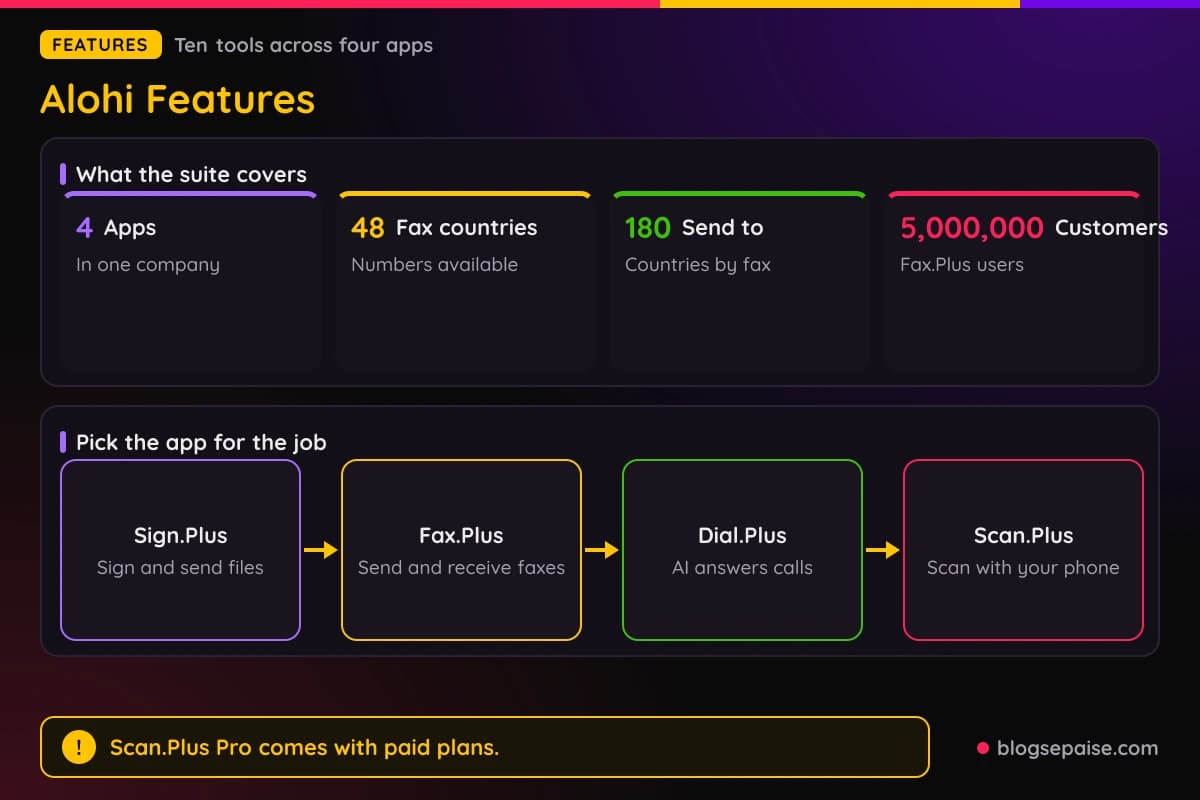
Alohi is a Swiss software company with 4 apps. Sign.Plus handles electronic signatures, Fax.Plus handles online faxing, Dial.Plus runs an AI phone assistant, and Scan.Plus scans on your phone.
Fax.Plus is the biggest name in the group, with over 5,000,000 customers worldwide. It sells fax numbers in 48 countries and sends faxes to over 180 countries.
Sign.Plus lets you sign a file yourself or send it to other people. It follows the ESIGN Act, eIDAS, and ZertES, and it supports Qualified Electronic Signatures.
Dial.Plus gives your business a phone number and connects every call to an AI agent that works around the clock. Scan.Plus turns a phone into a scanner with AI tools such as text recognition and translation.
Security badges across the suite include ISO 27001, SOC 2, GDPR, CCPA, and HIPAA. Alohi built the products with support from Innosuisse, the Swiss Innovation Agency.
Prices start low. Fax.Plus Basic costs $8.99 a month, or $6.99 a month billed annually, and Sign.Plus Personal costs $14.99 a month, or $9.99 a month billed annually.
Dial.Plus plans start at $19 a month, and Scan.Plus Pro costs $4.99 a month. Fax.Plus, Sign.Plus, and Scan.Plus each have a free plan too.
Paid Fax.Plus and Sign.Plus plans include Scan.Plus Pro at no extra cost. A paid Fax.Plus plan also comes with 30 days of free Sign.Plus.
Fax.Plus quotes coverage from PCMag, Forbes, TechRadar, Tom's Guide, US News, and ZDNet. One reviewer called it the best online fax service for small businesses.
Each product bills on its own plans, with its own limits for pages, requests, and minutes. Costs add up when you use several of them.
Disclosure: Some of the links I share might be affiliate links. If you click on one and make a purchase, I may earn a small commission as a thank you. But don’t worry, it won’t cost you anything extra. I only recommend stuff I genuinely believe in. Your support helps me keep creating awesome content. You can read my full affiliate disclosure in my disclaimer page.
If you want to save a lot of hours searching for high-paying affiliate programs, check out our exclusive list of 2500+ affiliate programs. You’ll find all the information about the programs inside the list. This list is perfect for affiliate bloggers and influencers.
Alohi Features
Alohi spreads dozens of tools across four apps. The ten below cover the signature tools, the fax tools, the AI phone assistant, and the scanner.
Sign.Plus does four jobs: signing your own papers, sending requests, saving templates, and tracking every step. Fax.Plus does sending, receiving, numbers, and strict medical rules.
Documents stored in Fax.Plus and Sign.Plus use 256-bit AES encryption, with a unique key for each user. Data in transit uses TLS.
Files move between the apps too. Scan.Plus can send a scan straight to Fax.Plus or Sign.Plus, and Fax.Plus connects with Sign.Plus.
Mobile apps for iOS and Android cover Sign.Plus, Fax.Plus, and Scan.Plus. Dial.Plus links to Android and iOS apps in its footer.
Developers get a Sign.Plus API and a Fax API, plus a free developer account with a sandbox. Zapier connects Fax.Plus to thousands of apps.
Plan level matters a lot here, because many tools start on a higher tier. Each feature below names the plan where it begins.
1. eSignature Tools And Legal Compliance
Sign.Plus is the e-signature app in the suite. You can sign a file yourself or send it to other people from the web, iOS, Android, or the API.
A signature generator saves your signature. You draw it with a mouse, trackpad, or stylus, or you upload a scanned image.
Signers can be checked before they open a file. A unique code goes out by SMS, or you set a passcode.
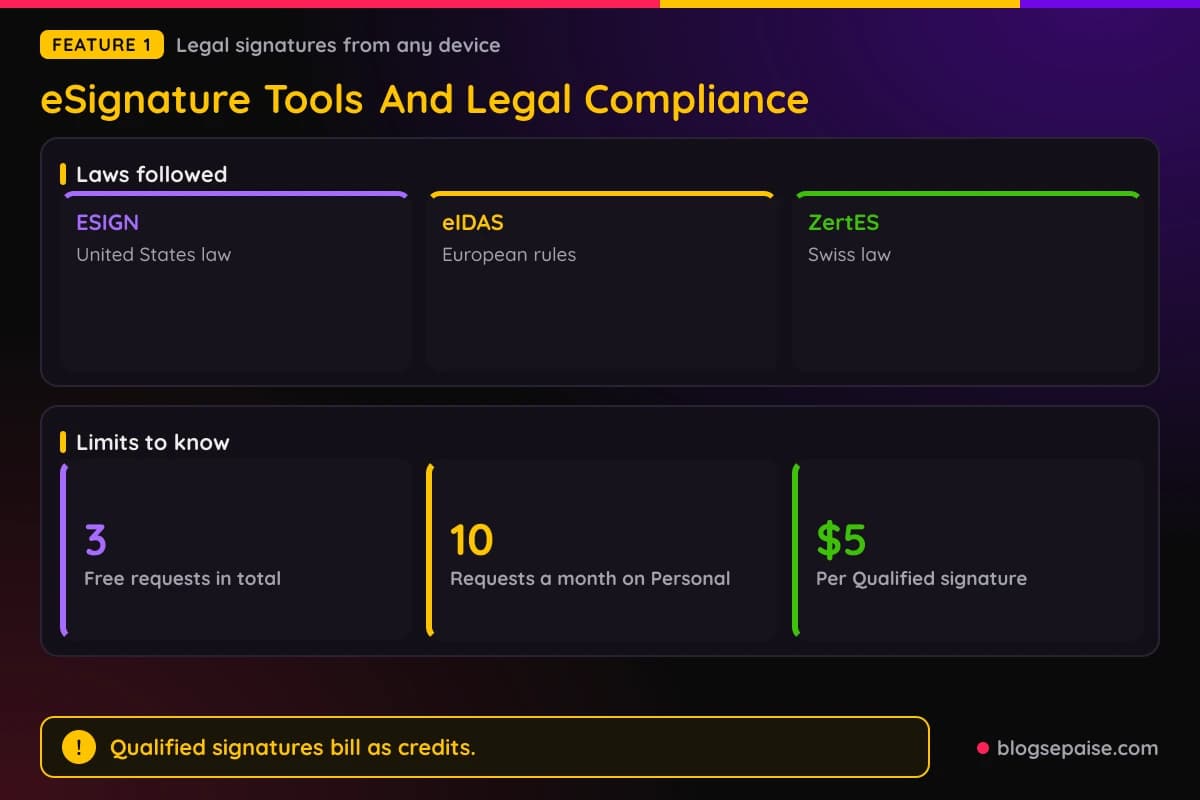
Sign.Plus follows ESIGN, eIDAS, and ZertES, and it supports Qualified Electronic Signatures. A Qualified signature costs $5 per recipient, billed as credits in packs of 10 to 1,000.
Expiration dates cancel a request after a deadline you set. Real-time notices tell you when someone opens or signs.
Every plan has Sign Myself, signing steps, expiration dates, and a real-time audit trail. The Free plan covers 3 signature requests in total and 1 template.
Two-factor sign-in comes with Free, and Google Workspace and Microsoft Word integrations are listed too. Personal adds reminders and a Gmail extension.
Sign.Plus protects stored files with 256-bit AES encryption and TLS 1.3 or higher. Alohi states that its CDN capacity is 15 times larger than recorded DDoS attacks.
Customers named on the Sign.Plus site include the United Nations, PwC, 3M, IBM, Airbus, FIFA, Canva, Philips, Roche, and Harvard.
2. Print To Sign
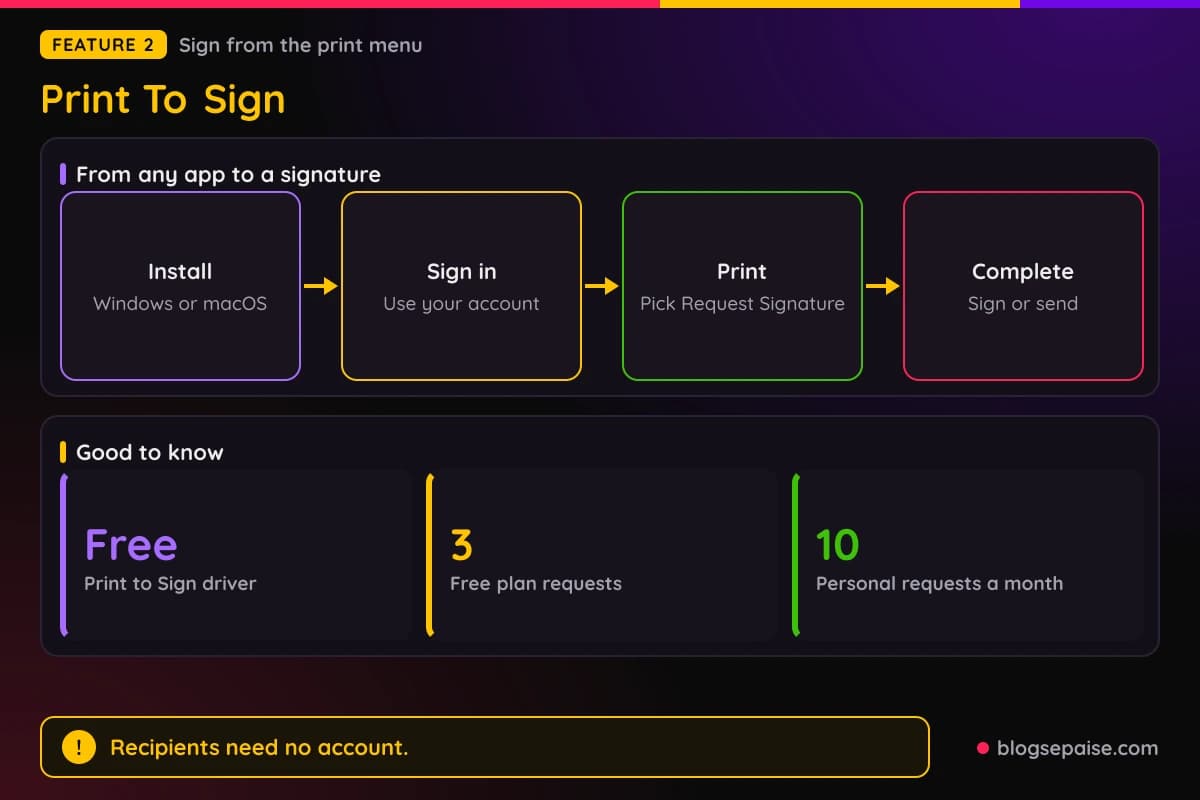
Print to Sign is a free driver for Windows and macOS. It sends any printable file to Sign.Plus without saving or uploading it first.
Install it, then sign in to your Sign.Plus account when setup finishes. You may need administrator permission during the install.
Open any file and press Ctrl+P on Windows or Cmd+P on a Mac. Pick Request Signature or Sign Myself from the printer list.
A Sign.Plus window then opens with the document. Sign it yourself, or type each recipient's name and email address and send it.
Recipients do not need a Sign.Plus account. They get an email invitation to review and sign.
Each request keeps the same tamper-proof audit trail as any other signature. The driver also lives in your account under Settings and then Signing.
If the printer choices do not show up, check the install and restart your computer. Each request still counts against your plan, so watch your remaining requests under Plan and Billing.
Any app with a print dialog works, from a word processor to a browser. Nothing needs a PDF export step first.
3. Reusable Templates And Bulk Send
Templates save time on files you send again and again. You prepare a document once with fillable fields and dynamic variables, then save it.
Bulk Send pushes one template to many recipients at once. It starts on the Business plan.
Public forms turn a template into a link that anyone can open and fill in. Professional and higher plans include them, along with attachment collection.
Collect Attachments lets you ask signers for IDs or images. ID verification starts on Professional too.
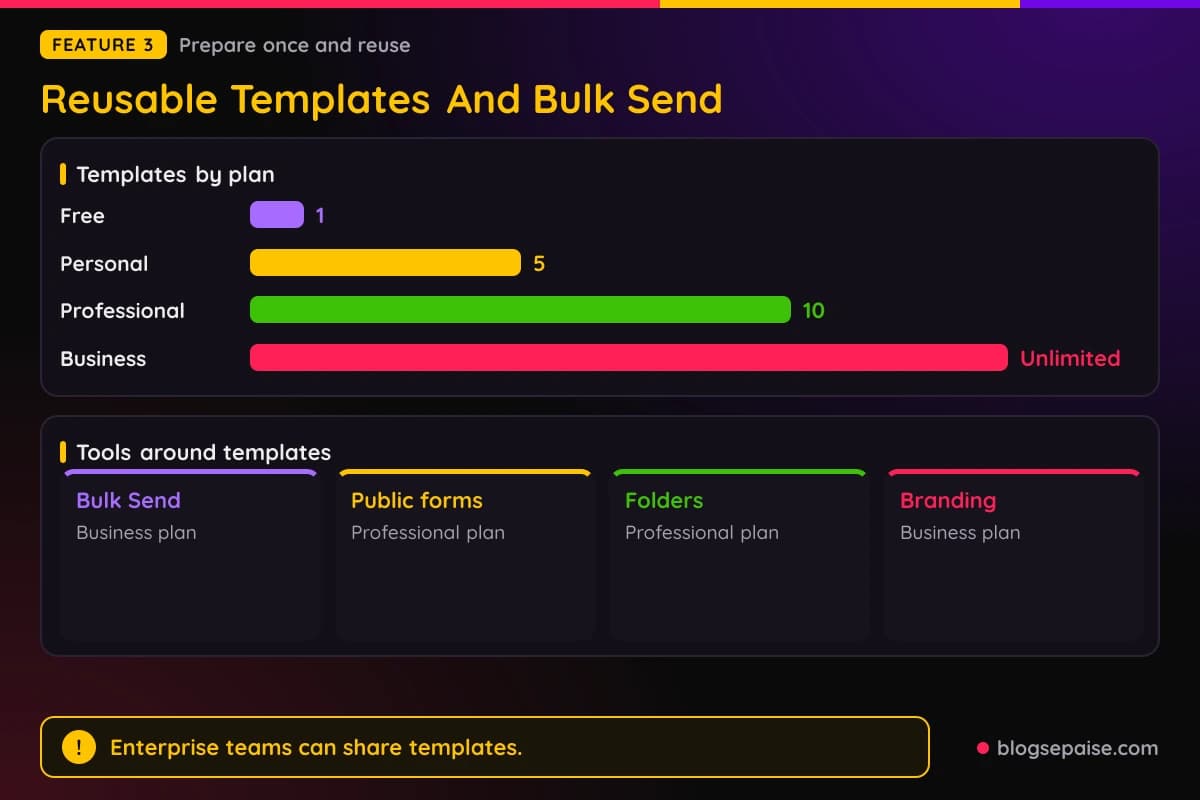
Template counts grow with the plan. Free gets 1, Personal gets 5, Professional gets 10, and Business and Enterprise get unlimited templates.
Enterprise teams can share templates with teammates. Custom branding adds your logo and color theme to signing pages and emails, starting on Business.
Folders keep signed files in order and let you search by title, date, or notes. Zapier ties templates to other apps on Business and higher plans.
Dynamic variables fill in details for each recipient. That keeps offer letters, rental forms, and service agreements quick to prepare.
Professional gives 10 templates, which fits most small offices. Bigger teams on Business get unlimited templates.
4. Flexible Workflows And Audit Trail
Workflows control who signs and in what order. You choose simultaneous or sequential signing and assign roles.
You can hand a document to someone else, and the owner gets a notice. Unfinished files save as drafts that you finish on any device.
Progress tracking shows who opened, viewed, or signed. You send reminders by hand, or you schedule them until the request expires.
In-person signing lets people sign on your device in the same room. SMS authentication and requests by SMS or WhatsApp start on Professional.
Seats get a monthly allowance for SMS and WhatsApp requests. It is 10 on Professional, 30 on Business, and 150 on Enterprise.
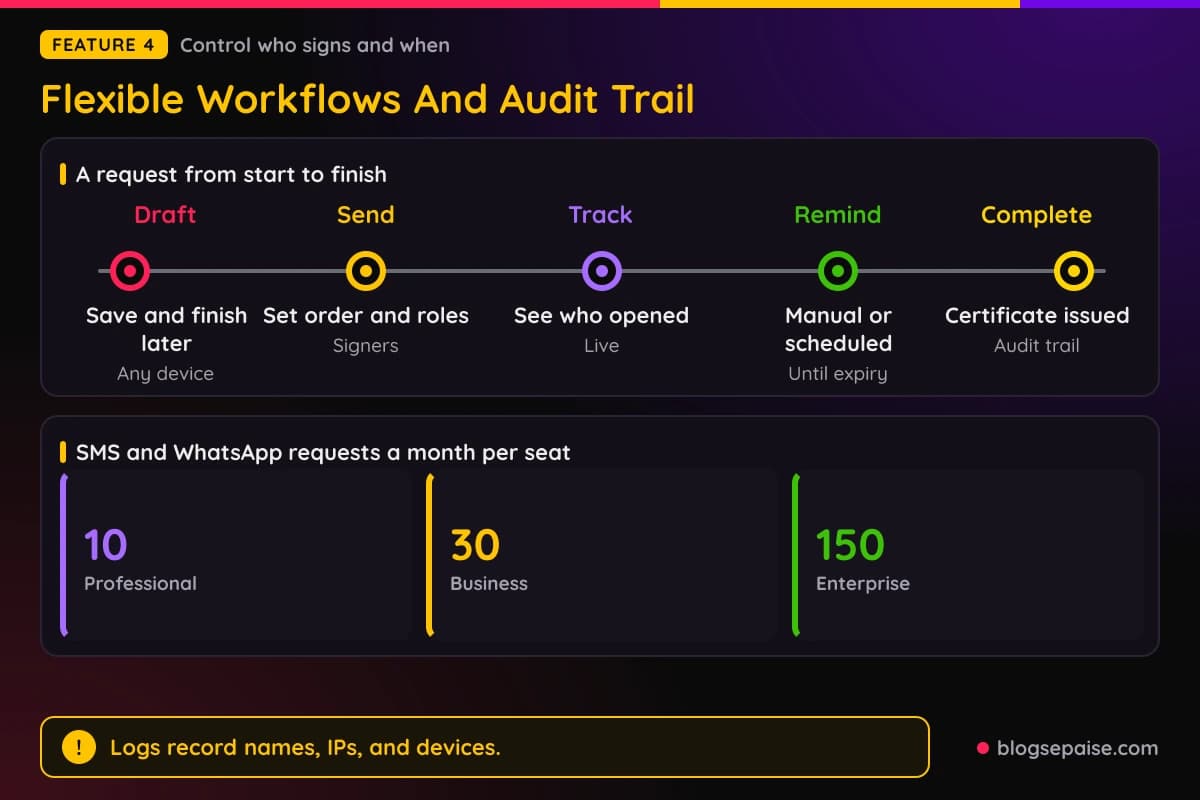
Secure logs record names, IP addresses, and devices for every action. Each finished file gets a completion certificate.
Teams on Business and Enterprise invite members, assign roles, and manage billing from one dashboard. Enterprise adds single sign-on, advanced security controls, data residency, and priority support.
Enterprise also adds HIPAA compliance with a BAA and PHIPA compliance with an agent agreement. Those matter for medical and legal teams.
5. Online Faxing, Email To Fax, And Print To Fax
Fax.Plus replaces the fax machine. You send and receive faxes from the web, a mobile app, your email, or your desktop.
Email to Fax lets you send from your inbox. Print to Fax works from the print dialog in Windows and macOS apps.
Every sent fax creates a printable confirmation report, and an email tells you if it went through. Failed faxes get one free retry, and you can set more.
Cover sheets come ready made, or you can customize a template with sender, recipient, and document details. Scheduled faxing starts on Basic.
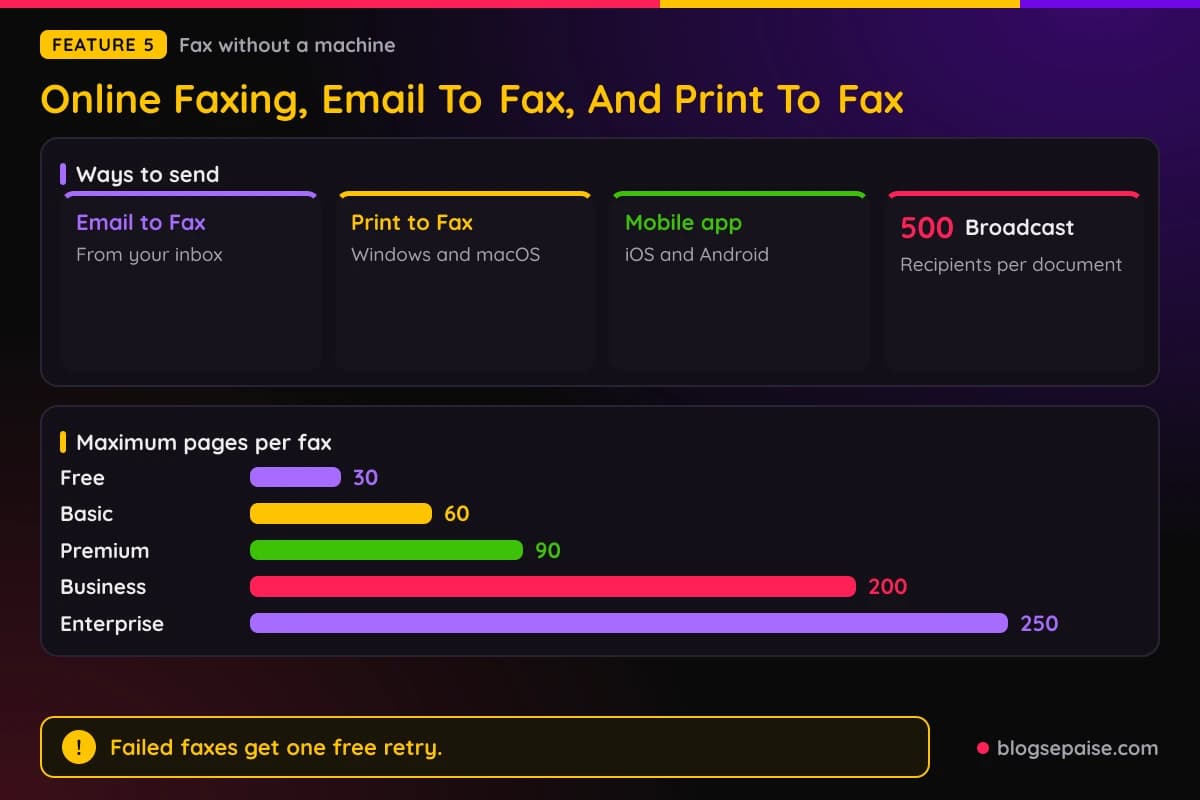
Broadcasting sends one document to up to 500 recipients. You track each delivery from one view.
Each fax holds up to 10 files with a 30MB size limit. Page limits per fax grow by plan, with 30 on Free, 60 on Basic, 90 on Premium, 200 on Business, and 250 on Enterprise.
Receiving faxes needs a paid plan with enough pages left. Faxes land in unlimited secure storage.
Integrations include Slack, Microsoft Teams, Microsoft Word, and Google Workspace. Zapier and the Fax API reach many more apps.
Fax.Plus Free lets you send but not receive. It gives 10 pages in total, with no dedicated number, no Email to Fax, and no Print to Fax.
Basic adds a dedicated number, Email to Fax, Print to Fax, scheduled faxing, and the Sign.Plus integration.
Faxes to certain destinations may count as multiple pages. Alohi publishes sending rates for each destination.
6. Fax Numbers And Porting
Paid plans include a dedicated fax number. You can pick local, toll-free, or international numbers.
Fax.Plus sells numbers in 48 countries and sends faxes to over 180 countries. Toll-free numbers and number porting start on Premium.
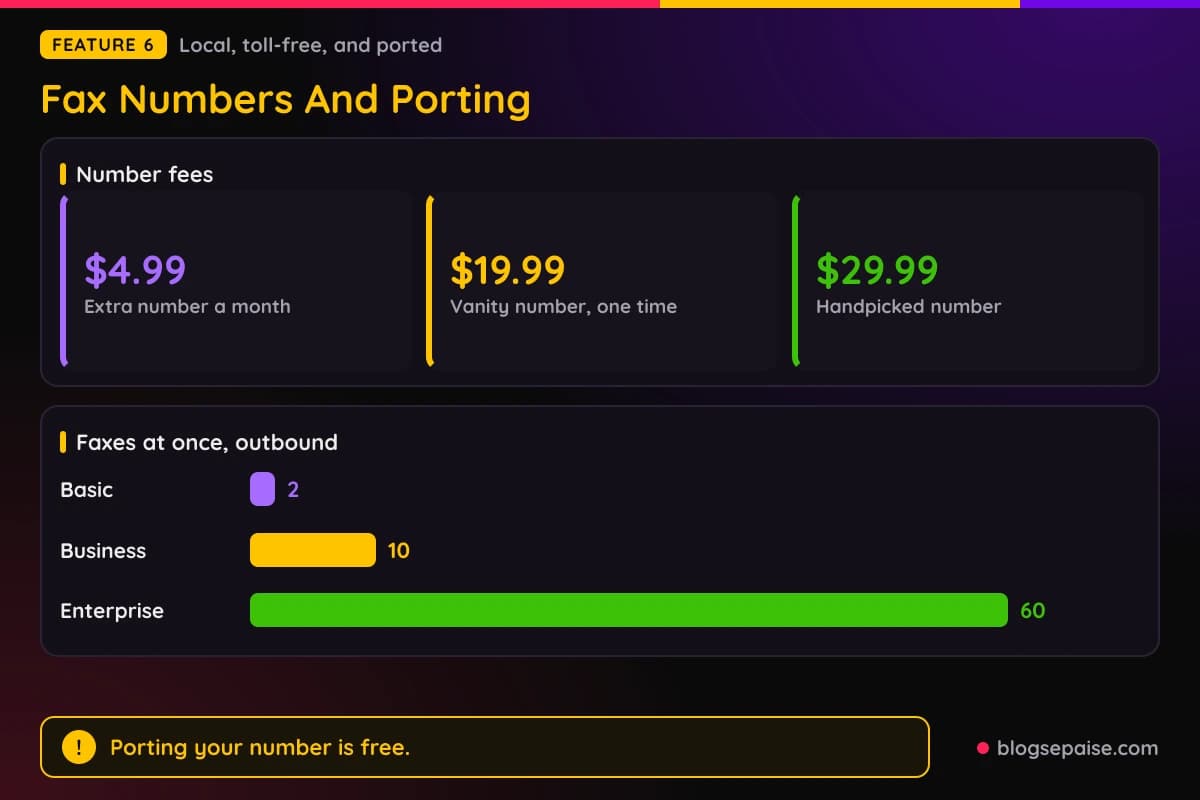
Porting lets you keep your current fax number, and it costs nothing. US and Canadian numbers need Premium or higher.
Extra toll-free or local numbers cost $4.99 a month each. Business and Enterprise include 2 free dedicated numbers.
Vanity numbers cost $19.99 one time. Choosing your own number in an area code also costs $19.99, and a handpicked memorable number costs $29.99.
Spam control comes with the numbers. You can block spam or anonymous senders and switch off reception for a while.
Business and Enterprise let you manage many numbers and give them to people. Business includes 5 members, while Enterprise has unlimited members.
Concurrent sending matters for busy offices. Basic and Premium allow 2 outbound and 2 inbound faxes at once, Business allows 10, and Enterprise allows 60.
No plan has a setup fee, and taxes are extra on every listed price. Once you pick an area code, you get a random number there unless you pay for a custom pick.
Depending on the country, porting may need a specific plan or higher before you move a number.
7. AI Fax Transcripts And Data Extraction
Alohi AI reads your faxes for you. AI Text Transcript turns a fax into searchable text that you can copy or download as a .txt file.
AI Data Extraction pulls labeled fields such as patient name, date of birth, or referring physician. It reads handwritten forms as well as printed ones.
You can edit the results before copying or exporting them. Enterprise users can define custom fields for their own forms.
Both tools run from the Alohi AI panel in the document viewer. Enterprise can also run them on every inbound fax.
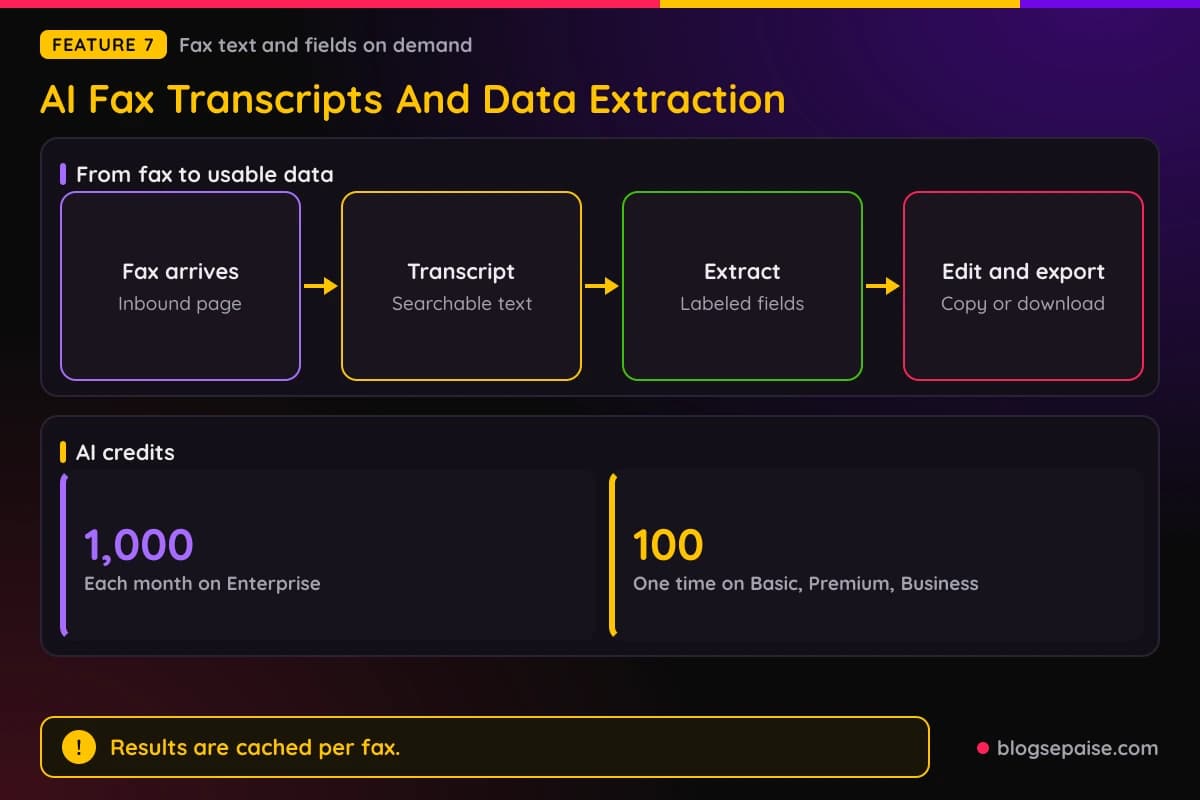
Enterprise includes 1,000 AI credits each month. Basic, Premium, and Business get 100 credits one time, and those do not renew.
Results are cached per fax, so reopening one does not use more credits. Processing stays inside the Fax.Plus environment.
Both tools are HIPAA compliant. They run under ISO 27001, SOC 2 Type II, and HIPAA certifications with AES-256 encryption.
AI tools suit medical forms, intake sheets, and referral faxes. Labeled fields beat reading a pile of pages by eye.
Direct EHR integration is marked coming soon. Paid plans also work with AI assistants such as ChatGPT and Claude through an MCP connection, which is off for HIPAA accounts.
8. HIPAA Fax And Enterprise Controls
HIPAA faxing covers medical offices that must protect patient data. A Business Associate Agreement, called a BAA, is available on the Enterprise plan only.
Setup has five steps. You buy Enterprise, add or port a number, pick a data residency location, turn on Advanced Security Controls, and request a BAA.
Data at rest uses AES-256 encryption with a unique key for each user. Access controls include roles, two-factor sign-in, and single sign-on.
Data residency lets Enterprise customers choose where live data and backups live. Options include Los Angeles and Oregon, Zurich and Geneva, Singapore and Tokyo, Toronto and Montreal, or Sydney.
Email to Fax for HIPAA accounts uses a TLS enforced address. Incoming email attachments stay off until an owner or admin turns them on.
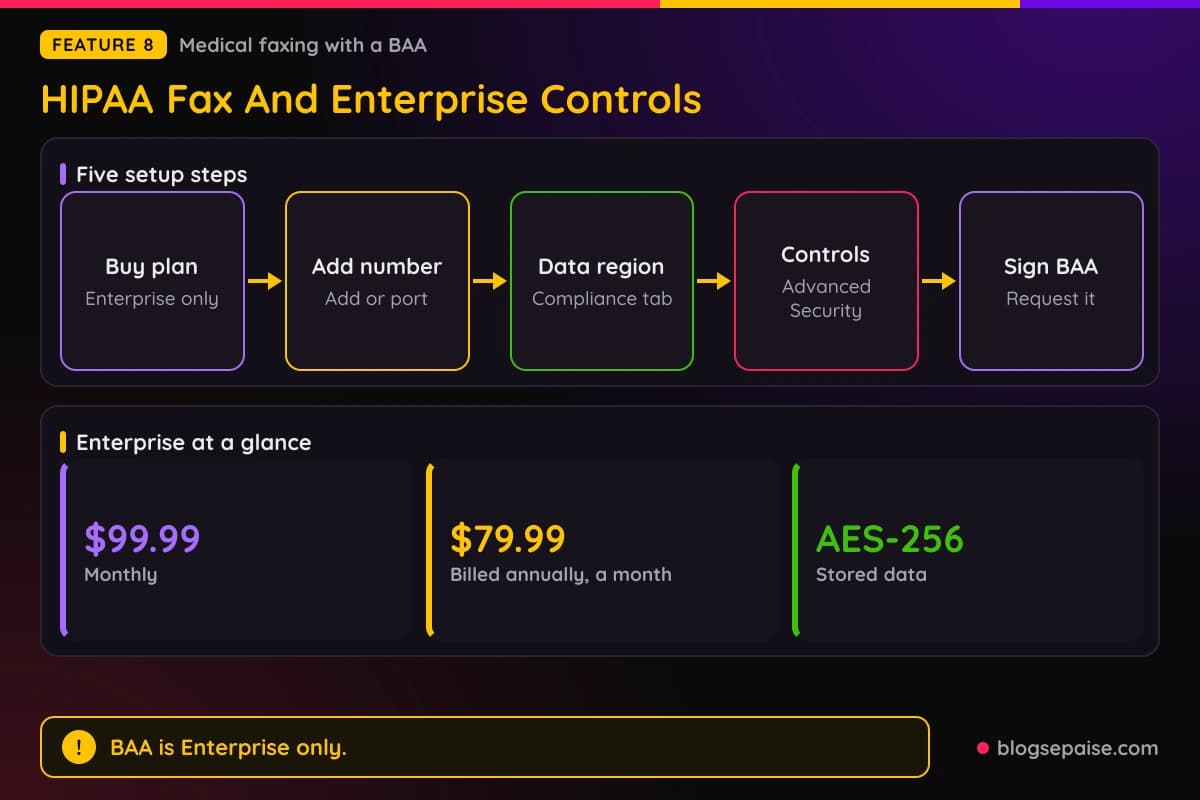
Enterprise also adds SCIM provisioning, multi-admin, the API, an analytics dashboard, access logging, and priority support. Admins can enforce fax cover sheets and shared contacts.
The compliance list also includes ISO 27001, SOC 2 Type II, GDPR, and CCPA. Fax.Plus follows Swiss privacy laws.
Fax.Plus lists inbound fax delivery in under 20 seconds and 99.99% uptime across Alohi services.
PHIPA compliance covers Ontario, Canada. Sign.Plus Enterprise also offers HIPAA with a BAA, so signature requests can follow the same rules.
9. Dial.Plus AI Phone Assistant
Dial.Plus gives your business a phone number and an AI agent that answers every call. It works 24 hours a day and also handles voice chats and texts.
You set the agent's name, role, personality, and guardrails. Then you add documents, FAQs, and scripts as its knowledge base.
You can port your current number or buy a new local number. Each number gets its own agent.
Agents reply in the caller's local language. Alohi does not list the exact languages.
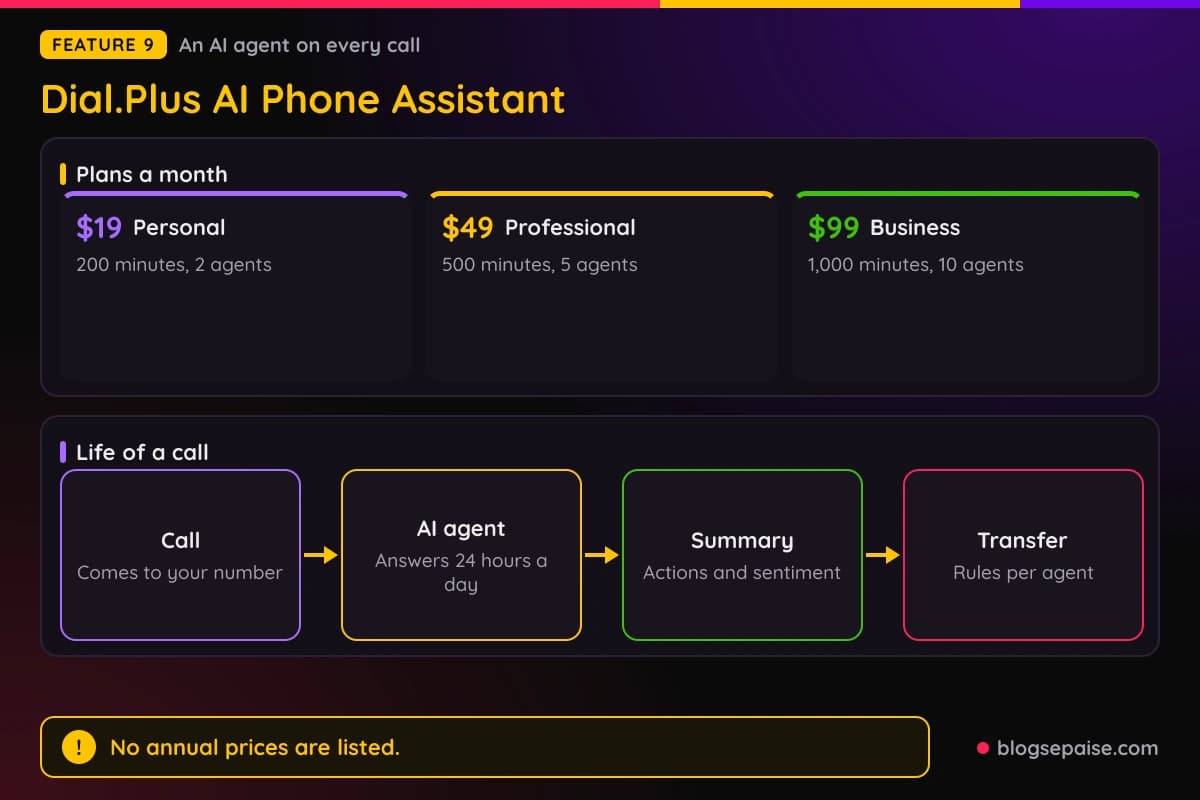
Each call or chat produces a summary with action points, sentiment, and performance data. It can sync to your CRM or inbox.
Call forwarding rules send calls to a teammate's number. Rules are set per agent and are not shared between agents.
You can search conversations, track topics and sentiment, and ask questions about one call or a date range. Real-time monitoring lets you watch calls as they happen.
Dial.Plus plans start at $19 a month for 200 minutes, 1 number, and 2 AI agents. Alohi warns that AI can make mistakes, so follow the laws in your area.
Use cases include customer support, front desk work, and sales calls that qualify new leads. Healthcare information and job applicant screening are listed too.
Professional and Business add call transfer. Enterprise adds SSO, HIPAA with a BAA, an SLA, and priority support.
10. Scan.Plus Mobile Scanner
Scan.Plus turns your phone into a scanner. It finds page edges, crops them, and supports multi-page scans that you can reorder.
You can export as PDF or JPG, edit by hand, and save on your phone. You can also send a scan straight to Fax.Plus or Sign.Plus.
AI tools include curvature correction, finger removal, Magic Filters, an image enhancer, and an eraser tool. OCR turns scans into editable, searchable text.
Scanned text can be translated into several languages and summarized. AI Chat is included in both plans.
The Free plan costs $0 and has no time limit. It gives a limited monthly allowance of AI credits.
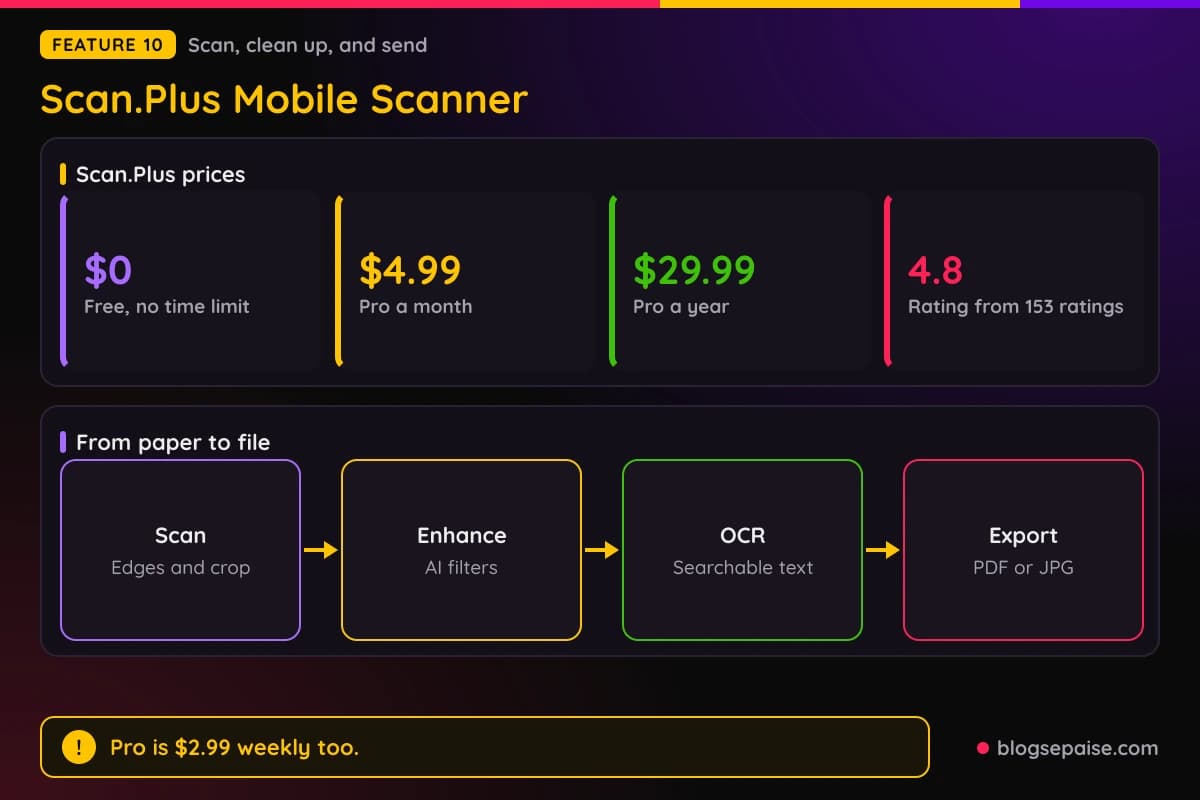
Pro costs $2.99 a week, $4.99 a month, or $29.99 a year, which is about $2.50 a month. It adds PDF tools to compress, merge, split, lock files, and remove passwords, plus cloud auto-save.
Pro is also included with paid Fax.Plus and Sign.Plus plans. Scan.Plus holds a 4.8 out of 5 rating from 153 ratings.
Subscriptions run through the Apple App Store or Google Play and can be canceled anytime. Alohi does not publish the number of AI credits.
Scan.Plus lists GDPR, CCPA, ISO 27001, SOC 2, and HIPAA badges. It describes the app as fully encrypted.
Alohi Pricing Plans
Alohi sells each product on its own, and each has its own plans. Annual billing costs less on every Fax.Plus and Sign.Plus plan.
Fax.Plus Free gives 10 pages in total, with no dedicated number. Basic costs $8.99 a month, or $6.99 a month billed at $83.99 a year, and includes 200 pages a month.
Premium costs $17.99 a month, or $13.99 a month billed at $167.99 a year. It includes 500 pages and toll-free numbers.
Business costs $34.99 a month, or $27.99 a month billed at $335.99 a year. It includes 1,000 pages, 5 members, and an admin console.
Enterprise costs $99.99 a month, or $79.99 a month billed at $959.99 a year. It includes 4,000 pages, unlimited members, 1,000 AI credits a month, SSO, and HIPAA with a BAA.
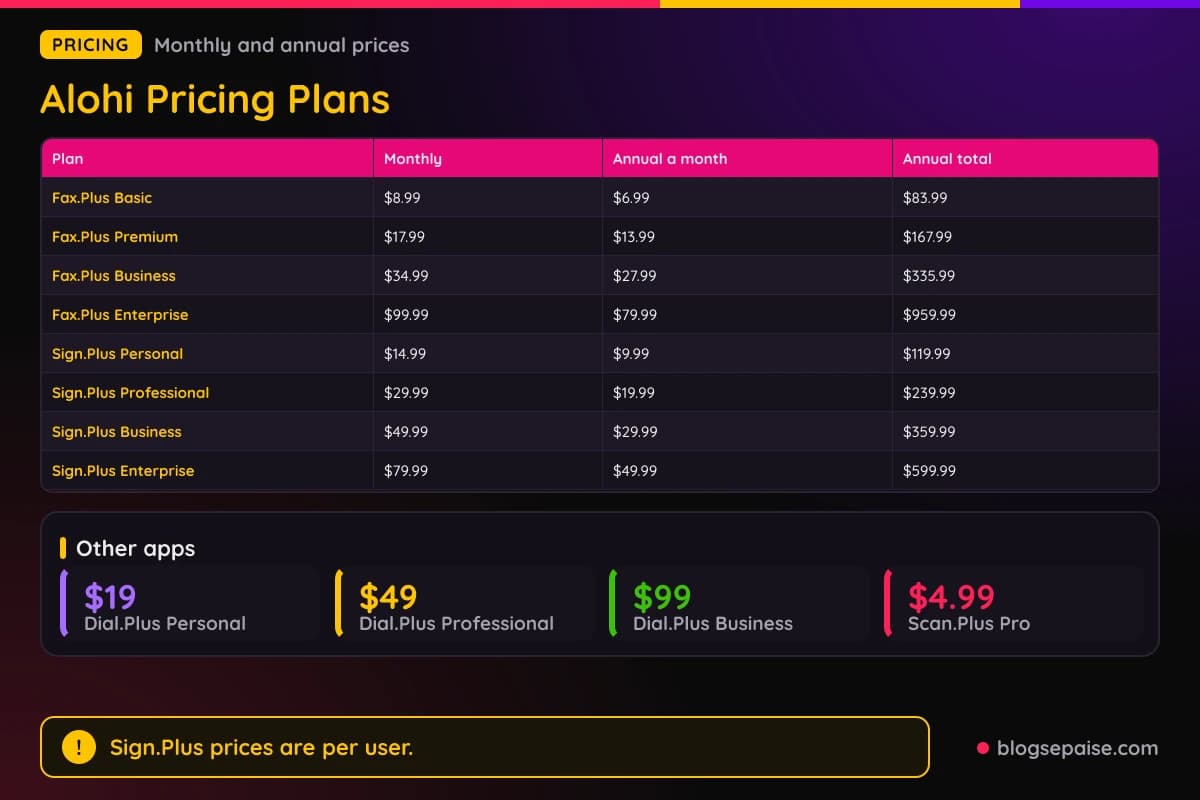
Extra pages cost $0.20 on Free, $0.10 on Basic, $0.07 on Premium, $0.05 on Business, and $0.03 on Enterprise. Annual plans include up to 3 months free and save up to 22%.
Sign.Plus Free gives 3 signature requests in total. Personal costs $14.99 a month, or $9.99 a month billed at $119.99 a year, for 10 requests and 5 templates each month.
Professional costs $29.99 a month per user, or $19.99 a month billed at $239.99 a year. It allows up to 5 users, unlimited requests, and 10 templates.
Business costs $49.99 a month per user, or $29.99 a month billed at $359.99 a year. Enterprise costs $79.99 a month per user, or $49.99 a month billed at $599.99 a year.
Sign.Plus API plans start at $75.99 a month billed annually, which is $911.99 a year, for 50 signature requests. Grow costs $279.99 a month billed annually for 200 requests, and Scale costs $659.99 for 600.
Dial.Plus starts at $19 a month for Personal, $49 for Professional, and $99 for Business. Enterprise pricing is custom, and Dial.Plus lists no annual prices.
Scan.Plus Free costs $0, and Pro costs $4.99 a month or $29.99 a year. Paid Sign.Plus and Fax.Plus plans include Pro.
Fax.Plus plans come with 30 days of free Sign.Plus, and paid Sign.Plus plans start with a free trial. Alohi does not state the Sign.Plus trial length or list refund terms, and taxes are extra.
Annual billing saves real money. Fax.Plus Basic saves $23.89 a year, Premium saves $47.89, Business saves $83.89, and Enterprise saves $239.89.
Sign.Plus saves even more. Personal saves $59.89 a year, Professional saves $119.89 per user, Business saves $239.89 per user, and Enterprise saves $359.89 per user.
Fax.Plus Free allows 1 outbound fax at a time and 0 inbound. Paid plans open up receiving.
Fax.Plus Enterprise shows a Starts at label on its $99.99 price. Big teams can also ask for a custom high-volume plan.
Automatic Top-Up adds credit when your balance drops below a level you set. It works on every Fax.Plus plan, including Free, and an owner or admin sets it up on the web.
Sign.Plus Free includes Sign Myself, signing steps, eSignature fields, a real-time audit trail, and the mobile app. Zapier, folders, Bulk Send, and custom branding are not included.
Who Is Alohi Best Suited For
Alohi suits people who deal with paperwork. Faxes and signatures still run a lot of offices.
Medical offices fit well. Fax.Plus Enterprise offers HIPAA faxing with a BAA, and Sign.Plus Enterprise offers HIPAA with a BAA too.
Law firms, real estate agents, and finance teams send records that need a trail. Sign.Plus has industry pages for healthcare, real estate, legal services, financial services, accounting and tax, and insurance.
Fax.Plus has industry pages for healthcare, education, law firms, financial services, IT companies, and real estate. Schools and IT teams get their own use cases there.
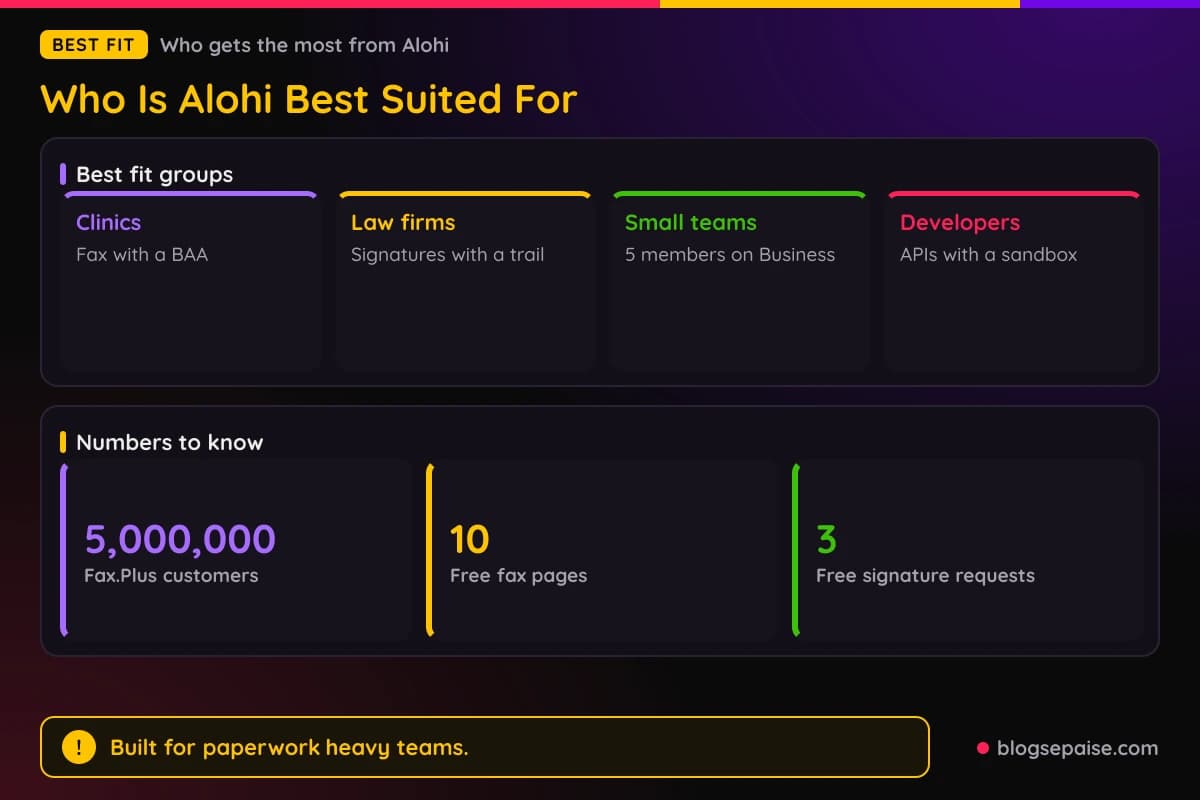
Freelancers and solo workers can start on the free plans. Sign.Plus Free covers 3 signature requests, and Fax.Plus Free covers 10 pages.
Small teams get the most from Fax.Plus Business, which includes 5 members and an admin console. Sign.Plus Professional covers up to 5 users.
Developers can add signing or faxing to their own apps with the Sign.Plus API and the Fax API. A free developer account with a sandbox is available.
Small businesses that miss calls can use Dial.Plus as a front desk. Plans start at $19 a month.
People who scan on the go get Scan.Plus Pro free with a paid Fax.Plus or Sign.Plus plan.
Privacy minded teams get data residency choices on Enterprise plans. Regions include Zurich and Geneva, Toronto and Montreal, and Sydney.
Consultants who send proposals for signature can use templates and reminders to chase replies.
Accountants and tax pros can use Sign.Plus for engagement letters. People who hate printing can use Print to Sign and Print to Fax to skip the print, scan, and send routine.
Who Alohi Is Not For
Alohi is not the best match for everyone. Some limits are easy to miss.
HIPAA faxing needs Enterprise, which costs $99.99 a month, or $79.99 a month billed annually. Small clinics on Basic or Business cannot get a BAA.
Email to Fax and AI tools work differently on HIPAA accounts. The MCP connection is off for those accounts.
Light signers may pay too much. Sign.Plus Personal costs $14.99 a month and allows 10 signature requests.
Teams that need SMS or WhatsApp requests and ID checks must buy Professional. Bulk Send, branding, and document sharing need Business.
Heavy faxers should watch page counts. Basic allows 200 pages a month, and extra pages cost $0.10 each.
Each fax has a page cap by plan, such as 60 pages on Basic. Large batches may need Business or Enterprise.
Dial.Plus lists prices as From $19, $49, and $99 a month, with no annual price. Enterprise is custom.
Alohi gives two country counts for Dial.Plus numbers, 40+ and over 20. Scan.Plus gives no AI credit number.
Bundle terms are not spelled out on the plans page. Each product still shows its own plan table.
Anyone who wants to fax only a few pages should check the free plan first. Fax.Plus Free gives just 10 pages in total, and it cannot receive faxes.
Free Sign.Plus has 3 requests in total, so it suits a one-time signing only. Personal gives 10 a month.
Teams that need exact language lists for a phone assistant must ask Alohi first. Dial.Plus does not list supported languages.
Companies that want Zapier on Fax.Plus must buy Enterprise. Slack and Microsoft Teams links start on Business.
The plans page lists no refund terms. Taxes are not included in the prices.
Alohi Alternatives
Alohi competes in three markets, so the rivals depend on the product. A signature tool, a fax service, and a phone system each have their own names.
DocuSign is a long-standing e-signature name used by large companies. Adobe Acrobat Sign suits teams that already work in Adobe tools.
Dropbox Sign, which used to be called HelloSign, fits teams that keep files in Dropbox.
eFax is an older online fax service that focuses on faxing alone. Fax.Plus adds e-signatures, AI reading, and scanning in the same family.
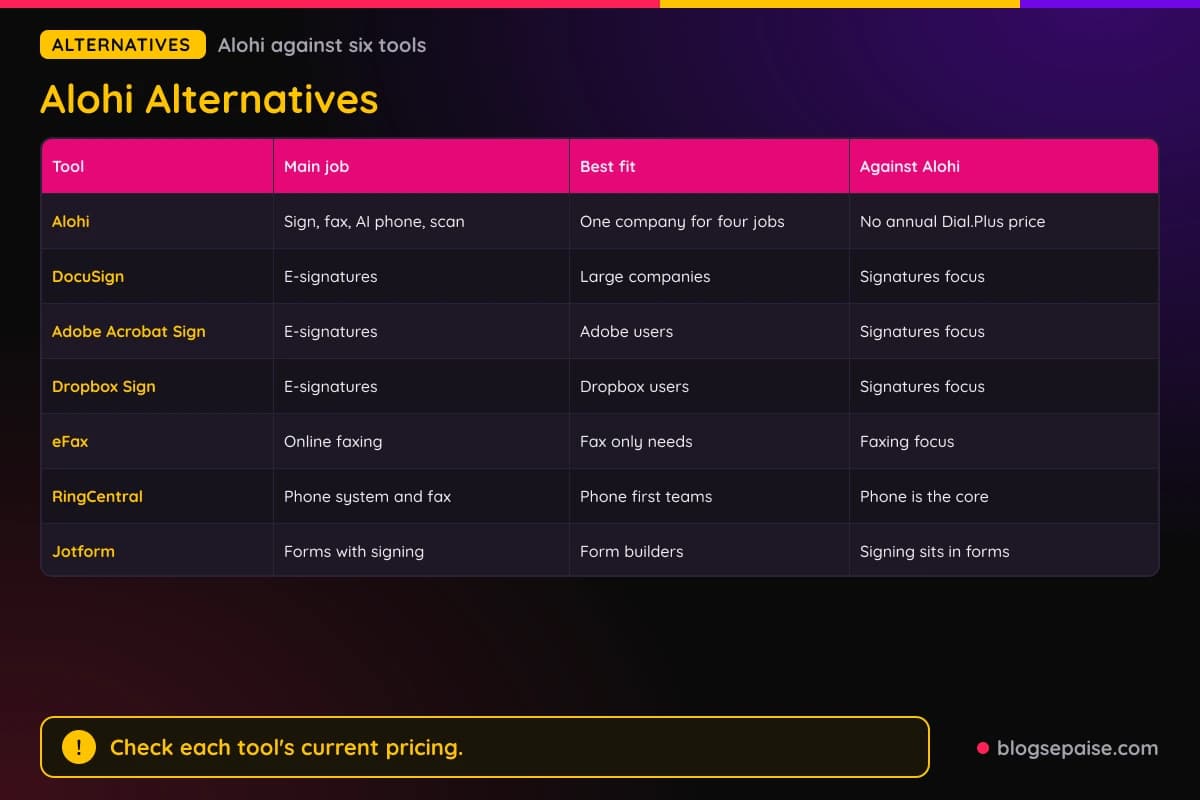
RingCentral is a business phone system that also supports fax. It fits teams that want the phone system to be the core tool.
Jotform makes forms with a signature step. It fits people who already build forms and want signing in the same place.
The bundle is the main edge for Alohi. One company covers signatures, faxes, an AI phone line, and a scanner, and paid plans include Scan.Plus Pro.
Rivals change prices often, so check their pricing before you decide. Compare on the job you need most.
Pick DocuSign or Adobe Acrobat Sign if your company already uses one. Pick Alohi if signatures are only part of the work.
Pick eFax if you only fax and want a single focus. Pick Fax.Plus if you also want AI reading and signatures nearby.
Mixing tools is fine too. You can use Fax.Plus for faxing and keep another signature tool.
For a similar tool, read our Jotform review. You can also browse the software reviews hub to compare more tools.
Alohi Use Cases
Alohi fits a few repeat jobs. Medical records, contracts, missed calls, and paper scans lead the list.
Clinics send referrals and lab results by fax. Fax.Plus Enterprise adds AI Data Extraction to pull a patient name and date of birth into labeled fields.
Real estate agents send offers and disclosures for signature. Templates and public forms keep each deal repeatable.
Law firms and accountants collect signatures and keep an audit trail. Folders and search by title, date, or notes keep files easy to find.
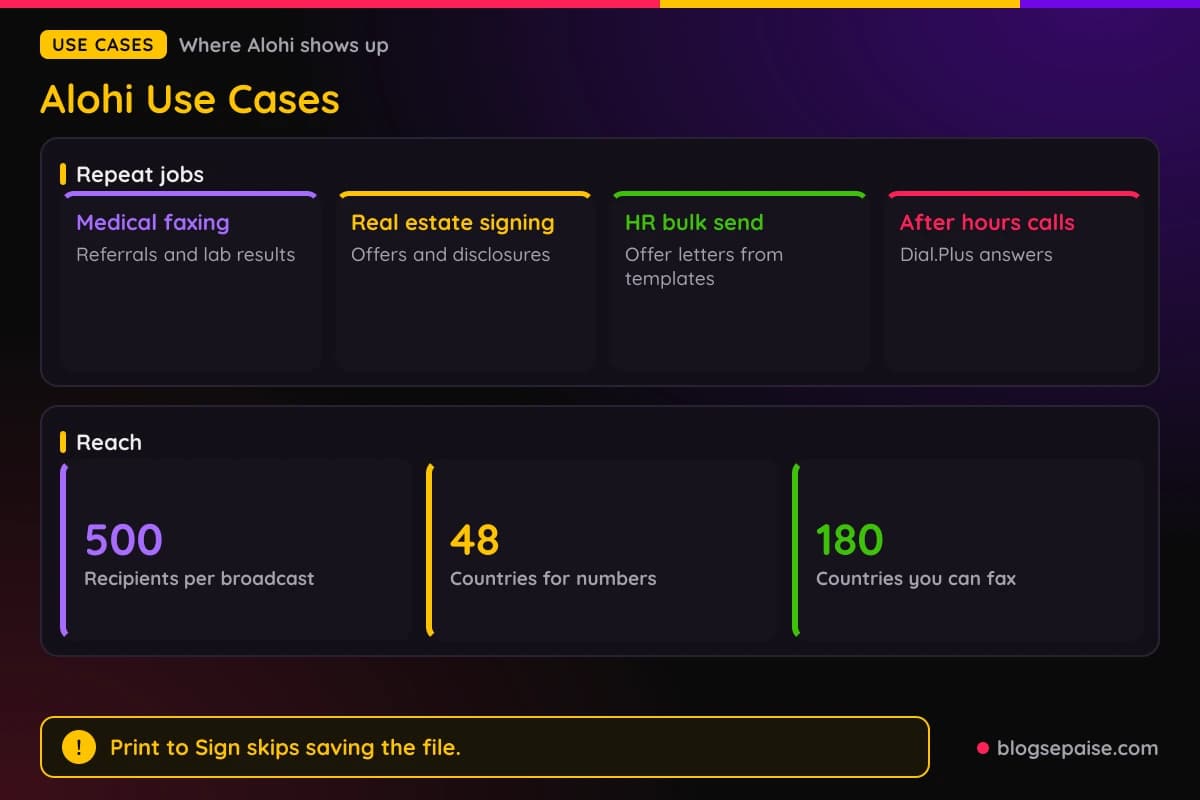
HR teams send offer letters with Bulk Send and templates. Business plans add custom branding with a logo.
Small shops let Dial.Plus answer calls after hours. Summaries show action points and sentiment for the next morning.
Offices send one notice to up to 500 recipients with fax broadcasting. Delivery tracking shows each result.
Freelancers print a contract to Sign.Plus with Print to Sign. The client signs by email with no account.
People scan paper with Scan.Plus and then fax or sign it from the same phone. OCR makes the text searchable.
Accountants send engagement letters and tax forms for signature. Reminders chase late signers until the request expires.
Insurance teams collect signatures and attachments from clients. Public forms and attachment requests handle the paperwork.
Property managers send leases with templates and track who opened them. Progress tracking shows who viewed or signed.
Receptionists get help from Dial.Plus with greeting, booking, and routing calls. Call transfer sends harder calls to a person.
Developers add signing with the Sign.Plus API, or faxing with the Fax API. A free sandbox lets them test first.
IT teams add fax to their own tools through the API or Zapier. Zapier connects Fax.Plus to thousands of apps on Enterprise.
Financial teams use Sign.Plus for account forms and Fax.Plus for records. Financial services has its own industry page on each app.
Final Thoughts On Alohi
Alohi is a useful pick when you handle faxes, signatures, or both. Fax.Plus and Sign.Plus are the strongest parts, with clear plans and solid security.
Prices are easy to compare. Fax.Plus Basic costs $8.99 a month or $6.99 billed annually, and Sign.Plus Personal costs $14.99 or $9.99.
The catch sits in a few places. HIPAA faxing needs Enterprise, Dial.Plus has no annual prices, and refund terms are not listed.
Free plans make a test run easy. Fax.Plus gives 10 pages, Sign.Plus gives 3 requests, and Scan.Plus Free has no time limit.
Start with the job you have today. Pick Fax.Plus Premium if you need a toll-free number, and Sign.Plus Professional if you send files to several people.
Annual billing saves money on every Fax.Plus and Sign.Plus plan. Fax.Plus advertises up to 3 months free, and Sign.Plus advertises 4 months free.
Security gets strong marks. ISO 27001, SOC 2, GDPR, CCPA, and HIPAA badges appear on the sites, and Fax.Plus follows Swiss privacy laws.
Check your volume before you pick a Fax.Plus plan. Up to 200 pages points to Basic, 200 to 500 to Premium, 500 to 1,000 to Business, and 1,000 or more to Enterprise.
Small teams should compare per user pricing on Sign.Plus. Professional, Business, and Enterprise bill per user.
Alohi suits you best if paper still shows up in your week. If it does not, a lighter tool may be enough.
Paid Fax.Plus and Sign.Plus plans include Scan.Plus Pro, so a scanner comes along.P|You can browse more write-ups on our software reviews hub if you want to compare tools side by side.
Alohi FAQ
1. What Is Alohi?
Alohi is a Swiss company with four apps. Sign.Plus does e-signatures, Fax.Plus does online faxing, Dial.Plus is an AI phone assistant, and Scan.Plus is a mobile scanner.
2. Does Alohi Have A Free Plan?
Yes, for three apps. Fax.Plus Free gives 10 pages in total, Sign.Plus Free gives 3 signature requests, and Scan.Plus Free costs $0 with no time limit.
3. How Much Does Fax.Plus Cost?
Basic costs $8.99 a month or $6.99 billed annually. Premium costs $17.99 or $13.99, Business costs $34.99 or $27.99, and Enterprise costs $99.99 or $79.99.
4. How Much Does Sign.Plus Cost?
Personal costs $14.99 a month or $9.99 billed annually. Professional costs $29.99 or $19.99, Business costs $49.99 or $29.99, and Enterprise costs $79.99 or $49.99.
5. How Much Does Dial.Plus Cost?
Personal starts at $19 a month, Professional at $49, and Business at $99. Enterprise pricing is custom.
6. Is Alohi HIPAA Compliant?
Yes, on Enterprise plans. Fax.Plus and Sign.Plus both offer HIPAA compliance with a BAA on Enterprise only.
7. Are Sign.Plus Signatures Legally Binding?
Sign.Plus follows ESIGN, eIDAS, and ZertES, and it supports Qualified Electronic Signatures. Check the rules for your own document type before you send it.
8. Can I Keep My Current Fax Number?
Yes. Porting is free, though US and Canadian numbers need Premium or higher.
9. Can I Fax From Email?
Yes. Email to Fax starts on the Basic plan, and Print to Fax works from Windows and macOS apps.
10. What Does Scan.Plus Cost?
Free costs $0. Pro costs $2.99 a week, $4.99 a month, or $29.99 a year, and paid Fax.Plus and Sign.Plus plans include it.
11. Does Alohi Have An API?
Yes. Sign.Plus and Fax.Plus each have an API and a free developer account with a sandbox.
12. How Much Does Annual Billing Save?
Fax.Plus advertises up to 3 months free and up to 22% off. Sign.Plus advertises 4 months free.
13. Does Alohi Have A Mobile App?
Yes. Sign.Plus, Fax.Plus, and Scan.Plus have iOS and Android apps.
14. Can Fax.Plus Fax Many People At Once?
Yes. Broadcasting sends one document to up to 500 recipients and tracks every delivery.
15. Does Dial.Plus Work In Other Languages?
Agents reply in the caller's local language. Alohi does not list the exact languages.
16. Can I Sign A Document From My Printer Menu?
Yes. Print to Sign adds Request Signature and Sign Myself to the printer list on Windows and macOS.
17. Does Fax.Plus Charge For Extra Pages?
Yes. Extra pages cost $0.20 on Free, $0.10 on Basic, $0.07 on Premium, $0.05 on Business, and $0.03 on Enterprise.
18. Can I Try Sign.Plus Before Paying?
Yes. Sign.Plus Free gives 3 signature requests, and paid plans start with a free trial. Alohi does not state the trial length.