Jotform Review (2026): Online Form Builder Pricing And Tools
Jotform is an online form builder that lets you collect information without writing code. You drag fields onto a page, share the form, and the answers land in one place.
More than 40 million people use Jotform. Its users include small businesses, schools, nonprofits, healthcare teams, and large companies.
Around the form builder sits a wide set of tools. They cover apps, e-signatures, workflows, AI agents, boards, tables, PDFs, online stores, payments, and website widgets.
Forms can take payments, collect files, and send alerts the moment someone submits. More than 20,000 form templates give you a starting point for most jobs.
Pricing runs on five plans, from a free Starter plan to a custom Enterprise quote. Paid plans start at $34 a month billed yearly.
Disclosure: Some of the links I share might be affiliate links. If you click on one and make a purchase, I may earn a small commission as a thank you. But don’t worry, it won’t cost you anything extra. I only recommend stuff I genuinely believe in. Your support helps me keep creating awesome content. You can read my full affiliate disclosure in my disclaimer page.
If you want to save a lot of hours searching for high-paying affiliate programs, check out our exclusive list of 2500+ affiliate programs. You’ll find all the information about the programs inside the list. This list is perfect for affiliate bloggers and influencers.
Jotform Features
Jotform bundles 14 groups of tools under one account. A single login covers forms, apps, signatures, workflows, AI, data, and security.
Most of these tools start from a form submission. The answer someone types becomes a PDF, a task, an approval, a payment, or a row in a table.
The first group is the form builder itself. The next groups add apps, e-signatures, workflows, and AI agents on top of it.
After those come boards, tables, PDF tools, stores, widgets, and mobile apps. The last groups cover AI connectors, teams, Enterprise, and security.
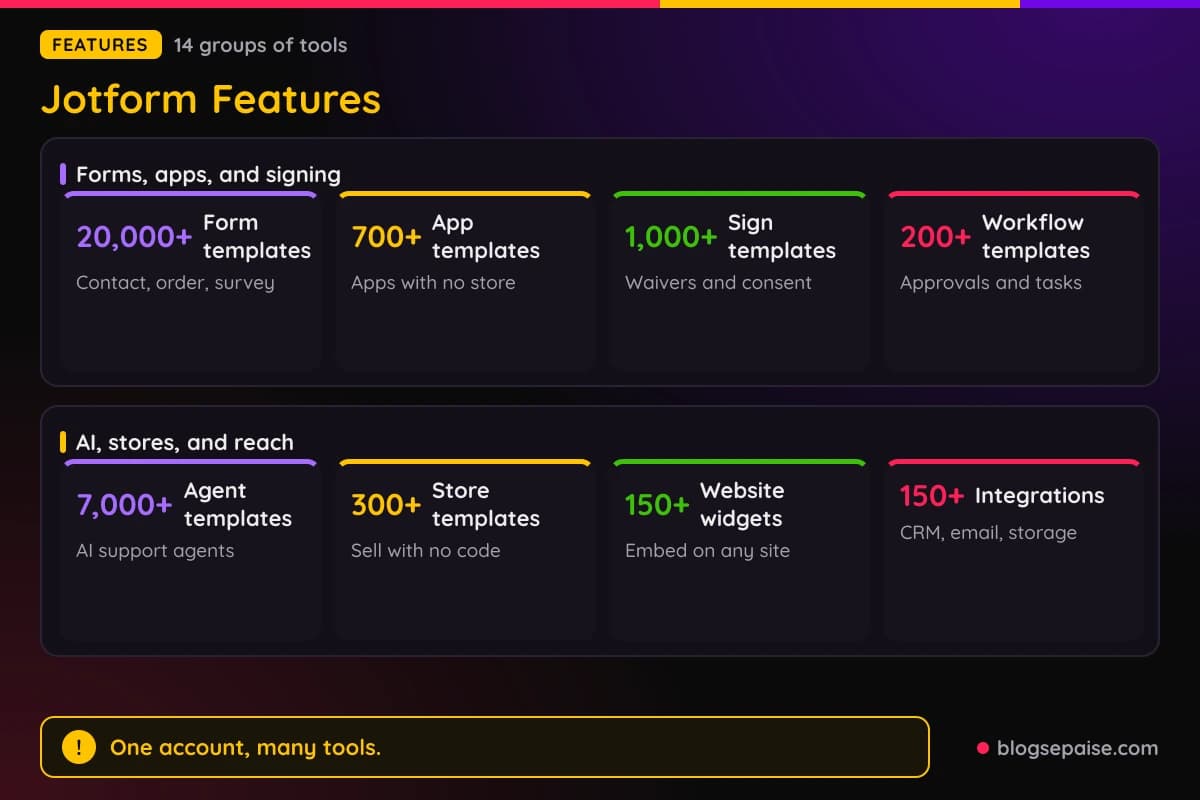
Every plan includes the standard features, even the free Starter plan. The plans differ in limits, such as forms, submissions, storage, and HIPAA access.
Counts for templates, integrations, and payment processors vary across Jotform products. Check the current figure before you plan around one.
1. Form Builder
Form Builder is the product that everything else grows from. You build a form by dragging fields onto a page, with no code and no design skills needed.
More than 20,000 form templates cover contact forms, registrations, surveys, orders, and applications. You can start from a template and change any part, or begin with a blank page.
Styling covers your logo, fonts, and colors, so the form matches your brand. Forms adjust to phone, tablet, and desktop screens.
Conditional logic shows or hides fields based on earlier answers. It can also send targeted emails and show a different thank-you message to different people.
Conversational forms ask one question per page, which feels like a chat. Answer piping reuses an earlier answer in later questions or in emails.
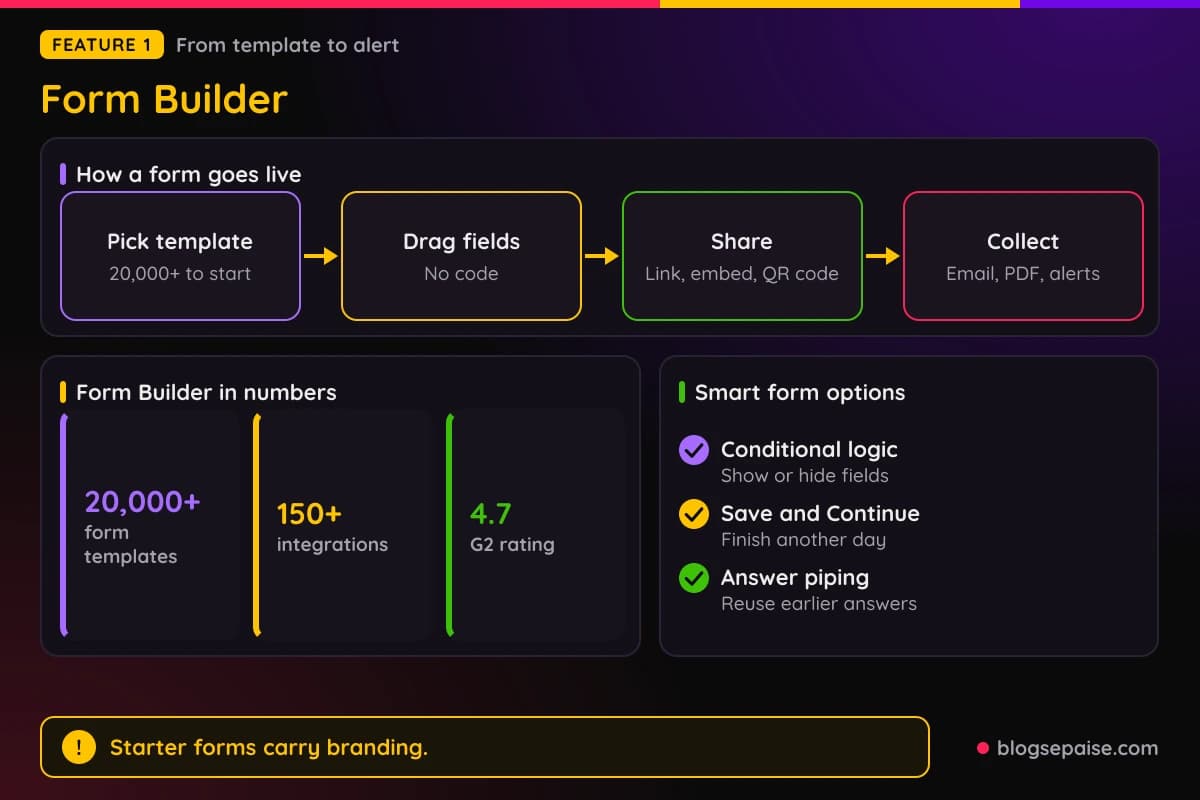
Save and Continue Later lets people leave a long form and finish another day. Pre-populated forms fill fields from earlier submissions, other forms, or Excel files.
Offline forms work in the Jotform mobile app and sync once the phone reconnects. File upload fields collect documents and photos, and a signature field collects e-signatures on any device.
Sharing is flexible. You can send a link, paste an embed code, add a popup or plugin, or print a QR code that opens the form.
Every submission can trigger a notification email to you and an autoresponder to the person who filled it out. A submission can also become a PDF, one at a time or in bulk.
Spam control includes a basic CAPTCHA, Google reCAPTCHA, and a limit of one submission per IP address or computer. You can also close a form after a set time or number of submissions.
More than 150 integrations connect forms to Mailchimp, HubSpot, Salesforce, Google Sheets, and cloud storage. Zapier reaches 3,000+ more platforms.
Built-in form analytics track views and completion, and Google Analytics can connect as well. A visual report builder turns answers into bar graphs, pie charts, and submission grids.
Payments work inside forms for products, fees, donations, recurring donations, and subscriptions. Later groups cover payments in depth.
Sign-up is free with Google, Microsoft, or an email address. Jotform holds a 4.7 rating on G2, Capterra, and Software Advice, and 5.0 on Product Hunt.
The free Starter plan includes all standard features, with limits on forms, submissions, and storage. Starter forms carry Jotform branding, and paid plans remove it.
2. Jotform Apps
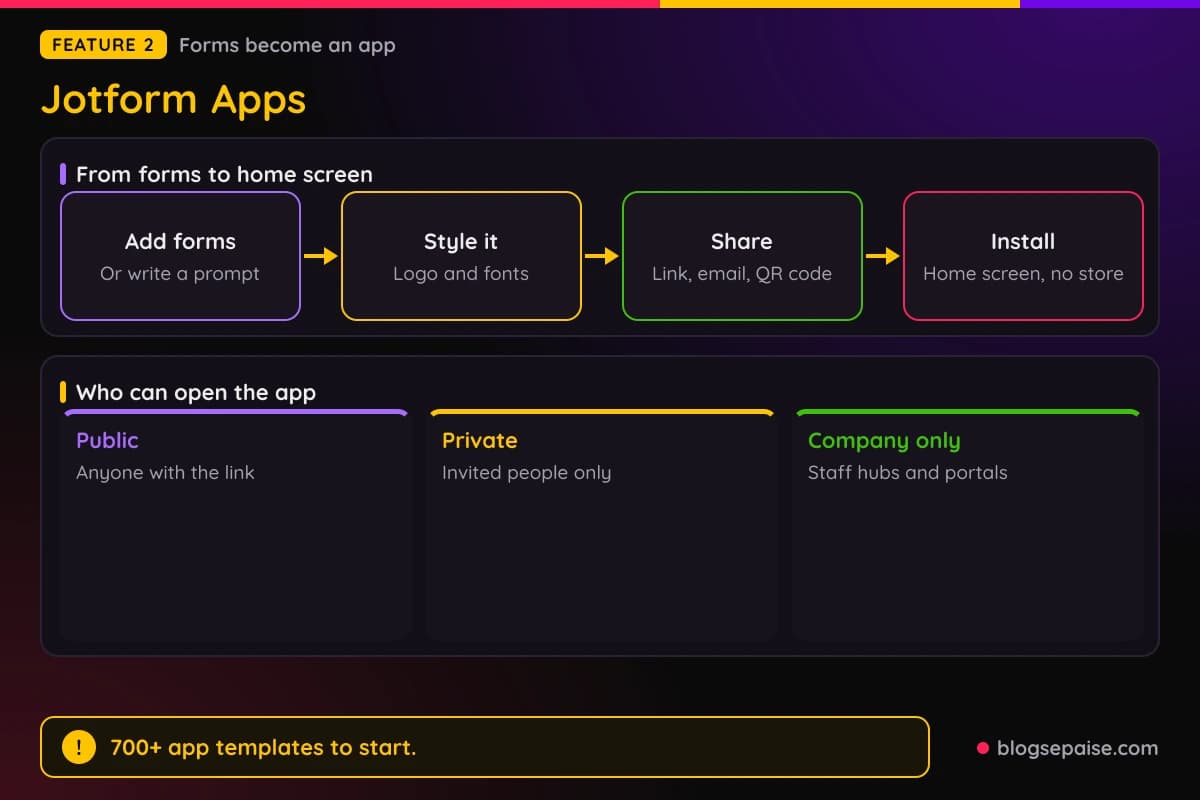
Jotform Apps turns forms into a mobile app without coding. You drag in forms, links, and widgets, or describe the app in a prompt and let AI build it.
The result is a web app that people add to their home screen. No app store is involved, so there is nothing to submit for review.
You can pick color schemes, use your logo as the app icon, choose custom fonts, and add a splash screen. The app adjusts to any screen size.
Sharing works by social post, link, email, or QR code, and you can also download the app. It opens on any device.
Push notifications reach users once they add the app to their home screen. On iPhone, users must add it first, and you switch notifications on in App Builder Settings.
Apps can be public, private, or limited to company users. That makes the same tool work for a customer portal or an internal staff hub.
An app can bundle appointment scheduling, payment collection, and workflow automation. Store Builder and donation apps sit on the same base.
Payments run through processors such as Square, PayPal, and Authorize.net. Jotform adds no transaction fees, so you pay only the processor's rate.
More than 700 app templates give you a starting point. Typical picks are client portals, HR hubs, event apps, and donation apps.
Apps are included in every plan, including Starter. There is no separate usage fee, and limits on forms, submissions, views, and storage follow your plan.
The App Builder also works inside ChatGPT and Claude. A later group covers those connectors.
Small businesses, contractors, nonprofits, and event organizers get the most from it. Any no-code user who wants an app on a phone is a fit.
A contractor can bundle an estimate form, an appointment widget, and a payment form into one app. Clients open it from their home screen to book, pay, and send photos.
These are web apps added to the home screen, not native store apps. That keeps setup fast, but you get no app store listing.
3. Jotform Sign
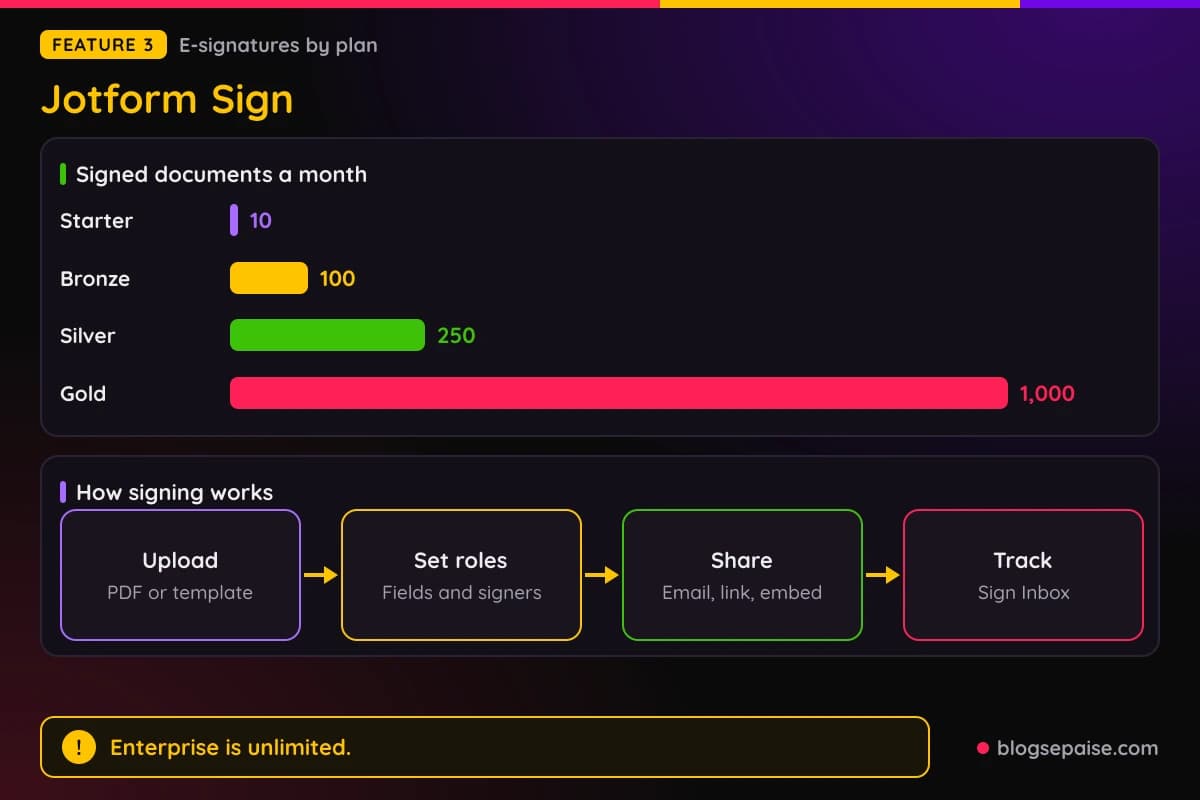
Jotform Sign is the e-signature product. You upload a PDF or pick a template, mark where signers should sign, and send it out.
Setup has four steps. Upload a PDF or choose a template, set the fields and signer roles, share the document, and track progress.
More than 1,000 templates cover agreements, waivers, and consent forms. Documents are reusable, so a waiver you build once can go to every new client.
You can send a document by email or link, or embed it on a website. A mobile app and any-device signing mean signers do not need a computer.
Sign Inbox tracks the status of each document. It also handles notifications, reminders, and downloads of finished files.
Workflows tie into signing. You can add documents and signers to approval flows, and signed copies can go to cloud storage automatically.
Tables and Report Builder help when you need to look at the data behind signed documents. Jotform keeps those products on the same account.
Signing has its own monthly limit by plan. Starter gives 10 signed documents a month, Bronze 100, Silver 250, and Gold 1,000.
Enterprise has unlimited signed documents. Bronze costs $39 monthly or $408 a year, Silver $49 or $468, and Gold $129 or $1,188.
Signature fields also appear inside regular forms. A consent form or contract request can collect a drawn or typed signature without a separate tool.
Tracking shows the status of every document, and reminders nudge people who have not signed yet. Reusable documents save the most time when you send the same paperwork often.
Approve and Sign on Enterprise and Teams lets members request signatures from inside a workflow. Signer roles keep the order clear when several people sign.
Starter's 10 documents a month suit a freelancer who sends a few contracts. A business with steady paperwork will want Bronze or higher.
Sign has no separate integration set. Cloud storage delivery and workflow links are the confirmed ways to move signed files.
4. Jotform Workflows
Jotform Workflows is no-code automation for tasks, approvals, and payments. A workflow starts when someone submits a form.
You build it on a drag-and-drop canvas with forms, approvals, tasks, payments, and integrations. Participants get an email and respond through Jotform Inbox or Mobile Forms.
Conditional logic sends different submissions down different paths. Parallel processing lets several people work at the same time.
Multi-approver rules can require all approvers or a majority. That fits budget approvals where more than one manager must agree.
Tasks can be checklists, approvals, payment requests, or data entry steps. Workflows can also request e-signatures along the way.
Progress tracking, reminders, and due dates keep a workflow moving. Workflow reports show where requests sit.
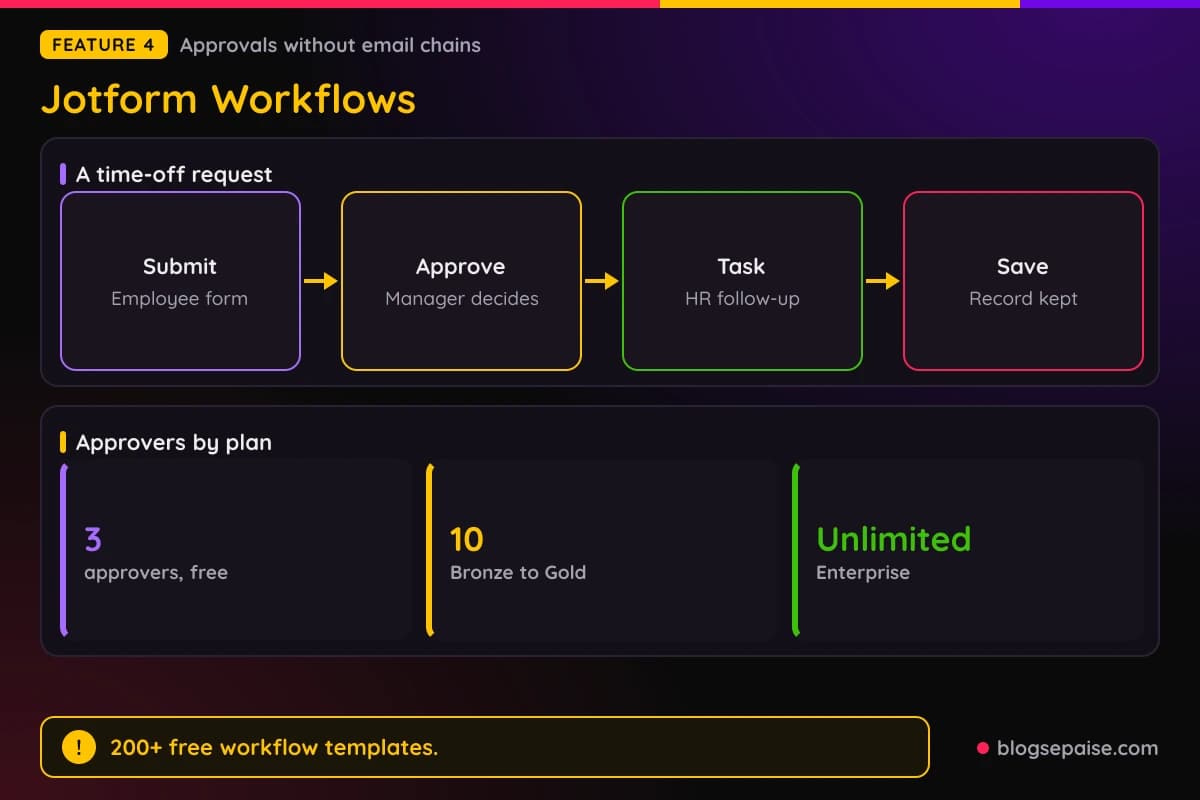
More than 200 free workflow templates cover onboarding, time-off requests, expenses, purchase orders, budget approvals, content review, and contracts.
HR, healthcare, and e-commerce teams use them often.
Payments can happen at any stage, through processors such as Square, PayPal, Stripe, and Authorize.Net. Jotform adds no transaction fees.
Named integrations include Google Drive, Slack, Airtable, Dropbox, and Microsoft Teams. Data can flow out to those tools at the end of a step.
Approver counts depend on the plan. Free accounts get up to 3 approvers, Bronze, Silver, and Gold get up to 10, and Enterprise is unlimited.
White labeling is Enterprise only. Security covers encryption, GDPR, CCPA, and optional HIPAA.
Workflows is the expanded version of Jotform Approvals. You reach it from My Forms and then My Workflows.
Participants can respond from a phone through Mobile Forms. That keeps approvals moving when a manager is away from a desk.
Larger approver pools need a paid plan, and white labeling needs Enterprise. Free accounts can still run an approval flow with up to 3 approvers.
Workflows are free to start, and Jotform does not list a separate price. Plan limits still apply.
A time-off request is a simple example. The employee fills a form, the manager approves, HR gets a task, and the record is saved.
5. Jotform AI Agents
Jotform AI Agents are customizable assistants for customer service and support. They work around the clock and answer questions in conversation.
You can create an agent from scratch, from an existing form, or from a template. More than 7,000 agent templates give you a head start.
Training material includes FAQs, documents, URLs, plain text, Q&As, and past conversations. Form content can train your agent too.
You set actions and triggers, such as sending emails, searching a website, or opening a ticket.
Tools include Google Calendar appointments, workflow triggers, API requests, Slack, web search, and links.
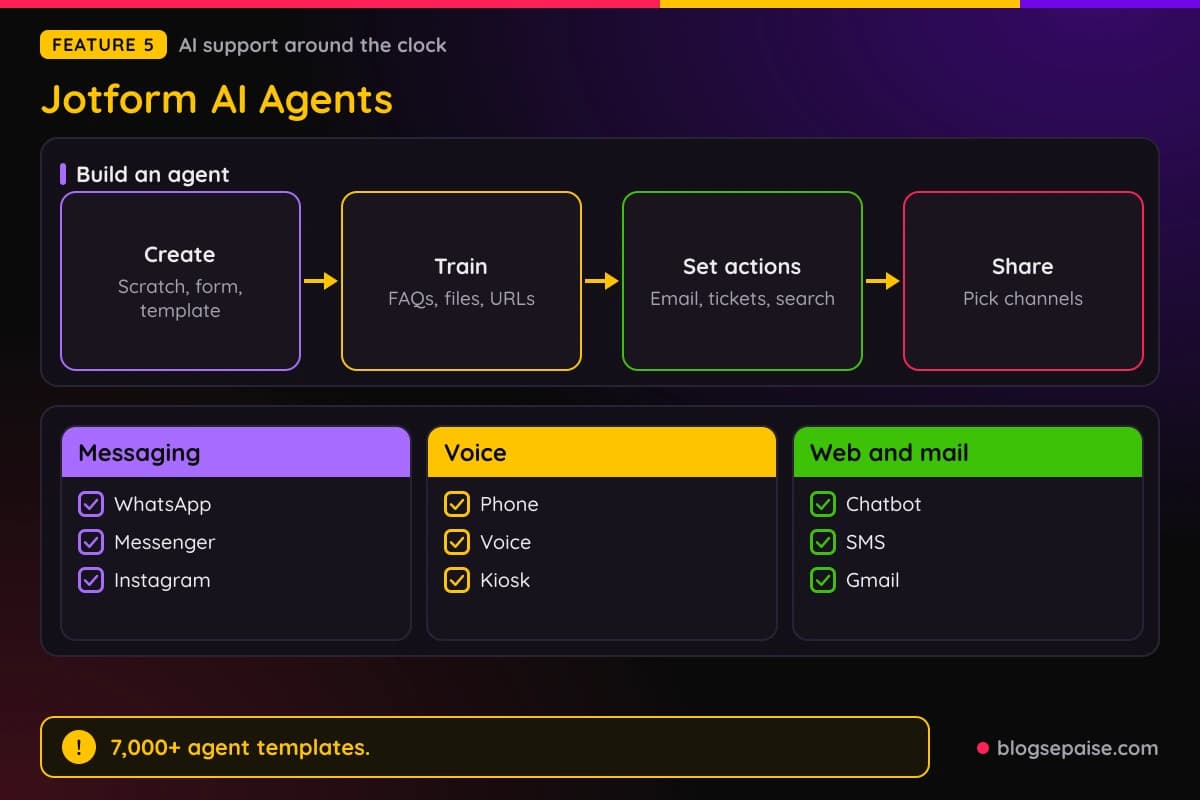
Channels are broad. An agent can work by phone, voice, chatbot, kiosk, app, WhatsApp, Messenger, Instagram, SMS, and Gmail, or as a standalone page.
It also works with WordPress, Shopify, Canva, and Salesforce. Agents are multilingual, so they can answer in the visitor's language.
You can customize the avatar and branding. White labeling is available on Enterprise.
Standard accounts run on OpenAI GPT-4. HIPAA accounts run on Google Gemini through Vertex AI under a business associate agreement.
Jotform does not use agent conversation data to improve its services. Form content is used to train your agent.
A dedicated phone number add-on lets an agent take calls. It is an extra recurring fee, billed monthly or yearly with up to 20% off yearly, and it works on Starter too.
Numbers come from the US, UK, or Canada, and you can choose the area code for US and Canadian numbers.
A cancelled number cannot be reactivated, and calls count toward a shared monthly voice call limit.
Jotform does not state the price of the phone number add-on or the exact agent limits here.
Those cover agents, conversations, sessions, voice minutes, SMS, and knowledge base size, so check them before buying.
Support teams, HR, IT, events, sales, and hospitality are the main fits. An agent on a payment form can also answer billing and security questions.
6. Jotform Boards And Tables
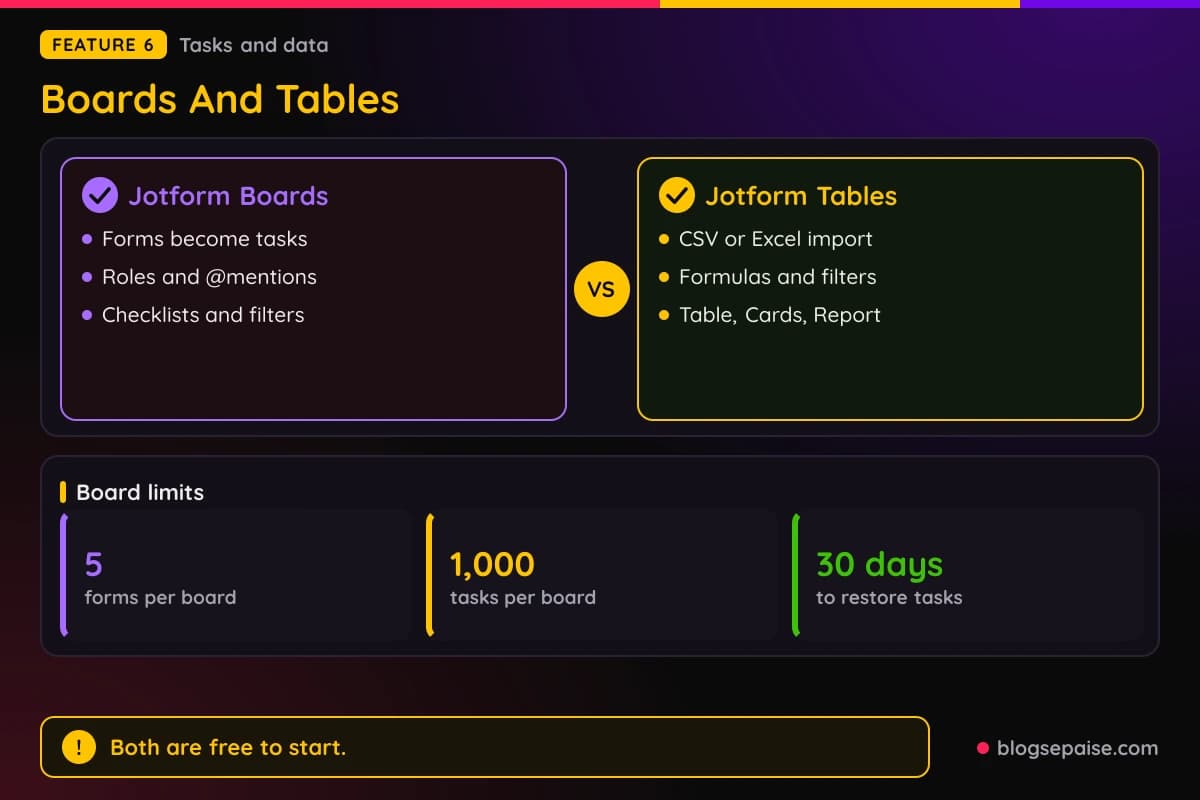
Jotform Boards is task management that grows out of your forms. Requests from forms, workflows, e-signatures, and AI agents become tasks on a visual board.
You connect up to 5 forms to one board, and each new submission becomes a task. You can add tasks by hand too.
Boards also appear as a tab inside Jotform Tables. Roles include read-only, commenter, and collaborator.
Each task can have an assignee, due date, priority, comments, and attachments. You can @mention people by email, and an activity log records changes.
Filters, custom fields, checklists, groups, themes, and drag-and-drop layouts help you organize. Limits are the same on every plan.
One board holds 100 people and 1,000 tasks. Each task takes 10 assignees, each board takes 5 custom fields, and you can make unlimited boards.
Deleted tasks can be restored for 30 days. Boards are free with all features on every plan, and Bronze, Silver, and Gold add storage.
Encrypted forms do not connect to Boards. HIPAA-enabled forms can connect, and shared board viewers need a Jotform account.
Jotform Tables is the data workspace, a spreadsheet alternative with one-click sharing.
You create a table from a template, connect a form so submissions arrive automatically, import a CSV or Excel file, or type data by hand.
Views include Table, Cards, Report, Calendar, Uploads, and Online Form. Column types, search, filters, formulas, and calculations work without code.
Templates cover a Social Media Calendar, Sales CRM, Recruitment Tracker, Issue Tracker, and Office Inventory. Tables can send data to other software, build PDFs, and send emails.
Prefilled forms can go out straight from a table. Request or share submission edits to keep records current.
Tables is free to start. Jotform does not state row or table limits.
Sales, HR, IT, project, and inventory teams suit it best. Students and volunteer groups use it too.
7. PDF Tools: PDF Editor, Smart PDF Forms, And Report Builder
Jotform has three PDF tools that do different jobs. PDF Editor builds PDFs from submissions, Smart PDF Forms converts existing PDFs, and Report Builder turns data into reports.
PDF Editor turns form submissions into PDFs automatically. You design the layout, colors, fonts, images, and document size, and each submission produces a finished PDF.
You reach it from My Forms and More, or from the Edit Form menu with Edit as PDF Form. Thousands of PDF templates include contracts, invoices, quotes, certificates, and pay stubs.
PDFs can be shared by email, QR code, or social post, shared as attachments on notifications, or sent to Google Drive and Dropbox. Fillable PDF forms work offline, and submitting needs internet.
PDF Editor has limits. You get 1 PDF form per account with unlimited PDF documents, and no payments or redirect-based integrations inside PDF forms.
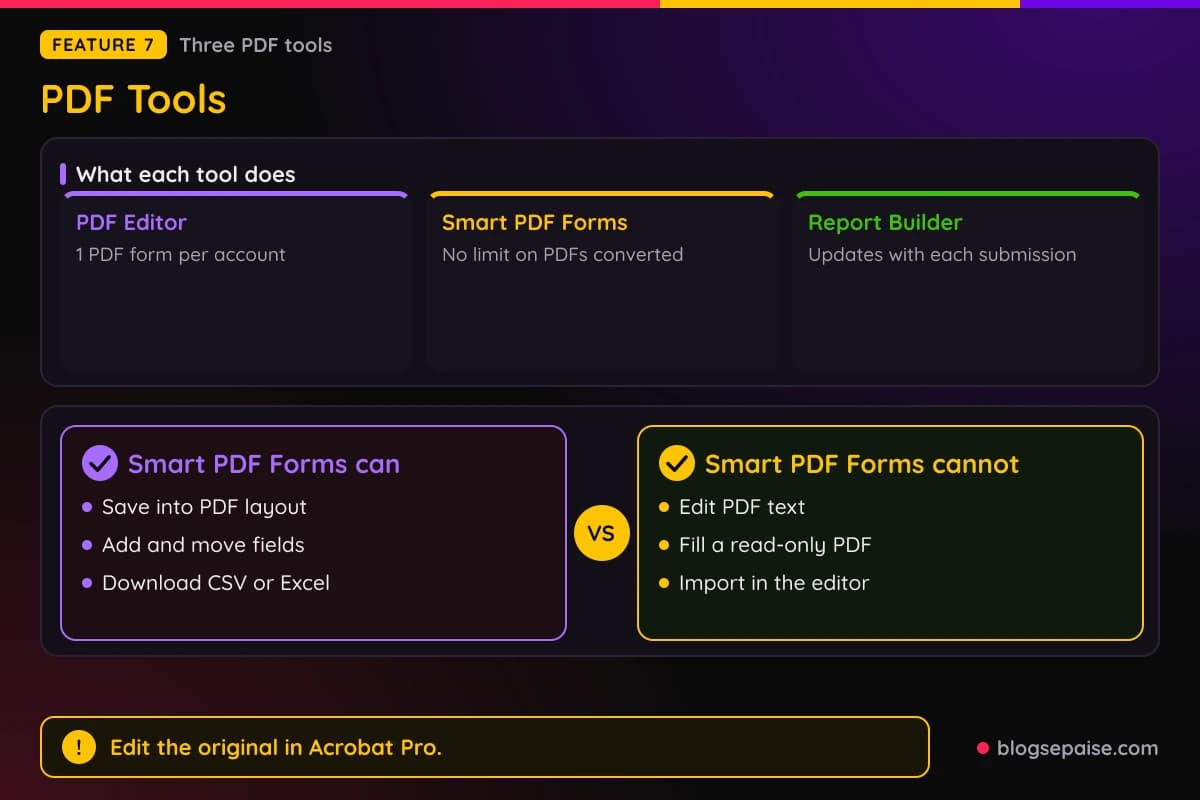
A PDF form also cannot show data by form conditions. Importing your own PDF is not available in the editor.
Smart PDF Forms converts an existing PDF form into a mobile-friendly online form. You upload the PDF, build the online version beside it, and collect responses.
Responses can save back into the original PDF layout. The path is My Forms, Create Form, Import Form, Import PDF Form.
Conditional logic, validation, Excel and CSV downloads, and syncs to Google Drive, Dropbox, and Box all work. Payments and 100+ integrations such as Google Sheets and Mailchimp are included.
Smart PDF Forms has no limit on PDFs converted, and it is on every plan, including free. Some fields may not be detected, so you connect them by hand.
You cannot edit PDF text or images inside Jotform, and a read-only PDF cannot become fillable. To change the original, edit it in Adobe Acrobat Pro and use Update PDF.
HIPAA use of Smart PDF Forms needs Gold or Enterprise with a business associate agreement. Registration, consent, application, and agreement PDFs are the natural fits.
Report Builder turns form data into reports and presentations that update with each new submission. You create the form, customize the report, and share by link, embed, or secure PDF.
Layouts, logos, color palettes, charts, icons, shapes, and date filters are included. You can embed a report on a website, a WordPress page, or a Medium post.
8. Store Builder And Online Payments
Store Builder is a no-code online store. You use it to sell products, services, and subscriptions, and to collect donations.
You start a free workspace and drag in Product List elements with images, options, descriptions, and a search bar. Branding covers your logo, colors, products, and pricing.
More than 300 store templates give you a base. 80+ ready-to-use widgets add extras to the store.
Shoppers get a shopping cart, favorites, guest checkout, and order tracking. They can also contact the owner from the store.
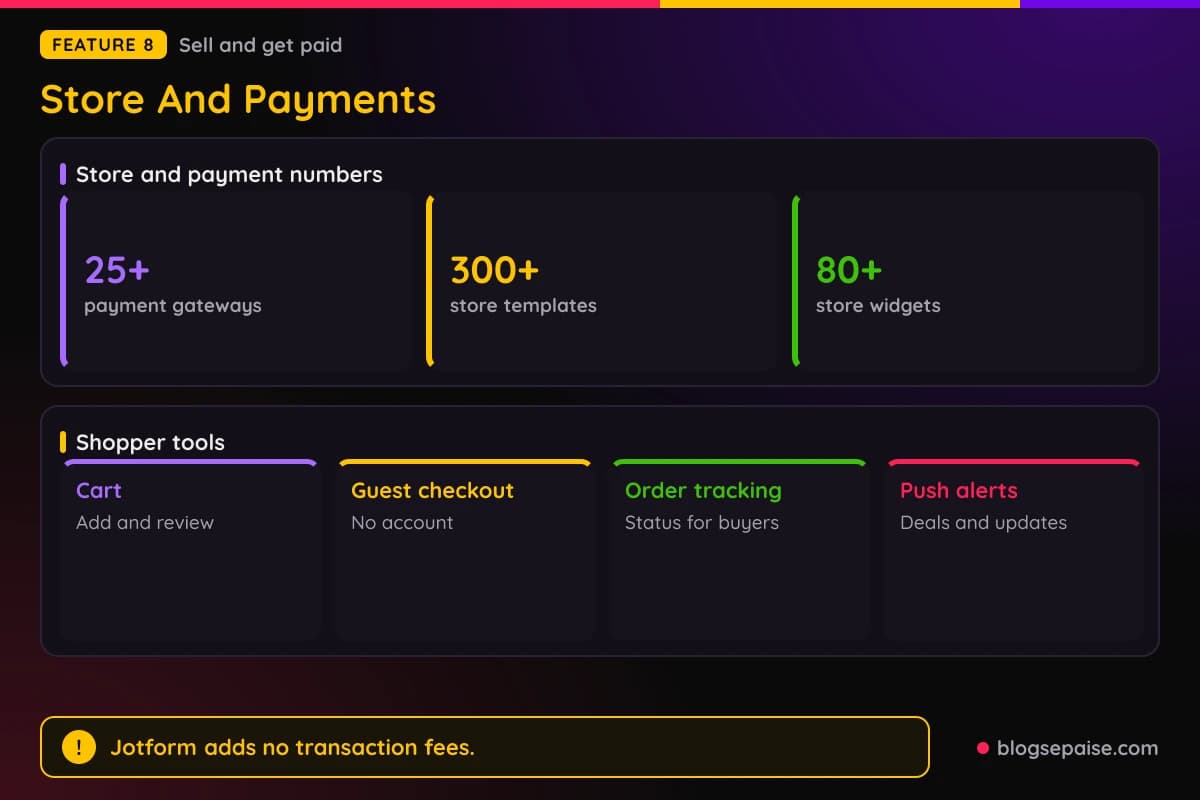
You manage orders in Jotform Tables with views and custom reports. Real-time push notifications can announce updates, discounts, and promotions.
Jotform does not state product count limits, currency and tax settings, or shipping options for Store Builder. Check those before you plan a large catalog.
Online Payments covers payment forms, donation forms, and recurring subscriptions. It targets small businesses, sellers, nonprofits, and healthcare providers.
More than 25 payment gateways connect to your forms, including Square, PayPal, Stripe, and Authorize.Net. Jotform adds no transaction fees, so you pay only the processor's rate.
Templates for orders, donations, and subscriptions come from the library of 20,000+ templates. Forms are drag-and-drop and work on phones.
An AI Agent on a payment form can answer billing and security questions. That cuts cart abandonment when buyers hesitate.
Payment data can sync to third-party apps, e-signatures, and custom emails. You can embed forms in WordPress or Squarespace.
Compliance includes PCI DSS Level 1, PSD2, GDPR, CCPA, and 256-bit SSL, plus HIPAA support on eligible plans.
Payment submissions are capped by plan at 10, 100, 250, and 1,000 a month from Starter to Gold.
Jotform does not state subscription setup details, supported countries, or refund handling. Those depend on the processor you connect.
Most payment features are free, with no extra Jotform fee per sale. Plan limits on payment submissions still apply.
9. Website Widgets And Form Widgets
Jotform Website Widgets is a library of more than 150 no-code widgets for your site. They aim to boost engagement, collect leads, and build trust.
You browse by category, search, or sort by Popular, Recent, and Trending. You open a widget, preview it, click Use Widget, and customize colors, spacing, and layout.
Embedding takes a short code snippet pasted into a code block, a custom HTML section, or a page editor. Later edits update every place the widget appears, with no site code changes.
Widgets work on WordPress, Webflow, Wix, Shopify, Squarespace, and static HTML. That makes them portable, unlike plugins tied to one platform.
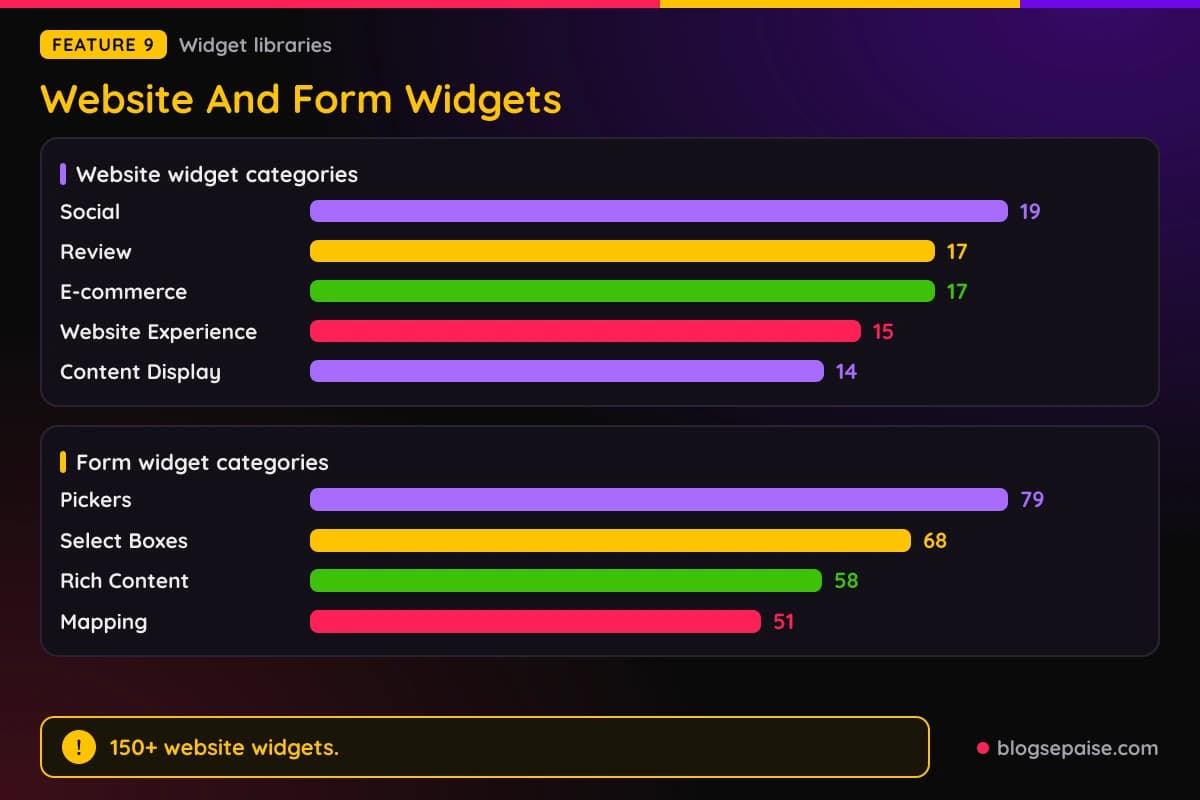
Categories include Social with 19 widgets, Review with 17, E-commerce with 17, and Website Experience with 15. Content Display has 14 and Business has 11.
Highlights include Google Reviews, Instagram Feed, Countdown Timer, Weather, QR Code, Event Calendar, WhatsApp Chat, Appointment Booking, Popup, FAQ, Accessibility, and Chatbot.
Appointment Booking offers your services, controls availability, and collects customer details. Popup handles lead capture, discounts, newsletters, and exit offers.
Accessibility lets visitors adjust contrast, text size, spacing, and motion, and it remembers their choices. Form widgets feed answers into Jotform Inbox.
Website Widgets is free, but Jotform does not state per-account caps. Review widgets connect to Google and Facebook, though the setup steps are not described.
Form Widgets are a separate library that adds extras inside forms. Hundreds of widgets cover video, social media, maps, calculations, and pickers.
Featured picks include Calendly for booking a meeting time, Clearout Email Validation, and Loom Video Recorder.
Others include Form Calculation, Signature, Checklist, Data Grid, PDF Embedder, Inventory, Image Slider, and Unique ID.
Category counts are large. Pickers has 79, Select Boxes has 68, Rich Content has 58, Mapping has 51, Verification has 42, and Calculation has 37.
Inventory helps you avoid overselling and overbooking. Take Photo and Signature collect proof straight from the respondent.
Pricing and limits for Form Widgets are not stated. Search and sort by Newest or Popular help you find the right one.
10. Inbox, Mobile App, And Enterprise Mobile
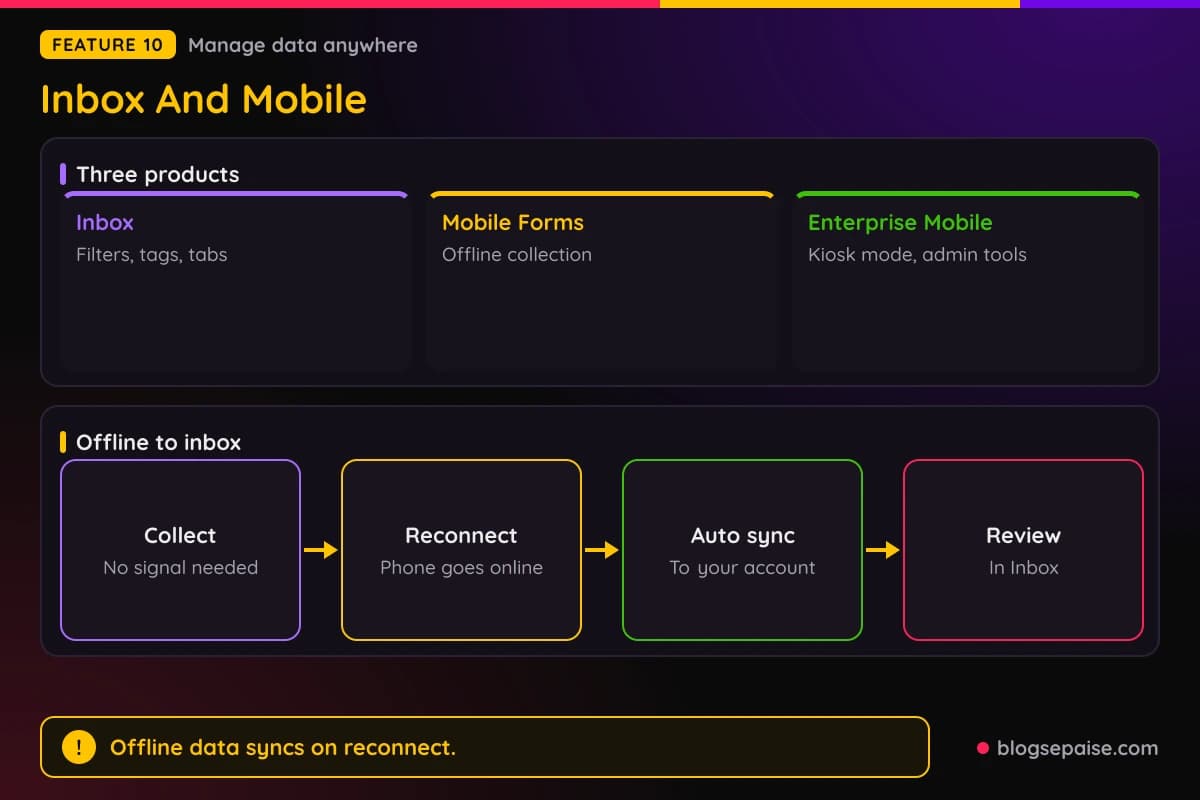
Jotform Inbox is where you view, organize, and manage submissions from any device. It works like an email inbox for form answers.
You can filter, search, and sort by dates, labels, tags, content, and form fields. Color-coded tags and custom tabs keep busy inboxes tidy.
Comments let you tag teammates by email. You can reply to form fillers or forward a response by email.
Shareable links can carry an expiry date, edit permissions, and access settings. Email invitations give people read-only or collaborator access.
Responses can be edited by reopening the original form. You can save a response as a PDF or print it in one click.
Jotform Mobile Forms is the app for phones and tablets. You download it from the Apple App Store or Google Play, or scan a QR code.
You create and manage forms, collect responses offline, and view submissions. Push notifications arrive instantly, and you can approve or deny approvals.
Advanced fields include recorded voice, scanned barcodes, geolocation, and e-signatures. An AI Agent can guide respondents through questions.
You can assign forms and approvals to team members. Inspections, incident reports, trade show sign-ups, restaurant feedback, and polls are typical uses.
Field crews in construction and oil and gas, and exhibitors at shows, rely on offline mode. Supported OS versions for the mobile app are not stated.
Jotform Enterprise Mobile adds management for large teams. Offline data syncs to your Enterprise account once the device reconnects.
Admins invite users with a simplified login, assign tasks and forms, and set permissions to view, manage, or share responses.
Push notifications go out for each new submission, with a customizable amount.
Kiosk mode refreshes the form automatically after every submission. Barcode scanning and drawing on images come as widgets, and mobile analytics track usage.
Account owners reach the Admin Console and monitor how members use the app. Jotform can build a white-labeled custom app, and Enterprise Mobile has no stated limits.
11. AI Products: Form Builder, App Builder, And Data Assistant
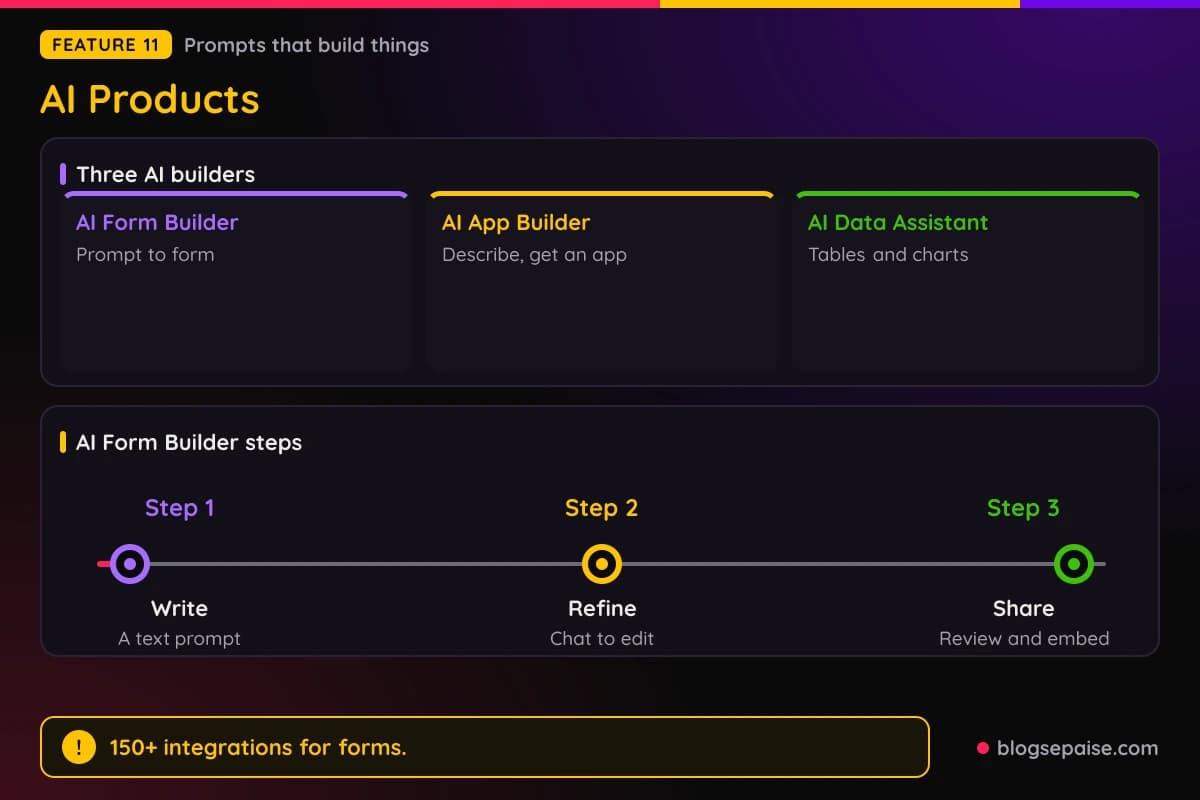
Jotform has three AI builders that start from a prompt. They cover forms, apps, and data.
AI Form Builder designs and customizes a form from a text prompt. You write the prompt, refine the form with a built-in AI chatbot, and then review and share or embed it.
You can change colors, add fields, and edit text through the chat. Naming the form type and your occupation tailors it to your industry.
Forms are optimized for mobile, tablet, and desktop. 150+ form integrations and hundreds of form widgets are available, including PDF embeds, signatures, and checklists.
Form creation limits follow your plan. AI support has no usage limits, and branding customization is limited to changing the form color.
Data from your prompts is not used to train the AI Form Builder. Form and field content may be used to train Jotform's system, though personal data such as names is not.
Quizzes and surveys come from a separate AI Quiz Generator that works from documents or prompts. AI Form Builder itself does not define a target audience.
AI App Builder builds a ready-to-use app from a plain description. Inputs include Upload, Add Link, and Talk, which is voice.
Jotform does not state steps, limits, or integrations for the AI App Builder. The workspace has Create, Customize, Design, Widgets, and Users tabs.
AI Data Assistant turns data into an AI-powered workspace. You tell it how to manage your data and get tables with insight and charts.
It can create tables from an uploaded order file, analyze over-budget expenses, and visualize trends and key metrics. A prompt can also categorize feedback as positive, negative, or neutral.
Follow-up tools write replies, update records, and route submissions from your inbox. An example is a personalized confirmation email to every accepted applicant.
Bulk actions run one prompt across many records. A clinic could send reminders to every patient with missing insurance info.
You can share tables with edit or comment access and ask questions by voice. Insights surface patterns and outliers, and Jotform does not state limits or pricing for the assistant.
12. ChatGPT, Claude, And MCP Connectors
Jotform works inside AI chat apps through three connectors. There is a ChatGPT App, a Claude App, and an MCP server.
The ChatGPT App is the ChatGPT Form Builder. You can create, edit, design, and analyze forms without leaving ChatGPT.
You connect your Jotform account, then refine forms by adding, removing, and reordering fields. You can rewrite questions and change settings, themes, and layout.
For analysis you can list forms and pull submissions. Filters cover date, status, keywords, and field values, with summaries, trends, and recommendations.
Sample jobs include a holiday party RSVP, a 10-question onboarding quiz, an agency intake form, and a SaaS satisfaction survey. You need an existing Jotform account first.
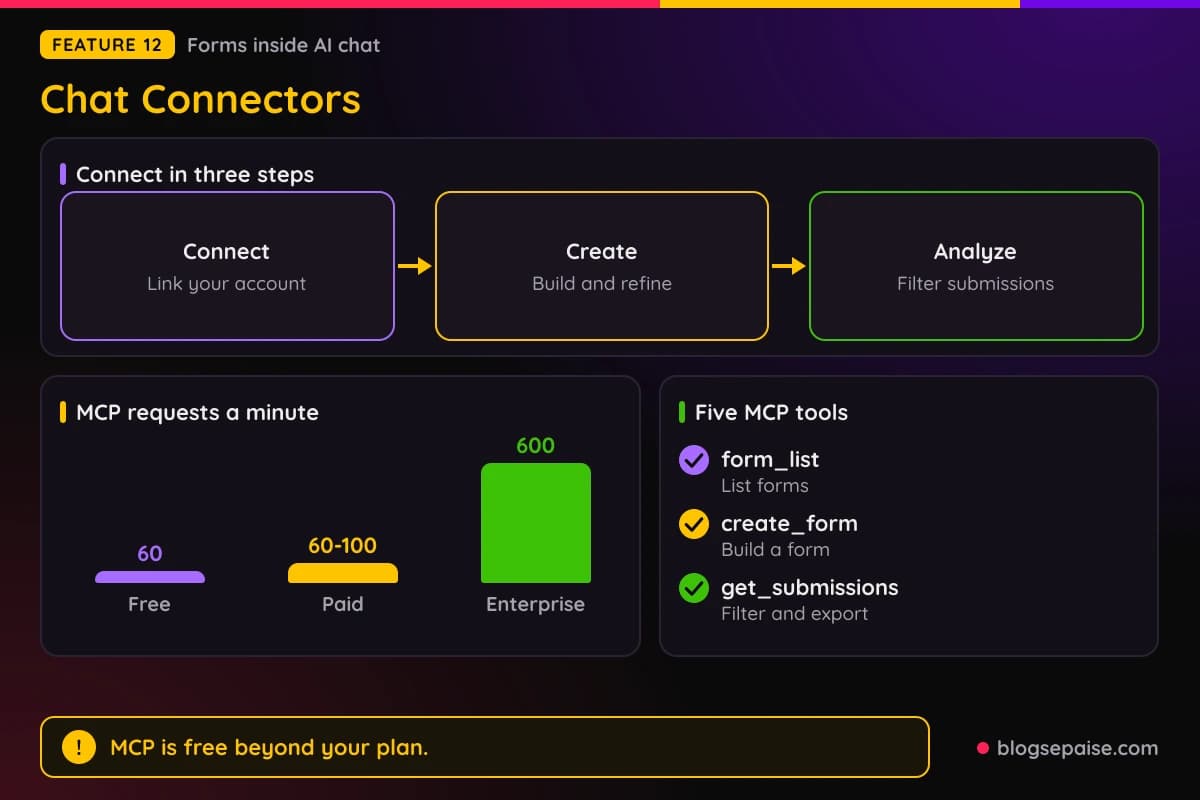
The Claude App follows the same three steps of connect, create and refine, and analyze. You activate Jotform under Connect your Tools in Claude.
It generates forms from prompts, edits fields, questions, logic, and styling, and handles basic logic such as order totals.
Form types include lead, survey, feedback, registration, job application, and order.
Data stays in Jotform, and Claude processes it through the integration without storing it independently. Jotform does not state plan requirements or limits for either app.
The Jotform MCP Server lives at mcp.jotform.com. It is built on the open Model Context Protocol and the Jotform API.
You connect a client such as ChatGPT, Claude, Manus, or Cursor with a one-time OAuth 2.0 login. Then you give commands in plain language.
Five tools do the work. They are form_list, create_form, edit_form, create_submission for testing and imports, and get_submissions for filtering and export.
Only workspace admins can install the app, and bearer tokens are not supported. HIPAA data needs a HIPAA-enabled plan with proper scopes.
Rate limits vary by plan. Free accounts get 60 requests a minute, paid plans get 60 to 100, and Enterprise gets 600.
MCP use is free beyond your subscription and does not count against form or submission limits. You revoke access under My Account, Connected Apps, and data stays in place.
13. Teams And Enterprise
Jotform Teams gives your organization shared workspaces. Forms, tables, reports, and apps built there belong to the team, not one person.
That matters when staff leave, because access stays with the team. You can create any number of teams in an organization.
Setup has three steps. Create a team, invite members and set their permissions, and collaborate on forms that collect data.
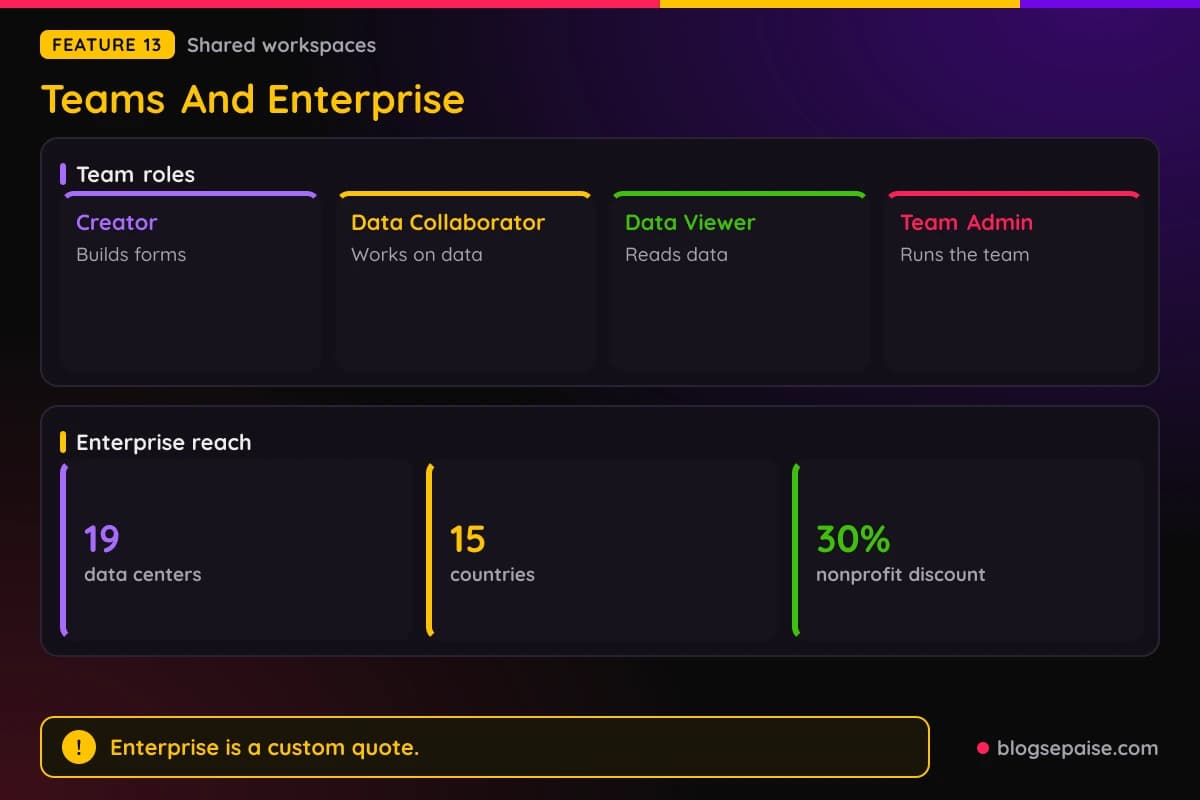
Role-based access control includes Creator, Data Collaborator, Data Viewer, and Team Admin roles. Jotform does not spell out exactly what each role can do.
Tables let a team and its clients work on submission data as spreadsheets, calendars, or cards. Boards turn submissions, AI agent chats, and workflow steps into tasks.
Approval flows cover HR requests, job applications, and IT tickets. Approve and Sign lets members request e-signatures.
Healthcare teams can keep separate teams per department, which helps with HIPAA. Nonprofits, HR, agencies, and schools use Teams as well.
Member caps, storage, and plan requirements for Teams are not stated. Organizations such as Three Rivers Park District, The Village Network, and Tennessee State University use it.
Jotform Enterprise is the top plan, with custom pricing through a quote. It adds unlimited forms and submissions, a multiuser platform, dedicated support, and user management.
Single sign-on, service level agreements, data residency, professional services, and custom branding and domain come with it.
HIPAA-enabled features are included, and Multi SSO works with Google and Microsoft at once.
AI helps at the org level. It can turn prompts into forms, apps, and workflows, build a Brand Kit, and create org-wide templates.
An Admin Console and Insights give real-time analytics and user management. Kiosk mode, offline forms, and role-based access are included.
Security includes 256-bit SSL, data localization, PCI certification, and a dedicated instance.
Solutions cover GDPR, CCPA, FERPA, HIPAA, and SOC 2, and the data center network spans 19 data centers in 15 countries.
Professional Services has three parts. They are a consultation, an implementation built on your server, and expert training.
Enterprise has a demo and a quote path, and Jotform does not mention a free trial. Existing Bronze, Silver, and Gold users can upgrade, and qualifying nonprofits and schools get 30% off.
14. Security, HIPAA, Prefill, Assign Forms, And Notifications
Security starts with 256-bit SSL on all plans and TLS 1.2 by default. Encrypted Forms store submissions encrypted with a password you create.
Encrypted Forms use RSA 2048-bit encryption on your computer. File uploads are not covered, and notification emails are not encrypted and carry no submission data.
You can disable cloning and require login to view submissions. Two-factor authentication is offered, and SAML single sign-on is Enterprise only.
Backups take one click and give a ZIP with form HTML, CSV, and uploads. Data replicates across Google Cloud, with hourly AWS snapshots kept for 30 days.
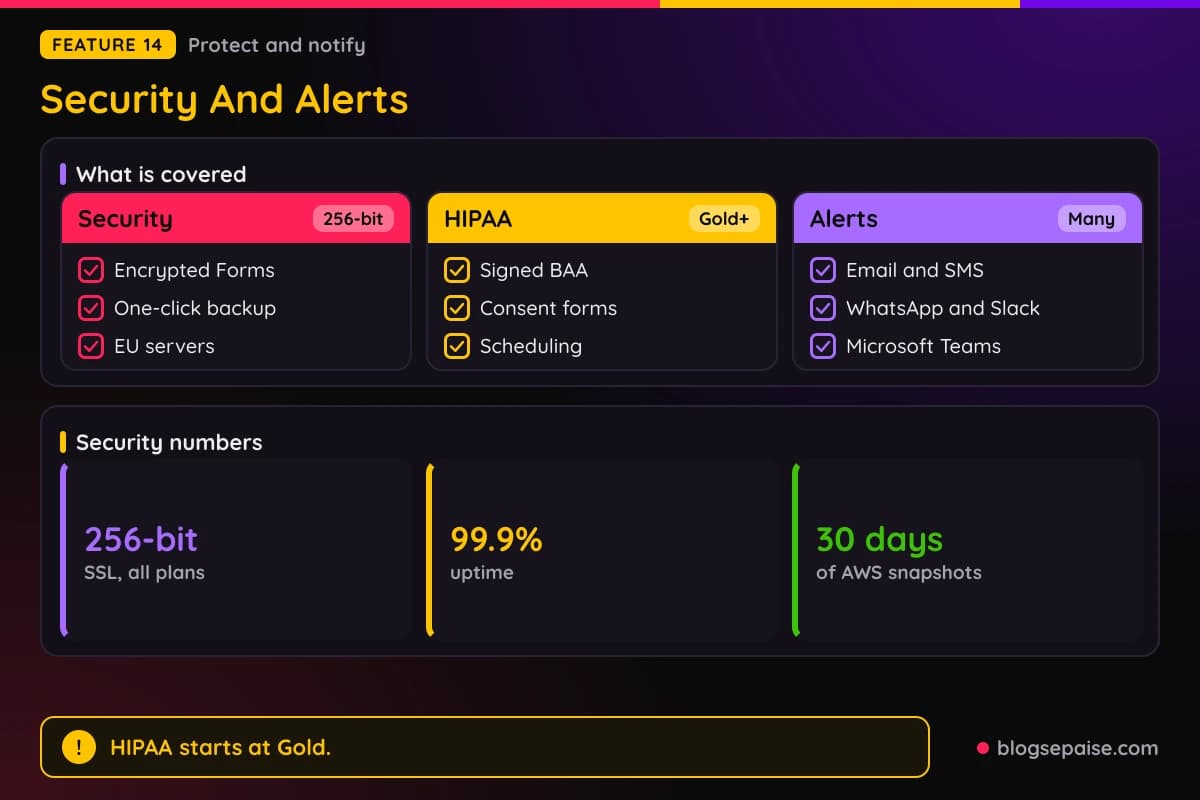
EU servers sit in Frankfurt, and you switch them on in the Data tab. Data centers also run in Iowa and Virginia, and uptime is 99.9 percent.
Compliance includes PCI DSS Service Provider Level 1, GDPR, CCPA, FERPA, and HECVAT. SOC 2 and StateRAMP programs exist, and multiple users on one account need Enterprise.
HIPAA-enabled forms need a Gold or Enterprise plan. Covered entities that turn them on get a signed business associate agreement, and users still must follow HIPAA rules.
Templates include 10 form templates and 10 PDF templates for intake, consent, and records. Scheduling, e-signature consent, payments, and Google Calendar events are covered.
Prefill Forms has eight new ways to fill fields in advance. Three cover Tables, the Fill Another Form button, and the Fill Again button.
Workflows and Assign Forms can send prefilled forms too. Airtable, Pipedrive, and monday.com can prefill from your records.
Assign Forms lets you give forms to team members and clients and track responses. Assignees work on any device, offline through Mobile Forms, and manage data in Tables and Inbox.
Form Notifications send alerts right after a submission. Channels include email, push, SMS, WhatsApp, Slack, Microsoft Teams, Google Chat, RingCentral, SimpleTexting, Twilio, and ClickSend.
You choose which fields appear in the alert and send a demo to test it. Several channels can run at once, and team alerts can go to shared channels.
Jotform does not state prices or limits for notifications or prefill. Setup takes a few clicks in form settings.
Jotform Pricing Plans
Jotform has five plans: Starter, Bronze, Silver, Gold, and Enterprise. A toggle switches between monthly and yearly billing, and the limits stay the same either way.
Starter is free. It gives you 5 forms, 100 submissions a month, 100 MB of storage, and 10,000 form views a month.
Bronze costs $39 monthly or $34 a month billed yearly, which comes to $408 a year. It gives you 25 forms, 1,000 submissions a month, and 1 GB of storage.
Silver is the best value plan and costs $49 monthly or $39 a month billed yearly, or $468 a year. It gives you 50 forms, 2,500 submissions a month, and 10 GB of storage.
Gold costs $129 monthly or $99 a month billed yearly, or $1,188 a year. It gives you 100 forms, 10,000 submissions a month, and 100 GB of storage.
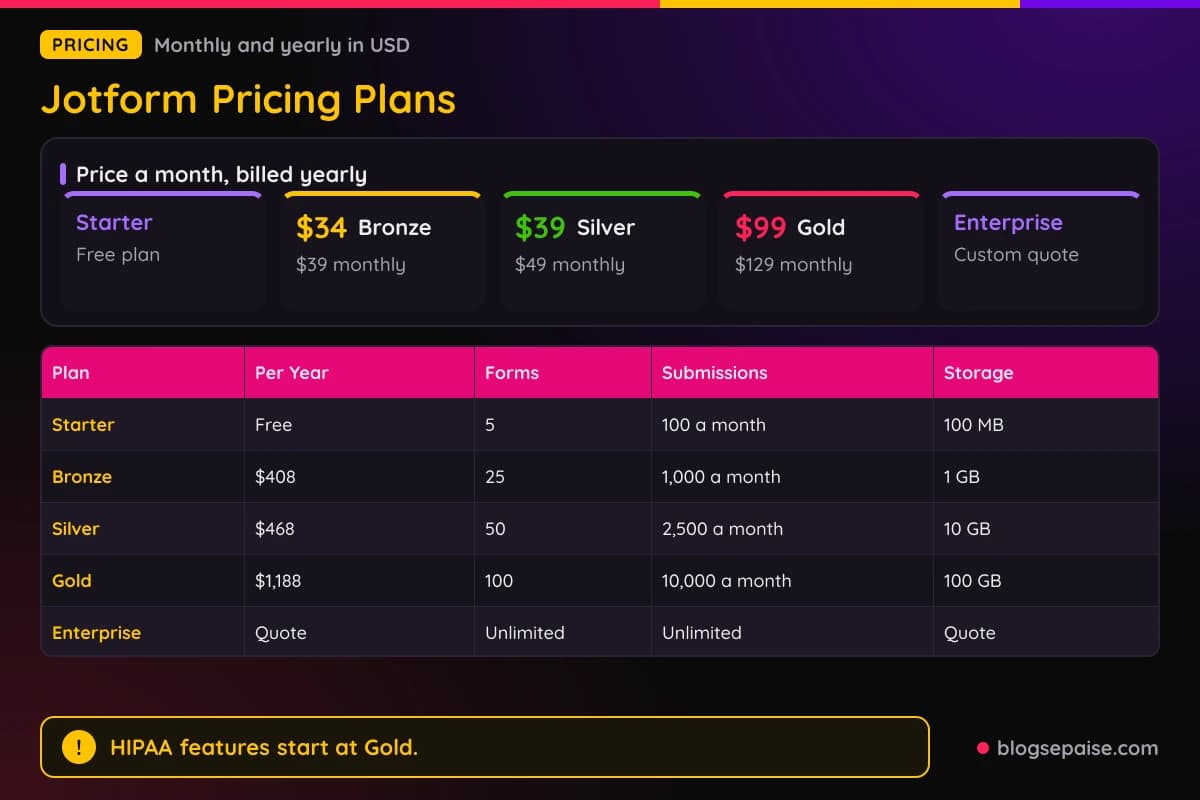
Enterprise has custom pricing through a quote. It adds unlimited forms and submissions, single sign-on, data residency, and dedicated support.
Other limits scale with the plan. Form views a month run 10,000, 100,000, 1,000,000, and 10,000,000 from Starter to Gold.
Fields per form run 100, 250, 500, and 1,000. Payment submissions a month run 10, 100, 250, and 1,000, and signed documents a month use the same numbers.
Total submission storage is 500, 10,000, 25,000, and 100,000. If you pass it, the oldest response is deleted to make room.
Paying yearly saves $5 a month on Bronze, $10 on Silver, and $30 on Gold. That is $60, $120, and $360 a year.
Cost per monthly submission falls as you move up. On yearly billing it is about 3.4 cents on Bronze, 1.6 cents on Silver, and 1 cent on Gold.
HIPAA features are on Gold and Enterprise only. Starter through Gold are single-user plans, and Enterprise is the only multiuser plan.
Nonprofits and schools can get 50% off Bronze, Silver, and Gold, and 30% off Enterprise, after approval. The discount applies to monthly and yearly billing.
A 30-day money-back guarantee covers paid plans, and you contact support to request it. Paid plans have no free trial, but the free Starter plan works like one.
You can cancel anytime. You keep the plan until the next billing date and then drop to Starter.
Upgrades credit your unused time, and downgrades apply the new limits right away. Payment is by credit card, debit card, or PayPal, and tax is added automatically.
The dedicated phone number add-on for AI Agents costs extra. Jotform does not state its price.
Who Is Jotform Best Suited For
Small businesses get the most value for the least money. Bronze and Silver cover contact forms, order forms, payments, and appointment requests.
Freelancers can start on the free Starter plan. Five forms and 100 submissions a month cover a simple client intake form.
Nonprofits and schools save the most. A 50% discount on Bronze, Silver, and Gold makes Silver cost about $19.50 a month on yearly billing.
HR teams can use workflows, approvals, and Sign together. Onboarding, time-off requests, and expense approvals all run from one submission.
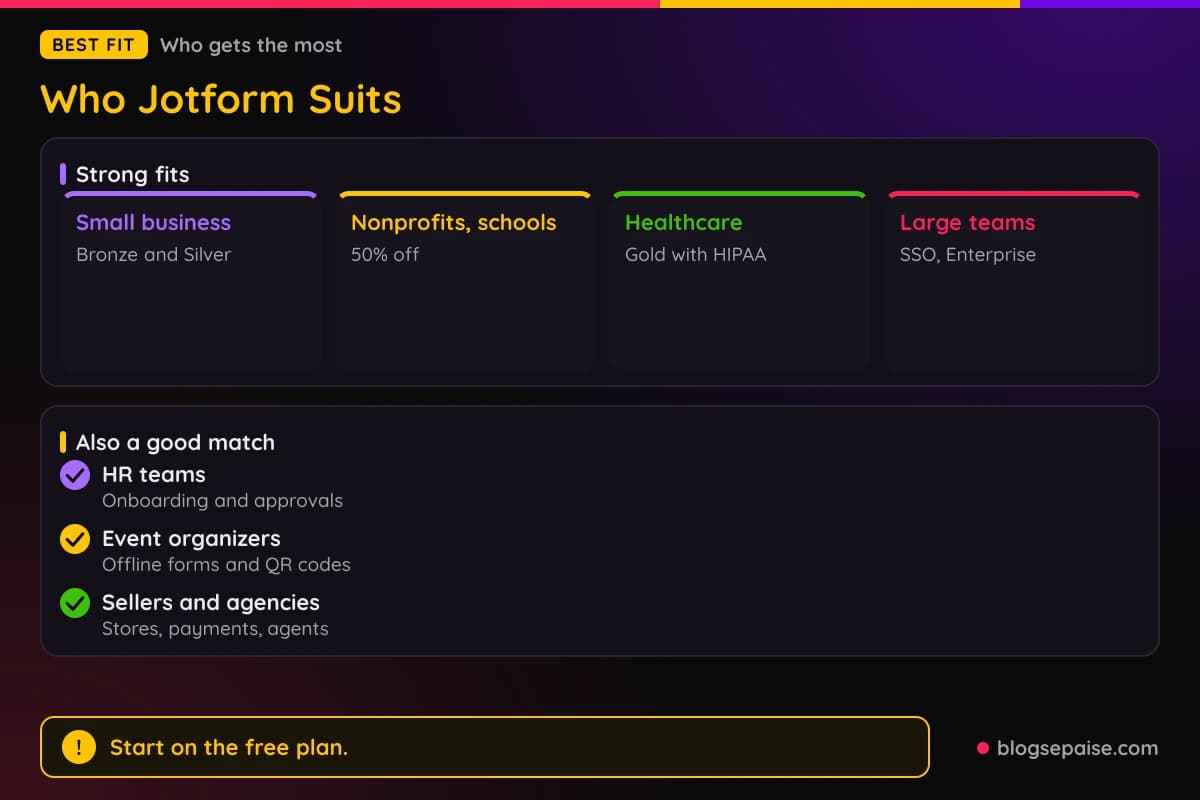
Healthcare teams that need HIPAA-enabled forms should look at Gold or Enterprise. Intake, consent, and scheduling forms come with a signed business associate agreement.
Event organizers get QR code forms, offline mobile collection, and kiosk mode. Trade show staff can capture sign-ups without a signal.
Sellers can build a store and take payments with more than 25 processors. Jotform adds no transaction fees on top of the processor's rate.
Agencies and support teams benefit from AI Agents and Boards. Requests turn into tasks, and agents answer common questions around the clock.
Large organizations fit Enterprise. Single sign-on, data residency, an Admin Console, and professional services support many departments.
Everyone who wants no-code tools will feel at home. People who work in ChatGPT or Claude can build forms from a chat too.
Who Jotform Is Not For
Jotform is not the best pick for teams that want one polished survey style. A tool built only around conversational design may feel more focused.
People who need many users on one account will hit a wall. Starter through Gold are single-user plans, and only Enterprise has multiple users.
Heavy volume pushes you up the ladder. Gold caps submissions at 10,000 a month and forms at 100, so busy teams move to a custom Enterprise quote.
Strict HIPAA needs raise the cost. HIPAA features start at Gold, and you must still follow HIPAA rules yourself.
Jotform does not state a price for the AI Agent phone number add-on or the numbers for agent limits. Teams that plan heavy voice use should check those first.
Some tools have clear gaps. PDF forms allow only 1 PDF form per account, and Smart PDF Forms cannot edit the text of an existing PDF.
Teams that dislike branding on free forms will need a paid plan. Starter forms carry Jotform branding, and Bronze and above remove it.
Anyone who wants a long free trial of a paid plan will not get one. The free Starter plan and a 30-day money-back guarantee are the safety net.
Jotform Alternatives
Jotform competes with many form and survey tools. Well-known options include Typeform, Google Forms, Tally, Formstack, and Microsoft Forms.
Check each tool's current pricing and limits before you choose. Prices, plans, and features change often.
Typeform is known for polished, conversational forms that show one question at a time. It fits surveys and lead capture where looks matter most.
Google Forms is free and simple, and it ties into a Google account and Sheets. It suits quick polls and classroom quizzes more than payments or approvals.
Tally is a lightweight builder with a clean writing-style editor. It suits people who want a simple form fast, and it has fewer extras than Jotform.
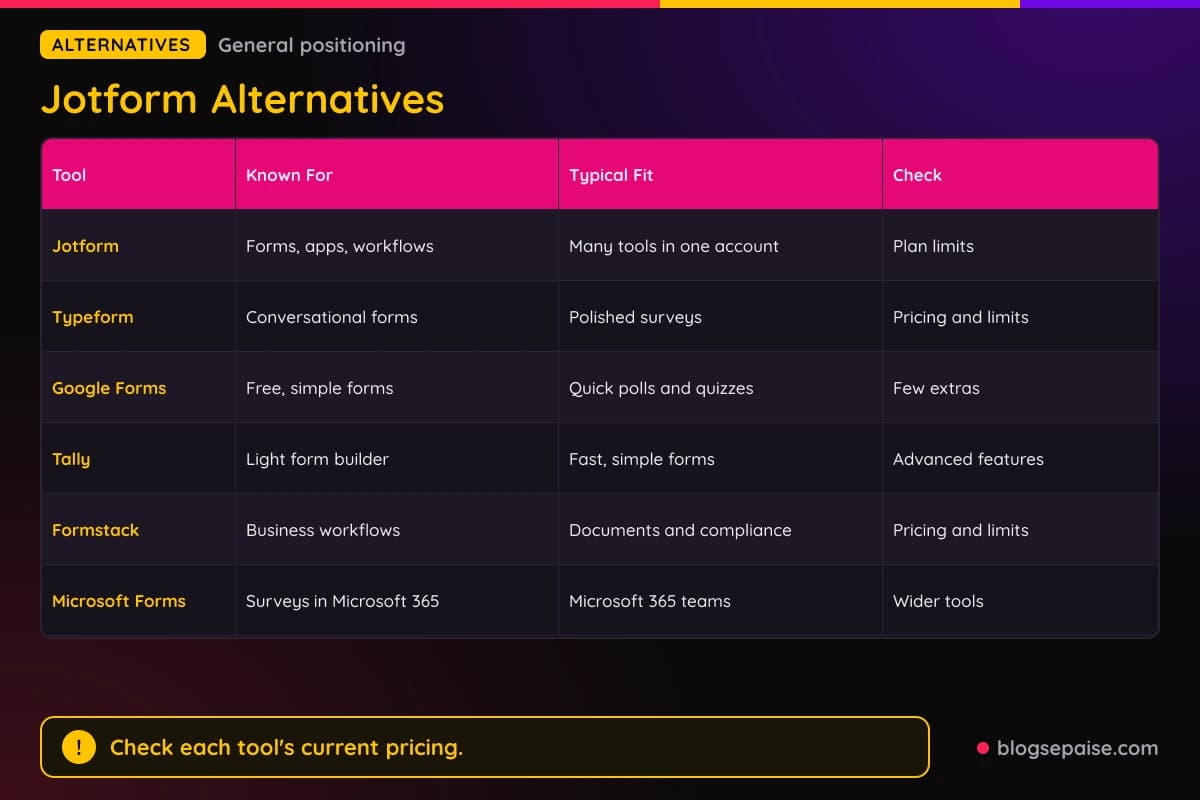
Formstack is built for business workflows and documents. It aims at teams that route forms, collect signatures, and manage compliance.
Microsoft Forms suits teams already in Microsoft 365. It covers simple surveys and quizzes without the wider product set Jotform adds.
Jotform stands out for breadth. Forms, apps, signatures, workflows, AI agents, boards, and tables live in one account.
On price, Jotform starts at $34 a month billed yearly for paid plans, and Starter is free. Compare that with each rival's current plans before you decide.
For more write-ups, browse our software reviews hub to compare tools side by side.
If your forms collect personal data, our privacy policy generator can help you draft the notice you need.
Jotform Use Cases
Use cases come from the product set. Each one starts with a form and adds a tool around it.
A small business can take orders and payments. A payment form with Square, PayPal, or Stripe collects money, and a notification reaches you by email, SMS, or Slack.
A clinic can handle patient intake and consent. HIPAA-enabled forms on Gold collect intake details, e-signatures, and appointment requests, and Google Calendar creates the events.
An HR team can run onboarding and time-off approvals. A workflow routes each request to the right manager, and Sign collects the final signatures.
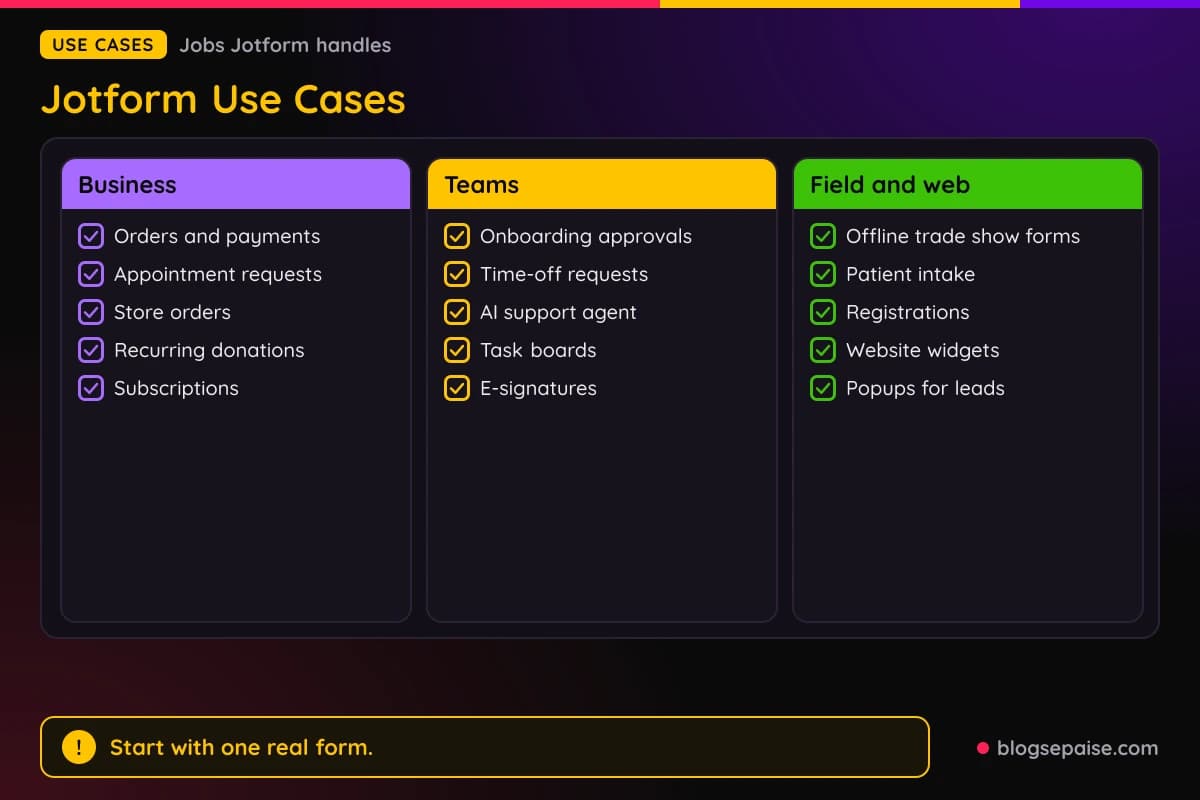
A school or nonprofit can collect registrations and donations at a discount. Recurring donations and event sign-ups run from one form.
A support team can add an AI Agent to its site. The agent answers from your FAQs and documents, and hard questions become tasks on a Board.
Event staff can use Mobile Forms offline at a trade show. Kiosk mode resets the form after every sign-up, and data syncs when the signal returns.
A seller can build a Store Builder shop and manage orders in Tables. Guest checkout and order tracking keep the buying side simple.
A marketer can add widgets to a website. A popup, a spinning wheel, or a countdown timer collects leads without touching code.
Final Thoughts On Jotform
Jotform is a broad toolkit built around the humble form. It grows from a contact form into apps, signatures, workflows, AI agents, and data tools.
The free Starter plan makes it easy to try. Paid plans start at $34 a month billed yearly, and a 30-day money-back guarantee backs them.
Strengths are breadth, templates, and no-code setup. More than 20,000 templates and 150+ integrations cover most small business needs.
Weak spots are single-user plans and limits that depend on your plan. Some details, like the AI Agent phone add-on price, are not stated.
Start with Starter, build one real form, and count your monthly submissions. Then pick the plan that fits, and check the current limits on the Jotform pricing page.
Forms collect personal data, so read our legal disclosures guidance and our GDPR cookie notice builder if you serve EU visitors.
Jotform FAQ
1. What Is Jotform?
Jotform is an online form builder with no-code tools for forms, apps, e-signatures, workflows, AI agents, boards, tables, PDFs, and payments.
More than 40 million people use it, and sign-up is free.
2. Is Jotform Free To Use?
Yes. The Starter plan is free and gives you 5 forms, 100 submissions a month, and 100 MB of storage.
Starter forms carry Jotform branding, and paid plans remove it.
3. How Much Does Jotform Cost?
Bronze is $39 monthly or $34 a month billed yearly. Silver is $49 or $39, Gold is $129 or $99, and Enterprise is a custom quote.
Yearly totals are $408 for Bronze, $468 for Silver, and $1,188 for Gold.
4. Does Jotform Have A Free Trial Or Refund?
Paid plans have no free trial. A 30-day money-back guarantee lets you cancel within 30 days of payment for a full refund.
Contact support to request it.
5. Is Jotform HIPAA Compliant?
Jotform offers HIPAA-enabled features on Gold and Enterprise, with a signed business associate agreement for covered entities.
You still must follow HIPAA rules yourself.
6. Can Jotform Take Payments?
Yes. Forms connect to more than 25 payment gateways, including Square, PayPal, Stripe, and Authorize.Net.
Jotform adds no transaction fees, so you pay only the processor's rate. Payment submissions are capped by plan.
7. How Many Integrations Does Jotform Have?
Jotform has more than 150 integrations, covering email marketing, CRMs, project management, and cloud storage. Zapier adds 3,000+ more platforms.
A REST API is available too, for developers who use API keys.
8. Is Jotform Safe For Sensitive Data?
Jotform uses 256-bit SSL on all plans and offers Encrypted Forms. Compliance includes PCI DSS Level 1, GDPR, and CCPA.
File uploads are not covered by Encrypted Forms, so plan around that.
9. Can I Use Jotform With ChatGPT Or Claude?
Yes. Jotform has a ChatGPT App, a Claude App, and an MCP server for other AI tools.
You need a Jotform account, and the MCP server is free beyond your subscription.
10. Can Nonprofits And Schools Get A Discount?
Yes. Approved nonprofits and schools get 50% off Bronze, Silver, and Gold, and 30% off Enterprise.
The discount applies to monthly and yearly billing.