Klap Review (2026): AI Clip Maker Pricing, Tools, And Verdict
Klap is an AI tool that turns long videos into short vertical clips for TikTok, Instagram Reels, and YouTube Shorts. You upload a file or paste a link, and the AI picks the moments worth posting.
Klap reports 8.5M clips made by 3.5M creators. Its users include YouTubers, podcasters, streamers, coaches, marketers, and agencies.
The platform covers clip making, YouTube repurposing, highlight reels, podcast tools, platform generators, subtitles, translation, cropping, and resizing.
Each clip comes out vertical at 9:16 with captions and a Virality Score from 0 to 100. Klap works best on spoken video such as podcasts, interviews, webinars, and lectures.
Pricing runs on three plans counted in clips per month, from $14 to $189 a month. Klap offers 1 video free with no credit card.
Disclosure: Some of the links I share might be affiliate links. If you click on one and make a purchase, I may earn a small commission as a thank you. But don’t worry, it won’t cost you anything extra. I only recommend stuff I genuinely believe in. Your support helps me keep creating awesome content. You can read my full affiliate disclosure in my disclaimer page.
If you want to save a lot of hours searching for high-paying affiliate programs, check out our exclusive list of 2500+ affiliate programs. You’ll find all the information about the programs inside the list. This list is perfect for affiliate bloggers and influencers.
Klap Features
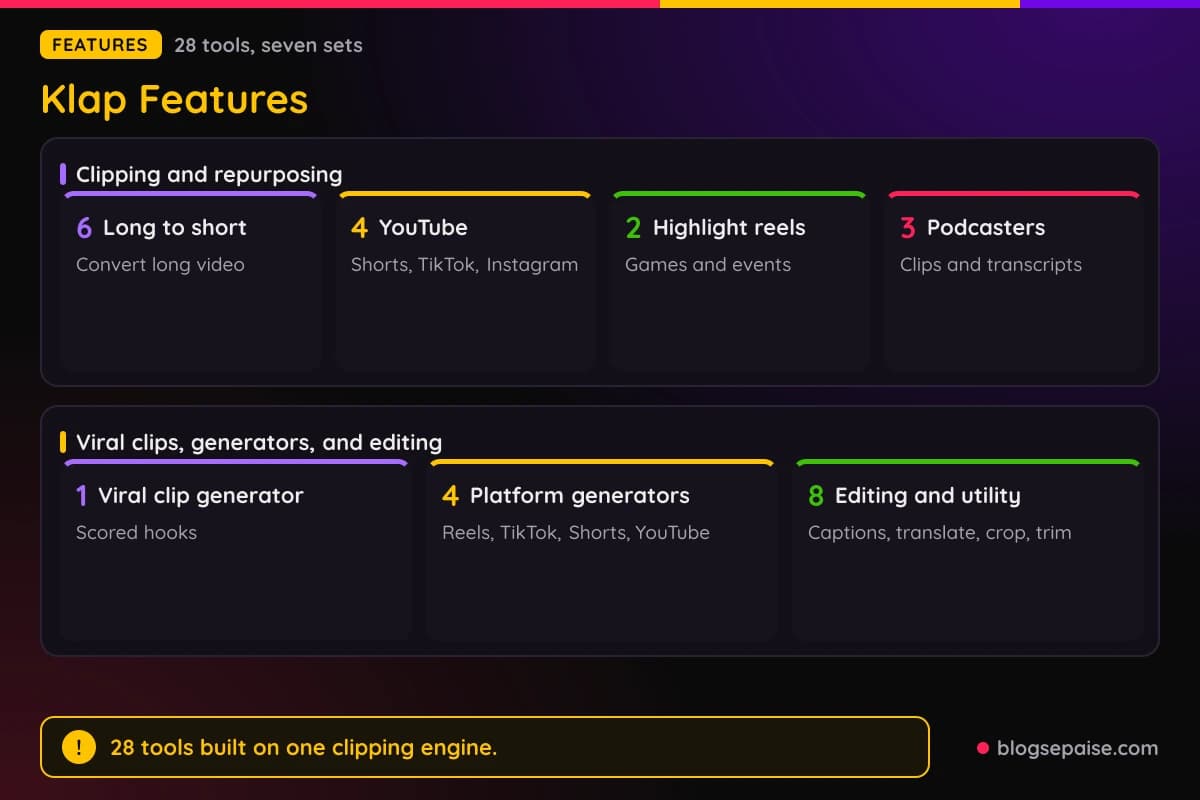
Klap has 28 tools, and most of them share one clipping engine. You give it a long video, and it returns short vertical clips with captions, ranked by a Virality Score from 0 to 100.
Six tools turn long videos into short clips, and four repurpose YouTube videos. Two build highlight reels, and three serve video podcasters.
A viral clip generator ranks moments by hook and pacing. Four platform generators target Reels, TikTok, Shorts, and YouTube videos.
Eight editing and utility tools cover subtitles, translation, cropping, resizing, trimming, captions, and video editing. The tool titles repeat a lot across the clipping tools because they share one engine.
AI Reframe 2 is Klap's name for the reframing step, which keeps the speaker in frame as the video converts to vertical.
Clips export in vertical 9:16 for TikTok, Reels, Shorts, Snapchat Spotlight, and Facebook Reels, with no watermark added.
1. Turn Long Videos Into Short Clips
The first group has six tools that do the same basic job. They take a long video and cut it into short vertical clips.
The Long Video to Short Video Converter is the plain version. It turns long videos into vertical clips for TikTok, Reels, and YouTube Shorts, with 10+ shorts in about 30 seconds.
You paste a YouTube link or upload a file, and the work happens in your browser with no install. Processing runs from about 30 seconds to a few minutes, so expect it to vary.
The AI scans for hooks, punchlines, emotional peaks, and quotable lines. It returns clips ranked by a Virality Score, each one reframed to 9:16 with captions and speaker tracking.
You can download clips one by one or in a batch, or publish to YouTube, Instagram, and TikTok. A built-in scheduling calendar sits in the same place.
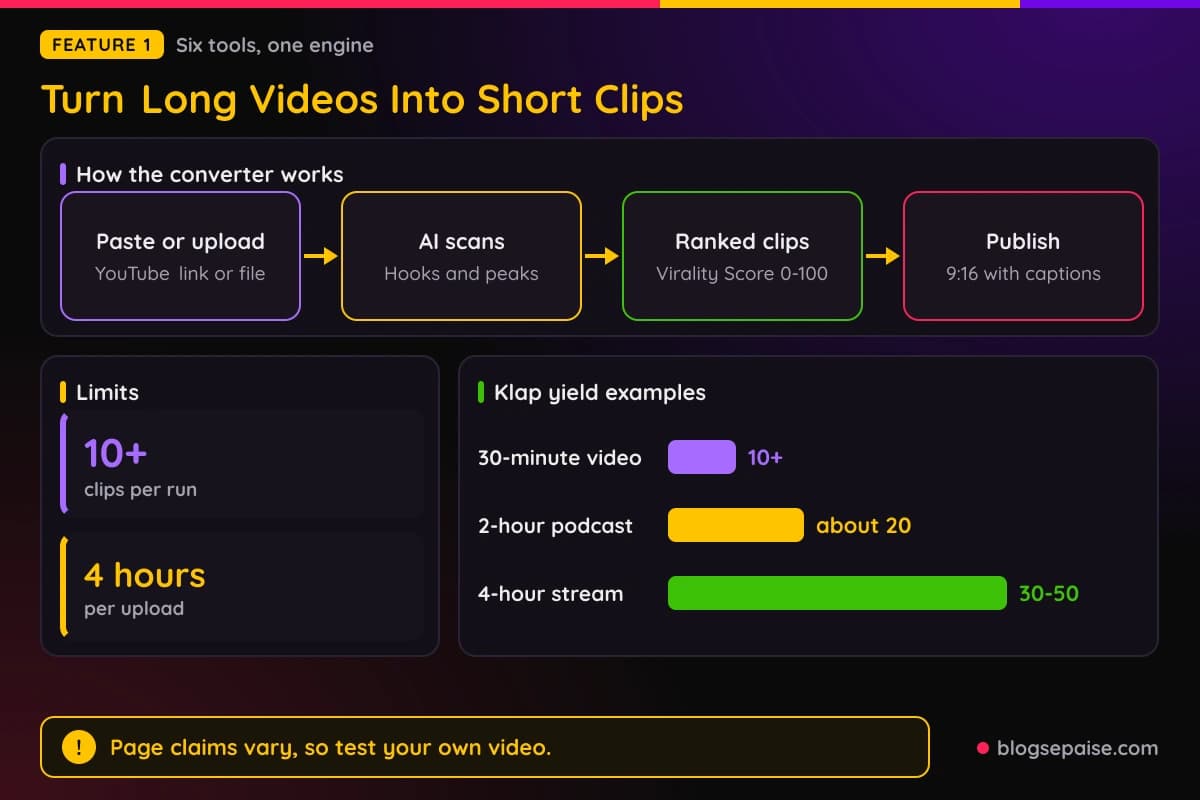
Uploads can be MP4, MOV, AVI, MKV, WMV, or FLV, and links can come from YouTube, Vimeo, Twitch, Google Drive, or Dailymotion. The maximum is 4 hours per upload.
Klap gives yield examples. A 30-minute video gives 10+ shorts, a 2-hour podcast gives about 20, and a 4-hour stream gives 30-50.
The AI Clip Maker uses the same engine and targets 10+ viral-ready clips from any video in 30 seconds. Its extra is a transcript editor where you highlight text to keep and strike text to cut.
The video updates as you edit the words, which is easier than dragging a timeline. You can also type prompts such as find the best question and answer moments or get every product mention.
Posting advice for the score is simple. Post clips scoring 90+ first, test the 70-80 range, and skip the rest.
The AI Clip Generator is built for existing videos, not text-to-video. For building a video from text, Invideo, Canva, and Adobe Express are the tools to use instead.
It yields 8-15 clips from a 20-minute YouTube video and 20-40 from a 2-hour podcast. Its Virality Score weighs hook quality in the first 3 seconds, edit pacing, topic relevance, and caption keyword density.
Output is vertical 9:16 for TikTok, Reels, Shorts, Snapchat Spotlight, and Facebook Reels. A polish editor lets you adjust captions, swap layouts, trim, and tweak the reframe.
The AI Video Clipping Tool is the team version. It covers batch uploads, YouTube import, and API webhook ingestion, with brand kits for logo, fonts, colors, and caption style per client.
Team workspaces have roles for admins, editors, and viewers, plus activity logs. Batch jobs can reach up to 100 finished clips per hour.
Team use also brings up a Pro tier with up to 10 hours of source video per day and uncapped Enterprise use. The standard plans are Basic, Pro, and Pro+, so plan details vary.
The AI Shorts Maker is built for YouTube. It generates 30+ YouTube Shorts from one long video in 30 seconds, pulling a pasted YouTube link directly with no re-upload.
You connect your YouTube channel to publish, or schedule a month of posts from the calendar. Klap reports that animated caption templates add 30%+ watch time.
The Video to Shorts Converter takes any video and aims at Shorts, Reels, and TikToks in 30 seconds. It works in a browser, including on mobile, and pasting a URL avoids the upload limit.
It works best on clear spoken audio, such as podcasts, interviews, webinars, and lectures. It is less effective on silent, music-only, or non-speech gameplay footage.
Shorts counts vary from 10+ to 30+ depending on the tool. Processing times vary too, so check your own file.
2. Repurpose YouTube Videos For Every Platform
The second group is for people who already have a YouTube library. Four tools start from a YouTube link and aim at a different platform each.
The YouTube to Shorts Converter takes a public YouTube URL and builds vertical Shorts. You can use your own uploads or videos you have the rights to clip.
You do not download or upload anything. The AI finds hooks and key moments and returns Shorts in about 30 seconds.
Each clip is 9:16 with captions baked in, a Virality Score, and no watermark. You can publish to YouTube Shorts from Klap or schedule a month ahead with the built-in calendar.
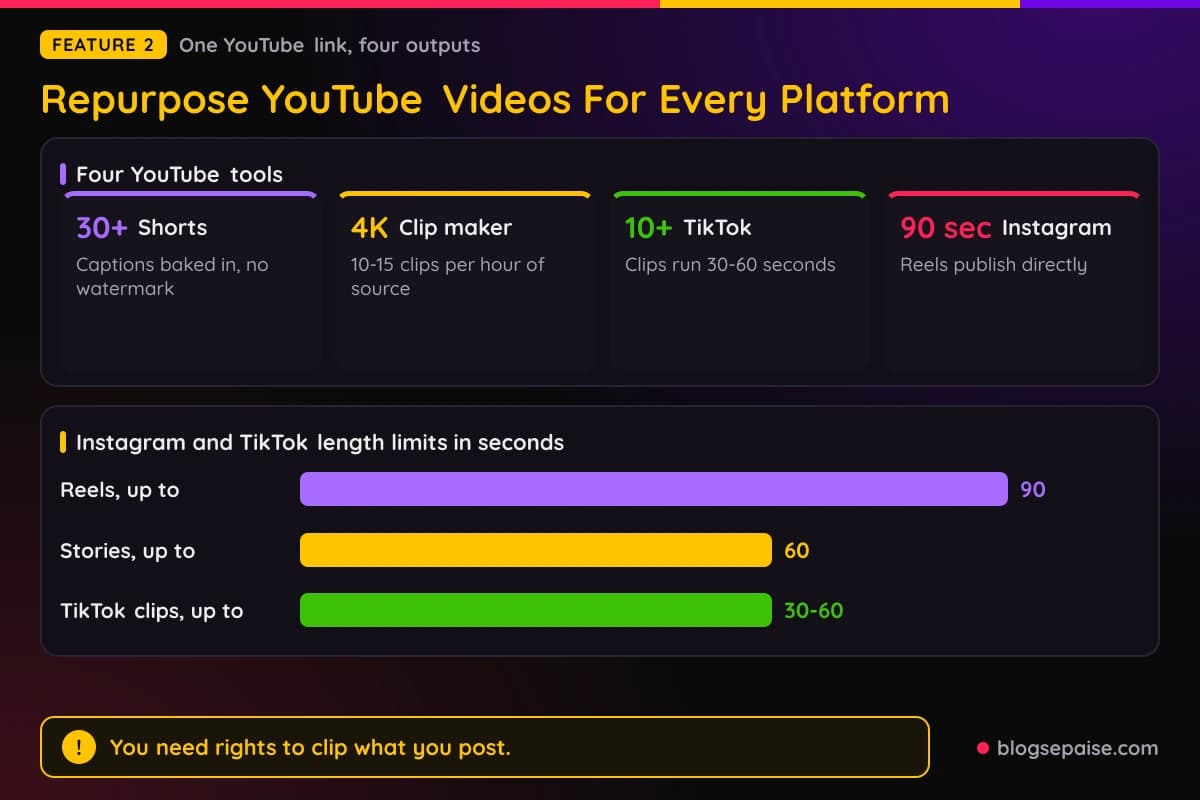
Counts run from 10+ to 30+ Shorts per video. Typical examples are 30+ from a 1-hour video and 20-40 from a 2-hour podcast or livestream.
Klap is for repurposing long videos. YouTube's own tool is for filming new Shorts.
You need the rights to anything you clip, through permission, a license, or fair use. Klap gives no legal guidance, so that part is on you.
The YouTube Clip Maker is the editing-friendly sibling. One long video goes in, and 10+ ranked clips come out, which works out to 10-15 per hour of source.
Inputs include your own uploads, public videos you have rights to, and livestream replays, plus Vimeo, Twitch, Google Drive, and Loom links. The limit is 4 hours per video.
Clips carry word-by-word captions with keyword highlights, an automatic Hook Title, and a Virality Score. Downloads go up to 4K with no watermark, and the free video includes 4K.
You can fix the text in a transcript editor by keeping or removing sentences. Publishing goes to TikTok, Instagram, YouTube, and LinkedIn.
Trimming one specific moment is not the job here. For that, our free video trimmer may fit better.
The YouTube to TikTok Converter targets 10+ TikTok-ready clips in 30 seconds. You connect TikTok once, then publish directly or schedule from the calendar.
Clips run 30-60 seconds with animated captions and a Virality Score. A 30-minute video typically yields 8-10 clips.
Klap keeps the original audio and suggests swapping in licensed music from TikTok's library. No official YouTube to TikTok integration exists, so Klap works as the closest option.
The YouTube to Instagram tool makes 10+ captioned clips in about 30 seconds. Reels publish directly to a connected Instagram account and can be scheduled.
Stories and feed posts work differently. You must download the file and upload it through the Instagram app.
Reels run 9:16 up to 90 seconds, Stories 9:16 up to 60 seconds, and feed posts 4:5 or 1:1. Length targeting runs from 30 to 90 seconds, and downloads are MP4.
Instagram does not accept raw YouTube URLs, so you cannot paste a link into Instagram itself. Klap handles that step, and no re-recording is needed.
The Virality Score rates your first-second hook and pacing, with cuts every 3-5 seconds. For the bigger idea, our guide to repurposing content explains why one video can feed many platforms.
3. AI Highlight Reels
The third group has two tools that build one highlight reel instead of many short clips. The Highlight Video Maker scans a full video, picks the strongest moments, and assembles them with captions and transitions.
The first pass takes about 30 seconds and needs no editing experience. You upload a file or paste a link, then review the reel and reorder, trim, or fix captions.
You can steer it with a text prompt, such as highlight every goal or every customer testimonial. Inputs are MP4 and MOV, with links from YouTube, Twitch, Vimeo, and Google Drive, up to 4 hours.
Outputs come in 16:9, 9:16, and 1:1, with no watermark and room for your logo, colors, and fonts. The AI weighs audio energy, motion intensity, speaker engagement, and topic relevance.
Editing time drops by up to 90%, compared with freelancers who charge $50-200 per reel over 2-3 days. Premiere or CapCut give you more manual control.
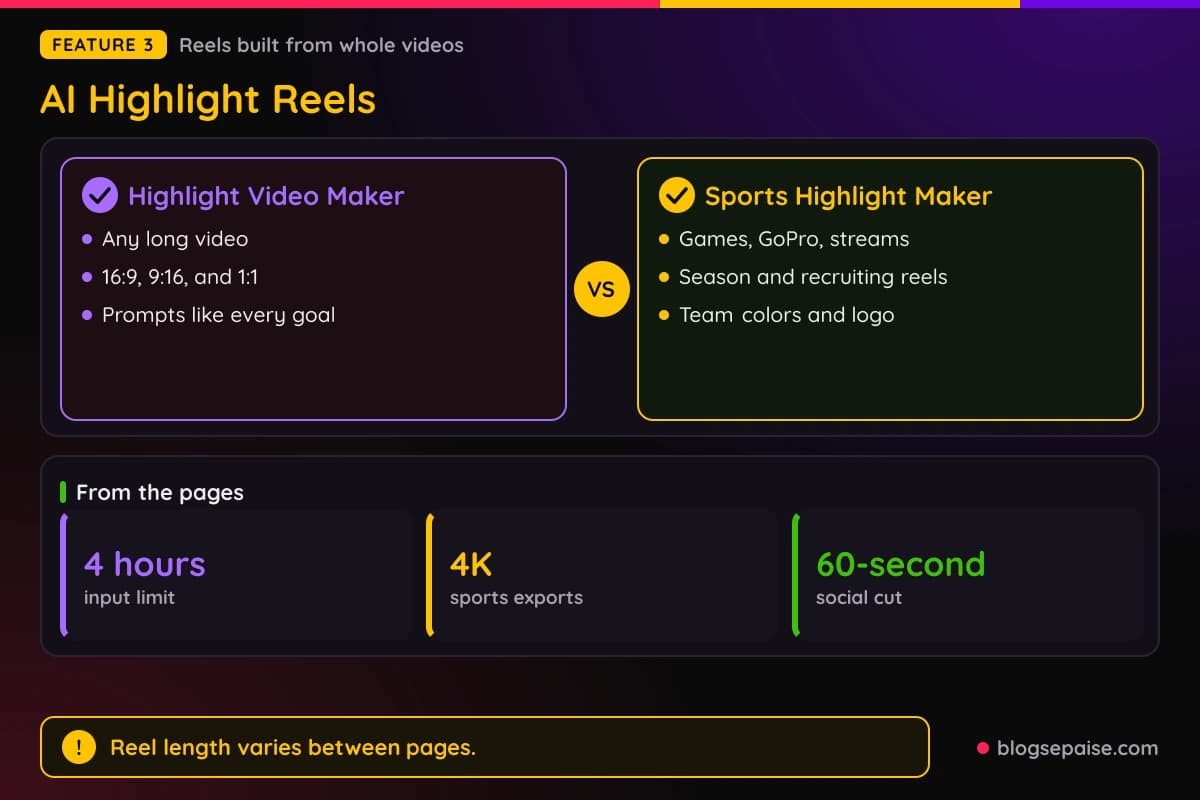
The Sports Highlight Video Maker applies the same idea to game footage. It finds scoring plays, defensive stops, big hits, and emotional reactions, then adds captions and transitions.
You can upload full games, GoPro clips, sideline footage, or streams, and add several files in one session for a season reel. Exports go up to 4K with no watermark.
Supported sports include basketball, football, soccer, hockey, lacrosse, volleyball, and MMA, with no sport-specific presets. Clear broadcast, sideline, or GoPro footage works best, and shaky video is harder.
For recruiting, you can pick a 60-second social cut or a longer recruiting reel, and add a jersey number, position, and contact details.
Recruiting reel length varies from 60 seconds to 90 seconds, so check before you plan.
Share options include YouTube, TikTok, Hudl, and Instagram. Team colors and a logo can be added in the editor.
4. Tools For Video Podcasters
The fourth group is for people who record podcasts on video. It has three tools, and two of them are nearly identical.
The Podcast Clip Maker is a free AI clip maker for video podcasts. It looks for quotable insights, reveals, emotional exchanges, debates, and jokes.
Clips get a Virality Score from 0 to 100 and speaker-labeled captions. You upload a video episode or paste a link, then publish to TikTok, Instagram, and YouTube or download clips by episode.
Links can come from YouTube, Riverside, Zencastr, and StreamYard, and you can use exports from Riverside, Zencastr, StreamYard, and SquadCast. The limit is 4 hours per episode.
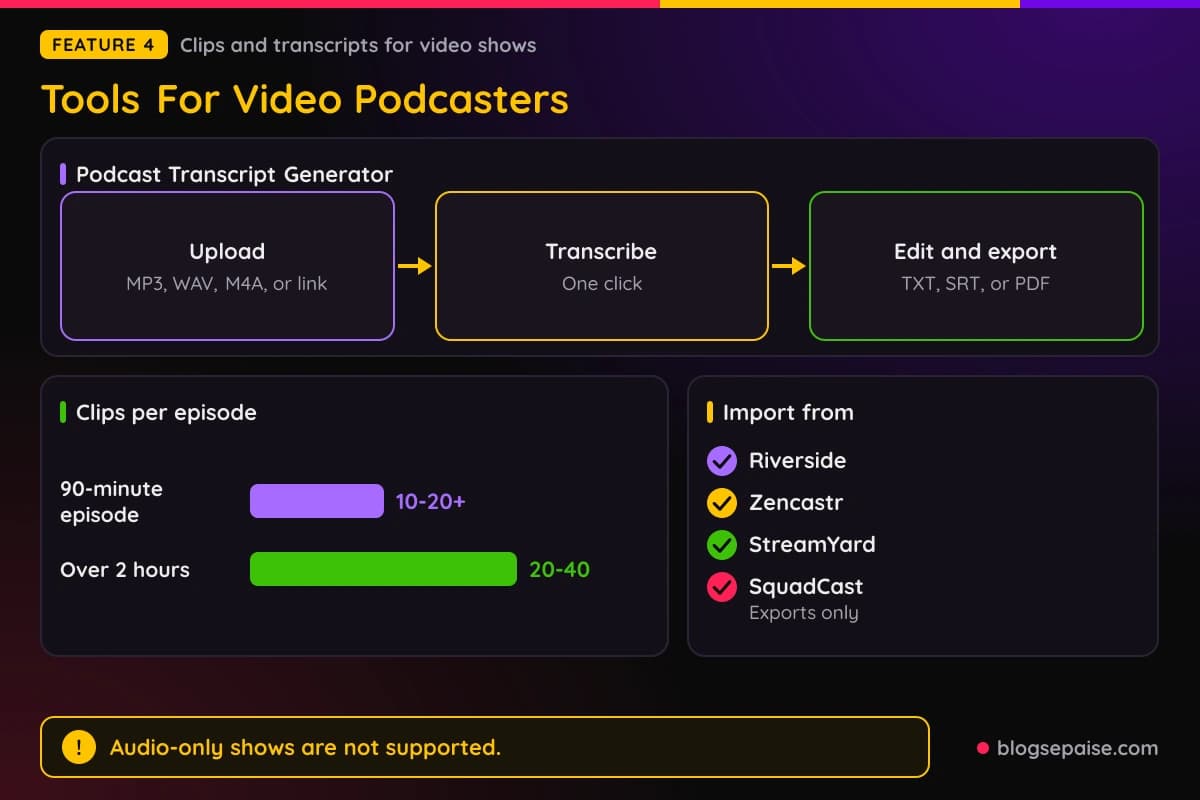
You can also type a plain request, like find the part where they disagree. That tells the AI which moment to hunt for.
Output examples are 10-20+ clips from a 90-minute episode and 20-40 from an episode over 2 hours. Formats include 9:16, 1:1, and 16:9.
Multi-host layouts are a real selling point. Split-screen, three-screen, four-screen, and picture-in-picture layouts apply automatically.
Teams can connect through an API with webhook delivery, an MCP server, Zapier, Make, and n8n. That matters for networks with many shows.
Two limits are worth knowing. Audio-only podcasts are not supported, and Klap points those users to Podsqueeze or Headliner.
It does not write show notes, standalone transcripts, or newsletters. Processing time runs from about 30 seconds to 5 minutes for 10+ clips.
The Podcast Transcript Generator fills the transcript gap. It turns episodes into accurate, searchable transcripts, and you can edit them after they generate.
Inputs are audio files in MP3, WAV, or M4A, or a pasted YouTube link. Klap advises clear audio without background noise.
The steps are upload, click transcribe, then edit and export. Exports can be TXT, SRT, or PDF.
There is no limit on podcast length, and multi-hour episodes work. Klap does not state file size limits, speaker identification, or timestamp details.
The first podcast transcription is free, and later use is paid. Accuracy is high in most cases, though Klap gives no accuracy figure.
The Podcast Transcription tool is nearly a copy of the generator, titled Transcribe a Podcast for Free With AI. It adds fonts and colors to match your brand, and results arrive in minutes.
The transcript is highly accurate in most cases, and you should refine it by hand. Noisy audio hurts results, so record cleanly.
Benefits include accessibility, reach, and SEO from the keywords in the text. Transcripts can be shared with your team and your listeners.
5. Viral Clip Generator
The Viral Clip Generator is the fifth group on its own. Klap pitches it as 10+ short clips ready for TikTok, Reels, and Shorts.
You paste a YouTube link or upload an MP4, MOV, AVI, or MKV file, up to 4 hours. The AI scores moments for hooks, punchlines, contrarian takes, and emotional peaks.
Each clip gets a Virality Score from 0 to 100 and comes out vertical at 9:16, with captions and speaker tracking. Klap reports that scores above 80 are statistically much more likely to perform.
The score inputs are hook strength, emotional peak, dialogue clarity, and pacing. Klap does not publish the scoring method, and the number works as a ranking aid.
No tool can guarantee virality. The model was trained on millions of clips.
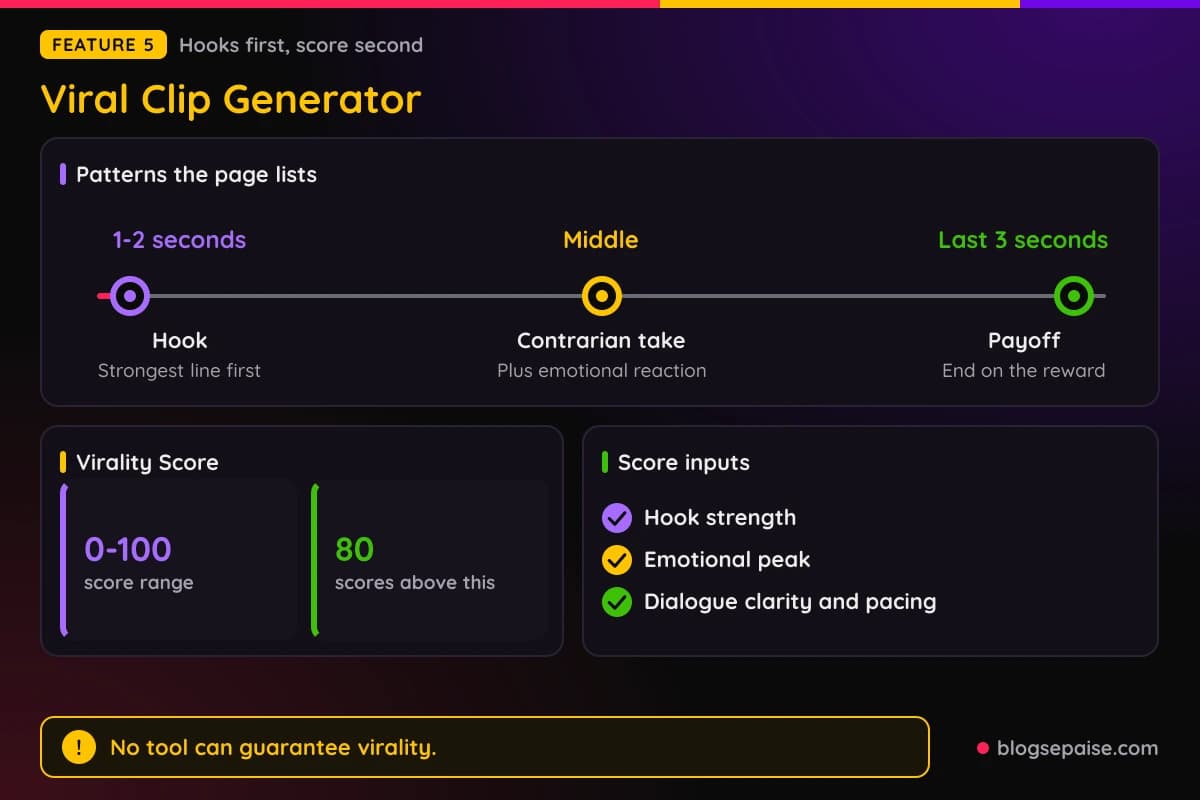
Hook detection is the standout idea. It moves the strongest line to second 0, and it can reorder dialogue, but only with your approval.
Captions appear word by word inside the TikTok safe zone, and you can add your brand styling. You then download, schedule, or publish to TikTok, Reels, and Shorts.
Yield examples are about 10-15 clips per hour, with a 30-minute podcast giving 6-8 and a 2-hour interview giving 20+. A 4-hour stream gives 30+ viral clip attempts.
Ranked clips of 10-15 arrive in about 30 to 60 seconds, depending on the video. Check your own file for the real time.
Winning patterns include a hook in the first 1-2 seconds, a contrarian take, an emotional reaction, and a payoff in the last 3 seconds.
About 85% of videos are watched on mute, which is why word-by-word captions matter.
Paid plans add more clips per month, longer videos, HD export, and brand customization. The audience includes podcasters, YouTubers, coaches, and streamers using Twitch or Kick replays.
6. Platform Specific Generators
The sixth group has four tools named after the platform they serve. Three of them are cousins of the clip tools, and one reaches further.
The AI Reel Generator turns long videos into Instagram Reels. It is not a text-to-video tool, so Canva or Invideo fit that job better.
It targets 10+ Reels from one upload in about 30 seconds to under a minute. Inputs are a YouTube link or MP4, MOV, AVI, WMV, and MKV files.
It works best on speaking content like podcasts, interviews, webinars, livestreams, and talking heads. The AI picks moments, crops to 9:16 with speaker tracking, and adds word-by-word captions.
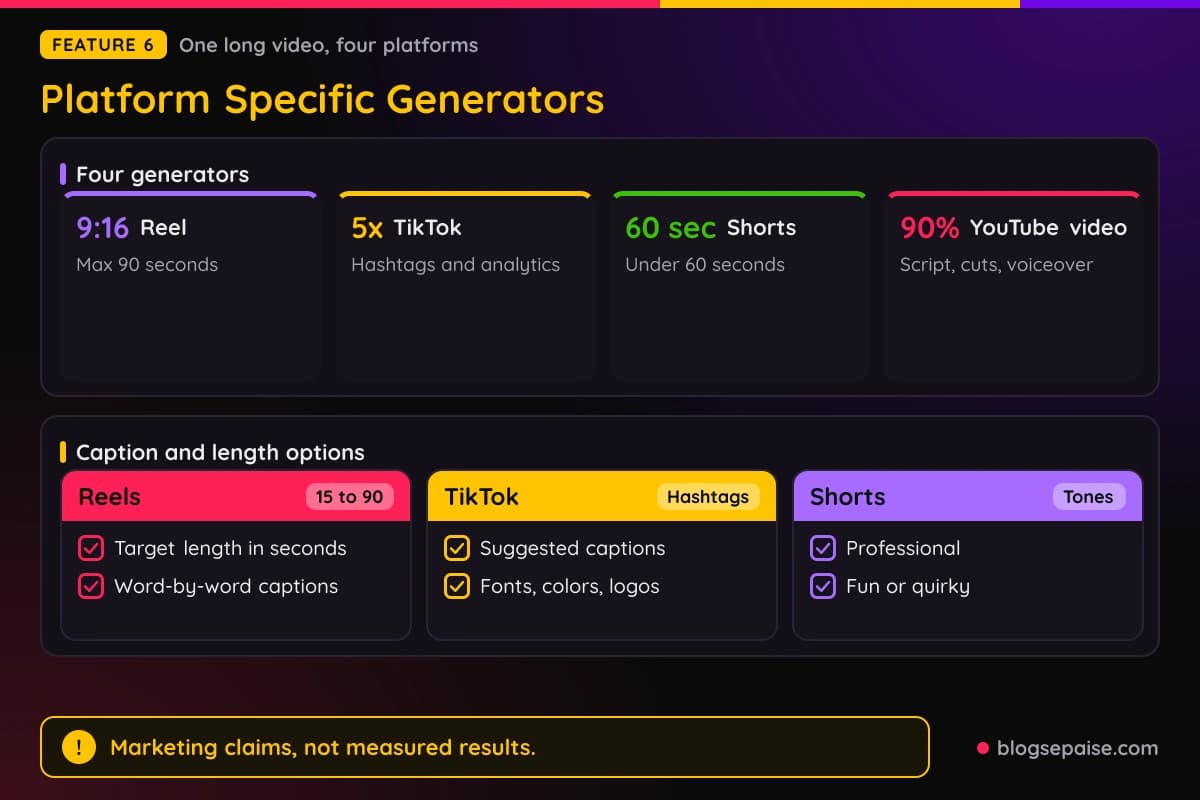
Reels are locked to 9:16 with a maximum of 90 seconds, and you can set a target length from 15 to 90 seconds. Captions sit above the Reels interface, and Klap picks a cover frame for you.
In the editor you can trim, change caption styles, and add brand colors and a logo. You download in HD or post straight to Instagram, and 10+ Reels come from a one-hour video.
The AI TikTok Video Generator converts long-form video into TikTok shorts. It picks segments by engagement, relevance, and visual appeal, and matches trending formats.
It also suggests captions and hashtags, and blends in music, text, and effects. You can set custom fonts, colors, logos, and framing.
Scheduling, direct posting, and real-time analytics are included. Formats are MP4, AVI, MOV, WMV, FLV, and MKV, and the original resolution is preserved.
Processing takes seconds to a few minutes, and Klap reports you can grow a TikTok audience 5x faster. Klap gives no detail on language support, size limits, or pricing for this tool.
The AI YouTube Shorts Generator turns long videos into Shorts in seconds. You drag in a file or paste a YouTube link, choose a style, and the AI trims and selects highlights.
Caption tones include professional, fun, and quirky, and you can adjust editing style and transitions. Shorts run under 60 seconds.
You can download, post directly to YouTube Shorts, or export for TikTok and Instagram. Formats are MP4, MOV, and AVI, and the tool speaks to influencers, businesses, and agencies.
The AI YouTube Video Maker is the odd one out. It cuts editing time by up to 90%, and it accepts raw footage, a YouTube link, or a written description of your concept.
The AI writes a script, finds key scenes, cuts the video, and can add voiceovers, background music, and effects.
Included tools are auto-cutting, transitions, background removal, one-click enhancements, captions, intros, and overlays.
You can tweak by hand with drag and drop, then export in high quality or publish to YouTube. Formats are MP4, MOV, and AVI, and it aims at vlogs, tutorials, product demos, and branding videos.
Klap shows no sample of the script or voiceover output. The other three generators in this group work from existing video only.
Because these four tools overlap, compare them by platform and not by feature lists. If you plan a lot of Shorts, our YouTube video idea generator can help you decide what to film.
7. Editing And Utility Tools
The last group holds eight smaller tools. They focus less on finding clips and more on fixing, captioning, and reshaping video you already have.
The Subtitle Generator makes timed, synchronized subtitles and is free to try. You upload a video or paste a YouTube link, the AI analyzes the audio, and you review and edit.
You can export the video with subtitles burned in or share it directly. Fonts, sizes, and colors are adjustable.
It handles 52 languages with different accents and dialects, and supports videos up to 3 hours depending on your plan. Longer videos need to be split.
Accepted formats are MP4, AVI, MOV, and WMV. Klap gives no accuracy figure for the subtitles.
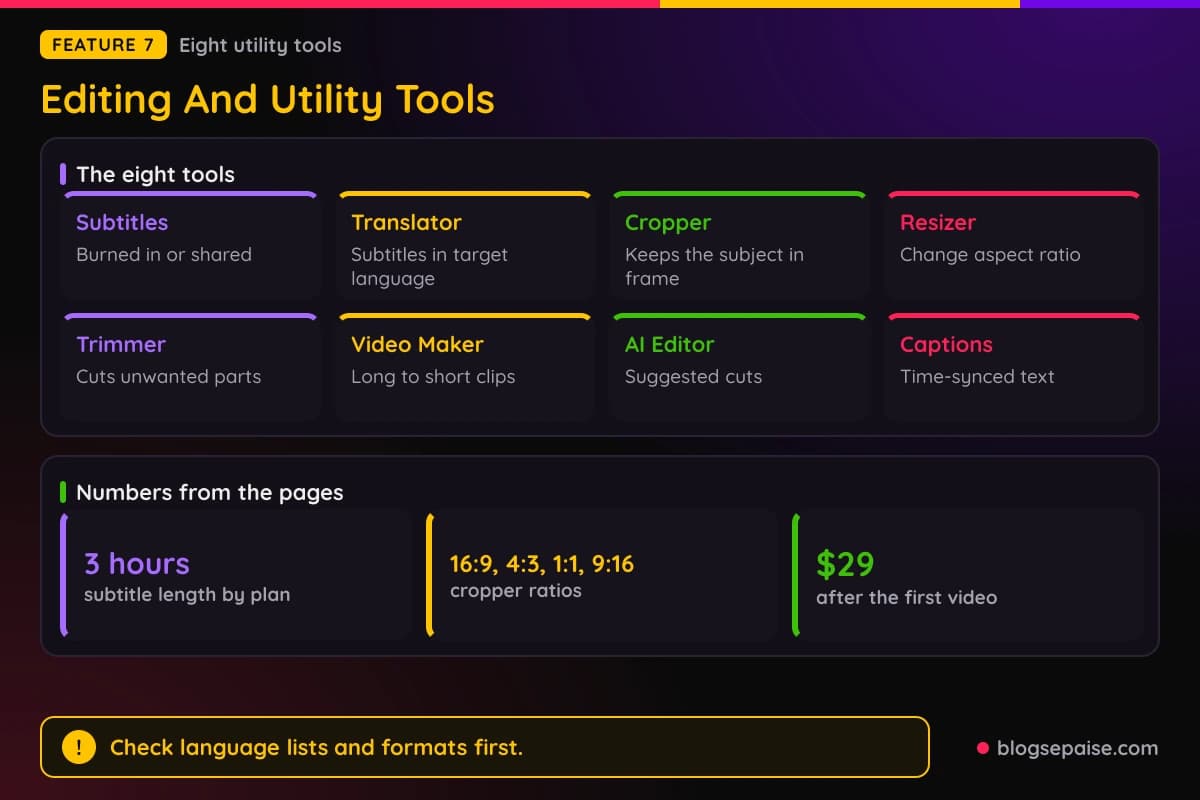
The Video Translator reads the spoken audio and writes subtitles in the language you pick. They stay in sync with playback.
The AI detects the original language, so you only choose the target. You can export a video with embedded subtitles, separate subtitle files, or subtitle files alone.
The Video Translator covers 52 languages, though Klap gives no language list, file size, length, or processing time. It produces subtitles rather than a dubbed voice.
The Video Cropper reframes video with AI and keeps the main subject in frame. Target ratios are 16:9, 4:3, 1:1, and 9:16.
Targets include TikTok, Facebook, Instagram, and LinkedIn. Subjects are detected automatically, so you do not mark the main subject by hand.
The Video Resizer changes dimensions, aspect ratio, width, height, or resolution for different platforms. Targets include Instagram feed, stories, and IGTV, plus YouTube and YouTube Shorts.
You upload a file or a YouTube link, and no subscription is needed. Resizing might affect quality, and Klap aims to minimize that.
The Video Trimmer removes unwanted segments and adjusts length, and it can also produce clips ready for publishing. Formats named are MP4, AVI, MOV, WMV, FLV, and MKV, all in a web browser.
Large videos run on powerful servers, and Klap sets no stated limits. You can also pick the section to keep by hand.
The Video Maker turns long-form video into short clips with no download or editing experience needed. It supports manual or AI highlight extraction in a few seconds.
The first video is free and then it costs $29 a month, which matches the Basic monthly price. Formats are MP4, AVI, and MOV.
The AI Video Editor aims to turn long-form video into shareable shorts. It trims long intros and awkward pauses and flags unnecessary footage with suggested cuts.
Extras include scene detection, manual trims, added text, and a real-time preview. It can also learn your style, though Klap gives no detail on how.
Processing takes within seconds to a few minutes. Audio syncing is included, with no detail on how it works.
The AI Caption Generator transcribes speech into time-synced captions in just seconds. You upload a podcast, a webinar, or a short clip, then style fonts, size, color, and placement.
It can tell multiple speakers apart and label captions for each. Built-in sharing covers Instagram, TikTok, and Facebook.
Language support varies by tool. Some show 52 languages, while others name English, Spanish, French, German, and more.
Captions help viewer retention, and fonts, size, color, and placement stay adjustable.
Klap Pricing Plans
Klap's pricing is short and easy to read. The core idea is to pay only for clips you generate.
There are three plans, and each one is measured in clips per month. A toggle switches between Monthly and Yearly.
Basic is for individuals and gives 100 clips a month. It costs $29 monthly or $14 a month billed yearly.
Pro is labeled Popular and aimed at professionals, with 300 clips a month. It costs $79 monthly or $39 a month billed yearly.
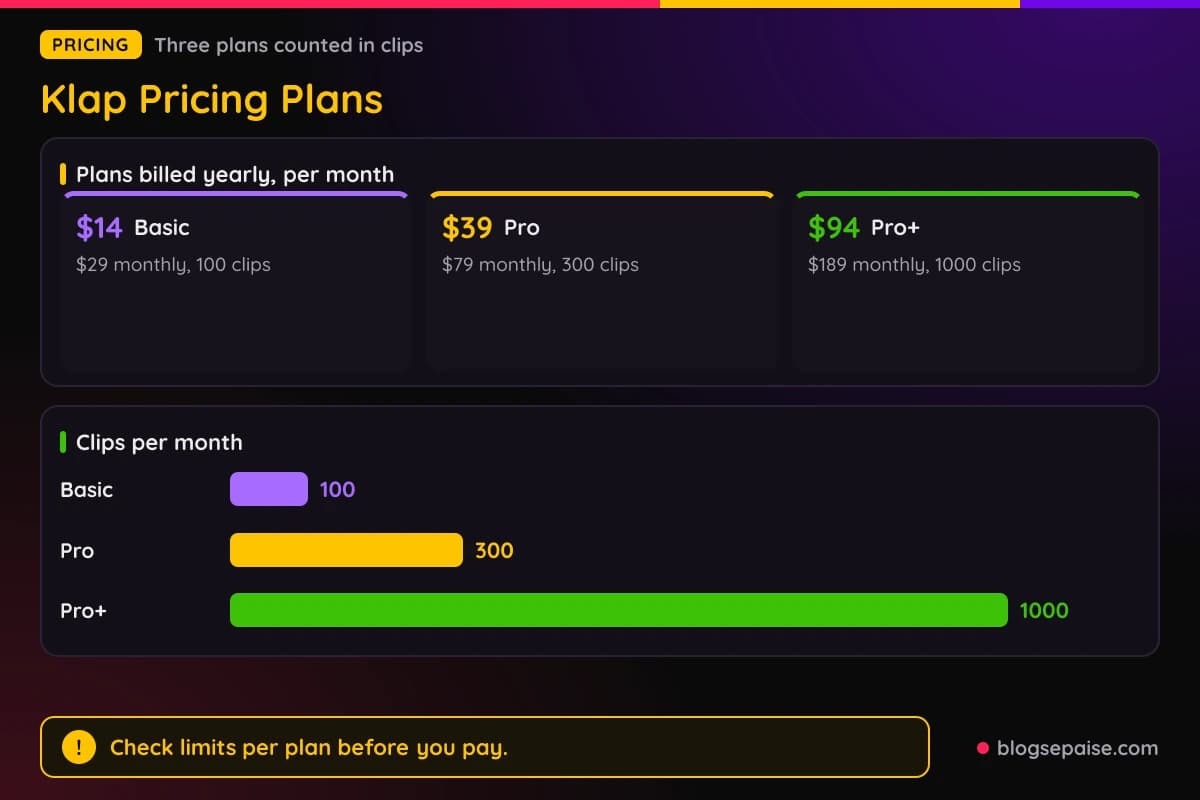
Pro+ is for teams and gives 1000 clips a month. It costs $189 monthly or $94 a month billed yearly.
Every plan includes AI clipping, unlimited social accounts, and analytics. A line below the cards offers custom plans for bigger needs.
Yearly billing is labeled Save 50%. The math is close, since $14 is about 48% of $29, and $94 is about 50% of $189.
Here is the per-clip math from the plan numbers. Basic monthly is $29 for 100 clips, which is $0.29 a clip, and yearly is $14 for 100 clips, which is $0.14 a clip.
Pro monthly is $79 for 300 clips, about $0.26 a clip, and yearly is $39 for 300 clips, about $0.13 a clip.
Pro+ monthly is $189 for 1000 clips, about $0.19 a clip, and yearly is $94 for 1000 clips, about $0.09 a clip.
Those figures assume you use every clip in the plan. You pay for clips you generate, and Klap does not define a clip further.
Klap lists no free plan. It offers 1 video free with no credit card, so a trial exists even though the plan cards do not show it.
Klap does not state export limits, video length, resolution, watermarks, team seats, or API access per plan. It lists no refund or cancellation terms either.
Plan details vary elsewhere, like a Pro plan with up to 10 hours of source video a day. The plans themselves are Basic, Pro, and Pro+ with clip counts only.
One mention of upgrading to Klap Pro puts the price at $29 a month. The plan prices are $29 monthly for Basic and $79 for Pro.
Yearly billing gives the lowest price per clip. Klap does not say if the full year is charged up front.
Who Is Klap Best Suited For
Klap fits people who already have spoken video and want many short clips from it. YouTubers, podcasters, streamers, coaches, educators, marketers, and agencies are the core audience.
YouTubers with a back catalog get the clearest benefit. A YouTube link can become Shorts, TikToks, and Reels without any downloading, and the clips come with captions and scores.
Video podcasters are the second strong fit. The multi-host layouts, the Riverside, Zencastr, and StreamYard imports, and the 4-hour limit all point at long recorded conversations.
Coaches, educators, and webinar hosts also match the pitch. Talks, lectures, and training videos suit its speech detection best.
Agencies and teams get brand kits, workspaces with roles, review links, and an API. The agency tool can replace $2K-$5K in monthly editing cost per client.
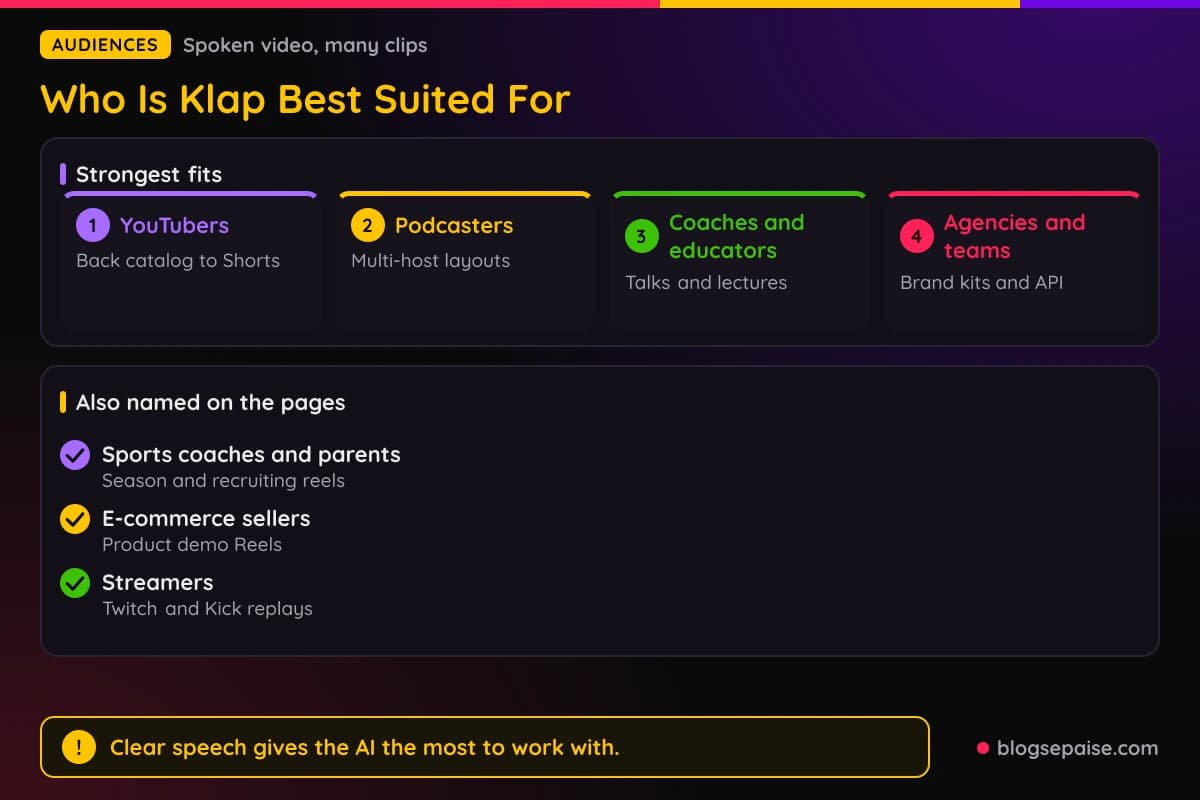
Sports families and coaches have their own tool. The Sports Highlight Video Maker handles season footage and recruiting reels, though Klap offers no sport-specific presets.
E-commerce sellers fit too, mostly for product demos. Instagram Reels from a demo can serve as Shopping Reels.
Solo creators who post often will like the pricing math. The Basic plan gives 100 clips a month, which works out to about three clips a day.
Beginners are a fit too, since you need no editing experience. Results depend on how clear the speech is.
Who Klap Is Not For
Klap fits spoken video best, and several kinds of projects fall outside what it does. The limits are clear in a few places.
Silent or music-only video is a weak match. The AI leans on speech, so Klap is less effective for silent, music-only, or non-speech gameplay.
Audio-only podcasts are out. The Podcast Clip Maker needs video, and Klap points audio-only shows to Podsqueeze or Headliner.
If you want to write a video from scratch, look elsewhere. The AI Clip Generator and AI Reel Generator are not text-to-video tools.
People who want full manual control may feel boxed in. Premiere and CapCut give more manual control, while Klap is faster for a first pass.
Per-plan numbers are thin. Klap does not state export limits, video length, resolution, watermarks, seats, or API access by plan.
Klap lists no refund or cancellation terms. Yearly plans carry a Save 50% label with no refund note next to it.
Speed, language counts, and clip counts vary. Processing runs from about 30 seconds to a few minutes.
Rights are on you. You must have permission, a license, or fair use to clip a video, and Klap offers no legal guidance.
Security details are mixed. SOC-2 controls apply to enterprise, and SSO and audit logs are enterprise only.
Klap Alternatives
Klap competes in a crowded field. Alternatives include Opus Clip, Vizard AI, Submagic, and Veed.io.
Check each tool's current pricing and limits before you choose. Prices and plans change often.
OpusClip is a long-video clipper and the closest match to Klap. Both turn a long video into scored short clips.
Vizard is another AI clipper in the same family. Compare how each tool handles the layouts and captions you care about.
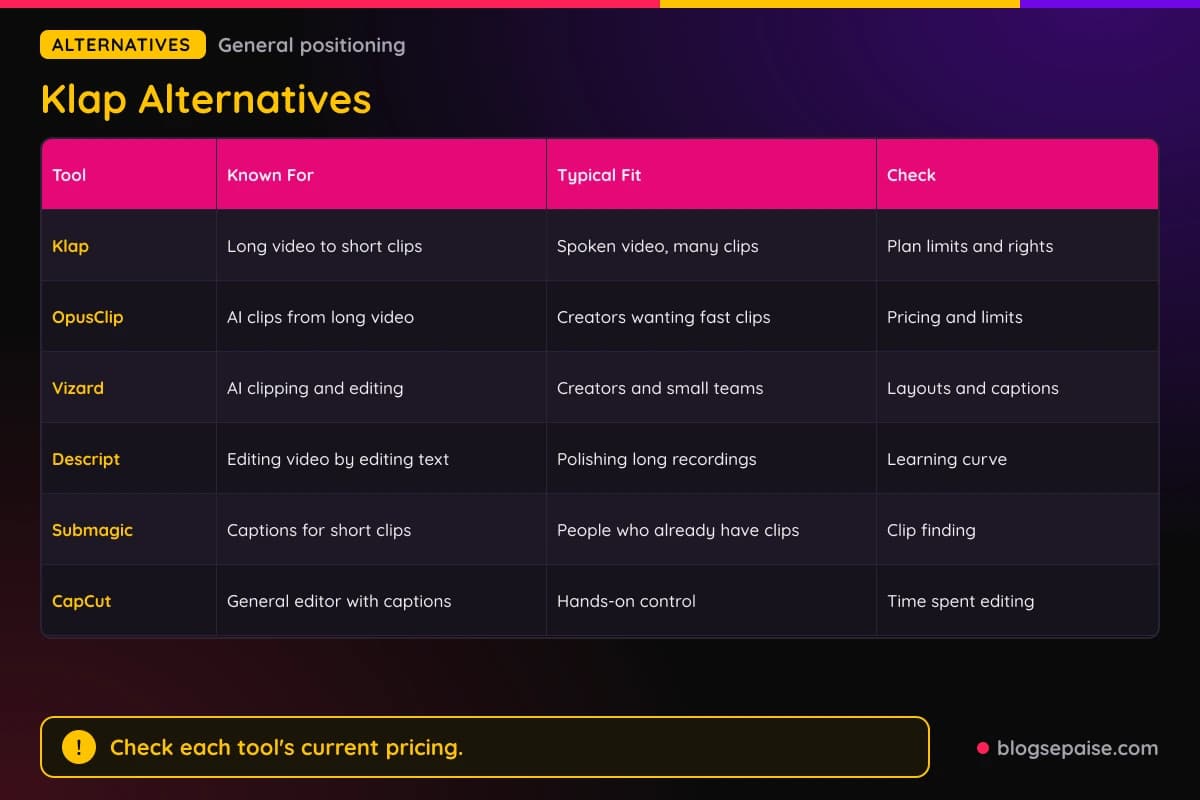
Descript is a broader editor built around editing video by editing text. It suits long recordings you want to polish more than fast clip batches.
Submagic focuses on captions and short-form styling. It fits people who already have clips and want them to look sharp.
CapCut is a general video editor with manual control and auto captions. It gives you more manual editing, while Klap aims to do the first pass for you.
Klap is a fast first pass for repurposing long video. A tool that shows you every setting may fit better if you like to tweak.
On price, Klap's plans start at $14 a month billed yearly for 100 clips. Compare that with each rival's current plans, since prices and limits change.
For a similar short video tool, read our SendShort review. Our JoggAI review covers another AI video tool, so pick the one that matches the video you make.
Klap Use Cases
Klap suits real jobs for YouTubers, podcasters, streamers, webinar hosts, agencies, sellers, and coaches.
A YouTuber can turn a back catalog into Shorts, TikToks, and Reels. A 1-hour video can give 30+ Shorts, so one upload feeds weeks of posts.
A podcaster can cut a 90-minute episode into promo clips with speaker-labeled captions. Multi-host layouts keep each guest on screen.
A streamer can pull moments from Twitch replays. A 4-hour stream gives 30-50 clips, though quality depends on how many strong moments exist.
A webinar host can turn a 60-minute session into about 20 clips for LinkedIn and YouTube. Both are publishing targets.
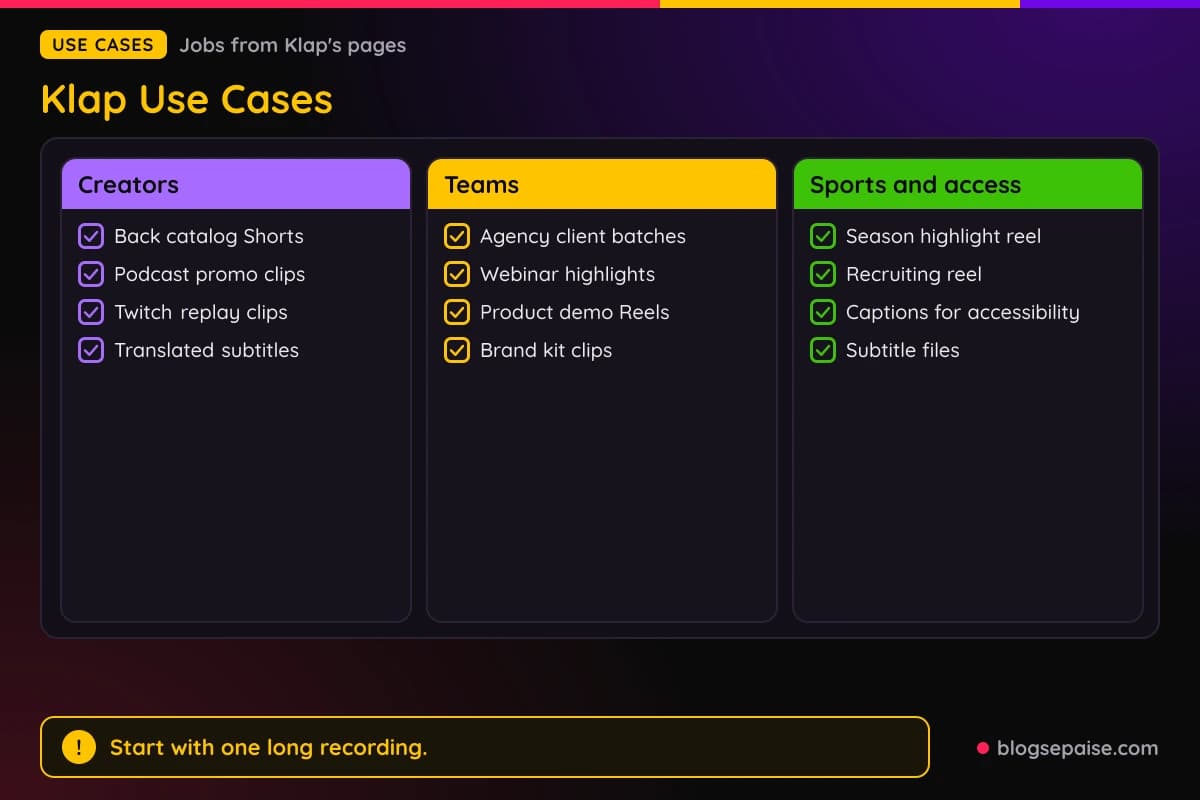
An agency can run batches for clients with brand kits and review links. The team tool handles up to 100 finished clips per hour.
An online seller can turn product demos into Reels. Instagram Reels from a demo can serve as Shopping Reels.
A coach or parent can build a season highlight reel or a recruiting reel from game footage. The editor lets you add a jersey number, position, and contact details.
Anyone who needs captions can use the Subtitle Generator or AI Caption Generator. Both suit accessibility and engagement.
A creator with an international audience can add translated subtitles with the Video Translator. It supports 52 languages.
Final Thoughts On Klap
Klap does one job: it takes long, spoken video and turns it into many short, captioned clips with a score on each.
The 28 tools are mostly variations of that one engine. The extras, like transcripts, subtitles, translation, and highlight reels, round out the set.
Pricing is easy to read, with 100, 300, and 1000 clips a month. Yearly billing works out to $0.14, $0.13, and $0.09 per clip.
Klap does not state per-plan limits or refund terms. Speed and language numbers vary.
Start with the free video on a long recording you already have, count the usable clips, and then pick a plan.
Spoken content suits Klap best, since speech is what its AI reads. If your video is silent or music-only, look at other tools first.
You can browse more write-ups on our software reviews hub if you want to compare tools side by side.
Klap FAQ
1. How Does Klap Work?
You upload a video or paste a link, and Klap's AI scans for hooks, punchlines, and emotional peaks. It returns vertical clips with captions, ranked by a Virality Score.
You can edit the clips, then download them or publish and schedule from the same place.
2. Is Klap Free To Use?
You can try Klap and create 1 video free with no credit card. Klap lists no free plan, and the free video works as a trial.
Buttons across the tools lead to a signup screen, so expect to make an account.
3. How Much Does Klap Cost?
Basic is $29 monthly or $14 a month billed yearly for 100 clips. Pro is $79 or $39 for 300 clips, and Pro+ is $189 or $94 for 1000 clips.
Klap does not state export limits, video length, or refund terms.
4. How Long Does Klap Take To Make Clips?
Processing runs from about 30 seconds to a few minutes.
Times vary by tool and file, so check your own file.
5. Which Videos Work Best With Klap?
Clear spoken video works best, like podcasts, interviews, webinars, lectures, and product reviews. Klap's AI leans on speech detection.
Silent, music-only, or non-speech gameplay footage is less effective.
6. Does Klap Add A Watermark?
Klap never adds watermarks, even on the free plan. That holds across the tools.
The free video includes 4K export with no watermark.
7. Where Can I Publish Klap Clips?
Klap offers direct publishing to TikTok, Instagram Reels, and YouTube Shorts, and some tools add LinkedIn. A built-in calendar lets you schedule posts.
Instagram Stories and feed posts need a manual upload.
8. How Many Languages Does Klap Support?
Captions and transcription cover 52 languages. Some tools show a shorter set, so language support varies.
Language lists differ between tools, so check the one you plan to use.
9. Does Klap Have An API Or Integrations?
Yes, Klap offers an API with documentation at docs.klap.app, an MCP server, and links to Zapier, Make, and n8n. Klap lists no API pricing.
Webhook delivery is available through the API.
10. Do I Need Rights To The Videos I Clip?
Yes. You need permission, a license, or fair use to clip a video, and Klap gives no legal guidance.
Stick to your own content or footage you have cleared.