Emailchaser Review (2026): Cold Email Software With Autopilot, Lead Finder, And Warmup
Emailchaser is cold email software that finds leads, verifies addresses, sends sequences, and tracks replies in one app. It sends from your own mailboxes and rotates the sending across them.
Every plan allows unlimited email accounts, unlimited team seats, and unlimited client workspaces. Pricing follows emails and active contacts, so adding an inbox never raises the bill.
Autopilot reads your website and builds an ideal customer profile. It then finds verified prospects, drafts a 4-step sequence, and lines up a domain with 2 mailboxes after one approval from you.
A Lead Finder, a free email finder, a LinkedIn email finder, and an email checker handle the list work. Each address passes up to two independent checks before a campaign touches it.
Warm-up comes built in as a gradual ramp from 5 emails a day to 50, with an optional warm-up pool on top. A Sales CRM, a cold email API, and an MCP server for AI agents round out the toolbox.
Four plans run from Starter at $47 a month to Enterprise at $897 a month, and annual billing gives 2 months free. A 7-day free trial costs $0 today and includes 500 lead credits.
Freelancers, founders, sales teams, marketing agencies, and recruitment agencies all have a pitch page. Switching from Instantly earns 50% off for as long as you stay.
Disclosure: Some of the links I share might be affiliate links. If you click on one and make a purchase, I may earn a small commission as a thank you. But don’t worry, it won’t cost you anything extra. I only recommend stuff I genuinely believe in. Your support helps me keep creating awesome content. You can read my full affiliate disclosure in my disclaimer page.
If you want to save a lot of hours searching for high-paying affiliate programs, check out our exclusive list of 2500+ affiliate programs. You’ll find all the information about the programs inside the list. This list is perfect for affiliate bloggers and influencers.
Emailchaser Features
Emailchaser packs 14 tools into one account, so cold outreach does not need a stack of separate subscriptions. Every plan includes Lead Finder, the email verifier, and warm-up.
Inbox rotation, AI writing, Autopilot, and API access come with every plan too.
Lead credits pay for prospect reveals. Starter includes 1,500 credits a month, Pro includes 5,000, Max includes 10,000, and Enterprise includes 30,000.
Extra credits cost $33 per 1,000. Verification runs on a separate meter at $0.0017 per check, billed on your invoice.
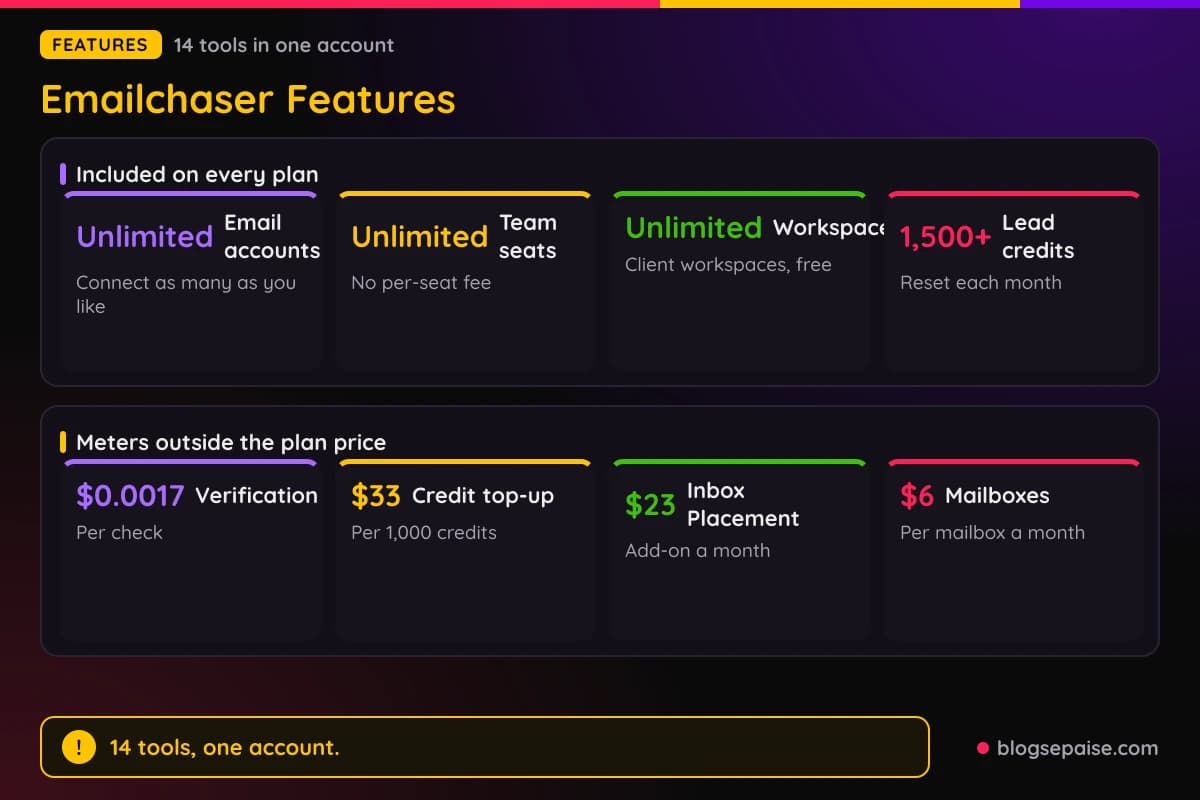
Two items sit outside the plan price. Inbox Placement is an add-on from $23 a month, and done-for-you mailboxes cost $6 a month each.
The Sales CRM comes with Max and Enterprise only. Starter and Pro users still get the Unibox, where replies and AI reply drafts live.
1. Cold Email Software
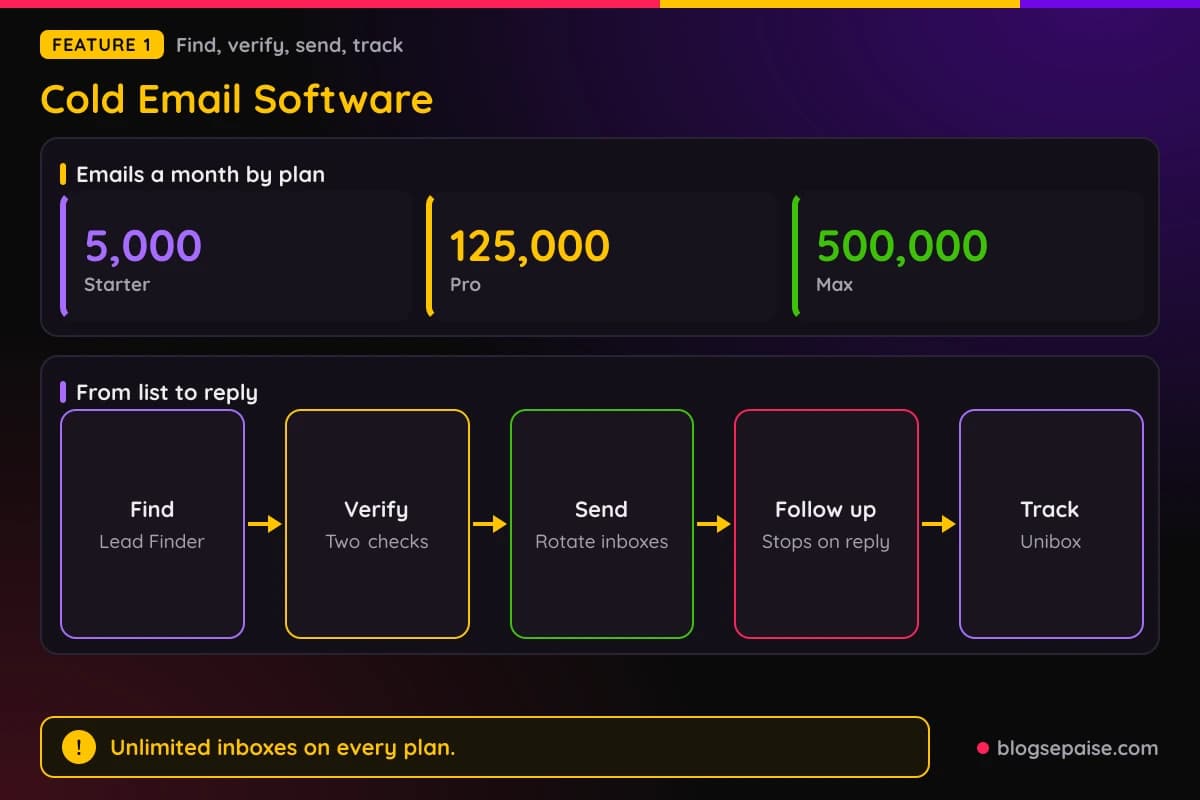
Emailchaser covers finding, verifying, sending, following up, and tracking replies in one subscription. Plans are priced by emails and active contacts, not by inbox.
Connect as many sending accounts as you like, and campaigns rotate across them. SPF, DKIM, and DMARC support is part of the setup, and you control the sending volume.
Campaigns run multi-step follow-ups that stop once a prospect replies. You can preview each email with real lead data before launch, and sends follow a schedule you choose.
Each address gets up to two independent checks before it is contacted. Invalid addresses are skipped, and catch-all addresses that pass are contacted unless you choose valid-only.
A cold email API, an MCP server, and webhooks sit in the same account for developers. LinkedIn Sales Navigator exports arrive as CSV files you can drop straight into a campaign.
Starter, Pro, and Max carry 5,000, 125,000, and 500,000 emails a month. Max costs the same as Instantly's comparable plan, and a switch from Instantly earns 50% off for as long as you stay.
2. Autopilot
Autopilot is the hands-off way to start. You give it your website, and it works out who to email, finds verified prospects, drafts a sequence, and lines up a domain with 2 mailboxes.
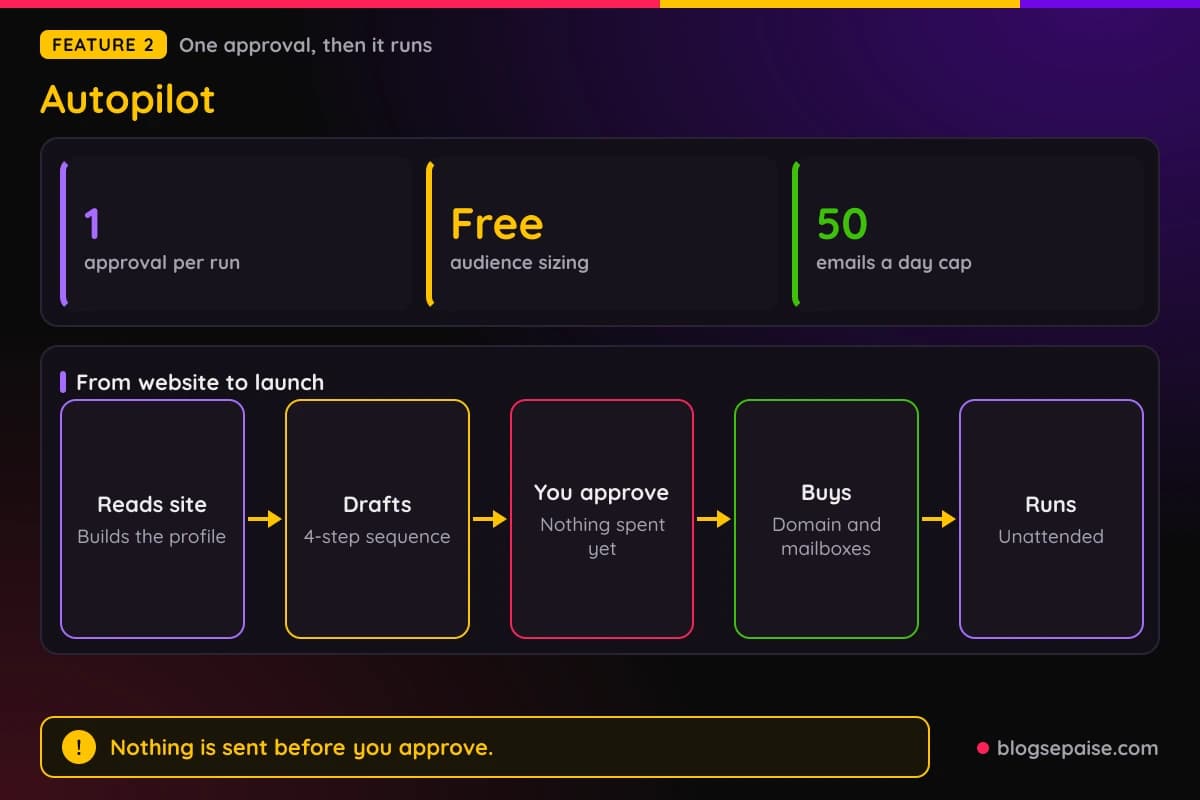
A run moves through six stages and needs one approval. It reads your site, sizes the audience for free, drafts the sequence, waits for you, buys the domain and mailboxes, and then runs unattended.
Nothing is revealed, bought, or sent until you press Approve and launch. The approval screen shows who you will email, the audience, the copy, and the estimated monthly cost, and you can edit or reject any of it.
Each new mailbox ramps from 5 emails a day in week one and adds 5 a week up to 50. Sending starts once the mailboxes connect, within 24 hours and usually sooner.
A kill switch pauses sending, top-ups, and drafting together, and you can resume the run later. Autopilot also tops up prospects and shifts sends toward winning A/B variants.
AI reply drafts wait for you to send them unless the run is set to auto-send. An AI agent with a read and write API key can also approve a run, so tell your agent to wait if you want the last word.
3. AI SDR
Autopilot is Emailchaser's AI SDR, and it comes with every plan from $47 a month. An AI SDR picks targets, finds contacts, writes emails, and follows up so you skip the outbound grind.
The AI builds an ideal customer profile with job titles, seniorities, industries, company sizes, locations, and keywords. It then writes a 4-step sequence, an opening email plus 3 follow-ups a few days apart.
The app walks through five steps: your website, your customers, budget, sending accounts, and review and approve. A monthly budget turns into a sending plan with first-month and monthly costs.
Prospects come from the built-in business contact database, and each reveal costs 1 lead credit. Every address is checked before its first email at $0.0017 per check.
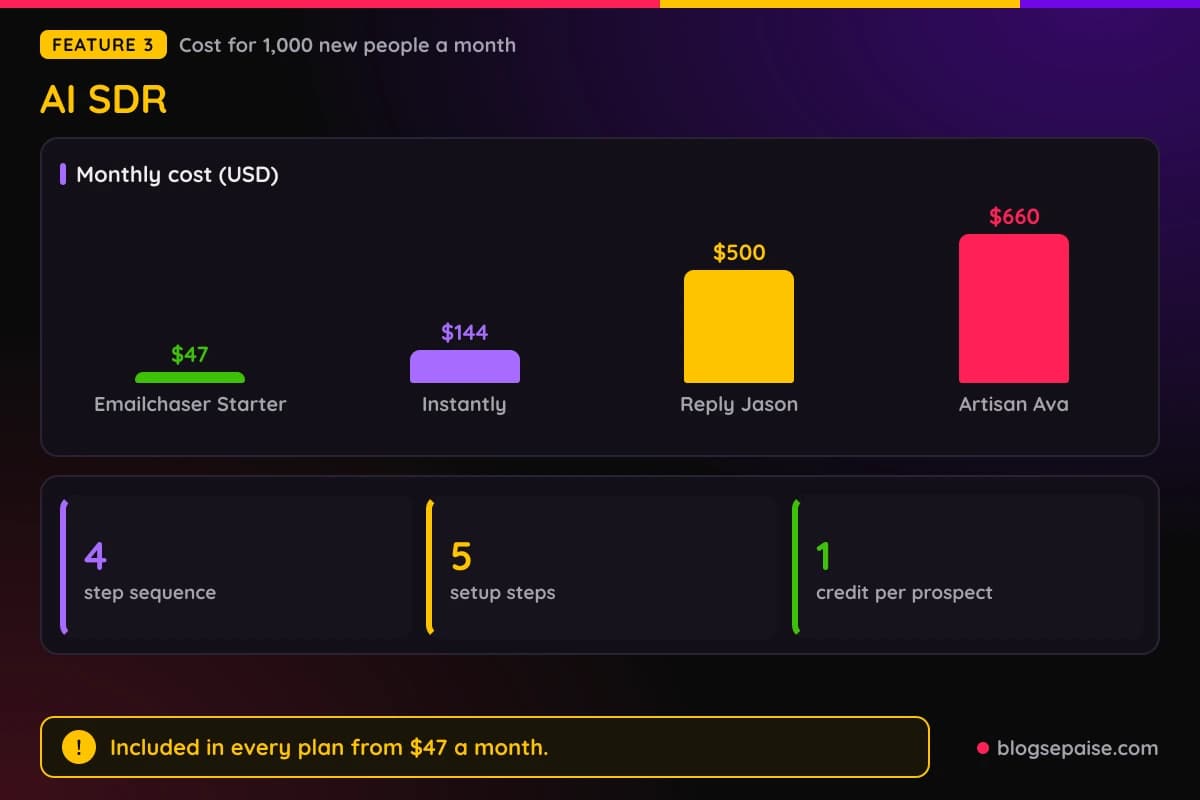
Cost is where it stands out. At 1,000 new people a month, Emailchaser Starter costs $47, against $144 for Instantly, $660 for Artisan Ava, and $500 for Reply Jason billed annually.
Interested replies get a drafted answer that waits for you to send it. Rival prices change often, so check them again before you decide.
4. Campaigns
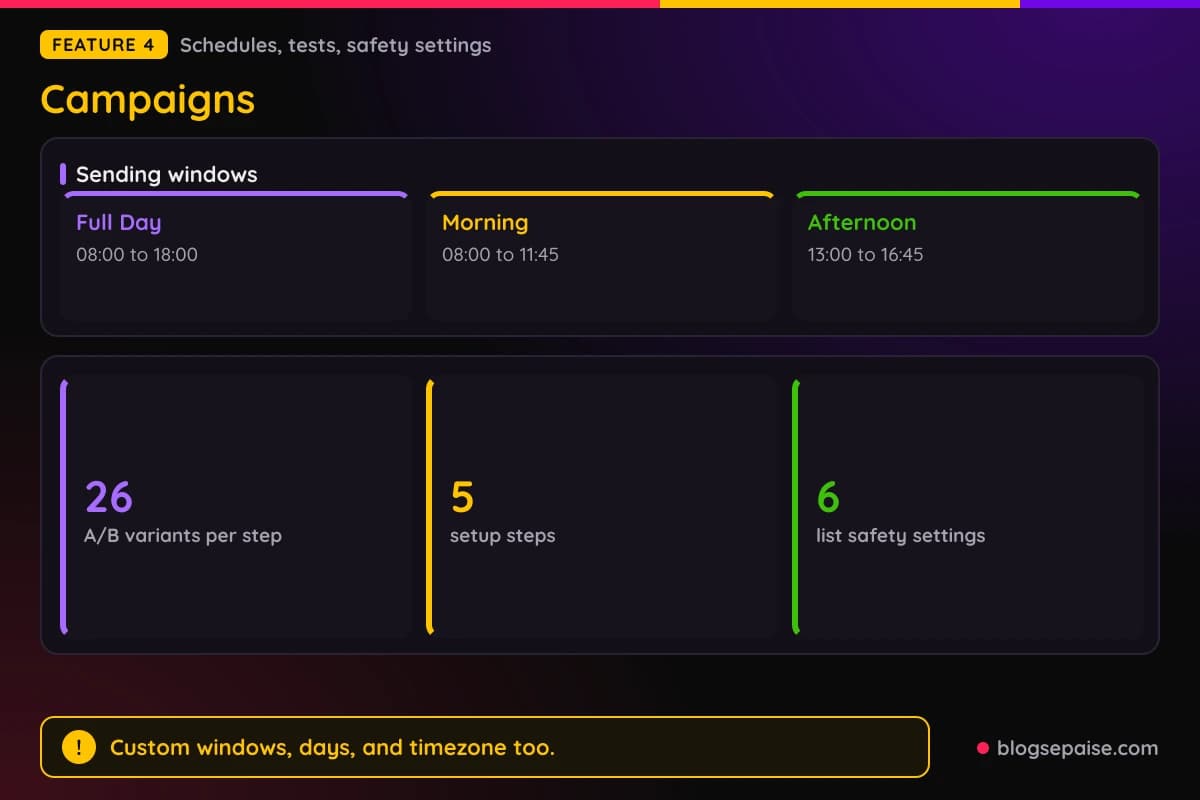
Campaigns follow a five-step setup: name the campaign, select sender accounts, import leads, create the sequence, and launch. You then watch progress on the analytics page.
Leads import from a .csv file or a Google Spreadsheet. The sequence editor supports links, inline images, attachments, custom variables, spintax, and a signature.
By default the editor withholds bold, italic, underline, and lists, so emails read like plain personal notes. That suits cold outreach, where a simple look usually feels more human.
Scheduling has three presets: Full Day from 08:00 to 18:00, Morning from 08:00 to 11:45, and Afternoon from 13:00 to 16:45. You can also set a custom window, days, and timezone.
A/B tests allow up to 26 variants per step, labeled A to Z. Six campaign settings guard your list, including automatic duplicate removal, invalid email filtering, and a block on leads already in another campaign.
You can exclude personal addresses such as Gmail ones and ignore leads who already responded. Leads that hard bounced for any Emailchaser user are blocked for everyone else.
5. Lead Finder
Lead Finder is a free Chrome extension that exports leads and their work emails from a LinkedIn Sales Navigator search as a .csv file. The export button reads Export with Emailchaser.
You build the search in Sales Navigator with filters such as industry, job title, and location. Emailchaser then finds the work email for every exported lead and double-verifies it.
Setup takes five steps. Sign up, install the extension in about a minute, search Sales Navigator, click Export with Emailchaser, and upload the CSV to a campaign.
You need an Emailchaser account, the extension, and a Sales Navigator account. The extension itself is free, and each verified email is billed as a verification check.
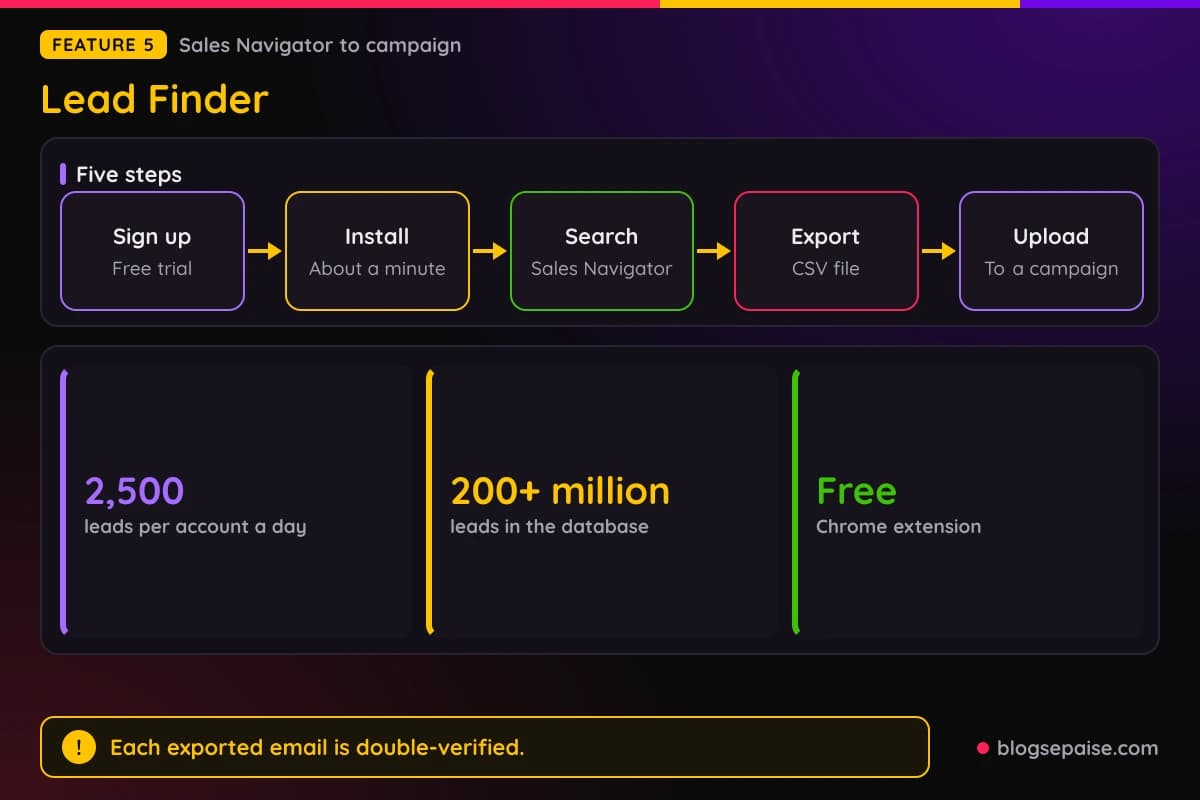
Exports are capped at 2,500 leads per LinkedIn account per day. Large lists work inside that daily limit.
A people database search also lives inside the app, and the database covers 200+ million leads. Searches filter by job title, seniority, and location.
Search results are masked, and credits are spent only when you add people to a campaign.
6. Email Finder
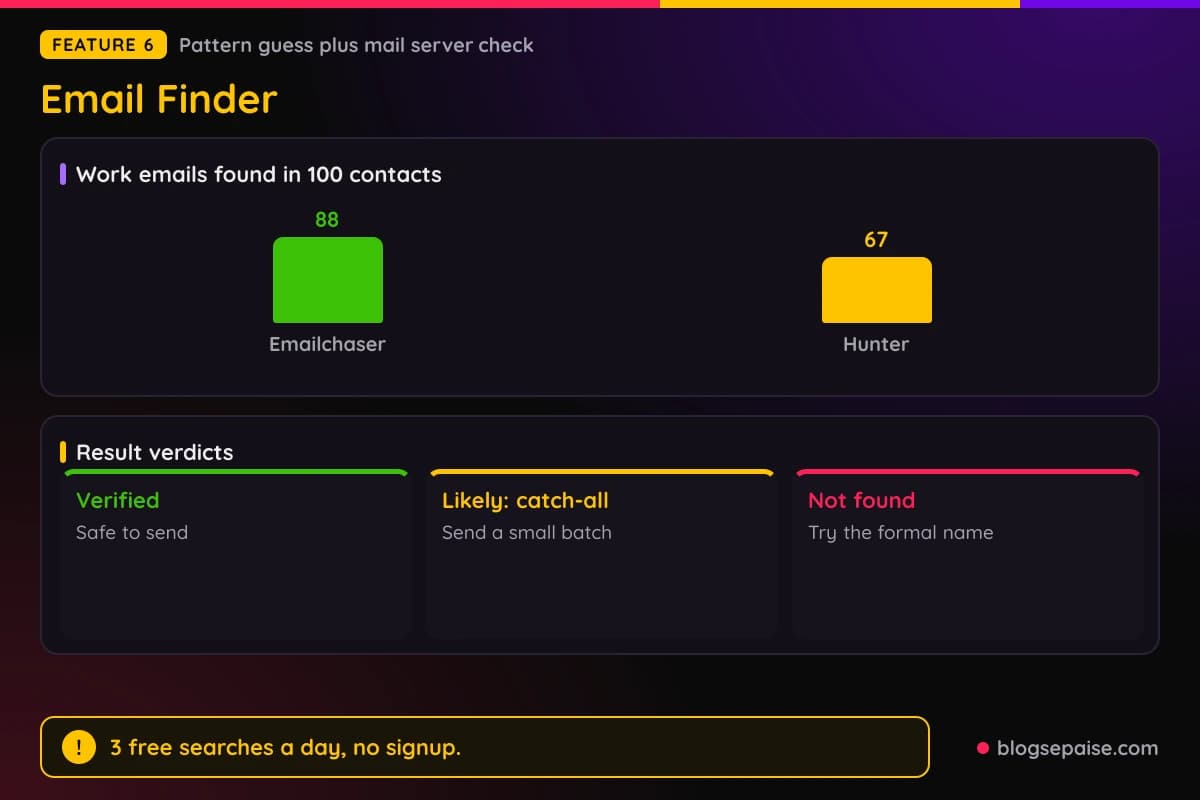
The Email Finder is a free tool that returns a work email from a first name, last name, and company website, or from a LinkedIn profile. You get 3 searches a day with no signup.
Searches take a few seconds to about a minute. The tool builds 12 or more candidate addresses in common company formats, including short forms such as Mike for Michael.
It then asks the company mail server if each mailbox exists, and no email is sent to the person. Every candidate goes through the email verifier.
Results come back as Verified, Likely: catch-all, or Not found. Verified means the server confirmed the mailbox, and Likely means the domain accepts everything, so send in a small batch.
In its own test of 100 contacts published on 2 August 2026, Emailchaser found 88 work emails and Hunter found 67. Hunter offers 50 free searches a month with an account, and Skrapp offers 50 free credits.
Personal Gmail searches are not supported, since personal addresses follow no company pattern. Each result shows the pattern, the mail server such as Google Workspace or Microsoft 365, and every address checked.
7. LinkedIn Email Finder
The LinkedIn Email Finder takes a profile link and reads the person's name and company. It then finds a work email at the company's domain.
Two independent verification services check the email before it is shown. You get 3 free lookups a day with no signup, and a new one returns every 8 hours.
Any linkedin.com/in/ profile URL works, from any country's LinkedIn site, with or without https://. LinkedIn shows emails only to a person's own connections, so the tool works from the name and company.
Lists scale through three routes. A single link is free, a pasted list or CSV runs up to 10,000 links per run, and a whole Sales Navigator search uses the Lead Finder extension.
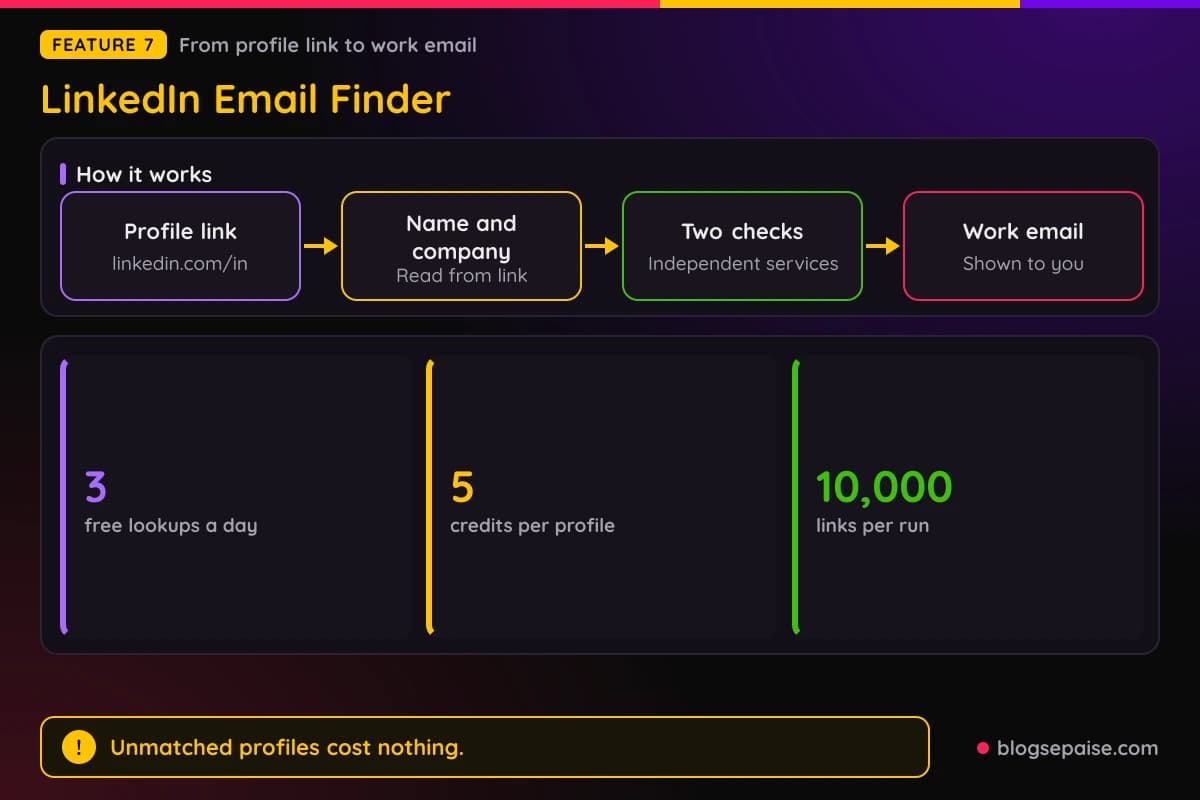
Each profile in a list costs 5 credits, and profiles that cannot be matched cost nothing. The Pro plan's 5,000 monthly credits cover 1,000 profiles.
Sales Navigator is not required for profile links. Found emails can go straight into a campaign that sends from your own mailboxes with automatic follow-ups.
8. Email Checker
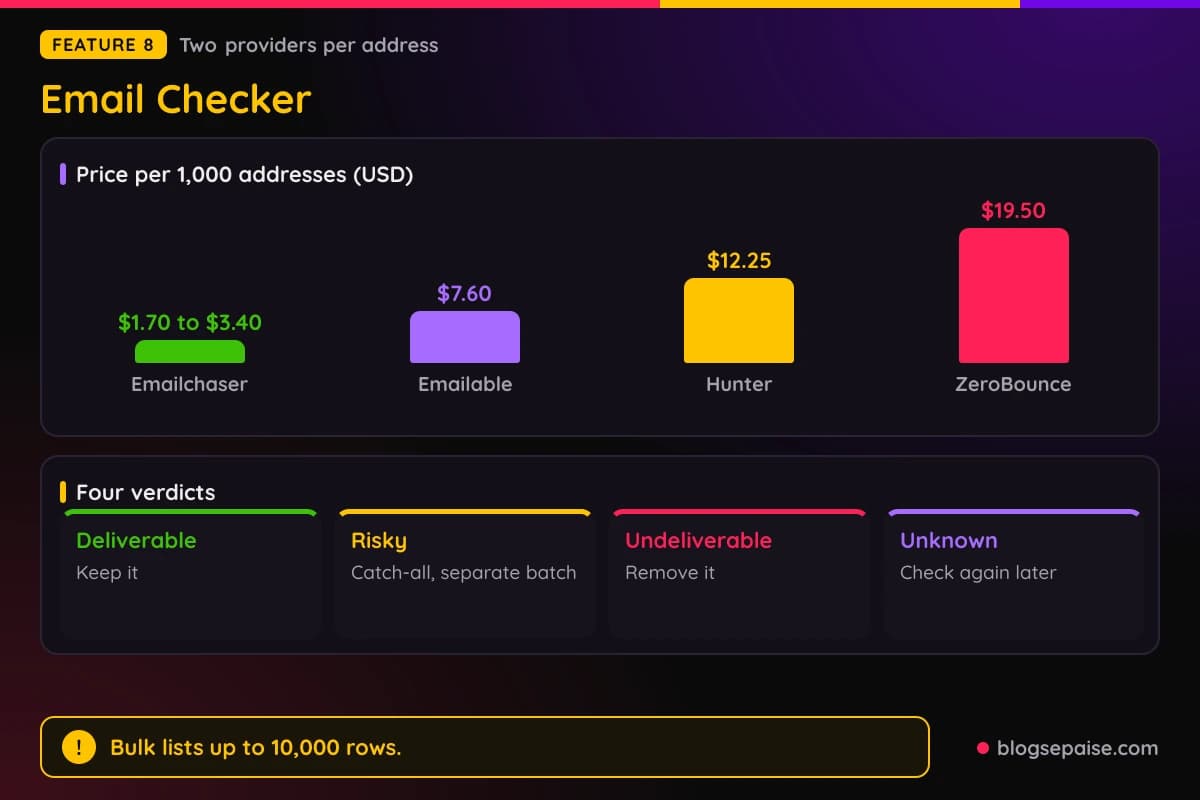
The Email Checker tests format, mail server, and mailbox. A first provider checks that the mailbox exists, and a second independent provider re-checks every address the first does not reject.
Free use gives 3 checks a day with no signup, then one more every 8 hours. Half of all checks answer in 7 seconds or less, based on 118 free checks run from 2 to 5 October 2026.
Verdicts are Deliverable, Risky: catch-all, Undeliverable, and Unknown. Unknown usually means greylisting, so check again later because it is not the same as undeliverable.
Bulk cleaning accepts a .csv or .txt file, or pasted addresses, up to 10,000 rows. The file is read in your browser, and paid plans verify up to 50,000 addresses in one job.
Cost runs $0.0017 per check, which works out to $1.70 to $3.40 per 1,000 addresses. Emailable costs $7.60, Hunter costs $12.25, and ZeroBounce costs $19.50 per 1,000.
A deliverable address can rarely bounce if its mailbox closes after the check, so re-check lists older than 30 to 90 days. The 7-day trial verifies 100 addresses from your list.
9. Email Accounts
You can connect unlimited Google, Microsoft, and Gmail accounts you already own at no extra cost. IMAP mailboxes on your own mail server are capped at 10 on Starter, 40 on Pro, 120 on Max, and 360 on Enterprise.
Done-for-you accounts come as a package of 1 new .com domain and 2 Google mailboxes. They use US IP Google accounts with SPF, DKIM, and DMARC included.
Ordering has four checkpoints and one approval. You choose a domain, create the accounts, approve the order at the exact price, and the mailboxes connect automatically.
Accounts go live within 24 hours and usually sooner. The trial includes a free .com domain and 2 mailboxes for the first month, with the setup fee waived.
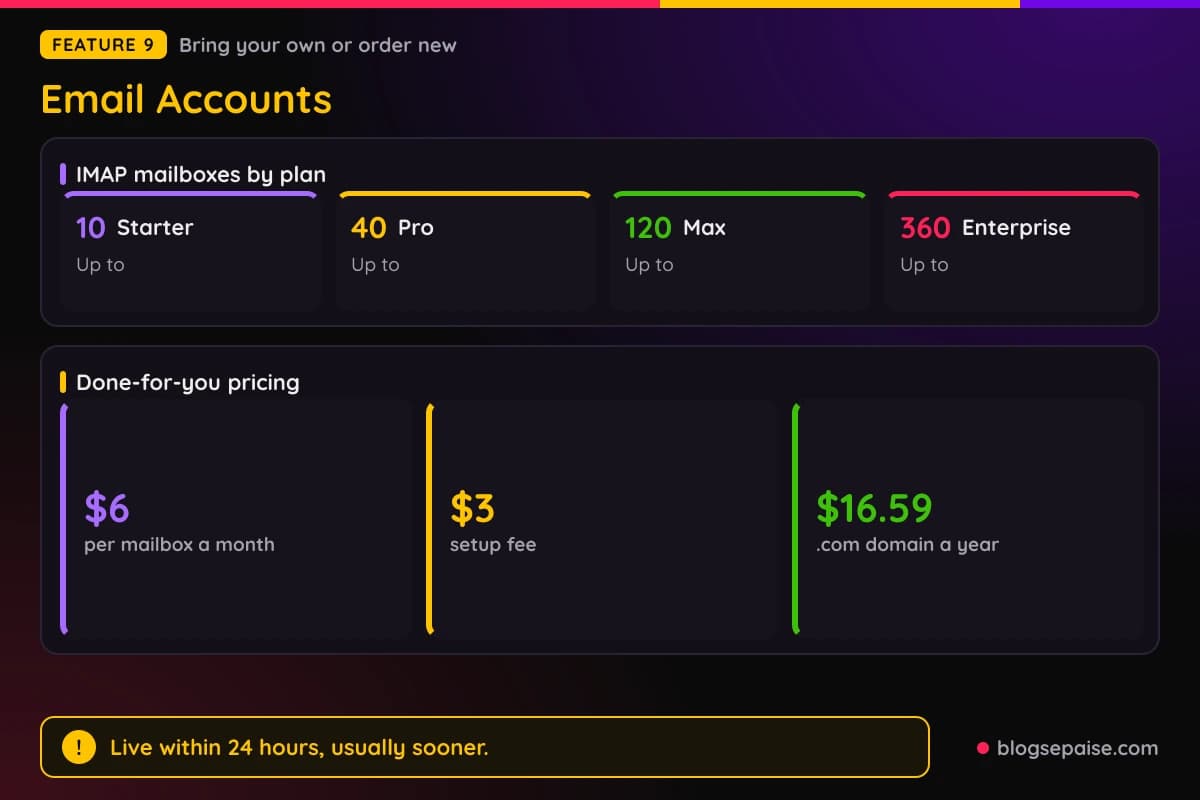
New mailboxes cost $6 a month each plus a $3 setup fee. Domains start at $16.59 a year for .com, $14.99 for .org, and $13.99 for other extensions.
Warmed-up mailboxes sit on domains warmed for 12 or more weeks. They cost $6 a month each plus $16.79 once per domain, and 15 mailboxes on 5 domains send 450 emails a day for $187 a month plus $127.95 upfront.
10. Email Warm-Up
Warm-up comes in two parts. The gradual build-up sends real campaign email, starting at 5 a day in week one, then 10, 15, 20, 25, 30, 35, 40, 45, and 50 a day in week 10.
The ramp is one switch per mailbox, or many at once from the bulk actions menu. It only lowers a mailbox's own daily limit, so that limit must be 50 or more for the ramp to reach 50.
A planner takes your target emails a day and your mailbox count. At 300 emails a day, 6 mailboxes reach the target in week 10, while 15 mailboxes reach it in week 4.
The warm-up pool is optional. Mailboxes exchange email with each other, and where possible the mail is opened, marked important, and moved out of spam.
On connected mailboxes the pool starts at 2 a day, adds 2 each weekday, and stops at 40, and all of that is adjustable. It works on Google and Microsoft mailboxes only.
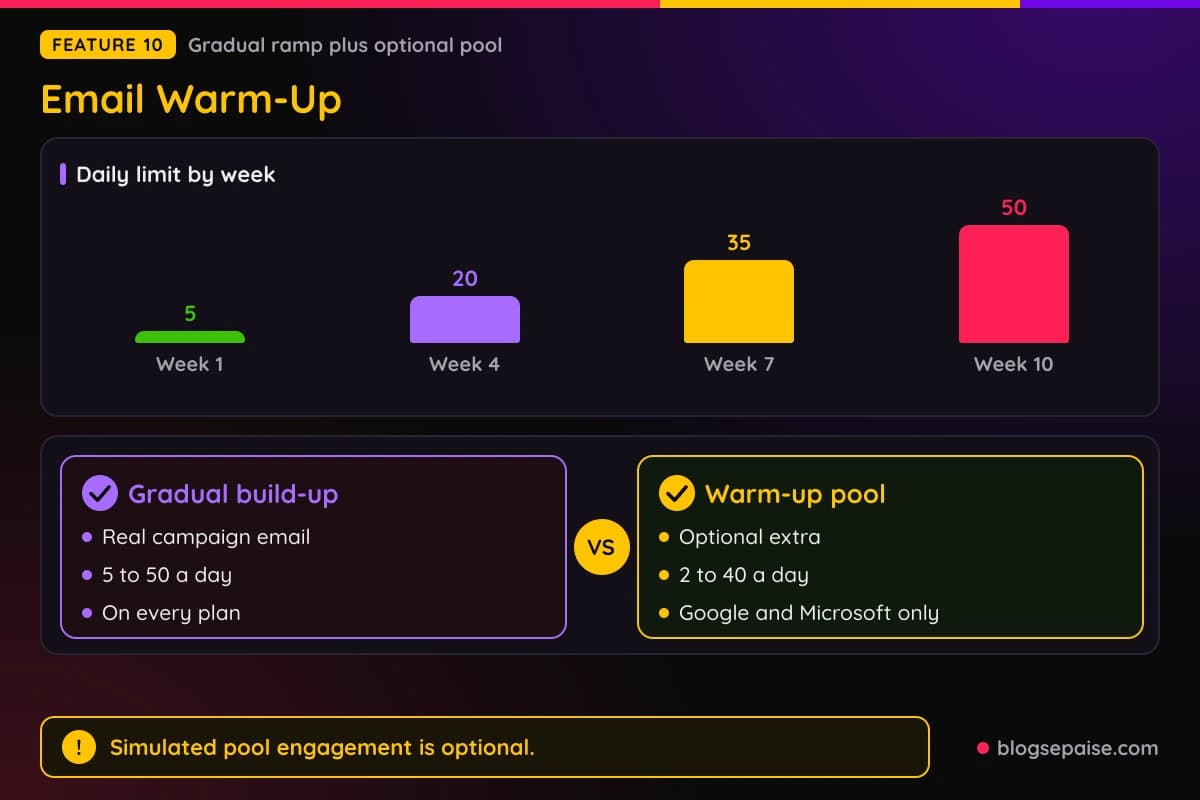
Mailboxes bought through Emailchaser join the pool automatically and rise to 10 a day.
Warm-up cannot fix a domain that fails SPF, DKIM, or DMARC, so run the free domain health check first. Pool engagement is simulated, and both parts come with every plan.
11. Inbox Placement
Inbox Placement is a paid add-on that works with any plan. Growth costs $23 a month, or $220.80 billed yearly, and Hypergrowth costs $47 a month, or $451.20 billed yearly.
A test sends your real subject and body from up to 20 of your connected sending accounts. Each mailbox sends one probe to every seed inbox in the panel, and Emailchaser reads each seed to record the outcome.
The seed panel covers Gmail and Google Workspace, Outlook and Microsoft 365, Yahoo, and other providers. Results break down by provider and by sending mailbox.
Four outcomes are possible: Primary inbox, Gmail category tab, Spam, and Never arrived. Never arrived is reported apart from spam because it usually points to a silent block.
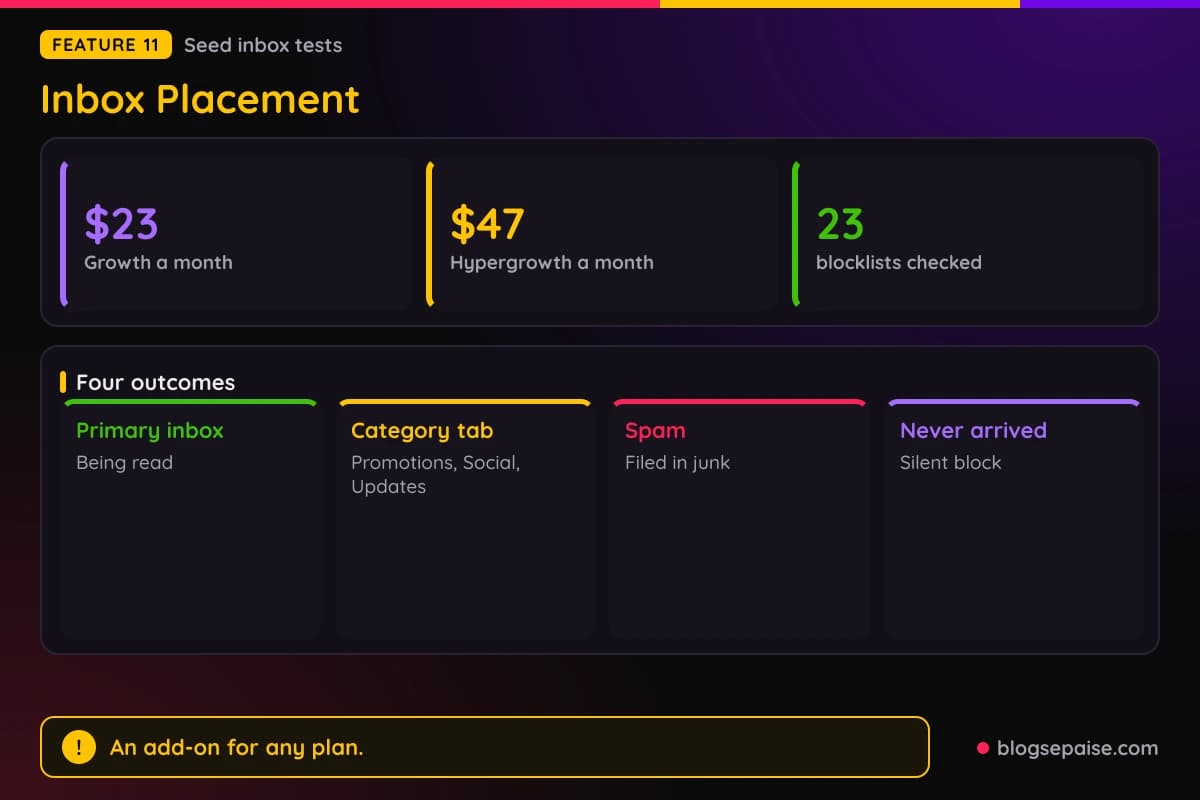
Bundled checks cover SPF, DKIM, DMARC, and MX for every sending domain. Your domain and any dedicated sending IP are checked against 23 DNS blocklists, each with a delisting link.
Your subject and body are scored against SpamAssassin-style rules, and each rule that fires comes with a suggested fix.
Hypergrowth adds scheduled tests, alerts when placement drops, automatic pausing of a faulty mailbox, and email or Slack notifications. One add-on covers all workspaces, so agencies do not pay per client.
12. Sales CRM
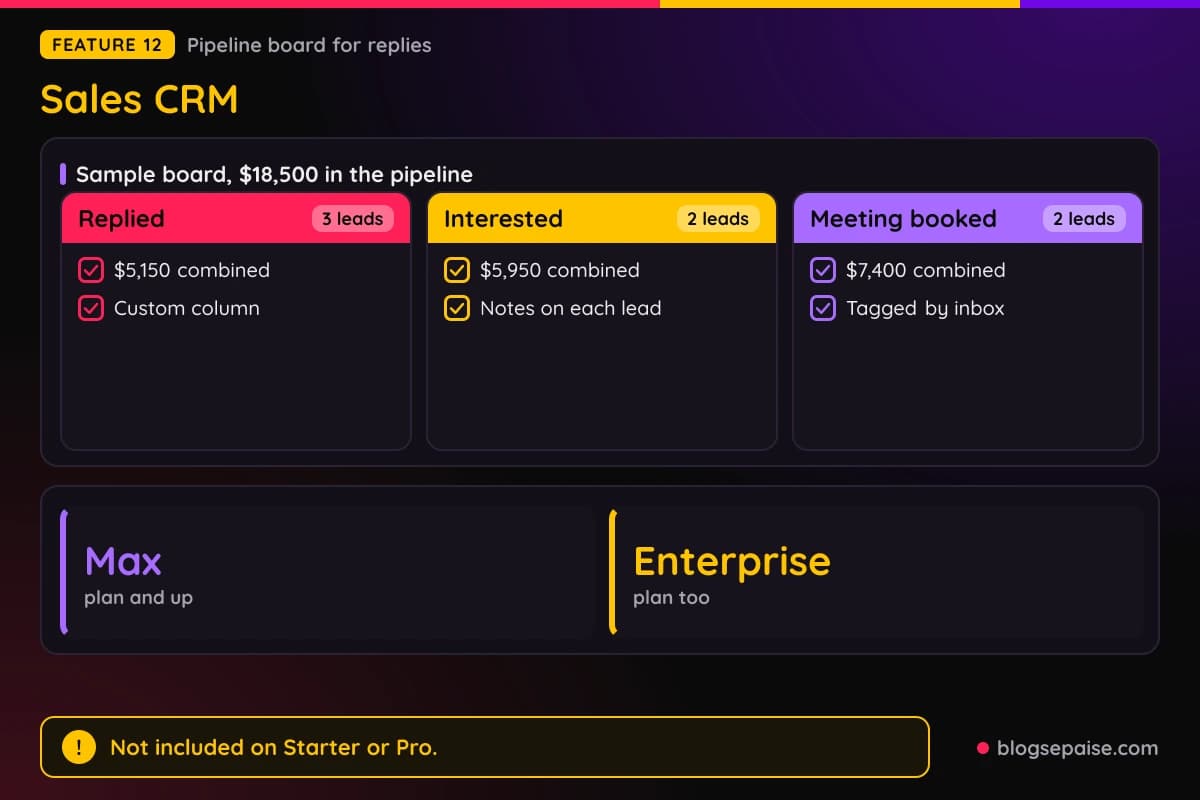
The Sales CRM is a pipeline board built into the same app, so replies land next to the campaigns that produced them. It is included on Max and Enterprise and not on Starter or Pro.
Columns are custom. You rename and recolor them to fit your sales process and move leads between them.
Notes attach to each lead, which helps in long sales cycles where details get lost. The board also shows the total value of all leads in the pipeline, so you can forecast revenue if every lead closes.
Team members join by invite and see the same leads, columns, and notes. A sample board shows $18,500 in total pipeline, with 3 replied leads worth $5,150 and 2 interested leads worth $5,950.
The same sample has 2 leads at meeting booked worth $7,400. Leads are tagged to the inbox they came from, and some carry note counts.
Replying leads can also be exported to CRMs such as HubSpot, Salesforce, and Pipedrive. Recruitment agencies use the Master Inbox to see replies across connected accounts.
13. Cold Email API
The Cold Email API is a REST API for creating leads, managing campaigns, and receiving reply events. The base URL is api.emailchaser.com/r, and every endpoint returns JSON.
It has 33 core endpoints, takes 1,000 leads per request, and allows 600 requests per minute. Docs come from an OpenAPI definition, with a Postman collection and cURL, JavaScript, and Python examples.
Keys are workspace scoped, shown once, and revocable at any time. A key is either read-only or read and write, with nothing in between.
Read-only keys get HTTP 403 on writes, except audience size, a Lead Finder search, the setup ping, and the domain availability check.
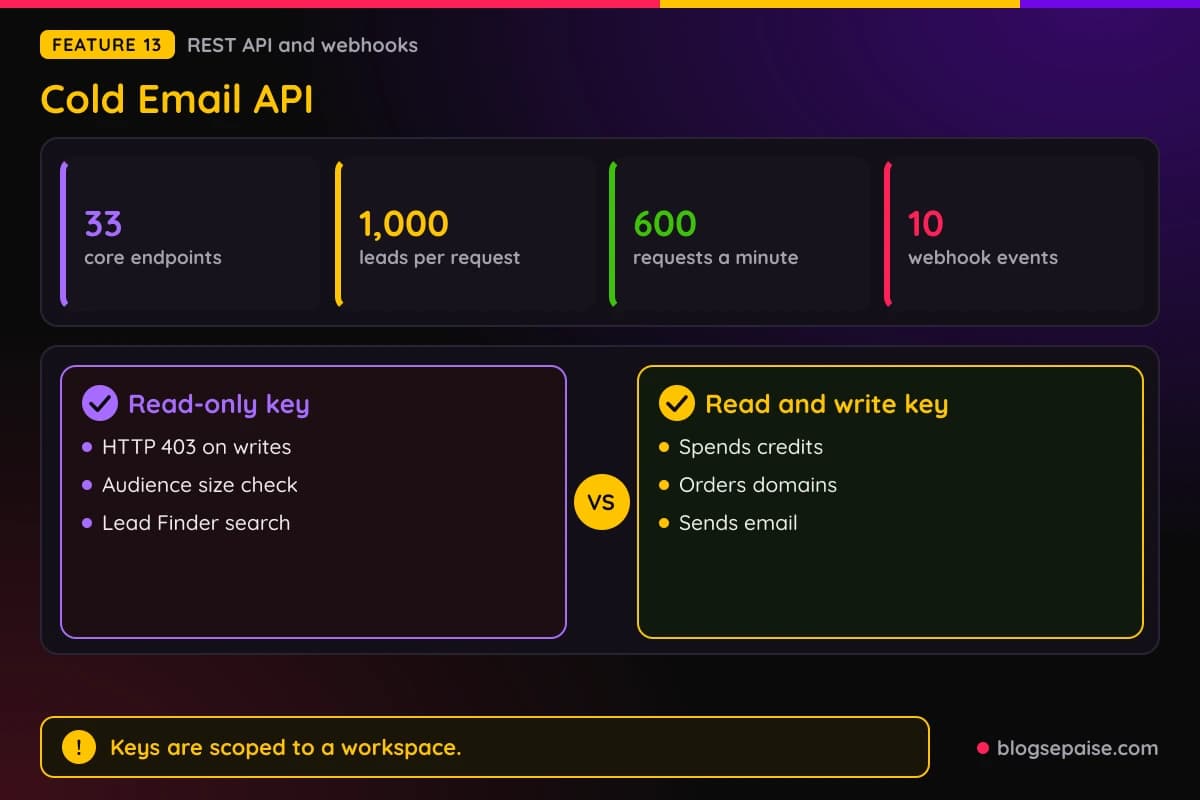
A read and write key can also spend credits, order domains and mailboxes, and send email.
Webhooks cover 10 event types, including EmailSent, EmailReply, EmailBounce, LeadCreated, and CampaignStatusChanged. Deliveries carry an HMAC-SHA256 signature, and retried deliveries keep the same event ID.
POST /leads upserts by email, so leads do not duplicate. Make has a native integration, and Clay can push enriched leads into campaigns.
Emailchaser does not track opens, so no opens metric exists in stats or webhooks. Google and Microsoft mailboxes cannot be connected through the API, while SMTP and IMAP mailboxes can.
14. MCP Server
The MCP server lets AI agents such as Claude, ChatGPT, Grok, Claude Code, and Cursor run an Emailchaser workspace. It is hosted, nothing installs locally, and one API key connects it.
It exposes 102 tools across campaigns, leads, replies, deliverability, Lead Finder, Autopilot, credits, and webhooks. Every call goes through the REST API with your key, so the same scopes and rate limits apply.
Claude, ChatGPT, and Grok add a remote link that carries the key. Claude Code, Cursor, and VS Code connect with a bearer token header, and you create the key in the API and MCP area.
Keys are read-only or read and write, and you can revoke one instantly. Tools that spend money, such as purchase_credits, create_dfy_order, and approve_autopilot_run, say so in their descriptions.
Example jobs include onboarding a domain onto Autopilot with a budget and pausing the weakest campaigns. Agencies can create one sub-workspace per client.
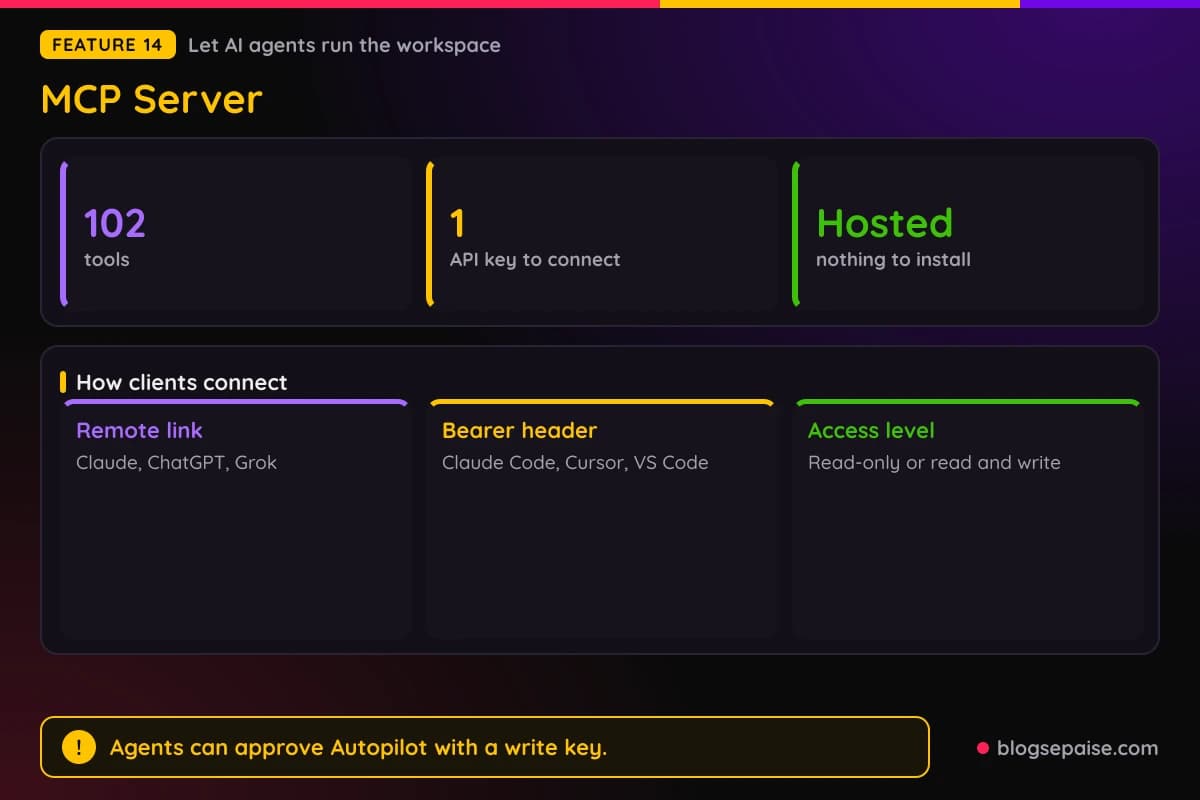
A read and write key that can start an Autopilot run can also approve it, because the backend cannot tell an agent from you. Tell your agent to wait for your approval if you want the last word.
Emailchaser Pricing Plans
Emailchaser has four plans: Starter, Pro, Max, and Enterprise. Email accounts are unlimited on every plan, so price depends on emails, contacts, and lead credits.
Annual billing gives 2 months free, and limits, features, and credits match monthly billing. Plans have no contract, and you can cancel anytime from account settings.
Starter costs $47 a month, or $470 billed yearly, which saves $94 against $564. It allows 5,000 emails a month, 1,000 active contacts, 1,500 lead credits, and up to 10 IMAP mailboxes.
Pro is the most popular plan. It costs $97 a month, or $970 billed yearly, which saves $194 against $1,164.
Pro allows 125,000 emails a month, 25,000 active contacts, 5,000 lead credits, and up to 40 IMAP mailboxes.
Max costs $358 a month, or $3,580 billed yearly, which saves $716 against $4,296. It allows 500,000 emails a month, 100,000 active contacts, and 10,000 lead credits.
Max also adds up to 120 IMAP mailboxes, the Sales CRM, and private Slack support.
Enterprise costs $897 a month, or $8,970 billed yearly, which saves $1,794 against $10,764. It allows 1,500,000 emails a month, 500,000 active contacts, and 30,000 lead credits.
Enterprise also adds up to 360 IMAP mailboxes, the Sales CRM, and a private Slack channel.
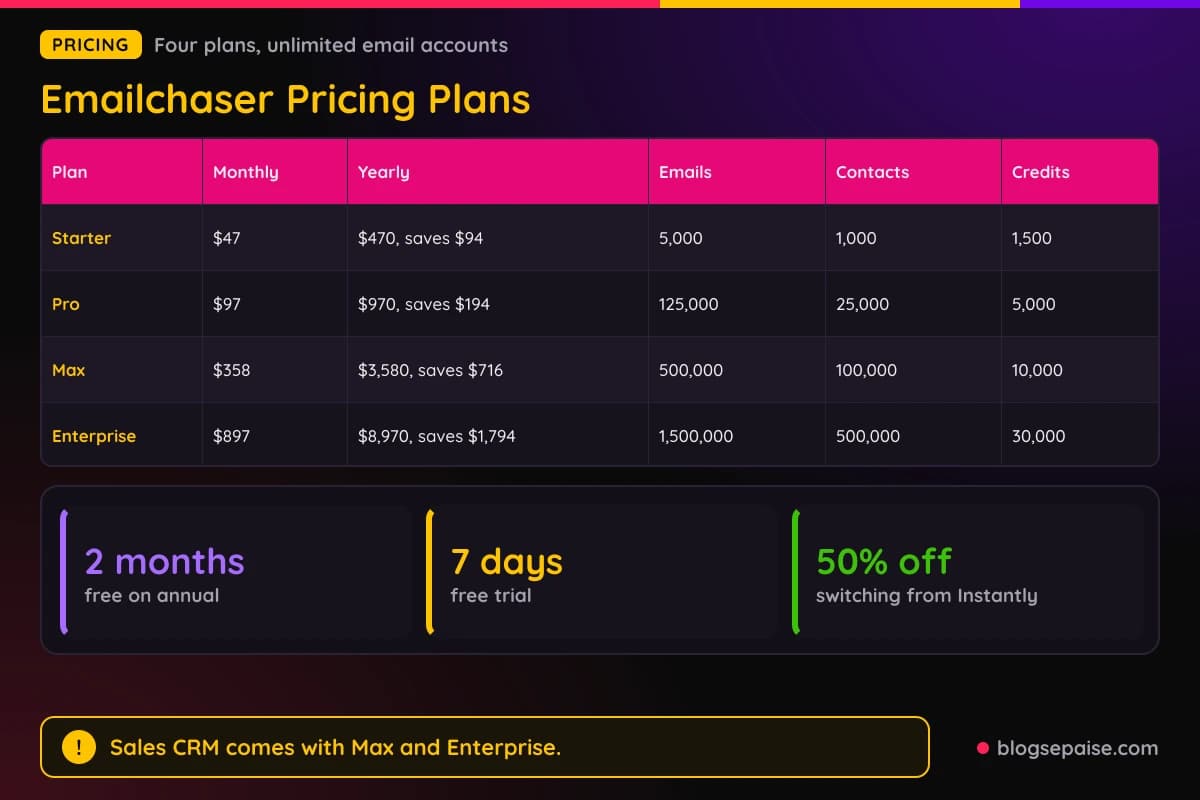
Active contacts count leads stored across all campaigns and lists, and removing contacts frees room. Email limits include follow-ups and reset on the 1st of each month.
Every plan includes unlimited team seats, unlimited client workspaces, built-in warm-up, inbox rotation, Lead Finder, the email verifier, AI writing, Autopilot, and API access.
The 7-day free trial costs $0 today and includes 500 lead credits. The plan starts on day 7 unless you cancel, and the trial includes a .com domain and 2 mailboxes for the first month.
Switching from Instantly earns 50% off for as long as you stay, which makes Starter $23.50, Pro $48.50, and Max $179 a month. A one-click import moves campaigns and leads over.
Extra lead credits cost $33 per 1,000, or $20 per 1,000 when you buy 5,000 or more at once. Top-ups never expire, and unused plan credits expire at the monthly reset.
Email verification costs $0.0017 per check on your invoice. Done-for-you mailboxes cost $6 a month each plus a $3 setup fee, and warmed-up mailboxes cost $16.79 once per domain.
Domains start at $16.59 a year for .com, and Inbox Placement is an add-on from $23 a month. A Done For You service costs $497 a month.
Done For You includes everything in Pro, 50 inboxes on 10 new domains, lead list building, and a launched first campaign.
Platinum Service is priced by quote for volumes above the standard plans. Domain registrations are final once purchased.
Emailchaser does not list refund terms. Plans have no contract, so cancel before day 7 of the trial if you do not want to pay.
Lead credits stretch differently by task. One credit reveals one verified prospect in Autopilot, while a LinkedIn profile in a list costs 5 credits.
Starter's 1,500 credits cover 1,500 prospects in a month. Pro's 5,000 credits cover 5,000 prospects or 1,000 LinkedIn profiles.
A small done-for-you start is cheap to price. Two mailboxes cost $12 a month plus $6 in setup fees, and the domain adds $16.59 a year for a .com.
Annual billing pays for 10 months and covers 12. Choose it if you plan to run campaigns for most of the year.
Monthly prices match Instantly's comparable tiers, and Emailchaser adds the lead credits that Instantly sells apart. Volume is where the gap shows, since Pro sends 125,000 emails a month for $97.
Start with the free trial, run one small campaign, and count what a booked meeting costs you. Then pick the plan that matches the emails you send each month.
Who Is Emailchaser Best Suited For
Emailchaser fits anyone who sends cold email at volume and wants one bill for the whole stack. Six groups have their own pitch pages.
Freelancers get entry-level plans and a 7-day free trial. Starter at $47 a month covers 5,000 emails and 1,000 active contacts, and double verification keeps bounces low.
Founders can run outbound without a sales hire. Autopilot builds the profile, sequence, and mailboxes from a website, and Max and Enterprise add the Sales CRM for tracking deals.
Freelancers who need a first client can pull leads from Sales Navigator with Lead Finder and upload them to a campaign. The Unibox keeps every reply in one place.
Founders on a tight budget can start on Starter, and the trial includes a .com domain and 2 mailboxes for the first month. Autopilot handles the setup work for them.
Sales teams share one workspace with unlimited seats. Replying leads can be exported to HubSpot, Salesforce, and Pipedrive, and the API supports custom workflows.
Reps can test copy with up to 26 A/B variants per step. Inbox rotation spreads sending across every connected mailbox.
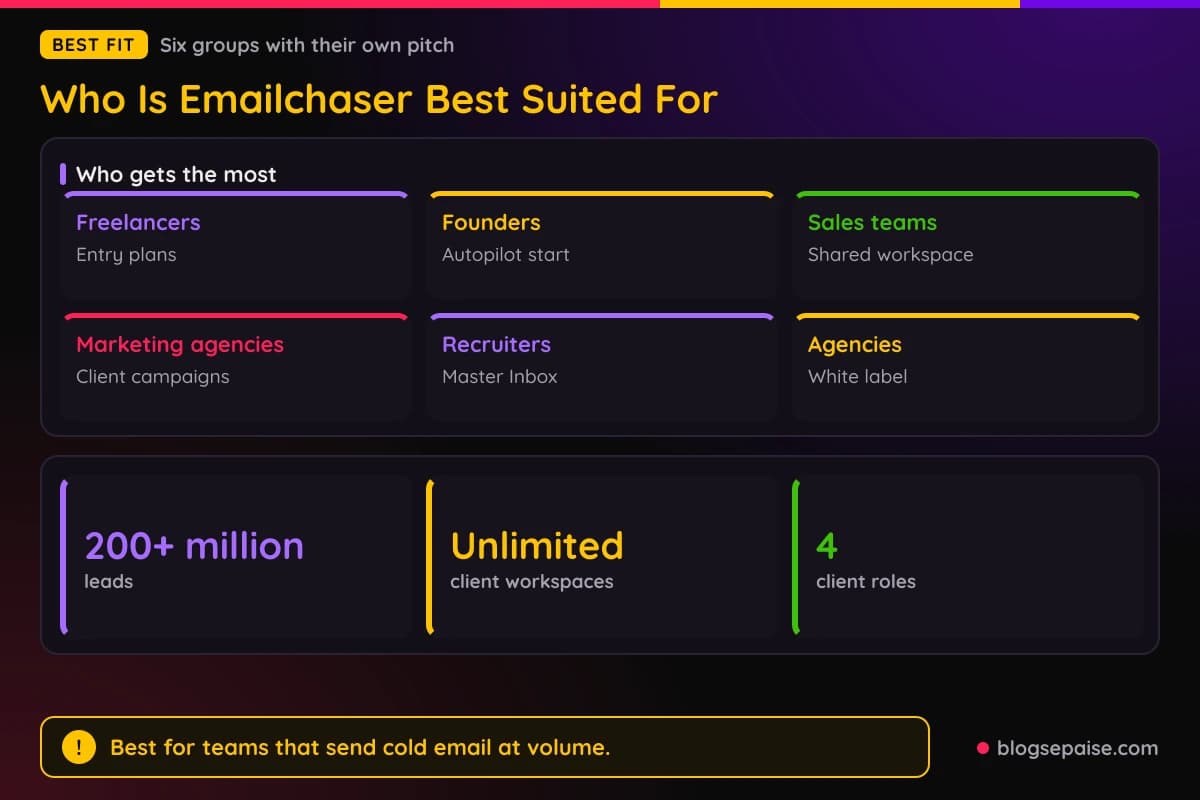
Marketing agencies run cold email for their own growth and for clients. Lead Finder, the Sales CRM, and CRM exports cover the pipeline from list to meeting.
Recruitment agencies find new clients and candidates with Lead Finder. The Master Inbox shows replies across connected accounts, including replies from candidates' personal emails.
Candidates often reply from a personal address instead of a work one. A shared inbox for all replies keeps those answers from getting lost.
Agencies get unlimited client workspaces, seats, and mailboxes on every plan. White label runs on the agency's own domain with SSL set up by Emailchaser.
Client roles are Admin, Editor, Replies only, and View only, so each client sees only its own workspace.
Each client can have a separate API key. In a 10 client, 100,000 email setup with 30 mailboxes, Pro costs $97 a month against $189 for Saleshandy Scale, $464 for Smartlead Unlimited Smart, and $847 for Woodpecker.
At 500,000 emails a month, Max costs $358 against $582 for Smartlead. Max also adds 10,000 verified leads a month and a private Slack channel with the Emailchaser team.
Who Emailchaser Is Not For
Emailchaser is not the right tool for everyone. Anyone who wants newsletters or promotional blasts to opted-in subscribers needs an email marketing platform instead.
Our AWeber review covers one built for that job. Emailchaser is built for cold outreach to prospects.
Teams that want a built-in CRM on a small budget should note that the Sales CRM comes with Max and Enterprise only. Starter and Pro users export replies to another CRM.
Teams that send from their own mail server should count IMAP mailboxes, which are capped at 10 on Starter, 40 on Pro, 120 on Max, and 360 on Enterprise.
Emailchaser sends email only. It does not list LinkedIn or phone steps inside its sequences, so multichannel outreach needs another tool.
Open-rate reporting does not exist here. Emailchaser does not track opens, so no opens metric appears in stats or webhooks.
API-only setups need SMTP or IMAP accounts, since Google and Microsoft mailboxes cannot be connected through the API. The warm-up pool works with Google and Microsoft mailboxes only.
Cold email carries legal duties. It is legal in most regions when you follow CAN-SPAM in the US and GDPR in the EU, so read the rules before you send.
Anyone who needs refund terms spelled out should ask before paying. Emailchaser does not list refund terms, and domain registrations are final once purchased.
For the Autopilot Starter kit, approval must be a person clicking Approve in the app. Other runs can be approved by you or by an agent you trust with your key.
A read and write key can approve runs and send replies that cannot be recalled. Keep agents on read-only keys until you trust the setup.
If none of that stops you, the free trial costs $0 today. Run one campaign and judge the results yourself.
Emailchaser Alternatives
Emailchaser competes with Instantly, Smartlead, Mailshake, Saleshandy, and Woodpecker. Check each tool's current pricing before you choose, since plans change often.
Instantly is the closest rival, with an AI Copilot that builds campaigns and AI Workflows that route replies. Its Growth plan costs $47 a month and its Hypergrowth plan costs $97 a month.
Instantly sells lead credits separately and they expire 2 months after purchase on monthly plans. Emailchaser includes lead credits in every plan, and its top-ups never expire.
Smartlead offers unlimited mailboxes, AI warm-ups, and a unified Master Inbox. It charges $29 per client workspace, and its Unlimited Smart plan costs $464 a month in a 10 client, 100,000 email setup.
Mailshake adds the SHAKEspeare AI email writer, a Data Finder for prospects, and a dialer. Our Mailshake review covers its plans and limits in detail.
Saleshandy runs sequences across email, calls, LinkedIn, and WhatsApp. Its Scale plan costs $189 a month in the same 10 client setup.
Woodpecker adds LinkedIn actions such as profile visits and connection requests to email campaigns. It costs $847 a month in that setup, charges $27 to $32 per client workspace, and sells API access for $20 a month.
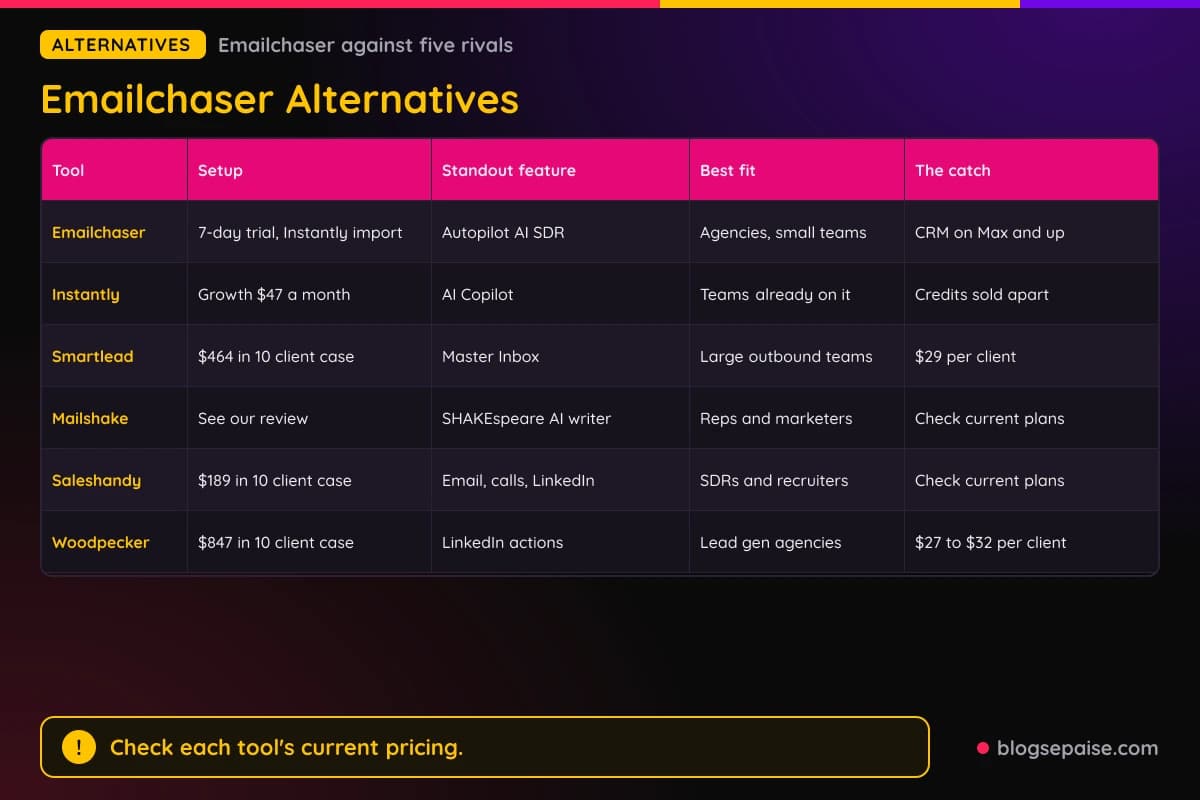
Emailchaser stands out for Autopilot, unlimited mailboxes and workspaces, and verification, lead finding, and warm-up on every plan. Those extras suit agencies and small teams that want one bill.
On price, Starter at $47 a month matches Instantly Growth, and Max at $358 beats Smartlead's $582 at 500,000 emails a month. Compare each rival's current plans before you commit.
Pick a tool by the way you work. Count per-client fees if you serve many clients, count credits if you buy leads, and count mailboxes if you plan to scale sending.
Trying two tools side by side costs little, and Emailchaser offers a 7-day free trial. Run the same 40 email list through each and compare bounces and replies.
Switching from Instantly has one catch. Mailbox passwords do not move over, so every mailbox must be reconnected, campaigns arrive as drafts, and imported webhooks arrive disabled until you review them.
Emailchaser Use Cases
Emailchaser fits several outbound jobs. Lead generation for a service business is the most common one.
Founders can find early customers with Autopilot. It reads a website, builds a 4-step sequence, and launches after one approval.
Agencies can run outreach for many clients from separate workspaces. White label on the agency's domain and a separate API key per client keep each account tidy.
Recruiters can source clients and candidates with Lead Finder. The Master Inbox collects replies, including those from candidates' personal emails.
Teams on Instantly can move over with the import wizard. The four steps are Connect, Import, Reconnect mailboxes, and Done.
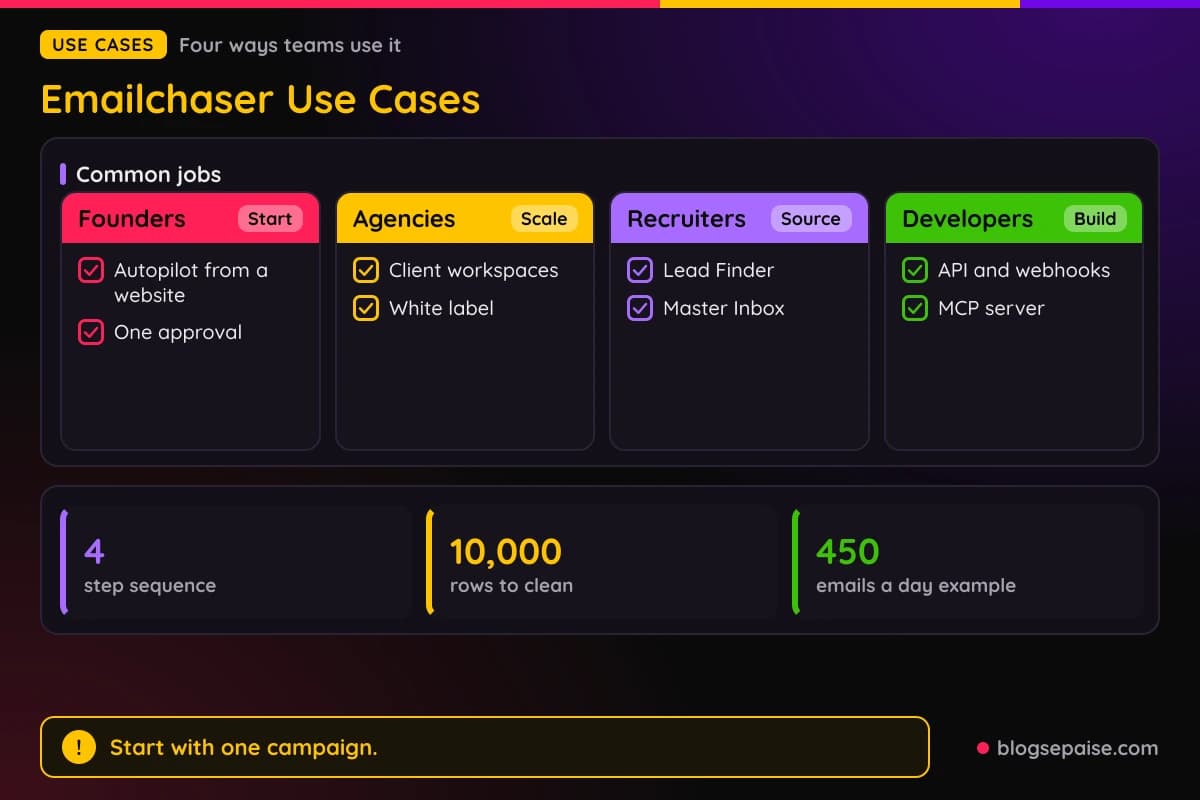
List cleaning is a use case on its own. Paste or upload up to 10,000 rows for free browser cleaning, and paid plans verify up to 50,000 addresses in one job.
Deliverability checks use Inbox Placement. Send a test from up to 20 accounts, see where mail lands, and fix blocklist or authentication problems before a launch.
Capacity planning uses the warm-up planner. A target of 300 emails a day across 6 mailboxes lands in week 10, while 15 mailboxes get there in week 4.
Developers can wire Emailchaser into other tools. The API, webhooks, Make, and Clay move leads and replies where you need them.
AI agent workflows run through the MCP server. An agent can check campaign stats, pause weak campaigns, and register a webhook for new replies.
Freelancers can use the free email finder and checker before they pay. Three free searches and three free checks a day cover a first small list.
Sales teams can test subject lines with A/B variants. Winning variants get more sends when Autopilot runs the campaign.
Pick the use case closest to your goal and start with one campaign. Measure replies and meetings before you add more mailboxes.
Final Thoughts On Emailchaser
Emailchaser does one job well: it turns a list idea into a running cold email campaign without a pile of separate tools. Lead finding, verification, sending, warm-up, and reply tracking sit in one account.
Unlimited email accounts, seats, and client workspaces are the standout. Pricing follows emails and contacts, so growing your inbox count never raises the bill.
Autopilot adds a hands-off start. It reads your website, drafts a 4-step sequence, and waits for one approval before it spends anything.
Pricing is easy to read, with four plans from $47 to $897 a month and 2 months free on annual billing. Limits are clear on emails, active contacts, and lead credits.
Gaps are plain facts. Emailchaser does not list refund terms, does not track opens, and keeps the Sales CRM for Max and Enterprise.
Agencies and small teams get the most from it, because workspaces, white label, and the API come with every plan. Founders and freelancers can start on Starter and grow from there.
Start with the 7-day free trial and its 500 lead credits. Run one small campaign, check replies, and judge the cost per meeting before you pick a plan.
Setup takes real care. Check SPF, DKIM, and DMARC on your domain, let the ramp run, and send only to verified addresses.
Cold email still depends on a good offer. Emailchaser handles the plumbing, and your message and list decide the replies.
You can browse more write-ups on our software reviews hub if you want to compare tools side by side.
Emailchaser FAQ
1. What Is Emailchaser?
Emailchaser is cold email software that finds leads, verifies addresses, sends sequences, and tracks replies. It sends from your own Google, Microsoft, or IMAP mailboxes.
It also includes Autopilot, warm-up, a Sales CRM on higher plans, a cold email API, and an MCP server.
2. How Much Does Emailchaser Cost?
Starter costs $47 a month, Pro costs $97, Max costs $358, and Enterprise costs $897. Annual billing costs $470, $970, $3,580, and $8,970 a year.
Add-ons cost extra, including Inbox Placement from $23 a month and done-for-you mailboxes at $6 a month each.
3. Does Emailchaser Have A Free Trial?
Yes. The trial lasts 7 days, costs $0 today, and includes 500 lead credits.
The plan starts on day 7 unless you cancel before then. Domains and mailboxes the agent sets up are billed separately when you approve them.
4. Does Emailchaser Include Email Warm-Up?
Yes. Every plan includes a gradual ramp that starts at 5 emails a day and rises by 5 each week up to 50.
An optional warm-up pool for Google and Microsoft mailboxes adds simulated engagement on top.
5. How Many Email Accounts Can I Connect?
Email accounts are unlimited on every plan. IMAP mailboxes on your own mail server are capped at 10 on Starter, 40 on Pro, 120 on Max, and 360 on Enterprise.
Google, Microsoft, and Gmail accounts you already own connect at no extra cost.
6. Can I Switch From Instantly To Emailchaser?
Yes. An import wizard moves campaigns, leads, suppression lists, and webhooks in four steps, and switching earns 50% off for as long as you stay.
Every mailbox must be reconnected because Instantly does not export mailbox passwords.
7. Does Emailchaser Have An API?
Yes. The REST API has 33 core endpoints, takes 1,000 leads per request, and allows 600 requests per minute.
A hosted MCP server with 102 tools lets AI agents use the same keys and limits.
8. How Does Emailchaser Verify Emails?
A first provider checks that the mailbox exists, and a second independent provider re-checks every address the first does not reject. Each check costs $0.0017.
Results are Deliverable, Risky: catch-all, Undeliverable, or Unknown.
9. Who Is Emailchaser Best For?
Emailchaser suits agencies, founders, freelancers, sales teams, and recruitment agencies that send cold email. Unlimited client workspaces make it a fit for agencies.
Teams that only send newsletters to opted-in subscribers need a different kind of tool.
10. Does Emailchaser Include A CRM?
Yes, on Max and Enterprise. The Sales CRM has custom columns, notes, a pipeline value total, and team sharing.
Starter and Pro users get the Unibox and can export replying leads to another CRM.
11. Can AI Agents Use Emailchaser?
Yes. A hosted MCP server with 102 tools lets Claude, ChatGPT, Grok, Claude Code, Cursor, and VS Code run campaigns, leads, and Autopilot.
Read-only keys limit an agent to reading, and read and write keys let it spend credits and send email.
12. Does Emailchaser Offer Refunds?
Emailchaser does not list refund terms. Domain registrations are final once purchased.
Use the 7-day free trial to test the product before you pay.
13. Can I Cancel Emailchaser Anytime?
Yes. Monthly and annual plans have no contract, and you can cancel from account settings.
Mailbox billing stops when you cancel the mailboxes.