SoftSync Review (2026): How Much Does This AI CRM Cost?
SoftSync is an all-in-one AI CRM at softsync.ai for startups and small or growing teams. It removes the data entry from daily CRM work.
SoftSync keeps leads, meetings, email, e-signatures, and follow-up in one place. It covers the jobs of separate tools for leads, booking, note taking, contracts, and support.
AI drafts emails and keeps customer details current, and meeting notes are captured without a bot. Email and replies stay linked to the right customer record.
Migration from spreadsheets or other CRMs is quick. There are no add-on fees, since AI and add-ons are all included.
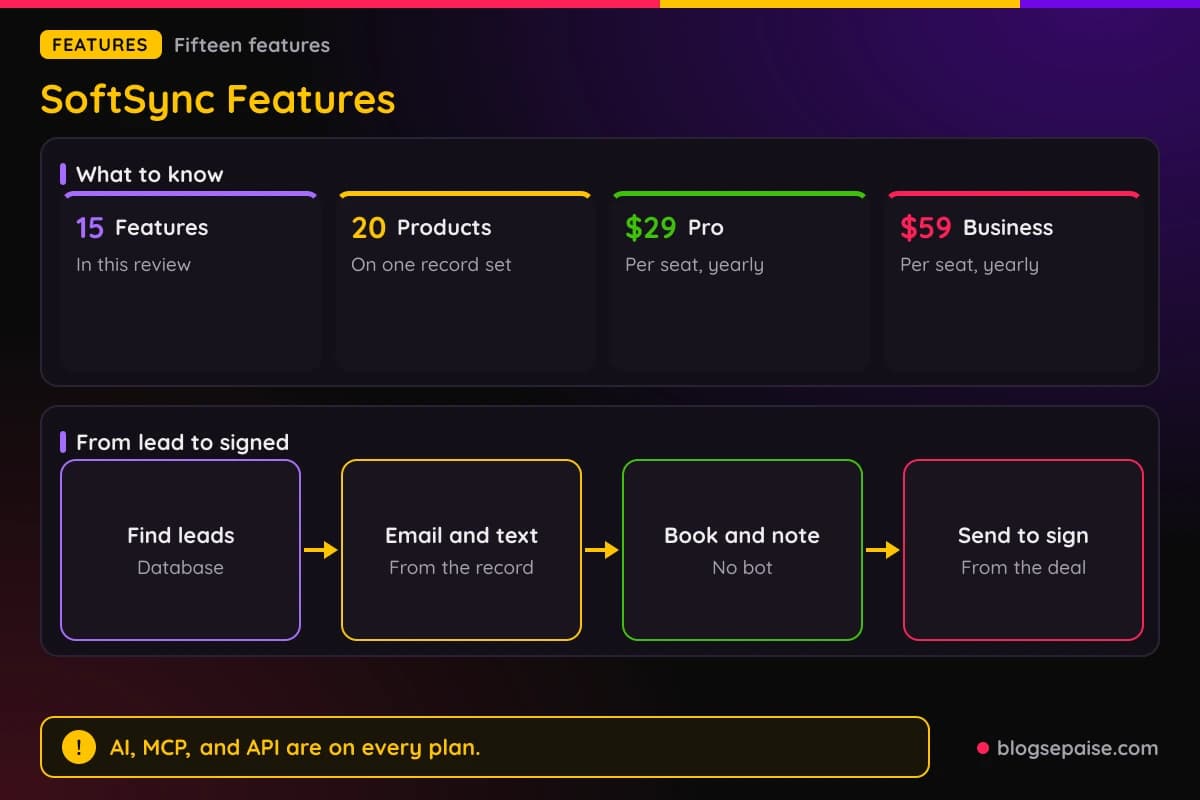
SoftSync has two paid plans and a custom Enterprise plan. Pro costs $29 per seat a month billed yearly or $39 billed monthly, and Business costs $59 per seat a month billed yearly or $79 billed monthly.
AI, MCP, and API access come on every plan. Pro workspaces hold up to 5 team members, and Business workspaces hold up to 25.
SoftSync offers a free live walkthrough called Intro to SoftSync and a 1-minute product tour.
SoftSync was founded in 2025, is based in San Francisco, and had about 7 employees as of late 2025. The company is bootstrapped rather than venture funded.
Disclosure: Some of the links I share might be affiliate links. If you click on one and make a purchase, I may earn a small commission as a thank you. But don’t worry, it won’t cost you anything extra. I only recommend stuff I genuinely believe in. Your support helps me keep creating awesome content. You can read my full affiliate disclosure in my disclaimer page.
Search 1,500+ affiliate programs in the Blogsepaise Program Database and filter them by category, network and commission type, then go straight to each program's signup page. The Link Health Monitor then checks your posts for broken, redirected and untagged affiliate links.
SoftSync Features
SoftSync has 20 products, and eight of them are core products. They are Outreach, Email campaign, Meetings, Meeting notepad, Flexible CRM, Reports, AI Assistant, and Autopilot.
The rest of the product list covers SMS, Templates, a Lead Database, Documents, E-signature, Forms, a Web Agent, a Customer Portal, a Knowledge Base, Website Content, a Service Desk, and a Team Inbox. This review groups all of them into 15 numbered features.
Every product reads and writes the same customer records. Workspaces can start as a simple list and grow to include automation and reports without switching tools.
The core CRM includes records, custom objects, table, pipeline, and calendar views, and team roles. The sales workspace adds email sync, campaigns, templates, and meeting notes.
1. A Flexible CRM With Industry Templates
SoftSync is a customizable CRM for small business. It manages contacts, companies, and deals, and it keeps emails, meeting notes, and next steps attached to each customer's history.
You name pipeline stages with your team's own terms. You can also add fields such as renewal dates or services.
Records show as a table, a board, or a calendar. Each view shows the same records in a different way, so switching views does not duplicate data.
Getting started is short. You begin with Contacts, Companies, or Deals, add the fields you need, name your stages, and choose a view.
You can save a view for daily use. You can change the setup as your process evolves.
Groups and record types stretch the CRM past sales. Partnerships, projects, and renewals are examples, and each one links back to the same customer history.
Custom record types include investors, candidates, properties, and partners. Each type has its own fields, stages, views, and links.
SoftSync works as both contact management software and sales pipeline management software. You can also track non-sales work, such as projects or renewals, next to sales.
SoftSync also offers ready-made CRM setups for specific industries, and each one is added in one click. A template brings lists, boards, forms, and automations that are already built.
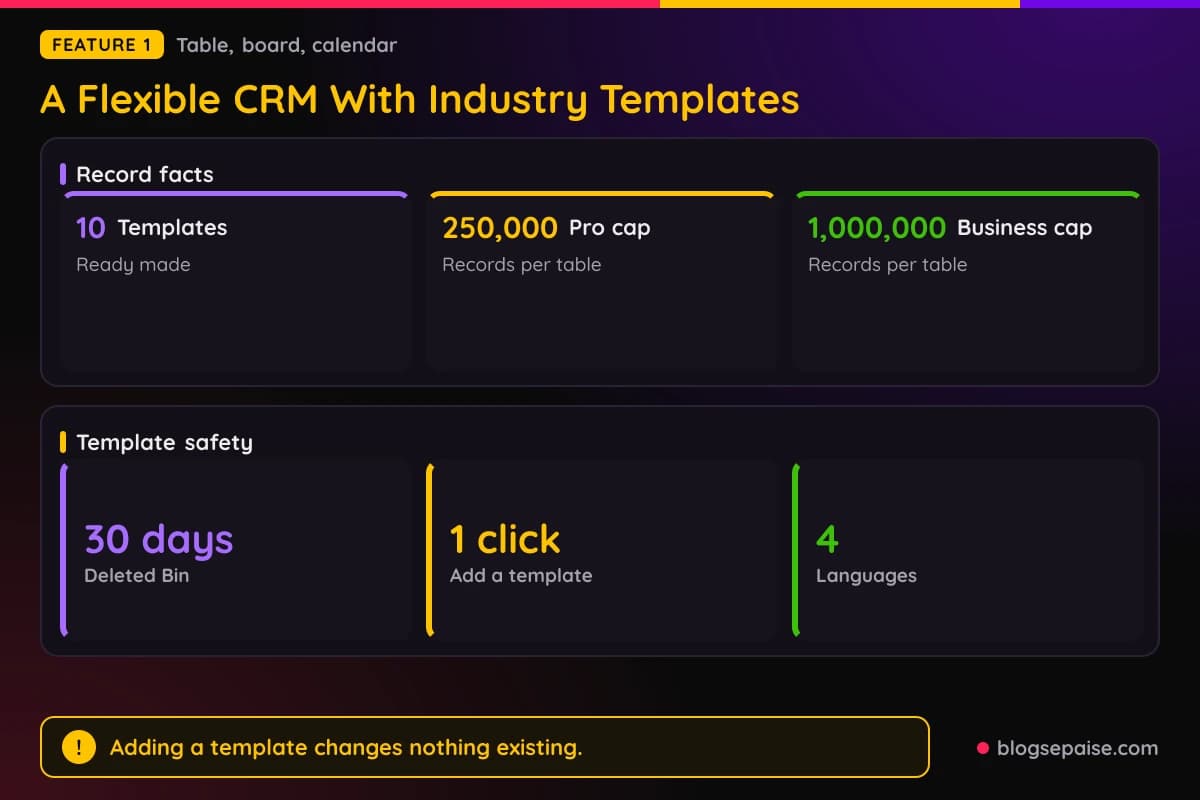
Templates cover Service desk, Wiki, Recruitment, HR, Vet clinic, Clinics, Salon and spa, Real estate, Property management, and Projects and Time.
You can open and inspect any template before you add it, and nothing changes until you add it. Example records can come with the template so you can test it right away, and you can clear them all at once while your own records stay.
Only admins can add, update, or remove templates and example data. Everyone else can view the templates.
Adding a template only adds items. Nothing existing is changed, renamed, or deleted, and an add that stops partway can be retried safely.
Removing a template hides its groups for the whole team and keeps all records. Re-adding it restores everything, and removed example data stays in the Deleted Bin for 30 days.
Translations are included for Danish, Finnish, Norwegian, and Swedish. Example records and names follow the workspace language setting.
The record cap is 250,000 per table on Pro and 1,000,000 per table on Business. Import is available on every plan.
2. Email And Campaigns
SoftSync works as email follow-up software that keeps outreach personal. You send outreach from your own inbox, with sales email automation built in.
You can connect Gmail or Outlook, so messages come from the inbox your customers recognize. Pro includes 1 mailbox connection per user and Business includes 5.
A personal message inserts customer details from the record, so you do not rewrite the same introduction again and again. You can preview the message before it goes out.
Timed follow-up lets you set a delay so the next touch is scheduled before you send. No separate reminder is needed.
Reply activity shows who replied after sending. The sequence stops once a conversation starts, and the reply stays on the customer record.
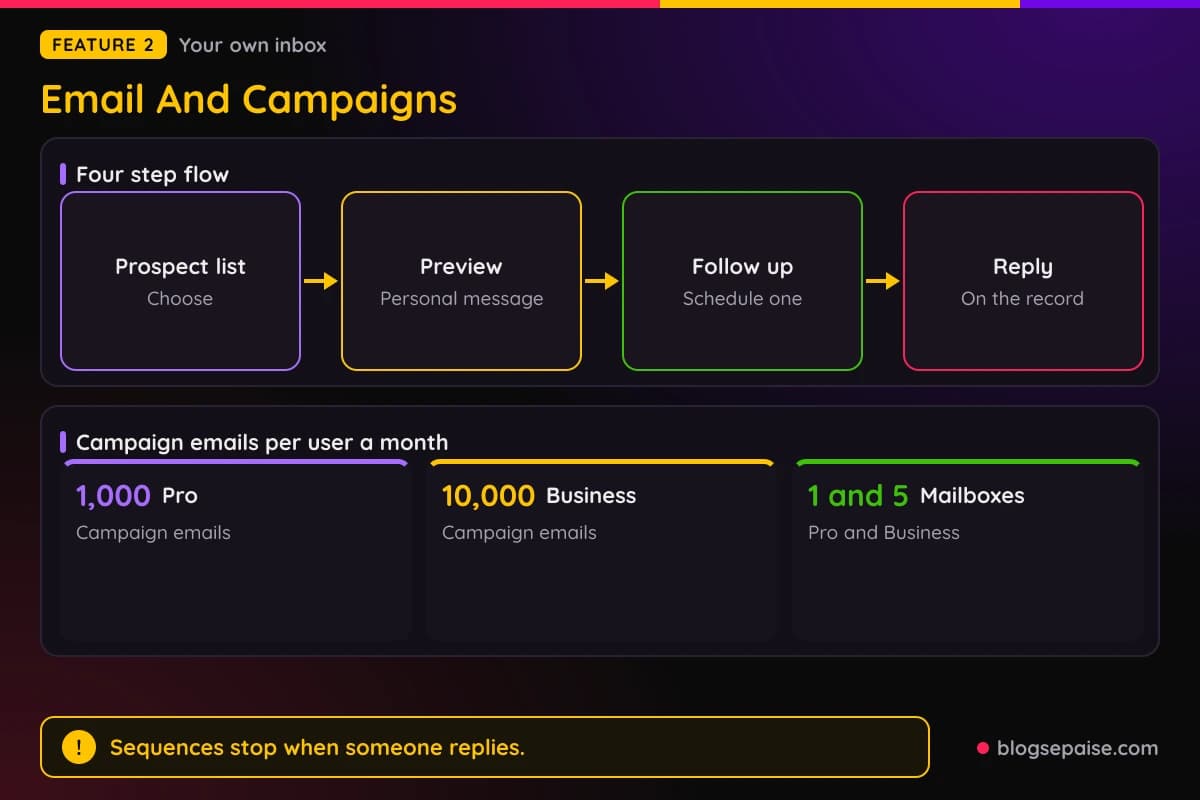
Automated sequences are multi-step follow-ups that wait between steps and stop on reply. The setup flow has four steps: choose a prospect list, preview a personal message, schedule one follow-up, and open the reply on the customer record.
Email and campaigns are built into the CRM, so every message and reply ties to the right customer. You do not need a second tool for outreach.
Campaign volume depends on the plan. Pro includes 1,000 campaign emails per user a month, and Business includes 10,000.
Pro also includes email sync and templates in the sales workspace. Enterprise has custom limits.
The Team Inbox can start replies from saved email templates, with details such as the customer's name filled in from the record. Autopilot can also send reminders and drafts as part of a routine.
3. SMS Texting From The Contact Record
SoftSync lets you text customers from their contact records. You see delivery status and keep the texts next to the emails.
A Send Text button appears on any contact that has a phone number. You choose the number and write up to 1,600 characters.
Texts go out from your company name, and nothing needs to be purchased or installed. Each text shows its status on the contact record, from Waiting to Delivered.
Texts have four statuses. They are Waiting to send, Sent, Delivered, and Not delivered, and the reason shows when a text is not delivered.
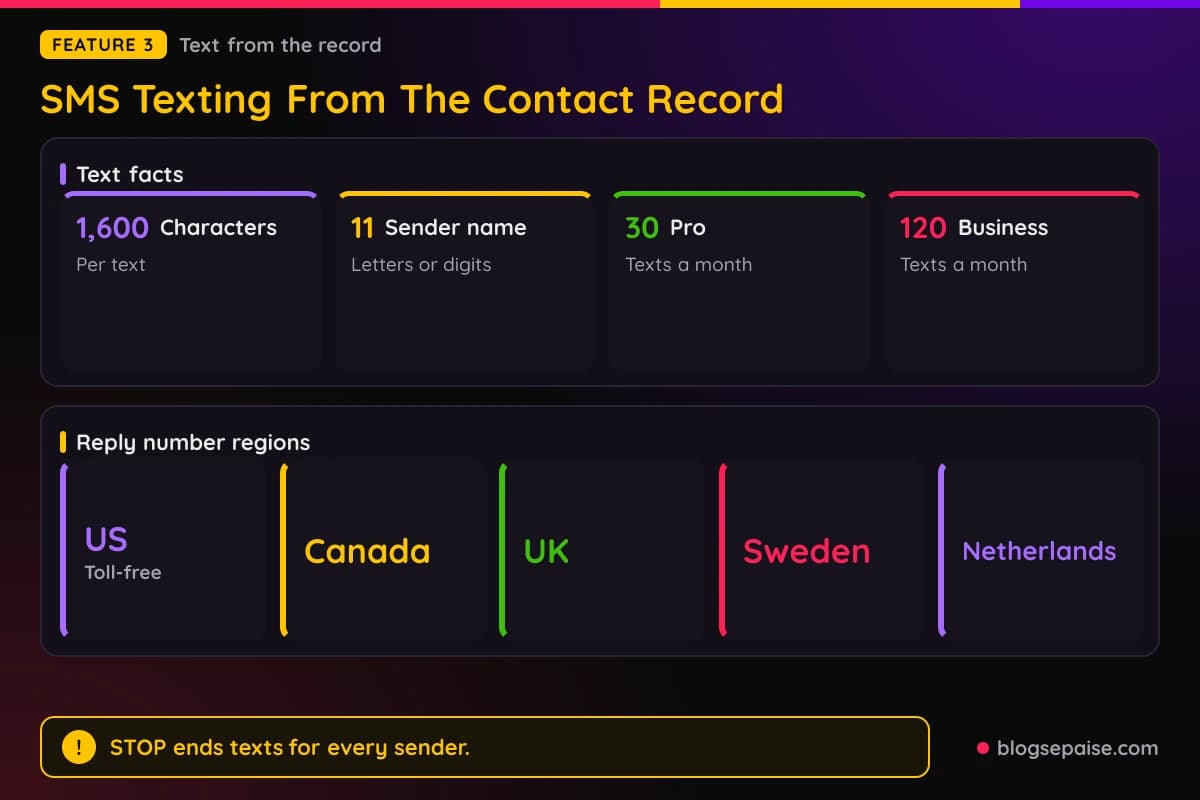
No phone number is required to start. You can choose a sender name of up to 11 letters or digits, and texting works right away.
The exception is the US and Canada, where carriers accept texts only from a number. A US number requires your business to be verified first, which usually takes a few days.
A reply number lets customers text back. Replies appear on the contact and in the shared Inbox, where any team member can answer by text.
With a shared number, the Inbox shows each person's texts as a chat. Replies go out as texts, not email.
The Business plan includes one reply number for the whole workspace. Reply number regions are the US (toll-free), Canada, the UK, Sweden, and the Netherlands.
Until a reply number is approved, texts keep using your sender name. Without a reply number, you set the SMS opted-out date on the contact by hand when someone asks.
Contacts who reply STOP are not texted again, and START turns texts back on. An opt-out applies to every sender, including you, Autopilot, and the AI Assistant.
Autopilot has a Send message step, such as a reminder the day before each booking. It skips opted-out contacts and records that in the run.
Pro includes 30 texts a month and Business includes 120. The allowance is shared across the workspace, and each text counts once regardless of length.
Texts that never left do not count, and you can see the remaining texts under Settings, then Billing. Admins and editors can send texts once texting is shared with them, and they can text only contacts they can see.
4. Lead Database And Chrome Extension
The lead database is a B2B database for finding your next customers. You search for companies that look like your best customers and add chosen companies and people to your CRM.
Search filters include country, company size, and other criteria. The match count updates as you filter, and seeing the count is free.
Free items include the match count, the charts, and the first 25 companies of a search. After that, SoftSync charges credits.
Credits cost 1 per company shown or added, 2 per person, and 10 per work email found. You are not charged for people or emails that are not found.
Credits are shared across the team and refresh monthly. Pro includes 1,000 enrichment credits per workspace and Business includes 10,000.
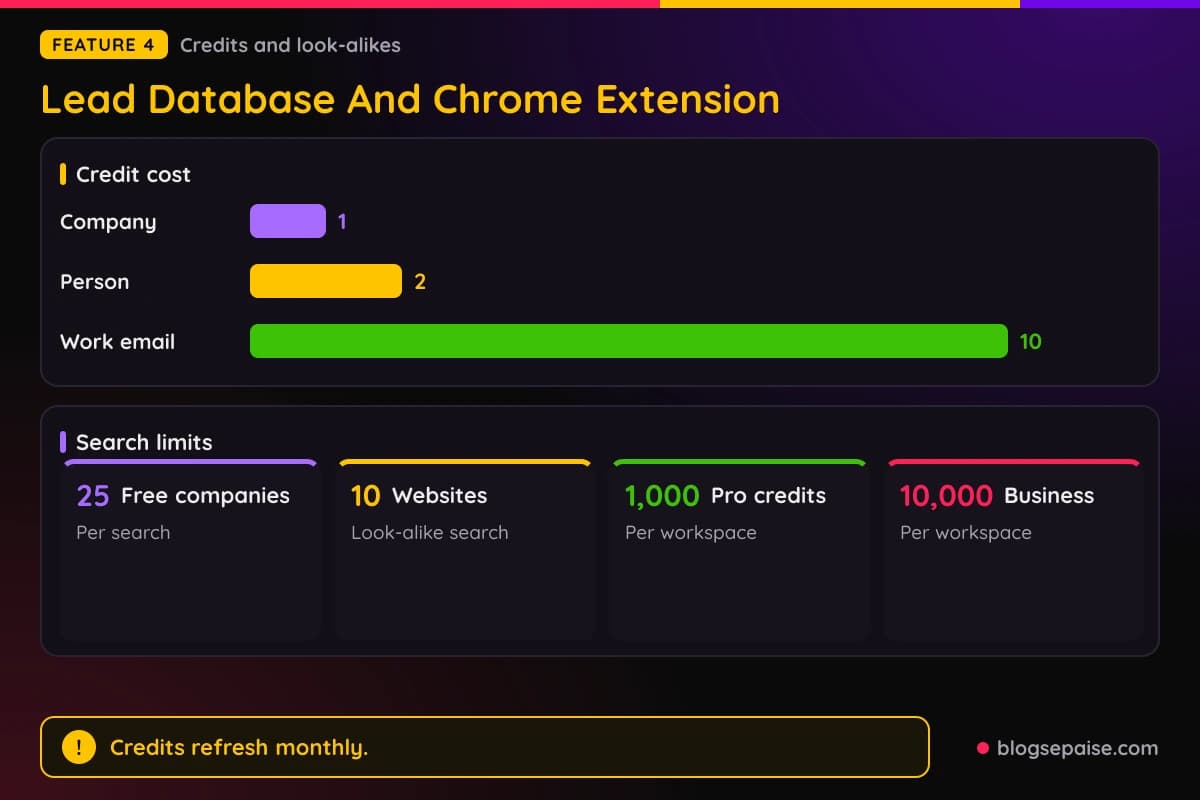
The add bar shows the maximum possible cost before you confirm. You select companies, choose how many people to add for each, and add them to your CRM.
Look-alike search starts from a company or contact in your CRM with the Find similar companies option. You can also enter the websites of several companies you like, and SoftSync uses up to 10 of them.
Saved searches keep your filters and add choices under a name. You can reopen one in a click and share it with your team.
Companies already in your CRM are excluded from results. Re-added companies are not duplicated, and manually entered data is not overwritten.
Added records carry company details and a company profile note. If key people are enabled, contacts come with job title, LinkedIn profile, and a work email when you ask for it.
Anyone in the workspace can search and browse, but adding companies requires the Admin or Editor role.
The Chrome extension handles leads you find while browsing. It skips the copy-paste.
You can save a contact in one click while viewing them, and the contact and company come into SoftSync together. A company page turns into a record that keeps the contact, company, and source connected from the start.
The extension also fills gaps by adding available role, location, and company information before outreach. It works on supported professional and company pages, and where enrichment is available SoftSync can add role and company context.
If the contact already exists, SoftSync keeps the existing record and lets you add new information to the right customer. The page shows four steps: find a contact on a profile, preview the details, save the contact, and open the connected customer record.
5. Reports And Dashboards
Reports show where every sale stands. You build focused dashboards from the Contacts, Companies, and Deals in your CRM.
Reports help you spot leads that are moving, deals that stall, and contacts who need follow-up. You can open the records behind any number.
The sales funnel view shows open deals, pipeline value, win rate, and revenue movement together. Reviews can start from the same picture.
Focused charts let you compare stages, owners, sources, or time periods. You pick the chart that fits the question.
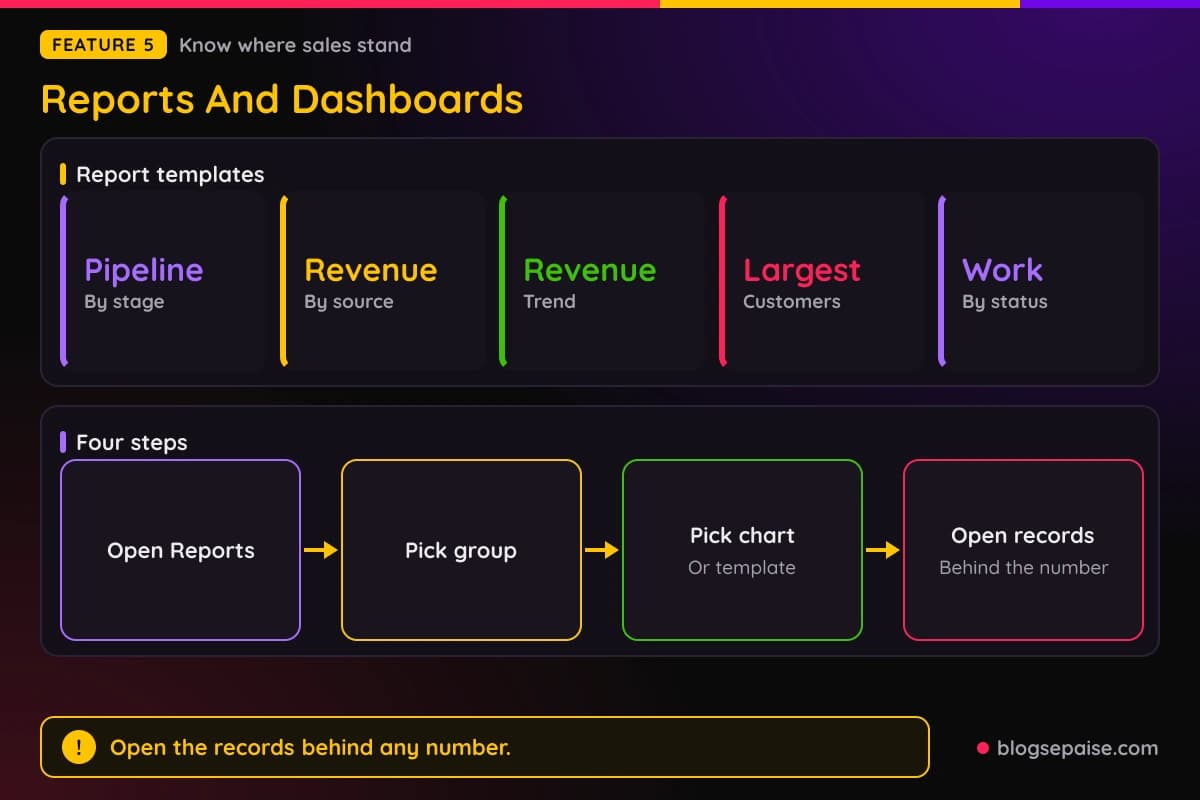
Drill-down lets you filter a chart by stage, owner, source, or date. You then open the matching Contacts, Companies, or Deals that need action.
Templates give you a starting point. Templates include Pipeline by stage, Revenue by source, Revenue trend, Largest customers, and Work by status, and you adjust the fields and filters.
Reports use your workspace's own groups, objects, fields, and stages. Dashboards therefore reflect how your team already tracks sales.
Reports can answer five sample questions. They are how many Deals are open, where the funnel narrows, which owner has the most value, which source converts best, and how revenue changes over time.
The workflow has four steps. You open Reports, choose the group and information to measure, pick a chart or start with a template, and open the records behind the result.
Reports and dashboards are included on Pro. Dashboards, charts, and the underlying records stay in one connected workspace.
6. Schedule Meetings
Scheduling is online appointment software that fills your CRM. You get one shareable booking page for demos, onboarding calls, or team meetings.
Bookings write straight to your CRM. Scheduling goes beyond a calendar invite by keeping booking, customer context, and the next action together before and after the call.
You set up each meeting type once, such as a Sales demo, an Onboarding call, or a team meeting. For each type you set the hosts, the meeting length, the assignment rule, and the guest questions.
Each meeting type gets its own page with separate hosts, duration, questions, and booking link. You can share a single link or embed the page on your site.
Guests see only times that match host availability and connected calendars. Double booking is prevented by the host's available hours and the connected calendars, and bookings are written to the calendar on confirmation.
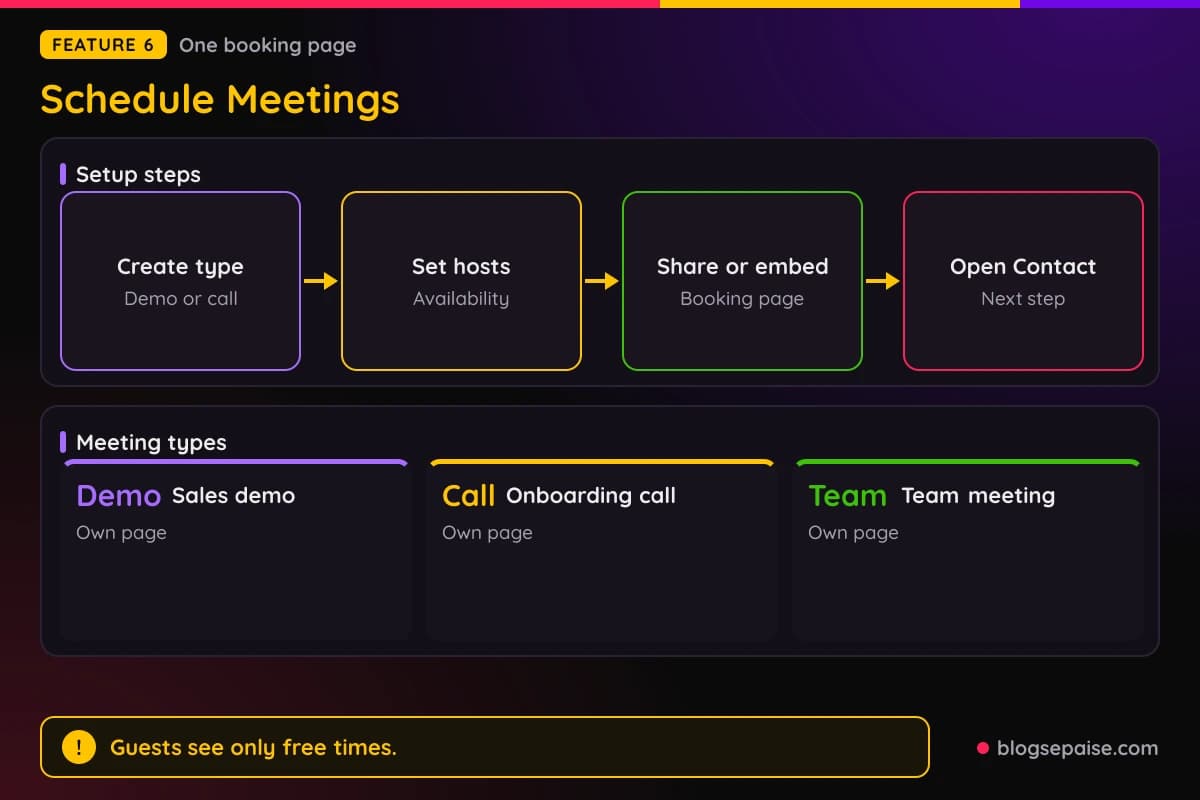
Guests book from the page, see only free times, and receive a confirmation. The page also collects context for your team through the guest questions.
After a booking, SoftSync matches the guest to an existing Contact by email or creates a new one. It adds the calendar event and keeps the booking ready for follow-up.
You choose a Contacts group for each meeting type. That way new leads land in the right place with their booking details stored.
The setup flow has four steps. You create a Sales demo or meeting type, choose hosts and set their availability, share or embed the booking page, and open the Contact to prepare the next step.
Schedule Meetings is not the same as Note Taker. Schedule Meetings handles booking before the call, while Note Taker captures the conversation itself.
7. Note Taker Without A Bot
Note Taker produces AI meeting notes without a bot. It is a desktop app for Mac or Windows that runs without a bot joining the call.
The app lives in the menu bar on a Mac and in the system tray on Windows. It captures the microphone and system audio, so nobody has to invite a recording participant.
It writes a live transcript and an editable summary. The summary covers decisions, requirements, names, dates, and next steps.
Before or at the start of a conversation, you open SoftSync from the menu bar or system tray. You then add a contact, company, or deal to Meeting Context.
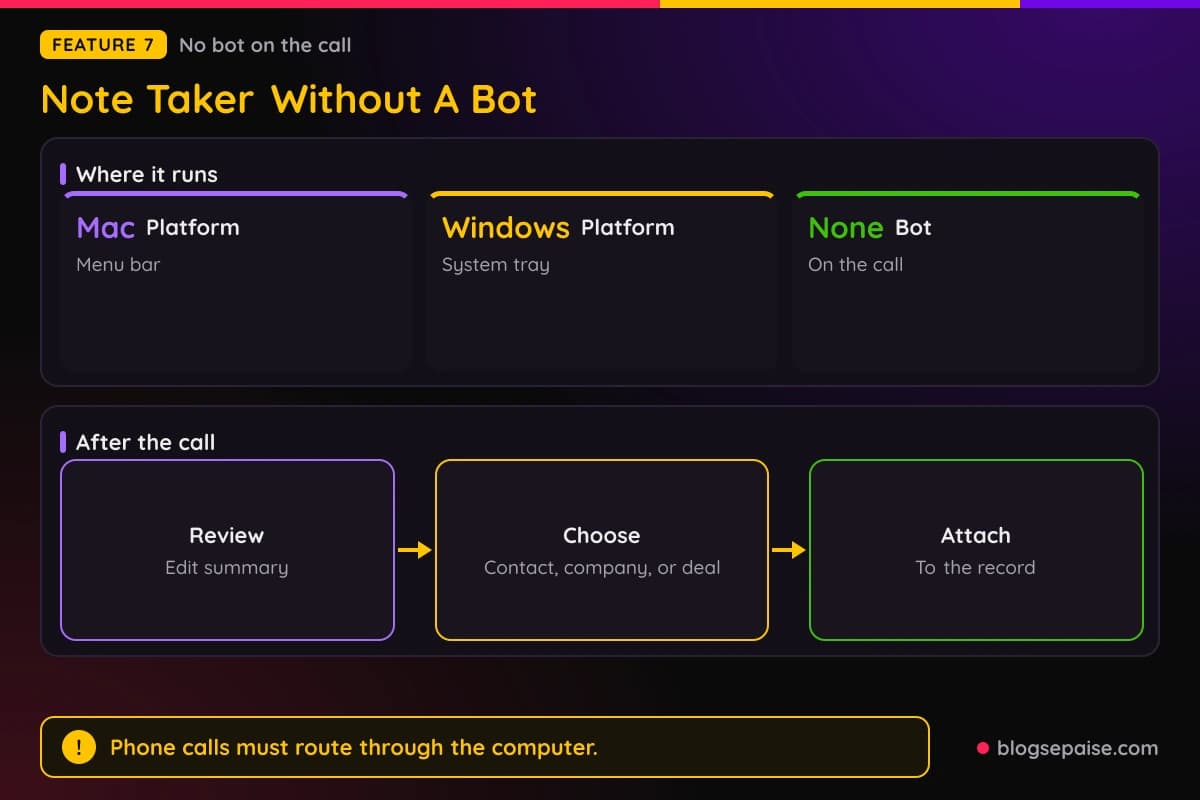
You start capture while the conversation runs. You choose what to capture and what to save.
After the call you review and edit the summary. You then choose the contact, company, or deal and attach the checked summary to its CRM record.
Note Taker captures three kinds of conversations. They are online meetings, phone calls routed through the computer, and ordinary conversations near the computer.
The app does not dial phone calls itself. Phone calls must be routed through the user's computer.
The Meeting Assistant attaches call notes to the matching customer record. AI summaries still need human review, and the app is confirmed only for Mac and Windows.
Meeting notes are captured without a bot, and the desktop app records from Mac or Windows. Pro includes the desktop recorder.
8. Documents And E-Signature
Documents give you quotes and contracts in one click. You design a template once, then generate a PDF from any deal, contact, or company with the correct details filled in.
Layouts are built from simple blocks: logo, title, text, a table of line items, and a footer. You can preview the PDF before saving, and customer name, deal, products, and total fill in from the record.
You can also bring your own PDF. You upload an existing file and click to place boxes for record details and signatures, and the original content stays unchanged.
Uploaded PDFs can be up to 30 MB and 300 pages. They must not be password protected.
To create a document you open the deal's Files tab, click New, then Write a document. You select a quote template and click Make the PDF, and the PDF appears on the deal.
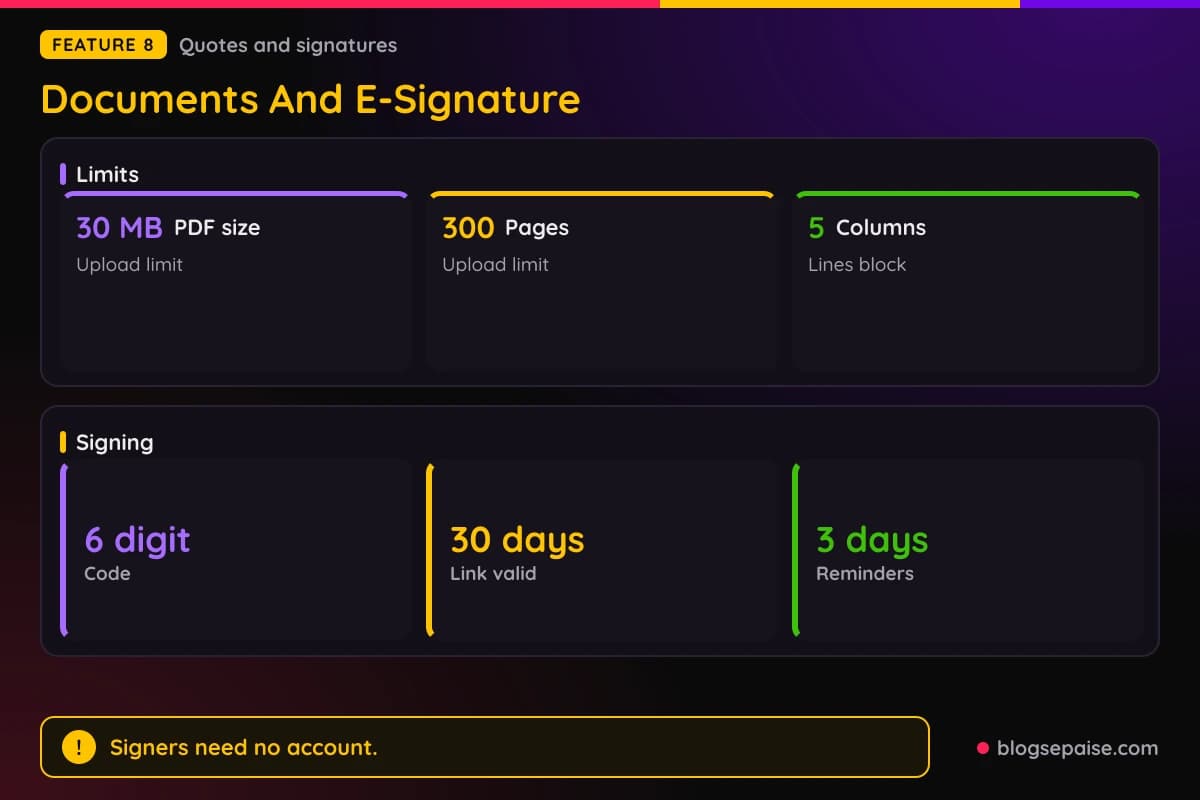
Starting from a template creates your own copy that you can edit, and Make the PDF locks the text. The Lines block adds one row for each item in a record list, supports up to five columns, and can show text when the list is empty.
Ready-made templates include Proposal, Meeting notes, Mutual NDA, Investor update, and Seed term sheet. Have a lawyer review the NDA and term sheet before you rely on them.
Admins and Editors design templates, and all workspace members can see the template list. Anyone who can open a record, including Viewers, can make a PDF from a template.
Documents show only what the creator is allowed to see. Writing your own copy, editing it, or deleting files requires edit rights on that record.
E-signature is built into the CRM, and you send it and get it signed. You send quotes or contracts for signing directly from a deal, and the sealed signed copy is stored on the customer record.
You place signature, name, date, and email fields on the document, and some fields fill in when the signer signs. You then add each signer and choose a signing order, either in order or all at once.
Anyone with a name and email address can sign on any phone or computer with no account. Each signer gets an email with a button and then a page where they enter a 6-digit code sent to that address and agree to sign electronically.
Signers can type, draw, or upload a signature, and each signer sees only their own fields. You can pick signers from the record or a linked record, including your own team members.
The signing link stays valid for 30 days by default, and you can adjust it from 1 to 120 days when sending. Reminders go out automatically every 3 days by default, and you can turn them off.
Signers who decline must give a reason, and the sender and anyone who already signed are emailed. The file shows Declined, and it can be edited and resent.
A signed file is added beside the original with (signed) in its name, and all parties receive a copy by email. The document shows each signer and signing time and carries a digital seal.
Only the sender or an admin can resend the email, correct a signer's name or address, or cancel. No specific signing standards or regulations are named for e-signature.
9. Forms That Create Contacts
Forms turn website answers into customers. You build website forms from fields your team already uses, and each submission becomes a contact ready for ownership and follow-up.
You do not create any new field to build a form. You choose the questions and where answers are saved.
Publishing options are a public link or embed code for your website. After you save, the Use it step offers five ready-made embed styles.
You control which fields visitors see, which fields the app fills automatically, and where answers are saved. An automatic value can be a fixed value, the submission date and time, or a mix of answers and text.
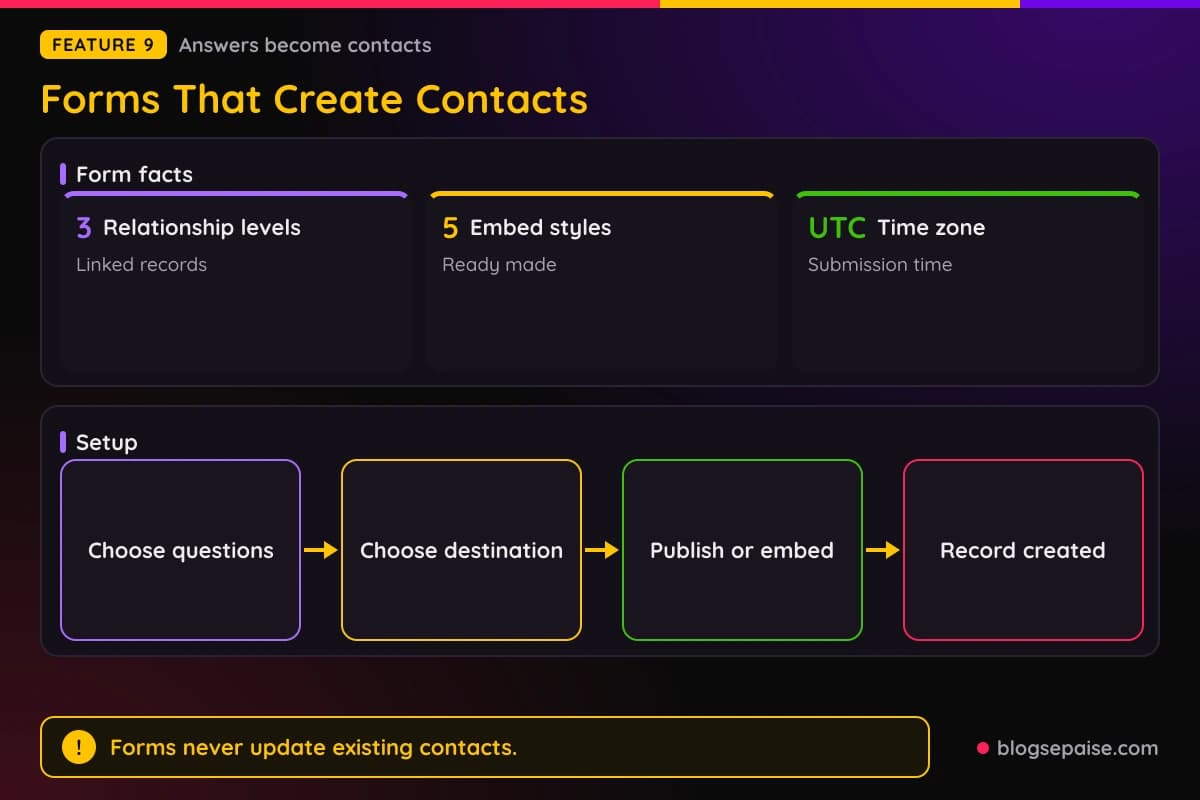
Submission times use UTC. Forms can also follow existing relationships up to three levels deep, and each linked record is created when someone submits.
Every submission creates new records, and related records are created and linked to the main record. Submissions never match or update an existing contact or company.
Because of that, decide how to handle duplicates before you share a form widely. Resetting the public link disables the old link and embed, and records already submitted remain in the workspace.
Workspace administrators create and edit forms. Other users see submission records based on their existing access.
To save a form you need a name, a main group and object, and at least one valid destination. Every required destination field needs either a visitor question or an automatic value.
Forms also feed the Service Desk. Web chat, new email, and forms all feed one ticket list there.
10. SoftSync AI Assistant, MCP, And API
The AI features act as teammates that understand your business. You ask questions about your CRM, connect Claude or ChatGPT through MCP, or use the API.
The AI signs in as the user and sees only what that user can see. You can set it to read-only, to need confirmation before changes, or to limits for a narrow task.
There are three AI teammates. The reply writer reads incoming emails and drafts replies in your tone, and you review and approve before it sends.
The deal chaser finds customers who have stopped replying and drafts friendly follow-ups. Nothing is sent without your approval.
The meeting briefer compiles recent emails, notes, and open questions before customer meetings. The teammates take notes on what works and learn from each attempt.
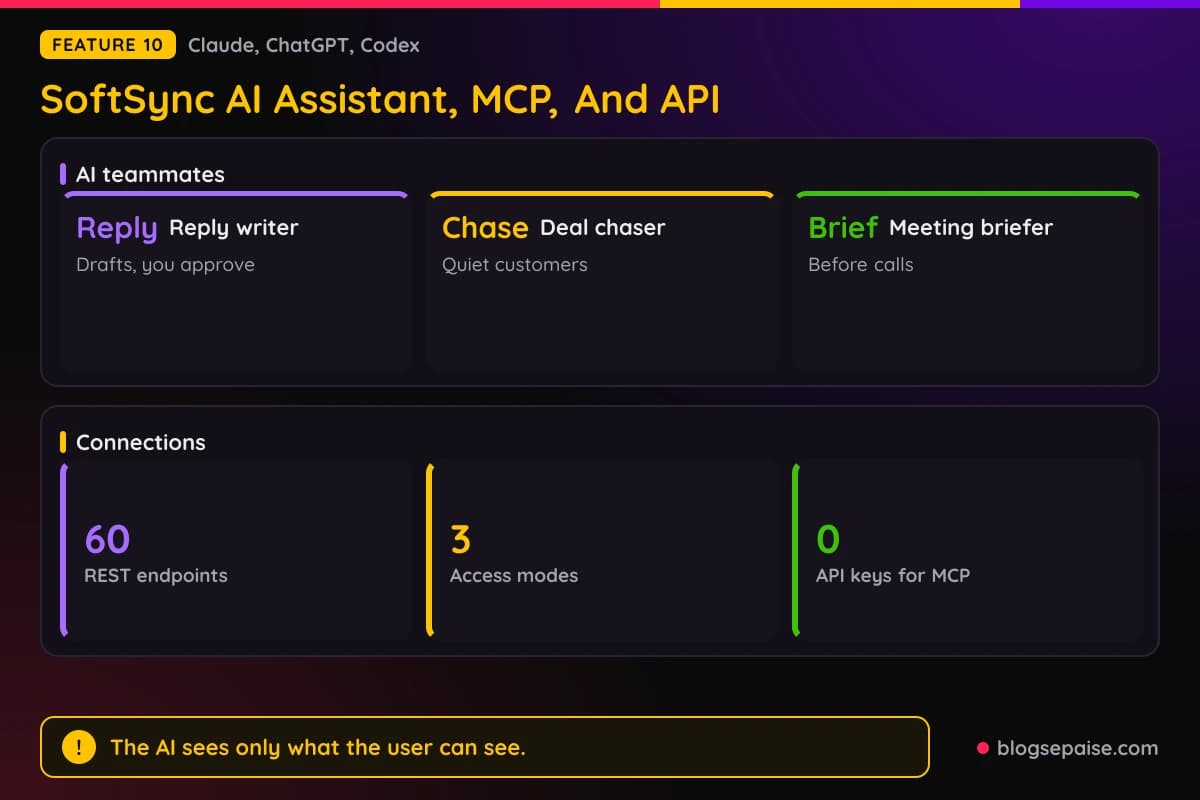
The workflow has four steps. You choose a teammate or describe the job, connect your email, review the prepared work and approve it, and add a comment if it is off so the AI uses that feedback next time.
MCP works with Claude, ChatGPT, or Codex, and with other MCP-compatible clients. It supports researching leads, updating records, drafting follow-ups, and showing its work, and it uses the Model Context Protocol, an open standard.
MCP does not need an API key. It signs in with your SoftSync account.
The REST API has about 60 endpoints. They cover records, groups, views, notes, messages, campaigns, workflows, and table structure.
API keys are personal and created under Settings, then API Keys. The API is for your own code, while MCP serves AI work.
The Assistant runs inside SoftSync, MCP connects outside AI clients, and the API serves custom code. All three use the same records and permissions.
Workspace data is not used to train AI models. The Assistant can use information from files available in your workspace, within its access.
Actions are recorded on the customer record in plain-language sentences. For how-to or policy questions, the Assistant checks your Knowledge Base pages first and names the pages it used.
Finn Schløsser-Møller says he moved data from HubSpot to SoftSync, with Claude guiding the options and handling the transfer. AI, MCP, and API access are included on every plan.
11. Autopilot Workflows
Autopilot is CRM automation: you describe the job and Autopilot does it. It turns a plain-language task description into a CRM workflow.
A typical job reads like one sentence, such as a weekly check for stalled deals that reminds the owner. You need no workflow builder knowledge, and you can also start from a ready-made routine.
The process has three steps. You describe the job, review when the routine runs and what it will do, and then switch it on.
Nothing runs until you approve it. Once on, the routine runs in the background and you can pause, edit, or delete it at any time.
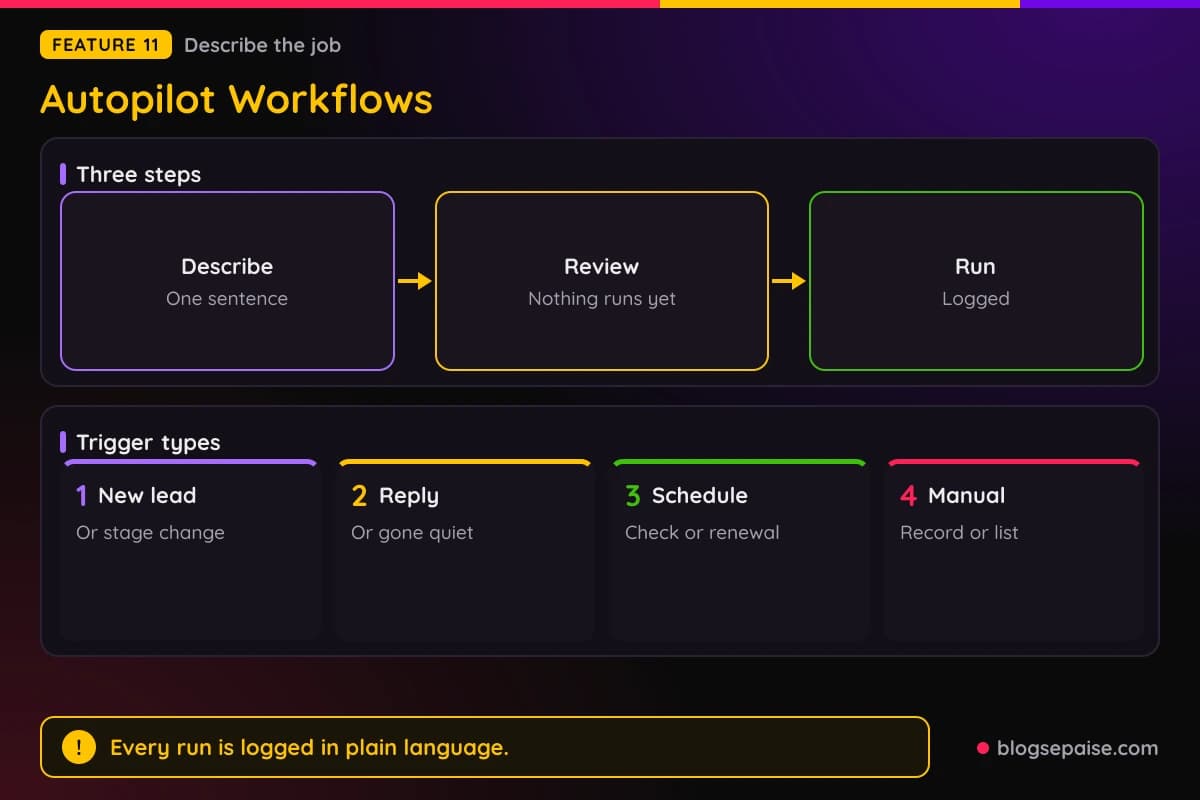
Every run is logged in plain language. The run history shows what was checked and which reminders were sent.
Autopilot has four kinds of triggers. They are a new lead arriving or a deal changing stage, a reply coming in or a conversation going quiet, a scheduled check such as a Monday check or a renewal date, and manual runs for one record or a whole list.
Connected tools in your workspace can supply information or actions outside SoftSync when a job needs them. Routines live inside SoftSync alongside your data, and you update a process by describing the new rule or editing the routine.
Autopilot covers sales follow-up automation and sales workflow automation for any repeating job you can describe in a sentence. Your team still owns the relationship.
The AI Assistant handles the question or action in front of you. Autopilot detects repeatable situations and handles them on a schedule, with or without anyone asking.
The Team Inbox can use Autopilot to distribute new emails among teammates in turns. Pro includes Autopilot workflows.
12. Web Agent Chatbot
The Web Agent is an AI customer support chatbot that answers while you sleep. It is a chat bubble on your website that answers visitor questions from your own help articles.
Visitors ask in their own words, and the agent replies in the visitor's language. It names the source article it used.
When the agent cannot help, it passes the chat to your team. The visitor leaves a name and email, and the chat appears in the Team Inbox where your team replies.
The agent tells the visitor it does not know when an answer is not in your articles, rather than guessing. It reads only articles meant for customers, never team-only pages or drafts, and you can narrow it to one list of pages.
You choose one of four tones: Friendly, Professional, Playful, or Brief. You can also set a greeting, a color, and house rules, such as what the agent must never promise.
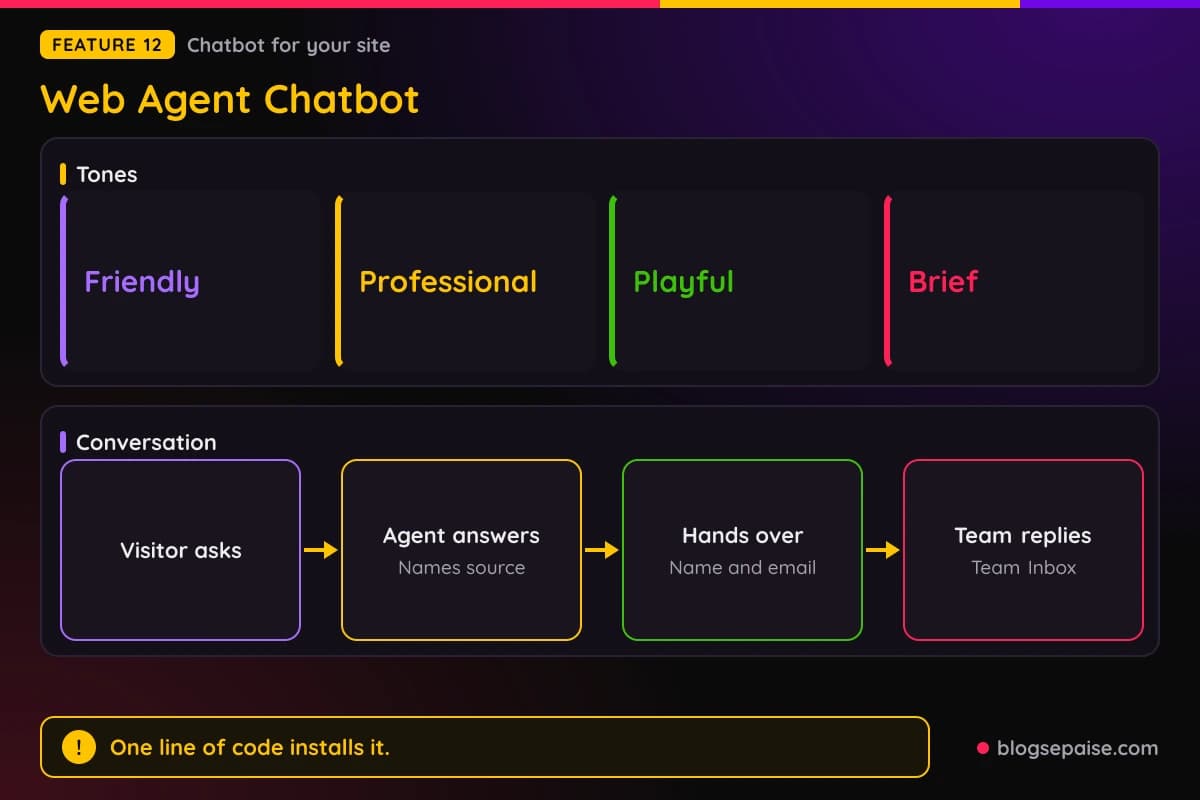
Installation takes one line of code. You paste it before the closing body tag, or into your site builder's custom code box, and every page with the code shows the bubble.
You choose who sees chats: everyone in the workspace, selected teammates, or only yourself. Teammates you did not pick cannot see them.
Switching the agent off removes the bubble from your site right away. If the code ended up somewhere it should not be, you can create a new link.
Only workspace admins can set up the agent, because it talks to people outside your company. When a question goes to the Service Desk, the visitor sees a ticket number such as TICK-000042.
The agent's answers are marked as AI in the Team Inbox. No figures, pricing, or usage limits are published for the Web Agent.
13. Knowledge Base And Customer Portal
The Knowledge Base lets you write the answer once. It is one place for team knowledge that the Assistant can quote and that can become a customer help center.
You write pages with headings and lists, and drafts stay private until ready. Search works with everyday wording rather than exact titles, and the best matches appear first.
Visibility has three levels. A draft is never shown to customers or the Web Agent, a team only page stays inside your team, and a page published with Customers too appears on the help center and feeds the Web Agent.
Only Editors in the Wiki group can write pages. Everyone in the workspace can read all pages, including drafts and team pages, and customers see only pages published for them.
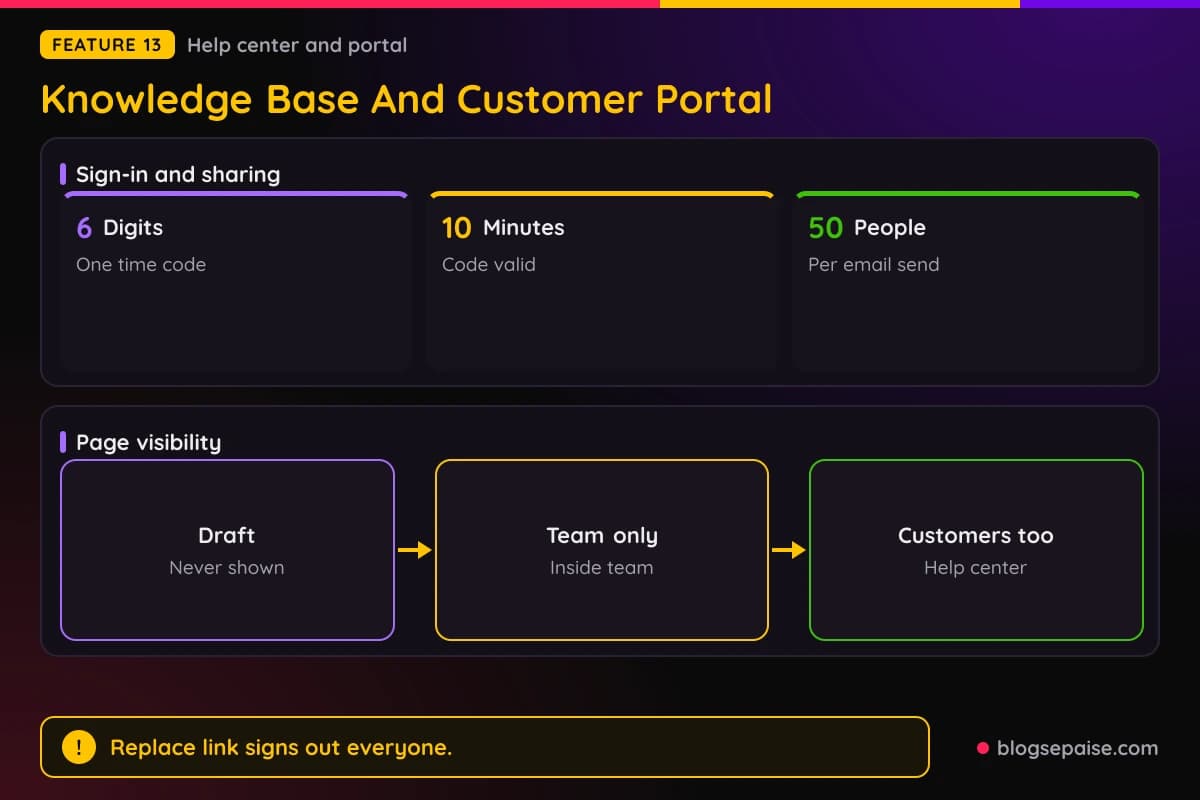
Team pages and help articles are the same kind of page. The only difference is if it is shared with customers.
The Customer Portal gives each customer a page of their own. It comes in two portal types.
The help center shows published articles grouped by topic, and anyone with the link can read it with no sign-in. The private portal makes each customer sign in and see only their own linked records.
Setup starts with a purpose, and SoftSync builds the pages. Page types include customer self-service, help center, public list, and form or booking page, generated ready to adjust.
Customer preview lets you pick a customer and see their exact view. Nothing tried in preview is saved.
Sign-in is passwordless. Customers enter an email or mobile number and receive a six-digit one-time code that is single use and valid for 10 minutes.
Only linked records are visible. You choose which details customers see and can change, if they can add files, and which documents they can download, and unticked fields are never shown.
An optional Let visitors search setting lets visitors type questions in their own words. One line of code places the portal on your site under your name, and it resizes to fit, including on phones.
Sharing options are copying the link, printing a QR code, emailing the link from the Share window to up to 50 people at a time, or sending it by text if a texting service is connected.
Turning off Open to visitors closes the portal for now, and turning it back on restores the same link. Replace link permanently disables the old link and signs out everyone.
14. Website Content
Your team writes and your website follows. Pages and posts are written in SoftSync and shown on your own website.
Nobody edits content in the site's code, and nothing is embedded. SoftSync does not build your website, and your site keeps its own design and address.
Each post has a title, address, summary, cover picture, category, tags, and author. The text is split into sections that you can reorder, and you can add pictures and video in the editor.
Each picture needs a short description. Video can be a YouTube, Vimeo, or Loom link, or an uploaded video file.
A live preview opens your website beside the editor. Clicking text or a picture on the page opens the matching post, section, or question, and after you save the page reloads on its own.
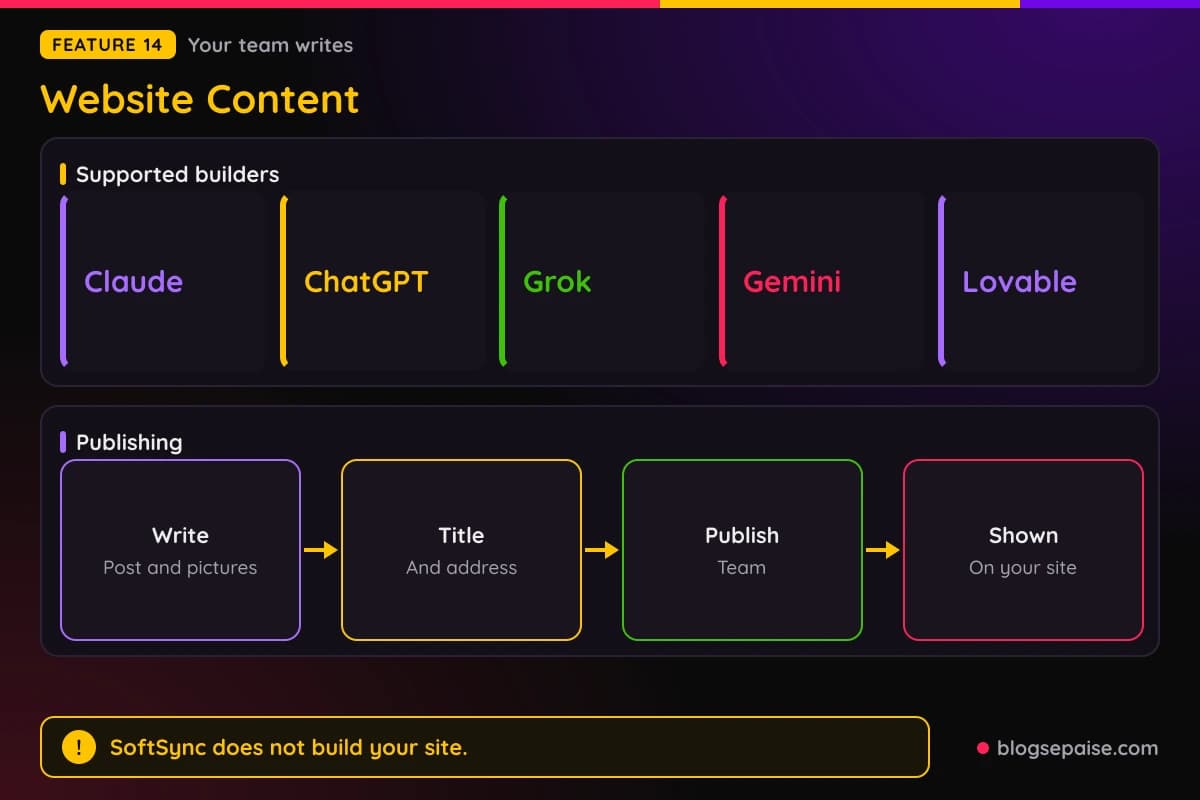
A single prompt connects your website builder. Supported tools are Claude, ChatGPT, Grok, Gemini, and Lovable.
SoftSync generates instructions from your content so the tool can read posts, add new ones, upload pictures, and show a live preview. If an AI website builder created your site, the one-prompt setup writes the small server code piece for you.
Your website needs that small piece of server-side code, which reads published posts using a workspace key. The secret key stays on your website's server and never appears in the page visitors see.
The publishing workflow has four steps. A team member writes a post and adds pictures, gives it a title and address, the team publishes it, and your website shows it at its own address.
Only published posts appear on your site, and drafts appear only in the preview while you build. Anyone on the team you grant access can edit, and each post shows its author's name and picture.
Website content is separate from the Knowledge Base. The Knowledge Base hosts help articles in a public help center, while website content feeds your own site, such as a blog or marketing pages.
15. Team Inbox And Service Desk
The Team Inbox is shared inbox software for support@, sales@, and hello@. A team connects a shared address and answers it together.
Every reply goes out from the team address, so customers never see a personal one. The inbox shows every conversation to everyone with access.
It works with Google Workspace, a Google Group, or a Microsoft 365 shared mailbox. For Microsoft 365, an administrator must approve the connection once.
Each email thread is one conversation with an owner, so two people do not answer the same customer. Everyone can see who has each conversation.
Teammates reply from the shared address within the same thread, and conversations can be marked done. A done conversation reopens when the customer writes again.
You can limit the mailbox to yourself, selected teammates, or everyone in the workspace. People without access never see its conversations.
Admins and editors with access can reply. Viewers with access can read conversations and see ownership but cannot reply.
When a website visitor asks for a person, the full Web Agent chat appears in the Inbox next to email. Each new customer email becomes one task with a ticket number, and you can assign it under Assigned to or let Autopilot share it out.
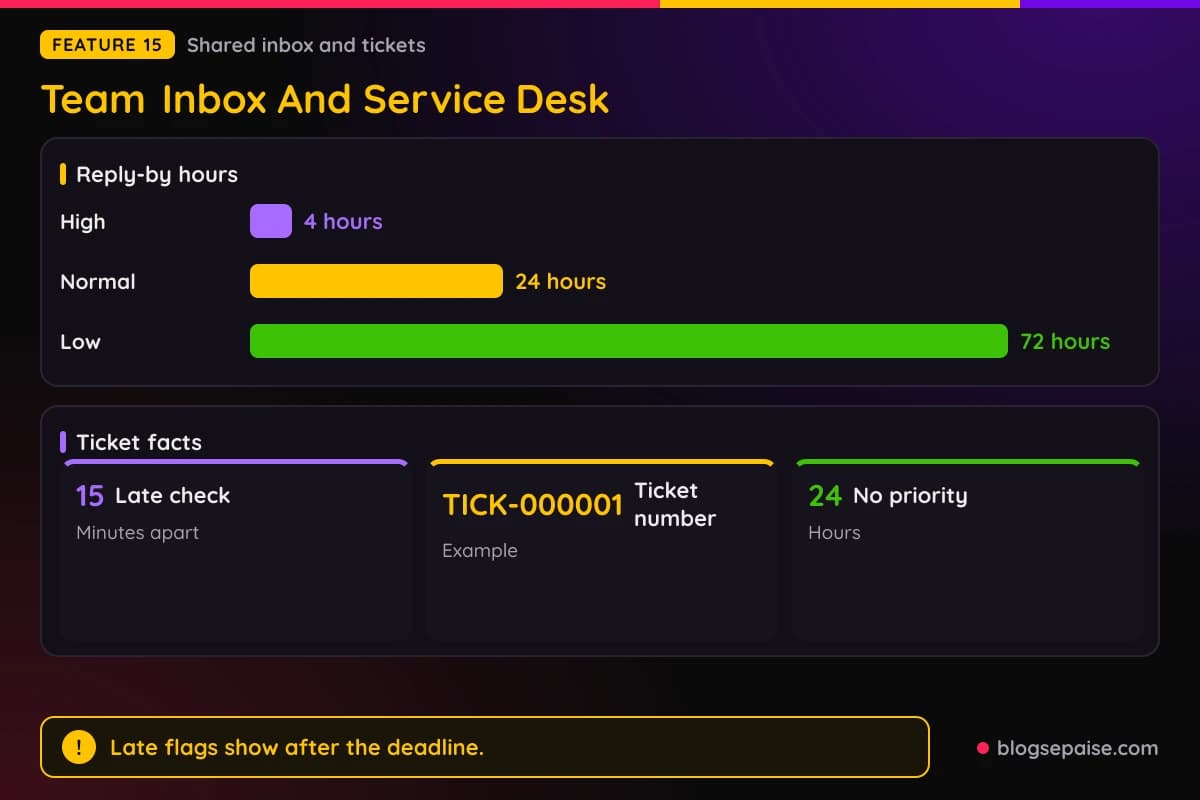
The Service Desk is a customer support ticketing system built into the CRM. Customer requests become numbered tickets, such as TICK-000001, and each ticket has an owner, a priority, and a reply-by time.
Web chat, new email, and forms all feed one list, and saved contacts are linked automatically. A shared mailbox such as support@ works as a source, and each email conversation becomes one ticket.
Reply-by windows count from when the ticket was opened. High priority is 4 hours, Normal is 24 hours, Low is 72 hours, and No priority is 24 hours.
A ticket shows Late once its reply-by time passes with no first reply. The check runs about every 15 minutes, so a ticket may turn Late slightly after its deadline.
The first reply field is not filled in by replying, so staff must set it by hand. Until then the ticket keeps counting against the clock.
Changing the priority updates the reply-by time right away, still counted from the original open time. The timer is not a commitment made on the team's behalf.
An overview dashboard shows requests by priority, on-time replies, and customer satisfaction. An admin adds the Service Desk from Settings, then Templates, and can preview what will be added and choose to include example help articles.
SoftSync Pricing Plans
SoftSync has three plans: Pro, Business, and Enterprise. Pricing is per seat and excludes VAT.
Pro costs $29 per seat a month billed yearly, or $39 per seat billed monthly. Business costs $59 per seat a month billed yearly, or $79 per seat billed monthly.
Enterprise is custom priced. Yearly billing shows as a lower monthly per-seat price.
Prices are available in 11 currencies. In euros, Pro costs 24 yearly or 29 monthly and Business costs 55 yearly or 69 monthly, and in pounds Pro costs 21 yearly or 29 monthly and Business costs 44 yearly or 58 monthly.
Pro allows 5 team members per workspace, 10 groups, and 250,000 records per table. Business allows 25 team members, 100 groups, and 1,000,000 records per table.
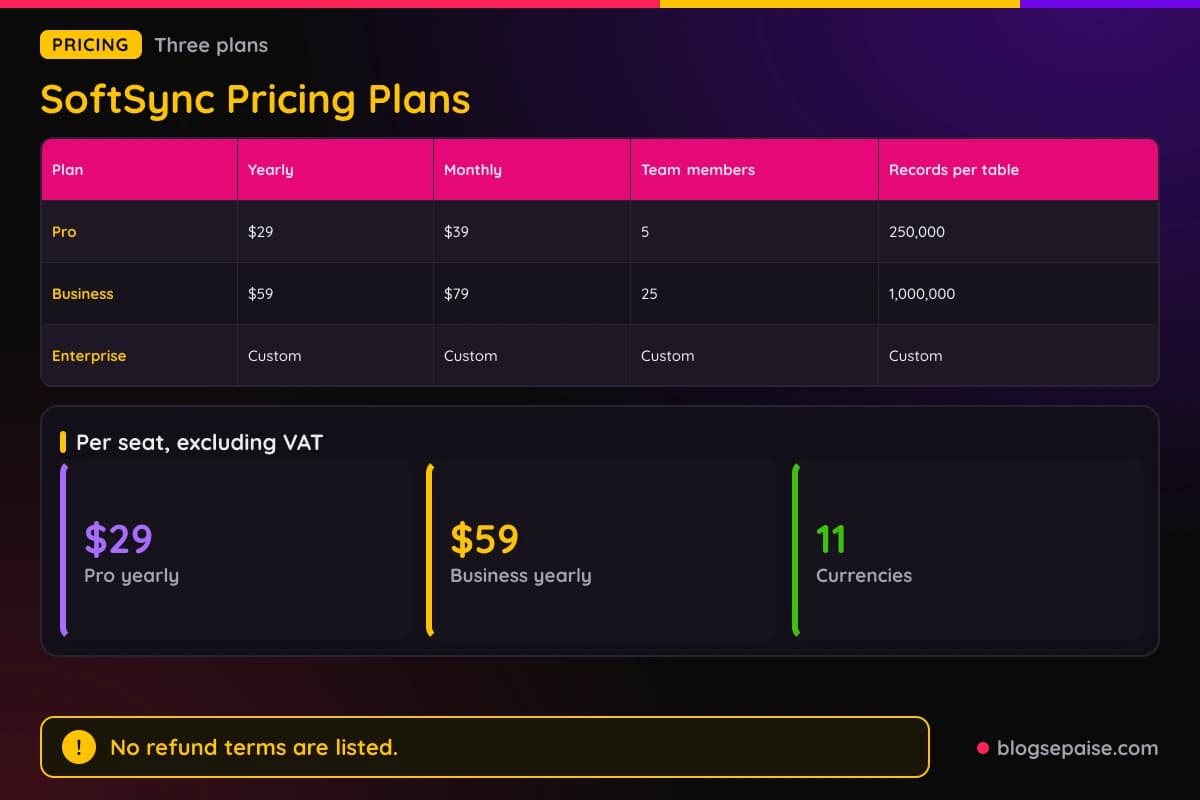
Pro includes 1 mailbox connection per user, 1,000 campaign emails per user a month, 1,000 chats per user a month, and 1,000 enrichment credits per workspace. Business includes 5 mailbox connections, 10,000 campaign emails, 10,000 chats, and 10,000 enrichment credits.
Enterprise has custom limits and unlimited capacity for agreed requirements. It adds custom integrations and Priority Support.
Pro covers the core CRM with records, custom objects, table, pipeline, and calendar views, and team roles. It also includes the sales workspace with email sync, campaigns, templates, and meeting notes, plus the desktop recorder, Chrome extension, reports, dashboards, AI Assistant, Autopilot workflows, enrichment, integrations, API, and MCP access.
Business includes everything in Pro. It adds Priority Support for migration and setup, a Workspace Consultant, custom integrations, and higher capacity.
On Pro, Data Migration and Workspace Consultant are self-served. On Business, both include Priority Support.
Import is available on every plan. No add-on fees apply, and there are no add-ons.
Early-stage teams can ask for a startup discount by booking a conversation. SoftSync charges no setup fee for shaping the workspace with the team.
You can move to a larger standard plan as your team grows, and capacity beyond Business requires Enterprise. Paid subscriptions can be managed or cancelled from the billing area.
SoftSync has no free plan, and trial terms, if any, appear at checkout.
No refund terms are published. SoftSync offers a free live walkthrough called Intro to SoftSync and a 1-minute product tour.
Who Is SoftSync Best Suited For
SoftSync is an all-in-one CRM and AI CRM for startups and small or growing teams. It also works as a customizable CRM for small business.
The sales workspace suits teams that want leads, booking, email, notes, and contracts in one place.
Teams that already work in Claude or ChatGPT can connect them through MCP. Enterprise exists for teams that need custom limits and unlimited capacity for agreed requirements.
Solo founders and very small teams can start on Pro.
Teams with an unusual process can shape records around it. Custom record types such as investors, candidates, properties, and partners are available.
Support teams get a Team Inbox, Service Desk, Web Agent, Knowledge Base, and Customer Portal. Teams that publish content get Website Content, which feeds their own site.
Companies that work in Danish, Finnish, Norwegian, or Swedish get template translations in those languages. Testimonials come from people at Vic.ai, 24SevenOffice, SAP, and RevenueConnect, among others.
Who SoftSync Is Not For
Teams larger than 5 people cannot stay on Pro. Pro allows 5 team members per workspace, and Business allows 25.
The lower $29 and $59 seat rates require annual billing. Monthly billing costs $39 on Pro and $79 on Business.
SoftSync has no free plan, and trial terms, if any, appear at checkout.
Recruiters who need an applicant tracking system should look elsewhere. SoftSync is not an ATS.
Note Taker runs on Mac and Windows only. It does not dial phone calls, so phone calls must be routed through your computer.
Priority Support and the Workspace Consultant start on Business. Pro includes the self-served versions.
SMS reply numbers come with the Business plan and cover the US, Canada, the UK, Sweden, and the Netherlands. In the US and Canada, carriers accept texts only from a number, and a US number needs business verification first.
Texting allowances are small. Pro includes 30 texts a month and Business includes 120.
Forms never match or update an existing contact or company. Teams that expect de-duplication from forms need to plan for that.
SoftSync does not build your website, and Website Content needs a small piece of server-side code on your site. Only workspace admins can set up the Web Agent.
SoftSync Alternatives
The table below compares SoftSync with HubSpot, Attio, and Zoho CRM. The tools price differently, so check each pricing page before you decide.
HubSpot's free CRM has no expiration date and needs no credit card. It includes up to two users and 1,000 contacts.
HubSpot Starter costs from $15 a month per seat, Professional from $50 per seat, and Enterprise from $75 per seat. It also includes Breeze Assistant, email tracking, meeting scheduling, live chat, a shared inbox, and more than 2,000 apps in the HubSpot Marketplace.
HubSpot's connectors for Claude and ChatGPT need a paid subscription to those assistants.
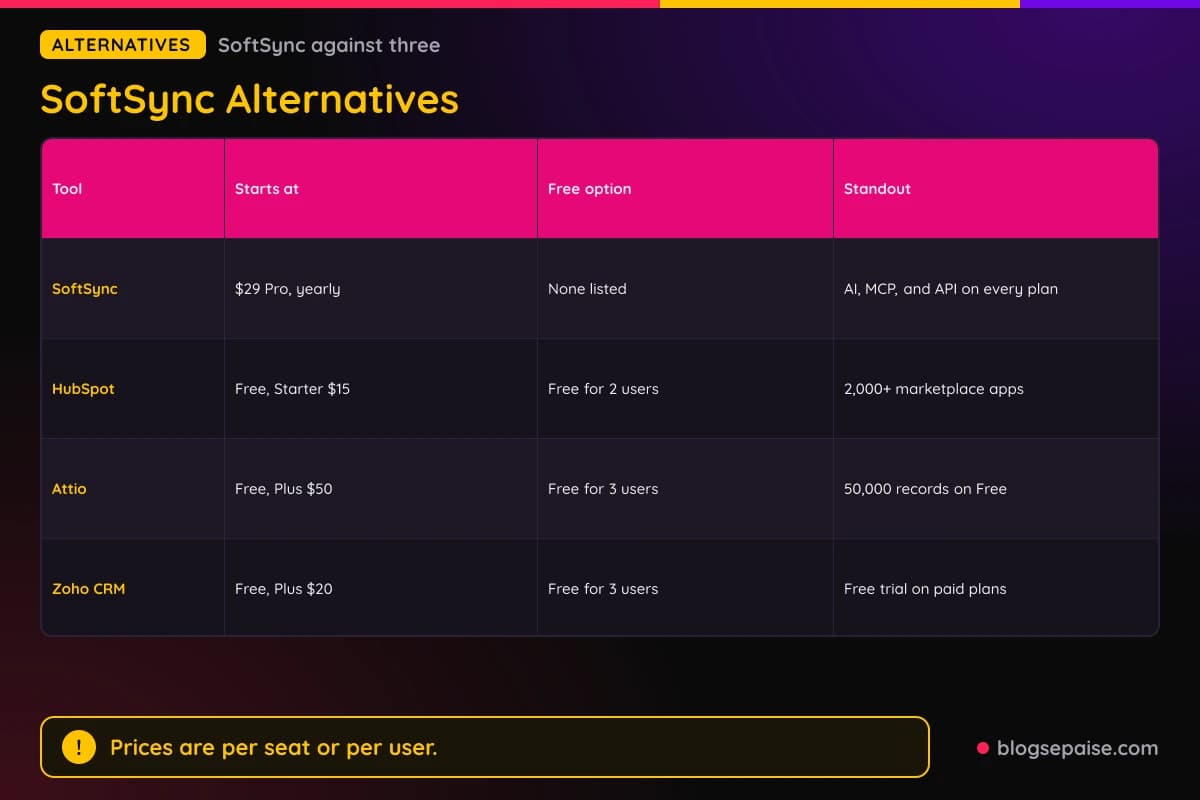
Attio has a Free plan for up to 3 users with 50,000 records and 3 objects. Plus costs $50 a month monthly or $40 annual for 1 user, with extra users at $44 monthly or $35 annual.
Attio Pro costs $125 a month monthly or $100 annual for 1 user, and adds custom objects, call intelligence, and sequences. Ultra costs $1,000 a month with annual billing only and includes 5 users.
Attio's Plus plan includes 250,000 records and 5 objects, and Pro includes 1M records and 12 objects. Annual billing saves about 20 percent on Attio Plus and Pro.
Zoho CRM has a free edition that is free forever for up to 3 users. Its free edition includes contact management, workflow automation, up to 10 custom email templates, and API access at 5,000 calls a day.
Zoho annual plans save up to 34 percent, and its paid editions have a free trial. CRM Plus starts at $20 per user a month and adds help desk and ticketing, live chat, email marketing, and project management.
SoftSync stands apart on a few points. Its Pro plan starts at $29 per seat a month billed yearly, it has no free plan, and it includes AI, MCP, and API access on every plan.
SoftSync Use Cases
SoftSync fits six groups: founders and startups, funds, agencies, SaaS teams, recruiters, and real estate. Each group has workflows the tool is built around.
Founders and startups use it for founder-led prospecting, discovery calls, startup partnerships, and B2B sales follow-up.
Funds use it for LP fundraising, investor relations, portfolio reviews, reporting, and deal flow management. It works as a venture capital CRM and deal flow management software.
Agencies use it for agency prospecting, proposal follow-up, client handoffs, and renewal context.
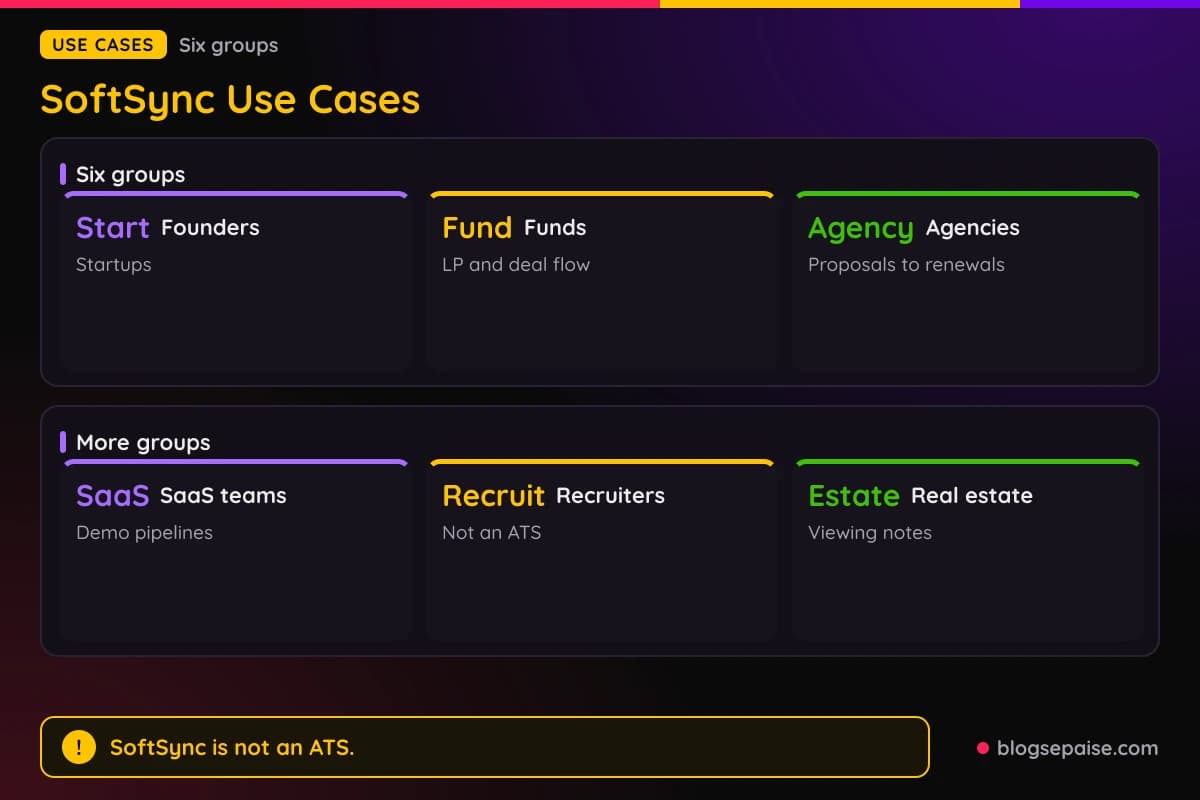
SaaS teams use it for demo pipelines, trial conversations, and customer expansion workflows.
Recruiters use it for employer prospecting, client intake, mandates, and sales follow-up. SoftSync is not an ATS.
Real estate teams use it for commercial prospecting, open-house follow-up, investor relationships, and viewing notes. Real estate and Property management templates are also available.
Customer testimonials give a sense of how teams use it. Bjørn Lier, founder of RevenueConnect, reports that sales are up more than 45 percent two months after adopting SoftSync.
Finn Schløsser-Møller, a board chair and strategic advisor, moved data from HubSpot to SoftSync. He says Claude guided the options and handled the transfer.
Other named endorsers include people at Vic.ai, FrontedHR, 24SevenOffice, Diller, Placepoint, Hjemla, Box Marketing, Done.ai, SAP, and Lexabit. Their common themes are keeping context, next actions, and follow-up connected, and reducing administrative work.
Final Thoughts On SoftSync
SoftSync is an AI CRM for startups and small or growing teams. It groups 20 products around one set of customer records, from email and SMS to e-signature, forms, a chatbot, and a service desk.
Pro costs $29 per seat a month billed yearly and Business costs $59, with monthly rates of $39 and $79. AI, MCP, and API access come on every plan.
Its strongest points are the bot-free Note Taker, the e-signature built into the deal, and the way MCP lets Claude, ChatGPT, or Codex work on the same records. Autopilot routines need your approval before they run, and every run is logged in plain language.
The catch is size and age. Pro stops at 5 team members, there is no free plan, and SoftSync was founded in 2025 with a small review base.
Several features have clear limits. Forms never update existing contacts, Note Taker runs only on Mac and Windows, and SMS allowances are 30 texts on Pro and 120 on Business.
If you run a small team and want one place for leads, meetings, email, and contracts, SoftSync is a fair test on Pro. Check the trial terms at checkout and count your seats first.
You can browse more write-ups on our software reviews hub if you want to compare tools side by side. Our Affiliate Program Database includes programs you can join.
SoftSync FAQ
1. What Is SoftSync?
SoftSync is an all-in-one AI CRM for startups and small or growing teams. It keeps leads, meetings, email, e-signatures, and follow-up in one place.
2. How Much Does SoftSync Cost?
Pro costs $29 per seat a month billed yearly or $39 billed monthly. Business costs $59 per seat a month billed yearly or $79 billed monthly, and Enterprise is custom priced.
3. Does SoftSync Have A Free Trial?
SoftSync has no free plan, and trial terms, if any, appear at checkout.
4. Does SoftSync Have A Free Plan?
No. SoftSync has Pro, Business, and Enterprise plans, and none of them is free.
5. How Many Users Can SoftSync Have?
Pro allows 5 team members per workspace and Business allows 25. Enterprise limits are custom.
6. Does SoftSync Offer Refunds?
No refund terms are published. You can manage or cancel a paid subscription from the billing area.
7. Is There A Discount For Startups?
Yes. Early-stage teams can ask for a discount by booking a conversation with SoftSync.
8. Does SoftSync Work With Claude Or ChatGPT?
Yes. MCP works with Claude, ChatGPT, or Codex, and it signs in with your SoftSync account, so it needs no API key.
9. Does SoftSync Have An API?
Yes. The REST API has about 60 endpoints, and API keys are personal and created under Settings, then API Keys.
10. Does SoftSync Record Meetings With A Bot?
No. Note Taker is a desktop app for Mac or Windows that captures microphone and system audio without a bot joining the call.
11. Can SoftSync Send Text Messages?
Yes. You can text a contact from the record with up to 1,600 characters, and Pro includes 30 texts a month and Business includes 120.
12. Does SoftSync Have E-Signature?
Yes. You send a document for signing from a deal, signers verify with a 6-digit code, and the signed copy is stored on the record.
13. Can SoftSync Replace HubSpot?
A customer testimonial describes moving data from HubSpot to SoftSync. Compare plans first, since HubSpot has a free CRM for up to two users.
14. Is SoftSync An Applicant Tracking System?
No. SoftSync is not an ATS.
15. Does SoftSync Train AI On My Data?
No. Workspace data is not used to train AI models.
16. When Was SoftSync Founded?
SoftSync was founded in 2025 and is based in San Francisco.