ngram Review (2026): AI Video Maker Pricing, Credits, Features, And The Catch
ngram is an AI video maker that turns a prompt, a document, or a screen recording into a finished video. You review a plan first, then ngram renders a draft with voiceover, captions, and your brand.
Inputs include text prompts, PDFs, Markdown files, public URLs, screenshots, screen recordings, raw video, and PowerPoint decks. The output is an MP4 you can edit again in chat, in a script editor, or on a timeline.
The product lists 22 features, from an avatar presenter to translation, social publishing, and video hosting. Customer logos on the site include HubSpot, Deel, Zapier, ITV, Veeva, DP World, Genpact, and SafetyCulture.
Pricing runs on credits. Paid plans start at $29 a month, or $23.20 a month when billed annually, and a Free plan gives 1,000 credits a month.
Premium video generation costs 10 credits per second, and a cheaper model costs 3 credits per second. Downloads need a paid plan, so Free is for testing the tool and sharing watch links.
ngram shows a 4.6 out of 5 rating from 62 reviews. Screencast mode and social publishing are still labeled Beta.
G2 named ngram a Summer and Fall 2026 High Performer, and Product Hunt ranked it #2 Product of the Day. Integrations include Zapier, n8n, a Chrome extension, an MCP server, a REST API, and webhooks.
Disclosure: Some of the links I share might be affiliate links. If you click on one and make a purchase, I may earn a small commission as a thank you. But don’t worry, it won’t cost you anything extra. I only recommend stuff I genuinely believe in. Your support helps me keep creating awesome content. You can read my full affiliate disclosure in my disclaimer page.
If you want to save a lot of hours searching for high-paying affiliate programs, check out our exclusive list of 2500+ affiliate programs. You’ll find all the information about the programs inside the list. This list is perfect for affiliate bloggers and influencers.
ngram Features
ngram packs 22 features into one video workspace. The ten that matter most cover planning, recording, voice, captions, brand, and sharing.
Every video starts in a start wizard where you pick a video type, a Brand Kit, a voice, and a presenter.
Video types include explainer, product launch, changelog, and feature announcement. Others are customer onboarding, sales enablement, tutorial, social clip, and teaser.
Credits pay for video generation. Unlimited text generation starts on Basic, and unlimited image and audio generation starts on Premium.
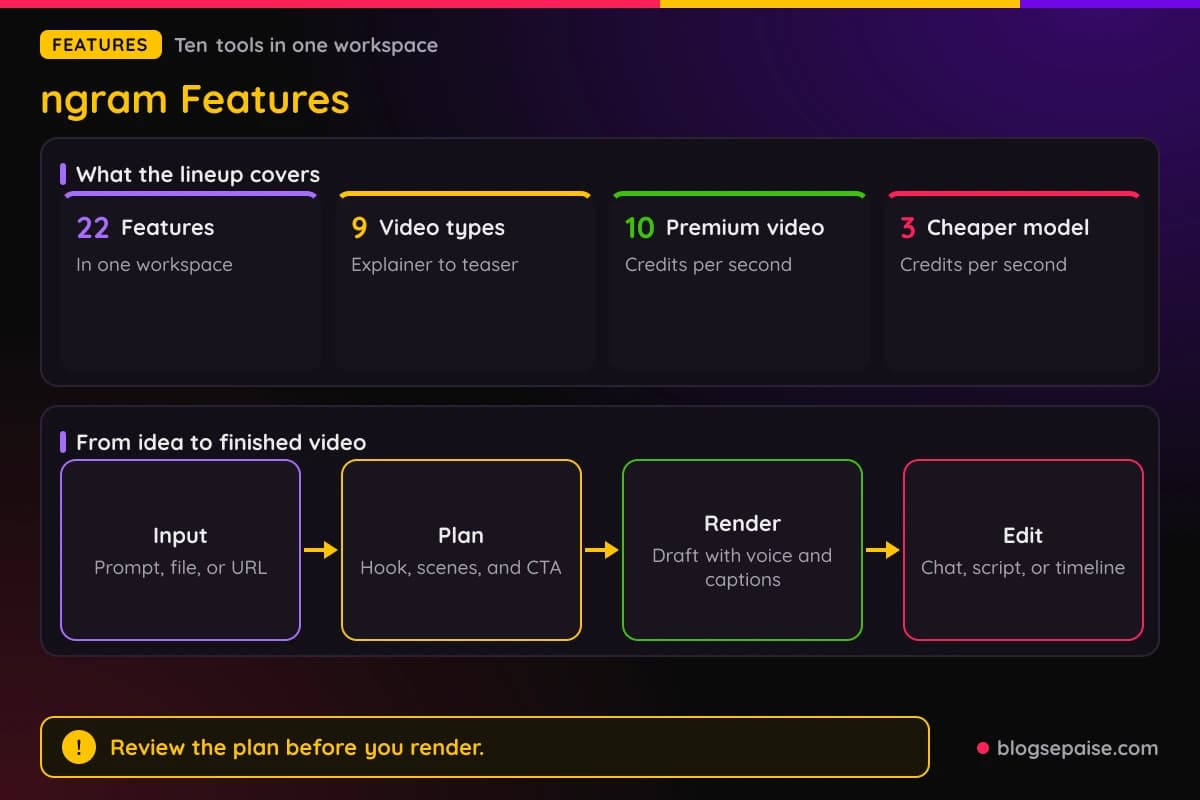
Default settings show a 16:9 frame and a 30 second length, and you can change both. Chat, a script editor, and a timeline sit behind every video for later edits.
Editing finished premium videos needs a paid plan. Free covers one premium video a month of up to 60 seconds with default models.
Two areas carry a Beta label. Screencast mode and social publishing to LinkedIn, X, and YouTube are both Beta.
1. AI Video Generation
AI Video Generation is the core of ngram. It turns a prompt or source material into a script, a storyboard, a rendered draft, and an editable project.
The flow has four stages: input, plan, render, and edit. You add a prompt or file, review the plan, generate the first draft, and then revise it.
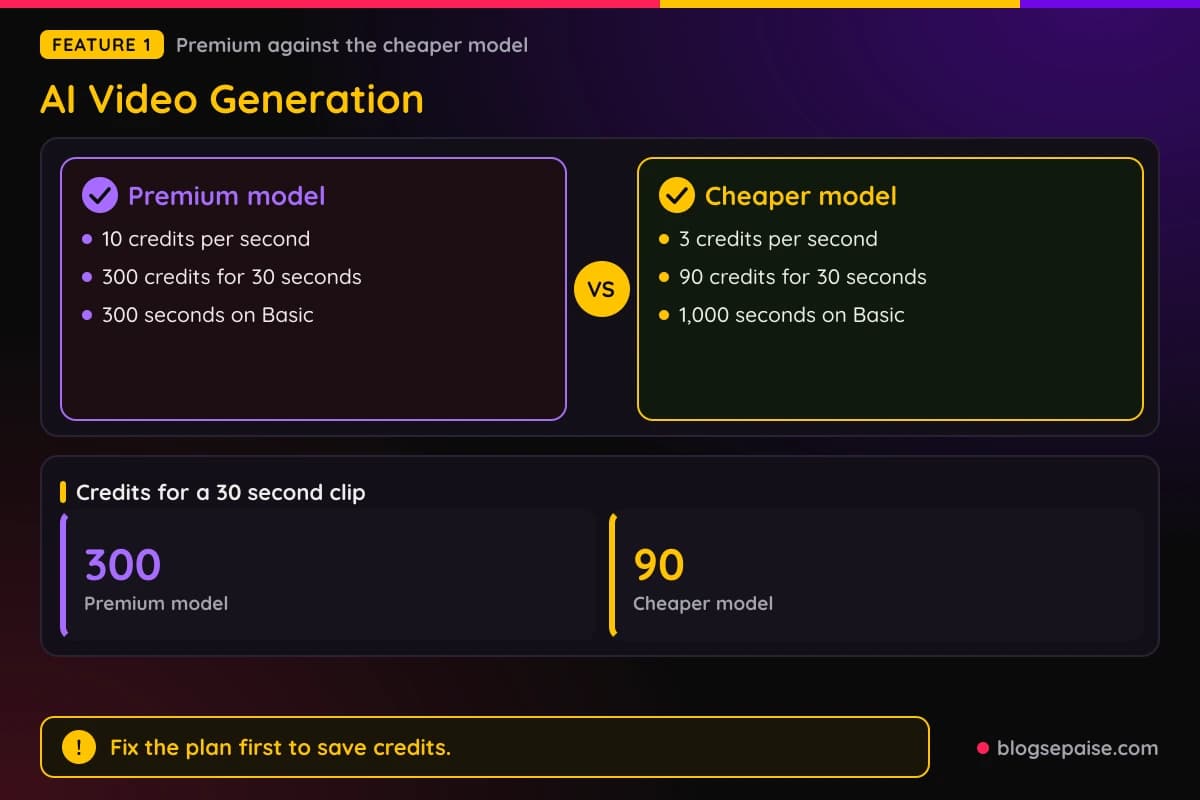
The plan stage shows the hook, scenes, visual direction, pacing, timing, and call to action before anything renders. You fix the outline first, which saves credits.
Accepted inputs include a text prompt, a PDF, a Markdown file, a public URL, a screenshot, a screen recording, raw video, and a PPTX or PDF deck.
Some product flows sit behind a sign-in. For those, ngram opens an attended browser handoff, you take over the live browser when asked, and then you choose Done so capture can continue.
The first draft can include captions, voiceover, motion graphics, and brand direction when you turn them on. Revisions happen through agentic chat, the script editor, visual chat, canvas controls, or the timeline.
Premium generation costs 10 credits per second. The cheaper model costs 3 credits per second, so a 30 second clip uses 300 credits or 90 credits.
Standard Studio export is MP4. Separate tools convert media to GIF, WebM, MP3, WAV, PNG, or JPG.
Zapier, n8n, a Chrome extension, and an MCP server connect video creation to other tools. Make.com is listed as coming soon.
The separate AI Video Generator tool makes short clips. AI Video Generation builds multi-scene projects with a script and storyboard behind them.
2. Screencast Editing
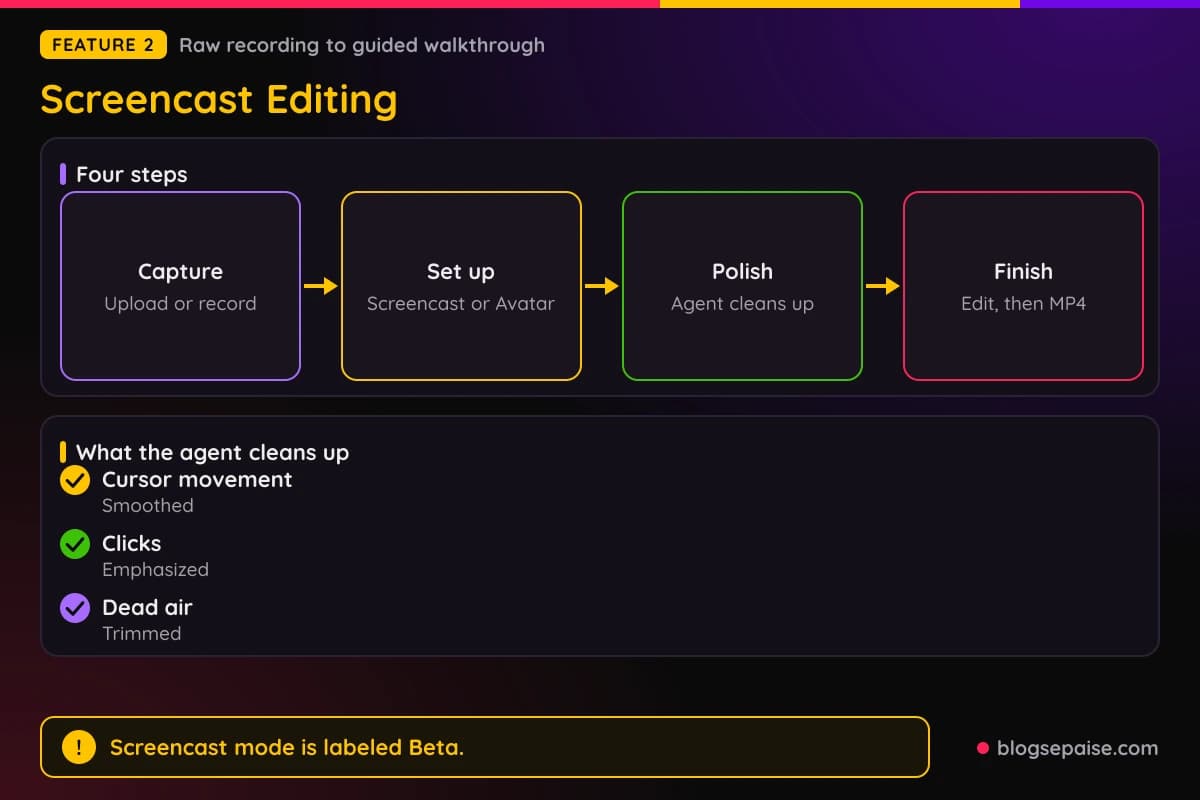
Screencast mode turns a raw product recording into a guided walkthrough. You upload an existing recording or record in the browser.
Next, you pick Screencast for a screen-led edit, or Screencast plus Avatar when a presenter should guide the viewer. The Avatar start template uses a 16:9 frame.
An agent then polishes the clip. It smooths cursor movement, emphasizes clicks, trims dead air, and adds step labels, captions, transitions, and brand treatment.
Finished walkthroughs stay editable in the same canvas, chat, and timeline tools. You review them in the scene editor and download an MP4.
Source speech edits work in flows that keep the speaker from the original video. They remove filler words or pauses, isolate speech, and replace the source voice.
Browser Handoff helps when a product sits behind a login. You sign in when asked, select Done, and ngram keeps browsing the product in the same chat.
Screencast mode is labeled Beta, so expect rough edges. Pure Screencast stays in Beta as well.
The full editor opens as a separate project copy with a timeline, canvas, Elements, and Record. Music is picked from the tone and pacing, and you can browse or swap tracks.
3. Dynamic AI Avatar Talking Head
Avatars let a digital presenter read your script without a filmed speaker. A filterable picker helps you choose a prebuilt character.
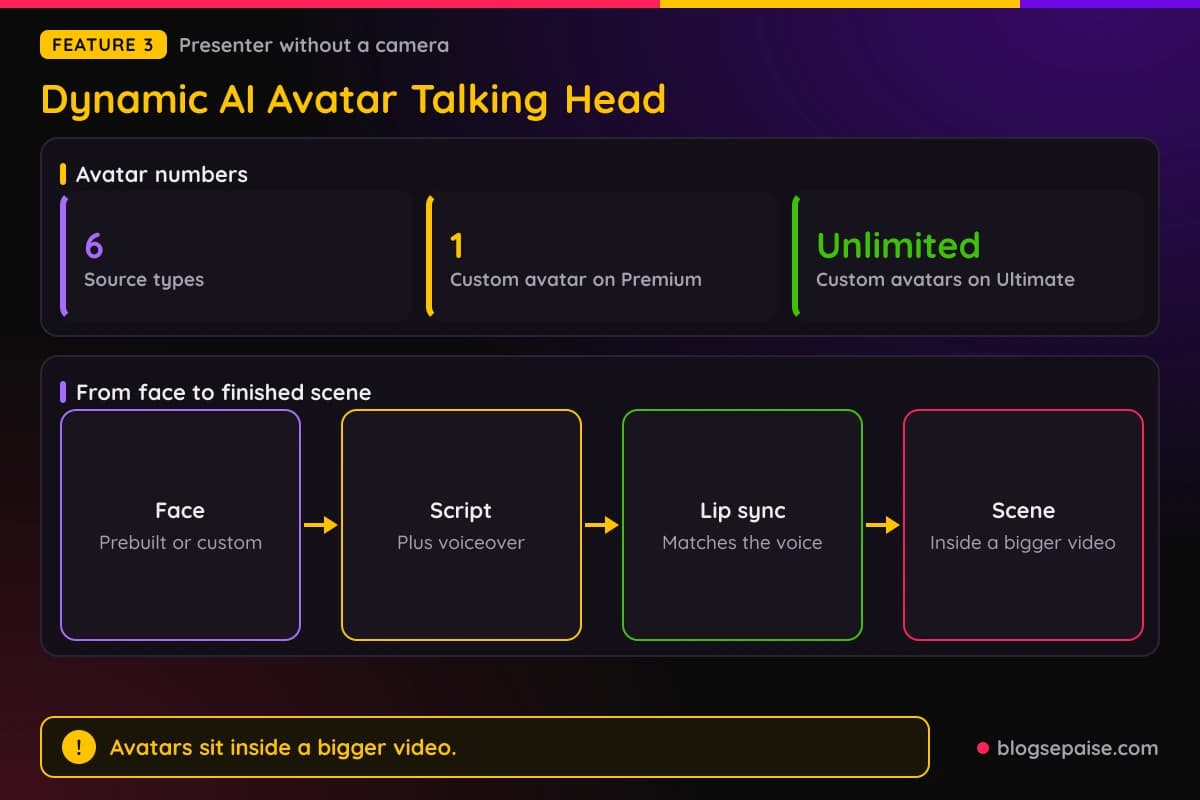
Lip movements sync to the script and the selected voiceover. The avatar becomes one scene inside a larger video, not the whole thing.
You can mix an avatar with screen recordings, callouts, motion graphics, music, captions, and B-roll. Typical jobs are an opening, an explanation, a recap, or a localized section.
Custom avatars come from a face image, a short clip, or an approved face in your team library. Team faces live in one settings page, so nobody hunts through loose files.
Conversation style handles two or more speakers. It gives one speaker the lead presenter role and gives the others distinct voices.
A large presenter can show emphasis words behind the head and shoulders, called depth captions. Regular subtitles can run separately.
Translated scripts work with avatars too. ngram translates the script and on-screen text, makes new voiceover, and regenerates lip sync through agentic chat.
Premium includes 1 custom avatar, and Ultimate lifts that to unlimited. ngram does not publish the number of prebuilt avatars.
Six source types can start an avatar video: text, docs, PDF, PPT, URL, and image. Voiceover can drive the lip sync, so a new voice changes the mouth movement too.
The Screencast plus Avatar template places a presenter next to a product walkthrough. Avatar scenes suit sales demos and training, where a human face keeps viewers watching.
4. AI Voiceover
AI Voiceover gives your video a narrator. You pick a single voice or a lead voice in the composer.
For dialogue, choose Conversation style and add two or more speakers with distinct voices. You describe the extra speakers in the video brief.
You can set the spoken language before or after generation. Chat can also change the voiceover language once the video exists.
Custom voices are cloned or uploaded with consent, then stored in the team voice library. Premium includes 1 custom voice, and Ultimate gives unlimited voices.
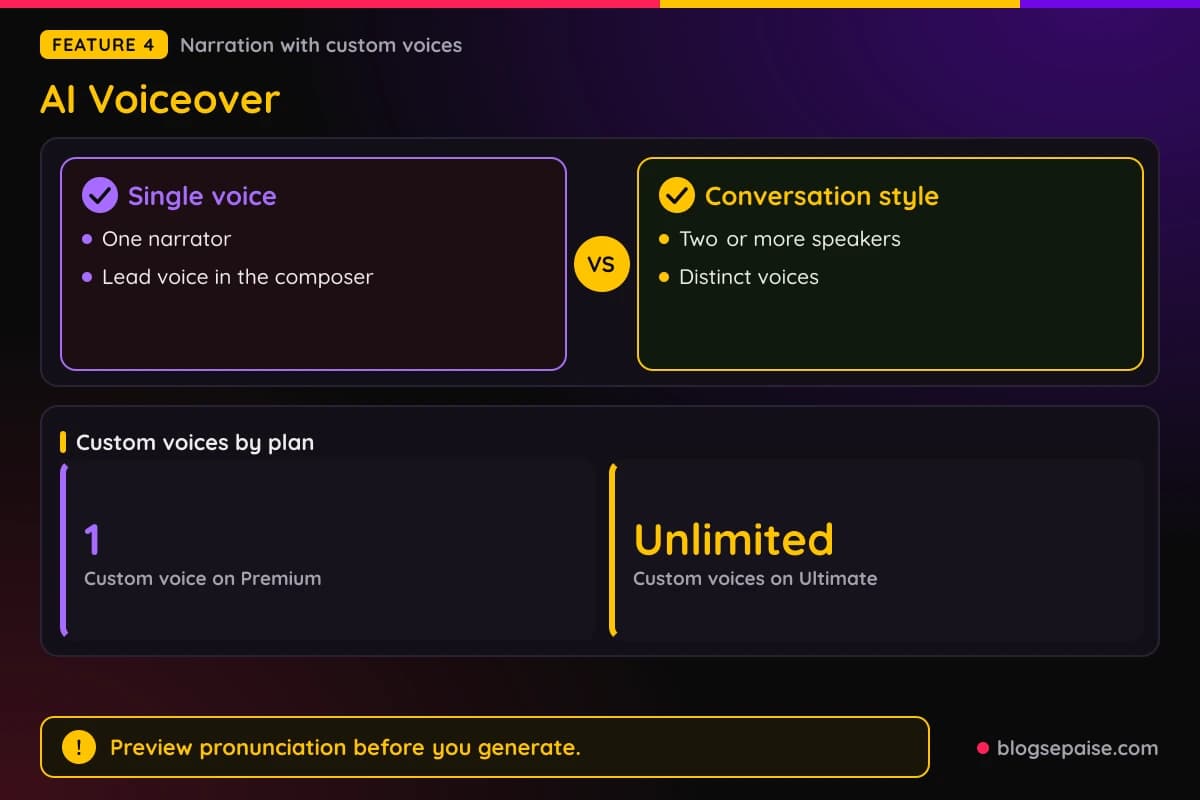
A custom pronunciation setting handles names and technical terms. You preview it before generation, so a product name does not come out wrong.
Narration edits happen in Edit and then Script. Applying a line re-voices that scene and keeps the visuals, though larger timing changes can regenerate the scene.
You can mute music without muting voiceover or sound effects. Voice-only output works with Conversation style, no avatar, and voiceover left on.
Voice coverage comes through ElevenLabs voices and frontier language models. ngram does not publish a voice count.
Voice style can match the audience. Educators pick a calm voice for K to 12, a neutral voice for undergraduate classes, and an authoritative voice for compliance training.
5. Captions And Subtitles
Captions are off by default on new videos. You turn them on when you need them.
Caption font, color, and position follow your selected Brand Kit. Subtitles then match the rest of the video.
Captions burn into the rendered video, so they show without sound. Final captioned output exports as MP4.
Narration edits happen scene by scene in the script editor, and direct video edits happen on the timeline. Captioned projects stay editable for clips, audio, effects, and scenes.
Depth Captions highlight selected words behind a presenter. They work separately from ordinary subtitles and suit large talking-head presenters.
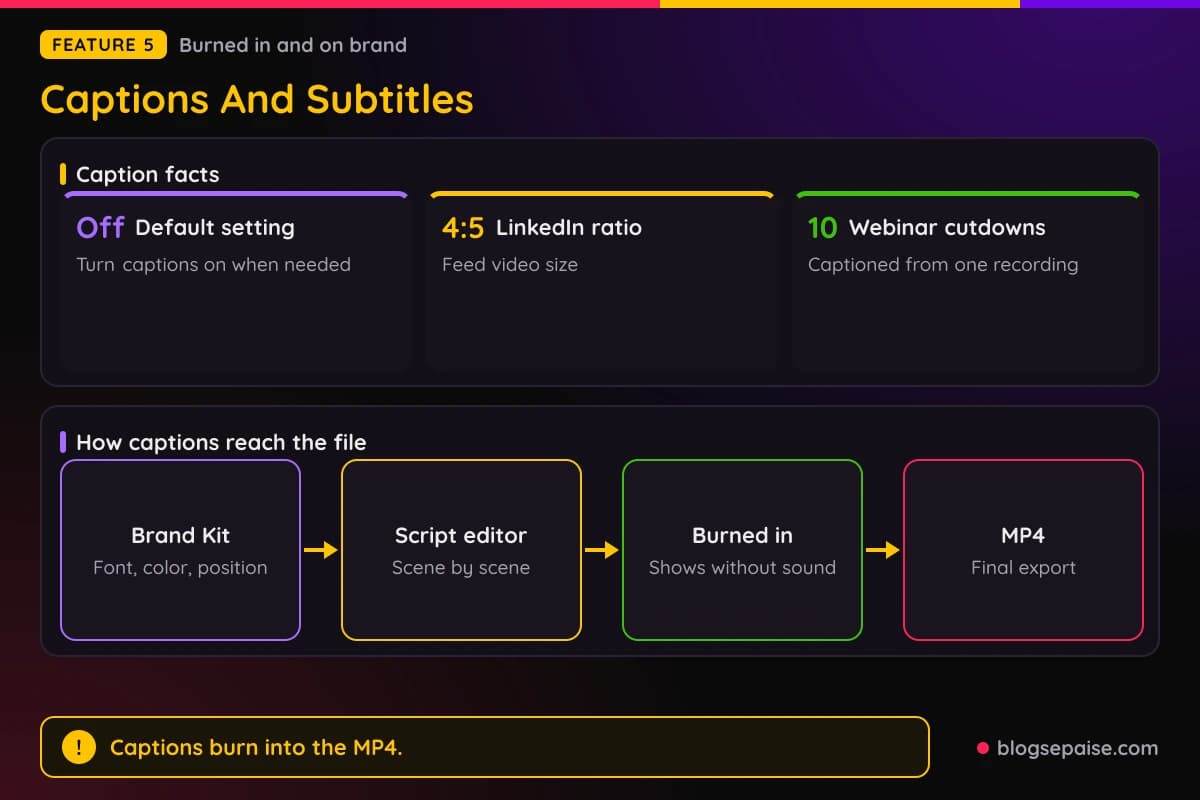
Translated captions are burned into localized videos. ngram does not publish a fixed language count for captions.
LinkedIn videos use a 4:5 ratio, and ngram targets about fifteen minutes for a branded captioned LinkedIn video. A webinar recording can turn into ten captioned cutdowns.
Finished MP4s can be converted to another format with the Video Converter. Captions stay burned into the file after a conversion.
A branded, captioned sales demo targets fifteen minutes. A training video from SOPs or screen recordings targets under thirty minutes.
6. Brand Kit
A Brand Kit stores your logo, colors, and fonts. It also holds motion style, image style, and screenshot style.
Voice and tone preferences, approved phrases, blocked phrases, CTAs, and example assets go in too. Reusable intro and outro slides live there as well.
You can build a kit by hand or use the brand style generator. It starts from a website URL or sample images and produces a palette, a motion style, and an image style.
Pick the kit in the start wizard before generation. It then shapes the visual direction, scenes, captions, and graphics.
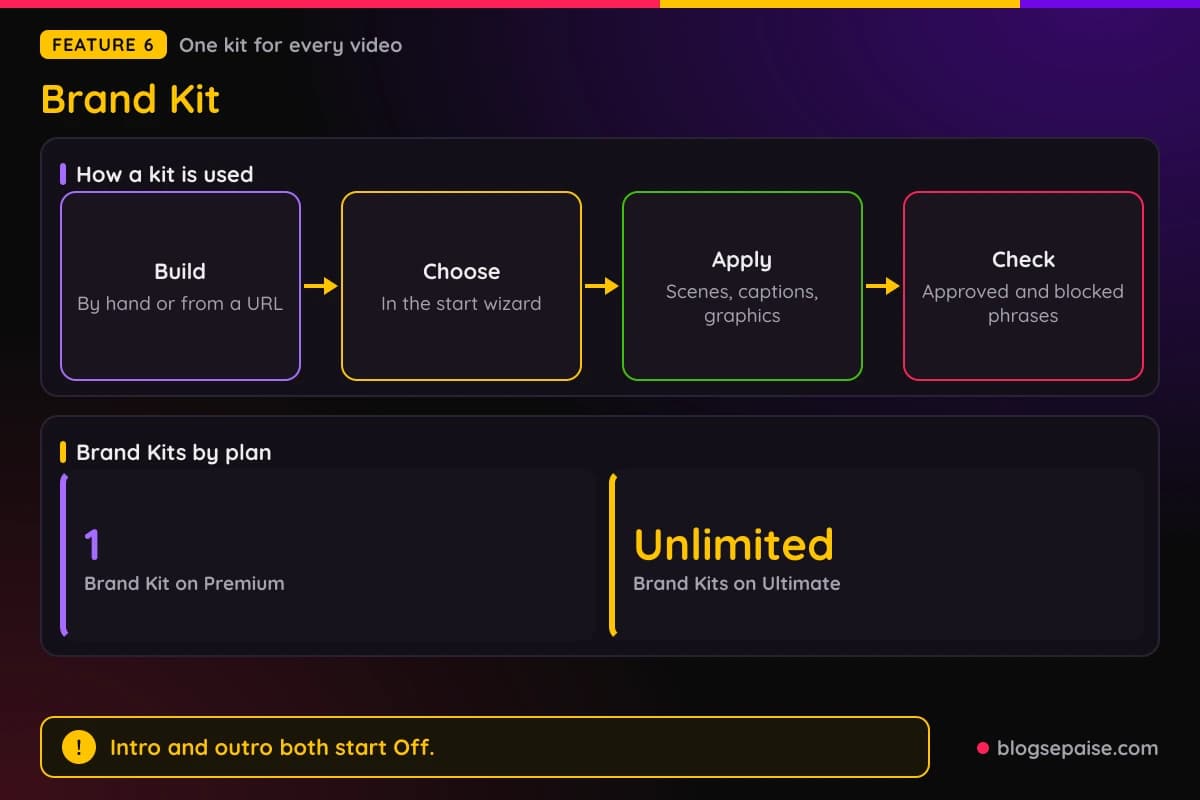
The agentic flow checks generated copy against your approved and blocked phrase lists. Wording you never want on screen gets caught.
You can choose a saved intro and outro for each video, and both start Off. Zapier automations can select an existing kit when they start a video.
Premium includes 1 Brand Kit, and Ultimate gives unlimited kits. Slide authoring is available on Premium and Ultimate.
Agencies keep one kit per client. Each holds a logo, fonts, a palette, and reusable intro and outro slides.
Brand kits help when several people make videos. Everyone starts from the same colors, fonts, and approved phrases.
7. Translation And Localization
Translation turns one approved video into versions for other markets. It starts from a finished or draft project.
ngram translates the script, the captions, and the on-screen text. Titles, callouts, lower-thirds, and CTAs get translated and re-rendered.
Target-language voiceover matches the tone and pacing of the translated script. For avatar videos, lip sync is regenerated to match.
The workflow has four steps: source, localize, sync, and ship. You pick a language or market, review the voiceover, and export market-specific versions.
Translated captions carry Brand Kit styling and timing. Lip sync regeneration runs through the agentic chat workflow.
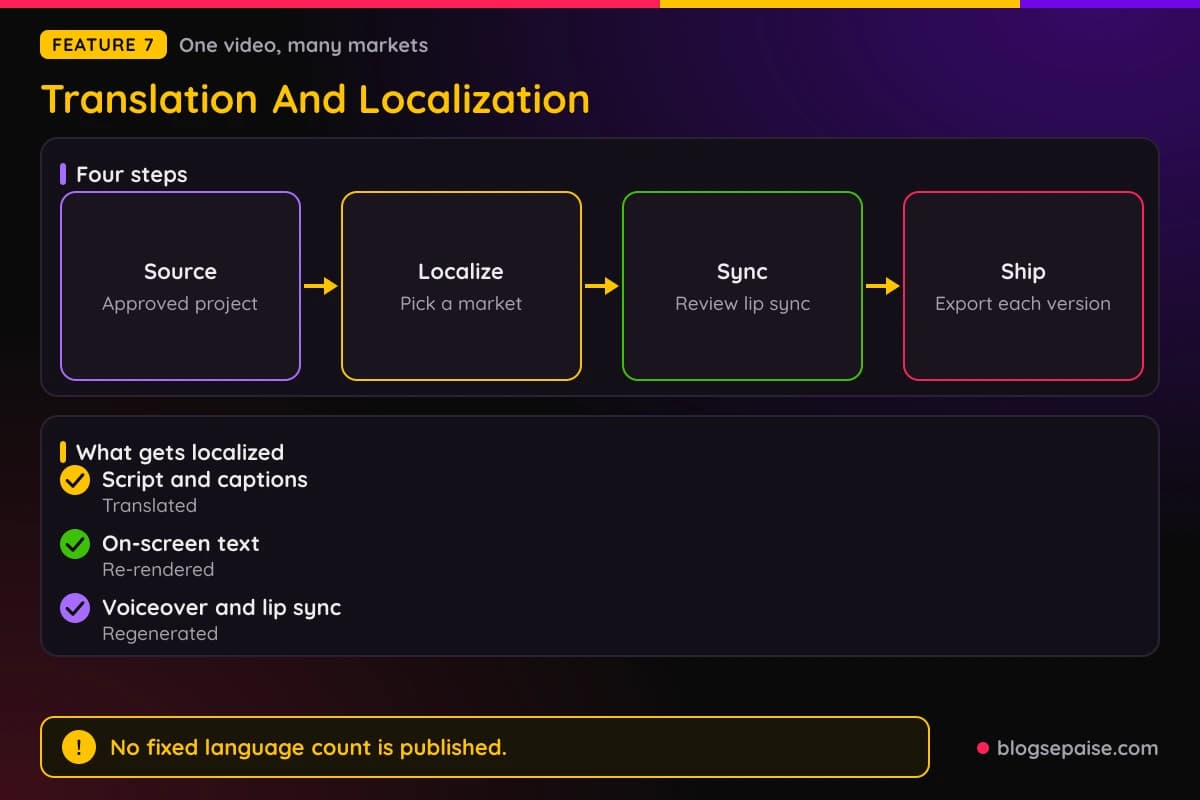
Language coverage comes through ElevenLabs voices and frontier language models. ngram does not publish a fixed language count.
Educators can localize into languages such as Mandarin, Spanish, and Portuguese. Captions and voiceover come with each version.
Seven live integrations sit around the tool: Chrome Extension, Zapier, n8n, MCP Server, LinkedIn, YouTube, and X. Automations can start a localized version without opening the app.
8. Social Publishing
Social Publishing posts videos from inside ngram. It connects through OAuth, so you do not leave the app.
Three channels are live in Beta: LinkedIn, X, and YouTube. Instagram, Facebook, and TikTok are listed as coming soon.
A built-in content calendar lets you compose a post, pick a connected destination, and choose the timing. Options are publish now, a one-off date and time, or a recurring cadence.
Calendars can be shared through a public read-only link. ngram suggests checking each post on the destination platform after it goes live.
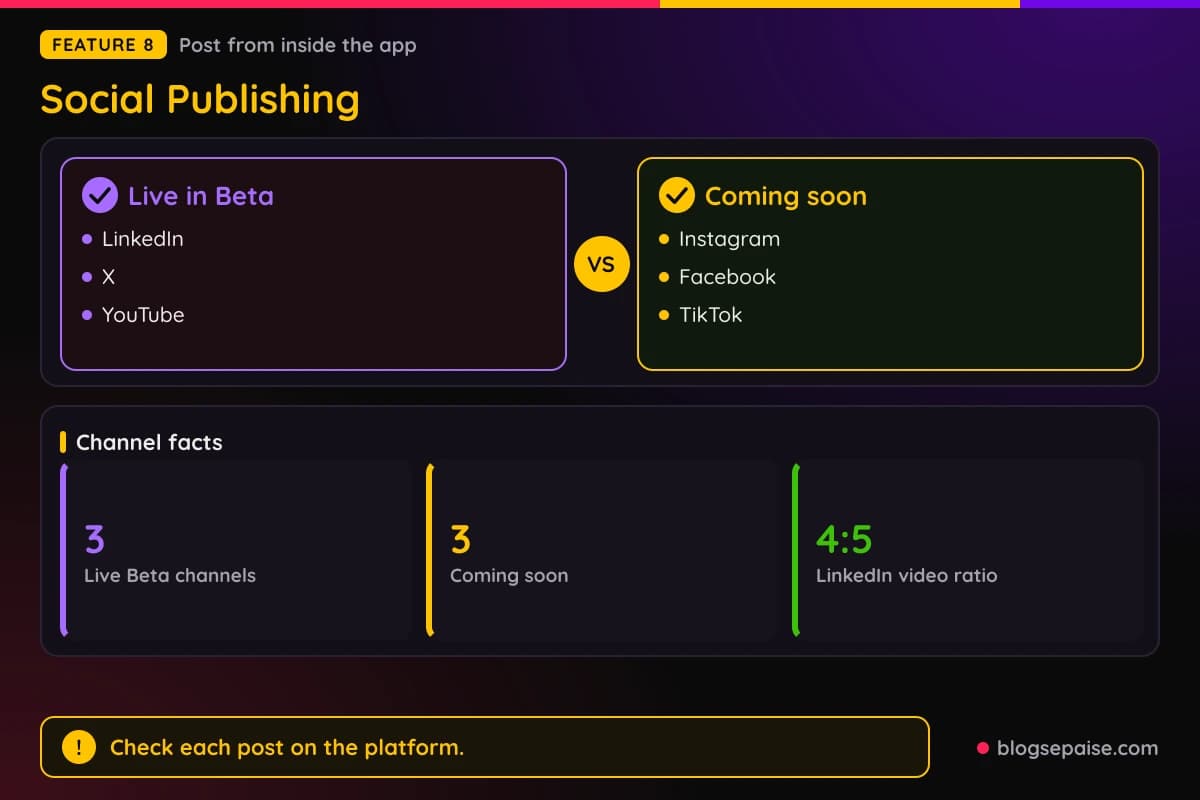
The LinkedIn video maker produces a captioned, branded video sized 4:5 for the feed. Other video makers format clips for LinkedIn, X, TikTok, YouTube Shorts, and Instagram Reels.
Social performance analytics are not promised. You still read your numbers inside each platform.
Founders use the tool for LinkedIn, X, and Instagram content. Product marketers target social content in under 20 minutes.
One project can feed every channel. A founder can create a separate edit per channel and download each as an MP4.
9. Video Hosting
Video Hosting gives each video a watch page and an embed code. Every plan, Free included, can share a public watch link.
Website embeds are on every plan too. You copy the embed code from the Share flow and paste it into a landing page, help article, or customer portal.
Unlisted links start on Basic. Anyone with an unlisted link can watch, while public sharing makes the video discoverable.
Brand Kit settings carry into the watch page and the embedded player, so the look stays the same. Player customization is a limited rollout for eligible accounts.
Ultimate and Enterprise add interactive elements. Viewers can click buttons, answer polls, and take quizzes inside the player.
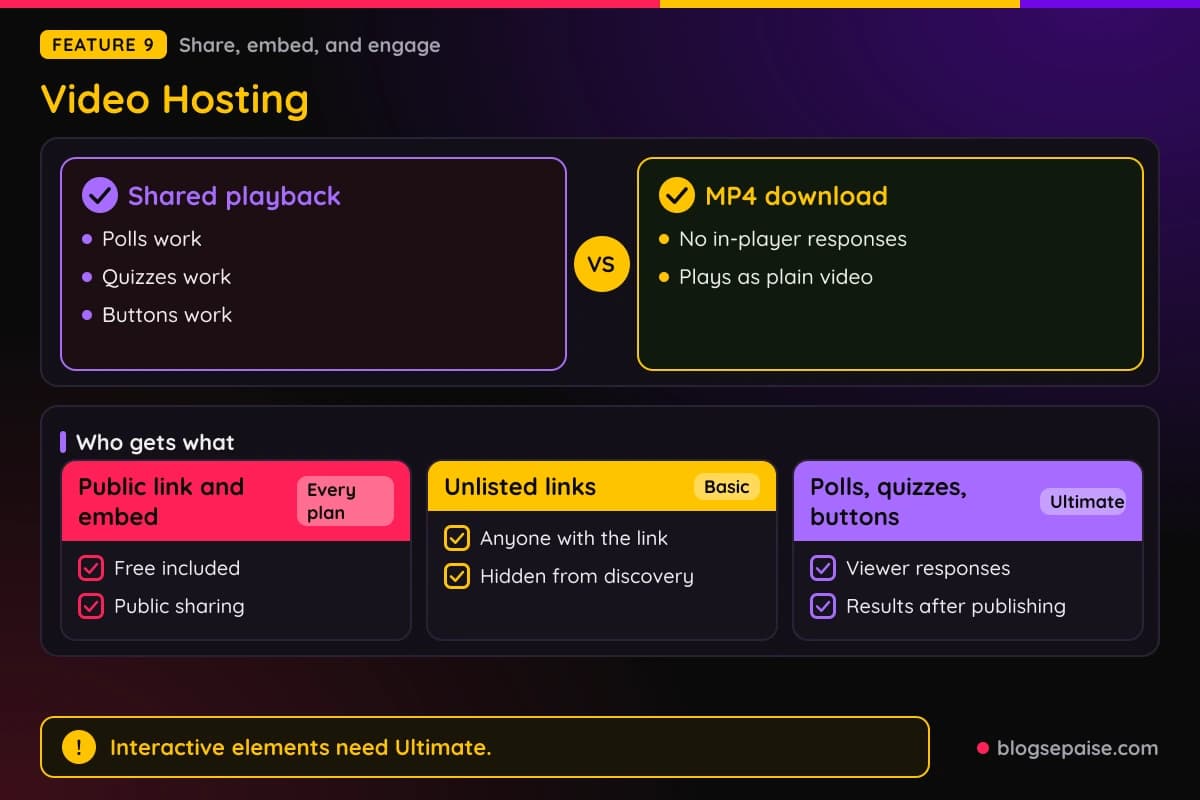
A Book a demo button can link straight to a booking page. Poll tallies, quiz results, and viewer responses show up after publishing.
Interactive elements work in shared playback and not in MP4 downloads. A downloaded file cannot collect responses.
ngram does not list basic view counts for hosted videos.
Public sharing makes a video discoverable, while an unlisted link stays out of sight. Check options such as password protection or named-recipient access in the Share flow before you publish.
10. Collaboration
Collaboration puts many users in one shared team workspace. Admins invite teammates and manage roles from team settings.
The workspace holds projects, Brand Kits, generated assets, and shared conversations. A projects dashboard lists past work so you can reopen or reuse it.
Members can share an agentic conversation with the team from the conversation menu. Teammates then view the same thread.
Shared Brand Kits and asset libraries make brand material available across the workspace. Four audiences get named: product marketing, agencies, customer success, and founders.
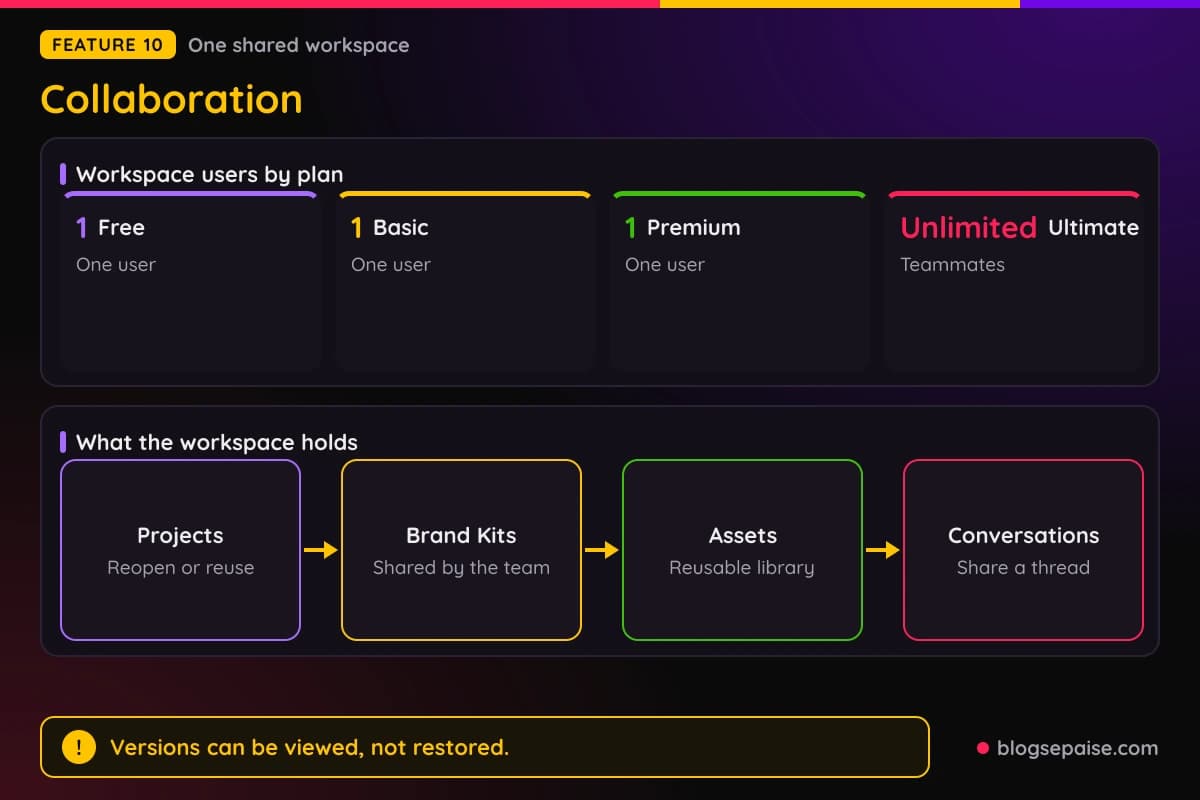
A Versions gallery appears when a conversation has two or more renders. You can view or download an earlier version, but ngram does not restore or revert a project.
Seats follow the plan. Free, Basic, and Premium have 1 workspace user, and Ultimate allows unlimited teammates.
ngram does not mention comments on projects. Rules for outside client access are not specified.
Users can reopen, reuse, or re-edit past videos and their assets. Past work becomes a starting point instead of a blank page.
ngram Pricing Plans
ngram sells plans in credit tiers. Free, Basic, Premium, Ultimate, and Enterprise cover testing, regular use, and big teams.
Free costs $0 and needs no credit card. It gives 1,000 credits a month, one premium video a month of up to 60 seconds, default models, public sharing, and website embeds.
Downloads need a paid plan, and Free top-ups cost $40 per 1,000 credits. Free has 1 workspace user.
Basic costs $29 a month, or $23.20 a month billed annually at $278.40 a year. It includes 3,000 credits a month and 720p exports.
Basic covers up to 300 seconds of premium generation a month, or 1,000 seconds with the cheaper model. Top-ups cost $20 per 1,000 credits.
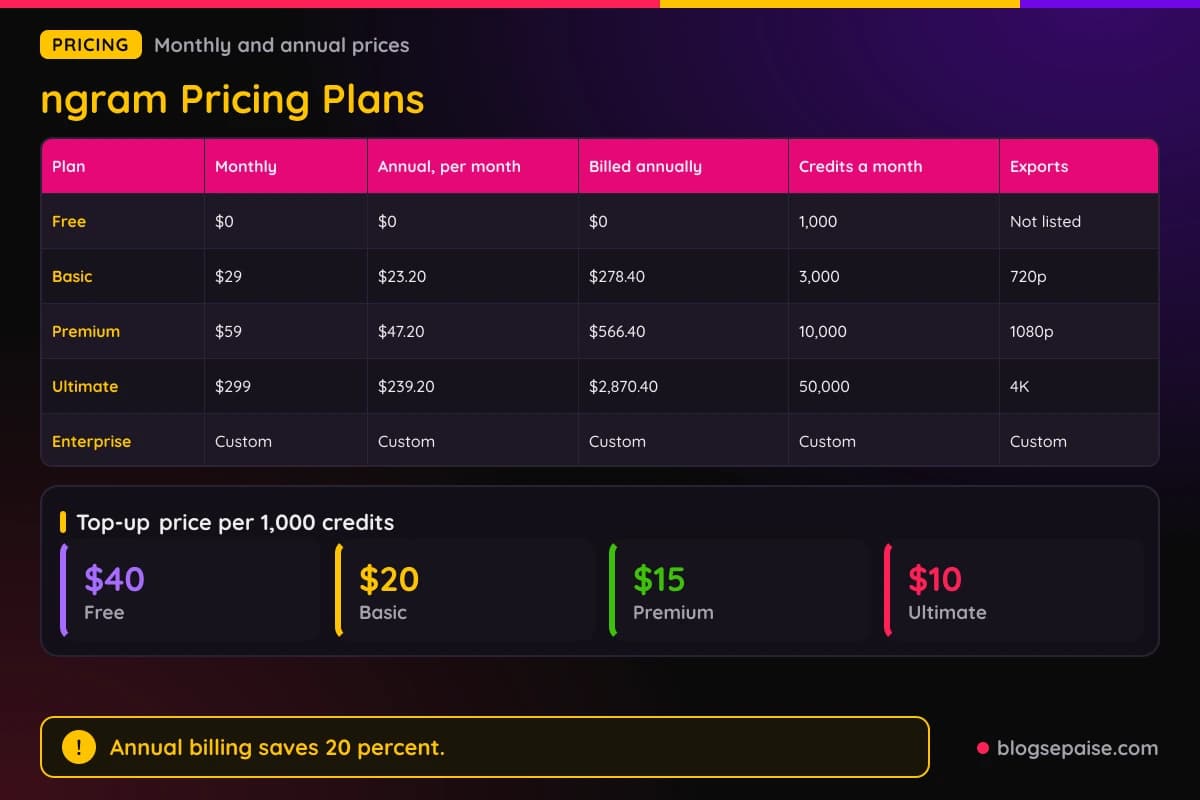
Premium, marked Most Popular, costs $59 a month, or $47.20 a month billed annually at $566.40 a year. It gives 10,000 credits a month and 1080p exports.
Premium adds all advanced models, unlimited image and audio generation, 1 Brand Kit, 1 custom voice, and 1 custom avatar. It allows up to 1,000 seconds of premium generation, or 3,333 seconds with the cheaper model.
Ultimate costs $299 a month, or $239.20 a month billed annually at $2,870.40 a year. It gives 50,000 credits a month and 4K exports.
Ultimate allows up to 5,000 seconds of premium generation, or 16,666 seconds with the cheaper model. It adds unlimited Brand Kits, voices, avatars, and teammates, plus polls, quizzes, and call to action overlays.
Premium top-ups cost $15 per 1,000 credits, and Ultimate top-ups cost $10. Annual billing saves 20 percent on Basic, Premium, and Ultimate.
Enterprise has custom pricing, custom credits, and custom export quality. It adds organization-wide security and controls, plus dedicated onboarding and support.
Premium and Ultimate monthly credits roll over for one billing cycle, and annual credits last until renewal. Basic and Free credits reset each month.
Upgrades are prorated for the rest of the billing cycle, and downgrades take effect at the next billing date. ngram lists no refund terms.
Credit math helps with planning. Basic gives 3,000 credits, Premium gives 10,000, and Ultimate gives 50,000 each month.
Annual plans issue credits up front: 36,000 for Basic, 120,000 for Premium, and 600,000 for Ultimate.
At 10 credits per second, 1,000 credits buy 100 seconds of premium video. A 30 second clip uses 300 credits, which is 10 percent of the 3,000 Basic credits.
In minutes, Premium gives nearly 17 minutes of premium video a month, and the cheaper model stretches that to about 55 minutes.
Free fits a trial run. Basic fits low weekly volume, Premium fits consistent creators who want advanced models and brand controls, and Ultimate fits power creators and teams.
Approved blogs can get a free account and up to 100 of their posts turned into branded videos. Each video comes with a public link and an embed code.
Who Is ngram Best Suited For
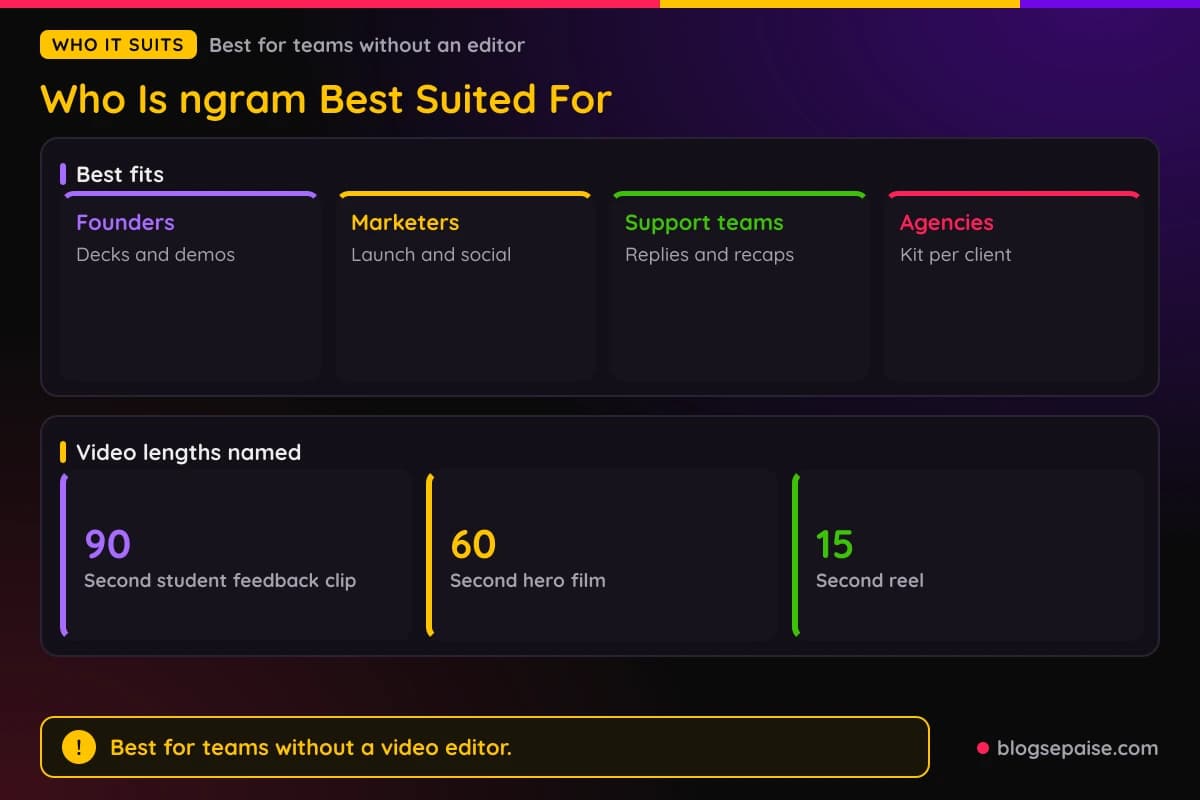
ngram suits people who need regular videos but have no video team. Founders are the clearest match.
A founder can turn a pitch deck into an investor video, polish a rough product demo, or post changelog clips. Homepage explainers and onboarding walkthroughs fit too.
Product marketers get branded launch videos and LinkedIn posts. Sales enablement teams build demo videos from decks and recordings.
Customer success teams make onboarding videos, QBR recaps, and feature education clips. A support answer can become a short video instead of a long email thread.
Educators turn lecture decks into narrated modules and tutorials. Corporate trainers build compliance modules from SOPs and regenerate scenes when a policy changes.
Agencies can keep a Brand Kit per client, which fits Ultimate with its unlimited kits. Client videos include retainers, pitches, case studies, and ad variants.
Bloggers and creators can use the free blog program to turn posts into videos. Solo creators can run Ultimate without a team.
Teachers with large sections can send a 90 second feedback clip to each student, with the name on screen.
Agencies can ship a 15 second reel, a 30 second B2B cut, or a 60 second hero film from a landing page.
Solopreneurs and small teams can run Premium alone and keep Ultimate for later. Developer relations, HR, and support teams have solution pages too.
Remote teams can share Brand Kits, assets, and conversations in one workspace.
Product managers have a solution page too. They can turn release notes and docs into feature announcement videos.
Company sizes named include solopreneurs, startups, small and midsize businesses, remote teams, and enterprises. Industries include SaaS, fintech, e-commerce, healthcare, and real estate.
People who edit screen recordings for software demos get the most from Screencast mode. Pick Premium if you want advanced models, 1080p, and a Brand Kit.
Who ngram Is Not For
ngram is not the best match for everyone. Credits run out fast on premium video, so heavy users must plan.
Basic covers up to 300 seconds of premium generation a month. That is five minutes of finished video for $29.
Free users cannot download videos. A paid plan is needed for MP4 downloads.
Teams that need Instagram, Facebook, or TikTok publishing must post by hand. Those channels are coming soon, and LinkedIn, X, and YouTube are Beta.
Anyone who needs a fixed language list should check first. ngram does not publish a language count for voiceover, captions, or translation.
Large teams on Premium or lower get 1 workspace user. Extra seats need Ultimate or Enterprise.
Editors who want full control of every frame may find chat editing limiting. Chat edits and full editor changes do not sync, since Open in editor creates a separate project copy.
Anyone who wants 4K exports must buy Ultimate. Basic exports at 720p and Premium at 1080p.
Anyone who needs in-player polls inside downloaded MP4s will not get them. Interactive elements work in shared playback and not in MP4 downloads.
People who want a finished video with no review step may find the plan stage slow. ngram asks you to approve the hook, scenes, and call to action first.
Sign-in protected products need an attended step. Browser Handoff asks you to log in yourself and select Done, so fully hands-off capture is not possible there.
Large organizations cannot buy Enterprise from a price list. Custom credits, controls, and onboarding come through a sales talk.
ngram Alternatives
Several tools overlap with ngram. A few names come up again and again.
Synthesia makes avatar presenter videos from scripts. It suits training teams that want a presenter on every video.
Descript edits video by editing the transcript. It suits podcasters and creators who record real footage.
Loom records your screen and camera and shares a link fast. It suits quick messages more than polished marketing videos.
Camtasia is a desktop screen recorder and editor. It suits people who want manual control over every clip.
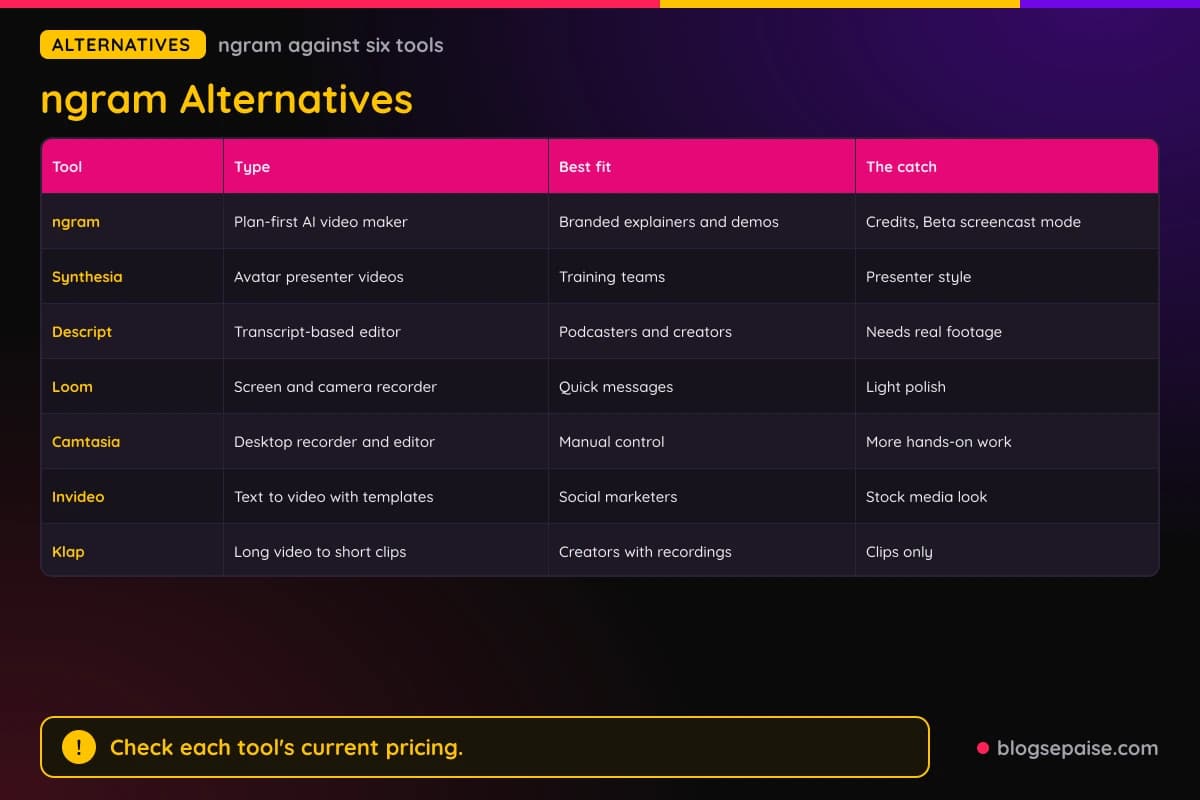
Invideo is a general text to video tool with templates and stock media. It fits marketers who want a broad toolkit.
Klap cuts long videos into short vertical clips. It fits creators who already have long recordings.
FineVoice focuses on AI voice work such as text to speech. It fits creators who only need narration.
Loom and ngram can work together. Record in Loom, then upload the recording to ngram for cleanup, captions, and brand treatment.
Start with the job. Camtasia, Loom, and ngram overlap on screen recordings, while FineVoice is enough when you only need narration.
ngram stands out for the plan-first flow, the Brand Kit, and screen recording cleanup in one tool. Prices for the other tools change often, so check them again before you decide.
For a closer look at clip tools, read our Klap review. For avatar videos, see our JoggAI review, and for voice work, see our FineVoice review.
ngram Use Cases
ngram shows up in a handful of repeat jobs. Training, sales, support, and social posts lead the list.
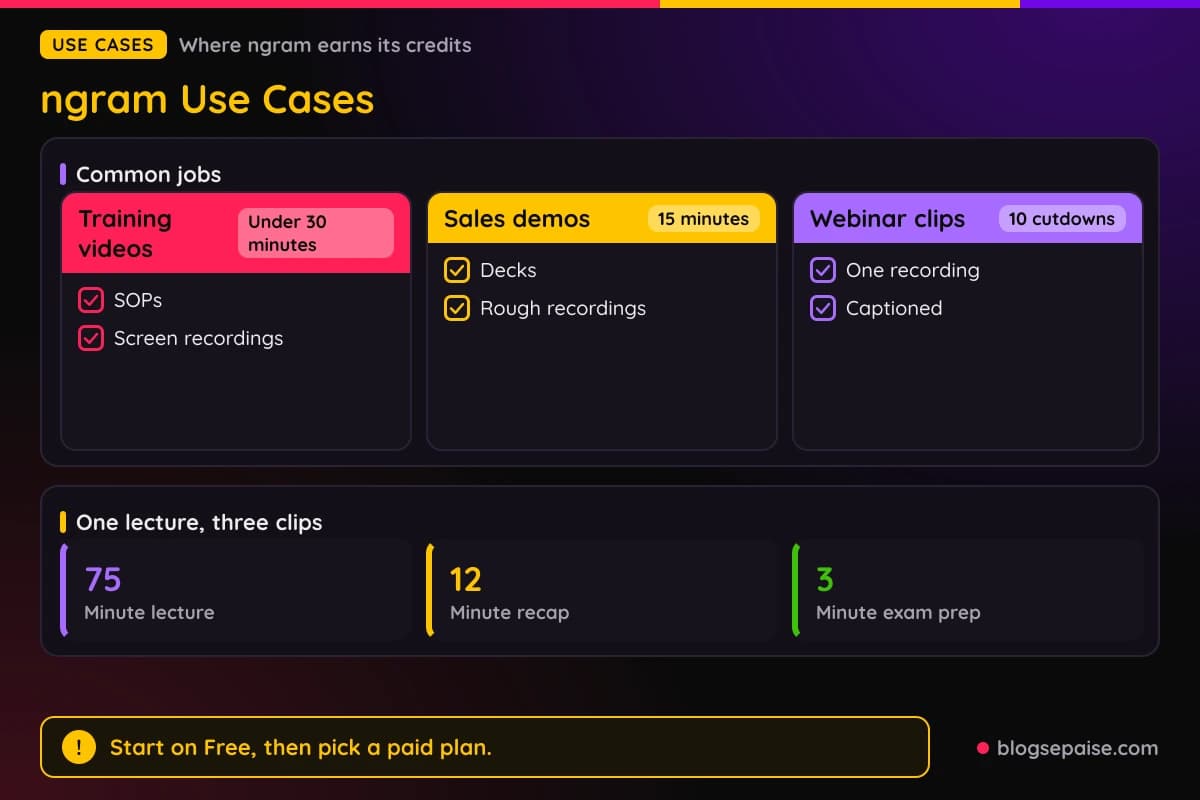
Training videos come from SOPs or screen recordings. ngram targets a finished training video in under thirty minutes.
Sales demo videos start from a rough recording or a deck. The target is a branded, captioned demo in fifteen minutes.
Webinar recordings turn into ten captioned cutdowns. Each cut can fit a different channel.
Product updates become changelog clips for email, LinkedIn, and in-app changelogs. A 90 second onboarding walkthrough is a typical example.
A URL can become a sixty second walkthrough video. Marketers use that for landing page explainers.
Customer success teams send QBR recaps to people who skipped the call. Renewal outreach videos recap wins and usage before the talk.
Course creators build narrated modules from lecture decks. A 75 minute lecture can become a 12 minute recap, a 3 minute exam prep clip, and a 30 second hook.
Agencies make ad hook variants of one idea. One example shows 5 variants, each tuned to an audience or platform.
Support teams reply with short videos instead of long email threads. ngram targets the same hour for a support reply video and the same day for a QBR recap.
Founders turn investor pitch decks into videos for people who watch without the founder present. Homepage explainers and changelog clips use the same flow.
Compliance teams build certification modules from policy documents. When a policy changes, ngram regenerates the affected scenes.
Agencies aim to turn client notes received at 10am into a next cut by end of day.
Automation fans connect Zapier, n8n, the Chrome extension, or the MCP server. A REST API and webhooks are listed too.
Final Thoughts On ngram
ngram is a strong pick for anyone who needs branded videos without an editor. The plan stage, the Brand Kit, and chat editing keep control in your hands.
Pricing is clear. Basic costs $29 a month or $23.20 a month billed annually, Premium costs $59 or $47.20, and Ultimate costs $299 or $239.20.
Credits are the catch. At 10 credits per second, Basic stretches to 300 seconds of premium video a month.
Screencast mode and social publishing are Beta, and three social channels are still coming soon. Language and voice counts are not published.
Free is good for a test run. You get 1,000 credits and one video of up to 60 seconds, but downloads need a paid plan.
Start on Free, make one explainer from a URL or a deck, and check the credit estimate before you generate. Move to Premium for 1080p, advanced models, and a Brand Kit.
Recognition is solid. G2 named ngram a Summer and Fall 2026 High Performer, and Product Hunt ranked it #2 Product of the Day.
Premium fits most solo creators and small marketing teams. Ultimate fits teams that need unlimited kits, voices, avatars, and seats, plus polls and quizzes.
Integrations help busy teams. Zapier, n8n, a Chrome extension, an MCP server, a REST API, and webhooks are all listed.
Agencies compare ngram with freelancers, who take about two weeks to a first cut with another week for revisions.
Treat credits like a budget. Plan scenes first, use the cheaper model for drafts, and save premium generation for the final render.
Annual billing saves 20 percent, so pick it once you know you will keep making videos.
You can browse more write-ups on our software reviews hub if you want to compare tools side by side.
ngram FAQ
1. What Is ngram?
ngram is an AI video maker that turns prompts, documents, decks, URLs, and screen recordings into branded videos. It has 22 features, including avatars, voiceover, captions, translation, and hosting.
2. How Much Does ngram Cost?
Basic costs $29 a month or $23.20 a month billed annually. Premium costs $59 or $47.20, Ultimate costs $299 or $239.20, and Enterprise is custom.
3. Does ngram Have A Free Plan?
Yes. Free gives 1,000 credits a month and one premium video a month of up to 60 seconds, with no credit card.
4. How Do ngram Credits Work?
Credits pay for video generation. Premium video costs 10 credits per second, and the cheaper model costs 3 credits per second.
5. Can I Download Videos On The Free Plan?
No. MP4 downloads need Basic or higher, though Free can share a public watch link and a website embed.
6. What Can I Turn Into A Video With ngram?
You can start from a text prompt, a PDF, a Markdown file, a public URL, a screenshot, a screen recording, raw video, or a PPTX deck.
7. Does ngram Have AI Avatars?
Yes. You can pick a prebuilt avatar or add a custom one from a face image or short clip. Premium includes 1 custom avatar, and Ultimate allows unlimited.
8. Can ngram Translate Videos?
Yes. ngram translates the script, captions, and on-screen text, makes target-language voiceover, and regenerates lip sync for avatar videos. It does not publish a language count.
9. Which Platforms Can ngram Publish To?
LinkedIn, X, and YouTube are live in Beta. Instagram, Facebook, and TikTok are listed as coming soon.
10. What Export Quality Does ngram Offer?
Basic exports at 720p, Premium at 1080p, and Ultimate at 4K. Enterprise export quality is custom.
11. Do ngram Credits Roll Over?
Premium and Ultimate monthly credits roll over for one billing cycle. Annual credits last until renewal, and Basic and Free credits reset each month.
12. Does ngram Work For Teams?
Yes. A shared workspace holds projects, Brand Kits, assets, and conversations. Ultimate allows unlimited teammates, while Free, Basic, and Premium have 1 workspace user.
13. Does ngram Have A Brand Kit?
Yes. A Brand Kit stores logo, colors, fonts, tone, and approved and blocked phrases. Premium includes 1 kit, and Ultimate allows unlimited kits.
14. Is There A Program For Bloggers?
Yes. Approved blogs get a free account and up to 100 of their posts turned into branded videos, each with a public link and embed code.
15. Can I Change Plans Later?
Yes. Upgrades are prorated for the rest of the billing cycle, and downgrades take effect at the next billing date.
16. Can ngram Record My Screen?
Yes. Screencast mode lets you upload a recording or record in the browser. It then smooths cursor motion, trims dead air, and emphasizes clicks, and it is labeled Beta.
17. Does ngram Support Polls And Quizzes?
Yes, on Ultimate and Enterprise. Polls, quizzes, and call to action overlays work in shared playback and not in downloaded MP4s.
18. What Types Of Videos Can ngram Make?
The generator offers explainer, product launch, changelog, feature announcement, customer onboarding, sales enablement, tutorial, social clip, and teaser videos.
19. Does ngram Offer An Enterprise Plan?
Yes. Enterprise has custom pricing, credits, and export quality, plus organization-wide security and controls, and dedicated onboarding and support.
20. Who Is ngram Best For?
Founders, product marketers, customer success teams, educators, and agencies that need branded video without a video team.