Can You Use Affiliate Links On Facebook? Rules By Program And Placement
You found a product you love, and now you want to share it with your Facebook friends. Then a question stops you: will Facebook or the affiliate program punish you for it?
The short answer is yes, you can use affiliate links on Facebook in most cases. The long answer depends on two rule books and on the place where you post.
The affiliate program has its own rules about where links may appear. Meta has a second set of rules about spam, branded content, and group behavior.
A third group, the Federal Trade Commission, cares about how you tell people you earn a commission. Miss that part and a perfectly allowed link can still land you in trouble.
The 7 steps below cover all three, and then they walk through 6 placements: your personal profile, a Page, groups, Reels, comments, and Messenger. A worked example and a list of common mistakes close things out.
Disclosure: Some of the links I share might be affiliate links. If you click on one and make a purchase, I may earn a small commission as a thank you. But don’t worry, it won’t cost you anything extra. I only recommend stuff I genuinely believe in. Your support helps me keep creating awesome content. You can read my full affiliate disclosure in my disclaimer page.
If you want to save a lot of hours searching for high-paying affiliate programs, check out our exclusive list of 2500+ affiliate programs. You’ll find all the information about the programs inside the list. This list is perfect for affiliate bloggers and influencers.
Why The Answer Changes By Program And Placement
Facebook has no single rule that bans or allows affiliate links. Meta's spam policy never names affiliate links at all.
That silence does not mean anything goes. Your link gets judged by behavior, such as how often you post, where you post, and if the link is honest.
Affiliate programs add a layer on top. Each program decides which places count as your approved site, and breaking that rule can cost you commissions.
Amazon is the most common question, so it gets plenty of space below. The same thinking applies to any program you join.
Placement matters because Facebook is not one place. A personal profile, a business Page, a group, a Reel, a comment, and a Messenger chat each work differently.
A link that is fine on your Page might get removed in a group. A link that works in a Reel might break a rule if you send it to strangers in Messenger.
So the plan is simple. Check the program rules, check Meta's rules, choose the placement, disclose, avoid spam triggers, and track what happens.
Think of the rules as three layers: the program, Meta, and the FTC. A link has to pass all three layers, and the strictest one wins.
Here is a quick map before the steps. Groups follow admin rules, Reels need a spoken disclosure, comments need a disclosure in the post, and Messenger needs permission.
Many beginners check only Facebook and forget the program. That is a common way to run into trouble over a post that Facebook never touched.
Take the steps in order. Each one answers a question that the next one depends on.
Step 1: Check The Affiliate Program's Rules First
Start with the program, because it can end your account faster than Facebook can. Open the terms and look for the words site, social media, ads, and messages.
Amazon Associates is the best-known case. Its Operating Agreement lets you earn from a website, social media user-generated content, an app, or an Alexa skill.
Amazon calls each of those your Site. So Facebook content can fall under the agreement, which also means Facebook content must follow it.
The Participation Requirements say you must identify your Site or Sites in your application. They also say a Site must have original content and be publicly available at the address you give.
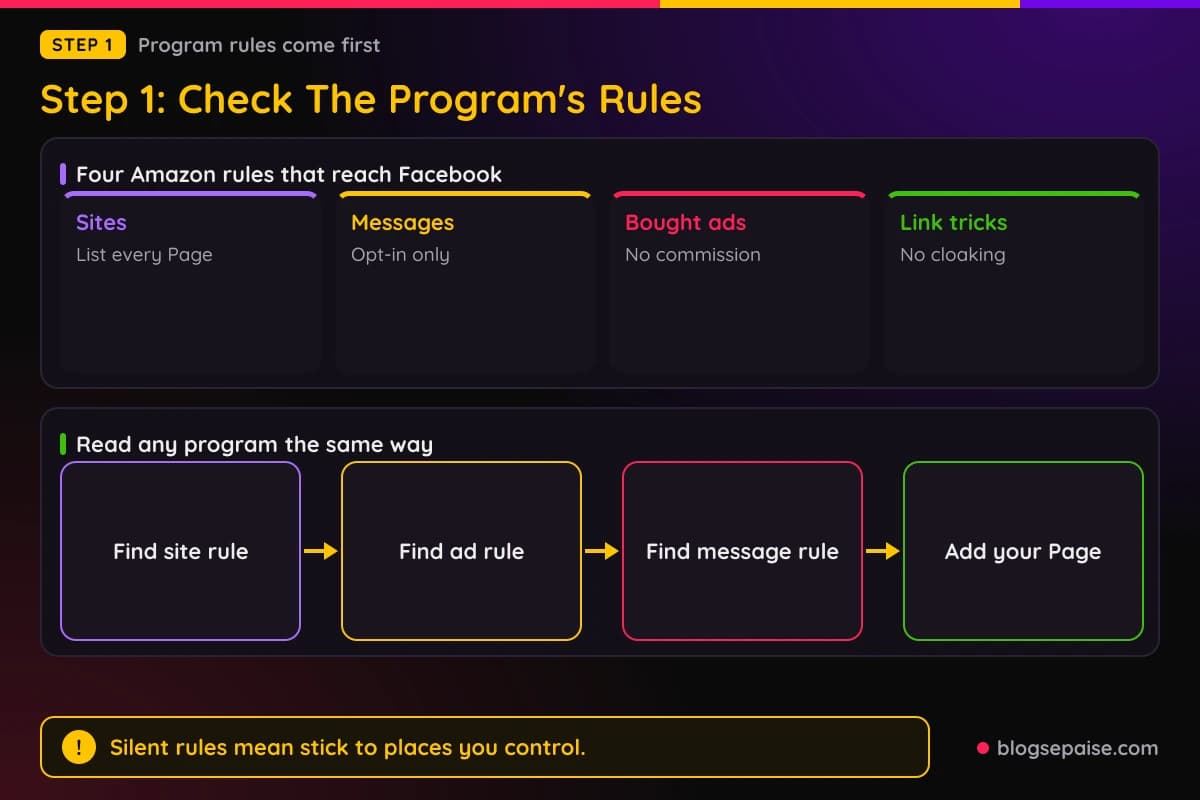
Another line says the information you give about your Site must be complete, accurate, and up to date at all times. Add every Page you promote from to your account.
Amazon also limits who you can contact. You may include tagged links in emails, SMS, and direct messages from your social media Sites, but only when the person opted in.
Another rule covers ads. Amazon does not pay commission on a purchase by a customer who reached Amazon through any advertisement you bought.
That matters on Facebook, because boosting a post that holds your tagged link is buying an ad. Plan on those clicks earning nothing.
Amazon bars link tricks too. You cannot cloak, hide, or spoof the web address of your Site that contains tagged links, and a shortener cannot make it unclear that you are linking to Amazon.
One more rule says you cannot create or display your tagged links on a site that is not your Site. Keep it in mind whenever you are tempted to drop your tag somewhere you do not run.
Amazon's policies do not name Facebook groups, personal profiles, or Messenger chats. Where a rule is silent, stick to places you control and ask Associates support.
Read the pricing rule too. Amazon sets conditions on showing prices and availability, so a typed price in a post can cause trouble.
Look for the disclosure section as well. Amazon requires the statement "As an Amazon Associate I earn from qualifying purchases," and Step 5 covers where it goes.
Networks work the same way. If you apply through a network such as Awin, each brand inside it can set its own social media rules.
Check the account area where you list your Sites. If the Page you post from is missing, add it before you share a single link.
Keep a short note of each rule you find, with the date you read it. The note makes it easy to check your posts later.
Other programs differ, so read each one's terms for the same four topics: sites, social media, paid ads, and messages.
Step 2: Check Meta's Rules On Spam And Branded Content
Meta's Community Standards on spam are the main rulebook for affiliate posts. The policy covers content designed to deceive, mislead, or overwhelm people to gain attention.
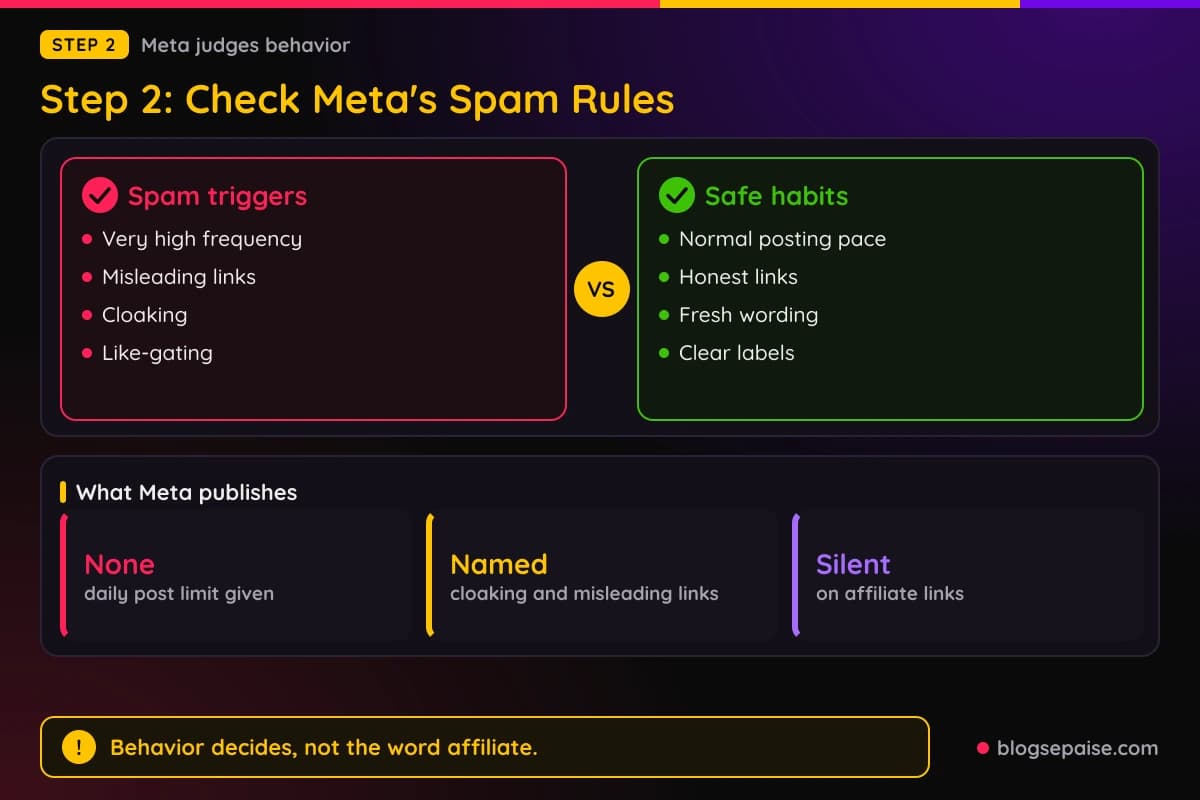
The policy bars posting, sharing, or creating accounts at very high frequencies. Meta gives no exact number, so no safe daily count is published.
It also bars buying, selling, or trading accounts, groups, and Pages. Offering anything of value in exchange for likes, shares, or follows is on the list too.
Misleading links are named. A link that promises one kind of content and delivers something very different breaks the policy.
Cloaking is named as well. Showing Meta one page and showing people another is an attempt to get around the content rules.
Other listed tricks include sites that change domains after a required action, fake Like or play buttons, and pop-ups that trap people who try to leave.
Like-gating is on the list. You cannot require a public like or share before someone can see what you promised.
Notice what is missing. The spam policy does not mention affiliate links or the link-in-comments habit by name.
Branded content has its own rules. Meta's Branded Content Policies cover content that features, or is influenced by, a business partner.
Meta uses a Paid Partnership label for that content. To use the branded content tools you manage a Facebook Page or use Professional Mode on your profile.
You also follow the Branded Content Policies and Partner Monetization Policies.
The spam policy has an exception for selling content for value. It applies to clearly identified branded content.
Sort your habits into two piles: the ones the policy names and the ones it is silent on. Avoid the named ones completely, and use good judgment on the rest.
For silent areas, honesty is a good guide. If a stranger would feel tricked by the post, change it.
Branded content rules matter when a brand pays you or gives you something of value. The label tells readers about that relationship.
Remember that a rule can apply even when it is not about money. A post with no affiliate link at all can still be spam if it repeats itself too often.
Meta can update its policies, so read the spam page again every few months.
Meta's Terms add that you cannot use its products to send spam. Business use, such as buying ads or running a business Page, falls under separate commercial terms.
Step 3: Pick The Placement: Personal Profile, Page, And Groups
Now choose where the link goes. Start with your personal profile, because most people ask about it first.
Meta publishes no rule that bans affiliate links on a personal profile. The spam policy still applies, so keep volume low and the link honest.
Amazon's rules still apply there too. Your profile counts as social media content, and the disclosure rule follows it.
A profile also reaches friends and family, who may not want product posts every day. Space your links out and mix them in with normal updates.
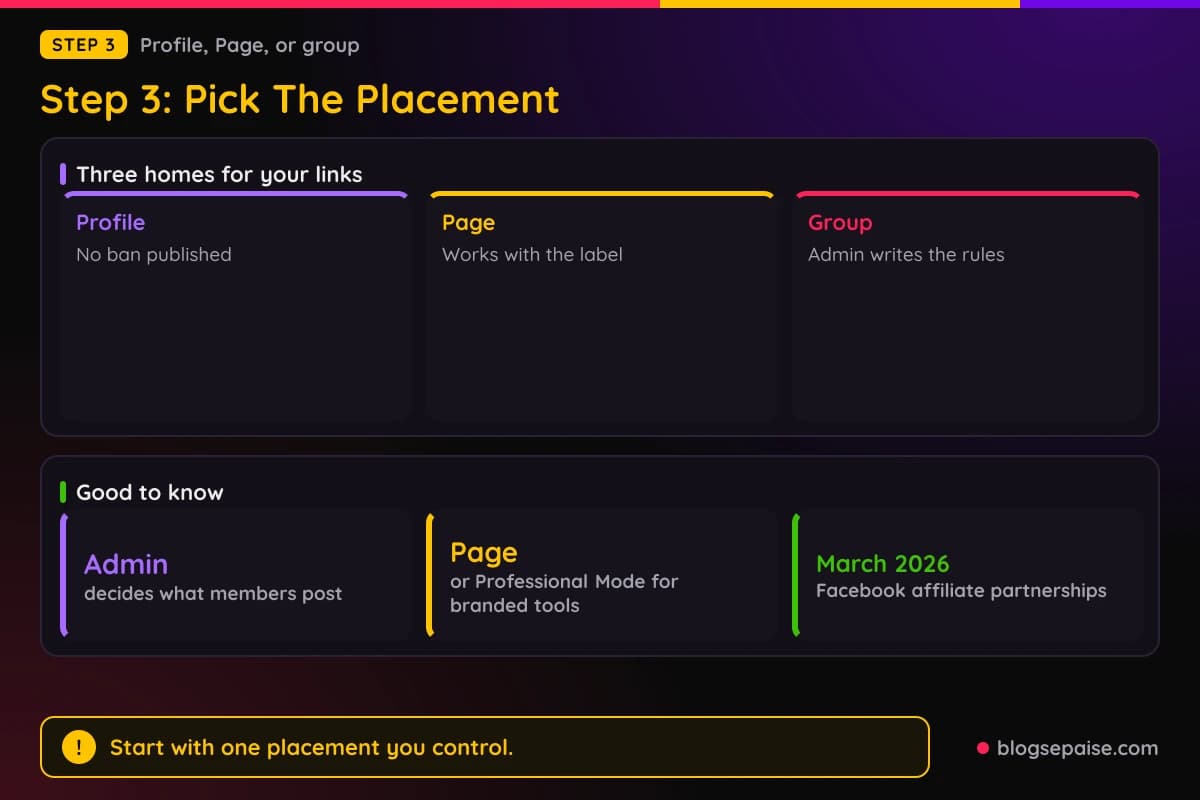
A Facebook Page is the better home for steady affiliate posts. You can list it in your affiliate account and keep every link in one place.
Pages also work with the Paid Partnership label. Meta says its branded content tools need a Page or a Professional Mode profile.
Meta announced Facebook affiliate partnerships on March 24, 2026. Eligible Pages and Professional Mode profiles can tag products in photo posts and Reels, and Amazon is a launch partner in the US.
Connecting an affiliate account adds a clickable banner to the content. Meta also says it detects links from its affiliate partners that you already have.
Groups are the tricky one. The group admin writes the rules, and Meta gives admins tools to remove posts, manage spam, and choose what members can post.
A group can ban promotion, limit it to one thread, or allow it freely, because the admin decides. Read the rules before you post and follow them exactly.
Amazon does not name groups in its policies. Treat a group as a place you do not control, and add your tagged link only when the group rules allow links.
Pick one placement to start. A Page is the easiest to track and the easiest to keep tidy.
Keep personal and professional apart if you can. A Page lets friends enjoy your profile while you build a separate audience for product posts.
When you join a new group, wait and watch before you post a link. Read the pinned rules and see how admins treat other members' links.
Admins can also tag a rule in a post or comment. A removed post usually points you to the rule you missed.
Your own group is different, because you set the rules. Write a clear rule about links and disclosure, and use our Facebook group name generator to pick a name.
Step 4: Handle Reels, Comments, And Messenger
Reels get the most reach, so many people want to add links there. A Reel lets you talk through a product, and that helps people trust your pick.
The Paid Partnership label and Facebook's affiliate tagging both work with Reels. Meta's tagging tool lets you attach products to photo posts and Reels instead of pasting a raw link.
Spoken disclosure matters in video. The FTC says the disclosure belongs in the video itself, ideally in both audio and on screen.
Say it early and say it plainly. A line like "I earn a commission if you buy through my link" works.
Comments are the next habit. Many creators write the post and drop the link in the first comment.
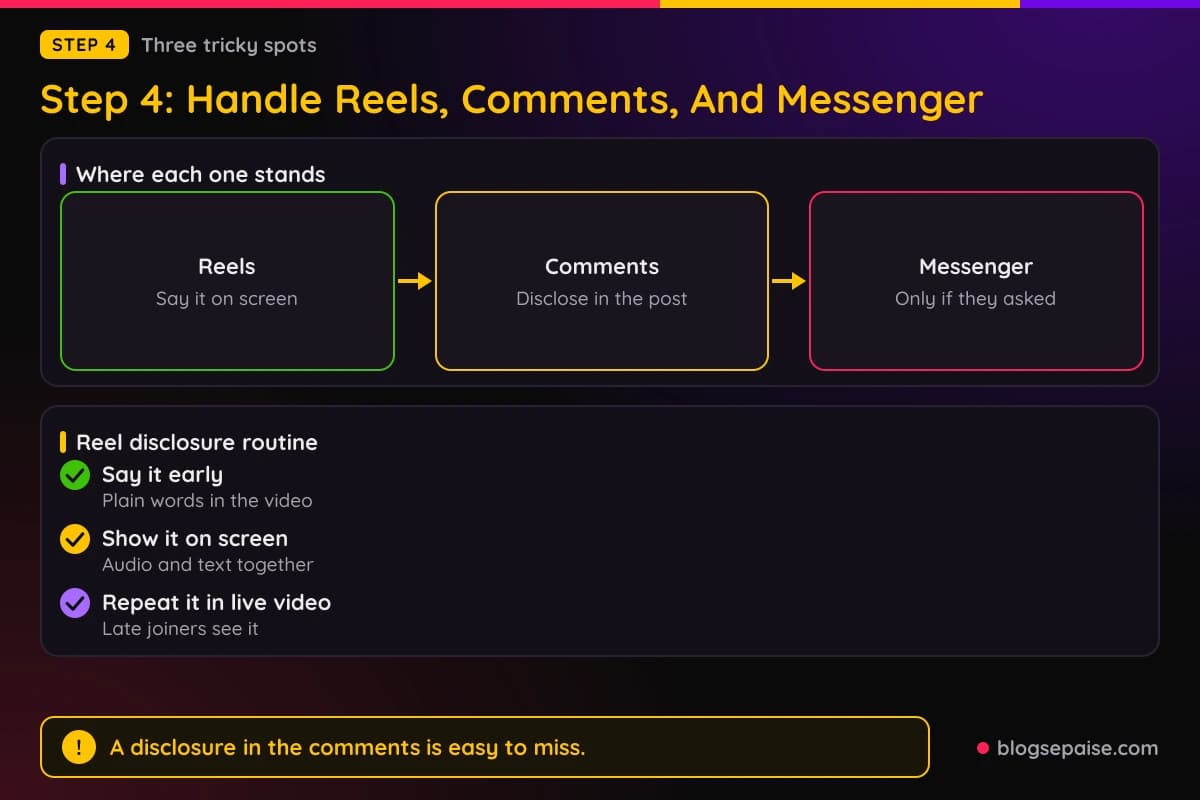
Meta's spam policy does not name that habit. The FTC does warn that a disclosure in the comments is easily avoidable and not clear and conspicuous.
So if the link sits in a comment, the disclosure still belongs in the post. Put the word ad or the words paid link up front, and repeat it next to the link.
Do not drop your link into other people's posts or Pages. It reads like spam to the owner, and Amazon's rule on displaying tagged links where you do not run the Site applies.
Messenger needs the most care. Amazon allows tagged links in direct messages from your social media Sites only when the person asked for them.
Meta's Terms bar using its products to send spam. Sending your link to a list of friends who never asked is the quickest way to break both rules.
Show the product in use. A short clip of you making the coffee beats a still photo with a link.
Keep the spoken line short. Try something like "Links in this video earn me a commission."
Reply to comments with care. If a viewer asks for the link, answer with the disclosure instead of pasting the link under every comment.
If someone asks you for a recommendation in a chat, answer and send the link with a short disclosure. That counts as a solicited message.
Step 5: Disclose Every Link The Right Way
Disclosure is where most Facebook affiliates slip. The rule comes from the FTC, and both Amazon and Meta point back to it.
The FTC says people must see and understand a disclosure. It belongs with the endorsement, not on an About page, at the end of a post, or behind a MORE link.
The FTC also says to keep the disclosure out of a pile of hashtags or links. Put it where eyes land first.
For affiliate links, the FTC says the words paid link right next to the link should be an adequate disclosure. The words affiliate link alone may not be understood, and commissionable link is probably not clear.
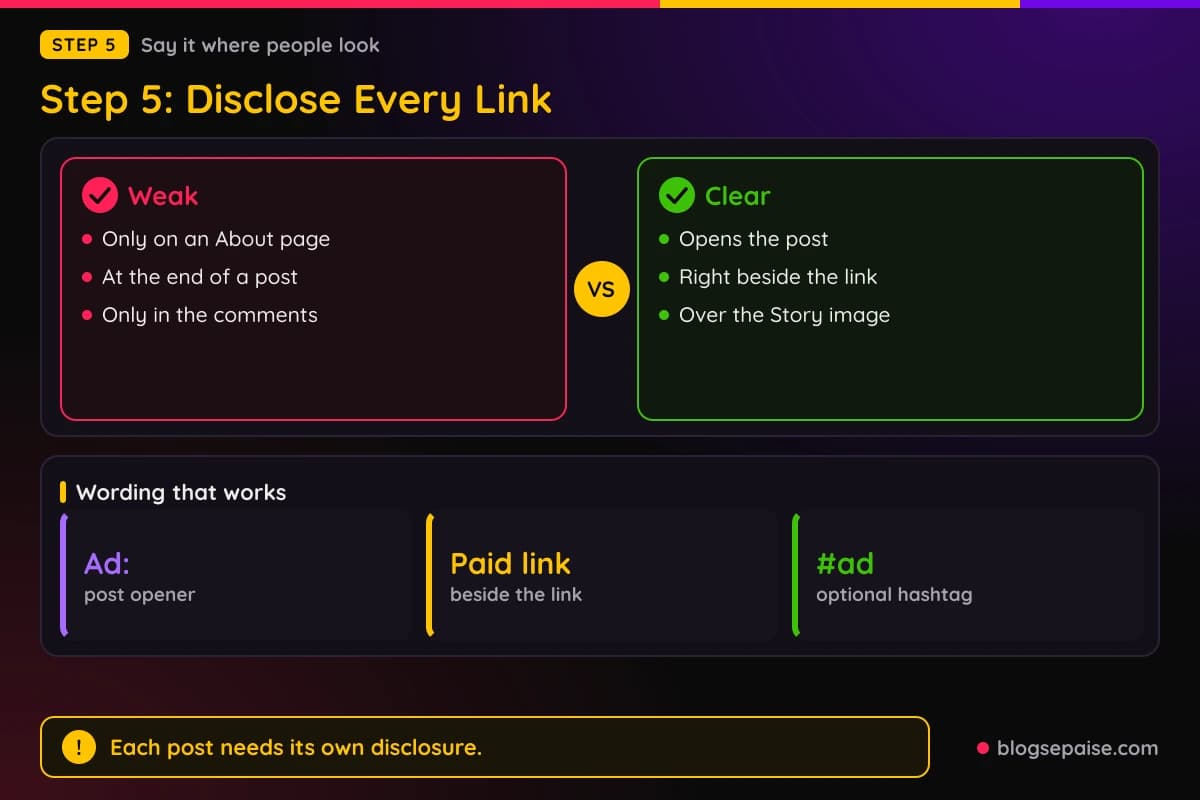
On Facebook, the FTC says starting a post with Ad:, Paid ad, or #ad would likely be effective. Hashtags are optional, but short plain words work.
Each post needs its own disclosure. The FTC says an influencer cannot assume followers will read more than one post and connect them.
Amazon adds its own wording. Its Operating Agreement requires the statement "As an Amazon Associate I earn from qualifying purchases" to appear clearly and prominently.
For social media content, Amazon says the statement must be associated with your account. Putting it in your Page's About section is a simple way to do that, and the short disclosure still goes beside each link.
Amazon also says Associates may use Facebook's Branded Content tool. The FTC says a platform tool is fine, but it advises adding your own clear disclosure too.
For Stories and images, put the words over the picture where people can read them. For live video, repeat the disclosure so late joiners see it.
The responsibility is yours. The FTC says the ultimate responsibility rests with the influencer and the brand.
Write the disclosure in plain words. Short beats clever, and a teenager should get it at a glance.
Place it before the link, not after. A reader should see the words first and the link second.
Use the same wording every time. A habit keeps you from forgetting, and readers learn to spot it.
Add the words when you edit old posts too. If you add a link to an older post later, add the disclosure at the same time.
Our guide to legal disclosures and the affiliate disclosure generator help you write a clean line.
Step 6: Avoid The Spam Triggers
Even a well-disclosed link can look like spam if you act like a bot. Meta judges patterns, and the policy names several.
Watch for 5 triggers. Frequency comes first, and Meta's policy bars posting at very high frequencies, by hand or with automation.
No number is published, so you cannot count your way to safety. Post at the pace a real person would, and mix product posts in with normal ones.
Repetition is the next trigger. Meta says accounts with lower posting rates can be restricted when other spam signals show up, such as repetitive content.
Write 1 fresh post for each link. Add your own photo, a real reason you like the product, and a detail only a user would know.
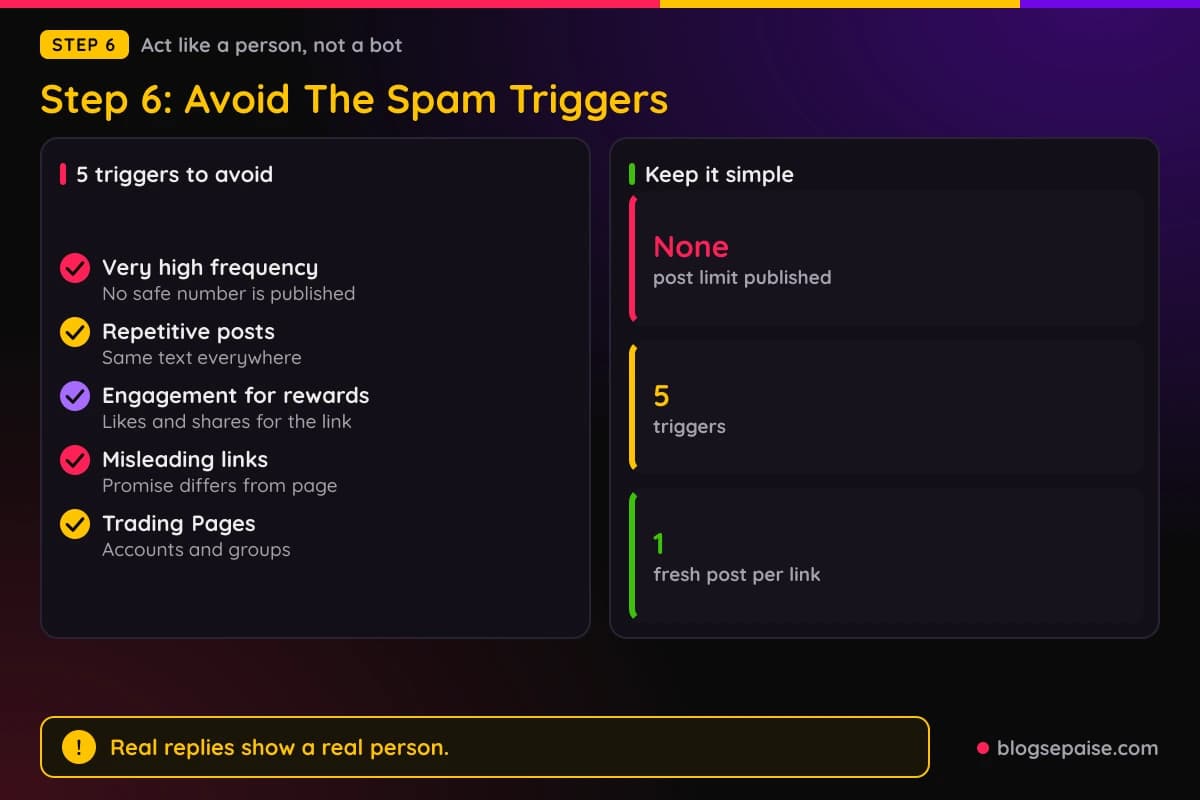
Never trade for engagement. Meta bars offering anything of value for likes, shares, or follows.
Meta also bars requiring people to engage before they can see what you promised. A post that says like and share to get the link breaks that rule.
Keep links honest. If the post promises a review, the link must lead to a review or a product page, not a surprise.
Skip redirects and pop-ups. Sites that change domains after a click, or that trap people with pop-ups, are on Meta's list.
Never buy or sell Pages or groups. Build your own audience instead.
Be careful with paid boosts. Amazon pays nothing on purchases from ads you bought, and Meta has ad standards of its own, which our guide to Facebook and Instagram ads covers.
Plan a content calendar so only some of your posts carry links. A mix of tips, stories, and questions keeps the Page useful.
Skip tools that post for you at high speed. The policy names automatic activity, and bots tend to repeat the same text.
Keep your best posts useful without the link. If a post only works as an ad, readers scroll past it.
Answer your audience by hand. Real replies show that a real person runs the Page.
If Meta removes a post or limits your Page, do not repost the same link right away. Read the notice, fix the cause, and appeal if you think it was a mistake.
Step 7: Track What Your Links Do
Tracking tells you which placement earns and which one wastes time. Without it you are guessing.
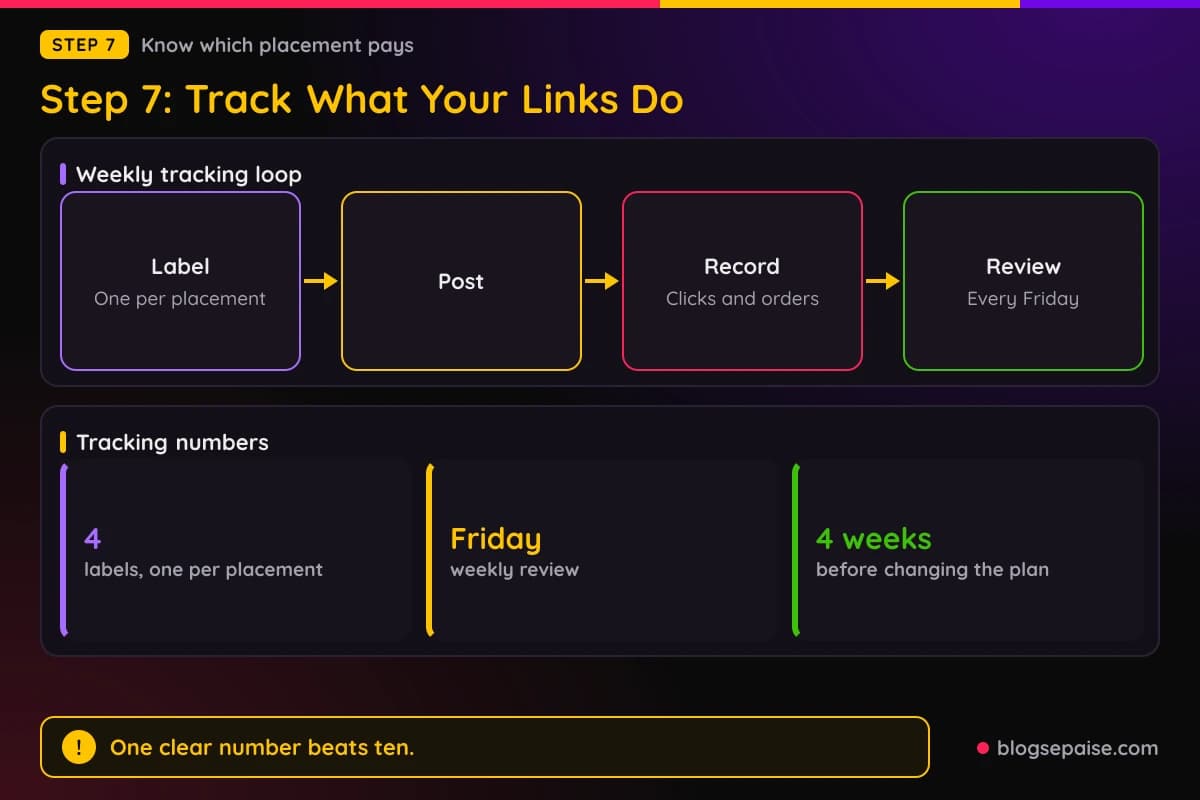
Use a separate label for each placement. Give one to your profile, one to your Page, one to groups, and one to Reels, for 4 labels in all.
Program reports work best when the labels are separate. With one label everywhere you cannot tell a Reel sale from a group sale.
A link manager helps too. Tools such as Pretty Links or ClickMagick count clicks on links you control.
Check the program's rules on shorteners and redirects before you use one. Amazon bars a shortener that makes it unclear you are linking to Amazon.
Record each post in a simple sheet. Write the date, placement, label, clicks, orders, and commission in dollars.
Review the sheet every Friday. After 4 weeks you will see a pattern worth acting on.
Watch removals as well. Note any post that a group admin or Facebook took down, and write down why.
Compare clicks to orders. A placement with many clicks and no orders may attract the wrong audience or send people to a weak page.
Keep Facebook's numbers beside the program's numbers. Page insights show reach, your tracker shows clicks, and together they show how well a post converts.
Update your plan every month. Drop placements that earn nothing and repeat the ones that do.
Pick one number to watch first, such as clicks per post. One clear number is easier to act on than ten.
Note the format and the time of day too. A pattern may show that Reels beat photos or that mornings beat evenings.
Save a screenshot of each disclosure. If anyone asks, you can show what the post said.
Ask readers where they found you. A short poll on your Page helps you match sales to posts.
Watch your program standing too. Our page on how to avoid getting banned from affiliate programs lists the habits that cost people their accounts.
A Worked Example: Dev Tests Four Placements In Four Weeks
Here is a made-up example that shows the steps in action. Dev runs a small home coffee blog and has an Amazon Associates account.
Dev reads Amazon's rules first and adds the Facebook Page to the account. Then Dev reads Meta's spam policy and writes down 3 rules: no engagement bait, no cloaked links, and no bursts of posts.
Dev picks 4 placements: a personal profile, the Page, one group that allows a weekly link thread, and Reels. Each placement gets its own label.
Every post opens with Ad: or Paid link, and the Amazon Associate sentence sits in the Page's About section. Dev never types a price in a post.
Over 4 weeks Dev shares 2 profile posts, 6 Page posts, 2 group posts, and 3 Reels.
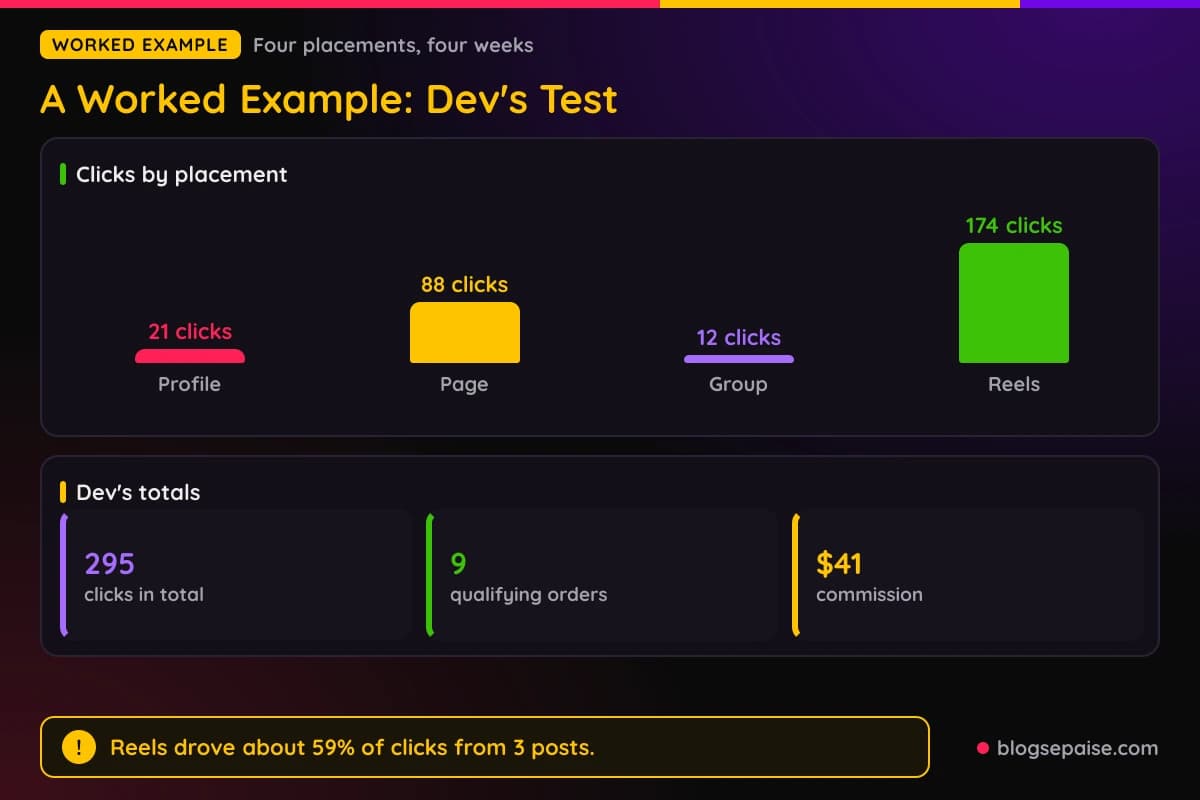
The profile posts bring 21 clicks. The Page posts bring 88 clicks, the group posts bring 12 clicks, and the Reels bring 174 clicks.
That adds up to 295 clicks. The Reels deliver about 59% of them from only 3 posts.
The tracked results come to 9 qualifying orders and $41 in commission. Most of the orders came from the Reels and the Page.
One group post gets removed by an admin because the weekly link thread runs on a different day. Dev reads the rule again and uses the right thread next time.
After 4 weeks Dev cuts the profile posts to 1 a month and makes more Reels. The plan changes because the numbers showed what worked.
Dev saves a screenshot of every post. If a brand or a platform ever asks, Dev can show the disclosure.
Dev checks the tracker every Friday and writes one line about each post. By week 3 the Reels are clearly ahead, so Dev plans two more.
Dev answers every comment by hand, so the Page reads like a person. Dev runs no ads, so the test costs time and nothing else.
Nothing here is a promise of results. Your clicks, orders, and commissions will differ, so run your own test.
Common Mistakes When Using Affiliate Links On Facebook
Posting the link and skipping the disclosure is mistake number one. The FTC says the disclosure belongs with the endorsement.
Putting the disclosure only in a comment is the second. The FTC says a disclosure in the comments is easily avoidable.
Boosting a post that holds your Amazon tag is the third. Amazon does not pay commission on purchases that come from ads you bought.
Hiding the link behind a shortener or redirect is next. Amazon bars cloaking and shorteners that make the destination unclear, and Meta bars cloaking and deceptive redirects.
Ignoring group rules gets your posts removed. Admins decide what members can post, and they have tools to remove posts and to ban or limit people.
Messaging links to people who never asked breaks the opt-in rule. Amazon allows tagged links in direct messages only when the person opted in.
Typing prices into posts can run into Amazon's rules on showing prices and availability. Skip dollar amounts and let the product page show the current price.
Copying one post into ten places is another. Meta lists repetitive content as a spam signal.
Buying followers or trading Pages is a shortcut that breaks Meta's rules. The policy bars selling accounts and buying engagement.
Overselling the product is a mistake too. Keep every claim honest and specific.
Leaving a Page off your program account is the last one. Add every place you promote from, so the information in your account stays complete and up to date.
Final Thoughts
So, can you use affiliate links on Facebook? Yes in most cases, as long as the program allows it, you follow Meta's rules, and you disclose every link.
Meta publishes no ban on affiliate links, and Amazon's policies do not name Facebook groups, profiles, or Messenger. That leaves you to follow the rules that are written down and to ask when you are unsure.
Start small. Pick one placement, write one honest post with a clear disclosure, and track the result.
Then grow from what works. A niche you know well makes honest posts much easier, and our guide to choosing a profitable niche can help.
Rules change over time. Read the program terms and Meta's policies again every few months.
Frequently Asked Questions
1. Can you use affiliate links on Facebook?
Yes in most cases. Meta's spam policy does not ban them by name, but you still need to follow the program's terms, Meta's rules, and the FTC's disclosure guidance.
2. Does Amazon allow affiliate links on Facebook?
Amazon's Operating Agreement lets you earn from social media user-generated content. You must follow its policies on listing your Sites, disclosure, bought ads, and messages.
3. Can I post affiliate links on my personal profile?
Meta publishes no rule against it. Disclose each link and keep your posting pace normal.
4. Can I use affiliate links in Facebook groups?
It depends on the group, because admins set the rules. Amazon's policies do not name groups, so follow the group's rules and keep the post honest.
5. Can I put the link in the first comment?
Meta's spam policy does not name that habit. The FTC says a disclosure in the comments is easily avoidable, so disclose in the post and beside the link.
6. Can I run Facebook ads to affiliate links?
Amazon does not pay commission on purchases from ads you bought. Other programs set their own ad rules, so read them first and see our guide to Facebook and Instagram ads.
7. Do I have to say it is an affiliate link?
Yes. The FTC says to disclose clearly and conspicuously, and it calls paid link next to the link an adequate disclosure.
8. What is the Paid Partnership label?
It is Meta's label for branded content. You need a Facebook Page or a Professional Mode profile to use the branded content tools.
9. What are Facebook affiliate partnerships?
Meta announced them on March 24, 2026. Eligible creators can tag affiliate products in photo posts and Reels, and Amazon is a launch partner in the US.
10. Can I send affiliate links in Messenger?
Only to people who asked. Amazon allows tagged links in direct messages from your social media Sites when the person opted in.
11. How often can I post affiliate links?
Meta publishes no number. Its policy bars very high frequencies, so post at the pace a real person would.
12. Will Facebook ban me for using affiliate links?
Meta's spam policy lists behaviors that draw enforcement, such as very high frequency, misleading links, and cloaking. Affiliate links are not named.
13. Can I use a Facebook Page for affiliate links?
Yes. A Page works with the Paid Partnership label and Facebook's affiliate partnerships tools, and it keeps your links in one place.
14. Do I need to list my Facebook Page in my Amazon account?
Amazon says you must identify your Sites and keep that information complete, accurate, and up to date. Adding the Page keeps your account in line.