Calilio Review (2026): Cloud Phone System From $12 And The Catch
Calilio is a cloud phone system for businesses. Calls and texts run over the internet on phones, tablets, laptops, and the browser, with no desk phones or office wiring.
The company behind it, Calilio Pte Ltd, lists locations in Singapore, Australia, and New Zealand. It calls itself the telephony partner of more than 1,000 businesses.
You get local, mobile, and toll-free numbers in over 100 countries. The first US, Canada, or UK local number is free after account verification, and extra lines start at $2 a month.
Calilio says setup takes 5 minutes with no PBX hardware. You sign up, buy or port a number, add agents and supervisors, and set up routing.
The toolset covers a shared team number, ring strategies, IVR, voicemail, call recording, AI call reports, live call monitoring, a power dialer, and bulk SMS. A Chrome extension adds click-to-call from websites and CRMs.
Standard costs $15 per user a month, or $12 a month billed annually. Premium costs $35 per user a month, or $28 a month billed annually, and Enterprise is custom.
Calilio shows a 4.6 out of 5 rating from more than 125 reviews, including 4.7 on G2 and 4.3 on Capterra. It also offers a 14-day money-back guarantee.
Calilio calls itself the #1 cloud phone system for sales and support teams. Its pages also name marketing, operations, and remote teams.
Calilio reports customer results of up to 75% lower costs, 63% savings on international calls, and 42% better first-call resolution.
An AI Voice Agent, listed as Beta, answers calls around the clock and handles 5 calls at once. It also provides transcripts and summaries.
Other ratings include 4.9 on Software Suggest and 4.5 on SourceForge.
Each plan bundles free minutes and texts for US and Canada numbers. After that, usage comes out of a prepaid wallet.
Integrations include HubSpot, Pipedrive, Salesforce, and Pabbly Connect, with mobile apps for iOS and Android. API and webhook access is marked coming soon.
The site also lists an SMS Compliance Checker and a Call Recording Disclosure Generator under Compliance Tools.
Phone numbers and call charges bill apart from the plan. Calilio Hub sells prepaid call packs that cut those rates by up to 30%.
Disclosure: Some of the links I share might be affiliate links. If you click on one and make a purchase, I may earn a small commission as a thank you. But don’t worry, it won’t cost you anything extra. I only recommend stuff I genuinely believe in. Your support helps me keep creating awesome content. You can read my full affiliate disclosure in my disclaimer page.
Search 1,500+ affiliate programs in the Blogsepaise Program Database and filter them by category, network and commission type, then go straight to each program's signup page. The Link Health Monitor then checks your posts for broken, redirected and untagged affiliate links.
Calilio Features
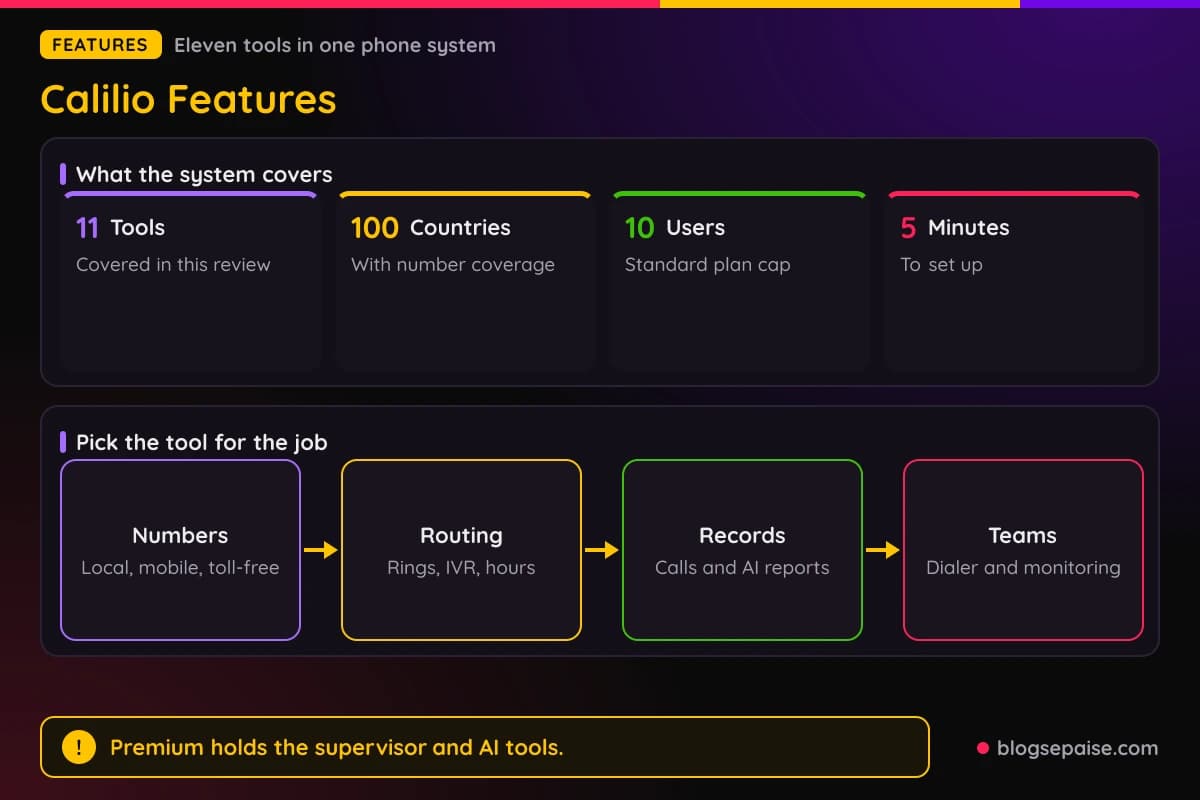
Calilio spreads its tools across calling, messaging, call center work, numbers, call handling, and AI reports. This review covers eleven of them.
Most routing and calling tools sit in Standard, while supervisor tools and AI reports sit in Premium. Standard stops at 10 users, and Premium has no cap.
Everything runs from one dashboard with a callbox that shows calls, voicemails, and messages in one view. Setup runs through Settings, My Numbers, and Members.
Agents work from the iOS and Android apps, a browser web phone, or a Chrome extension.
1. Business Phone System And Number Sharing
Calilio replaces a traditional PBX with a cloud phone system that runs over the internet. You make and receive calls and texts from a phone, tablet, laptop, or web browser.
Setup follows five steps. Create an account, buy or port a number, add agents, supervisors, and admins, set up IVR, voicemail, and business hours, then start calling.
Number sharing lets several agents use one business number for calls and texts. You buy the number under Settings and My Numbers, invite people under Members, and assign the same number to each of them.
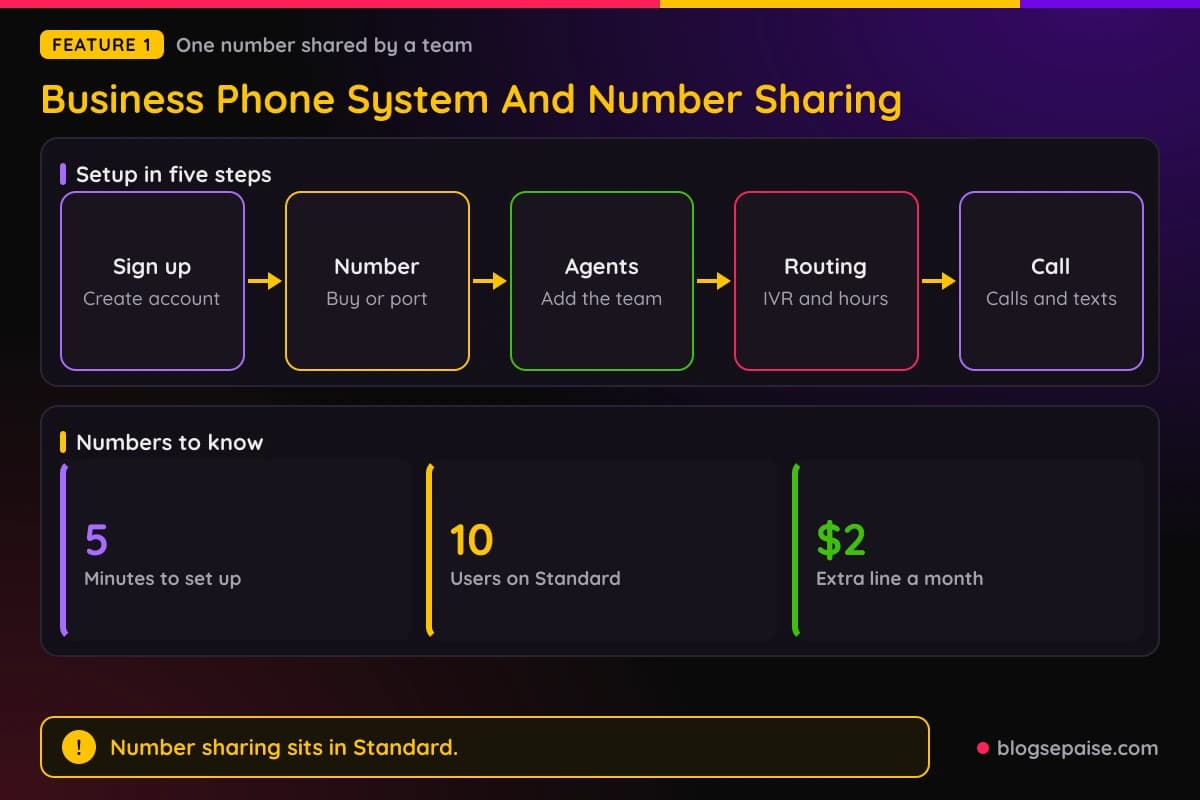
Number sharing and call forwarding sit in the Standard plan.
Internal team messaging lets agents and supervisors chat, call, and attach files inside the app. Standard includes it too.
Calilio warns against putting too many agents on one number without coordination, since it causes confusion. It also suggests voicemail for after-hours cover instead of relying on the shared number alone.
2. Simultaneous Ring And Call Transfer
Simultaneous ring makes every agent in a group ring at the same moment. The first person to answer takes the call, and ringing stops for everyone else.
Setup is four steps. Open Settings and Call Flow, pick the flow for the number, choose Simultaneous, add the agents, then set how long the group rings and what happens next.
Calilio's example ring time is 30 seconds. If nobody answers, the call can fall back to voicemail, another team, an IVR menu, or the AI Voice Agent.
Standard also lists sequential and round-robin ring strategies, though Calilio's page does not explain how they work.
Call transfer moves a live call to another person. During the call you click Transfer Call on the phone pad and pick an online member or an external number.
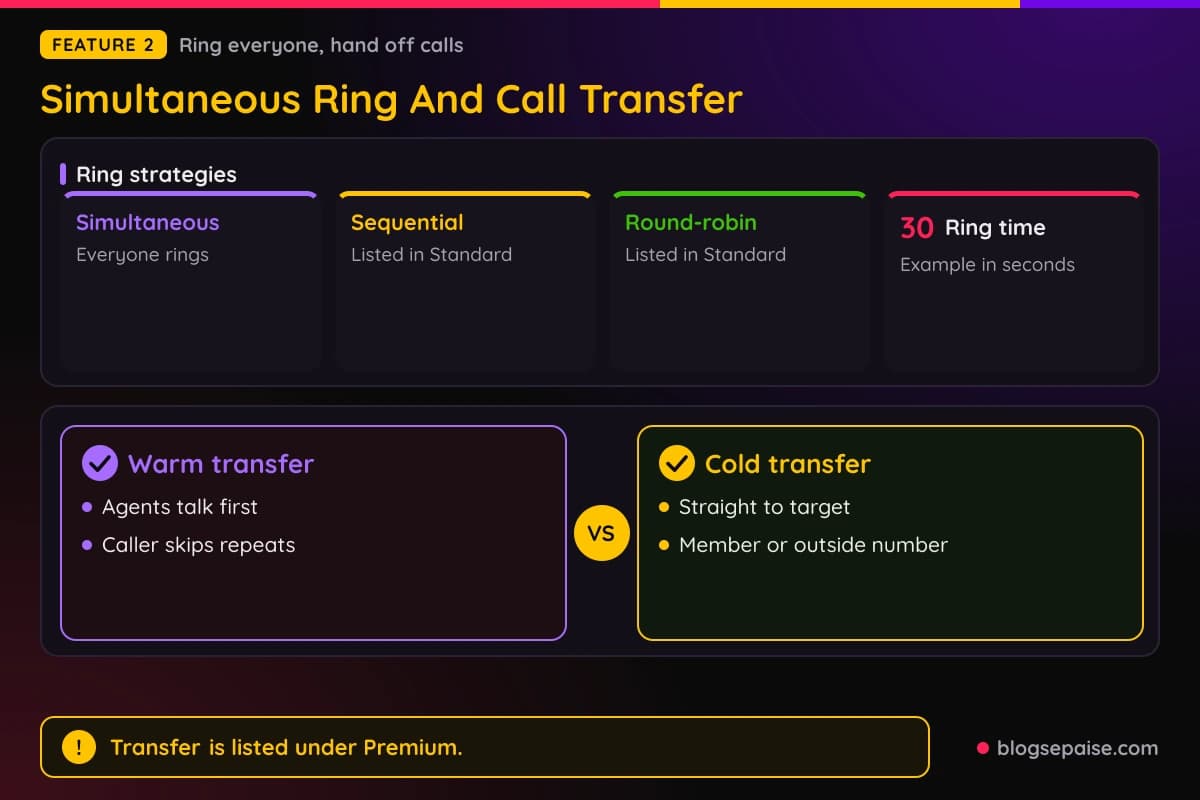
Warm transfers let the first agent talk to the receiving agent before handing over, so the caller does not repeat the story. Cold transfers send the caller straight to the destination.
Agents can add notes or tags before a transfer, and hold music or announcements can play. Calilio lists call transfer under Premium, yet also describes it as included in all plans.
3. Bulk SMS And Business Messaging
Calilio handles texts and picture messages from the same app as calls. The callbox shows calls, voicemails, and texts in one view.
Bulk SMS sends one message to a list. You write it in a Compose SMS screen, and campaigns can be one-time or recurring.
Recipients come from hand entry, your contacts, a CSV or Excel file, or your CRM. Calilio removes duplicate numbers across all sources before sending.
Personalization tokens fill in contact details, and the composer shows a live preview and character count. You can save a campaign as a draft.
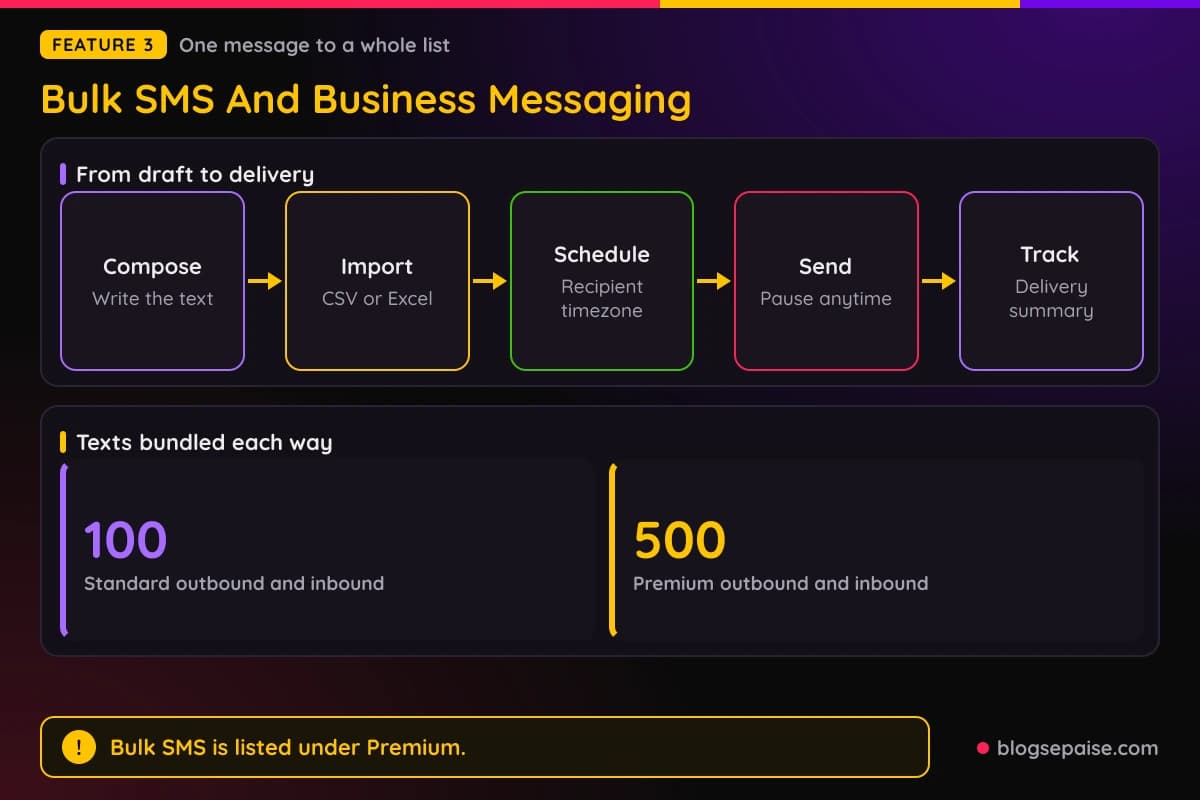
You can schedule a send by date, time, and timezone, or repeat it on a schedule. The timezone can be the recipients' rather than yours.
Each campaign shows its status and a delivery summary, and you can pause, resume, or end it mid-send. Saved replies cover common answers in the inbox.
Plans bundle texts for US and Canada numbers. Standard includes 100 outbound and 100 inbound, and Premium includes 500 of each.
Premium lists Bulk SMS, though the bulk SMS feature description says campaigns come with every plan. Calilio publishes no per-text rates and describes no opt-out steps.
A2P 10DLC registration for US and Canada texting costs a fee per attempt, and Calilio lists no amount.
4. Call Center Software For Inbound, Virtual, And Outbound Teams
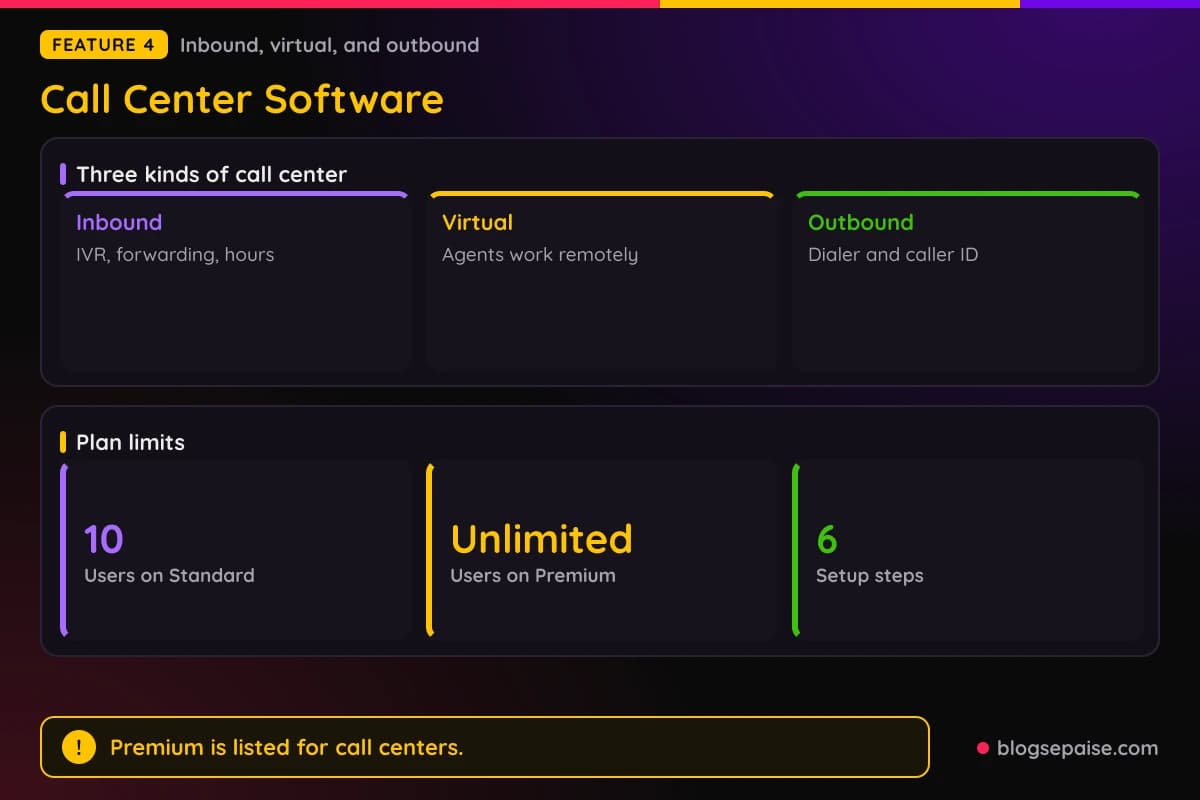
Calilio sells its phone system as call center software for inbound, virtual, and outbound teams. Agents work from desktop, mobile, tablet, or browser, and no PBX is required.
Inbound teams get IVR, call forwarding, business hours, voicemail, and call transfer. IVR can send callers to sales, support, billing, or another team.
Business hours change routing by time, and callers can leave voicemail when the office is closed. Notes, tags, and recordings attach context to every conversation.
A virtual call center adds remote work. Calilio lists six setup steps, from sign up and numbers to routing, calls, and reviewing recordings, analytics, and AI call reports.
Outbound teams get the power dialer, click-to-call, custom caller ID, and call disposition labels. Custom caller ID shows local or toll-free numbers on outbound calls.
Call analytics track call volume, answer rates, team activity, and outcomes. Premium adds live monitoring and AI call reports for supervisors.
Calilio lists Premium as ideal for call centers, and it has unlimited users while Standard stops at 10. Enterprise adds a dedicated account manager and phone and WhatsApp support.
5. Virtual Numbers, Vanity Numbers, And Number Porting
Calilio sells local, mobile, toll-free, and vanity numbers in over 100 countries. Numbers start from $2 a month, and the first US, Canada, or UK local number is free after account verification.
Buying takes four steps. Open Settings, My Numbers, and Purchase Number, pick a country and number type, choose a number, and pay to activate it.
Some countries ask for proof of ID or proof of address before activation. Numbers send and receive texts and calls from any device.
Toll-free numbers come with prefixes such as 800, 888, and 877. Calilio lists no toll-free price.
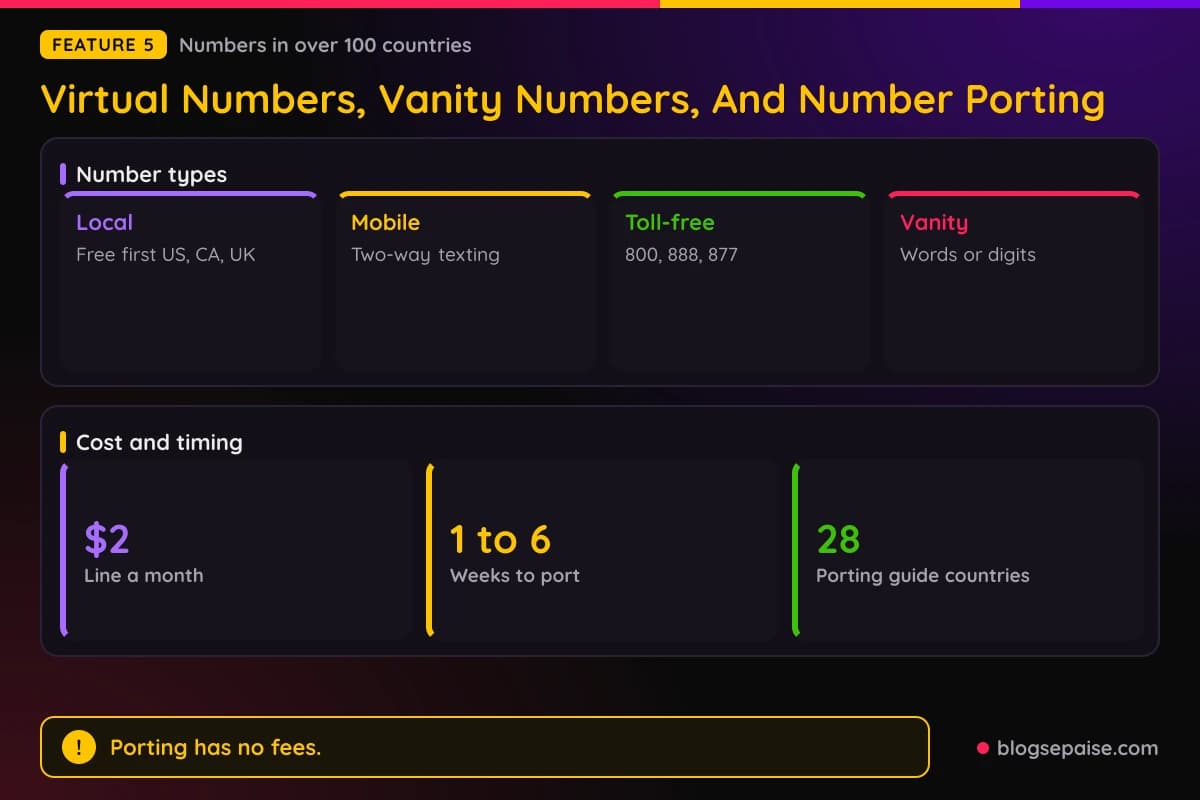
Mobile numbers support two-way texting and keep business lines apart from personal ones. Calilio says some service providers may not send one-time codes to VoIP numbers, and that delivery is managed by third-party platforms.
Vanity numbers spell words, like 1-800-FLOWERS, or repeat digits. You type digits into a Match To field and pick from the matches.
Porting moves your current number in with no porting fees. Go to Settings, My Numbers, and Port Existing, then send a Letter of Authorization, a recent bill, and a Customer Service Record.
Most ports take 1 to 6 weeks. US ports under 50 numbers usually take 2 to 4 weeks, and larger US batches take 4 to 6 weeks.
Calilio has porting guides for 28 countries. Keep your old service active until the port finishes.
6. IVR, Custom Greetings, And Business Hours
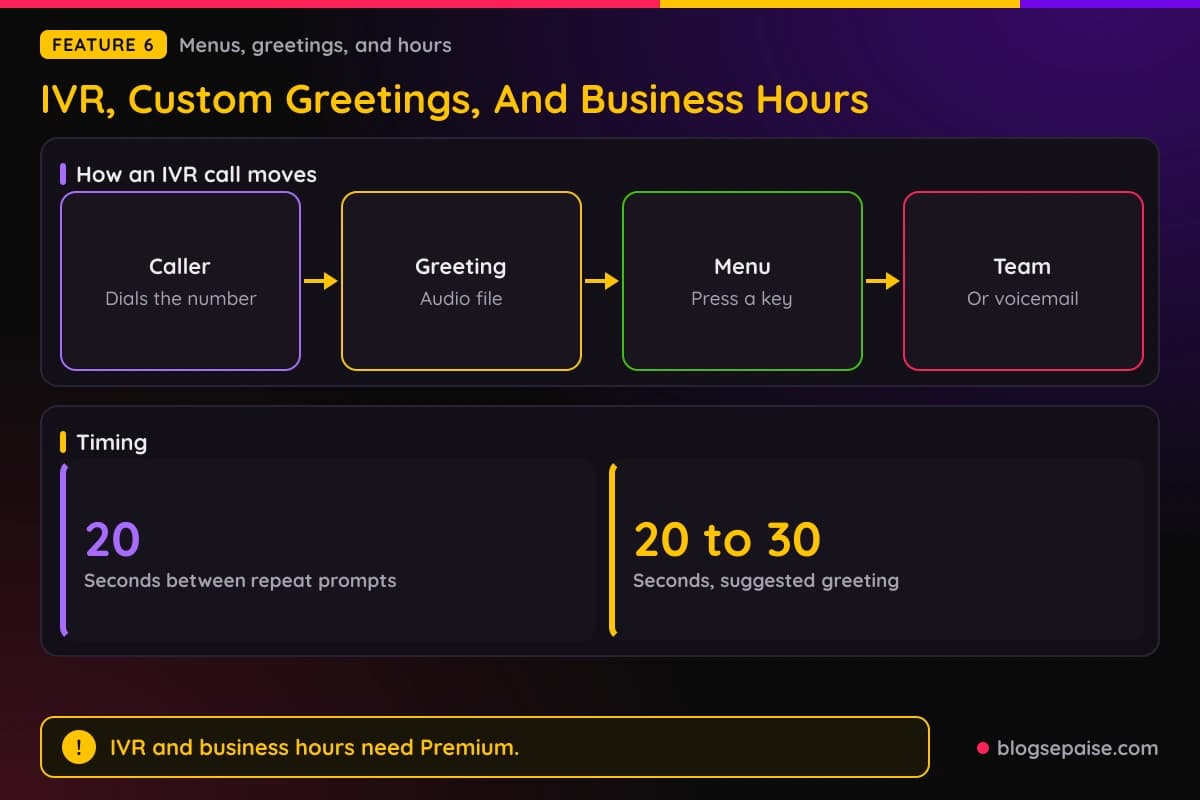
IVR is the menu that says press 1 for sales and press 2 for support. In Calilio you open Number Settings, turn on Call Strategy, click IVR, and add menu options with text-to-speech or an audio file.
Each option ties to a keypad number that routes to a team or agent. A voicemail toggle catches callers when nobody picks up.
A wrong key press plays a message so the caller can try again. If no key is pressed, a follow-up message repeats every 20 seconds until the caller chooses.
Custom greetings are audio files you upload. Under My Numbers you scroll to Audio and Voicemail, turn on Welcome Voice Message, and upload the file, and Calilio suggests a length of 20 to 30 seconds.
Business hours set the time zone, working days, and hours for each number. Calls outside those hours go to voicemail automatically.
Hours can differ by day, and rules can cover weekends and holidays. Calilio does not explain how holiday schedules are set.
Call forwarding sends calls to another number or user. Conditional forwarding triggers when the line is busy, unreachable, switched off, or unanswered, and unconditional forwarding sends every call.
IVR and business hours need Premium. Custom greetings and call forwarding cost nothing extra.
7. Voicemail And Voicemail Transcription
Voicemail turns on under Settings, My Numbers, and Audio and Voicemail. You upload a greeting, then listen to messages from the callbox, the mobile app, a browser, or the softphone.
Voicemail-to-email sends an alert when a new message arrives. On a shared number, every assigned agent can open the same voicemails.
Voicemail transcription turns messages into text once voicemail is on. Transcripts sit in the callbox, download on demand, and attach to records in synced CRMs such as Pipedrive, HubSpot, and Salesforce.
Standard includes 10 free AI transcription minutes and Premium includes 100. Calilio lists no supported languages and no length cap for voicemails.
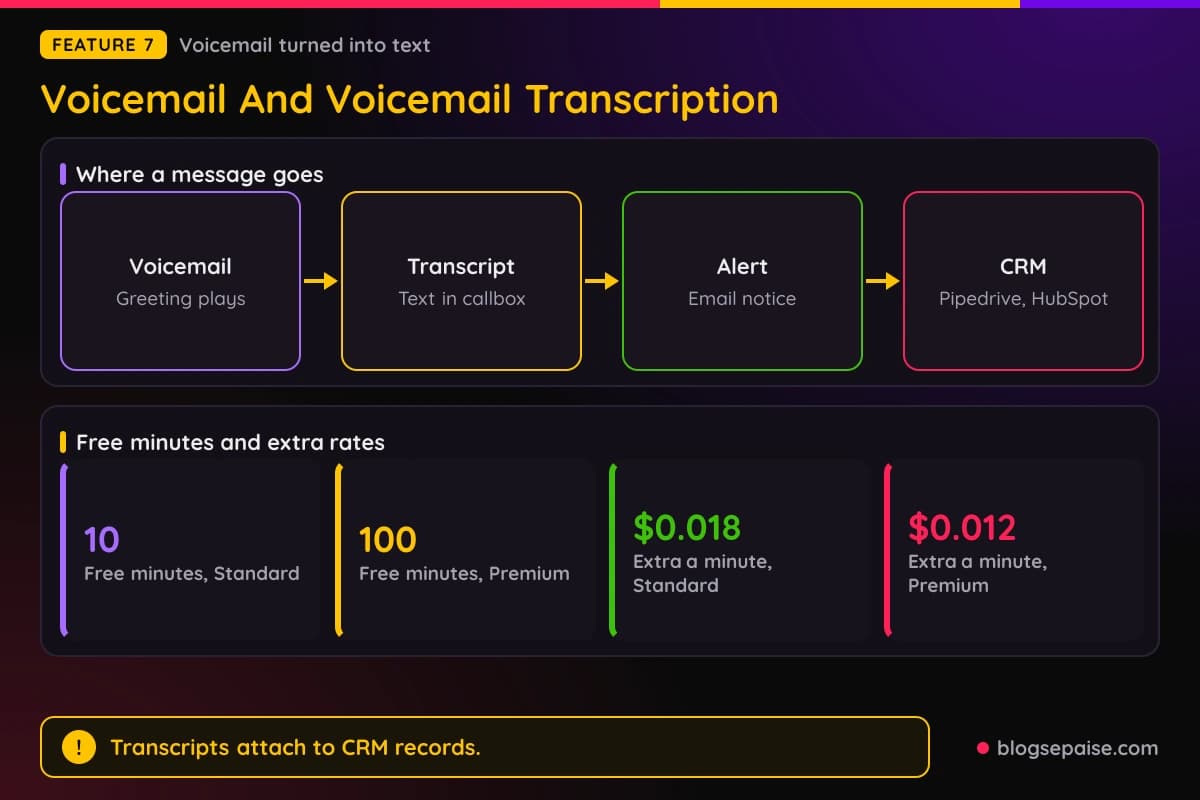
Past the free minutes, voicemail transcription costs $0.018 a minute on Standard and $0.012 on Premium.
8. AI Call Reports And Call Analytics
AI Call Reports build a report for each call. It holds a transcript, a summary, the reason for the call, and a conclusion.
Sentiment is positive, negative, or neutral. Conclusions are resolved, pending, or follow-up required, and reasons are sales, support, inquiries, or complaints.
Reports download from the callbox alongside the recording, and export as PDF. They can sync with CRMs such as HubSpot, Salesforce, Pipedrive, and LeadHeed.
Detailed reports live under AI Analytics and Advanced Report. You can view them by reason, conclusion, and sentiment.
Call analytics track call volume, duration, answer rate, missed calls, and average answer time. A leaderboard compares how each member handles calls.
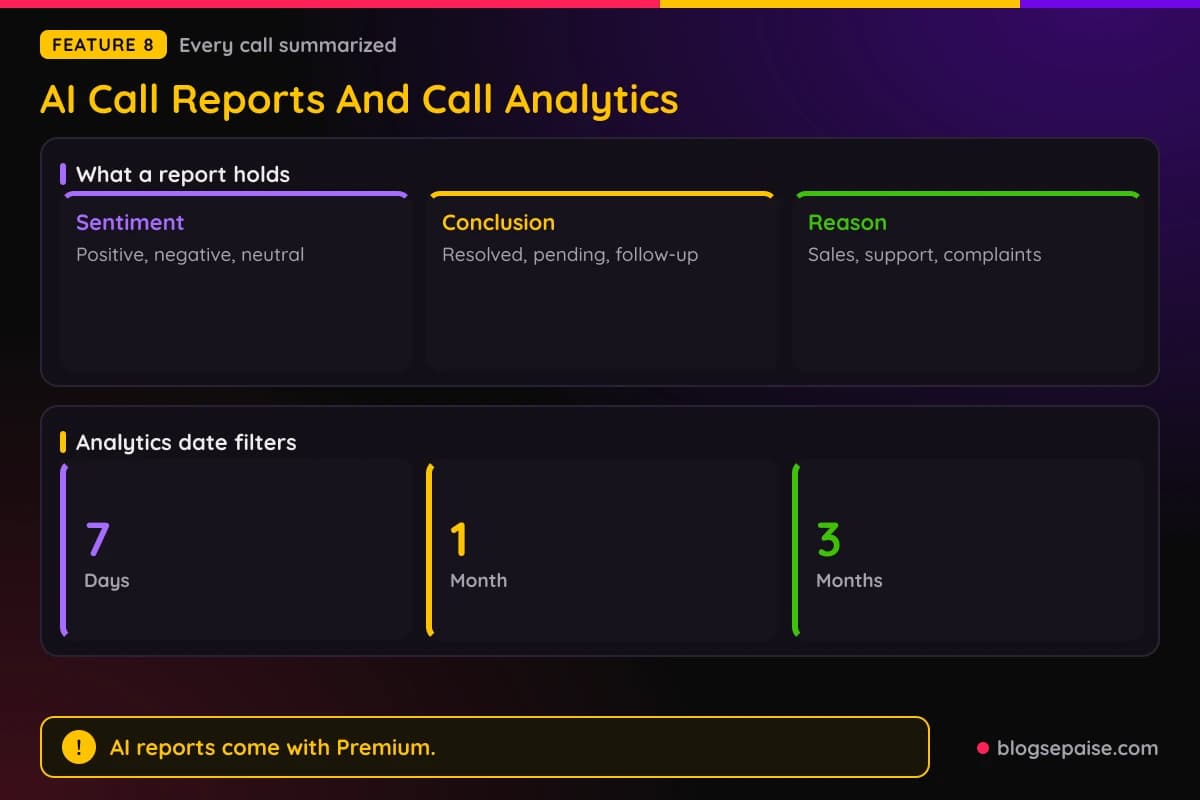
The analytics dashboard time ranges are yesterday, 7 days, 1 month, 3 months, or a custom range. You can also view insights for each number.
Standard gets basic call analytics, and Premium gets AI-powered analytics and AI call reports. Calilio lists no export option for analytics and no supported languages for the reports.
Calilio advises checking key details against the recording, since noise, accents, and poor audio can hurt accuracy.
9. Live Call Monitoring With Listen, Whisper, And Barge-In
Live call monitoring lets supervisors step into calls as they happen. It sits in Premium and works from the Live Calls section of the dashboard.
Listen lets a supervisor hear a call silently, without interrupting.
Whisper lets the supervisor coach the agent while the customer hears nothing. Calilio says only the agent can hear the supervisor.
Barge-in connects the supervisor to both the agent and the customer in a conference call. Calilio does not state if the customer is told that a supervisor joined.
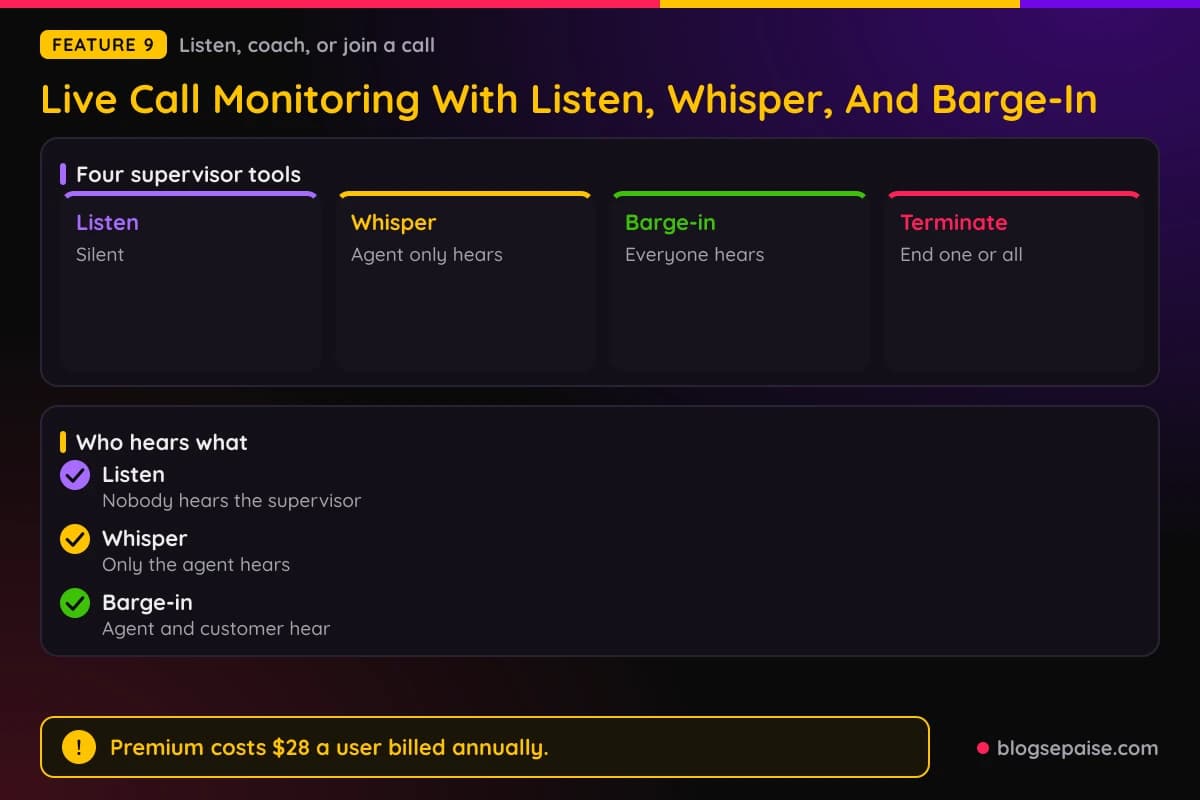
Terminate ends one call, or ends all active calls at once in an emergency.
To use it, log in, scroll to the Live Calls section of the dashboard, and listen to or end calls in real time.
Calilio advises telling agents that calls may be monitored. It describes barge-in as useful for immediate intervention, and it lists no cap on monitored calls.
10. Call Recording, Call Transcription, Notes, And Tags
Call recording can run on every call or start on demand. For automatic recording, open Number Settings and turn on Auto Record Call.
Recordings sit in the cloud with encryption and controlled access, and you can download them. Calilio lists no retention period.
Standard includes 100 free recording minutes and Premium includes 1,000. Past that, recording costs $0.003 a minute, and call storage costs $0.0008 a minute.
Calilio advises telling callers and getting consent where laws require it. Its site offers a Call Recording Disclosure Generator for the wording.
Call transcription turns whole calls into searchable text. Turn on Auto Transcription in Number Settings, or transcribe single calls by hand from the callbox.
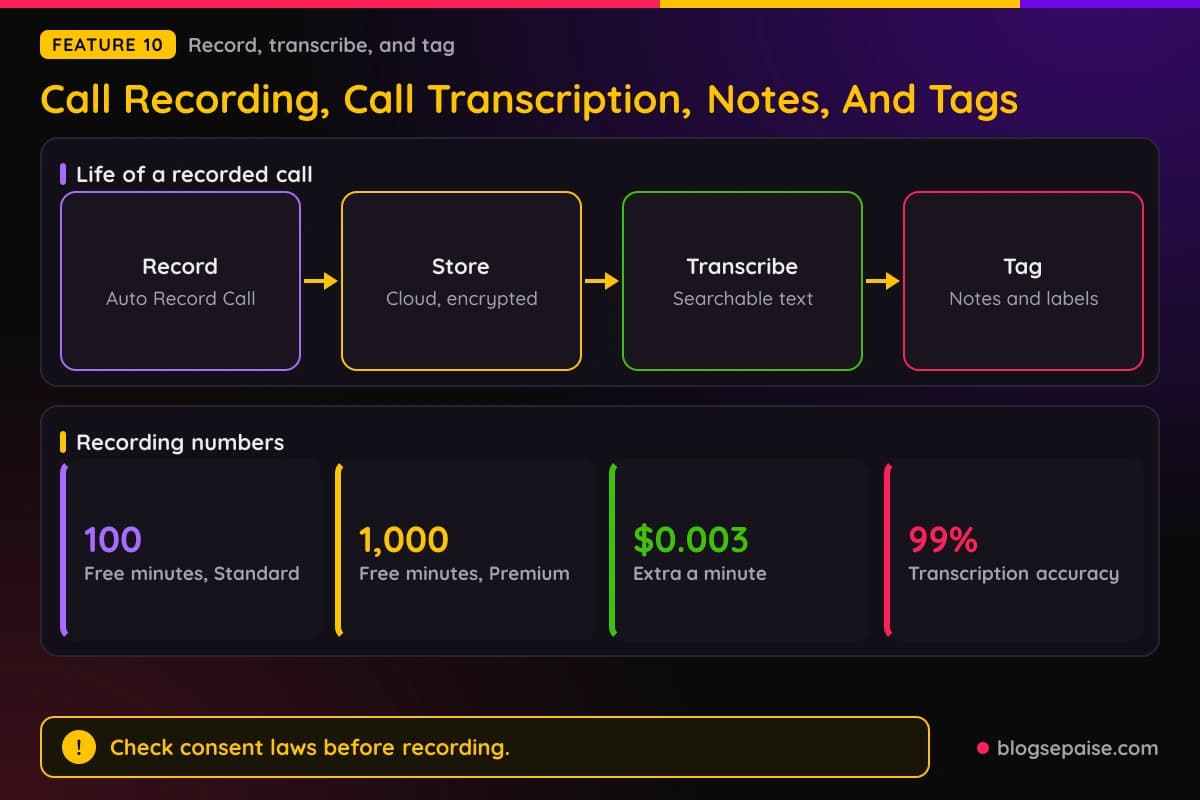
Calilio puts transcription accuracy at 99% and lists no supported languages. Transcripts can be searched, shared, and downloaded.
Tags label calls with terms such as Follow-up, New Lead, or Billing Issue. Notes add short details, and both can be added right after a call or later from the call log.
Tags sync with CRM contact details. Calilio advises short, shared tag names and avoiding vague ones such as General.
11. Power Dialer And Call Disposition
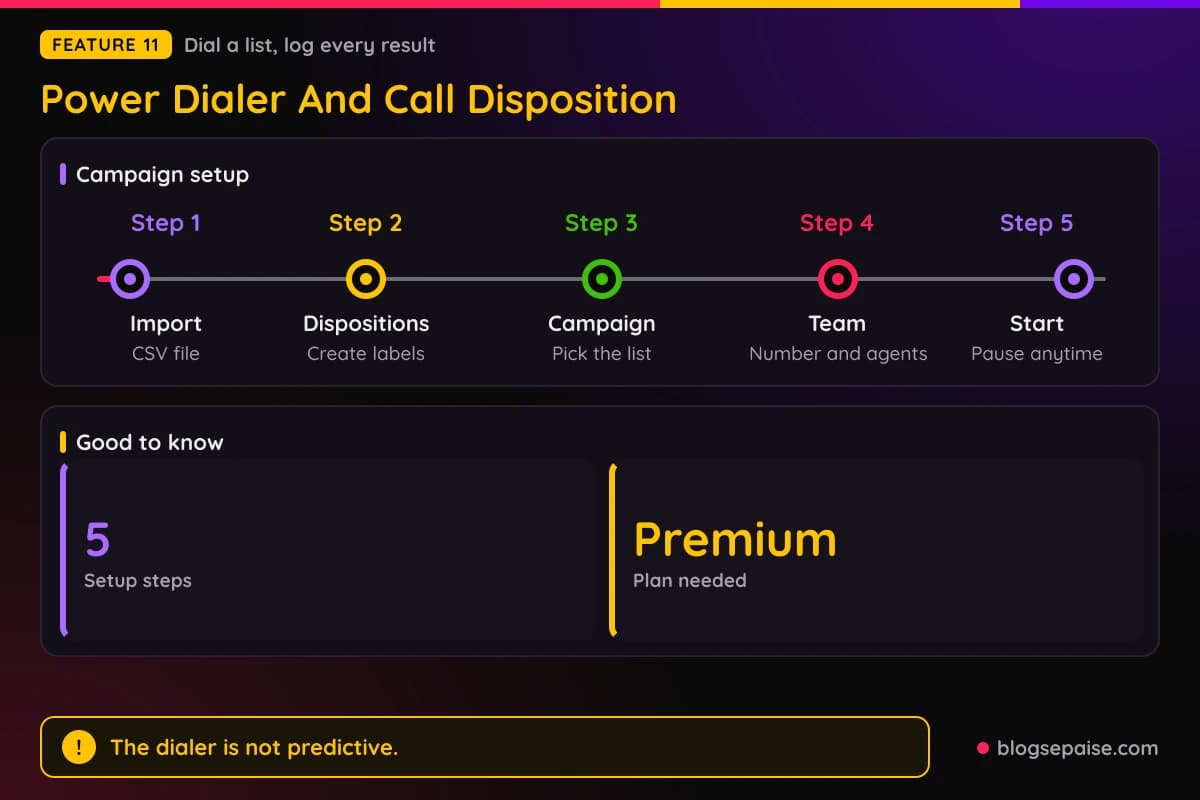
The power dialer calls contacts from a campaign list one after another. Each agent handles one call at a time, so it is not a predictive dialer.
Setup follows five steps. Import a CSV, create dispositions, create a campaign from the list, pick the number, agents, and dispositions, then start.
Agents get a preview duration to read contact details and a post-call duration to add notes. Several agents can share one list without calling the same contact twice.
Admins can pause, resume, or review a campaign, and Track Active Sessions shows live calls, connected calls, and failed attempts. A Chrome extension also dials from websites and CRMs.
Call disposition labels each outcome, such as Interested, Follow-Up, No Answer, Not Interested, or Wrong Number. You can create custom labels too.
Disposition data helps managers track success rates, conversion trends, and agent efficiency. Calilio lists Pipedrive, HubSpot, Salesforce, and LeadHeed among its CRM integrations.
Both tools need Premium. Calilio states no limit on list size or file size.
Calilio Pricing Plans
Calilio charges per user and sells two priced plans plus a custom one. Annual billing saves 20%.
Calilio lists Standard as ideal for solopreneurs, startups, and small businesses. Premium is listed as ideal for growing businesses, franchises, and call centers.
Standard costs $15 per user a month, or $12 a month billed annually, which is $144 a year per user. It allows up to 10 users.
Standard bundles 200 outgoing and 100 incoming minutes, plus 100 outbound and 100 inbound texts. It also includes 1 free number, 100 recording minutes, and 10 AI transcription minutes.
Premium costs $35 per user a month, or $28 a month billed annually, which is $336 a year per user. It has unlimited users and adds IVR, business hours, the power dialer, and live monitoring.
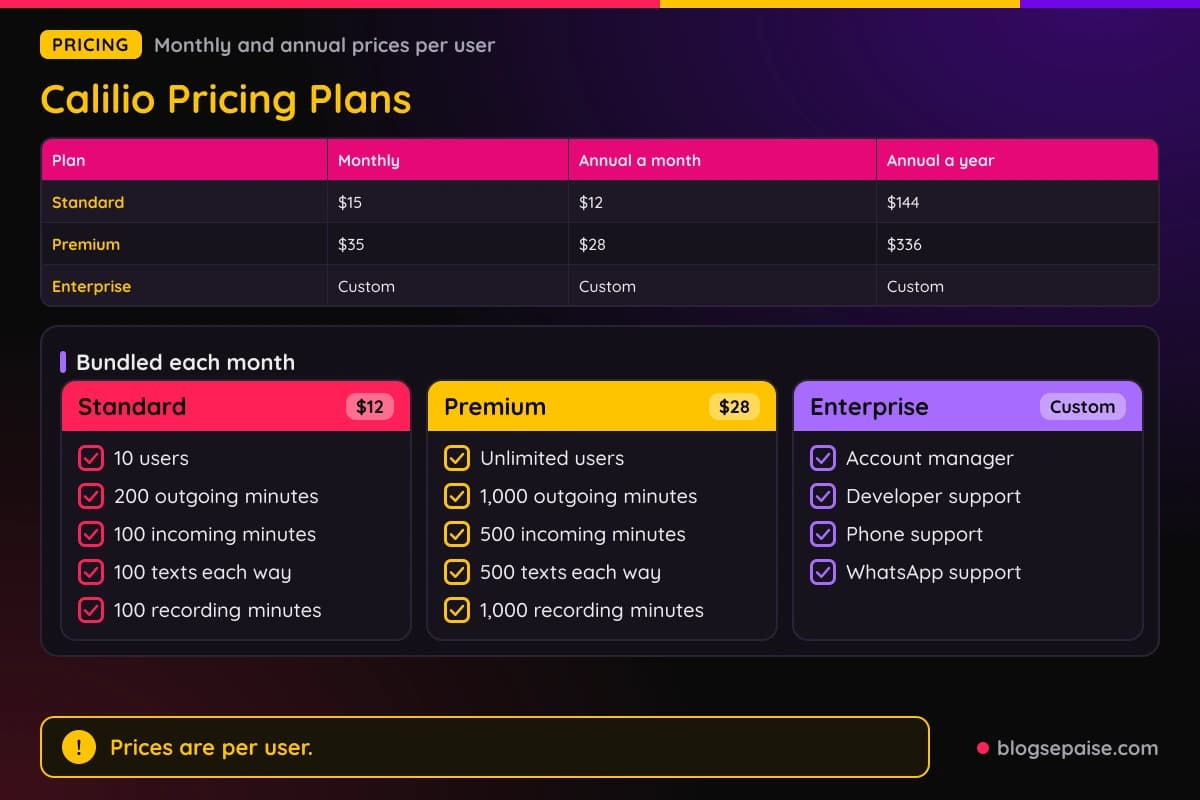
Premium bundles 1,000 outgoing and 500 incoming minutes, plus 500 outbound and 500 inbound texts. It also includes 1,000 recording minutes, 100 AI transcription minutes, and 100 AI voice agent minutes.
Calilio's homepage and Hub page show the same bundles as totals, with 300 minutes and 200 texts on Standard and 1,500 minutes and 1,000 texts on Premium.
Premium also adds bulk SMS, saved replies, call transfer, AI-powered analytics, and 24/7 customer support. Enterprise is custom and adds a dedicated account manager, developer support, and phone and WhatsApp support.
Annual billing saves $36 a user on Standard, since 12 months at $15 comes to $180 against $144. On Premium it saves $84, since $420 drops to $336.
Calilio puts the value of the included freebies at $13.37 on Standard and $63.55 on Premium. Extra lines start at $2 a month each.
Enterprise lists API and webhook access as coming soon, and Calilio posts no Enterprise price. A 10-person team pays $120 a month on Standard billed annually, or $280 a month on Premium.
Each plan includes a $1 wallet credit. Bundled minutes and texts count only for calls and texts to or from US and Canada numbers.
After the bundle, usage comes out of a prepaid wallet that you load yourself. Phone numbers, calls, texts, and A2P 10DLC registration bill apart from the plan.
The AI Voice Agent gives 10 free minutes on Standard and 100 on Premium. Past that it costs $0.25 a minute on Standard and $0.15 on Premium.
Hub also sells a Combo Standard pack with 200 minutes and 200 text segments for $5 over 30 days. Calilio's homepage describes pack lengths of 15 to 90 days or more.
Billing hits your plan bundle first, then an active pack, then your wallet at standard rates. Hub is included with Standard, Premium, and Enterprise.
Calilio Hub sells prepaid packs for calls and texts, and packs start at $5.
Packs cover 100+ countries and save up to 30% against pay-as-you-go. Calilio's homepage and Hub page show different prices for some of the same packs, so confirm any price before you buy.
Calilio offers Enterprise as a customized plan for large organizations and enterprises. Buyers reach sales through a Contact Sales button.
Calilio offers a 14-day money-back guarantee and does not mention a free trial.
Who Is Calilio Best Suited For
Calilio fits small teams that want a low-cost cloud phone system. Standard at $12 a user covers number sharing, ring strategies, call recording, and basic analytics for up to 10 users.
Outbound sales teams get the most from Premium. The power dialer, call disposition, click-to-call, and Chrome extension all target outbound work.
Growing businesses and franchises fit Premium, which has no user cap. Teams can add users without changing plans.
Teams that want AI summaries without extra software can use Premium. Each AI call report holds a transcript, a summary, a sentiment, a reason, and a conclusion.
Remote teams fit well because Calilio lists desktop, mobile, tablet, and browser access. One shared number can serve the whole team.
Call centers that need coaching tools fit Premium. Listen, whisper, and barge-in let supervisors step into live calls.
Businesses that need numbers in many countries also fit. Calilio sells local, mobile, and toll-free numbers in over 100 countries.
Teams that use HubSpot, Pipedrive, or Salesforce will find them in Calilio's integration list.
Teams that text lists can use bulk SMS with scheduling by recipient timezone. Calilio says setup takes 5 minutes with no hardware.
Who Calilio Is Not For
Teams of more than 10 people cannot use Standard. Premium costs more than double at $28 a user against $12 billed annually.
Anyone who wants a flat monthly bill should know that usage costs extra. Phone numbers, calls beyond the bundle, texts, and A2P registration all bill apart from the plan.
Teams that need a developer API should wait, since API and webhook access is marked coming soon.
Companies that call mostly outside the US and Canada get less from the bundles. Bundled minutes and texts count only for US and Canada numbers.
People who need one-time passcodes on a virtual number can hit blocks. Calilio says some service providers may not send codes to VoIP numbers.
Anyone who wants 24/7 support should note that Calilio lists it under Premium, not Standard.
Buyers who want a free trial will not find one mentioned. Calilio offers a 14-day money-back guarantee, and the refund terms sit in a separate policy.
Teams that need predictive dialing should look elsewhere, since the power dialer places one call at a time per agent.
Calilio Alternatives
Calilio is a low-priced cloud phone system with call center tools. The five rivals below are compared on prices and features each company lists on its own site.
RingCentral's Core plan costs $20 a user a month billed annually and puts calls, meetings, and chat in one app. Its unlimited calling covers the US and Canada.
Aircall's Essentials plan costs $30 a license a month with a 3-user minimum, and Aircall lists 250+ integrations. The power dialer sits in Professional at $50.
Dialpad Connect starts at $15 a user a month, and live transcription is in its base tiers. Live Coach starts at the Advanced tiers of Support and Sell.
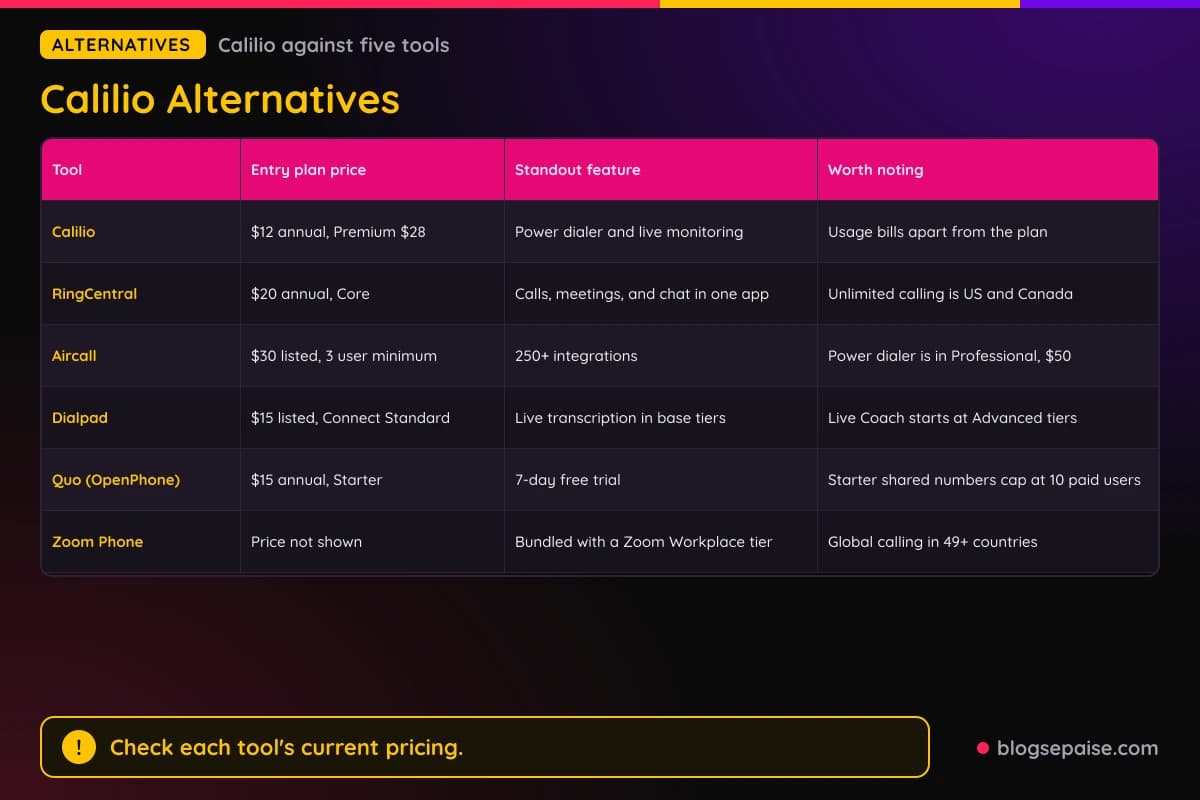
OpenPhone is now called Quo. Its Starter plan costs $15 a user a month billed annually with a 7-day free trial, and shared numbers on Starter cap at 10 paid users.
Zoom Phone comes bundled with a Zoom Workplace tier and lists global calling in 49+ countries. Its price did not appear on the product page.
Calilio's entry price of $12 a user billed annually is lower than the entry prices above for RingCentral, Aircall, Dialpad, and Quo. Each plan bundles different features, so compare plan contents too.
Switching tools can mean porting your number, which Calilio says takes 1 to 6 weeks into its platform. Prices change, so check each tool's current plans.
Headcount decides the math. Three users on Calilio Standard cost $36 a month billed annually, and ten users on Premium cost $280.
Pick Calilio if the $12 entry price and the Premium call center tools fit your team.
For a similar tool, read our Alohi review, which covers a fax, e-sign, and AI phone suite. You can also browse the software reviews hub to compare more tools.
Calilio Use Cases
Sales teams use the power dialer to work a CSV list. Agents preview each contact, call, and log a disposition.
Support teams use IVR and a shared number. Callers press a key such as 1 for Sales or 2 for Support, and agents can add notes before a transfer.
Startups can use the free local number and the Standard plan. Custom greetings come with every plan, and Standard includes call recording.
Calilio lists Premium as ideal for franchises. It has no user cap, so adding users does not force a plan change.
Remote teams share one business number from any device. On Premium, business hours send after-hours calls to voicemail.
Call centers use live monitoring to coach. A supervisor whispers to an agent during a call without the customer hearing.
Marketing teams send bulk SMS to lists and schedule sends by recipient timezone.
Teams with global customers can buy local numbers in over 100 countries.
Calilio's pages name finance, insurance, retail, education, logistics, SaaS, hotels, law firms, BPO, nonprofits, restaurants, construction, recruiters, automotive, and schools among its industries.
Final Thoughts On Calilio
Calilio is a low-cost cloud phone system with real call center tools. Premium at $28 a user billed annually packs IVR, a power dialer, live whisper, and AI call reports.
Standard at $12 is lean but covers shared numbers, ring strategies, and recording. The 10-user cap pushes growing teams to Premium.
The main trade-offs are separate usage bills, API and webhook access marked coming soon, and plan details that differ between pages. Prepaid Hub packs can soften calling costs.
Pick Calilio if you run sales or support from the US, Canada, or UK and want an affordable setup. A 14-day money-back guarantee lowers the risk of trying it.
Check your calling countries and expected minutes before you sign. Then compare Standard against Premium for your headcount.
Plan on usage costs from day one. Add the wallet, number fees, and any Hub packs to the seat price, and test call quality on your own network inside the 14-day window.
Calilio FAQ
1. What Is Calilio?
Calilio is a cloud phone system built by Calilio Pte Ltd. It runs calls and texts over the internet with numbers in over 100 countries.
2. How Much Does Calilio Cost?
Standard costs $15 per user a month, or $12 billed annually. Premium costs $35 or $28 billed annually, and Enterprise is custom.
3. Does Calilio Have A Free Trial?
Calilio lists no free trial. It offers a 14-day money-back guarantee.
4. Does Calilio Include Free Minutes?
Yes. Standard bundles 200 outgoing and 100 incoming minutes, and Premium bundles 1,000 outgoing and 500 incoming.
5. Can I Keep My Existing Phone Number?
Yes. Calilio ports existing numbers with no porting fees, and ports usually take 1 to 6 weeks.
6. How Does Billing Work After The Free Minutes?
A prepaid wallet pays for extra usage. You load it yourself after the $1 credit runs out.
7. Does Calilio Offer Bulk SMS?
Yes. You can send to a CSV or Excel list, schedule in the recipient's timezone, and pause a campaign mid-send.
8. Can I Use Calilio For A Call Center?
Yes. Premium has unlimited users, IVR, a power dialer, live monitoring, and AI call reports.
9. How Many Users Does Each Plan Allow?
Standard allows up to 10 users. Premium has unlimited users.
10. Does Calilio Have An AI Voice Agent?
Yes. The Beta agent answers calls around the clock and handles 5 calls at once, with 10 free minutes on Standard and 100 on Premium.
11. Which Plan Includes Live Call Monitoring?
Premium. It covers listen, whisper, barge-in, and end call.
12. Does Calilio Work With A CRM?
Yes. It connects with HubSpot, Pipedrive, Salesforce, and Pabbly Connect, and Zapier appears in its integration list.
13. Is There A Calilio Mobile App?
Yes. Calilio has iOS and Android apps, a browser web phone, and a Chrome extension.
14. What Is Calilio Hub?
It is a store for prepaid call and text packs. Packs start at $5 and save up to 30% against pay-as-you-go rates.
15. Does Calilio Record Calls?
Yes. Standard includes 100 free recording minutes and Premium includes 1,000, and recording must follow local consent laws.
16. Does Calilio Have An API?
Not yet. API and webhook access is marked coming soon under Enterprise.
17. Can Calilio Numbers Receive One-Time Passcodes?
Sometimes. Calilio says some service providers may not send codes to VoIP numbers, and that delivery is managed by third-party platforms.
18. Does Calilio Offer Annual Billing?
Yes. Annual billing saves 20%, which makes Standard $12 and Premium $28 per user a month.
19. Can I Add Extra Phone Numbers?
Yes. The first US, Canada, or UK local number is free, and extra lines start at $2 a month each.
20. Is Voicemail Transcription Included?
Yes. Standard includes 10 free transcription minutes and Premium includes 100, with small per-minute fees after that.