Campaign Monitor Review (2026): From Cluttered Inbox To Clean Campaigns
Email marketing sounds simple until you actually try to build a campaign that looks good, reaches the right people, and does not land straight in spam.
Most small business owners end up wrestling with clunky software that promises the world and delivers a headache instead.
That frustration is exactly why so many people keep searching for something that actually works without a steep learning curve.
Campaign Monitor has been around for more than two decades, and it built its reputation by helping small businesses, nonprofits, and marketing agencies create email campaigns that get real results.
The platform sits under Marigold now, a company known for its relationship marketing approach, but the core mission stays the same.
Make email marketing easy enough for anyone to use while still packing in the power that growing businesses need to actually see returns.
Big names have trusted this platform too. Brands like Rolling Stone, UNICEF, and Rip Curl have all run campaigns through Campaign Monitor, and that kind of track record does not happen by accident.
The platform has also picked up recognition over the years, including spots on lists like Forbes World's Best Cloud Companies and G2's user choice awards.
So the real question becomes whether Campaign Monitor still holds up today, and whether it deserves a spot in your marketing stack.
I dug into everything Campaign Monitor offers, and in this review I will walk you through it all.
The features, the pricing, who it works best for, and whether it is worth signing up for. Let's get started.
Disclosure: Some of the links I share might be affiliate links. If you click on one and make a purchase, I may earn a small commission as a thank you. But don’t worry, it won’t cost you anything extra. I only recommend stuff I genuinely believe in. Your support helps me keep creating awesome content. You can read my full affiliate disclosure in my disclaimer page.
Campaign Monitor Features
1. Email Template Builder
Building an email that actually looks professional used to mean hiring a designer or fighting with clunky software for hours.
Campaign Monitor fixes that with an email builder made for real people, not just designers.
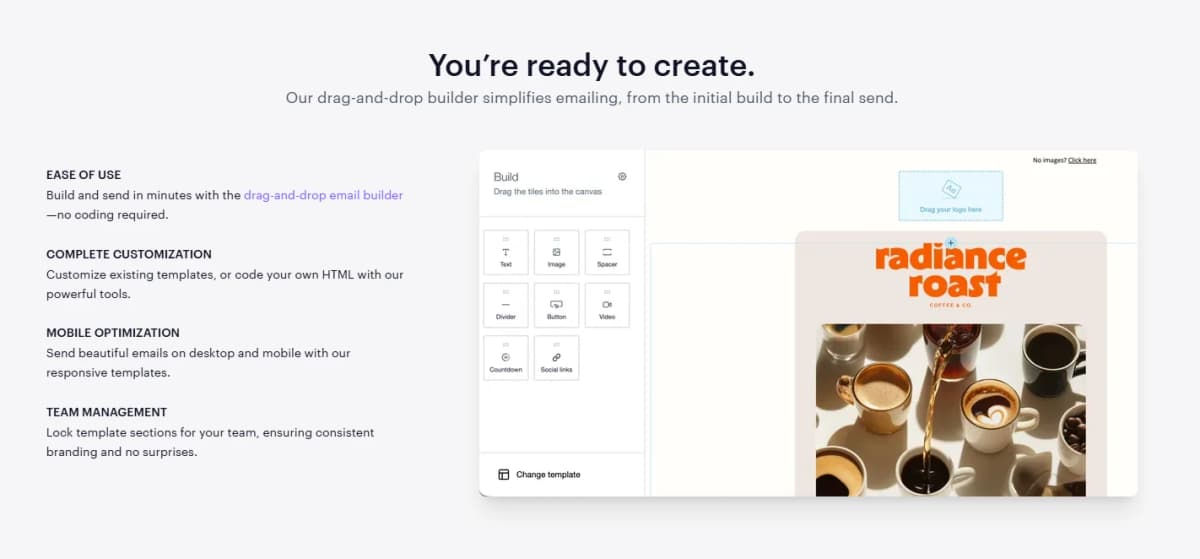
You get ready to customize templates, a drag and drop builder for extra flexibility, or a full HTML editor if you want complete creative control.
The whole system was built on years of email marketing best practices, and now it comes with AI Email Booster added on top, giving you an extra layer of confidence before you hit send.
Keeping your brand consistent across every campaign is where this feature really shines.
You can apply your branding once to a template and duplicate it as many times as you need, saving you from rebuilding the same layout over and over.
The builder even remembers your recent color and font choices, suggesting them again so your emails stay visually consistent without you having to think about it every single time.
That kind of small convenience adds up fast when you are sending campaigns regularly.
The AI tools baked into this feature deserve some real attention too.
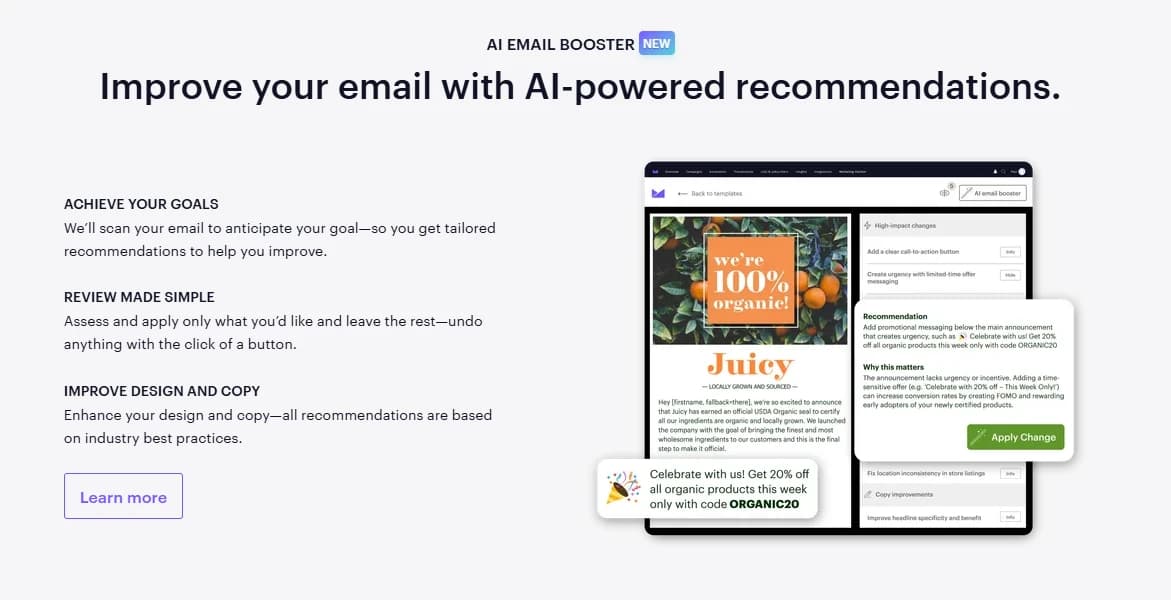
AI Email Booster analyzes your email and suggests improvements you can review and apply instantly, helping your message align better with your actual campaign goal.
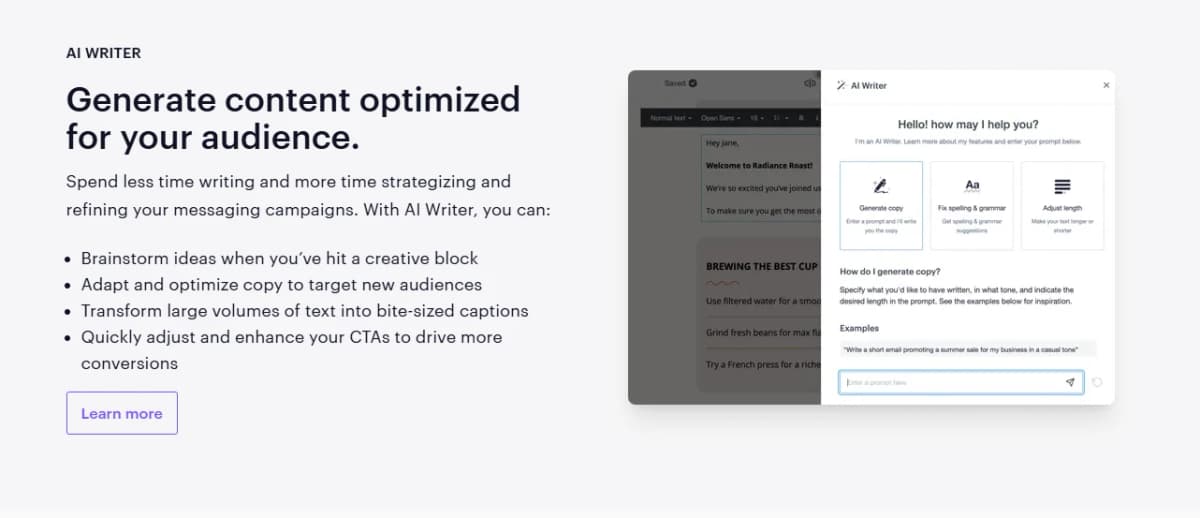
If you are staring at a blank screen, AI Writer helps you draft your first version so you skip the writer's block entirely, then you can refine the message however you like while keeping your audience in mind.
Before anything goes out, you can preview your email across mobile, desktop, and popular email providers, send a test to a coworker for feedback, and schedule delivery to match your recipient's own time zone for a nicer personal touch.
Flexibility really is the theme running through this whole feature.
The drag and drop builder lets you build and send a campaign in minutes without touching a single line of code, which is perfect if design is not your strong suit.
But if you do want full control, you can code your own HTML email using their tools built for exactly that.
Every template stays mobile optimized automatically, and if you manage a team, you can lock certain sections of a template to keep branding consistent and avoid any surprise edits from someone on your team.
2. Marketing Automation
Email automation sounds great in theory, but figuring out where to actually start can feel overwhelming pretty fast.
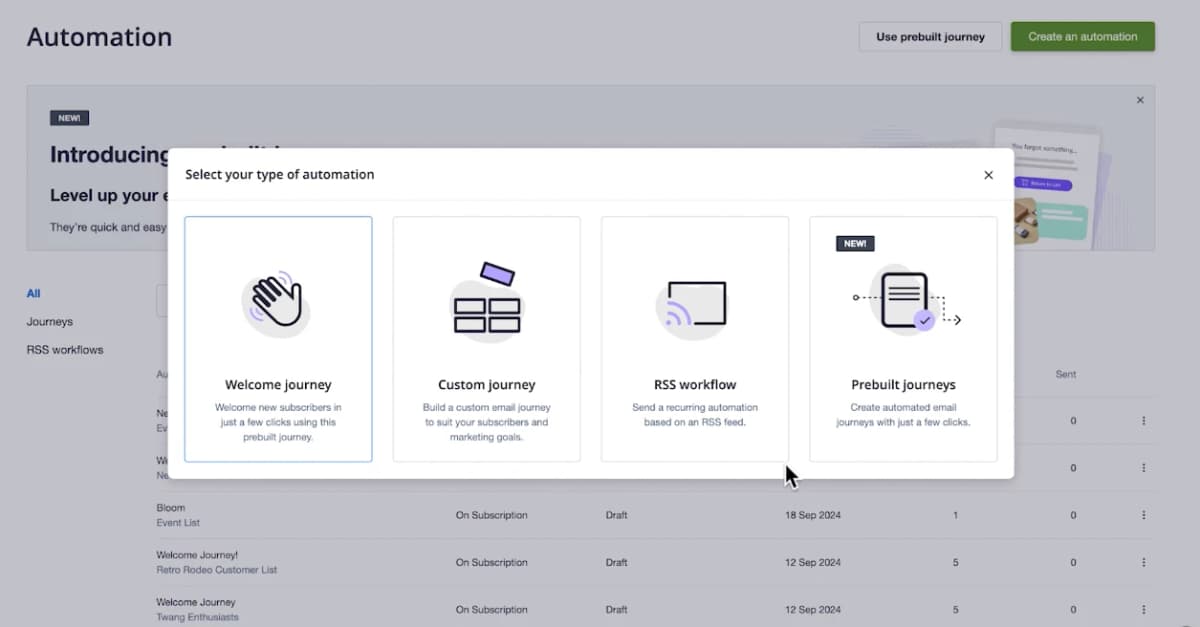
Campaign Monitor's Marketing Automation feature exists to make that starting point a lot less intimidating.
Instead of manually sending every single email yourself, you can set up automated sequences that reach your audience with the right message at exactly the right moment, which frees up your time while still keeping your marketing personal and relevant.
The whole point of automation is engagement, and Campaign Monitor leans into that heavily.
You can craft email content that actually matches what your audience wants to see, using the data you already have on hand to guide those decisions.
This matters a lot because generic blast emails tend to get ignored, while automated messages triggered by real behavior tend to feel more relevant and get better results.
Building this kind of system used to require serious technical know-how, but Campaign Monitor simplifies the setup considerably.
Getting started does not mean you are on your own either.
Campaign Monitor offers guided resources, including video walkthroughs, that show you exactly how to set up automation inside the platform.
Their team of experts is also available to answer questions specific to your business, since every company runs a little differently and generic advice does not always apply.
This kind of support matters especially if you have never built an automated email flow before and want to avoid rookie mistakes.
Beyond the setup process, Campaign Monitor provides ongoing guides meant to turn you into a genuine email automation pro over time.
These resources cover everything from understanding your audience better to keeping your content dynamic no matter what industry you operate in.
The goal is straightforward. Help you become a better marketer who knows how to engage customers at the right time with the right message, without needing a marketing degree to figure it all out.
3. Transactional Email
Transactional emails do not get talked about as much as marketing campaigns, but they might matter even more.
These are the receipts, password resets, shipping confirmations, and account notifications your customers actually expect to receive.
Campaign Monitor treats these messages with the same care as regular campaigns, letting you deliver a consistent, branded experience across every single communication your business sends out.
These emails carry serious weight too. Transactional emails often contain some of the most important information a company sends, and they trigger open rates eight times higher than standard marketing emails.
Campaign Monitor's transactional email service lets you create, edit, and optimize these triggered messages using the exact same tools you already use for your regular campaigns.
That means pixel level design control, mobile responsiveness built in automatically, and the ability to upload your own templates if you want to match your brand with total precision.
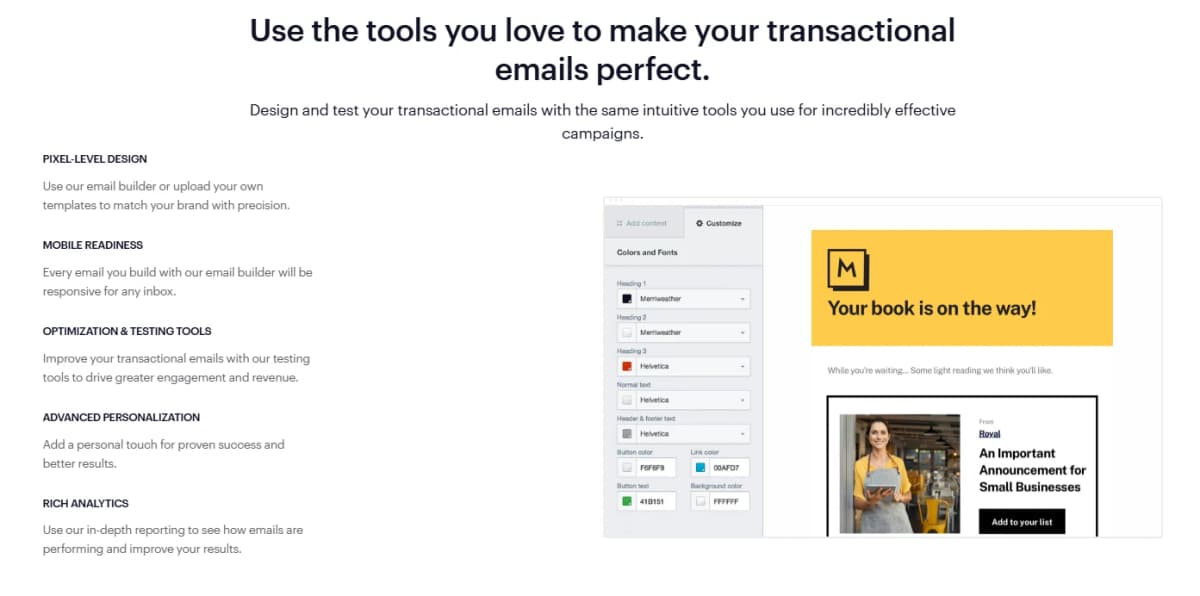
Testing and personalization get plenty of attention here as well. You can use built in optimization and testing tools to improve engagement and revenue from every transactional message you send.
Advanced personalization options let you add a more personal touch, which tends to drive better results than a generic automated notice.
Once emails start going out, rich analytics show you exactly how each one performs, giving you interactive reports on open rates, click through rates, and deliverability, along with complete delivery logs broken down by email type and recipient.
Reliability might be the most important part of this whole feature, since a missed password reset or a delayed shipping confirmation can genuinely frustrate a customer.
Campaign Monitor's transactional email infrastructure is built to hit an industry leading 99% delivery rate, giving you real confidence that your important messages actually reach the inbox.
For every single email sent, you get a complete delivery log so you can double check that everything went through exactly as expected, which matters a lot when these messages are considered mission critical for your business.
4. Email List Segmentation
Sending the same email to your entire list rarely works well anymore. People expect messages that actually feel relevant to them, and that is exactly what segmentation solves.
Campaign Monitor lets you improve open rates, boost click rates, and cut down on unsubscribes by putting personalization to work through smart segmentation.
Instead of guessing what your audience wants, you group them based on real data and send content that actually matches their interests.
Building out your segments starts with your data.
You can create custom fields like location, interests, or gender to make your campaigns feel more relevant right out of the gate, and you can connect through APIs to pull in even more data from other platforms you already use.
Once you know a bit more about your subscribers, you can identify what each group actually cares about and craft content that speaks directly to them instead of sending one generic message to everyone at once.
That kind of personal touch tends to build stronger loyalty over time.
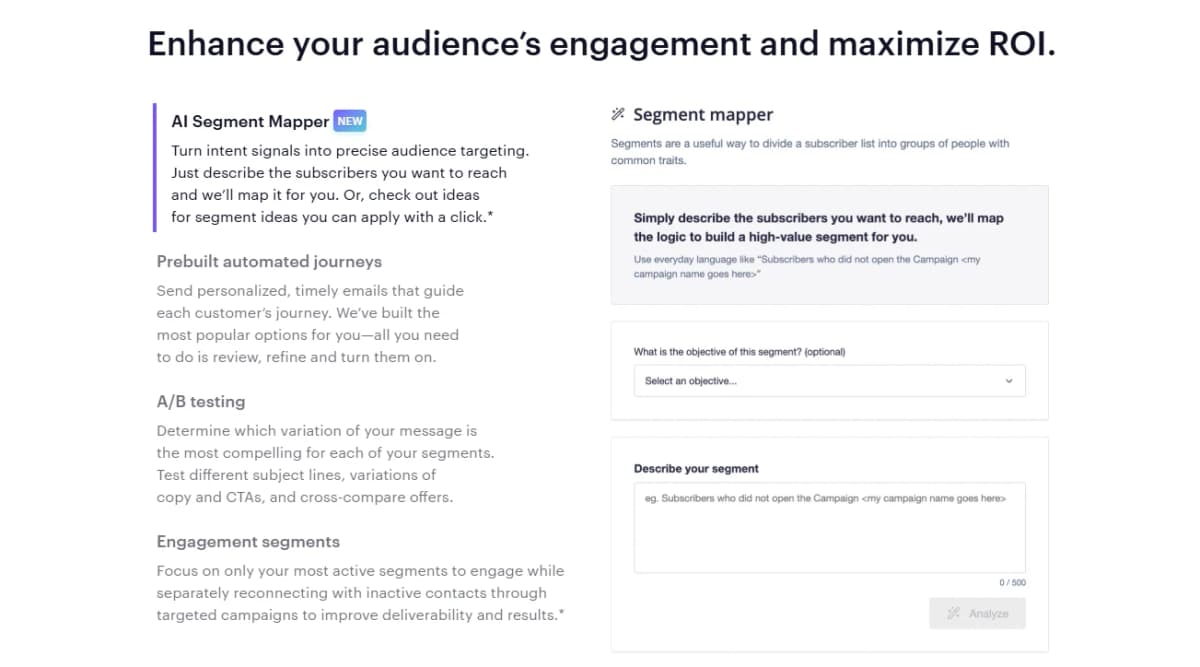
The AI Segment Mapper feature takes a lot of the guesswork out of this process.
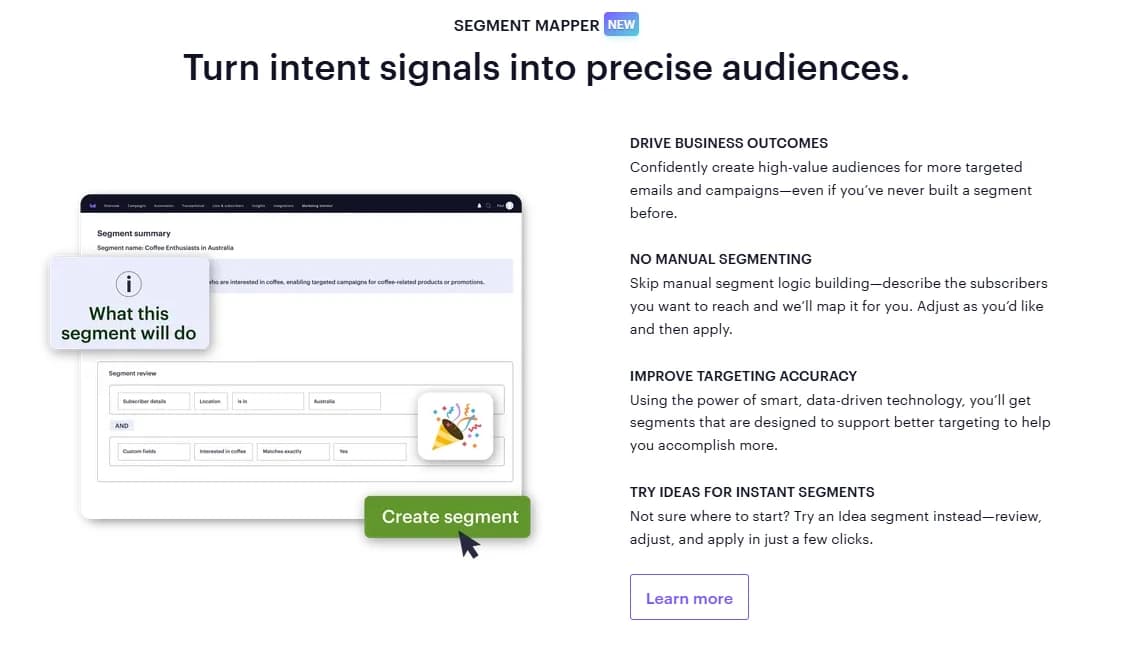
You simply describe the type of subscribers you want to reach, and Campaign Monitor maps that segment out for you automatically.
If you are not sure where to start, you can browse suggested segment ideas and apply them with a single click.
This alone saves a ton of time compared to manually sorting through your list trying to figure out who belongs where.
A handful of other tools round out this feature nicely.
Prebuilt automated journeys let you send timely, personalized emails that guide a customer along their journey, and Campaign Monitor has already built the most popular options for you, so all you really need to do is review them and turn them on.
A/B testing lets you figure out which version of your message performs best within each segment, whether you are testing subject lines, copy, or your call to action.
Engagement segments let you focus your energy on your most active subscribers while running separate campaigns to reconnect with people who have gone quiet, which helps protect your deliverability and overall results.
5. Personalized Emails
Every industry runs on different types of customer data, but all of it becomes valuable once you know how to use it.
What someone bought, where they travel, or where they like to eat can all shape how you talk to them through email.
Campaign Monitor connects directly with your website, business apps, and e-commerce platform, pulling all that data into one place so you can put it to work building smarter, more successful campaigns.
Timing and relevance work together here in a big way.
Marketing automation lets you build set it and forget it customer journeys tailored around each person's individual interests and behavior, so you are not manually sending every single email yourself.
Dynamic content takes your customer data and uses it to build emails that feel personalized and timely without requiring extra work from you every time you hit send.
If your audience spans different regions, time zone sending delivers each email at the same local time no matter where your subscriber lives, which feels a lot more thoughtful than a random 3am send.
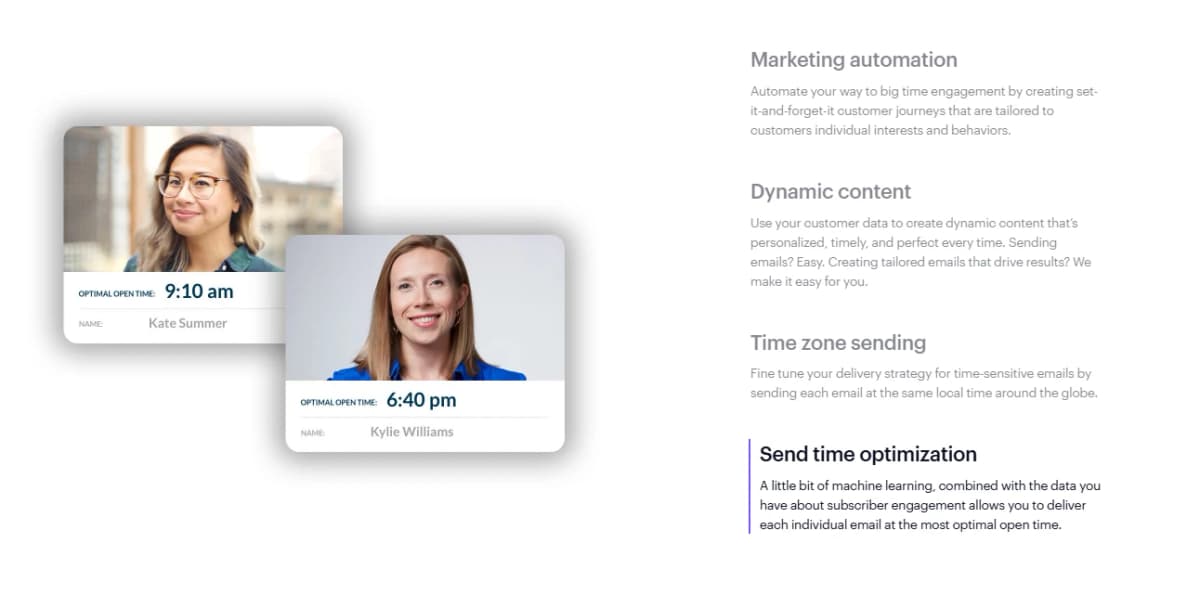
Send Time Optimization pushes personalization even further.
Using a bit of machine learning combined with your subscriber's actual engagement history, Campaign Monitor figures out the best possible moment to deliver each individual email so it lands right when someone is most likely to open it.
This feature comes with the Premier tier, while Time Zone Sending is available on both the Essentials and Premier plans.
Between dynamic content, segmentation, and smart timing, every campaign ends up feeling far more relevant than something built manually ever could.
None of this works without solid reporting behind it, and Campaign Monitor covers that too.
You get A/B testing and deep reporting that shows exactly what is working and what needs improvement, covering subject lines, click through rates, and more.
The personalization data itself draws from purchase history, browsing behavior, product views, and past email engagement, plus geographic and time zone data to tailor both message and delivery timing.
Since Campaign Monitor connects with your existing business apps and e-commerce tools, the data shaping your campaigns reflects real activity across your entire tech stack, which means your targeting gets sharper the longer you use the platform.
6. Signup Forms
Growing your email list only works if people actually want to sign up, and that starts with a form that looks good and feels easy to use.
Campaign Monitor gives you intuitive tools to build signup forms that actively grow an engaged audience instead of just collecting random email addresses that never open anything.
Whether you are just getting started or you have been running campaigns for years, you can launch a form in minutes and start watching your list grow almost immediately.
Flexibility is a big part of what makes this feature work well.
You can choose from standalone signup pages, full landing pages, forms embedded directly onto your website, or pop-up forms designed to grab attention the moment someone lands on your site.
Customizing any of these formats is simple too, since the builder gives you a wide range of layouts, fonts, colors, shadows, background images, and gradients to play with.
You can make a form that matches your brand exactly, without needing any design experience going in.
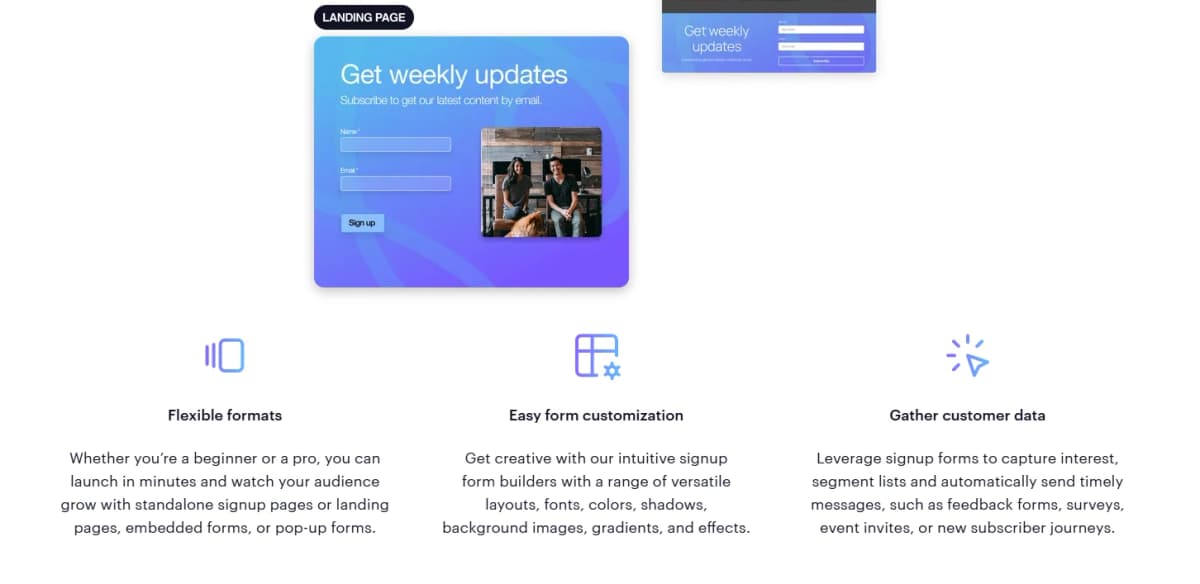
Collecting data through these forms opens up plenty of opportunity too.
You can use signup forms to capture genuine interest, segment your list based on what people signed up for, and automatically trigger messages like feedback surveys, event invites, or a welcome journey for brand new subscribers.
Premade signup page templates make this process even faster, letting you launch something polished and start earning new subscribers as soon as tomorrow morning without building everything completely from scratch.
Each format serves a slightly different purpose depending on your goal.
A hosted signup page gets you set up quickly with no coding required, which works great if you just need something simple and fast.
A hosted landing page gives you more design control for things like ad campaigns or event signups.
Embedded forms let you add a signup experience directly onto your existing website with full control down to the code itself, while pop-up forms actively encourage visitors to subscribe the moment they arrive on your site.
Once your forms are live, built in reporting shows you exactly how many people viewed each form, how many actually subscribed, and your overall conversion rate, giving you everything you need to optimize performance without relying on a separate analytics tool.
7. AI Workflows
Marketing gets a lot more complicated when you are juggling strategy, writing, design, and targeting all at once.
Campaign Monitor built its AI Workflows to take some of that pressure off, giving you a set of AI powered tools designed to help you produce better campaigns without spending your entire week on them.
Instead of guessing what might work, these features actually guide you toward decisions backed by real data and proven marketing practices.
Marketing Monitor sits at the center of this system, and it works by removing the guesswork from your overall strategy.
You get real time performance insights measured against industry benchmarks, along with suggested tactics based on how your campaigns are actually performing.
You stay fully in control the whole time, since you get to choose which tactics to apply and adjust them however you like.
The recommendations feel personal too, shaped around your own usage patterns, and you can apply anything suggested with a single click.
Once you have made changes, Marketing Monitor shows you how those tactics actually paid off, so you know you are moving in the right direction instead of just hoping for the best.
AI Email Booster works alongside Marketing Monitor to improve individual emails before they go out. It scans your email, anticipates what you are trying to accomplish, and gives you tailored recommendations to help you get there.
Reviewing suggestions stays simple, since you only apply what you actually want and can undo anything with one click if you change your mind.
Every recommendation is grounded in industry best practices, covering both design and copy improvements, which means you are not just getting random tips but genuinely useful direction.
Segment Mapper and AI Writer round out the toolkit nicely.
Segment Mapper lets you build precise audience segments just by describing who you want to reach, skipping the manual logic building that used to eat up so much time.
If you are not sure where to start, Idea segments give you a starting point you can review and apply in just a few clicks.
AI Writer helps on the content side, generating copy that fits your audience so you spend less time staring at a blank page.
You can use it to brainstorm when you hit a creative wall, adapt your messaging for a new audience, shrink long text into short captions, or sharpen your calls to action to drive more conversions.
8. AI Email Booster
Writing an email that actually performs well takes more than just good intentions.
AI Email Booster exists to give you a clear, direct path toward better results by interpreting your goal and then handing you personalized recommendations you can review, adjust, and apply with a single click.
Instead of second guessing your own copy, you get a second opinion built on real marketing data.
Staying in control matters a lot here, and Campaign Monitor designed this feature with that in mind.
You get high impact recommendations tailored specifically to your email, and you get to decide what actually resonates with your goals. Nothing gets forced onto your campaign.
You explore the suggestions, apply what makes sense, and simply leave behind anything that does not fit what you are trying to accomplish.
The real value shows up in how much time this saves. What used to take hours of writing, editing, and refining now takes minutes of review before implementation.
AI Email Booster essentially takes the lower value tasks off your plate, letting you focus on the parts of your campaign that actually need your strategic thinking instead of getting stuck polishing sentences over and over.
Every suggestion aims to boost your chances of clicks, conversions, and overall engagement, giving you real confidence before you hit send.
You can access AI Email Booster in two places, either directly inside the email template builder or as a suggested tactic within Marketing Monitor, which is currently in beta.
It pairs naturally with other tools too, like AI Writer for drafting your first version, prebuilt automated journeys for guiding customers through a sequence, and A/B testing for figuring out which version of your message actually performs best.
Together these tools turn the entire email creation process into something a lot more seamless, from that very first blank draft all the way through to the final send.
9. Segment Mapper
Building an audience segment used to require some serious technical know-how, and a lot of marketers avoided it entirely just because the process felt intimidating.
Segment Mapper changes that completely by turning intent signals into precise audience targeting without any of the usual complexity.
You get to create high value segments that power more targeted emails and journeys, and the whole process only takes a few clicks.
The actual building process feels refreshingly simple. You select the list you want to use, then describe the segment you are trying to reach directly in the prompter.
From there, Campaign Monitor uses smart, data driven technology to build a segment rooted in real best practices, which you can apply to a campaign within minutes.
This removes the stress that usually comes with manually building segment logic, especially if you have never built one before and were not sure where to even begin.
Putting these segments to work is where the real payoff shows up.
Once your segment is built, you can pair it with a highly personalized campaign and watch your engagement improve as a result.
Getting more value out of an audience you already have tends to matter more than constantly chasing new subscribers, and Segment Mapper makes that existing audience a lot easier to work with effectively.
Accessing this feature is straightforward too.
You can find Segment Mapper directly within the lists and subscribers section of your account, whether you are selecting an existing list or building a brand new one.
It also shows up as a suggested tactic inside Marketing Monitor if you are already using that feature.
Segment Mapper pairs naturally with prebuilt automated journeys for guiding subscribers through a sequence, A/B testing for comparing which message variation performs best, and engagement segments for focusing your attention on your most active subscribers while separately working to reconnect with anyone who has gone quiet.
10. Marketing Monitor
Guessing whether your email marketing is actually working is a frustrating spot to be in, and Marketing Monitor exists specifically to pull you out of it.
This feature gives you real time performance insights measured directly against industry benchmarks, along with suggested tactics designed to boost how your campaigns perform.
You also get access to your recent results, so you know exactly where you stand and can take action right away instead of waiting around for a monthly report to tell you something you already suspected.
Understanding how you stack up against the competition matters a lot here.
You can compare your performance against various industries across open rate, click through rate, bounce rate, and unsubscribe rate, which helps you pinpoint exactly where your campaigns need the most work.
Once you know your weak spots, the built in coaching kicks in. You choose a goal, and Marketing Monitor hands you a set of proven tactics designed to help you reach it.
You can track which tactics you have already completed, see how they performed, and check out what tactics remain if you want to keep pushing toward your highest potential.
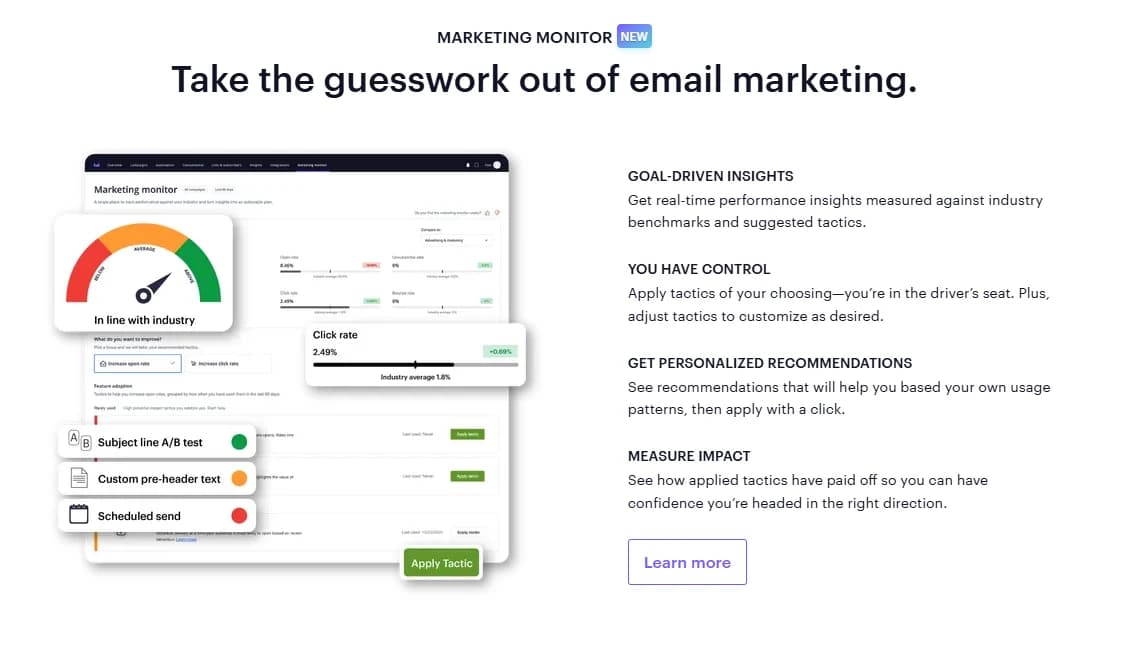
Tracking your progress over time is where this feature really earns its keep. You can review your recent results tactic by tactic, letting you iterate immediately instead of waiting weeks to figure out what worked.
This kind of instant feedback helps you learn which specific actions actually move the needle, rather than guessing based on gut feeling.
Marketing Monitor also connects directly to Segment Mapper and AI Email Booster, both currently in beta for select customers, giving you quick access to precise audience targeting and email improvement suggestions right from the same dashboard.
At the center of all this sits Campaign Score, a campaign level performance indicator that tells you plainly what is working and what is not.
Alongside your score, you get simple, personalized recommendations for improvement, distilled from real time data and compared against industry standards.
Every recommendation comes from expert produced guidance meant to refine your strategy with every single send.
Campaign Monitor positions itself as more than just a place to send emails here, acting more like an actual marketing partner guiding your strategy toward its full potential using every tool the platform has to offer.
11. Email Analytics
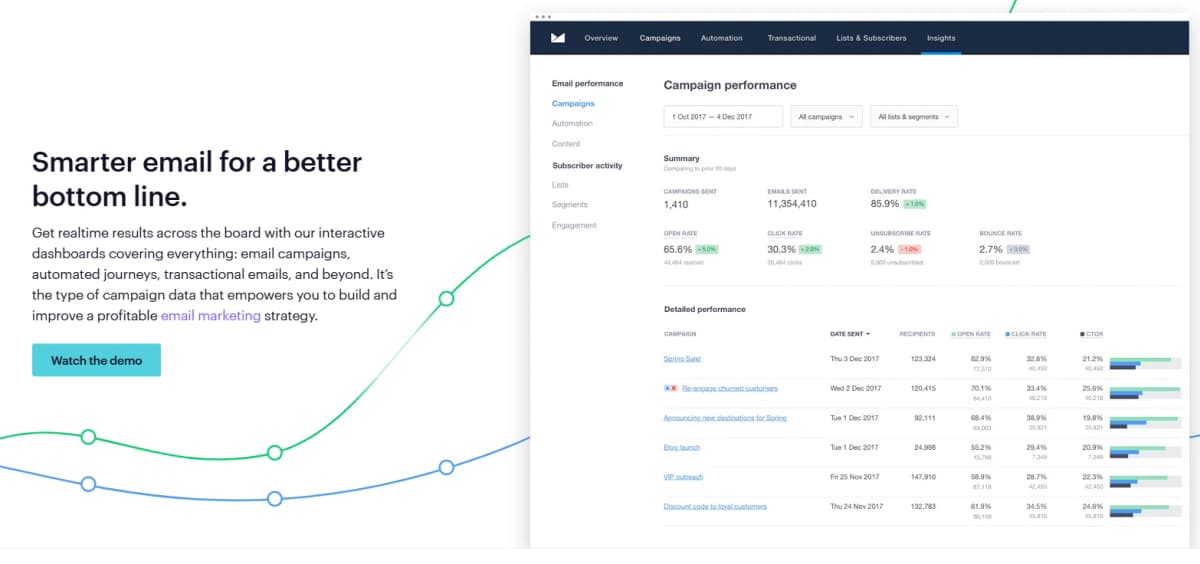
Sending an email is only half the job. Knowing whether it actually worked is where the real value comes in, and Campaign Monitor's Email Analytics feature covers that completely.
You get real time results through interactive dashboards that track everything from regular email campaigns to automated journeys and transactional emails.
This kind of visibility is exactly what helps you build a genuinely profitable email marketing strategy instead of just sending emails and hoping for the best.
The reporting here goes deep. You get a complete set of reports covering opens, clicks, shares, and bounces, giving you the full picture you need to revise your strategy and actually hit your goals.
Testing plays a big role too, since you can A/B test different elements of your campaign like images, content, and subject lines to figure out what resonates most with your audience.
Before anything goes out, you can also run spam testing and preview your email across multiple devices and email service providers, catching potential problems before they ever reach a subscriber's inbox.
Seeing email performance in isolation only tells part of the story, which is why Campaign Monitor lets you connect your campaigns to third party analytics tools like Google Analytics or Webtrends.
This gives you a fuller view of how people engage with your brand beyond just the email itself, letting you see the direct impact your campaigns have on website activity, conversions, and overall ROI.
Viewing email performance alongside your other marketing channels makes it a lot easier to understand where email actually fits into your bigger picture.
Data accuracy matters just as much as the data itself, and Campaign Monitor takes this seriously with a non-human click filter that helps keep your reports clean and trustworthy.
This becomes especially important given how much privacy and security measures have shifted across the email marketing space recently.
The platform tracks metrics like open rates, click through rates, bounce rates, unsubscribes, and link activity, helping you see exactly where subscribers are engaging and where they are dropping off, so every decision you make going forward is based on real behavior instead of noisy or misleading numbers.
12. Website Builder
Email marketing works best when it connects to something bigger, and Campaign Monitor's Website Builder lets you manage your website and your email marketing from the exact same platform.
Instead of juggling separate tools for your site and your campaigns, everything lives in one place, which cuts down on the usual back and forth between different logins and dashboards.
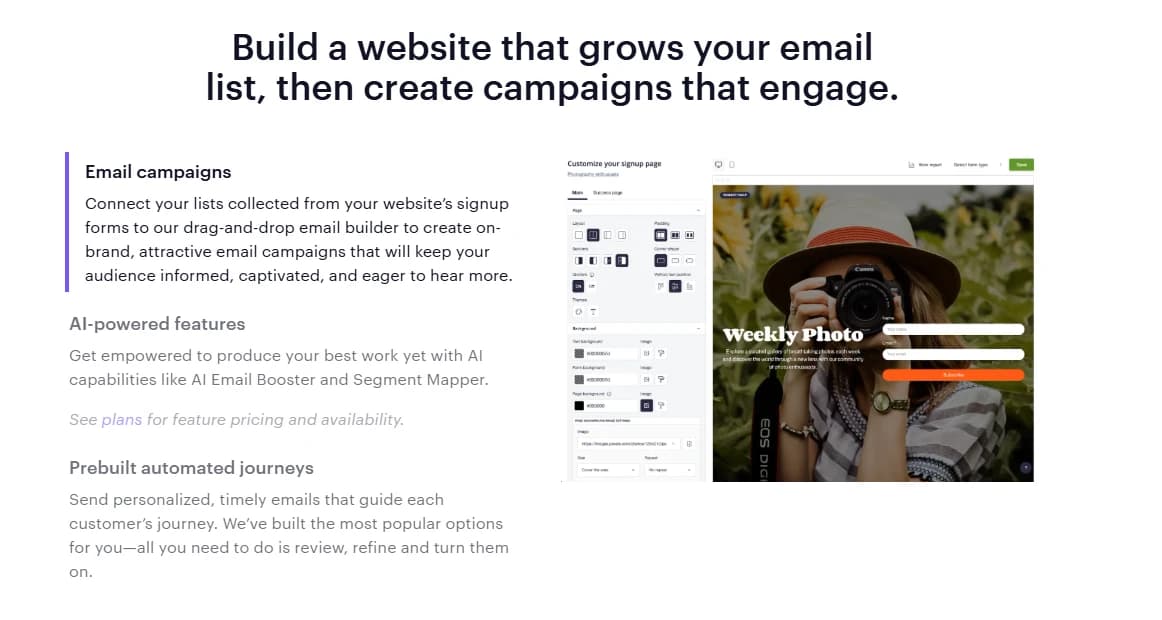
Design flexibility stands out right away here. You can choose from a range of templates that are simple to customize, or let AI build a fully branded website for you without writing any code yourself.
Whichever route you pick, Campaign Monitor keeps your entire marketing funnel connected. You can create email campaigns, automations, landing pages, signup forms, and now a full website, all without leaving the app.
That kind of consolidation matters a lot if you are running a small team and do not have the bandwidth to manage five different platforms at once.
Once your site is live, tracking its performance stays simple too. You can monitor your website using the metrics already included in the platform, or integrate directly with Google Analytics if you want a deeper dive.
Every website comes with an SSL certificate and hosting included, or you can connect your own domain if you already have one you want to keep using.
Website Builder comes included with the Premier plan, and you can add it to Lite or Essentials plans for an extra 10 dollars a month.
The real advantage here is how naturally the website ties back into your email strategy.
Signup forms collected on your new website connect directly to the drag and drop email builder, letting you turn website visitors into email subscribers and then immediately start sending them on-brand campaigns.
You also get access to the same AI powered features available elsewhere on the platform, like AI Email Booster and Segment Mapper, along with prebuilt automated journeys that guide new subscribers through a personalized sequence right from their very first signup.
13. SMS Marketing
Email is powerful, but inboxes get crowded fast, and sometimes your message needs a different channel to actually get noticed.
Campaign Monitor's SMS Marketing feature lets you combine text messages with your email strategy so your important updates stand out instead of getting buried under a hundred other emails.
The SMS service is currently available to contracted customers sending to the USA, Canada, Australia, and the UK.
The numbers behind text messaging make a strong case on their own.
Email and SMS rank as the top two preferred channels for people receiving updates from brands, and 95% of text messages get read and responded to within just three minutes of arriving.
SMS also averages a 98% open rate, which is a number email marketing simply cannot touch.
Pairing these two channels together gives your campaigns a much better shot at actually reaching someone at the right moment.
Getting started with SMS does not require a steep learning curve either.
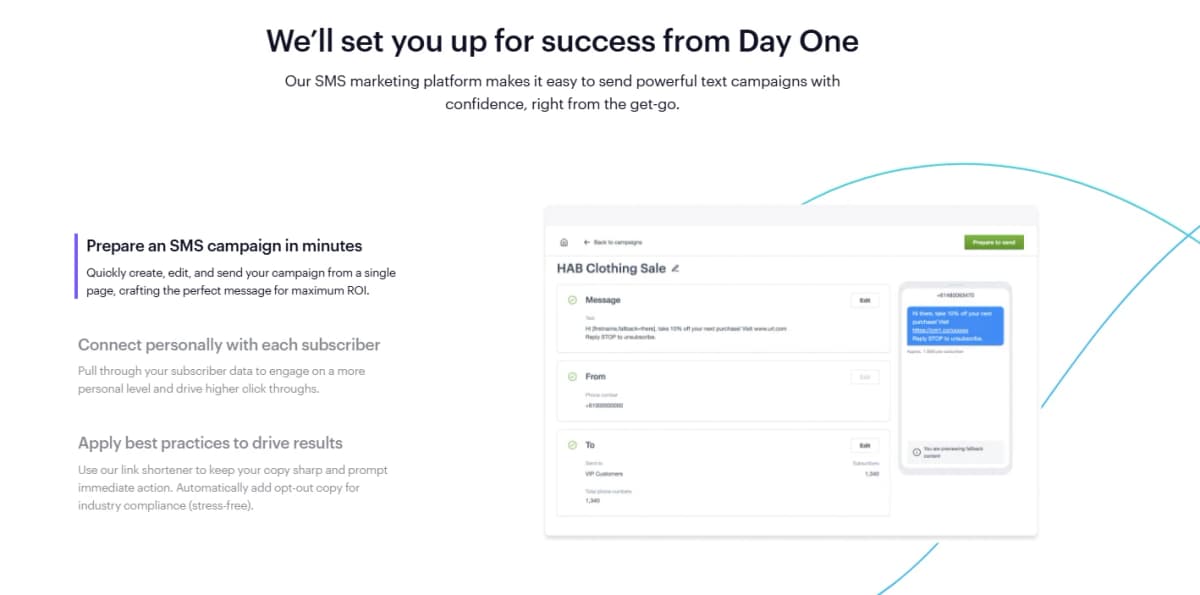
You can prepare an entire campaign in minutes, creating, editing, and sending your message from a single page while crafting copy built for maximum return.
Personalization carries over from email too, since you can pull through subscriber data to engage each person on a more individual level, which tends to drive higher click through rates compared to a generic blast message.
Campaign Monitor also builds in smart tools like a link shortener to keep your copy sharp, and it automatically adds opt-out language to keep you compliant with industry regulations without you having to think about it.
Managing both channels together keeps your whole marketing operation simpler too.
You can run your email and SMS campaigns from the same platform, learn text messaging best practices directly from Campaign Monitor's team of experts, and check real time reporting to see results as soon as your messages go out.
For teams new to texting as a marketing channel, this setup makes the learning curve a lot less intimidating while still giving you professional level tools to work with from day one.
14. Integrations
No marketing platform works in a vacuum, and Campaign Monitor understands that your email tool needs to talk to the rest of your tech stack.
With a library of pre-built integrations, you can customize your account to match exactly how your company already operates, connecting the tools your team relies on every day without any complicated manual setup.
Some integrations stand out as genuinely useful for most businesses.
Campaign Monitor for Salesforce lets you combine both platforms so your email marketing runs independently while staying connected to your CRM data.
If your business runs on WordPress, the WordPress integration pulls signups from your website directly into your Campaign Monitor lists automatically.
And if you run an online store, the Shopify integration lets you leverage your customer purchase data to build targeted, timely campaigns based on actual shopping behavior instead of guesswork.
Growing your list gets easier with a few more specialized tools too.
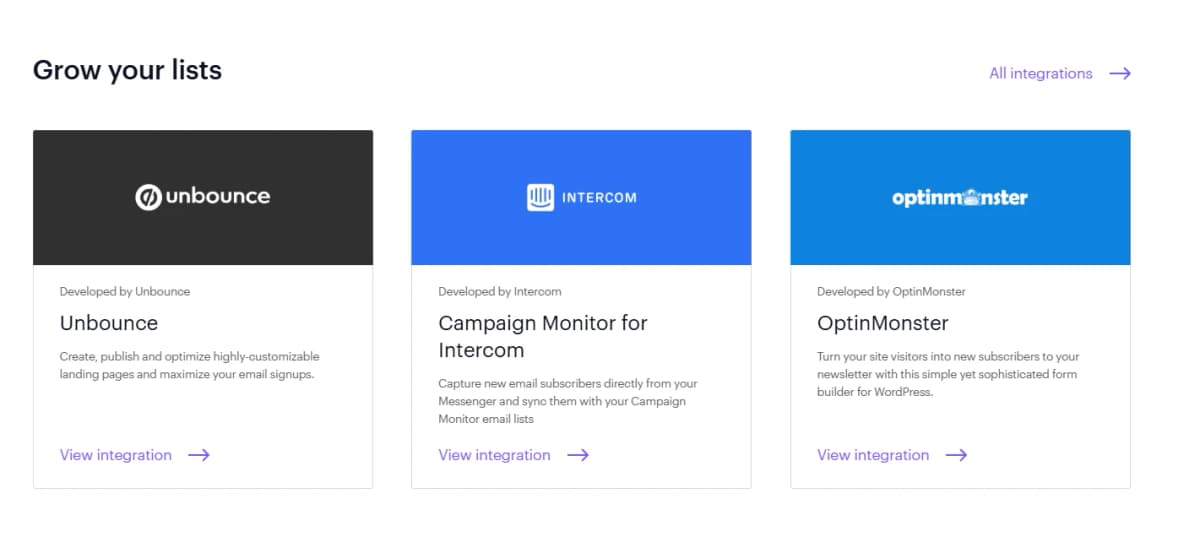
Unbounce lets you build and optimize custom landing pages designed to maximize signups, while the Intercom integration captures new subscribers directly from your Messenger conversations and syncs them straight into your lists.
OptinMonster adds a sophisticated form builder for WordPress sites, helping turn casual visitors into actual newsletter subscribers.
On the advertising side, you can automate SMS conversations through Rungopher, pull leads straight from Facebook Lead Ads through Zapier, or sync your subscriber list with AdRoll to retarget people across the web and social platforms.
For more specialized needs, Campaign Monitor also connects with CRM focused tools like Raiser's Edge NXT for nonprofits, Lexer for building a connected customer data platform, and Qgiv for organizations running online giving campaigns, event registrations, or peer to peer fundraising.
Between marketing tools, CRM connections, and advertising platforms, Campaign Monitor gives you a pretty wide net for connecting the rest of your business without forcing you to abandon tools you already depend on.
15. Professional Services
Sometimes software alone is not enough, and having real people available to help makes a genuine difference.
Campaign Monitor backs its platform with a full team of email experts covering support, deliverability, and professional services, all ready to step in whenever you need extra help getting the most out of the platform.
Support here moves fast. The team maintains an average initial response time of 90 minutes or less, with staff spread across the globe so you get help during business hours in your own region, Monday through Friday.
That kind of responsiveness matters a lot when a campaign issue pops up right before a scheduled send and you need an answer immediately instead of waiting around for a reply the next day.
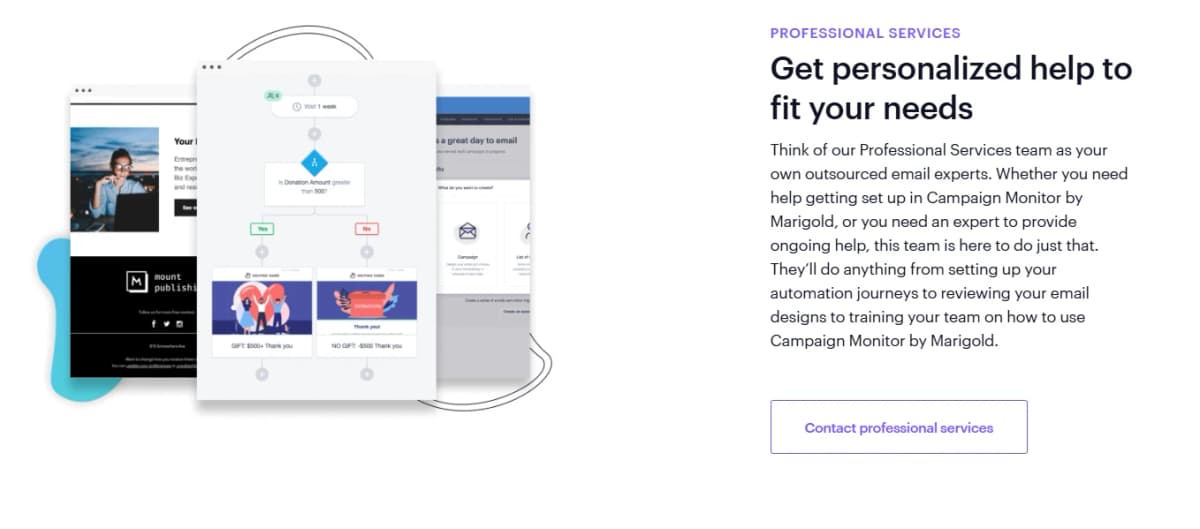
For businesses that want more hands on guidance, the Professional Services team works almost like an outsourced email department.
They can help you get fully set up on Campaign Monitor, build out your automation journeys, review your email designs before you send, or train your team on how to use the platform effectively.
This kind of support works especially well for businesses that do not have a dedicated email marketer on staff and want an expert guiding the process instead of figuring everything out through trial and error.
Deliverability gets its own dedicated attention too, and for good reason since a beautifully designed email means nothing if it never reaches the inbox.
Campaign Monitor maintains industry leading delivery rates above 99% through its infrastructure, but the team makes clear that actual inbox placement still depends on factors you control directly, like list quality, sending habits, engagement history, and proper authentication setup.
Their Deliverability Services help you understand exactly what is affecting your inbox placement and give you clear, prioritized steps to fix it, whether you need a one time review or ongoing advisory reporting to keep your email program healthy over time.
Campaign Monitor Pricing Plans
Campaign Monitor keeps its pricing structured around four plans, and the cost adjusts based on how many contacts you plan to reach, starting at the 0 to 500 range.
You can choose to pay monthly or annually, and paying annually knocks a solid discount off each tier, making it worth considering if you already know you are sticking around for a while.
The Lite plan starts things off at $11.70 a month with the annual discount applied, and it works well if you are just getting started.
You get five subscriber emails a month, access to select core features like custom coded templates and unlimited signup forms, and advanced email tools like AI Writer, automated email access, prebuilt journeys, and transactional emails.
If you want the drag and drop website builder, it is available as an optional purchase on this tier rather than included automatically.
Right above that sits the Essentials plan, marked as the best value option at $27.90 a month with the annual discount.
This tier unlocks unlimited email sends along with priority level support, and it includes every core feature rather than just a select few.
You also get unlimited access to the AI powered email features, unlimited automated emails, and inbox preview, so you can check how your email looks before it goes out.
If you want extras like the non-human click filter, engagement segments, a countdown timer, or time zone sending, those are available as optional add-ons at this level.
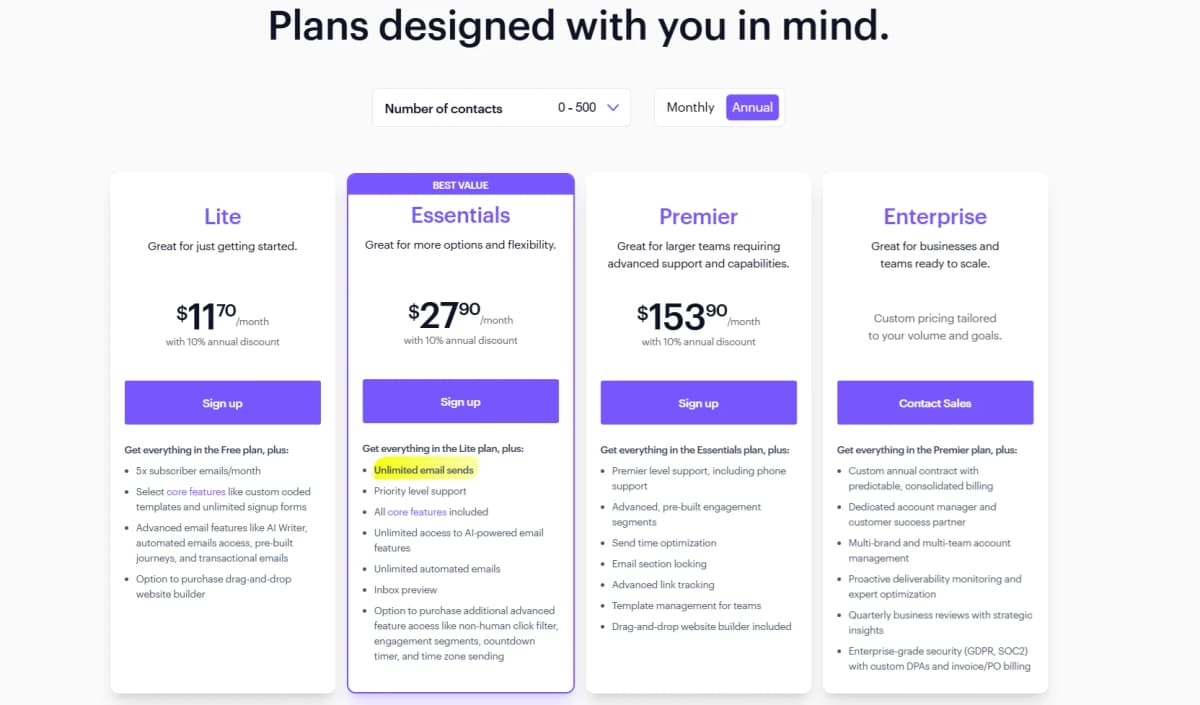
The Premier plan runs $153.90 a month with the annual discount and targets larger teams that need more advanced support and capability.
This tier includes Premier level support with phone access, advanced prebuilt engagement segments, and send time optimization, which uses subscriber behavior to pick the best moment to deliver each email.
You also get email section locking to protect your branding, advanced link tracking, template management built for teams, and the drag and drop website builder included at no extra cost.
At the top sits the Enterprise plan, built for larger businesses ready to scale and priced with custom pricing tailored to your specific volume and goals.
This tier includes a custom annual contract with predictable billing, a dedicated account manager, and support for managing multiple brands or teams under one account.
You also get proactive deliverability monitoring, quarterly business reviews with strategic insights, and enterprise grade security covering GDPR and SOC2 compliance, along with custom data processing agreements and flexible invoice or purchase order billing.
Since pricing here is fully custom, you would need to contact their sales team directly to get exact numbers based on your business needs.
Final Thoughts On Campaign Monitor
Campaign Monitor packs a lot into one platform, from the email builder and AI powered tools to segmentation, SMS marketing, and even a full website builder.
Whether you are a small business sending your first newsletter or an agency managing campaigns for a dozen clients, the platform scales with you instead of forcing you into features you do not need.
The AI tools alone, like AI Email Booster and Segment Mapper, take a lot of the guesswork out of building campaigns that actually perform.
If you are still deciding whether Campaign Monitor is the right fit, the smartest move is signing up for the free trial.
It costs nothing, requires no long term commitment, and lets you explore the platform firsthand before you spend a single dollar.
You can test the email builder, try out the drag and drop tools, and get a real feel for how the dashboard works before deciding which paid plan makes sense for your business.
There is no better way to know if a tool fits your workflow than actually using it yourself.
Email marketing only works when the tool behind it makes your life easier instead of harder, and Campaign Monitor seems built with exactly that goal in mind.
Give the free trial a shot and see how much smoother your campaigns can run once everything lives in one place.
Campaign Monitor FAQ
1. What is Campaign Monitor?
Campaign Monitor is an email marketing and automation platform built for small businesses, nonprofits, and marketing agencies.
2. Does Campaign Monitor offer a free trial?
Yes, Campaign Monitor offers a general free trial so you can explore the product firsthand.
3. What happens if I go over my plan's limits?
You will get notified if you exceed your limits, and you can choose to upgrade or pay for the additional emails.
4. Can I change my plan later?
Yes, you can switch between the Lite, Essentials, or Premier plans anytime, or sign up for an annual contract instead.
5. Is there an annual pricing option?
Yes, each plan offers an annual option with a 10 percent discount, though this discount does not apply to agency or multi-team plans.
6. What is the difference between priority and premier support?
Premier support moves your requests to the top of the queue so you get help faster.
7. Does Campaign Monitor integrate with other software?
Yes, Campaign Monitor offers over 250 integrations including Salesforce, WordPress, and Google Analytics.
8. What payment methods does Campaign Monitor accept?
Campaign Monitor accepts most credit cards, and invoicing is available for high volume senders and larger organizations.
9. What currencies does Campaign Monitor support?
Pricing is listed in USD, but Campaign Monitor can also work with currencies like CAD, EUR, GBP, AUD, and NZD.
10. Does Campaign Monitor offer a nonprofit discount?
Yes, nonprofits can get a 15 percent discount by contacting the sales team.
11. What is the cheapest Campaign Monitor plan?
The Lite plan starts at $11.70 a month with the annual discount for 0 to 500 contacts.
12. Which plan offers the best value?
The Essentials plan is marked as best value, starting at $27.90 a month with the annual discount.
13. Does the Essentials plan include unlimited email sends?
Yes, unlimited email sends are included starting with the Essentials plan.
14. Is the website builder included in every plan?
The website builder is included with the Premier plan, and available as an optional add-on for Lite or Essentials.
15. What does the Premier plan include that Essentials does not?
Premier adds phone support, advanced engagement segments, send time optimization, email section locking, and advanced link tracking.
16. Is Enterprise pricing fixed?
No, Enterprise pricing is custom and tailored to your business volume and goals.
17. Does Enterprise include a dedicated account manager?
Yes, Enterprise plans come with a dedicated account manager and customer success partner.
18. Can I use AI features on every plan?
AI powered email features are available starting on the Lite plan, with unlimited access included on Essentials and higher.
19. Does Campaign Monitor support SMS marketing?
Yes, SMS marketing is available for contracted customers sending to the USA, Canada, Australia, and the UK.
20. Does Campaign Monitor track email performance?
Yes, Campaign Monitor tracks metrics like open rates, click through rates, bounce rates, and unsubscribes through its analytics dashboard.