Runpod Review (2026): Cheap Cloud GPUs For AI, Serverless Power, And The Catch
Runpod is a cloud platform that rents GPUs for AI work. You can start one GPU in a container, run an autoscaling endpoint, or book a cluster of many GPUs.
Pods are on-demand GPU containers with 21 GPU types, from the RTX A5000 to the B300 with 288 GB of memory. Billing runs per second, and Runpod charges no ingress or egress fees.
Serverless turns a container into an API endpoint that scales up with requests and down to zero when idle. FlashBoot targets cold starts under 200ms.
Clusters link GPUs across nodes with 1,600 to 3,200 Gbps networking and Slurm for job scheduling. On-demand clusters reach 64 GPUs, and Reserved Clusters scale to 10,000+ GPUs through sales.
Hub is a catalog of ready Serverless repos, and Hybrid Cloud lets a team run Runpod orchestration on hardware it already owns. Enterprise accounts add SOC 2 Type II, ISO 27001, and a 99.99% uptime SLA.
The same GPU can carry two prices. An H100 SXM costs $2.69 an hour on Community Cloud and $3.99 an hour on Secure Cloud.
Disclosure: Some of the links I share might be affiliate links. If you click on one and make a purchase, I may earn a small commission as a thank you. But don’t worry, it won’t cost you anything extra. I only recommend stuff I genuinely believe in. Your support helps me keep creating awesome content. You can read my full affiliate disclosure in my disclaimer page.
If you want to save a lot of hours searching for high-paying affiliate programs, check out our exclusive list of 2500+ affiliate programs. You’ll find all the information about the programs inside the list. This list is perfect for affiliate bloggers and influencers.
Runpod Features
Runpod covers the path from one rented GPU to a cluster of 64. Pods, Serverless, Clusters, Hub, and Hybrid Cloud are the five products in its menu.
Every product runs containers you control. Network storage, two cloud tiers, and a set of developer tools sit underneath all of them.
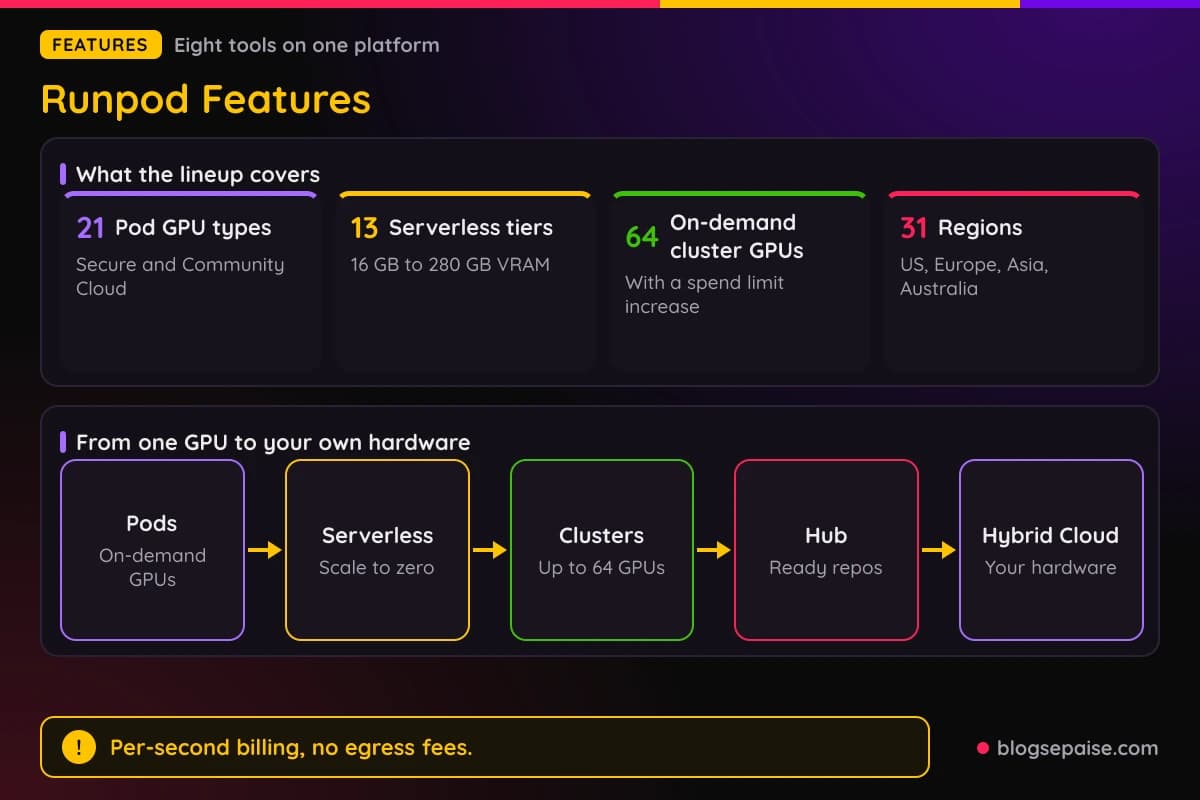
GPU memory runs from 16 GB on the smallest Serverless tier to 288 GB on the B300 Pod. Pods list 21 GPU types, and Serverless groups its cards into 13 tiers.
More than 1M developers use the platform, and 31 regions span the US, Europe, Asia, and Australia. The eight features below show where each product helps and where it asks for care.
1. Pods
Pods are GPU containers you rent by the hour. You choose a GPU, a region, and a container image, then click Deploy.
A Pod starts in under 30 seconds, with no provisioning queue and no sales call. No credit card is needed just to look around.
You control the container, the storage, the GPU type, and the runtime. Custom Docker images pull from registries such as Docker Hub or ECR, and base images with common machine learning stacks are ready to use.
Supported software includes PyTorch, TensorFlow, JAX, ONNX, CUDA toolkits, NCCL, and Horovod. Any Linux GPU framework runs, and vLLM and TGI are the suggested tools for inference.
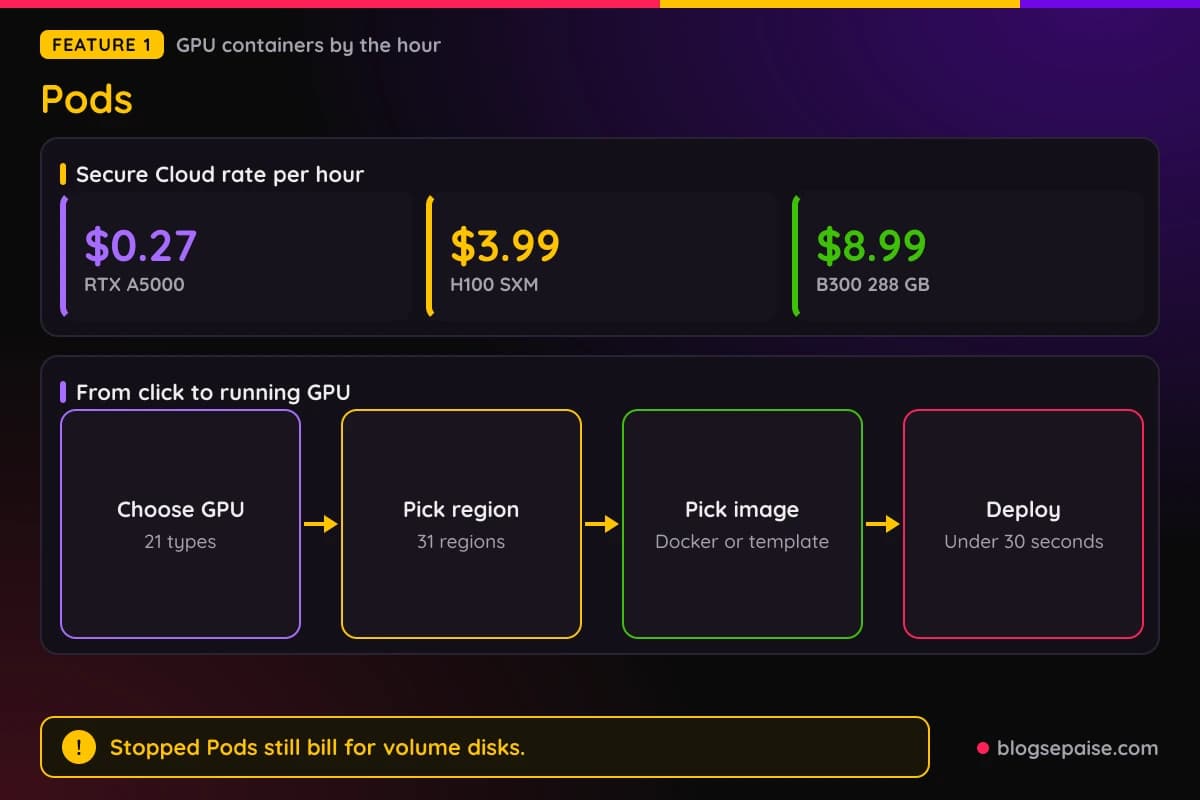
The lineup spans 21 GPU types. On Secure Cloud the B300 with 288 GB costs $8.99 an hour, the B200 costs $7.99, and the H200 costs $5.29.
The H100 SXM costs $3.99 an hour, the A100 SXM costs $1.79, and the L40S costs $1.09. Smaller cards start at $0.27 an hour for the RTX A5000 and $0.50 for the RTX 3090.
Specs are listed per GPU so you can match a card to a job. The H100 SXM comes with 80 GB of VRAM, 125 GB of system RAM, and 20 vCPUs, while the RTX 4090 offers 24 GB of VRAM, 41 GB of RAM, and 6 vCPUs.
Billing is per second. It starts when the Pod runs and stops when you terminate it, with no minimums.
A stopped Pod still costs money. Volume disks keep billing at $0.20 per GB a month while a Pod sits idle, and container disks do not persist when the Pod is idle.
H100 or L40S Pods fit LLM inference. A100 and H100 SXM fit training and fine-tuning, and the RTX 4090 and RTX A6000 fit image and video generation.
Direct control is the draw. A small test can run on an RTX 3090 at $0.50 an hour, and a bigger run can move to an H100 SXM without changing your container.
The top cards carry big memory. The B300 pairs 288 GB of VRAM with 251 GB of system RAM and 32 vCPUs, and the H200 offers 141 GB with 276 GB of RAM and 24 vCPUs.
2. Serverless
Serverless turns any container into an API endpoint on a GPU. You write a handler, deploy it, and Runpod scales workers up and down as requests arrive.
Autoscaling runs from zero to hundreds of workers. Flex workers scale to zero when idle, and active workers stay pre-warmed so the first request does not wait.
FlashBoot targets cold starts under 200ms. A flex worker that has scaled to zero can still see a cold start, and active workers are the setting that avoids it.
Billing is per second, from worker start to full stop, rounded up to the nearest second. You pay for compute time only, and idle flex workers cost nothing.
Runpod lists a single hourly Serverless rate per GPU and does not split it into flex and active prices. Long commitments bring discounts on active and flex workers, arranged through sales.
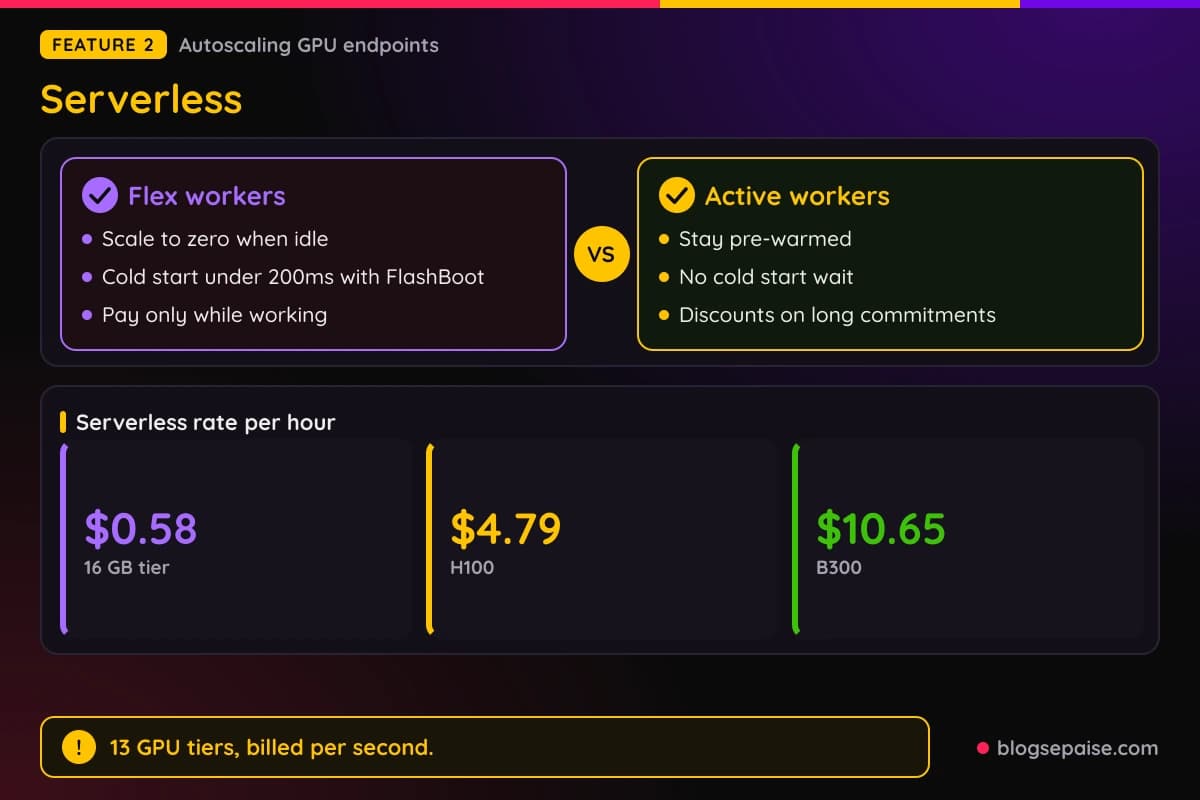
Serverless has 13 GPU tiers, from 16 GB to 280 GB of VRAM. The B300 costs $10.65 an hour, the H200 costs $5.93, the H100 costs $4.79, and the A100 costs $2.72.
Mid-range tiers run cheaper. A 48 GB tier with the L40, L40S, and 6000 Ada costs $1.75 an hour, the RTX 4090 costs $1.10, and a 24 GB tier with the L4, A5000, and 3090 costs $0.69.
Serverless rates run higher per hour than Pod rates for the same card. An H100 costs $4.79 an hour on Serverless against $3.99 for an H100 SXM Pod on Secure Cloud.
Deployment comes straight from GitHub, so a push releases to the endpoint and you can roll back to an earlier container version.
Python, Node.js, Go, Rust, and C++ run in containers. Webhooks and event triggers connect endpoints to other systems.
Logs, metrics, and alerts live in one interface. Runpod Overdrive is a separate offering for faster LLM inference, with up to 3.5x faster token streaming on Llama 3.1 8B and up to 2.45x higher throughput on Qwen3-8B.
One-click launches start pre-configured templates, so a first endpoint can go live without writing a Dockerfile. Runpod endpoints have handled 12,380,000,000 requests since launch.
3. Clusters
Clusters are multi-node GPU setups for training that needs more than one machine. You provision them yourself in the console and stop or terminate them at any time.
Anyone can launch 2 nodes on demand, which gives up to 16 GPUs. Larger on-demand clusters reach 8 nodes and 64 GPUs once you request a spend limit increase.
Networking is the selling point. East-west bandwidth runs from 1,600 to 3,200 Gbps over InfiniBand or RoCE v2, and each customer gets dedicated inter-node bandwidth.
Tenants are separated with L2 and L3 segmentation and RDMA fabric partitioning. Runpod states there is no routable path between customers.
Orchestration uses Slurm, with the sinfo, sbatch, and srun commands. Kubernetes is not supported, so teams built around Kubernetes need another route.
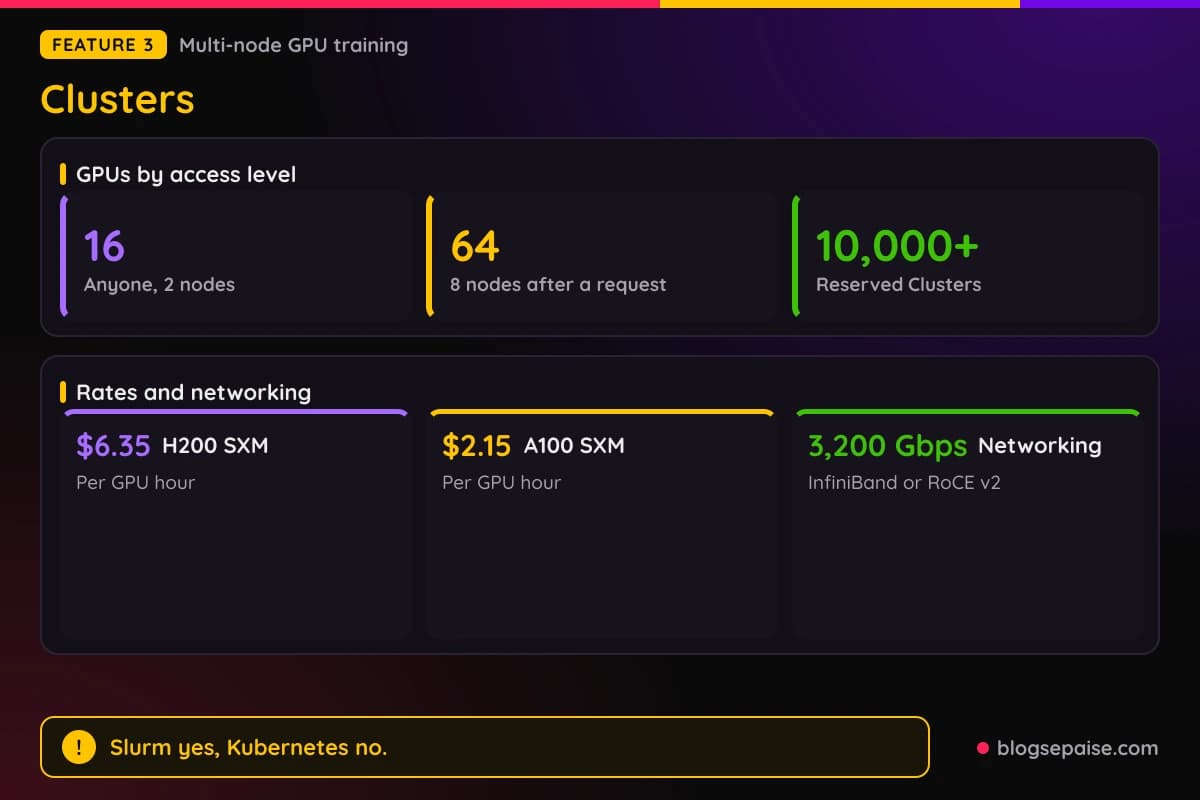
On-demand rates are listed for two GPUs. H200 SXM clusters cost $6.35 per GPU hour, and A100 SXM clusters cost $2.15.
L40S, H100 SXM, and B200 clusters show Contact Sales instead of a price. Reserved Clusters list no rates either, with terms of 1, 3, 6, 12, and 12+ months.
Billing is per second with no minimum commitment, no upfront cost, and no termination fee. Reserved Clusters scale to 10,000+ GPUs and carry a guaranteed uptime SLA, custom RAM, storage, and networking, and onboarding help.
Native Network Storage gives every node a shared filesystem where it is available. You can bring your own Docker containers or use templates for inference, training, and research across the major frameworks.
Independent SOC 2 Type II compliance covers the platform. Axolotl users can run fine-tuning jobs on Clusters, which suits teams that outgrow a single Pod.
Short test runs stay cheap because billing is per second. A 16 GPU run on A100 SXM at $2.15 per GPU hour costs $34.40 an hour, and the same 16 GPUs on H200 SXM at $6.35 cost $101.60 an hour.
4. Runpod Hub
Hub is a catalog of templates, models, and open-source AI apps that deploy on Runpod. Every repo is built for Serverless, with a prebuilt Docker image and a handler.
The flow is short. Open the Hub in the console, choose a repo, review the hardware and settings, click Deploy, and then click Create Endpoint.
A live Serverless endpoint, callable through an API, is ready within minutes. Settings such as environment variables, model paths, and precision appear in a configuration screen, and each repo lists its hardware needs.
Each repo has an automated build and test pipeline, and every new GitHub release triggers a fresh cycle. You can pick an older version from a dropdown before you deploy.
The Hub is in beta and is not production ready. Feedback and bug reports go through Discord.
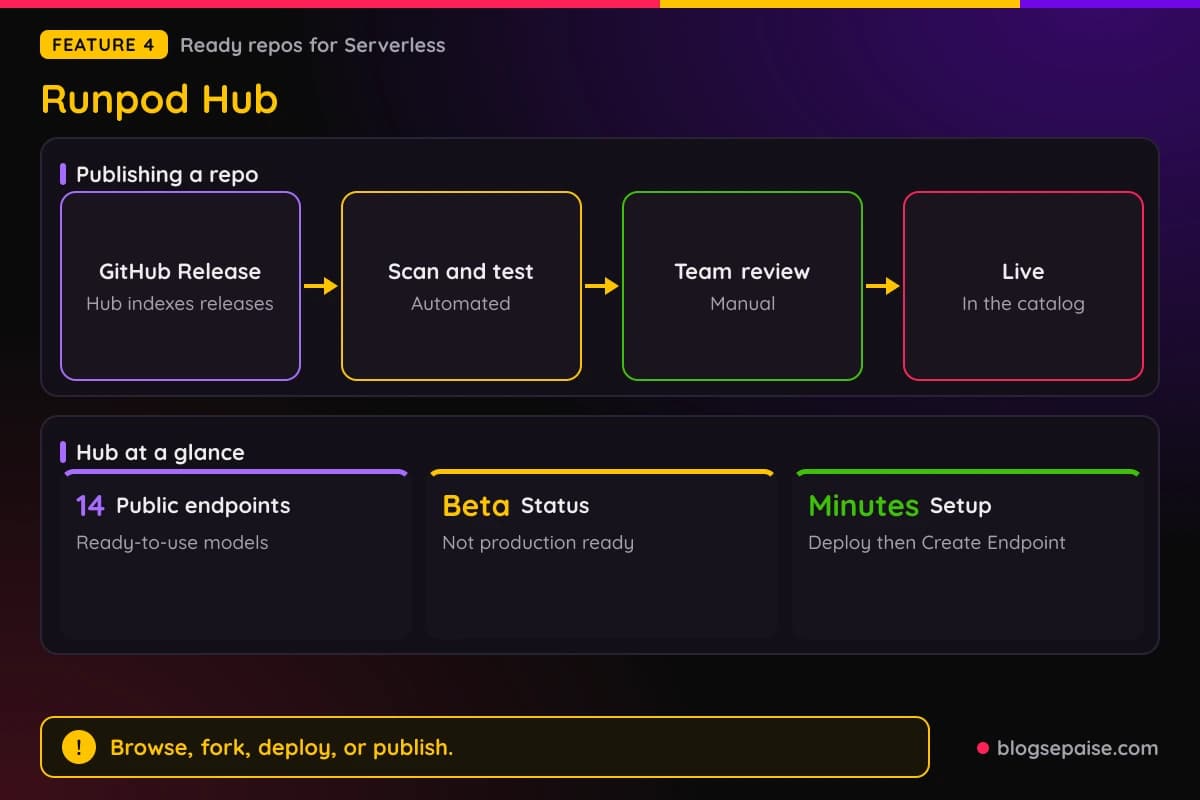
Publishing your own repo takes six steps. Build a working Serverless repo with a handler, a Dockerfile, and a README, then add a hub.json file with the title, category, hardware, and presets.
A tests.json file holds at least one test that returns HTTP 200. You then create a GitHub Release, since the Hub indexes releases and not commits, and submit the URL in the console.
An automated scan, build, and test runs first, followed by a manual team review. Approved repos go live in the catalog.
Public endpoints sit next to the catalog. The list has 14 ready-to-use models, including Qwen3 32B AWQ, FLUX.1 Schnell, FLUX.1 Kontext, Seedream 3.0, Seedance 1.0 pro, and Wan 2.2 for video.
The Hub suits people who want a working endpoint without writing a handler. It also helps creators who want a reusable deployment path for their own project, and forking an existing repo is part of the workflow.
Task types cover text to text, text to image, image to image, text to audio, text to video, and image to video. Other model types include LLMs, Stable Diffusion, and OCR.
5. Hybrid Cloud Deployments
Hybrid Cloud is a control plane for GPUs you own or rent elsewhere. It brings that hardware under the Runpod console, CLI, and APIs.
Workloads run on your hardware first, and Runpod cloud takes the overflow. The orchestration layer is the same one that runs Runpod cloud, installed on your machines.
Setup has three steps. You run one install command to add the host agent, Runpod verifies the hardware and scopes it to your org, and your teams launch Pods from the console.
The agent connects outbound over an encrypted overlay and needs no inbound ports. Resources stay visible only to your org, and persistent data stays on local NVMe you own.
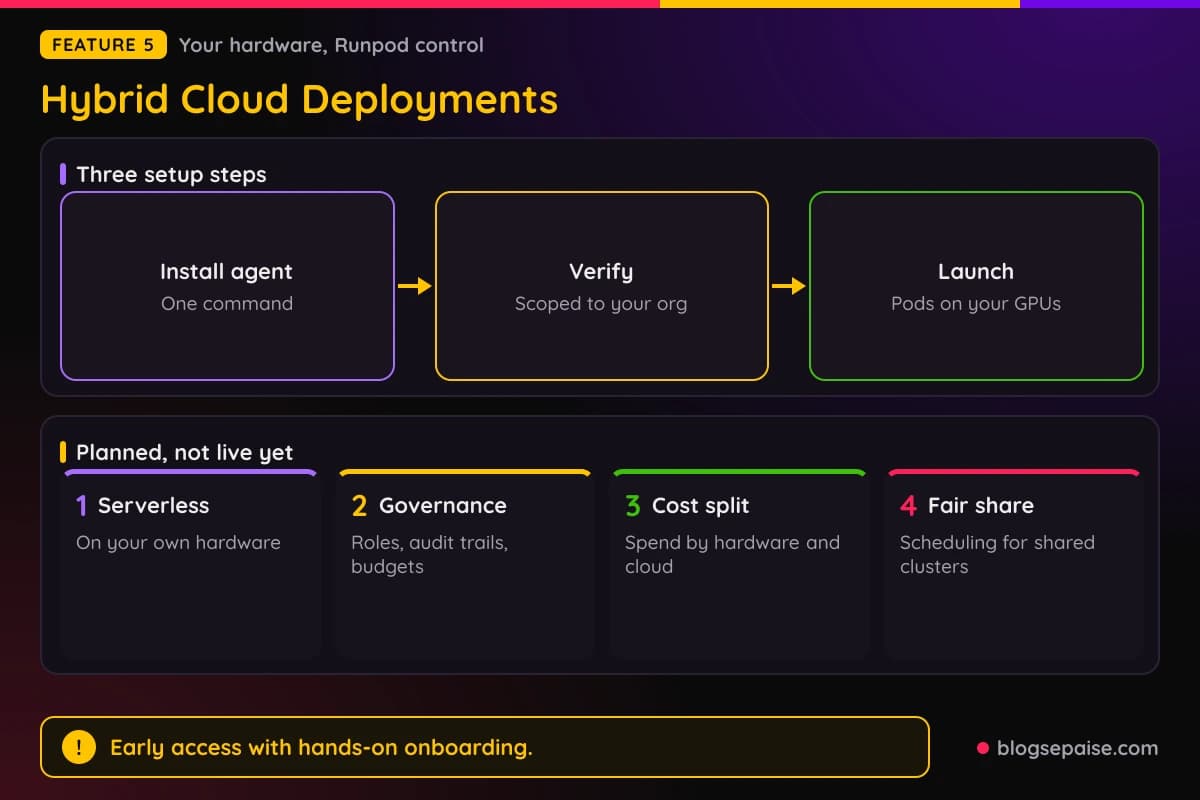
Any VM you control works, in a cloud account or on-prem, and the setup has been shown on AWS and GCP. Runpod does not provision or access your cloud accounts, and workloads are standard containers.
Leaving is simple. You uninstall the host agent, and the main thing you give up is the orchestration layer.
Overflow jobs run on Runpod infrastructure. Teams with strict data residency rules need to raise that early.
Access is limited. The product is new, it runs as an early access program, and onboarding is hands-on, with direct access to engineers.
Pricing is postpaid and built for enterprise buying. It combines an annual management fee that scales with the compute under management and professional services for onboarding, and no figures are published.
Three groups fit best. Research institutions get self-service access to on-prem GPUs with cloud overflow when queues fill, and organizations with mixed estates manage on-prem, colocation, and cloud capacity under one control plane.
Teams with reserved or owned clusters put idle capacity to work. They burst to Runpod cloud for spikes without building a dedicated platform team.
Four items are planned and not live yet. They are Serverless endpoints on your own hardware, governance with roles and audit trails, cost attribution, and fair-share scheduling for shared clusters.
6. Network Storage And Volumes
Storage on Runpod comes in four forms. Container disk, volume disk, standard network storage, and high-performance network storage each serve a different job.
Container disk costs $0.10 per GB a month and holds temporary data. It does not persist when a Pod is idle.
Volume disk costs $0.10 per GB a month while the Pod runs and $0.20 per GB a month while it sits idle. Persistent data survives a stop, so the idle rate is the price of keeping it.
Network storage lives apart from any single Pod. Standard network storage costs $0.07 per GB a month under 1 TB and $0.05 per GB a month over 1 TB.
High-performance network storage costs $0.14 per GB a month. That is double the standard rate.
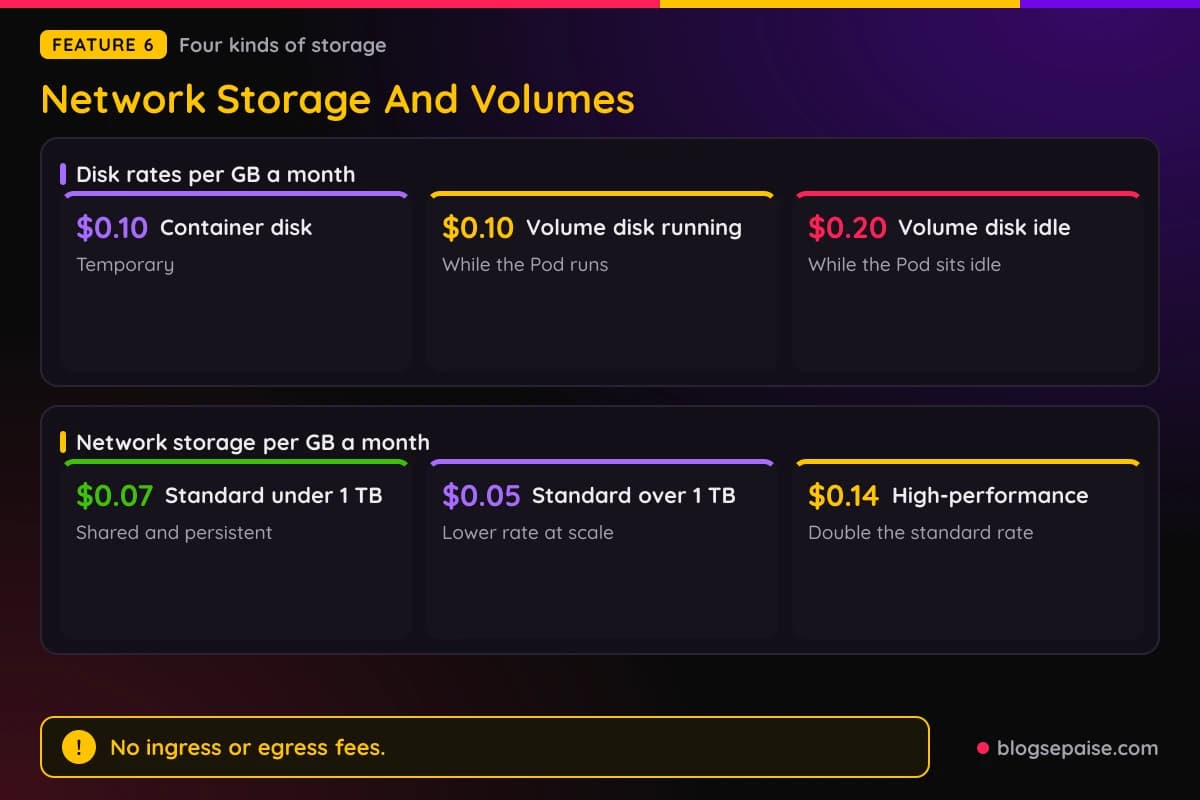
A 500 GB volume disk costs $50 a month while a Pod runs. The same volume costs $100 a month while the Pod is idle.
The same 500 GB on standard network storage costs $35 a month. Move past 1 TB and the rate falls to $0.05 per GB.
Network storage matters most for Serverless and Clusters. Serverless endpoints use it for persistent, fast model storage, and Clusters use it as a shared filesystem across nodes for models from tens to hundreds of gigabytes.
Runpod charges no ingress or egress fees, so moving data in and out does not add to the bill. Persistent and temporary storage can be used together on one Pod.
The storage rates are simple, but the idle volume charge catches people. A forgotten stopped Pod with a big volume keeps billing every month until you delete it.
Size changes the math. A 100 GB network volume costs $7 a month on standard storage and $14 on high-performance storage.
Persistent model storage helps Serverless workers start without downloading weights each time. Large models are the main reason to pay for it.
7. Secure Cloud And Community Cloud
Pods run in two tiers. Secure Cloud runs in T3 and T4 data centers and isolates tenants, and Community Cloud costs less for every GPU on the pricing list.
The gap can be large. An RTX 4090 costs $0.89 an hour on Secure Cloud and $0.34 on Community Cloud, and an RTX 3090 costs $0.50 against $0.22.
Big cards show a smaller gap. The H100 SXM costs $3.99 against $2.69, the H200 costs $5.29 against $3.59, and the B300 costs $8.99 against $6.94.
The A100 PCIe costs $1.79 on Secure Cloud and $1.19 on Community Cloud. The cheapest listed Pod is the RTX A5000 at $0.16 an hour on Community Cloud.
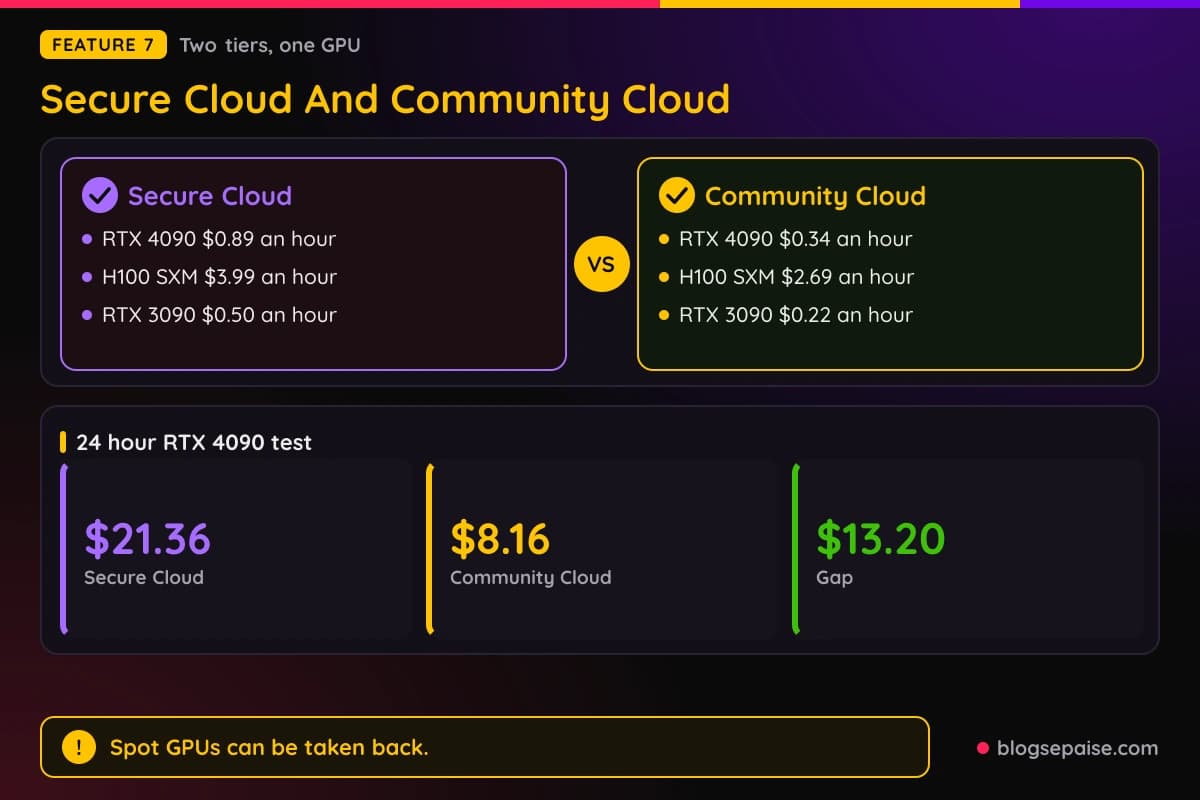
Spot GPUs add a third option. They cost less and can be taken back when demand rises, so they fit fault-tolerant and batch work and not a job that must finish in one run.
Spot availability and prices show in the console and API. Check the console for current spot prices before you launch.
Per-second billing works across both tiers. The pricing tables carry a toggle between hourly and per-second views.
Take a 24 hour RTX 4090 test. It costs $21.36 on Secure Cloud and $8.16 on Community Cloud, and the $13.20 gap adds up fast across repeated runs.
Pick Community Cloud for experiments, fine-tuning runs that can restart, and image generation. Pick Secure Cloud for client work, steady inference, and anything that handles sensitive data.
Regions help too. 31 regions cover the US, Europe, Asia, and Australia, and Enterprise accounts can choose regions to meet data residency needs.
Secure Cloud offers more than 30 GPU configurations across the 31 regions. If a card is not available in one region, check another before you give up.
8. Developer Tools And API
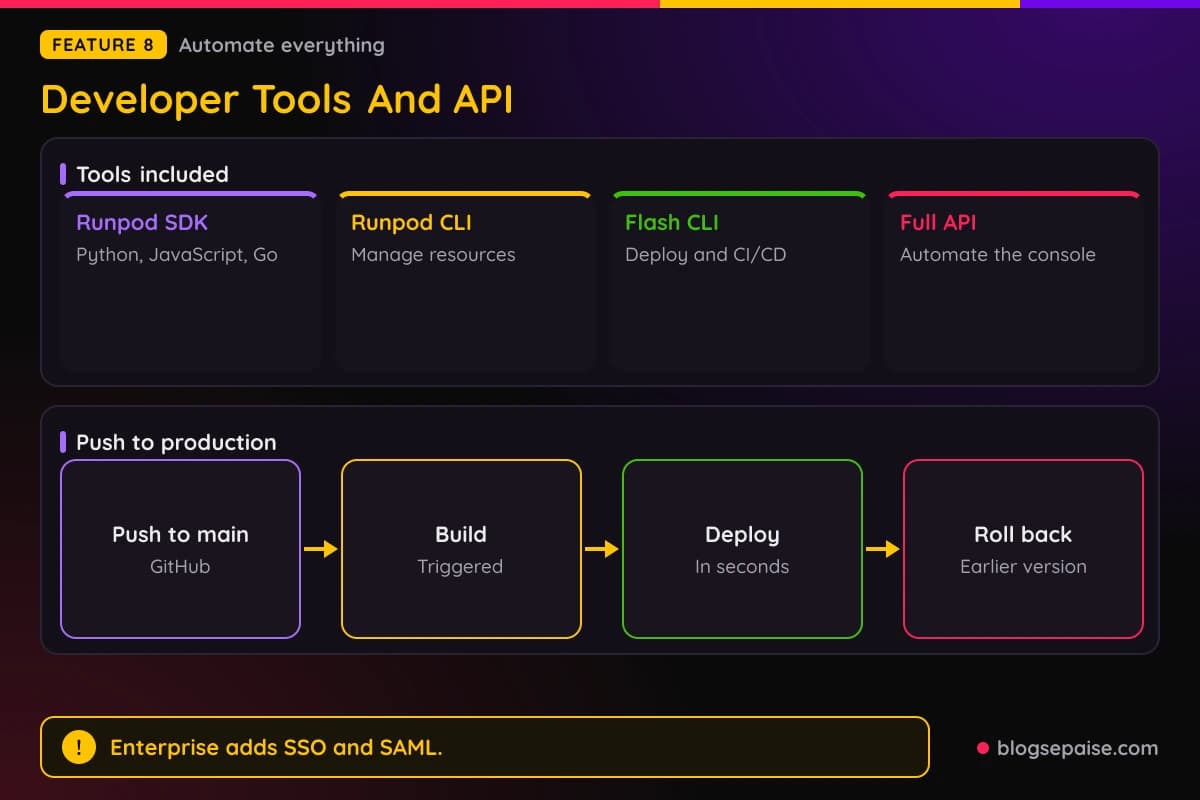
Runpod ships a set of tools for people who automate. The Runpod SDK covers Python, JavaScript, and Go, and a CLI manages resources from the terminal.
Flash CLI handles deployment and CI/CD. Full API access means anything you do in the console can run from a script.
GitHub integration is the simplest route. A push to the main branch triggers a build and a deploy, and Serverless endpoints roll back to a previous container version if a release goes wrong.
Webhooks, APIs, and custom event triggers connect Serverless endpoints to other systems. Monitoring includes real-time logs, metrics, and alerts in one place.
SSH access works on Pods, so you can work inside a running container the way you would on any Linux server. Teams on Clusters can also use their own Docker containers.
Templates cut setup time. One-click templates start pre-configured environments for inference, training, and research, with CUDA, PyTorch, and other dependencies installed.
Inference tools such as vLLM and TGI are recommended on Pods. Enterprise serving uses vLLM-based serving with PagedAttention and continuous batching, and it supports any Hugging Face model.
Axolotl works with Runpod Clusters out of the box, and SkyPilot can launch Runpod GPUs from its own command line. That makes Runpod easy to slot into tools you already use.
Enterprise accounts add SSO and SAML with Okta, Entra ID, Auth0, Google Workspace, and Duo. Four standard roles exist, which are Admin, Billing, Developer, and Basic, plus custom roles.
Resources can carry tags for team, project, or cost center. A Billing Explorer tracks spend by tag, and invoices arrive post-paid on one consolidated statement.
Organizations own resources and not individual users. A push to the main branch can build and deploy in seconds, which keeps releases tied to your Git history.
Runpod Pricing Plans
Runpod prices GPUs by usage and not by monthly plan. Every product has its own hourly rates, and billing runs per second.
Pods have two price columns. All the rates below are per hour, with Secure Cloud first and Community Cloud second.
The B300 with 288 GB costs $8.99 and $6.94. The B200 costs $7.99 and $5.98, and the H200 costs $5.29 and $3.59.
The H100 SXM costs $3.99 and $2.69, the H100 NVL costs $3.19 and $2.59, and the H100 PCIe costs $2.89 and $1.99. The A100 SXM costs $1.79 and $1.39, and the A100 PCIe costs $1.79 and $1.19.
Mid-range cards start with the L40S at $1.09 and $0.79, and the RTX 6000 Ada at $0.99 and $0.74. The RTX 5090 costs $1.19 and $0.69, and the RTX 4090 costs $0.89 and $0.34.
At the low end, the RTX 3090 costs $0.50 and $0.22, the L4 costs $0.59 and $0.44, and the RTX A5000 costs $0.27 and $0.16.
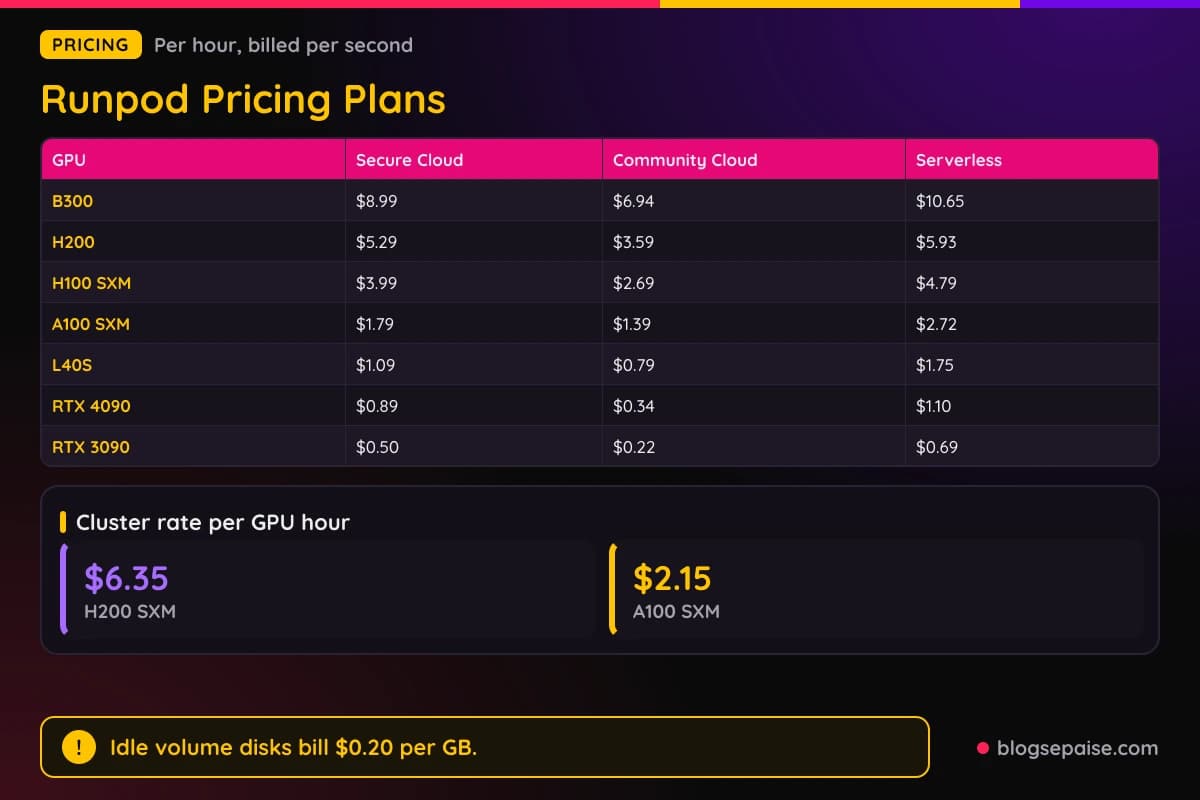
Serverless uses one hourly rate per GPU tier. The B300 costs $10.65, the B200 costs $8.64, the H200 costs $5.93, the H100 costs $4.79, and the A100 costs $2.72.
A 48 GB tier costs $1.75, the RTX 5090 costs $1.58, the RTX 4090 costs $1.10, and a 24 GB tier costs $0.69. The 16 GB tier costs $0.58 an hour.
Clusters list two rates. H200 SXM costs $6.35 per GPU hour and A100 SXM costs $2.15, with L40S, H100 SXM, and B200 set through sales.
On-demand clusters scale to 64 GPUs. Reserved Clusters carry discounts for longer terms of 1, 3, 6, 12, and 12+ months, with pricing through sales.
Storage is a separate line. Container disk costs $0.10 per GB a month, volume disk costs $0.10 running and $0.20 idle, standard network storage costs $0.07 under 1 TB and $0.05 over, and high-performance network storage costs $0.14.
Examples make the rates concrete. A 10 hour fine-tuning run on an A100 SXM costs $17.90 on Secure Cloud at $1.79 an hour, or $13.90 on Community Cloud at $1.39.
A full day on an H100 SXM costs $95.76 on Secure Cloud and $64.56 on Community Cloud. Per-second billing means a 90 second job on a $3.99 H100 SXM costs about $0.10.
Enterprise buying works on commitments. Reserved baseline capacity bills at committed rates with usage-based burst above it, volume discounts grow with larger commitments, and invoices arrive post-paid on one statement.
Hybrid Cloud uses an annual management fee plus onboarding services, set with each customer. Pricing for it is not published.
Here is the catch with the money. Idle volume disks bill double, Secure Cloud costs more than Community Cloud for every GPU, and the biggest cluster GPUs show no public price.
Serverless also costs more per hour than a Pod with the same card, which makes Pods the cheaper pick for steady, always-on work. Serverless wins when traffic is spiky and you want idle time to cost nothing.
Who Is Runpod Best Suited For
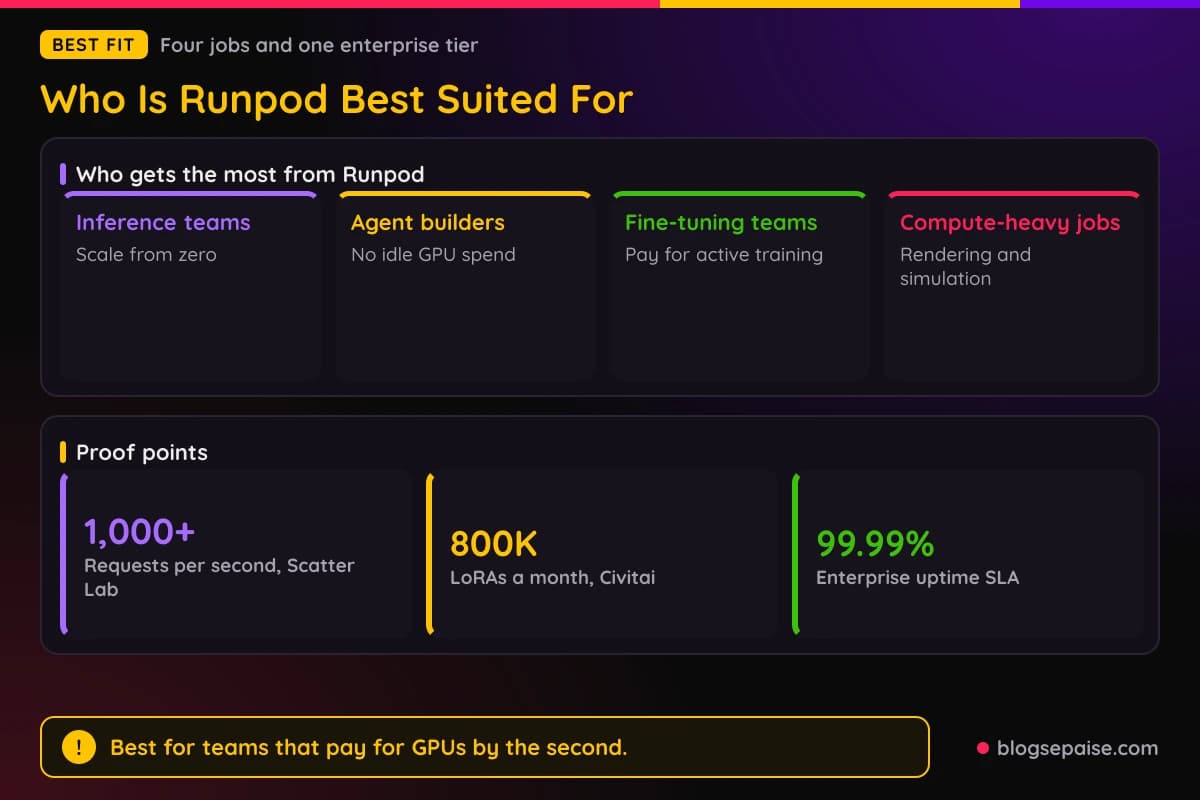
Runpod suits people who need GPUs and want to pay by the second. It fits solo developers, small AI startups, research groups, and large companies with strict security needs.
Inference teams are the clearest fit. Serverless endpoints scale from zero, and FlashBoot targets cold starts under 200ms.
Scatter Lab scaled from zero to over 1,000 requests per second on Serverless. KRNL AI reached 10K+ concurrent users and cut infrastructure costs by 65%.
Image, text, and audio generation at scale all run well on the platform. LLaMA, SDXL, Whisper, and Mixtral appear as example models.
Agent builders get pay-as-you-go compute. Agents pay only while they run, with no idle GPU spend, and GPUs are allocated dynamically during surges.
One-click runtimes and built-in integrations connect agents to outside APIs, vector databases, and retrieval systems. Multi-agent workflows run as concurrent tasks, with sub-100ms latency as the target.
Fine-tuning teams can pay for active training time only. Pre-configured environments come with dependencies installed, and a model can be served straight after training ends.
Civitai trains 800K LoRAs a month in production on Runpod. BottoDAO cut its AI art engine costs by 73%, and Glam Labs cut server costs from thousands of dollars a day to hundreds.
Compute-heavy work such as rendering, simulation, and batch processing fits too. A100 and H100 GPUs, multi-GPU runs, and cheap spot instances serve large parallel jobs, in batch or interactive sessions.
Solo developers can start on Community Cloud, where an RTX 3090 costs $0.22 an hour. A small volume and a stopped Pod keep experiments cheap.
Big companies have Enterprise. It brings ISO/IEC 27001:2022, SOC 2 Type II, and SOC 3, HIPAA and GDPR programs with BAAs and DPAs on request, and a contractual 99.99% uptime SLA.
Enterprise also adds a dedicated technical account manager, priority support, and migration help. Glam Labs cut training costs by 90% and finished its migration in a day.
Teams with their own GPU racks suit Hybrid Cloud. They keep ownership of the hardware and the data while Runpod orchestrates, and cloud capacity covers the spikes.
Who Runpod Is Not For
Runpod is not the right pick for everyone. A few groups should look elsewhere or plan around the limits.
Teams that need Kubernetes should be careful. Clusters run Slurm and do not support Kubernetes.
Anyone who expects stopped Pods to cost nothing will be surprised. Idle volume disks bill $0.20 per GB a month, and the charge continues until you delete the volume.
Buyers who want public prices for the biggest cluster GPUs hit a wall. L40S, H100 SXM, and B200 clusters show Contact Sales, and Reserved Clusters are priced through sales.
Teams that need a production-ready app store should wait. The Hub is in beta and is not production ready.
Companies that want to run Serverless on their own hardware today cannot. Hybrid Cloud is a limited early access program, and Serverless on customer hardware is still planned.
Jobs that must never be interrupted should avoid spot GPUs. Spot capacity can be taken back when demand rises.
Strict data residency needs take care with Hybrid Cloud. Overflow workloads run on Runpod infrastructure, so raise it early.
Pods bill from the moment they run, and the meter keeps going until you terminate them. Watch the first hour of any new setup.
People who only want a website host or a no-code app builder have other options. Runpod rents GPUs for AI work and does not host ordinary sites.
Runpod Alternatives
Runpod sits among a crowded set of GPU clouds. A few names come up again and again.
Vast.ai is a marketplace where hosts rent out GPUs, so prices and quality vary by host. It suits bargain hunters who can accept that spread.
Lambda is a GPU cloud aimed at AI training, with on-demand instances and clusters. It suits teams that want a simple training cloud from a single vendor.
CoreWeave builds GPU capacity for large training and inference at scale, usually under enterprise contracts. It suits big teams with large steady needs.
Modal is a serverless platform where you write Python functions and run them on GPUs. It suits Python teams who never want to touch containers.
AWS offers GPU instances and managed machine learning services inside a very large cloud. It suits companies already built on AWS that want everything under one account.
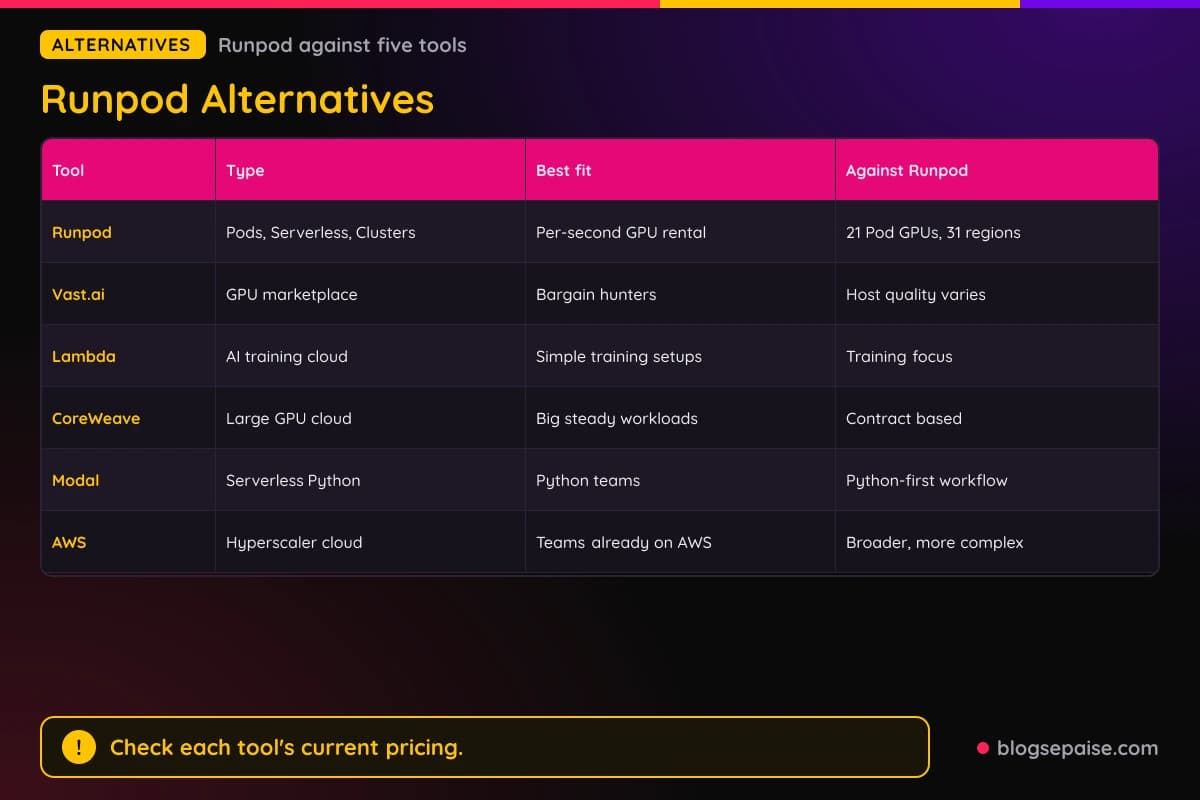
Runpod stands out for the mix of Pods, Serverless, and Clusters on one platform with per-second billing and no egress fees. Prices for the other tools change often, so check them again before you decide.
The trade-off is focus. Runpod rents GPUs for AI work, so teams that want a broad menu of cloud services under one account may still prefer a hyperscaler.
If you only need ordinary web hosting, our Verpex review covers a host built for that job. For app building without GPUs, see our Emergent review.
Runpod Use Cases
Five jobs show where Runpod earns its keep. Each one maps to a product page.
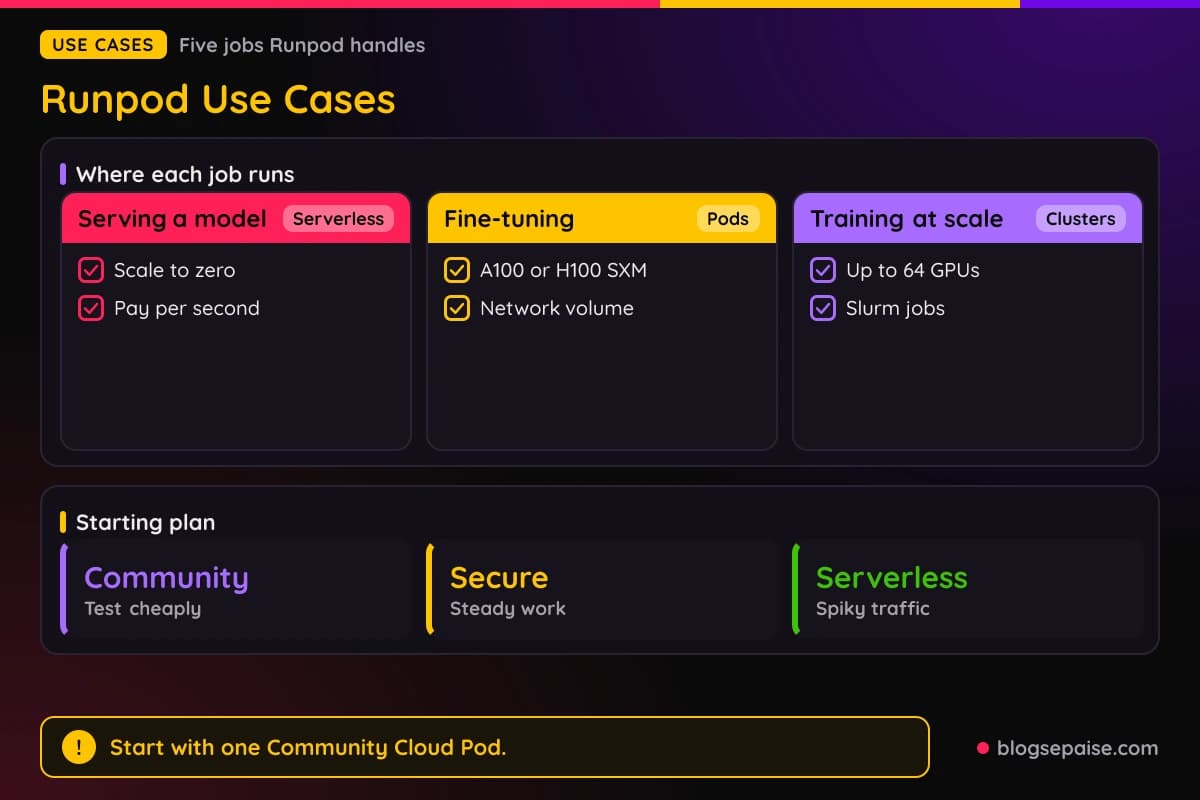
Serving a model through an API is the first. You package a model with a handler, deploy it to Serverless, and let the endpoint scale to zero when no one calls it.
Public endpoints cover quick tests. The list has 14 ready-to-use models, so you can call FLUX.1 Schnell or Qwen3 32B AWQ before deploying anything of your own.
Fine-tuning a model is the second. A Pod with an A100 or H100 SXM and a network volume runs the training, and per-second billing stops when the run ends.
Running AI agents is the third. Always-on or event-driven agents pay only while they run, and Serverless handles surges with dynamic GPU allocation.
Batch rendering and simulation is the fourth. Spot GPUs cut the cost of large parallel jobs, and the same Pod can serve interactive sessions when you need them.
Training across many GPUs is the fifth. A cluster of up to 64 GPUs with InfiniBand networking and Slurm handles multi-node runs, and Reserved Clusters scale far beyond that.
A simple starting plan keeps costs low. Test on a Community Cloud Pod, move steady work to Secure Cloud, and use Serverless for anything with spiky traffic.
Ownership of hardware changes the picture. A research center with its own GPUs can use Hybrid Cloud to give students self-service access, with cloud overflow when the queue fills.
Final Thoughts On Runpod
Runpod is a strong pick for anyone who wants GPUs without long contracts. Pods start in under 30 seconds, billing runs per second, and egress costs nothing.
Prices are low where it counts. A Community Cloud RTX 4090 costs $0.34 an hour, and an H100 SXM costs $2.69 on Community Cloud and $3.99 on Secure Cloud.
The product line is broad. Pods cover everyday work, Serverless covers spiky traffic with scale to zero, and Clusters reach 64 GPUs on demand and 10,000+ through sales.
The catch is in the fine print. Idle volumes cost $0.20 per GB a month, Hub is in beta, Hybrid Cloud is limited early access, and the largest cluster GPUs have no public price.
Serverless also costs more per hour than a Pod, and spot GPUs can be taken back. Plan for those limits before you build around them.
Enterprise buyers get a different deal. SOC 2 Type II, ISO/IEC 27001:2022, SSO and SAML, and a contractual 99.99% uptime SLA come with an agreement, plus a dedicated technical account manager and migration help.
Small teams do not need any of that to get value. A single Pod with a clear budget and a habit of deleting what you no longer use covers most early projects.
Start with one Community Cloud Pod and a small volume. Delete the volume when you finish, and move to Serverless or Clusters once the workload proves itself.
You can browse more write-ups on our software reviews hub if you want to compare tools side by side.
Runpod FAQ
1. What Is Runpod?
Runpod is a cloud platform that rents GPUs for AI work. It offers Pods, Serverless endpoints, Clusters, a Hub of ready repos, and Hybrid Cloud for hardware you own.
2. How Much Does Runpod Cost?
Runpod bills by usage. Community Cloud Pods start at $0.16 an hour, an H100 SXM costs $2.69 or $3.99 an hour, and Serverless rates run from $0.58 to $10.65 an hour.
3. Does Runpod Bill Per Second?
Yes. Pods, Serverless, and Clusters all bill per second, and Serverless rounds up to the nearest second.
4. What Is The Difference Between Secure Cloud And Community Cloud?
Secure Cloud runs in T3 and T4 data centers with tenant isolation. Community Cloud costs less for every GPU, such as $0.34 against $0.89 for an RTX 4090.
5. What Is Runpod Serverless?
Serverless turns a container into an autoscaling GPU endpoint. Flex workers scale to zero when idle, active workers stay pre-warmed, and FlashBoot targets cold starts under 200ms.
6. How Big Can A Runpod Cluster Get?
On-demand clusters reach 8 nodes and 64 GPUs after a spend limit increase request. Reserved Clusters scale to 10,000+ GPUs through sales.
7. Does Runpod Charge For Data Transfer?
No. Runpod charges no ingress or egress fees.
Storage still costs money, and idle volume disks bill $0.20 per GB a month.
8. Is Runpod Hub Ready For Production?
No. The Hub is in beta and is not production ready, and feedback goes through Discord.
9. Is Runpod Secure For Business Use?
Enterprise accounts have ISO/IEC 27001:2022 certification, a SOC 2 Type II audit, and a SOC 3 examination. HIPAA and GDPR programs, SSO and SAML, and a 99.99% uptime SLA are part of Enterprise agreements.
10. Can I Use My Own Hardware With Runpod?
Yes, through Hybrid Cloud. You install a host agent, Runpod orchestrates your GPUs, and overflow goes to Runpod cloud, though access is limited early access.
11. Does Runpod Support Kubernetes?
Clusters do not support Kubernetes. They use Slurm with the sinfo, sbatch, and srun commands.
12. Who Is Runpod Best For?
AI developers who need GPUs by the second, including inference teams, agent builders, fine-tuning teams, and companies with batch jobs. Enterprise buyers get compliance and an uptime SLA.
13. Does Runpod Offer Spot GPUs?
Yes. Spot GPUs cost less and can be taken back when demand rises, so they fit fault-tolerant and batch work.
14. Which Languages Does Runpod Serverless Support?
Python, Node.js, Go, Rust, and C++ run in containers, along with PyTorch, TensorFlow, JAX, and ONNX. You can also bring a custom runtime through Docker.
15. Where Are Runpod Regions?
31 regions span the US, Europe, Asia, and Australia. Enterprise accounts can choose regions to meet data residency needs.
16. How Do I Get Started With Runpod?
Pick a GPU, a region, and a container image in the console, then click Deploy. No credit card is needed just to explore.