Vista Social Review (2026): Social Media Management Pricing, Plans, Features, And The Catch
Vista Social is a social media management platform that handles posting, replies, reports, reviews, and brand monitoring from one dashboard. Teams use it to run many profiles without jumping between apps.
It publishes to Instagram, Facebook, X, LinkedIn, TikTok, YouTube, Pinterest, Threads, Reddit, Snapchat, and Tumblr. A shared calendar, approval flows, and a mobile app for iOS and Android come with it.
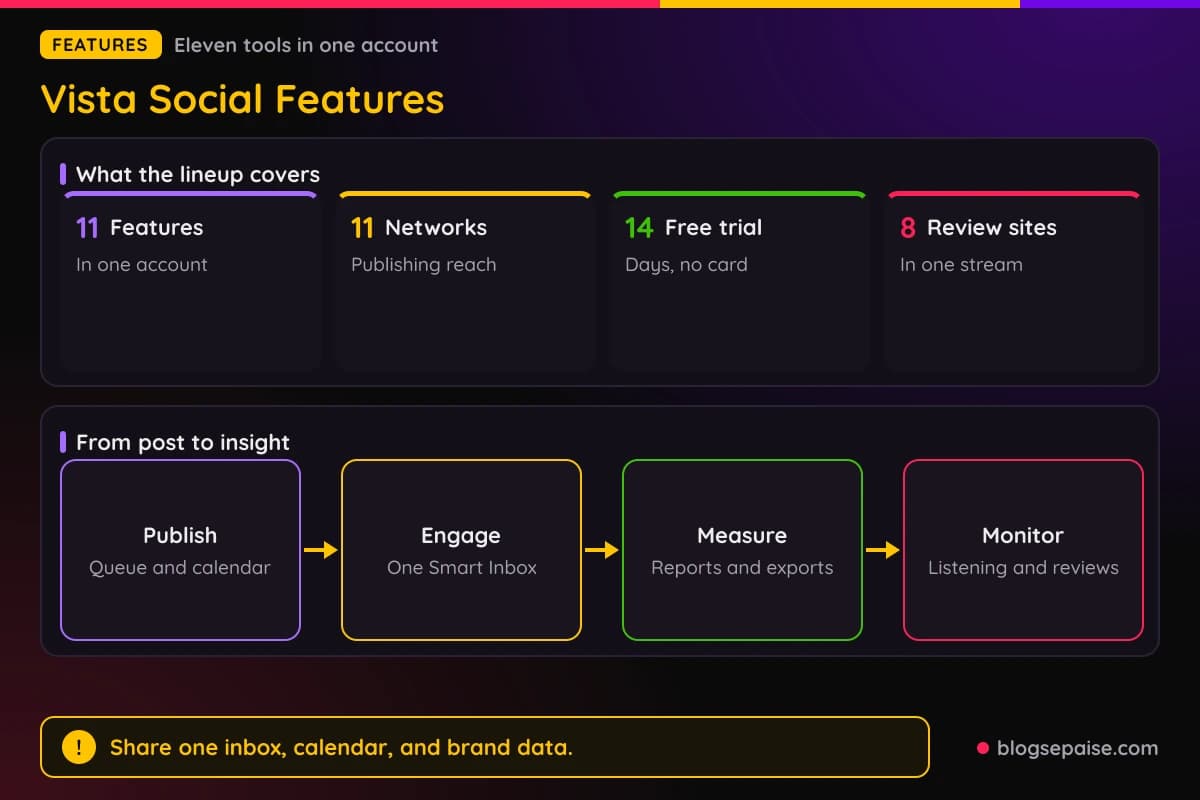
The platform has 11 main features, from Ask Vista, an AI team that answers in Slack and Microsoft Teams, to Vista Work for project boards. Vista Page, DM Automations, and Employee Advocacy sit in the same account.
Pricing starts at $99 a month for Professional, or about $79 a month billed annually at $950 a year. Advanced costs $199 a month, Scale costs $449 a month, and Enterprise is custom.
Professional includes 15 social profiles and 2 users. Professional, Advanced, and Scale each start with a 14-day free trial and need no credit card.
Vista Social carries a #1 easiest to use ranking on G2 and a #1 ranked social media tool ranking on Capterra. It is GDPR compliant, SOC 2 compliant, and CCPA ready.
Add-ons cover X at $29 a month, Listening from $75 a month, and Employee Advocacy at $199 a month. Registered nonprofits can get up to 50% off Professional and Advanced.
Vista Social also offers solution pages for agencies, enterprises, small businesses, multi location brands, creators, education, nonprofits, and white label use.
Disclosure: Some of the links I share might be affiliate links. If you click on one and make a purchase, I may earn a small commission as a thank you. But don’t worry, it won’t cost you anything extra. I only recommend stuff I genuinely believe in. Your support helps me keep creating awesome content. You can read my full affiliate disclosure in my disclaimer page.
If you want to save a lot of hours searching for high-paying affiliate programs, check out our exclusive list of 2500+ affiliate programs. You’ll find all the information about the programs inside the list. This list is perfect for affiliate bloggers and influencers.
Vista Social Features
Vista Social packs 11 features into one account. Most of them share the same inbox, calendar, and brand data.
Every plan starts from a base of unlimited post scheduling, a calendar view, a media library, and draft posts. Bulk scheduling and smart scheduling come on Professional too.
Profiles are the unit that gets counted. Professional allows 15, Advanced allows 30, Scale allows 70, and Enterprise allows unlimited.
Each Vista Page counts as a profile, so link in bio pages use up slots. Plan for that before you connect everything.
Users are capped as well, with 2 on Professional, 3 on Advanced, 4 on Scale, and 8 or more on Enterprise. Extra users are available on Scale and Enterprise.
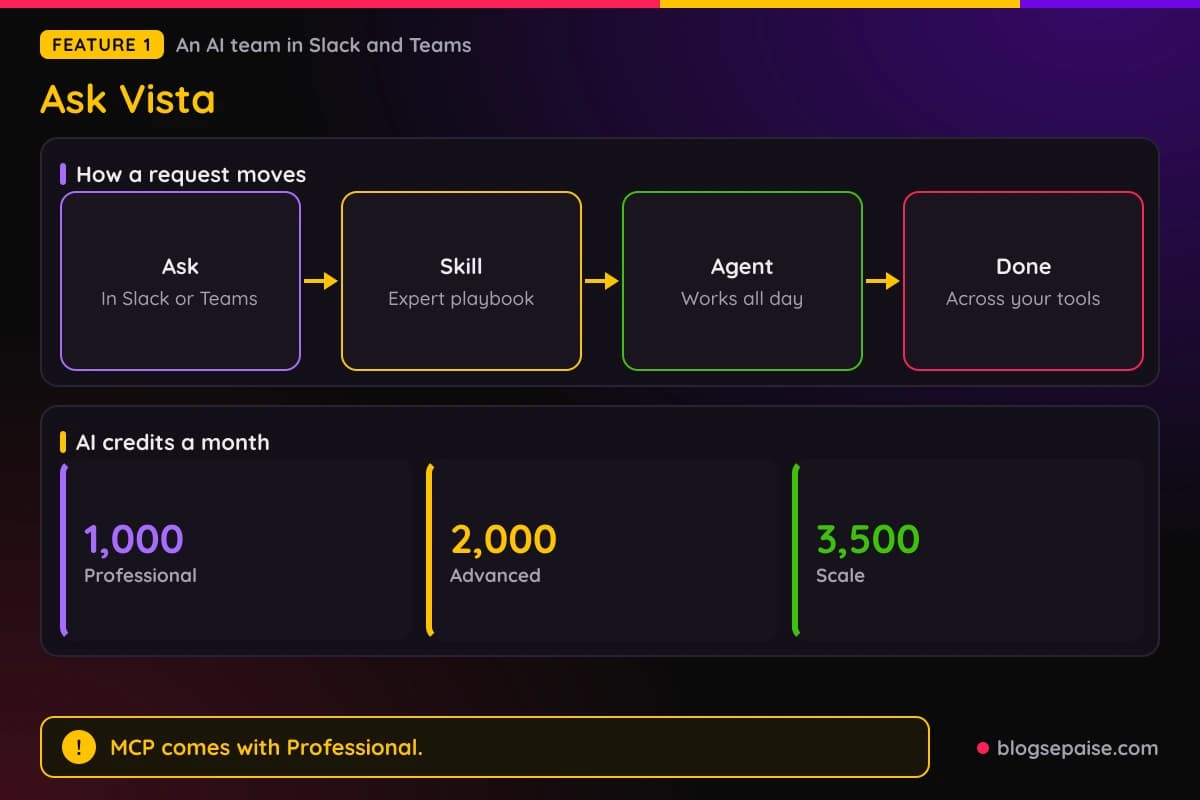
AI credits pay for Ask Vista and the writing tools. Professional gives 1,000 a month, Advanced gives 2,000, Scale gives 3,500, and Enterprise is unlimited.
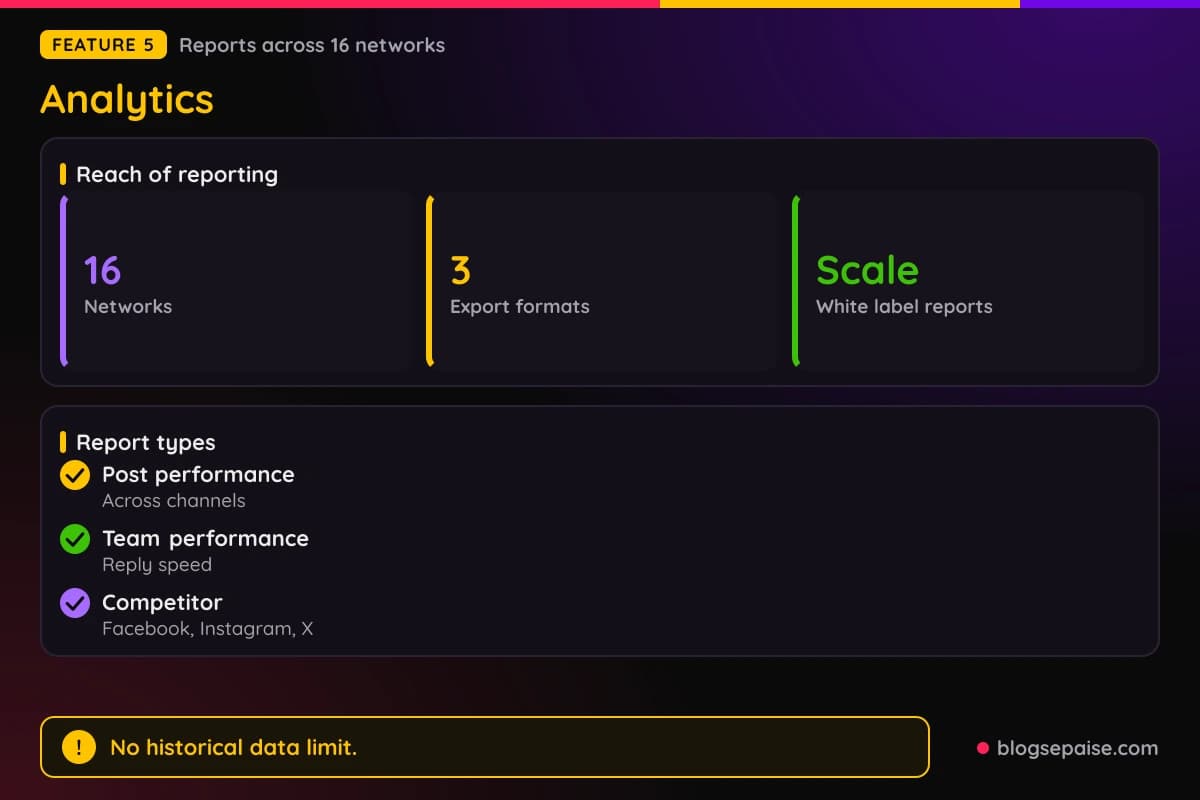
Reports keep every old number, because there is no historical data limit while the account is active.
1. Ask Vista
Ask Vista is the AI team inside Vista Social. It answers in Slack and Microsoft Teams, so people can ask for work where they already chat.
Agents run around the clock, and Vista Social describes the setup as a 24/7 AI team. A single request can run across connected tools, such as Instagram, Slack, and ClickUp.
Skills package expert playbooks into single commands. Instead of writing a long prompt every time, you run a skill.
Ask Vista can reply to comments and messages in your brand voice at any hour. It uses your business information to do it.
It can also build a DM automation from a plain description. That ability comes with Advanced, Scale, and Enterprise.
Professional includes Ask Vista with MCP, and MCP appears in the integrations menu. AI credits pay for the work, with 1,000 on Professional and 3,500 on Scale.
Security matches the rest of the platform, with GDPR compliance, SOC 2 compliance, and CCPA readiness. Usage numbers for Ask Vista itself are not published.
Because Ask Vista works inside chat apps, teammates who never open the dashboard can still use it. Skills keep the requests short and repeatable.
2. Brain
Brain trains the AI on your brand's knowledge, voice, and rules. Replies and drafts then stay accurate and on brand.
Setup has four steps. You add your data, set your rules, let Vista Social apply it, and keep it current.
Data covers products, services, and FAQs. Vista Social says the upload takes seconds and the setup takes minutes, not months.
Rules cover brand voice, do's and don'ts, and specific guidelines. You also set when a human should step in.
One shared knowledge base feeds Ideas, Publishing, Inbox, Automations, and Vista Page. Content ideas then rely on your real products, promotions, and campaigns.
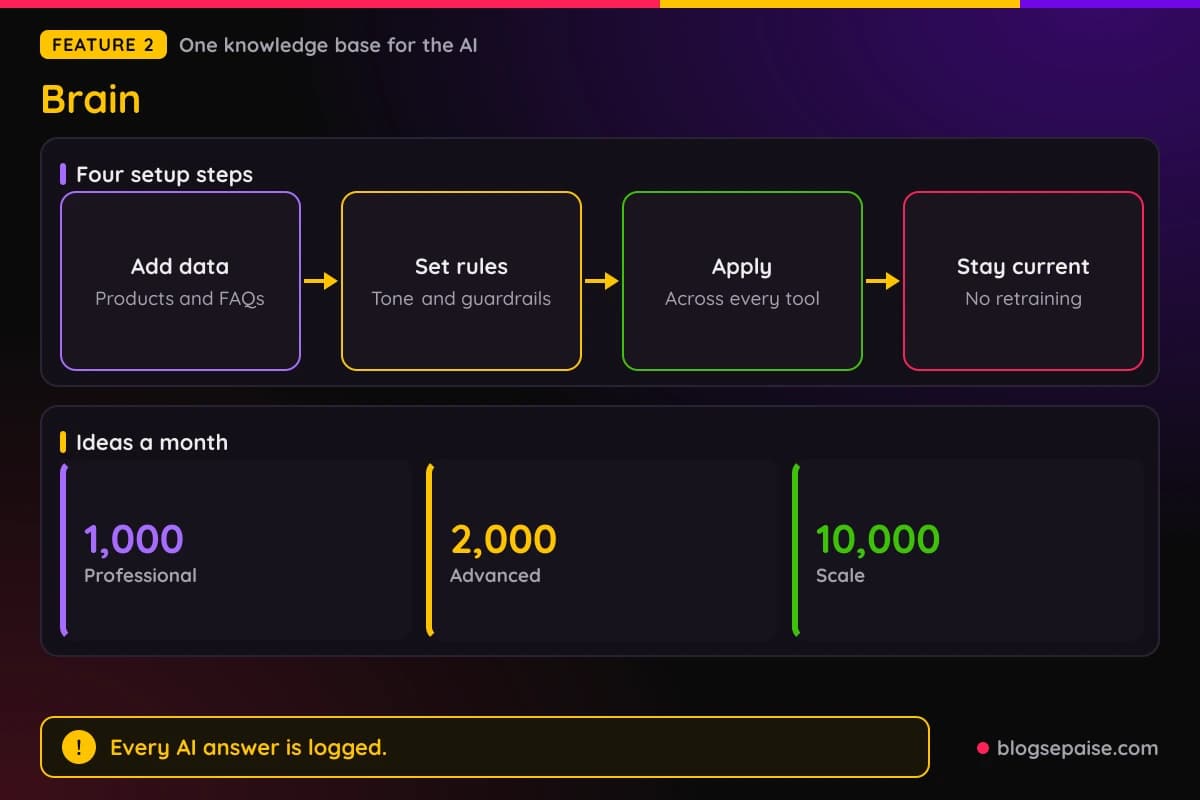
Every response is logged with the question, the answer, and the source. A manager can check why the AI said something.
The AI updates when your policies change, with no manual retraining. Ideas are capped by plan, with 1,000 on Professional, 2,000 on Advanced, and 10,000 on Scale.
Advanced adds AI Training and Knowledge, and Scale adds Premium AI Training with escalations, guidance, and Zendesk sync. Supported file formats and data caps are not published.
Teams that answer the same questions every day gain the most from Brain. A good FAQ document makes the replies better.
3. Publishing
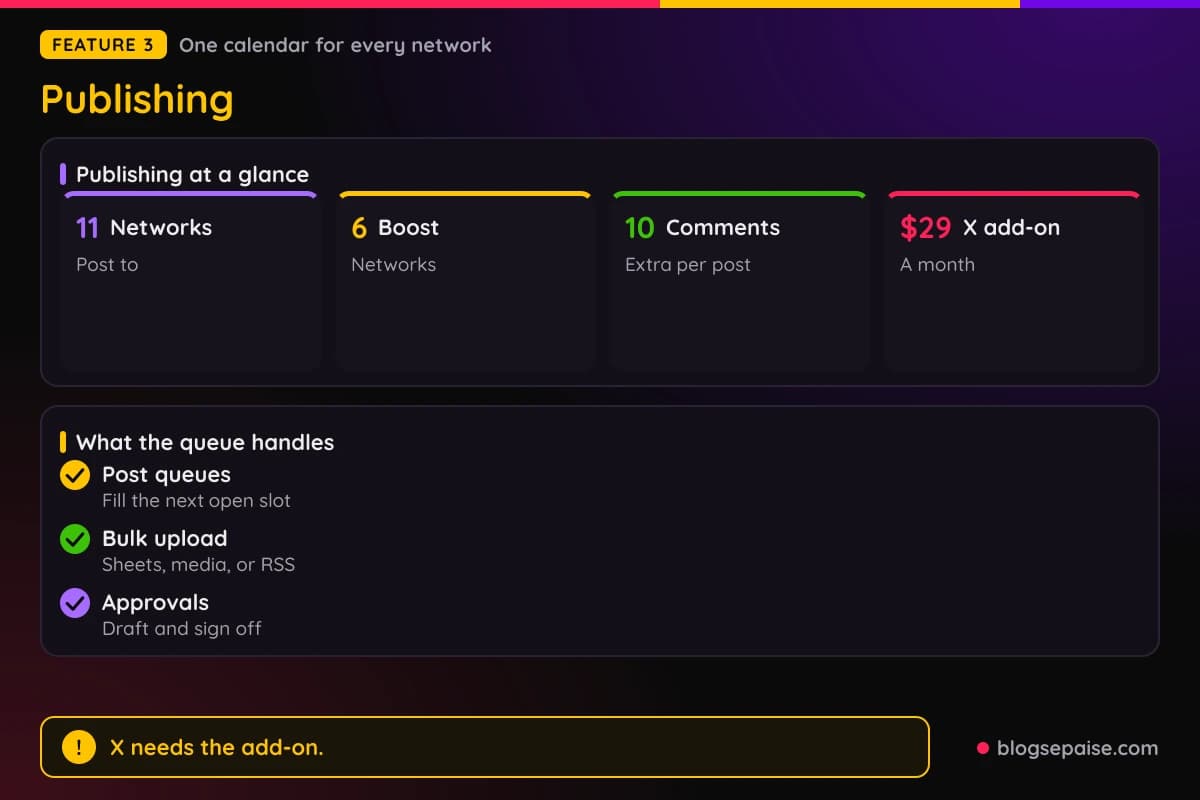
Publishing is the core of the platform. It posts to 11 networks: Instagram, Facebook, X, LinkedIn, TikTok, YouTube, Pinterest, Threads, Reddit, Snapchat, and Tumblr.
You set a posting schedule for each profile and then add posts to a queue. Each post fills the next open slot, and a profile can have more than one schedule.
Optimal time analysis picks posting times for each profile. Post queues let you set fixed times instead.
Bulk scheduling accepts spreadsheets, images, videos, or an RSS feed. A shared content calendar shows single posts and whole campaigns.
Approvals work through draft posts, review steps, and permissions on who can publish. Phones and desktops get a notice when content needs a sign-off.
An AI Assistant writes captions, taglines, and posts, and it can translate or match your brand voice. The media library holds photos, videos, and user generated content, with Canva built in.
Boosting works on 6 networks: Facebook, Instagram, LinkedIn, Pinterest, TikTok, and X. You also get trending audio, up to 10 extra comments per post, custom video thumbnails, and Google Analytics URL tracking.
A free browser extension works in Chrome and Firefox, and Zapier connects the rest. X publishing needs the add-on at $29 a month.
Posting to 11 networks from one calendar saves a lot of tab switching. The mobile app carries the calendar, the social inbox, and reports.
4. Engagement
Engagement collects comments, DMs, shares, mentions, and reviews in one Smart Inbox. Every connected network and profile feeds the same stream.
Conversation View groups all messages from one person. You see the full history before you reply.
Replies work for Facebook and Instagram comments and messages. TikTok, YouTube, and LinkedIn comments are covered too.
You can like, dislike, delete, and block from the inbox. Messages can be tagged for strategies, goals, or workflows.
Work can be assigned to team members, and internal notes let people mention each other inside a conversation. Efficiency shows up as tasks assigned and tasks completed.
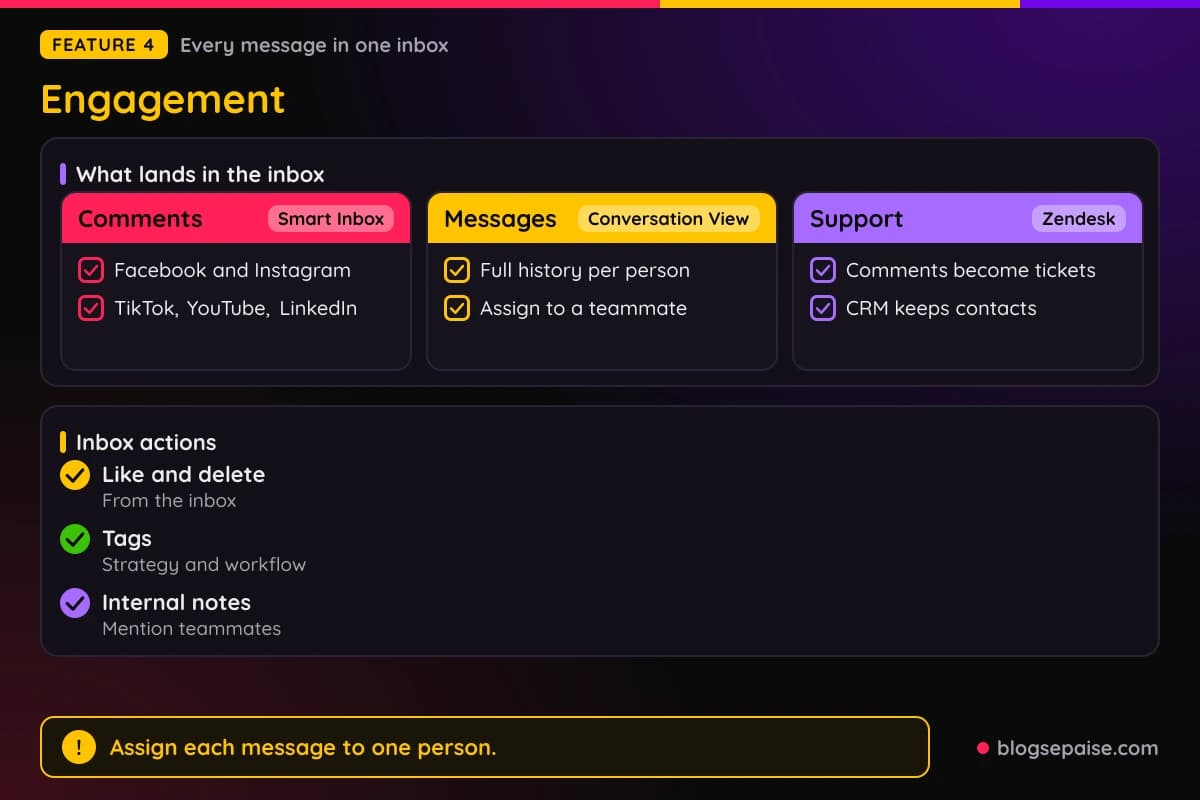
A built-in CRM stores contact details for everyone who interacts with your profiles. A Zendesk integration turns comments and messages into support tickets.
Ask Vista can answer around the clock in your brand voice, and DM Automations handle the repeat questions. The inbox works on desktop and mobile.
Sentiment detection comes with Enterprise. Message caps and saved reply tools are not published.
Agencies can keep client conversations apart by profile. Assigning a message to a teammate stops two people from answering the same comment.
5. Analytics
Analytics covers 16 networks in one dashboard: Facebook, Instagram, Google Business, TikTok, X, LinkedIn, Pinterest, Reddit, YouTube, Threads, Bluesky, Snapchat, Yelp, Trustpilot, Tripadvisor, and OpenTable.
X analytics is an add-on at $29 a month. Reports start with a social profile performance view of growth across every connected profile.
A post performance report compares posts across channels. A team performance report tracks how fast and how often users reply and finish tasks.
A competitor report benchmarks other brands against yours. Competitor analytics cover Facebook, Instagram, and X profiles.
Sentiment analysis labels messages, comments, mentions, and reviews as positive, negative, neutral, or mixed. A review report tracks Facebook, Google Business, Yelp, TripAdvisor, OpenTable, and Trustpilot.
Custom reports let you pick sections, add cover pages, and add branding. Templates can be reused, and exports come in 3 formats: PDF, CSV, and Excel.
Reports can run on a schedule and go to chosen recipients. White label reports with your own logo, title, and description come with Scale.
Advanced adds advanced reporting, and Enterprise adds industry benchmarking. Reporting also works in the mobile app.
Agencies can send branded PDFs to clients each month. Scheduled delivery means the report arrives without anyone remembering to send it.
6. Listening
Listening tracks brand, competitor, and category conversations. A listener can be internal, covering your own profiles, or external, covering the open web.
Each listener can be active, paused, or archived. More than 10 sources feed it, including X, Facebook, Instagram, YouTube, Reddit, Google Search and Trends, news outlets, and review sites.
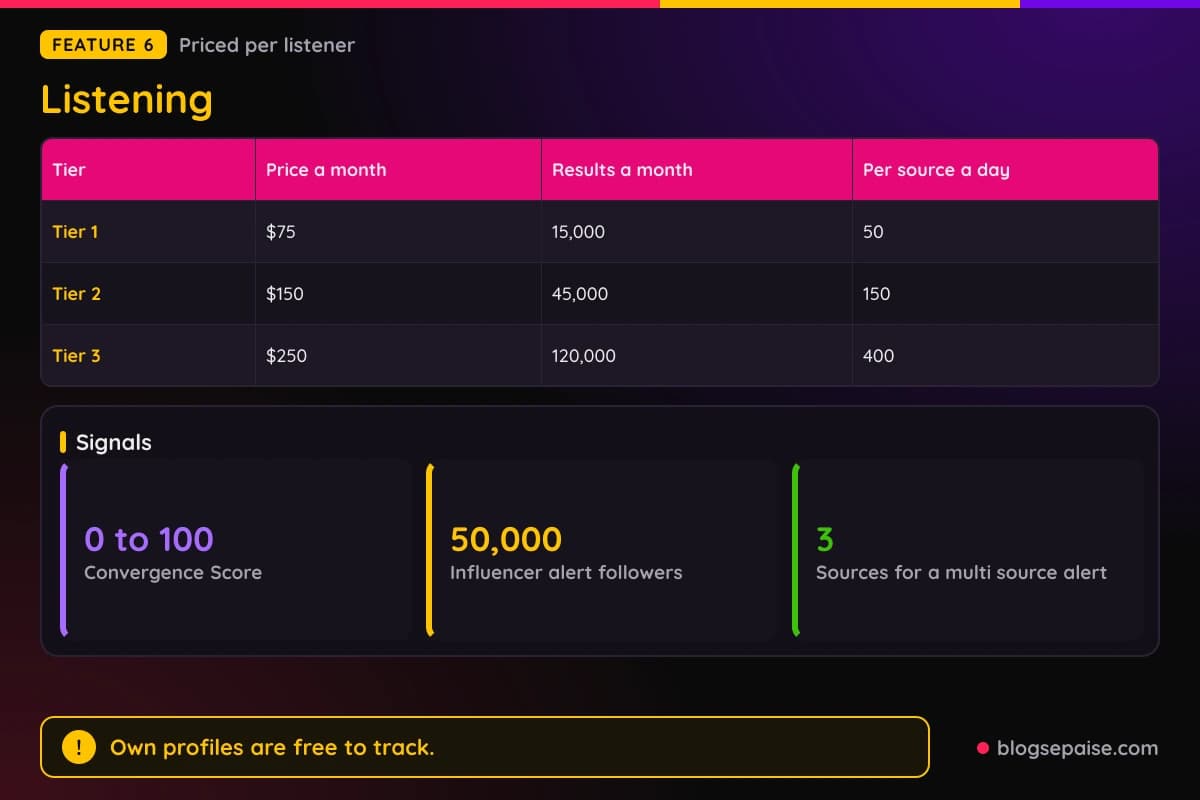
Duplicate stories merge across sources. Each story gets a Convergence Score from 0 to 100, based on source count, recency, and volume.
Sentiment is topic aware and filters out unrelated namesakes. It covers many regions and languages.
Six alert types exist: volume spike, sentiment dip, new trending theme, multi source story, influencer hit, and crisis keyword. The influencer alert fires at 50,000 followers, and the multi source alert needs at least 3 sources.
Alerts go out by email, in app, and Slack, and a cooldown stops repeats. Webhook delivery and daily digests are coming soon.
Pricing is per listener. Tier 1 costs $75 a month for 15,000 results, Tier 2 costs $150 for 45,000, and Tier 3 costs $250 for 120,000.
Daily caps per source are 50, 150, and 400 results across the three tiers. Tracking your own profiles is free.
Reports end in a shareable link, a PDF, or a CSV zip. Trend cards include a Create Post button.
Crisis keyword alerts use whole word matching on 2 keywords. That helps a brand catch a problem before it spreads.
7. Review Management
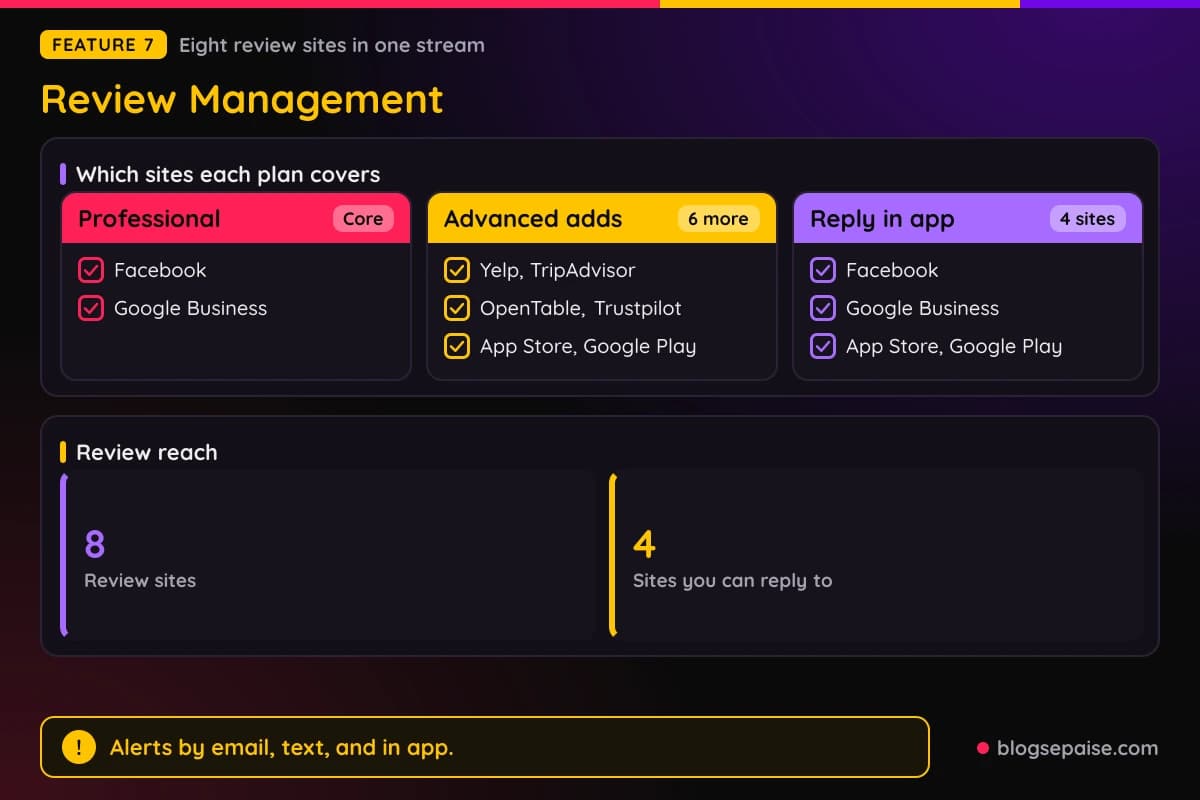
Review Management pulls reviews from 8 sites into one stream: Facebook, Google Business, Yelp, TripAdvisor, OpenTable, Trustpilot, the Apple App Store, and Google Play.
Which sites you get depends on the plan. Professional covers Facebook and Google Business, and Advanced adds 6 more: Yelp, TripAdvisor, OpenTable, Trustpilot, the App Store, and Google Play.
You can reply from the dashboard to 4 sites: Facebook, Google Business, the App Store, and Google Play. Other sites send you to that network's own response page.
New review alerts arrive by email, text, and in app. You can sort, filter, and save custom views.
Review analytics export to PDF or go out on a schedule. Reports cover review trends and the reviews that matter most.
Multi location brands read every location's reviews in one inbox, and the AI can draft review responses there. Review request tools and widgets are not described.
Restaurants can watch OpenTable and Yelp, and app makers can watch the App Store and Google Play. Everything lands in one place.
Reviews also show up in the analytics section as a review report. Sentiment labels sort them into positive, negative, neutral, or mixed.
8. DM Automations
DM Automations reply to DMs, comments, mentions, and reviews on their own. The classic start is a comment with a chosen keyword on a post or Reel.
The example keyword is FREEBIE. A person comments it and gets a DM with a link or an offer.
Setup has three steps. Choose the trigger, customize the response, and let it run.
Three build paths exist. Start from a Ready to Go template, set each trigger by hand, or describe the goal and let Ask Vista build it.
Lead capture can share a link, ask for an email address, or collect details inside the chat. Contact details from interested buyers go to your team.
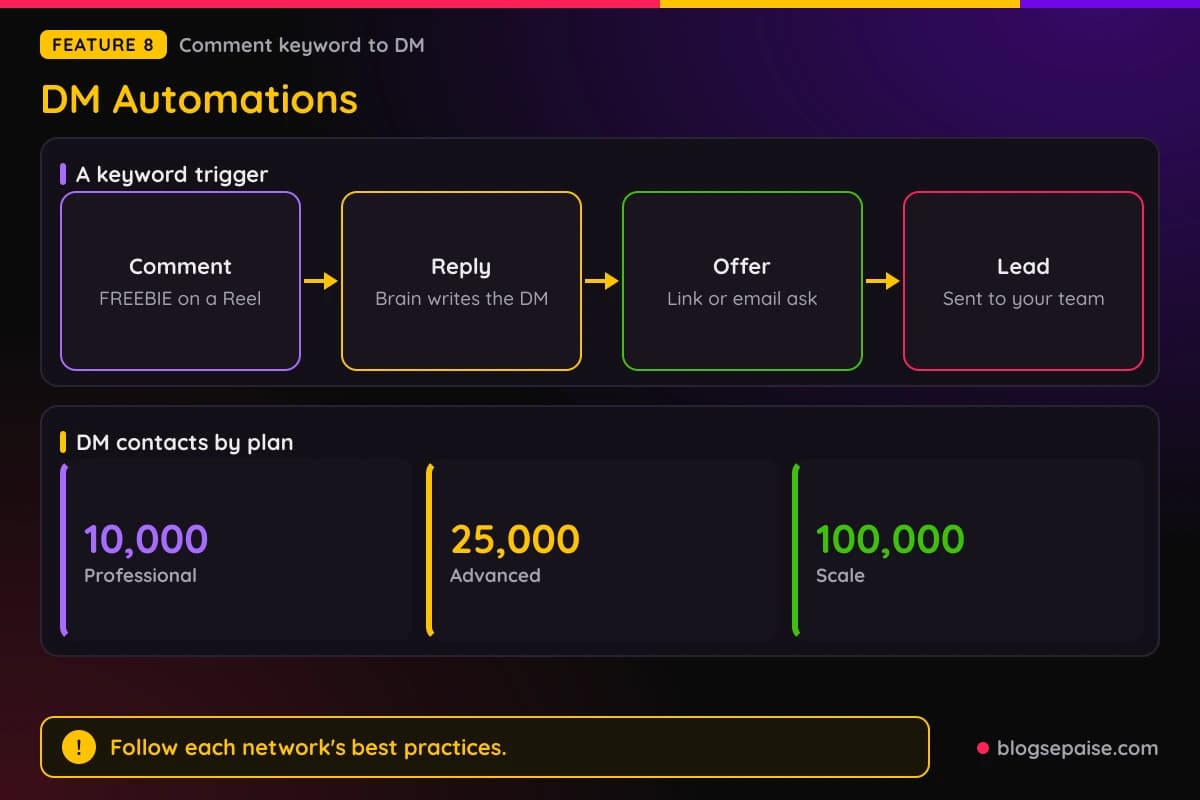
Replies come from Brain, which uses your docs, FAQs, and brand guidelines. You set the tone, including slang or humor.
DM contacts are capped by plan, with 10,000 on Professional, 25,000 on Advanced, and 100,000 on Scale. Advanced adds advanced DM automations.
Automations run through each network's official API, and Vista Social is an approved app on Meta and TikTok. It cannot promise how a network treats any one account, so follow the best practices.
Contact details collected in a chat go to your team for follow up. A creator example in the product shows posts going from 50 to over 800 comments.
9. Employee Advocacy
Employee Advocacy lets staff share, repost, like, and comment on brand content. The company can then measure the reach it earns.
Published posts can be opened for resharing, or you can write advocacy only posts. Employees act from desktop or mobile.
Staff share pre approved copy, which keeps messages consistent. Content can go to specific employee groups through Slack or email.
Employees can follow topics for their roles and suggest content. A built-in AI writer drafts captions they can share in one click.
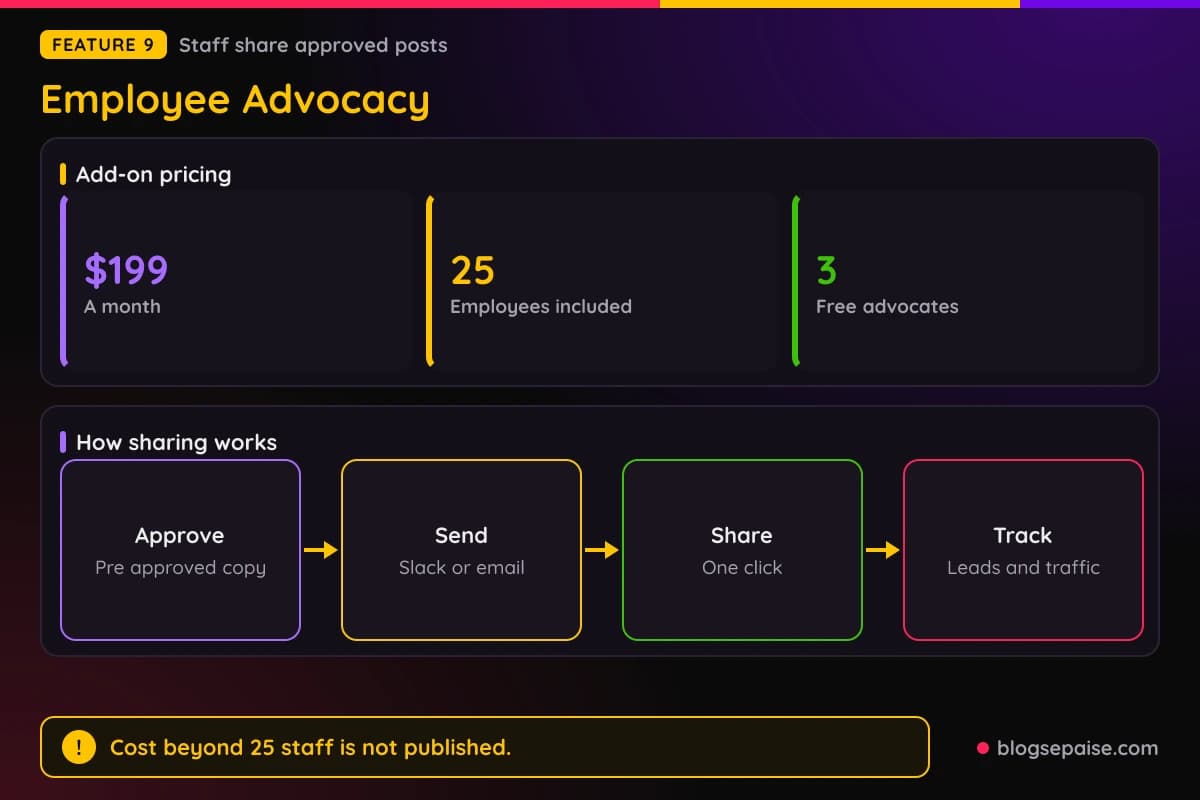
Results can tie to leads, web traffic, and event registrations. Earned Media Value estimates the ad spend you saved.
Pricing is an add-on at $199 a month for 25 employees and unlimited posts. It is free to try with 3 advocates.
Vista Social reports that 92% of an employee's followers are new to the brand. The cost beyond 25 employees is not published.
Advocacy comes with the planning, scheduling, inbox, analytics, and reputation tools, plus Optimal Send Times and the AI Assistant. Staff do not need a second app.
10. Vista Page
Vista Page is a mobile friendly mini website and link in bio tool. It turns your social profiles into clickable, shoppable pages.
Uses include sending traffic, taking payments, capturing leads, booking appointments, and tracking clicks.
Blocks cover videos, calendars, images, forms, and payments. Typeform blocks handle signups and surveys, and a Shopify block embeds a storefront.
Themes can be adjusted to your brand. The number of themes is not published.
Addresses default to yourname.vista.page. You can use your own custom domain, and SSL comes with it.
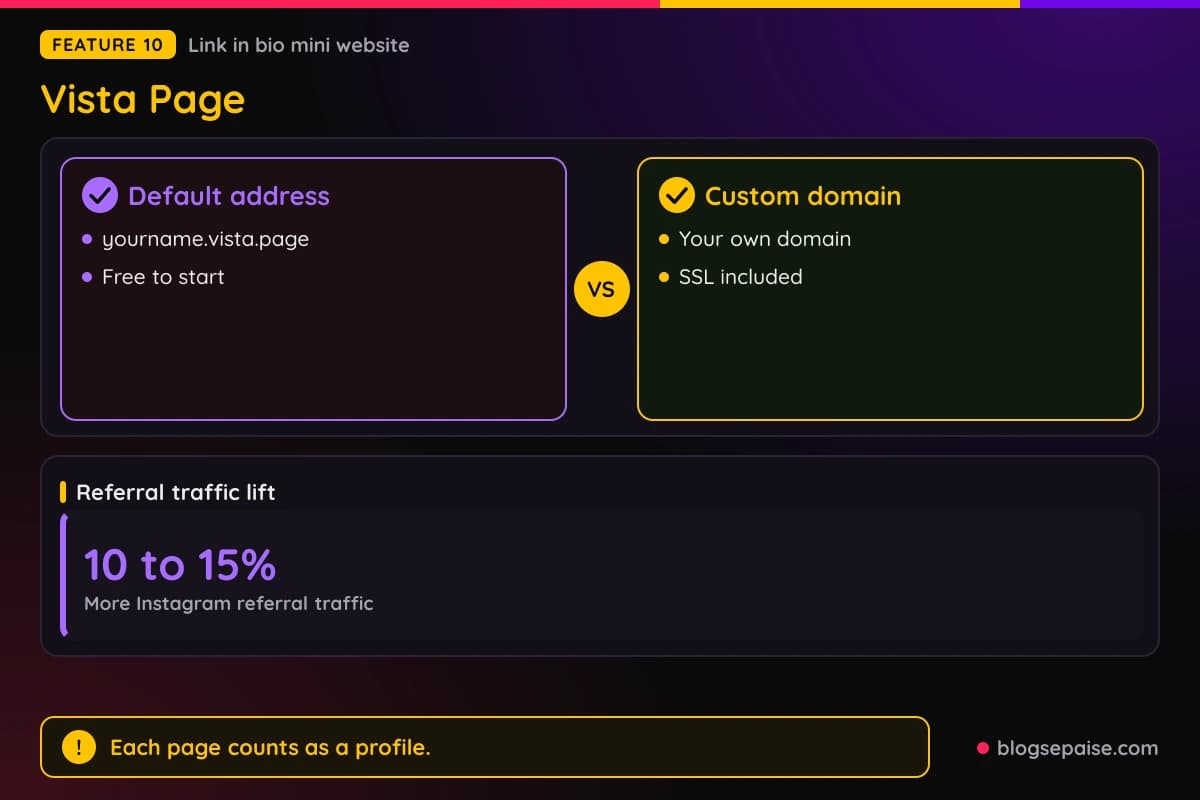
Reporting covers page views and link clicks, and Google Analytics connects for more detail. Calendly, YouTube, and Google Tag Manager are named integrations.
There is no limit on how many Vista Pages you make, but each one counts as a profile. You can schedule posts to a Vista Page like any other profile.
Advanced adds custom domains and Google Tag Manager. Vista Social cites a Parse.ly study that found a link in bio adds 10 to 15% more Instagram referral traffic.
11. Vista Work
Vista Work is project management built into the platform. Campaigns are planned, produced, launched, and measured in one place.
A project board groups tasks by status. It also shows which posts each task belongs to.
Because it lives in the same account, a task can sit beside the posts it belongs to. That cuts the back and forth between a task app and a calendar.
Agencies and in house teams are the likely users, since boards help when many people touch one campaign.
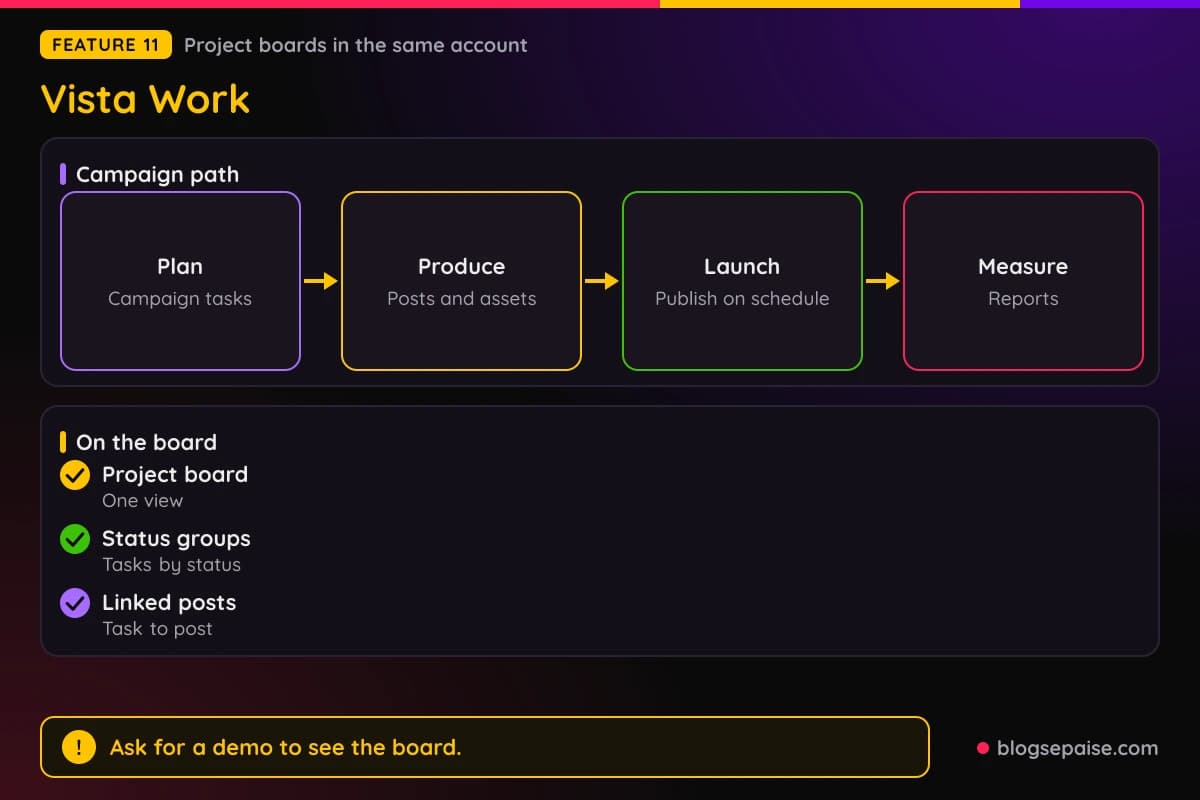
Vista Social publishes little detail on Vista Work. Task features beyond status grouping, client portals, and usage limits are not described.
Ask for a demo or start the 14-day trial to see the board before you rely on it. A separate price for Vista Work is not published.
Vista Social Pricing Plans
Vista Social has four plans: Professional, Advanced, Scale, and Enterprise. Yearly billing is a one time upfront payment and saves 20% against monthly.
Professional costs $99 a month, or about $79 a month billed annually at $950 a year. It includes 15 social profiles, 2 users, 10,000 DM contacts, 1,000 AI credits, and 1,000 ideas.
Professional support is by email. It covers unlimited post scheduling, a calendar, a media library, bulk and smart scheduling, the social inbox, and Vista Page.
Advanced costs $199 a month, or about $159 a month billed annually at $1,910 a year. It includes 30 profiles, 3 users, 25,000 DM contacts, 2,000 AI credits, and 2,000 ideas.
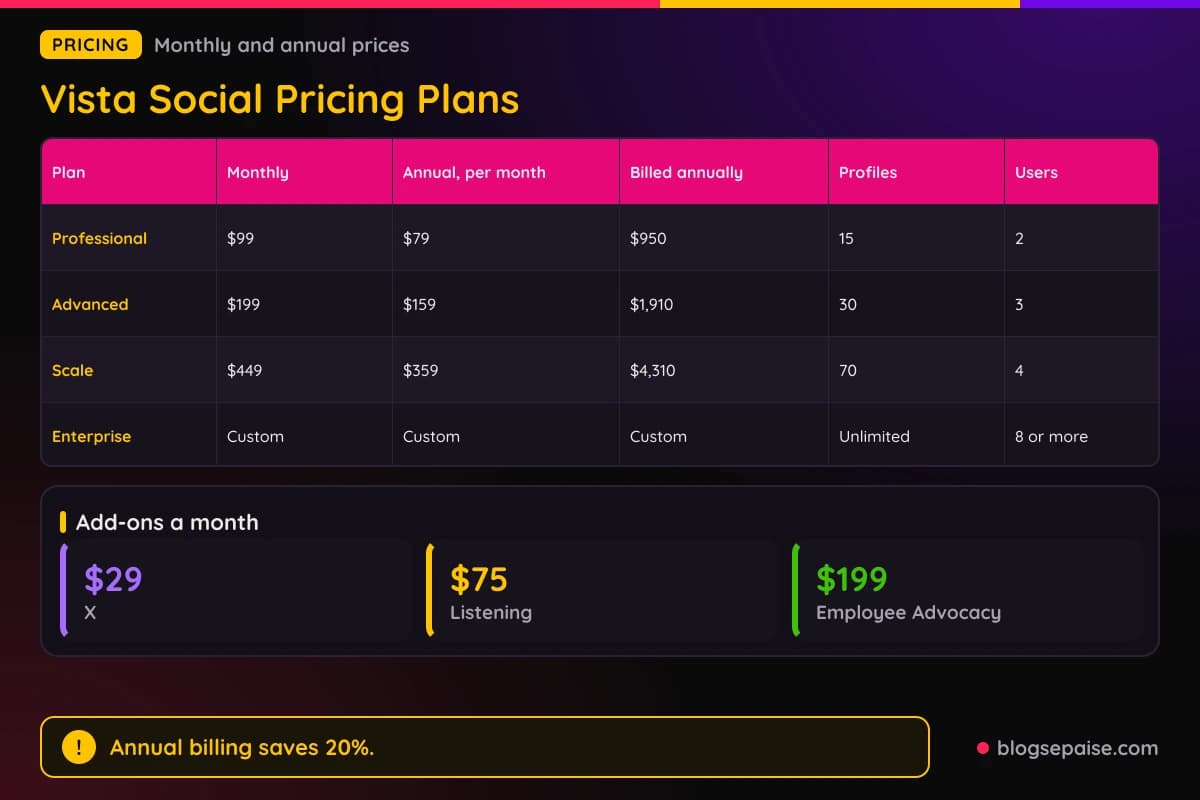
Advanced adds custom fields, complex approvals, advanced reporting, Zapier and Make.com, and advanced DM automations. Support adds video calls on top of email.
Scale costs $449 a month, or about $359 a month billed annually at $4,310 a year. It includes 70 profiles, 4 users, 100,000 DM contacts, 3,500 AI credits, and 10,000 ideas.
Scale adds white label reports and dashboards, client profile connect, and Premium AI Training. Extra profiles come in blocks of 10, and extra users are available.
Enterprise has custom pricing, unlimited profiles, 8 or more users, unlimited AI credits, and unlimited ideas.
Enterprise adds sentiment detection, industry benchmarking, brand safety tools, SAML 2.0 single sign on, and a dedicated account manager.
Professional, Advanced, and Scale each start with a 14-day free trial and need no credit card. Enterprise has no trial, so you ask for a demo.
Add-ons are priced apart. X costs $29 a month, Listening starts at $75 a month, and Employee Advocacy costs $199 a month for 25 employees.
Registered nonprofits can get up to 50% off Professional and Advanced with proof such as a 501(c)(3). You can switch plans at any time.
Refund terms are not published. Check the live pricing table for the full per plan feature list before you pay.
Credit math helps with planning. Professional gives 1,000 AI credits and 1,000 ideas, while Scale gives 3,500 credits and 10,000 ideas.
Annual math is simple. Professional saves about $238 across the year, Advanced saves about $478, and Scale saves about $1,078 against paying monthly.
Pick Professional if you run up to 15 profiles with a small team. Pick Advanced for 30 profiles, Zapier, and more review sites, and pick Scale for 70 profiles and white label reports.
Who Is Vista Social Best Suited For
Vista Social suits teams that run many profiles and want one tool for everything. Agencies are the clearest match.
Each client gets a dashboard that keeps data separate, and clients can get their own login. Approval flows make sure the right person signs off before a post goes live.
Scale adds white label reports and client profile connect. With a custom domain the platform can wear an agency's brand, though X works only on the main Vista Social domain.
Multi location brands get a single dashboard for publishing, inbox, and reviews. Roles cover headquarters, regional, location, and creator levels.
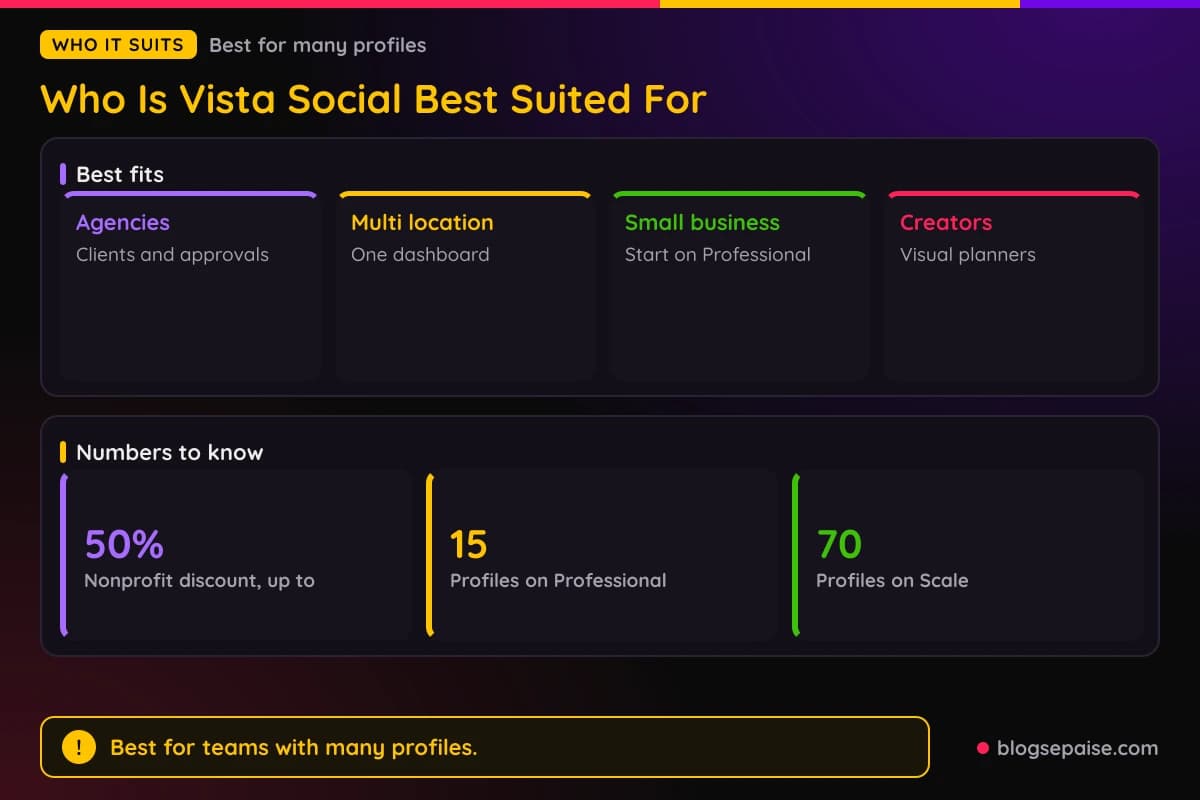
Each location can have its own Vista Page with hours, offers, and links. Reviews from every location land in one inbox.
Small and medium businesses can start on Professional with 15 profiles and 2 users. Creators get visual planners for Instagram and TikTok feeds plus drag and drop queues.
Schools can give each department its own profiles and limit student access to one department. Posts from student accounts pass through a department head or the communications office.
Nonprofits can save up to 50% on Professional and Advanced. Enterprise brands get SAML single sign on and brand safety tools.
Support teams that use Zendesk can turn comments and messages into tickets.
Agencies get the most from Scale, since white label reports and client profile connect sit there. A freelancer with a few clients can start on Professional.
Marketing teams inside a company can use the shared calendar, drafts, and approvals to avoid email chains. Managers see who replied and how fast.
Brands with many reviews gain from the single stream, since a missed review costs trust. Restaurants, hotels, and app makers fit this pattern.
Who Vista Social Is Not For
Vista Social is not the right match for everyone. Solo posters with one or two accounts may find $99 a month steep.
Professional is the lowest paid plan, and no free plan is published, only a 14-day trial.
Teams that post mostly to X must add $29 a month. White label dashboards do not support X at all.
Small teams hit user caps fast, with 2 users on Professional and 3 on Advanced. More seats mean Scale at $449 a month or a custom Enterprise quote.
Heavy listening users pay per listener, from $75 to $250 a month each. Monitoring many topics adds up fast.
Anyone who wants full detail on Vista Work should ask for a demo first. Task features beyond boards are not described.
DM automation fans should know that no network guarantees apply. Rate limits are not published.
Brands that need a fixed refund policy will not find one. Employee Advocacy beyond 25 people has no published price.
Enterprise buyers cannot see a price list. Sentiment detection and benchmarking need a sales call.
Anyone who wants a free plan forever should look elsewhere. Vista Social gives a 14-day trial and then charges.
Teams that only need a basic scheduler may pay for features they never touch. Listening, reviews, and Vista Work add value only when you use them.
Large teams that live in one network, such as LinkedIn alone, may not need 15 or more profiles. A narrower tool can cost less.
Vista Social Alternatives
Many tools overlap with Vista Social. Buffer, Hootsuite, Sprout Social, Agorapulse, SocialPilot, and Metricool come up most.
Buffer is a simple scheduler that suits solo posters. It skips the listening and review tools.
Hootsuite is an older platform built for large teams. It fits companies that already use it.
Sprout Social is a premium suite with deep reports. Compare its listening and seat costs with Vista Social before you choose.
Agorapulse is strong on inbox work and reports. It fits teams that spend most of the day answering people.
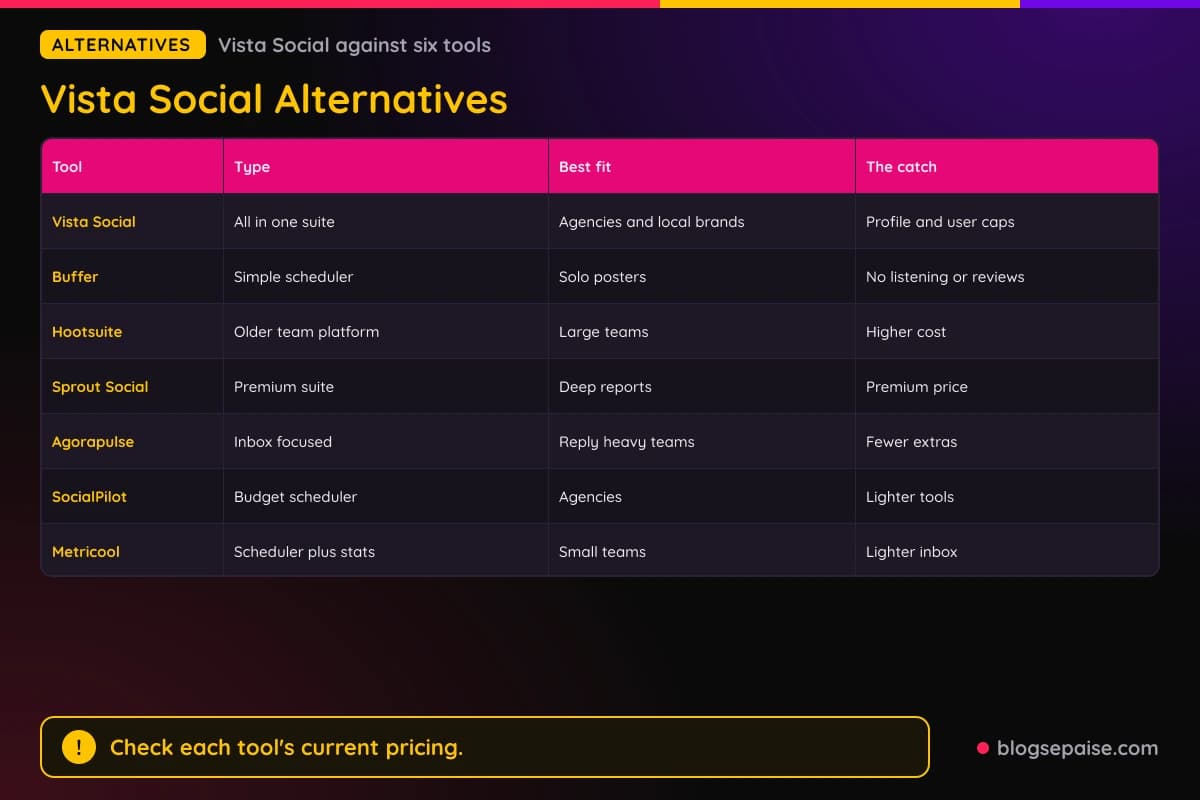
SocialPilot is a budget friendly option for agencies. Metricool pairs scheduling with analytics at a modest price.
Vista Social stands out for the mix of publishing, reviews, listening, and DM automation in one account, with white label on Scale. Prices for the other tools change often, so check them again before you decide.
The right pick depends on the job. Choose Buffer for simplicity, Hootsuite for legacy team setups, Sprout Social for premium reports, and Vista Social for a wide toolkit at a mid-range price.
Shortlist two tools and run both trials at the same time. Connect the same profiles and compare the inbox, the reports, and how fast you can schedule a week of posts.
For a wider list, read our best social media schedulers guide. For another content tool, see our ContentStudio review, and for evergreen queues, see our MeetEdgar review.
Vista Social Use Cases
Vista Social shows up in a few repeat jobs. Agencies, local brands, creators, and support teams lead the list.
An agency connects a client's profiles, loads a month of posts in bulk, and sends them for approval. The client signs off, and the posts go live on schedule.
A franchise schedules one post to all locations at once or to a single location. Brand approval chains check the copy before it goes out.
A creator plans an Instagram feed in the visual planner. Drag and drop moves posts, and queues pick optimal times.
A shop owner posts a Reel and sets a keyword comment trigger. DM Automations send a link or offer to each person who comments.
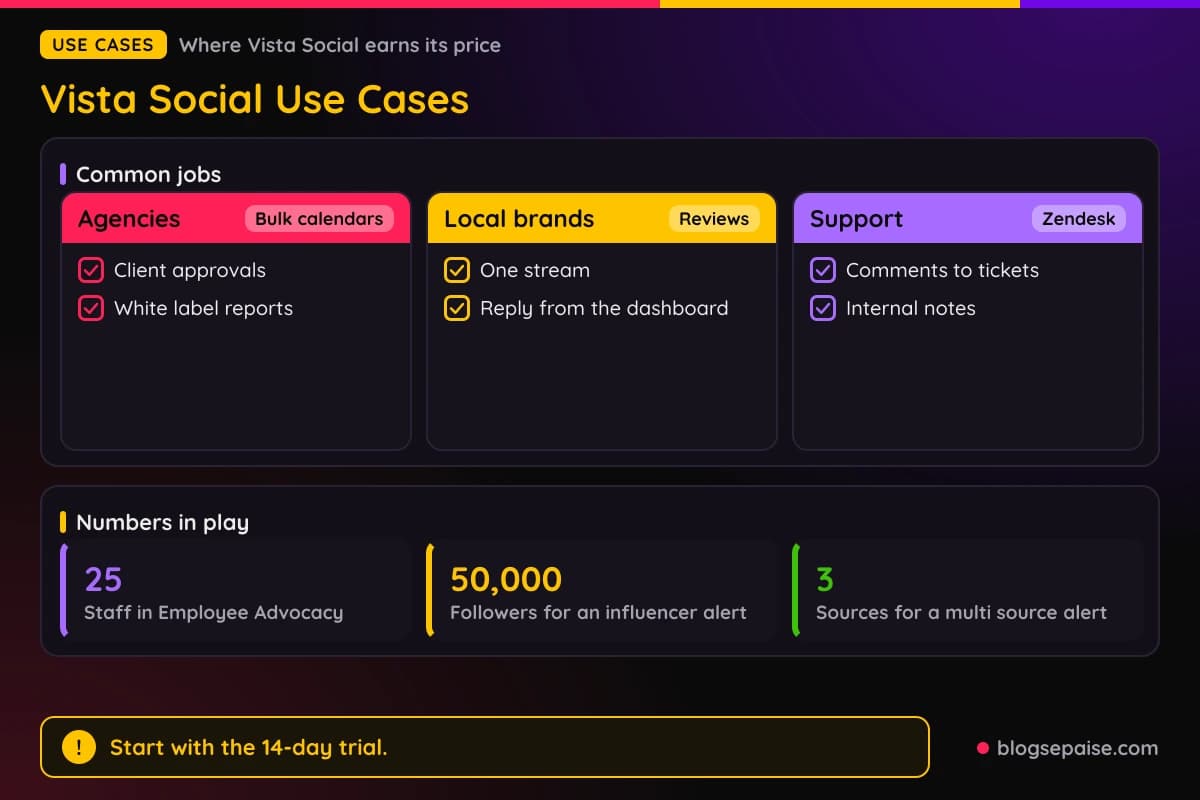
A support team connects Zendesk so comments become tickets. Internal notes and assignments keep one person in charge of each case.
A brand sets crisis keyword alerts in Listening. A sentiment dip or an influencer with 50,000 followers triggers a notice by email, in app, or Slack.
A company opens Employee Advocacy to 25 staff. Employees share pre approved posts, and the team tracks traffic and leads.
A restaurant watches Yelp, OpenTable, and Google Business reviews in one stream. A university gives each department its own profiles and approval chain.
A link in bio built in Vista Page collects emails and takes bookings. Google Analytics tracks the clicks.
A nonprofit applies for the discount with a 501(c)(3) document. Once approved, the discount applies to future payments.
A hotel group watches TripAdvisor and Google Business reviews from every property. Managers reply from one dashboard.
A software company watches the App Store and Google Play for new reviews. Alerts reach the product team by email, text, and in app.
Final Thoughts On Vista Social
Vista Social is a strong pick for agencies, multi location brands, and busy marketers who want one login. Publishing, inbox, reports, reviews, and listening share one account.
Pricing is clear. Professional costs $99 a month or about $79 billed annually, Advanced costs $199 or about $159, and Scale costs $449 or about $359.
Profile and user caps are the catch. Professional has 15 profiles and 2 users, so teams grow into Advanced or Scale quickly.
Add-ons raise the bill. X costs $29 a month, Listening starts at $75, and Employee Advocacy costs $199.
Start with the 14-day free trial, which needs no credit card. Connect your top profiles, schedule a week of posts, and test the inbox.
Try Brain with real FAQs before you trust AI replies. Check that each review site you need is covered by your plan.
Annual billing saves 20%, so pick it after the trial.
You can browse more write ups on our software reviews hub if you want to compare tools side by side.
Annual billing and nonprofit discounts help the price. A 20% saving on yearly plans is real money on Scale.
Ask Vista and Brain are the newest parts, so test them with your own FAQs. Treat AI replies like a junior teammate and check the log.
The best fit is a team with many profiles and many jobs. Solo posters can use a lighter tool.
Vista Social FAQ
1. What Is Vista Social?
Vista Social is a social media management platform for publishing, inbox, analytics, listening, review management, and automations. It has 11 main features.
2. How Much Does Vista Social Cost?
Professional costs $99 a month or about $79 billed annually. Advanced costs $199 or about $159, Scale costs $449 or about $359, and Enterprise is custom.
3. Does Vista Social Have A Free Trial?
Yes. Professional, Advanced, and Scale include a 14-day free trial with no credit card.
4. Is There A Free Plan?
No free plan is published. Employee Advocacy is free for 3 advocates, and Listening is free for your own profiles.
5. How Many Social Profiles Do I Get?
Professional has 15, Advanced has 30, Scale has 70, and Enterprise is unlimited. Each Vista Page counts as a profile.
6. Which Networks Can Vista Social Publish To?
Publishing covers Instagram, Facebook, X, LinkedIn, TikTok, YouTube, Pinterest, Threads, Reddit, Snapchat, and Tumblr. X needs the add-on at $29 a month.
7. What Is Ask Vista?
Ask Vista is an AI team that answers in Slack and Microsoft Teams. It runs agents and skills, and it can build DM automations on Advanced and up.
8. What Is Brain?
Brain trains the AI on your products, FAQs, tone, and rules. Replies, ideas, and automations draw from it.
9. Can Vista Social Reply To Reviews?
Yes, for Facebook, Google Business, the Apple App Store, and Google Play. Other sites link you to their own reply page.
10. Does Vista Social Have White Label?
Yes, Scale adds white label reports and dashboards, and a custom domain is possible. X works only on the main domain.
11. Does Vista Social Offer A Nonprofit Discount?
Yes. Registered nonprofits can get up to 50% off Professional and Advanced with documentation such as a 501(c)(3).
12. What Is Vista Page?
Vista Page is a link in bio mini website. It uses a vista.page address or your own custom domain.
13. How Do DM Automations Work?
A comment with a chosen keyword triggers a DM with a link or offer. Brain supplies the replies, and lead details go to your team.
14. Can I Pay Yearly?
Yes. Yearly billing is a one time upfront payment and saves 20% against monthly.
15. What Does Listening Cost?
Tier 1 costs $75 a month, Tier 2 costs $150, and Tier 3 costs $250, priced per listener. Tracking your own profiles is free.
16. What Does Employee Advocacy Cost?
It costs $199 a month for 25 employees and unlimited posts. It is free to try with 3 advocates.
17. Does Vista Social Have A Mobile App?
Yes, iOS and Android apps include the calendar, social inbox, and reports. Desktop apps for Mac and Windows and extensions for Chrome and Firefox exist too.
18. Is Vista Social Secure?
Vista Social is GDPR compliant, SOC 2 compliant, and CCPA ready. Enterprise adds SAML 2.0 single sign on.
19. Can I Change Plans Later?
Yes. You can switch plans at any time, during or after the trial.
20. Who Is Vista Social Best For?
Agencies, multi location brands, small businesses, creators, schools, and nonprofits that manage many social profiles from one tool.
21. Does Vista Social Offer A Listening Free Tier?
Listening is free for tracking your own profiles. Tracking brand, competitor, and category conversations across the web starts at $75 a month per listener.
22. Can Clients Log In To Vista Social?
Yes. Agencies can give clients their own login, and clients see only their own data.
23. Does Vista Social Work With Zapier?
Yes. Zapier and Make.com integrations come with Advanced, and Zapier also appears in the Publishing tools.
24. How Many Users Are Included?
Professional includes 2, Advanced includes 3, Scale includes 4, and Enterprise includes 8 or more. Extra users are available on Scale and Enterprise.