Netlify Review (2026): Free Website Hosting, AI Agent Runners, Pricing Plans, And Real Limits
Netlify is a web platform that builds your site from Git, serves it from a global edge network, and gives it a live link. It also runs serverless functions, a Postgres database, and AI agents.
The Free plan lets you test a real project before paying anything. Sites stay private until you publish.
Every push gets its own preview link before it reaches the live site. You can review it, send it to a client, and roll back with one click if something breaks.
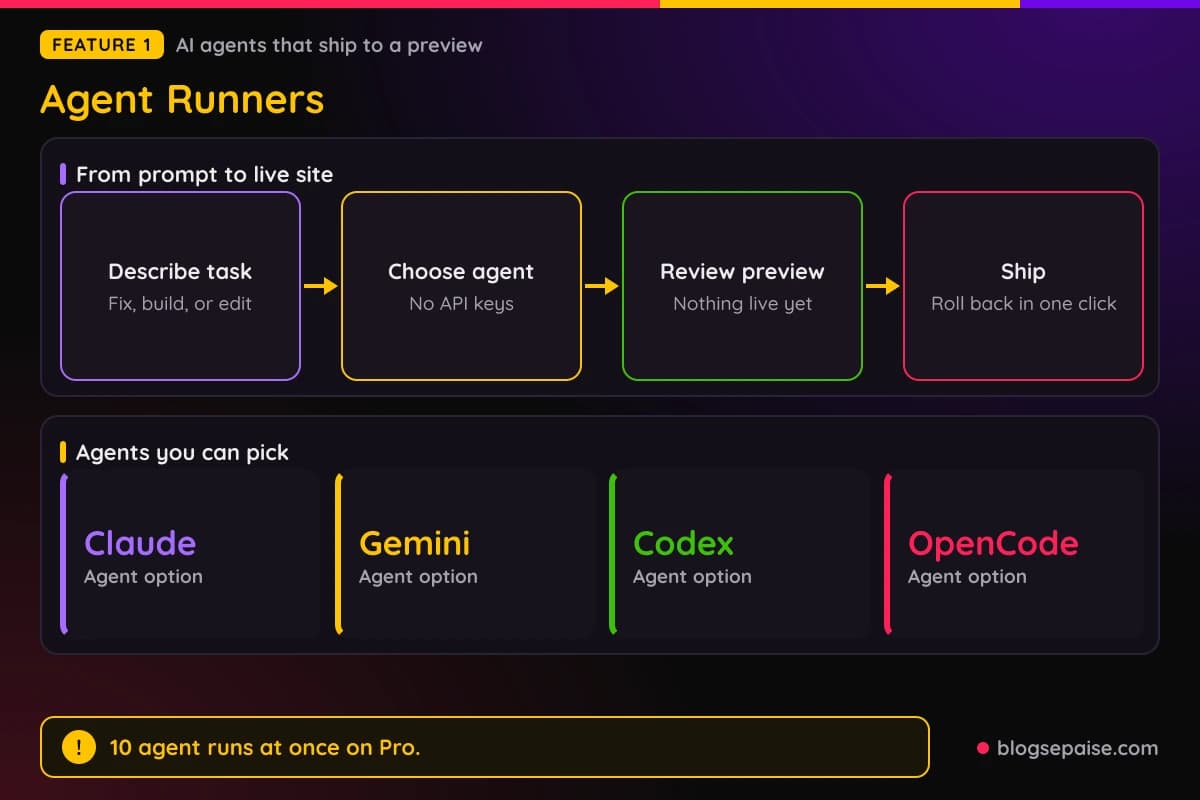
Agent Runners lets you ask Claude, Gemini, Codex, or OpenCode to change a project from a prompt. No API keys are needed, and the result lands in a Deploy Preview first.
The Free plan costs $0 and comes with 300 credits a month. Personal costs $9 a month with 1,000 credits, and Pro costs $20 a month with 3,000 credits.
Credits pay for production deploys, compute, bandwidth, web requests, and AI inference. A production deploy costs 15 credits, so a busy site can use up a plan faster than the sticker price suggests.
Netlify fits bloggers who build with a framework and developers who want previews on every change. A classic WordPress site on shared hosting is a different kind of setup.
Disclosure: Some of the links I share might be affiliate links. If you click on one and make a purchase, I may earn a small commission as a thank you. But don’t worry, it won’t cost you anything extra. I only recommend stuff I genuinely believe in. Your support helps me keep creating awesome content. You can read my full affiliate disclosure in my disclaimer page.
If you want to save a lot of hours searching for high-paying affiliate programs, check out our exclusive list of 2500+ affiliate programs. You’ll find all the information about the programs inside the list. This list is perfect for affiliate bloggers and influencers.
Netlify Features
Netlify groups its tools into three jobs. Build covers Agent Runners, Functions, the AI Gateway, storage, Identity, and Forms.
Ship covers Deploy Previews, branch deploys, build hooks, secret scanning, and one-click rollbacks. Scale covers the edge network, Observability, Analytics, an Image CDN, and rate limiting.
Everything deploys from one repository. Frontend builds, serverless code, and edge routing logic ship together in a single release.
Free plans get Agent Runners, Functions, AI models, Netlify Database, Blob storage, a global CDN, and unlimited Deploy Previews. Credits, not locked features, decide how far the Free plan goes.
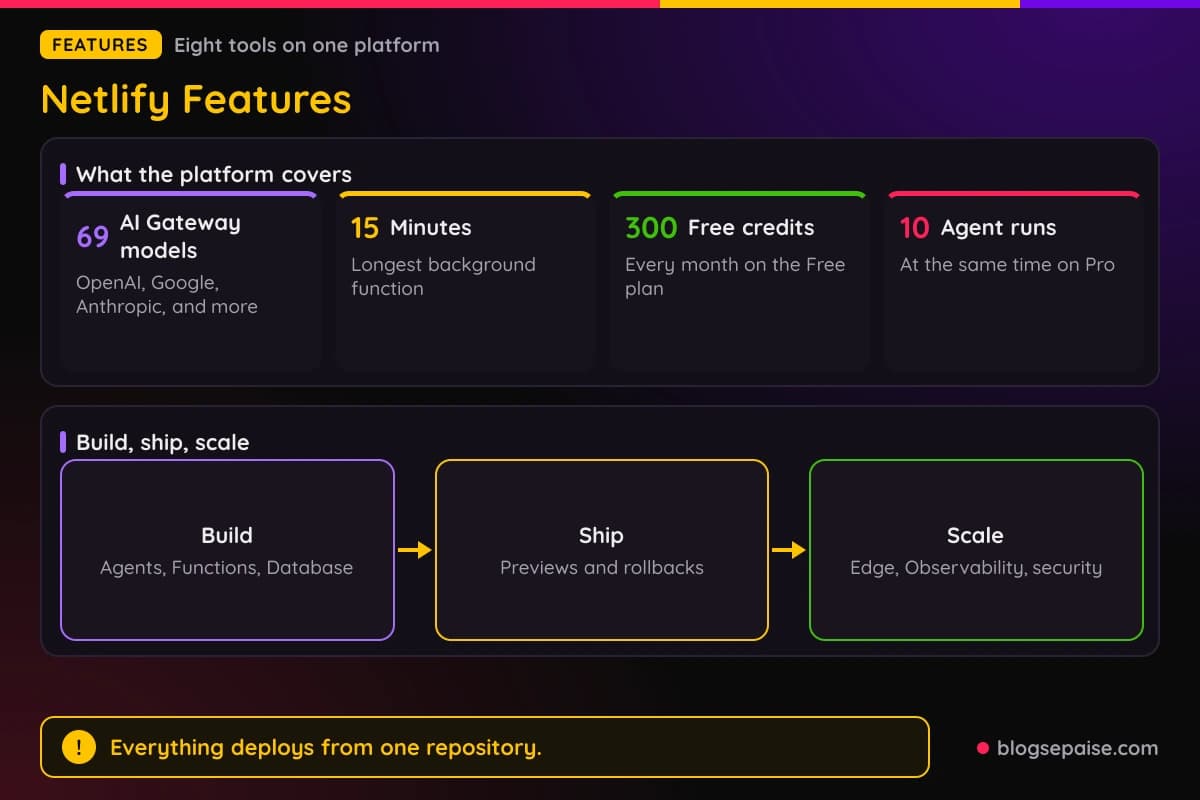
Custom domains with SSL are part of the Free plan too. Sites stay private until you publish them, so a half-built project does not leak.
Netlify says millions of developers ship on the platform. Netlify Functions alone run more than 700 million times a day.
1. Agent Runners
Agent Runners lets an AI agent change your project from a plain request. You describe a bug fix, a new page, a content update, or a whole new project, and the agent works on Netlify infrastructure.
You pick the agent. Claude, Gemini, Codex, and OpenCode are the four options, and Kimi, DeepSeek, and GLM models are available too.
No API keys or outside accounts are needed. Netlify supplies the model access, so a first prompt can start without any setup.
The agent sees your code, environment variables, build settings, and deployment pipeline. It can also wire up a serverless function, set up a form, or configure auth without extra steps.
Nothing goes live until you say so. The agent's work lands in a Deploy Preview, and you can review it, ask for changes, or roll back in one click.
Agents run in isolated environments that never touch your secrets. Role-based access that controls deployments also controls who can run agents.
Activity logs record who prompted what and when. Every change is tracked, reversible, and auditable, which matters when a team shares one project.
Pro allows 10 agent runs at the same time across all your projects. AI inference is billed in credits and the cost varies by model, so keep an eye on the meter.
For a blogger, the use is simple. Ask for a new landing page or a layout fix, check the preview link, and publish only when it looks right.
Agent Runners also speeds up prototypes. Each prompt creates a branch, and each change gets a Deploy Preview that you can share.
Docs cover prompt templates, environment setup, and enterprise access controls. That helps a team write requests the same way each time.
2. Deploy Previews
Deploy Previews give every pull request or merge request its own live URL. The link shows up as a commit status and always reflects the latest commits.
Previews stay available until the deploy is removed. Free plans get unlimited Deploy Previews, and the number of reviewers is unlimited too.
Reviewers need no extra setup. A designer, a client, or a tester can open the link and leave notes right on the page.
The Netlify Drawer is the feedback tool inside every preview. It needs no plugin and no code change, and it captures screenshots, annotations, and screen and voice recordings.
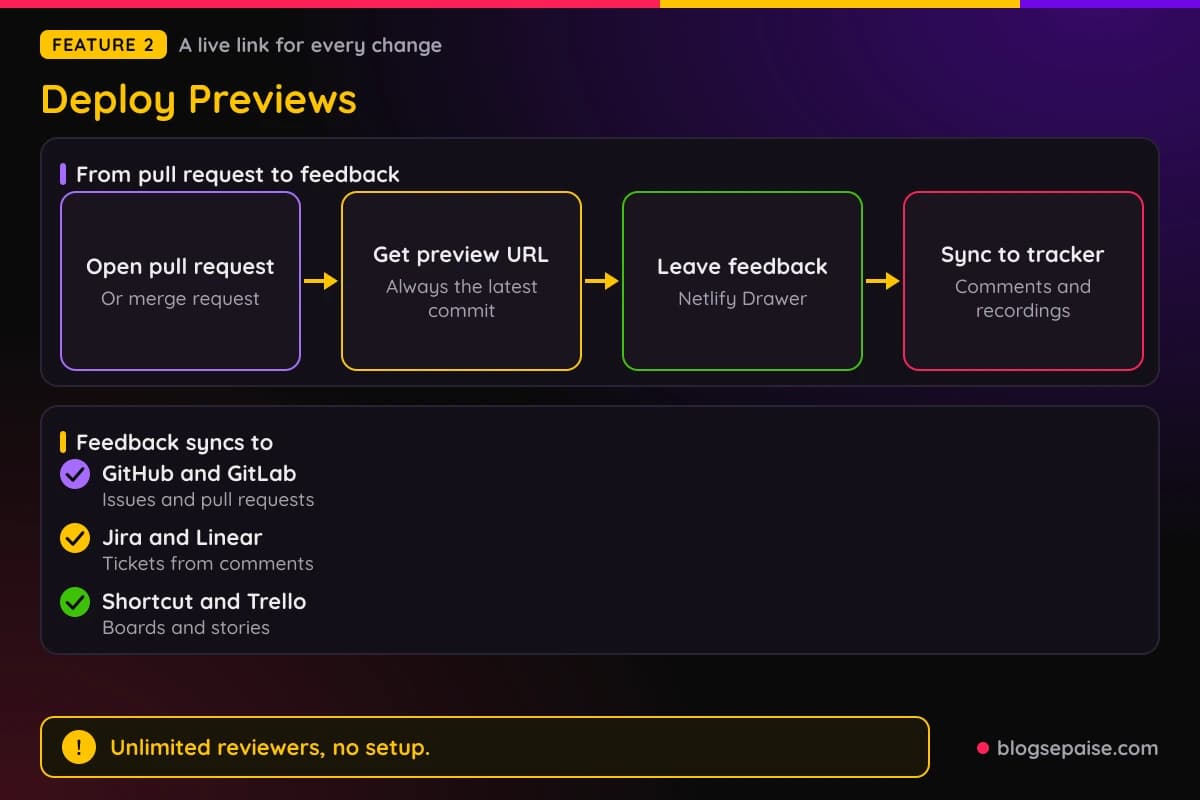
Feedback can flow into GitHub, GitLab, Jira, Linear, Shortcut, and Trello. Comments, screenshots, and recordings appear in the tool your team already uses.
Mentions work with @replies, so you can pull a teammate into a thread. Browser and device details attach to each comment automatically, and BrowserStack can show the environment.
Responsive testing lets you check a preview at different device sizes. A QR code loads the preview on a phone.
Deploy logs from the latest deploy show inside the Drawer. You can debug a failed build without leaving the preview.
Previews match production because staging and production share the same global environment. Once a preview looks right, one click sends it live.
Project managers catch scope changes earlier because they see the real build and not a mockup. Designers compare their intent with the working page and fix gaps before launch.
DevOps teams can connect previews to CI/CD tools to automate approvals or create tickets from feedback. That turns a comment into a task without copy and paste.
3. AI Gateway
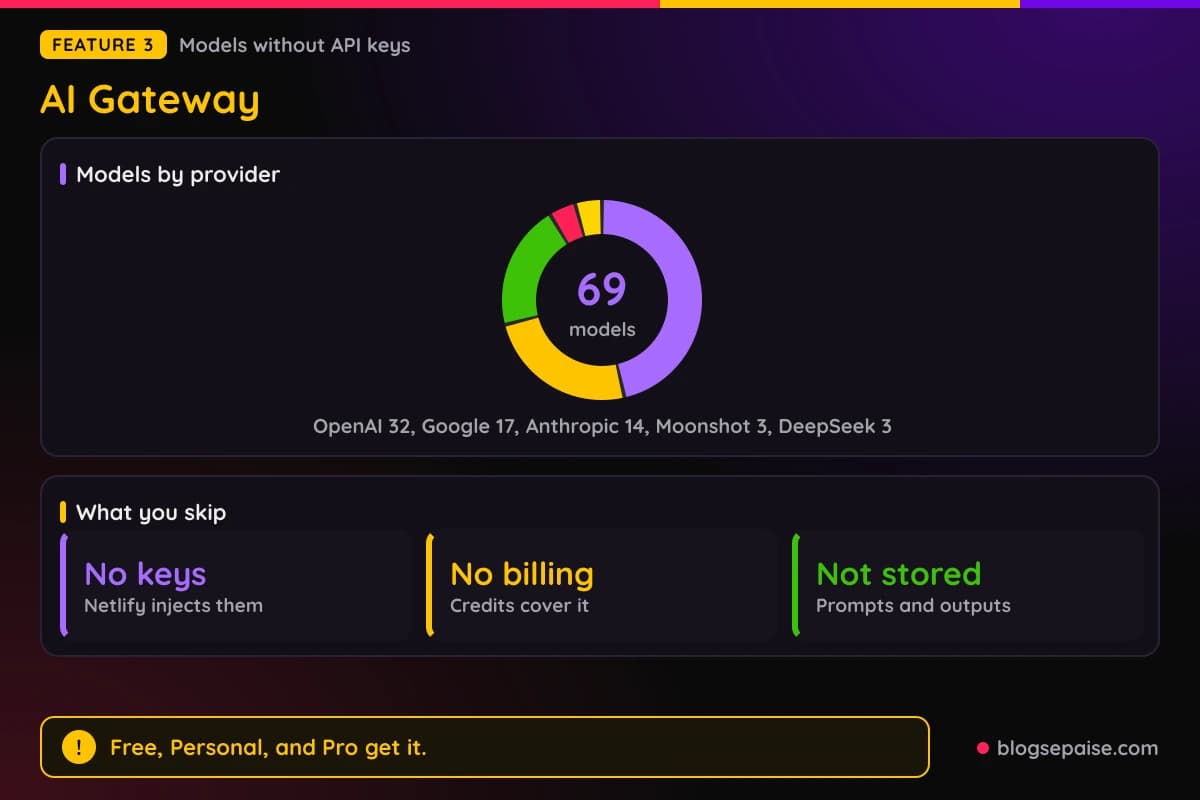
AI Gateway gives your code access to commercial and open models with no API keys, no separate accounts, and no extra billing. Netlify injects the environment variables at runtime.
You use the official SDKs from OpenAI, Anthropic, Google, and OpenRouter. Netlify sets values such as OPENAI_API_KEY and OPENAI_BASE_URL for you, so your code needs no key or base URL.
The catalog holds 69 models. OpenAI has 32, Google has 17, and Anthropic has 14.
Moonshot adds 3 Kimi models and DeepSeek adds 3 more. OpenRouter is a partner that opens up a large set of other models for text, images, and video.
Requests run through the gateway, and prompts and model outputs are not stored. That helps if you build a tool that handles client text.
Rate limits apply per account, and usage analytics cover every project on a team. Token usage and credit use show in the Netlify dashboard.
The gateway works in serverless, edge, and background functions. The Netlify CLI or the Vite plugin lets you call it from your own computer without managing keys.
Pricing is credit based. AI Gateway is available on Free, Personal, and Pro, Enterprise gets it on request, and the cost per call varies by model, so test with a small job first.
The SDK examples on Netlify use models such as gpt-5 and gemini-2.5-pro. A quickstart guide in the docs walks through the first call.
For a blogger, a simple use is an alt text generator or a summary box. A function calls a model, and the keys never appear in your code.
4. Functions
Functions are server-side code that runs as part of your Netlify project. They cover API endpoints, webhooks, background jobs, and scheduled tasks.
More than 700 million functions run on Netlify every day, and Functions work on every plan. You can write them by hand or ask an agent to write them.
A regular function takes a request and returns a response. You set the route with a path in the config, and handlers use the standard Request and Response objects.
Background functions run for up to 15 minutes. They return a 202 response right away and keep working, then send results to Netlify Database, Blobs, or a webhook.
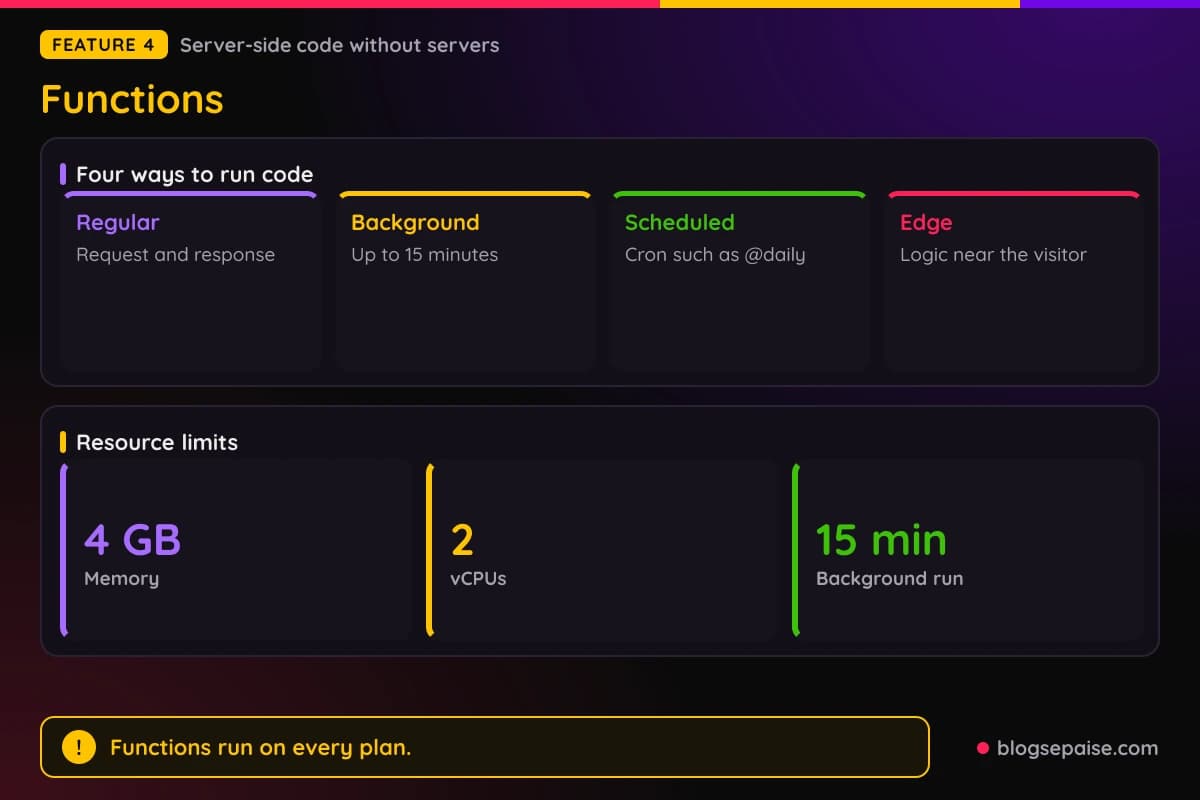
Scheduled functions use a cron expression, such as @daily. Netlify calls them on time, so they suit nightly syncs, digest emails, and cleanup jobs.
Edge Functions are a separate product for fast logic close to the visitor. They handle personalization, redirects, A/B routing, and access checks before heavier work reaches Functions.
Memory goes up to 4 GB and CPU up to 2 vCPUs on credit-based plans. You can also pick a region in the config.
Functions deploy in the same push as your frontend, and every change gets a preview link. Secret scanning blocks exposed keys before deploy, and API keys stay on the server and never reach the browser.
Identity, Forms, and platform events connect to Functions. A function can run at signup, block a login, or react to a form or deploy event.
The module shape matches Deno, Bun, Hono, and Nitro, so existing code ports with little change. Examples use TypeScript, with typed config and import syntax.
Webhooks from Stripe and GitHub land in a function with a route like /api/stripe-webhook. That lets a small site take payments and react to events without a separate server.
5. Netlify Database
Netlify Database is a managed Postgres database inside the platform. It is built on Neon, and Netlify handles setup, so you never touch Neon directly.
It is standard Postgres, so any compatible tool works. The database lives in the same project and deployment as your app.
When an agent builds something new, Netlify decides if a database is needed and creates one. A single command also sets one up for a developer or a code agent.
Each Deploy Preview gets its own isolated copy of the data. Testing in a preview never touches the live app.
Every agent run happens in its own isolated branch. Agents cannot reach production data until you review and approve the work.
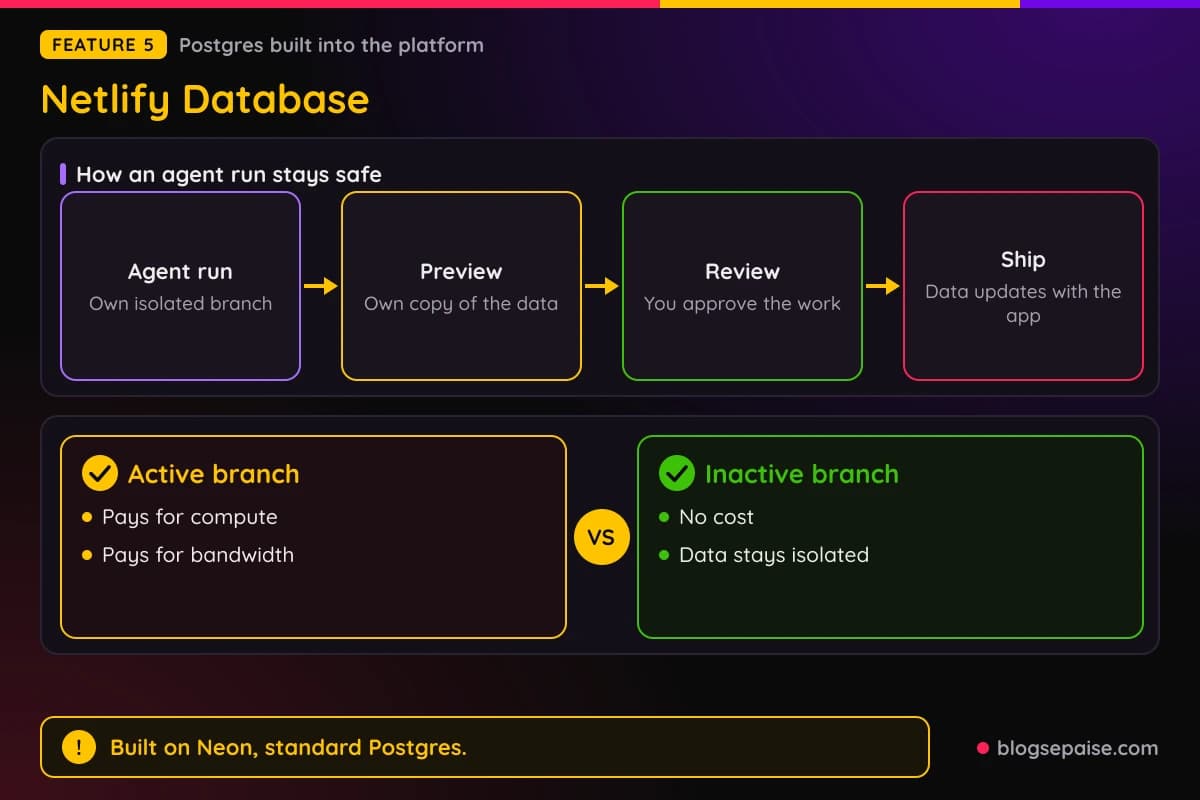
Shipping a new version updates the database alongside the app, so the two stay in sync. Schema migrations are handled for you.
It is available on all credit-based plans. Charges apply only to compute and bandwidth while a branch is active, and inactive branches cost nothing.
Storage, compute, and branch limits vary by plan. Blob storage handles files and images on the Free plan, while the database holds structured data.
Netlify gives examples such as online stores, booking apps, customer portals, and team dashboards. AI coding tools such as Claude Code or Cursor can connect to it through netlify.ai.
You can start building right away and scale later. The database begins as a working instance for development and grows into a full production database.
Conor Martin used Netlify Database with Claude Code and says he just asked it to store the data. He calls the setup that easy.
6. Observability
Observability shows production traffic, function performance, and usage in one place. It needs no setup and starts working as soon as you deploy.
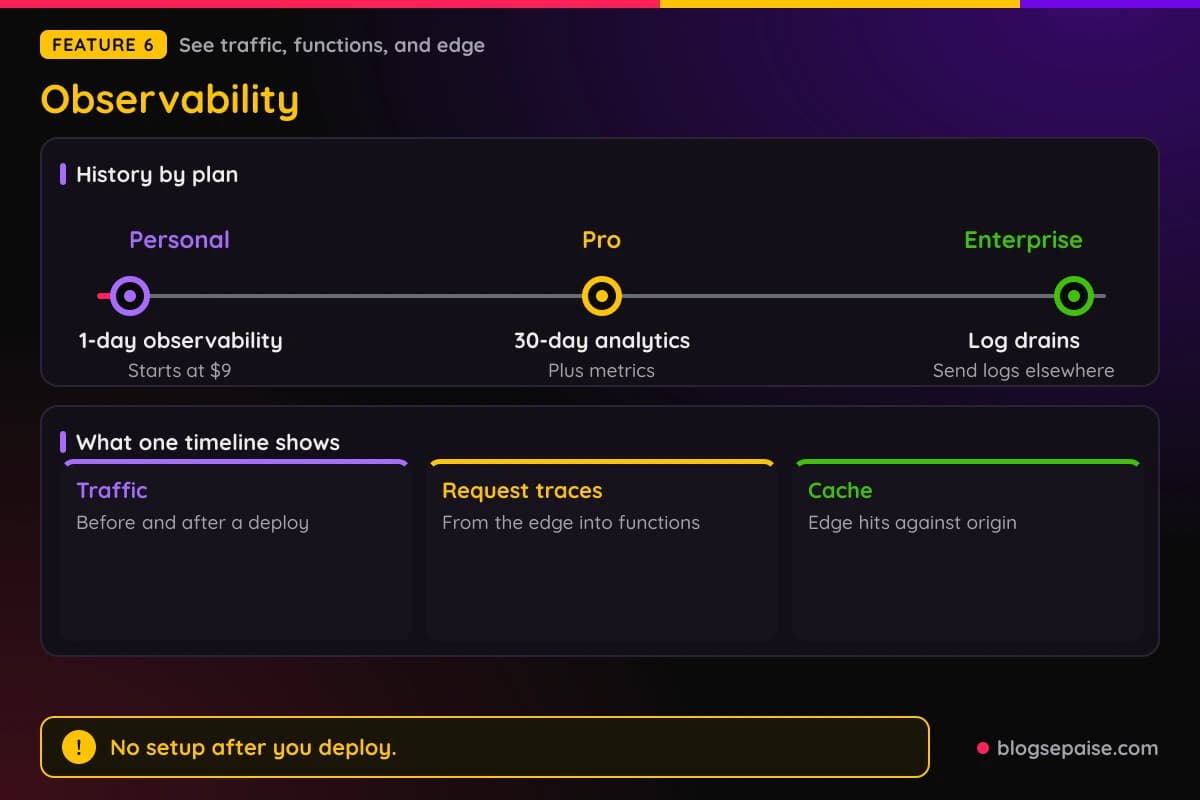
A unified timeline puts traffic, functions, and edge requests in one view. You can move from the big picture to one endpoint, then trace a single request from the edge into your functions.
Traffic before and after a deploy can be compared. That helps you catch a regression right after a release.
Cache performance and latency are tracked. You can see what is served from the edge and what comes from the origin, which helps you raise the hit rate.
Slow endpoints and costly requests are easy to find. Filters by function or status code narrow a problem down fast.
Plan limits decide how far back you can look. Personal includes 1-day observability, and Pro includes 30-day analytics and metrics.
Enterprise adds log drains, which send logs to other tools. Mark Hall, a senior director at Mattel, says Observability gives instant visibility into production.
Observability also reads bandwidth and runtime behavior, which feed your credit bill. Watching bandwidth is the quickest way to avoid a surprise.
Web analytics and Real User Monitoring are separate tools. They report visitor traffic and Web Vitals, with 30-day history on Pro.
A blogger can spot which pages draw the most requests before the credit bill grows. That is the practical payoff of the timeline view.
7. Security
Netlify encrypts data with at least TLS 1.2 in transit and AES-256 at rest. Access tokens get the same treatment.
Every deployed domain gets a free Let's Encrypt certificate, and you can install your own. Custom domains with SSL come with the Free plan.
DDoS mitigation watches for traffic spikes and odd patterns. It covers Layer 3, Layer 4, and Layer 7 attacks.
The edge serves prerendered static content, so no active processes sit there to attack. That cuts the attack surface for a typical blog or marketing site.
Netlify Advanced Web Security adds a Web Application Firewall with predefined rules that block malicious traffic. Firewall Traffic Rules limit access by IP address or country.
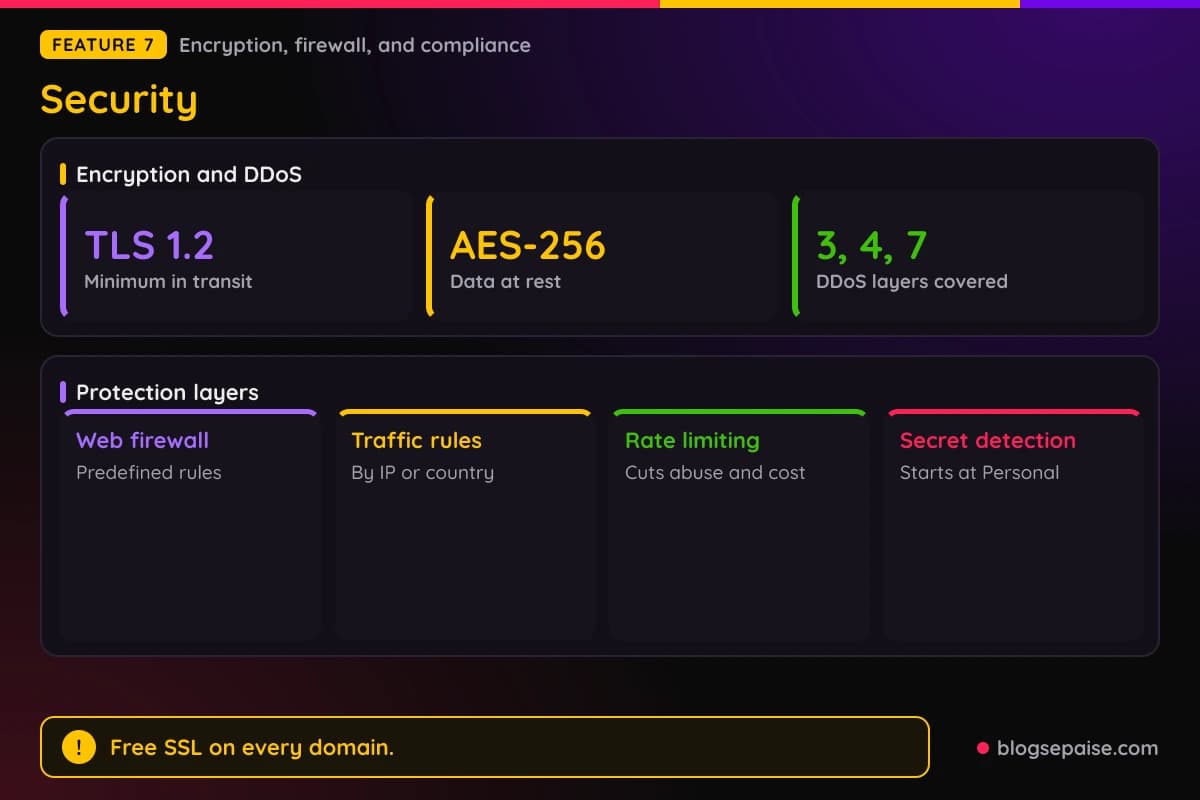
Rate limiting is customizable and helps with API usage and bandwidth costs. The Free plan includes basic firewall rules and basic rate limiting.
Personal adds smart secret detection. Secret scanning also blocks exposed keys before a deploy goes out.
Compliance covers ISO 27001, PCI DSS, HIPAA, SOC 2, ISO 27018, CCPA, GDPR, and DORA. Enterprise customers can read audit reports, including SOC 2 Type 2, in the Trust Center.
You still own part of the job. Your app architecture, data handling, caching setup, and authentication are your responsibility, while Netlify handles encryption, vulnerability management, and network security.
Private Connectivity gives builds and functions allowlist-friendly IPs to reach your backends. Enterprise team management lets admins add and remove users and split teams by role.
Two-factor authentication and role-based access protect the dashboard itself. Those controls matter once more than one person can deploy.
8. Edge Network
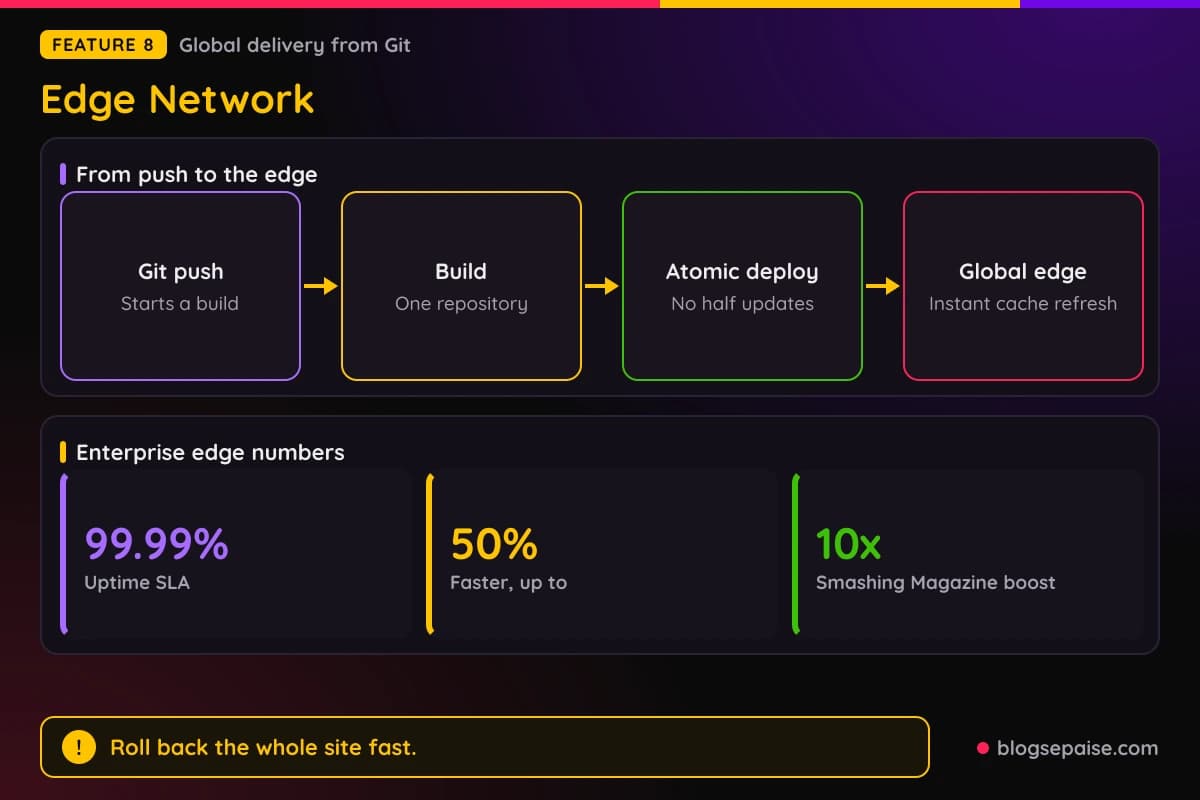
The edge network serves your site from locations around the world. Deploys go from Git straight to the edge, and you manage no origin servers.
Atomic deploys publish all code and assets together. Visitors never see a half-updated site, and no maintenance window is needed.
Instant cache invalidation updates global caches within seconds of a deploy. Old deploys stay available at permanent URLs.
Rollbacks restore the whole site to any earlier deploy. Staging and production share the same global environment, so previews match the live output.
Edge Functions are written in TypeScript or JavaScript and change requests and responses at the edge. Examples include country-based redirects, cookie-based A/B tests, login redirects, and HTML rewriting.
A netlify.toml file holds redirects, proxies, and headers in version control. Redirects can use the visitor's country or browser language.
Password protection covers all or part of a site and is set in the dashboard. An Image CDN and fine-grained cache control with stale-while-revalidate sit alongside it.
Always-on DDoS protection and auto-scaling handle traffic spikes by default. HTTPS is on by default too.
High-Performance Edge is the Enterprise tier. It comes with a 99.99% uptime SLA and up to 50% faster response times.
Smashing Magazine reported a 10x performance boost after moving to Netlify. LiveChat's CTO says the move let the web team iterate fast and independently.
Netlify Pricing Plans
Netlify sells four plans. Free, Personal, Pro, and Enterprise all run on monthly credits.
Free costs $0 and has a 300 credit limit each month. It includes Agent Runners, Functions, AI models, Netlify Database, Blob storage, a global CDN, custom domains with SSL, and unlimited Deploy Previews.
Personal costs $9 a month and includes 1,000 credits. It adds smart secret detection, 1-day observability, and priority email support.
Pro starts at $20 a month with unlimited members and 3,000 credits. It adds private organization repos, shared environment variables, 3 concurrent builds, and 30-day analytics and metrics.
Bigger Pro tiers raise the credits. 5,000 credits cost $33 a month, 10,000 cost $63, 15,000 cost $95, and 20,000 cost $126.
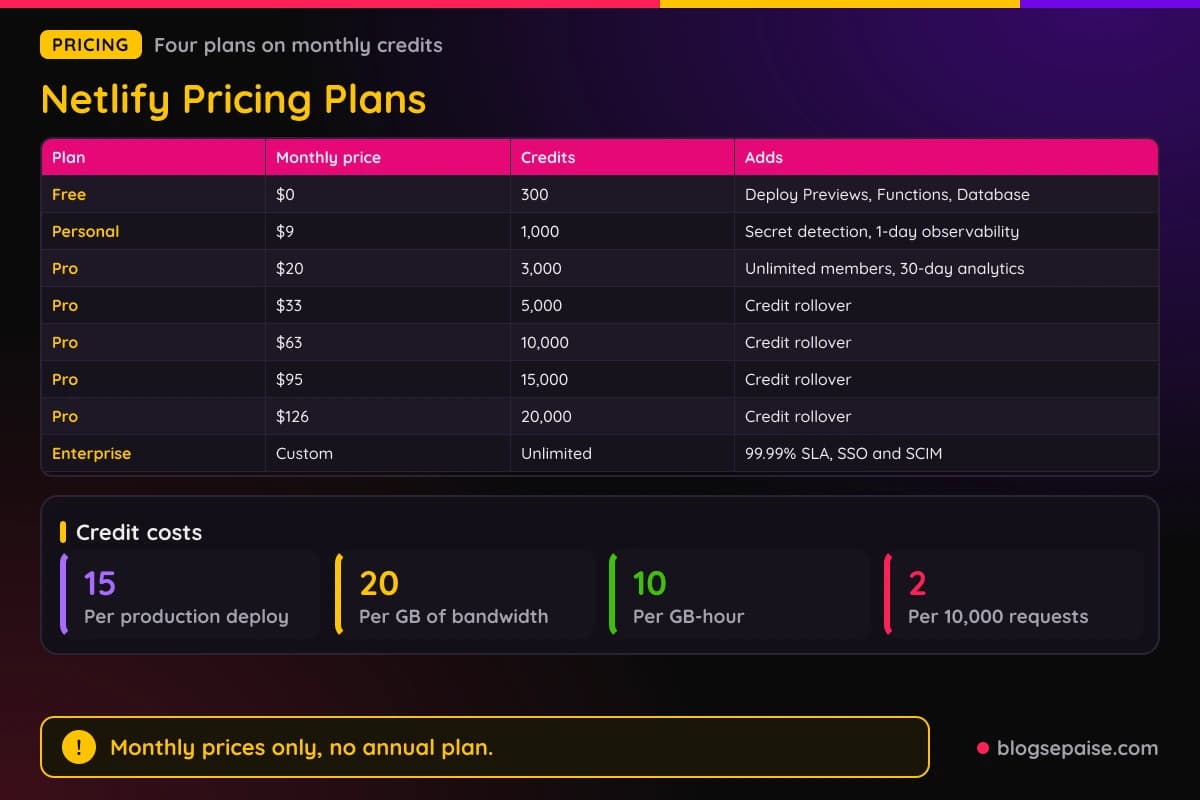
Tiers above 3,000 credits roll unused credits over for one extra billing cycle. The base 3,000 credit tier does not roll over, and you can change tiers at any time.
Enterprise has custom pricing and unlimited credits. It adds a 99.99% SLA, an enterprise network tier, high-performance builds, SSO and SCIM, log drains, organization management, and 24/7 dedicated support.
Netlify lists monthly prices only, so there is no annual price to compare. Plans bill by the month.
Usage is metered in credits. A production deploy costs 15 credits, compute costs 10 credits per GB-hour, bandwidth costs 20 credits per GB, and web requests cost 2 credits per 10,000.
AI inference costs vary by model. For a small site, 300 credits cover 20 production deploys, or 15 GB of bandwidth, or 1.5 million web requests if you spend them on one thing.
Extra credits come through auto recharge, which is off by default. On Pro, 1,500 extra credits cost $10.
Math helps here. Ten production deploys use 150 credits, which is half of the Free allowance.
Personal at $9 triples the credits to 1,000 and adds secret detection. The same 1,000 credits cover 50 GB of bandwidth or about 66 production deploys.
Pro at $20 makes sense once a team joins. Its 3,000 credits cover 150 GB of bandwidth or about 200 production deploys.
Compute is the quiet cost. One GB-hour costs 10 credits, so a function running at 4 GB for one hour uses 40 credits.
At the Pro pack rate of $10 for 1,500 credits, a production deploy is about $0.10 and a GB of bandwidth is about $0.13. That puts the credits in dollars you can plan around.
Pro allows unlimited members for $20 a month, and Git contributors are free and unlimited on all repos. Extra concurrent builds beyond the 3 included cost $40 each.
Payment is by credit card unless you are on Enterprise, which also accepts ACH or wire transfer. Accounts created before September 4, 2025 can keep their legacy plan.
The catch is the meter. A blog with steady traffic and frequent deploys can pass 300 credits, while Pro at 3,000 credits gives about 200 production deploys if nothing else uses them.
Who Is Netlify Best Suited For
Netlify suits people who build sites from code or from a framework. React, Next.js, Vue, Svelte, and Astro all work, with automatic detection.
Bloggers who use a static site generator get the clearest win. A push to Git builds the site, and the edge network serves it with SSL on your own domain.
Affiliate marketers can test landing pages without risk. Every change gets a preview link, so you can check a page on your phone before it goes live.
Freelancers and agencies can send clients a preview link. Unlimited reviewers and the Netlify Drawer let clients leave comments directly on the page.
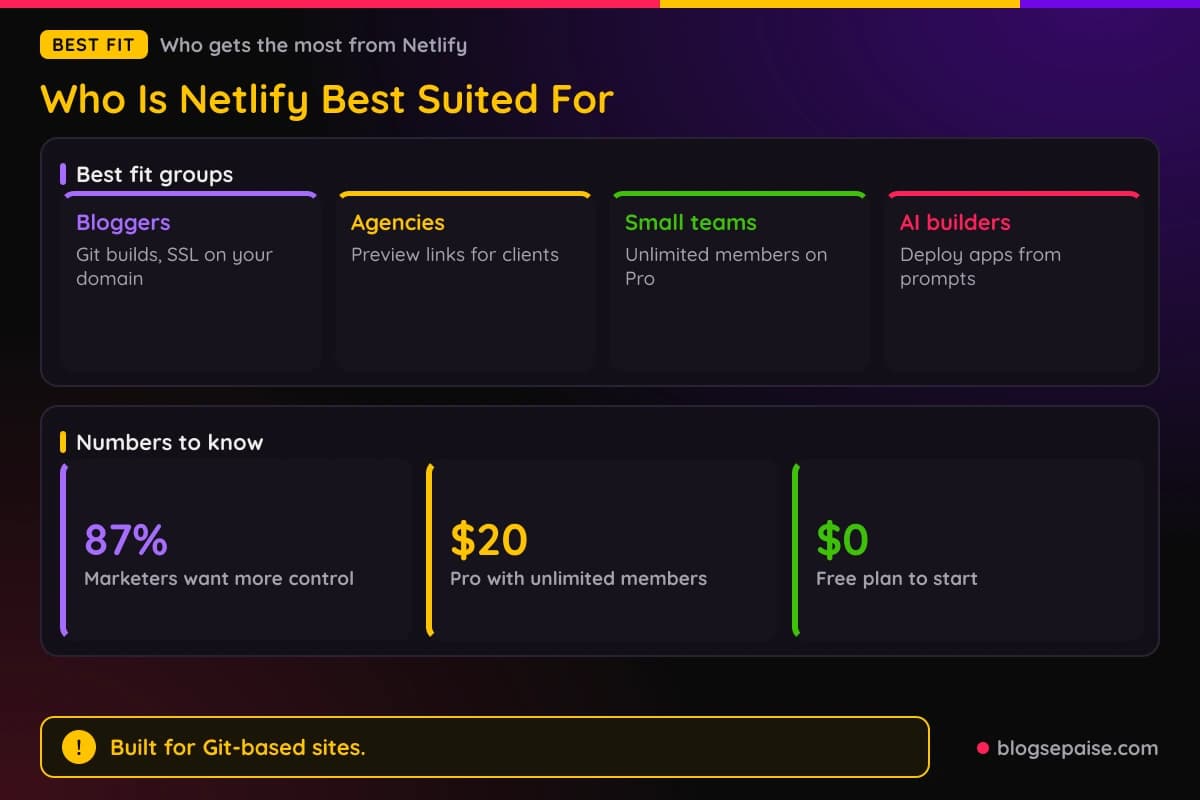
Small teams get a good deal on Pro. Unlimited members cost $20 a month, and Git contributors are free and unlimited on all repos.
Marketing teams can ship updates without waiting on engineering. Navan restructured its marketing site so content updates and localization no longer depend on developers, and 87% of marketers want more direct control over web content.
Developers who want a backend without servers fit well. Functions, a Postgres database, Blobs, Identity, and Forms all sit in the same project.
Product managers and designers can use Agent Runners to build prototypes. Each prompt creates a branch, each change gets a Deploy Preview, and the result becomes a pull request.
AI builders are a core audience. Bolt and Windsurf are among the code agent platforms that use Netlify to deploy apps built from prompts.
Large companies use Enterprise. Logos on Netlify's site include Navan, Contentful, Unilever, Stack Overflow, Riot Games, Nike, and Figma.
Solo creators building a portfolio, a newsletter landing page, or a link hub fit the Free plan. Custom domains with SSL come at no cost, and the site stays private until you publish.
Teams moving off a heavy CMS can go step by step. DocuSign migrated core marketing pages off Drupal with a headless CMS and edge delivery, and did it incrementally.
Ecommerce brands that want fast storefronts fit too. Manscaped runs a single codebase across regions, with edge delivery and localization.
Who Netlify Is Not For
Netlify is not the right pick for everyone. A few groups should look elsewhere or plan around the limits.
Anyone who wants a flat, fixed hosting bill may dislike credits. Usage costs change with deploys, bandwidth, compute, and requests, so the monthly total can move.
Sites with heavy traffic need a close look at bandwidth. At 20 credits per GB, the 300 credits on Free cover only 15 GB, and the 1,000 credits on Personal cover 50 GB.
People who want a classic WordPress site with a control panel should pick regular web hosting. Netlify deploys code from Git, so that kind of setup fits better elsewhere.
Teams that need annual billing or a fixed yearly price will find none. Netlify lists monthly prices only, and accounts outside Enterprise pay by credit card.
Beginners who never touch Git may feel lost at first. Agent Runners shrink that gap, but you still meet terms like repo, branch, and deploy.
Free has no priority email support, and smart secret detection starts at Personal. Teams that want SSO, SCIM, log drains, or a 99.99% uptime SLA must move to Enterprise, which has no public price.
Pro includes 3 concurrent builds, and extra ones cost $40 each. A team with many projects pushing at once can feel that limit.
Teams that need a long-running server process may struggle. Background functions stop at 15 minutes, so a job that runs for hours needs another home.
Anyone who wants one flat price for unlimited bandwidth will not find it. Bandwidth always draws from the credit pool at 20 credits per GB.
Free users get the same core tools but only 300 credits. A traffic spike can use that allowance quickly.
Netlify Alternatives
Netlify sits among several site hosts. A few names come up again and again.
Vercel is the closest rival, with Git-based deploys, preview links, and a strong tie to Next.js. It suits teams that build mostly with Next.js.
Cloudflare Pages hosts sites on the Cloudflare network. It suits people who already use Cloudflare for DNS and security.
GitHub Pages hosts static sites straight from a GitHub repository for free. It suits simple blogs and docs that need no functions or database.
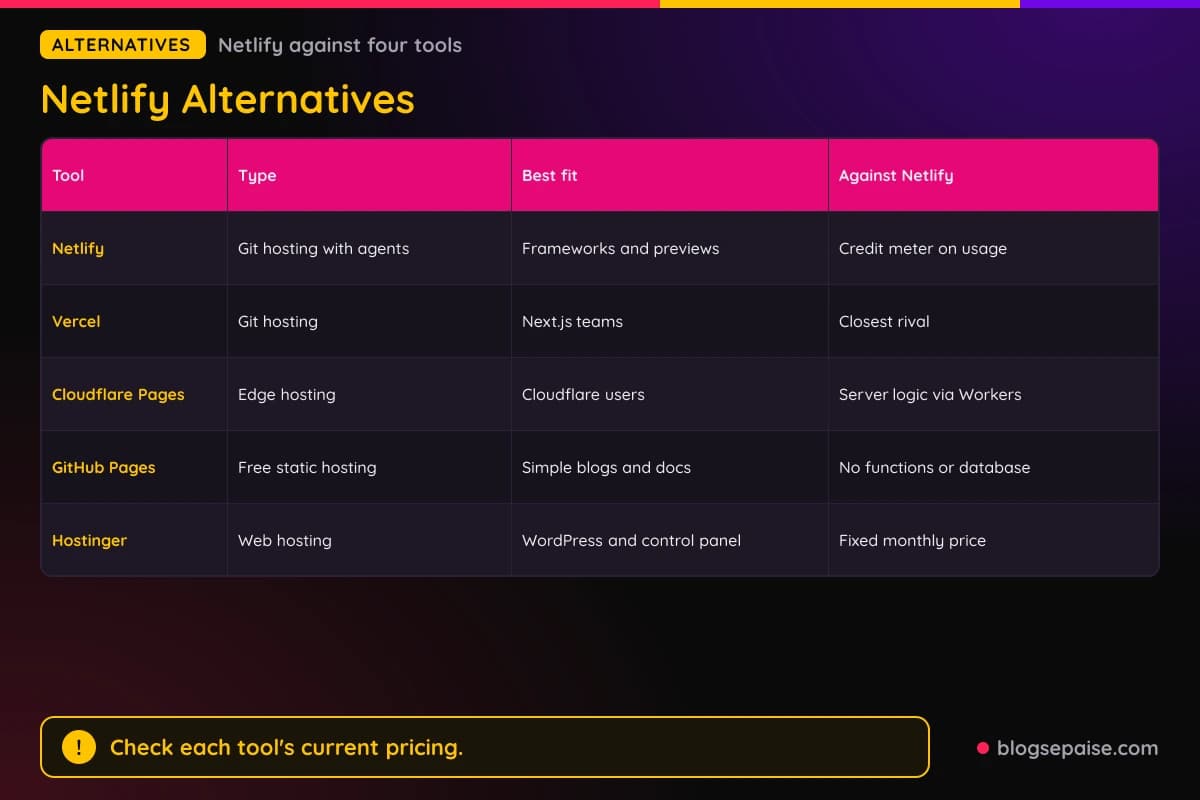
Hostinger is regular web hosting with WordPress support. It suits bloggers who want a control panel and a fixed monthly price.
Netlify stands out for Agent Runners, a built-in Postgres database, and Deploy Previews with a feedback drawer on every plan. Prices for the other tools change often, so check them again before you decide.
The trade-off is the credit meter. A host with fixed pricing may cost less for a high-traffic site.
Both Netlify and Vercel build from Git and give each branch a preview. Netlify adds Agent Runners and a built-in Postgres database, while Vercel leans on its Next.js roots.
Cloudflare Pages pairs with Cloudflare Workers for server logic. Netlify keeps functions, forms, and a database in one dashboard.
GitHub Pages costs nothing, but it has no built-in functions, forms, or database. Netlify gives you those on the Free plan.
Pick by habit. If your code lives on GitHub and your site is plain HTML, GitHub Pages is enough, and if you want previews and AI help, Netlify is the step up.
For a plain hosting comparison, our cloud hosting providers guide covers more options. Our Verpex review looks at a traditional host.
Netlify Use Cases
Five jobs show where Netlify earns its keep. Each one maps to a solution Netlify promotes.
A blog or marketing site is the first. Build it with a framework, push to Git, and Netlify handles the build, SSL, and global delivery.
Riot Games uses static generation with edge caching to handle traffic spikes for League of Legends. Deploy Previews also speed up its QA.
Landing pages and tests are the second. Branch deploys and previews let you try a page, and edge A/B tests or country redirects change what visitors see.
Ecommerce storefronts are the third. Rendering can be set per page for collections, product pages, and location-based pricing.
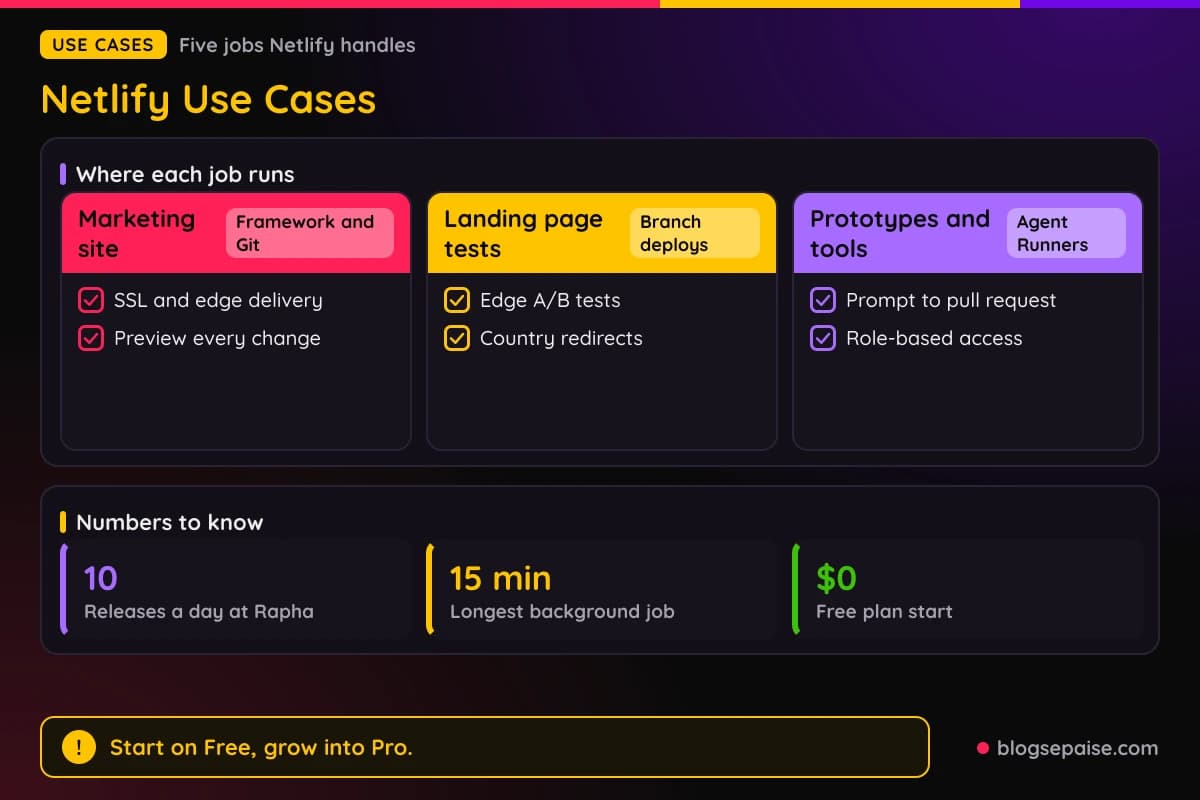
Rapha moved from one release every two weeks to as many as it wants, sometimes ten a day. Preview-first workflows with instant rollback made that safe.
Prototypes are the fourth. Describe the idea to Agent Runners, get a live preview URL, and turn it into a pull request when it holds up.
Internal apps are the fifth. Sales dashboards, UTM generators, refund tools, budget trackers, and PTO portals can live behind role-based access, secrets management, or password protection.
A simple starting plan keeps costs low. Start on Free with one site, add Personal when you need observability and secret detection, and move to Pro when a team joins.
AI builders can use Netlify as the deploy target. Platforms such as Bolt send generated apps to Netlify with one-click deployment.
Navan restructured its marketing site with a headless CMS so marketers own content updates. Preview workflows and localization run without downtime.
IPSY built a composable foundation with a Next.js frontend for bundles, dynamic pricing, and secure checkout. It avoided rewriting its legacy systems all at once.
Scheduled work is a quiet use case. A scheduled function can send a nightly digest or clean old data, and a background function can process an upload for up to 15 minutes.
Webhook handling is another. Stripe and GitHub events reach a function, which can update your database or send an alert.
Final Thoughts On Netlify
Netlify is a strong pick for anyone who ships sites from Git. Previews on every change, one-click rollbacks, and a Free plan with 300 credits make it easy to start.
The platform goes well beyond hosting. Agent Runners, Functions, a Postgres database, and an AI Gateway with 69 models sit in the same project.
Pricing starts at $0, then $9 for Personal and $20 for Pro. Bigger Pro tiers run $33, $63, $95, and $126 a month for up to 20,000 credits.
The catch is the credit meter. A production deploy costs 15 credits and bandwidth costs 20 credits per GB, so busy sites need a plan that fits.
Netlify shows monthly prices only, and accounts outside Enterprise pay by credit card. Enterprise buyers get a 99.99% SLA, SSO and SCIM, log drains, and 24/7 support.
Small sites do not need any of that. Free covers a personal blog with modest traffic, and Personal adds secret detection and 1-day observability for $9.
Start with one site and watch the usage numbers for a month. Turn on auto recharge only if you want a safety net, since it is off by default.
Agent Runners and the AI Gateway are the newest pieces. They help most when you already work in Git and want AI help without managing keys.
Previews are the feature you will use daily. A shareable link for every change cuts the back and forth with clients and teammates.
You can browse more write-ups on our software reviews hub if you want to compare tools side by side.
Netlify FAQ
1. What Is Netlify?
Netlify is a web platform that builds sites from Git and serves them from a global edge network. It also offers Agent Runners, Functions, Netlify Database, an AI Gateway, and Observability.
2. Is Netlify Free?
Yes. The Free plan costs $0 forever with a 300 credit limit each month, unlimited Deploy Previews, custom domains with SSL, Functions, and Netlify Database.
3. How Much Does Netlify Cost?
Free costs $0, Personal costs $9 a month, and Pro starts at $20 a month. Enterprise pricing is custom.
4. Does Netlify Offer Annual Pricing?
Netlify lists monthly prices only. There is no annual price to compare.
5. How Do Netlify Credits Work?
Each metered feature uses credits. A production deploy costs 15 credits, compute costs 10 credits per GB-hour, bandwidth costs 20 credits per GB, and web requests cost 2 credits per 10,000.
6. What Are The Pro Credit Tiers?
Pro offers 3,000 credits for $20, 5,000 for $33, 10,000 for $63, 15,000 for $95, and 20,000 for $126 a month. Tiers above 3,000 credits roll unused credits over for one extra billing cycle.
7. Can I Buy More Credits?
Yes, through auto recharge, which is off by default. On Pro, 1,500 extra credits cost $10.
8. What Are Deploy Previews?
Each pull request gets its own live URL that reflects the latest commits. Reviewers can comment through the Netlify Drawer, and feedback syncs to tools such as GitHub, Jira, and Linear.
9. Which AI Agents Does Agent Runners Support?
Claude, Gemini, Codex, and OpenCode, plus Kimi, DeepSeek, and GLM models. No API keys are needed.
10. What Is Netlify AI Gateway?
AI Gateway gives your code access to 69 models from OpenAI, Anthropic, Google, Moonshot, and DeepSeek with no API keys to manage. Prompts and model outputs are not stored.
11. Does Netlify Have A Database?
Yes. Netlify Database is managed Postgres built on Neon, with an isolated data branch for each Deploy Preview.
12. Can Netlify Run Background Jobs?
Yes. Background functions run for up to 15 minutes, and scheduled functions use a cron expression such as @daily.
13. Is Netlify Secure?
Netlify uses TLS 1.2 or higher and AES-256 encryption, plus DDoS protection for Layers 3, 4, and 7. Compliance covers ISO 27001, SOC 2, HIPAA, PCI DSS, GDPR, and more.
14. Who Is Netlify Best For?
Bloggers and affiliate marketers who build with a framework, developers, agencies, and small teams. Enterprise suits larger companies that need a 99.99% SLA and SSO.
15. Which Frameworks Does Netlify Support?
React, Next.js, Vue, Svelte, and Astro work with automatic detection and optimization. Netlify Build is customizable and framework-agnostic.
16. Can I Roll Back A Deploy On Netlify?
Yes. Rollbacks restore the whole site to any earlier deploy in one click, and old deploys stay at permanent URLs.
17. Does Netlify Have A Form Feature?
Yes. Forms collect submissions without backend code, and a function can react to a form event.
18. How Do I Get Started With Netlify?
Sign up, connect a Git repository or describe a project in Agent Runners, and Netlify builds and deploys it. Sites stay private until you publish.