Emergent Review (2026): AI App Builder Pricing And Verdict
Emergent is an AI platform that builds websites, apps, dashboards, forms, CRMs, automations, and agents from plain language prompts. You describe it, and the platform generates the screens, data, and backend.
The workflow has four steps: describe, generate, refine, and deploy. You refine by prompting again instead of dragging things around in a visual editor, and you launch to a live URL.
No coding is needed, which suits non-technical owners and small teams. Emergent targets SMB owners, IT agencies, product managers, and operations teams.
Pricing runs on credits. Free gives 10 monthly credits, Standard costs $20 a month for 100, and Pro costs $200 a month for 750, with custom Business and Enterprise plans.
Your code and project files stay yours, and you can export them to GitHub and host them somewhere else.
Disclosure: Some of the links I share might be affiliate links. If you click on one and make a purchase, I may earn a small commission as a thank you. But don’t worry, it won’t cost you anything extra. I only recommend stuff I genuinely believe in. Your support helps me keep creating awesome content. You can read my full affiliate disclosure in my disclaimer page.
If you want to save a lot of hours searching for high-paying affiliate programs, check out our exclusive list of 2500+ affiliate programs. You’ll find all the information about the programs inside the list. This list is perfect for affiliate bloggers and influencers.
Emergent Features
All twelve builders share one idea. You write a prompt, Emergent generates the project, and you refine it by prompting again instead of dragging things around in a visual editor.
Sites and pages come from the website, landing page, form, and survey and quiz builders. App and product work comes from the app, web app, SaaS, and schedule builders.
Data and AI work comes from the dashboard, CRM, automation, and agent builders. Each one starts from a prompt and ends at a live URL or a working tool.
Every builder shares the same pricing structure, with a Free plan, Standard, Pro, and Enterprise.
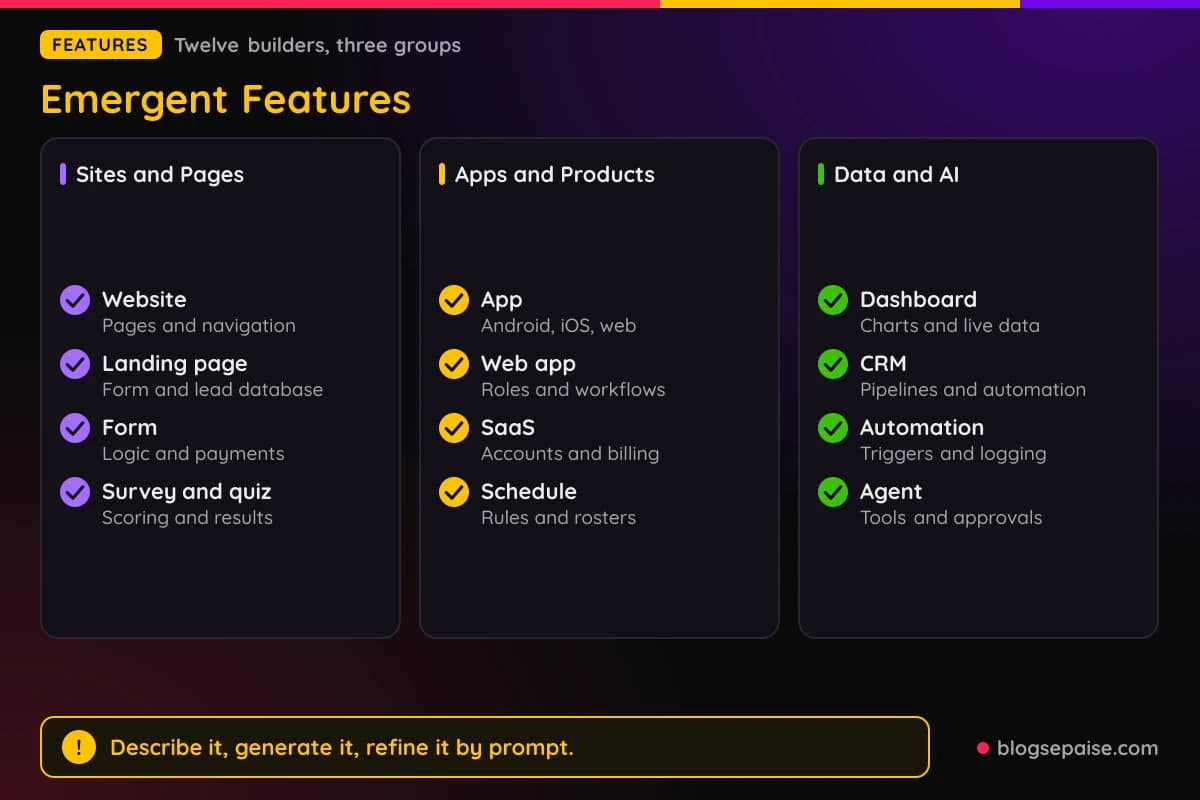
Launch times run in minutes for sites and forms, minutes to hours for apps, and hours for CRMs.
1. AI Website Builder
The AI Website Builder is the front door to Emergent. It offers the fastest way to build a website with AI, and you can go from an idea to a live website in minutes.
You start by describing your vision, such as a business site with a homepage, a services page, and a contact form.
The layout, pages, navigation, and design appear in real time while Emergent builds the site.
The flow has four steps: describe, watch it build, refine, and launch. Refining happens by prompt, so you add hero sections and pages and change copy, colors, fonts, and layouts without an editor.
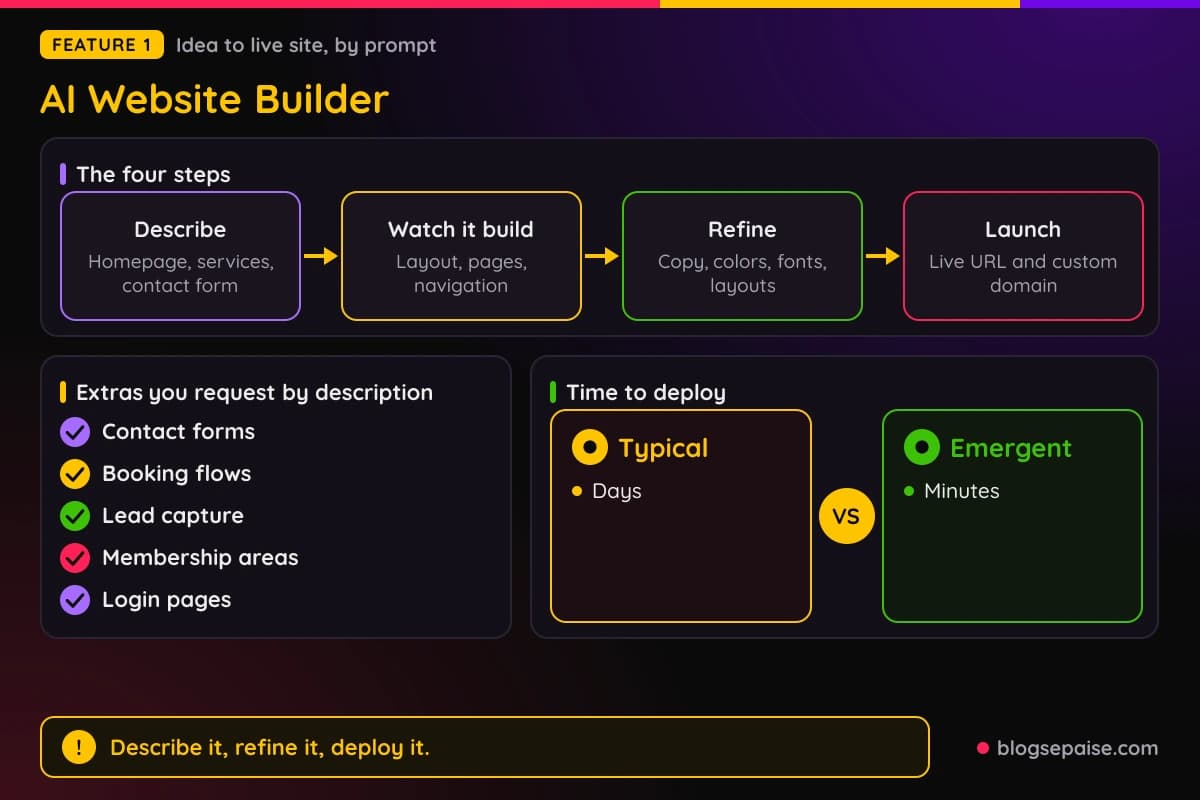
You can request extras by description, including contact forms, booking flows, lead capture, membership areas, and login pages.
You can also ask for SEO work, such as header structure and keyword placement.
When the site is ready, you deploy it to a live URL and connect a custom domain.
If you cancel, your code and project files stay yours, and you can export them and host them somewhere else.
Deployment takes minutes instead of days, and sites are responsive automatically.
Checking the result on your own phone is a quick way to confirm the responsive layout.
Because refining happens by prompt, adding a testimonials section or changing a font takes one sentence rather than a trip through menus.
2. AI Landing Page Builder
The Landing Page Builder is pitched around owning your leads. You describe the campaign, the audience, and the offer, and Emergent writes the page and connects the form to a database you own.
Forms write to a real database table inside the project.
You can query it, export it, or build on it, and there are no lead storage fees, export limits, or per lead pricing on any plan.
One prompt produces the hero, features, social proof, pricing, FAQ, call to action, form, and thank you state.
Forms can be multi-step, conditional, or calculators, and there is no response cap.
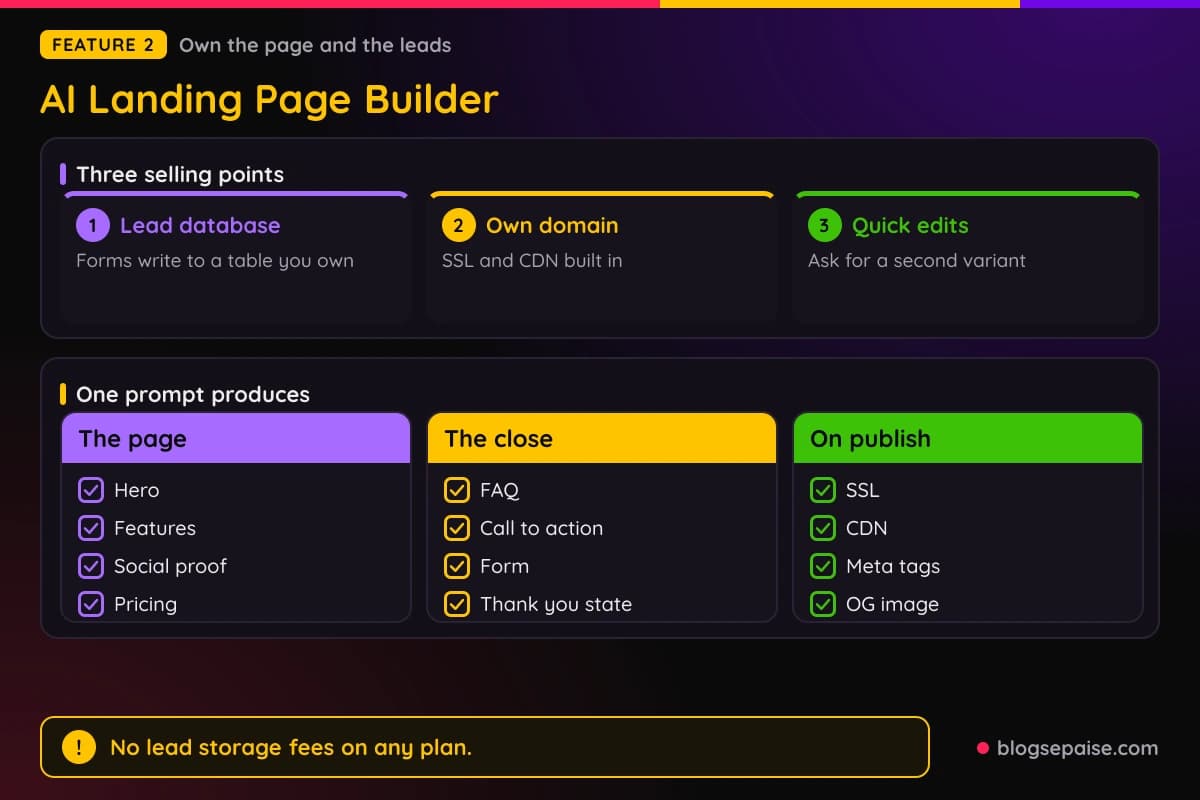
Publishing includes SSL, a CDN, meta tags, and an OG image, and the live URL appears minutes after the first prompt.
Custom domains use credits, which is worth remembering when you budget.
You can ask for a second variant by prompt and compare conversion by traffic source in GA4 or a similar tool.
Integrations include GA4, Meta Pixel, PostHog, Hotjar, HubSpot, Mailchimp, Klaviyo, Stripe, and Calendly.
Emergent also compares itself with Unbounce and details Unbounce's visitor limits.
Those Unbounce figures are dated September 2026.
Leads land in your own database, so a campaign page does not depend on a separate form service or a per lead fee.
3. AI Form Builder
The form builder is built around one idea: build any form with AI and own every response. One prompt produces the fields, the validation, the database, and the integrations.
There are no response caps and no per form pricing. Every submission is written to a database in your project, so you can query it, export it, or build dashboards on top of it.
Conditional logic, calculated quotes, scoring, and routing come included from the free tier.
Stripe and PayPal can be added as a form step for one-time or subscription payments, and the payment is stored with the submission.
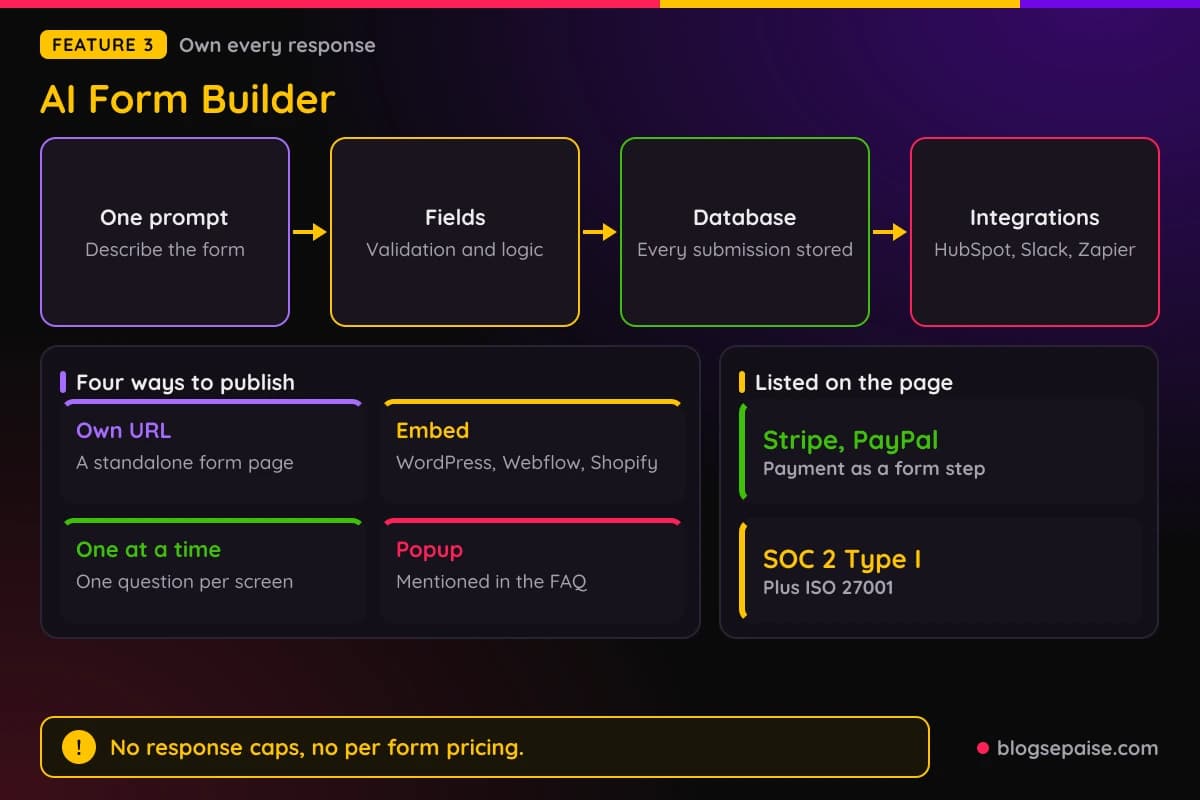
Native integrations include HubSpot, Salesforce, Mailchimp, Klaviyo, Google Sheets, Airtable, Notion, Slack, and Zapier, plus webhooks. Any tool with an API can connect as well.
You can publish a form on its own URL, embed it on WordPress, Webflow, Shopify, or any site, or show it one question per screen. A popup mode is also available.
Example uses include event RSVPs, job applications with resume upload, dental intake with consent and signature, and quote requests.
Emergent shows SOC 2 Type I and ISO 27001 badges, and HIPAA users must contact sales about Enterprise terms before collecting protected health information.
Payments stored with each submission make the Form Builder a fit for quote requests and paid event signups.
4. AI Survey And Quiz Builder
The Survey and Quiz Builder covers surveys, quizzes, and polls. It is a maker with no response caps, and it generates questions, skip logic, scoring, and result screens from text.
Every response is saved to a database you own. There are no per response fees, no annual limit, and no overage charge, and skip logic and scoring come on every plan including free.
Quizzes can show a personalized result screen to each respondent. A live dashboard can be filtered, and lead capture can send the score, archetype, and source to Slack, HubSpot, or Klaviyo.
A seven step guide walks through building one.
A good quiz has 10 to 15 single-select questions, with every option mapped to a result, and a result screen with a title, a paragraph, three to five next steps, and one action.
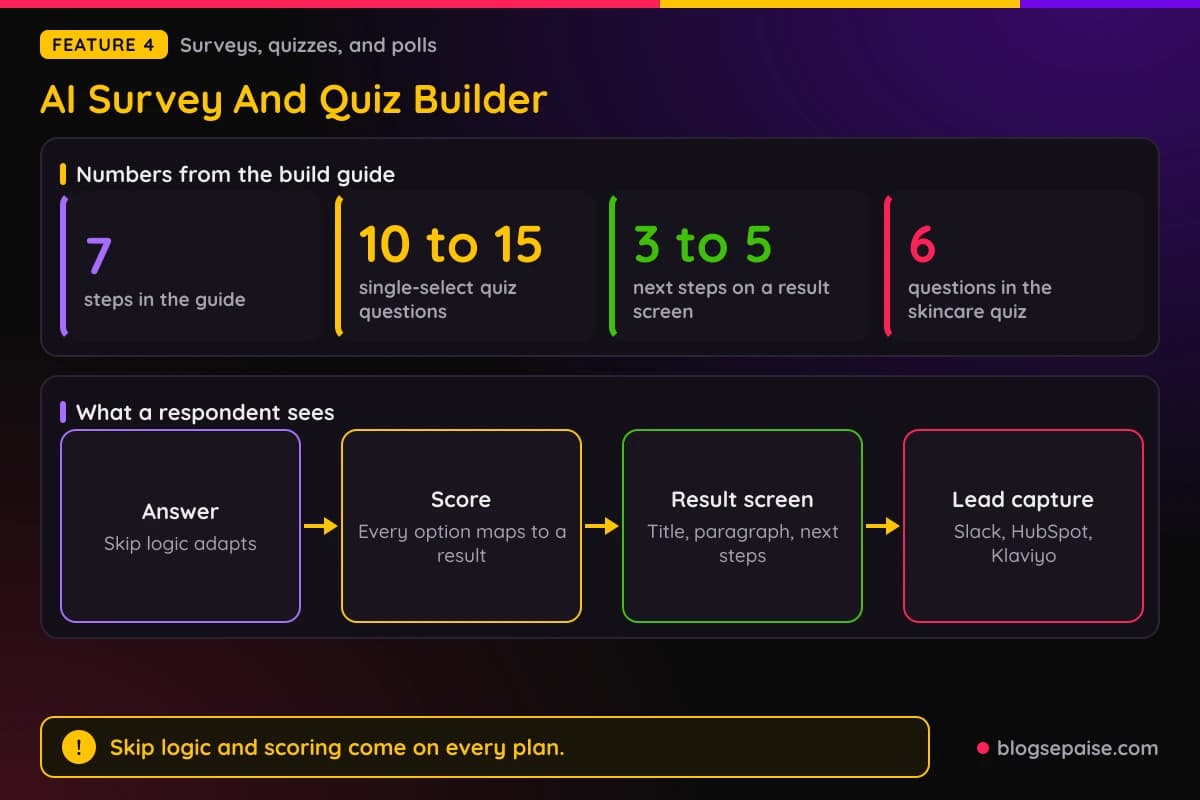
Example uses include an NPS survey, an anonymous employee engagement survey, a six question skincare quiz, a lead generation quiz by role and budget, and a live conference poll with real-time results.
Branding can sit on your own domain with no platform logo.
Emergent compares itself with SurveyMonkey, Typeform, and Interact, noting that SurveyMonkey charges $0.15 per extra response over its plan limits.
Quizzes pair well with lead capture, since the score, archetype, and source can reach Slack, HubSpot, or Klaviyo.
5. AI App Builder
The AI App Builder is the broad one. It turns prompts into websites, apps, and dashboards, with no coding required.
Output targets include Android with adaptive layouts, iOS for iPhone and iPad, Progressive Web Apps that install from one codebase, and websites.
The builds are export-ready for Google Play and the App Store, but Emergent does not explain how submission works.
The workflow has four steps. You describe the app, generate it, customize it by prompt or visual controls, and launch for Android, iOS, or web.
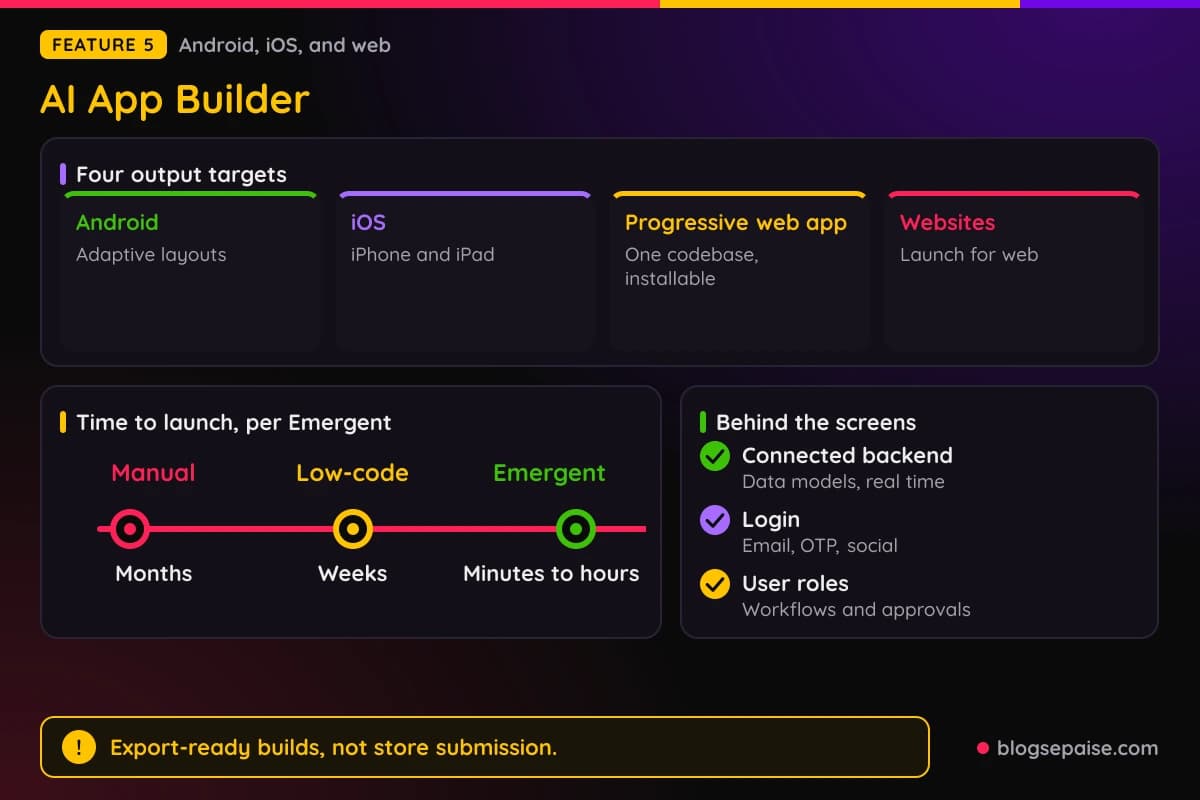
Behind the screens, Emergent generates a connected backend, data models, and real-time support.
Supported features include login by email, OTP, or social accounts, user roles, workflows for approvals and notifications, payments, subscriptions, and push notifications.
Example apps include appointment booking, restaurant ordering, food delivery, habit tracking, personal finance, fitness tracking, and event ticketing.
Launch takes minutes to hours, against months for manual builds and weeks for low-code.
You can export the app and keep control of the app and your data.
Because the backend is generated alongside the screens, an appointment booking app starts with logins and data models already in place.
6. AI Web App Builder
The Web App Builder targets production-ready web applications. You can go from an idea to a live web app in minutes, without coding skills or an engineering team.
The builder has four modules. They cover interface generation, backend and databases, authentication with roles and workflows, and integrations with deployment.
Interfaces are responsive and include forms, tables, filters, and charts, and spreadsheets can become dashboards.
Roles can be set for admins, teams, customers, and vendors, with automated approvals and notifications.
Integrations include Stripe, Razorpay, and PayPal for payments, plus Twilio, SendGrid, and Slack for messages.
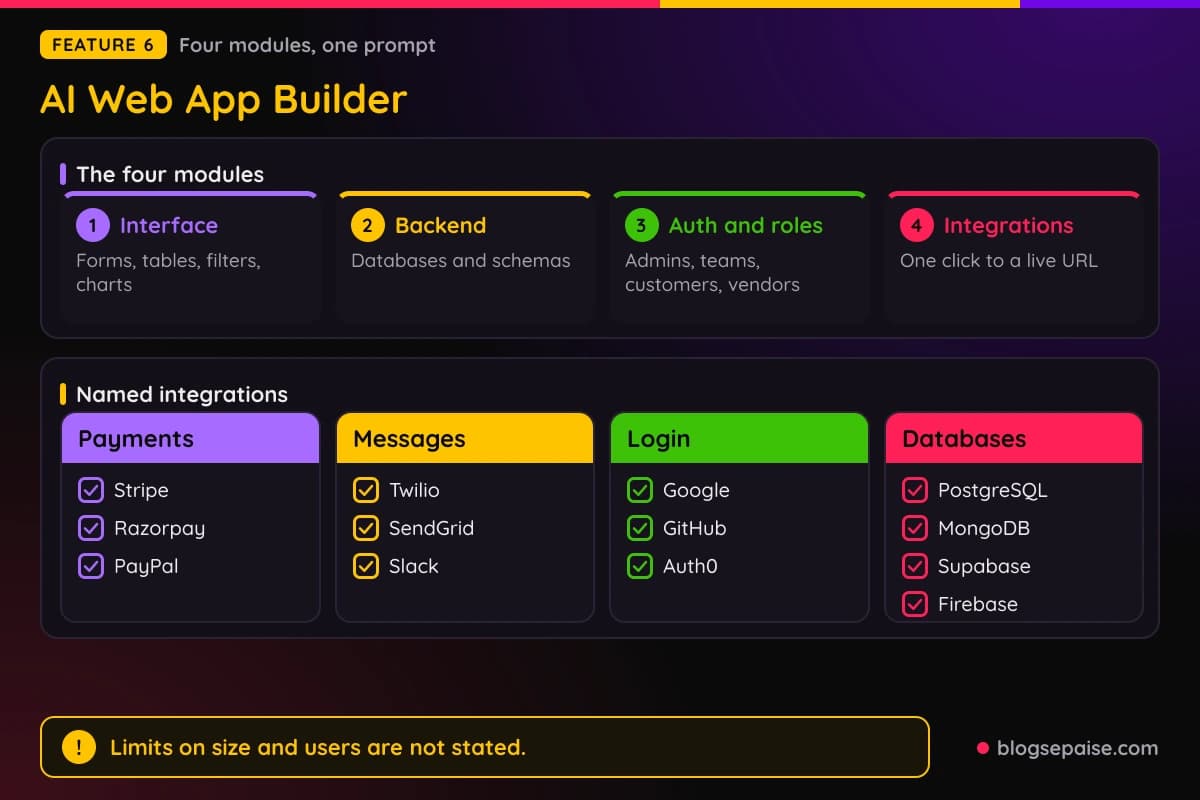
Login options include Google, GitHub, and Auth0, and the databases named are PostgreSQL, MongoDB, Supabase, and Firebase.
App types include SaaS products, customer portals, internal tools, marketplaces, booking systems, admin dashboards, and CRMs.
Deployment is one click to a live URL, and scaling is automatic.
Emergent does not state limits on app size, users, storage, or bandwidth, and it does not name the framework or hosting provider.
Pricing starts with a free tier and paid plans from $20 a month based on usage.
Pairing the Free plan with a small internal tool is a low-risk way to see how the generated interface, database, and roles behave.
7. AI SaaS Builder
The SaaS Builder is aimed at people who want to sell software.
The SaaS Builder ships real software products, and user accounts, billing, and backend come from your prompt.
In the four step flow, you describe the idea, watch the interface, database, accounts, and backend appear, refine by prompting, then launch on a live URL with your own domain.
In the demo, the agent saves a plan to a file and asks design questions before it deploys.
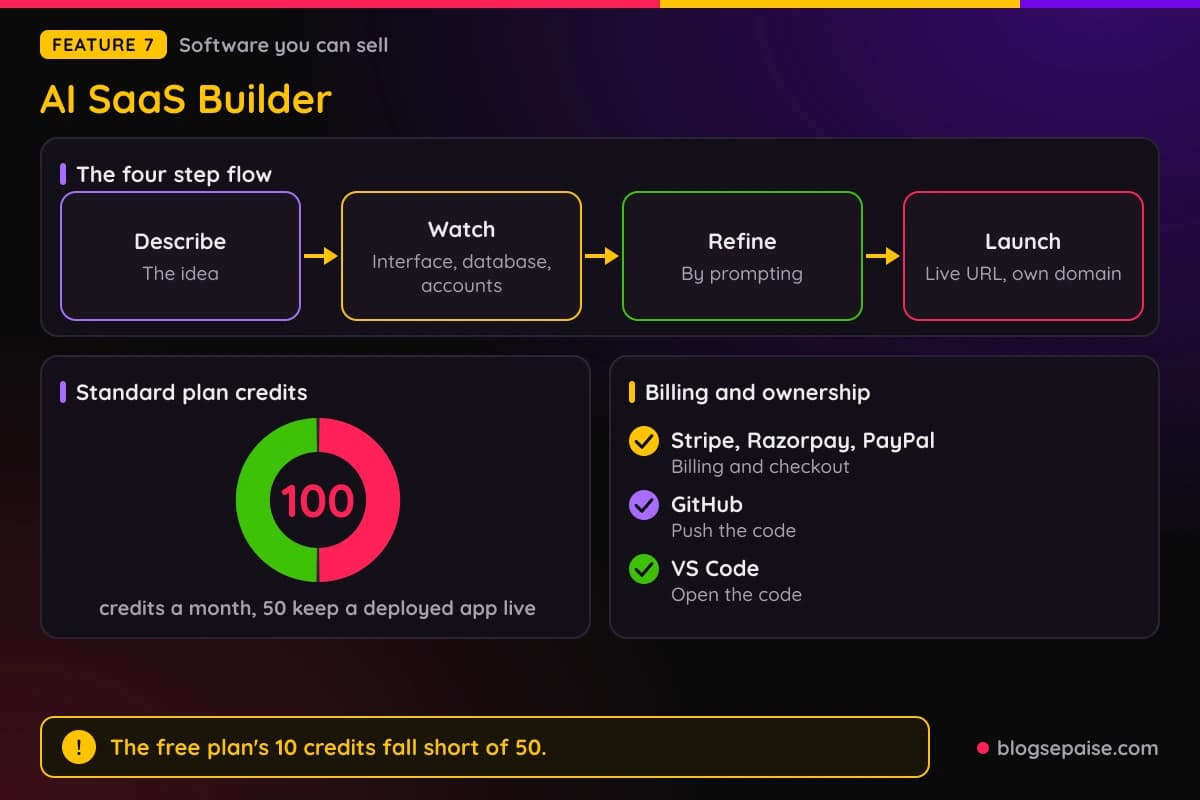
Billing runs through integrations.
Emergent supports Stripe, Razorpay, and PayPal for one-time payments, subscriptions, invoicing, and checkout, so you can charge customers and own what you build.
Ownership is a repeated theme. You can push the code to GitHub or open it in VS Code, and nothing is locked.
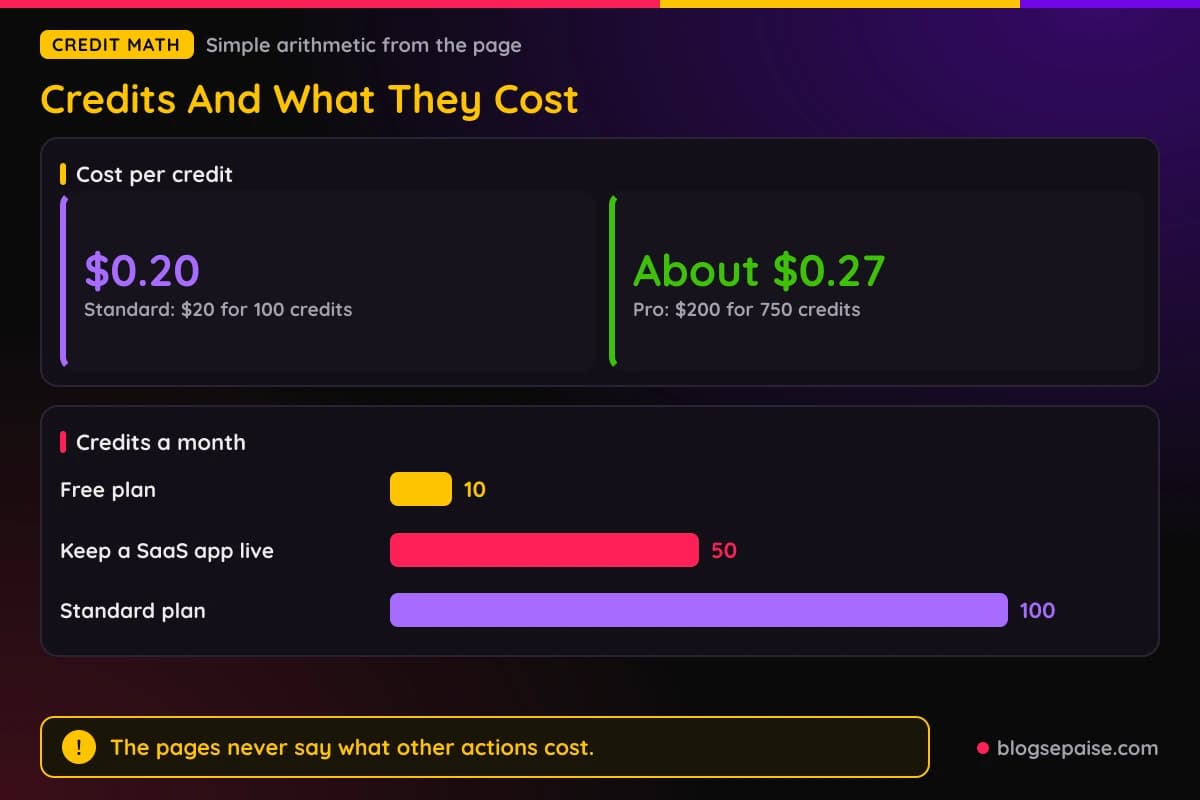
Credits matter most here. New users get 10 free credits, and deploying costs 50 credits per month to keep live.
On those figures, the free plan's 10 credits fall short of 50, while the Standard plan's 100 credits cover it with 50 left over.
Emergent does not say how other actions use credits.
Budget for the 50 credit deployment cost before you plan a launch, since it repeats every month the app stays live.
8. AI Schedule Builder
The Schedule Builder creates a working scheduling app from a plain language prompt. You can have a working app the same day, complete with calendar views and availability rules.
Views include day, week, month, and timeline, with color coding by team, role, location, or status. Reassigning a slot updates the rest of the week.
The scheduling rules are the interesting part.
You can set availability windows, time off, blackout dates, conflict detection across people, rooms, and equipment, recurring slots with exceptions, maximum hours, and minimum rest gaps.
Auto-scheduling can assign by skill, role, seniority, or location, balance hours fairly, handle time zones and daylight saving, and rebalance when someone drops.
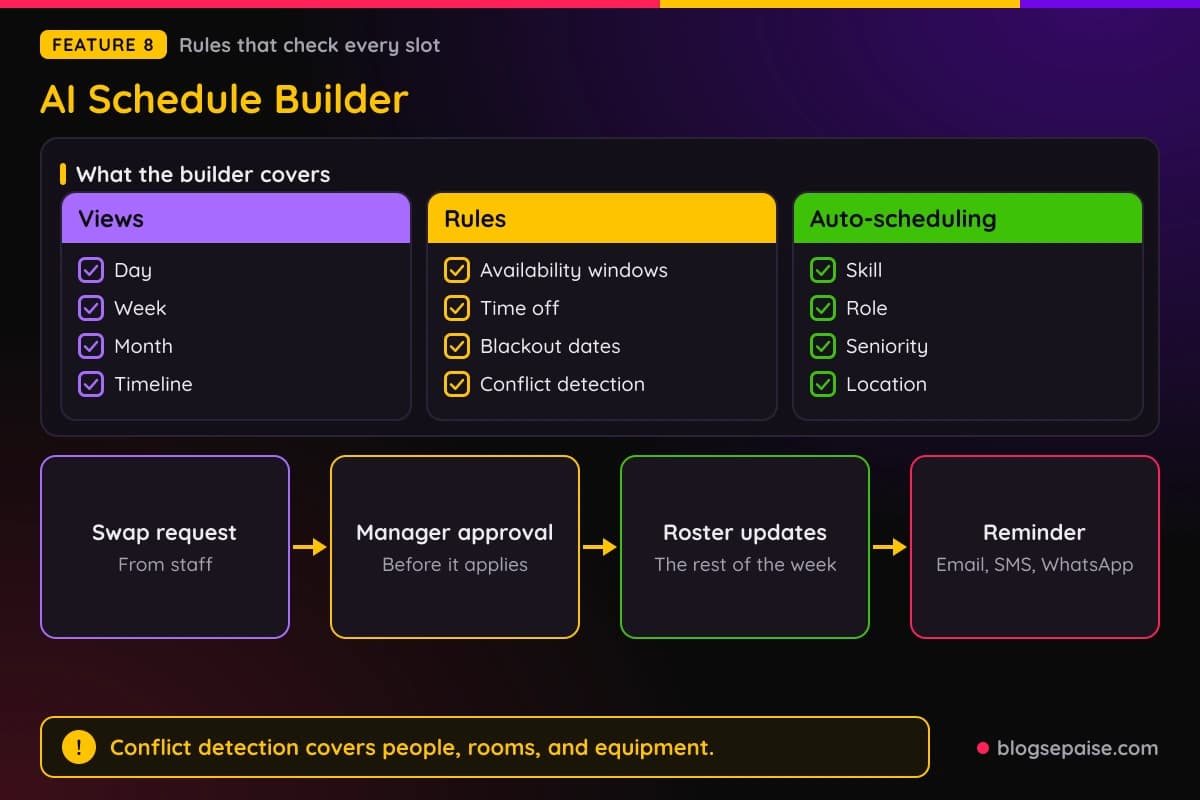
Managers see the full roster, while staff see their own shifts.
Integrations include two-way Google Calendar and Outlook sync, reminders by email, SMS, and WhatsApp, and Slack or Teams updates.
Swap, cover, and time-off requests go through manager approval.
Use cases include employee shift scheduling, interview scheduling, maintenance trackers, project timelines, and appointment booking.
The demo builds a trekking website, and some sample content carries placeholder text.
Conflict detection across people, rooms, and equipment is the rule most small teams will notice first when replacing a shared calendar.
9. AI Dashboard Builder
The Dashboard Builder delivers working dashboards with charts, live data, and a backend from a prompt. No analysts are needed, and you can go from data to dashboard in minutes.
The steps are to describe what to track, connect your data, refine by prompting, and launch. Charts include line, bar, pie, and combo types, plus sortable tables, filters, date ranges, and drill-downs.
Live data comes through APIs and webhooks, with scheduled auto-refresh and the option to combine several sources.
Named sources include PostgreSQL, MongoDB, Supabase, spreadsheets, warehouses, CRMs, and payment tools.
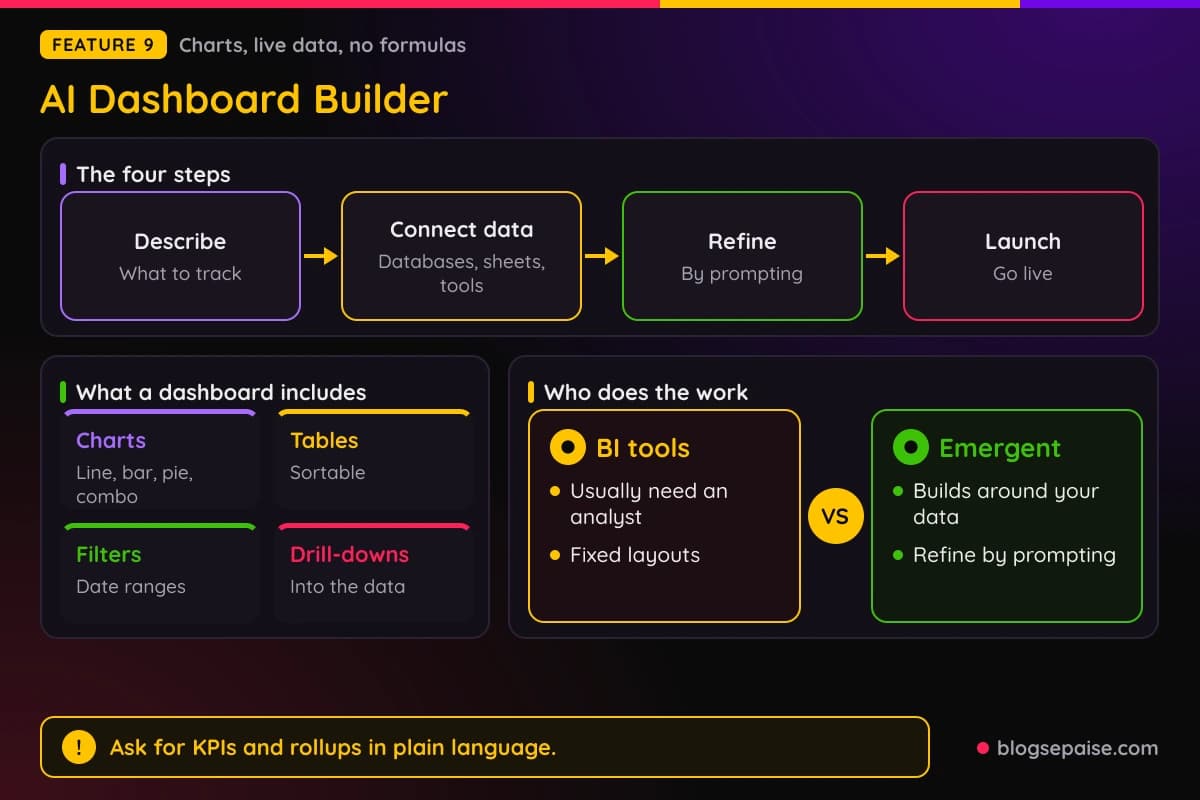
Analysis happens in plain language. You can ask for KPIs, ratios, and rollups without formulas, and Emergent flags anomalies and trends and writes summaries and scheduled reports.
Sharing uses live links, executive summaries, team views, role-based access, login, and encryption.
Template tools use fixed layouts and BI tools usually need an analyst, while Emergent builds around your data.
Emergent does not state limits on data volume or dashboard count.
Use cases include sales analytics, marketing performance, SaaS admin, project management, and support dashboards.
Role-based access and encryption matter when a dashboard shows sales or support data to people outside your core team.
10. AI CRM Builder
The CRM Builder lets you describe how your team tracks leads, deals, or customers, and then change it later just by asking. No code is needed.
One prompt can produce pages, forms, tables, and filters, laid out for desktop, tablet, and mobile. You can import contacts from spreadsheets and customize fields, stages, and pipelines by description.
Automation includes auto-assigning and routing new leads, follow-ups and reminders, moving deals between stages on conditions, and automatic reports.
Email and calendar sync links emails to contacts and logs meetings.
Payment status can sit on each deal, with invoices and recurring billing. Security covers secure login, role-based access, encryption, and per-record view and edit permissions.
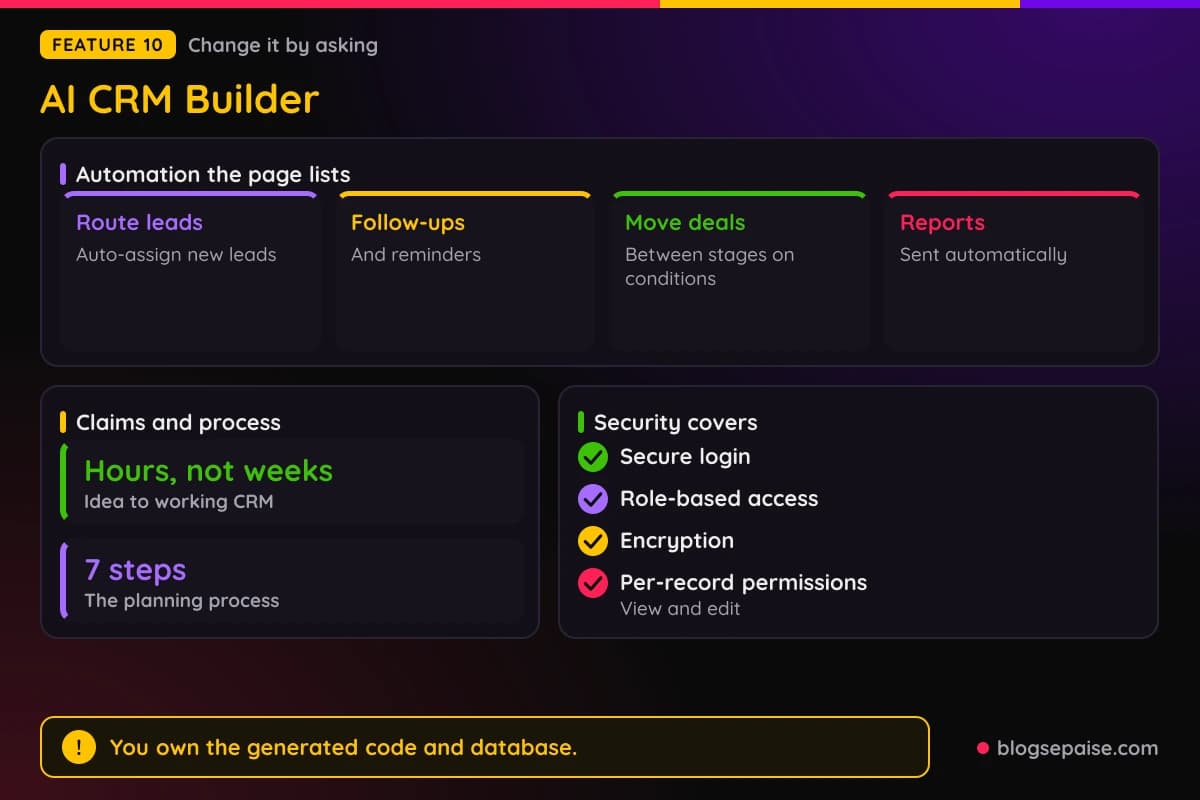
An idea becomes a working CRM in hours, not weeks, and CRMs can be built in days.
A generic seven step process covers planning one, from mapping your stages to launching and inviting teammates.
You own the generated code and database and can host, modify, or export them. Use cases include real estate, marketing, sales, healthcare, and small business CRMs.
Because fields, stages, and pipelines change by description, a small team can reshape the CRM as its sales process evolves.
11. AI Automation Builder
The Automation Builder is framed as business process automation.
You describe the workflow, the trigger, and the destination, and Emergent generates the automation, the form or dashboard that fires it, and the database it logs to.
The big draw is no task cap. Credits are shared with no per task meter, unlike Zapier, n8n, and Make.
Triggers include webhooks, schedules, inbound email, forms, and database events. Branching, retries, error handling, and native AI or agent steps are built in.
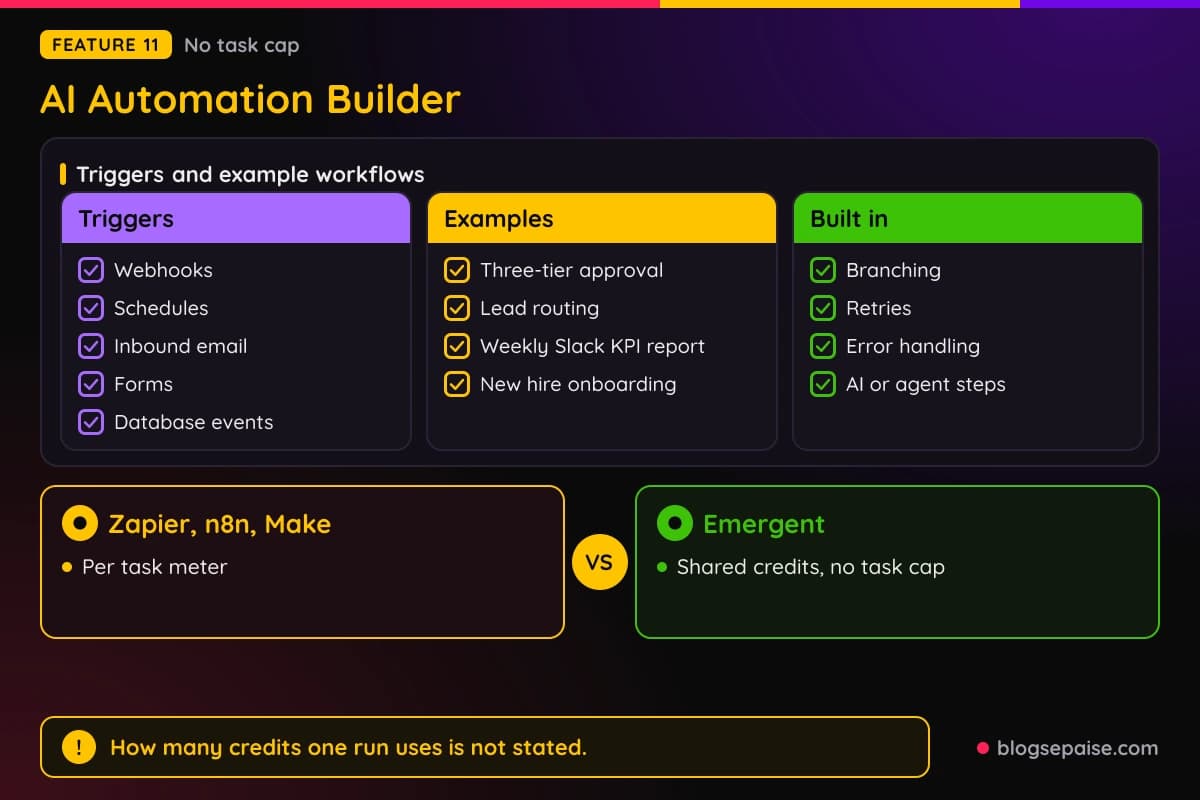
Example workflows include a three-tier approval with a Slack alert, lead routing by territory or value, a weekly Slack KPI report from Postgres, and new hire onboarding across five tools.
Integrations include Slack, HubSpot, Stripe, Airtable, Google Sheets, Gmail, Salesforce, and Twilio. Any tool with an API or webhook can be connected.
The code can be exported to GitHub and deployed anywhere, including your own cloud, Kubernetes, or a VPS.
Emergent compares itself with Zapier Professional, which costs $19.99 a month on annual billing for 750 tasks.
Emergent does not say how many credits one run uses, and AI steps draw on the same credit pool.
Test one workflow, such as lead routing by territory, and watch the credit counter before moving anything critical.
12. AI Agent Builder
The Agent Builder aims at no-code agents that reason, use tools, and get work done. An agent plans steps toward a goal, uses tools, and connects to your apps and data.
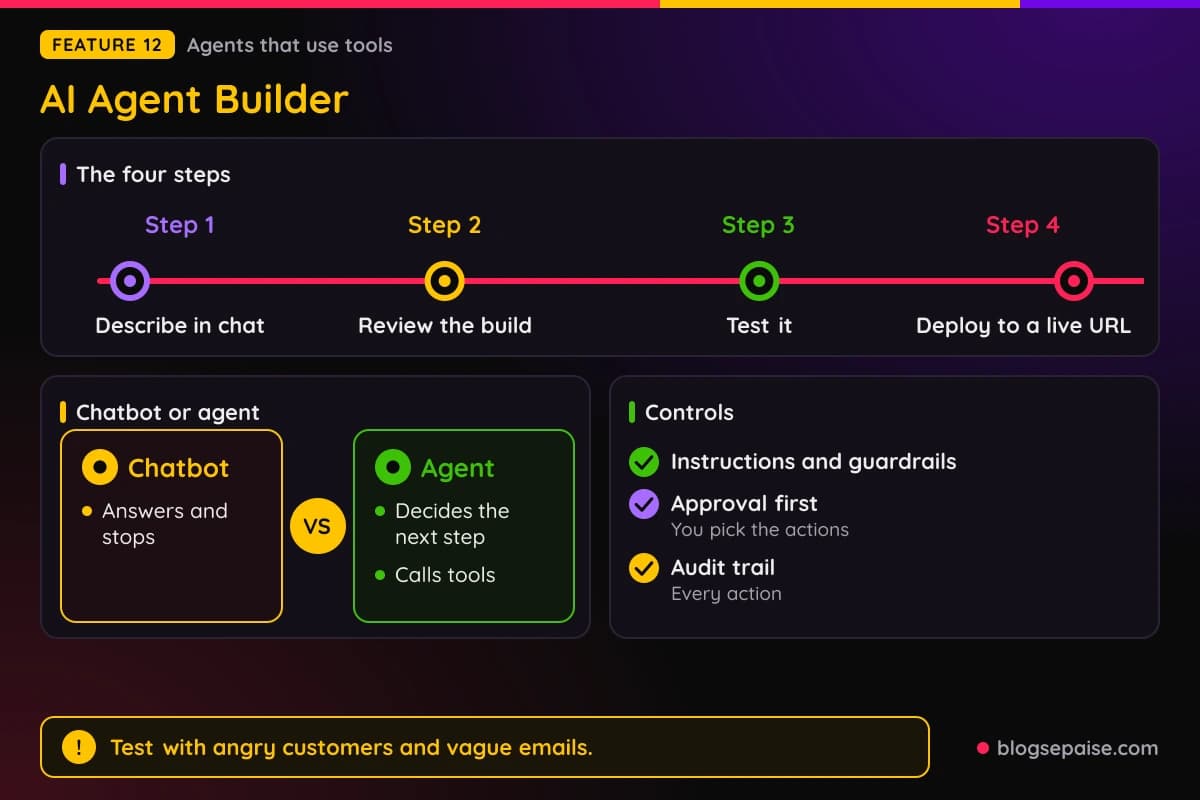
The four steps are to describe the agent in chat, review the build, test it, and deploy to a live URL.
A good setup describes the task, the tools, the tone, and one thing the agent must never do, then tests it with angry customers, vague emails, and leads missing phone numbers.
Controls include instructions, guardrails, workflows, and a choice of which actions need your approval first.
Every action is recorded in an audit trail, and agents respect existing permissions.
You can publish an agent as a standalone app or embed it as a copilot in your product or site.
Integrations include Slack, Teams, WhatsApp, Zendesk, Intercom, Google Drive, Notion, PostgreSQL, Salesforce, and HubSpot.
Example agents include a sales agent that qualifies leads and books meetings, a research agent, a support agent built from a knowledge base, and an ops monitoring agent.
A chatbot answers and stops, while an agent decides the next step and calls tools.
Emergent does not state run counts, tool-call caps, or context limits beyond the plan features.
Pro includes custom AI agents and a 1M context window.
The Free plan, by contrast, includes one-click LLM integration.
Start with the approval setting so the agent asks before it takes any action that touches customers.
Emergent Pricing Plans
Emergent prices its Individual plans in credits. The plans are Free, Standard, and Pro, with Business and Enterprise under a separate Enterprise tab.
The Free plan costs $0 a month and includes 10 free monthly credits. It also includes core platform features, web and mobile builds, access to advanced models, and one-click LLM integration.
Standard costs $20 a month and includes 100 credits per month.
Standard suits first-time builders and adds web and mobile apps, private project hosting, GitHub integration, fork tasks, and the option to purchase extra credits as needed.
Pro costs $200 a month and includes 750 monthly credits. It adds a 1M context window, ultra thinking, system prompt edit, custom AI agents, high-performance computing, and priority customer support.
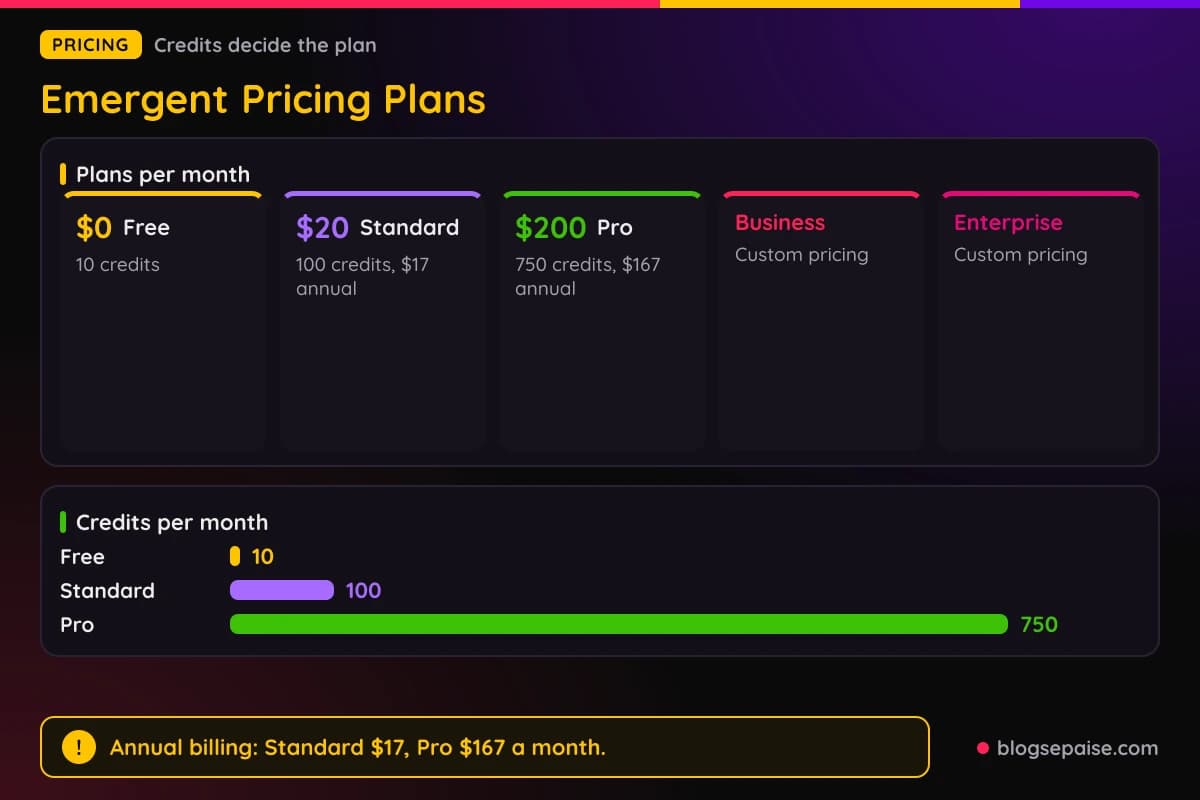
Business and Enterprise use custom pricing and a Book a demo button. Business adds role-based access control, single sign-on, shared team workspaces, and real-time co-editing.
Enterprise adds user-level credit limits, audit logs, self-hosted database support, a priority SLA, user groups, deployment to your own cloud, and credit usage reports with an analytics dashboard.
Emergent offers an annual option: Standard is $17 a month and Pro is $167 a month.
The credit math is simple. Standard is $20 for 100 credits, which works out to $0.20 per credit, and Pro is $200 for 750 credits, or about $0.27 per credit.
So Pro costs more per credit than Standard, and the extra money goes toward features and priority support rather than cheaper credits.
Extra credits can be bought on Standard, but Emergent gives no rates or amounts.
Emergent does not list refund or cancellation terms, and it links to separate Terms and Privacy documents.
On annual billing, Standard works out to $0.17 per credit and Pro to about $0.22 per credit.
Annual billing saves $3 a month on Standard and $33 a month on Pro, which adds up to $36 and $396 a year.
Who Is Emergent Best Suited For
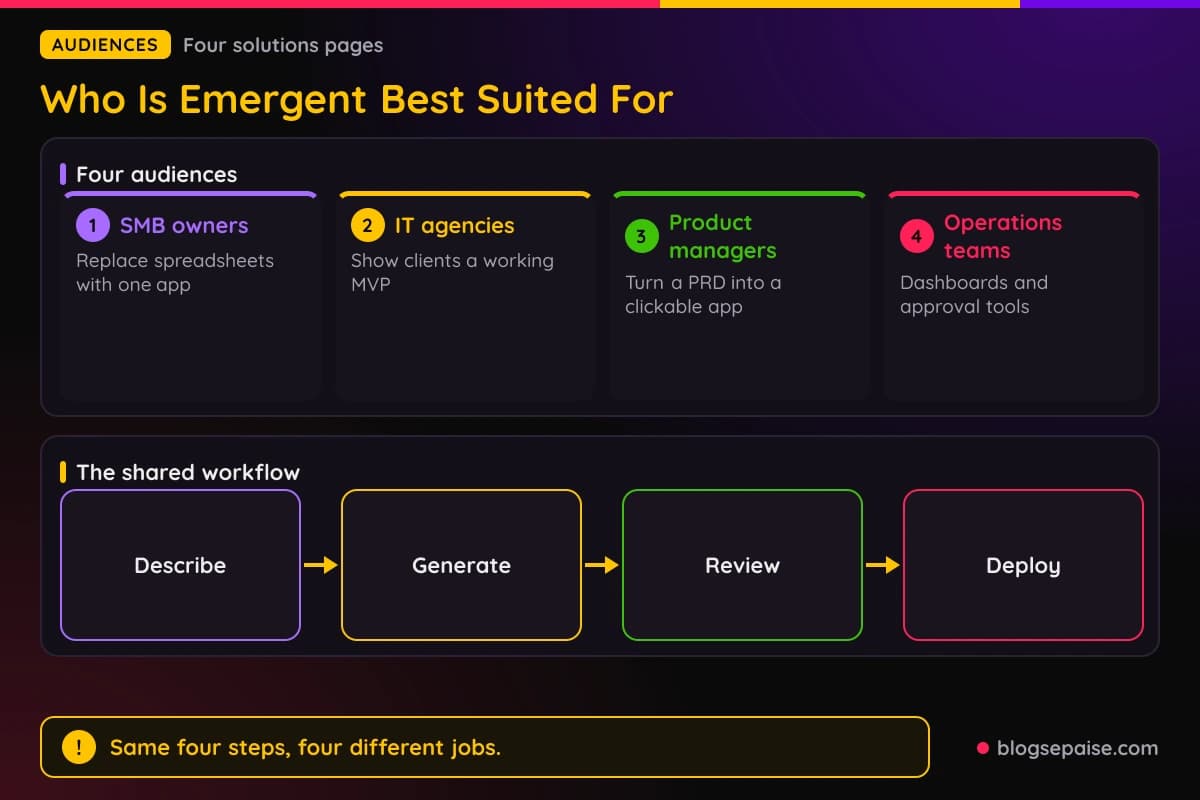
Emergent speaks to four audiences: SMB owners, IT agencies, product managers, and operations teams.
Each audience gets the same idea, which is describing a tool and letting the platform generate it.
SMB owners are the first audience. Emergent targets non-technical small and medium business owners and managers, and pitches custom software without agencies or developers.
Emergent shows 12 example projects for this group, including a booking system, order management, CRM and lead tracking, inventory tracking, an invoice and billing tool, and staff scheduling.
Agents can also clean messy data, draft emails and WhatsApp messages, and answer plain language questions about your data.
One simple subscription replaces custom development fees.
A testimonial from Emily, owner of a wellness studio in the USA, says she replaced six spreadsheets and two different tools with a single app.
IT agencies are the second audience.
For agencies and software service firms that need something concrete to show prospects, you can paste a brief, get an MVP, refine scope live on a client call, and deploy.
Typical goals for agencies include delivering projects 2-3x faster, shipping full-stack apps in days, and turning RFPs into a clickable MVP in under an hour.
Named stack support covers React, Next.js, Node, Python, and PostgreSQL, with direct deployment or a Git workflow.
A testimonial from Mario Pino Corona of Allcom Chile says he built a system in five hours that impressed Walmart and closed a $100K deal with an airport.
The company logos shown do not say what those companies used.
Product managers are the third audience. PRDs, user stories, or problem briefs can become clickable apps with screens, flows, and a basic backend and data model.
A visual editor, comments on screens, versioning with an approved mark, and role-based access support review.
Product teams can validate ideas up to 10× faster, though Emergent shows no data behind that number.
Operations teams are the fourth audience.
Operations teams focus on work stuck in spreadsheets and developer queues, with dashboards, command centers, internal tools, and approval workflows built on top of existing ERP or CRM systems.
Across all four audiences, the flow is the same: describe, generate, review or refine, and deploy. All four also show SOC 2 and ISO 27001 badges and mention role-based access and workspace controls.
Non-technical owners get the most from the first audience, while agencies and product managers use the same prompts to produce demos and prototypes.
Who Emergent Is Not For
Several questions stay open about Emergent, and they matter most for heavy users and regulated teams.
Every plan runs on a monthly allowance, and Emergent does not say what a credit buys. That leaves 10, 100, or 750 credits hard to translate into finished projects.
The one concrete figure is deployment, which costs 50 credits per month to keep live. On those numbers, the free plan's 10 credits would not cover that.
Custom domains also use credits, and AI steps in automations draw from the same pool.
Heavy users could burn through an allowance faster than the price suggests.
Extra credits can be purchased on Standard, and Emergent gives no rates.
The second gap is refunds. Emergent does not list refund or cancellation terms and links to separate Terms and Privacy documents.
Third, custom code control is thinly documented.
Code exports to GitHub, but Emergent does not name the framework or hosting provider, and it sets out no limits on app size, users, storage, or bandwidth.
Fourth, agent run counts, tool-call caps, and context limits are undefined, and store submission is covered only as export-ready builds.
Regulated work is another flag. Emergent tells HIPAA and regulated workflow users to contact sales, so those buyers should plan for an Enterprise conversation instead of a quick self-serve signup.
Testimonials and company logos come without detail on what each company built.
Teams that need fixed monthly costs, documented limits, or written refund terms should confirm each point with support before committing.
Emergent Alternatives
Emergent sits among AI app builders and no-code tools.
These tools overlap with Emergent in different ways, from prompt-first builders to visual no-code editors.
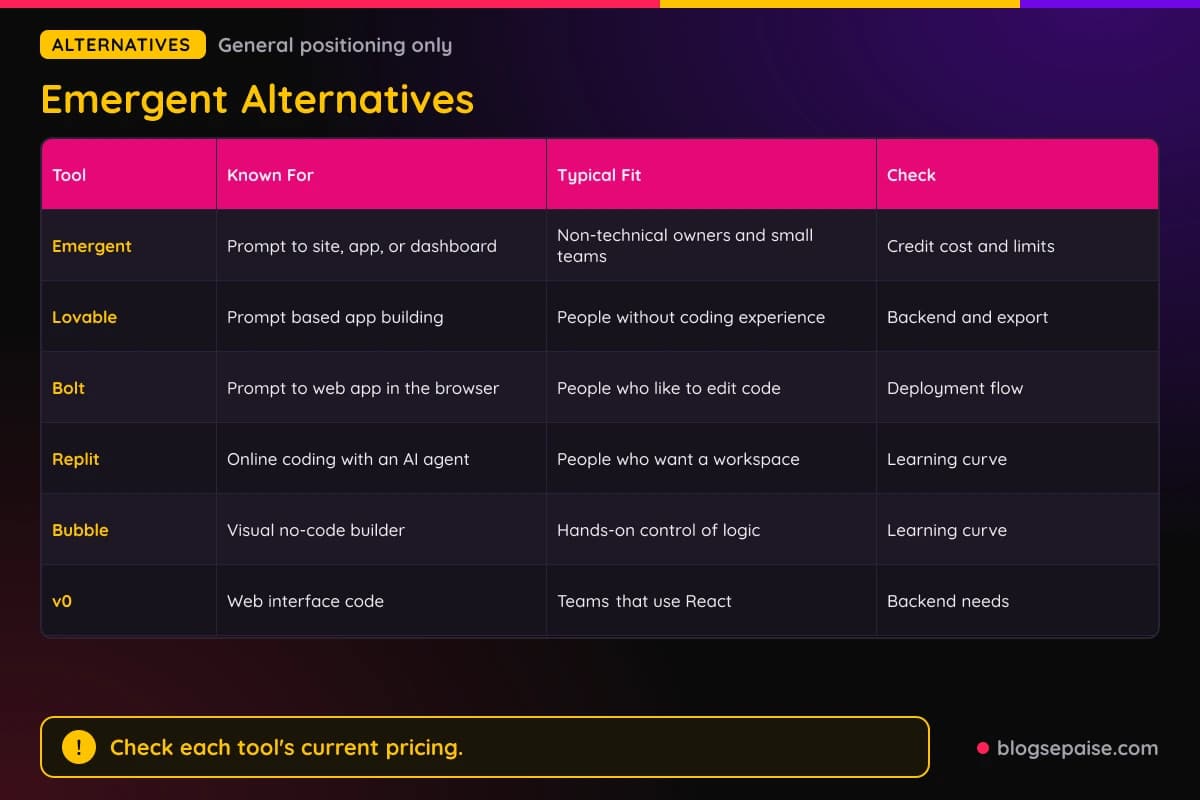
Lovable is a prompt-based app builder for people without coding experience.
It is a close cousin of Emergent in spirit, so compare how each one handles backends, code export, and usage limits.
Bolt is a browser-based tool that turns prompts into web apps, and it appeals to people who like to see and edit the code.
Its editing and deployment flow differs from Emergent's prompt-first approach.
Replit combines an online coding environment with an AI agent.
It suits people who want a development workspace beside the generated app, which feels different from Emergent's plain language pitch.
Bubble is a visual no-code builder where you place elements and set logic by hand. It gives fine control, and the tradeoff is a longer learning curve than prompting.
v0 from Vercel is best known for generating web interface code. It can suit teams that already work in React and want a design head start rather than a full backend.
Emergent also compares itself with Unbounce, Typeform, SurveyMonkey, Zapier, Make, and n8n, which shows how many jobs it aims to cover.
Those comparisons include Zapier Professional at $19.99 a month for 750 tasks, and SurveyMonkey at $0.15 per extra response.
To choose, ask three questions. Does the tool generate a backend, can you export the code, and how does the price grow as you use it.
Then run the same small project in two tools on their free plans before you pay for either one.
Keep notes on setup time, credits used, and how easily you can export code, so the comparison rests on your own results.
Emergent Use Cases
Emergent offers plenty of examples, and the most useful ones match everyday small business needs.
For sites and pages, examples include a SaaS beta waitlist, a webinar signup, a coming-soon page with a countdown, and an ebook download.
The website builder's own example is a business site with a homepage, services page, and contact form.
Forms and surveys cover event RSVPs, job applications, quote requests, NPS surveys, and a skincare recommendation quiz. A lead generation quiz by role and budget shows how scoring can feed a CRM.
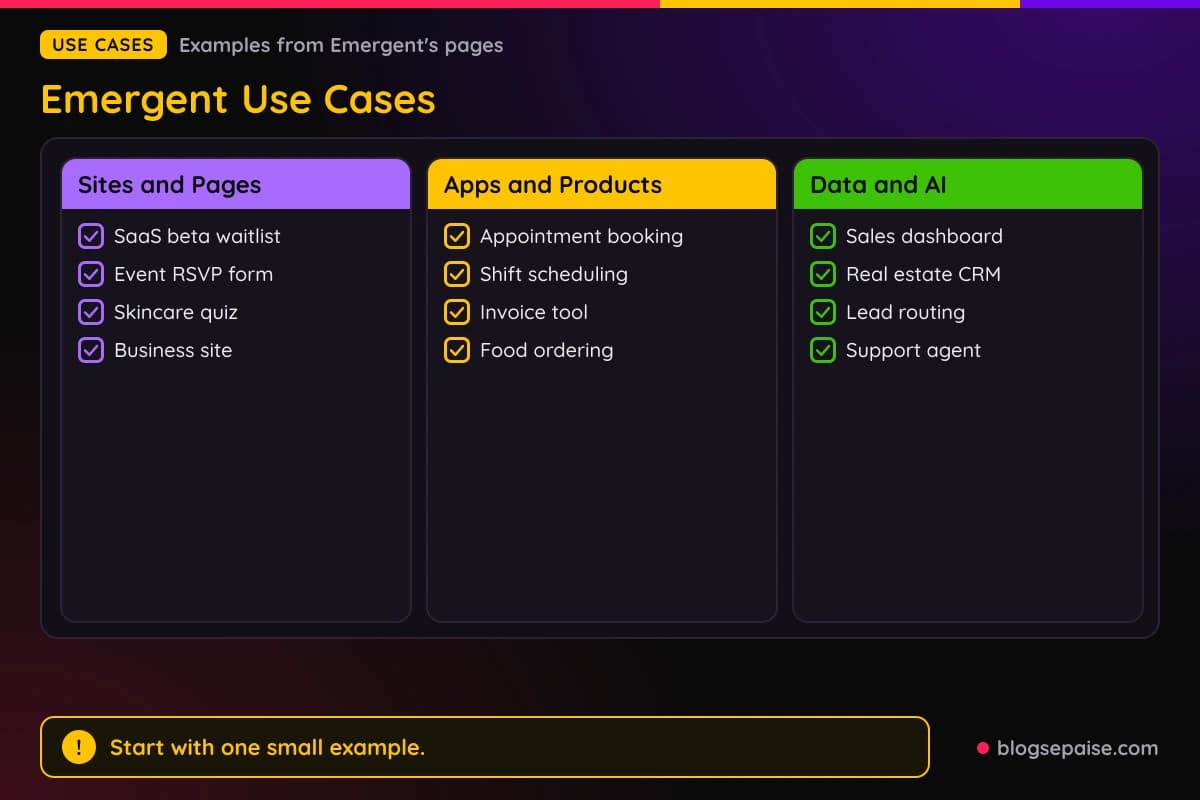
For apps and products, examples include appointment booking, restaurant ordering, food delivery, habit tracking, and event ticketing.
The SaaS Builder adds AI content writing, scheduling, and invoicing tools.
Scheduling covers employee shifts, interviews, and maintenance. A small team could replace a shared calendar and a spreadsheet with one app that checks conflicts before confirming.
For data and AI, dashboards cover sales analytics, marketing performance, SaaS admin, and support. CRMs suit real estate, marketing, sales, healthcare, and small businesses.
Automation examples include lead routing, a weekly Slack KPI report, and new hire onboarding across five tools.
Agent examples include a sales agent, a support agent built from a knowledge base, and an ops monitoring agent.
If you build a SaaS product and want affiliates to promote it, our Rewardful review covers software built for that job.
If you want to start earning by recommending tools like this one, our first 30 days affiliate marketing guide covers a launch sequence.
A good first test is small. Pick one example from the SMB list, such as a booking system or an invoice tool, and see how far the free credits take you.
Booking systems and invoice tools are small enough to finish on free credits, which makes them a fair test of the whole workflow.
Final Thoughts On Emergent
Emergent covers a lot of ground for one platform. Twelve builders share one prompt-first workflow, and every builder repeats the same promise of a working site, app, or dashboard in minutes or hours.
The strongest ideas are about ownership. Leads, form responses, and survey answers land in a database you own, and your code can be exported to GitHub.
The weakest spot is clarity on credits. The plans are easy to read, but Emergent never explains the cost of a credit in real work.
Because of that, treat the Free plan as a test lab. Build one small thing, note how many credits it takes, and then decide if Standard at $20 for 100 credits fits.
Pro at $200 for 750 credits makes more sense once you know you need custom AI agents, a 1M context window, or priority support.
Business and Enterprise are for teams that need single sign-on, audit logs, or deployment to their own cloud.
Annual billing lowers Standard to $17 a month and Pro to $167 a month, which suits builders who already know they will stay.
Starting on the free plan with a real project shows how fast the credit counter moves.
Write down what you built, how many credits it used, and what you would change, so the next decision rests on real numbers.
You can browse more write-ups on our software reviews page if you want to compare tools side by side.
Emergent FAQ
1. How Does Emergent Work?
You describe what you want in plain language, and Emergent generates the interface, data, and backend. You then refine the result by prompting again, and deploy it to a live URL.
The four steps on most builders are describe, generate, refine, and launch. Agents are described in chat, reviewed, tested, and deployed.
2. Is Emergent Free To Use?
Emergent has a Free plan at $0 a month with 10 free monthly credits. No credit card is required to start, though an asterisk beside that note goes unexplained.
The Free plan includes core platform features, web and mobile builds, access to advanced models, and one-click LLM integration.
3. How Much Does Emergent Cost?
Standard is $20 a month for 100 credits, and Pro is $200 a month for 750 credits. Business and Enterprise use custom pricing through a demo request.
Annual billing lowers Standard to $17 a month and Pro to $167 a month. Business adds role-based access control, single sign-on, and shared workspaces.
4. How Far Does A Credit Go On Emergent?
Emergent does not say. The only concrete figure is 50 credits per month to keep a deployed SaaS app live, so a small project on the free plan shows more.
Custom domains and AI steps in automations also draw on credits, and Emergent gives no amounts.
5. Do I Need To Know How To Code?
No coding is needed, and Emergent describes its builders as no-code. For anything customers will rely on, still review the output carefully.
Refining happens by prompt, so changing copy, colors, fonts, and layouts takes a sentence instead of an editor.
6. Can I Export My Code From Emergent?
Code can be exported to GitHub or opened in VS Code, and you keep control of your app and data. The Standard plan includes GitHub integration.
If you cancel, your code and project files stay yours and can be hosted elsewhere.
7. Can I Build A Mobile App With Emergent?
The App Builder produces Android, iOS, and Progressive Web App output. The builds are export-ready for the app stores, but Emergent does not explain submission.
Output targets are Android with adaptive layouts, iOS for iPhone and iPad, and Progressive Web Apps that install from one codebase.
8. Can I Use My Own Domain On Emergent?
Yes, but custom domains use credits. Check the credit cost in your account before you connect one.
Landing pages publish with SSL, a CDN, meta tags, and an OG image.
9. Does Emergent Offer A Refund?
Emergent does not list refund or cancellation terms. It links to Terms and Privacy documents, so read those or ask support before you pay.
Reading both documents before you enter payment details costs only a few minutes.
10. Is Emergent Secure?
Emergent shows SOC 2 and ISO 27001 badges, and the form and survey builders mention SOC 2 Type I.
The form builder tells HIPAA users to contact sales about Enterprise terms before collecting protected health information.