How To Find Your Affiliate Links In Any Program
You got the approval email, you logged in, and now you are staring at a dashboard full of menus. Somewhere in there is a tracking link, and you cannot find it.
Plenty of new affiliates hit this wall in their first week. The menu names differ from program to program, and some of them hide the link behind a tool with a confusing name.
The good news is that every program gives you a link, and the places it hides are limited. Once you know the patterns, you can find the link in a few minutes.
7 steps below cover what a link is, where it hides, and how networks and small programs hand it out. A worked example, common mistakes, and a short FAQ follow.
Disclosure: Some of the links I share might be affiliate links. If you click on one and make a purchase, I may earn a small commission as a thank you. But don’t worry, it won’t cost you anything extra. I only recommend stuff I genuinely believe in. Your support helps me keep creating awesome content. You can read my full affiliate disclosure in my disclaimer page.
If you want to save a lot of hours searching for high-paying affiliate programs, check out our exclusive list of 2500+ affiliate programs. You’ll find all the information about the programs inside the list. This list is perfect for affiliate bloggers and influencers.
Why Your Affiliate Link Is Hard To Find
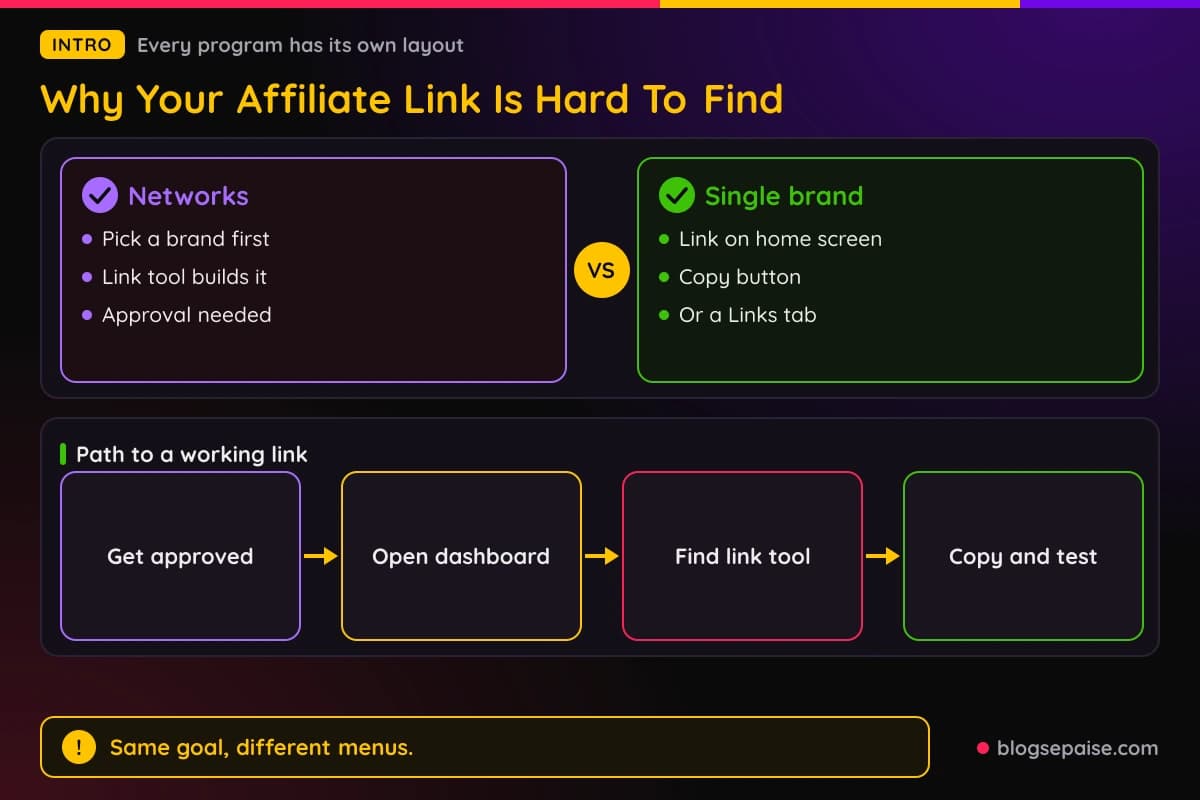
Affiliate programs are built by different companies, and none of them agreed on one layout. One program calls the page Links, another calls it Tools, and a third tucks it under a profile menu.
New partners also arrive at odd moments. You get approved, click a button in an email, and land on a screen that assumes you already know the system.
Networks add a layer. A network such as Awin holds many brands, so you often have to pick a brand first and then ask the tool to build a link for that brand.
Single-brand programs work the other way. The link may sit on the home screen of your dashboard, so you miss it because you expect to dig for it.
Some programs do not give you a link at all until you take one more step. You may need to add a payout method, accept a contract, or confirm your site before the link appears.
Another cause is that the link you want may not be the link you were given. A default link sends people to the brand home page, but you often need a link to one product or one article.
That second kind is called a deep link, and most tools make it with a separate button. Step 6 explains how deep links work.
A third cause is plain timing. Dashboards sometimes load slowly after approval, and a brand can take a few hours to switch your account on.
Keep calm if the link is missing right after you join. Check the welcome email first, then the dashboard, then ask support.
Our guide on how to get approved for affiliate programs covers the step before this one. You need a yes before you have anything to find.
If you are still waiting on applications, the page on instant approval affiliate programs shows which ones hand over links fast.
Expect a few minutes of clicking around on your first day with any new platform. After you have found the link once, the next program takes half the time.
Write down where you found it. A simple note with the program name and the menu path saves you from hunting again next month.
Step 1: Learn What An Affiliate Link Looks Like
You cannot find something if you do not know its shape. An affiliate link is a normal web address with your personal code added to it.
That code tells the program who sent the visitor. When the visitor buys, the program credits you.
The code can sit in different spots. Some links carry it in the path, some after a question mark, and some use a short domain that redirects to the brand.
A link from the Awin network, for example, goes through a domain that starts with awin1 and contains your publisher ID. A Rewardful link usually looks like the brand home page with a via parameter at the end.
Short links from networks like CJ Affiliate use a click path with your publisher ID and a link ID. Amazon links are normal product addresses with a tag that holds your tracking ID.
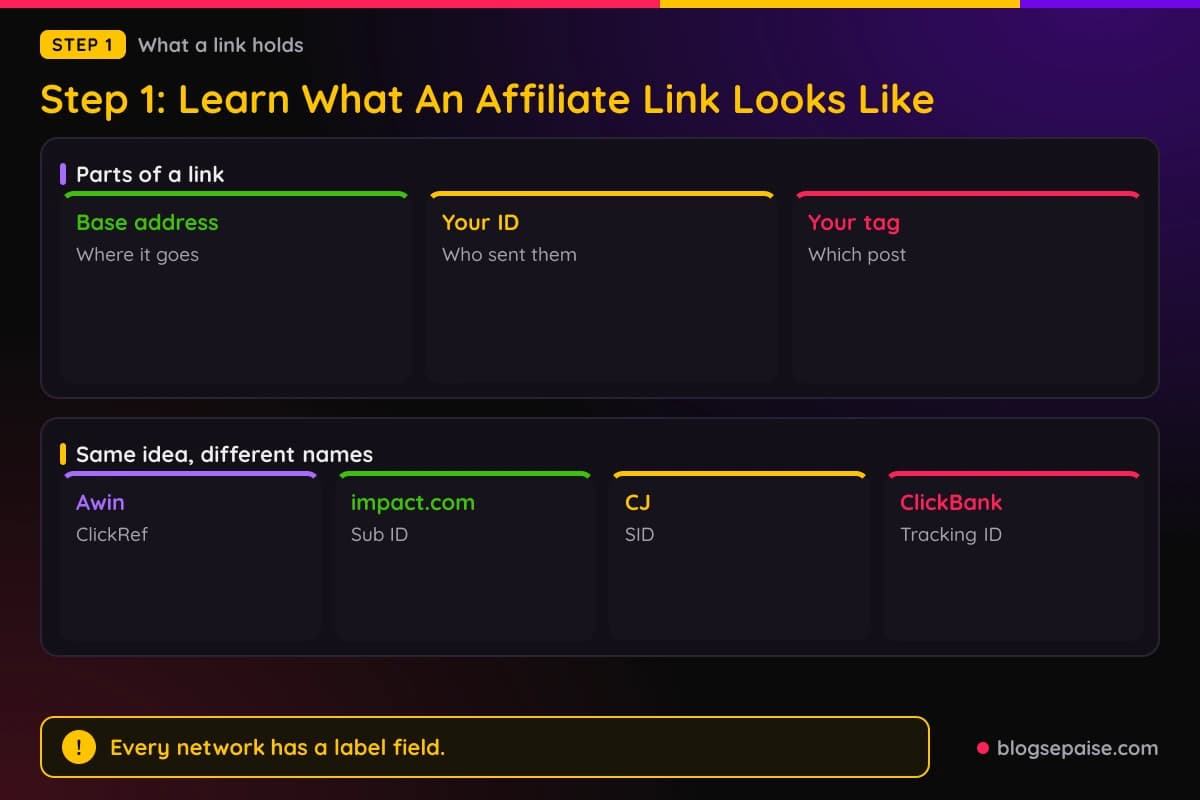
Most links have three parts. The first is the base address, which tells the browser where to go.
The second is your ID, which can be a number, a nickname, or a short code. The third is optional and holds a tag you choose, such as the name of the post where the link sits.
That optional tag has different names. Awin calls it a ClickRef, ClickBank calls it a tracking ID, impact.com calls it a Sub ID, and CJ calls it an SID.
The idea is the same everywhere. You add a short label to a link so you can see in reports which page or video earned the click.
A link without a label still works. A link with a label also teaches you which spot on your site does the real work.
Another word to know is the deep link. A deep link points to one page on the brand site, such as a single product, instead of the home page.
Deep links usually convert better because the reader lands where you promised. They only work if the brand allows them.
Finally, learn the word tracking link. Many dashboards use it for the same thing, so when a menu says tracking link or promo link or referral link, it means the address you share.
Knowing these four words helps you scan a dashboard fast. Look for link, tracking, promo, referral, tools, or creative, and the right menu usually jumps out.
Step 2: Check Your Welcome Email And Account Dashboard
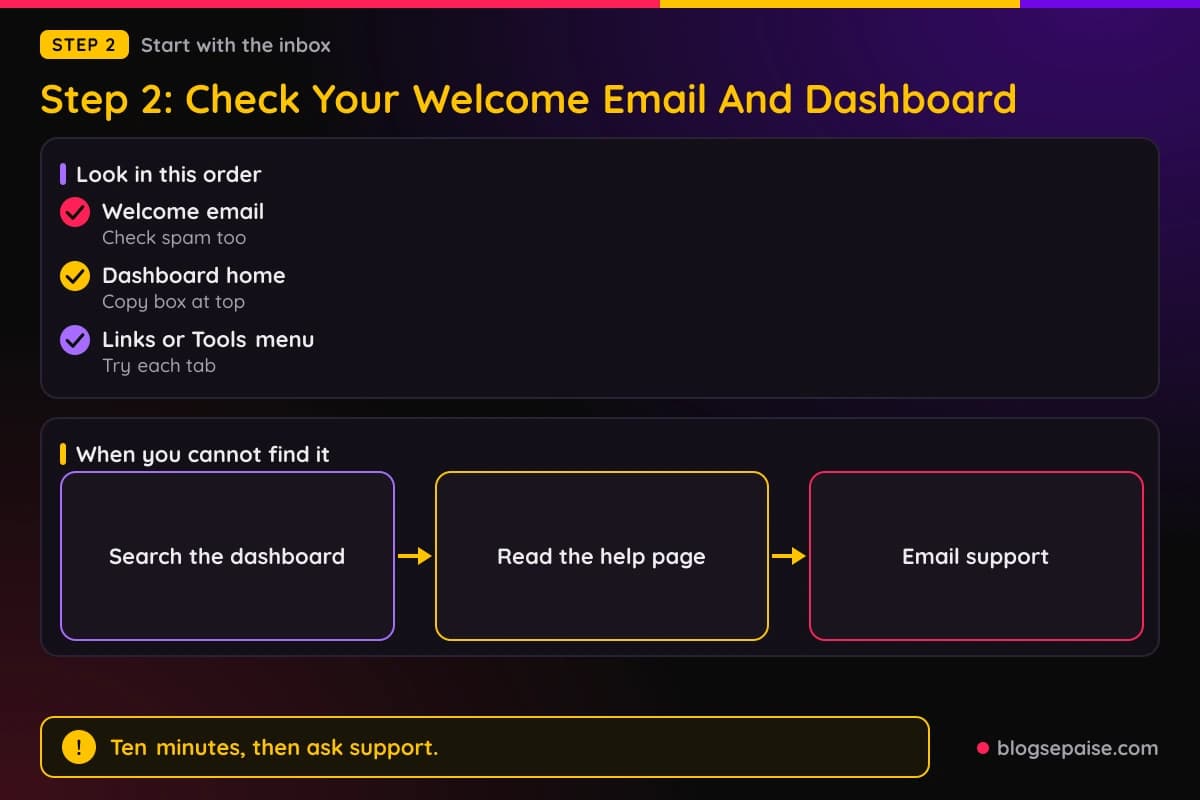
Start where the program wants you to start, which is the email. After you join, most programs send a welcome message with a login link and sometimes your first link.
Search your inbox for the program name and for words like welcome, approved, partner, or affiliate. Check your spam folder too, since many of these emails land there.
If the email holds a link, copy it and paste it into a note. Then click it once in a private window to see where it goes.
Some welcome emails hold only a login button. In that case the link lives inside the dashboard, and the email just gets you there.
Brand programs often include an affiliate ID in the email. A line such as your referral code or your affiliate ID is a clue, since you can add it to a link format the program shows.
Next, open the dashboard and look at the home screen. Smaller programs often put your default link in a box at the top.
A box called your link, your referral link, or share your link is the usual sign. A copy button sits next to it.
If the home screen shows no link, scan the left or top menu. Words to hunt for are Links, Tools, Creatives, Marketing, Promote, Resources, and Referrals.
Open each one. It takes a minute and beats guessing.
Check the account settings too. Some programs hide the link until you add a payout method, tax form, or site address, and a small banner may tell you so.
A search bar is a quick helper. Many dashboards have one, and typing link or tracking can take you straight to the page.
Look for a help button or a getting started checklist as well. Networks like Awin and impact.com show checklists to new partners that point to the link tools.
Brand programs sometimes send a partner kit. It is a document with logos, text, and your link, and it often arrives a day or two after approval.
If you cannot find the link after ten minutes, email support. Ask one clear question, such as where do I find my tracking link for this program.
Include your account email and the program name in the message. A short clear request gets a faster answer than a long worried one.
One more habit helps. Bookmark the dashboard login page right away so you never need to search for it again.
Step 3: Find Your Links In Amazon Associates
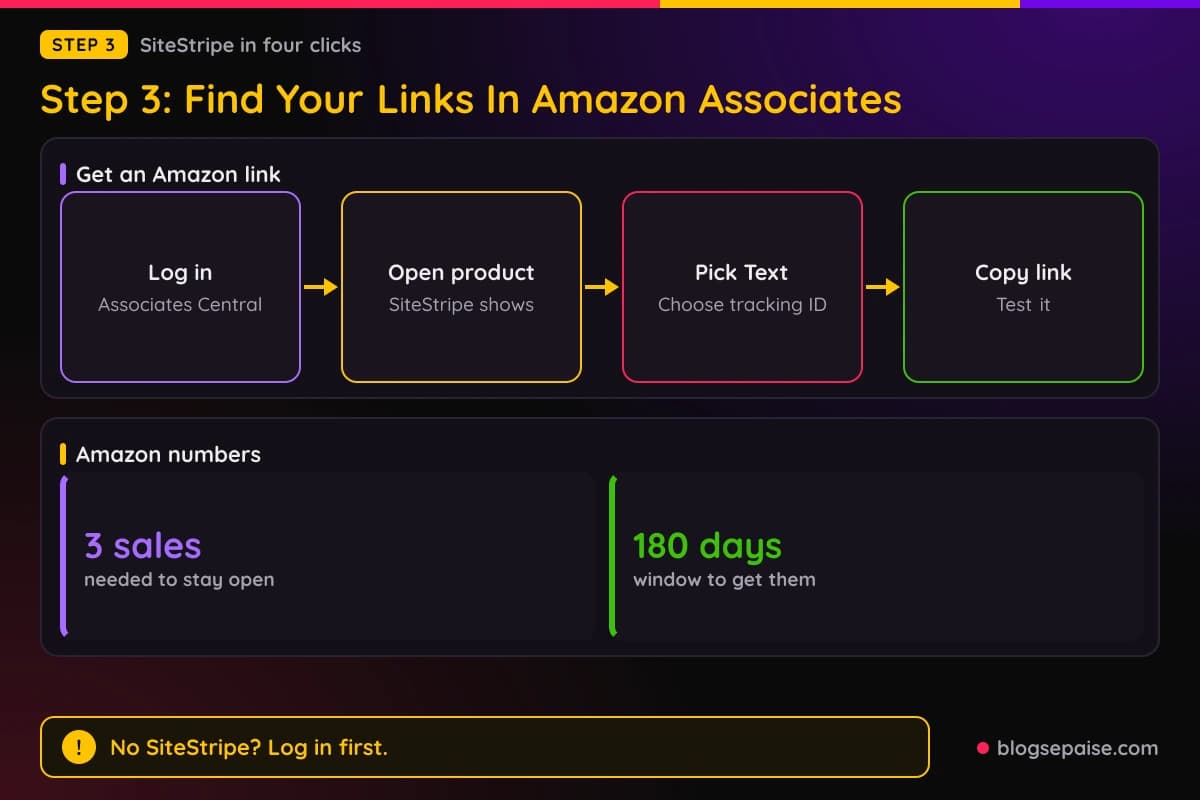
Amazon is the program most beginners join first, and it is easy to use once you know the trick. The main tool is SiteStripe, a toolbar that sits at the top of Amazon pages.
SiteStripe only shows when you are logged in to your Associates account in the same browser. If you cannot see it, log in to Associates Central and then open a product page again.
Amazon has also said that SiteStripe can be turned on or off in the Associates tools settings. If the bar is missing even though you are logged in, check that setting.
On a product page, the bar has a Get Link button with a few choices. The Text option is the one Amazon still supports for most people.
When you click Text, Amazon builds a link with your tracking ID already inside. If you have more than one tracking ID, a drop-down menu lets you choose which one to use.
Amazon used to offer Image and Text plus Image choices on that bar. Those were scheduled to end in late 2023, so older tutorials that mention them are out of date.
You may also see a short link option. It creates an address that starts with amzn.to, which is Amazon's own shortener.
A short link is handy for social posts and videos where space is tight. A full link is fine for a blog post.
Your tracking ID is the tag in the link. By default you get one ID from sign-up, and Amazon lets you create more for different sites or channels.
Use a separate tracking ID for each place you promote. That way the reports show if a sale came from your blog, your newsletter, or a video.
A computer is the easiest place to use SiteStripe. On a phone, the Amazon shopping app has its own share tool for Associates, though menus there change often.
Do not give up if you see no earnings at first. A new account has to make 3 qualifying sales within 180 days or Amazon can close it.
Do not buy through your own link either. Amazon says personal orders do not count toward those 3 sales.
You can also build a link by hand. Take any product address and add your tag to the end, but the official tool is safer because it avoids typos.
Always paste the link into a private window and check that the tag is in the address bar after the page loads. A missing tag means the sale will not be credited.
Amazon also cares about how links look. Its rules say a link must not hide that it goes to Amazon, which matters if you use a cloaking tool, and Step 7 covers that.
Good news for mobile users: you can email yourself a link from SiteStripe on a laptop and use it on a phone later. Short links make that easy.
Step 4: Find Links In Awin, ShareASale, Impact, CJ, And Rakuten
Networks give you one account and many brands. The trick is that you must be approved by a brand before you can make a link for it.
Look for a status that says joined, approved, or active next to the brand name. If it says pending, no link will work yet.
Start with Awin. After you log in, open the Toolbox menu and look for Link Builder, which Awin's help pages place under Links and Tools.
On the newer platform the menu names can differ, so use the search bar if you cannot spot it. The tool is called Link Builder in Awin's help center.
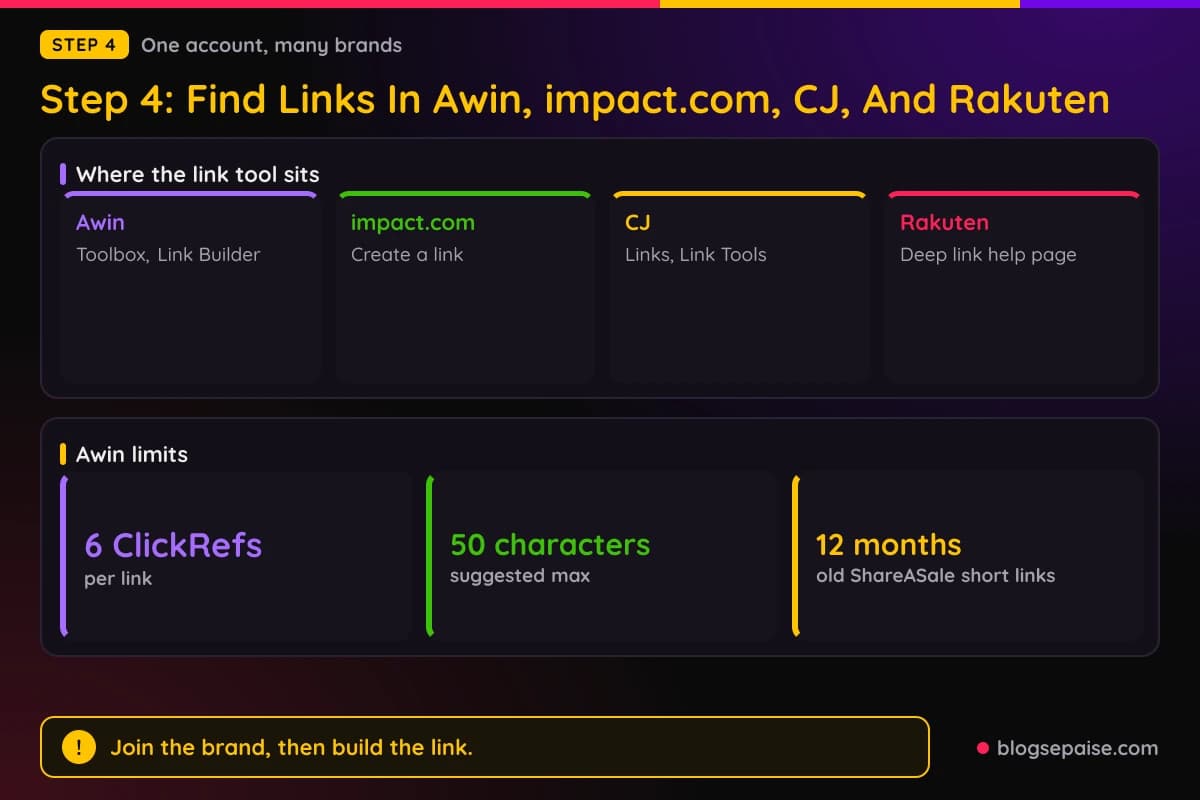
In Link Builder you pick the advertiser, paste the page address you want to promote, and click Generate Link. The result is your tracking link with your publisher ID inside.
Awin also lets you add a ClickRef before you generate. You can add up to 6 ClickRefs on a link, and Awin suggests short descriptive names under 50 characters.
Only the first ClickRef shows in the brand's reports, so put the most important label there. The others stay in your own data.
Awin has a MyAwin browser extension and a Convert a Link feature as well. Both turn a normal brand address into a tracking link without opening the full dashboard.
If you used ShareASale, your account moved to Awin. Awin says most old ShareASale links keep tracking, but short links with no clicks in the 12 months before the move stopped tracking.
If you already had an Awin account, you could use its login. Awin says accounts cannot be merged once created, so you may end up with two logins.
Now impact.com. After you join a brand, use the Create a link widget on your partner dashboard to build a tracking link for that brand's program.
Pick the program, choose an ad if asked, and copy the link. If you want a label, open the Advanced option, add a Sub ID, and select Update and Copy Link.
Deep links on impact.com only work when the brand allows them for the ad. You build one by adding a percent-encoded page address to your full tracking link.
If your link is a vanity link, sign in and grab the full tracking address first. impact.com also offers a Chrome extension for deep links on brands that have opted in.
CJ Affiliate organizes links under a Links tab. Third-party guides say you search for an advertiser, pick a link type such as a banner or text link, and copy the code or the address.
CJ also has a Link Tools area with a Deep Link Generator. You drag a bookmarklet to your browser bar, open a brand page, and click it to get a tracking link for that exact page.
In the link code window, you can type an SID and update the code. CJ then adds your label and starts showing that SID in reports after the link gets clicked.
Menu names at CJ have changed over the years, so match the idea rather than the exact words. Look for Links, Link Tools, or Get Links.
A CJ link often runs through a click path with your publisher ID and a link ID. Flexjobs, for instance, uses a jdoqocy.com address of that style.
Rakuten Advertising lets publishers make deep links themselves, and its help center shows how to build them by hand. If a link lands on the brand home page, deep linking is not allowed there.
Rakuten also has a mobile Link Builder app for partnered brands. Its dashboard menus changed over time, so use the help center to match your account.
Across all five networks, the pattern is the same. Join the brand, open the link tool, paste the page you want, add an optional label, and copy the result.
One caution for every network. Never edit the ID part of a link by hand, because one wrong character sends your commission to nobody.
Step 5: Find Links In PartnerStack, ClickBank, Digistore24, And Gumroad
These programs work a little differently from the big networks. Many of them are product marketplaces, so the link is tied to a product, not a brand.
PartnerStack partners find their referral link in two places. The program Summary page shows a default link, and the Links tab lists every available link, including custom ones.
Some programs turn the default link off. If you see no link, the program may only allow custom links, so check the Links tab or ask the program manager.
PartnerStack accounts have one login and many programs. After you log in, switch to the right program before you look for the link.
ClickBank uses a link called a HopLink. You make one in the Affiliate Link Tools area under a Create tab, choose your account nickname, add an optional tracking ID, and generate it.
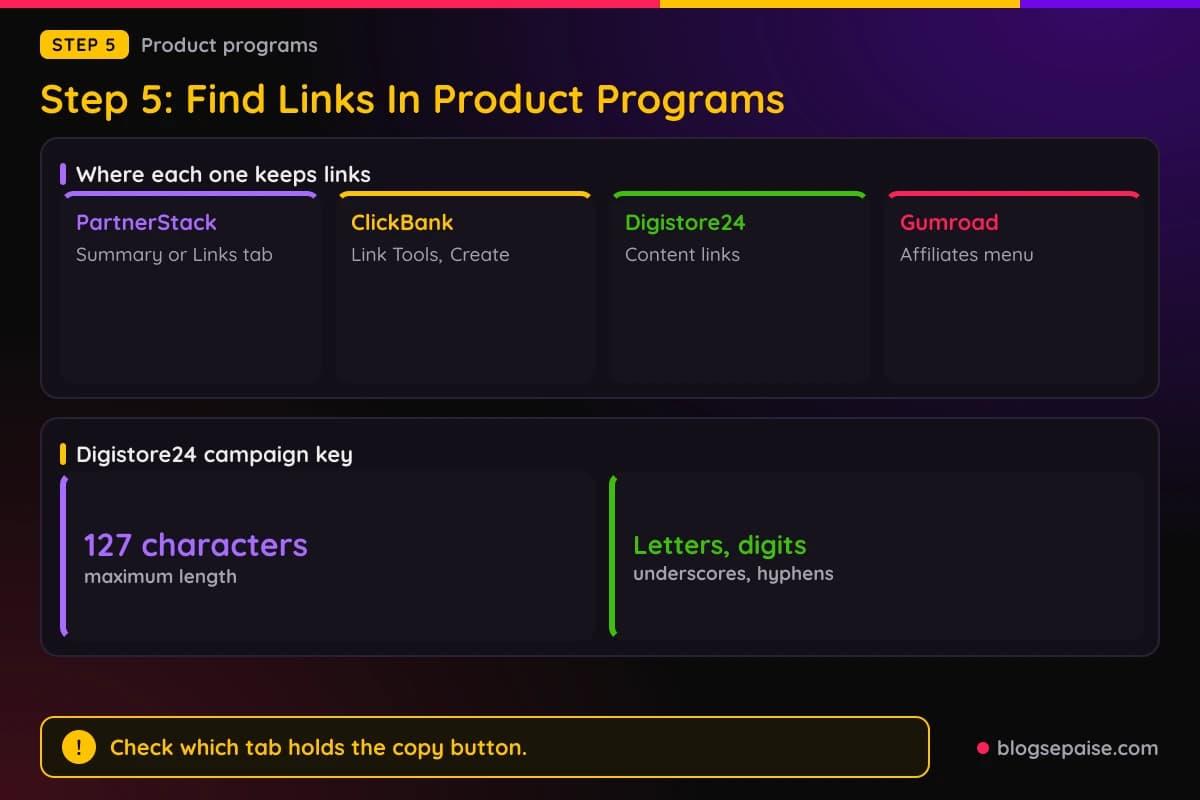
You can also make a HopLink from the marketplace. Find a product, click Promote, enter your nickname and an optional tracking ID, and copy the result.
Each new HopLink gets a new encrypted value, even for the same product. That is normal and not an error.
ClickBank tracking IDs are private to you, so the seller cannot see them. You can add one by hand to a link with ?tid= in lowercase, though a link built by hand is not encrypted unless you use the HopLink Shield.
Digistore24 builds promo links for you once you pick a product. In the affiliate view, go to Sales and partners, open Content links, and use the promo link option to see the address.
The promo link has the product ID, your Digistore24 ID, and an optional campaign key at the end. The key can be up to 127 characters and uses letters, digits, underscores, and hyphens.
A campaign key shows up in the Transactions report for each sale. Use short names like email or video so reports stay tidy.
Digistore24 asks affiliates to use the normal promo link, because link shorteners change the address and can break tracking. A WordPress plugin from Digistore24 also has a promo link generator.
Gumroad hides its affiliate tools behind your name. Click the arrow next to your username at the bottom left of the dashboard and choose Affiliates.
From there you can copy your link, which takes the form gumroad.com/a/ followed by a number. The a in the path marks it as an affiliate link.
Remember that Gumroad affiliates only get links for sellers who invited them or whose products allow sign-up. If a seller has not accepted you, nothing appears in that list.
Programs run on Rewardful send you to a login page of their own, often on a getrewardful.com address for that brand. The approval email usually tells you where.
After login, the dashboard shows a default link that adds a via parameter to the brand address. Copy it and test it in a private window like any other.
FirstPromoter portals work in a similar way. Help pages show your referral link on the overview page, and some brands add a Referral Links section where you make more.
FirstPromoter also lets affiliates create links with sub IDs, which show how the same link performs in each channel. Not every brand turns that on.
Store programs built with Shopify apps follow the same idea. The welcome email holds a login to the store's affiliate portal, and the link sits on the first screen, but the app and menu names vary by store.
If the portal is a plain page with a code and no link, add your code to the store address as the email shows. If that is unclear, ask the store owner for the exact format.
Step 6: Build Deep Links And Add Tracking IDs
Once you can find your default link, the next skill is making links for specific pages. Readers click more when the link takes them straight to what you wrote about.
Start with the tool. Awin Link Builder, impact.com, CJ Deep Link Generator, Rakuten, and Amazon SiteStripe all create deep links from a page address.
On a network, copy the address of the exact product or article you want from the brand's site. Paste it into the tool and generate the link.
Check the result by clicking it. If it lands on the home page instead, the brand does not allow deep linking, and you must use the default link or ask for permission.
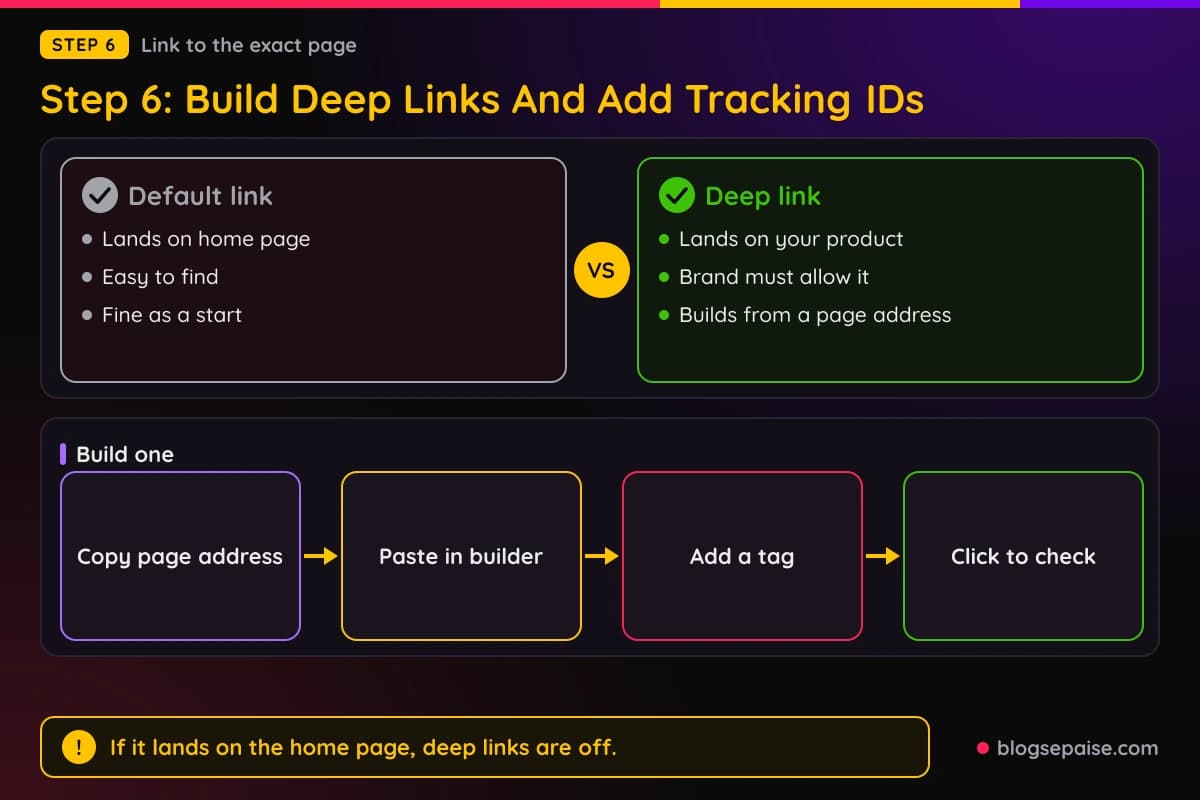
On impact.com, the manual way is to add the brand page address, percent-encoded, to your tracking link. Percent-encoding swaps special characters for codes, so a slash becomes %2F.
Free online encoders do this in a second. Paste your address, copy the result, and add it to the right spot in the tracking link.
On Awin you can also append the destination by hand, since the link has a place for it. Using Link Builder is simpler and avoids mistakes.
Now the tags. Pick a naming habit before you create many links, such as post name, then channel, using lowercase letters and underscores.
Awin ClickRefs, impact.com Sub IDs, CJ SIDs, ClickBank tracking IDs, and Digistore24 campaign keys all follow this idea. The place you type it differs, but the label works the same.
Keep tags short and free of spaces. Letters, digits, and underscores are safe almost everywhere.
Do not put personal data in a tag. Names, emails, and phone numbers do not belong in a link that readers and brands can see.
Awin shows only the first ClickRef to the brand, and ClickBank keeps tracking IDs private. Even so, treat every tag as public.
You can also add UTM tags to a link you control, which feed your own analytics. Our free UTM parameter builder makes them in a few clicks.
Keep UTM tags and network tags apart. UTMs go to your analytics, and network tags go to the program.
Some programs strip extra parameters from links, and impact.com short links hide them. If a tag vanishes, check the program's link settings.
A spreadsheet helps here. Log the page, the program, the tag, and the date for each link you create.
For help picking tools that log clicks, see our guide to link tracking software. It compares ways to see which link earned the click.
Step 7: Shorten, Cloak, And Test Your Link
The last step is making the link tidy and proving that it works. Long network addresses look messy, and many bloggers shorten them.
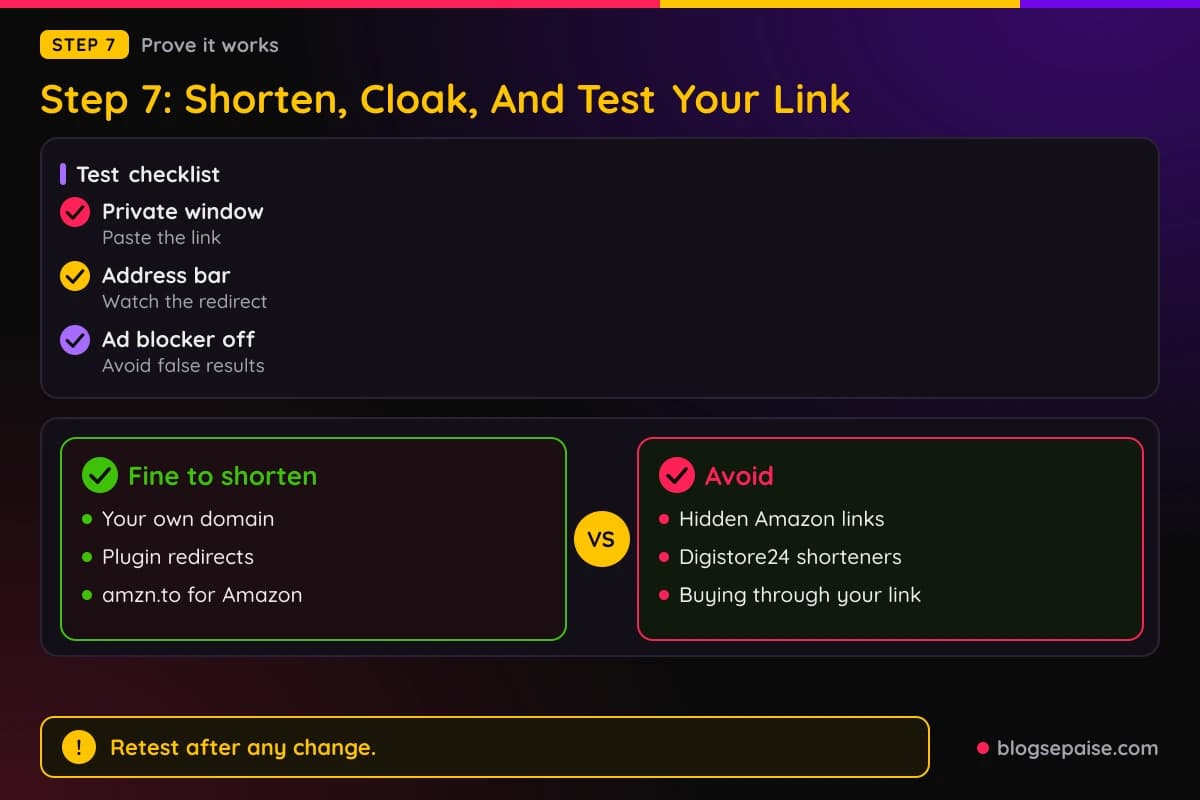
Shortening and cloaking are close cousins. A shortener makes the address shorter, while cloaking puts it on your own domain, such as yoursite.com/go/brand.
WordPress plugins do this well. Pretty Links, ThirstyAffiliates, and Lasso all create redirects on your own domain, and our Pretty Links review shows how.
Cloaking is allowed in many programs but not all. Some brands ask you to use the original link, and Digistore24 says shorteners can break tracking.
Amazon is the strict one. Its rules say a shortened link must not hide that it goes to Amazon, so use amzn.to for short Amazon links and skip third-party tools.
Disclosure matters as well. A cloaked link should never hide that you earn money, so keep your notice near the link.
Our free affiliate disclosure generator writes one for you. Place it where readers see it before they click.
Now test the link. Open a private browser window, paste it, and watch the address bar as the page loads, since you should pass through the network and land on the brand page.
Check that the final address still holds a tag or ID. For Amazon that is the tracking ID, and for ClickBank it is the hop redirect.
Then look at the dashboard. Click your own link once and see if a click appears in reports, remembering that some dashboards take minutes or hours to update.
Test on a phone too. Links sometimes behave differently inside social apps, which open pages in their own browser.
Turn off your ad blocker for one test. Some blockers stop tracking scripts and give a false result.
Never buy through your own link to test. Many programs cancel self-purchases, and some close accounts that do it.
If the click does not show after a day, contact support with the link, the time, and what you saw. Screenshots help them find the problem fast.
Retest after you cloak or shorten a link. A redirect plugin can break a link in subtle ways, so a quick check is worth it.
Repeat the test every few months for your top links. Brands change their pages, and a link that worked last year may point to a dead page now.
A Worked Example: Maya Finds Links In Four Programs
Maya runs a small blog about home coffee. She has been approved by 4 programs, and none of them show her a link on the first screen.
Her first stop is Amazon. She logs in to Associates Central, opens a coffee grinder page, and uses SiteStripe to copy a text link with her tracking ID.
Next she checks her inbox for the Awin welcome email. It holds only a login button, so she opens Link Builder, picks a coffee brand, pastes a product page, and adds a ClickRef called grinder_post.
Her third program is on PartnerStack. The default link sits on the Summary page, and she finds a second link in the Links tab for a different offer.
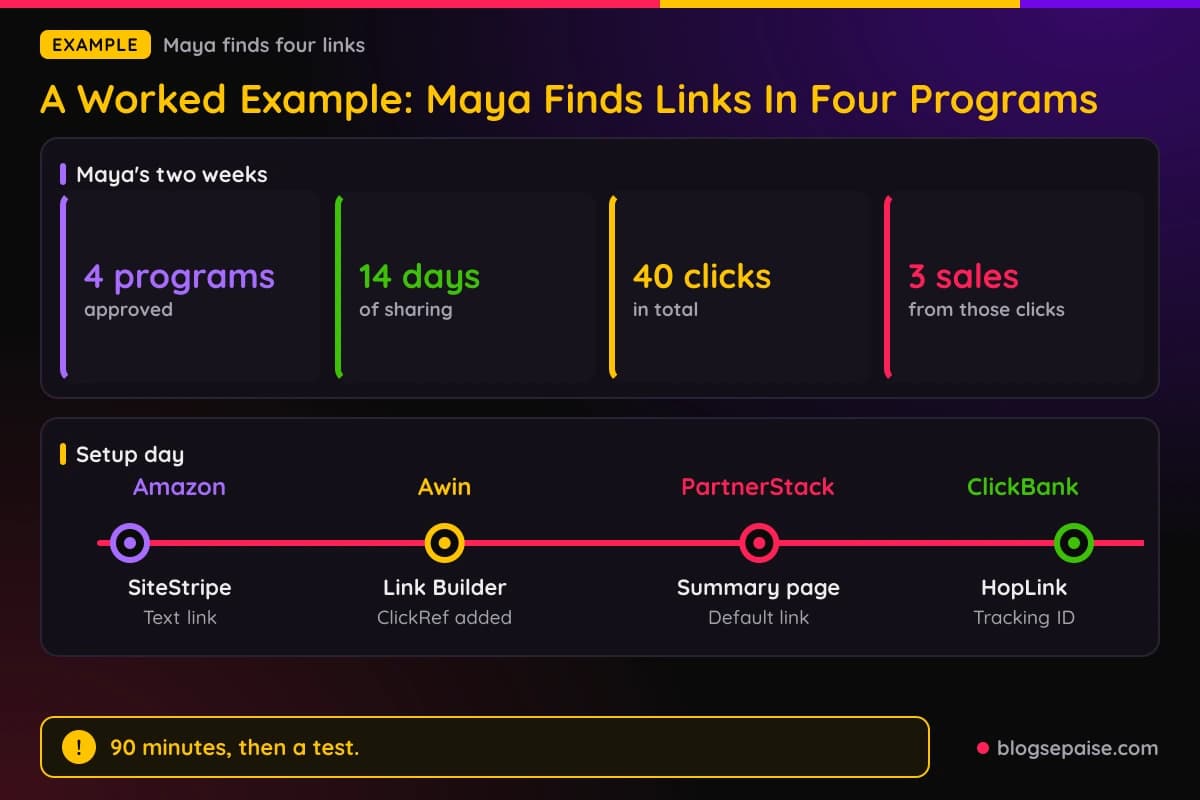
Her fourth is a ClickBank product. She uses Affiliate Link Tools, enters her nickname, adds a tracking ID called newsletter, and generates a HopLink.
She logs each link in a spreadsheet with the page, the tag, and the date. The setup takes her about 90 minutes on a Saturday.
Over the next 14 days she shares the links on her blog and sees 40 clicks in total. Of those clicks, 3 end in a sale.
She notices that the grinder post earns most clicks, thanks to the ClickRef. The newsletter link earns the fewest, so she tries a new subject line.
At the end of two weeks she tests each link again in a private window. All four still land on the right page, and all four show clicks in the dashboards.
Her biggest lesson is how much the tags help. Without them, 40 clicks would be a single number and teach her nothing.
The numbers here are small, but the habit is what counts. Find the link, tag it, test it, and log it.
Common Mistakes When You Look For Affiliate Links
The first mistake is using the brand home page address with no tracking. A normal address earns you nothing, even if you tell friends it is your referral.
The second is copying a link from a dashboard of another person. Always use the links shown after you log in to your own account.
The third is skipping the pending status. If a brand has not approved you on a network, any link you make for it will not pay.
The fourth is editing the ID by hand. One missing character can send a click nowhere, so copy and paste instead.
The fifth is forgetting to test. A link that looks right can still fail, and you only find out after a month without sales.
The sixth is using shorteners the program does not allow. Amazon, for example, wants it clear that a link leads to Amazon.
The seventh is putting the same tag on every link. When all links share a label, the reports cannot tell them apart.
The eighth is buying through your own link. Many programs cancel those orders, and some close the account.
The ninth is ignoring the settings page. A missing payout method or tax form can hide your link or hold your payments.
The tenth is relying on old screenshots in tutorials. Menu names change, so match the idea of the step and check the program's own help pages.
The last mistake is giving up too soon. Almost every program has a link you can find, and support teams answer this question all the time.
For more on staying safe in programs, read our page on how to avoid getting banned from affiliate programs.
Final Thoughts
Finding your affiliate link feels harder than it is. The link is always somewhere in the welcome email, the dashboard home, or a tools menu.
Start with the email, then scan the menus for words like links, tools, promo, or referral. If you join a network, make sure the brand has approved you before you build anything.
Add a tag to each link, build deep links for the pages you write about, and keep a simple log. Those three habits turn a link into data.
Test every link in a private window before you share it. A two minute check saves weeks of lost clicks.
Pick one program today, find its link, and put it in a post. Once you do it once, the rest will feel easy.
Frequently Asked Questions
1. Where do I find my affiliate link after I get approved?
Check the welcome email first, then the dashboard home page, and then menus named Links, Tools, Promote, or Referrals. If nothing shows, ask support.
2. Why can I not see my affiliate link?
The brand may not have approved you yet, or the program may need a payout method first. Some programs also turn the default link off.
3. What is a tracking link?
It is a web address with your personal ID added so the program can credit your sales. Programs also call it a promo link or a referral link.
4. How do I find my Amazon Associates link?
Log in to Associates Central, open a product page, and use the Get Link button in the SiteStripe bar. The Text option adds your tracking ID.
5. Where is the Awin link builder?
Awin's help pages place Link Builder under the Toolbox menu. Pick an approved advertiser, paste a page address, and generate the link.
6. Do my ShareASale links still work?
Awin says most do. Short links with no clicks in the 12 months before the move to Awin stopped tracking.
7. What is a deep link?
A deep link points to one page on a brand site, such as a single product. Most networks have a tool that builds one from a page address.
8. What is a sub ID or ClickRef?
Both are labels you add to a link. They show in reports so you know which post or video earned the click.
9. How many ClickRefs can I add on Awin?
Awin allows up to 6 on one link. Only the first shows in the brand's reports.
10. Where do I find a ClickBank HopLink?
Use the Create tab in Affiliate Link Tools, or click Promote on a product in the marketplace. Enter your nickname and an optional tracking ID.
11. Where do I find a Digistore24 promo link?
Go to Sales and partners, open Content links, and pick the promo link option for your product. You can add a campaign key at the end.
12. Where do I find my Gumroad affiliate link?
Click the arrow next to your username, choose Affiliates, and use the copy link button. The address has an a in the path.
13. Can I shorten an affiliate link?
Often yes, but check the rules first. Amazon wants it clear that the link goes to Amazon, and Digistore24 says shorteners can break tracking.
14. How do I test that my link tracks?
Open it in a private window and watch the address bar, then check for a click in your dashboard. Do not buy through your own link.
15. Why does my link send people to the home page?
The brand may not allow deep links for that page. Use the default link or ask the program manager.
16. Can I use one link in many places?
You can, but tags show which place works best. A different tag for each page or channel keeps your reports useful.