What Happens To Your Affiliate Commission When A Customer Returns The Item
You shared an Amazon link, a reader bought the product, and the commission showed up in your report. Then the customer sent the item back, and you started to wonder if that money was ever yours.
That worry is fair. Plenty of new affiliates ask the same thing: if I was already paid and the customer returns the item, do I lose the money?
The short answer is that the commission can shrink or vanish, and it depends on when the return happens.
Before payment, the sale usually just disappears from your totals. After payment, some programs take the money back from a later payout.
Another common question is about clicks. If 38 people click your link and nobody buys, you earn nothing, because affiliate programs pay for sales and not for visits.
Most pages on this topic are written for merchants who run the program. This guide is written for you, the affiliate, so you can see what gets reversed, when it happens, and where to look.
The 8 steps below go in order, and a worked example near the end shows a full month with real numbers. Where a program does not publish a rule, the article says so plainly.
Disclosure: Some of the links I share might be affiliate links. If you click on one and make a purchase, I may earn a small commission as a thank you. But don’t worry, it won’t cost you anything extra. I only recommend stuff I genuinely believe in. Your support helps me keep creating awesome content. You can read my full affiliate disclosure in my disclaimer page.
If you want to save a lot of hours searching for high-paying affiliate programs, check out our exclusive list of 2500+ affiliate programs. You’ll find all the information about the programs inside the list. This list is perfect for affiliate bloggers and influencers.
Why Commission Can Change After A Sale
A tracked sale is not final money. It is a claim that stays open while the merchant waits to see if the customer keeps the product.
Think of it like a restaurant tab. The order is placed, but nobody counts it as income until the meal is paid for and nobody asks for a refund.
Affiliate programs run on that idea. They pay you when a purchase turns into real revenue, and a returned order never becomes real revenue.
Impact says most brands prefer not to pay commission on returned orders, because that revenue is never realized.
Awin lists a cancelled or fully returned order as a clear reason for an advertiser to decline a commission.
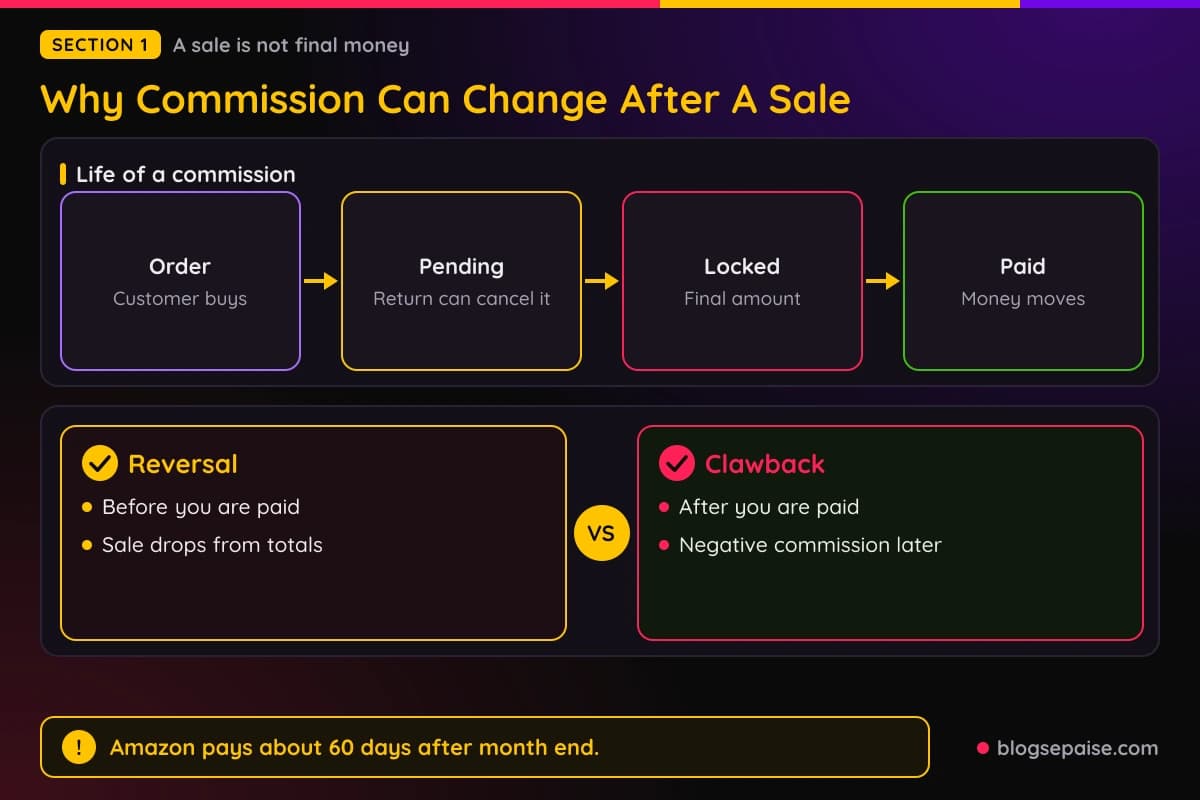
So the first thing to learn is that a sale goes through stages. Each network uses its own names, but the path looks alike almost everywhere.
First comes the order, then a waiting stage, then a locked stage, and finally the payout. A return that lands in the waiting stage is cheap to fix, and a return that lands after payout is the messy one.
Two words matter here. A reversal cancels a commission before you are paid, and a clawback takes back money that you were already paid.
Reversals are common and quiet. You may only notice that a number in your dashboard went down.
Clawbacks are rarer and more annoying, because they can pull your balance below what you expected. Some programs promise they will not do it, and some do it through a negative commission.
Amazon pays approximately 60 days after the end of each calendar month in which the commission was earned. That gap gives returns time to show up before your money moves.
Other networks use shorter or longer windows. The steps below show where each window sits and how to read yours.
You do not need to fear any of this. You only need to know the timing, so a reversal never comes as a surprise.
The good news is that the rules are written down in most places. You just have to know which page holds them.
Step 1: Learn What Counts As A Commissionable Sale
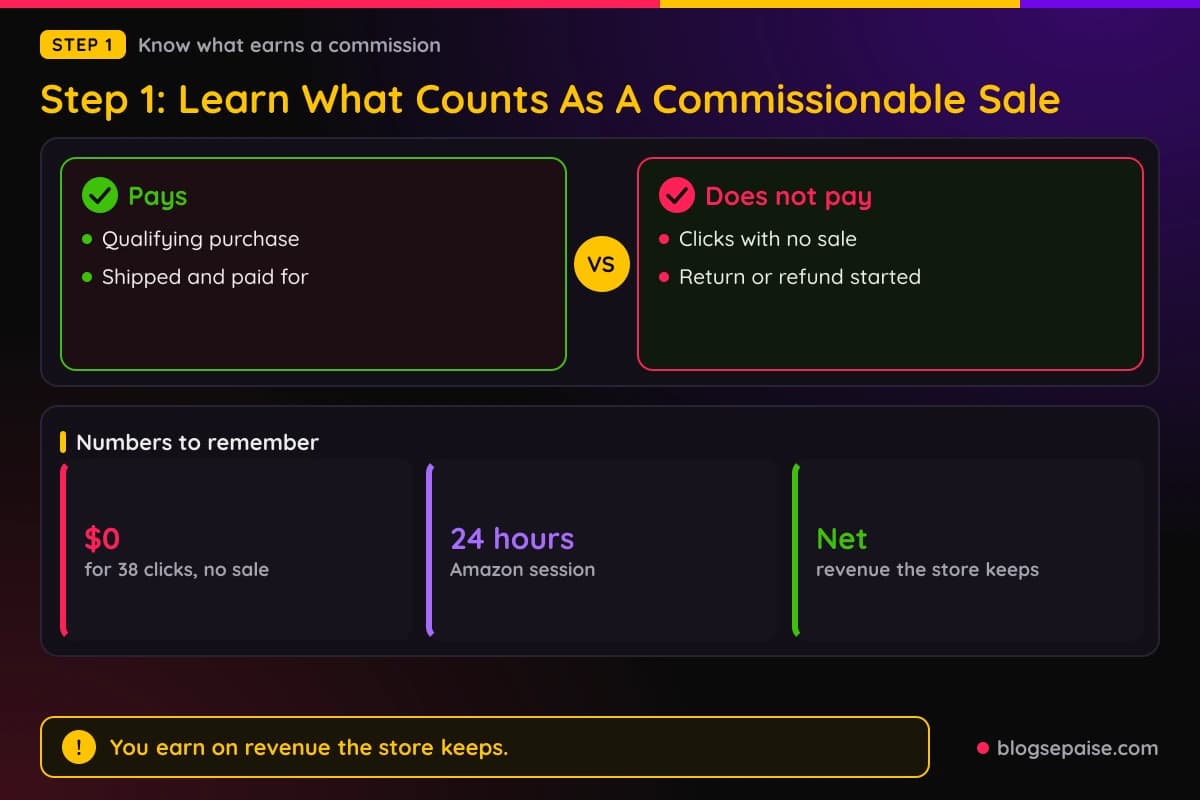
Start with the basics, because the Quora question about 38 clicks and no purchase shows how many people mix this up. A click is not a sale.
Amazon pays on a Qualifying Purchase, which happens when a customer clicks a special link on your site, goes to Amazon, and buys. Visits that end without a purchase earn $0.
That is true for most affiliate programs. Pay per sale is the norm, and pay per click is rare.
Amazon also ties your credit to a 24-hour session. If the customer buys inside that session, or adds the item to a cart and buys later within the cart window, you can get the credit.
Our guide on why cookie windows matter covers how long a link keeps credit on other programs. A longer window helps you win the sale, and it does not change what happens after a return.
Next, learn the exclusion. Amazon's Commission Income Statement leaves out any product order where a cancellation, return, or refund has been initiated.
Read that line twice. It says the exclusion starts when the return is initiated, not when the item arrives back at the warehouse.
Amazon also requires that the product is shipped to the customer and paid for. The Earnings report lists items ordered after your referral that were then dispatched.
So an order that is cancelled before dispatch may never become an earning at all. You may see it in the ordered items count and never in your earnings.
Qualifying Revenue also has a definition. It equals the amount Amazon actually receives from the purchase.
Amazon takes out shipping charges, gift-wrapping fees, handling fees, taxes, service charges, credits, rebates, card processing fees, and bad debt.
That means a partial refund can shrink the revenue your commission is based on. The commission is a share of money Amazon keeps, not of the sticker price.
Subscription and software programs follow the same logic. Rewardful, for example, deletes an unpaid commission after a full refund and recalculates it after a partial refund.
So the first rule is simple. You earn on revenue the merchant keeps, and revenue that comes back out of the till takes your share with it.
Our commission earnings estimator helps you plan with that in mind. Try it with a lower number than the sticker price to see how a few returns change your month.
Step 2: Find Out How Amazon Handles Returned Items
Since Amazon is the program most beginners start with, this step looks at its rules first. The Associates Operating Agreement points to a separate Commission Income Statement for the money details.
Amazon's help center says negative numbers in your Earnings reports represent returned or refunded products. It adds that Amazon subtracts the commission from your account when a product comes back.
That covers customers who refuse delivery and third-party sellers who refund a customer. So a return does take commission away, and Amazon says so in plain words.
The same help page notes that customers have several days to return an item. Because of that, the original sale and its return can show up on different reports.

You might see a good day on Monday and a negative line on a later date. Both belong to the same order.
Amazon separates two labels. Refunded means a third-party seller issued a refund, and returned means the item went back to Amazon.
Now the part that scares people: what if the money was already paid?
The Commission Income Statement says that if an excess payment was made for any reason, Amazon reserves the right to adjust or offset it against later commission income.
In plain English, Amazon can take the extra out of your next payout. It does not say it will send you a bill.
The Operating Agreement and the Commission Income Statement do not list a number of days after which a return can no longer touch your earnings. Amazon publishes no fixed cutoff, so you cannot count on a date.
Payment timing helps you here. Amazon pays approximately 60 days after the end of each calendar month, so a sale from early January is not paid until around early March.
That delay lets most returns land before the money leaves Amazon. It does not remove the risk completely.
The payment minimums are also worth knowing. A direct deposit needs at least $10, a gift card needs at least $10, and a check needs at least $100 and carries a $15 processing fee.
Amazon reserves the right to hold commission income until the total reaches the minimum. A small balance simply waits, and returns can reduce it while it waits.
Step 3: Read The Status Labels On Your Network
If you promote through networks, the labels change, and so does the timing. Learn the words once and every dashboard gets easier.
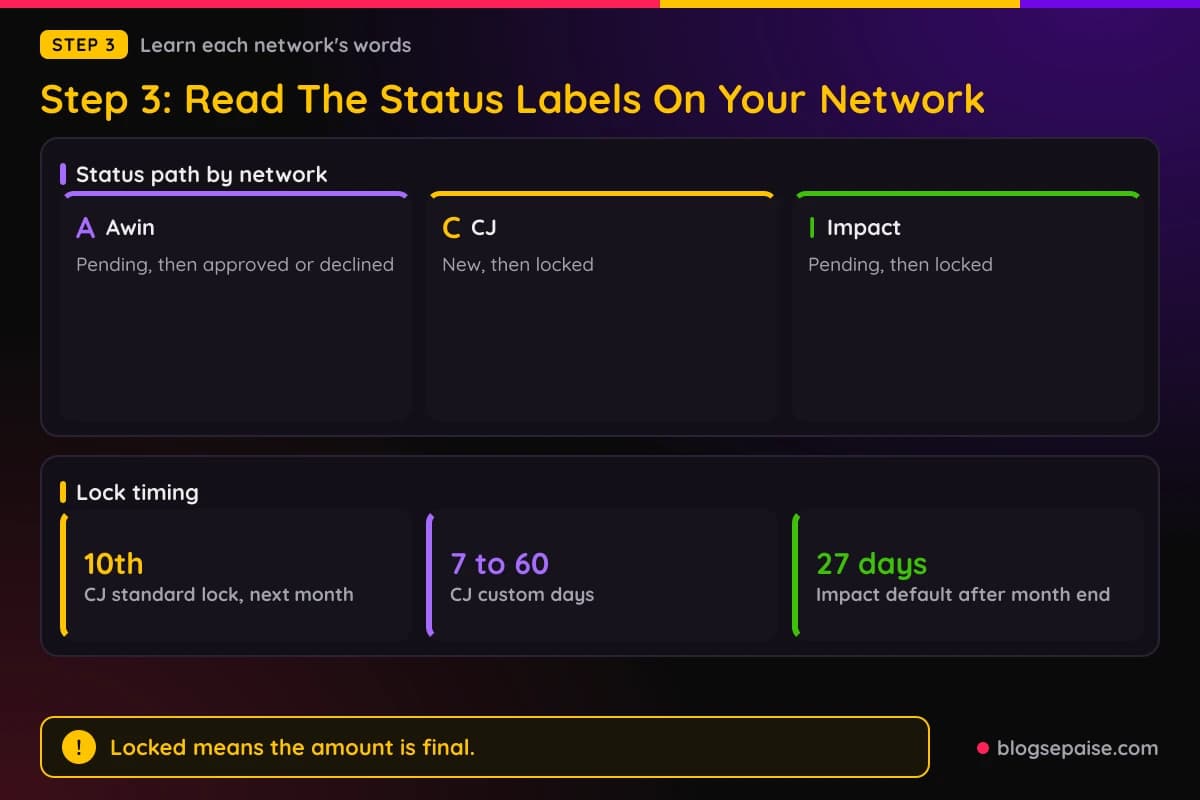
On Awin, a new sale appears as a pending commission. The advertiser reviews it during the program's validation period and either approves or declines it.
A declined commission is cancelled and is not paid. Awin lists a cancelled or fully returned order as a clear reason for a decline.
Each program sets its own validation period, and Awin's advertiser documentation gives no day count. Your own dashboard and the advertiser's program page are the places to find it.
If the advertiser takes no action, Awin approves the commission automatically when the period ends. Approved commissions join your next payment cycle.
ShareASale used to be a big name here. Awin says the ShareASale platform closed on October 6, 2025, so those programs now live inside Awin.
On CJ, a new commission sits in a status called New. The advertiser can correct it or extend it while it stays New.
Once the commission locks, the advertiser can no longer edit it. CJ's standard cycle locks commissions on the 10th of the month after the event date.
Advertisers can also pick a custom cycle with a lock date between 7 and 60 days after the event. An open-ended cycle has no lock date, so the commission stays New until the advertiser locks it.
An advertiser on the standard cycle can extend a commission by one extra pay period. A December sale that would lock on January 10 then becomes eligible on February 10.
CJ lets advertisers correct orders for returned or invalid purchases, usually through a correction file. The result is that you are paid only on valid transactions.
Impact uses a pending status, then locked. Its help center says an action stays pending until the locking period ends, and the brand can modify or reverse it during that time.
Impact's help center gives a default locking period of 27 days after the end of the month in which the action was tracked. The brand's contract can differ, and you can find the exact figure in the contract schedule inside your account.
A reversed action has its cost voided and no commission is due. After the lock date passes, the commission is final and the brand owes it.
PartnerStack and Rewardful work more like software programs. They use holds, pending periods, and invoices, which the next steps cover.
Step 4: Know The Hold Period Before You Spend The Money
A hold period is the wait between a sale and the moment the commission becomes safe. It is the single best number to know, because it tells you when a return can still reach your money.
Rewardful gives a clear example. Commissions start as pending, and the default pending period is 30 days after the sale.
Rewardful recommends matching the pending period to the merchant's refund policy. A 90-day refund policy calls for a 90-day pending period, so the refund hits before the payout.
During that pending period, a partial refund makes Rewardful recalculate the commission, and a full refund deletes it. After the pending period the commission turns due, and refund adjustments still apply while it remains unpaid.
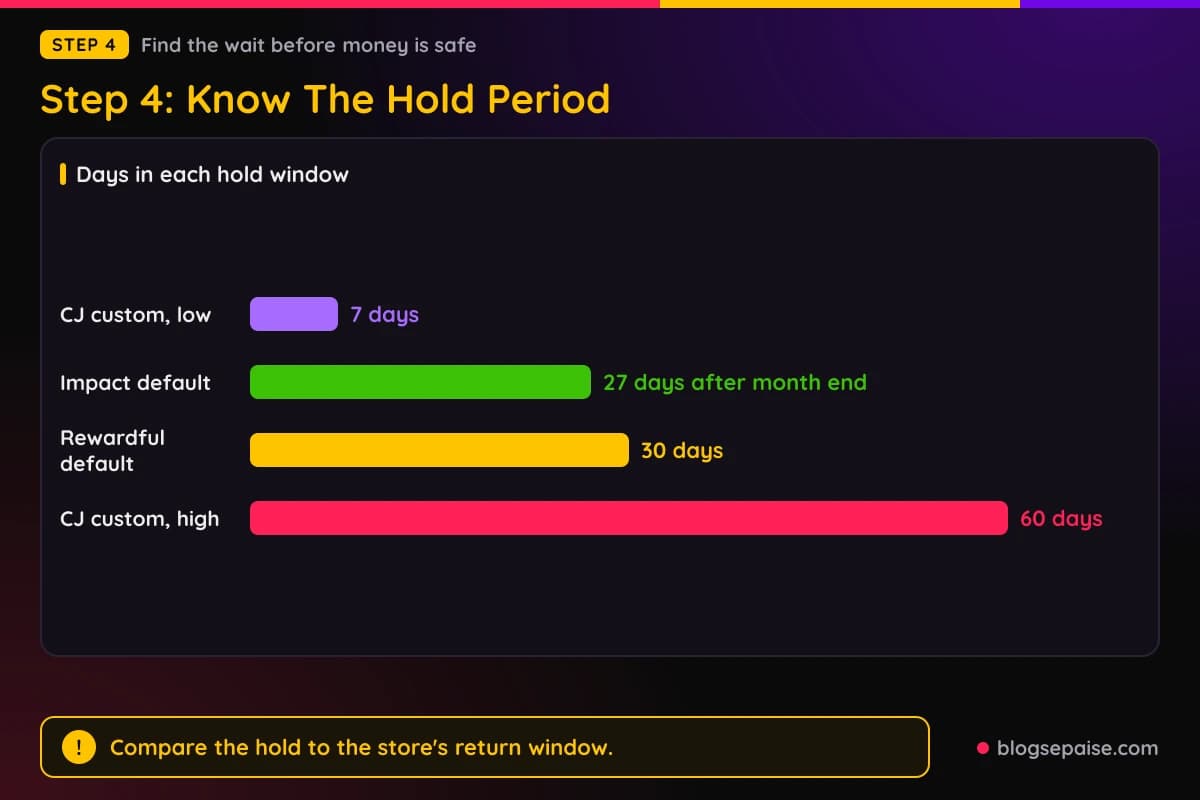
CJ, as covered above, locks on the 10th of the following month under the standard cycle. Custom cycles run from 7 to 60 days after the event.
Impact's default is 27 days after the end of the month. The actual figure sits in each brand's contract.
Amazon's published protection is the payment delay of approximately 60 days after the end of the month.
Awin uses a validation period that each advertiser sets. The documentation names no day count, so check each program.
Here is the trick. Compare the hold period to the merchant's return window, because a return window longer than the hold is where trouble starts.
If a store gives customers 30 days to return and the commission locks after 20, a late return may land after the lock. Some programs then absorb the loss, and others claw it back, which you will see in the next step.
Our guide to recurring and one-time commissions shows why this matters for software programs. A recurring payout can come with refunds each month.
Do not spend unpaid commission. Treat the pending number as a forecast and the paid number as income.
Write the lock date on a calendar when you see a large sale. Then check the status again the day after it passes.
Step 5: Plan For Money You Were Already Paid
Now the question from the Quora post: what if the customer returns the item after you were paid? The answer differs by program, so here are the published rules.
Awin says amounts already paid cannot be reversed on any plan. Once a commission is approved and paid, that money stays with you.
Awin also says approved commissions generally cannot be reversed. On its Access plan, a reversal is possible only in exceptional cases through support.
PartnerStack handles it differently. Once an invoice is paid, the commissions belong to the partner, and PartnerStack will not remove funds from the partner's available withdrawal balance.
The company can still recover the money in two ways. One is an outside reimbursement arranged between the company and the partner, and the other is a clawback.
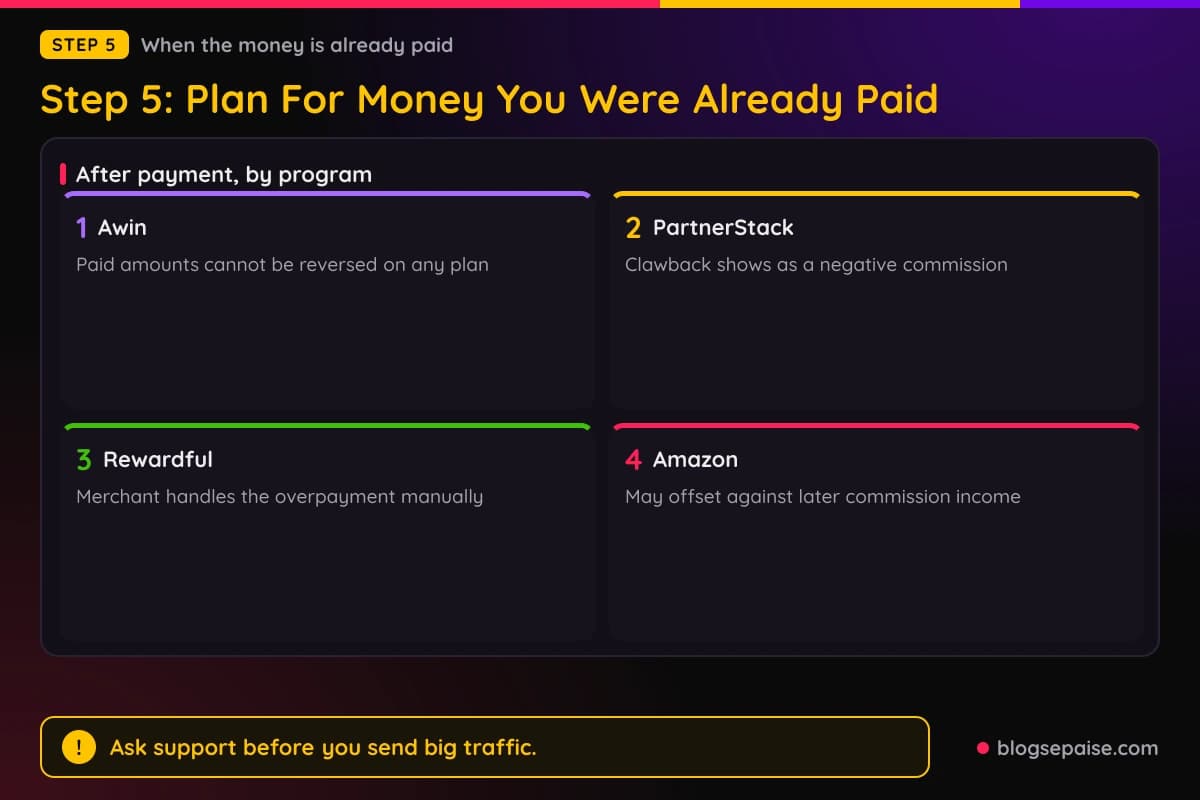
A clawback creates a negative commission. It appears on the company's next partner invoice once the partner has earned enough new commissions to cover it.
So a PartnerStack clawback waits for your next earnings. It does not reach into your withdrawn cash.
Before payment, a program manager can remove an incorrect commission during the invoice review window, which runs from the 1st through the 7th.
Check the terms of each PartnerStack program to see how that company treats refunds.
Rewardful says it does not adjust paid commissions. If a refund comes after payment, the merchant must handle the overpayment manually.
For you, that means the merchant may contact you, ask for the money back, or accept the loss. Rewardful leaves the next move to the merchant, so your agreement with that merchant decides it.
Amazon, as shown in Step 2, reserves the right to adjust or offset an excess payment against later commission income. It publishes no cutoff date for that.
So there are three outcomes after payment. You keep the money, a negative amount reduces a later payout, or the merchant asks you for it.
If you work with a program that does not publish its rule, say so to yourself plainly: the rule is not published. Then send support a short question and save the reply.
A good question is simple: if a customer returns an item after I am paid, do you reverse the commission, and how? Ask it before you send big traffic.
Step 6: Check Your Reports For Returned Items
Knowing the rules helps, but you also need to see what actually happened. Set a short routine and run it every week.
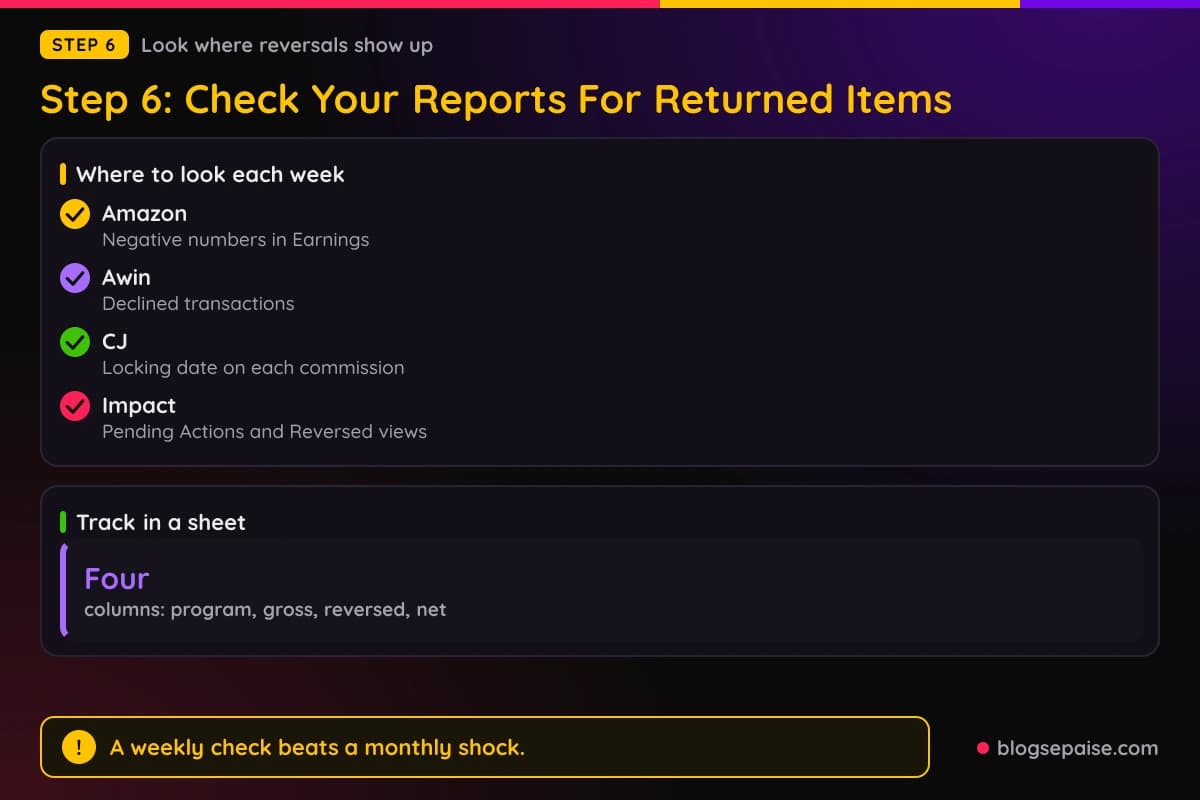
On Amazon, open the Earnings report and look for negative numbers. Amazon's help center says negative numbers represent returned or refunded products.
Also compare the Ordered Items and Shipped Items counts. A gap between them means some orders have not shipped yet or were cancelled first.
The Returned Items figure counts products sent back for a refund. Watch it each month and compare it to the number of items shipped.
Our affiliate income report explained guide walks through the basic columns. It makes a good companion when you first open a dashboard.
On Awin, check the validations or transactions view for declined items. Awin's publisher FAQ says you can hover over the circles beside a transaction to see a decline reason.
For more detail on a decline, Awin points publishers to the advertiser's account manager. Many programs send little detail, so ask politely and keep it short.
On CJ, look for the locking date on each commission. CJ's Commission Detail data includes that date, so you can see when a commission stops being editable.
On Impact, look at the Pending Actions and Reversed views in your wallet. Impact says to check reversed actions against any missing funds.
Impact also shows the locking date on each pending payout, along with the scheduled clearing date. Those two dates tell you when a pending amount turns final.
On Rewardful, the dashboard lets you filter payouts by status: pending, due, and paid. Use that filter before you request a payout.
Keep a small spreadsheet with four columns: program, gross commission, reversed, and net. After two or three months you will see your real return rate for each program.
That number beats any guess. A program that reverses 5 percent of your sales behaves very differently from one that reverses 25 percent.
Step 7: Pick Products And Programs That Cause Fewer Reversals
You cannot stop a customer from returning an item, but you can change the odds. The choices you make in your content move the number more than you might expect.
Be honest about the product. A review that hides the flaws brings buyers who feel let down and send it back.
Write about sizing, fit, setup time, and who the product is not for. A reader who knows the limits buys with the right expectations and keeps the item.
Pay attention to categories where buyers want to try the item at home. Your own reports show which products come back, and no one can measure that better than you.
Prefer programs with a clear refund and reversal policy. A program that spells out its hold period and its clawback rules is easier to plan around than one that stays silent.
Read the terms before you promote. Look for words like reversal, chargeback, clawback, locking period, validation period, and negative balance.
Software programs bring a different pattern. A customer who pays and then asks for a refund can cancel the commission, as Rewardful's pending period shows.
For those programs, compare the vendor's refund window with its pending period. Rewardful's own advice is to match them.
Another smart move is to send traffic to products you would buy yourself. Fit between reader and product is the best protection against returns.
Avoid misleading claims. Brands decline commissions for terms violations, and Amazon reserves the right to withhold commissions for them.
Spread your income across a few programs. If one program has a bad month for returns, the others keep your total steady.
Step 8: Build A Cushion Into Your Income Plan
Even with careful picks, some reversals will happen. A cushion keeps them from hurting your plans.
Start by splitting your numbers into three groups: pending, locked, and paid. Count only the paid group as money you can spend.
Next, apply a haircut to what is still pending. A 10 percent haircut is a simple starting point, and you can replace it with your own return rate once your spreadsheet has a few months of data.
Say your dashboard shows $500 pending. With a 10 percent haircut you plan around $450 and treat anything above that as a bonus.
Keep a small reserve for clawbacks. Programs that use negative commissions, like PartnerStack, subtract the amount from future earnings, so a reserve covers a slow month.
Do not pay for tools or ads with unpaid commission. Wait until the money is paid and past the point where a return can touch it.
For payment minimums, keep the threshold in mind. Amazon's $10 deposit minimum is low, while a $100 CJ threshold is only an example, since you set your own minimum there.
A small balance that waits for the minimum is exposed to returns for longer. Choose a threshold that fits the speed of your income.
Set a monthly review date. On that day, list reversals by program and note any pattern, such as one product that keeps coming back.
If one product causes most of your returns, stop promoting it. A single bad product can cancel the profit from several good ones.
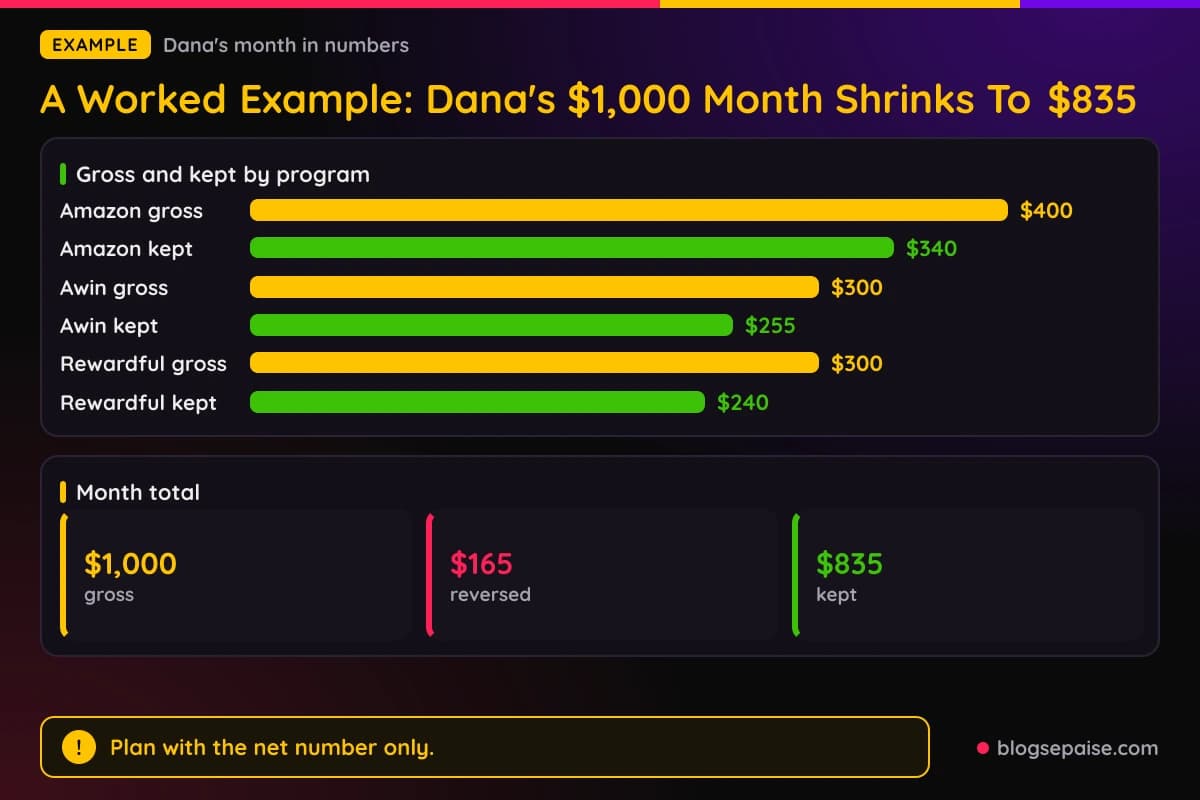
A Worked Example: Dana's $1,000 Month Shrinks To $835
Dana runs a home office blog. In one month her reports show $1,000 in commission across three programs.
Amazon shows $400, Awin shows $300, and a software program on Rewardful shows $300. On paper it looks like a great month.
Now follow the reversals. On Amazon, some customers return items, and the Earnings report shows negative numbers worth $60 of commission.
Her Amazon net is $340. Since Amazon pays approximately 60 days after the end of the month, she has not been paid yet, so the reversal costs her nothing but the number on the screen.
On Awin, the advertiser declines $45 of pending commission for fully returned orders during the validation period. Her Awin net is $255.
Dana checks the decline reasons, sees the returns, and moves on. The rest of her Awin commission is approved and joins the next payment cycle.
On Rewardful, two customers ask for full refunds while their commissions are still pending. Rewardful deletes those commissions, which removes $60.
Her Rewardful net is $240. Because the refunds came within the 30-day default pending period, no paid money was touched.
Add it up. The reversals are $60, $45, and $60, which total $165, and her kept commission is $835.
That is 16.5 percent below the gross number. Dana learned that the dashboard total is a forecast and the net total is her income.
Next month, Dana earns $700 gross on Amazon. One return from a payout that already went out shows up as an excess payment of $25.
Amazon reserves the right to offset that against later commission income, so her next payout comes in $25 lower. She expected it, because her spreadsheet already had a reserve line.
If Dana had planned her budget around $1,000, she would have been short by $165 before the offset even happened. By planning around the net number she stayed calm and kept paying her bills.
The lesson is small and practical. Track gross, reversed, and net for each program, and plan only with net.
Common Mistakes With Affiliate Commission On Returned Items
The first mistake is counting pending commission as income. Pending money can still be reversed, and only locked or paid money is safe.
Another is ignoring the lock date. Many people check earnings but never check when a commission stops being editable.
A third mistake is assuming that every program claws back paid money. Awin says paid amounts cannot be reversed, while Amazon reserves the right to offset, so the rules differ.
The opposite mistake is assuming you always keep paid money. PartnerStack and Amazon both describe ways to recover money after payment.
Many affiliates skip the program terms. The terms are where a hold period, a decline reason, or a clawback rule is spelled out.
Some people never read the negative numbers on the Amazon report. Those lines are returns and refunds, and they explain why a total went down.
Others push high-return products because the commission looks big. A big rate on a product that people send back is worth less than a small rate on a product they keep.
Ordering from your own link is a mistake as well. It breaks program rules and creates returns that look suspicious.
Another trap is panicking at one negative line. A single return is normal, and a pattern is the thing to watch.
Finally, some affiliates forget to ask support. If a rule is not published, a short email gets you an answer you can save.
Final Thoughts
A returned item can cost you the commission, but it usually costs you less than you fear. Most of the time the sale simply disappears from your pending total before any money moves.
The risk grows after payment, and the rules differ by program. Awin says paid amounts stay paid, PartnerStack uses negative commissions, Rewardful leaves it to the merchant, and Amazon can offset against later income.
Where a program does not publish a rule, treat that as a fact and plan for the worst case. A small reserve covers almost every surprise.
Learn the hold period, check your reports each week, and plan with net numbers. Do that and a return will never feel like a punch in the stomach.
Frequently Asked Questions
1. Do I lose my Amazon commission if the customer returns the item?
Yes, the commission for that item is removed. Amazon says negative numbers in your Earnings reports represent returned or refunded products.
2. Do I have to pay Amazon back if I was already paid?
Amazon does not say it will bill you. It reserves the right to adjust or offset an excess payment against any later commission income.
3. How long after a sale can a return affect my commission?
Amazon publishes no cutoff in the Operating Agreement or the Commission Income Statement. Networks like CJ and Impact publish lock dates after which the advertiser cannot edit a commission.
4. Do I get paid if 38 people click my link and nobody buys?
No. Affiliate programs such as Amazon pay on qualifying purchases, so clicks without a sale earn $0.
5. When does Amazon pay affiliates?
Amazon pays approximately 60 days after the end of each calendar month in which the commission was earned. A direct deposit needs at least $10.
6. How does a reversal differ from a clawback?
A reversal cancels a commission before you are paid. A clawback recovers money that was already paid, often through a negative commission on a later payout.
7. Does Awin take back commission that was already paid?
Awin says amounts already paid cannot be reversed on any plan. Declines happen before that, while a commission is still pending.
8. How does PartnerStack handle refunds after payment?
Once an invoice is paid, PartnerStack will not remove funds from a partner's available withdrawal balance. The company can recover the money through an outside reimbursement or a clawback that appears as a negative commission.
9. How does a partial refund change my commission?
Rewardful recalculates an unpaid commission after a partial refund. Amazon bases commission on the amount it actually receives, so a partial refund can lower the revenue behind it.
10. Where do I find a program's locking or validation period?
On Impact, open the brand's contract schedule in your account. On Awin, the validation period is set per program, and the advertiser's program details show it.
11. Should I spend commission that is still pending?
No. Pending commission can still be reversed, so plan around paid and locked amounts only.
12. Can I avoid returns completely?
No, but honest reviews and good product fit lower them. A short reserve covers the rest.