Best Time To Post For US, UK, Canada And Australia Audiences
You hit publish at 6 a.m., and then you wonder if you picked the wrong hour. A bigger blogger posts at noon, gets the clicks, and you start to doubt your timing.
The honest answer has two halves. Google does not care what time you publish, but your readers, your email list, and your social followers care a lot.
When people ask about the best time to post for us audience readers, they usually mean the first day. That is when social posts and emails bring the first wave of visits and affiliate link clicks.
Here is the plan for affiliate bloggers who write for the US, UK, Canada, and Australia. Nine steps cover time zones, picking one main audience, and the windows that big studies report for each platform.
You will see the best time to publish blog posts, the best time to post on YouTube, and the best time to post on Facebook. Pinterest, LinkedIn, and Threads get their own step too.
Studies disagree with each other, and the guide says so every time it happens. Treat each window as a starting point, then test it with your own numbers.
You will also get a worked example with invented numbers, common mistakes, and a short FAQ. Keep the free Time Zone Converter open in another tab as you read.
Disclosure: Some of the links I share might be affiliate links. If you click on one and make a purchase, I may earn a small commission as a thank you. But don’t worry, it won’t cost you anything extra. I only recommend stuff I genuinely believe in. Your support helps me keep creating awesome content. You can read my full affiliate disclosure in my disclaimer page.
If you want to save a lot of hours searching for high-paying affiliate programs, check out our exclusive list of 2500+ affiliate programs. You’ll find all the information about the programs inside the list. This list is perfect for affiliate bloggers and influencers.
Why The Clock Matters Less For Blog Rankings
The video above makes one point plainly. Google does not care what time you post, and your readers, your email list, and your social followers do.
Search traffic builds over weeks and months, long after the publish hour has passed. Social and email traffic arrives in the first day or two, and then it fades.
Google's John Mueller has said that publishing frequency is not a ranking factor. Search Engine Roundtable and Search Engine Journal also reported that changing a page's date does not help it rank.
Neither statement is about the hour of the day. The video makes the same call: the hour you press publish does not move your rankings.
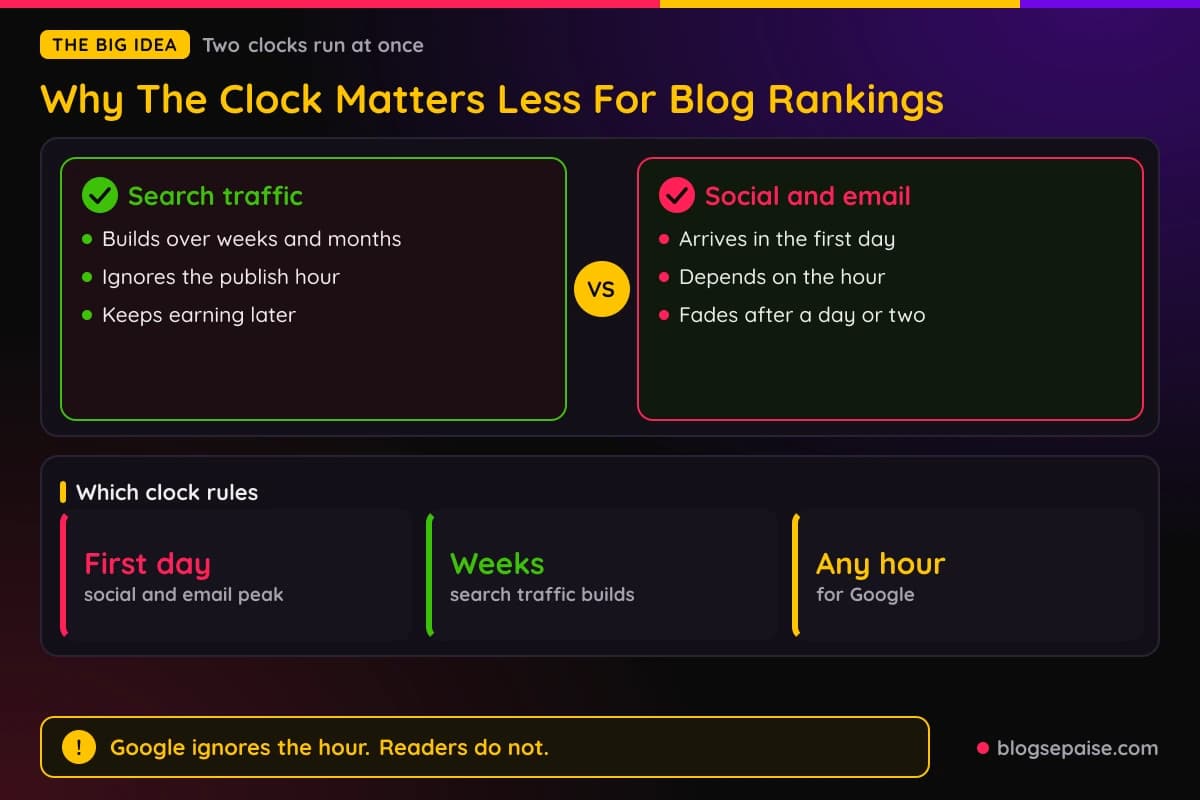
The clock matters for the first day. That is when your email list, your Facebook followers, and your Pinterest audience decide if a click is worth it.
A strong first day sends a burst of visits to your post. Some of those visitors click your affiliate links.
So think of two clocks. The search clock runs slowly and ignores your schedule, while the people clock runs every single day.
Sprout Social and Buffer both publish yearly timing studies, and the two do not agree. You will see exactly where they split as we go.
Think of the first day as a launch window. The post is fresh in feeds, your list is looking at the inbox, and every early click counts.
For an affiliate blogger the stakes are small but real. A post that lands while readers are awake has a better chance of early clicks than the same post sent while they sleep.
The rest of the guide follows the spine of the video. First come the best days, then the best times of day, then a way to find the schedule that fits your own audience.
Step 1: Know The Time Zones Of The Four Countries
Four countries mean at least eight clocks. Start with the offsets from UTC, the standard that every other clock measures from.
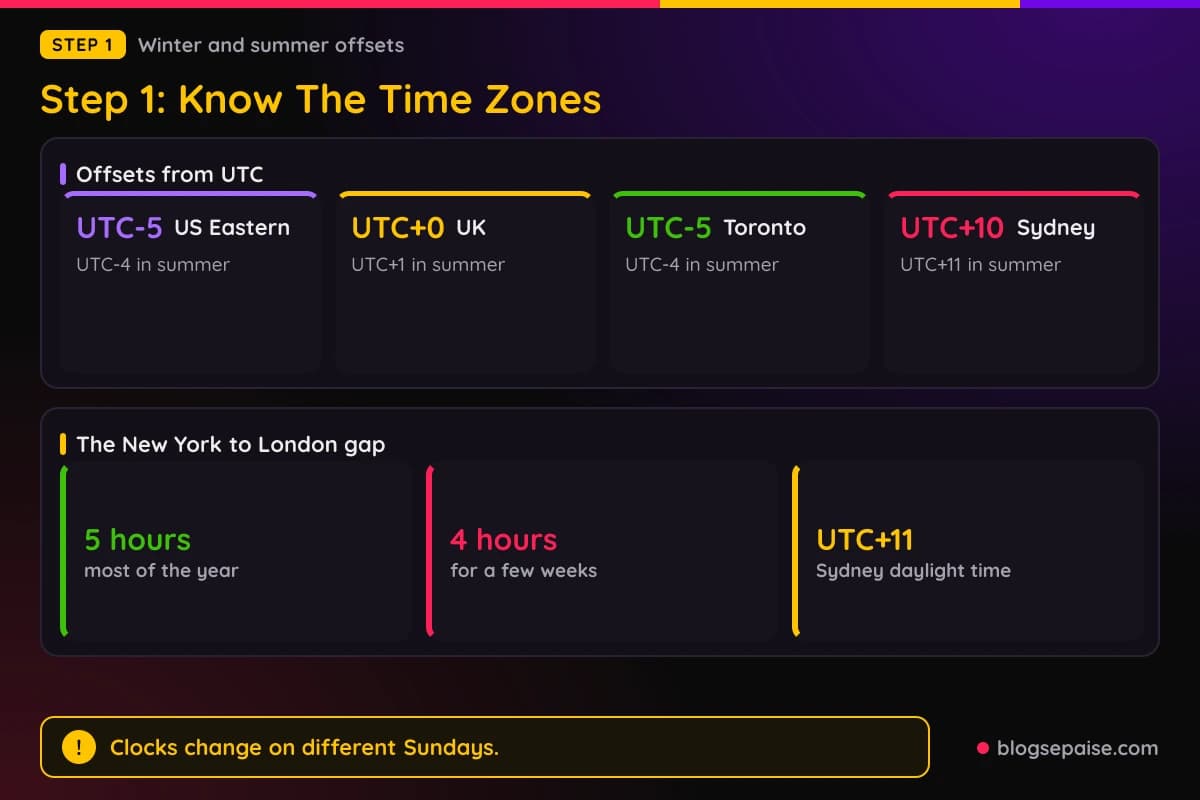
The United States spans several zones. Eastern time is UTC-5 in winter and UTC-4 in summer, Central is UTC-6 and UTC-5, Mountain is UTC-7 and UTC-6, and Pacific is UTC-8 and UTC-7.
US daylight saving starts on the second Sunday in March and ends on the first Sunday in November, both at 2 a.m. Hawaii and Arizona do not observe it, according to Wikipedia's list of daylight saving by country.
The United Kingdom uses Greenwich Mean Time, UTC+0, in winter. In summer it uses British Summer Time, UTC+1, and the clocks change on the last Sunday in March and the last Sunday in October.
Canada's biggest audiences sit in Eastern and Pacific time. Toronto and Montreal use Eastern time with the same March and November dates as the US.
Western Canada has been changing. Wikipedia's Time in Canada page lists most of British Columbia on year-round UTC-7 since March 8, 2026, and Alberta on year-round UTC-6 since April 2026.
Saskatchewan does not change its clocks either. Because the rules keep shifting, check a converter before you schedule for Vancouver or Calgary.
Australia flips the calendar. Sydney, Melbourne, Canberra, and Hobart use AEST, UTC+10, and switch to AEDT, UTC+11, from the first Sunday in October to the first Sunday in April.
Queensland, Western Australia, and the Northern Territory do not use daylight saving. Brisbane stays on UTC+10 and Perth stays on UTC+8.
The gaps move during the year. New York and London are five hours apart for most of it, but the gap shrinks to four hours for a few weeks.
In 2026 that happened from March 8 to March 29 and again from October 25 to November 1. The reason is that the US and the UK change their clocks on different Sundays.
Sydney moves too. A 9 a.m. Eastern post lands at 11 p.m. in Sydney in July and at 1 a.m. the next day in January.
Australian readers are the hardest to reach with a US schedule. Plan on them finding your post the next morning, which works fine for a blog post that keeps earning.
Step 2: Pick One Primary Audience
Four countries do not mean four schedules. Pick one primary audience and build your plan around it.
Affiliate bloggers often skip this step and post whenever they remember. A clear pick turns a messy guess into a plan.
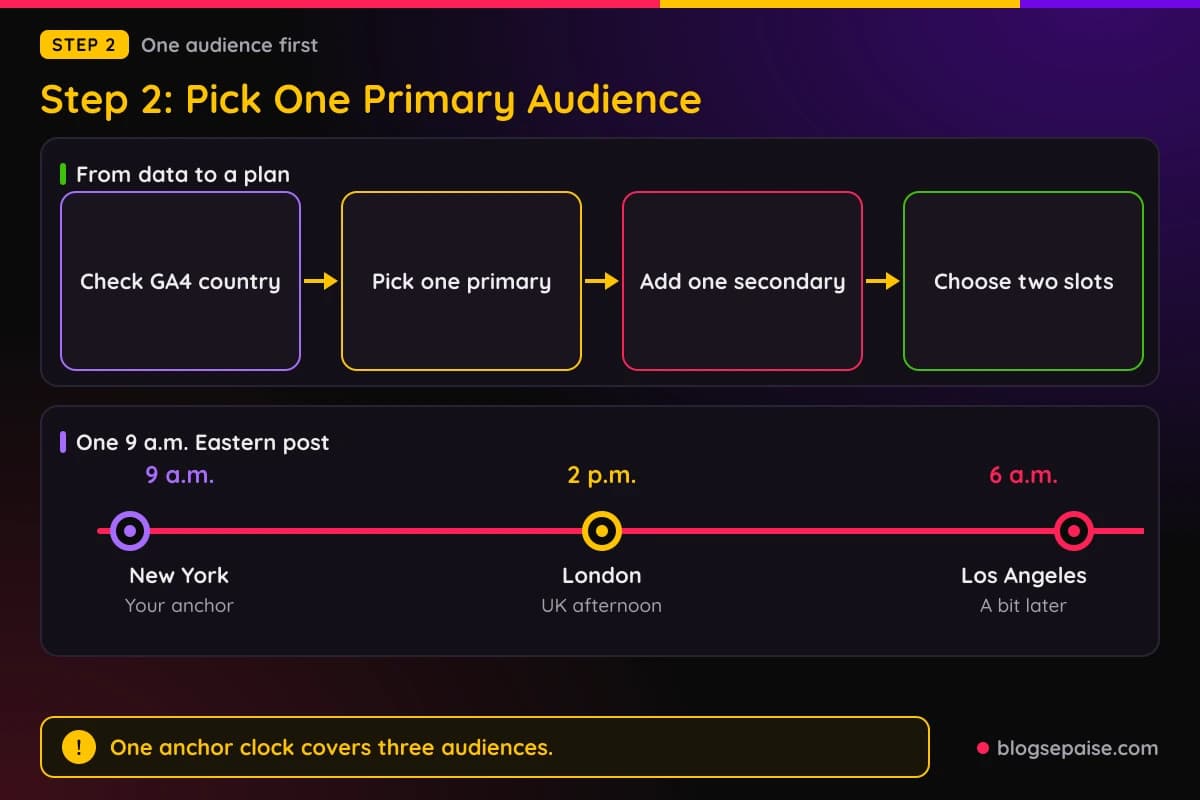
Open GA4 and look at the Country report under Reports and Demographics. The country with the most sessions is your starting point.
If two countries are close, pick the one with more affiliate link clicks. Commissions matter more than raw visits.
Write the pick in one sentence, such as primary audience US Eastern, secondary audience UK. That sentence keeps every later choice simple.
Share the sentence with anyone who helps with your posts. They will schedule in the same clock as you.
Next, check how the other countries overlap. A 9 a.m. Eastern post reaches London at 2 p.m. in both summer and winter.
The same post shows up at 6 a.m. in Los Angeles, so West Coast readers see it a little later in their morning. Toronto and Montreal share the New York clock.
That overlap is why US East works as an anchor. One post covers the US morning, the UK afternoon, and Canada's biggest cities.
Australia is the odd one out. If Australia is your biggest audience, flip the plan and anchor on Sydney instead.
Use two slots at most. One slot serves your primary audience and one serves the next biggest country.
Every extra slot costs you time, and a small site rarely has the posts to test more than two.
Step 3: Choose When To Publish Your Blog Posts
The best time to publish blog posts is the time that helps your first-day traffic. Aim a little before the hour your audience becomes active.
Sprout Social's 2026 study of nearly 2 billion engagements names Tuesdays and Wednesdays as the best days overall. It names Sunday as the lowest day across the board.
Its summary lists 11 a.m. to 6 p.m. local time as the best window. The detailed table in the same study shows 12 to 6 p.m. for those days.
So publish the blog post an hour or two before your first social post. Then the link works the moment the first reader clicks.
Say your primary audience is US Eastern and your first social post goes out at noon. Publish at 9 or 10 a.m. Eastern on a Tuesday, and check the page on your phone before you share it.
Your email list needs a slot too. Send the email the same morning, then compare open rates by hour with our email open rate calculator.
Weekends are not banned for every platform. Sprout lists Sunday as its weakest day, yet Buffer's long-form YouTube data shows Sunday as the strongest, so the platform decides.
Also pick a calm moment on your side. Publishing in a rush leads to broken links and a missing disclosure.
Run a last check on your links and your Disclosure before the post goes live. A fast check on your phone catches most problems.
Keep a steady rhythm. A schedule you can keep every week beats a perfect minute you can only hit twice.
Step 4: Pick Your Facebook Windows
The best time to post on Facebook depends on which study you read. Sprout Social and Buffer both published large studies in March 2026, and their windows differ.
Sprout Social studied nearly 2 billion engagements across about 307,000 profiles from November 27, 2025 to February 27, 2026. Its times are in each user's local time.
Sprout lists Monday 12 to 1 p.m., Tuesday and Wednesday 12 to 8 p.m., and Thursday 12 to 2 p.m. and 8 p.m. It rates weekends and early mornings as weak.
Buffer analyzed over 52 million posts for its 2026 State of Social Media Engagement report. Its best Facebook slot is 9 a.m. on Thursday, and its quick guide says 8 a.m. to 12 p.m. on weekdays.
Both studies lean toward midweek. Sprout lists weekends as the worst, and Buffer says Saturday is the quietest day.
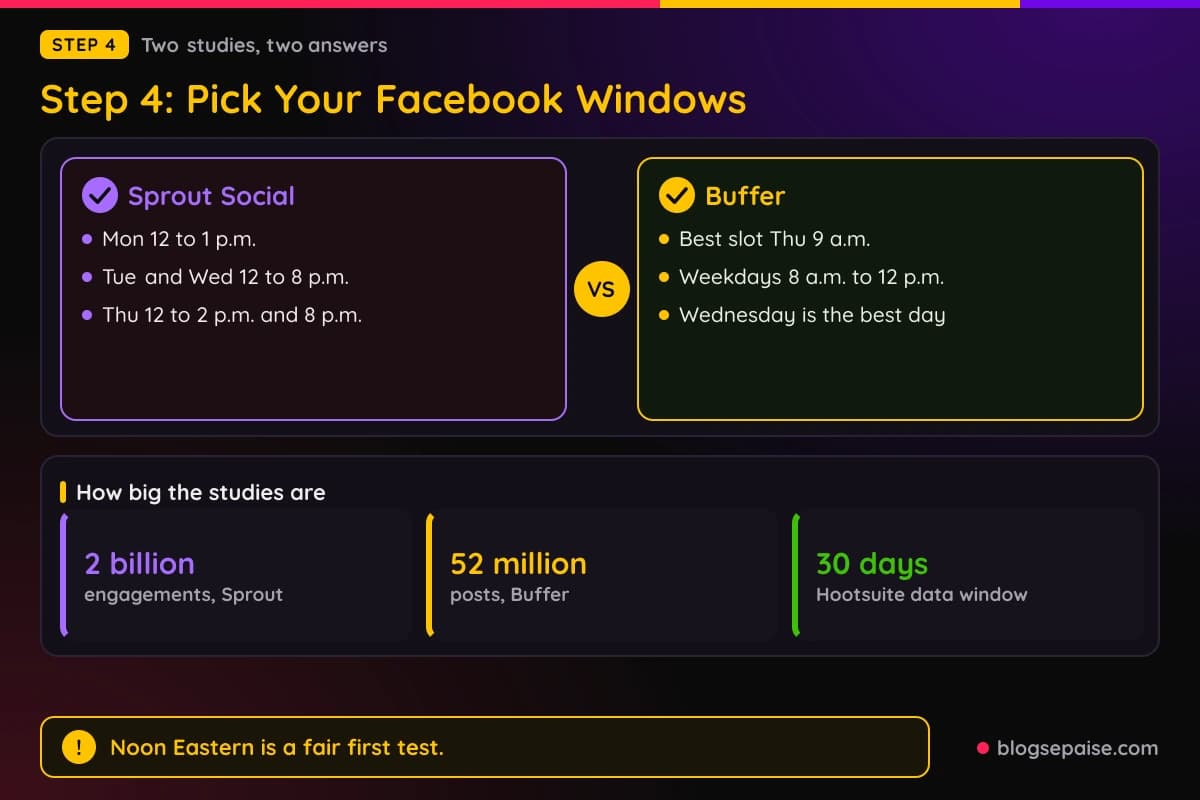
The studies split on the hour. Sprout favors afternoons, and Buffer favors mornings.
Hootsuite takes a different route. Its tool uses your last 30 days of results to pick times for you.
When your account has too little data, Hootsuite falls back to industry standard times shown in your time zone. So even its tool starts from averages.
For a US audience, noon Eastern sits inside Sprout's Tuesday and Wednesday window. It also sits at the edge of Buffer's morning range, so it makes a fair first test slot.
Both studies record each user's local time, so a noon window means noon on each reader's own clock. A Page with followers in four countries cannot hit local noon for all of them.
That is why Step 2 matters. Pick the audience you want most, and aim the slot at them.
Give any slot a full month. Facebook results swing from post to post, and one week proves nothing.
Avoid posting the same link at the same minute on every page you run. Spread the posts out, so each audience sees something fresh.
If you plan to share affiliate links there, read our guide to affiliate links on Facebook first.
Step 5: Pick Your YouTube Windows
The best time to post on YouTube depends on the format. Buffer's 2026 data splits long videos from Shorts.
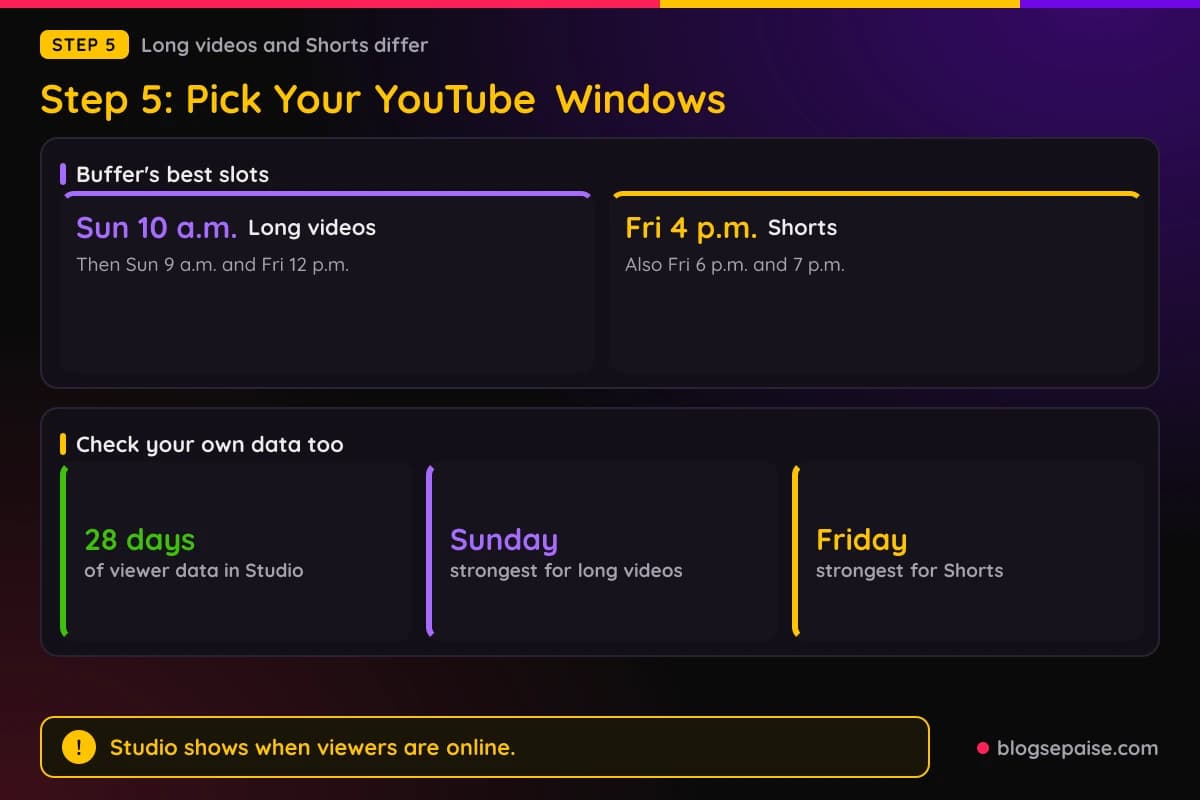
For long videos, Buffer names Sunday at 10 a.m. as the best slot by a wide margin. Sunday at 9 a.m. and Friday at 12 p.m. follow.
Wednesday and Thursday are the quieter days for long videos in that study. Sunday is the strongest day overall.
For Shorts, Buffer names Friday at 4 p.m. as the best slot, with 6 p.m. and 7 p.m. on Friday also strong. Friday, Saturday, and Thursday are the strongest days, and Monday and Tuesday are the weakest.
Buffer's own summary does not line up with itself. Its text points to mornings of about 8 to 11 a.m. for long videos, while its quick guide lists 6 to 10 p.m. from Sunday to Tuesday.
Sprout Social's 2026 study does not cover YouTube, so there is no second large study to compare here. Treat the Buffer numbers as one view.
Google's help page for the Audience tab describes a report called When your viewers are on YouTube. It shows when your viewers are online across YouTube in the last 28 days.
The same page suggests using it to plan a Premiere or a live stream. That makes it the best free timing tool you have for video.
Check which time zone Studio shows before you act on an hour. Then use the Time Zone Converter to see which country each peak belongs to.
A video thumbnail and title matter as much as the hour. A perfect slot cannot fix a weak title.
Upload early and schedule the publish time, so processing is done when viewers arrive. Pair the timing with a strong title using our YouTube title optimizer.
Step 6: Pick Windows For Pinterest, LinkedIn, And Threads
Start with Pinterest. Buffer's study does not cover it, so Sprout Social's study is the only large source we found.
Sprout lists Monday 10 a.m. to 12 p.m. and 2 to 3 p.m., Tuesday 7 a.m. and 10 a.m. to 1 p.m., and Wednesday 8 a.m. to 1 p.m. and 3 p.m.
It also lists Thursday 10 to 11 a.m. and 2 to 4 p.m., plus Friday 10 to 11 a.m. Weekends are the worst for Pinterest in that study.
Like the rest of Sprout's study, those Pinterest windows use each user's local time. A window at 10 a.m. means 10 a.m. for the person scrolling.
We found no best time published by Pinterest itself. Sprout's windows are mostly late morning, which is early evening in London.
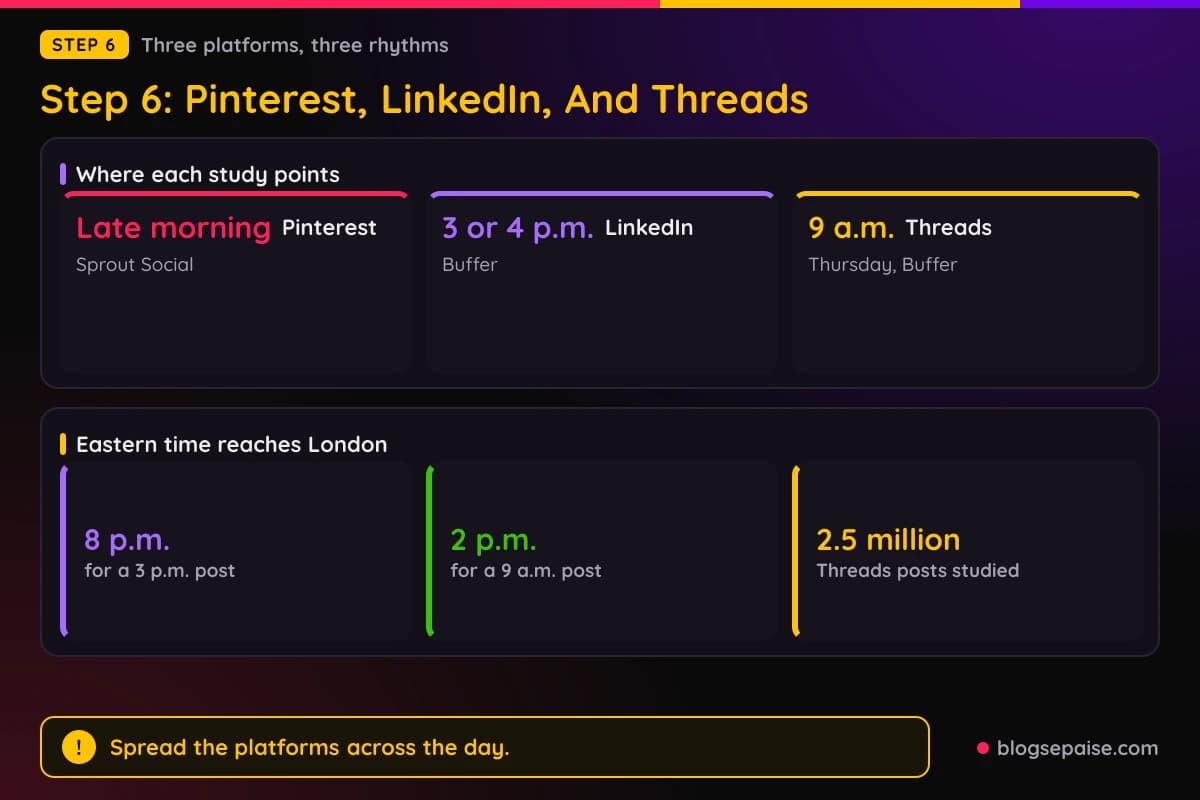
LinkedIn comes next. Sprout lists Tuesday 11 a.m. to 5 p.m., Wednesday 11 a.m. to 4 p.m., and Thursday 11 a.m. and 1 to 5 p.m.
Buffer names 4 p.m. on Wednesday, 4 p.m. on Friday, and 3 p.m. on Friday as the best slots. It says weekend posts beat early weekday posts.
Buffer also notes a shift from 2025, when LinkedIn peaks sat inside the workday. Both studies put the peak in the afternoon. A 3 p.m. Eastern post reaches London at 8 p.m., so favor the Eastern afternoon only when most of your readers are American.
Sprout does not cover Threads. Buffer's study of 2.5 million Threads posts names 9 a.m. on Thursday as the best slot.
Its next best window is weekday mornings, 7 a.m. to 12 p.m. Wednesday is the best day, followed by Thursday and Tuesday.
Saturday, Sunday, and Monday are the lowest days for Threads in that study. A 9 a.m. Eastern Threads post reaches London at 2 p.m.
The three platforms pull in different directions. Pinterest leans to late morning, Threads to early morning, and LinkedIn to the afternoon.
Spread them across the day instead of posting everywhere at once. Sprout and Buffer both say to treat their numbers as a start.
A simple day could look like this. Threads at 9 a.m. Eastern, Pinterest at 11 a.m., and LinkedIn at 3 p.m.
That day costs three short tasks, and each lands in a window that a study names. Adjust it after your first month of data.
Step 7: Find Your Own Best Times In Your Data
Studies give you a starting point, and your own data gives you the answer. Three free reports show when your readers are around.
Start with GA4. It has no dedicated hourly report, but you can add the Hour dimension to a table report.
Click the plus sign next to the dimension name above the table, choose Time, then Hour. The value is a number from 0 to 23, so a 15 means the 3 p.m. hour.
Pair Hour with sessions and your key events, such as clicks on affiliate links. Look for hours where link clicks rise, not just visits.
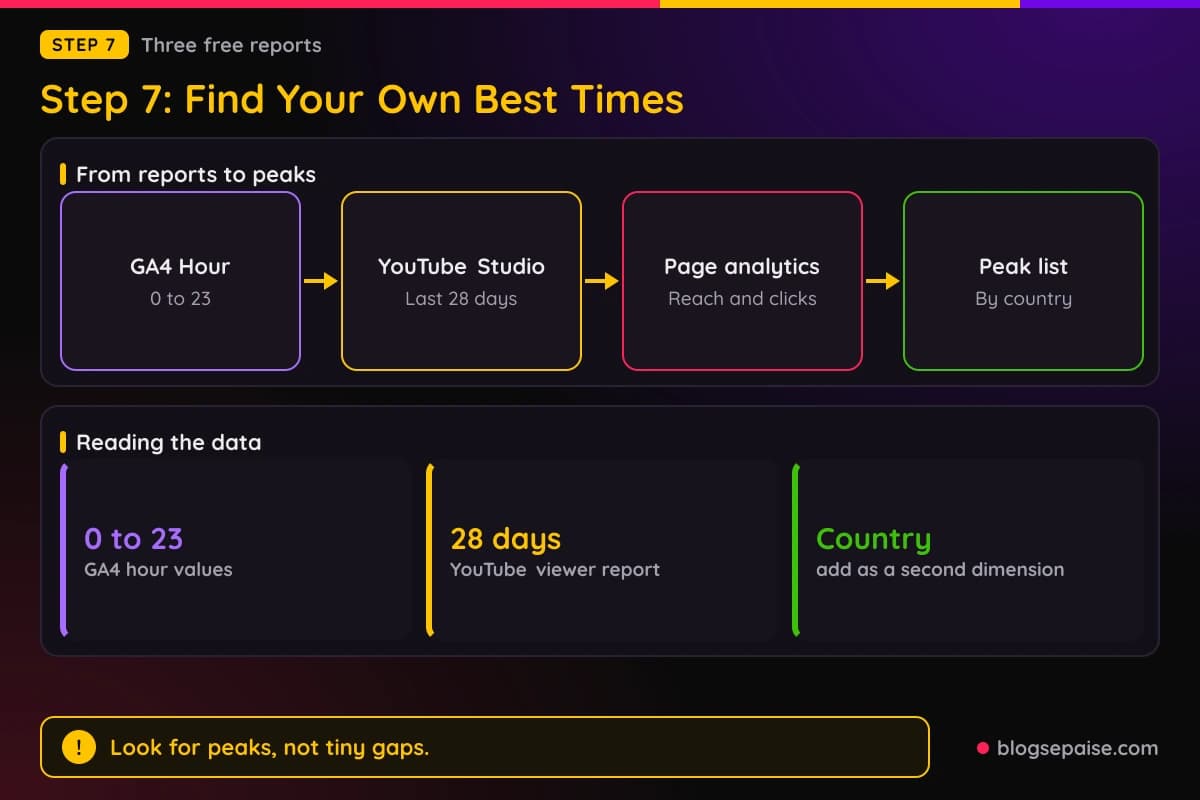
Add Country as a second dimension so UK evening traffic does not bury US morning traffic. Our Google Analytics set-up guide helps if your tracking is not ready.
Check the time zone setting of your GA4 property in Admin. The hours should match the clock you think they match.
Now open YouTube Studio. Go to Analytics, choose the Audience tab, and find When your viewers are on YouTube. The report covers the last 28 days.
It shows when your viewers are on YouTube, which is not the same as when they watch your channel. Use it as a hint, then check the views on your own uploads.
Facebook has moved its Page analytics around more than once. Older Page Insights showed the average number of fans online each hour, and Meta Business Suite now holds your Page analytics.
Open Insights there and look for an audience or timing chart. If your Page does not show one, compare reach and link clicks by post time in a simple sheet.
Your email service shows opens by time too. Match those hours to your GA4 hours before you trust either one.
Do not chase small gaps. A difference of a few clicks on a small site is noise, so look for two or three clear peaks.
Write the peaks down by country and platform. That list becomes your schedule in Step 8.
Step 8: Schedule Across Time Zones
Scheduling across four countries is easier from one clock. Use the clock of your primary audience and write every time in it.
The Time Zone Converter lets you pick two cities and a time. It shows the converted time, both UTC offsets, the daylight saving status, and a 24-hour overlap chart.
Try it with your plan. Enter 12 p.m. in New York and pick London, and the tool shows what your UK readers see.
Check the daylight saving flag in the weeks when clocks change. The gap between cities moves, as you saw in Step 1.
The Social Post Scheduler Template takes your niche and a platform. It builds a weekly plan you can print.
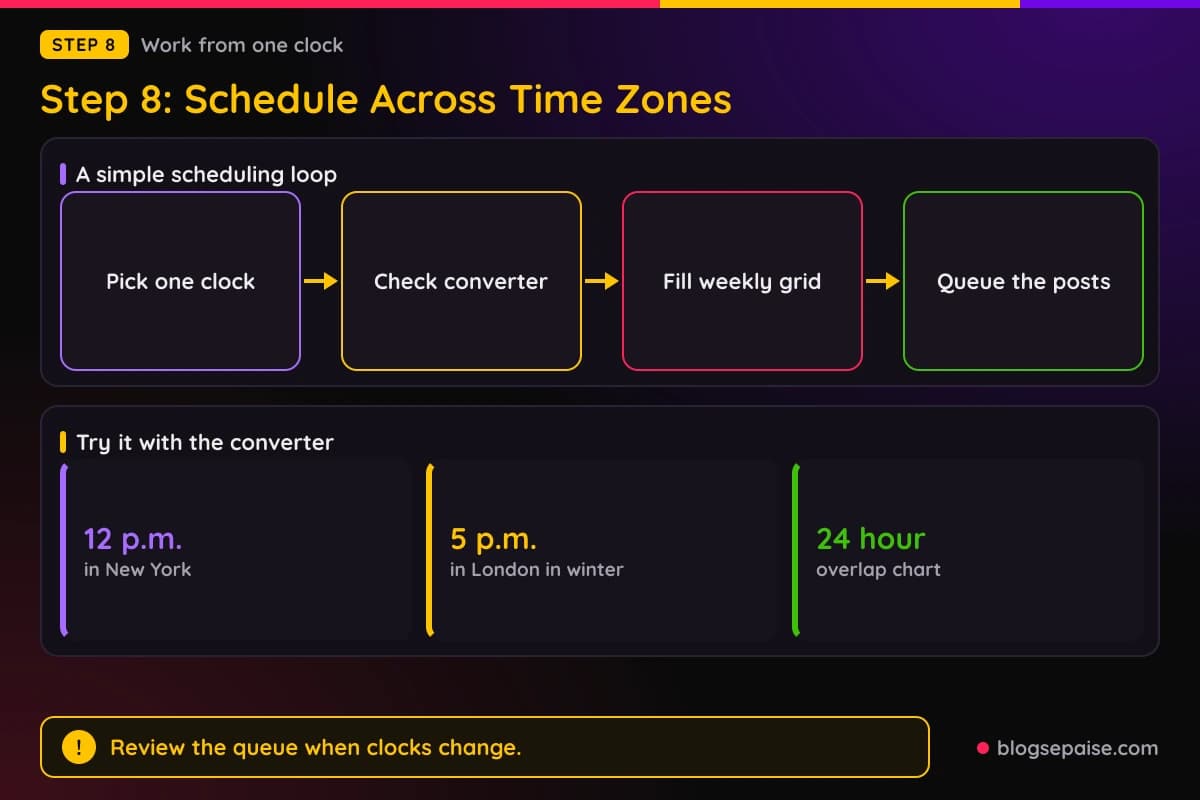
Use the template to turn your windows into a weekly grid. Fill each box with a time in your primary clock and add a second line for the secondary country.
A scheduling tool then holds the posts for you. Our guide to the best social media schedulers compares ten of them.
Check which time zone your scheduler uses before you queue a week. A queue set to the wrong zone puts every post hours off.
Hootsuite shows its suggested times in your time zone. That is a useful reminder that every tool has a setting for it.
Review the queue in March, late October, and early November. Posts may land an hour off from your plan after a clock change.
Keep a one line note for each post with the platform, the time in your primary clock, and the time in your secondary clock. It makes the review in Step 9 much faster.
If you work with a helper, share the same note. Everyone then reads the same clock.
Step 9: Test And Review After Four Weeks
Run one test at a time. Pick one platform and change only the hour.
Use two or three time slots, and rotate them over four weeks so no slot owns the best weekday. Post the same type of content in each slot.
Pick one number to judge. Link clicks to your blog from that platform, taken from GA4 sessions by source, work well for affiliates.
Record each post in a sheet with the date, the platform, the slot, and the link clicks after 24 hours. The first day is where timing matters most.
After four weeks, average the clicks for each slot. If one slot beats the next by a clear margin, make it your main slot.
If two slots land close together, keep both. A tie tells you the hour is not what limits your results.
Compare your results with the studies. If your numbers disagree with Sprout Social or Buffer, trust yours, because they come from your audience.
Four weeks is our practical rule, not a figure from a study. It gives each slot several posts without making you wait a season.
Test again every quarter, or after a big change in your audience. Clock changes and busy seasons shift reader habits.
Always keep one slot open for a test. You never stop learning when one post a week is an experiment.
Write down what you learned in a single line after each review. In a year you will have a small playbook that no study can give you.
A Worked Example: Maya Tests Her Facebook Posting Time
Every number in this example is made up to show the method. Maya runs a home office gear blog and has never tested her timing.
Her GA4 Country report shows 62% of sessions from the US, 21% from the UK, 9% from Canada, and 8% from Australia. She picks US Eastern as her primary audience and the UK as secondary.
Her question is when to post on Facebook. She plans four slots in Eastern time: 9 a.m., 12 p.m., 3 p.m., and 7 p.m.
She uses one slot per week for four weeks, with two posts in each week. She posts the same type of content each time.
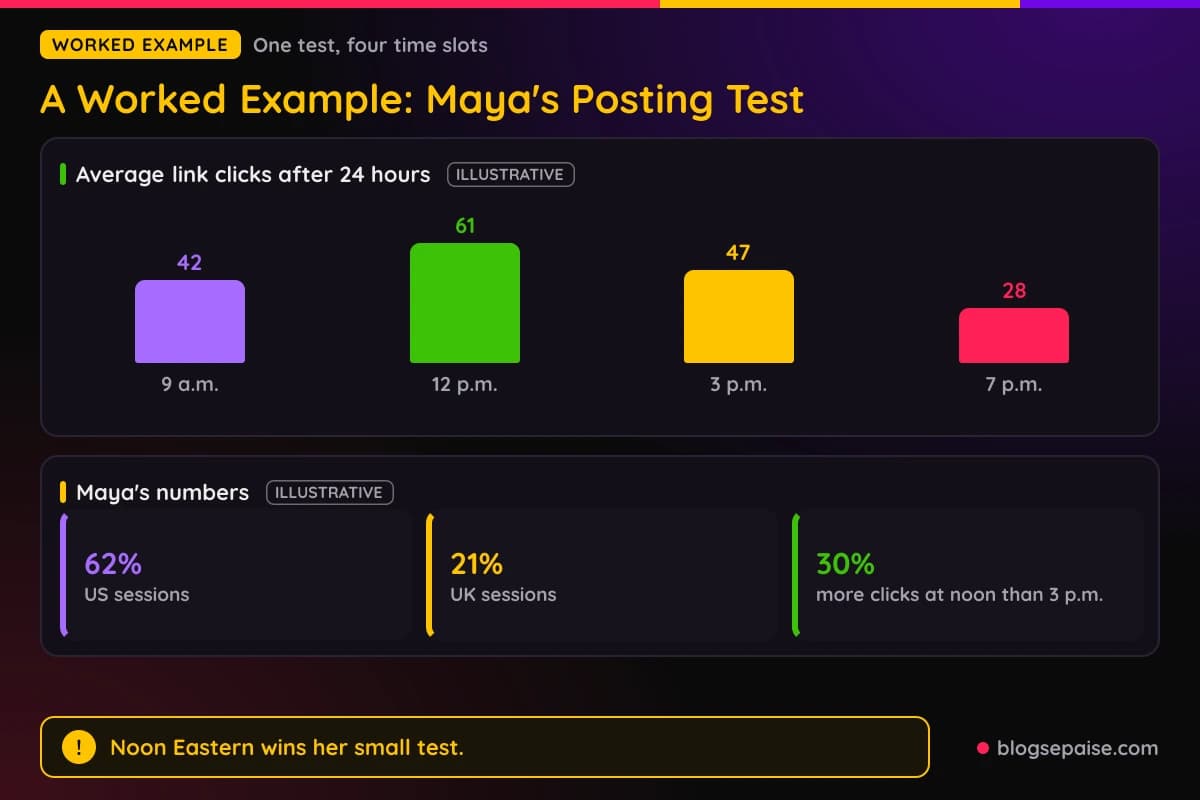
After 24 hours she records the link clicks for each post. The averages are 42 clicks at 9 a.m., 61 at 12 p.m., 47 at 3 p.m., and 28 at 7 p.m.
Noon wins. It gets about 30% more clicks than the 3 p.m. slot.
Noon Eastern is 5 p.m. in London in winter, so her UK readers see the post in the late afternoon. That fits her secondary audience well.
Her Australian readers see the same post in the small hours, around 4 a.m. in January and 2 a.m. in July. She lets that group find her through search instead.
Maya sets noon Eastern as her main Facebook slot. She keeps 3 p.m. as the test slot for next month.
She writes one line in her sheet: primary US Eastern, Facebook at 12 p.m., test 3 p.m., review in four weeks.
The sample is small, with only eight posts. Maya treats the result as a lean, not proof, and she plans to test again next quarter.
Common Mistakes When Choosing Posting Times
The first mistake is treating a study as law. Sprout Social and Buffer disagree on Facebook, YouTube, and LinkedIn, so neither one is final.
The second is forgetting that the studies use local time. A window that works for a reader in Chicago does not tell you what works for a reader in Sydney.
The third is chasing four countries at once. Pick one primary audience and one secondary audience, and let the rest find you through search.
Forgetting daylight saving is the fourth. The gap between New York and London changes for a few weeks each spring and fall, and Sydney moves the opposite way.
The fifth is changing the hour and the content at the same time. If both change, you will not know which one made the difference.
The sixth is judging after three posts. One strong or weak post tells you almost nothing.
The seventh is posting at the best time with a weak post. A good hour cannot rescue a thin or unclear piece.
The eighth is sending every platform the same post at the same minute. Spread the posts across the day, as the platforms suggest.
The ninth is skipping weekends everywhere. Buffer's long-form YouTube data puts Sunday on top, so check each platform on its own.
The tenth is worrying about the hour for search. Our video makes the point again: Google does not care what time you post.
A last mistake is never writing the plan down. Without a note, you forget which slot you tested and repeat the same guess.
Final Thoughts
Timing is a first-day tool, not a ranking trick. Your readers, your email list, and your social followers decide how well the first day goes.
Pick one primary audience, read the windows as a starting point, and note where the studies disagree. Then let your own data from GA4, YouTube Studio, and your Page analytics pick the winner.
Plan in one clock, check the daylight saving flag, and test for four weeks. Use the Time Zone Converter and the Social Post Scheduler Template to keep it tidy.
Then repeat the test every quarter. A schedule built on your own audience will serve you better than any study.
Start this week with Step 2. Pick your primary audience, write the one sentence, and schedule one test post.
Frequently Asked Questions
1. What is the best time to post for a US audience?
There is no single answer. Sprout Social's 2026 study points to Tuesdays and Wednesdays from late morning to 6 p.m. local time, while Buffer's Facebook data points to weekday mornings.
2. Does the time of day I publish a blog post affect SEO?
Our video says Google does not care what time you post. The hour affects first-day social and email traffic instead.
3. What is the best time to post on YouTube?
Buffer's 2026 data names Sunday at 10 a.m. for long videos and Friday at 4 p.m. for Shorts. Sprout Social does not cover YouTube, so check When your viewers are on YouTube in Studio.
4. Which day is the best to post on Facebook?
Buffer names Wednesday as the best day, with Thursday close and 9 a.m. on Thursday as its top slot. Sprout lists Tuesday and Wednesday as its widest windows.
5. Should I post in Eastern time for the UK, Canada, and Australia too?
Eastern time reaches the UK in the afternoon and shares a clock with Toronto and Montreal. Australia sees the post at night, so plan on those readers finding it the next morning.
6. How do I find my own best posting times?
Add the Hour dimension to a GA4 table report, open the Audience tab in YouTube Studio, and check your Page analytics in Meta Business Suite. Then test two or three slots for four weeks.
7. Does Pinterest publish a best time to post?
We found no best time published by Pinterest itself. Sprout Social's 2026 study lists mostly late morning windows from Monday to Friday and rates weekends lowest.
8. How often should I retest my posting times?
Every quarter works well for most small sites. Retest sooner after a big audience shift or a clock change.
9. Should I post at the same time every day?
Not necessarily. Pick the strongest days for each platform, and post at your best slot on those days, as both studies show days differ.
10. Do I need a scheduling tool for this?
You can post by hand, but a tool saves effort when you cover several time zones. Our best social media schedulers guide compares ten options.
11. How do I convert a posting time for another country?
Open the Time Zone Converter, pick the two cities, and enter the time. Check the daylight saving flag in the weeks when clocks change.