Foxit PDF Editor Review (2026): Pros, Cons, And Who It Fits
Foxit is a PDF and document software company at foxit.com. It sells PDF Editor, eSign, an AI Assistant, a Workspace for multi-document analysis, a free PDF Reader, and server tools for enterprises.
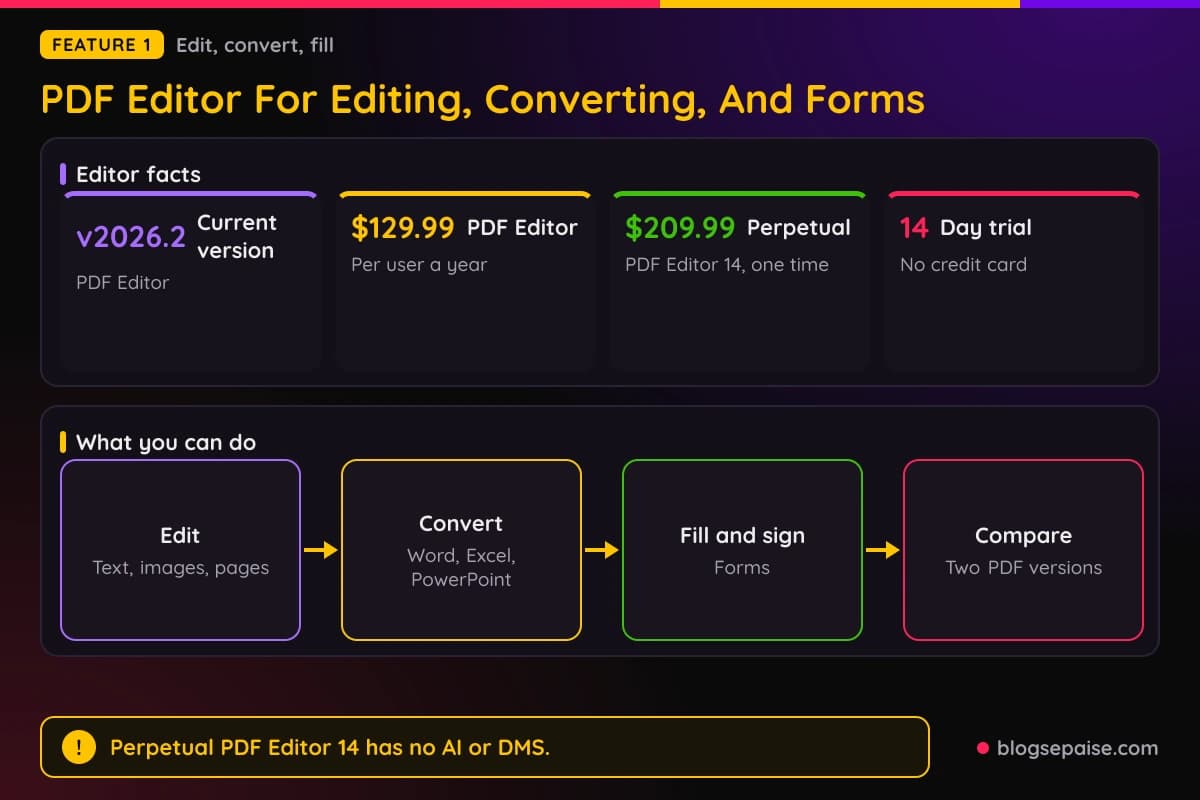
PDF Editor edits text, images, and pages, converts to and from Word, Excel, and PowerPoint, runs OCR, and compares versions. PDF Editor+ adds mobile apps, Smart Redact, and eSign with 150 envelopes a year.
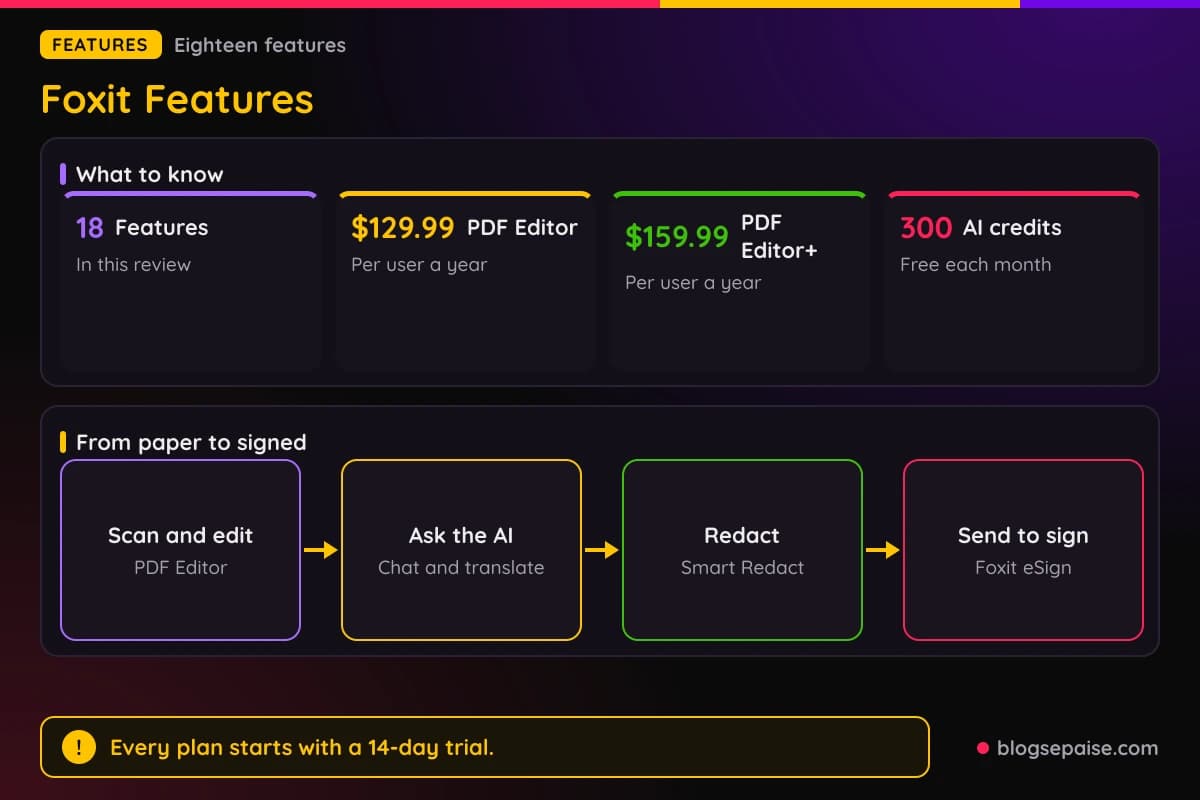
PDF Editor costs $129.99 per user a year and PDF Editor+ costs $159.99. A perpetual PDF Editor 14 license costs $209.99 one time.
Monthly billing is available from $10.99. Every plan starts with a 14-day free trial with no credit card.
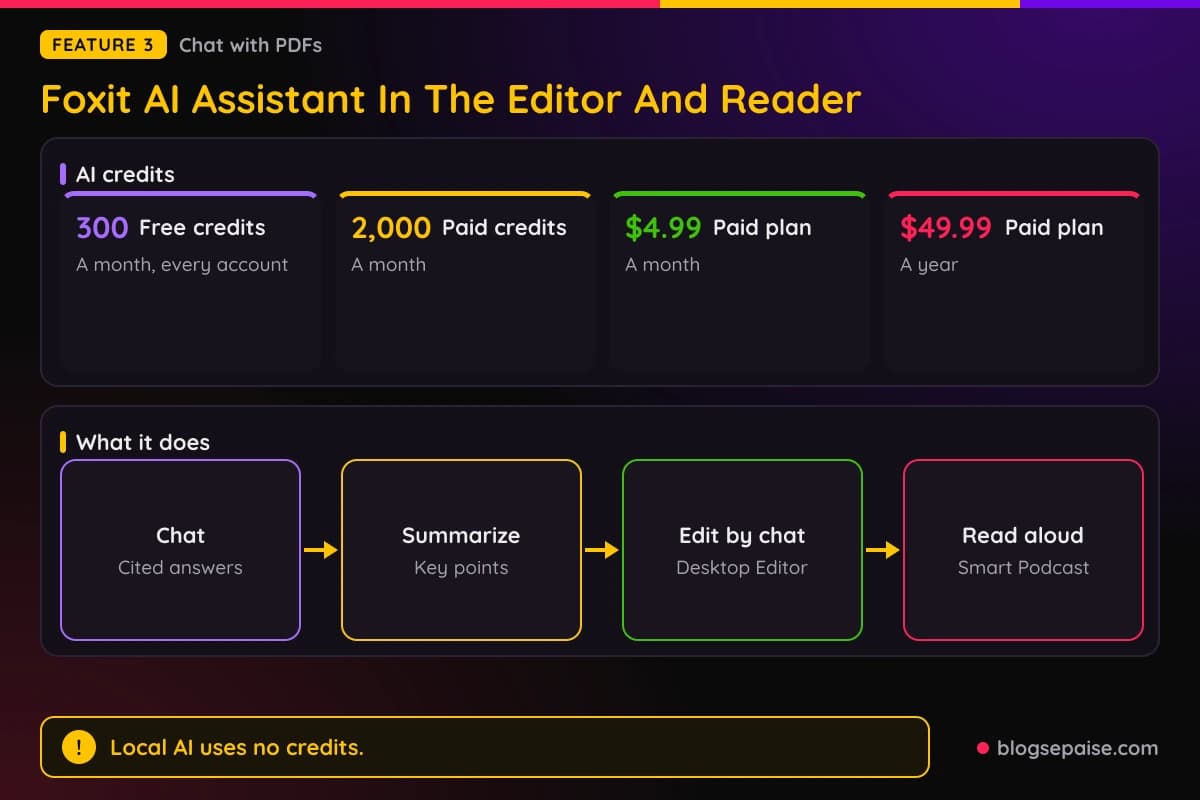
Every Foxit account gets 300 AI credits a month, including the free PDF Reader. A paid AI Assistant plan gives 2,000 credits a month for $4.99 a month or $49.99 a year.
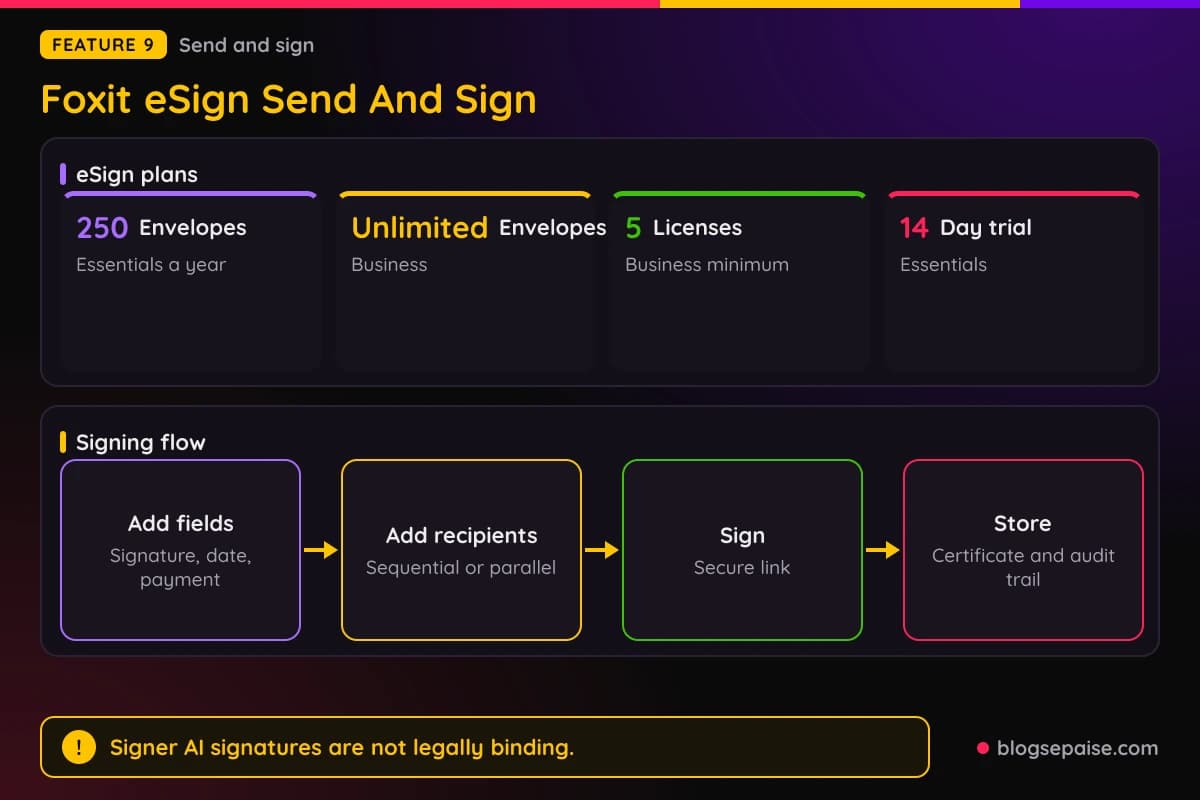
Foxit eSign has Essentials and Business plans. Essentials allows 250 envelopes a year, and Business allows unlimited envelopes.
Volume licensing, the Foxit DMS document repository, and an Admin Console cover larger teams. Smart Redact Server, Rendition Server, and Maestro Server OCR cover high-volume server work.
Disclosure: Some of the links I share might be affiliate links. If you click on one and make a purchase, I may earn a small commission as a thank you. But don’t worry, it won’t cost you anything extra. I only recommend stuff I genuinely believe in. Your support helps me keep creating awesome content. You can read my full affiliate disclosure in my disclaimer page.
Search 1,500+ affiliate programs in the Blogsepaise Program Database and filter them by category, network and commission type, then go straight to each program's signup page. The Link Health Monitor then checks your posts for broken, redirected and untagged affiliate links.
Foxit Features
Foxit sells a connected set of PDF, signing, AI, and server products. The 18 features below run from the desktop Editor to on-premises server tools.
The Editor, Reader, and Workspace share the same 300 monthly AI credits. A PDF Editor or eSign subscription also comes with Foxit DMS storage.
Foxit PDF Editor v2026.2 is the current release. You can try it with a 14-day free trial with no credit card.
1. PDF Editor For Editing, Converting, And Forms
Foxit PDF Editor creates, edits, converts, signs, and manages PDFs. It runs on Windows, macOS, and the web, and the current version is PDF Editor v2026.2.
You edit text, images, and pages. You can also merge, split, organize, and rearrange pages.
Conversion runs to and from Word, Excel, and PowerPoint. The Editor creates, fills, signs, and sends forms.
OCR turns scanned paper into searchable PDFs, and a compare tool checks two versions of a PDF. Password protection secures the file.
The interface uses a familiar ribbon style. AI Generate Image creates and inserts images from a description, and the Editor also has accessibility tools, bookmarks, and measurement tools.
Foxit PDF Editor 14 is the perpetual license, and it runs on Windows and macOS only. It has no AI Assistant, Workspace, Smart Redact, DMS, or cloud features, which come with subscriptions.
Security uses AES-256 document encryption, with OAuth 2.0 and Microsoft Entra ID single sign-on. Compliance covers SOC 2 Type 2, GDPR, TAA, Section 508, VPAT, and ADA.
The Admin Console handles deployment, updates, license management, and user governance. Policies and access controls apply centrally.
2. Scan And OCR To Searchable PDFs
Foxit PDF Editor turns paper documents and image files into searchable, editable PDFs. It accepts scanned paper, existing scanned PDFs, and image files.
Scanning connects straight to a scanner with TWAIN and WIA support. Multi-page batch scanning is built in.
OCR takes three steps. Open the document, run Convert and then Recognize Text, then search, copy, export, or edit the result.
Options cover recognition languages, page ranges, and suspected text detection. The ABBYY OCR engine does the recognition, with table and column detection, and batch OCR handles hundreds of pages.
After OCR, the Editor highlights suspect words that may be errors. A side-by-side view compares the result with the original for quick correction.
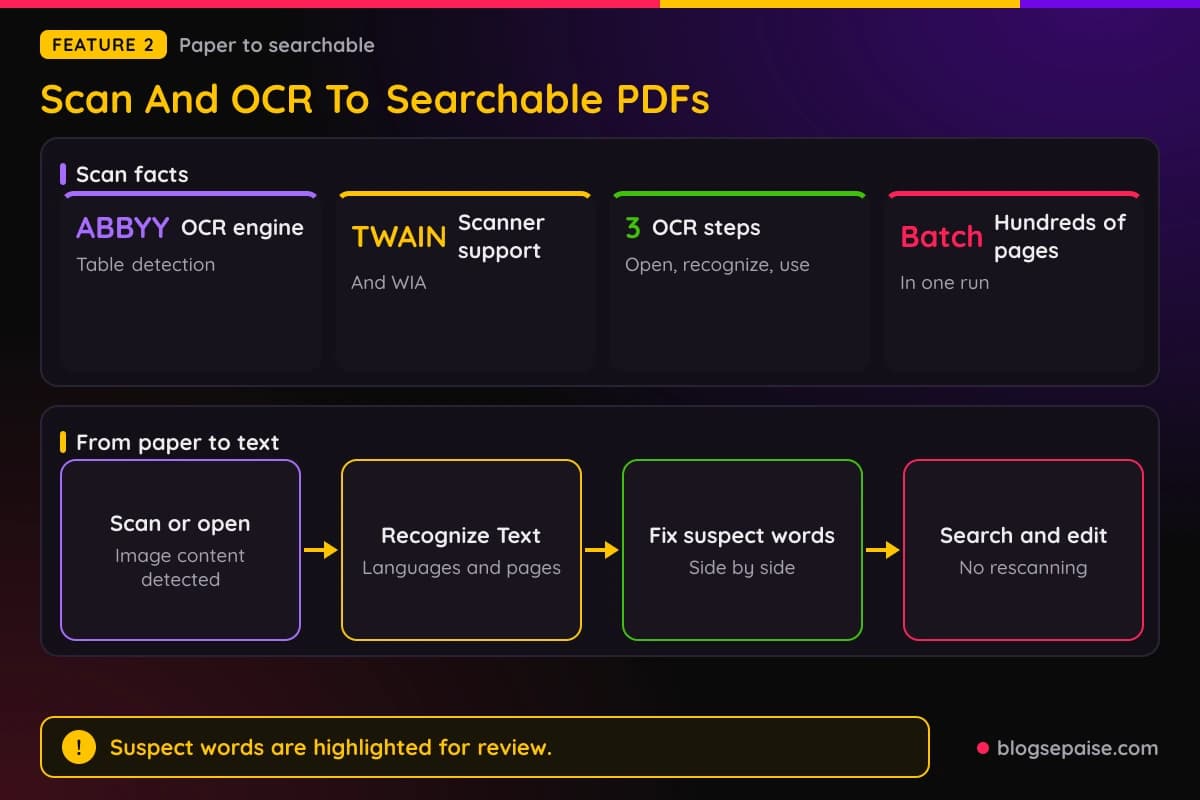
Paragraph-level editing works on scanned documents, with font matching and layout preservation. You edit without rescanning.
Scanned PDFs are optimized for smaller file size and searchability. Full-text search runs across a document library.
Teams that need to convert whole scanned archives use Maestro Server OCR, covered in feature 16.
3. Foxit AI Assistant In The Editor And Reader
The Foxit AI Assistant is built into PDF Editor and the free PDF Reader. It works on the open document across desktop, cloud, and mobile.
Chat answers questions about a document with citations that link back to the exact spot in the file. Summaries pull out the key points of long documents.
Extraction pulls figures, dates, and terms from reports and contracts. Chat with images answers questions about charts, diagrams, and scanned pages.
Edit by chat runs plain-language requests such as redaction, page reordering, watermarks, page numbers, format conversion, and file protection. That works in the desktop Editor only.
AI Bookmark builds a structured outline for long documents, and Generate Image creates pictures from text. Both work in the Editor, mobile, and cloud, and not in the Reader.
Read Aloud reads a document paragraph by paragraph. Smart Podcast turns a document into podcast-style audio.
Skills are one-click actions such as Summary and PDF Action Inspector, and custom Skills handle repeatable work. The Inspector scans for embedded JavaScript, hidden data that survives redaction, and content that may print differently from what shows on screen.
Formula conversion turns equations into MathML or LaTeX. Local AI mode runs on your own hardware through Microsoft Foundry Local, works offline, and uses no credits on Windows and macOS.
Cloud AI runs through Azure AI services. Data is stored temporarily in the request's region and deleted within 24 to 48 hours depending on the service, and chat histories are not used for training without explicit consent.
4. Translate Documents In 25+ Languages
Translate Document converts a full PDF into 25+ languages, including Spanish, French, German, Chinese, and Japanese. The layout stays intact.
Headers, footers, page numbers, fonts, images, and complex layouts carry over. A side-by-side view opens the original and the translation together.
Open the PDF, go to AI Assistant, then Translate Document, and pick a target language. The translation opens in a new tab so you can compare it, then save or share it.
Credit cost is stated two ways: one credit for the whole PDF regardless of size, or credit use that scales with document length.
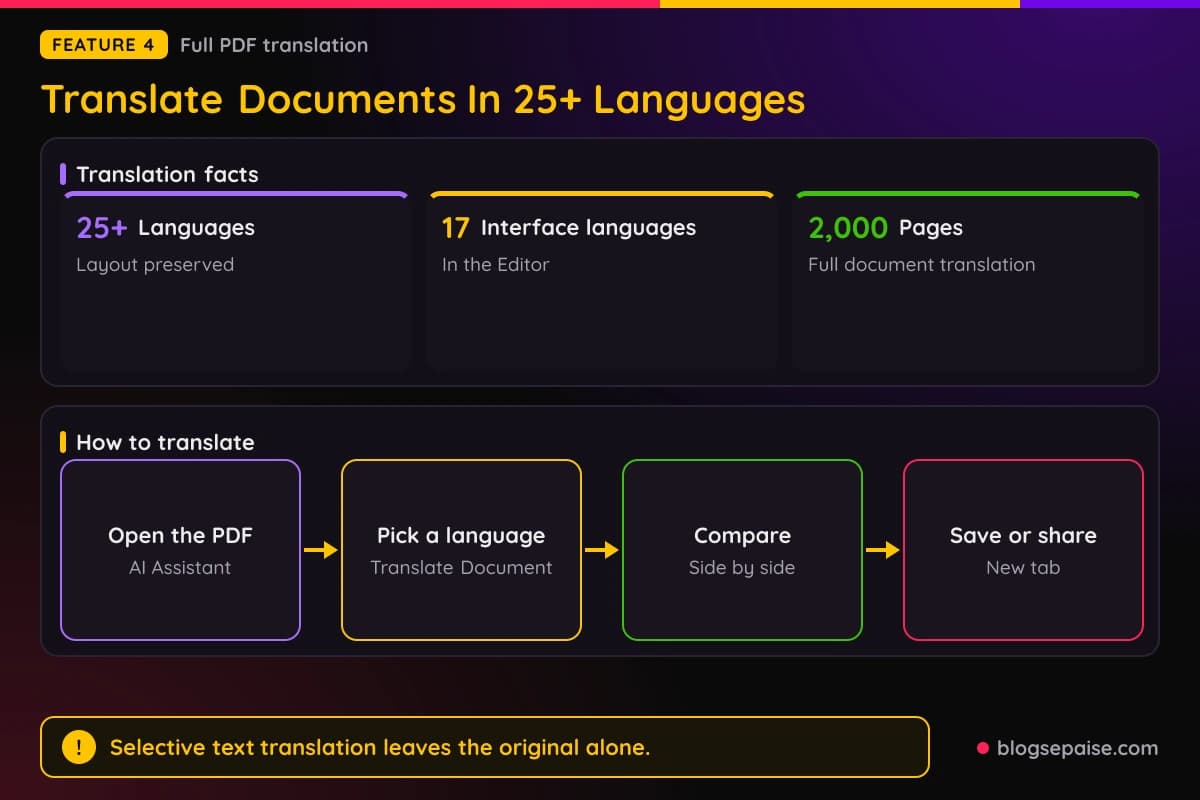
Selective translation works on selected text through the AI Assistant chat, and the original stays unchanged. Full-document translation can process up to 2,000 pages, and a separate figure lists no page limit on any account.
A context-aware engine handles idioms and technical terms and keeps terminology consistent across translations. The old three-page free limit is gone.
Mobile translation returns a finished result instead of the side-by-side view. The Editor interface is available in 17 languages.
5. Foxit Workspace For Many Documents At Once
Foxit Workspace is a browser-based AI hub for analyzing many documents together. A project holds up to 100 files and keeps chat history and context between sessions.
Files can be PDF, Word, Excel, PowerPoint, images, and web links. Scans become searchable through OCR, and Foxit's own engine reads PDFs in order, including multi-column layouts and tables.
You ask questions across every file in a project. Answers cite the source document and section, so one click checks the original.
Outputs include presentations, reports, diagrams, mind maps, images, web pages, Markdown, and HTML. They are built from the project sources and edit in place.
You switch between versions of GPT and Gemini inside the same project and chat. The agent plans steps and works through documents until a result is ready.
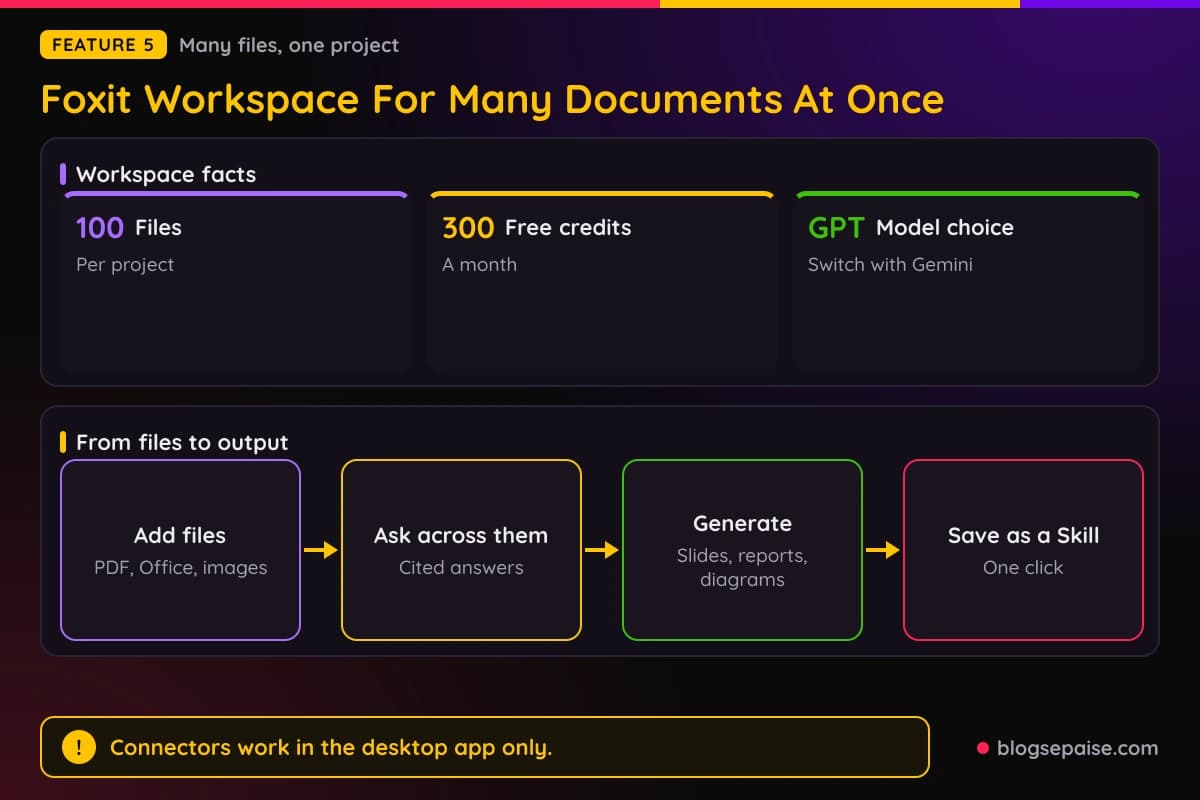
Skills are reusable one-click actions: Summary, Mind Map, Report, Infographic, Quiz, and Flashcards. Custom Skills are available on the free tier.
One-click connectors reach Notion, Atlassian, Asana, HubSpot, and Figma, and MCP adds more tools. Connectors and MCP work in the Windows and Mac desktop app only, not in the browser.
Workspace needs a free Foxit account and no PDF Editor subscription. It runs in the browser at ai.foxit.com/workspace or in the desktop app, and the free account includes 300 AI credits a month.
6. Smart Redact For Personal Data
Smart Redact finds and removes personal information from PDFs with AI in one click. It covers visible content, hidden content, and metadata.
Detection covers names, addresses, IDs, Social Security numbers, phone numbers, emails, credit card details, account numbers, case numbers, and contract terms. It also finds protected health information in medical records, prescriptions, and insurance claims.
Custom keywords and phrases catch document-specific terms. Reusable redaction profiles support repeatable, policy-driven work in legal, HR, and regional compliance.
A preview shows suggested redactions before anything is applied, and you can review, edit, or remove items. Smart Redact lives inside PDF Editor+, so you do not switch tools.
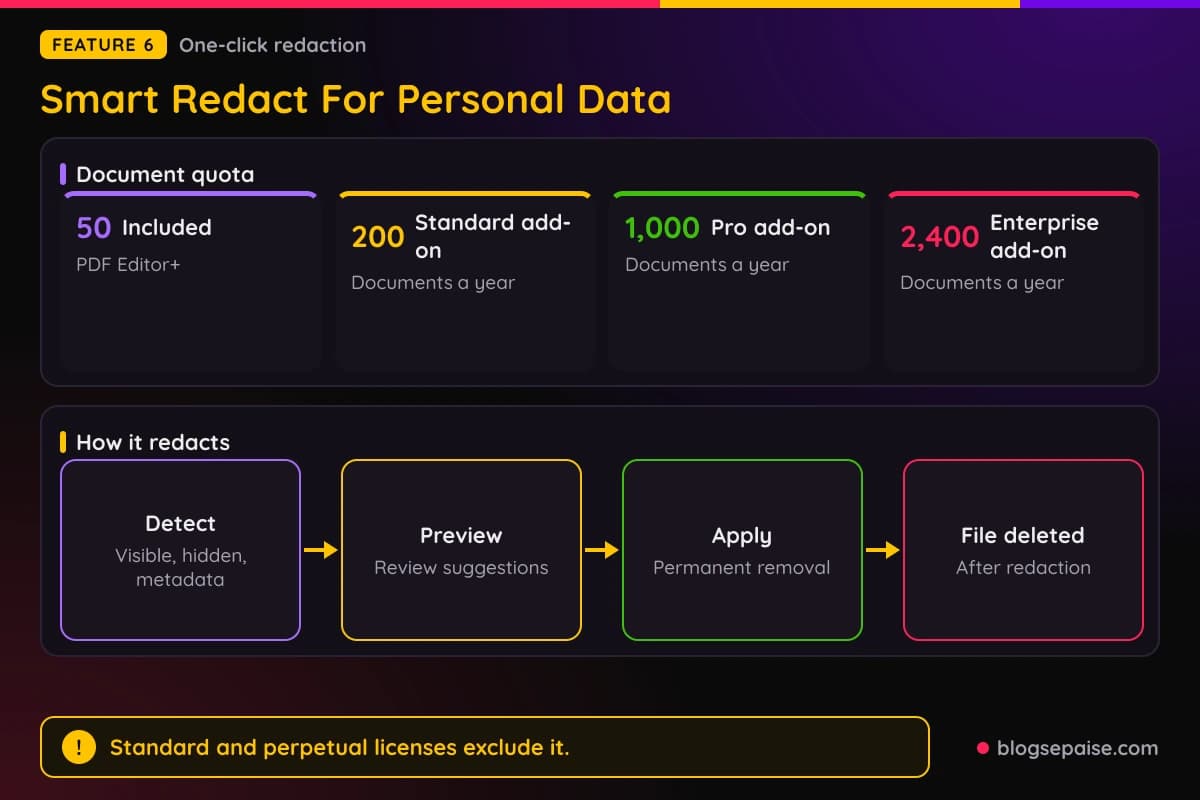
Files go to the Foxit cloud for analysis and redaction and are deleted automatically afterward. The cloud runs on Azure with AES-256 encryption, transfers are encrypted, and the service is TAA compliant and SOC 2 certified.
PDF Editor+ includes a quota of 50 documents. More capacity is sold in the app as Standard at 200 documents a year, Pro at 1,000, and Enterprise at 2,400.
The standard Editor and perpetual licenses do not include Smart Redact. Named use cases include GDPR, HIPAA, FOIA, PCI DSS, and FINRA work.
7. Review, Annotation, And Collaboration
Shared Review invites reviewers by email or link to comment on the same PDF at once. Comments sync automatically, and reviewers see changes as they happen.
A shared review runs in three steps: start the review, comment and track feedback, then work from your existing storage. You can set review deadlines and track progress.
A Review Tracker dashboard shows sent and received reviews, reviewer status, and deadlines. It also merges comments from email-based reviews.
Annotation tools include highlight, strikeout, underline, sticky notes, text callouts, shapes, arrows, freehand drawing, and stamps. Each annotation carries an author and a timestamp.
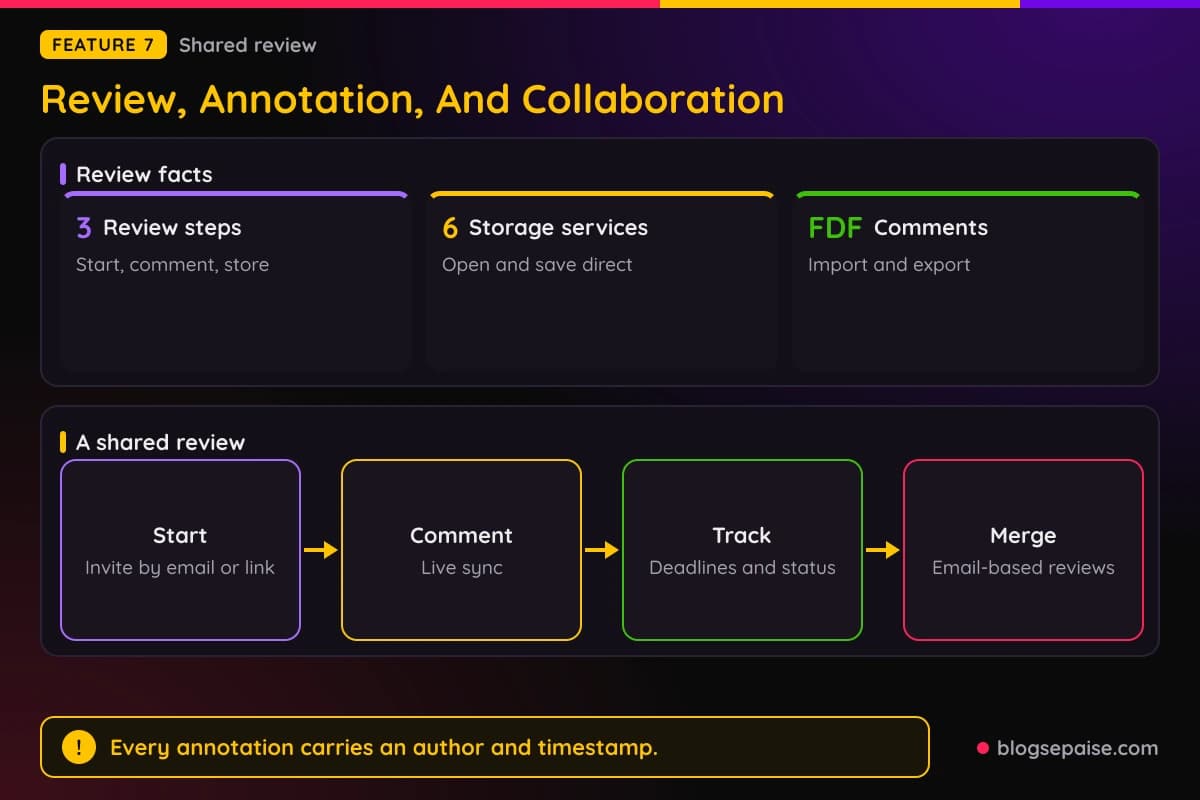
A summary panel lists all comments and filters by reviewer, status, or type. You import and export comments as FDF files.
PDFs open and save directly with six storage services: OneDrive, Google Drive, Dropbox, Box, Egnyte, and SharePoint. SharePoint check-in and check-out works too.
Enterprise DMS connections include iManage, OpenText eDOCS, and NetDocuments. Accessibility support covers PDF/UA and WCAG.
8. Foxit DMS Document Storage
Foxit DMS is a cloud repository for documents. It comes with a Foxit PDF Editor or Foxit eSign subscription at no extra charge, with unlimited storage pooled across the account.
A perpetual PDF Editor license does not include DMS. A free trial is available.
DMS stores PDF, Word, Excel, PowerPoint, images, audio, video, CSV, JSON, HTML, and plain text. Folders, subfolders, custom metadata, and tags organize files.
Search runs by name, content, metadata, folder, modified date, and tags. A template library holds PDFs, Office files, and pre-filled forms.
Version history restores earlier versions, and check-in and check-out lock a file for exclusive editing. Files sync live across the cloud and desktop apps.
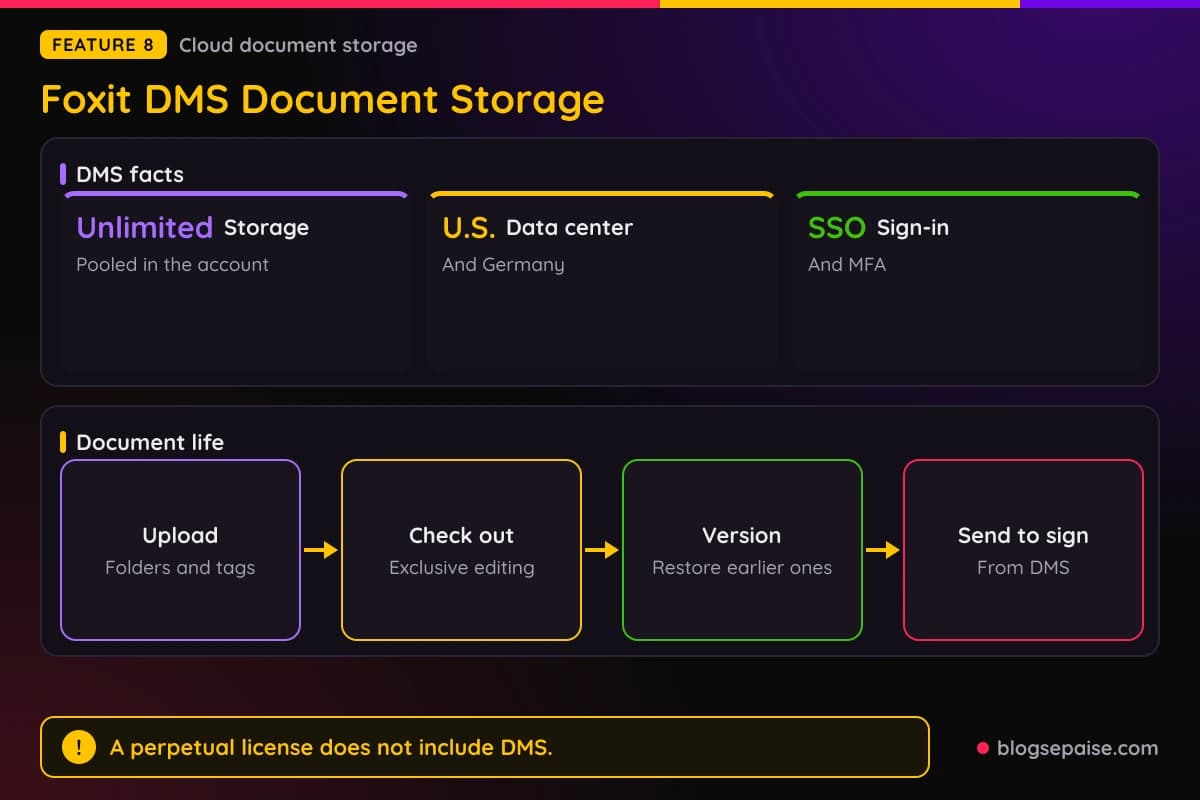
Permissions are role based, with encryption, SSO, and MFA. Audit trails record timestamped edits, approvals, and signature events.
Retention rules archive, expire, or delete files by type, status, or metadata. Data residency covers U.S. and German data centers.
Word, Excel, and PowerPoint files open and edit inside DMS without a separate Microsoft subscription. eSign sends files for signature from DMS and stores the signed records.
9. Foxit eSign Send And Sign
Foxit eSign sends, signs, and stores agreements. You upload a PDF or another supported document, add signature, date, text, payment, and attachment fields, and add recipients.
Signing order is sequential or parallel. Signers open a secure link in a browser or on mobile and sign with no account and no software download.
Tracking, reminders, audit events, and signature certificates follow each agreement. Completed agreements are stored.
Electronic signatures come with all plans. Digital signatures use PKI certificates, and qualified signatures run through ZealiD on Business.
Authentication options include secure links and passcodes, email authentication, SMS verification, 2FA, MFA, knowledge-based authentication, and SAML SSO for enterprise access.
Audit trails record signer metadata, IP addresses, event logs, and RFC 3161 timestamps. Legal frameworks covered are the U.S. ESIGN Act, UETA, and eIDAS.
In-person signing and wet signing are available. Signer AI is a free signing tool that needs no Foxit account, and its signatures are not legally binding.
Compliance support covers HIPAA, FERPA, 21 CFR Part 11 controls, GDPR, and CCPA. Enforceability depends on document type, jurisdiction, consent, and identity verification level.
10. Reusable Templates, Web Forms, And Bulk Sending
Reusable templates save recurring agreements so documents stay consistent. Essentials allows 10 templates, and Business allows unlimited templates.
Online forms embed templates in websites, apps, or kiosks for check-ins and customer registrations. API integration connects templates to existing systems to automate document creation.
Existing DocuSign templates import into Foxit eSign with their contents preserved. A built-in library holds pre-designed templates for various industries that you copy or customize.
Team sharing uses tags, descriptions, and customizable filters to help locate templates. Fields and descriptions stay editable as needs change.
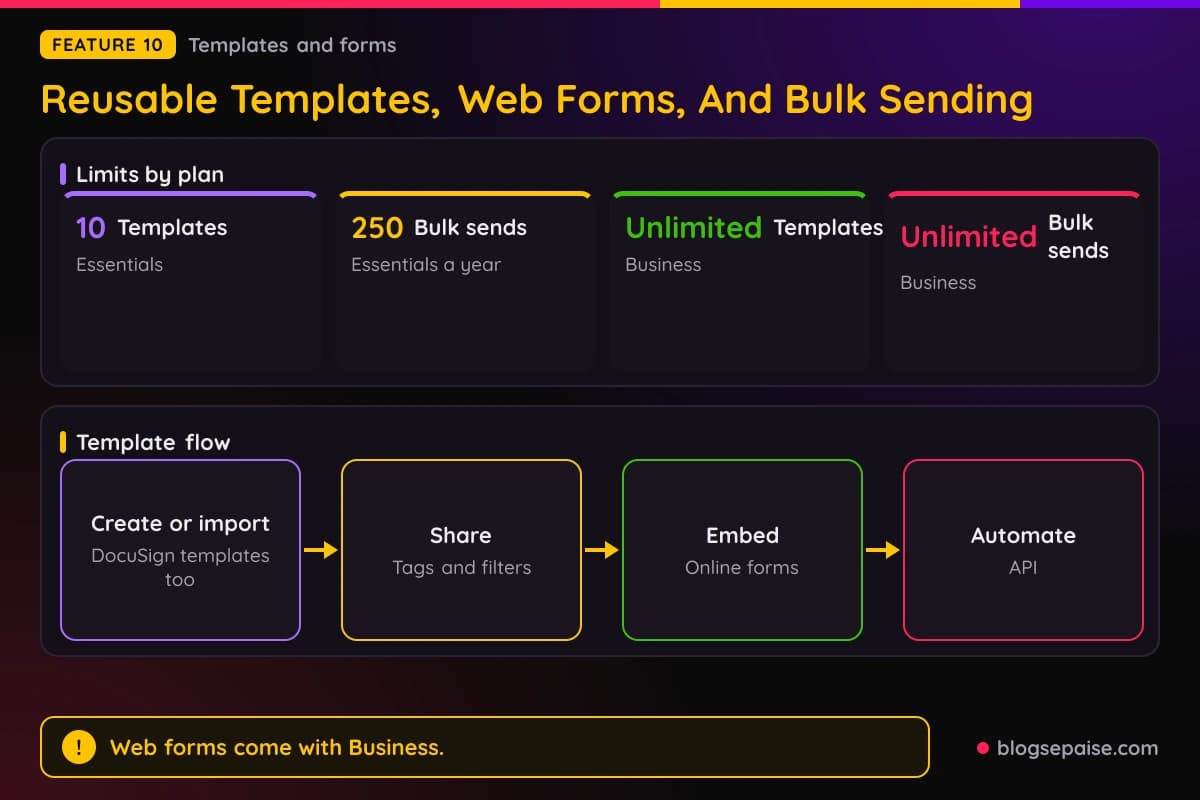
Signable web forms and bulk sending come with Business, which has unlimited bulk sending. Essentials allows 250 bulk sends a year.
The legal example standardizes contracts, NDAs, and client agreements and updates templates as requirements change. Business also adds custom branding, advanced form fields, user management, and eSigner delegation.
11. Sign On Mobile With The eSign App
The Foxit eSign mobile app runs on iOS and Android. You send, sign, and manage documents from a phone.
A photo of a paper document converts into a digital agreement, so no scanner is needed. Offline mode prepares, signs, and manages documents without internet and syncs when you reconnect.
Templates save frequent forms and share across teams. Drag-and-drop preparation adds signature fields, dates, and data entry fields.
Multiple signers with sequential or parallel signing need the eSign Business plan. Real-time tracking monitors status and sends reminders, and bulk send and sign are available.
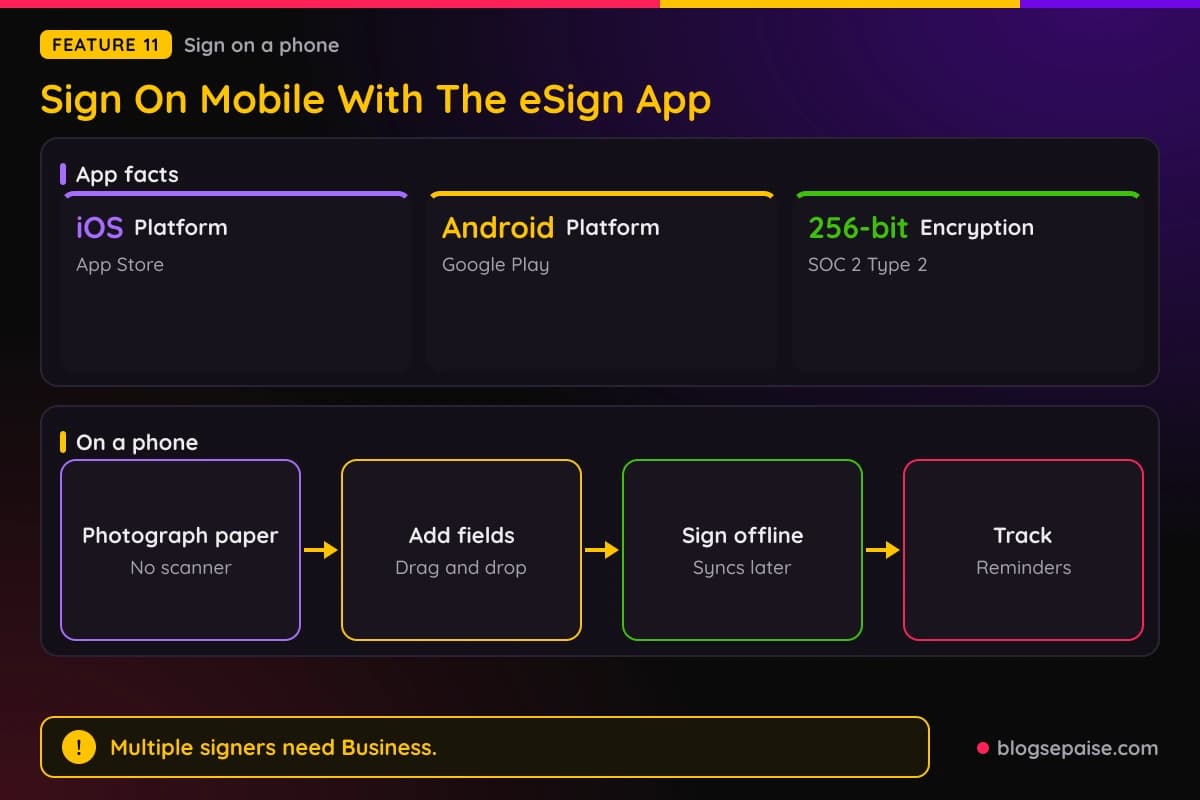
Security uses 256-bit encryption, SOC 2 Type 2 compliance, 2FA, and MFA. The app complies with ESIGN, eIDAS, and UETA.
Supported files include PDF, DOCX, XLSX, PPTX, and PNG. On-Demand Notary also runs inside the app.
12. Foxit Pay For Collecting Payments
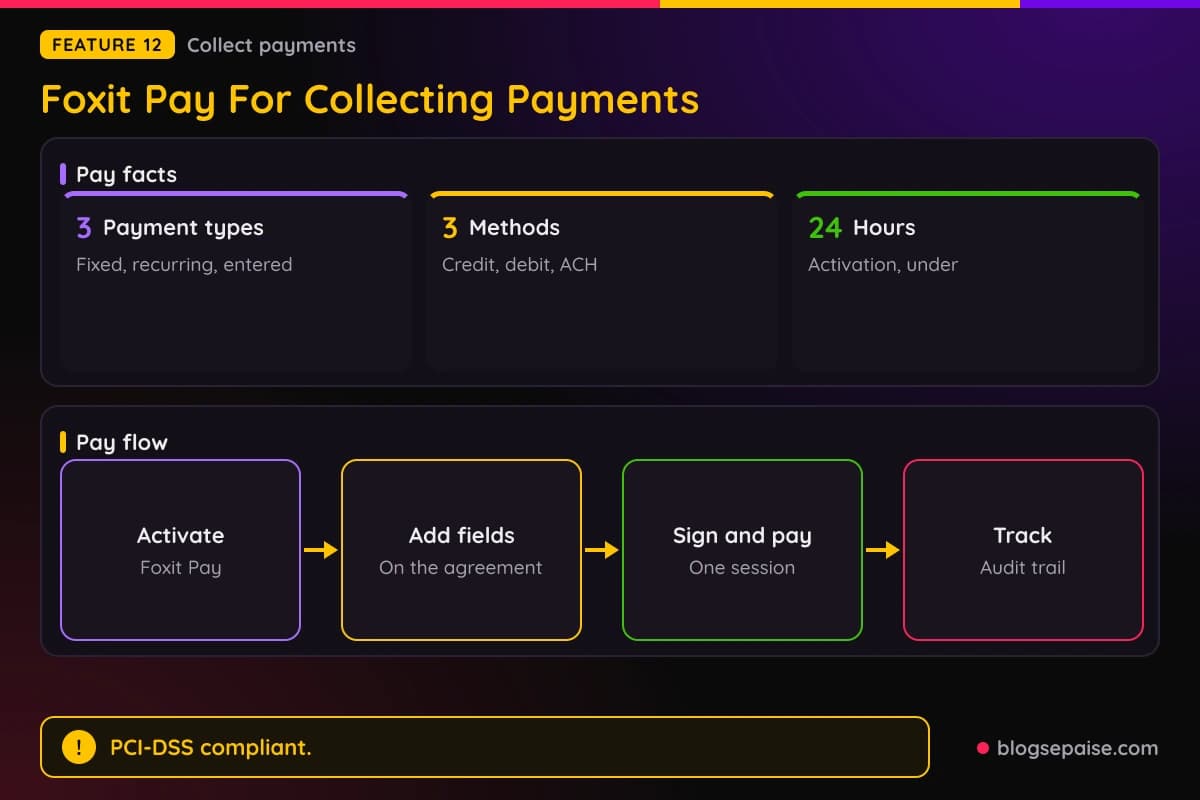
Foxit Pay adds payment collection to eSign agreements. Signers review, sign, and pay in one session with no other links or accounts.
Payment fields go directly onto agreements. Three payment types exist: a fixed one-time amount, a recurring payment, and a signer-entered amount, which suits donations.
Accepted methods are major credit cards, debit cards, and ACH bank transfers. Payment data and transactions are encrypted, and the service is PCI-DSS compliant.
Setup has four steps. Activate Foxit Pay, which takes less than 24 hours, add payment fields, send the agreement, then track payment requests and review the audit trail.
Payment requests show in the document tracking screen, and all payment activity enters the audit trail. An admin dashboard manages team access, custom branding, and transaction review.
No Foxit Pay fees or transaction rates are published. Named industries include legal, accounting and financial, real estate, consulting, healthcare and wellness, HR and recruitment, and nonprofit.
Legal teams use it for retainer agreements, settlement agreements, and service contracts with upfront or deposit payments.
13. On-Demand Notary
On-Demand Notary brings online notarization into Foxit eSign through a partnership with NotaryLive. Notaries are available 24/7.
Signers and the notary can join together or separately. Annotation tools support the notary process with tags, notes, and feedback.
Notarized documents save to the eSign document tracking screen, and signers get an emailed copy. Security and compliance match those of Foxit eSign.
Remotely notarized documents are accepted in all 50 states. If a state does not allow online notaries, a notary certified in a different state notarizes the document.
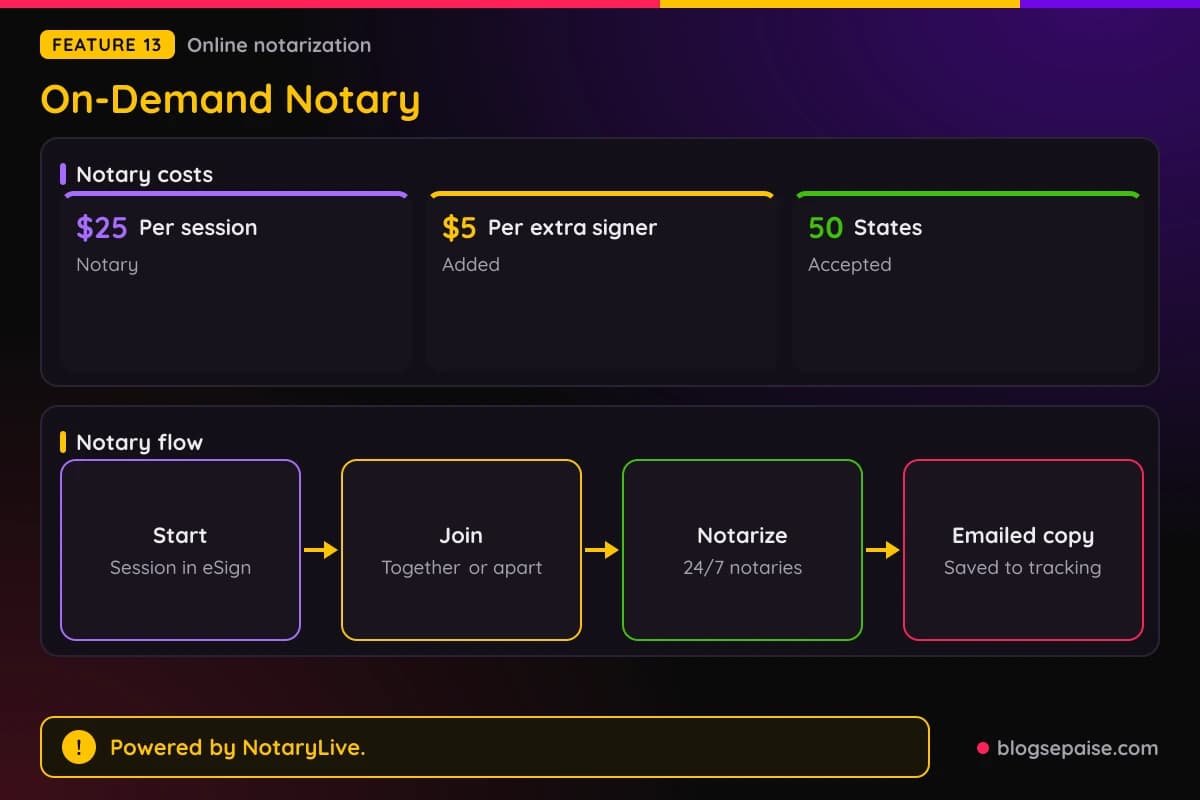
A session costs $25, and each additional signer costs $5. The Essentials plan marks On-Demand Notary as a paid item.
Healthcare teams use it for patient consent forms, provider agreements, and regulatory documents. Other industries include real estate, legal, financial, education, government, corporate, insurance, construction, and non-profit.
14. Integrations And Connectors
Foxit has 59 integrations: 20 for PDF Editor and 39 for eSign.
Microsoft options for PDF Editor cover Office, SharePoint, Teams, Outlook, Purview, and Microsoft 365 GCC High. Teams views and comments on PDFs in chats, channels, and meetings.
Purview applies sensitivity labels, encrypts PDFs, and enforces compliance policies. Outlook converts emails to PDFs and combines messages.
Cloud storage links cover OneDrive, Google Drive, Dropbox, Box, ShareFile, and Egnyte. Asana lets teams review PDFs inside tasks.
Document management links cover iManage, ndOffice, eDOCS, Worldox, Documentum, Alfresco, and DMSforLegal.
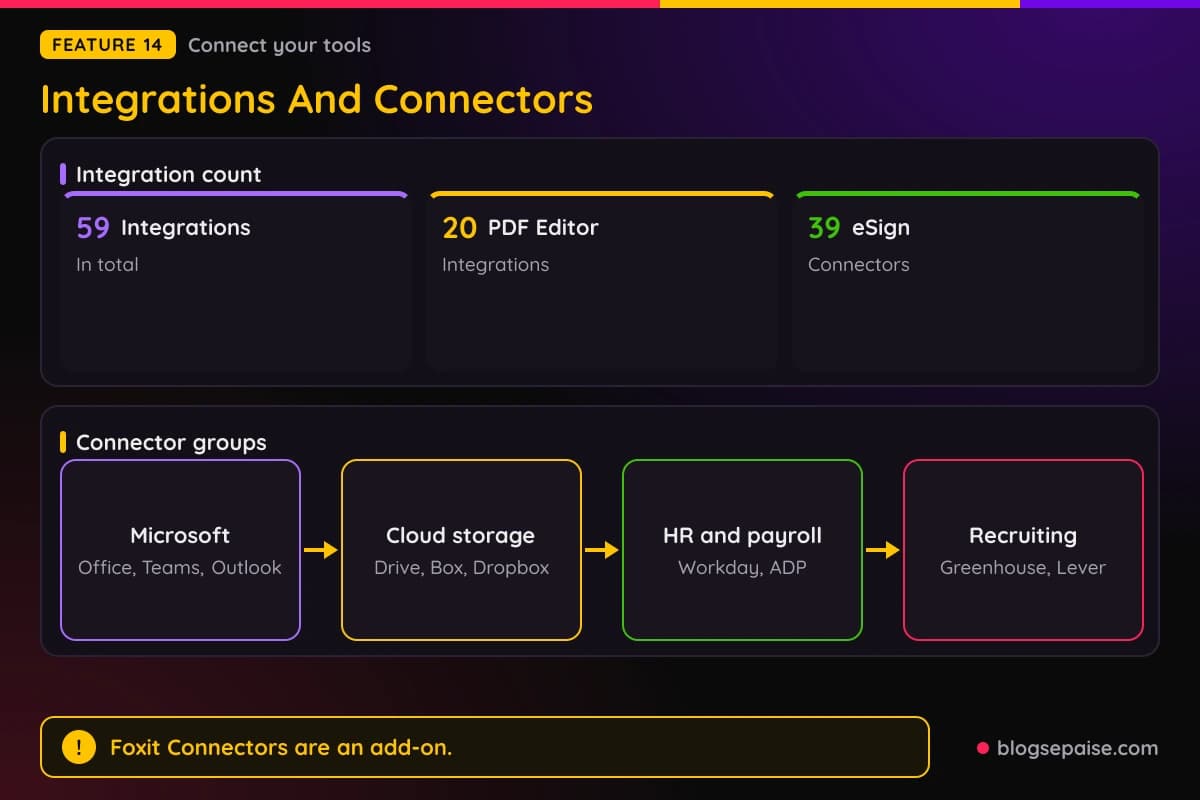
The 39 eSign connectors include Google Drive, Box, SharePoint, OneDrive, and Dropbox. HR connectors include Workday, BambooHR, Rippling, SAP SuccessFactors, Oracle Cloud HCM, HiBob, Deel, and Zoho People.
Payroll connectors include ADP Workforce Now, Gusto, Paylocity, and Paycor. Recruiting connectors include Greenhouse, Lever, iCIMS, SmartRecruiters, and Workable.
Foxit eSign for Salesforce generates, sends, and tracks agreements from Salesforce. Foxit Connectors are an add-on for eSign Business, eSign Essentials, and PDF Editor+.
Developers get a PDF SDK, a PDF Conversion SDK, Document Generation, PDF Embed, PDF Services, eSign APIs, and an MCP Server for connecting AI agents.
15. Foxit PDF Reader, The Free Viewer
Foxit PDF Reader is free. It runs on Windows and macOS and opens local PDFs offline.
You read, search, navigate, and print PDFs. Highlights, notes, and comments are included.
You fill existing form fields and save the file. You add your signature and return the document, with no account needed.
A free Foxit account adds AI Assistant and Workspace access with 300 shared AI credits a month. Credits renew monthly.
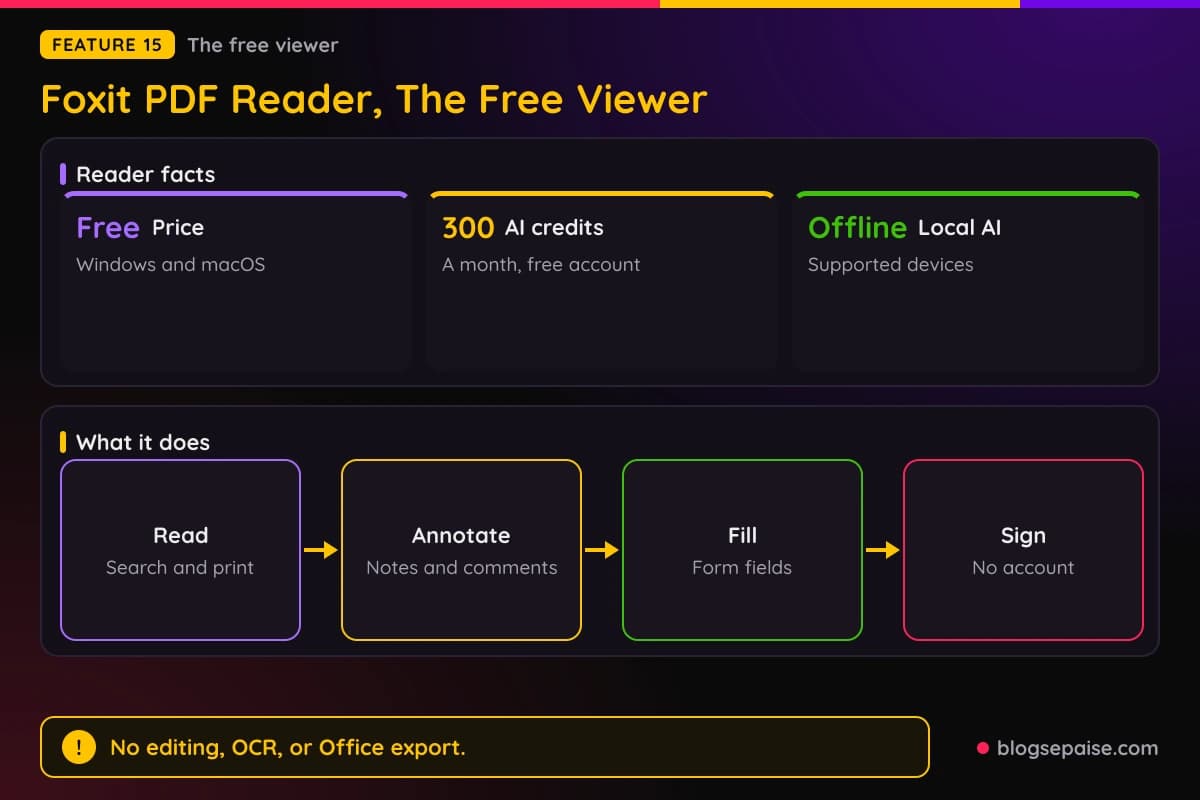
Local AI runs supported text tasks on your device after a model download, with no cloud credits. It works on compatible Windows devices and Apple silicon Macs.
The Reader does not edit PDF text and images, convert to Office formats, run OCR, or redact permanently. Those need PDF Editor.
Foxit also offers free online tools such as PDF to Word, Merge PDF, and Compress PDF. Phones and tablets use the separate Foxit PDF Editor Mobile app.
16. Enterprise Automation: Maestro Server OCR And PDF Compressor
Foxit Enterprise Automation covers server-side products for high-volume, non-interactive work. Maestro Server OCR, PDF Compressor, and Rendition Server make up the set.
Maestro Server OCR converts scanned and paper documents into searchable PDFs. A voting OCR engine cross-validates results, and pages process in parallel across all CPU cores.
Pre-processing includes auto de-skew, despeckle, rotation correction, color inversion, and cropping. Maestro has no compression, no custom workflow logic, and no audit trail.
PDF Compressor uses wizard-based setup with no custom code. It combines conversion, compression, PDF/A archiving, and OCR, and it uses proprietary MRC compression.
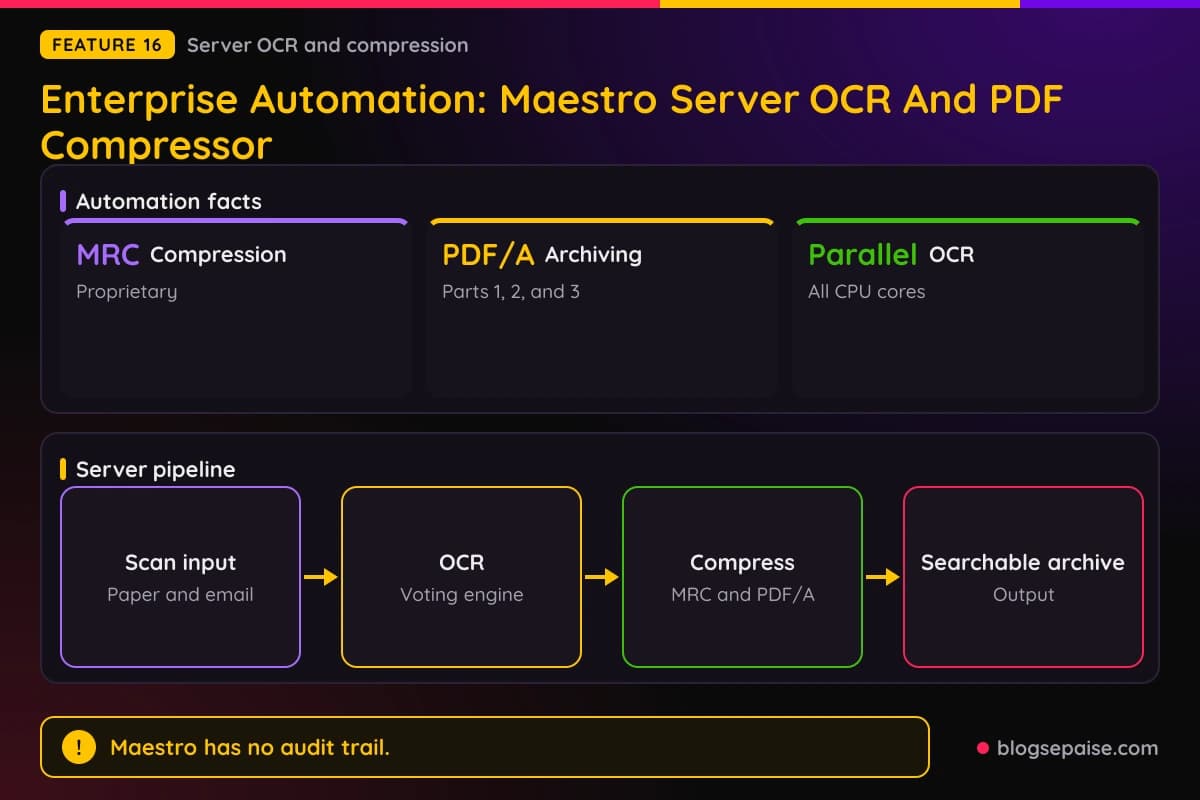
It supports PDF/A-1, PDF/A-2, and PDF/A-3. The Born Digital feature converts Office files, email, and existing PDFs to PDF/A without rescanning.
Typical customers are in insurance, banking, healthcare, and government. Deployment complexity is low for Maestro and low to medium for PDF Compressor.
Integration connects to ERP, ECM and DMS, SAP, SharePoint, mail servers, and RPA platforms through web services, C and .NET APIs, and open plugin interfaces. ADA and Section 508 auto-tagging and Bates stamping are available.
17. Rendition Server For Document Pipelines
Rendition Server automates the whole pipeline: ingestion, routing, conversion, OCR, compression, redaction, and output. It deploys on-premises, and no cloud services or external APIs are required.
Input comes from scans, uploads, barcodes, and capture systems. It converts business files to PDF and PDF/A.
Input formats include TIFF, JPEG, BMP, PNG, GIF, AcroForms, XFA, Word, Excel, PowerPoint, Visio, WordPerfect, LibreOffice, DWG, DXF, .eml, .msg, and ZIP, RAR, and 7-Zip archives.
Output covers PDF 1.7, PDF/A-1a and 1b, PDF/A-2a, 2b, and 2u, PDF/A-3a, 3b, and 3u, JPEG, TIFF, plain text, and OCR results as XML and ALTO XML.
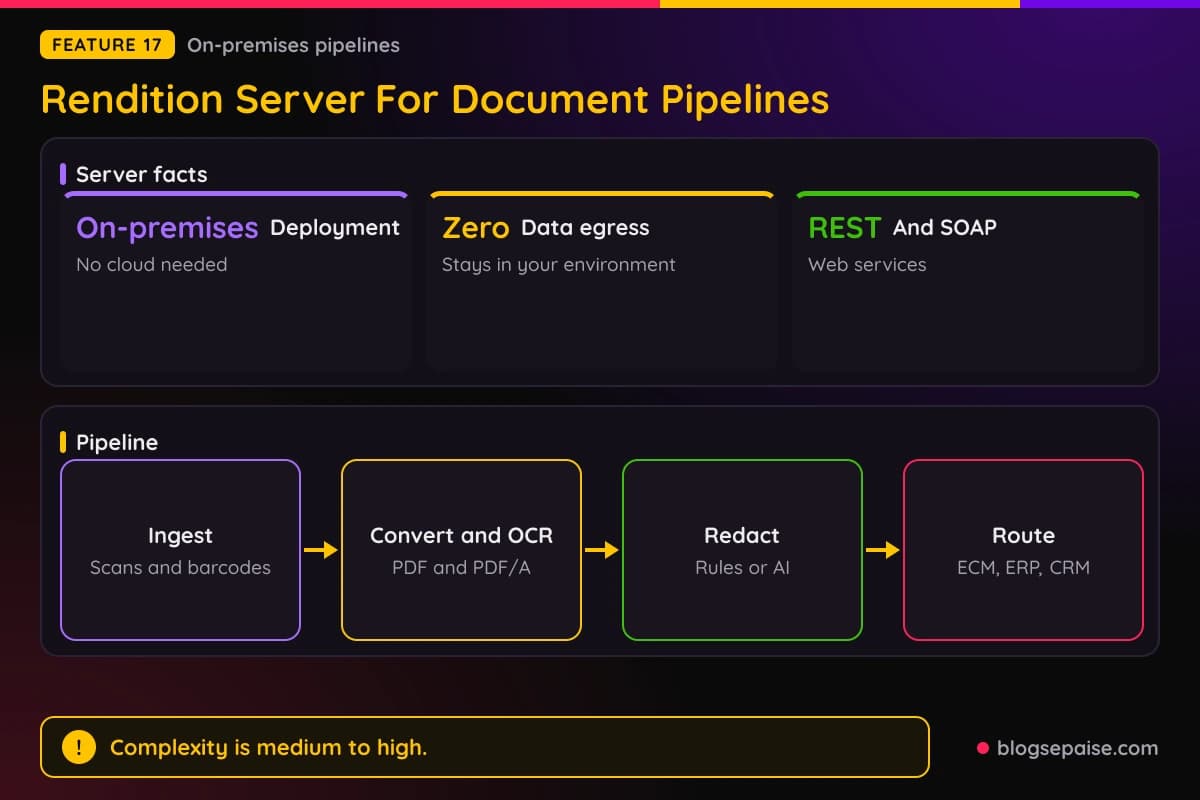
Tools include barcode recognition, image compression, split, merge, watermark, tagging, and linearize. Redaction uses pattern-based rules for PII and PHI plus an AI-powered option.
Workflow monitoring, process tracking, and AI-powered audit logs follow each job. Integration uses REST and SOAP web services to reach ECM, ERP, CRM, and DMS platforms.
Zero data egress keeps processing inside your environment. Deployment complexity is medium to high, and pricing goes through Talk to Sales.
18. Smart Redact Server For Batch Redaction
Smart Redact Server batch-redacts sensitive data across many documents with AI. Redaction covers text, embedded images, metadata, comments, and hidden document layers.
Reusable templates save and share across a team. Scheduled scans run daily, weekly, or monthly.
Region-specific profiles customize redaction by document type and jurisdiction. Named frameworks are GDPR, HIPAA, and CCPA.
Direct connections reach Google Drive, OneDrive, Box, SharePoint, Exchange, and AWS S3. Files are processed in place, so workflows do not change.
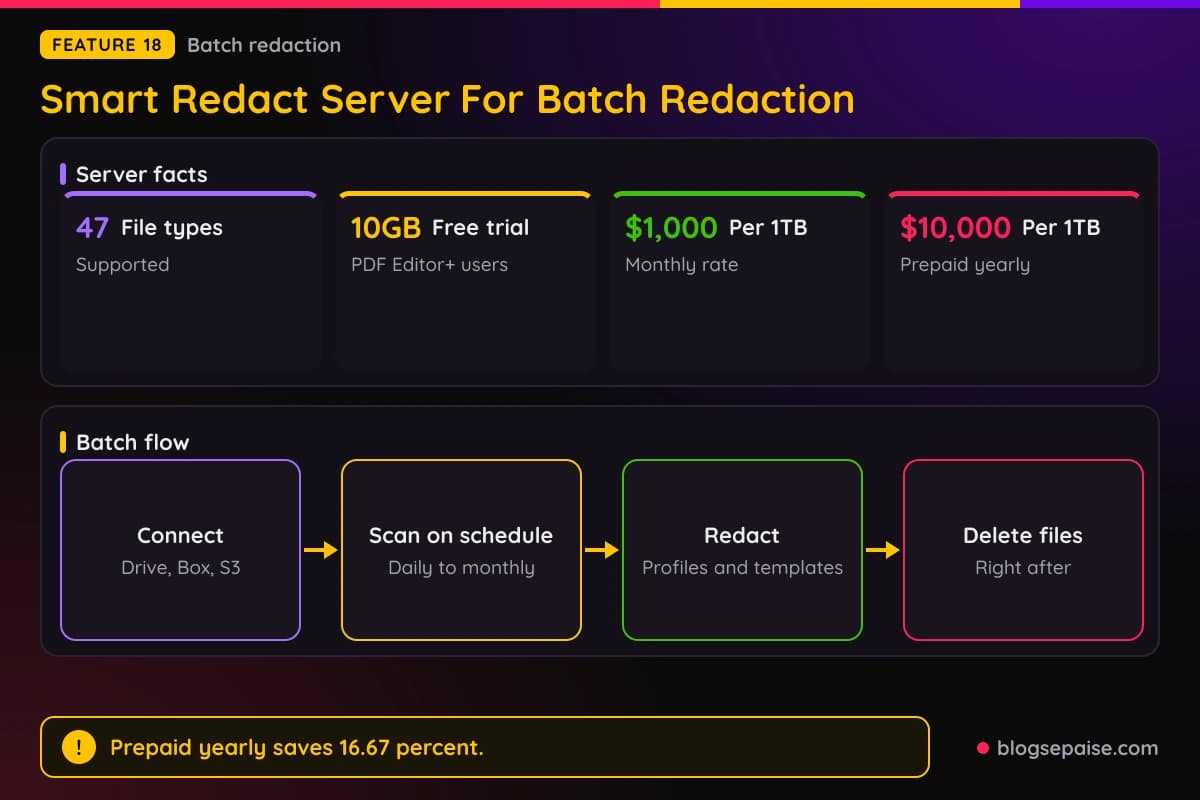
It supports 47 file types, including PDF, Word, Excel, PowerPoint, JPG, PNG, TIFF, BMP, HTML, TXT, RTF, JSON, and XML.
Files are deleted immediately after scanning and redaction. Stored data uses AES-256 encryption, data in transit uses SSL 2048-bit encryption, and audit trails and detailed logs track activity.
An active PDF Editor+ subscription is required at purchase, and redaction stays usable if the subscription later expires. Smart Redact Server uses its own Document Credits, not AI credits.
A free trial gives 10GB to PDF Editor+ users, and the minimum purchase after the trial is 1TB. Pricing is $1,000 per 1TB on the monthly rate and $10,000 per 1TB prepaid yearly, which saves 16.67 percent.
Foxit Pricing Plans
Foxit sells plans for PDF Editor, eSign, and the AI Assistant, plus volume licensing. Prices exclude applicable local taxes.
PDF Editor costs $129.99 per user a year. It includes the Windows, macOS, and web apps, Foxit DMS, and 300 AI credits a month.
PDF Editor+ costs $159.99 per user a year. It adds iOS and Android apps, Smart Redact, and Foxit eSign with 150 envelopes a year.
Monthly billing is available from $10.99. Three billing choices exist: annual paid in full, annual billed monthly, and monthly.
A perpetual Foxit PDF Editor 14 license costs $209.99 one time per user. It has no AI Assistant, Workspace, Smart Redact, DMS, or cloud features.
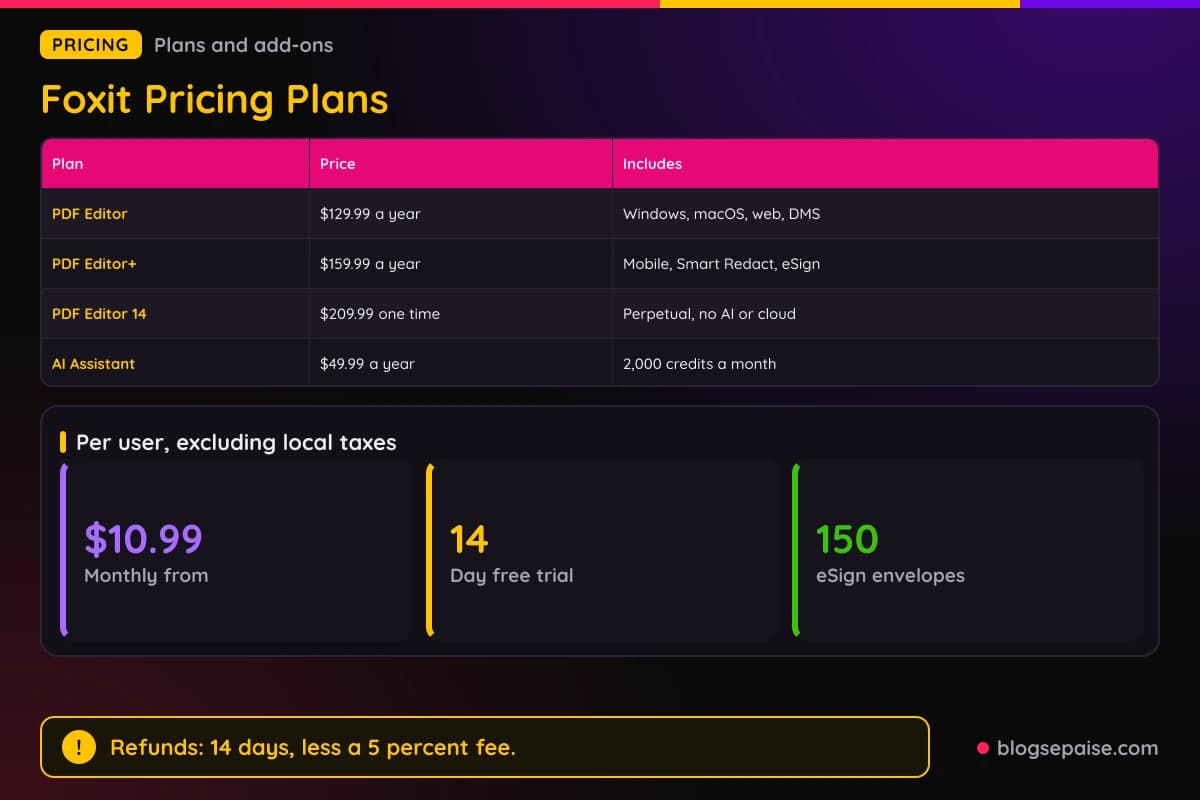
Every plan starts with a 14-day free trial with no credit card. Foxit PDF Reader is free.
The AI Assistant is free with every Foxit account at 300 credits a month. The paid subscription gives 2,000 credits a month for $4.99 a month or $49.99 a year, and it works with any Foxit product, including the free Reader.
Paid credits from several licenses pool into one team pool through the Admin Console. Free credits stay individual.
Foxit eSign plans are priced per user per year, and no dollar amounts are published for either plan. Essentials is for individuals and allows 250 envelopes a year, 10 templates, and 250 bulk sends, assigned to 1 dedicated user.
Essentials starts with a 14-day free trial with no credit card. Business needs a minimum of 5 licenses and has unlimited envelopes, templates, and bulk sending.
Business adds custom branding, signable web forms, all integrations including Teams, Dynamics, and Zapier, advanced authentication, advanced form fields, user management, and eSigner delegation. There is no long-term contract, and upgrades or downgrades are flexible.
Volume licensing uses custom pricing. It starts at 30 or more licenses for PDF Editor with discounts up to 30 percent, and at 16 or more licenses for eSign.
Volume licenses bring one purchase order, one renewal date, subscription or perpetual terms, and a mix of PDF Editor, PDF Editor+, and eSign licenses. You order direct or through a partner, and you request a quote with your product, quantity, and company details.
Education volume discounts begin at 10 licenses. Students and educators get a discount automatically at checkout with a school email on PDF Editor+ for Education.
Nonprofits reach discounts through TechSoup, with savings up to 68 percent on up to 5 of each Foxit product per TechSoup fiscal year. TechSoup's Foxit eSign offer includes 150 signature requests per user per year.
Monthly plans and prepaid annual plans bought from Foxit are refundable if cancelled within 14 days, calculated as the purchase price less a 5 percent handling fee. Annual plans billed monthly owe the full annual payment after 14 days.
Non-subscription products are eligible for return within 14 days from the date of receipt. Refund requests go through the phone number (866) 693-6948.
Foxit for Salesforce and the Admin Console are sold separately for PDF Editor. Foxit Connectors are an add-on for eSign Business, eSign Essentials, and PDF Editor+.
Who Is Foxit Best Suited For
Foxit PDF Editor serves knowledge workers, IT teams, small businesses, and enterprises. The ribbon-style interface suits people who already know the layout of other PDF editors.
Foxit eSign Essentials is built for individuals. eSign Business suits growing companies and enterprises that need compliance support.
The paid AI Assistant plan targets individuals and power users. Free accounts with 300 credits suit light use of summaries, chat, and translation.
Students and educators get PDF Editor+ for Education at a discount with a school email. Campus IT teams get centralized license management and an Admin Console at no additional charge on request.
Nonprofits, charities, and public libraries reach discounted licenses through TechSoup.
Large enterprises with complex, multi-system workflows are the target for Rendition Server. Maestro Server OCR suits teams that want a low-cost way to extract text for AI pipelines.
Legal, healthcare, banking, insurance, government, manufacturing, and AEC teams each have their own Foxit solution page. Our software reviews hub lists more tools to compare.
Who Foxit Is Not For
The perpetual PDF Editor 14 license runs on Windows and macOS only. It has no AI Assistant, Workspace, Smart Redact, DMS, or cloud features.
The mobile apps, Smart Redact, and eSign with 150 envelopes come only with PDF Editor+. The standard PDF Editor plan has fill-and-sign only.
PDF Editor+ includes a Smart Redact quota of 50 documents. More capacity is a paid in-app purchase.
Foxit eSign Essentials allows 250 envelopes and 10 templates a year. Multiple signers with sequential or parallel signing need the Business plan, and Business needs a minimum of 5 licenses.
Annual plans billed monthly cannot be refunded after 14 days. The full annual payment stays owed.
Workspace holds up to 100 files per project, and its connectors and MCP work in the desktop app only. Local AI needs supported hardware and a model download.
The Reader cannot edit text, convert to Office formats, run OCR, or redact permanently. Signatures from Signer AI are not legally binding.
AEC drawing tools work on Windows only. Foxit is not a construction collaboration platform, and large real-time multi-user markup, model coordination, and automated batch revision management are out of scope.
Education pricing applies only to PDF Editor+ and needs a school-issued email. Gmail, Yahoo, and Hotmail are not accepted, eligibility is verified at renewal, and renewals use the regular price if eligibility lapses.
Custom plans are not offered, and bundles such as Reader plus eSign need a call with a specialist. Maestro Server OCR has no audit trail, and Rendition Server has medium to high deployment complexity.
Foxit Alternatives
The table below compares Foxit with Adobe Acrobat, DocuSign, and PandaDoc. The tools price differently, so check each pricing page before you decide.
Adobe Acrobat has three individual plans: Standard, Pro, and Studio. E-signatures come with all three.
Acrobat Pro adds 70+ advanced PDF tools, redaction, web forms, and scan-to-editable conversion. Studio adds AI Assistant, PDF Spaces, and Adobe Express features.
Acrobat Pro and Studio show a free trial button, while Standard shows only Buy now. Acrobat Standard lets you collect e-signatures and track responses.
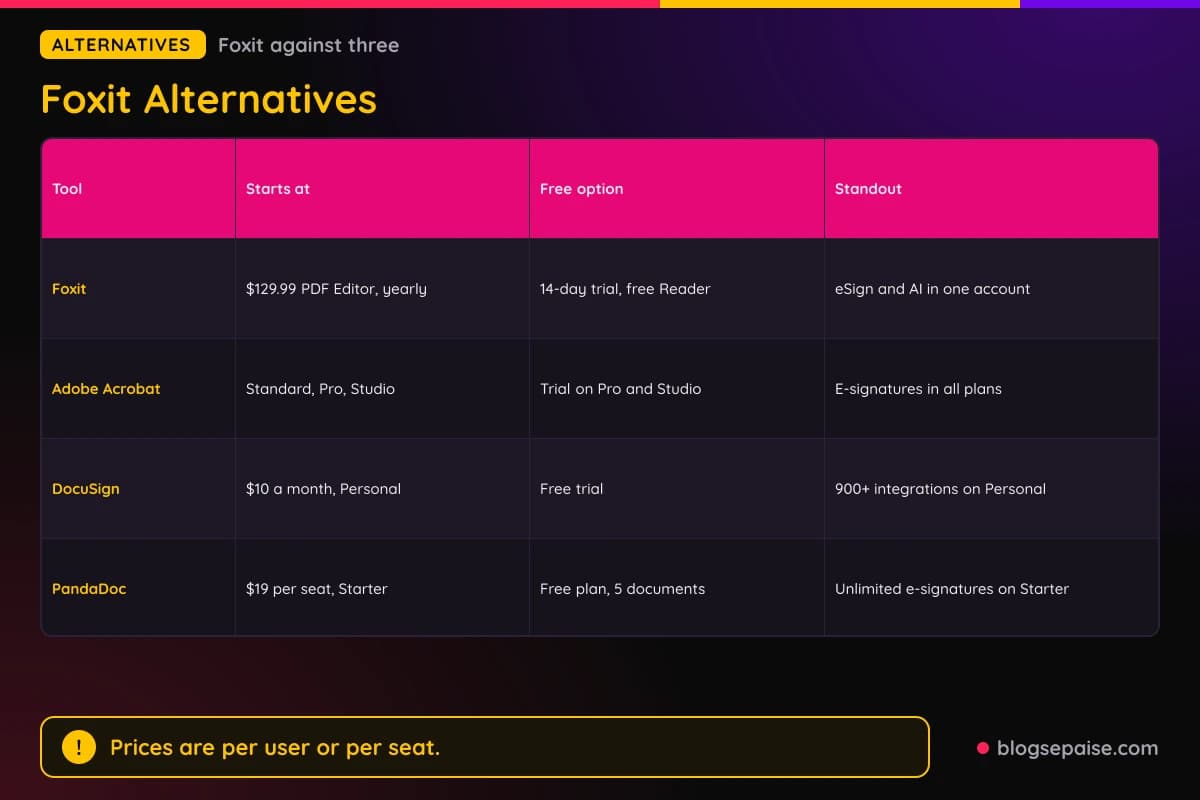
DocuSign eSignature has Personal at $10 a month per user, or $120 billed annually, with 5 envelopes a month. Standard costs $25 a month, or $300 annually, and Business Pro costs $40 a month, or $480 annually.
Standard and Business Pro allow 100 envelopes per user per year. Personal includes reusable templates and 900+ integrations.
Business Pro adds interactive web forms, payment collection during signing, attachment requests, conditional logic, and bulk send. DocuSign offers a free trial.
PandaDoc has a Free plan with 5 documents a month and no credit card. Starter costs $19 per seat a month billed annually and has unlimited e-signatures and a 14-day trial.
PandaDoc Business costs $49 per seat a month billed annually and adds custom quotes, CRM integrations, approval workflows, web forms, and bulk send. Enterprise adds SSO, CPQ, and Notary, and prices go through sales.
Foxit stands apart on a few points. PDF Editor+ costs $159.99 a year with eSign included at 150 envelopes, a perpetual license exists at $209.99, and every account gets 300 free AI credits a month.
If Foxit is not the right fit, check out Alohi, another document and communication tool in our software reviews. Read our Alohi review for the details.
Foxit Use Cases
Foxit has solution pages for education, government, banking, insurance, legal, healthcare, manufacturing, IT services, AEC, and nonprofit. Each page pairs the products with the document jobs of that field.
In education, students summarize and translate long readings, annotate and combine course files, run OCR on scanned research, and handle forms and signatures. Faculty make course materials accessible, and campus IT manages licenses centrally.
In government, teams prepare public records for release by reviewing, organizing, and redacting files. They also publish accessible forms, digitize paper backlogs, collect signatures on permits and approvals, and embed document tools in citizen portals.
In banking, teams handle customer onboarding records, including account-opening files, ID documents, and KYC and CIP documentation. They also process loan applications, mortgage packages, and tax documents, and collect customer signatures.
In insurance, teams prepare policy documents such as applications, renewals, endorsements, and disclosures. They review claim files that mix PDFs, photos, estimates, correspondence, and adjuster notes, and they archive records with OCR, compression, and PDF/A output.
In legal work, teams turn scanned records and exhibits into searchable, bookmarked PDFs. They redact disclosures, compare revisions, apply Bates numbering, and prepare document sets for court filing, with the receiving court's rules checked separately.
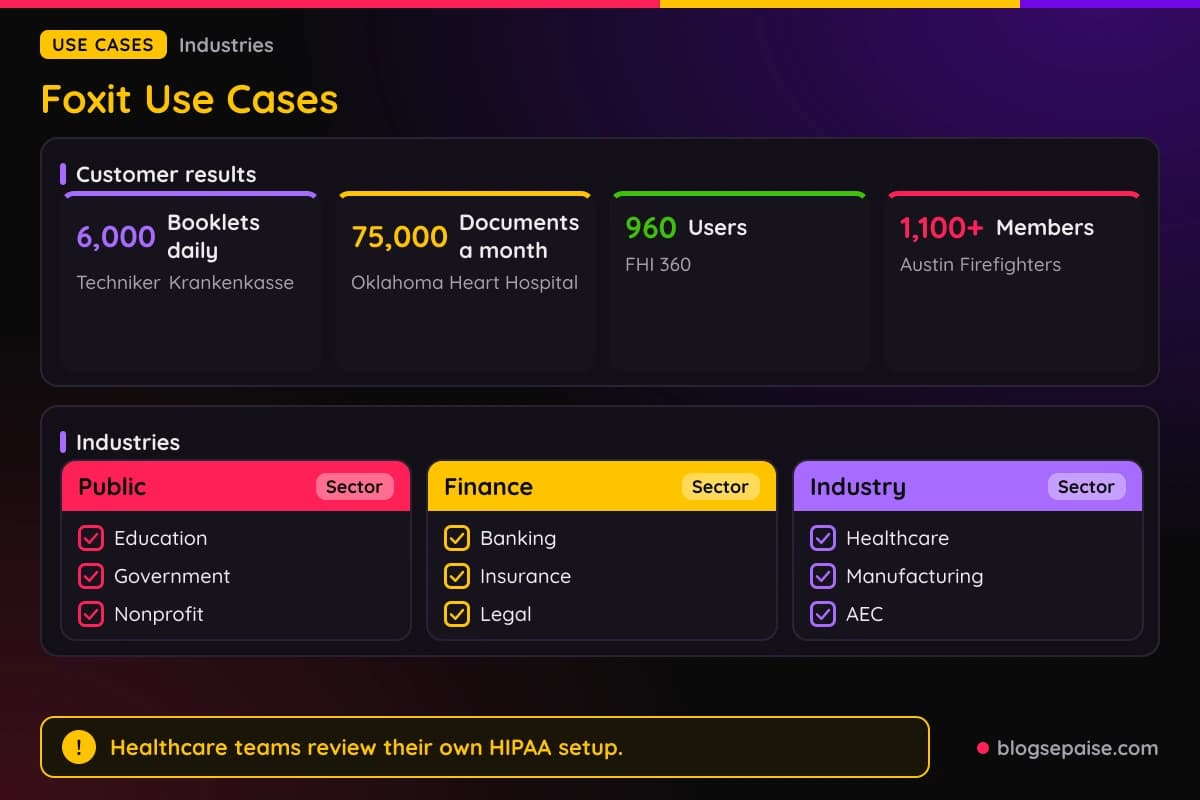
In healthcare, medical practices, independent medical evaluation firms, and medical suppliers prepare intake forms, referral packets, reports, and supply orders. A product name alone is not a blanket HIPAA determination, so organizations review their own deployment and controls.
Healthcare customers report results. Techniker Krankenkasse processes 6,000 bonus booklets daily and cuts file sizes 100-fold, Oklahoma Heart Hospital made 75,000 monthly documents searchable, and Canadian Memorial Chiropractic College doubled staff PDF editing access while spending less than its previous budget.
In manufacturing, teams edit specifications, SOPs, and work instructions, compare revisions, convert scanned legacy documents, and sign supplier agreements. Standardized archives route into ERP and ECM or DMS systems.
IT services teams deploy, secure, and manage PDF tools across users, devices, and environments with the Admin Console. In AEC, teams reuse custom markup symbols, label drawing sets with page labels, and take measurements including distance, perimeter, area, and volume from drawing sheets.
In the nonprofit field, groups combine grant application forms, remove personal information from donor records, and send volunteer agreements for e-signature. FHI 360 runs 960 users across global operations, and the Austin Firefighters Association used Foxit eSign for payroll and donation documents with 1,100+ members.
Shared Services Canada has a Foxit case study. Colorado Courts and the New York Unified Court System are named government customers.
Final Thoughts On Foxit
Foxit is a PDF toolset that spans editing, OCR, AI, redaction, eSign, document storage, and server automation. Most of it runs on one account with shared AI credits and shared DMS storage.
PDF Editor costs $129.99 a year and PDF Editor+ costs $159.99, with a perpetual option at $209.99. Every plan starts with a 14-day free trial with no credit card.
Its strongest points are the bundle in PDF Editor+, which puts mobile apps, Smart Redact, and 150 eSign envelopes next to the Editor. The free tier is generous too, with a free Reader and 300 AI credits a month on any account.
The catches are plan gating and limits. The perpetual license has no AI or cloud features, Smart Redact has a quota of 50 documents, Essentials caps envelopes at 250, and annual plans billed monthly cannot be refunded after 14 days.
No dollar prices are published for eSign, and some figures differ between products, such as the volume licensing minimums of 30 and 16 licenses.
If you want one account for editing, signing, and AI, start the 14-day trial and count your envelopes and Smart Redact documents first. Teams with 30 or more licenses can ask for a volume quote.
You can browse more write-ups on our software reviews hub if you want to compare tools side by side. Our Affiliate Program Database includes programs you can join.
Foxit FAQ
1. What Is Foxit?
Foxit is a PDF and document software company. It sells PDF Editor, eSign, an AI Assistant, Workspace, a free Reader, and server tools.
2. How Much Does Foxit PDF Editor Cost?
PDF Editor costs $129.99 per user a year and PDF Editor+ costs $159.99. Monthly billing is available from $10.99, and a perpetual PDF Editor 14 license costs $209.99.
3. Does Foxit Have A Free Trial?
Yes. Every plan starts with a 14-day free trial with no credit card, and Foxit eSign Essentials has the same 14-day trial.
4. Is Foxit PDF Reader Free?
Yes. The Reader opens, searches, annotates, and prints PDFs, fills forms, and adds your signature with no account needed.
5. How Much Does Foxit eSign Cost?
Foxit eSign is priced per user per year, and no dollar amounts are published. Essentials allows 250 envelopes a year, and Business has unlimited envelopes with a 5-license minimum.
6. What Are Foxit AI Credits?
Every Foxit account gets 300 AI credits a month, and a paid subscription gives 2,000 for $4.99 a month or $49.99 a year. Local AI uses no credits.
7. Does PDF Editor Include eSign?
PDF Editor+ includes Foxit eSign with 150 envelopes a year. The standard PDF Editor plan has fill-and-sign only.
8. Does Foxit Have Mobile Apps?
Yes. PDF Editor+ includes iOS and Android apps, and a separate Foxit eSign mobile app runs on iOS and Android.
9. Can Foxit Edit Scanned Documents?
Yes. OCR turns scans into searchable PDFs with the ABBYY engine, and you edit paragraphs without rescanning.
10. Does Foxit Offer Refunds?
Monthly plans and prepaid annual plans bought from Foxit are refundable within 14 days, less a 5 percent handling fee. Annual plans billed monthly owe the full annual payment after 14 days.
11. What Is The Minimum For Volume Licensing?
PDF Editor volume licensing starts at 30 or more licenses with discounts up to 30 percent, and eSign starts at 16 or more licenses. Education volume discounts begin at 10 licenses.
12. Is There A Student Discount?
Yes. Students and educators get a discount automatically at checkout with a school email on PDF Editor+ for Education.
13. Does Foxit Work With Microsoft 365?
Yes. PDF Editor integrates with Office, SharePoint, Teams, Outlook, and Purview, and eSign connects to SharePoint and OneDrive.
14. Is Foxit eSign Legally Binding?
Foxit eSign follows the U.S. ESIGN Act, UETA, and eIDAS. Enforceability depends on document type, jurisdiction, consent, and identity verification level.
15. Does Foxit Use My Documents To Train AI?
No. Chat histories are not used for training without explicit consent, and Local AI keeps processing on your device.
16. Does Foxit Have An API?
Yes. Developers get a PDF SDK, PDF Services, Document Generation, PDF Embed, eSign APIs, and an MCP Server.
17. How Much Does Smart Redact Server Cost?
It costs $1,000 per 1TB on the monthly rate and $10,000 per 1TB prepaid yearly. A free trial gives 10GB to PDF Editor+ users.