Physical Vs Digital Affiliate Products: Pros, Cons, And Payouts
Sooner or later every new affiliate hits the same fork in the road.
You can promote things that arrive in a box, such as blenders, backpacks, and running shoes, or you can promote things that arrive in an inbox, such as software, courses, templates, and ebooks.
Both paths can pay. They pay in different ways, and picking the wrong one for your site can mean a lot of work for a few dollars.
In this guide you will follow nine steps in order.
You will define what counts as physical and digital, compare commission rates, compare cookie windows, weigh returns and refunds, judge buyer intent, compare price points, match the offer to your content, check seasonality, and then score both sides and pick.
Along the way you will meet a short list of common mistakes and answers to the questions new affiliates ask most.
Commission rates, cookie windows, and refund rules change from program to program, so confirm any figure on the program's own page before you rely on it.
Check current terms on the program page before you rely on any number.
If you are still hunting for a topic to build your site around, read our guide on how to choose a profitable niche first, because the right product type depends a lot on the niche.
For a list of programs to look through once you pick a side, see our page on high quality affiliate programs.
Disclosure: Some of the links I share might be affiliate links. If you click on one and make a purchase, I may earn a small commission as a thank you. But don’t worry, it won’t cost you anything extra. I only recommend stuff I genuinely believe in. Your support helps me keep creating awesome content. You can read my full affiliate disclosure in my disclaimer page.
Search 1,500+ affiliate programs in the Blogsepaise Program Database and filter them by category, network and commission type, then go straight to each program's signup page. The Link Health Monitor then checks your posts for broken, redirected and untagged affiliate links.
Why The Choice Matters
Many beginners pick a product the way they pick a snack. They see something popular, they find an affiliate link, and they start writing.
That works for a while, and then the numbers show up. The product type can change what the same traffic earns.
Physical products are easy to understand. People already know what a pair of headphones is, so there is little to explain, but the commission is a percentage of a retail price.
Digital products can take more explaining. A software tool or a course has little cost to deliver after it is built, so a company may offer a bigger share of each sale.
Neither side is better in every case. The right side depends on your readers, your content style, your patience, and the way your niche buys things.
Think of it as a small business decision. You are choosing what to stock on your shelf, and the wrong items will sit there no matter how nice your site looks.
The choice is not permanent. You can run both types on the same site and shift the mix as you learn.
The nine steps below help you make a first call and then adjust it with real data.
Step 1: Define What Counts As Physical And Digital
Start with plain definitions, because the line gets blurry fast. A physical product is something that ships to a home or a store.
It has a factory, a warehouse, a box, a carrier, and a return policy that involves mailing something back.
A digital product is something delivered by download, login, or link. Software subscriptions, online courses, ebooks, templates, stock photos, music, fonts, and web hosting plans all live here.
Some offers sit in the middle. A meal kit ships a box, yet you pay a subscription.

A fitness app is digital, yet it may sell a bracelet. A camera sold with a course bundle blends both.
When you meet a mixed offer, ask one question: what does the buyer actually receive, and how fast?
If the answer is a package on a truck, treat it as physical. If the answer is a login or a file within minutes, treat it as digital.
Next, learn where each type tends to come from. Networks carry both kinds of offers.
Awin describes more than 30,000 advertisers on its homepage, in categories such as Retail and Shopping, Fashion, Travel, Finance and Insurance, and Telecom and Services.
PartnerStack describes itself as a partner platform for B2B software companies, where affiliates and creators earn commissions by promoting those brands. Brand lineups change, so check each network's current list before you plan around it.
Web hosting, domain names, and online tools count as digital offers, so they behave like digital products for the rest of this guide.
Write your definitions in a note at the top of a spreadsheet. Make one column for physical, one for digital, and list five offers you could promote in your niche under each.
Keep this sheet open. You will add commission, cookie, and refund details to it as you move through the steps.
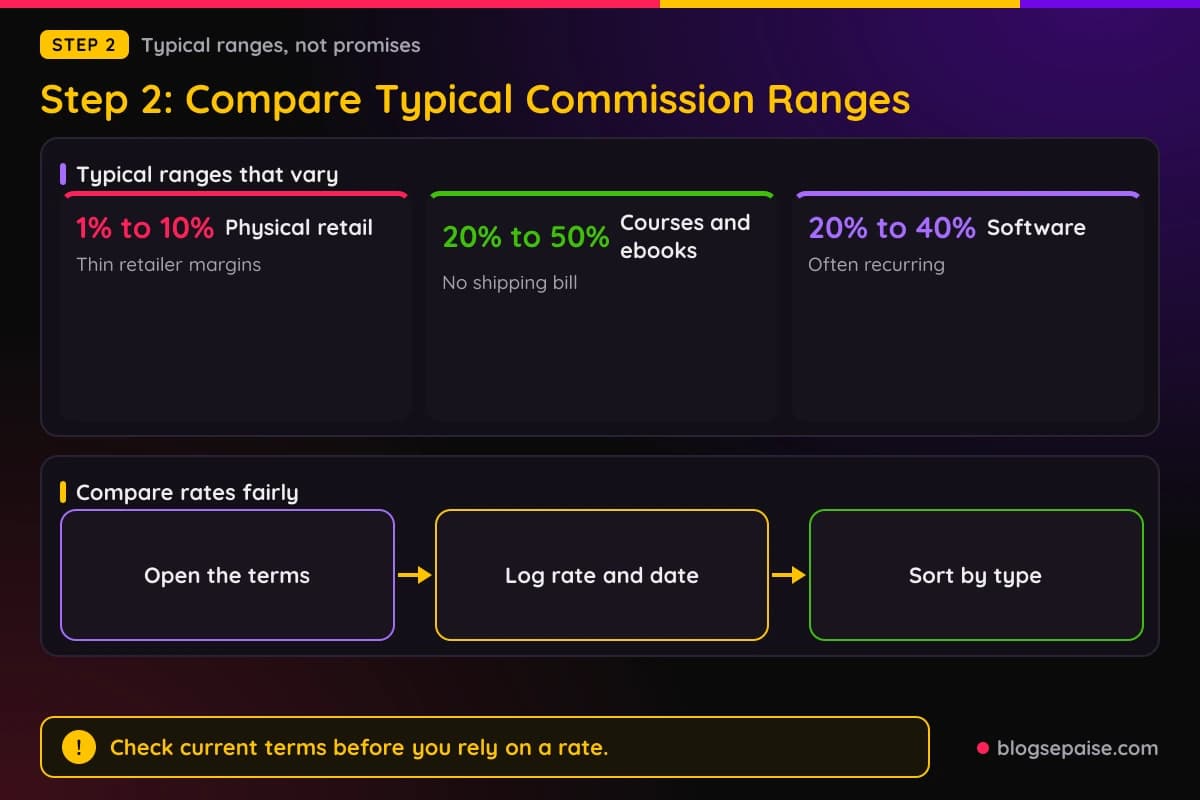
Step 2: Compare Commission Rates
Commission is the number most people look at first. The percentage tells you how much of each sale you keep, and it differs a lot by program.
Amazon Associates is a clear example for physical goods. Its fixed rate table lists 3 percent for toys, furniture, and home, 4.5 percent for kitchen, 1 percent for grocery, and 10 percent for luxury beauty.
The same table lists 0 percent for gift cards, so the rate for your exact item depends on its category.
Digital programs publish their own rates. The Kit affiliate program, for example, says you earn 50 percent commission on each new customer's first 12 months.
Kit also says that referring 10 or more paying customers in a year adds a 10 percent recurring commission on each one for as long as they stay with Kit.
These are two programs, not an average of a whole category. Another physical program may pay more than Amazon, and another digital program may pay less than Kit.
Recurring commission deserves its own mention. With a program like Kit's, one signup can pay for months, which does not happen with a pair of shoes.
Recurring pay has fine print too. Read the partner terms for limits on months, plans, and customer changes, then write the rule in your spreadsheet.
Here is how to compare rates properly. Open the terms page of each program on your list.
Copy the rate, the date you checked, and any tier rules, such as a higher rate after a number of referrals. Then sort your sheet by rate within each product type.
Watch for category rates, too. Large retailers can publish a table with different percentages for different categories, so your product may sit in a low tier.
You can plug a rate into our commission earnings estimator to see what a month of traffic could be worth under each option.
Use cautious numbers for clicks and sales, because a rosy guess will mislead you.
One more thing to remember: a high percentage does not rescue a poor offer. A 50 percent commission on something nobody wants pays 50 percent of nothing.
Step 3: Compare Cookie Windows
A cookie window is the amount of time the program keeps crediting you after someone clicks your link. If the reader buys inside the window, you earn.
If the reader buys after it ends, you do not.
Amazon's program policies say a session ends 24 hours after the click, and that add-to-cart purchases count only if they are completed within 89 days of the initial click.
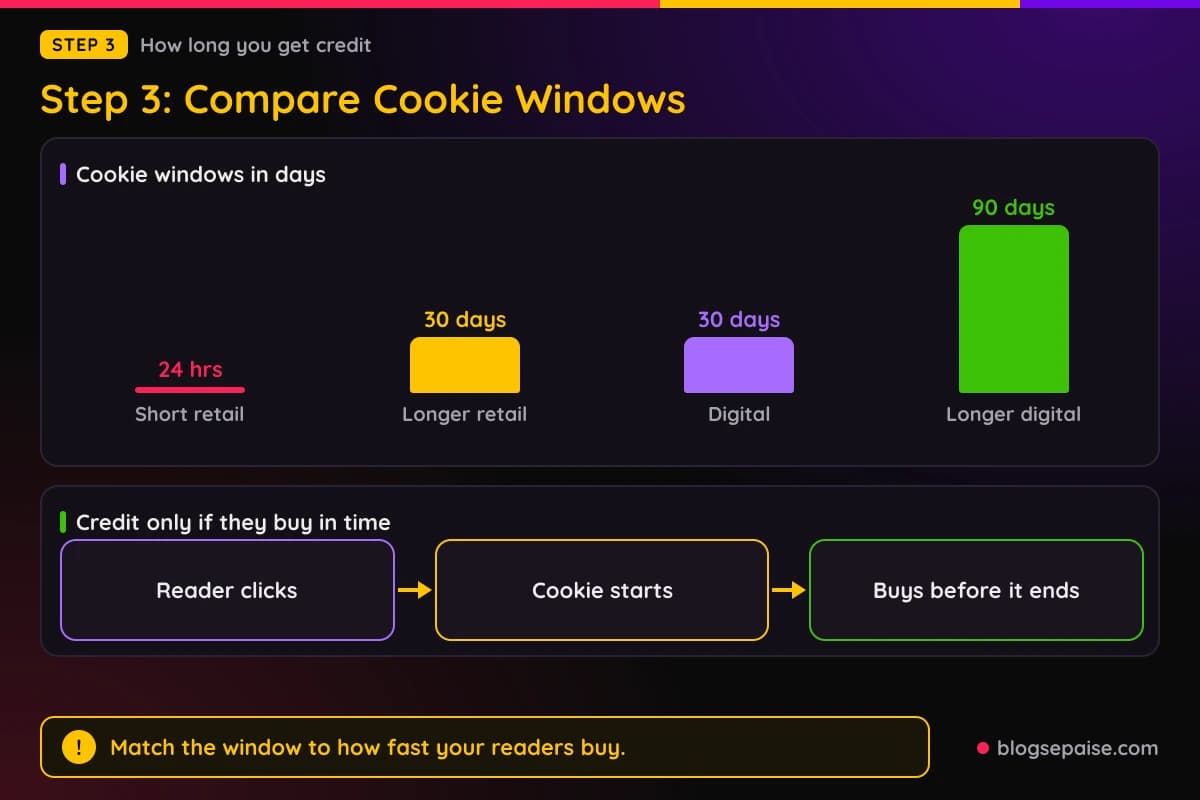
The Kit affiliate page describes a 90-day cookie, so a referral counts if the person signs up for a paid plan within 90 days of clicking.
Those two programs show how far windows can differ, so read the terms of each program you plan to join.
Think about how people buy. Someone who needs a phone charger tonight may buy it today or tomorrow, so a short window can suit a quick purchase.
Someone weighing a business tool or a course may read, compare, and wait for a trial to end, so a longer window gives credit to the person who started that journey.
Windows matter if your readers take a long time to decide. If your readers research for longer than the window lasts, you do the work and someone else may get paid.
A cookie window is the program's rule for crediting you, not a promise that every sale gets tracked. Keep your own notes on how long it takes your readers to buy.
Add a cookie column to your sheet and fill it in from the terms page. Then ask a simple question about your niche: do readers buy fast or slowly?
Fast buyers fit short windows. Slow buyers need long ones.
You can also help shorten a long decision. A clear comparison, a trial offer, or a discount code from the program can move a reader from reading to buying.
Only use codes the program gives you, and never invent a deal.
Last, keep the terms on file. If a program shortens its window, you want to notice quickly, because the change can cut your income without any change on your site.
Step 4: Weigh Returns, Refunds, And Holds
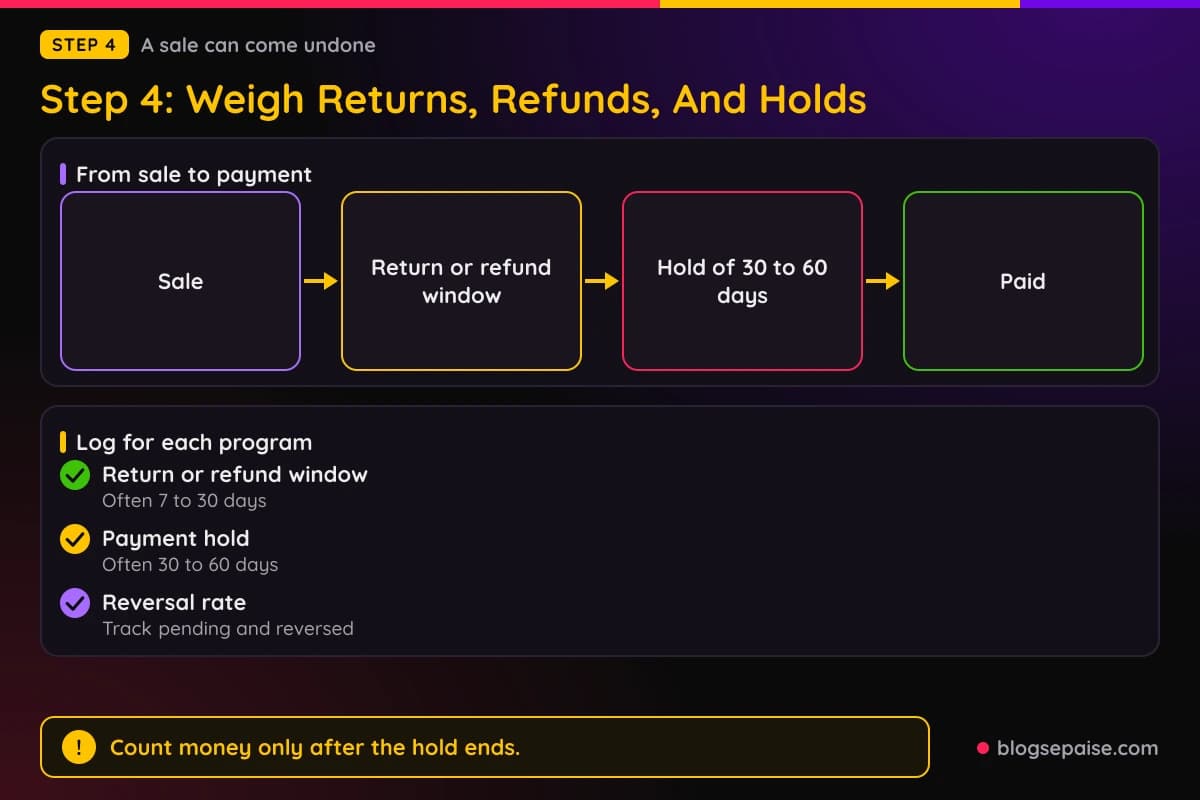
Every sale you earn can come undone. A shopper returns the item or a student asks for a refund.
Each program writes its own rule. Amazon's policies say orders with a cancellation, return, or refund already initiated are disqualified.
Kit says commissions are held for 31 days to account for refunds. Check the terms of each program for how long money is held and what happens to a refund after that.
Payment timing differs too. Amazon says it pays approximately 60 days after the end of each calendar month, with a $10 minimum for direct deposit.
Kit says you can withdraw once your commissions reach $5.
The delay matters for your cash flow. If you plan around the click date instead of the pay date, you may feel broke while the dashboard looks fine.
Physical products come with their own return policies from the retailer, so check the policy for the specific item. Digital sellers set their own refund rules, so check those on the product page.
Here is how to protect yourself. Tell readers who a product is for and who should skip it.
Share the real refund or return policy in your post, and link to it if you can. Do not promise results the product cannot guarantee, since overpromising can lead to refunds.
Then track the numbers. Log pending, approved, and reversed commissions in your own sheet.
Once you have a few weeks of data, you can compute your own reversal rate for each product type and use it in later steps.
If you are comparing this model with a store that ships its own goods, our guide on affiliate marketing vs dropshipping compares the two models.
Step 5: Judge Buyer Intent
Buyer intent is how close a reader is to buying when they land on your page.
A reader who searches for a product name plus the word review is probably closer to a purchase than a reader who searches for a broad idea.
Physical products can attract quick intent. Someone searching for the best budget running shoes may want to buy shoes soon.
The need is clear, the product category is familiar, and the reader mostly needs help picking one.
Digital products can attract slower intent. A reader searching for how to start an email newsletter may want to learn something first.
They may read a few guides, watch a demo, or join a free trial before they pay.
Both can convert when your content matches where the reader is. Comparison posts and best of lists suit readers close to a purchase.
Tutorials and step by step guides suit readers who are still learning.
Pay attention to the search words in your niche. Phrases with best, versus, review, price, discount, or alternative suggest the reader is near a decision.
Phrases with how to, guide, or ideas suggest the reader is earlier in the process.
Digital offers have a handy trick here. A tutorial can walk a reader through a task and show the tool doing the work, so the product feels like the natural next step.
Physical offers have a different trick. Photos, size notes, and honest wear reports can help a reader trust your pick when they cannot touch the item.
Write down the main search phrases for the five offers on each side of your sheet. Mark each phrase close to buying or still learning, and count how many fall in each group.
The side with more close to buying phrases may convert faster, and the side with more learning phrases may convert slower.
Step 6: Compare Price Points And Payout Per Sale
Now put commission and price side by side. Payout per sale is the price multiplied by the commission rate, and it is the number that actually lands in your account.
The numbers below are generic arithmetic with assumed prices and rates, not real programs. A $20 item at a 5 percent rate pays $1, and a $200 item at 5 percent pays $10.
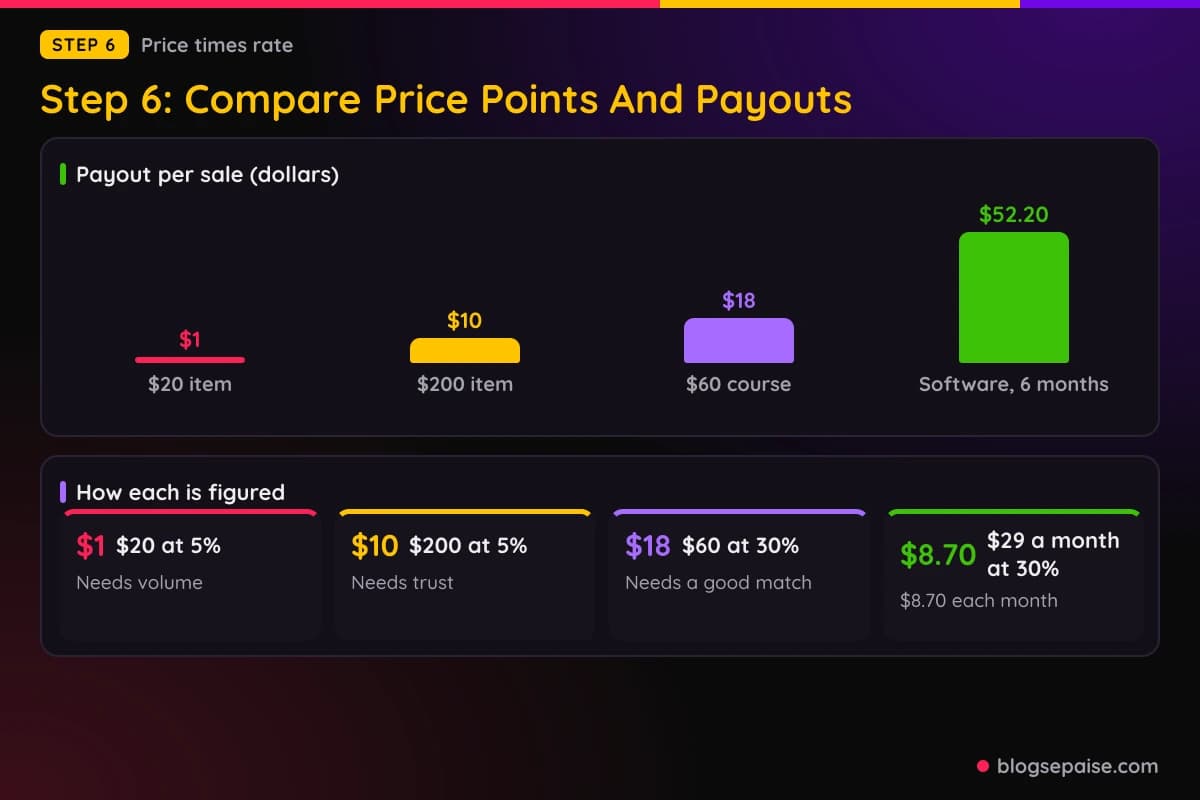
A $60 course at a 30 percent rate pays $18 per sale. The price is lower than the $200 item, yet the payout is higher, because the rate is higher.
Software with monthly billing adds a time factor. A $29 per month plan at a 30 percent recurring rate pays $8.70 each month, which is $52.20 over six months.
That six month figure assumes the program pays recurring commission for that long and the customer does not cancel early.
Notice the pattern. Low priced goods need volume, and higher priced goods need trust.
Higher prices bring their own friction. The more a thing costs, the more questions a reader may ask, so your content has to answer them in detail.
To compare fairly, add four columns to your sheet: price, rate, payout per sale, and an honest guess at how many readers out of a hundred would buy.
Multiply payout by that guess to get a rough payout per hundred readers. The guess will be rough, but it forces you to think in earnings per reader instead of percentages.
Step 7: Match The Offer To Your Content
The best offer on paper still fails if it does not fit the way you write. Content fit is about the match between the product, the reader, and the format of your posts.
Physical products fit review posts, gift guides, best of lists, and hands on comparisons. If you like testing things and taking photos, physical goods give you a lot to show.
Digital products fit tutorials, walkthroughs, case studies, and problem and solution posts.
If you like teaching, screen recording, and explaining steps, digital goods give you a natural way to show value.
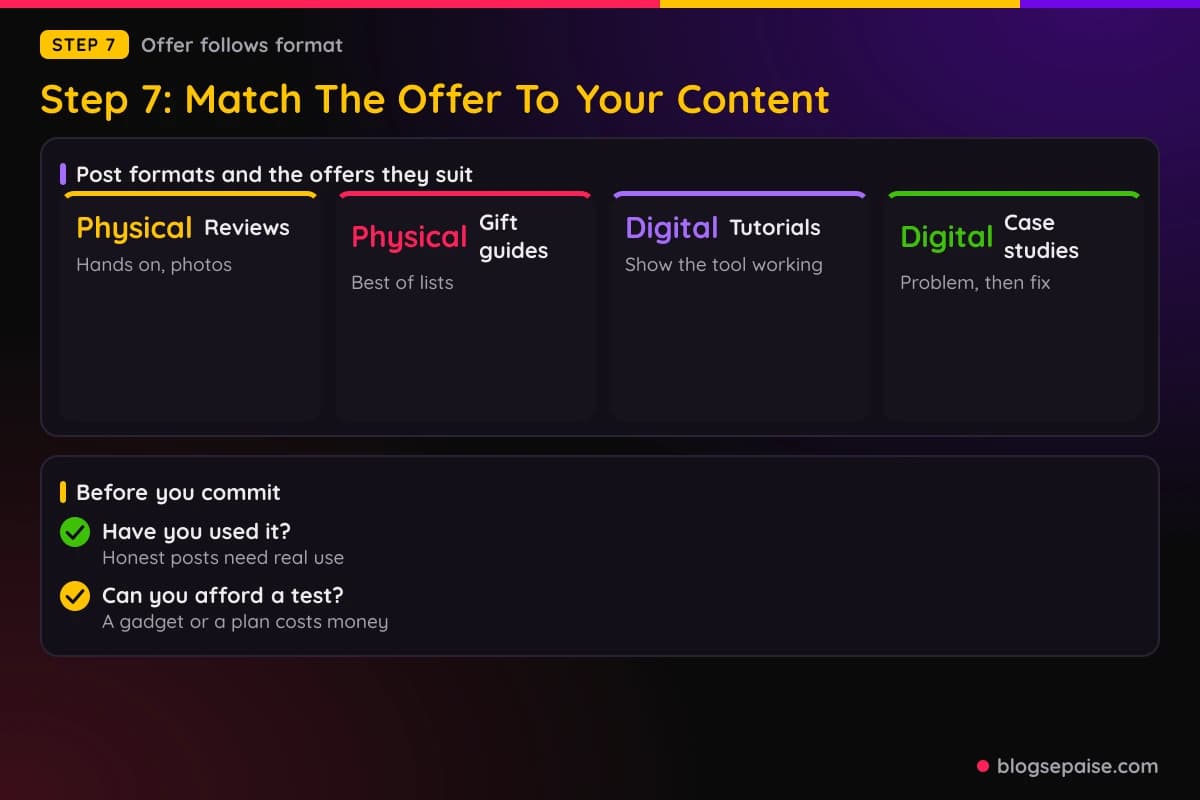
Your own experience matters here. Honest recommendations come from using things.
If you have never used a course, a glowing review of it will read as thin. If you own a piece of gear and know its flaws, you can write the kind of review that earns trust.
Your niche matters, too. Some niches, such as cooking or parenting, may call for gear, while others, such as blogging or design, may call for tools and training.
Many niches mix, such as photography, where a camera and an editing course can live in the same post.
Think about the life of a post as well. A physical product review can go stale when a new model replaces the old one, and a software tutorial can go stale when the interface changes.
Disclosure is the same on both sides. The FTC says a disclosure should be placed with the endorsement itself and be hard to miss, so put the note near the top of the post.
Look up the advertising rules that apply where you publish, since they can differ by country.
Check your ability to produce the content, too. Physical products may need you to buy or borrow the item, and digital products may need you to pay for a trial or a plan.
A practical test: list five post ideas for each product type in your niche. If you feel energy for the physical list and dread for the digital list, believe that feeling.
Content you enjoy gets finished, and finished content is what earns.
Step 8: Check Seasonality
Seasonality is the way demand rises and falls through the year. Some products and topics have it, and some do not.
There is a simple way to check your niche. Google Trends graphs how interest in a search term changes over time, so look at the main search phrases of your top offers over several years.
Note the months with the biggest bumps, then mark them on a calendar so you can publish and update ahead of time.
Publishing early matters because Google says crawling and indexing take time, and that some changes take several months to show.
Be careful about one thing. A single year can mislead you, since news, a viral video, or a product launch can create a spike that never repeats.
Compare several years before you plan around a pattern.
Seasonality also affects cash flow. If most of your income arrives in a few months, you need to budget for the quiet ones.
Step 9: Score Both Sides And Make Your Pick
You now have facts in your spreadsheet for each offer: type, commission, cookie window, refund rules, buyer intent, payout per sale, content fit, and seasonality.
It is time to turn the facts into a decision.
Give each factor a score from 1 to 5 for each offer, where 5 is best for you. Do not overthink the scale, because a rough score is fine if you are honest.
For commission, a 5 means a high payout per sale after you multiply price by rate. For cookies, a 5 means a window that matches how fast your readers buy.
For refunds, a 5 means low reversal risk and a short hold before payment. For intent, a 5 means your readers are close to buying.
For content fit, a 5 means you can create great posts easily. For seasonality, a 5 means demand that matches your plans.
Add the scores for each offer and compare the totals. If the totals are close, you can pick on interest.
Do not skip the gut check. A score sheet cannot measure how much you care about the topic.
If a physical product wins by two points but you would hate writing about it, the digital offer might still be the better choice.
Next, choose a small test. Pick two or three offers, ideally from both sides, and write one strong post for each.
Give each post a fair time to rank and collect clicks, and then compare real clicks, sales, and reversals.
The numbers will correct your guesses. Trust the data over the plan.
Plan a review date on your calendar. At that review, keep what works, improve what almost works, and drop what does not.
If you are early on and need approval for programs, read our guide on what affiliate networks look for before you apply, because each program sets its own approval rules.
Common Mistakes When Comparing Product Types
The first mistake is chasing the biggest percentage. A 50 percent rate on an offer that nobody needs pays nothing.
The second mistake is ignoring the cookie window. A 24 hour window on a product that your readers research for two weeks means other affiliates may collect your sales.
The third mistake is forgetting returns and refunds. The dashboard shows a sale today, and the reversal can show up later.
Wait for the hold to end before you count the money as yours.
The fourth mistake is copying someone else's mix. A big site and a small site have different traffic, so match your plan to your own.
The fifth mistake is promoting what you have never used. Readers can tell, and a thin review hurts trust.
The sixth mistake is overpromising. Claims about income or results can lead to refunds, and they can break advertising rules.
Stick to what the product does and say who it is for.
The seventh mistake is trusting a number from a blog post. Rates change, programs close, and rules shift.
Treat any figure you read as a hint and confirm it on the official page with the date you checked.
The eighth mistake is picking one side forever. Your audience, your skills, and the programs will change, so review your mix every few months.
Final Thoughts
Physical and digital affiliate products are two tools with different jobs. Physical goods bring familiar products and percentage rates like the ones in Amazon's table.
Digital goods can bring higher percentages and recurring income, as Kit's program shows, along with slower decisions and more explaining.
The nine steps are simple. Define the types, compare commission, compare cookies, weigh refunds, judge intent, compare price points, match your content, check seasonality, and score the result.
Then test with real posts and let the data speak.
If you remember only one habit, make it this one: keep a dated sheet of the terms for every program you promote. Terms change, and a sheet turns a surprise into a quick edit.
Start small. Choose two or three offers, write one great post for each, and review the results after a few months.
When you are ready to find programs for the side you chose, our page on high quality affiliate programs is a good next stop.
To plan which niche your products should come from, try our niche profitability scorer.
Frequently Asked Questions
1. Which pays more, physical or digital affiliate products?
It depends on the program. Amazon Associates lists rates from 0 percent to 10 percent by category, while the Kit affiliate program lists 50 percent for a customer's first 12 months.
Payout per sale also depends on price, so run the numbers for your own offers and check current terms.
2. Are digital affiliate products easier to sell?
Not always. Digital products can need more explaining and more time to decide.
Physical products are easier to understand, but each program sets its own rate, so compare both.
3. What is a cookie window for each type?
The window is set by each program. Amazon's policies describe a session that ends 24 hours after the click, and Kit describes a 90-day cookie.
Read the terms page of each program you plan to join.
4. Do I lose my commission if a customer gets a refund?
It depends on the program. Amazon says orders with a cancellation, return, or refund already initiated are disqualified, and Kit holds commissions for 31 days to account for refunds.
Check the payout terms of each program.
5. Can I promote both on the same site?
Yes. A mix lets you compare results from both sides with real data.
6. What does selling digital products as an affiliate involve?
You join the partner program of a software company, course creator, or digital marketplace, get a tracking link, and write content that helps the right reader decide.
Pay varies by program, so compare rates, cookies, and refund rules first.
7. How do I compare commission rates by type fairly?
Multiply the price by the rate to get payout per sale, then note the cookie window, refund rule, and payment hold. Keep the date you checked the terms, since rates shift over time.
8. Is recurring commission worth chasing?
It can be, because one signup may pay for many months. Read the fine print, since programs set their own limits on how long recurring pay lasts.
9. Which type is better for a brand new blog?
It depends on your niche and your content style. Test both with a few posts and let your results decide.
10. How long should I test before choosing?
Give each test post a fair time to rank and collect clicks, then compare clicks, sales, and reversals. Google says some changes take several months to show, so a very short test may tell you little.