AI Content Audit: How To Find What's Underperforming
Most sites have a quiet problem hiding in plain sight. Somewhere among all the published pages, a good chunk of them are barely pulling their weight.
Some used to rank well and have slowly slipped down the results page. Some never really took off in the first place.
Some are technically fine but just aren't answering the question readers are actually searching for anymore.
Finding these pages by scrolling through analytics one at a time is slow and easy to get wrong.
A content audit is the process of systematically reviewing everything on a site to figure out what's working, what's not, and why.
Done well, it turns a vague feeling that something is off into a clear, prioritized list of pages worth fixing, merging, or removing.
AI tools have made this process dramatically faster.
They can scan hundreds or thousands of pages at once, spot patterns a person would take weeks to notice, and even suggest likely reasons why a specific page is struggling.
The guide below walks through exactly how to run a content audit using AI, step by step, along with the judgment calls that still need a real person behind them.
Disclosure: Some of the links I share might be affiliate links. If you click on one and make a purchase, I may earn a small commission as a thank you. But don’t worry, it won’t cost you anything extra. I only recommend stuff I genuinely believe in. Your support helps me keep creating awesome content. You can read my full affiliate disclosure in my disclaimer page.
If you want to save a lot of hours searching for high-paying affiliate programs, check out our exclusive list of 2500+ affiliate programs. You’ll find all the information about the programs inside the list. This list is perfect for affiliate bloggers and influencers.
Why Content Audits Matter More Than Most Sites Realize
It's easy to focus entirely on publishing new content and forget that a lot of a site's future traffic potential is already sitting in pages that were published months or years ago.
A page that used to rank on the first page and has quietly dropped to page three isn't a lost cause.
Often it just needs attention, and ignoring it means leaving traffic on the table that would be far easier to recover than building a brand new page from scratch.
There's also a bigger picture reason this matters. Search engines pay attention to how a site performs as a whole, not just how individual pages perform in isolation.
A site with a large number of thin, outdated, or barely visited pages can drag down how the entire domain is perceived, even if a handful of pages are genuinely excellent.
Regular audits help keep the overall quality of a site high, which benefits every page, not just the ones directly fixed.
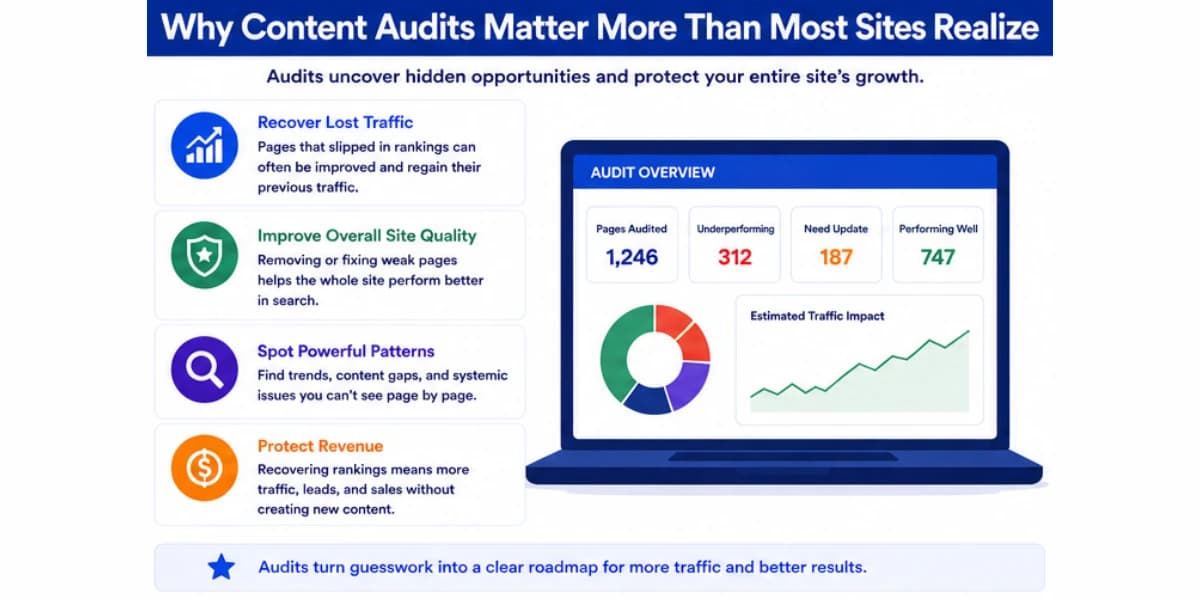
Audits also reveal patterns that are hard to see any other way. Maybe every page written by a certain author tends to underperform.
Maybe every page targeting a certain type of keyword struggles regardless of how well it's written.
Maybe a whole category of the site was built around a topic that search interest has moved away from.
None of these patterns show up clearly when you're looking at one page at a time, but they jump out once a full audit lays everything side by side.
There's a financial angle worth mentioning too, especially for sites that rely on advertising or affiliate revenue.
A page that's slipped from position four to position fifteen isn't just a ranking number changing quietly in the background.
It usually represents real, measurable lost income, since click through rates drop sharply the further down the results page a link sits.
Catching that slide early, before it slips even further, is almost always cheaper and faster than waiting until the page has fallen off the results entirely and needs to be rebuilt from a much weaker starting position.
For a complete overview of how AI fits into every stage of search engine optimization, read our complete AI SEO guide. It covers how AI tools handle everything from keyword research to technical audits.
What Counts As Underperforming
Before running an audit, it helps to get specific about what underperforming actually means, since the answer isn't the same for every page.
A single number, like traffic, doesn't tell the whole story on its own.
A page can have low traffic simply because it targets a low volume keyword on purpose, which isn't a problem at all if it's still ranking well for that keyword and serving the readers who do find it.
A page can have decent traffic but a very low click through rate from search results, which usually points to a weak title or meta description rather than a problem with the content itself.
A page can have good traffic but terrible engagement, meaning readers leave almost immediately, which often points to a mismatch between what the title promised and what the content actually delivers.
A page can also be underperforming relative to its own potential rather than in absolute terms.
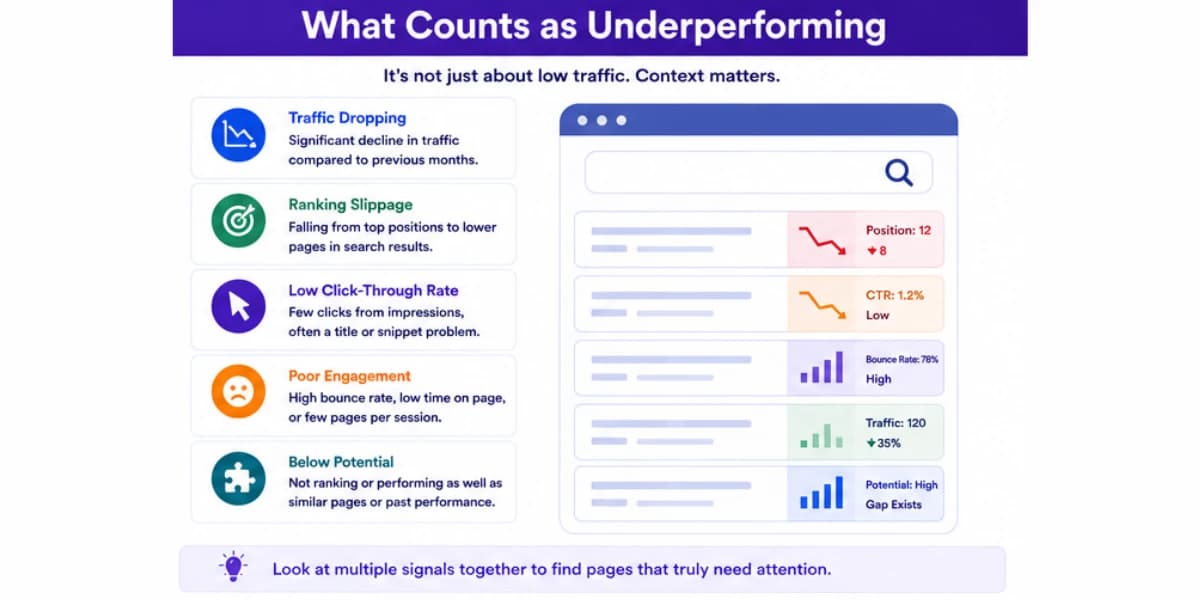
A page that used to rank in position three and has dropped to position twelve is underperforming even if it still gets some traffic, since it's clearly lost ground it once had.
A brand new page that's only been live for two weeks isn't underperforming just because its traffic is still low, since it hasn't had enough time to be properly indexed and evaluated yet.
Confusing these two situations, a genuine decline versus simply not having ramped up yet, is an easy mistake to make when scanning through raw traffic numbers without any historical context attached.
Getting this distinction right at the start of an audit saves a lot of wasted effort later, since flagging the wrong pages as problems, or missing real problems because a page technically has some traffic, leads to fixing the wrong things.
Spending time crafting a beautiful refresh for a page that was never actually a priority, while a genuinely struggling page sits untouched, is a common way a well intentioned audit ends up delivering far less value than it should.
Understanding how your content fits together is essential for effective audits. Our guide on what content clusters are explains how pillar pages and supporting articles work together to build topical authority.
Where AI Helps In A Content Audit
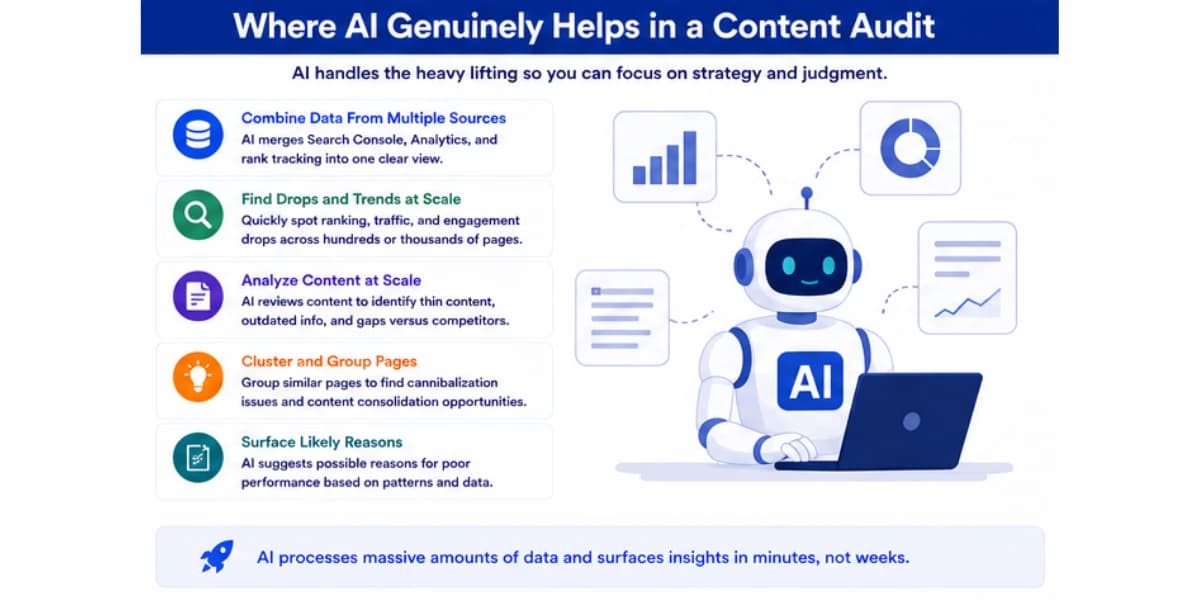
AI earns its place in this process mainly in the parts that involve processing large amounts of data quickly and spotting patterns across many pages at once.
Here's where it consistently proves useful.
Pulling Together Data From Multiple Sources
Pulling together data from multiple sources is a strong use case.
A full picture of how a page is doing usually requires combining search console data, analytics data, and sometimes rank tracking data from a separate tool.
AI tools can merge these different sources into one clean view far faster than manually exporting and combining spreadsheets by hand.
Spotting Ranking and Traffic Drops At Scale
Spotting ranking and traffic drops across a large number of pages at once is another clear strength.
Feeding a full list of URLs along with historical performance data into an AI tool lets it flag every page that's dropped significantly over a chosen time period, something that would take a very long time to catch by scrolling through a dashboard one page at a time.
Grouping Similar Pages To Spot Category Patterns
Grouping similar pages together to spot category level patterns is something AI handles well too.
It can cluster pages by topic or content type and show you that, for example, every page about a certain product category is underperforming while a different category is thriving, which points toward a bigger strategic issue rather than a handful of unrelated one off problems.
Drafting Likely Explanations For Underperformance
Drafting likely explanations for why a specific page might be struggling is genuinely useful as a starting point.
AI can compare a struggling page against what's currently ranking well for the same keyword and point out obvious gaps, like a missing subtopic, outdated information, or a much shorter word count than the competition.
If you need help finding where to add links in your existing content, try our internal link opportunity finder tool. It scans your pages and highlights where new internal links would add the most value.
Where AI Falls Short In An Audit
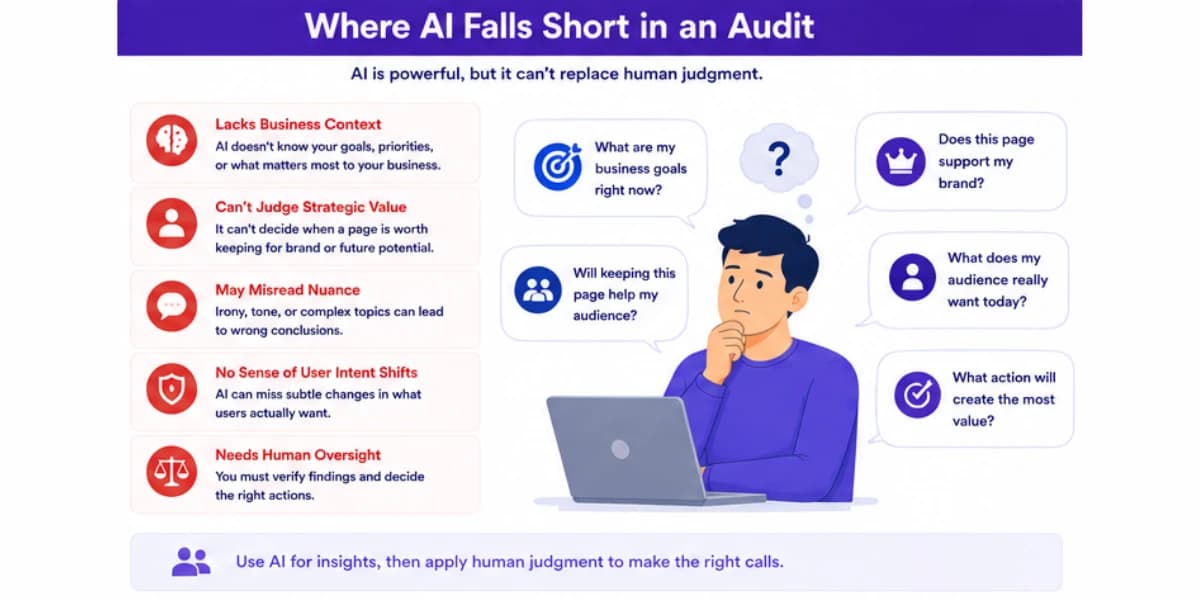
It's just as important to understand where AI struggles here, since leaning on it too heavily in the wrong spots leads to a misleading picture of what's actually happening.
AI Doesn't Know Your Business Priorities
AI doesn't know your business priorities unless you tell it directly.
A page with modest traffic might actually be one of your most valuable pages if it drives a disproportionate amount of revenue or leads, something that isn't obvious from traffic numbers alone.
Without that context, an AI tool might flag a genuinely important page as low priority simply because its traffic looks unremarkable next to other pages on the site.
AI Can Confuse Correlation With Cause
AI can also confuse correlation with the actual cause of a problem.
It might notice that a page's traffic dropped around the same time a title tag was changed and assume that's the reason, when the real cause was actually a broader algorithm update that affected many sites at once, or a new competitor page that happened to launch the same month.
Confirming the actual cause usually requires a human looking at the bigger picture, not just the timing of one change on one page.
Judging Content Quality In A Nuanced Way
Judging content quality in a nuanced way is still a weak spot.
AI can flag that a page is shorter than competitors or missing certain subtopics, but it can't reliably judge if the writing itself is genuinely engaging, if the examples used actually make sense for the target audience, or if the overall argument of the piece holds together well.
Those are still calls a human needs to make by actually reading the content closely.
Deciding What To Do About An Underperforming Page
Finally, deciding what to do about an underperforming page, refresh it, merge it with another page, or remove it entirely, is a strategic decision that depends on business goals AI has no visibility into on its own.
It can suggest options, but the final call belongs to someone who understands the bigger picture of what the site is trying to achieve.
Learning how to do keyword research properly helps you map which pages should target which queries, so you can spot cannibalization issues before they become structural problems.
Gathering The Right Data Before You Start
An audit is only as good as the data feeding it, so it's worth spending a little time up front making sure you have access to the right sources.
Google Search Console is the most important single source, since it shows exactly how each page is performing in actual search results, including impressions, clicks, average position, and click through rate.
Analytics data adds a second layer, showing what happens after a visitor actually lands on a page, how long they stay, if they bounce immediately, and if applicable, if they take a meaningful action like signing up or making a purchase.
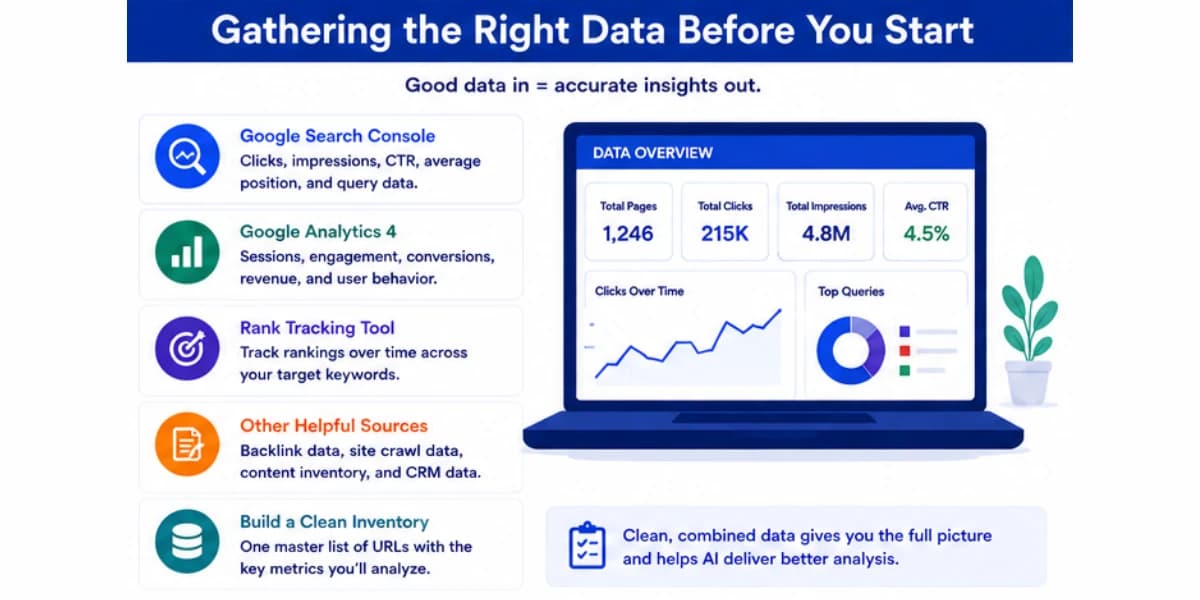
Combining these two sources gives a much fuller picture than either one alone, since a page could look strong in Search Console but weak in analytics, or the other way around, and each combination points toward a different kind of problem.
If the site sells anything or tracks leads, revenue or conversion data tied to specific pages is worth pulling in as well, even if it takes a bit more manual work to connect.
A page with modest traffic that consistently drives sales is a very different priority than a page with high traffic that never converts, and traffic numbers alone would never reveal that difference.
Rank tracking data, if the site has an active subscription to a rank tracking tool, rounds out the picture by showing exact position changes over time for specific target keywords, rather than the somewhat noisier average position figures that Search Console provides.
For a comprehensive list of tools that can help with every stage of the process, check out our roundup of best keyword research tools for affiliates. Many of these platforms include AI-powered clustering and intent analysis features.
Building The Audit Workflow
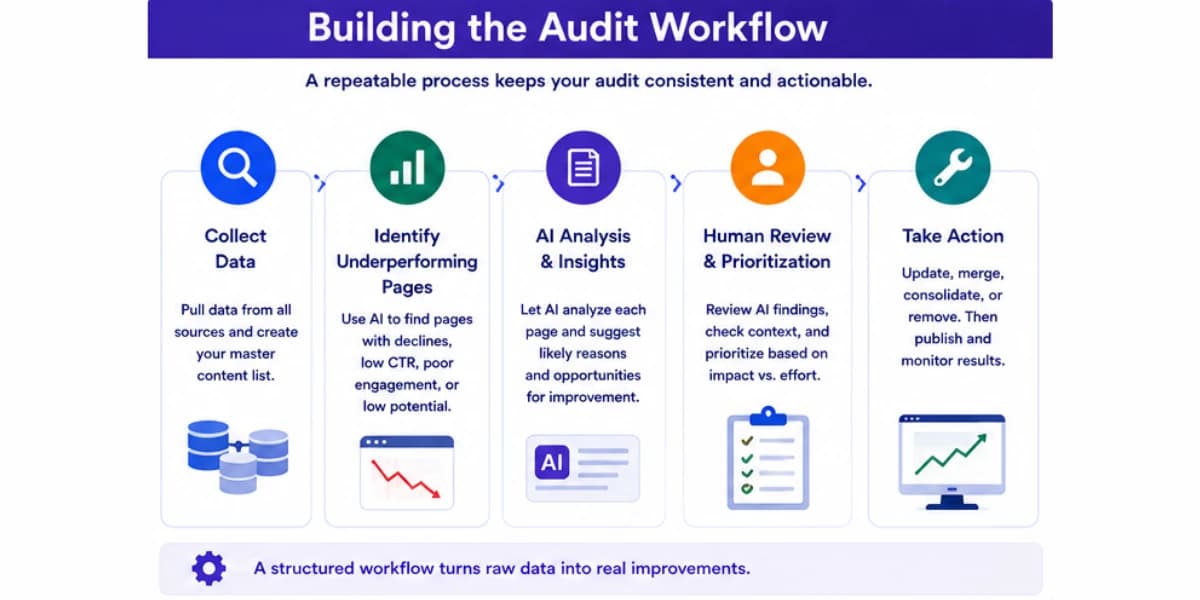
Here's a practical, step by step process for running a content audit with AI support, built for sites ranging from a few dozen pages up to several thousand.
Step One: Pull A Complete List Of Every Published Page
Start with a full export of every page currently live on the site, along with its publish date, last updated date, and current word count if that's easy to gather.
Missing pages from this list means missing them from the entire audit, so it's worth double checking that the export actually captures everything rather than just the pages that happen to show up in a sitemap or a recent crawl.
Step Two: Gather Performance Data For Each Page
For every page in the list, pull traffic data, ranking data for its target keyword if known, click through rate from search results, and if available, engagement metrics like average time on page or bounce rate.
That data becomes the raw material the rest of the audit depends on, so accuracy here matters more than speed.
Step Three: Set Clear Thresholds For What Counts As A Problem
Before running the AI assisted analysis, decide on the specific thresholds that will flag a page as needing attention.
A reasonable starting point might be any page that's dropped more than thirty percent in traffic over the past six months, any page ranking beyond position twenty for its target keyword despite being live for over six months, or any page with a click through rate well below what similar pages on the site typically get.
Setting these thresholds explicitly, rather than letting an AI tool decide what counts as significant on its own, keeps the audit grounded in numbers that actually make sense for your specific site rather than a generic default that might not fit your situation.
Step Four: Run The AI Assisted Analysis
With clean data and clear thresholds in hand, feed everything into an AI tool and ask it to flag every page that crosses one or more of your thresholds, group similar flagged pages together by topic or content type, and suggest a likely reason for each flagged page's underperformance based on a quick comparison against currently ranking competitor content.
Good output at this stage is a clear, organized list rather than a wall of unstructured text. Each flagged page should come with its specific metrics, which threshold it crossed, and a short note on the likely cause, ready for a human to review and prioritize.
Step Five: Review And Prioritize The Flagged Pages
Go through the flagged list and apply the business context an AI tool doesn't have. Bump up pages that drive real revenue or leads even if their traffic numbers look modest.
Bump down pages that are technically underperforming but don't actually matter much to the business, like an old page for a product line that's been discontinued.
That stage is also the point to catch any false positives, pages that got flagged because of a temporary or expected dip rather than a real ongoing problem.
A page that always sees a seasonal drop at a certain time of year isn't the same kind of problem as a page that's been steadily declining for a year straight, even if both technically crossed the same threshold.
Step Six: Decide On An Action For Each Priority Page
For each page that makes it through prioritization, decide on a specific next step. Some pages just need a straightforward refresh with updated facts and a few added sections.
Some need a bigger rework, essentially a new outline and a significant rewrite, because the original angle no longer holds up against current competition.
Some pages are better merged into a stronger, related page rather than kept separate, especially if two pages on the site are quietly competing for the same keyword.
A small number of pages are genuinely better removed entirely, if they serve no real purpose anymore and aren't worth the effort of fixing.
Step Seven: Track Results After Changes Go Live
Once decisions are made and changes are implemented, keep tracking the same metrics that flagged the page in the first place.
A page that gets refreshed should show some sign of improvement within a few weeks to a couple of months.
If it doesn't, that's useful information too, since it might mean the underlying problem was misdiagnosed and deserves a second look rather than being marked as fixed and forgotten.
Turning your topical map into a consistent publishing schedule is easier when you have a solid plan. Our guide on how to create a content plan for affiliate marketing walks through exactly how to structure your workflow.
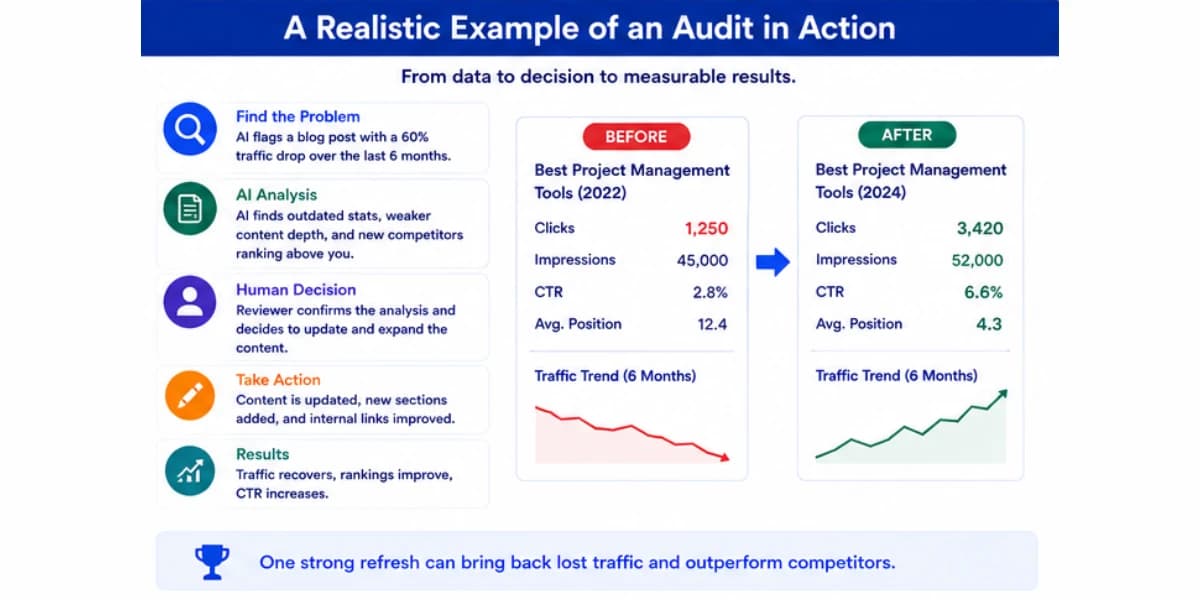
A Realistic Example Of An Audit In Action
Picture a site covering personal finance topics with around four hundred published articles.
Running the audit workflow above turns up sixty pages that crossed at least one threshold, which feels overwhelming until the AI assisted grouping step organizes them into clearer categories.
Twenty of the flagged pages turn out to be older articles about a specific type of savings account that search interest has clearly moved away from over the past couple of years, based on declining search volume data pulled during the review.
These get marked as low priority, since fixing them wouldn't recover much traffic even with a perfect refresh.
Fifteen flagged pages share a different pattern.
They're all reasonably well written but noticeably shorter than what's currently ranking, missing a comparison table or a clear pricing breakdown that every top ranking competitor now includes.
These become the highest priority group, since the fix is clear and the potential upside looks strong based on how much traffic similar, already strong pages on the site currently pull in.
A smaller group of eight pages turns out to be two sets of articles quietly competing against each other for nearly the same keyword, something that wasn't obvious until the topic grouping step placed them side by side.
These get merged into single, stronger pages instead of being refreshed separately.
The remaining flagged pages get a mix of light refreshes and, for a handful that serve no clear purpose anymore, removal.
Three months after the priority fixes go live, the fifteen highest priority pages show a meaningful jump in both rankings and traffic, confirming the original diagnosis was accurate and giving the team a clear pattern to watch for during the next audit cycle.
That pattern turns out to be genuinely useful going forward.
The team notices that comparison tables and clear pricing breakdowns show up as a recurring factor across several of the improved pages, which becomes a standard checklist item for every new article the site publishes going forward, not just something applied reactively during audits.
A reactive fix for existing problems ends up shaping how new content gets built from that point on, which is often the most valuable long term outcome of running an audit in the first place.
The merged pages also perform better than expected.
Combining the two sets of competing articles into single, stronger pages stops them from splitting traffic and ranking signals against each other, and it also results in pages that read as noticeably more complete and authoritative than either of the original two pieces did on their own, since the best material from both got kept and the weaker, redundant sections got cut.
Building a topical map for AI SEO gives you the content structure that makes audit decisions much easier, since you already know which pages should support which others.
How Often To Run A Full Audit
A full site wide audit doesn't need to happen constantly, but going too long without one lets small problems pile up into bigger ones.
For most active sites, a full audit once every six months strikes a reasonable balance between staying on top of issues and not spending excessive time on the process itself.
Between full audits, it's worth running a lighter check on your highest traffic and highest value pages more frequently, maybe once a month, just to catch any sudden drops early rather than waiting for the next scheduled full audit to notice something went wrong.
A sudden, sharp drop on an important page is worth investigating immediately regardless of where you are in your regular audit cycle.
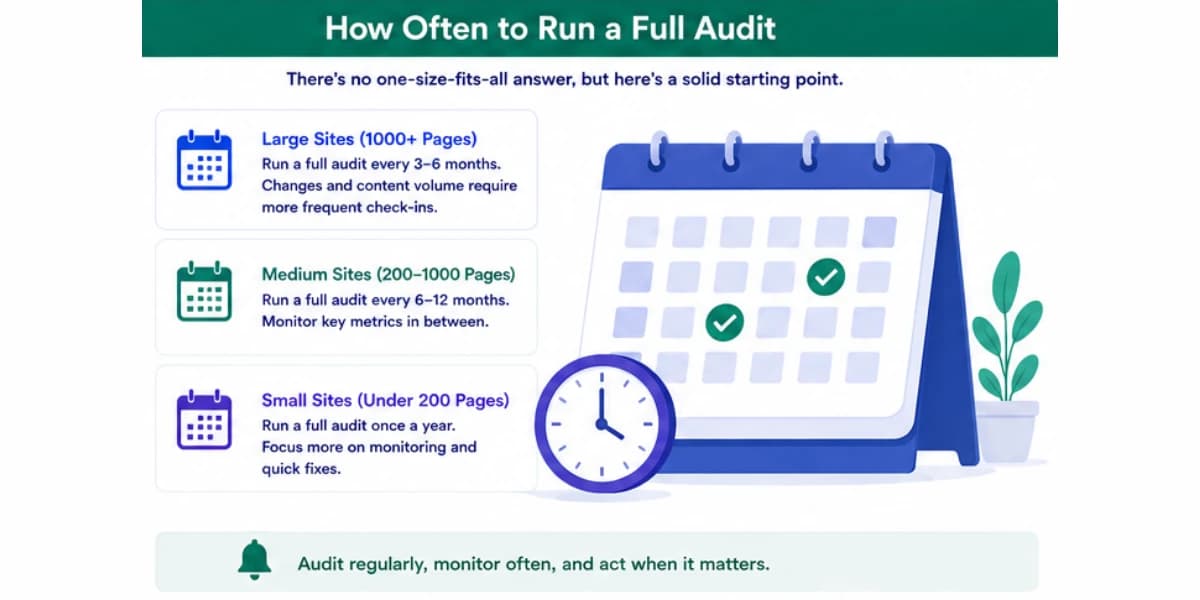
Sites publishing content at a very high volume, adding dozens of new pages every month, may benefit from a shorter audit cycle overall, since problems can accumulate faster when there's simply more content to potentially go wrong.
The right cadence also depends on how competitive your specific space is.
A niche with slow moving competitors and stable search behavior can often stretch to a longer gap between full audits without much risk.
A crowded, fast moving space where new competitor content shows up constantly rewards a tighter cycle, since the gap between your content and what's currently ranking can widen faster than in a calmer niche.
Creating content that stays relevant for years requires a different approach than chasing trends. Our article on creating evergreen content explains how to write articles that continue driving traffic long after publication.
Getting Better Results From AI During An Audit
The quality of an AI assisted audit depends heavily on how clearly you frame the request.
A vague prompt like tell me which pages are underperforming tends to produce a vague, unhelpful list.
A specific prompt that includes your actual thresholds, your data, and a clear definition of what counts as a problem produces a far more usable result.
Give the tool your full dataset in a structured format, a spreadsheet or table with page URL, traffic over time, ranking position, and click through rate, rather than describing the situation in a paragraph and hoping it can work from memory or general knowledge about your site.
AI tools work far better with concrete numbers in front of them than with a general description of the situation.
Ask for specific groupings rather than a single flat list.
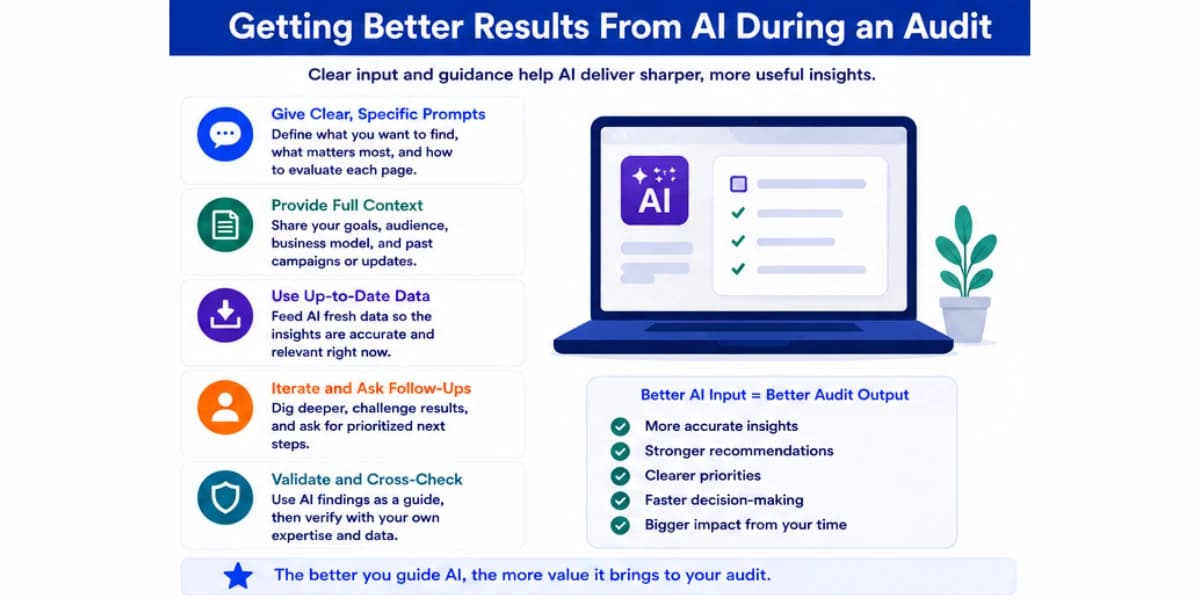
Requesting that flagged pages be grouped by likely cause, outdated information, weak titles, thin content compared to competitors, makes the resulting list far easier to act on than a single undifferentiated pile of sixty pages with no organizing structure.
It also helps to ask the tool to show its reasoning for each flagged page rather than just stating a conclusion.
A note like flagged because traffic dropped forty percent over five months while three new competitor pages appeared in the top results during that same window gives you something concrete to verify, rather than a bare assertion that a page needs work.
Finally, feed the tool examples of pages on your site that are performing well alongside the ones that aren't.
Comparing strong and weak pages side by side often surfaces useful differences, like a consistent structural element the strong pages share that the weak ones lack, that a tool looking only at underperforming pages in isolation would never notice.
Using the right SEO plugins for your website can help you manage and monitor your content audit process alongside other on-page optimization tasks.
Signs A Page Needs Attention Outside A Scheduled Audit
Some problems shouldn't wait for the next audit cycle.
A sudden, sharp drop in rankings or traffic on a page that's normally stable is worth investigating right away, since it often signals something specific happened, a technical issue, a competitor's new page, or a broader algorithm change, that's easier to diagnose while it's still fresh rather than months later during a routine review.
If a page starts receiving comments, support tickets, or emails pointing out that information is outdated or incorrect, treat that as an immediate signal rather than something to batch into the next scheduled audit.
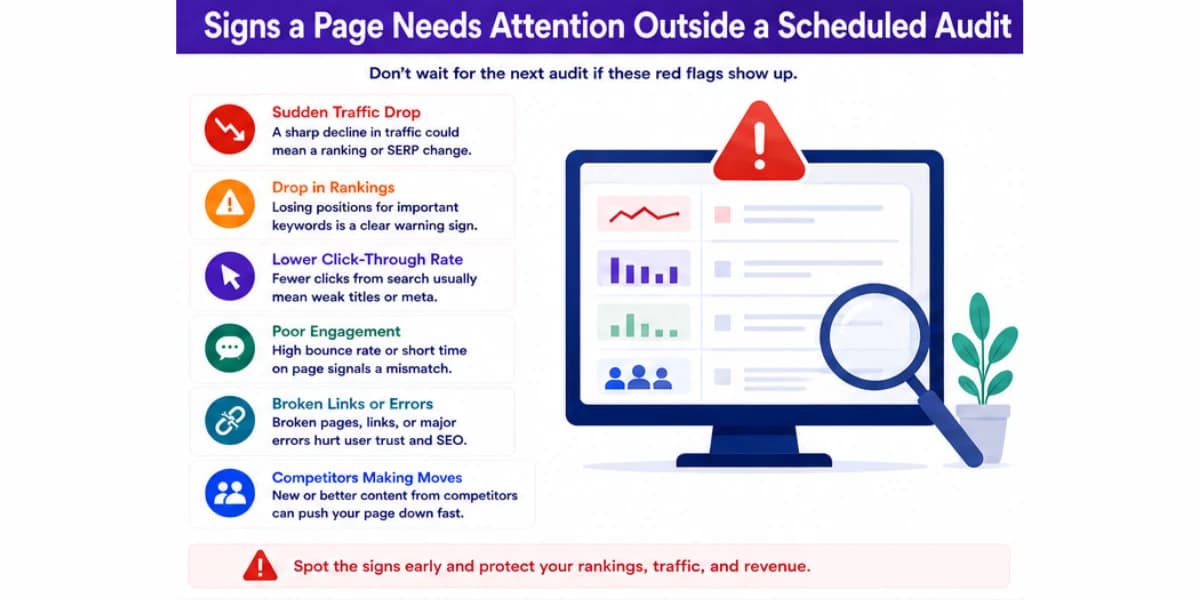
Readers catching mistakes before your own tracking does is a clear sign the page has likely been a problem for longer than realized.
A noticeable shift in the competitive landscape, a well funded new competitor entering your space or an established one publishing a wave of strong new content, is also worth an early check on your related pages rather than waiting for the regular cycle, since the ground can shift faster than a six month audit schedule accounts for.
For a complete overview of how AI fits into every aspect of search engine optimization, including content audits, read our AI internal linking guide to understand how link structures support your content strategy.
Common Mistakes To Avoid
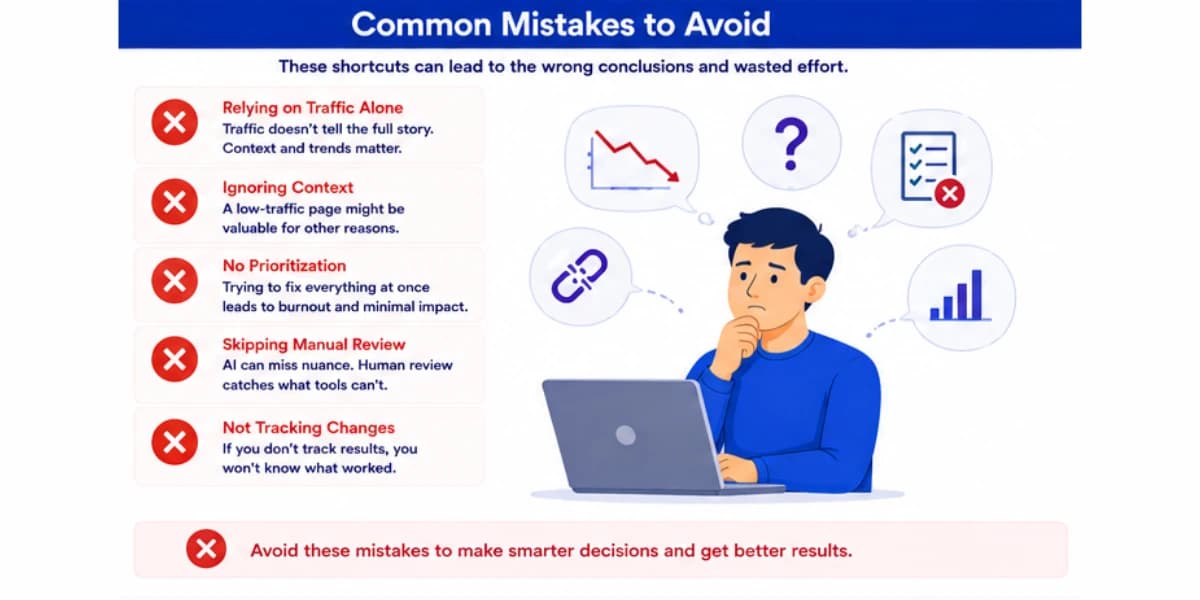
One common mistake is treating every flagged page as equally urgent.
Without a clear prioritization step that factors in actual business value, teams often end up spending time refreshing low value pages while genuinely important pages sit untouched simply because they happened to get flagged later in the list.
Another mistake is trusting AI generated explanations for underperformance without double checking them against the actual page.
An AI tool might suggest a page is too short compared to competitors, but a quick read might reveal the real problem is actually a confusing structure or a title that doesn't match what the content delivers, issues that a word count comparison alone would never catch.
A third mistake is running an audit once and never repeating it.
A single audit gives you a snapshot of a moment in time, but content performance keeps shifting as competitors publish new pages and search behavior evolves.
Without a regular cadence, the same problems that got fixed once can quietly resurface, or new ones can build up unnoticed for a long stretch.
A fourth mistake is ignoring pages that are performing well during the audit process.
It's tempting to focus entirely on what's broken, but looking closely at why your strongest pages are succeeding often reveals patterns worth applying to weaker pages too, like a particular structure, a certain content length, or a specific type of example that consistently works well across your site.
A fifth mistake, one that's easy to fall into with a large flagged list, is fixing pages in a random order rather than by actual potential impact.
Working through pages alphabetically or in whatever order they happened to appear in an export wastes the most valuable early weeks of an audit cycle on pages that may not matter much, when that same time could go toward the handful of pages with the biggest realistic upside.
Building topical authority in a niche depends heavily on keeping your content accurate and current, since search engines use freshness signals to determine which pages deserve to rank.
Turning Audit Findings Into a Real Action Plan
An audit that produces a long list of flagged pages but no clear next steps doesn't actually help much.
Once priorities are set, it helps to build a simple schedule, maybe five to ten pages tackled per week depending on team size, rather than trying to fix everything at once and losing momentum halfway through.
Assign clear ownership for each page being fixed, even on a small team, so nothing falls through the cracks.
Track the specific action taken on each page, refreshed, merged, or removed, along with the date, so the next audit can quickly reference what's already been addressed rather than accidentally flagging the same page again without noticing it was already fixed.
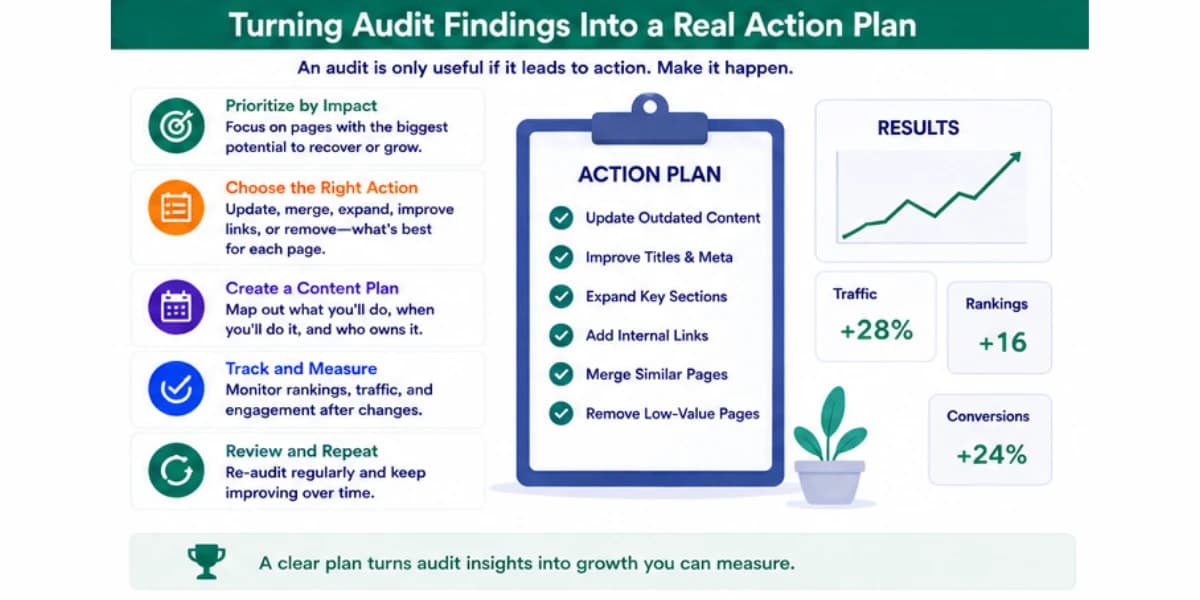
A simple shared spreadsheet works fine for this, and it doesn't need to be complicated to be genuinely useful over time.
Share the results of the audit, even a simplified summary, with anyone involved in creating new content for the site.
Seeing which types of pages consistently underperform, and which patterns show up repeatedly across the flagged list, helps shape better decisions for future content before it's even published, which is ultimately more valuable than fixing problems after they've already cost the site traffic for months.
A short summary presented at a regular team meeting, rather than a long document nobody reads, tends to be far more effective at actually changing how future content gets planned.
For a complete overview of how AI fits into every aspect of search engine optimization, including content audits, read our AI content refresh workflow guide to understand how to keep your content current and competitive.
Final Thoughts On AI Content Audit
A content audit doesn't need to be a massive, dreaded project that only happens once a year in a panic.
Treated as a regular, structured process, with AI handling the heavy lifting of data gathering and pattern spotting, it becomes a manageable habit that keeps a site healthy over time rather than a occasional emergency response to a traffic drop nobody saw coming.
Start with clean data and clear thresholds for what actually counts as a problem.
Let AI handle the scanning, grouping, and first pass explanations, but keep the prioritization and final decisions in human hands, since those calls depend on business context no tool has access to on its own.
Track what happens after every change, and feed that information back into the next audit so the whole process gets sharper over time instead of repeating the same guesswork every cycle.
Done consistently, this kind of audit process protects the traffic a site has already earned and often uncovers real opportunities hiding in plain sight, pages that are closer to a big improvement than anyone realized until the data was actually laid out clearly in front of them.
Perhaps the most underrated benefit of running audits regularly is what it does to how new content gets planned in the first place.
A team that knows exactly which patterns tend to predict success and which ones tend to predict decline starts building those lessons into new content from the very beginning, rather than only discovering the same mistakes six months later during the next audit.
Over time, that shift alone can reduce how much underperforming content ever gets published to begin with, which is a far better outcome than getting very good at fixing problems after the fact.
None of this requires a massive team or an expensive software stack to get started.
A small site can run a simplified version of this process with a spreadsheet, free access to Search Console, and a general purpose AI tool for the analysis and grouping steps.
The core principles, clear thresholds, honest prioritization based on real business value, and consistent follow up after changes go live, matter far more than the specific tools used to carry them out.
Start simple, run it once, and refine the process the second and third time around as you learn what actually works best for your own site.
Frequently Asked Questions
1. How many pages does a site need before a formal content audit becomes worth doing?
Even a smaller site with thirty or forty pages can benefit from a basic audit, though the process becomes far more valuable as a site grows past a hundred pages or so, since that's roughly the point where it stops being realistic to just remember which pages need attention. Smaller sites can often get away with a simpler, lighter version of the process described here, skipping some of the more elaborate grouping and clustering steps that matter more once a site has hundreds of pages to sort through.
2. Can AI run a content audit completely on its own without any human review?
It can handle the data gathering, flagging, and grouping steps quite well on its own, but the prioritization and final action decisions genuinely need human judgment, since those decisions depend on business context that isn't visible in traffic numbers alone.
3. What is the most common reason a page ends up underperforming?
There's no single dominant reason across every site, but outdated information, a mismatch between the title and what the content actually delivers, and simply being outcompeted by newer, more thorough competitor content are among the most frequent causes worth checking first.
4. Should declining pages always be refreshed rather than removed?
No. Some declining pages genuinely no longer serve a purpose, either because the topic has lost relevance or because a stronger related page already covers the same ground better. Refreshing every single flagged page regardless of its actual potential wastes time that could go toward pages with real upside.
5. How long should I wait after fixing a page before checking if it worked?
A reasonable window is four to eight weeks for most changes, since search engines need time to recrawl the page and reassess its ranking. Checking too early often leads to premature conclusions in either direction.
6. Is traffic the best single metric to judge if a page is underperforming?
Not on its own. Traffic needs to be considered alongside ranking position, click through rate, engagement, and actual business value like conversions or revenue. A page can look fine on traffic alone while still being a real problem on one of these other measures.