How To Get Approved For The Home Depot Affiliate Program
Home improvement is a big niche, and the Home Depot name carries trust with almost every reader in it. A deck guide or a paint roundup can send steady clicks to a store people already know.
Getting into the affiliate program is the first hurdle. You apply through a network, and you only see the full rules after you are inside.
Home Depot also keeps its public numbers short. The program summary lists a few rates and one cookie length, and little else.
That leaves many creators guessing about traffic, content, and what a reviewer wants to see. Here the guessing turns into eight steps that build on each other.
By the end you will know where to apply, what the program pays, how long the cookie lasts, and which mistakes get applications turned down.
Disclosure: Some of the links I share might be affiliate links. If you click on one and make a purchase, I may earn a small commission as a thank you. But don’t worry, it won’t cost you anything extra. I only recommend stuff I genuinely believe in. Your support helps me keep creating awesome content. You can read my full affiliate disclosure in my disclaimer page.
If you want to save a lot of hours searching for high-paying affiliate programs, check out our exclusive list of 2500+ affiliate programs. You’ll find all the information about the programs inside the list. This list is perfect for affiliate bloggers and influencers.
What The Home Depot Affiliate Program Is And What It Pays
The Home Depot affiliate program pays you a commission when a reader clicks your link and buys on homedepot.com. It runs on Impact, a large network that handles links, tracking, and payments.
Joining is free. Home Depot does ask for a live website at the time you apply, so a plan to build one later will not work.
Commission depends on the product group. Home Depot's affiliate FAQ lists 1 percent on most products, including mobile orders and buy online pick up in store orders.
The same FAQ lists 1 percent on appliances and 8 percent on select home decor products. Rates can change, so the schedule inside your Impact account is the one that counts.
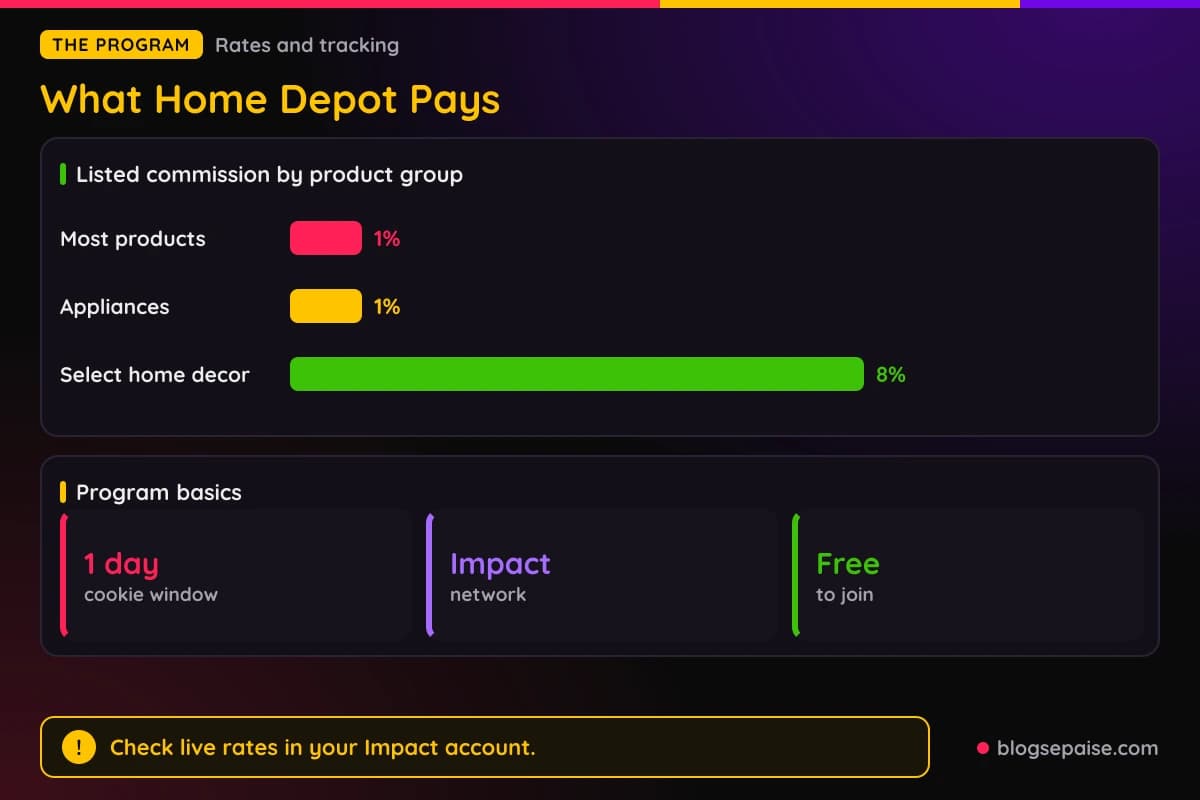
The cookie window is short. Home Depot lists 1 day, which means an order counts when it happens within 24 hours of the click.
A one day window favors readers who are close to buying. Our guide on cookie windows shows why that changes which pages you should promote.
Home Depot does not publish a minimum traffic number for applicants. It also does not publish a fixed approval time or a list of reasons it turns people down.
Because those details are missing, the best plan is to look like a real, active publisher in a home niche. Every step below is built around that one idea.
Think of the process as a chain. Your site shapes your Impact profile, your profile shapes your application, and your application decides your approval.
Each step depends on the one before it. Skip a step and the next one gets harder.
Payments also run through Impact, so you set up payout details inside your Impact account. Home Depot does not publish a payout schedule or a payout minimum in its public summary, so read those terms in Impact.
The low base rate shapes your strategy. At 1 percent, the money comes from volume and from pages that sell higher priced items or decor.
Do not let that scare you off. A trusted brand converts well, and readers rarely need convincing that Home Depot is a safe place to buy.
Expect the earning curve to be slow at first. Most new publishers need several months of steady posting before a retail program pays anything worth noticing.
Plan your goals around that. A clean first month is one approved account, five tracked links, and one new page, not a big check.
Step 1: Check That Your Site Fits A Home Improvement Program
Home Depot sells tools, building materials, appliances, decor, lighting, flooring, garden gear, and much more. Your site should sit close to one of those areas.
Good fits include DIY projects, home repair, remodeling, gardening, decor, organization, and tool reviews. A cooking blog or a gaming channel gives a reviewer little reason to say yes.
Next, ask if your readers actually buy these products. A page that walks someone through building a raised garden bed sends buyers to lumber, soil, and tools.
Check the shape of your content too. Guides, project walkthroughs, product roundups, and how-to videos all show a reviewer that you help people decide.
Product pages that simply list items with no advice tend to look thin. Add steps, costs, mistakes, and photos from real projects.
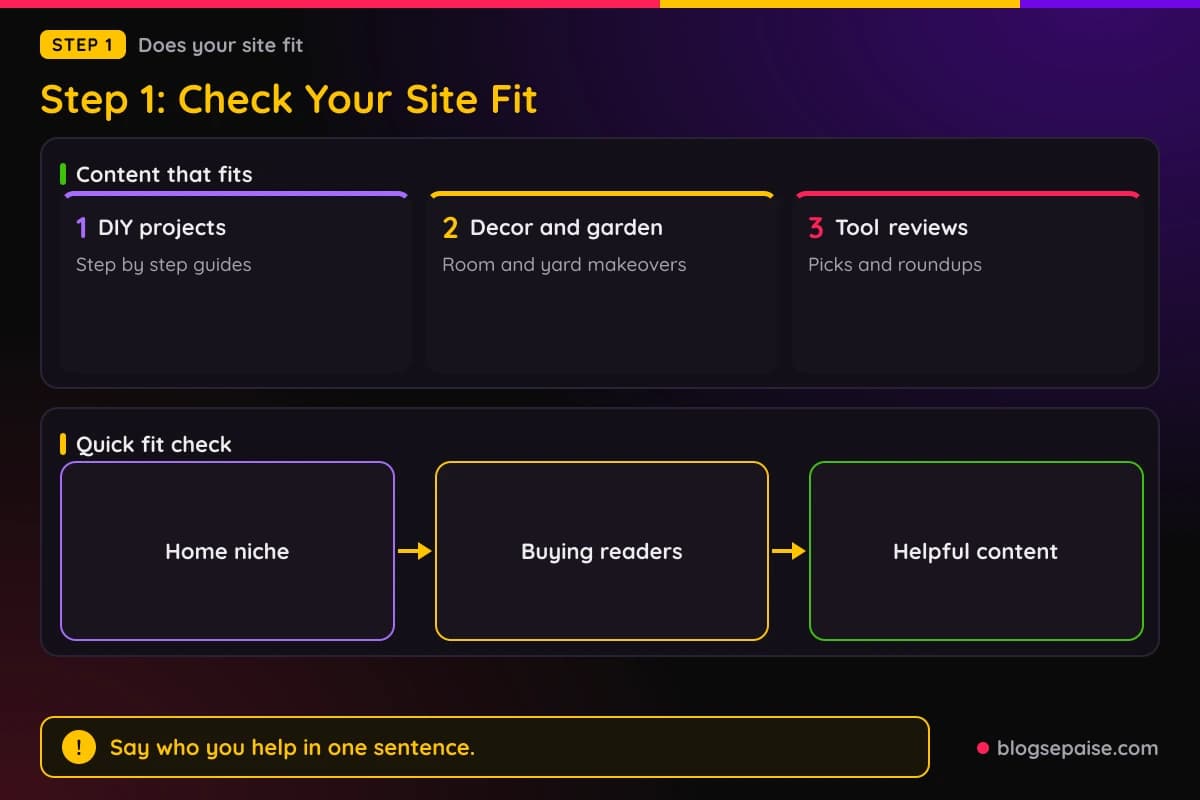
If your site covers many topics, make the home content easy to find. A menu item or a category page for DIY and home projects helps a reviewer see your focus in seconds.
A new niche site can still qualify. If you are still choosing a topic, our guide on how to choose a profitable niche helps you pick one that fits retail programs like this.
Be honest about your audience. Think about where your readers live and which Home Depot products they can actually buy.
Write down your top five pages and the Home Depot products each one could mention. If you struggle to list products, the fit may be weak.
Also look at your social channels, because Impact lets you add more than one property. A DIY channel on YouTube or a Pinterest board of room makeovers can support your case.
Still, a website matters most here. Home Depot asks for a live site, so social channels work as extras and not as replacements.
By the end of this step you should be able to say, in one sentence, who your readers are and what home projects you help them finish. Keep that sentence handy, because you will use it twice more.
Seasonal topics help you here. Spring garden work, fall yard cleanup, and winter heating fixes all send readers to a store on a schedule you can plan for.
Step 2: Get Your Site Ready Before You Apply
A reviewer will open your site before they say yes. Make that visit count.
Start with content. A safe target is 15 to 20 published pages that you wrote yourself, with real advice and original photos where you can.
Copied text, spun text, and pages stuffed with product links look bad to any reviewer. Write in your own voice and help the reader finish a project.
Next, add the basic trust pages. You need an about page, a contact page, a privacy policy, and a clear affiliate disclosure.
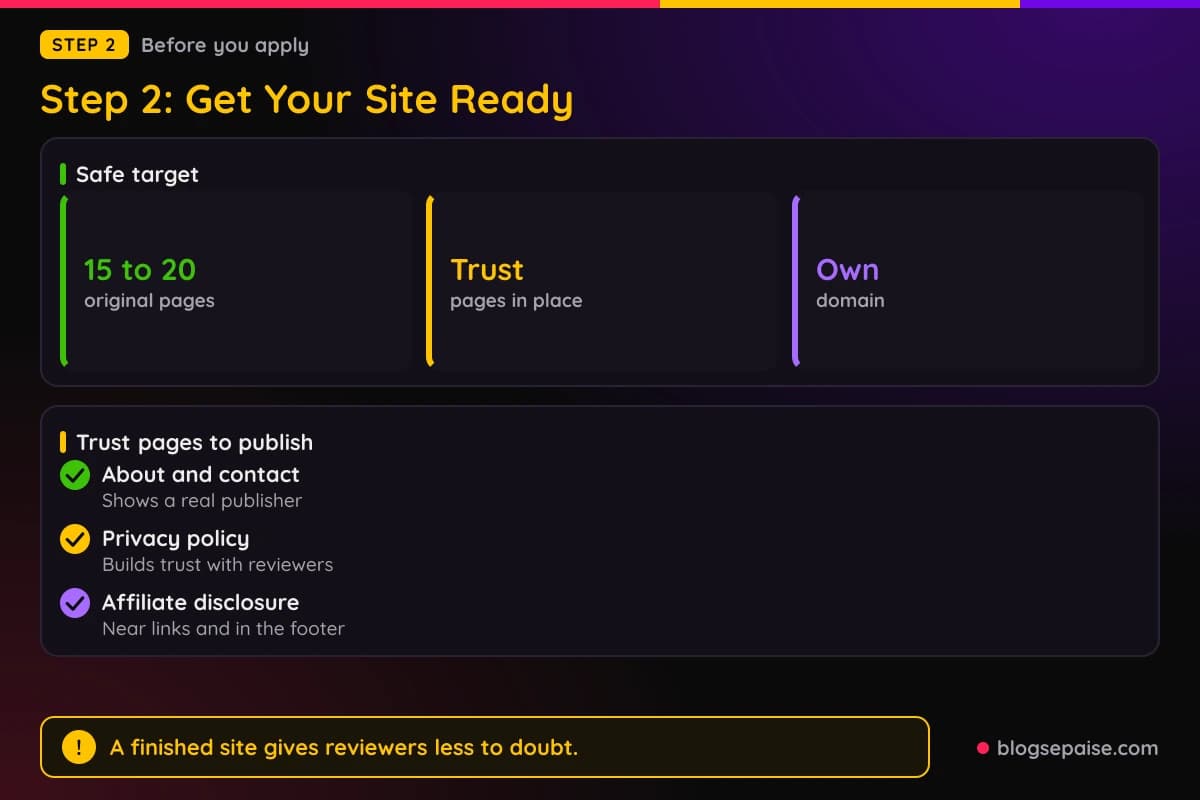
Disclosure matters because the FTC expects it, and Impact expects it too. Our affiliate disclosure generator can draft a plain statement you can paste into your footer and posts.
Use your own domain. A site on a free blog address looks temporary, and a custom domain shows you plan to stay.
Check that every page loads fast and works on a phone. Most home improvement readers browse on mobile while standing in a garage or a store aisle.
Fix broken links and empty pages. A menu that leads to a blank category tells a reviewer the site is not finished.
Keep your site free of content that clashes with a family retail brand. Adult material, hate, gambling, and pirated downloads are quick ways to lose an application.
Add a few real signs of life. A recent post date, a newsletter signup, and active social links all show that someone runs this site.
If your traffic is tiny, say nothing false about it. Our look at affiliate network traffic requirements explains how networks think about small sites.
Take ten minutes to read your homepage as a stranger. If you cannot tell what the site is about in five seconds, a reviewer cannot either.
Ask a friend who knows nothing about your site to find your best home project guide. If they get lost, a reviewer will too.
Fix what they struggle with before you move on. A clear path helps every visitor.
Add a short author bio with a real photo if you are comfortable with it. Readers trust a person, and a reviewer sees a real publisher behind the pages.
Run a quick spell check on the main pages and the menu. Small errors in the places people see first make a site look rushed.
Step 3: Create And Complete Your Impact Account
You cannot apply to Home Depot directly. You apply through Impact, so you need a free publisher account there first.
Go to the Impact signup page and choose the option for creators or publishers. Use your real name and a business email that matches your site.
Impact asks what kind of partner you are. Pick the choice that fits your main channel, such as content creator or blogger.
Then add your property. Enter your website address, a short description, and the main topics you cover.
Fill in the profile as fully as you can. Brands often look at it before they approve anyone.
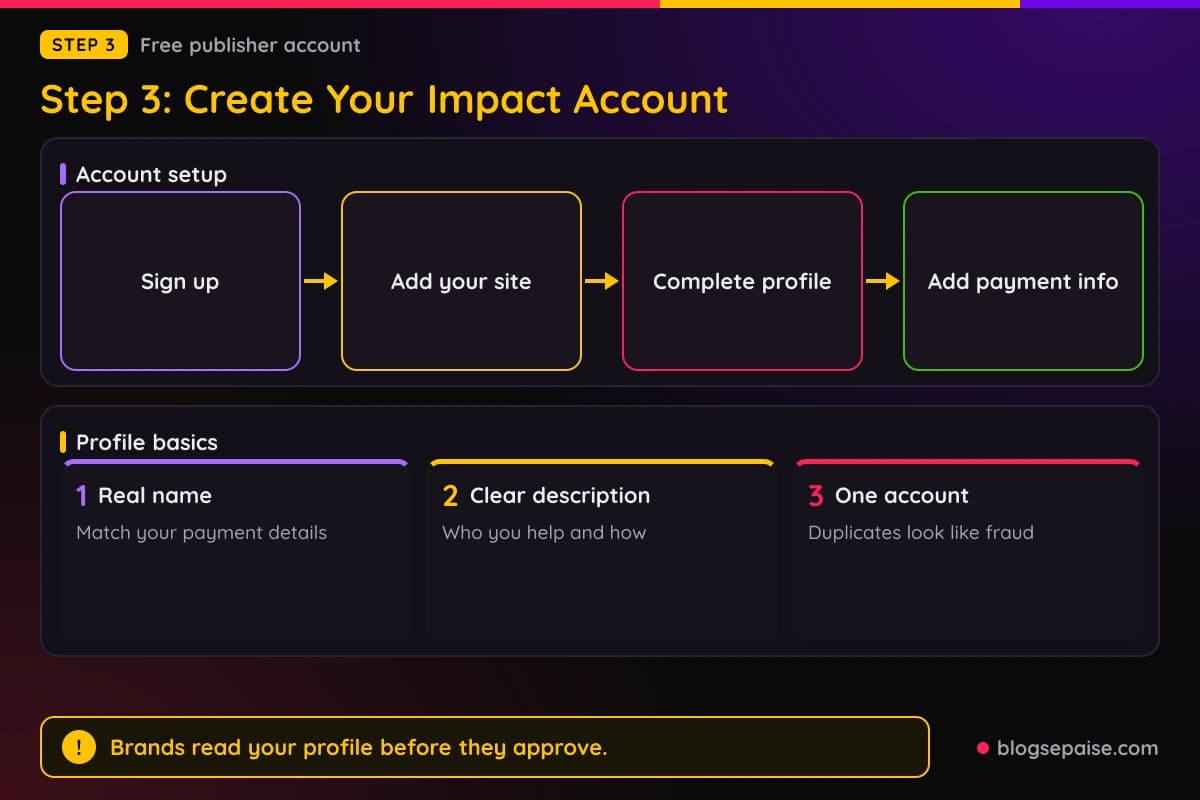
Use the one sentence from Step 1 as your description. Say who your readers are and what projects you help them finish.
Add a logo or a clear site image. A blank profile picture makes an account look unused.
Set up your tax and payment details when Impact asks. Some brands will not approve you until payment details are in place.
Use accurate information everywhere. A mismatch between your name, site, and payment details can slow things down or trigger a review.
Small details add up here. Spell your name and site address the same way in every field.
Do not create more than one account. Duplicate accounts look like fraud, and Impact can close them.
Verify your email and any other check the platform requests. Then wait for your account to show as active before you move on.
Keep your login safe, and turn on any extra security option Impact offers. Your commission payments will flow through this account, so protect it.
Take screenshots of your finished profile. If something looks off later, you can compare it with what you first entered.
Step 4: Find And Apply To The Home Depot Program
Once your account is active, open the brand search inside Impact. Type Home Depot and open the program page.
Read that page before you press apply. It shows the commission schedule, the terms, and any notes on what promotion methods are allowed.
Look at the payout and promotion rules too. Impact usually lists restrictions on coupons, paid search, and email in the terms.
If a Home Depot page shows more than one program, pick the one for the standard affiliate offer. Do not mix it up with a separate installation or services offer.
Click the button to apply. Impact opens a short form and asks you to confirm which property you are applying with.
Choose the site that best fits Home Depot. If you have several, apply with the one that has the strongest home content.
Agree to the terms only after you have read them. Accepting a program's terms is a real agreement, and our guide on reading affiliate program terms shows which clauses matter most.
Fill in every field the form shows. Leave nothing blank that you can answer honestly.
Submit once. Sending the same application again and again does not speed anything up.
After you submit, Impact shows the status as pending. That is normal, and it can stay pending for a few days.
Home Depot does not publish an exact approval time. Plan to keep working on your content while you wait.
Check that the property you picked shows as verified in Impact. An unverified property can stall an application before anyone reads it.
Save a screenshot of the terms on the day you apply. It gives you a record of the rates you saw at the start.
Step 5: Write Application Answers That A Reviewer Can Trust
Short answers decide many applications. A reviewer may spend under a minute on yours.
Start with who you are and what you publish. For example, say you run a DIY blog that shows renters how to upgrade a room on a small budget.
Then say how you will promote Home Depot. Name the page types, like project guides, tool roundups, and room makeover posts.
Add the way you get traffic. Search, Pinterest, YouTube, and email are all fine, as long as you tell the truth.
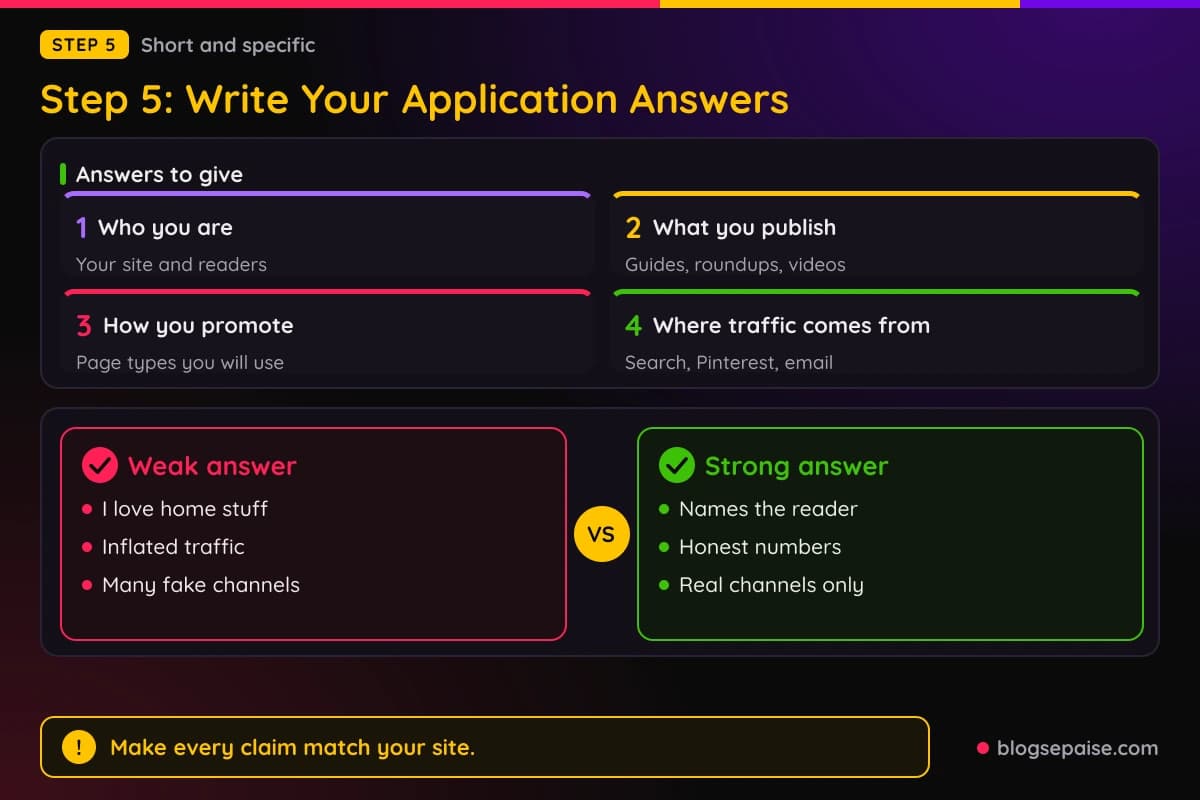
Keep each answer plain and specific. A line such as I publish step by step home project guides for first time homeowners tells a reviewer far more than I love home stuff.
Reviewers read dozens of these, so clear and direct wins. Skip hype words and tell them what your pages actually do.
Do not inflate your numbers. Reviewers can often compare your claims with what they see on the site, and a gap hurts you.
If your traffic is small, say so and say how you plan to grow. A small site with clear content beats a large claim that does not match the page.
Mention the platforms you will use only if you really use them. A long list of channels that do not exist makes a reviewer doubt the rest.
Never write that you will use coupons, deal sites, or paid ads unless you read the rules and plan to follow them. Those methods have the strictest limits.
Proofread. Typos are not fatal, but a clean, calm application looks like it came from a careful publisher.
Keep a copy of your answers. If you are rejected, you can fix the weak points and apply again with a better version.
Match your answers to your site. If you say you write tool reviews, the reviewer should find tool reviews within a click or two.
Say something specific about your readers, like first time homeowners or renters on a budget. A clear group is easier to trust than everyone who likes houses.
Step 6: Track The Decision And Handle A Rejection
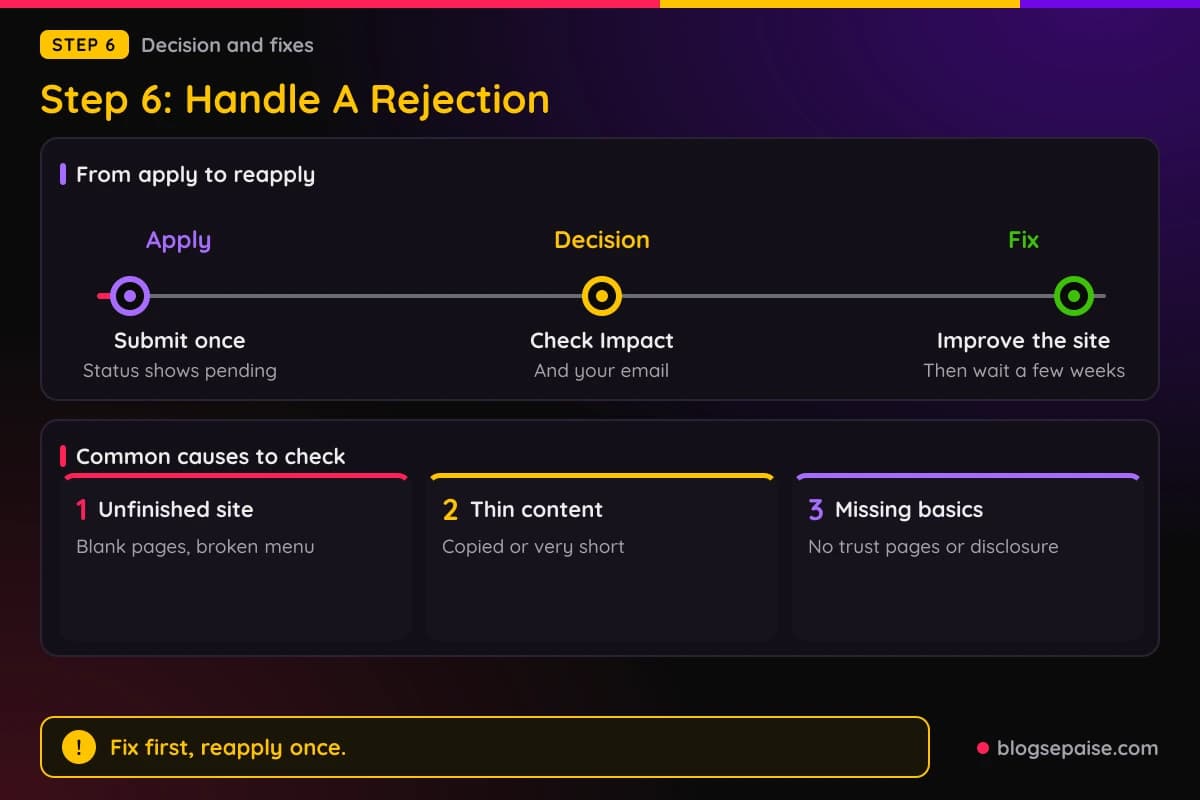
Watch your Impact inbox and your email. Approval and rejection notices usually land in both places.
If you are approved, you can pick up links right away. Move on to Step 7 and read the terms before you publish anything.
If you are rejected, do not panic. Home Depot does not publish a list of reasons, so you have to read the signals yourself.
Look at your site as a stranger would. The usual causes are a site that is not live or looks unfinished, thin or copied content, a niche far from home improvement, or missing trust pages.
Run through the list one item at a time and score your site honestly. The weakest item is the one to fix first.
Missing disclosure and low quality traffic can also hurt. Networks pay close attention to both.
Check the message in Impact for any note. Some brands add a line, and even a short hint can point you to the fix.
Make the changes first and ask second. Add real pages, fix the menu, publish the trust pages, and polish your profile.
Wait a few weeks before you reapply. Sending a new application the next day with no changes tends to get the same answer.
You can also contact Impact support or the program contact listed on the page and ask for feedback. Stay polite and short, and do not argue the decision.
While you wait, apply to other programs that fit your niche. Approval at one brand can help your profile look stronger at the next.
Keep publishing the whole time. A site that grows every month is the best answer to a rejection.
Treat a rejection as feedback on your site and not as a verdict on you. Many publishers get a yes on their second try after fixing the basics.
Keep a short log of what you changed and when. It helps you spot which fix mattered and gives you facts to cite if you contact support.
Step 7: Read The Rates, The Cookie, And The Rules After Approval
Approval is the start, not the finish. Open the Home Depot program page in Impact again and read the full contract.
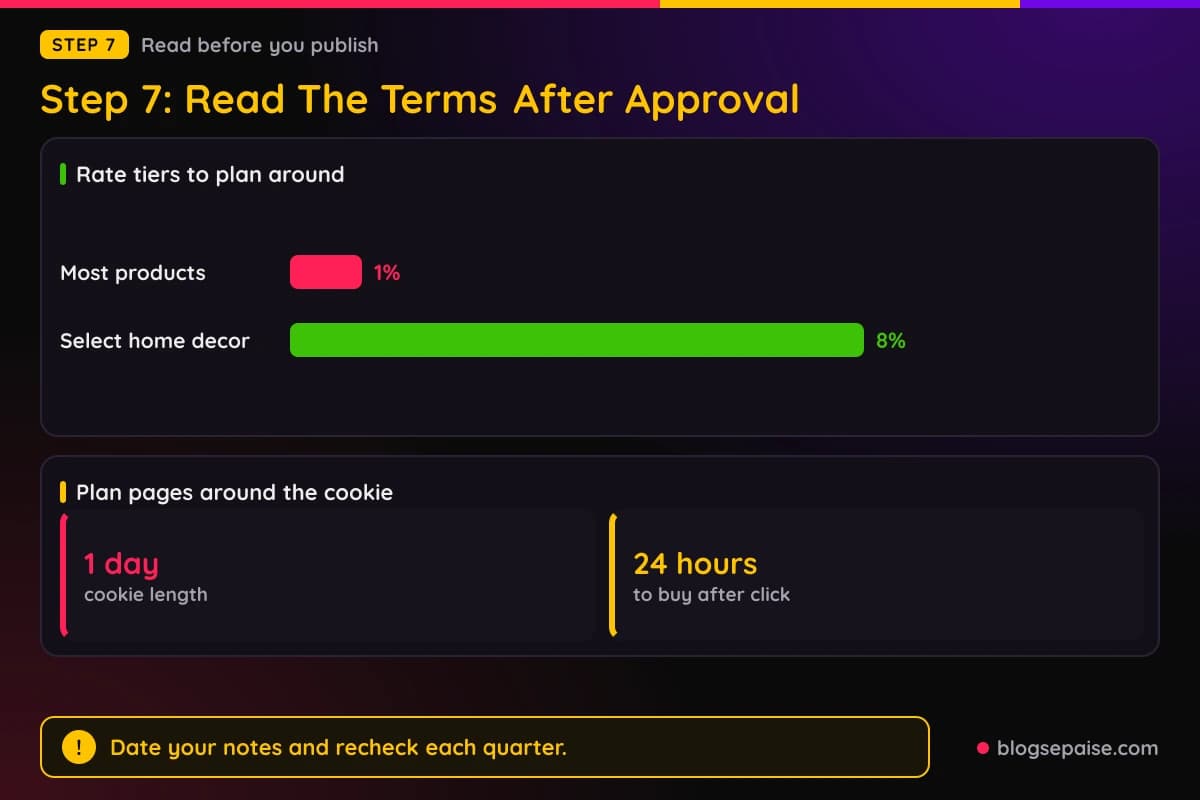
Check the commission schedule first. Match each product group to its rate, and note that 1 percent applies to most items while select home decor is listed at 8 percent.
Next, confirm the cookie length. Home Depot lists 1 day, so a link only earns when the reader buys within 24 hours.
Look for promotion limits. Brands often restrict paid search ads on brand names, coupon claims, and email blasts.
Check what does not earn. Returns usually reverse a commission, and certain orders may be excluded, so look for those lines in the terms.
Find the payment section as well. Note the payout method, the minimum, and the timing, because Home Depot does not publish those numbers outside Impact.
Write all of it in a notes sheet with the date. Terms change, and a dated record helps if you ever dispute a payment.
Use the 1 day window to plan your pages. Quick decision content, like a best drill under $100 post, suits a cookie that lasts 24 hours.
Pages that answer a ready to buy search work best. Think best cordless drill, best outdoor lights, or a shopping list for a bathroom refresh.
Slow research content is harder to monetize here. A long planning guide may send readers who return three days later and buy through a different link.
That is where attribution models come in. Another affiliate click after yours can win the credit, so read how last click rules work.
Take your time on this step. The ten minutes you spend now protect every post you write later.
Set a calendar reminder to reread the terms every quarter. A program can change its rates or rules, and the first sign is often a new line in the contract.
If a rule is unclear, email the program contact through Impact and keep the answer. A written reply protects you better than a guess.
Step 8: Build Your First Links And Pages The Right Way
Generate your tracked links inside Impact. Use only those links, because a plain homedepot.com link earns nothing.
Start with a page you already have. Add a few relevant product links where they truly help the reader.
Place your disclosure near the top of each page that carries a link. Plain wording works best, such as links on this page may earn me a commission.
Then publish one new page built around a buying moment. A tool roundup, a room makeover with a shopping list, or a seasonal garden guide fits well.
Pick products across the rate tiers. A page with decor items can reach the 8 percent group, while a page with tools and appliances sits at 1 percent.
Test your links on a phone and a laptop. Click each one yourself, check that it lands on the right Home Depot page, and do not buy through it.
Keep your page honest. If a drill is loud or a shelf is flimsy, say so, because readers trust that and come back.
Watch Impact for clicks and actions after a few days. Zero clicks usually means a link or traffic problem, and zero sales with many clicks points to the 1 day window.
Give each page at least a few weeks before you judge it. Search traffic takes time to build, and early numbers are small on every new page.
Add more pages month by month. A steady stream of useful posts builds the traffic that makes a 1 percent rate worth earning.
Update old posts when prices or products change. Fresh pages rank longer and keep your links accurate.
Share new pages on the channels you listed in your application. Consistency between what you said and what you do keeps your account in good standing.
Review your numbers monthly. Note which pages get clicks, which get orders, and which product groups bring the best rate.
A Worked Example: Maya Applies With Her DIY Blog
Maya runs a blog about budget apartment makeovers. She has 18 published guides, an about page, a contact page, a privacy policy, and a disclosure in her footer.
She creates her Impact account, adds her site, and writes a profile that says she helps renters upgrade rooms on a small budget. Then she finds Home Depot and applies.
Her answers are short and honest. She says she writes room makeover guides and tool roundups, and that her traffic comes from Pinterest and search.
Her application shows as pending for a few days, and then Impact tells her she is approved. She opens the terms and writes down the rates, the 1 day cookie, and the promotion rules.
Now she plans two pages. A lighting and mirror roundup could reach the 8 percent decor group, and a power tool page sits at 1 percent.
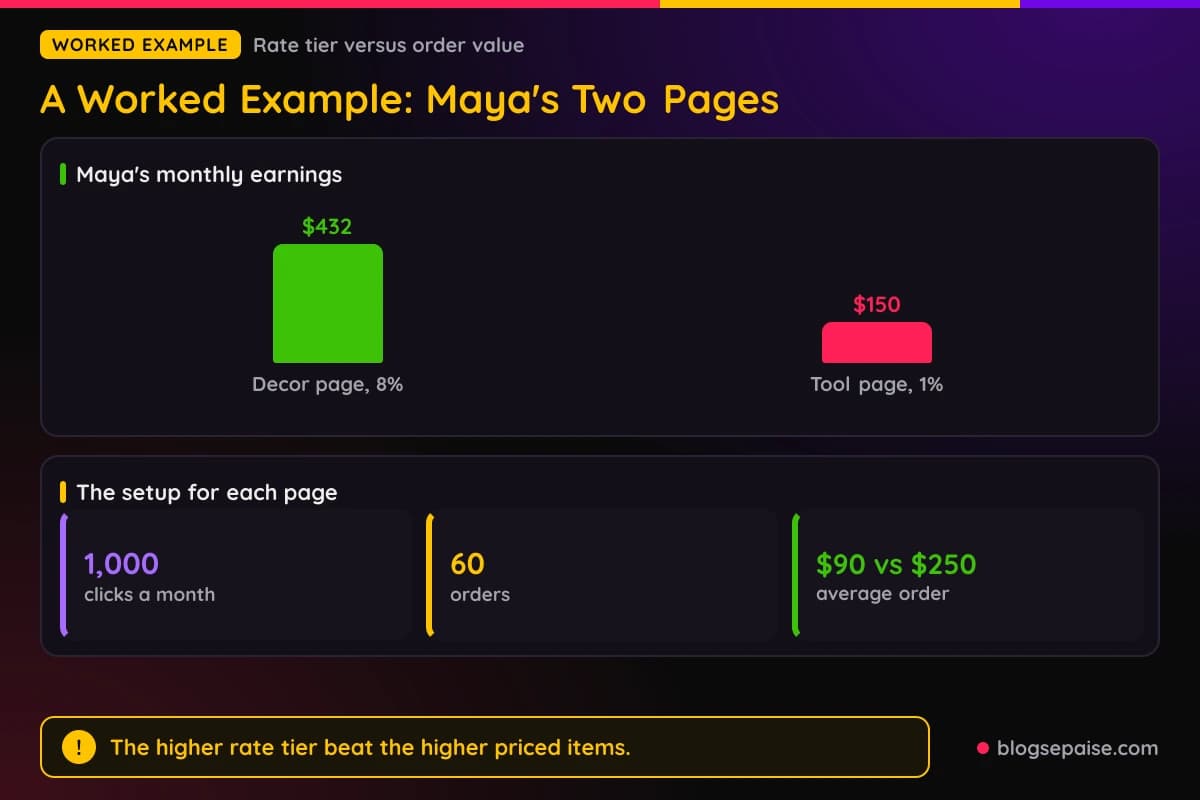
Both pages get 1,000 clicks a month, and 60 readers buy within one day on each. The decor page has an average order of $90, and the tool page has an average order of $250.
On the decor page she earns $7.20 per order, which is $432 a month. On the tool page she earns $2.50 per order, which is $150 a month.
The tool page sells higher priced items, but the rate is so low that the decor page still wins by $282. Her lesson is that the rate tier matters as much as the price.
She also learns that her tool page needs a different job. She turns it into a quick pick list for readers ready to buy, which suits the 1 day window.
Maya keeps her notes sheet and rechecks her Impact terms every few months. Her numbers rest on the rates she wrote down, and she knows they can change.
The whole path took her about two weeks from signup to her first tracked link. The prep work did most of the job, and the application itself took less than half an hour.
Her next move is a seasonal decor page for fall. She plans it two months early so it can rank before readers start shopping.
She keeps the tool page too, because even a 1 percent rate adds up when a page keeps its traffic all year.
Common Mistakes When Applying To The Home Depot Affiliate Program
The biggest mistake is applying before the site is ready. A half built site with a few short posts rarely wins approval.
Another mistake is applying from the wrong niche. A site about travel or finance has little reason to promote Home Depot.
Many people skip the trust pages. No privacy policy, no contact page, and no disclosure make a site look careless.
Some applicants copy product descriptions from stores. Reviewers can spot copied text quickly, and it ruins trust.
Vague answers hurt too. Saying I want to make money with affiliate links tells a reviewer nothing about your readers.
Others inflate traffic or list channels that do not exist. A gap between the claim and the site is an easy reason to say no.
Reapplying every day is another trap. Fix the problems, wait a few weeks, and then send one fresh application.
After approval, people forget to read the terms. Then they use coupons, ads, or methods that the contract limits, and they risk losing their account.
Some new affiliates ignore the 1 day cookie. They write long research guides and wonder why the sales do not show up.
Finally, many skip the disclosure on their pages. That puts both your Impact account and your reputation at risk.
Avoid these ten and you are ahead of most applicants. Each fix costs time but no money.
One more slip is chasing the 8 percent rate on every page. Only select decor products qualify, so stuffing decor links into unrelated posts looks forced.
Treat the rate tiers as a guide for planning and not as a reason to bend your content.
Final Thoughts
Getting approved for the Home Depot affiliate program comes down to looking like a real, helpful publisher in a home niche. The eight steps give you a clear order to follow.
Check your fit, prepare your site, build a full Impact profile, apply with honest answers, and then read the terms. After that, build pages that match a 1 day cookie.
Start today with Step 1 and write your one sentence about your readers. Then fix the weakest part of your site before you apply.
Remember that Home Depot publishes few numbers. Use your Impact account as the source for rates, payouts, and rules.
A small, careful application beats a rushed one. Give it a good week of prep, and you will be in far better shape.
Frequently Asked Questions
1. Where do I apply for the Home Depot affiliate program?
You apply through Impact. Create a free publisher account, search for Home Depot in the brand search, and submit your application there.
2. How much does the Home Depot affiliate program pay?
Home Depot's affiliate FAQ lists 1 percent on most products and appliances and 8 percent on select home decor. Check your Impact account for the current schedule.
3. How long is the Home Depot cookie window?
Home Depot lists 1 day. A sale counts when the reader buys within 24 hours of the click.
4. Is the Home Depot affiliate program free to join?
Yes. Joining is free, but you do need a live website when you apply.
5. How much traffic do I need to get approved?
Home Depot does not publish a traffic minimum. Focus on original content, a clear niche, and a finished site.
6. How long does approval take?
Home Depot does not publish an approval time. Many applicants hear back within days, but that is not a promise.
7. Can I join with only a social media account?
Home Depot asks for a live website at the time you apply. Social channels can support your case, but they should not be your only property.
8. Why was my application rejected?
Home Depot does not publish its reasons. Common causes are an unfinished site, thin or copied content, a weak niche fit, and missing trust pages.
9. Can I reapply after a rejection?
Yes. Fix the weak points, wait a few weeks, and send one new application.
10. Do I need an affiliate disclosure?
Yes. Put a plain disclosure on your site and near your links, because both the FTC and Impact expect it.
11. Does Home Depot pay for returned items?
Returns usually reverse a commission. Read the exact wording in your program terms.
12. Where do I find my payout details?
Your payout method, minimum, and timing appear inside your Impact account. Home Depot does not publish those numbers elsewhere.