Why Cookie Windows Matter More Than Commission Percent
Most new affiliates compare programs by one number. They hunt for the biggest commission percent and sign up wherever it shows.
A quieter number hides in the terms and often matters more. The cookie window decides how long after a click you can still get paid for a sale.
Readers rarely buy on the first visit. They read, compare, ask a friend, wait for payday, and come back days or weeks later.
If the window closes before they return, you did the work and earned nothing. A 30 percent rate on a sale that never gets credited pays exactly zero.
Cookie windows are small, dull, and easy to skip, which is why checking them gives you an edge. A few minutes of reading can change which programs get your best pages.
Disclosure: Some of the links I share might be affiliate links. If you click on one and make a purchase, I may earn a small commission as a thank you. But don’t worry, it won’t cost you anything extra. I only recommend stuff I genuinely believe in. Your support helps me keep creating awesome content. You can read my full affiliate disclosure in my disclaimer page.
If you want to save a lot of hours searching for high-paying affiliate programs, check out our exclusive list of 2500+ affiliate programs. You’ll find all the information about the programs inside the list. This list is perfect for affiliate bloggers and influencers.
Why Cookie Windows Matter More Than You Think
A cookie window is the time limit on your claim to a sale. Click a link today, and the program remembers you for a set number of days.
Commission percent is easy to see, so it gets all the attention. The window sits in the fine print, so it gets ignored.
Yet the two numbers work together to decide what you earn. A high rate with a tiny window can pay less than a modest rate with a long one.
Think about how you shop yourself. You see a product, close the tab, think about it for a week, and then buy.
Your readers do the same thing. The real question is if the program still remembers who sent them.
Short windows punish patient buyers. Long windows reward the content that plants an idea and lets it grow.
Think of the window as a shelf life for your recommendation. Once it runs out, the program treats the buyer as a stranger.
Experienced affiliates read this number before they write a word. A page built on the wrong program can sit for months and pay almost nothing.
That makes the window a quiet link between your content style and your income. A quick coupon post and a slow, careful review need very different windows.
Beginners often learn about windows after a puzzling month. Clicks look healthy, sales look thin, and nobody can say why.
Some of those missing sales may have landed after the window closed. Others may have come from a second device that never saw your cookie.
Once you can read a window, you can predict which programs will pay for the way you already write. You also stop chasing big percentages that hide weak terms.
None of this needs math beyond multiplication. You need a notes sheet, a calculator, and the program's current terms.
Windows also change, so every number in this guide is a range and not a promise. Check the program's current terms before you decide anything.
Step 1: Learn What A Cookie Window Is And How Tracking Works
A cookie is a tiny text file that your browser stores for a website. It holds a short piece of data, like an ID, so the site can recognize that browser later.
An affiliate link carries your ID in its web address. When a reader clicks it, the program's tracking system reads that ID and saves it in a cookie.
That cookie is stamped with a start time and an end time. The gap between the two is the cookie window.
Say a program lists a 30 day window. If the reader buys on day 12, the cookie is still alive and the sale is credited to you.
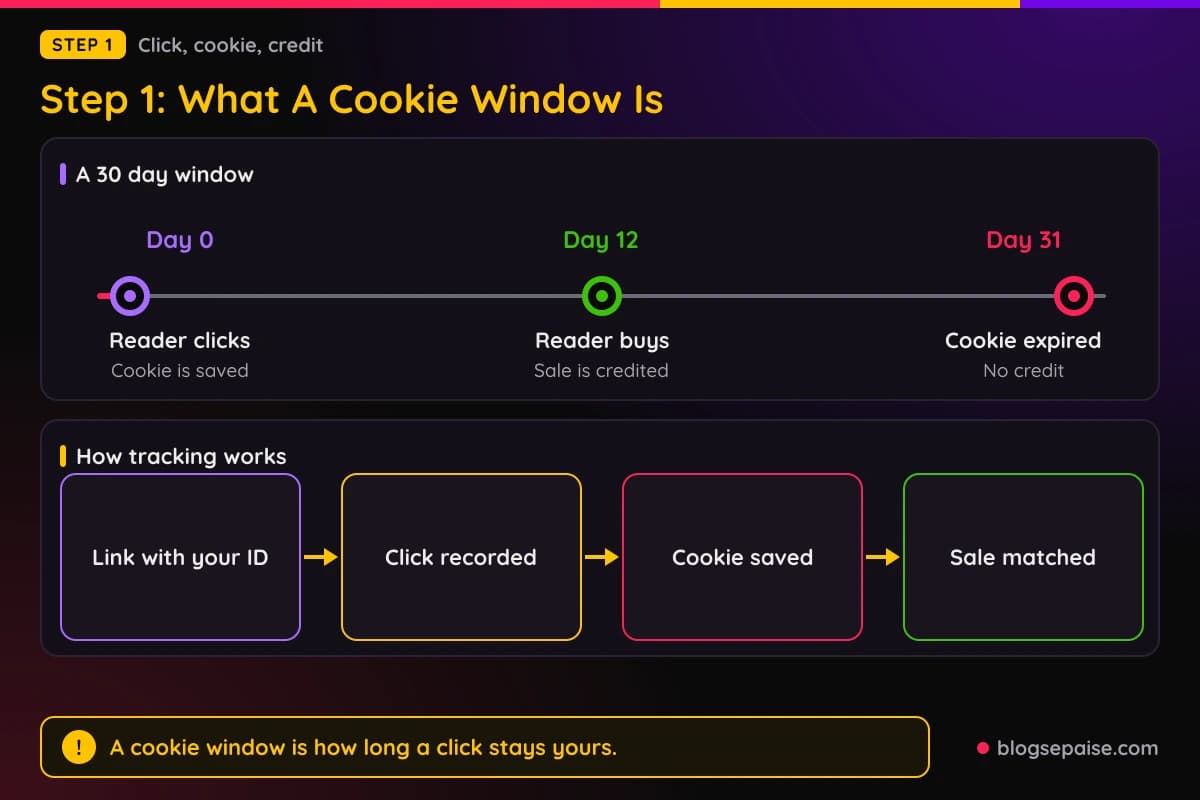
On day 31 the cookie has expired, so a purchase looks like a normal visit with no affiliate attached. The program owes you nothing, even if you sent that buyer.
Some programs do not rely on browser cookies alone. They may also track by a login, a coupon code, a server record, or a device match.
People still say cookie window for all of these methods. Think of it as the length of time after a click when a sale can still be linked back to you.
Some windows start at the click, and some restart on each new click. A few start the clock at the first click and never extend it, so read the exact wording.
Another detail is the type of cookie. A session cookie disappears when the browser closes, which can end your window within hours.
A persistent cookie stays until its end date. Most affiliate windows are meant to be persistent, but browser settings can shorten them, as Step 6 shows.
Networks add one more layer. Platforms such as Awin and PartnerStack run the tracking for many brands, and each brand picks its own window inside the network.
That means the window on a network listing is the brand's choice. Two brands on the same network can have very different numbers.
Keep one habit from this step. Always ask how many days, counted from which moment, and counted by what kind of tracking.
The answer takes a minute to find and saves you from false hopes. A program that is vague about these basics is telling you something about how it treats partners.
Step 2: Learn How Last Click Attribution And Overwriting Work
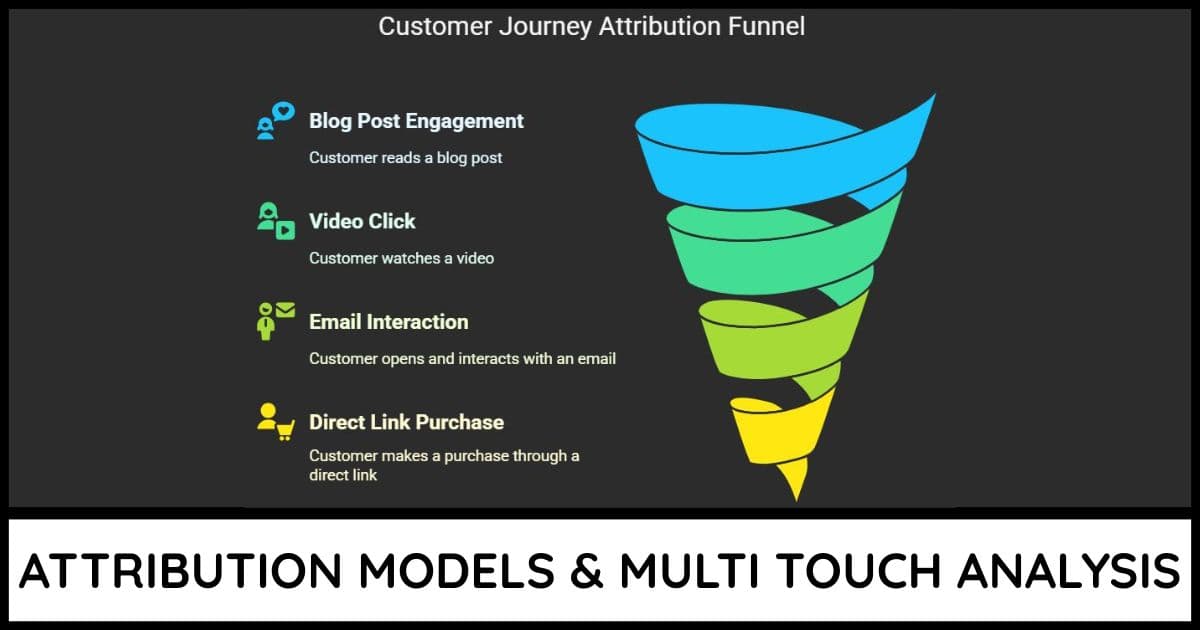
A reader can click more than one affiliate link before buying. Attribution is the rule that decides which click gets the credit.
The most common rule is last click. The final affiliate link clicked before the purchase wins, and earlier ones get nothing.
Here is how overwriting happens. A reader clicks your review link on day 1, and your cookie starts.
On day 5 the same reader searches for a coupon and clicks a coupon site's affiliate link. The new cookie replaces yours.
On day 6 the reader buys, and the coupon site gets paid. You started the journey and earned nothing.
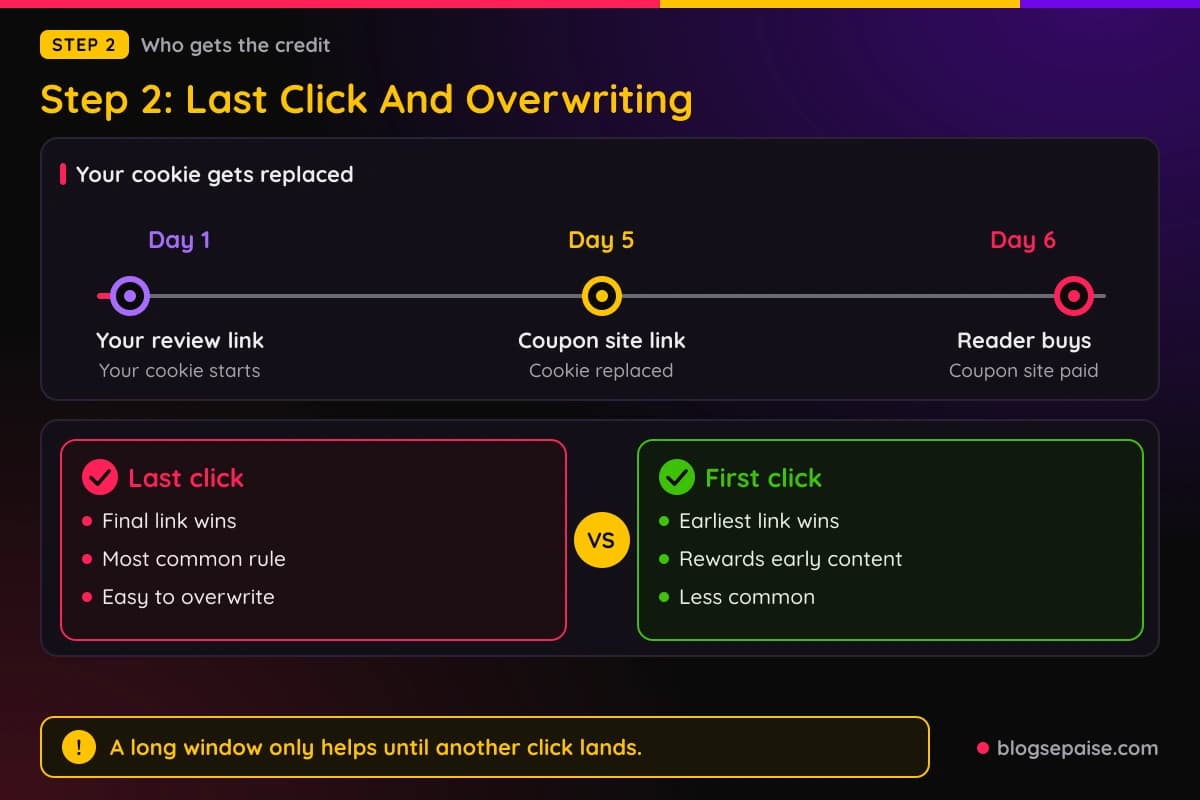
That is why a long window protects you less than people think. It only helps until another affiliate click lands on top of yours.
Other rules exist too. First click gives credit to the earliest link, and some programs split the credit between several touches.
Our guide to attribution models shows how each rule changes who gets paid. Reading it makes the fine print in a program's terms much easier to follow.
Coupon codes can also override cookies. If a program credits the owner of the code, a reader who types a code from another site can take your sale.
A few programs lock in the first affiliate for the whole window and refuse overwrites. That is rare, so treat it as a bonus if you find it.
Overwriting can also work in your favor. When your link sits late in the buying path, like in an email or a final comparison page, you can take the credit from earlier clicks.
Read the attribution wording right next to the window number. A 90 day window with a last click rule is far weaker than it sounds.
Write both facts side by side in your notes. For example, 90 days and last click tells a very different story than 30 days with first click.
The window sets how long a click stays alive, and the attribution rule sets how easily it gets replaced. You need both answers before the number means anything.
Step 3: Know The Typical Window Lengths
Cookie windows vary a lot, so there is no single normal. The range runs from 24 hours at the short end to 90 days or more at the long end.
Retail and marketplace programs often sit toward the short end. Windows of 1 to 30 days are common there, because shoppers buy fast.
Amazon Associates is a well known example, with a 24 hour window on its program pages. Check its current terms, because that number and its rules can change.
Software and subscription programs often run longer. Windows of 30 to 90 days show up often, since buyers test tools before they pay.
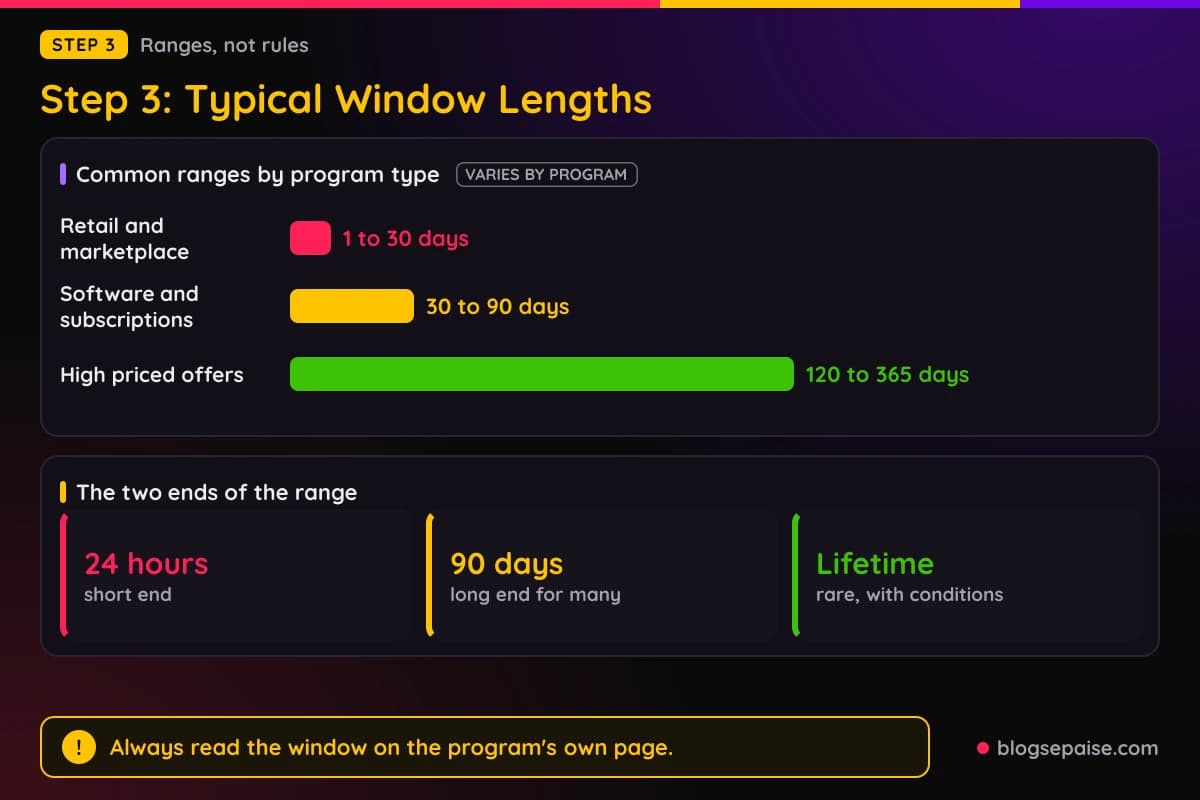
High priced products and services can run longer still. Some programs offer windows of 120 to 365 days, and a few advertise lifetime tracking.
Those are ranges and not rules. Every program picks its own number, and it can change that number with a notice or sometimes with little warning.
So never copy a window from a blog post, including this one. Open the program's own page and read the number it shows today.
Lifetime cookies deserve a closer look. Some tie a visitor to you for good, but the program may limit them to certain sign-ups or cancel them when the person clicks another affiliate link.
Also check what the window covers. Some count only the first purchase, while others cover any order the buyer places inside the window.
Window and commission type interact. Our article on recurring and one-time commissions explains why a short window with recurring pay can still beat a long window with one payment.
A short window is not always a red flag. Some brands use them because their products sell fast and they want to avoid paying for sales they would have made anyway.
A very long window is not always a gift either. If the program also pays a tiny rate, the length cannot rescue it.
Write each program's stated window in a notes sheet, with the date you checked it. A column of numbers makes comparing programs far easier later.
If a program does not state its window anywhere, treat that as a warning. Ask the support team, and wait for a written answer before you build pages around it.
Step 4: See How Window Length Changes Your Expected Earnings
A simple formula shows the effect. Expected earnings equal the number of buyers your window catches, times the price, times the commission rate.
Say 1,000 readers click your link in a month, and 5 percent of them eventually buy. That gives you 50 buyers.
Say the product costs $100 and the program pays 20 percent, so each credited sale pays $20. The only open question is how many of those 50 buyers the window catches.
Buyers do not all act on day one. Suppose 30 of them buy within 7 days, 40 within 30 days, and 45 within 60 days.
With a 7 day window you are paid for 30 sales, which is $600. With a 30 day window you are paid for 40 sales, which is $800.
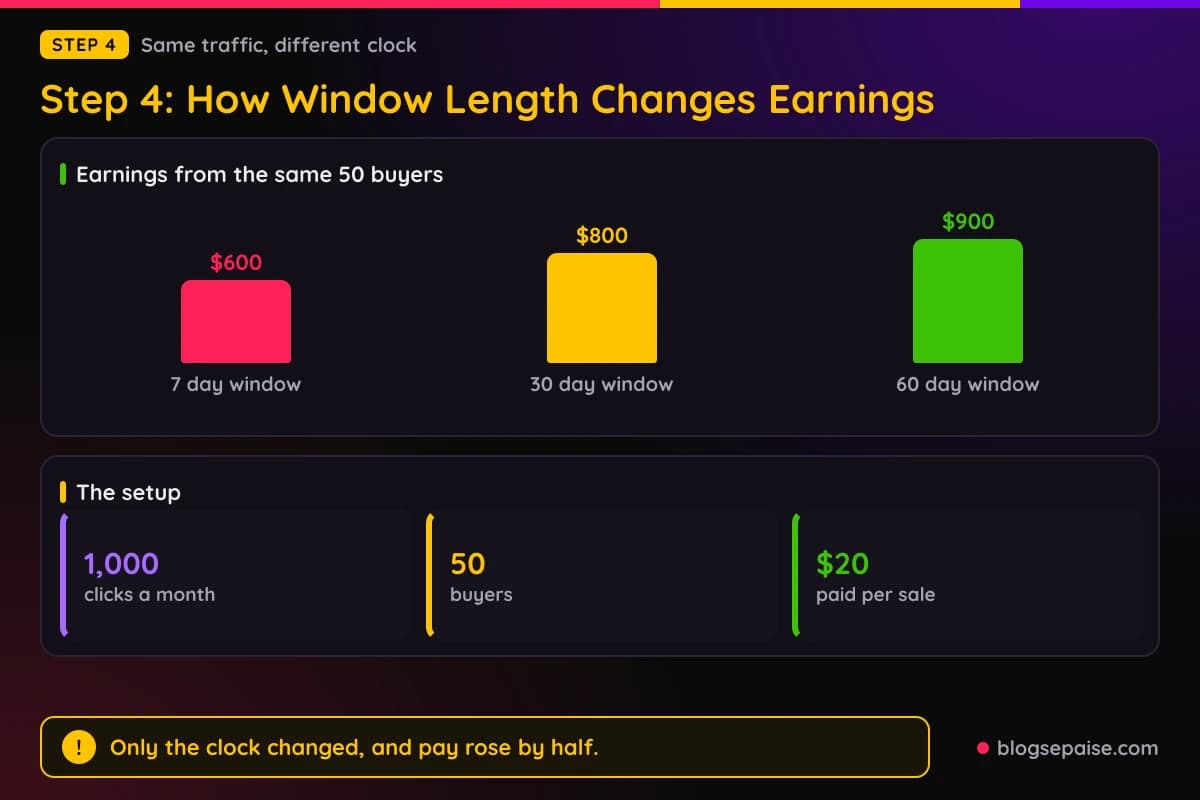
With a 60 day window you are paid for 45 sales, which is $900. Same readers, same product, same rate, and a $300 gap between the shortest and longest window.
The 20 percent rate never changed in any of those cases. Only the clock changed, and the clock raised your pay by half.
Notice that the first 7 days did most of the work, with 30 of the 45 buyers. Later days add less, so the gains slow down as the window grows.
That slowdown is useful. Going from 7 to 30 days helps a lot, while going from 60 to 90 days may add very little.
Real numbers will differ. Some audiences buy fast and others take months, so use your own click and sale dates when you have them.
Most affiliate dashboards show a click date and a sale date, or at least one of them. Export a few months of data and count the days between the two.
Sales that land outside the window never show up as commissions, so the data tells you only part of the story. Treat your dashboard as a floor and not a ceiling.
Even rough math beats guessing. Ten minutes with a calculator can show that a plain looking 15 percent program may outearn a flashy 25 percent one.
The same method works for any product price. A higher price makes each caught sale worth more, which makes a longer window even more valuable.
Step 5: Match Buying Cycles And Content Type To The Window
A buying cycle is the time between first hearing about a product and paying for it. It changes a lot from one product to another.
A $10 phone case may take minutes to choose. A business software plan may take weeks, and a course or a mattress can take longer.
Match the cycle to the window before you promote anything. If the cycle is longer than the window, a share of your sales will fall outside it.
Price changes the cycle as well. A cheap item invites a quick decision, while a costly one pushes readers to compare, wait, and ask for advice.
Free trials stretch things further. A reader may start a trial on day 3 and pay only when it ends, so check if the window counts the trial start or the first payment.
Programs handle this in different ways. Some credit the trial signup, and others wait for the first paid month, so ask before you promote trial offers.
Content type matters too, because different pages catch readers at different moments. A page for early research gets clicked early, while a page for final checking gets clicked right before purchase.
Reviews and comparison posts usually catch readers late in the cycle. Those readers are close to buying, so even a short window can work.
How-to guides and tutorials often catch readers early. A reader learning a skill may click a tool link, then spend weeks practicing before paying.
For that kind of content, a longer window is worth real money. Without it, your tutorial does the teaching and someone else gets paid.
Email sits in a special spot. A newsletter can send the same reader back to your link again and again, which restarts the clock if the program resets the window on each click.
That makes email a good fit for slow decisions. Each fresh click can put your link back on top, which also protects you from a coupon site overwriting your cookie.
If you want to build a list, our guide to email marketing tools can help you pick software that makes follow-up easier.
Social posts and short videos tend to work the other way. People scroll, tap, and buy on impulse or forget, so a short window may be enough.
Seasonal buying matters too. A reader may research a gift in October and buy in December, which is a gap no short window will cover.
Ask one question for every page you write. How long will a typical reader take to get from my page to checkout, and does the window cover it?
Your answer does not need to be exact. A rough guess of days or weeks is enough to tell you if a window fits the page.
Over time your sales dates will correct your guesses. Keep a short list of products with their usual decision time, and update it as you learn.
Step 6: Know The Cross-Device And Ad Blocker Limits
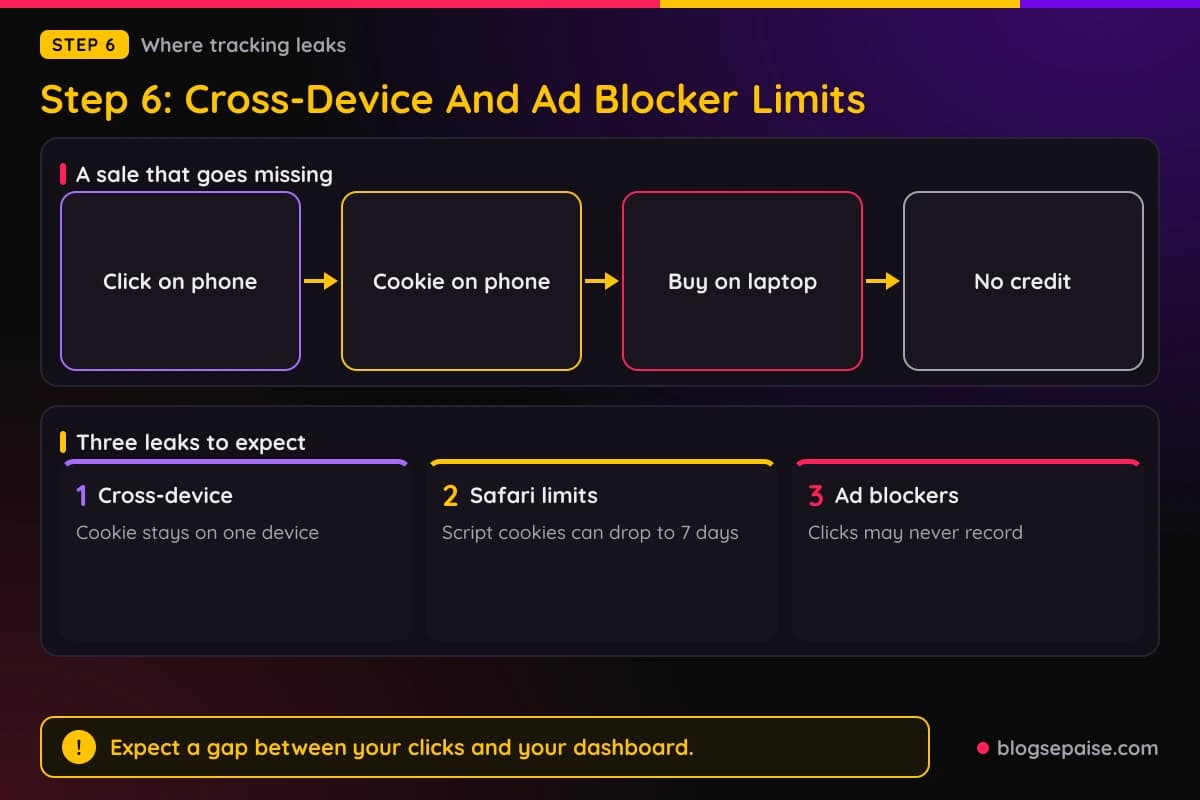
A cookie lives in one browser on one device. That single fact explains many missing commissions.
A reader clicks your link on a phone during lunch. That evening they buy on a laptop, and the laptop has no cookie from you.
The program sees a normal purchase with no affiliate attached. You get nothing, even though you started the whole thing.
Phones make this common. Many people browse on mobile and buy on desktop, or jump between a social app and a regular browser.
In-app browsers add another wrinkle. A link opened inside a social app may use a separate cookie store from the phone's main browser.
Browsers also limit cookies on purpose. Safari's tracking prevention can shorten cookies written by scripts, in some cases to 7 days, and other browsers have their own privacy rules.
Browser rules change, so check current documentation before you count on any number. A program might claim a 60 day window while the browser removes the cookie sooner.
Ad blockers and privacy tools can block tracking scripts or links entirely. When that happens, the click may never be recorded.
Some programs fight these limits with server-side tracking, login matching, or coupon codes that work on any device. Ask each program how it handles them.
You cannot fix these limits on your side. You can plan around them by expecting a gap between what you drive and what your dashboard shows.
A coupon code that only you share can help in cross-device cases. The reader types the code at checkout, and the program matches the sale to you if its rules allow it.
Do not try tricks to dodge these limits, like forced redirects or cookie stuffing. Those can get you banned, as our page on how to avoid getting banned from affiliate programs explains.
Treat tracking loss as a cost of doing business. Programs with strong tracking and a fair window are worth more than their headline numbers suggest.
When you compare two programs, ask both about tracking on mobile and Safari. A clear answer is a good sign, and a vague one is worth a note.
Step 7: Compare Two Programs By Window And Rate Together
Comparing programs by rate alone leaves out half the story. You need a method that puts rate and window on the same scale.
Start with price and rate. Multiply them to get the pay per sale, which is the number a percentage hides.
Next, estimate the share of your buyers that each window catches. Use your own data if you have it, or a careful guess if you do not.
Then multiply the pay per sale by the buyers caught. The program with the bigger result earns you more from the same traffic.
Call it capture times pay. It is simple, and it keeps you from picking the highest percent by reflex.
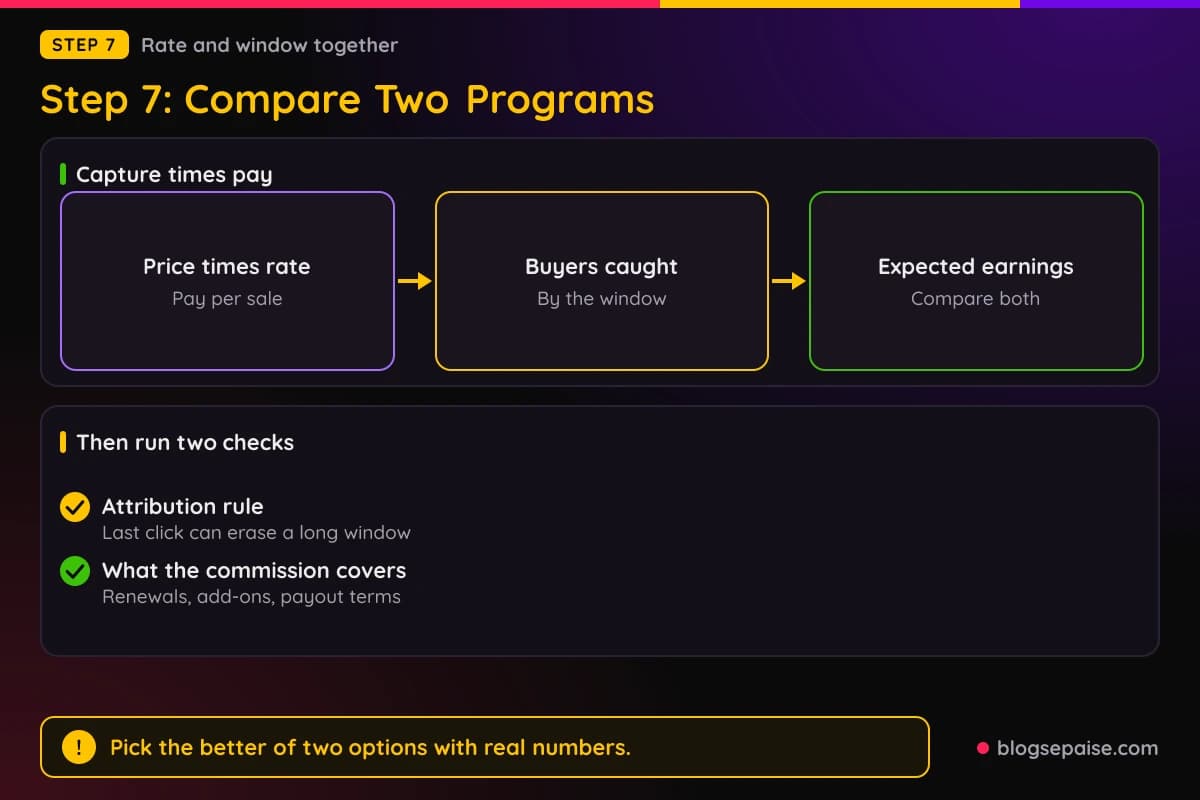
Add two checks after the math. First, look at the attribution rule, since last click can wipe out a long window.
Second, look at what the commission covers, such as renewals or add-ons. Our list of high quality affiliate programs is a good place to find programs worth running this test on.
Also look at the payout side. A great window loses its charm if the program pays late, sets a high payout minimum, or takes back commissions after refunds.
Rate and window are not the only filters, but beginners skip them most often. Run the math first, then check the rest.
Ties happen. When two programs earn about the same, lean toward the longer window, because it gives you more room when your readers are slow.
You can also lean toward the program with better support and clearer terms. A fair partner that answers emails is worth a small drop in earnings.
Rerun the comparison when terms change. A program that cuts its window from 60 days to 30 may no longer win the test.
Keep the results in your notes. After a few comparisons you will start to see which kinds of programs fit your audience.
Use round numbers when you are unsure. If a rough guess changes the winner, that is a sign to collect more data before you commit.
The goal is not to find a perfect program. The goal is to pick the better of two options with real numbers instead of a hunch.
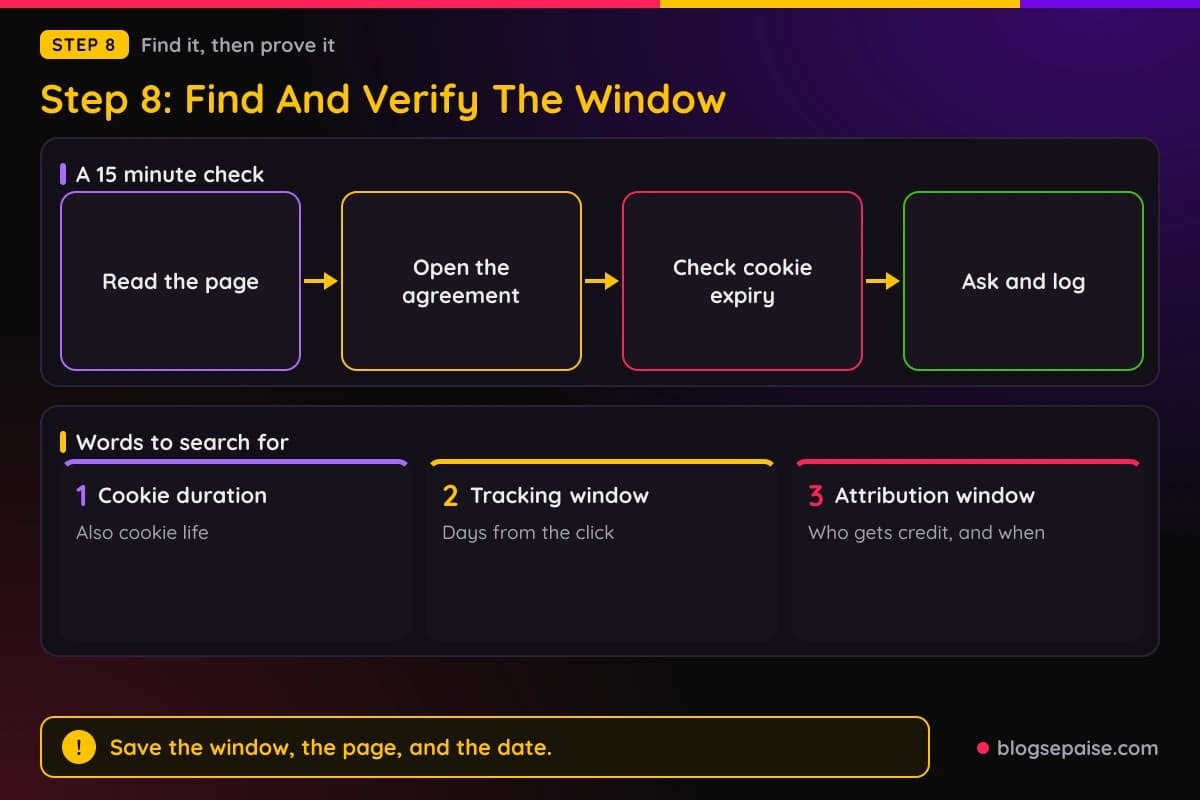
Step 8: Find And Verify A Program's Window
The window is almost always written down, but not always in the same place. Start with the program's signup page or its main partner page.
Look for words like cookie duration, cookie life, tracking window, or attribution window. Those are all names for the same thing.
Next open the full affiliate agreement, which is often a link in the footer or on the signup form. Our guide on how to read affiliate program terms covers the other clauses worth reading beside it.
If the program runs through a network, check the network dashboard too. Sellers often list the window on the program's detail page after you apply.
Compare the numbers across pages. If a marketing page says 90 days and the agreement says 30, the agreement usually controls.
When two pages disagree, email the program and ask which one applies. Save the reply with the date, since it can help you in a dispute.
Then check the tracking yourself. Click your own affiliate link in a clean browser and open the browser's developer tools to look at the cookie.
In Chrome you can open developer tools, go to the Application tab, and look under Cookies for the site. The expiry column shows when the cookie ends.
Compare that expiry date with the number in the terms. If a 30 day window shows an end date two days away, something is off, and you should ask the program.
Do not buy through your own link to test it. Most programs ban self-purchases, and a test sale can get your account flagged.
Ask the program's partner manager about mobile, Safari, and cross-device tracking. Good programs answer these questions in plain language.
Record the window, the source page, the date, and any reply in your notes. Check again every few months.
Windows can change, so a dated record protects you. It also lets you spot changes early and adjust your pages before income drops.
Make this a routine for every program you promote. The whole check takes about 15 minutes, and it saves you from building on a number that was never true.
A Worked Example: Priya Compares A 7-Day And A 90-Day Program
Priya runs a small blog about home espresso gear. Her grinder review page sends about 2,000 clicks a month to a product that costs $200.
About 3 percent of those readers end up buying a grinder, which is 60 buyers a month. She has two programs to choose from.
Program A pays 10 percent with a 90 day window. Program B pays 15 percent with a 7 day window.
At first glance B looks better, because 15 is bigger than 10. Priya decides to run the numbers before she picks.
Her pay per sale is $20 under Program A and $30 under Program B. Next she checks how long her readers take to buy.
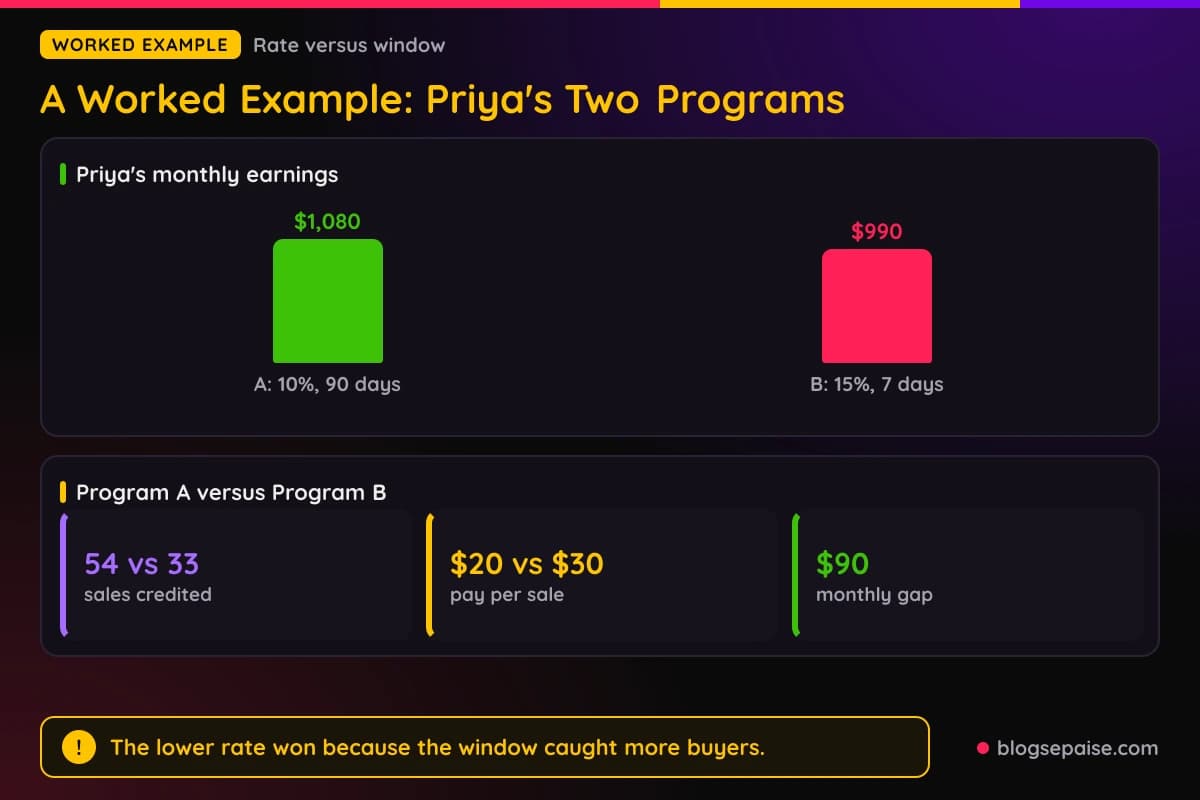
Her old sales records show that 33 of the 60 buyers buy within 7 days. By day 90, 54 of them have bought.
Under Program A she is paid for 54 sales, which is $1,080. Under Program B she is paid for 33 sales, which is $990.
The lower rate wins by $90 a month. Program B would need to catch 36 buyers just to tie.
Then Priya checks the attribution rules. Both programs use last click, so a coupon site could still take a sale.
She also emails Program A and asks how it handles Safari and cross-device sales. She saves the reply in her notes with the date.
She picks Program A for the grinder page. For a flash sale page where readers buy the same day, Program B would win, so she keeps its link ready.
Her lesson is that the right program depends on the page. One program is not best everywhere, so she keeps a short list in her notes for each type of post.
She rechecks both terms pages every few months and dates each check. Windows and rates change, and her math only holds while the numbers do.
The whole exercise took her under an hour. It also changed her pick, which a quick look at the percentages would never have done.
Common Mistakes With Cookie Windows
The first mistake is picking a program by commission percent alone. A big rate on a short window can pay less than a modest rate on a longer one.
The second mistake is trusting a window you read once. Programs edit their terms, so a number from last year may be wrong today.
Another mistake is ignoring the attribution rule. A long window means little if the last click always wins and coupon sites keep taking your sales.
Many beginners also forget cross-device loss. They compare their click count with their sales and wonder where the rest went.
Some people judge a window without looking at their audience. A 7 day window can be fine for impulse buys and painful for expensive software.
Beginners also treat a long window as permission to be slow. Readers forget, and the best time to win a sale is still while your page is fresh in their minds.
Some affiliates never ask support a single question. A short email about tracking and attribution often gets answers that the public pages leave out.
Skipping notes is another quiet mistake. Without dated records, you cannot tell if a program changed its terms or if your traffic changed.
Others test their own links by buying through them. That can break the rules and put commissions at risk.
A final mistake is stuffing or forcing cookies to stretch a window. Programs watch for it, and the penalty is usually a closed account and lost earnings.
Avoid these and you are already ahead of most beginners. The fixes cost nothing but a little reading time.
Final Thoughts
Cookie windows are small print with large effects. A few days more or less can change your income without changing a single word of your content.
The path is short. Learn what a window is, how last click overwrites it, and which ranges are common, then run the math, match the window to your readers, and verify the number.
Start with your next program application. Write down the window, multiply it against the rate, and let the result pick your winner.
Keep your notes dated and recheck them. Terms change, and your math should change with them.
A little care here pays off for a long time. The same checked window keeps working for every post you publish on that program.
For more on spotting weak programs, read our page on affiliate marketing red flags before you sign anything.
Frequently Asked Questions
1. How long is a typical affiliate cookie window?
It varies by program and product. Many fall between 24 hours and 90 days, with some going longer, so check the current terms.
2. Is a longer cookie window always better?
Not always. A long window with a tiny rate or a weak attribution rule can still pay less than a short window with a strong rate.
3. Does the cookie window start at the click or at the sale?
It normally starts at the click. Some programs restart it on later clicks, so read the exact wording.
4. If a reader clears their cookies, do I lose the sale?
Often yes. Without the cookie the program cannot link the sale to you, unless a coupon code or a login match does the job.
5. Can another affiliate take my sale inside the window?
Yes, under last click rules. A later click on another affiliate's link usually replaces yours, so read the attribution rule.
6. Do coupon codes override cookies?
Some programs credit the owner of the code even when your cookie is alive. Check the coupon rules in the terms.
7. Why do I get clicks but no commissions?
Several reasons are possible. Buyers may have taken longer than the window, switched devices, blocked tracking, or clicked another affiliate's link.
8. How can I check a program's cookie length myself?
Read the agreement, then click your link in a clean browser and check the cookie's expiry in developer tools. Do not buy through it.
9. Do cookie windows matter for recurring commissions?
Yes, at the start. The window decides if you get credited for the first signup, and recurring pay follows under the program's rules.
10. Is a lifetime cookie really forever?
Not always. Programs often attach conditions, like a certain sign-up type, and a later click on another affiliate's link can still replace it.
11. Do I need a long window for impulse buys?
Usually not. Impulse buyers decide within hours or days, so a short window may cover most of your sales on cheap products.
12. How often should I recheck a window?
Every few months, and before a big promotion. Save dated copies so you can show what the terms said when you joined.