How to Read an Affiliate Income Report (and What Real Ones Look Like)
Scroll through any affiliate marketing group for five minutes and you will see an income report. A bright screenshot, a big green number, and a caption that says something like "my best month yet."
Most beginners look at that number and feel two things at once. They feel excited, and then they feel a little behind.
The trouble is that a single screenshot tells you very little. It does not show the time frame, the costs, the refunds, or how much of that money has actually reached a bank account.
So in this guide we slow the screenshot down and read it like an accountant would. You will learn the numbers every report should carry, how to tell revenue from profit, and how to spot a report that has been polished to impress.
We will also build a sample report together, line by line. Every figure in that sample is made up for teaching, and we label it that way each time it appears.
If you want the bigger picture first, read the truth about passive income in affiliate marketing. For a quick tour of the stats you will see inside a dashboard, our post on affiliate dashboard metrics is a good companion.
Disclosure: Some of the links I share might be affiliate links. If you click on one and make a purchase, I may earn a small commission as a thank you. But don’t worry, it won’t cost you anything extra. I only recommend stuff I genuinely believe in. Your support helps me keep creating awesome content. You can read my full affiliate disclosure in my disclaimer page.
If you want to save a lot of hours searching for high-paying affiliate programs, check out our exclusive list of 2500+ affiliate programs. You’ll find all the information about the programs inside the list. This list is perfect for affiliate bloggers and influencers.
The Short Answer: What An Affiliate Income Report Really Shows
An affiliate income report is a summary of what an affiliate earned over a set period, usually one month. A good one shows clicks, orders, commissions, their status, and the costs that sat behind them.
A weak one shows a single number with no date, no source, and no context. That kind of report can be real and still be useless, because you cannot tell what produced the number.
Here is the quick method for reading any report. Check the time frame first, then the five core numbers, then the status of the money, then the costs, and finally the proof behind the screenshot.
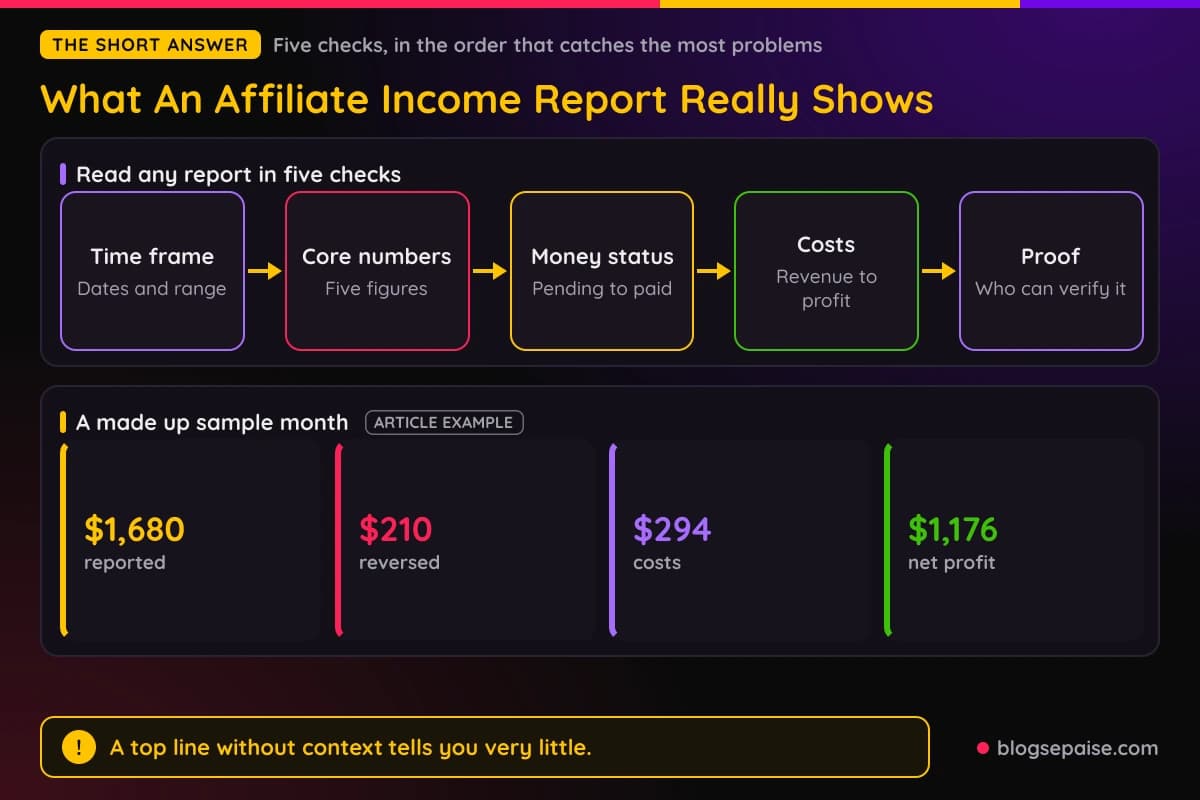
Each check catches a different kind of problem. The time frame catches a lucky spike, the core numbers catch weak traffic, the status catches money that may vanish, and the costs catch fake profit.
The rest of this guide walks through seven steps. Follow them in order and you will be able to read your own reports, and other people's, with a calm and clear head.
Step 1: Learn The Five Core Numbers Every Report Needs
Nearly every affiliate dashboard shows the same five numbers in some form. Once you know them, a report stops looking like a wall of figures and starts looking like a story.
The first number is clicks. A click is one visit that went through your affiliate link, and it tells you how much interest your content created.
The second number is conversions, which are the actions that earn you money. Depending on the program, a conversion can be a sale, a free trial, a lead, or a signup.
The third number is the conversion rate. It is conversions divided by clicks, so 84 sales from 4,200 clicks gives a conversion rate of 2 percent.
The fourth number is earnings per click, often shortened to EPC. It is total commissions divided by clicks, so $1,680 from 4,200 clicks works out to $0.40 per click.
The fifth number is the average commission per sale. In our made up sample, $1,680 across 84 sales means each sale paid about $20.
Why do these five matter together? Because each one points at a different part of your business.
Low clicks mean a traffic problem. A decent click count with a weak conversion rate means the offer or the page is the problem, and a low average commission means you may be promoting the wrong product.
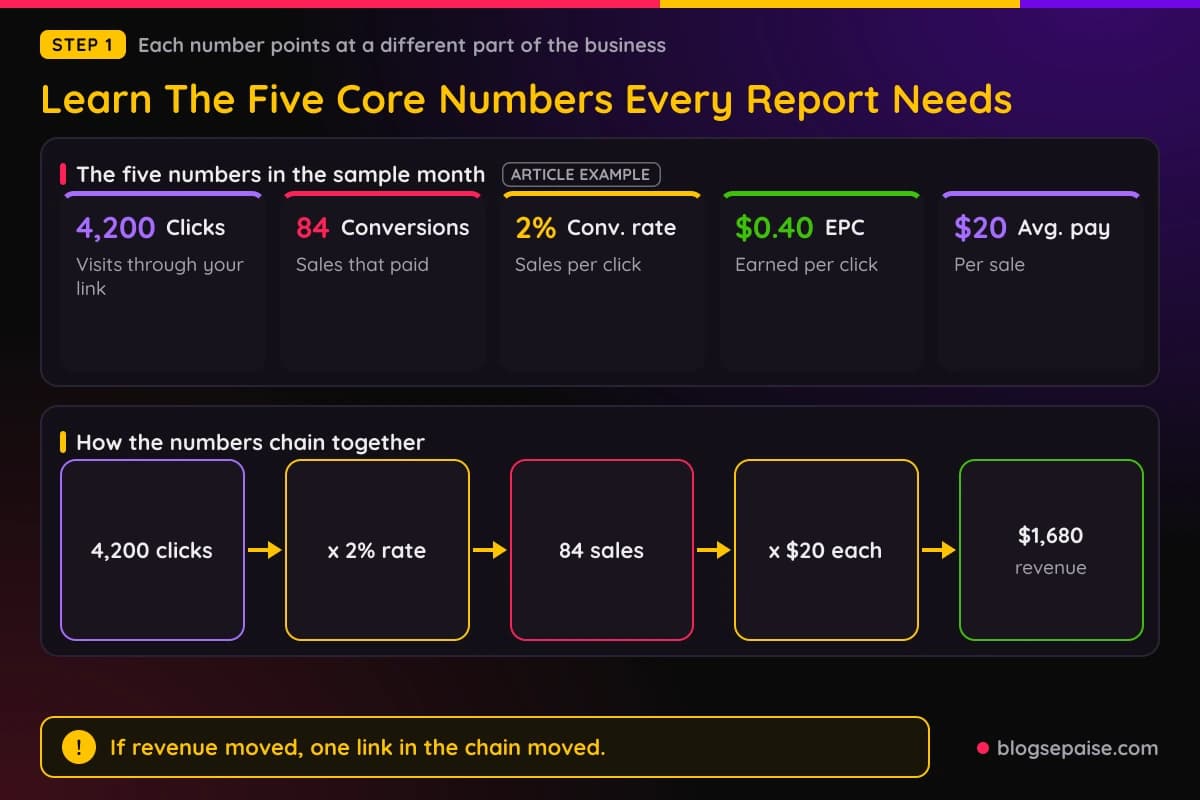
Notice how the numbers connect. Clicks times conversion rate gives conversions, and conversions times average commission gives revenue.
That chain is the most useful habit in report reading. If revenue went up, you can ask which link in the chain moved, and the answer tells you what to repeat.
A report that hides any of these five numbers is not lying by default, but it is hard to learn from. When someone shares only revenue, you cannot tell if they have a traffic machine, a high priced product, or one lucky sale.
Our post on tracking ROI goes deeper on how these ratios help you decide where to spend your time.
Step 2: Separate Revenue From Profit
The biggest number on most income screenshots is revenue. Revenue is the money the affiliate program reports, before anything gets taken out.
Profit is what is left after the costs of running the business. A site with $1,680 in commissions and $294 in costs does not have a $1,680 month, it has a much smaller one.
Let us price out the sample site, which is made up for this guide. It pays $30 for hosting, $40 for an email tool, $99 for an SEO tool, and $125 for a freelance writer, which adds up to $294.
Costs come in two flavors. Fixed costs like hosting and software repeat every month, while variable costs like writers, ads, and design work move up and down with your plans.
Ad spend deserves its own warning. If an affiliate spends $900 on ads to earn $1,100 in commissions, the screenshot shows $1,100 and the real result is a $200 gain before any other cost.
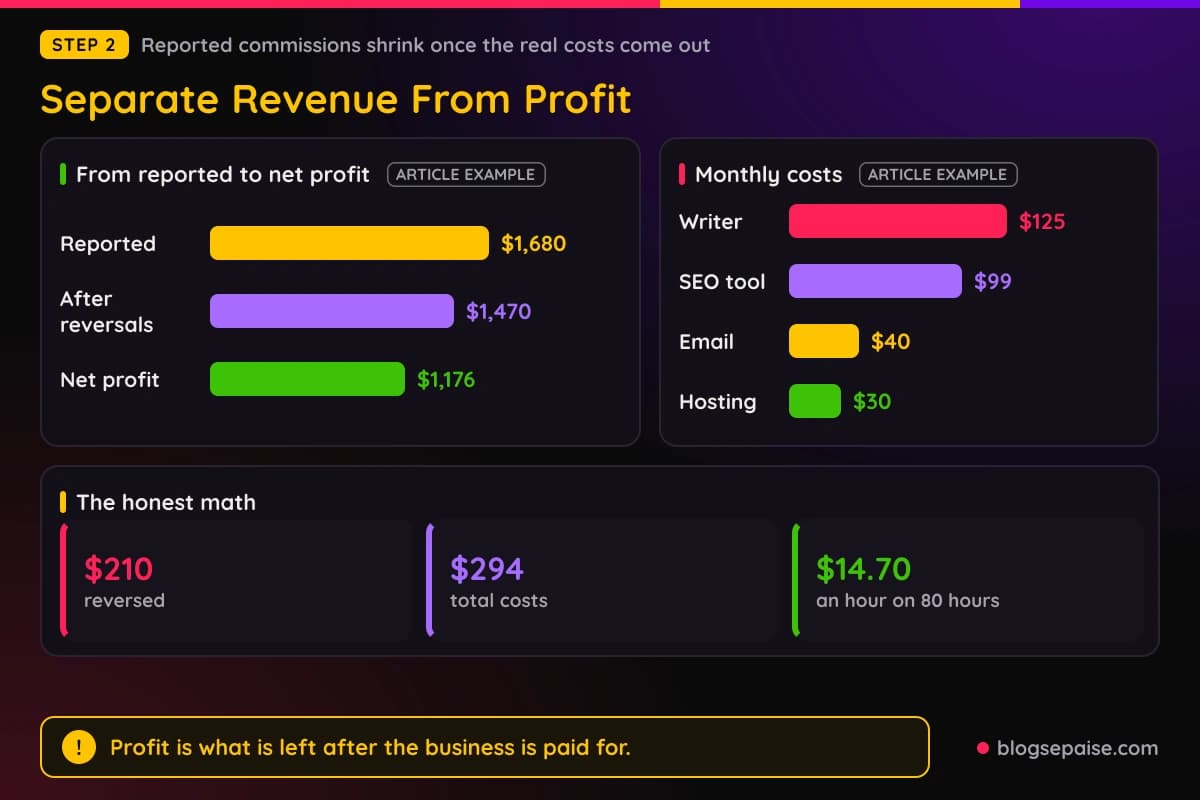
Then there are reversals. Refunds, canceled orders, and fraud checks pull commissions back out, and in the sample month $210 of the $1,680 was reversed.
So the honest math runs like this. $1,680 reported, minus $210 reversed, leaves $1,470, and minus $294 in costs leaves a net profit of $1,176.
Your time is also a cost, even if it does not show up in a bank statement. If you spent 80 hours to net $1,176, you earned about $14.70 an hour, and that number is worth knowing.
Do not let that discourage you. Most new sites earn well below minimum wage per hour at first, and the point of reading the math honestly is to track the climb.
For a simple way to log all of this each month, try our blog income tracker. It keeps revenue, costs, and profit in separate columns so you never mix them.
Step 3: Check The Time Frame And The Payment Status
A report with no dates is like a map with no scale. Always look for the exact range, such as March 1 to March 31, and ask if the number covers a day, a week, a month, or a whole year.
Some screenshots quietly show a lifetime total or a strong 30 day window instead of a calendar month. Neither is dishonest on its own, but both can make a number look bigger than a normal month would feel.
The next thing to read is the status of each commission. Almost every network uses the same stages, even if the names change.
Pending means the sale happened but the program has not confirmed it yet. Approved means the program accepted the sale, and paid means the money has been sent to you.
Programs wait before approving because customers can return products or cancel subscriptions. That wait is often 30 to 60 days, and some software programs hold commissions even longer.
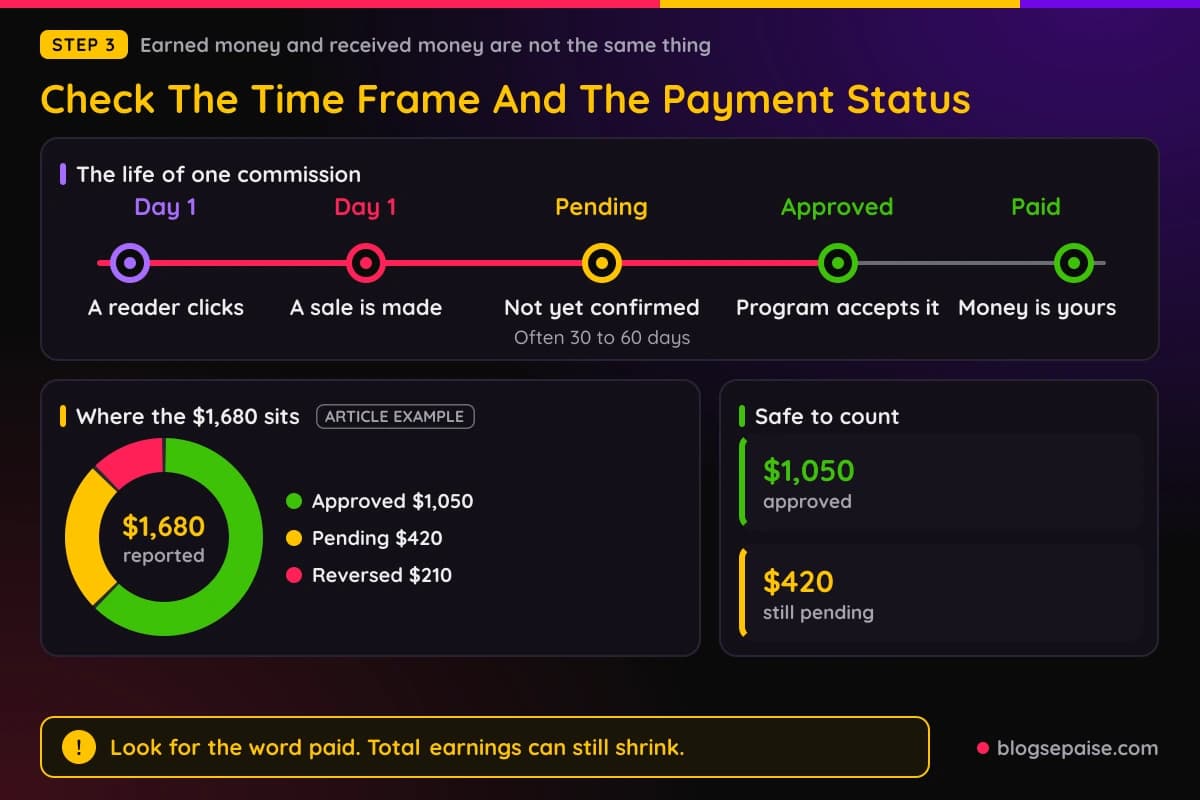
In our sample month, the $1,680 splits into $420 pending, $1,050 approved, and $210 reversed. Only the approved part is close to safe, and only the paid part is truly yours.
That is why experienced affiliates talk about cash in two ways. Earned money is what the dashboard shows, and received money is what landed in the bank.
When you read someone else's report, look for the word paid. A screenshot that lists only "total earnings" may be counting pending money that could still shrink.
There is also a timing gap between months. A sale in late March can pay out in May, so a payout total for May may reflect work done two months earlier.
Keep this in mind when you track your own numbers. Compare earned to earned and paid to paid, and never mix the two in the same chart.
Step 4: Look At Where The Traffic And Money Come From
A healthy report shows more than a total. It shows the sources behind the total, and the spread of those sources tells you how fragile the income is.
Start with traffic. In the sample month, 2,520 of the 4,200 clicks came from Google search, 840 from Pinterest, 630 from email, and 210 from other places.
That is a 60, 20, 15, and 5 percent split. Search carries the site, which is common, but email and Pinterest give it a little cushion.
Next, look at program concentration. In the sample, Program A earned $1,008, Program B earned $420, and Program C earned $252, so the biggest program made 60 percent of everything.
A big share from one program is a risk. If that program cuts its rate, closes, or bans the account, 60 percent of the income can disappear in one email.
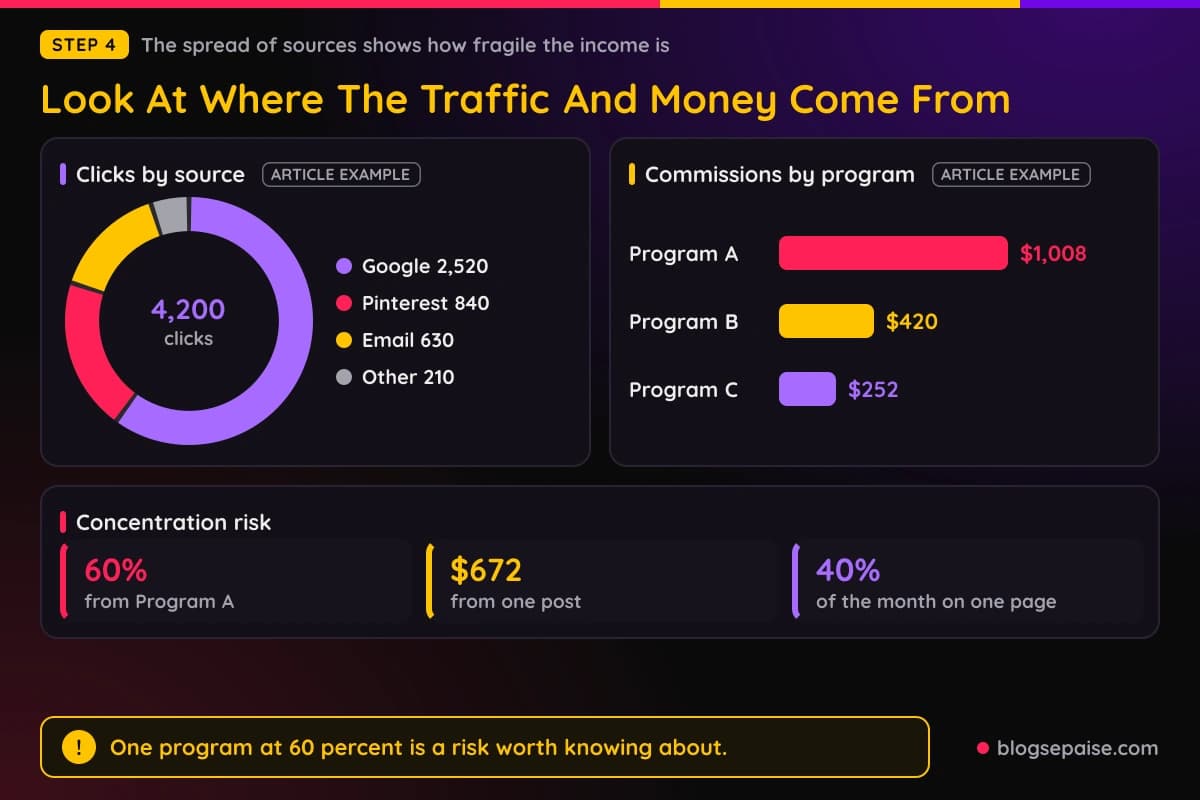
Single posts can hold a lot of weight too. If one review makes $672 of the $1,680, that is 40 percent of the month riding on one page.
There is nothing wrong with a star page. The point is to know about it, so you can guard it with updates and build a few more pages next to it.
When you see a screenshot from another affiliate, ask which of these spreads you can see. A report that shows income by program and by traffic source is far easier to trust than a total alone.
Our guide to attribution models explains why two tools can credit the same sale to different sources. If your numbers do not match across tools, that article will help you see why.
Step 5: Judge The Quality Of The Proof
Not all income proof is equal. A cropped phone screenshot is weak, and a bank deposit that matches a dashboard is strong.
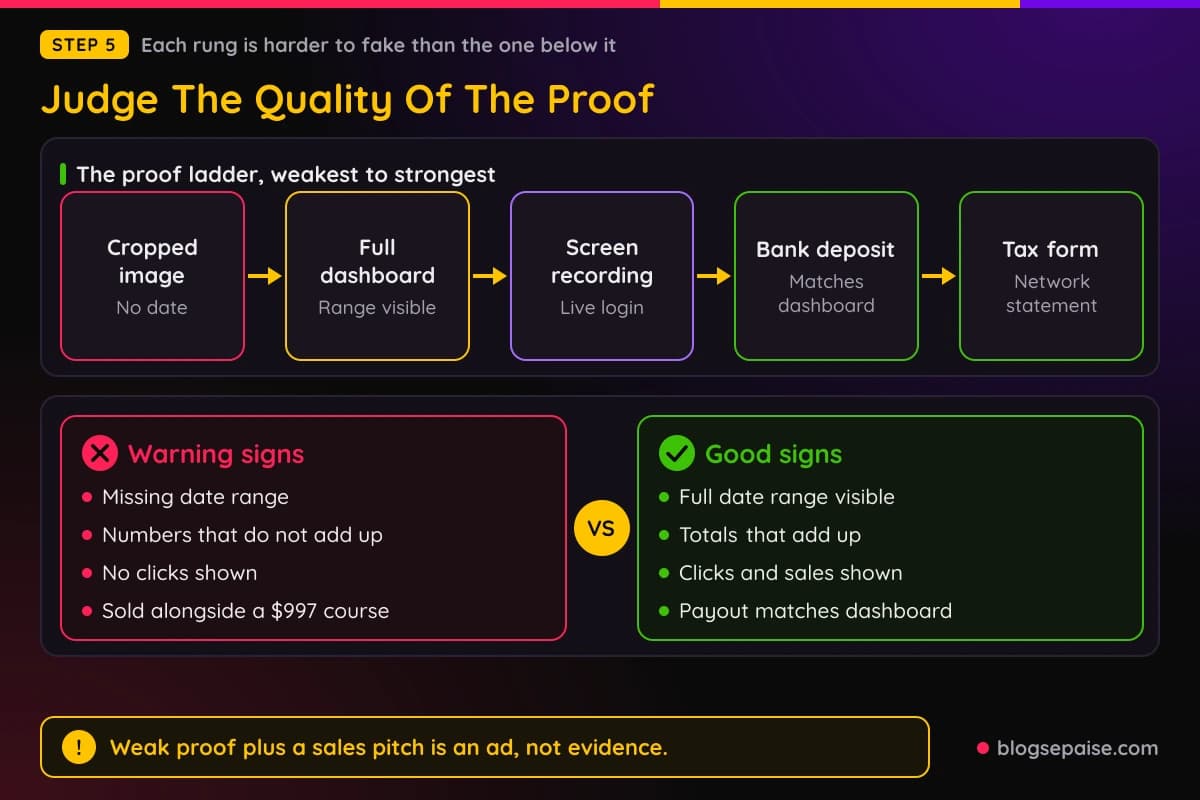
Think of proof as a ladder. The bottom rung is a cropped image, and each step up makes it harder to fake or mislead.
The first rung is a cropped screenshot with no date and no account name. The second is a full dashboard screenshot with the date range visible, and the third is a screen recording that shows the person logging in and clicking between pages.
The fourth rung is a payout notice or a bank deposit that matches the dashboard. The top rung is a tax form or year end statement from the network, which is the hardest evidence to bend.
You do not need the top rung for every claim. A friendly blogger sharing a monthly update can stay at rung two or three, and that is fine.
The trouble starts when a big claim comes with weak proof and a sales pitch. If the same person who shows a cropped screenshot is selling a $997 course, treat that picture as an ad, not as evidence.
Here are the warning signs worth knowing. Numbers that do not add up, a font that looks different from the rest of the page, a date range that is missing, and a dashboard that never shows clicks are all signs of a polished screenshot.
Be careful about dashboards that can be changed in a browser. Anyone can edit text on a web page using built-in tools, which is why a still image alone proves very little.
Our post on affiliate marketing red flags covers more of these warning signs, including the income claims used to sell courses. Read it before you pay for any program that leans on screenshots.
Step 6: Walk Through A Made Up Sample Report
Now let us put the steps together in one place. The report below is made up for this article, so no real person earned it and you should not treat it as a benchmark.
The site is a small review blog in its second year. The month is March, and the numbers are tagged as an article example in every chart.
Clicks were 4,200 and sales were 84, so the conversion rate was 2 percent. Revenue was $1,680, which makes EPC $0.40 and the average commission $20.
Out of that $1,680, $210 was reversed, $420 was still pending, and $1,050 was approved. After $294 in costs, the net profit was $1,176 if the pending money clears, and $756 if you count only the approved money.
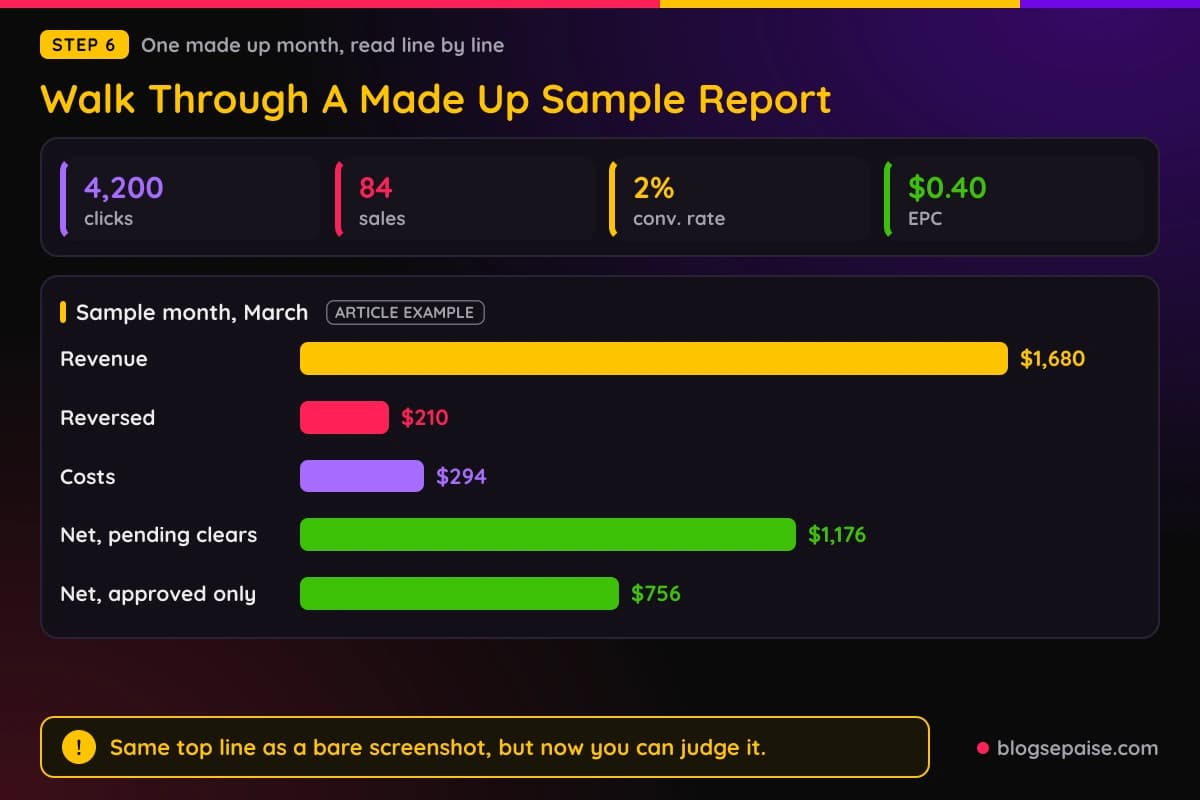
Read that report the way we have been practicing. The time frame is a full month, the five numbers hang together, and the money is split by status.
The traffic is mostly search, and the top program holds 60 percent of income. Costs are small, and the profit holds up even in the cautious view.
A careful reader might call it a decent small site with one risk, which is the dependence on Program A.
Now compare that with a screenshot that shows only "$1,680 earned." Same revenue, but you would know nothing about reversals, costs, or concentration, and you could not judge the business at all.
That gap is the whole lesson. The same top line can hide a healthy business or a shaky one, and only the surrounding detail tells you which.
Try this on your own numbers next. Write the five core numbers, the status split, and the cost total on one page, then read it out loud as if it belonged to a stranger.
Step 7: Build Your Own Monthly Income Report
Reading other reports is useful, but keeping your own is where the real value sits. A monthly report takes about 30 minutes once you have a routine, and it will teach you more than any course.
Pick one day each month, such as the second day, and do the report then. Waiting a day or two lets the previous month's numbers settle across your programs.
Start by pulling the clicks, conversions, and commissions from each program. Put them in one sheet, with one row per program and one column per number.
Then add the status columns. Record pending, approved, paid, and reversed amounts separately so you never confuse earned money with received money.
Add your costs next. Include every subscription, every freelancer payment, and every ad dollar, even the small ones that feel too tiny to count.
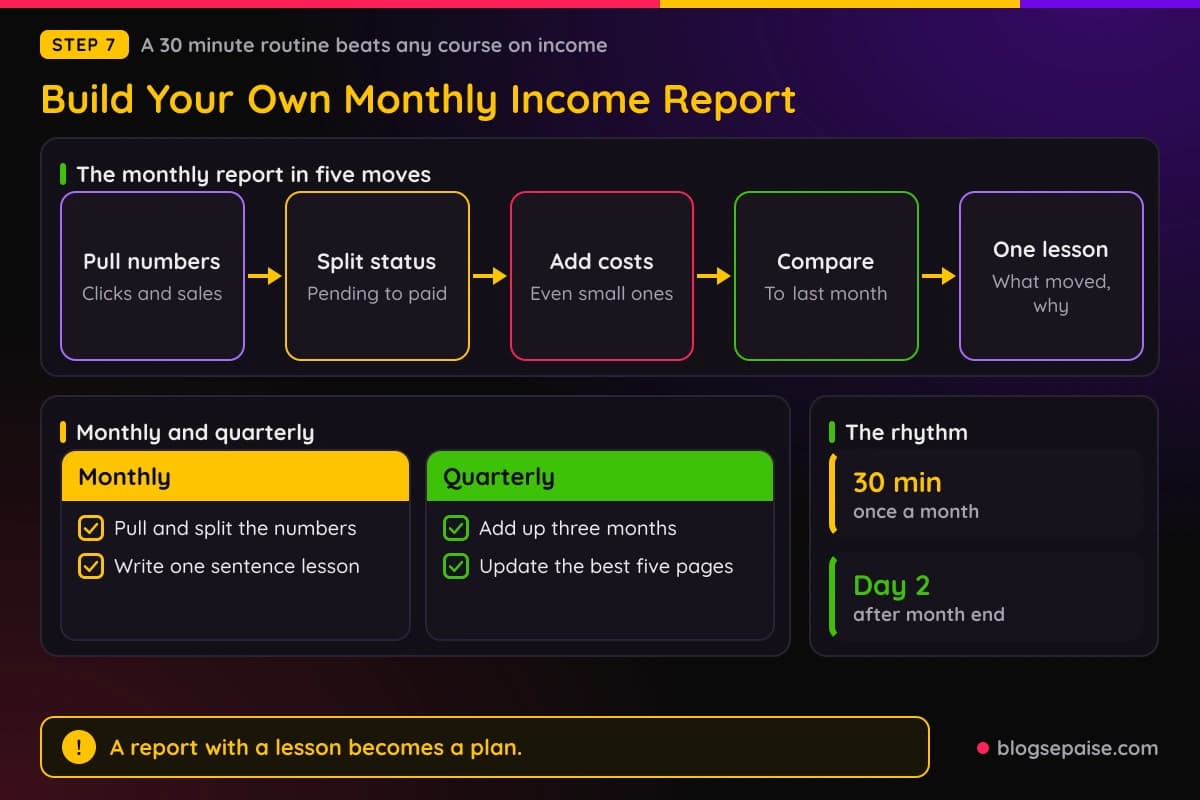
Finish with a short note to yourself. Write one sentence on what moved, one on why you think it moved, and one on what you will do next month.
That last step is the one most people skip. A report with numbers and no lesson is just a diary, while a report with a lesson becomes a plan.
For tracking clicks on your own side, a tool like ClickMagick logs every visit, so you have a second set of numbers to compare against each program dashboard. That second set helps you catch missing clicks or odd drops.
If you run many links on a WordPress site, Pretty Links keeps them organized and counts clicks too. Our roundup of link tracking software compares more choices.
Keep your sheet in one place you will actually open. A plain spreadsheet works, and so does a notes app like Notion if you like pages and templates.
How Different Kinds Of Programs Change The Report
Not every program pays the same way, so not every report looks alike. Knowing the payment type helps you read the same five numbers in the right light.
One time commission programs pay once per sale. A physical product from a big store is the usual case, and the report is easy to read because each sale is a single line.
Recurring programs pay again each month while the customer stays. Many software tools work this way, and their reports grow in a quiet, steady way as each new customer adds a small monthly payment on top of the old ones.
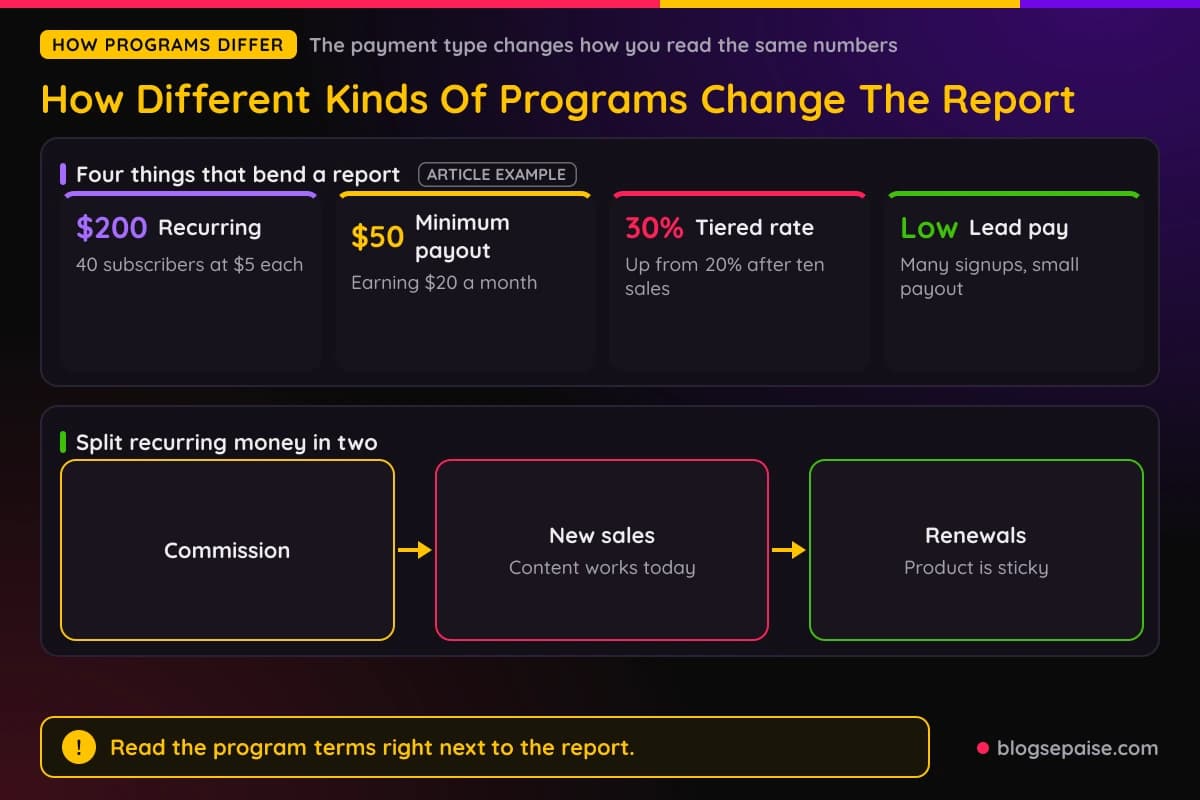
That makes a recurring report look very different from a one time report. A site with 40 active subscribers paying you $5 each makes $200 a month before it adds a single new sale.
When you read a recurring report, split the money into new sales and renewals. New sales show how well your content is working today, and renewals show how sticky the product is.
Lead and trial programs pay when someone signs up, even if they never buy. Those reports often show many conversions and a lower payout for each one, so the conversion rate looks great while the average commission looks small.
Tiered programs raise your rate when you hit a goal. If a program pays 20 percent up to ten sales and 30 percent after that, the average commission in your report will jump in the month you cross the line.
Always read the program terms next to the report. A cookie window, a minimum payout, and a payment schedule all change when and how the money shows up.
Minimum payout rules catch many beginners off guard. If a program pays only once you reach $50 and you earn $20 a month, your first payment arrives in month three, and the report will show approved money that has not been paid.
Currency can also change the picture. A program that reports in euros or pounds will show a different number than the one that lands in your account after the exchange rate and any bank fee.
What Real Income Reports Look Like At Each Stage
Honest reports look boring early on, and that is normal. Here is a made up path for a new site, so you can see the shape of a typical climb.
In this example, the site earns $0 in month 1, $12 in month 2, and $48 in month 3. By month 4 it reaches $95, then $210 in month 5, and $340 in month 6.
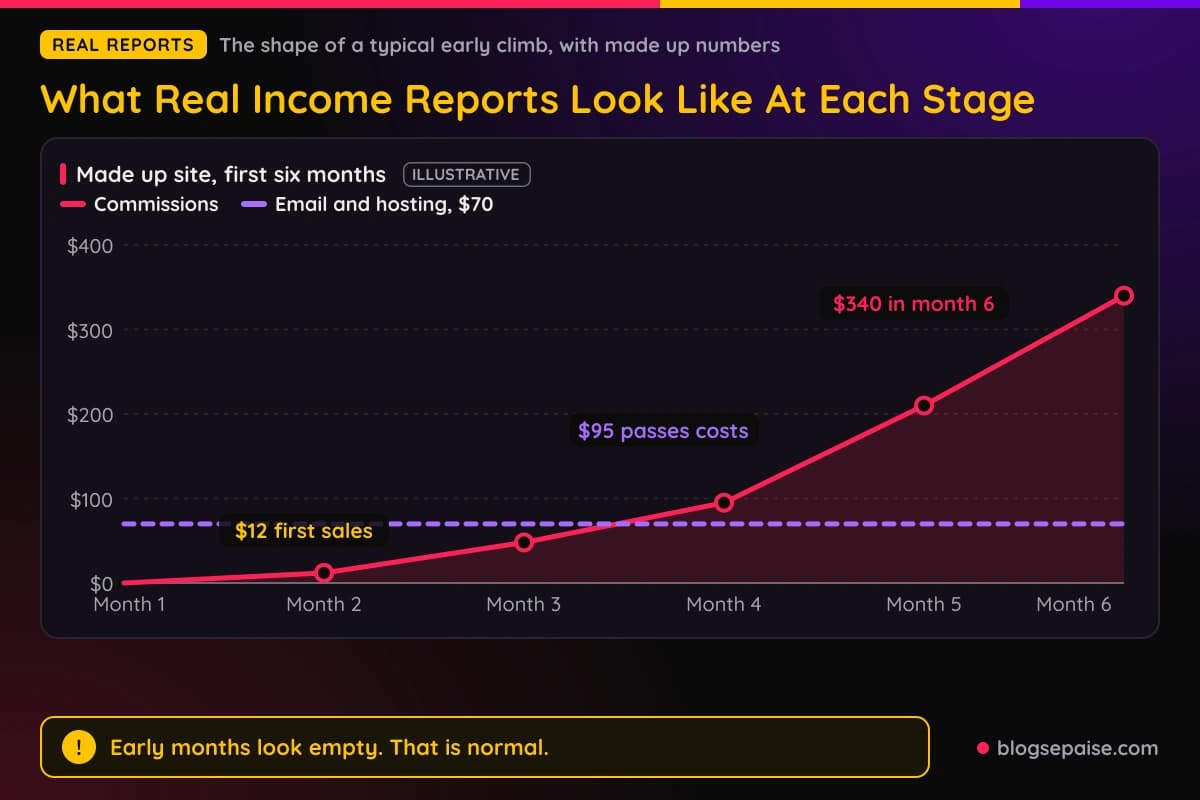
Notice the shape. The first sale takes a while, the middle months crawl, and the numbers speed up only after enough pages have aged and started to rank.
In a typical story like this, the first two months feel empty. The site is just building pages that search engines have not yet trusted.
Around the third month, the first small commission arrives. It might be $12 or $48, and it often feels huge even though it will not cover a coffee budget.
Between months 4 and 6, income starts to look like a real line. The site crosses its monthly costs, perhaps at the point where commissions pass the $40 email tool and the $30 hosting plan.
After that, many affiliates hit a slower stretch. Growth comes in steps, with a flat month, a jump, and another flat month, which is why a single month tells you little.
Real reports from established sites show the same lumpy pattern. Seasonal shoppers, program changes, and search updates all move the line, and good reporters note the cause next to the number.
Do not compare your month 2 to someone else's year 3. Compare your own line to your own last quarter, and ask if the direction is up.
If you are just starting, our plan for your first 30 days of affiliate marketing gives you a realistic early path. It sets small targets that match the empty early months in the chart above.
Tools And Habits That Make Reports Easier
You can run reports with free tools, and many affiliates do for years. A spreadsheet, a few login bookmarks, and a calendar reminder are enough to start.
A spreadsheet works best when each tab has one job. Keep one tab for monthly totals, one for program details, and one for costs, then add a small chart that plots revenue and profit together.
Check each program dashboard at the same time every month. Export the data if the program allows it, and save a copy, because some networks only show a limited history.
Take a dated screenshot of each dashboard at month end. It is your own backup, and it also gives you proof if a payment ever goes missing.
Link tracking helps most when you promote many offers. With ClickMagick you can see which page or email sent each click, and that data fills the traffic source part of your report.
For keyword and traffic research that feeds the numbers in your report, KWFinder shows which topics are worth another post. Pair it with your own results and you will know where to write next.
A good habit is a quarterly review on top of the monthly one. Every three months, add up the totals, find the best five pages, and decide which ones need an update.
Our commission earnings estimator is handy during that review. Plug in your click count, conversion rate, and average commission to test what a small gain in each one would do to next quarter.
Common Mistakes When Reading Income Reports
Even careful people trip on income reports. These are the mistakes that show up again and again.
The first mistake is trusting the top line. A big number feels like a result, but without costs and status it is only a guess about how well the business is doing.
The second mistake is comparing a pending total to a paid total. Mixing the two makes a month look better or worse than it was, and it throws off every chart you draw afterward.
The third mistake is ignoring reversals. Refunds are normal, and a program that reverses many orders behaves very differently from one that reverses few.
The fourth mistake is skipping the costs. A site that nets $1,176 from $1,680 is healthy, but a site that spends $1,500 to earn $1,680 is running on a thin margin.
The fifth mistake is judging a business by one month. One spike can come from a seasonal sale or a viral pin, so look at three months at least before you draw a conclusion.
The sixth mistake is copying someone else's numbers as a goal. A stranger's screenshot says nothing about their hours, budget, or starting point, so use it as a spark and not as a target.
The seventh mistake is believing a report because it looks neat. Polished charts feel professional, yet a plain spreadsheet with honest rows beats a glossy image with missing pieces.
The eighth mistake is hiding bad months. If you only record your wins, you lose the data that shows you how to fix what broke.
Final Thoughts
An affiliate income report is a tool, not a trophy. Read it for the story behind the number, and the number itself becomes much less scary.
Check the time frame, the five core numbers, the status of the money, the costs, and the proof. That short list will protect you from most polished screenshots and most of your own blind spots.
Remember that the sample report in this guide is made up. Real reports are messier, with late payouts, odd reversals, and flat months that have no clear cause.
Start your own monthly report this month, even if the number is $0. A page of honest zeros today becomes the starting line you will be glad to have when the climb begins.
Frequently Asked Questions
1. How would you define an affiliate income report?
It is a summary of what an affiliate earned in a set period, usually a month. A solid one lists clicks, conversions, commissions, payment status, and costs.
2. Are affiliate income screenshots real?
Many are real, but a screenshot alone cannot prove it. Look for a visible date range, matching payout proof, and numbers that add up.
3. How good is a 2 percent conversion rate in affiliate marketing?
It depends on the offer and the traffic. The 2 percent in our made up sample is a reasonable number to practice with, though real rates vary widely from page to page.
4. How do you calculate EPC in affiliate marketing?
EPC stands for earnings per click. You find it by dividing total commissions by total clicks, so $1,680 over 4,200 clicks is $0.40.
5. How are pending and approved commissions different?
Pending means the sale was recorded but not yet confirmed. Approved means the program accepted it, and the money then moves toward payout on the next pay date.
6. Why do affiliate commissions get reversed?
Customers return items, cancel subscriptions, or fail fraud checks. When that happens, the program takes the commission back, which is why a refund window matters.
7. How often should I make an income report?
Once a month is enough for most people. Add a deeper review every three months to spot trends that a single month hides.
8. Should I share my own income report publicly?
You can, and many readers enjoy honest updates. Show costs and the date range, include slow months, and avoid any claim that promises readers the same results.
9. How long until a new affiliate site shows income?
Many new sites see a first small commission around month 2 or 3, though some take longer. Treat that as a rough guide, because traffic and niche change the timeline.