Affiliate Link Monitoring: How To Find Broken Links In 6 Steps
Affiliate link monitoring means checking your links on a schedule, so a dead page, a sold-out product, or a missing tag does not sit on your site for months. A link that fails earns nothing, and your pages will not show an error unless you look.
Six steps follow. You learn the status codes, crawl your site, check stock, check redirects and tags, set a schedule with alerts, and then fix what turns up.
Facts come from Google Search Central, Amazon's Associates help center, Pew Research Center, and the documentation of the tools named below.
If your Amazon earnings already fell, start with our guide on Amazon affiliate sales that dropped. To pick software that tracks clicks and conversions, see our guide to link tracking software.
Disclosure: Some of the links I share might be affiliate links. If you click on one and make a purchase, I may earn a small commission as a thank you. But don’t worry, it won’t cost you anything extra. I only recommend stuff I genuinely believe in. Your support helps me keep creating awesome content. You can read my full affiliate disclosure in my disclaimer page.
If you want to save a lot of hours searching for high-paying affiliate programs, check out our exclusive list of 2500+ affiliate programs. You’ll find all the information about the programs inside the list. This list is perfect for affiliate bloggers and influencers.
Why Affiliate Links Stop Working
Links break because the web keeps changing. Pew Research Center checked just under 1 million pages drawn from Common Crawl and found that 25% of the pages it collected from 2013 through 2023 were no longer accessible as of October 2023.
Age matters. Pew reports that 38% of the pages in its 2013 snapshot were gone by 2023, and 8% of pages that existed in 2023 were already unavailable when it checked.
Pew counted a page as inaccessible only when it returned one of nine error codes showing that the page or its host no longer exists. Ambiguous codes and sites that block automated collection were left out, so Pew's figures likely understate the real share.
Links inside pages decay too. In Pew's samples, 23% of news webpages and 21% of government webpages contained at least one broken link.
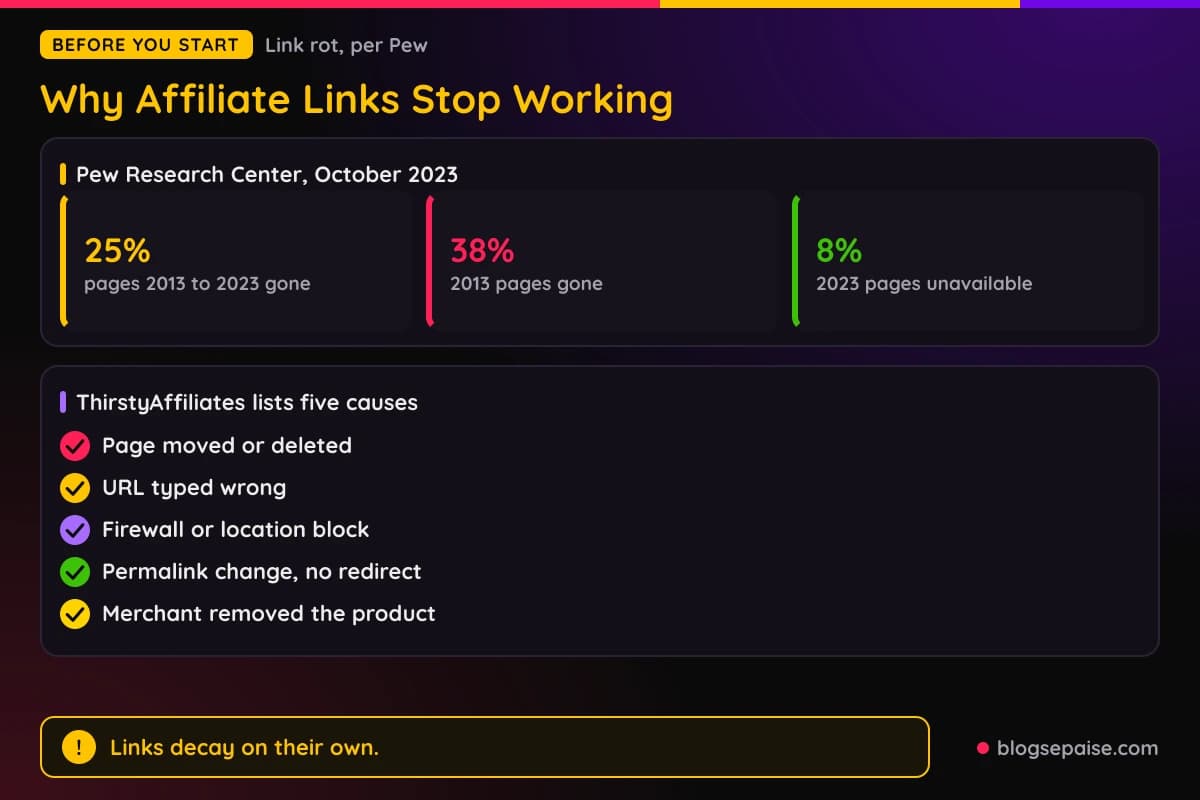
Affiliate links have extra ways to fail. ThirstyAffiliates lists five causes: the linked page was moved or deleted, the URL was typed wrong, a firewall or location restriction blocks access, a permalink change had no redirect, and the merchant removed the product from its shop.
Amazon explains the product side. Its Associates help center says items usually leave the catalogue because they are no longer available or were replaced by newer editions, and a newer edition gets a new ASIN.
The vendor 24metrics, which sells link testing, adds causes that hit paid campaigns. It names expired offers whose tracking links stay live, country-specific redirects to pages that no longer exist, device and deeplink mismatches, a tracker in the middle of a redirect chain going offline, and advertiser changes that networks are never told about.
The cost is easy to describe. ThirstyAffiliates says broken links stop clicks from turning into sales, leads, or commissions, and visitors who land on an error page often leave without opening another page.
Three kinds of failure matter. A dead page, a product nobody can buy, and a link whose tag or tracking went missing each need a different check, and the steps below cover all three.
Step 1: Learn What Each Status Code Means
Every checker reports an HTTP status code, so read those first. Google Search Central explains how it treats the main ones in its documentation on HTTP status codes and network errors.
A 301 redirect is a strong signal to Google that the redirect target should be processed. A 302 is a weak signal, and Google's crawlers follow up to 10 redirect hops by default.
A 404 means not found. Google treats all 4xx errors except 429 the same way, as content that does not exist, and a previously indexed URL is removed from its index.
A 5xx is a server error. Google says 5xx and 429 responses make its crawlers slow down for a while, and URLs that keep failing are eventually dropped.
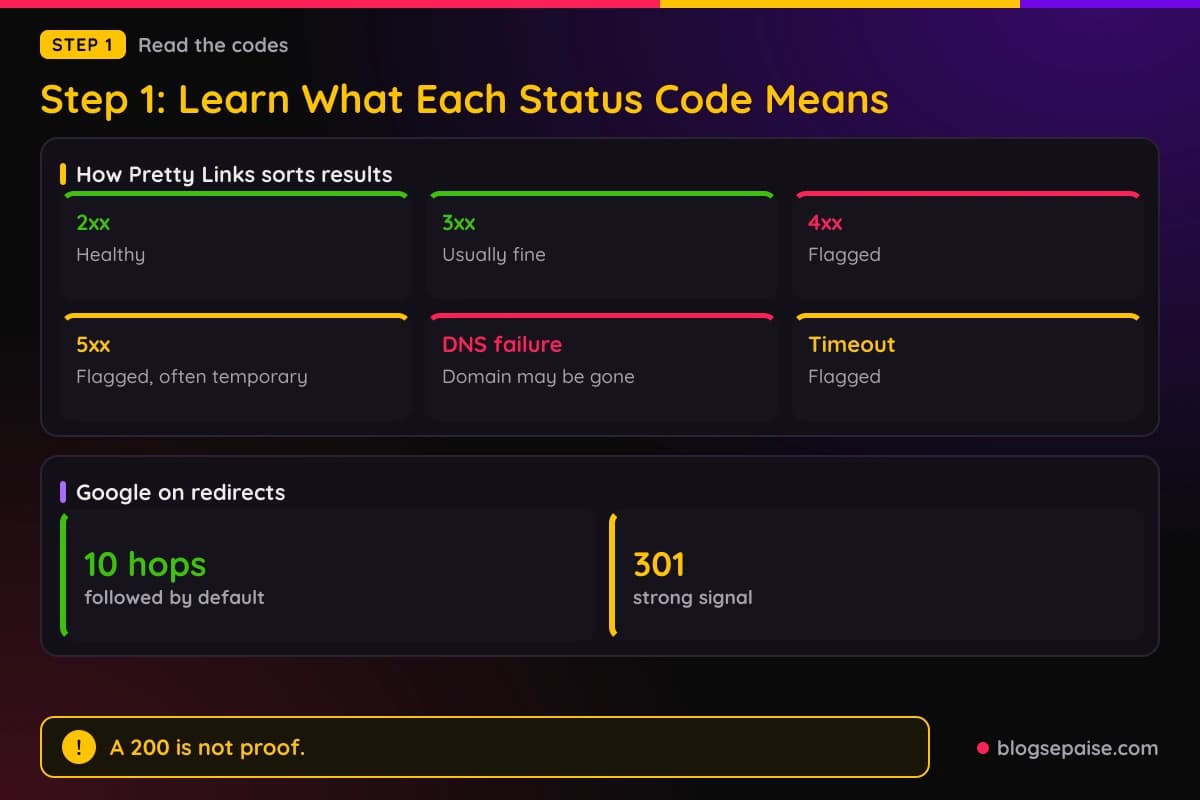
Pretty Links documentation sorts results for affiliate links in a simple way. A 2xx is healthy and a 3xx is usually fine, while a 4xx is flagged and 404 is the most common, meaning the page was removed or moved.
A 5xx is flagged too, though it is often temporary, so a recheck helps. A connection refused or DNS failure is flagged because the domain may be abandoned or moved, and a timeout is flagged as well.
Soft 404s are the sneaky case. Google describes them as pages that return a 2xx status while the content looks like an error or an empty page, and Search Console reports them as soft 404 errors.
A status-only check misses them. A DeadLinkRadar article makes that point, saying that standard uptime monitors report such a link as healthy because they only check HTTP status codes.
False alarms exist as well. Pretty Links warns that bot-blocking services such as Cloudflare can cause false flags, and Apify notes that some websites return 403 when accessed from cloud data centers.
Pretty Links also advises against acting on a single 5xx flag. Wait for the next check, and open the link in a browser yourself before you change anything.
Step 2: Crawl Your Site And Export The Broken Links
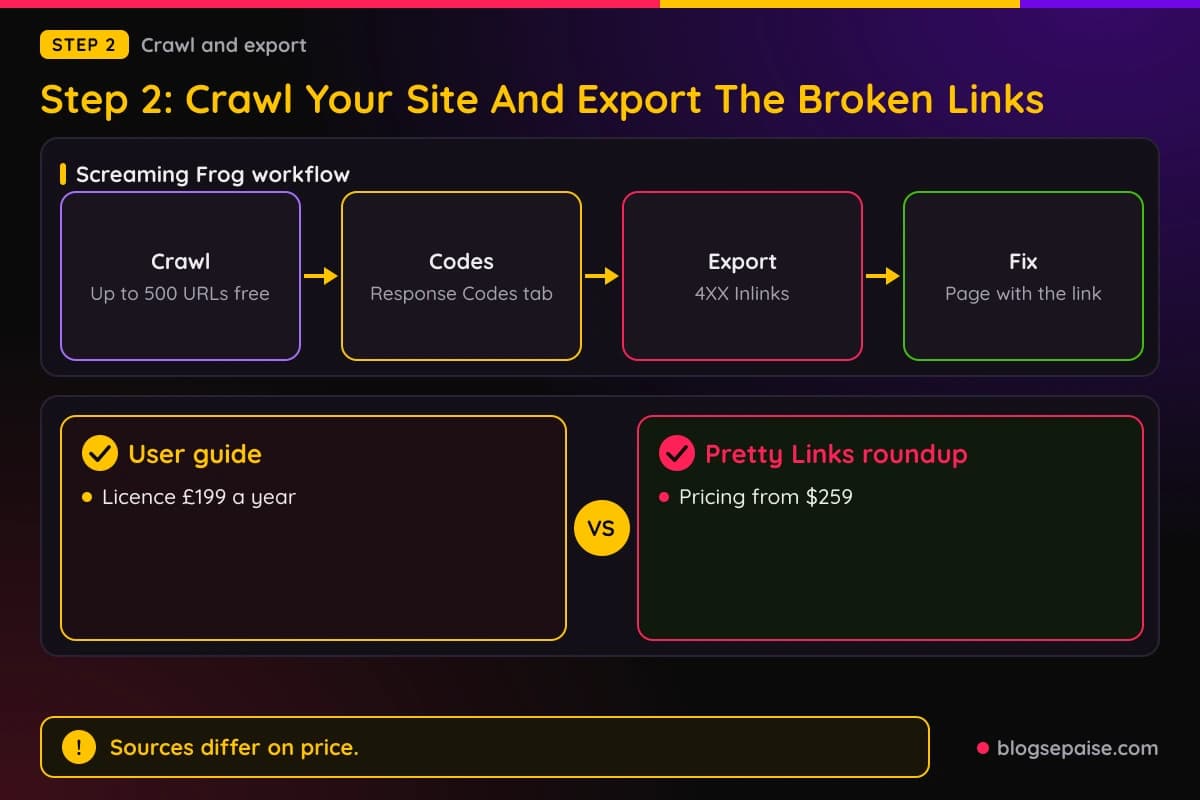
A crawl visits your pages, finds every link, and requests each one. Screaming Frog's SEO Spider does this from a desktop, and its free version crawls up to 500 URLs at a time.
Its Response Codes tab lists URLs by status code. The Bulk Export menu has a Client Error 4XX Inlinks option that exports every inlink to error pages, so you can see which of your pages carry each broken link.
The Redirects to Errors report lists redirects that end at blocked, no-response, 4XX, or 5XX pages. That catches an affiliate link that redirects before it dies.
Scheduling is a licensed feature. You set it under File > Scheduling, and exports from a scheduled crawl need Headless Mode.
Sources disagree on the licence price. Screaming Frog's user guide lists a licence at £199 a year, while a Pretty Links roundup says pricing begins at $259 for crawling more than 500 URLs.
List mode helps when your affiliate URLs sit in a spreadsheet. Paste or upload the list, start the crawl, and the export keeps your original order, including duplicates.
WordPress plugins check from inside your site. BetterLinks Pro has a scheduled scan with daily, weekly, or monthly frequency for posts, pages, WooCommerce products, and custom post types.
It reports 404 errors, 301 and 302 redirects including possible chains or loops, 401 and 403 responses, and broken internal and external links. An optional email report goes out after each scheduled scan.
Easy Affiliate Links Premium, listed from $29, shows each affiliate link's status and last-checked date under Affiliate Links > Manage. Email notifications are turned on under Affiliate Links > Settings > Broken Links.
The ThirstyAffiliates Pro Automatic 404 Checker needs the Statistics and Automatic 404 modules switched on, and its report sits under ThirstyAffiliates > Reports > 404 Checker. It sorts findings into warnings and errors, offers Ignore and Recheck actions, and depends on WordPress Cron working.
Pretty Links Link Health checks the target URL of each link, not the pretty URL. It runs weekly or monthly in batches of 50, marks dead links with a badge, and does not check alternate URLs inside rotations or split tests.
Its documentation lists Link Health on the Beginner, Marketer, and Super Affiliate plans, and Lite users must upgrade. You can read more in our Pretty Links review and our ThirstyAffiliates review, or get the plugin through Pretty Links.
Simple Affiliate Link Checker offers three scan methods: URLs Containing, Exact URL Match, and List URL Match. Reports arrive daily or hourly by email, in a Slack channel, or both.
According to ThirstyAffiliates, the Broken Link Checker plugin alerts you to broken internal and external links, and you set its scan frequency under Settings > Link Checker. Editing a broken URL from its dashboard applies the change everywhere that link appears.
Step 3: Check For Out Of Stock And Unavailable Products
A page that loads can still be a dead end for a buyer. On Amazon, the product may have left the catalogue or become unavailable, and a status code check will not tell you.
Amazon's help center says to search its catalogue for the newer edition using one or two title words, or the artist's or manufacturer's name. It adds that you may be able to list the replacement instead.
Lasso monitors a site 24/7 for broken links and for Amazon links that are out of stock. Its checks run on its own servers, so they do not slow your site.
Lasso marks a broken link alert with a red icon and an out-of-stock alert with an orange box icon. It errs on the side of caution, and shows the broken alert if it cannot fully verify that the link loads a real page.
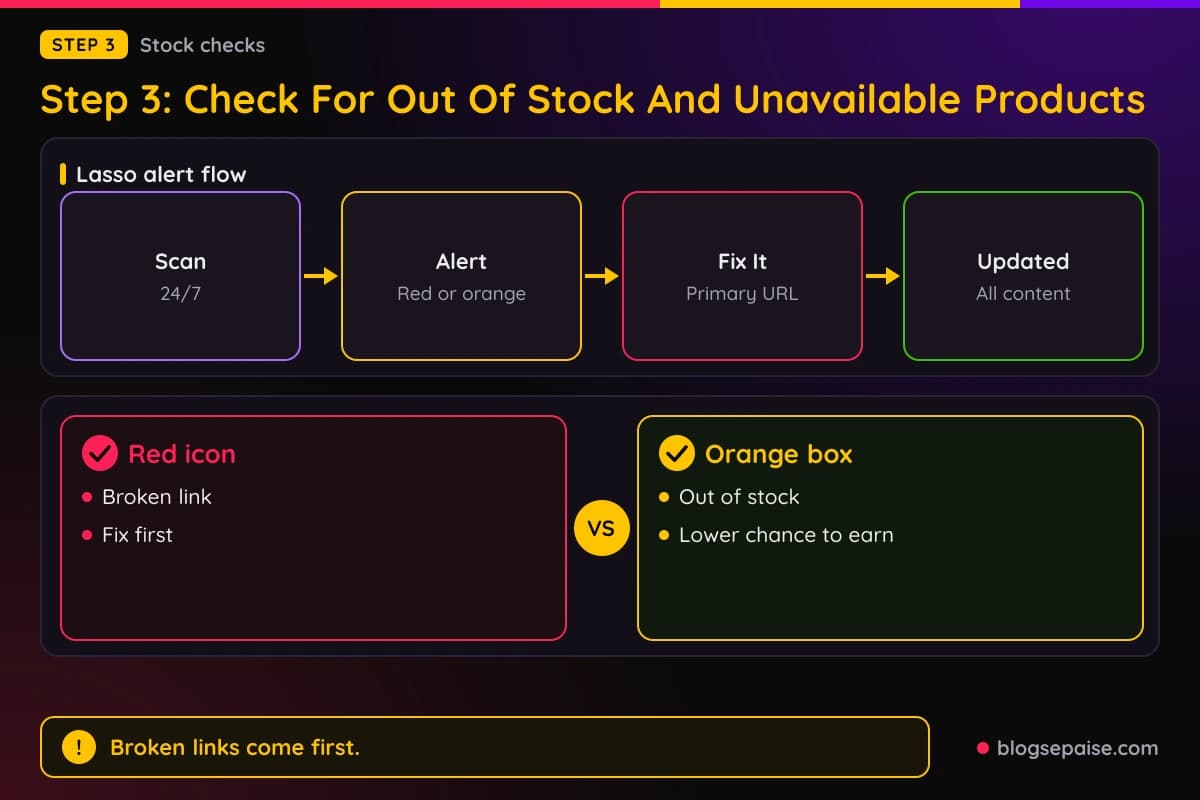
The Fix It button lets you change the Primary Destination URL, and Lasso updates it across all your content. Lasso's support guidance says to handle broken links first because they send readers to a dead end.
Out-of-stock products come second. Lasso says they still go to Amazon, so you have a chance to earn, but a much lower one.
You can try it through Lasso. Its alerts page describes the broken link and Amazon stock checks.
LinkMonitor scans hourly, daily, or weekly and sends email alerts within 60 seconds of a link breaking. It covers Amazon, Linktree, Pinterest, and any other URL, and costs $12 per month with a free version of limited functionality.
AMZ Watcher is a WordPress plugin for Amazon links. It checks product availability, missing or invalid Amazon affiliate tags, and low-converting products across the United States, Canada, Brazil, France, Germany, India, Italy, Mexico, Spain, and United Kingdom stores.
Its checks can run every 1, 3, 5, 7, 14, or 28 days, and each visit to a page on your site or on Amazon uses one page credit. Its example is 100 site pages plus 250 Amazon product pages, which is 350 credits per crawl.
Its WordPress.org listing shows version 1.0.8, last updated November 20, 2023, and tested up to WordPress 6.4.14. The listing warns that it has not been tested with the latest three major WordPress releases, so check that before you install.
A Pretty Links roundup says AMZ Watcher has a free plan and paid plans from $16.63 per month. The AMZ Watcher FAQ says its checks do not register clicks in your Amazon Associates dashboard.
Other options exist. Affilimate says it crawls your sitemap, runs daily checks, and flags broken or out-of-stock affiliate links, and AffiliScan covers broken or unavailable Amazon links in YouTube video descriptions.
AffiliateX lists Amazon, eBay, and AliExpress among the platforms its broken link checker supports. Its automated scans run daily, weekly, or monthly.
Step 4: Check Redirects And Tracking Tags
A link can load a real page and still pay nothing if the tag is gone. Amazon's Link Checker in Associates Central is built for checking the tagging on Amazon.com URLs, mainly for people who build or edit their own links.
It can flag a link as failed when the link was copied from Associates Central or SiteStripe. It also cannot check served links such as Omakase, Recommended Product Links, or other widgets.
Amazon adds that links made with its Build Links and Widgets tools already include your selected Associate ID or Tracking ID. Our guide on Amazon affiliate sales that dropped covers more tagging rules.
For other networks, the free-to-use Apify Affiliate Link Health Monitor records the final HTTP status, the full redirect chain, redirect loops, the final domain, expected affiliate query parameters, and tracking cookies seen along the way.
It reports each link as healthy, warning, or broken. A link is broken for reasons such as an HTTP error, timeout, redirect loop, too many redirects, unexpected final domain, or a missing expected affiliate parameter.
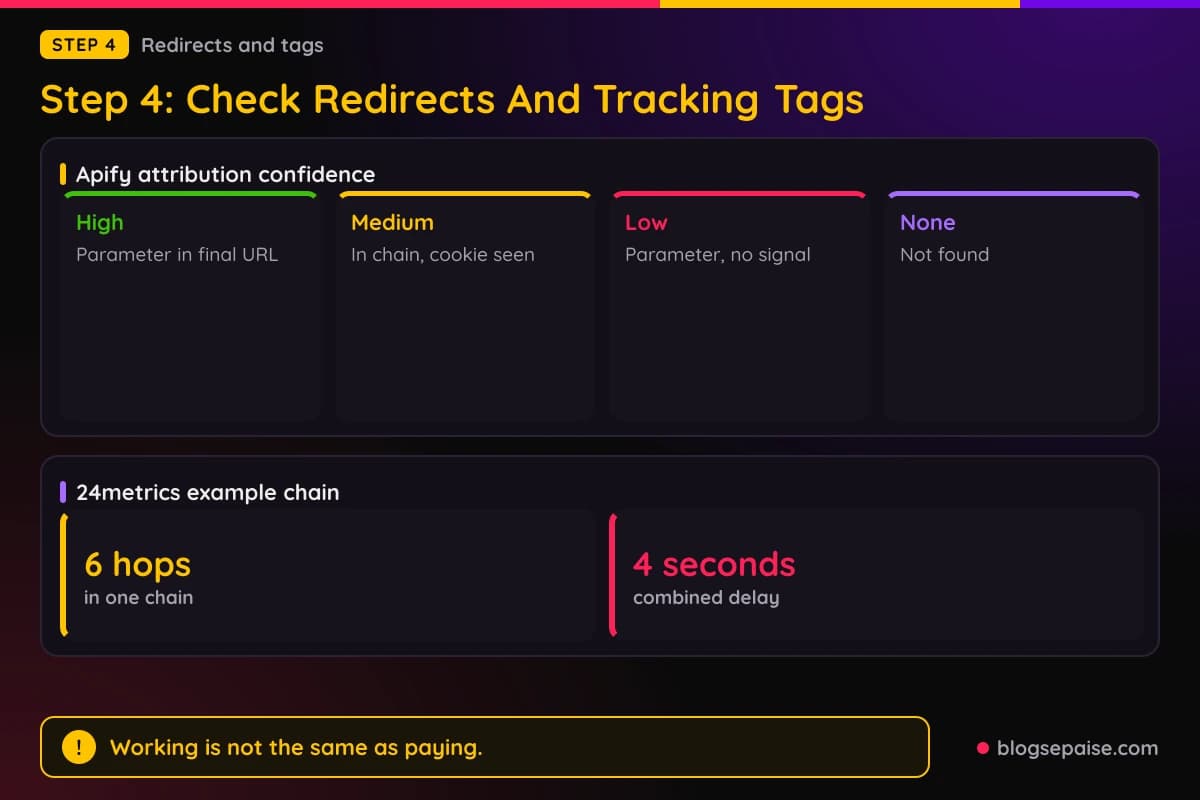
It also scores attribution confidence. High means the expected parameter is in the final URL, medium means it appeared in the redirect chain and a tracking cookie was seen, low means the parameter appeared with no other signal, and none means it was not found.
A warning about parameters that vanish is off by default, because networks often strip parameters after recording a click. Apify calls a tracking cookie an additional signal, not proof of successful attribution.
The same page lists limits. It does not guarantee a commission is credited, does not run JavaScript-heavy pages or solve CAPTCHAs, and does not read affiliate network statistics.
24metrics gives a manual routine for redirect chains. Trace every hop, record the response code and redirect type at each one, and compare the final destination with the landing page you expect, to catch silent redirects.
It also says a plain 200 check is not enough, because a 302 changed to a 301 can send users somewhere wrong. For country offers, it says to test from real residential IPs in the target country, since data center IPs can be whitelisted by advertisers.
Its example is a six-hop chain with a combined delay of 4 seconds, so count hops and delay as well as the destination. 24metrics also tells you to simulate iPhone, Android, and desktop with proper user agents.
Check your own link markup too. Google's 2021 post on link tagging says sites in affiliate programs should qualify those links with rel="sponsored", no matter if they were added manually or dynamically.
Google also says using affiliate links to monetize a website is fine, and that sites failing to qualify them may face manual actions. If you swap a plugin, confirm that the attribute still appears in the HTML of your links.
ThirstyAffiliates offers a Link Fixer module for one specific break. It is a small piece of JavaScript that runs after the page loads and fixes outdated affiliate links, for example after you change the permalinks setting.
Step 5: Set A Schedule And Alerts
A check you run once is an audit. A check that repeats and tells you when something breaks is monitoring.
Schedules differ a lot between tools. Pretty Links offers weekly or monthly, BetterLinks offers daily, weekly, or monthly, and LinkMonitor offers hourly, daily, or weekly.
AMZ Watcher lets you choose an interval from 1 to 28 days. Simple Affiliate Link Checker sends daily or hourly reports, and AffiliateX scans daily, weekly, or monthly.
Ahrefs, according to a Pretty Links roundup, runs scheduled scans daily, weekly, or monthly. The same roundup says Screaming Frog scheduled audits can run at chosen intervals.
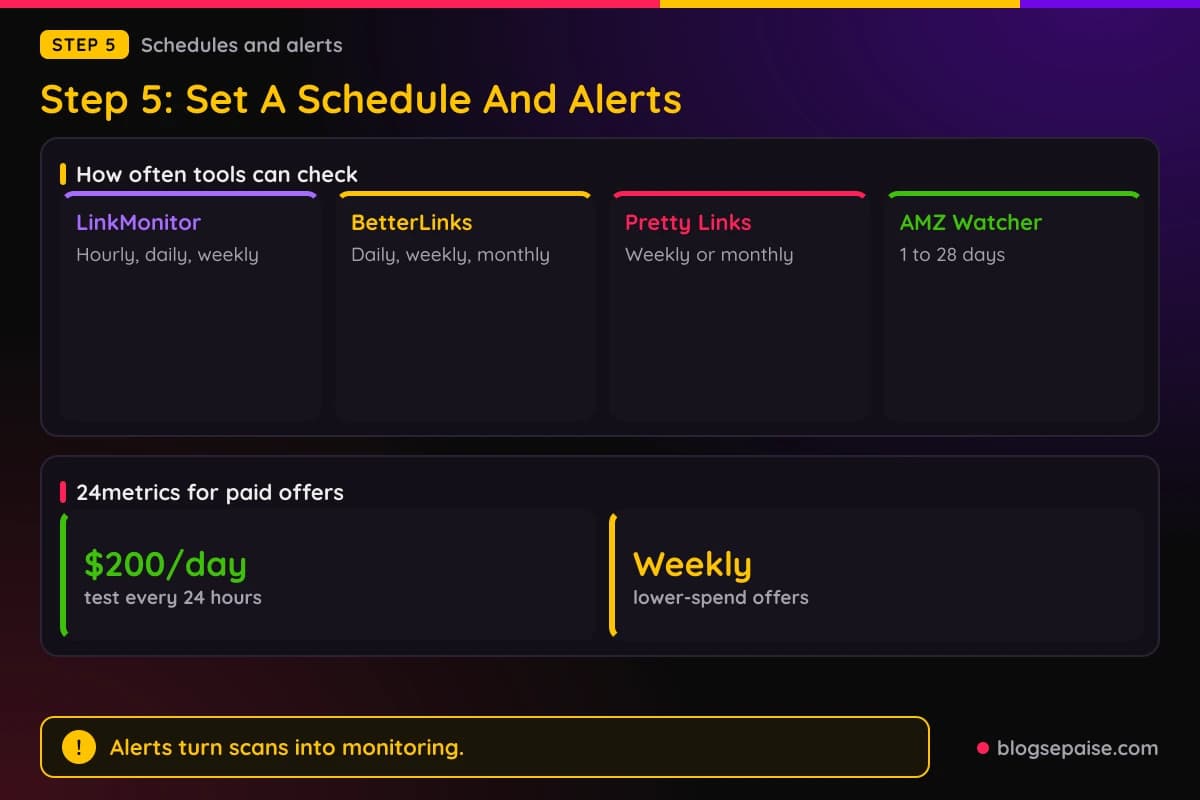
Paid traffic raises the stakes. 24metrics says to test offers that spend more than $200 per day at least every 24 hours from every targeted country, and lower-spend offers weekly.
It also says to connect the link tester to your tracking platform through an API, set alerts, and decide who is notified. Its last step is to log broken links each week, so you can spot patterns by advertiser or country.
Alerts matter as much as scans. AffiliateX sends an instant email when it detects a broken link, LinkMonitor emails within 60 seconds, and Simple Affiliate Link Checker can post to Slack through a webhook you paste into its settings.
Pretty Links sends a weekly email digest with the number of broken links and a link to fix them. Its documentation says Link Health prioritizes links that are actively getting clicks, so you hear about those first.
Checks create real traffic. Pretty Links advises running them in low-traffic windows on large collections, and says its checks run in batches of 50.
Our guide to affiliate dashboard metrics and ROI tracking guide show how to watch the money side while the link checks run in the background.
Step 6: Fix, Replace, Or Remove Each Broken Link
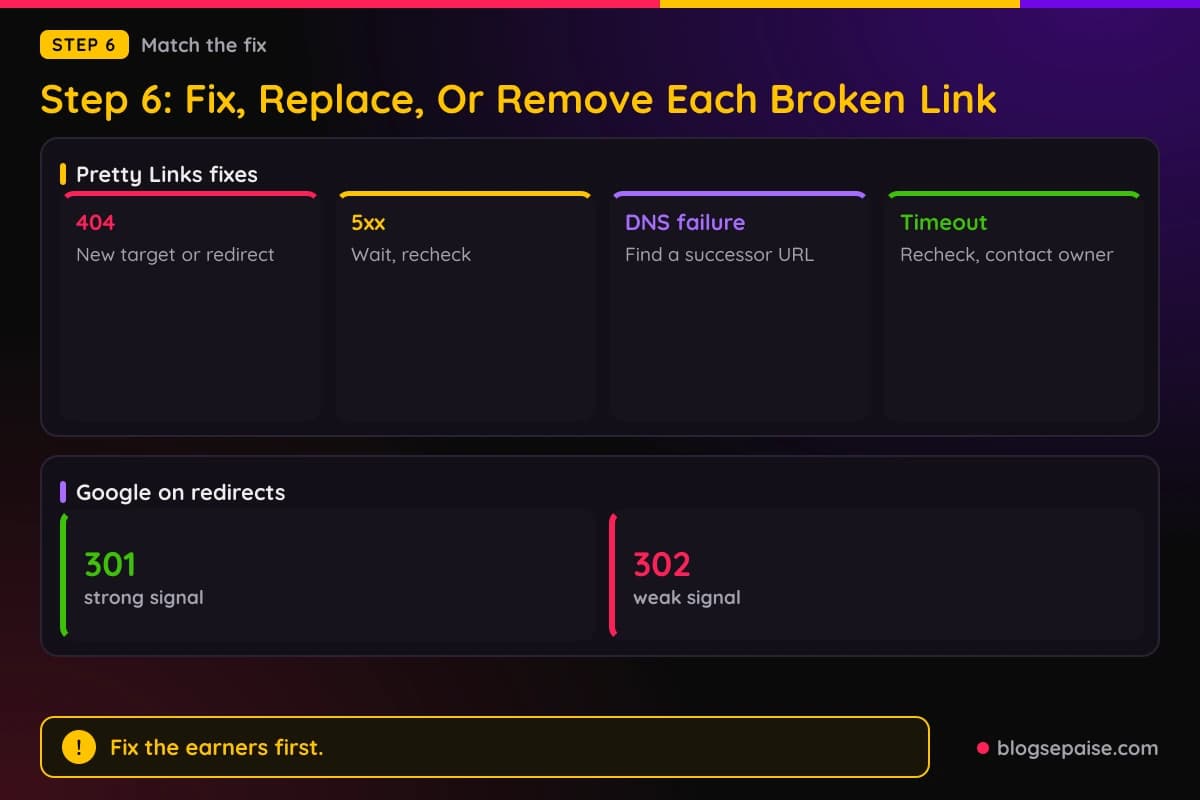
Match the fix to the finding. Pretty Links documentation gives a clear list for affiliate links, starting with the 404.
For a 404, update the target to a working alternative, redirect to your own related content, or expire the link with a fallback URL. For a 5xx, wait and recheck, contact the owner of the target, and treat it like a 404 if it persists.
For a connection refused or DNS failure, find a successor URL or redirect to a related page on your site. For a timeout, recheck, and contact the owner if it persists.
For an affiliate link, you can point the pretty link at a comparable replacement product. Pretty Links says existing shares of the pretty URL benefit automatically.
Edit in one place when your tool allows it. ThirstyAffiliates says that editing a URL in the Broken Link Checker dashboard changes it everywhere the link appears, and Lasso's Fix It button does the same across your content.
Out-of-stock Amazon items need a new product. Search Amazon's catalogue with one or two title words, and swap in the replacement if you can list it.
If you changed your own URLs, use a permanent redirect. Google calls a 301 a strong signal and a 302 a weak one, and it advises using the status code that fits the meaning of the redirect, because other clients may rely on it.
Verify each fix. ThirstyAffiliates provides a Recheck action to run after you change a link's destination, and its Ignore action keeps a confirmed false positive from being checked again.
Fix the links that earn first. Because Pretty Links ranks links by clicks, start at the top of its list and work down.
Which Kind Of Link Checker Fits Your Site
Crawlers, plugins, hosted services, and scripts cover different jobs. Screaming Frog is a desktop crawler with a free tier of 500 URLs, and it exports broken links with the pages that carry them.
Plugins live inside WordPress and know your affiliate links by name. Several lock link checks behind paid tiers: Pretty Links needs a Pro license, ThirstyAffiliates' 404 Checker is Pro only, Easy Affiliate Links needs Premium, and BetterLinks scheduled scans are in PRO.
Hosted services work on any platform. LinkMonitor costs $12 per month, Lasso monitors broken and Amazon out-of-stock links, and Affilimate checks daily.
Scripts suit people who want control. The Apify Affiliate Link Health Monitor is free to use and bills only for Apify platform usage, with the rate dropping on higher subscription plans.
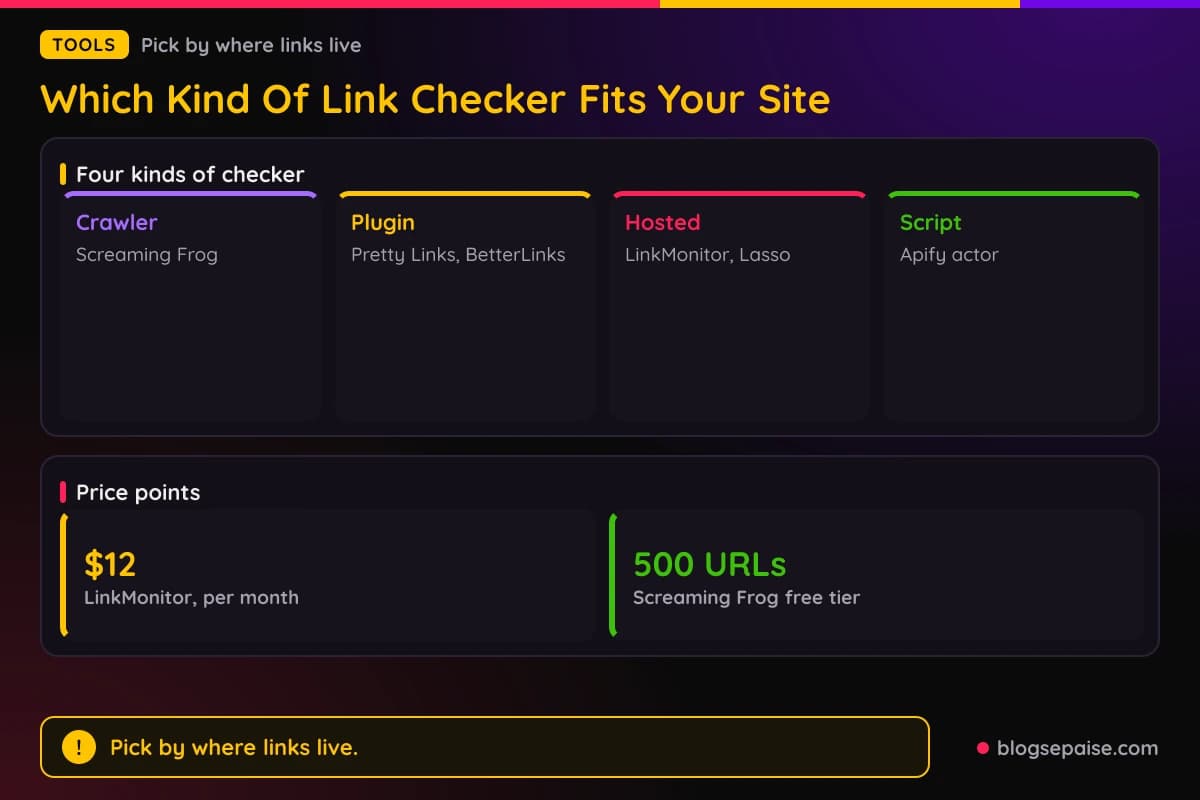
Pick by where your links live. A site on WordPress with a link manager gets the most from that manager's own checker, and a mixed set of pages, videos, and bios fits a hosted service or a crawler better.
Do not pick a plugin on name alone. Check its listing for the last update and the WordPress versions it was tested with, as the AMZ Watcher listing shows.
Whatever you choose, keep one more safeguard. Open your top money pages in a browser now and then, and click every affiliate link yourself.
Common Mistakes In Affiliate Link Monitoring
Trusting a 200 is the first mistake. A soft 404 returns a 2xx status with an error page in the body, so a status-only check calls it healthy.
Acting on a single 5xx is the second. Pretty Links advises waiting for the next check, since server errors are often temporary.
Ignoring false flags comes third. Bot-blocking services can trigger them, and ThirstyAffiliates notes that some reported issues may be false positives.
Assuming the tool sees everything is a quiet fourth. Pretty Links does not check alternate URLs in rotations, Apify does not run JavaScript-heavy pages, and Amazon's Link Checker does not handle links copied from SiteStripe.
Installing a plugin that nobody updates is the fifth. The AMZ Watcher listing was last updated in November 2023 and carries a warning about newer WordPress releases.
Skipping the tag check is the last. A live page with a stripped tag looks fine in a browser and pays nothing.
Final Thoughts
Links decay on their own. Pew found that 25% of pages collected from 2013 through 2023 were inaccessible by October 2023, and merchants add their own changes on top.
Learn the status codes, crawl your site, check stock, check redirects and tags, and put the checks on a schedule with alerts. Then fix the links that earn first.
Pick the tool that fits where your links live, and read its documentation for what it cannot see. A short routine, repeated, keeps dead links from sitting on your best pages.
Frequently Asked Questions
1. What is affiliate link monitoring?
Affiliate link monitoring is the practice of checking your affiliate links on a schedule for dead pages, unavailable products, and missing tags. Tools such as Pretty Links Link Health, Lasso, and LinkMonitor automate the checks and send alerts.
2. How do I find broken affiliate links on my website?
Crawl your site with a tool such as Screaming Frog and export the Client Error 4XX Inlinks, or use a plugin such as Pretty Links, BetterLinks, or ThirstyAffiliates. Then open each flagged link in a browser to confirm.
3. How often should I check my affiliate links?
Tools offer different intervals, from hourly in LinkMonitor to weekly or monthly in Pretty Links. 24metrics says offers spending more than $200 per day should be tested at least every 24 hours, and lower-spend offers weekly.
4. What is a soft 404?
Google describes it as a page that returns a 2xx status while its content looks like an error or an empty page. Search Console reports these as soft 404 errors.
5. Is a 301 redirect fine for an affiliate link?
Pretty Links documentation calls 3xx results usually fine. Google treats a 301 as a strong signal that the target should be processed and a 302 as a weak one.
6. Does a link checker count as clicks in Amazon Associates?
The AMZ Watcher FAQ says its checks do not register clicks in your Amazon Associates dashboard. Check each tool's documentation, since other tools may work differently.
7. Why does Amazon's Link Checker say my link failed?
Amazon says the tool does not work correctly with links copied from Associates Central or SiteStripe, and it cannot check served links such as Omakase or Recommended Product Links. It is meant for URLs you build or edit yourself.
8. Do I need rel="sponsored" on affiliate links?
Google's 2021 post says sites in affiliate programs should qualify affiliate links with rel="sponsored", and that sites failing to do so may face manual actions.
9. Can an affiliate link work and still not pay?
Yes. Apify notes that a working redirect does not guarantee a commission is credited, and its attribution confidence levels show how strong the tracking evidence is.