Amazon Affiliate Sales Dropped? Find The Cause In 9 Steps
A drop in Amazon affiliate sales can come from several causes, and each one leaves a different mark in your Associates reports.
Clicks can fall, fewer clicks can turn into orders, returns can take money back, or the rates can change.
Nine checks follow, starting with the cheapest to rule out. Facts come from Amazon's Operating Agreement, its Program Policies, its report help pages, and Google Search Central.
If your Google traffic fell, our guide on traffic that dropped overnight after a Google update covers that side. For returns in depth, see our guide on affiliate commission on returned items.
Amazon updates its pages over time, so check the linked help page if a number or a menu has changed.
Disclosure: Some of the links I share might be affiliate links. If you click on one and make a purchase, I may earn a small commission as a thank you. But don’t worry, it won’t cost you anything extra. I only recommend stuff I genuinely believe in. Your support helps me keep creating awesome content. You can read my full affiliate disclosure in my disclaimer page.
If you want to save a lot of hours searching for high-paying affiliate programs, check out our exclusive list of 2500+ affiliate programs. You’ll find all the information about the programs inside the list. This list is perfect for affiliate bloggers and influencers.
How Amazon Decides If A Sale Counts
Start with the rulebook, because every drop traces back to it somewhere. Amazon's Program Policies define a qualifying purchase in the Commission Income Statement.
The clock starts at your click. Amazon's help page calls it a 24-hour session, and it closes when the customer submits an order or comes in through another Associate's link.
If the customer returns through your link, a new 24-hour window opens. Items added to the cart during the window still count if the order is placed before the cart expires.
The Program Policies say a purchase counts if it is a 1-Click order, or if the item went into the cart and the order was completed no later than 89 days after the click. Amazon's report help pages say 90 days, so the two pages differ by a day.
A sale also has to be finished. The Program Policies say the product must be shipped to, streamed or downloaded by, and paid for by the customer within 180 days of the purchase.
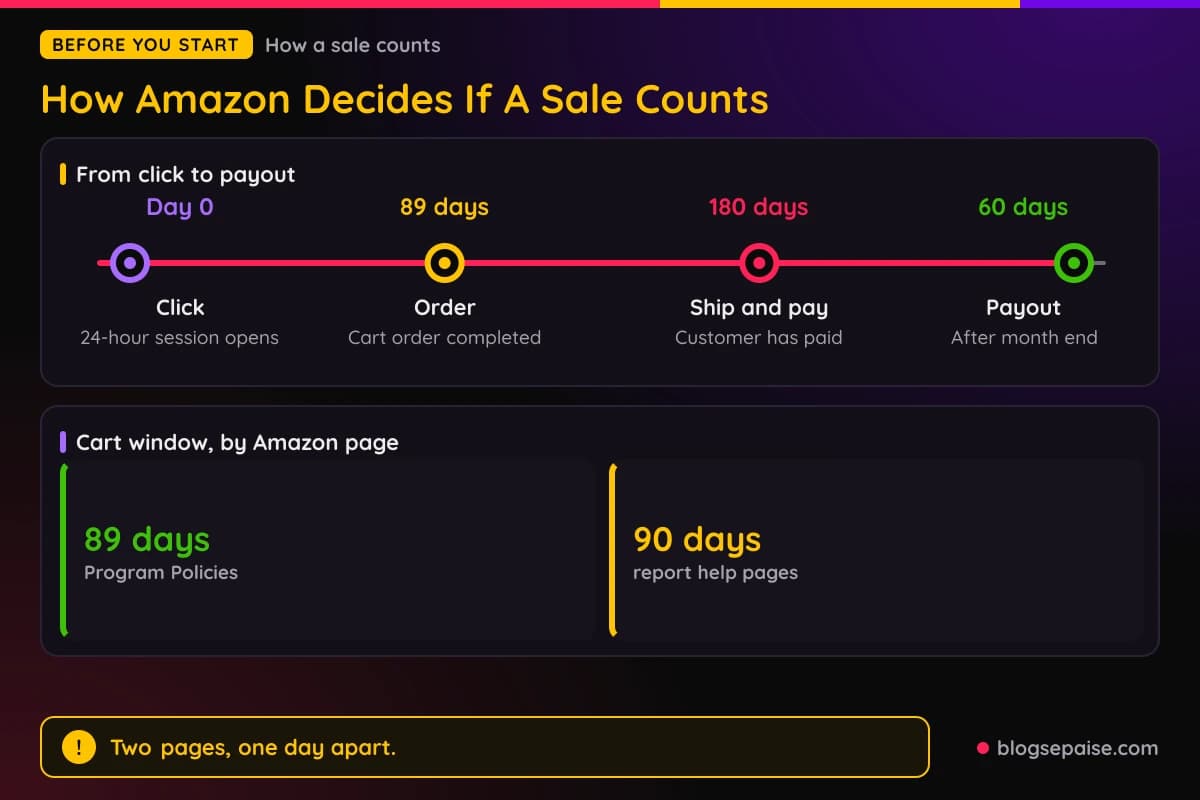
Commission comes later. Amazon's help page says it is credited only after the customer has bought the item, accepted delivery, and paid in full.
Payment comes later still. Amazon says commission income is paid roughly 60 days after the end of the month it covers, so January earnings are paid in late March.
The commission is a percentage of Qualifying Revenue. The Program Policies say that figure leaves out shipping, gift wrap, taxes, fees, credits, and bad debt.
Amazon's help page adds that commission is based on the sale price, not the list price. If a product's price falls, the dollar commission at the same rate falls with it.
Some purchases never qualify. The Policies list orders where a cancellation, return, or refund was started.
They also list purchases made through unapproved mobile apps, search engine links, and redirecting links. Purchases through improperly formatted links and from a Prohibited Paid Search Placement are on the list too.
Orders you place yourself earn nothing. Amazon's help page says the program is an advertising program rather than a discount program, and the same goes for orders for customers, friends, relatives, or associates.
That list gives you a map. Each of the nine steps below checks one part of it.
Step 1: Pick A Report And A Date Range That Fit
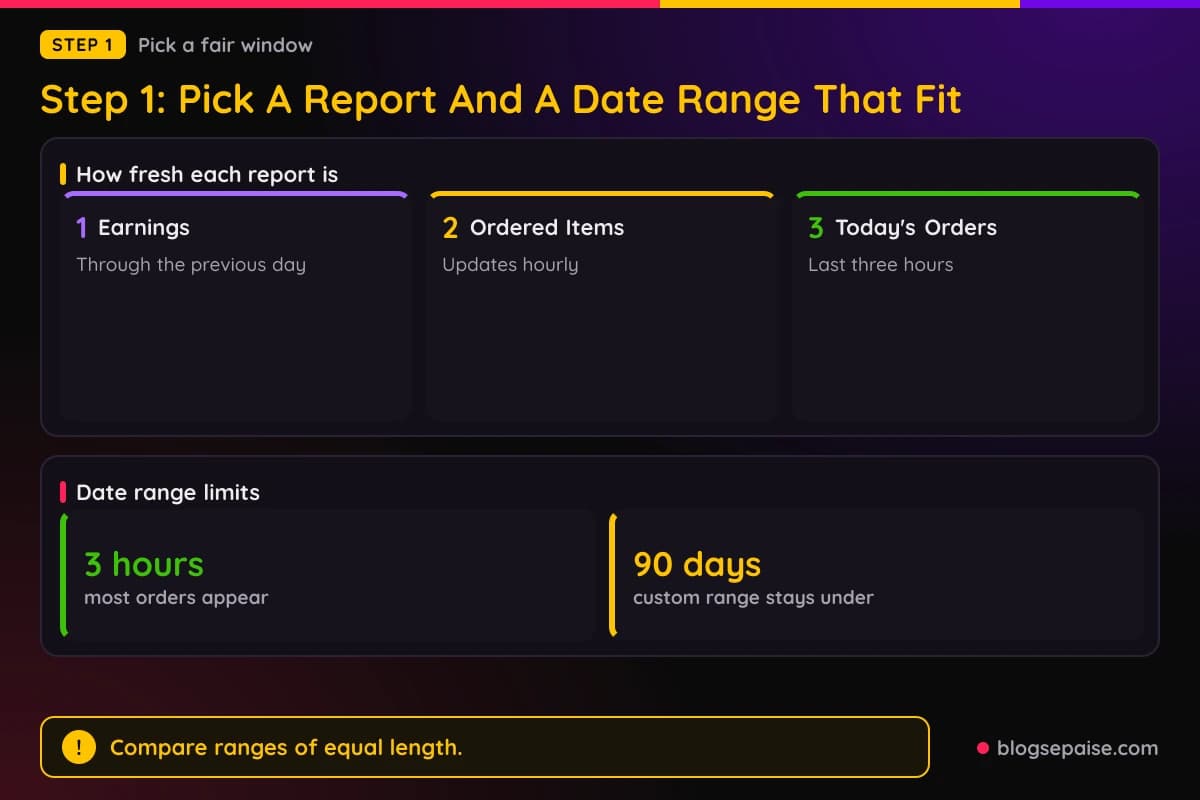
Before you chase a cause, make sure the drop is real. Amazon's reports run on different clocks, and a quick look at the wrong one can show a drop that is only a delay.
The Earnings Report is current through the previous day. On a Tuesday, Amazon's help page says it shows earnings through Monday.
The Ordered Items and Bounties reports update hourly, and most orders appear within three hours. Today's Orders shows data from the last three hours.
Pick a custom date range under 90 days, or use the presets for Today, Last 7 Days, and Last 90 Days. Compare two ranges of the same length.
Amazon's help pages warn about short ranges. A short range can show orders without matching clicks, or clicks without the orders you expected, because a cart can sit for a long time before checkout.
Use the download option to keep your own copy. The Download Reports link lets you choose the data and the date range, in Excel, CSV, or XML.
The Tracking ID Summary, Link Type Performance, and Daily Trends reports can be downloaded the same way. Saving a copy each month gives you something to compare later.
Tracking IDs help here. Amazon says they let you measure how different websites or marketing strategies perform while all earnings go to one account, such as separate IDs for a website and a newsletter.
The Tracking ID Summary Report shows only IDs with activity in the selected period, and transaction reports include each sale's tracking ID. If you use several IDs, find which one lost sales before you look anywhere else.
Step 2: Compare Clicks, Ordered Items, And Shipped Items
Three numbers tell you where a drop starts. Amazon's help page on using reports says the Earnings Report shows KPIs such as clicks, ordered items, shipped items, and conversion rates.
Product Link Clicks counts clicks on your Associates product links in the selected time frame. Items Shipped counts items actually shipped to customers in that time frame.
Revenue is items shipped multiplied by their price. Commission Income is the part of that revenue Amazon paid as commission.
The Order Report counts differently. Its Total Items Ordered column adds the items ordered through direct product links to all other items ordered.
Its Product Link Conversion column shows the share of direct link clicks that led to an order for that item. N/A means the order did not come from the product link.
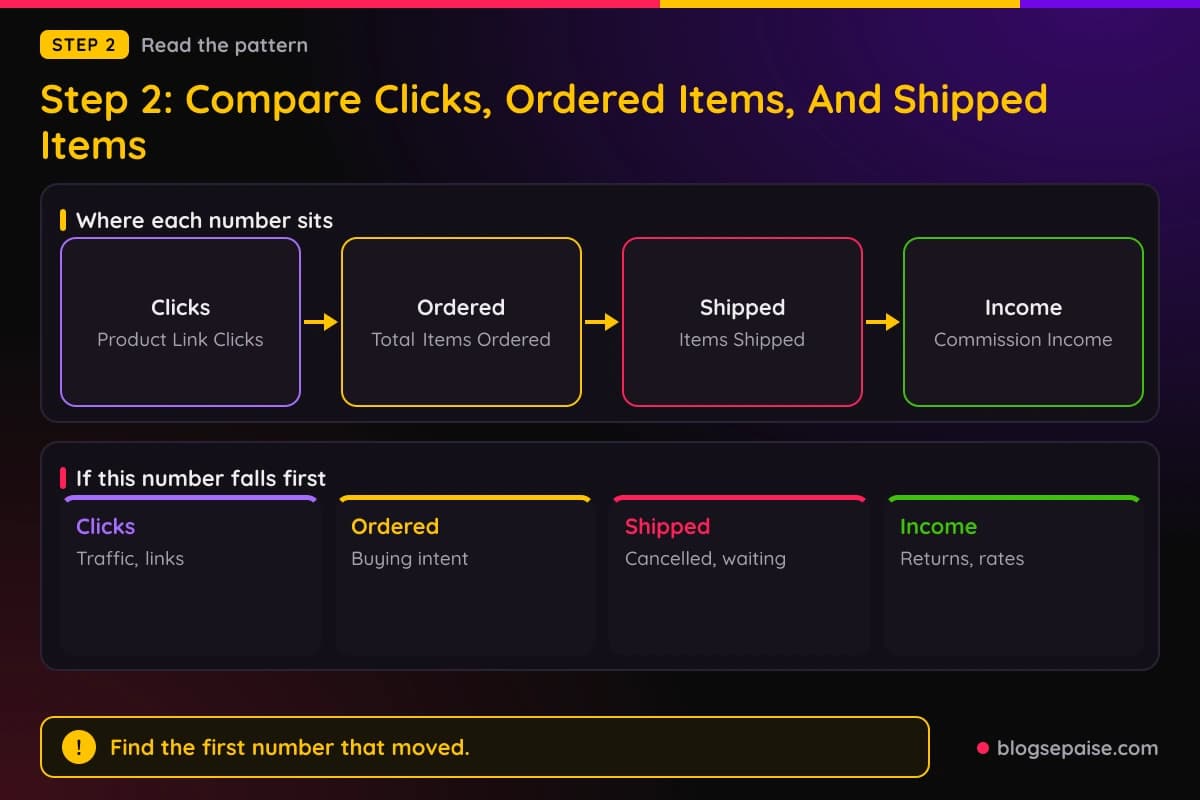
Now read the pattern. If clicks fell, your traffic or your link placement changed, and Step 8 is your next stop.
If clicks held and ordered items fell, fewer visitors are buying. Our guide on affiliate conversion rate benchmarks explains how to measure that.
If ordered items held and shipped items fell, orders are being cancelled or are waiting to ship. Amazon's help page says orders can be missing from your report if they were cancelled, have not shipped, or were marked ineligible.
If shipped items held and commission income fell, look at rates and returns in Steps 3 and 4.
The Link-Type Report adds one more cut. It shows Link Group, Clicks, Conversion, Items Ordered, Items Shipped, and Earnings for each link type, and Amazon notes the earnings refer only to product sales.
Its conversion note matters for recent clicks. Customers can check out up to 90 days after adding items to a cart, so recent clicks may not show orders yet.
Pre-orders create their own gap. Amazon's help page says pre-order commissions stay pending until the item ships, and the order shows under Ordered Items in the meantime.
Payment follows the standard 60-day terms after shipment. Amazon's own example is a game pre-ordered in October 2021 that launched in March 2022 and was paid in May 2022.
Step 3: Look For Returns, Refunds, And Negative Numbers
Returns can shrink earnings long after the sale. Amazon's help page says negative numbers in Earnings Reports represent returned or refunded products.
Amazon names two causes. One is a customer refusing delivery of a product you were credited for.
The other is a third-party seller refunding a customer for any reason. Amazon subtracts the commission in both cases.
Timing can mislead you. Customers have several days after delivery to return an item, so the original sale and its return can show on different reports.
Reports use two labels. Amazon's help page says Refund is used when a third-party seller refunds a customer for any reason, in part or in full.
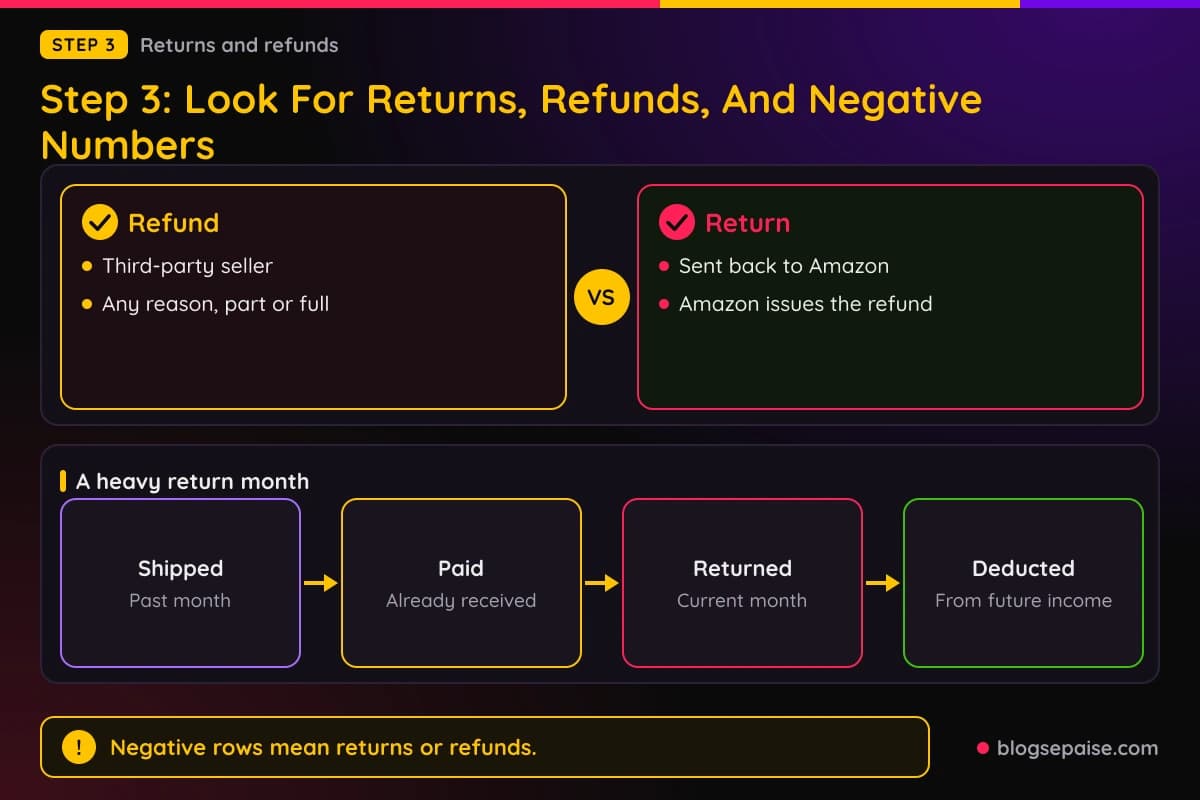
Return covers products that customers send back to Amazon for a refund. For third-party purchases, the vendor's policy decides if the customer must send the product back, and Amazon only knows a refund occurred.
A heavy return month can even push your balance below zero. Amazon says that happens in rare cases, when items shipped and paid in a past month are returned in the current month.
In that case Amazon says it deducts the shortfall from your future commission income, and you do not need to send any money.
The Program Policies add a related rule. Orders with a cancellation, return, or refund started are disqualified purchases.
To check your own account, download the Earnings Report for the weak month and look for negative rows. Compare them with the month before.
Our guide on affiliate commission on returned items walks through the full return cycle across networks.
Step 4: Check The Commission Rate For Each Category
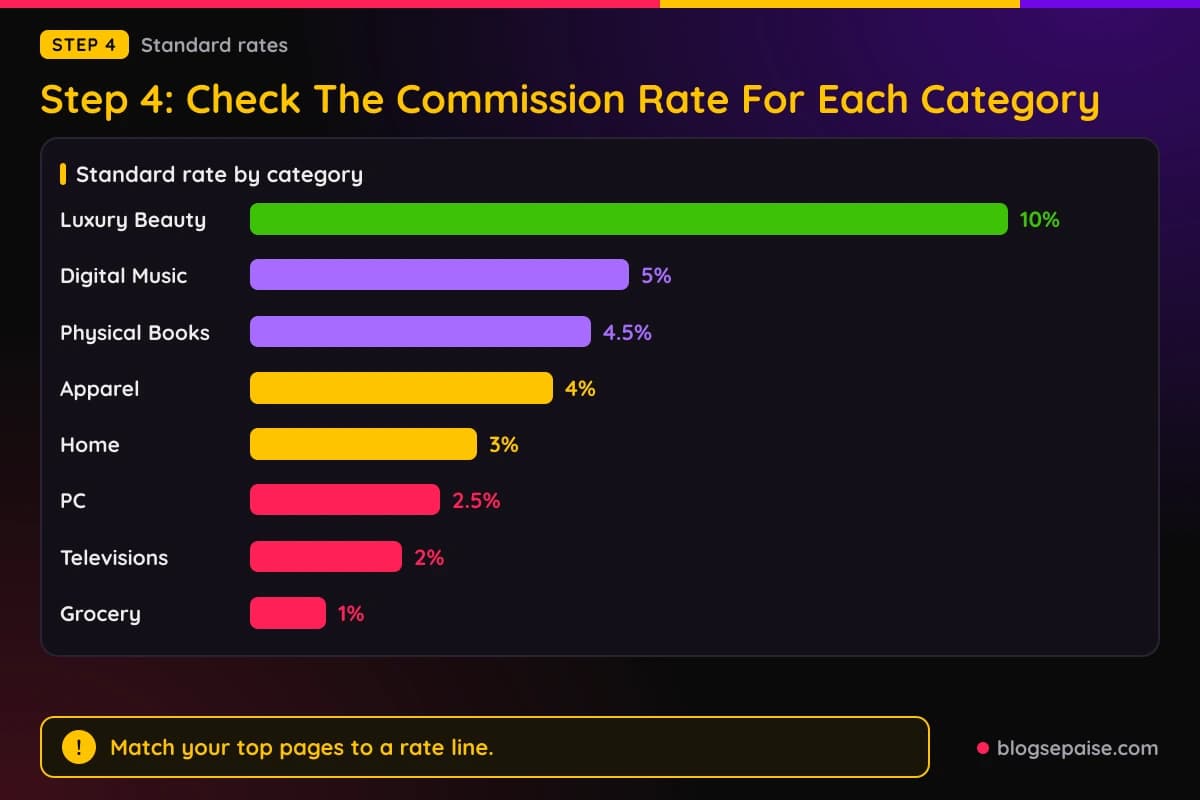
A rate change can cut earnings with no change in clicks or orders. Amazon's Standard Commission Income Statement lists a fixed percentage of Qualifying Revenue for each category.
It shows 10% for Luxury Beauty and 5% for Digital Music, Physical Music, Handmade, and Digital Videos. Physical Books, Kitchen, and Automotive sit at 4.5%.
Fire tablets, Kindle devices, Apparel, Watches, Jewelry, Luggage, Shoes, and Handbags pay 4%. So does the All Other Categories line.
Toys, Furniture, Home, Home Improvement, Headphones, Beauty, Musical Instruments, Outdoors, Tools, Sports, and Baby Products pay 3%.
PC and PC Components pay 2.5%, and Televisions and Digital Video Games pay 2%. Grocery, Health and Personal Care, Amazon Fresh, and Physical Video Games and Consoles pay 1%.
Gift Cards, Wireless Service Plans, Alcoholic Beverages, vehicle leasing and sales, and restaurant food delivery pay 0%.
If your top pages push readers toward a category in the lower rows, the same sales revenue pays less. Match your best pages to their category line before you decide anything else changed.
Amazon's statement also lists flat bounties. Prime sign-ups pay $12, Audible Standard trials pay $20, and Amazon Business account registration pays $15.
Limits exist too. Standard Commission Income on fine art is capped at $200 per product.
Amazon pays nothing for a month when your site mainly promotes free Kindle eBooks, 20,000 or more are downloaded through your links, and at least 80% of those downloads are free.
Amazon's rate page shows no effective date. Keep a saved copy of your own category mix and past reports, so you can see when a number changed for you.
Step 5: Check If Amazon Changed The Rules
Amazon can change its terms at any time. Section 13 of the Operating Agreement says it may do so by posting a notice or revised agreement on the Associates Site, or by email to the address on your account.
Changes take effect on the date specified. Apart from increases to Standard or Special Commission Income, that date is no less than two business days after the notice.
Continued participation counts as acceptance. If you do not accept a change, the agreement says your only recourse is to terminate.
Amazon's Operating Agreement page carries an Updated date of October 15, 2025. Two outside write-ups, from Karooya and ChatAds, describe an update effective April 14, 2026.
Both report that the April 14 update narrowed halo commissions. ChatAds says commission now applies only to direct qualifying purchases of the same ASIN variant.
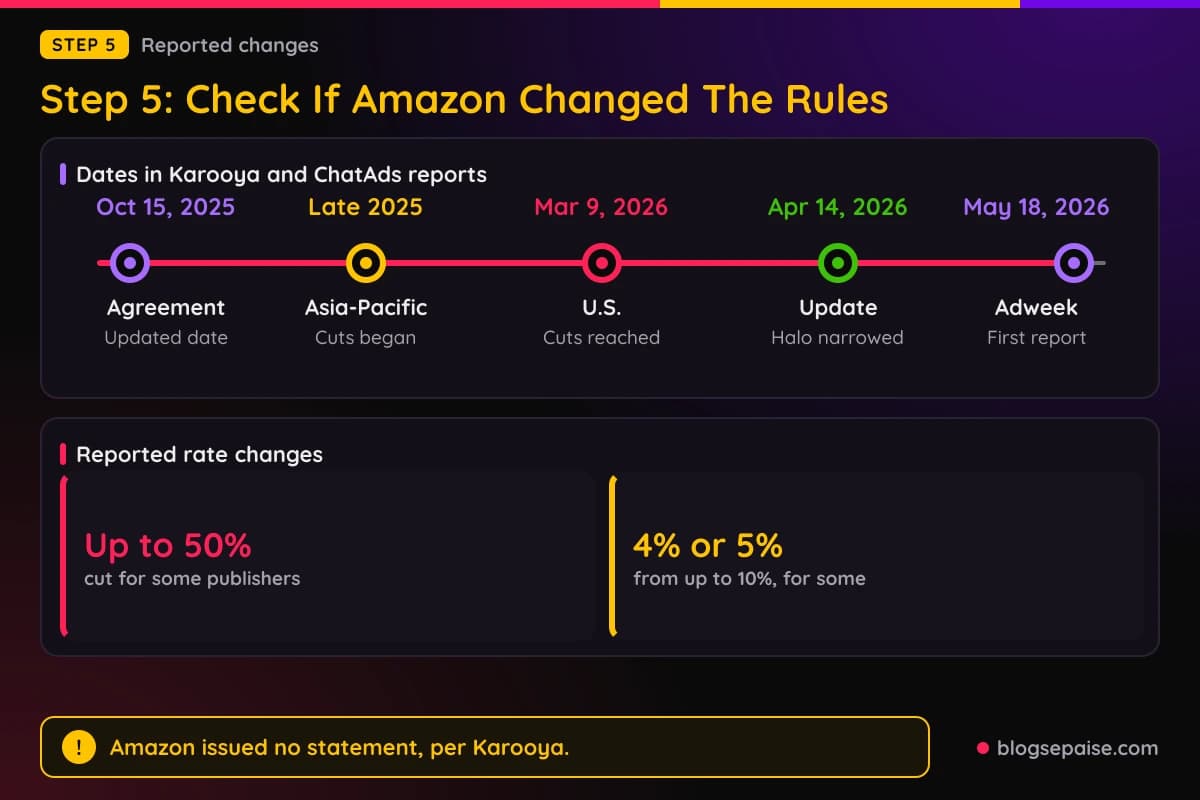
Both also mention a 180-day limit. The Program Policies carry the same figure, saying a product must be shipped, streamed or downloaded, and paid for within 180 days of purchase.
ChatAds adds that paid-ad traffic rules were tightened and the bar for content originality was raised. Karooya reports that certain boosted-post purchases are now disqualified.
Rates are a second story. Karooya and ChatAds say rate cuts began in Asia-Pacific in late 2025 and reached U.S. publishers around March 9, 2026.
Both write that some categories were cut by up to 50%, and that categories paying up to 10% fell to 4% or 5% for some publishers. Karooya says the cuts were not uniform and some long-standing publishers kept better terms.
ChatAds says the deepest cuts hit larger accounts with custom deals and that Amazon's public commission schedule still shows older rates. Neither source describes the cuts as an Amazon announcement.
Karooya says Amazon issued no statement, and that Adweek first reported the story on May 18, 2026, from interviews with seven publishers and partners.
Karooya also reports bonus and reporting changes. It says volume-based rate boosts and year-over-year performance bonuses were removed for most partners.
It adds that the threshold for tracking-ID data was raised and SKU or ASIN-level reporting was removed. Thinner reports could be the result.
Karooya calls the percentage figures well sourced but publisher reported. It names the Operating Agreement language as the one formally dated, checkable source.
Check your account messages and your email for a notice from Amazon. Then compare the date of your drop with the dates above.
Step 6: Check Your Links And Tracking IDs
Broken tagging is a cheap fix, so check it early. Amazon's Operating Agreement says links must properly use the tagged link formats Amazon provides.
The Program Policies list purchases through improperly formatted links as disqualified. They also say Special Links must use your assigned Associates ID.
Do not panic if your ID is missing from a browser address bar. Amazon's help page says it is not necessary for your unique ID to appear, because the shopping session is tagged so Amazon can credit the commission.
Amazon's Link Checker has a limit. The help page says it does not work correctly with links copied from Associate Central or SiteStripe.
It is built to check tagging on a URL you build yourself. It does not verify served links such as Omakase, Recommended Product Links, or other widgets.
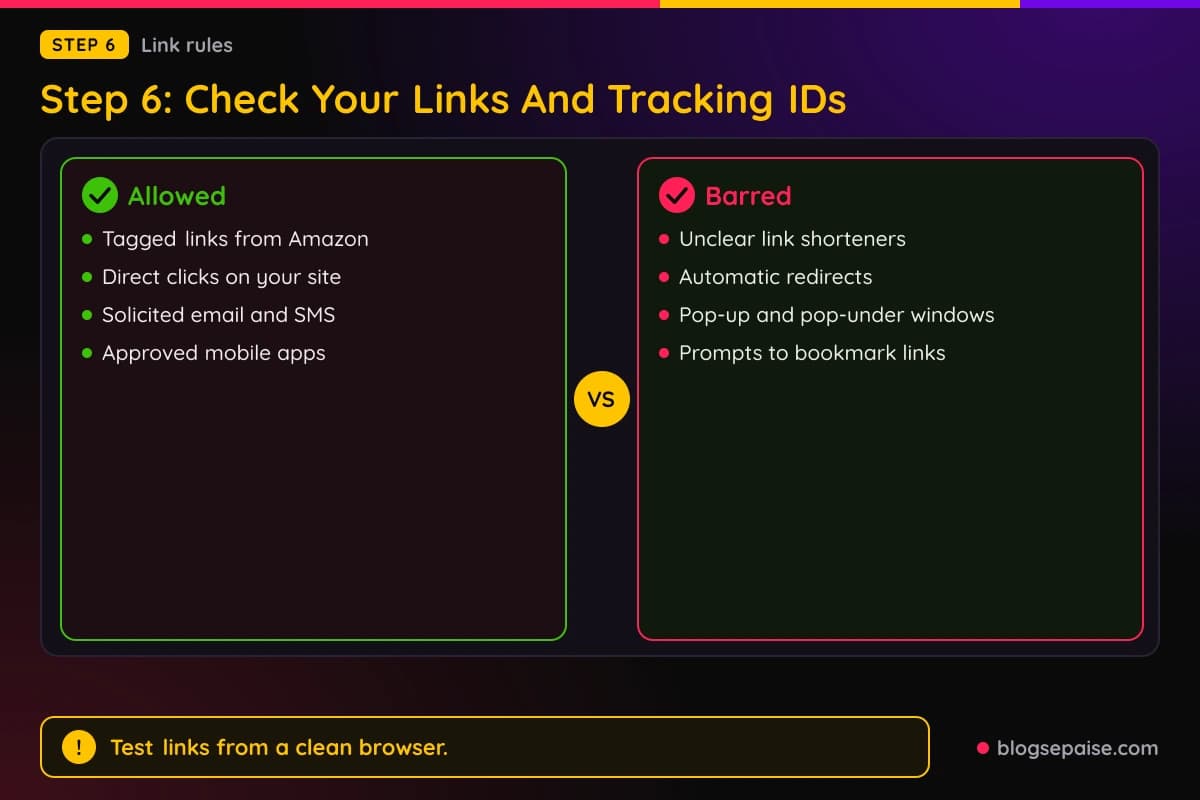
Shortened links are a risk. The Program Policies bar link shorteners that make the Amazon destination unclear, and they bar cloaking or obscuring the referring URL.
Redirects are barred too. Amazon's help page says it does not allow Associates to automatically redirect visitors to Amazon.com, so visitors must click a link on your site first.
Pop-ups are out as well. The participation guidelines bar pop-up and pop-under windows that drive traffic to Amazon.com.
Links must be accessed directly from your site. The Policies say you must not encourage customers to bookmark your Special Links.
Special Links may not be used in browser extensions or toolbars, except in approved mobile apps. Apps must not host or render Amazon web pages in WebViews.
Email and text need care. The Policies allow Special Links in email, SMS, or social messages only if the messages are solicited, meaning the recipient opted in.
Offline use is prohibited, including printed material, ebooks, mailings, and any oral solicitation.
If you changed a plugin, theme, or link tool recently, test the output. Click a link from a clean browser and watch where it lands.
Step 7: Check Your Content, Prices, And Disclosure
Amazon reviews the pages that carry your links. The Program Policies say sites must have original content and be publicly available.
Product list pages need additional original content, according to the Policies. Add your own notes, comparisons, and reasons for each pick.
Prices have strict rules. The Policies say you may show prices only if Amazon serves them or you pull them with the Creators API or PA API.
Price and availability data from the API must carry a date and time stamp and the Amazon disclaimer. Amazon's license terms say other data may be cached for up to 24 hours, while ASINs may be stored indefinitely.
Comparison displays must show the lowest new price. Mentions of a promotion must be removed when the promotion ends.
Disclosure is required. Section 5 of the Operating Agreement says your site must clearly and prominently state, "As an Amazon Associate I earn from qualifying purchases," or a substantially similar statement Amazon previously allowed.
On social media, Amazon's help page says the statement must be tied to your account. It also asks for a disclosure on each affiliate link, such as (paid link), #ad, or #CommissionsEarned.
A disclosure in text should appear in text, and a spoken recommendation needs a spoken disclosure. Content that uses both needs both.
The Policies say you are solely responsible for your site's content, legal compliance, disclosures, and privacy notices, including cookie disclosure.
They also bar incentives or rewards for using Special Links, and they bar artificially increasing commissions. Self-purchases and purchases for resale are barred as well.
Amazon's help center has a page on the content of a response to a compliance warning. Read it before you answer, and keep your reply factual.
Our guide on why your bounce rate is high helps if readers leave a page before they reach a product link.
Step 8: Check Where Your Traffic Went
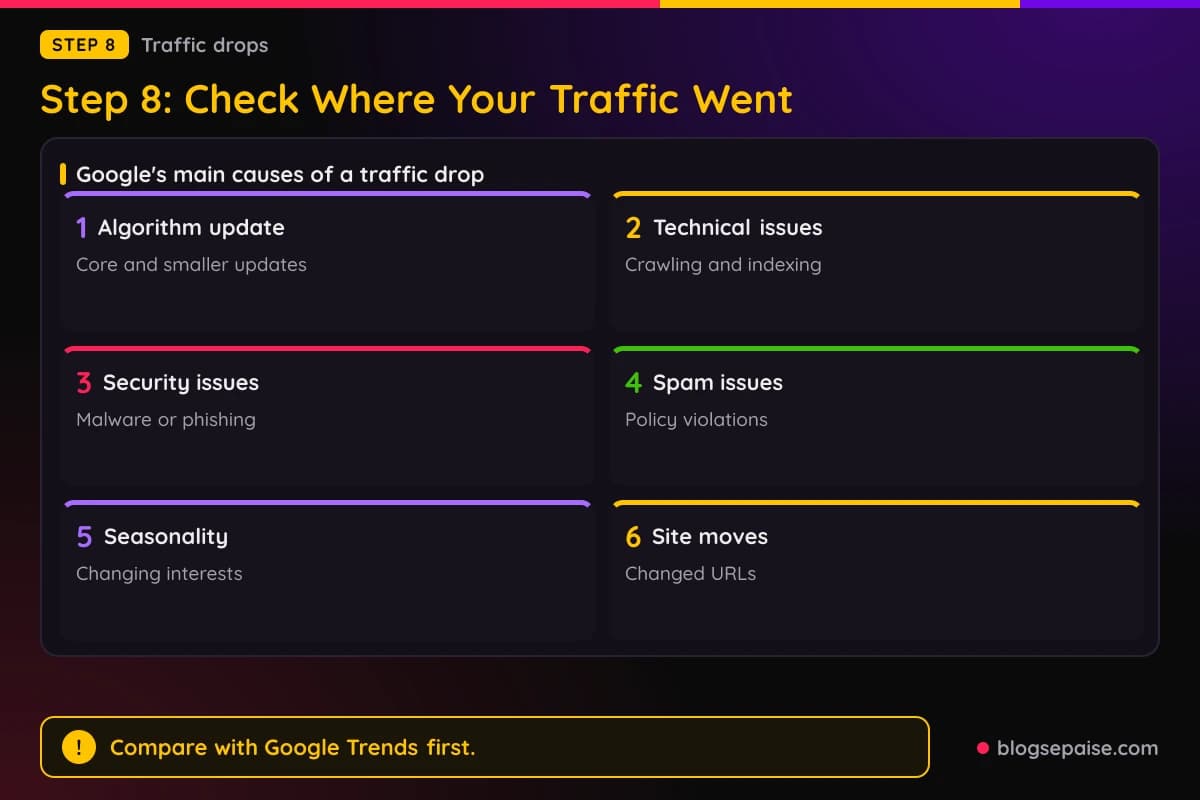
If clicks fell, the cause may sit outside Amazon. Google Search Central lists the main reasons organic traffic drops: algorithm updates, technical issues, security issues, spam issues, seasonality and changing interests, site moves, and reporting glitches.
Start with the Performance report in Search Console. Google says that if both impressions and clicks fell, you should investigate those causes.
If impressions held but clicks fell, Google says your title links or snippets may be less appealing than competing results. Competitors may also have stronger rich results.
Set the date range to the last 16 months. Google says that shows if the drop repeats every year.
Use the Compare tab, such as the last three months against the previous period or the same period last year. Check every tab to see if the change hits specific queries, URLs, countries, devices, or search appearances.
Sort the Pages table by Clicks Difference to find the pages that lost the most traffic. Then match those pages to the Amazon products they link to.
Seasonality has a documented check. Google says to filter by individual high-traffic queries and compare them in Google Trends to see if the drop is specific to your site or market-wide.
Core updates need patience. Google says to wait at least a full week after an update finishes, then compare that week with the week before the update started.
Google adds that small drops, such as moving from position 2 to 4, call for no drastic action. It recommends avoiding changes to content that already performs well.
For a large, sustained drop, Google suggests assessing the whole site against its helpful content questions. Changes can take days or months to take effect, so wait a few weeks before reassessing.
If a spam update hit you, see our guide on how to recover an affiliate site after a Google spam update.
Other channels can fade too. Our guide on Pinterest impressions that dropped overnight covers Pinterest, and the one on affiliate links on Facebook covers program rules for that network.
Geography can matter. Amazon's help page puts Default Tracking IDs for international click redirects under Account Settings, so check them if readers outside the U.S. visit you.
If you link several store IDs, the Consolidated Summary of Earnings gives one view across them, with up to 25 linked at a time. Amazon says its currency selector uses approximate exchange rates that do not reflect actual payout amounts.
Step 9: Check Your Products And Your Account Status
Products move. Amazon's help page says items usually disappear from its catalogue because they are no longer available or were replaced by newer editions.
New editions get new ASINs. Amazon suggests searching by one or two title words, or by the artist's or manufacturer's name, and linking to the replacement.
Some products cannot be linked. Amazon's help page says contractual agreements with some merchants and manufacturers keep Amazon from giving Associates content about them in linking tools.
You still earn on qualifying purchases of those, unless they appear on the Excluded Products page. That list may change, and Amazon says it cannot explain why items are added or removed.
The Products Statement excludes items sold on sites linked from Amazon, alcohol for U.S. licensed businesses, and prescription drugs or Amazon Pharmacy items.
Account status comes last. Amazon's application review page says the Associates team reviews your application once you have driven qualified sales, and it requires at least three within the first 180 days.
Personal orders do not count toward those three. If an application is rejected, Amazon says it cannot be reassessed.
Closed accounts follow a different path. Amazon's page says to contact Amazon within 5 business days of the closure, using the Contact Us form and the Closed Account Appeal option.
Amazon splits violations in two. For violations that are not customer trust risks, such as not responding to a request for more information, you can correct the problem and appeal with the information a warning response requires.
For customer trust risks, such as redirecting traffic from an Amazon site, Amazon reviews only an appeal that gives detailed evidence that its facts were wrong.
If your reports show nothing at all, read your account messages first. Then check your tax settings, because Amazon says you must have tax information on file before any payment is made.
Payment minimums matter too. The Program Policies list $10 for direct deposit, $10 for a gift card up to $2,000, and $100 for a check with a $15 fee.
Common Mistakes When Amazon Affiliate Sales Drop
Judging a single day is the first mistake. The Earnings Report runs a day behind, so a quiet morning can be a delay.
Changing your best pages after a small ranking move is the second. Google recommends avoiding changes to content that already performs well.
Retagging every link by hand is the third. Amazon says the Link Checker misreads links copied from Associate Central or SiteStripe.
Reading ordered items as earnings is another. Amazon pays commission only after the item ships and the customer has paid in full.
Ignoring return timing is a quieter one. Returns can land on a different report than the sale, so compare months and not single days.
Assuming a rate cut without opening the category line is common. Compare the rate on Amazon's statement with the revenue in your report first.
Using shortened or redirecting links to hide a tag is the last. Amazon bars both, and the Program Policies list improperly formatted links as disqualified.
Final Thoughts
A drop in Amazon affiliate sales is a puzzle with a short list of pieces. Clicks, ordered items, shipped items, returns, rates, rules, links, traffic, and account status each leave a trace.
Work through the steps in order. Pick a fair date range, compare clicks with shipped items, look for returns, and read the category rate line.
Then check the rules. Amazon's Operating Agreement lets it change terms, and outside reports describe rate and halo changes in 2026 that Amazon did not announce.
Last, check your links, your traffic, and your account. Keep copies of your reports each month, so the next drop starts with a baseline.
Frequently Asked Questions
1. Why did my Amazon affiliate sales suddenly drop?
Several causes fit a sudden drop: fewer clicks, fewer orders, returns, a rate change, a tagging problem, or an account issue. Compare clicks, ordered items, and shipped items in your reports to find which one moved first.
2. How long does the Amazon affiliate cookie last?
Amazon describes a 24-hour session that starts at your click. Items added to a cart in that window still count if the order is completed within 89 days, according to the Program Policies, or 90 days, according to the report help pages.
3. Why do I see clicks but no sales?
Amazon's help pages say short date ranges can show clicks without the orders you expected, because carts may not be checked out yet. Orders can also be missing if they were cancelled, have not shipped, or were marked ineligible.
4. Do returns reduce my Amazon affiliate commission?
Yes. Amazon's help page says negative numbers in Earnings Reports represent returned or refunded products, and Amazon deducts any shortfall from future commission income.
5. How often do Amazon Associates reports update?
Amazon says the Ordered Items and Bounties reports update hourly, and most orders appear within three hours. The Earnings Report is current through the previous day.
6. Did Amazon cut affiliate commission rates in 2026?
Karooya and ChatAds report cuts of up to 50% for some publishers, reaching the U.S. around March 9, 2026. Karooya says Amazon issued no statement, and ChatAds says the public schedule still shows older rates.
7. How can I appeal if my Amazon Associates account was closed?
Amazon says to contact it within 5 business days of the closure, using the Contact Us form and the Closed Account Appeal option. For customer trust risks, Amazon reviews only an appeal with detailed evidence that its facts were wrong.
8. When does Amazon pay affiliate commissions?
Amazon says commission income is paid roughly 60 days after the end of the month it covers. You must have tax information on file, and the Program Policies list a $10 minimum for direct deposit.
9. Can I buy through my own affiliate links?
No. Amazon's help page says it does not pay commissions on orders you place for yourself, for customers, or for friends, relatives, or associates.