Can You Use Affiliate Links On A Free Blogger Or WordPress.com Blog?
You started a free blog on Blogger or WordPress.com, and now you want to add a link that pays you when a reader buys. Then the worry hits: will the host delete the blog, or will the affiliate program ban you?
Short answer: yes, you can use affiliate links on a free blog. WordPress.com says you can add affiliate links to your content, and Blogger's Content Policy has no affiliate section at all.
Allowed does not mean free of limits. WordPress.com bans some link categories and sites built mainly to push affiliate links, and Blogger bans spam and misleading content.
Quora is full of the same questions, such as "Can I use affiliate links on a free Blogger website?" and "Can I put affiliate links on my blog on blogspot.com?"
The answers you find online are old, or they guess.
The seven steps below stick to what the hosts, Amazon, and the FTC publish. Where a host publishes no rule, the article says so plainly.
A worked example with invented numbers, common mistakes, and a short FAQ close things out.
Disclosure: Some of the links I share might be affiliate links. If you click on one and make a purchase, I may earn a small commission as a thank you. But don’t worry, it won’t cost you anything extra. I only recommend stuff I genuinely believe in. Your support helps me keep creating awesome content. You can read my full affiliate disclosure in my disclaimer page.
If you want to save a lot of hours searching for high-paying affiliate programs, check out our exclusive list of 2500+ affiliate programs. You’ll find all the information about the programs inside the list. This list is perfect for affiliate bloggers and influencers.
Why The Answer Depends On Three Rule Books
A free blog sits on land that someone else owns. So three rule books apply: your affiliate program, your free host, and the FTC.
Start with Blogger. Google's Blogger help says you can show AdSense and other ads on your pages, and it says nothing about affiliate links by name.
The Blogger Content Policy lists sections such as Spam, Misleading Content, and Regulated Goods and Services. It has no section on affiliate links, and publishing no rule is a plain fact, not a green light.
WordPress.com is different. Its support page on earning money has a section on affiliate links, and it states what is allowed and what is not.
Your affiliate program is the second rule book. Each program decides where your links may appear, and breaking its terms can cost you commissions.
The FTC is the third voice in the room. It cares about how you tell readers that you earn money, so a link that the host and the program both allow can still cause trouble if the disclosure is hidden.
Think of it as three layers. A link has to pass all three, and the strictest layer wins.
A free address is a fine place to learn. Just do not build your whole business on it.
Rules on free hosts can change without a vote from you. Check the live pages before each new batch of posts.
Many beginners check only the host and forget the program. That is a common way to lose commissions over a post that the host never touched.
Others do the reverse and check only the program. Then a missing disclosure or a spammy pattern gets the post flagged by the host.
Free hosts add a fourth fact to keep in mind. WordPress.com may show ads on a free site, and a blogspot.com or wordpress.com address is not a domain you own.
Other free builders, such as Wix, have their own terms. Read a builder's terms before you place a link there.
Medium is another free place where writers ask the same question. Our guide on affiliate links on Medium covers it, and our guide on using Quora and Medium covers the wider picture.
Take the steps below in order. Each one answers a question that the next one depends on.
Step 1: Check The Affiliate Program's Rules First
Start with the program, because it can end your earnings faster than any host can. Open the terms and search for the words site, social media, link, and ad.
Amazon Associates gets the most questions, so it gets the most space here. Its Operating Agreement defines your Site in four ways.
Your Site can be your website, social media user-generated content, an online software application, or an Alexa skill.
A blog on Blogger or WordPress.com is a website, so it fits that definition. Amazon's agreement does not name either host, and it publishes no line that bans or approves free addresses.
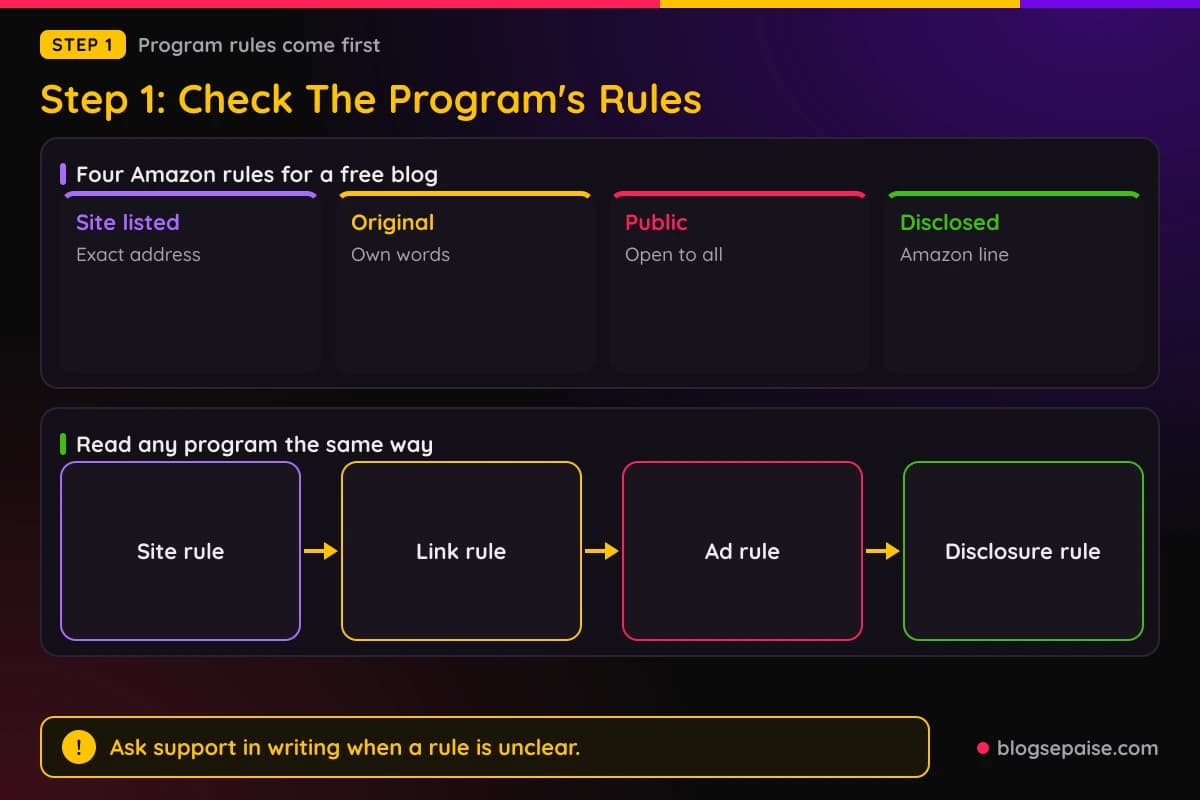
Amazon's Participation Requirements say you must identify your Site or Sites in your application. List the exact blog address you plan to use, such as yourname.blogspot.com.
Another line says your Site must contain original content. Third-party material needs significant commentary, analysis, or transformation, so copied product descriptions will not pass.
Your Site must also be publicly available at the website address in your application. A password-protected blog or a private draft does not meet that line.
The Operating Agreement asks for a disclosure line too: "As an Amazon Associate I earn from qualifying purchases." Put it on the blog where readers can see it.
Links must use the special tagged formats that Amazon provides. A plain product link without your tag earns nothing.
Other programs differ. A software program may approve each site, ban some ad types, or set its own approval rules, so a program that works for one free blog may turn down another.
Use a quick test for any program. Find the site rule, the link rule, the ad rule, and the disclosure rule.
If one of them is unclear, ask the program's support team in writing. Keep the reply, because an email from support is the best proof you can have if a commission is ever questioned.
Do this before you write a single link into a post. It costs ten minutes and can save you months of unpaid work.
Ask yourself a plain question before you post: do I run this blog, and is its address listed in my account? If either answer is no, do not put your tag there.
Bought ads need care too. Check your program's terms before you pay to promote a post that holds a tagged link.
Step 2: Read The Free Host's Rules On Affiliate Links
Next, read the host. Your blog lives on Blogger or WordPress.com, and each has rules for what you may post.
Blogger first. Its help page on earning money says you can show AdSense and other ads on your pages.
To use AdSense, your blog must follow the AdSense policies and restrictions. The Blogger Content Policy and Terms of Service still apply to your use of Blogger.
Blogger's help page does not mention affiliate links, and the Blogger Content Policy has no affiliate section. Blogger publishes no affiliate cap, no affiliate ratio, and no affiliate ban.
The policy does list sections that reach affiliate writers. Spam covers unwanted promotional or commercial content and anything that appears to be a mass solicitation.
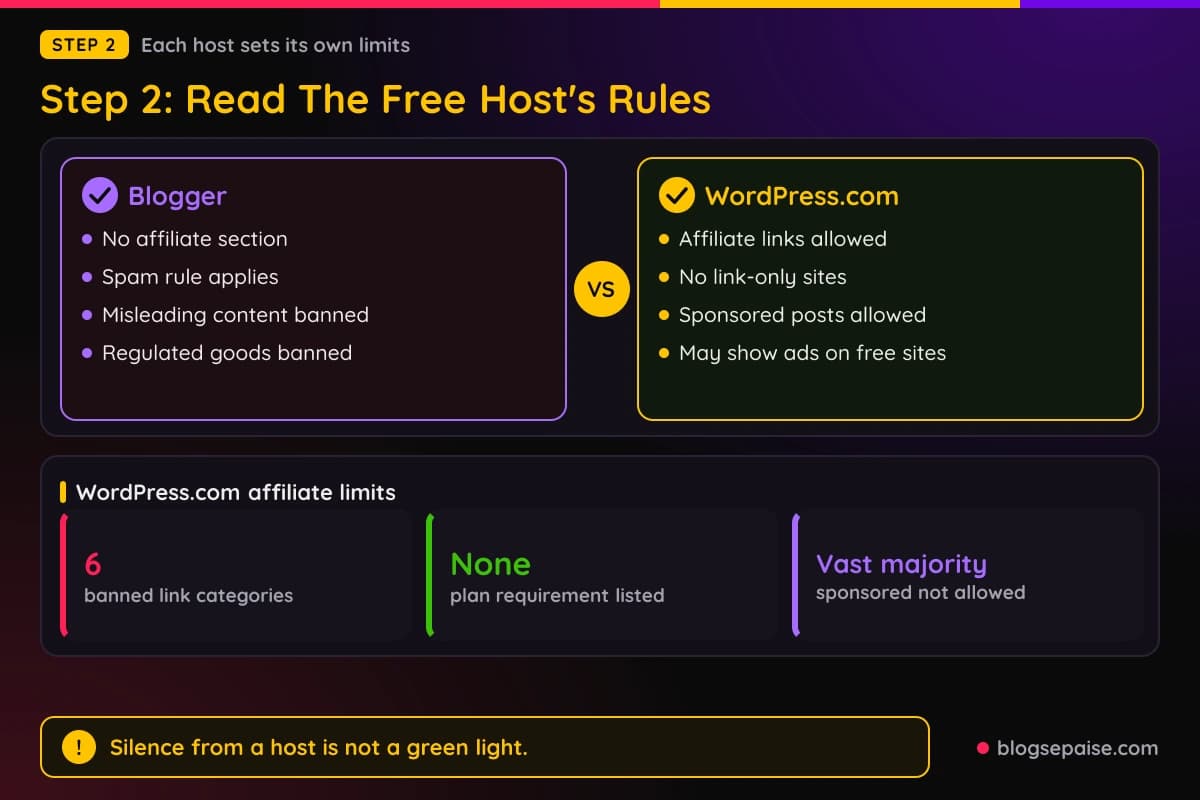
Deceptive Practices, Fraud and Scams tells you not to deceive, mislead, or confuse users for financial gain. Misleading Content says the same about content in general.
Regulated Goods and Services tells you not to sell, advertise, or facilitate the sale of regulated goods and services. The examples include alcohol, gambling, pharmaceuticals, and unapproved supplements.
So a link to a gambling site or a supplement store can fall under that rule. Stick to ordinary products and software.
Blogger also says advertisements are not allowed on adult blogs, and it bars ads for or links to commercial porn sites. Skip that niche on a free blog.
Now WordPress.com. Its support page says you can add affiliate links to your website's content.
The same page lists six categories where affiliate links are not allowed.
They are gambling, get-rich-quick schemes, multi-level marketing programs, disreputable merchants, sexually explicit material, and malware or phishing-type scams.
It also says WordPress.com does not allow sites that exist primarily to drive traffic to affiliate links. A blog needs real posts first and links second.
The support page lists no plan requirement for affiliate links, and it names no limit on links per post. WordPress.com's Terms of Service add a point for free sites.
Under the Terms, WordPress.com may display advertisements on your website and domain unless you buy a plan that includes the removal of ads. It may also show attribution text or links in your footer or toolbar.
So a free WordPress.com blog can carry ads and credits that you did not place. Do not promise readers an ad-free page.
WordPress.com also lets you publish sponsored posts. A sponsored post is any content that promotes a specific product or service, and sites where the vast majority of content is sponsored are not allowed.
Save a copy of each rule page with the date you read it. Policies change, and your notes show what you followed.
Blogger's Content Policy also covers copyright, harassment, and hate speech. Those sections apply to affiliate posts the same way they apply to any other post.
Neither host's rules replace the program's rules. A link can pass Blogger and still break Amazon's terms.
Step 3: Disclose Every Link The Right Way
The FTC says to disclose any financial, employment, personal, or family relationship with a brand. An affiliate commission is a financial relationship.
It also says to put the disclosure with the endorsement itself. Disclosures in an About Me section, at the end of a post, or behind a MORE click are likely to be missed.
On Blogger and WordPress.com, that means the note belongs inside the post, near the links. A footer or a sidebar is easy to scroll past.
The FTC also says to keep the disclosure out of a group of hashtags or links. Place it in a plain sentence of its own.
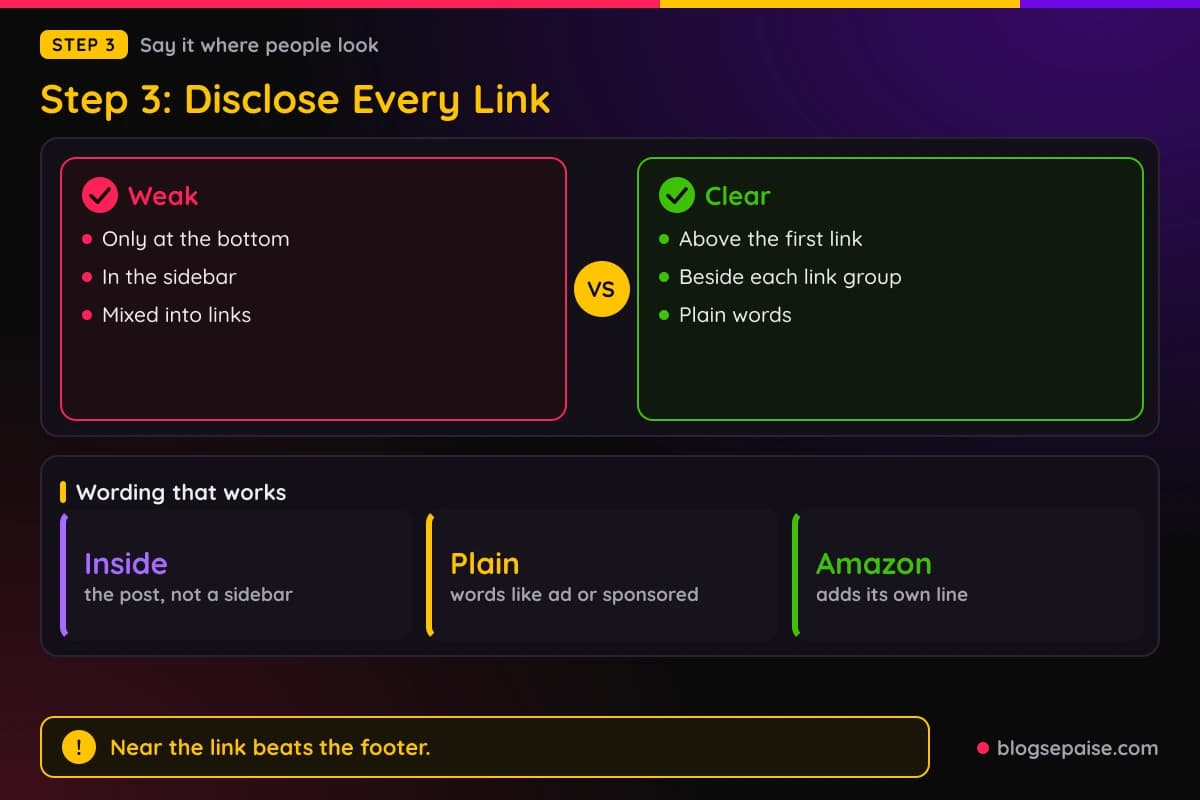
Use plain words. The FTC suggests terms such as ad, advertisement, or sponsored, and it says to avoid vague terms like collab or thanks on their own.
A sample opener could read: "I earn a commission when you buy through links in this post." Short, honest, and easy to scan.
Write the disclosure in the same language as the endorsement. An English post gets an English note.
Free products and perks need a disclosure too. The FTC says financial ties include free or discounted products as well as cash.
Amazon adds its own line: "As an Amazon Associate I earn from qualifying purchases." Use it on top of your own sentence.
If you publish a sponsored post on WordPress.com, say so at the top. A paid promotion is a financial connection, and readers should know before they read.
You can also add a site-wide note. Still put a sentence in each post, because readers often land on a single post from search.
Check the post on your phone before you publish. A note that sits near the link on a laptop can end up far from it on a small screen.
Our affiliate disclosure generator writes the sentence for you. Our legal disclosures guide covers the pages every blog needs.
Keep the wording the same from post to post. Readers learn to spot it, and you never have to wonder if you forgot.
Put one plain sentence above the first link and a short label such as paid link beside each group of links. Two spots beat one.
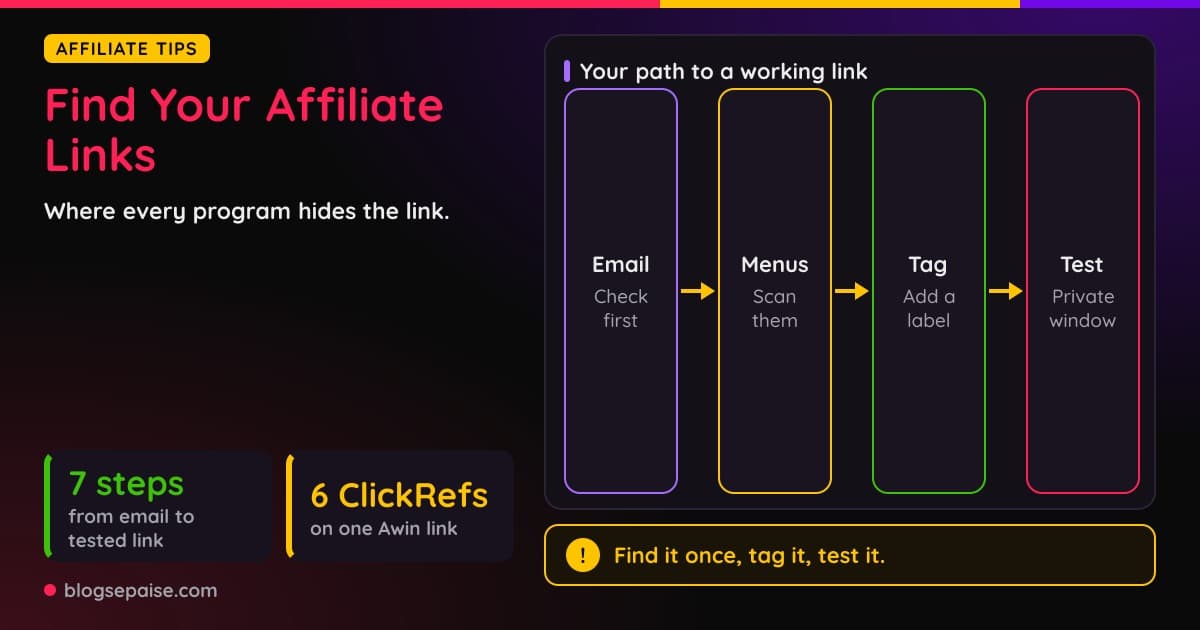
Step 4: Set Up Your Links In The Editor
Now set up the links. Do it in a clean order so you never publish a link by mistake.
First, sign up with the program. Then copy the tagged link from the program's own dashboard, not from a random web page.
Next, write the post as if the links did not exist. A reader should get the full answer without clicking anything.
Then add each link next to the sentence that explains why the product helps. Use plain link text that names the product.
In both editors, you highlight the words, choose the link tool, and paste the tagged address. Then add the disclosure sentence above the first link.
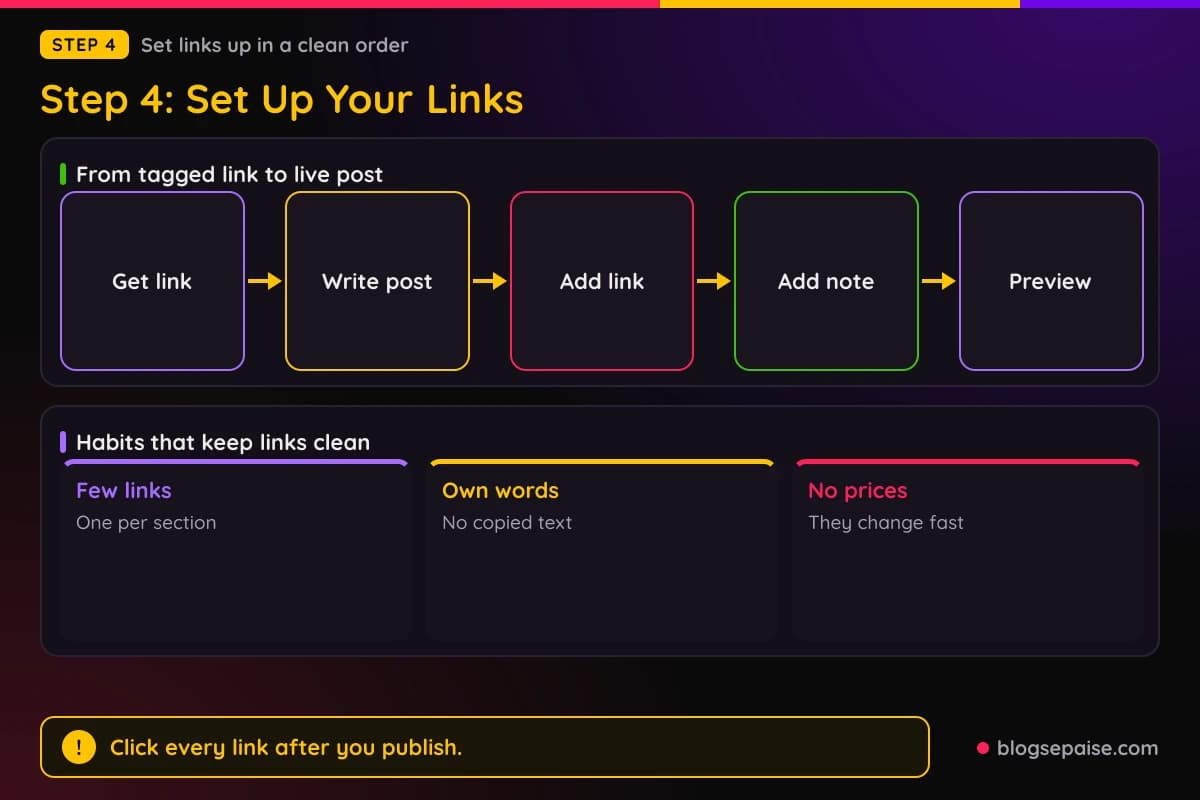
Open the published post in a private browser window and click every link. Make sure each one lands on the right product page with your tag.
Check the post on a phone too. Small screens move things around, and a broken layout can hide a link or its note.
Keep the links few. A post with one link per section reads like a guide, and a post with a link in every sentence reads like an ad.
Keep links out of the title and the first lines. Give the reader value first and let the links come after they have a reason to click.
Describe each product in your own words. Copied manufacturer text breaks the original content line and adds nothing for readers.
Leave typed prices out. Prices change fast, and a stale price misleads readers.
Check your program's terms before you shorten or mask a link. A reader should be able to tell where a link goes.
Update old posts when a product goes away. A dead link earns nothing and annoys readers.
Test one post before you roll links out across the blog. A single clean post shows you every spot where something can go wrong.
Write down which link sits in which post. A simple list saves hours when a program changes its link format.
Step 5: Avoid Risky Tactics On A Free Blog
Free hosts watch for patterns that look like spam. These tactics put a free blog at risk.
The first is a blog made only of links. WordPress.com says it does not allow sites that exist primarily to drive traffic to affiliate links.
The second is thin posts that copy a product page. Blogger's spam section covers unwanted promotional or commercial content, and Amazon wants original content.
The third is fake reviews. Blogger bans content that deceives, misleads, or confuses users, so review only what you have used.
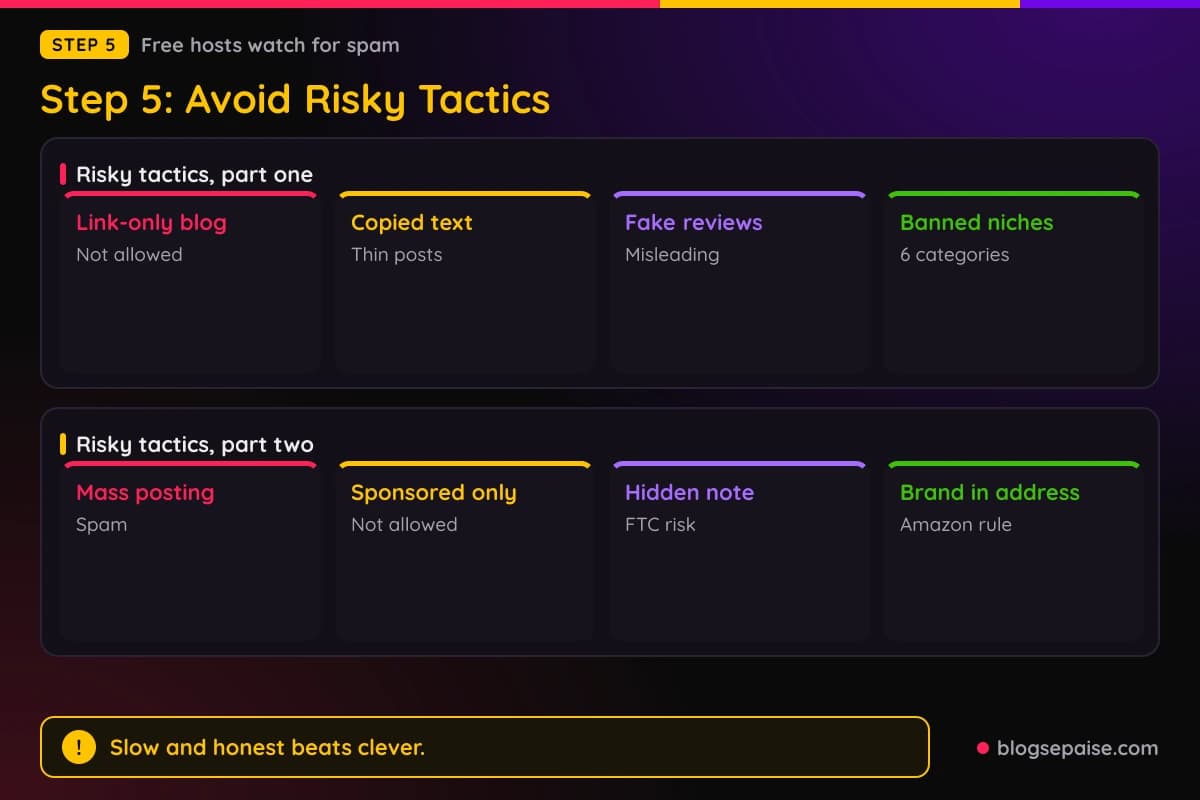
The fourth is links to banned niches. WordPress.com lists six categories, and Blogger's regulated goods rule names alcohol, gambling, pharmaceuticals, and unapproved supplements.
The fifth is mass posting. Blogger treats anything that appears to be a mass solicitation as spam, so do not paste the same post many times or drop links in other people's comments.
The sixth is a sponsored-only blog. WordPress.com does not allow sites where the vast majority of content is sponsored.
The seventh is hiding your disclosure. A hidden note hurts readers and goes against FTC guidance.
The eighth is a brand name in your blog address. Amazon's Participation Requirements make a Site unsuitable if it uses an Amazon trademark in any domain name or subdomain.
Pick an address that names your topic and not a store. A name like homeofficegear is safer than one that borrows a brand.
Safe habits beat clever tricks. A slow, steady blog earns something every month, and a removed blog earns nothing.
If a host or program rule is unclear, ask support and save the reply.
Skip clever workarounds for host rules. A trick that works today can get a free blog removed tomorrow.
Read your host's email notices. A warning is your chance to fix a post before the problem grows.
Step 6: Track What Your Links Do
Tracking tells you which posts earn and which only feel productive. Without it you are guessing.
Your blog's stats show views, and your program's report shows clicks, orders, and commission. Use both.
Record four numbers once a week: views, clicks, orders, and commission. A simple sheet is enough.
If your program lets you set a separate tracking tag, use one tag per post. Then you can see which post earned each order.
Add a notes column. Write down the post type, the disclosure spot, and the date you published or changed it.
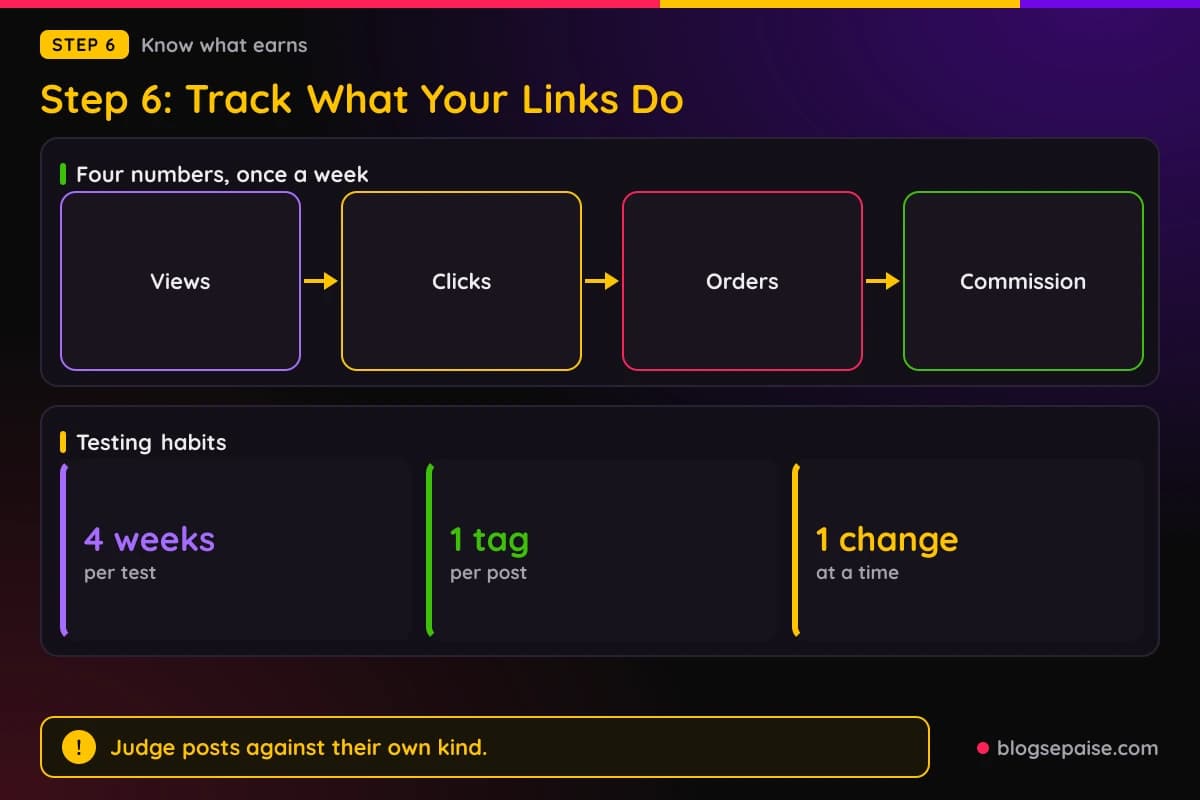
Give each test four weeks before you judge it. One slow week tells you nothing, and one lucky week tells you even less.
Change one thing at a time. If you move the disclosure and the link together, you will not know which change helped.
Treat the first two months as practice. Early numbers on a new blog are small, and the goal is to learn which posts earn clicks.
Keep every post as a draft file on your own computer. If a host ever removes a post, you can fix it and republish.
Check your links once a month. Products go out of stock, and programs change their link formats.
Our guide on how to track affiliate income when starting walks through the habit from day one.
Compare posts of the same type. A buying guide and a personal story will never perform alike, so judge each against its own kind.
Write one line after each month: what worked, what failed, and what you will try next.
Step 7: Plan The Move To Your Own Domain
A free blog is rented space. Plan to move to a domain you own once the blog earns its first few commissions.
Both hosts let you use a custom domain. Blogger's help says that to personalize your blog's website address, you can buy a domain.
In Blogger you open Settings, choose Custom domain, and enter the domain you bought. Blogger then shows two CNAME records to add at your domain provider.
Wait at least an hour after adding the records, then return to Blogger and repeat the custom domain step. It may take up to 24 hours for your blogspot.com address to redirect to the custom domain.
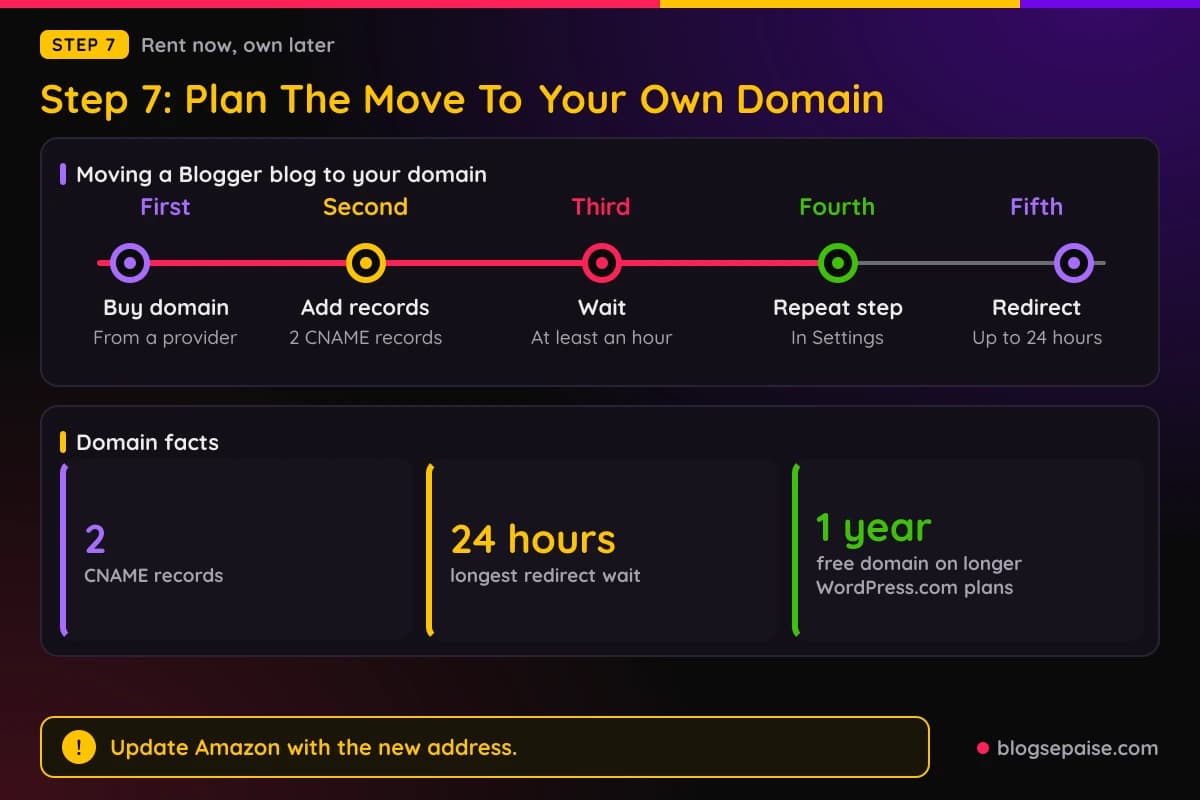
Blogger's help does not state a price for the custom domain step. It only says you buy the domain from a domain provider.
On WordPress.com, your site includes a .wordpress.com address until you add a custom domain. Any paid plan can connect a domain you already own from another provider at no extra cost.
With an annual, two-year, or three-year plan, you can register a new domain name free for one year. WordPress.com's domain page does not say if the free plan supports a custom domain.
Connecting keeps the domain registered with your current provider and points it at WordPress.com. You keep control of the name.
A paid WordPress.com plan can also include the removal of ads. Under the Terms of Service, ads can appear on a free site unless your plan removes them.
After the move, update your Amazon Associates account. Amazon wants your Site identified in your application, so add the new address.
Then update your links, your disclosure, and any posts that mention the old address. Click through the whole blog once.
If you want full control, you can build a site on your own hosting. Our guides on domain name and hosting and setting up WordPress cover that path.
Not sure where to start? Our guide to a website to start affiliate marketing compares the options.
Move before the blog gets popular. Fewer posts and fewer inbound links mean less to fix.
Keep the old blog live until the redirect works. Readers who click an old link should land on the right post.
A Worked Example: Dev Tests Three Posts In Eight Weeks
Dev is a made-up blogger, and every number in this example is invented to show how to read results. Real numbers will differ.
He writes about home office gear on a free Blogger blog. He applies to Amazon Associates with the exact blog address and adds the Amazon line to his blog.
Over eight weeks he publishes three posts with links. A buying guide has 5 links, a how-to has 3 links, and a personal story has 1 link.
Each post opens with one plain sentence about commissions. Each link group also carries a short note.
The buying guide gets 380 views, 31 clicks, and 3 orders. Dev earns $11 in commission.
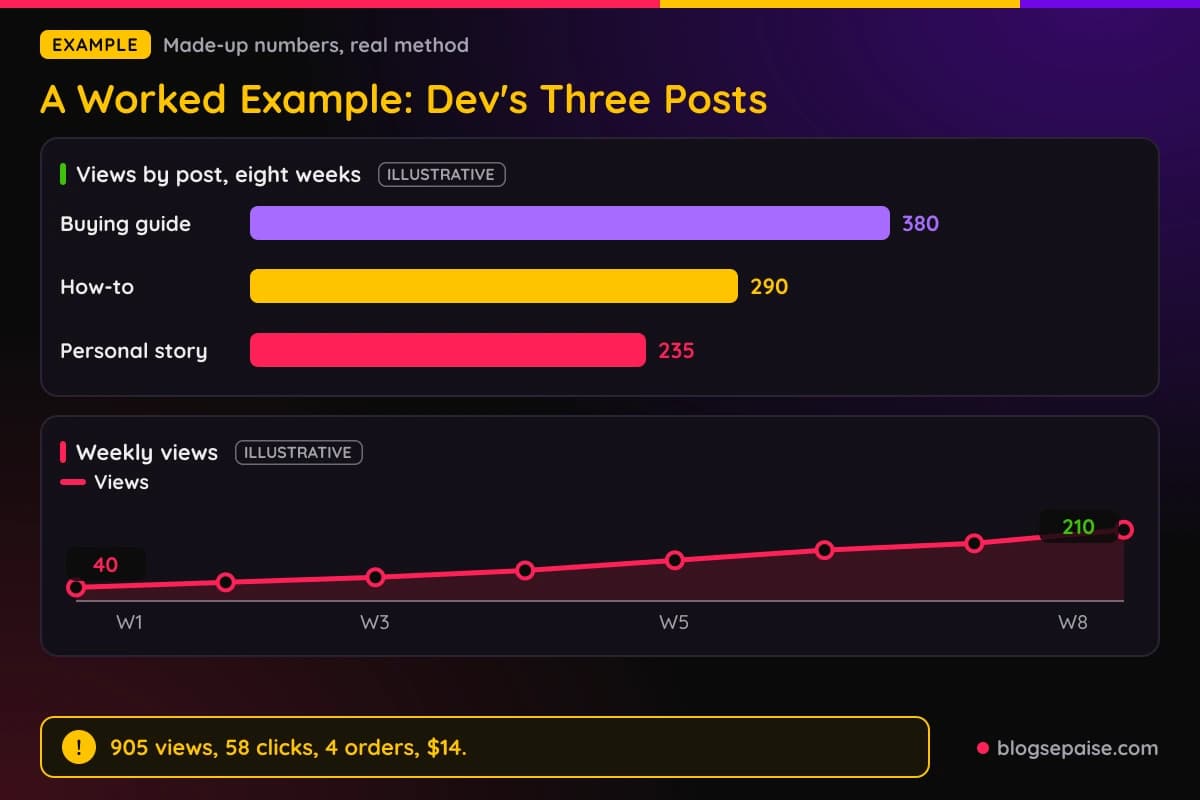
The how-to gets 290 views, 19 clicks, and 1 order, for $3. The personal story gets 235 views, 8 clicks, and no orders.
Across eight weeks Dev sees 905 views, 58 clicks, and 4 orders. His commission totals $14.
Look at the click rates. The guide turned about 8% of its views into clicks, the how-to about 7%, and the story about 3%.
The guide earned the most because its links sat next to real buying questions. The story earned nothing, but it brought readers back to the blog.
Weekly views grew from 40 in week one to 210 in week eight, with 55, 70, 90, 120, 150, and 170 in between.
Growth is slow on a new blog, which is normal.
In week nine Dev buys a domain and adds the two CNAME records in Blogger. He waits up to 24 hours for the old address to redirect.
He then adds the new address to his Associates account and clicks every link. He keeps his notes, his rule dates, and his support emails in one folder.
He keeps the buying guide as his main link post and adds one how-to a month.
Dev also gives each post its own tag. That is how he knows the buying guide earned 3 of the 4 orders.
If you copy this plan, expect different numbers. The habit to copy is recording the same four numbers every week.
Common Mistakes With Affiliate Links On Free Blogs
The first mistake is skipping the program's rules. A host may allow a link that your program does not.
The second mistake is forgetting to list your blog address in your Amazon account. Amazon says you must identify your Site or Sites in your application.
The third is assuming silence means yes. Blogger's help page and Content Policy do not mention affiliate links, so lean on its spam, misleading content, and regulated goods rules.
The fourth is hiding the disclosure at the bottom, on an About Me page, or in a sidebar. The FTC says those spots are likely to be missed.
The fifth is linking to banned niches on WordPress.com, such as gambling or get-rich-quick schemes.
The sixth is building a blog of links only. WordPress.com does not allow sites that exist primarily to drive traffic to affiliate links.
The seventh is copying product descriptions. Amazon wants original content, and readers want your own view.
The eighth is a brand name in your blog address. Amazon makes a Site unsuitable if it uses an Amazon trademark in a domain name or subdomain.
The ninth is promising an ad-free page. WordPress.com may show ads on a free site unless your plan removes them.
The tenth is staying on the free address forever. Move to a domain you own while the blog is still small.
The eleventh is trusting old advice. Policies change, so read the live rules before you publish.
The twelfth is publishing and forgetting. A quiet free blog still holds old links that can break or go out of date.
The last mistake is skipping tracking. Without the numbers, you keep writing posts that look busy and earn nothing.
Final Thoughts
So, can you use affiliate links on a free blog? WordPress.com says you can add them, and Blogger publishes no rule that bans them.
Your affiliate program has its own say, and the FTC cares about how you tell readers. Pass all three and your links are in good shape.
Start small. Publish one honest post with a few labeled links, track it for four weeks, and learn from the result.
Keep records of the rules you read, your tags, and your results. Those notes are the real asset, and they move with you to a new domain.
Then keep going at a steady pace. If you want more places to share, read our guide on using Quora and Medium and plan your next post.
Frequently Asked Questions
1. Can you use affiliate links on a free blog?
Yes. WordPress.com says you can add affiliate links to your content, and Blogger's Content Policy has no rule against them.
2. Can I use affiliate links on a free Blogger website?
Yes. Blogger's help says you can show AdSense and other ads, and its policy does not mention affiliate links.
3. Can I put affiliate links on my blog on blogspot.com?
Yes, but list the exact address in your affiliate account. Amazon says you must identify your Site or Sites in your application.
4. Does WordPress.com allow affiliate links?
Yes. Its support page says you can add affiliate links, but it bans six categories and sites that exist primarily to drive traffic to affiliate links.
5. Does the free WordPress.com plan allow affiliate links?
The support page lists no plan requirement for affiliate links. Read the page again before you publish, since plans and rules can change.
6. Will WordPress.com show ads on my free site?
The Terms of Service say WordPress.com may display advertisements on your website and domain unless you buy a plan that includes the removal of ads.
7. Can I use Amazon Associates links on a Blogger or WordPress.com blog?
Amazon's agreement names neither host. List your blog address in your account and keep the blog public.
8. Do I have to disclose affiliate links on a free blog?
Yes. The FTC says to disclose a financial relationship with a brand, and Amazon requires its own line: "As an Amazon Associate I earn from qualifying purchases."
9. Are sponsored posts allowed on WordPress.com?
Yes, WordPress.com lets you publish them. Sites where the vast majority of content is sponsored are not allowed.
10. How many affiliate links can I use in one post?
WordPress.com names no limit on its support page, and Blogger publishes none. Use as few as help the reader.
11. Can I use a custom domain with Blogger?
Yes, you buy a domain and add two CNAME records at your domain provider. It may take up to 24 hours for the blogspot.com address to redirect.
12. Do I need my own domain to start?
Neither host's rule page requires one for affiliate links. A program may set its own approval rules, so check its terms and plan the move to your own domain.
13. Do I need to be approved before I post a link?
Apply first. Amazon says you must identify your Site or Sites in your application, so list your blog address there.
14. Can I drop affiliate links in comments on other blogs?
Skip it. Blogger treats anything that appears to be a mass solicitation as spam, so keep your links inside your own posts.
15. Do other free builders like Wix allow affiliate links?
Each builder sets its own rules. Read the builder's terms and the affiliate program's terms before you place a link.