How To Recover An Affiliate Site After A Google Spam Update
Your rankings looked fine last week. Then the traffic graph fell off a cliff, and every SEO news feed was talking about a spam update.
Reddit threads about this tell similar stories. One owner added about 800 programmatic pages in a short time and then lost traffic across the whole site.
Another owner has a young site with roughly 90 AI-assisted articles, and most of those pages flipped to Crawled, currently not indexed. A third saw rankings partly return after a June spam update but never reach the old level.
If that sounds like your site, take a breath. A drop hurts, but Google's own documents show what its spam policies target, and they point to a path back.
Recovery is slow and it takes honest work on the pages themselves.
The seven steps below cover how to confirm the cause, audit every page, decide what stays, fix thin content, add real experience, tidy your structure, and then wait and watch.
A worked example, a list of common mistakes, and a short FAQ follow the steps. Every number in the worked example is made up so you can see the method.
Disclosure: Some of the links I share might be affiliate links. If you click on one and make a purchase, I may earn a small commission as a thank you. But don’t worry, it won’t cost you anything extra. I only recommend stuff I genuinely believe in. Your support helps me keep creating awesome content. You can read my full affiliate disclosure in my disclaimer page.
If you want to save a lot of hours searching for high-paying affiliate programs, check out our exclusive list of 2500+ affiliate programs. You’ll find all the information about the programs inside the list. This list is perfect for affiliate bloggers and influencers.
Why A Spam Update Hits Affiliate Sites Hard
Affiliate sites make money when a reader clicks a link and buys. That setup tempts owners to publish a lot of pages fast, and that is exactly the pattern Google's spam systems look for.
Google defines scaled content abuse as many pages generated mainly to manipulate search rankings instead of helping people. Its policy lists using generative AI tools to produce many pages without adding value for users as an example.
Notice what the policy targets. It does not ban AI or large sites, only volume with no value behind it.
Google's guidance on AI content says generative AI can help with research and with structuring original work. The trouble starts when a tool pumps out pages that nobody checked or improved.

Thin affiliate pages are named in the same policy. Google describes them as pages with affiliate links where the product descriptions and reviews are copied straight from the merchant.
Google also says good affiliate pages add value. Its examples include extra price information, original reviews, rigorous testing, product comparisons, and helpful category navigation.
Other policies can touch affiliate owners too. Expired domain abuse covers buying an old domain to host low value content.
Doorway abuse covers pages made to rank for similar queries that only funnel people onward.
Site reputation abuse is a different case. It covers third-party content published on a strong host site mainly to borrow that site's ranking signals, such as sponsored reviews dropped onto an unrelated site.
Google says it finds violations through automated systems and, when needed, human review. A page that breaks the rules may rank lower or may not appear in results at all.
That is why a sitewide drop feels so harsh. When a large share of your pages look like spam, the whole site can carry the weight.
Google runs its spam systems all the time. It describes a spam update as a notable improvement to that automated detection.
Google also says recovery can take months as its systems learn that a site now follows the policies.
Keep that timeline in mind as you work. A fast fix is not on the table, but a steady fix is.
Also, your site may not be broken everywhere. Many sites have a few strong pages carrying a pile of weak ones, and the plan below is built to save the strong pages.
Our guide on how to avoid getting penalized by Google covers the prevention side. The article you are reading focuses on the cleanup after the damage is done.
Step 1: Confirm It Was A Spam Update And Not Something Else
Before you rewrite anything, check the cause. Many drops come from a core update, a technical bug, a lost link, or a seasonal dip, and each needs a different fix.
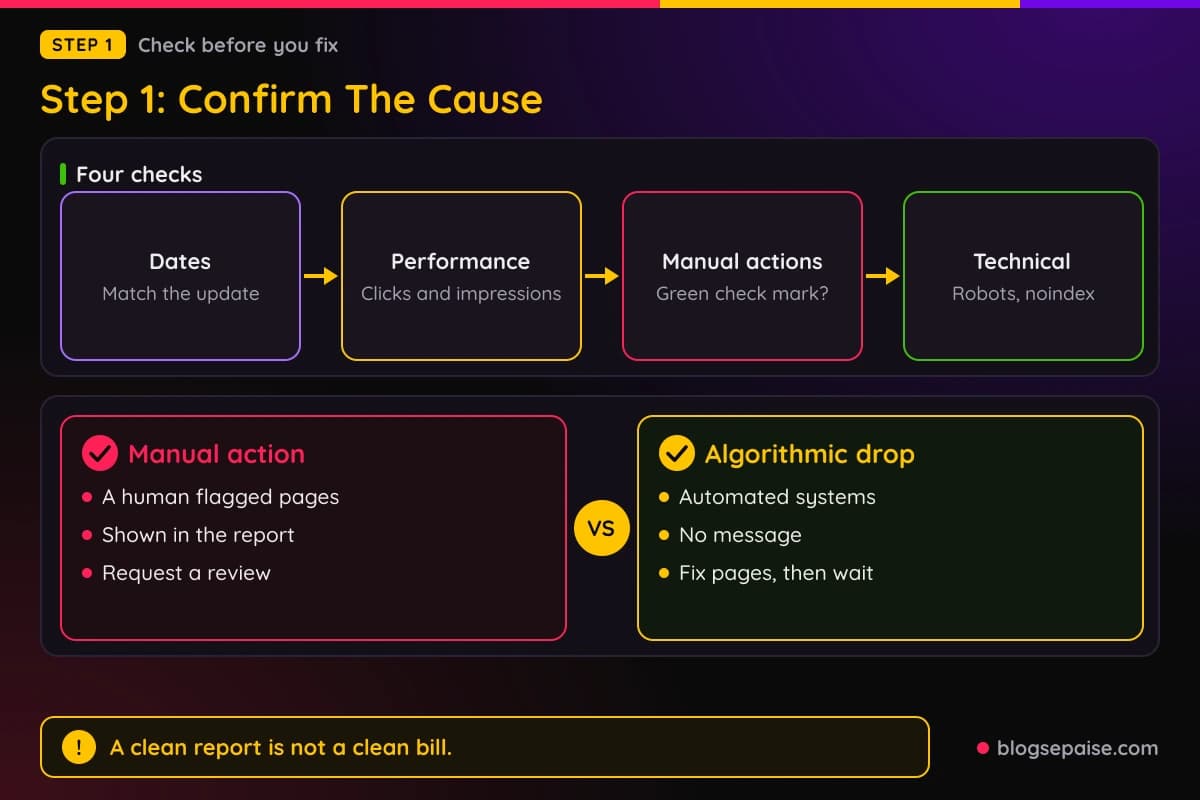
Start with dates. Google lists confirmed updates on its Search Status Dashboard, along with start and end dates, so write down the date your traffic fell.
Next, open the Performance report in Google Search Console. Set the date range to cover at least a month before the drop and the weeks after it.
Compare clicks and impressions for the same days of the week. A one week window against the week before keeps normal weekday swings from fooling you.
For a core update, Google advises waiting at least a full week after the rollout finishes before you analyze data. That rule helps with spam updates too, because numbers can jump around while a rollout is still running.
Now check for a manual action. Open the Manual actions report in Search Console and look for a message.
If you have no manual action, the report shows a green check mark and a message that says so. That result means no human reviewer has flagged the site, and it says nothing about automated systems.
A manual action is different. Google applies one when a human reviewer decides pages do not follow the spam policies, and the report shows which pages are affected.
Only a manual action can be fixed with a reconsideration request. If your report is clean, there is no form to fill in, and you recover by improving the site and waiting.
Rule out technical causes next. Check that your pages are not blocked by robots.txt, that no stray noindex tag went live, and that your server did not throw errors during the drop.
Look at the Page indexing report too. Google describes Crawled, currently not indexed as a page Google crawled but did not index yet, and says it may be indexed later.
Google also says there is no need to resubmit those URLs for crawling. Asking again will not change the answer, so spend that time on the pages themselves.
Say a big batch of AI-assisted posts flipped to that status at once. Read it as a clue about quality, not a verdict, since Google gives no single cause for the status.
Check if the drop is sitewide or limited to one folder. A hit on one template or one section points to that section as the problem.
Finally, compare against your own history. Look at when you published the big batches of pages and see if the drop follows them by days or weeks.
Write your findings in a short note with the date of the drop, the update that matches it, the pages hit hardest, and your manual action status. That note keeps you from chasing the wrong fix.
Step 2: Audit Every Page By Value
Now you need a full list of pages, and you need to judge each one honestly. A spreadsheet is the best tool here, even for a site with a few hundred URLs.
Export your URLs from your sitemap or from your site's database. Add columns for clicks and impressions from Search Console, for indexing status, and for word count.
Add a column for how the page was made. Mark each one as hand-written, AI-assisted with heavy editing, AI-assisted with light editing, or template-generated.
Be blunt with yourself. Google asks site owners to think about who made the content, how it was made, and why it exists, and the why matters most.
The best question is simple. If search engines vanished tomorrow, would you still want this page on your site for the people who visit it?
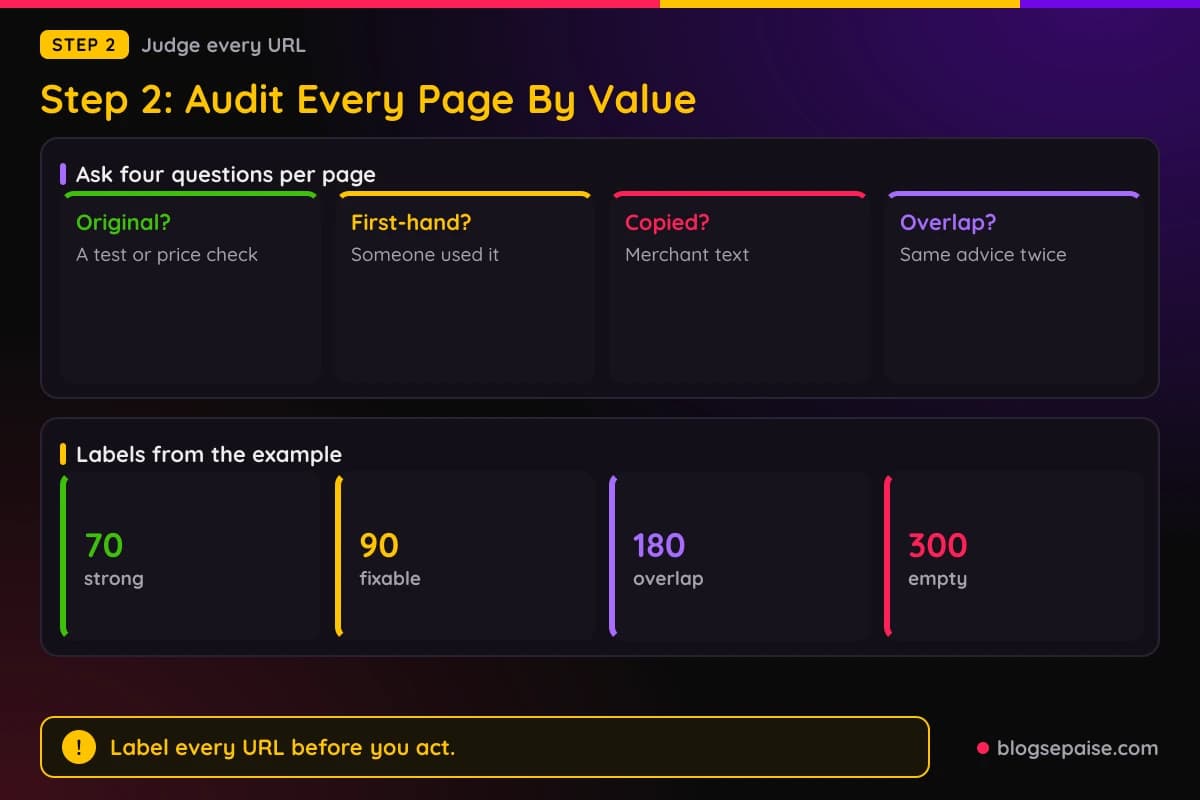
Score each page on a few traits. Does it give original information, such as a test, a photo, a price check, or a comparison?
Does it show first-hand use? Google asks if content shows experience, such as having used a product, and it warns against pages that mainly summarize what others say.
Does it repeat what the merchant already says? Pages built from copied descriptions are the exact case Google names as thin affiliate content.
Does it overlap with another page on your site? Three posts that chase the same keyword with the same advice are a quality problem and a cannibalization problem.
Does it answer a real question? A page that exists only to catch a search phrase, with no useful answer, leans toward doorway territory.
Give every page one of four labels based on those answers. Strong pages are your best work, fixable pages have a good idea and weak execution, overlap pages repeat another page, and empty pages offer little value.
If your site is large, sample before you commit. Read twenty pages from each template or batch, and judge the batch from the sample.
Use real readers if you can. Google's core update guidance suggests asking trusted people with no stake in your site to review it, since they will spot problems you have gone blind to.
Our AI content audit guide walks through a similar checklist for AI-assisted pages. Use it alongside your spreadsheet if your site has many.
Also look at the pages that still rank well. Google warns against drastic changes to content that already performs well, so protect those pages.
Do not touch the strong pages in a panic. They are your proof that the site can do good work.
By the end of this step you should have every URL labeled. That list drives all the choices in the next step.
Step 3: Decide To Keep, Improve, Merge, Or Remove
With your labels in place, pick one action for each page. There are four actions, and each one fits a different kind of page.
Keep is for strong pages. Leave the content alone, check that facts are still right, and make sure the page links to related pages on your site.
Improve is for fixable pages. These have a good topic and a clear reader need, but the writing is generic or the claims lack proof.
Merge is for overlap pages. When four pages cover the same topic, pick the best one, move the useful parts of the others into it, and make one stronger guide.
Remove is for empty pages. Some pages have no clear reader need and no way to fix them, so they should leave the site.

Google's own advice leans toward improving before deleting. Its core update guidance calls deletion a last resort for content that cannot be salvaged.
The same guidance adds a useful exception. If whole sections were made for search engines instead of people, removing them can help your stronger content perform better.
So weigh each removal with care. A page that gets a few clicks and answers a real question deserves a rewrite, not a delete button.
When you merge pages, use a 301 redirect from each old URL to the new combined page. Google recommends permanent redirects when a page has moved for good.
Redirect each old page to the closest match, not to your home page. A redirect that sends everyone to the home page confuses readers and gives Google a weak signal.
For pages you remove with nothing to replace them, you have two options. You can let them return a 404 status, or you can add a noindex tag while you decide.
Google says a 404 is not necessarily a problem when you removed a page with no replacement. Fix only the 404 errors that you still link to yourself or list in a sitemap.
If you want to keep a page for readers but out of search, use a noindex tag. Do not block it in robots.txt, because Google then cannot see the noindex tag.
For scaled content that you host, Google's spam policy page recommends excluding it from Search. That points to noindex for batches you want to keep for other reasons.
Do not swap dates to look fresh. Google lists changing a page date without a real update as a warning sign, and it says adding or removing large amounts of content only to look fresh does not help.
Write your action next to every URL in the spreadsheet. Then sort by action so you can work through each group in order.
A fair split depends on the site. A site built by hand may keep most pages, while a site built by templates may remove more than half.
Start with the removals and merges, since they shrink the job. A smaller site is easier to improve well.
For programmatic sites, our guides on programmatic SEO with AI and programmatic SEO with WordPress explain how template pages can be built with real data. Use them to decide which template pages deserve to stay.
Step 4: Fix Scaled And Thin Content
Most of the hours go into this step. You now have a pile of fixable pages and a few combined guides to write.
Start with the biggest templates. If 500 pages share one layout and one pattern of sentences, fix the template first so every page gains real value at once.
Add data that the merchant page does not have. Price history, size or spec comparisons, user questions you answered, and notes from your own testing all count.
Google names price information, original reviews, rigorous testing, and comparisons as marks of a good affiliate page. Aim to include at least two of them on each page.
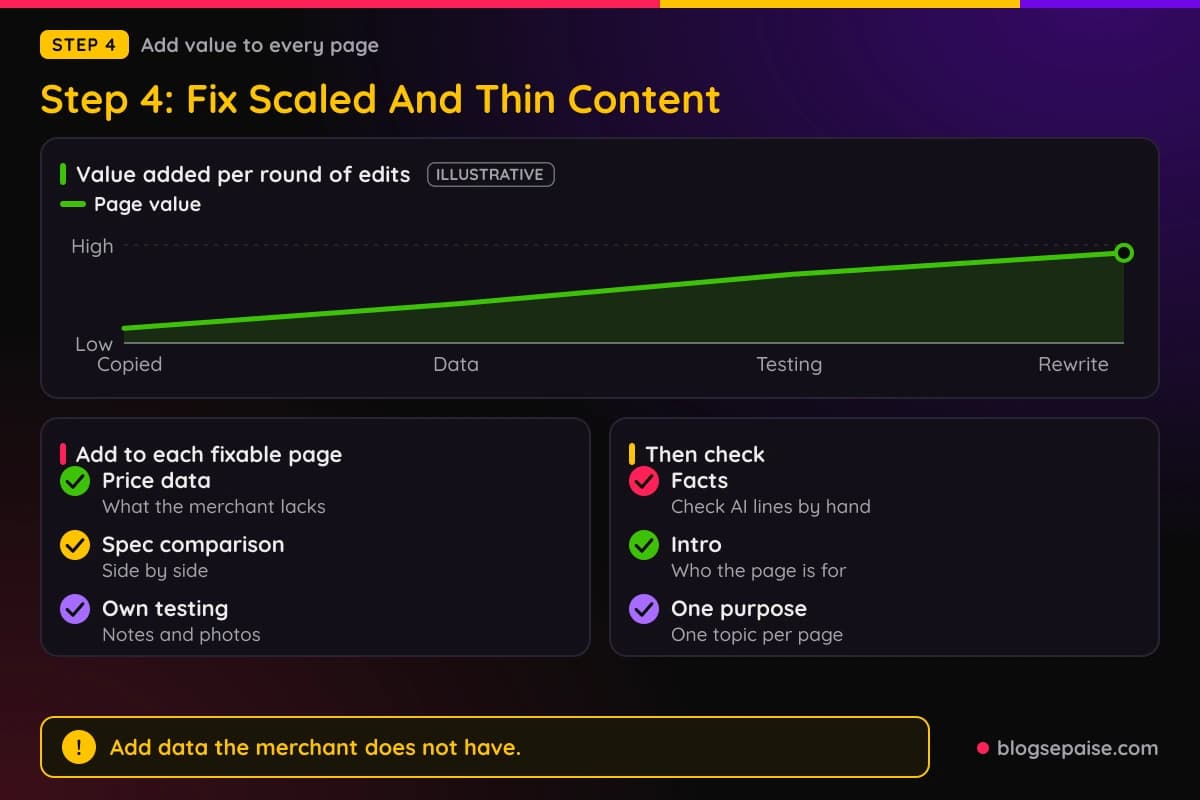
Rewrite the intro of every fixable page. The first lines should tell the reader who the page is for and what they will decide after reading.
Cut filler. Long warm-up paragraphs, repeated headings, and sentences that say nothing make a page feel auto-made.
Replace vague claims with specific ones. Instead of saying a product is great for beginners, say who it fits and what they might struggle with.
Fact-check every AI-assisted line. Google warns that generative models predict likely word sequences and can produce false statements, so it tells creators to check output by hand before publishing.
Check titles, meta descriptions, structured data, and image alt text too. Google applies the same review to those, because they can show up in Search.
Make sure each page has one clear purpose. A page that tries to rank for five unrelated phrases reads like a doorway page and helps nobody.
Check that your comparison pages hold real comparisons. A table of products with the same copied specs as the merchant adds no value.
Compare against the pages that outrank you. Google's own question is if other pages on the web would serve a searcher better, and an honest answer shows what to improve.
For AI-assisted drafts, keep the tool but change the process. Use it for outlines, research notes, and cleanup, and let a person write the parts that need experience.
Our AI content refresh workflow shows a repeatable way to update older pages without churning out filler. It fits this step well.
Work in batches and track progress. Finish fifty pages, then check them before you start the next fifty.
Avoid the temptation to run every page through a paraphrasing tool. A reworded copy of a merchant description is still a copy with no new value.
Also resist adding more pages while you fix old ones. Publishing fresh pages during cleanup sends the same signal that got you in trouble.
When a page is finished, ask the basic question once more. Would a reader who landed here feel helped, or would they go back to search?
Step 5: Add First-Hand Experience And Proof
Pages fall flat when no real person stands behind them. Google's helpful content guidance asks if content shows first-hand expertise, such as having used a product or visited a place.
Experience is the part AI cannot fake well. A tool can predict plausible words, but it did not unbox the product or run the test.
Start by using what you review. If you cannot buy a product, borrow it, rent it, or at least talk to people who own it and quote what they say with permission.
Take your own photos. A picture of the real item next to a ruler or on a kitchen counter tells readers and reviewers that someone held it.
Record simple notes while you test. Write down the date, what you did, what broke, and what surprised you, so the page can include details no other site has.

Say how you tested. Google's guidance says product reviews should explain what was tested and how, and a short method paragraph does that job.
Be honest about weak points. A review that names real downsides reads as trustworthy, and trust is the most important part of E-E-A-T according to Google.
Google also explains that E-E-A-T is not a specific ranking factor. It is a way to describe what its systems try to reward, and the raters who study it do not directly change rankings.
Add a clear author. Google asks if it is clear who created the content and if bylines lead to author background, so write a real bio with real experience.
Never invent an author. Google calls fabricated creator profiles, such as AI-generated headshots or made-up credentials, deceptive and a sign of low quality.
Explain how the content was made. If you used AI for part of the work, a short note on how you used it and why it helped readers can build trust.
Our article on can AI write E-E-A-T content shows where a person still has to step in. It pairs well with this step.
Add proof that readers can check. Include test results, dates, prices you saw, screenshots of your own dashboards, and links to official sources.
Keep disclosure plain and visible. Readers and programs both expect you to say when a link earns you a commission.
If you cannot add real experience to a page, change the page. Merge it into a guide where someone on your team does have experience, or retire it.
Do this work on your best money pages first. A few deeply reviewed pages teach more than hundreds of shallow ones.
Step 6: Clean Up Links And Structure
Once the content is better, fix how the site fits together. Structure tells Google and readers which pages matter.
Start with your redirects. Check that every merged or moved URL returns a 301 and lands on the right page in one hop.
Avoid chains where one redirect points to another redirect. Each extra hop slows readers down and makes the path harder to follow.
Update your internal links to point at the final URLs. Old links that run through redirects still work, but clean links are tidier and easier to audit.
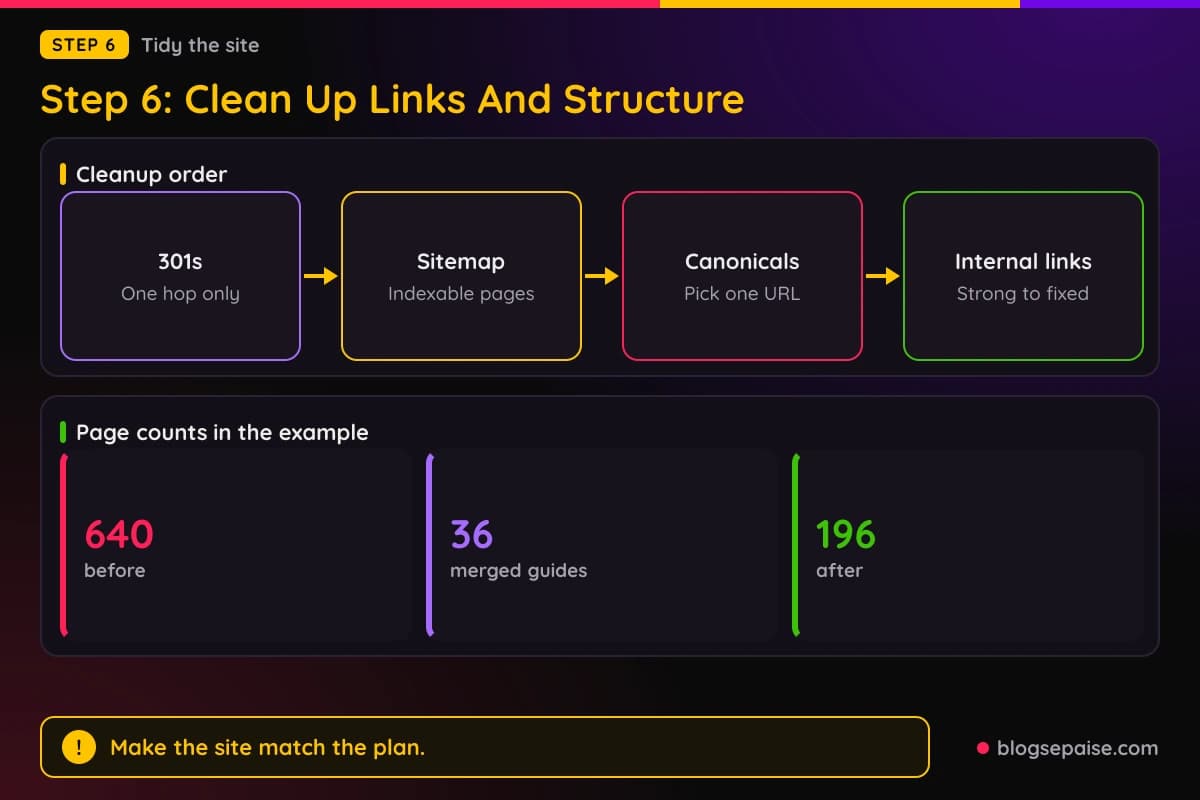
Fix your sitemap. List only the pages you want indexed, and drop removed, noindexed, or redirected URLs so the file matches reality.
Check canonical tags. Google says it picks a canonical itself when you do not declare one, and you can declare one if Google chose wrongly.
Make sure near-duplicate pages are not left behind. If two pages are not real duplicates, change their content so each one stands apart.
Build internal links with purpose. Link from strong pages to fixed pages, and link related guides to each other so readers can move through a topic.
Use plain descriptive anchor text. A link that says best espresso machines for small kitchens tells more than a link that says click here.
Link your merged guide from every page that fed into it. The old traffic paths should lead readers to the new page without a dead end.
Our internal link opportunity finder can help you spot pages that deserve more links. Use it after the redirects are in place.
Review your affiliate links too. Make sure they point to live offers, and remove old merchants you no longer promote.
Check page layout. Heavy ads, pop-ups, and link blocks that push the answer below the fold make a good page feel like a sales page.
Clean up navigation. Group guides by topic, keep menus short, and let readers reach the best pages in two clicks.
Finally, run a crawl. A crawler will show broken links, redirect chains, orphan pages, and stray noindex tags before Google finds them.
Save a record of everything you changed. If traffic moves later, you will want to know what shipped and when.
Step 7: Wait And Monitor
The hardest step is the quiet one. After cleanup, Google has to crawl your pages again and reassess the site.
Google says recovery from a spam update can take months. Plan for slow movement and do not judge the result after a week.
Some changes can show effects within days, according to Google's core update guidance. Confirming a sitewide improvement can take several months.
Set a rhythm for checking. Once a week, look at clicks, impressions, indexed pages, and the status of your fixed URLs in Search Console.
Do not request indexing for every page every day. Google says there is no need to resubmit pages that show Crawled, currently not indexed, so give your changes time.
Track a short list of numbers. Watch clicks to your top fifty pages, the count of indexed pages, and the share of pages with impressions.
Expect uneven progress. Strong pages often return first, while weaker ones may need more time or more work.
Do not expect the old peak. Rankings may settle lower or higher than before, because other sites change too and Google compares your pages with theirs.
Google says core updates reassess content compared with other content, so a gap that remains may mean other pages now serve searchers better.
If several months pass with no change, Google's core update advice is to wait for the next core update. Smaller, unannounced updates can also raise positions.
Google does not say your rankings will rebound at the next spam update. It says compliance can help over time, so keep your focus on the pages and not on update dates.
If you did have a manual action, file a reconsideration request only after you fix all affected pages. Google says to explain the quality problem, describe the steps you took, and document the results.
Reviews usually take several days or weeks, and you will get email updates. Do not send another request while one is pending.
While you wait, keep publishing at a pace you can support. A few well-researched posts each month beat a burst of fifty drafts.
Keep a log of changes and ranking moves. When a new spam update lands, you can tell if you were hit again or if it passed you by.
Keep your goal in view. You are building a site that readers would miss if it vanished, and that goal stays safe through every update.
A Worked Example: Elena Rebuilds A Coffee Gear Site
Elena runs a site about home coffee gear. All the numbers in this example are made up so you can see the method.
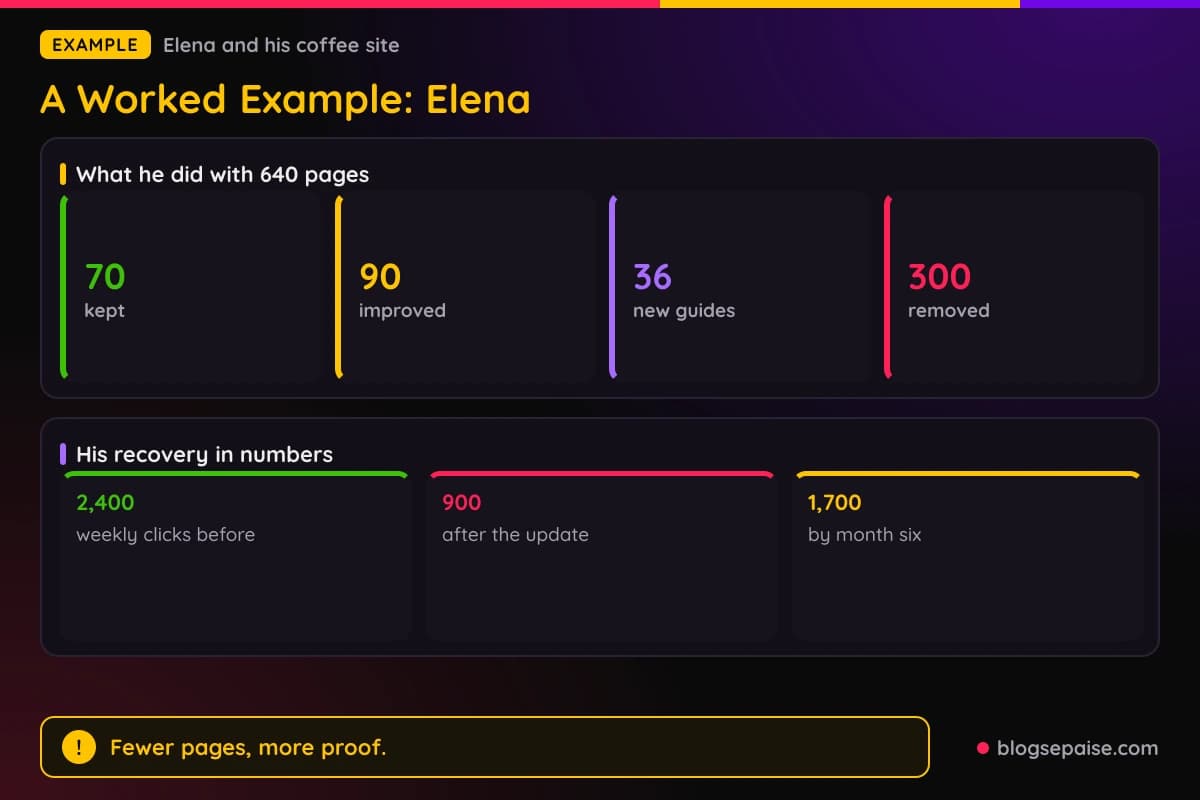
He launched with 84 hand-written reviews. Then he used a tool to build 556 more pages from a template, so the site grew to 640 pages in about three months.
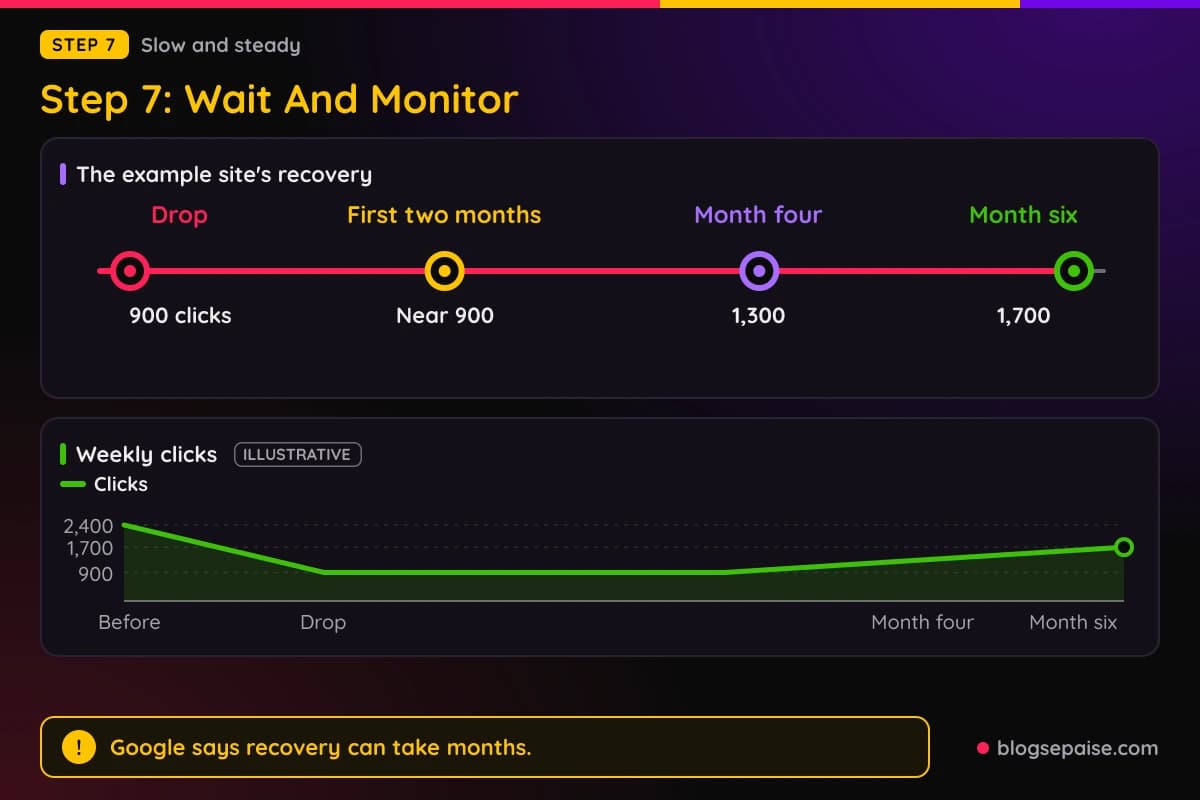
For a while, traffic climbed. Then a spam update arrived, and weekly clicks fell from 2,400 to 900.
In step one he checked the dates and found the drop matched the update rollout. His Manual actions report showed a green check mark, so he knew no human had flagged the site.
He also found that 410 of his template pages showed Crawled, currently not indexed. He did not resubmit them, and he moved on to the audit.
In step two he built a spreadsheet with all 640 pages. He read a sample of twenty pages from the template batch and found they repeated manufacturer text with a few swapped words.
He labeled 70 pages as strong, 90 as fixable, 180 as overlap, and 300 as empty. That added up to 640 pages.
In step three he kept the 70, improved the 90, merged the 180 overlap pages into 36 guides, and removed the 300. He used 301 redirects for the merged pages and left the removed pages to return 404.
In step four he spent six weeks on the 90 fixable pages and the 36 new guides. Each page got his own price checks, a spec comparison, and a rewritten intro.
In step five he bought two grinders and a kettle and tested them for a month. He added his own photos, a short method note, and a clear list of downsides to each review.
He also added an author page that told the truth about his background. He said he is a hobbyist who tests gear at home and does not claim any lab credentials.
In step six he cleaned his sitemap and fixed every redirect chain. The site went from 640 pages to 196, which is 70 plus 90 plus 36.
In step seven he checked Search Console each week. Clicks sat near 900 for the first two months, which worried him.
By month four weekly clicks reached 1,300. By month six they reached 1,700, which was still below the old 2,400.
He kept going. His rebuilt site had fewer pages, but more of them were pages he would be proud to show a friend.
Elena learned that the road back is slower than the road down. He also learned that a smaller site with real work can earn trust again.
Common Mistakes When Recovering From A Spam Update
The first mistake is blaming the wrong cause. Many owners rewrite everything when the real issue was a technical bug or a core update.
The second mistake is deleting pages in a panic. Google calls deletion a last resort for content that cannot be salvaged, so audit first.
The third mistake is publishing more AI pages to make up for lost traffic. More thin pages repeat the problem that caused the drop.
The fourth mistake is rewording pages with a paraphrasing tool. A new coat of words on a copied description adds no value.
The fifth mistake is faking freshness. Changing dates or adding and removing big blocks of text only to look new does not help rankings, according to Google.
The sixth mistake is inventing authors or reviews. Fabricated profiles and made-up experience can hurt trust, and they put your readers at risk too.
The seventh mistake is sending a reconsideration request with no manual action. That form is for manual actions only, and an algorithmic drop needs content fixes instead.
The eighth mistake is redirecting every removed page to the home page. Send each old URL to its closest match, or let it return a 404.
The ninth mistake is blocking removed pages in robots.txt. Google then cannot see your noindex tag or your redirect.
The tenth mistake is resubmitting URLs again and again. Google says there is no need to resubmit pages in the Crawled, currently not indexed status.
The eleventh mistake is changing everything at once with no notes. When rankings move, you will not know which change did it.
The twelfth mistake is giving up after four weeks. Google says recovery can take months, so judge your work over a longer span.
The last mistake is fixing the symptoms and keeping the habits. If you go back to mass publishing next quarter, you will end up in the same place.
Final Thoughts
A spam update feels personal, but it is a response to patterns, and patterns can change. Fix the pages, and the pattern changes with them.
Confirm the cause first, then audit every page by value. Keep what is strong, improve what is fixable, merge what overlaps, and remove what is empty.
Add real experience and proof where it counts, tidy your links and structure, and then give Google time. Months is the honest timeline.
Build the site you would want to read yourself. That is the best protection against the next update, and it is the same work that earns affiliate approval and reader trust.
For more on keeping a clean record with the programs that pay you, read our guide on how to avoid getting banned from affiliate programs.
Frequently Asked Questions
1. How do I recover from a Google spam update?
Confirm that a spam update caused the drop, then audit your pages and fix or remove low-value ones. Google says recovery can take months as its systems learn that your site follows the policies.
2. How long does recovery take?
Google says it can take months. Its core update guidance adds that some changes show effects within days, while sitewide improvement can take several months to confirm.
3. Do I need to wait for the next spam update?
Google does not say rankings will improve at the next spam update. It says compliance changes can help over time, so work on the site now and watch your data.
4. Does Google ban AI-generated content?
No. Google says AI can help with research and structure, but using it to generate many pages without adding value may violate the scaled content abuse policy.
5. How do I tell a manual action from an algorithmic drop?
Open the Manual actions report in Search Console. If it shows a green check mark, no manual action exists, and a drop in rankings points to automated systems.
6. Should I file a reconsideration request?
Only if you have a manual action. File it after you fix all affected pages, and explain the problem, the steps you took, and the results.
7. What does Crawled, currently not indexed mean?
Google crawled the page but has not indexed it, and it may be indexed later. Google says there is no need to resubmit the URL.
8. Should I delete my thin pages?
Improve them first when they can be saved. Google calls deletion a last resort, though removing whole sections made for search engines can help your stronger content.
9. Should I use noindex or delete?
Use noindex when you want the page for readers but out of search. Delete, or let the page return a 404, when it has no value and no replacement.
10. Should I redirect removed pages?
Redirect them only when a close replacement exists. Google recommends a 301 for pages that moved for good, and says a 404 is fine for removed pages with no replacement.
11. Can I keep using AI after a spam update?
Yes, with care. Use it for outlines and cleanup, check facts by hand, and add your own testing and experience before you publish.
12. Do thin affiliate pages cause spam penalties?
Google names thin affiliate pages as a spam policy issue when descriptions and reviews are copied from the merchant with no added value.
13. Does an expired domain put me at risk?
It can. Google names expired domain abuse when an old domain is bought mainly to rank content that has little value to users.
14. Will adding more content fix my traffic?
Probably not. Adding pages at scale repeats the problem, and Google says adding or removing large amounts of content just to look fresh does not help.
15. Is a partial recovery normal?
It can be. Rankings are compared with other sites, so your pages may settle above or below their old level, and Google says improvements may not bring a noticeable effect.
16. When should I hire help?
Consider it when your site has thousands of pages or a manual action you cannot read. Pick someone who audits pages and avoids quick fixes.