How to Track Your Affiliate Income From Day One
Most new affiliates track nothing for the first few months, and then they scramble.
A first commission lands, a second one shows up in a different dashboard, and a third arrives by email with no details. By month four you have money coming from three places and no clear picture of what is working.
Tracking from day one fixes that, and it costs almost nothing. A free spreadsheet and fifteen minutes a week will do the job.
Below you will find eight steps in order. By the end you will have a sheet that records every click, sale, cost, and payout, plus a simple routine that turns those numbers into decisions.
If you have not started yet, our plan for the affiliate marketing first 30 days is a good companion. You can also try our free blog income tracker while you build your own sheet.
Disclosure: Some of the links I share might be affiliate links. If you click on one and make a purchase, I may earn a small commission as a thank you. But don’t worry, it won’t cost you anything extra. I only recommend stuff I genuinely believe in. Your support helps me keep creating awesome content. You can read my full affiliate disclosure in my disclaimer page.
If you want to save a lot of hours searching for high-paying affiliate programs, check out our exclusive list of 2500+ affiliate programs. You’ll find all the information about the programs inside the list. This list is perfect for affiliate bloggers and influencers.
Why Tracking From Day One Pays Off
Numbers feel pointless when they are small. A month with $0 or $12 in earnings does not look worth writing down.
That thinking is a trap. Early records are the cheapest ones you will ever keep, because there are only a handful of entries and every one is fresh in your memory.
Wait six months and you will be digging through emails, logging into five dashboards, and guessing which post sent which sale. That cleanup takes hours, and some of the answers are gone for good.
Good records also answer the questions that matter most to a beginner. Which post earns money, which program pays on time, and how long the whole project takes to cover its own costs.
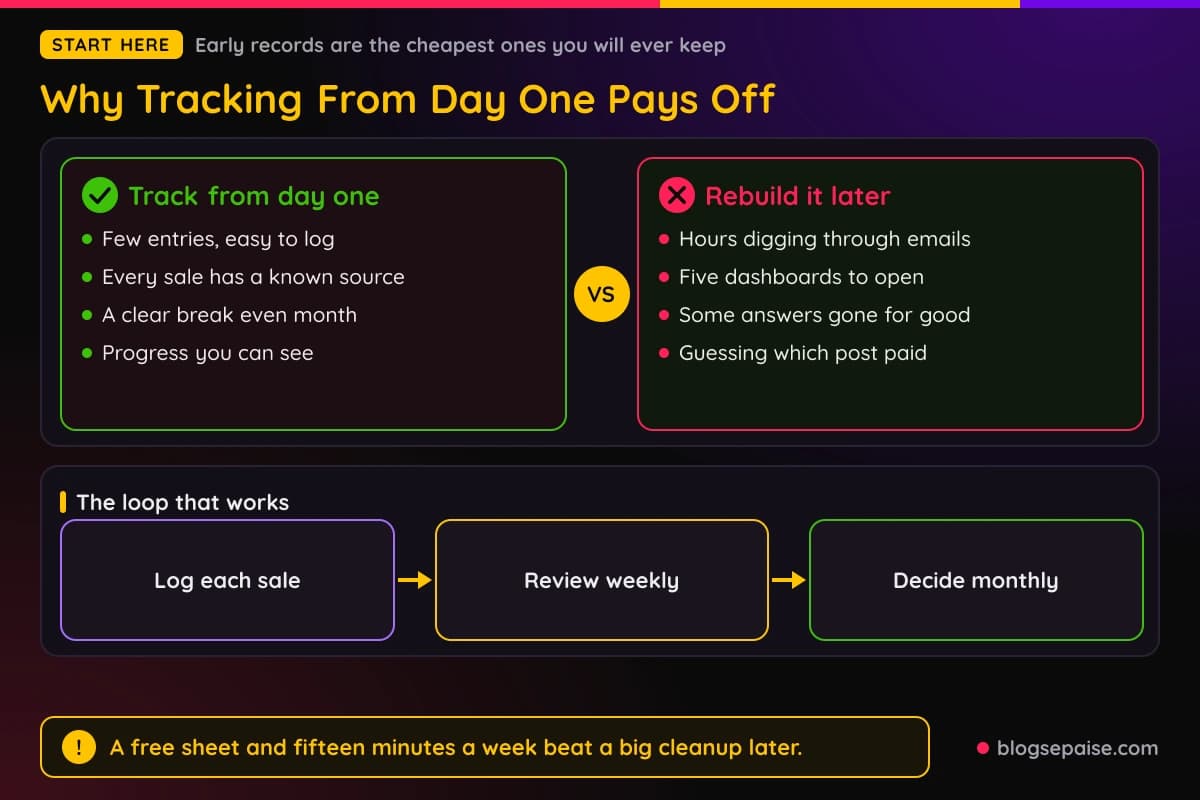
There is a mental benefit too. Seeing a $0 month written next to an $18 month shows progress that your memory would flatten into "nothing happened yet."
Tracking also protects you from fuzzy thinking. When a program says you earned $42 but your own sheet shows only $28, you notice the gap right away and can ask a question.
None of this needs fancy software. It needs a plain system that you actually open every week.
Step 1: Pick One Home For Your Numbers
Your first job is to choose a single place where all income data lives. One place beats three good places, because three places drift apart.
Most beginners should use a spreadsheet. Google Sheets is free, works on a phone, and saves itself, so you never lose a day of work to a crashed laptop.
A notes app can work for the first two weeks, but it falls apart once you have more than a few entries. You cannot add up a column of numbers in a text note without copying them somewhere else.
Dashboard tools are the third option. They pull data from your programs on their own, which sounds great, but they cost money and many beginners have nothing to pull yet.
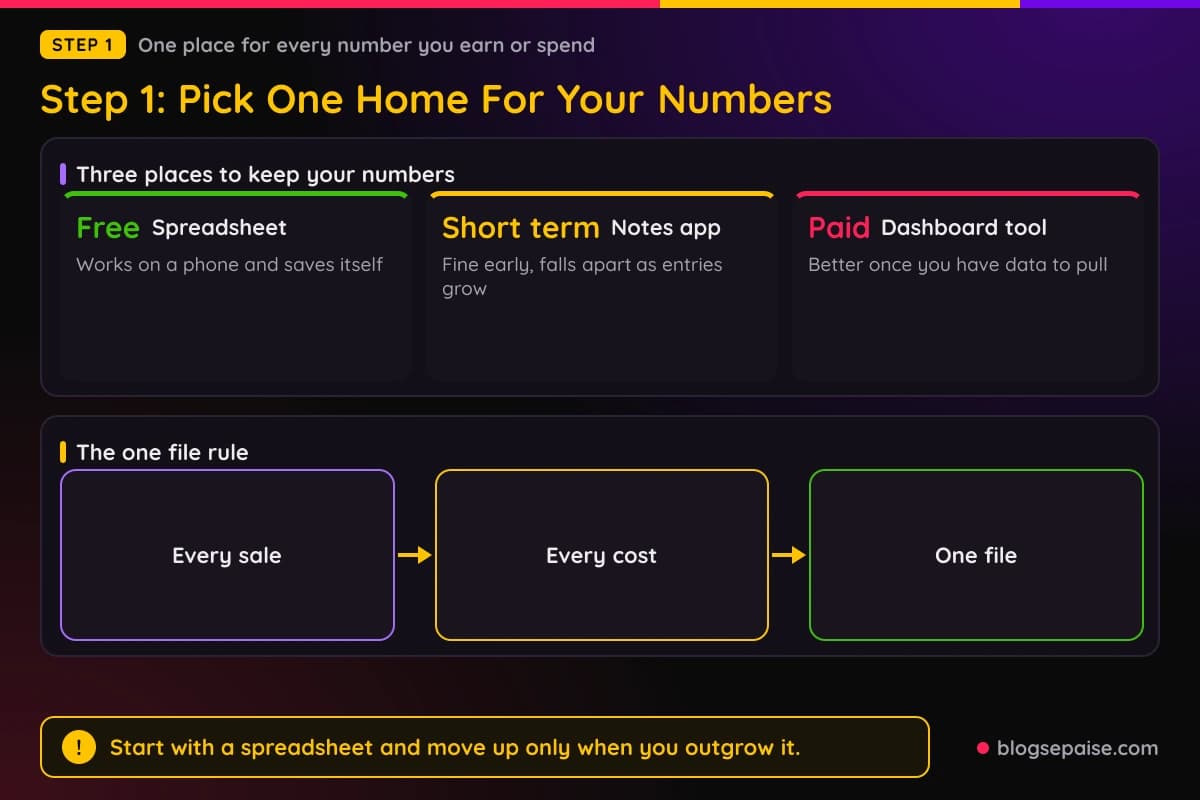
So start with a spreadsheet and keep the rule simple. Every number you earn or spend goes into that one file, even if it also shows up somewhere else.
Give the file a boring, clear name such as "Affiliate Income Tracker." Create it today, before you place your first link.
If you want a ready-made option, our free blog income tracker lets you log earnings in your browser. It is a good starting point if you do not want to build columns from scratch.
Later on, once your traffic grows, you can move up to a paid dashboard. Our guide to affiliate dashboard metrics shows which numbers deserve a spot on that screen.
For now, do not shop for tools. Make the file and move on to the next step.
Step 2: Build A Simple Income Sheet
A good sheet has two tabs. The first is a log where every commission gets its own row, and the second is a monthly summary that adds the log up.
Start with the log tab. Give it five columns: date, program, post or link label, amount, and status.
The date is the day the sale happened, not the day you were paid. The program is the company that owes you the money, such as a hosting company or an email tool.
The post or link label tells you where the sale came from. Step 3 explains how to name these so they stay useful.
The amount is the commission in dollars. Type the real number from the dashboard, not a guess, and use two decimals if the program shows cents.
The status column has three possible values: pending, approved, or paid. Step 4 covers why that column matters so much.
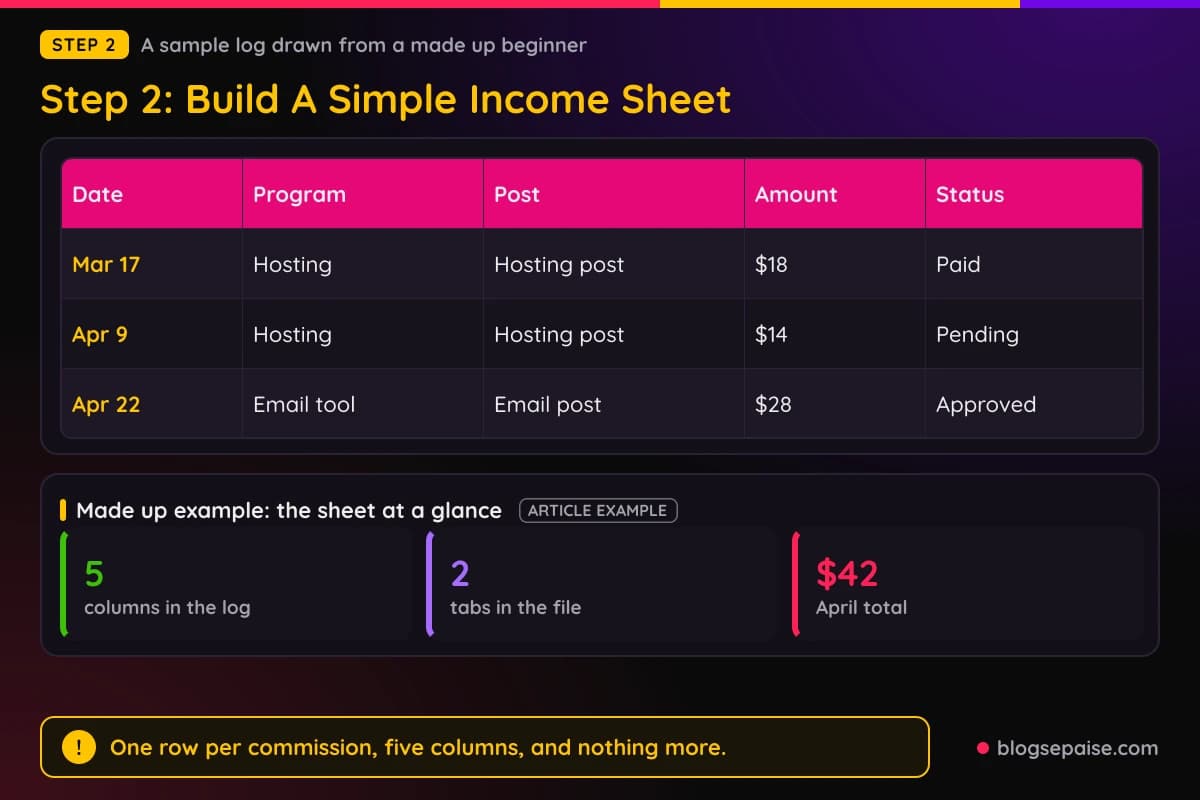
Here is a made up example so you can see it. In March, a beginner named Maya logs a row for Mar 17, a hosting program, her hosting post, $18, and the status paid.
In April she logs two more rows. On Apr 9 she records $14 from the hosting program, still pending, and on Apr 22 she records $28 from an email tool, already approved.
Maya is not a real person, and her sheet is a sample made up for this guide. Still, you can see how much a few rows tell you, because her April total is $42 and she can see which of those dollars she can actually spend.
The second tab is the monthly summary. It needs one row per month with four columns: commissions earned, costs, net, and notes.
You can build the totals with a simple sum formula. Ask the sheet to add every amount in the log whose date falls in that month.
Keep the notes column short. A line such as "new post went live" or "program changed rates" will help you read the story behind the numbers months later.
Resist the urge to add ten more columns. Every extra column is one more thing to fill in, and sheets that ask too much get abandoned.
Step 3: Label Every Link You Place
Knowing you earned $42 is useful. Knowing which post earned it is where the real learning starts.
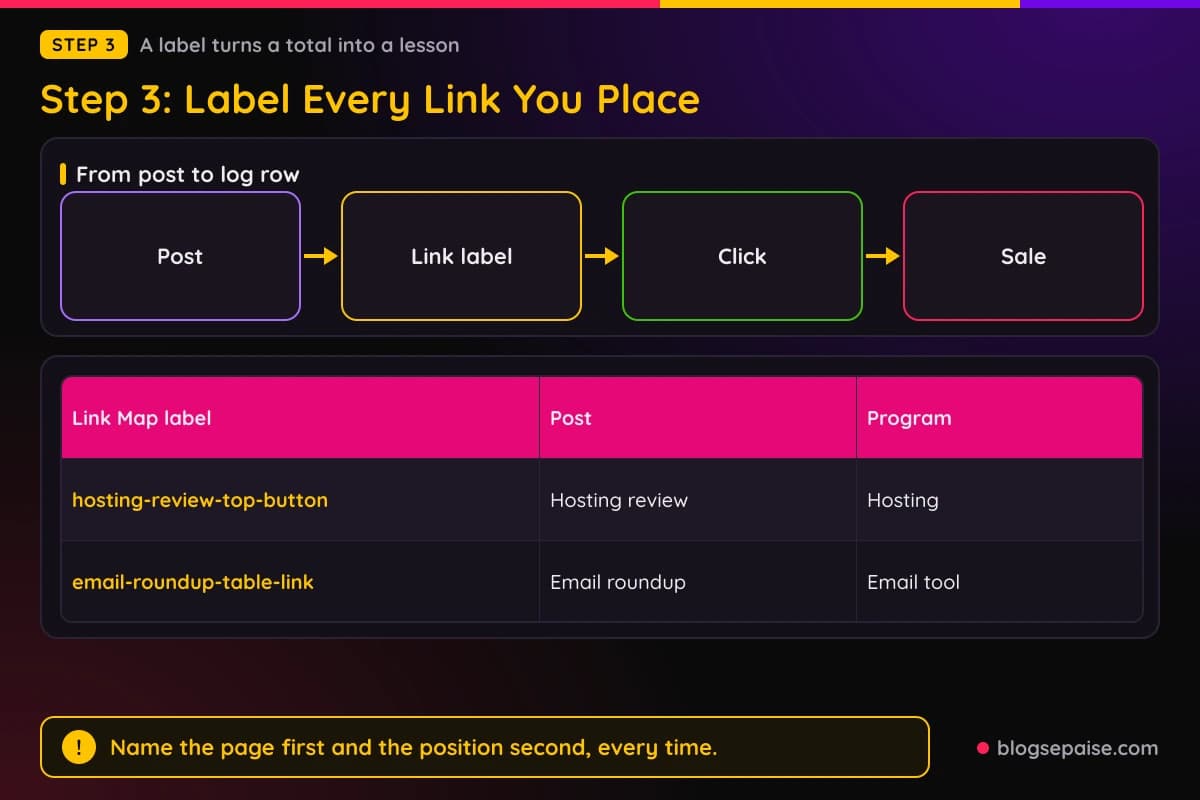
For that, every affiliate link needs a label. A label is a short name that tells you the post and the spot where the link sits.
A good label looks like "hosting-review-top-button" or "email-roundup-table-link." It names the page first and the position second.
Most affiliate programs let you add a tracking tag to your link. That tag is often called a sub ID, a campaign name, or a click reference, and the program reports sales against it.
Check your program's link builder for a field like that. If it has one, fill it in every time, using the same label style.
If a program has no tag field, use a different link for each post when you can. Some programs let you create several links, and each one gets its own click and sale counts.
Keep a third tab in your sheet called "Link Map." It lists each label, the post it lives in, the program, and the date you added it.
When a sale comes in with a label, you can find the post in seconds. When a sale has no label, you at least know which program it came from.
Keep the style the same across every post. If you switch from "hosting-review" to "review-hosting" halfway through, your filters and totals will split in two.
Be strict about this early. A site with five posts is easy to label, while a site with fifty unlabeled posts is a mess nobody wants to clean up.
Your own click counts help here too. A tool like ClickMagick records every click on your side, so you can compare your numbers against what the program reports.
If your site runs on WordPress, a link manager like Pretty Links gives each link a short, clean name and counts the clicks. Our roundup of link tracking software compares more options, though you do not need any of them in week one.
The free route works fine at the start. Labels in your link map plus the program's own reports already give you a lot.
Step 4: Log Each Commission And Its Status
Affiliate money moves through stages, and the stage decides if you can count on it.
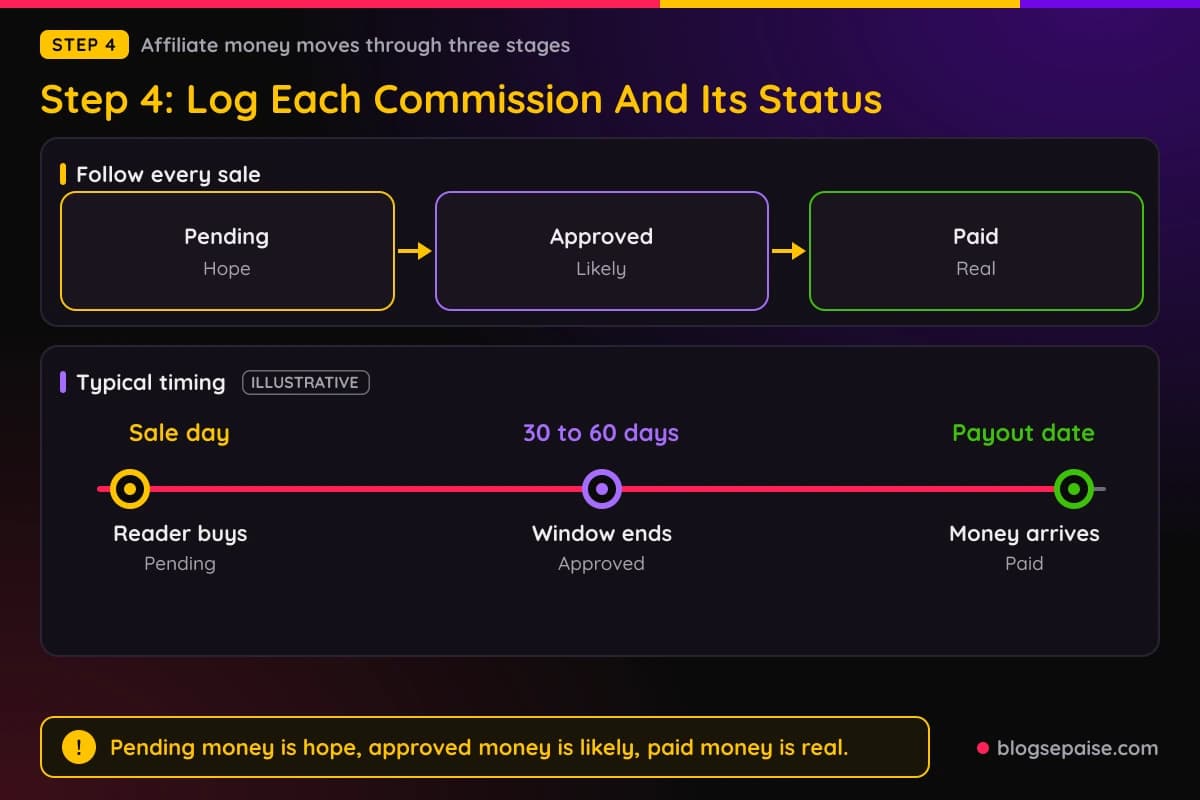
When a reader buys, the sale shows up as pending. The program is waiting to see if the buyer keeps the product, because refunds and cancellations can cancel the commission.
After that waiting period, the sale moves to approved. Many programs hold commissions for 30 to 60 days, though the exact window differs, so check yours in the program terms.
Once the money is approved, it waits for the next payout date. When the payment reaches your bank or payment account, the status becomes paid.
Your sheet should follow each sale through all three stages. That is the whole reason the status column exists.
Update it during your weekly check. Open each program dashboard, find any sale whose stage has changed, and change the status in your log.
Some sales never reach paid. A buyer asks for a refund, the program reverses the commission, and your pending $14 turns into $0.
Do not delete that row. Change the status to "reversed" and leave the amount, or add a note, so you remember how often it happens.
Over time the reversed rows show you which programs have high refund rates. That helps when you decide where to send more of your readers.
Most programs also have a payout minimum. If a program pays after you reach $50 or $100, your money can sit approved for months, so note the minimum next to the program in your sheet.
Add a small section at the top of the summary tab for money owed. List each program, the approved amount, and the payout threshold, so you know how close you are to getting paid.
One habit keeps you honest about income. Pending money is hope, approved money is likely, and paid money is real, and your sheet should keep those three apart.
Step 5: Count Your Costs Too
Income is half the story. A project that earns $65 and costs $80 is losing money, and you only know that if you write both down.
Add a costs section to your sheet, either as a third log or as extra rows in the same tab. Each row needs a date, what you bought, the amount, and a category.
Beginners usually have a short cost list. Hosting, a domain, an email service, a keyword tool, and maybe a theme or a plugin cover most of it.
Write down every one, even the small ones. A $12 domain and a $15 monthly hosting bill look tiny alone, but they add up fast across a year.
Do not forget annual bills. If you pay for a domain once a year, spread it out by dividing it across twelve months so no single month looks unfairly bad.
Group costs into a few clear categories. Hosting and domain, tools, content, and ads are enough for the first year.
Then add your time. You do not have to put a dollar value on it, but note the hours you spend each week in a plain column, because hours matter to your decision about how long to keep going.
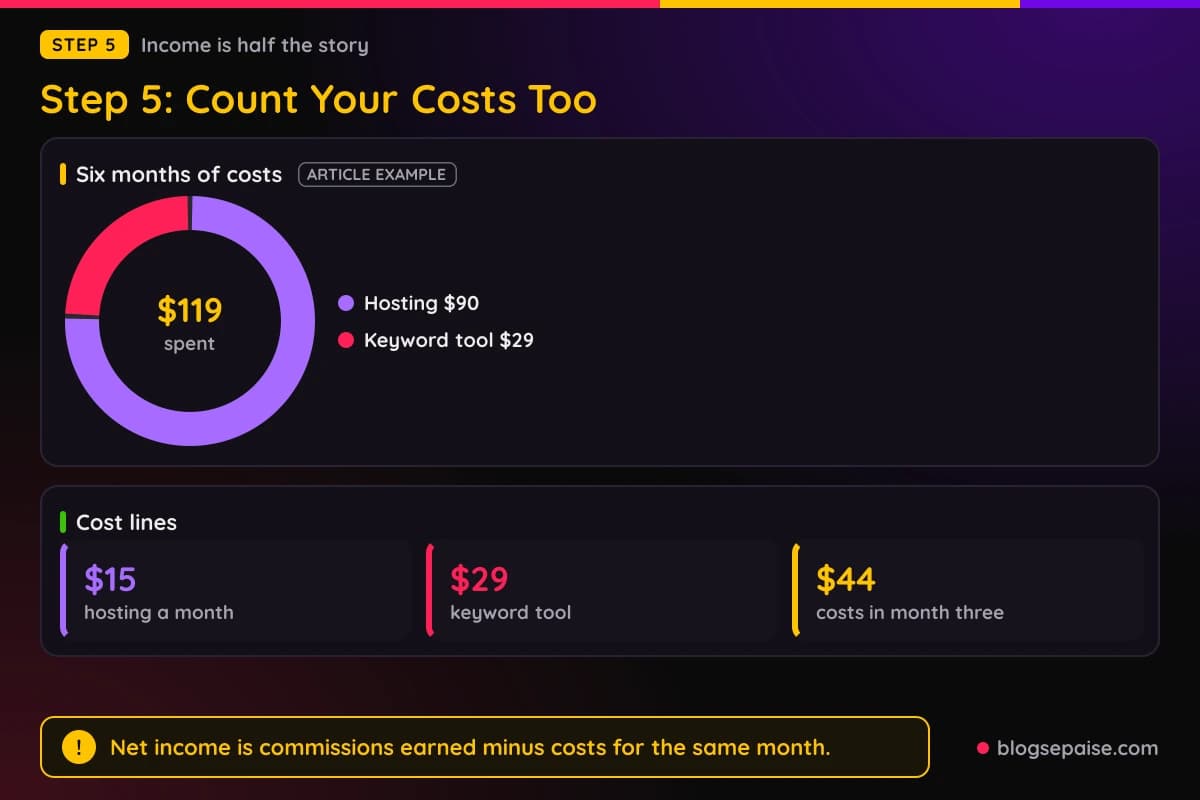
Net income is the number that matters most. It is commissions earned minus costs for the same month.
Here is Maya's made up example again. In her first month she earns $0 and spends $15 on hosting, so her net is a loss of $15.
In month three she buys a $29 keyword tool, so her costs that month are $44. She earns $18, so her net is a loss of $26.
Seeing that loss in black and white is not discouraging, it is clarifying. It tells her the tool needs to help her publish better posts, and it gives her a clear line to watch for the day income passes costs.
That day has a name: break even. It is the first month, or the first point in the running total, where you have earned back everything you spent.
Track a running total on the summary tab too. Add each month's net to the one before it, and you will see the exact month you cross from red to green.
Step 6: Set A Weekly And Monthly Review
A sheet that nobody opens is just a file. The habit around it is what makes it work.
Pick one fixed time each week, such as Sunday morning or Friday after lunch. Set a calendar reminder and treat it like a meeting with your future self.
The weekly review takes about 15 minutes. Open your main program dashboards, copy over any new sales, update the status of older ones, and glance at your click counts.
Keep the weekly check boring. You are not looking for insights yet, only for clean and complete data.
The monthly review is the longer one, and it takes about 45 minutes. On the first or second day of the month, close out the last month in your summary tab.
Add up commissions, add up costs, work out the net, and write one line in the notes column. Then look at your posts and ask which ones earned money and which ones did not.
Close the review by saving a copy of the sheet. A dated backup, such as "tracker-2026-03," means one wrong paste can never wipe out months of work.
Next, pick one change for the coming month. Maybe you will update your best post, add a link to a post that has none, or drop a program that has not paid you anything.
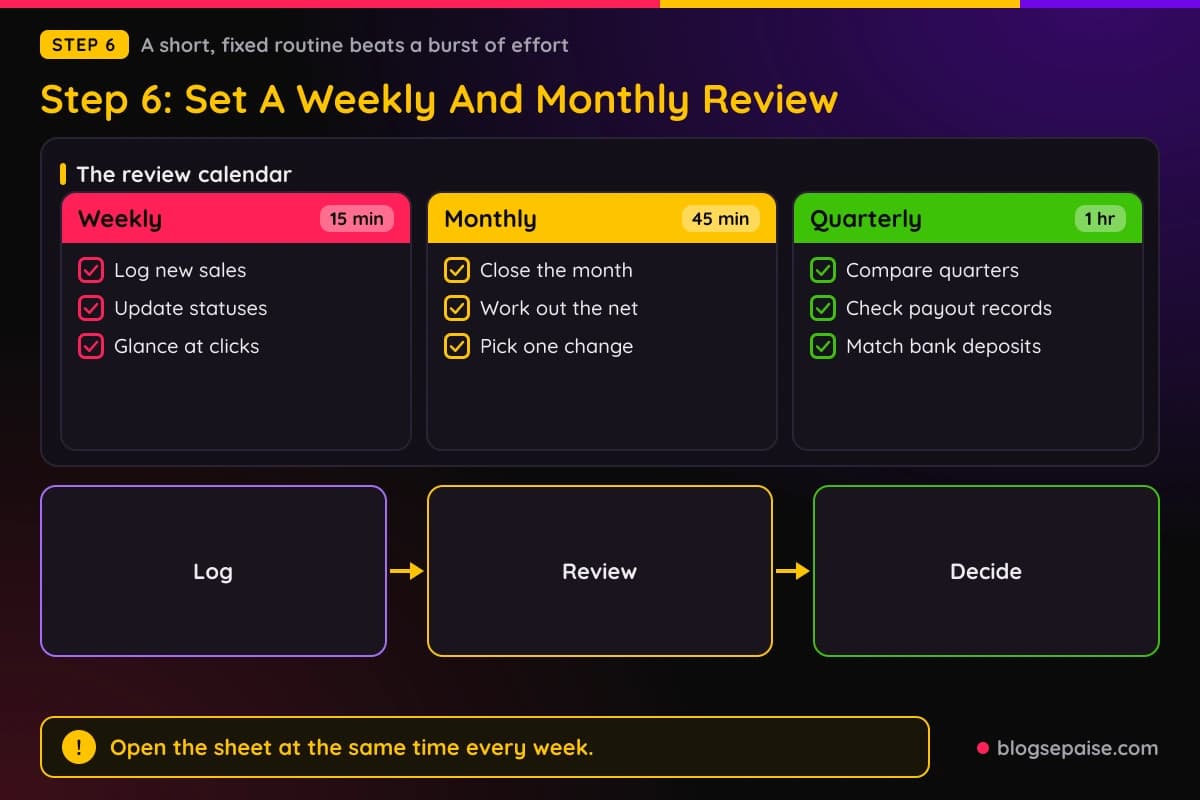
Every three months, spend an hour on a bigger look. Compare quarter to quarter, check each program's payout record, and decide if the setup still fits your goals.
Our affiliate income goal planner helps with that step. Put in your target and your current pace, and it shows how far apart the two are.
A fixed routine beats a burst of effort. Fifteen minutes every week tells you more than a three hour session once a year.
If you miss a week, do not abandon the sheet. Open it, catch up, and carry on, because a record with a small gap is still far better than no record.
Step 7: Turn Your Numbers Into A Monthly Chart
Rows of numbers hold the data, but a chart shows the direction. A simple bar chart of monthly commissions is enough.
Select the commission column in your summary tab and insert a column chart. Months go along the bottom and dollars go up the side.
Look at the shape, not the exact values. A rising shape means your work is compounding, and a flat shape means something needs to change.
Early bars will be small, and some will be empty. That is normal, because new posts usually need several months before they bring search traffic.
The chart also helps when motivation dips. On a bad week, a glance at six months of bars shows the long climb that a single weak week cannot erase.
Next, add two ratios to your monthly review. Both come from numbers you already have.
The first is conversion rate, which is sales divided by clicks. The second is earnings per click, which is commissions divided by clicks.
Here is a made up case with round numbers. Say Maya's links got 300 clicks in her sixth month, those clicks led to 8 sales, and she earned $120.
Her conversion rate is 8 divided by 300, which is about 2.7 percent. Her earnings per click are $120 divided by 300, which is $0.40.
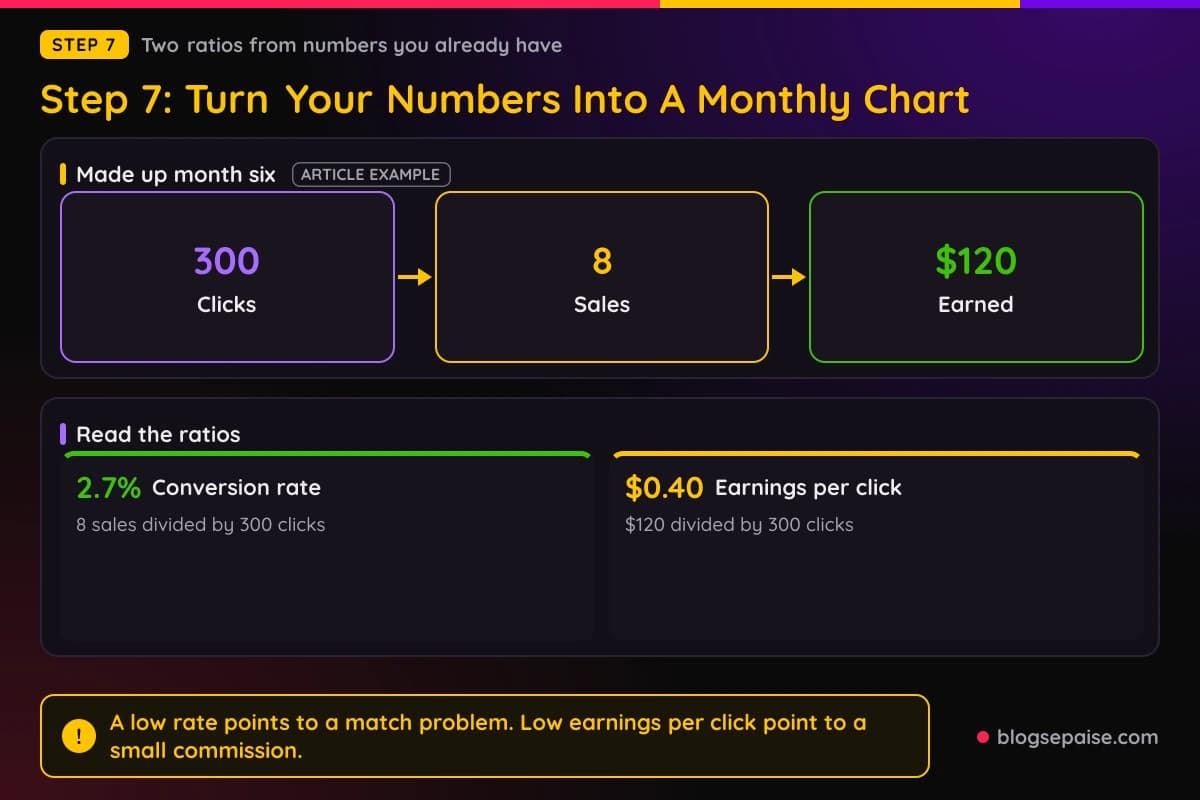
Those two numbers tell you different things. A low conversion rate often means the offer or the post does not match what the reader wants.
Low earnings per click with a fine conversion rate point to a cheap product or a small commission. In that case you might look for a better paying program in the same niche.
Compare ratios across your posts as well. A post with 100 clicks and 0 sales needs a different fix than a post with 10 clicks and 3 sales.
Write one line about each ratio in your notes column. A phrase like "conversion dipped after the redesign" gives future you a clue that raw numbers cannot.
Do not read too much into small samples. A post with 12 clicks cannot tell you much, so wait until a post has a few hundred before you judge it.
Step 8: Keep Records For Tax Time
Affiliate income is real income, and in the United States it generally counts as self-employment income. Your sheet makes tax season far less painful.
Treat the next line as a reminder, because no part of this guide is tax advice. Rules differ by situation, so talk with a tax professional or check the IRS website for your case.
Your own job is to keep clean records. Save the date, the amount, and the program for every payment, along with the receipts for your costs.
Many programs send a year end tax form if you earn above a certain amount, but not all do. Your own records matter either way, because a form may leave out sales that fell below a threshold.
Match your sheet against bank deposits each quarter. If a program paid $85 and your bank shows $85, tick it off in the log.
Keep a folder, either on your drive or in the cloud, for statements and receipts. Name files by date and program so you can find them in seconds.
Store records for several years, since tax offices can ask about older returns. A plain folder named by year is enough.
Also keep the program agreements and any payout emails. If a dispute ever comes up about a commission, those messages are your proof.
Treat this step as a small job done monthly, not a pile of work left until April. Five minutes a month beats five hours in spring.
When Your Numbers Do Not Match A Program Dashboard
Sooner or later your sheet and a dashboard will disagree. Do not panic, because small gaps are common and most have a plain cause.
The usual cause is timing. A sale made late on the last day of the month may land in the next month on the program side, and a refund can shrink a number days after you logged it.
Another cause is currency. If a program reports in euros or pounds and pays you in dollars, the amount in your bank can differ from the amount in the dashboard.
Fees can also change the total. Payment services take a small cut, so a $100 payout may arrive as a little less.
Start by checking the date and the status of the sale in question. Then check the program report for refunds or reversed commissions.
If the gap is still there after two billing cycles, write to the program's support team. Send the date, the amount, and the link label from your sheet, since clear details get faster answers.
Keep a short notes column for these cases. One line such as "dashboard showed $14, paid $13.40 after fee" saves you from solving the same puzzle twice.
Also treat your sheet as a second opinion, not a replacement. The program's report decides what you are owed, and your sheet tells you when something looks off.
A Made Up Example: Maya's First Six Months
Let us bring the pieces together with one story. Maya is a made up beginner, and the numbers below are an example, not real results.
Maya builds her sheet on day one and logs every link she places. Her hosting costs $15 a month, so she writes that down every month.
In months one and two she earns $0. Her sheet shows costs of $15 each month, and a running total of negative $30 after two months.
In month three she earns $18 and buys a $29 keyword tool, which pushes her costs to $44. Her net for the month is negative $26, and her running total drops to negative $56.
Month four brings $42 in commissions, which is the same $14 and $28 sale pair from her April rows. With $15 in costs, her net is a positive $27.
Month five brings $65 in commissions. After $15 in costs her net is $50, and her running total moves to a positive $21, which means she has broken even.
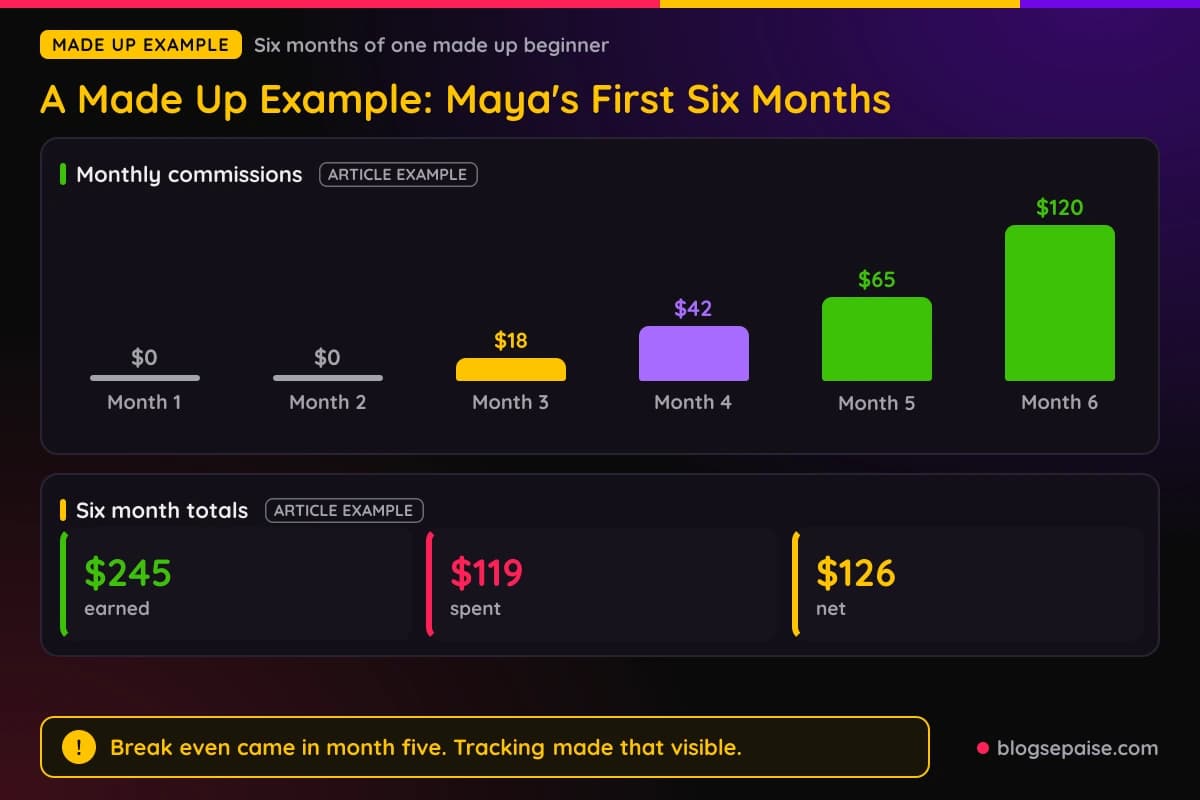
Month six brings $120. After costs, her net is $105, and her six month totals read $245 earned, $119 spent, and $126 net.
The $119 splits into $90 of hosting and the $29 keyword tool, which makes it easy to see where her money went.
Notice how much Maya learned from a tiny sheet. She knows break even came in month five, she knows the keyword tool cost her one losing month, and she knows which two posts drove the climb.
Without tracking, she would only remember that she felt slow for a few months. With tracking, she can prove that the project works and show where to put more time.
Your numbers will look different. The habit is what you copy, not the totals.
Common Mistakes With Income Tracking
The first mistake is waiting until you have real income. By then the habit is harder to build and the early data is gone.
The second is using too many places. A notes app here, a spreadsheet there, and a screenshot folder somewhere else means nothing ever adds up.
Third, many beginners log income only when it is paid. That hides the pending money, so you cannot see how your work is doing until weeks after the fact.
A fourth mistake is forgetting costs. If you only track earnings, every month looks better than it is, and you may keep a losing tool for far too long.
Fifth, skipping link labels. Without them you know your total but not your winners, and you cannot decide where to spend your next hour.
Sixth, building a sheet that is too fancy. Twenty columns and color codes look impressive, but you will stop updating it by week three.
Seventh, comparing yourself to other people. Another affiliate's chart tells you nothing about your hours, your niche, or your budget, so compare this month to your last month.
Finally, ignoring the numbers once they are logged. A sheet is only useful when it changes what you do, so end every monthly review with one decision.
If you want to see why so many new sites stall, read why most new affiliate sites fail. Poor tracking sits behind many of those stories.
Final Thoughts
Tracking your affiliate income is not exciting work, but it makes every other decision easier. It turns a vague feeling into a plain set of facts.
Start today with one spreadsheet. Add the log tab, the monthly summary, and a link map, then set a weekly reminder.
Record commissions as pending, approved, and paid. Record costs just as carefully, and watch the running total move toward break even.
Review the sheet every week for 15 minutes and every month for 45. Pick one change after each monthly review, and you will keep improving without guessing.
If you want a head start, open the free blog income tracker and log your first entry now. The best time to start tracking was before your first sale, and the second best time is today.
Frequently Asked Questions
1. When should I start tracking my affiliate income?
Start before you place your first link. A sheet with zero sales in it is still useful, because the habit is already in place when the first commission arrives.
2. Which tool is best for tracking affiliate income as a beginner?
A free spreadsheet such as Google Sheets is the best start. It costs nothing, works on any device, and you can move to a paid dashboard later.
3. How often should I update my income sheet?
Update it once a week for about 15 minutes, and do a longer review once a month. Regular short sessions keep the data fresh without eating your time.
4. Should I count pending commissions as income?
Log them, but mark them as pending and keep them out of your spendable total. Approved and paid commissions are the safe ones to count on.
5. Do I need to track costs if I spend very little?
Yes. Small costs like hosting and a domain add up, and you cannot find your break even point without them.
6. How do I know which post earned a sale?
Use a tracking tag or a separate link for each post, and keep a link map in your sheet. If a program has no tag option, note the program and check which posts send it traffic.
7. Is affiliate income taxable?
In the United States it generally counts as self-employment income. Talk with a tax professional about your own case, and keep clean records in the meantime.
8. How long should I keep my affiliate income records?
Keep them for several years, along with receipts and program emails. A folder organized by year makes them easy to find.
9. Can a free tool replace my spreadsheet?
Yes, if you will use it every week. Our free blog income tracker is a good option, as long as you keep all your numbers in one place.