How To Do Affiliate Marketing On YouTube Shorts: 8 Steps
YouTube Shorts are short vertical videos. YouTube Help says they can run up to 3 minutes and that you can record them with the Shorts camera in the YouTube app.
Links work differently in Shorts than in regular videos. YouTube says that, to reduce spam and scam attempts, URLs placed in Shorts comments and Shorts descriptions are non-clickable.
That rule shapes everything in affiliate marketing on YouTube Shorts. You cannot paste a tracking link under a Short and expect people to tap it.
YouTube does give you other routes. You can point viewers to a related video, add links to your channel profile, tag products with YouTube Shopping, or add a brand deal link if you work with a sponsor.
Eight steps follow, in the order you would do them. Our guides on affiliate links on Facebook and affiliate marketing on Pinterest cover two other platforms with their own link rules.
Programs and platforms change their menus and terms over time. Check the matching YouTube Help page if a button has moved.
Disclosure: Some of the links I share might be affiliate links. If you click on one and make a purchase, I may earn a small commission as a thank you. But don’t worry, it won’t cost you anything extra. I only recommend stuff I genuinely believe in. Your support helps me keep creating awesome content. You can read my full affiliate disclosure in my disclaimer page.
If you want to save a lot of hours searching for high-paying affiliate programs, check out our exclusive list of 2500+ affiliate programs. You’ll find all the information about the programs inside the list. This list is perfect for affiliate bloggers and influencers.
What YouTube Says About Links In Shorts
Start with the rulebook, because it explains why Shorts need a different plan. YouTube Help has a page called Sharing links with your audiences, and it sorts link types into clickable and non-clickable.
The first line of that page matches the rule above. URLs placed in Shorts comments and Shorts descriptions are non-clickable, and YouTube gives spam and scams as the reason.
The change is not new. Tubefilter reported in August 2023 that YouTube would stop making links in Shorts descriptions and comments clickable starting August 31.
Tubefilter says the change covered links from the original creator and from commenters.
YouTube told the outlet that Shorts growth had made it easier for spammers and scammers to share harmful links in Shorts comments and descriptions.

YouTube also said it needed extra preventative measures to make it harder to take advantage of users through links.
Tubefilter adds that YouTube planned prominent clickable links on channels near the Subscribe button, plus a safer way to link Shorts to long-form content.
YouTube's sharing page lists several link types as clickable.
They are channel profile links, external brand deal links, the related video link in Shorts, mentions and hashtags in Shorts comments and descriptions, and YouTube Shopping affiliate program links.
It also lists Shorts Green screen and Remix attribution links, and end screens, as clickable.
URLs in long-form video comments and descriptions are clickable too, and YouTube marks that row as needing access to advanced features.
For affiliate marketers, the useful items on that list are the related video link, the channel profile links, the brand deal link, and the Shopping affiliate links. Steps 3 and 4 cover each of them.
YouTube's external links policy adds more detail. It applies to videos, audio, channels, comments, pinned comments, live streams, and other YouTube products.
The policy counts several forms as links. They include clickable URLs, URL text shown in videos or images, obfuscated URLs such as writing dot com instead of .com, and verbal directions to other sites.
The policy does not ban affiliate content. YouTube says affiliate content does not violate its Terms of Use, but excessively posting it from dedicated accounts may violate its policies on spam.
Prohibited destinations include pornographic sites, sites that install malware or unwanted software, phishing sites, and sources that give unauthorized access to paid audio, video, games, software, or streaming services.
YouTube says the list is not complete.
One example in the policy fits Shorts closely. It describes instructions to copy an unclickable link that leads to a pornographic or spam site as prohibited content.
If YouTube cannot verify that a link is safe, it may remove the link. Violating links in a video or its metadata can lead to the video being removed.
A first offense typically brings a warning with no channel penalty. YouTube says creators can take a policy training so the warning expires after 90 days, and three strikes within 90 days may lead to channel termination.
Step 1: Check Your Program Allows YouTube
YouTube's rules are half of the picture. The affiliate program you join has its own terms, and those can be stricter.
Amazon shows how this works. Its Operating Agreement says the program lets you monetize your Site, and it defines Site to include social media user-generated content.
Amazon's Associates Central application review page lists the social networks it accepts. They are Facebook, Instagram, Twitter, YouTube, TikTok, and Twitch.tv.
Amazon asks you to list the exact URL of your page. It says listing only the network's main domain is not acceptable.
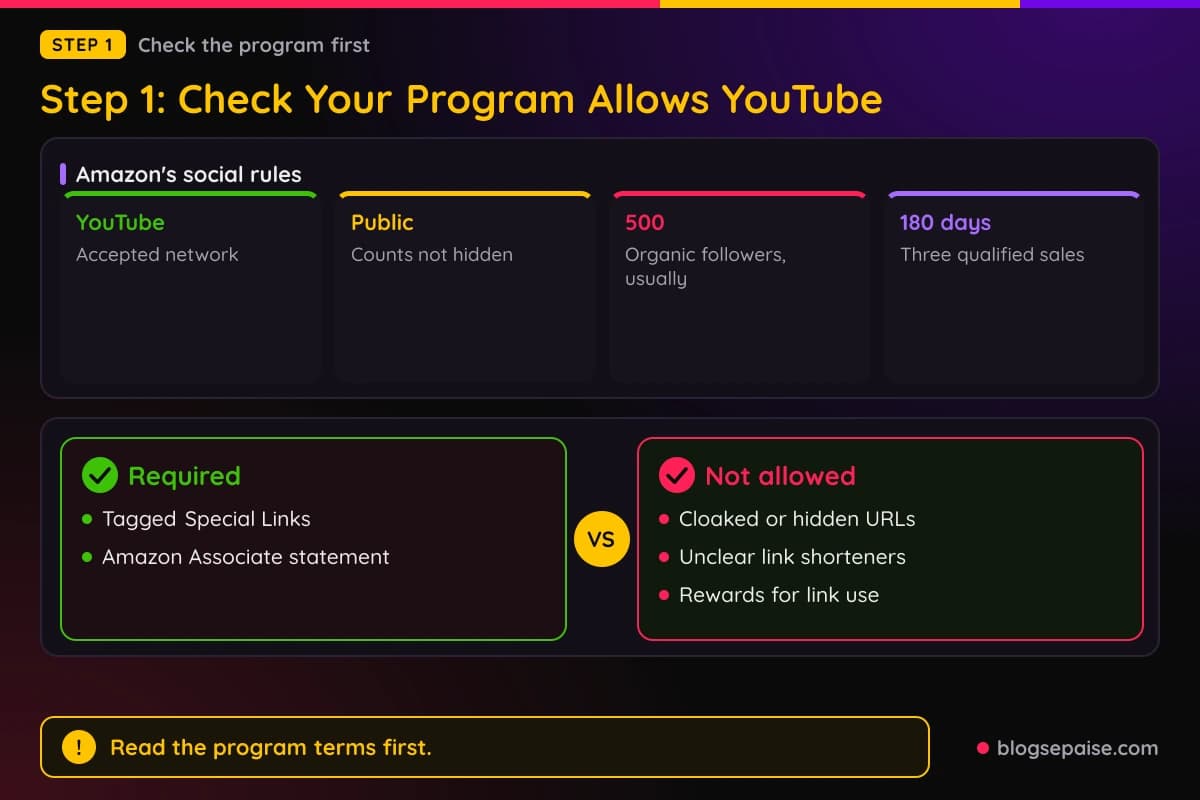
Amazon sets size rules for the networks it lists. The page must be established, with a substantive number of organic followers or likes, which in most cases means at least 500.
The page must also be public. Amazon says it does not accept pages where posts or follower and subscriber counts are hidden from non-followers.
Amazon reviews your listed Sites for content too.
It says Sites need robust original content, with a rule of thumb of at least 10 posts, and it requires at least three qualified sales within the first 180 days, with personal orders not counting.
Amazon's program policies add link rules that apply to any platform. Special Links must use the Associates ID Amazon assigned to you, and they must be tagged links that Amazon provides.
Amazon says you may not cloak, hide, spoof, or obscure the URL of your Site that contains Special Links. It also says you may not use a link shortener in a manner that makes it unclear you are linking to an Amazon site.
Amazon also bars incentives. You may not offer any consideration, reward, or incentive for using your Special Links, and you must not encourage customers to bookmark them.
Amazon requires a disclosure statement. You must show this text clearly and prominently, or a substantially similar version Amazon previously allowed: As an Amazon Associate I earn from qualifying purchases.
Amazon's policy documents do not include a rule written for YouTube alone. The general social media and link rules above apply, so check them before you post any tagged link.
Other programs write their own rules. Read the terms of each one before you tag a Short, and if the terms are silent on YouTube, ask the program manager in writing and keep the reply.
If you still need programs to join, see our guides on how to find affiliate links and how to get approved for affiliate programs.
Step 2: Create Your Shorts
Next comes the video itself. YouTube Help says you record a Short with the Shorts camera in the YouTube app, and the camera is not available on tablets, so you need a smartphone.
A Short can be up to 3 minutes long and can be made from one or more recorded clips. YouTube says uploads can be up to 1080p resolution.
The steps in the app are short. Sign in, tap Create, and select Short.
Then hold Capture to record, or tap it once to start and again to stop. You can change the duration in the upper right corner of the screen.
After recording, you can add music, filters, or effects. Undo and Redo remove or restore the last clip.

Tap Done to preview the video. Here you can add sounds, text-to-speech, or effects, or tap Back to return to recording.
Tap Next to add details. The title can be up to 100 characters.
Privacy defaults to private for creators aged 13 to 17 and public for creators 18 or older. You also mark the video as made for kids or not.
YouTube adds a Get feedback option that analyzes the hook, pacing, and more. Tap Upload Short to publish, or Save draft to finish later.
You can also pick a frame as the thumbnail before or after you upload. YouTube says thumbnails can be edited only in the YouTube app, not in Studio.
Drafts have no limit, but they save on your device, not your channel. Deleting the app or replacing the device loses them.
Music has a limit of its own. YouTube says music can cover up to 90 seconds of a Short up to 3 minutes when you use YouTube tools, depending on the song.
You can also upload a vertical video from a computer. YouTube Help says vertical videos saved to your computer or smartphone can be uploaded as Shorts.
If you already have long videos, you can turn them into Shorts. In the app, open the watch page of your own video, tap Remix, then tap Edit into a Short.
YouTube says you can select up to 60 seconds this way. Only public long-form videos you uploaded can be used, and private or unlisted videos, and videos with third-party copyright claims, are not eligible.
You also cannot use music or sounds from the Audio Library in Shorts made this way. The Short stays linked to your original video, so new viewers can find your long-form content.
YouTube Studio has a second route. Open the source video, select Clips and Shorts in the left menu, then choose Create clip or Short and pick Short.
You can choose the segment by selecting transcript text or entering timestamps. AI-powered suggestions are available in select countries and languages, and autocaptions are added where available.
For Shorts made with this tool, YouTube says the source video is automatically added as a related video. The exceptions are Shorts that are private, unlisted, or made for kids.
YouTube also says you will not be penalized for reusing your own content in a clip or Short. That helps, because related video links are a main way to reach a link.
YouTube changed how it counts Shorts views on March 31, 2025. A view now counts each time a Short starts to play or replay, with no minimum watch time.
The earlier metric is now called engaged views. YouTube says Partner Program eligibility and Shorts ad revenue sharing are based on engaged Shorts views.
Step 3: Choose How Viewers Reach Your Link
Since the description cannot carry a clickable link, you need another way to move viewers. YouTube offers three that fit affiliate work, and each has its own rules.
The first is the related video. After you upload a Short, you can add a related video to point viewers to your other content, and YouTube says it can showcase your videos, Shorts, and live streams in the Shorts player.
To add one, sign in to YouTube Studio and select Content. Click the Short, select a Related video from your channel, and click Save.
YouTube says adding a related video requires advanced feature access. The video you select must be public or unlisted, and it must follow the Community Guidelines.
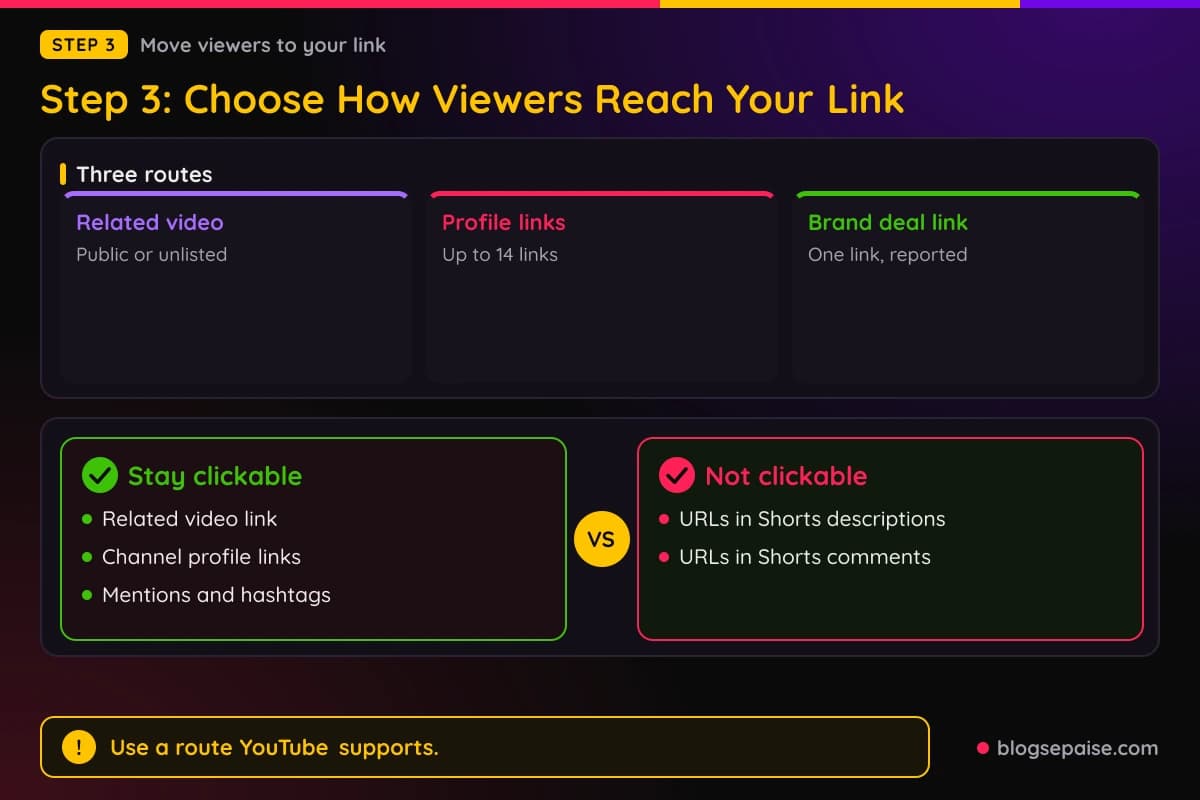
Viewers see a clickable link below your channel handle. That link goes to a video on YouTube, so the clickable affiliate link has to sit inside that video or its description.
YouTube lists URLs in long-form video descriptions as clickable, with the note that you must enable access to advanced features first. A Short can therefore lead into a long video that carries the link.
Amazon's rules still apply to that setup. Amazon says all Special Links must be accessed directly from your Site, so keep your tagged links inside content you control.
The second route is your channel profile. YouTube says you can add up to 14 links, and they appear on your channel's Home tab.
The first link shows prominently in the profile section near the Subscribe button. The remaining links appear when viewers click to see more.
To add them, sign in to YouTube Studio and select Customization, then Profile. Under Links, click Add link, enter the title and URL, and click Publish.
YouTube says these links must follow the external links policy. Links to sites with content that violates that policy are not allowed.
Amazon's link rules reach this spot too. Do not shorten or hide an Amazon link in a way that makes it unclear you are linking to Amazon.
The third route is a brand deal link. If you work with a partner brand on a sponsored Short, you can add one external link to the brand's site.
The link appears on screen with a sticker and in the Shorts description.
YouTube says the brand partner or its authorized agency must report the partnership to YouTube, and the link must lead directly to the partner brand's website.
Brand deal links do not appear on paid impressions, meaning views driven by branded content. Every link goes through an automated safety scan that can take up to 20 minutes.
If a brand deal link is removed for an external link policy violation, YouTube says your channel gets no Community Guidelines strike or warning for that removal.
To replace it, you select Stop sharing video, and the brand submits a new link.
Brand deal links are for sponsorships, not for affiliate tags. YouTube says the brand or its agency must report the deal first.
To add a brand deal link, open the Short in YouTube Studio or the app and tap Paid promotion and brands.
Then tap Find your brand partner, review the share agreement, and set the link to show in the video description, the video player, or both.
Mentions and hashtags stay clickable in Shorts comments and descriptions. They help viewers find your channel and your other videos, but they do not carry an outside URL.
Showing URL text in the video is a link form that YouTube's external links policy covers. If you show a destination on screen or say it aloud, the destination must follow the policy.
Step 4: Tag Products With YouTube Shopping
The YouTube Shopping affiliate program is the one built-in way to put an affiliate link on a Short.
Creators earn commissions when viewers buy tagged products on a retailer's site, and YouTube manages tagging, insights, and earnings in YouTube Studio.
Eligibility is strict. YouTube says the channel must be in the YouTube Partner Program and meet its subscriber threshold, and the creator must be based in a supported country.
The affiliate program page lists these countries: Argentina, Brazil, Germany, India, Indonesia, Japan, Korea, Malaysia, Mexico, Netherlands, Philippines, Poland, Singapore, Taiwan, Thailand, United Kingdom, United States, and Vietnam.
YouTube's Get started with Shopping page lists 12 markets for tagging other brands, so confirm your country in YouTube Studio.
Other limits apply. Music channels, Official Artist Channels, and channels tied to music partners are excluded, and the channel cannot be set as made for kids.
Meeting the rules is necessary but not enough. YouTube says it invites creators, and filling out the interest form does not guarantee an invitation.
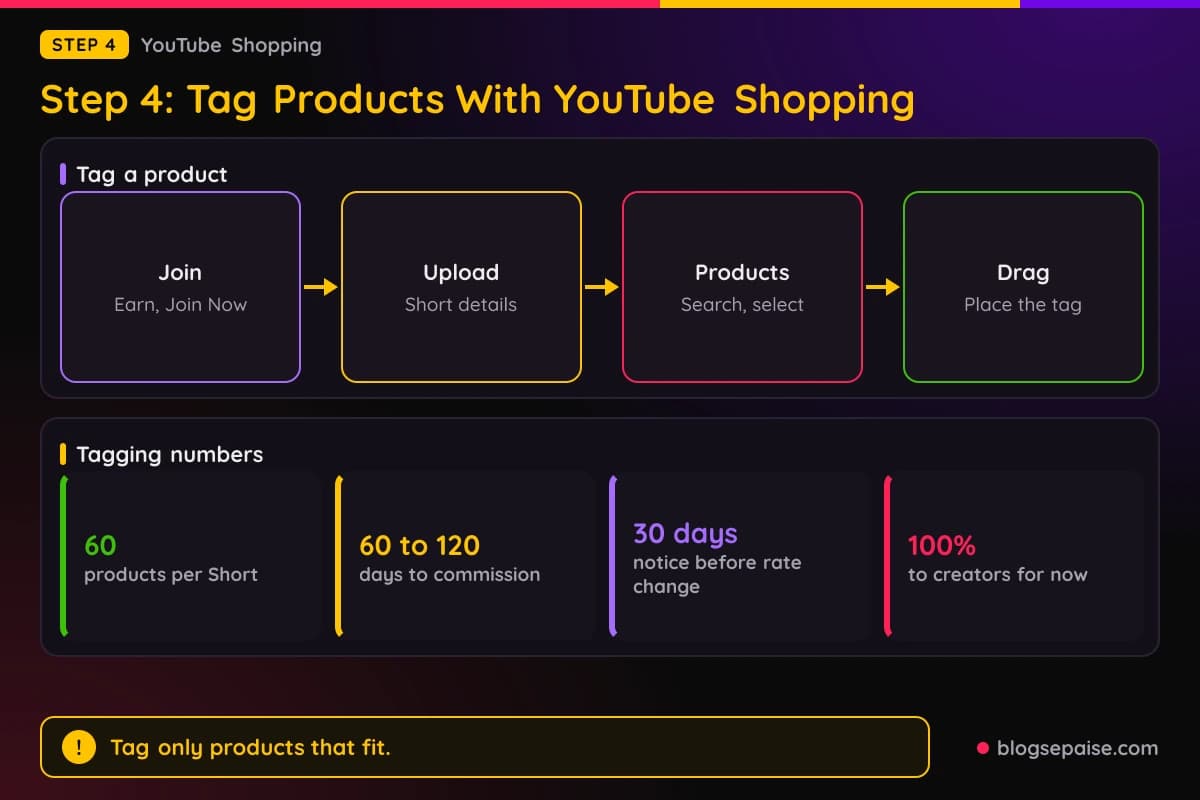
To join, sign in to YouTube Studio and select Earn from the left menu. Under Programs, click Join Now and accept the YouTube Shopping Affiliate Program Terms of Service.
Tagging a Short follows the upload flow. Upload a Short, open the Details page, open the description, and click Products.
Click the add icon, search for the product by name, select it, and drag it to the indicated area. You can tag up to 60 products per video or Short.
On a Short, tagged products show up as a Shopping product sticker. The sticker shows the first product in your list, so reorder the list to feature a different one.
The sticker sits in the bottom left corner by default. You can move and resize it in the YouTube mobile app, and viewers tap it to go to the retailer's site or tap the down arrow to see the full list.
YouTube sets four guidelines for what you tag. Products must be identifiable and prominent, meaningfully related to the content, of reasonable interest to buy, and used as the manufacturer intended.
Products should be mentioned verbally or in text, such as in the frame, title, or description. Brief, blurred, or obscured depictions do not qualify.
Music can block your sticker. If you use a non-shopping sound on a Short with a product sticker, YouTube says you must pick an eligible shopping sound, remove all sounds, or remove the sticker.
A copyright claim blocks tagging entirely, and so does a Creator Music revenue sharing track. Tagging is also unavailable when your audience is set as made for kids or your content is limited or ineligible for monetization.
YouTube bans spam tagging. It says spam tagging products, or indiscriminately tagging many unrelated products, is not allowed, and tags that do not meet the guidelines may be removed.
YouTube sends notifications about non-compliant tags. Repeated violations could result in your channel losing access to the Shopping affiliate program.
To find removed tags, go to the Content page in YouTube Studio, filter for Products, and then choose Tagging violation. If you think a tag was removed by mistake, contact Creator Support.
Commissions work on the retailer's side. YouTube says each brand or retailer sets its own commission rate and attribution window per product.
YouTube says 100 percent of commissions from affiliate merchants currently go to creators. It calls this rate temporary and promises at least 30 days' notice before it ends.
YouTube pays commissions through AdSense for YouTube, 60 to 120 days after the purchase, to allow time for returns. A returned purchase reverses the commission.
Merchants can run custom campaigns with higher rates. YouTube lists them under Special offer promotions in the Affiliate hub, and you are never required to take part.
Affiliate campaigns can also pay a fixed bonus. YouTube says campaigns are available in the United States and Korea, and the bonus goes to the first video that meets all campaign requirements.
A qualifying upload can be a Short or a long-form video. You must tag at least one eligible campaign product and turn on the Paid Promotion disclosure.
The video must be public, not made for kids, and published during the campaign's active period. YouTube also says to keep the video and product tags public for at least 30 consecutive days after upload.
Amazon has its own tagging path inside YouTube Shopping.
YouTube says you must be in the Partner Program and enrolled in the Shopping affiliate program in Brazil, Egypt, France, Germany, India, Saudi Arabia, the United Kingdom, the United States, or the United Arab Emirates.
With Amazon, you use the product picker in YouTube Studio and choose from the available Amazon products. YouTube says you can tag them in videos, Shorts, and livestreams.
You can also turn on auto-tagging. YouTube may then review your recent uploads, tag eligible Amazon products, and update or remove those tags after routine quality checks.
YouTube's terms add one more limit.
Routing traffic from non-YouTube sources to merchants with your affiliate links violates the Shopping affiliate terms, and the examples include syndicating links on external websites, automated redirects, click injection, and cookie stuffing.
Step 5: Disclose Every Affiliate Link
Disclosure is part of the job, not an extra. YouTube, the FTC, and Amazon all expect it, and each one asks for it in a slightly different way.
YouTube's branded content policy defines branded content as content influenced by a brand partner in exchange for something of value. That includes payment, free products, or sponsorships, now or later.
Creators disclose through the paid promotion declaration in YouTube Studio. The checkbox reads: My video contains paid promotion like a product placement, sponsorship, or endorsement.
On a computer, open the video under Content in YouTube Studio, click Show more, and check the paid promotion box. In the mobile app, open the video, go to Show more, open the paid promotion settings, and answer Yes.
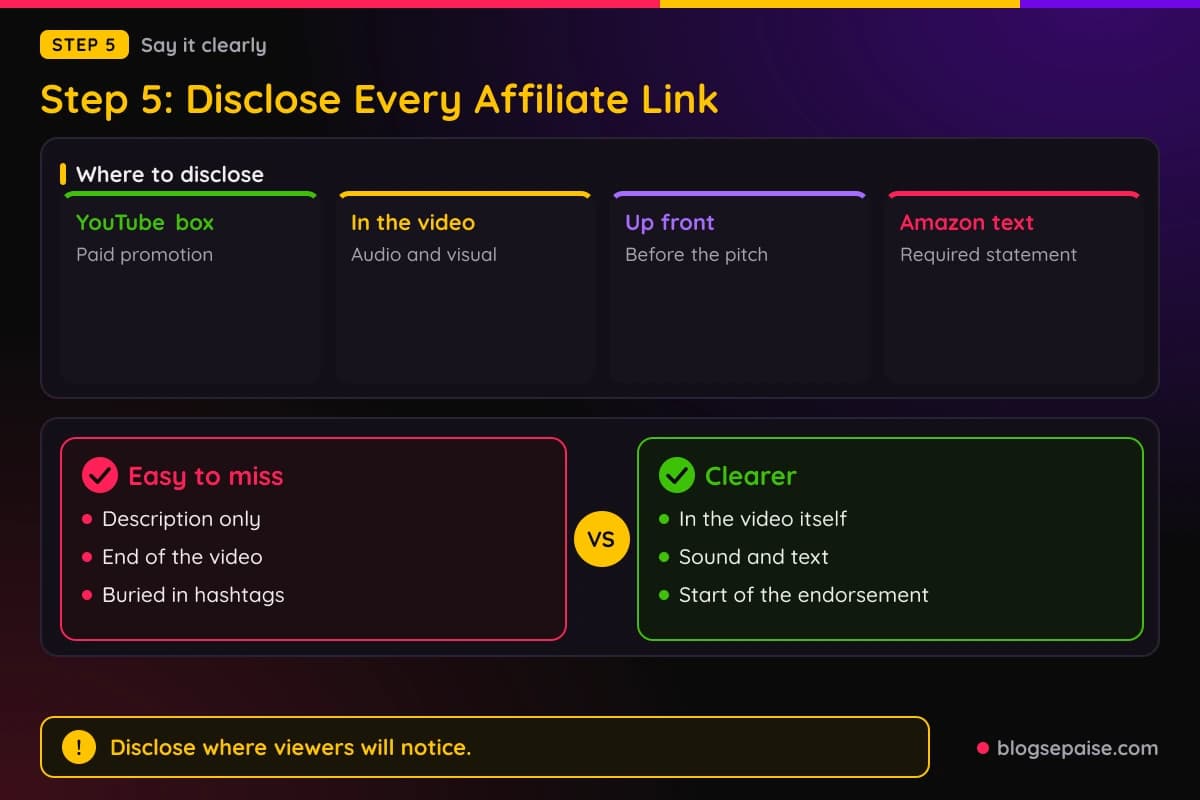
When you declare paid promotion, YouTube shows viewers a disclosure at the start of the video.
Ads still run, but YouTube may avoid ads from a brand partner's direct competitors, and videos with branded content are removed from YouTube Kids.
YouTube's Shopping affiliate tips page ties this to affiliate work.
It tells creators to select the branded content box if the content includes a paid endorsement, and to follow the current FTC endorsement guidance or their country's equivalent.
YouTube's branded content policy does not mention affiliate links. If systems detect branded content you did not disclose, YouTube may apply a label and notify you.
YouTube warns that its label does not replace your own duty. The policy says creators are responsible for making their disclosure clear and prominent, and local laws may add more.
The FTC gives the clearest rules for the video itself. Its Disclosures 101 guide says to disclose any financial, employment, personal, or family relationship with a brand.
It says to place the disclosure so it is hard to miss.
For video, the FTC says to include the disclosure in the video itself, and not just in the uploaded description, and to use both audio and visual since some viewers watch muted.
The FTC says disclosures are likely to be missed on a profile page, at the end of a video, or behind a more click. It also says not to bury the disclosure among hashtags or links.
In its Endorsement Guides questions and answers, the FTC adds that a disclosure in a YouTube or TikTok description alone is unlikely to be sufficient. It says disclosures at the beginning are better than at the end.
For an endorsement in the middle of a video, the FTC says to place the disclosure right before or at the start of that endorsement.
When an endorsement is visual, the disclosure should be at least visual, and when it is audible, at least audible, with both being best.
On wording, the FTC does not mandate specific words. It says starting with Ad, Paid ad, or #ad would likely be effective, and it lists vague terms such as sp, spon, and collab as ones to avoid.
For affiliate links, the FTC suggests this wording: I get commissions for purchases made through links in this post.
It says a label such as affiliate link alone may not be understood, while paid link next to an affiliate link should be adequate.
The FTC also says a disclosure in the comments is easily avoidable, so it is not clear and conspicuous. And it says platform tools alone are no guarantee, so use your own clear disclosure in addition.
Amazon has its own wording. Besides the statement As an Amazon Associate I earn from qualifying purchases, Amazon's policies tell Influencer Content creators with a material connection to use labels such as #Ad or #Sponsored.
Amazon also says you may not misrepresent or embellish its relationship with you. Keep your claims about products honest and your wording plain.
For a ready-made disclosure, see our affiliate disclosure generator. Our guide to legal disclosures covers the wider legal picture.
Step 6: Stay Inside The Spam And Reuse Rules
Affiliate Shorts can break YouTube rules even when the links are fine. Two policy areas matter most, spam and the channel monetization policies.
YouTube's spam policy applies to all content, including unlisted and private videos, comments, links, posts, and thumbnails. It lists comment spam as high-volume, repetitive, or deceptive comments used to drive traffic.
Its example is posting near-identical check out my channel messages on hundreds of videos. Do not use comments to push your affiliate offers.
The policy also bans off-platform diversion, which it describes as content whose purpose is to send viewers to external sites. Its example is a short teaser for a free movie that links to a malicious site.
Malicious clickbait is another violation. YouTube defines it as misleading titles, thumbnails, descriptions, or imagery that does not deliver what was promised.

Mass production is a risk for Shorts. YouTube bans using automation or AI to churn out large volumes of similar content with minimal changes, though testing tools or posting a few variations is allowed.
Scraped content is also covered. The policy gives re-uploading popular clips in full as an example of reposting without original commentary, educational value, or unique editing.
Scams are listed too, and they hit affiliate niches hard. YouTube names get-rich-quick investments, fake job offers, and fake customer support contacts meant to steal private data.
Penalties range from suspended monetization to termination. For some violations, YouTube removes the content and issues a warning or strike, and three strikes within 90 days may result in channel termination.
The channel monetization policies add two more checks. On July 15, 2025, YouTube renamed its repetitious content policy to inauthentic content and clarified that it covers content that is repetitive or mass-produced.
YouTube describes this content as looking like it was made with a template or feeling repetitive after several videos in a row.
Its not-eligible examples include image slideshows, templated storylines, and scrolling text with minimal or no narrative.
Series are fine when each video is different. YouTube says series or product review channels are allowed when each video has a distinct storyline, focus, or concept.
The reused content policy covers channels that repurpose content already online without significant original commentary or substantive changes. YouTube says it applies even if you have permission from the original creator.
If violating videos exist, or if YouTube cannot clearly tell you made the content, monetization may be removed from your entire channel. YouTube says that policy is separate from its copyright enforcement.
AI gets its own limits. YouTube does not allow AI-generated content made from generic or unoriginal templates that gives the impression of mass production without the creator's original insight.
It also does not allow AI personas presenting as human experts on sensitive topics such as health, legal issues, finances, or politics. Examples include an AI doctor giving diagnoses and AI hosts giving financial guidance.
YouTube does allow AI to help with scripts, backgrounds, or a character and story you invented, as long as the final product shows your creative vision and offers educational or entertainment value.
On the spam side, YouTube says creators should disclose content that is generated or meaningfully altered with AI, and that disclosure does not excuse a violation.
YouTube's branded content policy lists restricted categories with extra rules. They are alcohol, financial services, healthcare and medicines, gambling, and elections and political content.
If you promote products in those areas, read those rules before you post.
The branded content policy also lists prohibited products, such as recreational drugs, weapons, hacking software, counterfeit products, and academic essay-writing services.
YouTube's advice for borderline cases is simple. It says that when in doubt, do not post content you think might violate the policies.
Step 7: Know How Shorts Earn Money From Ads
Affiliate commissions are one income source. Shorts ad revenue is a separate one, and it has its own gate, so plan for each on its own terms.
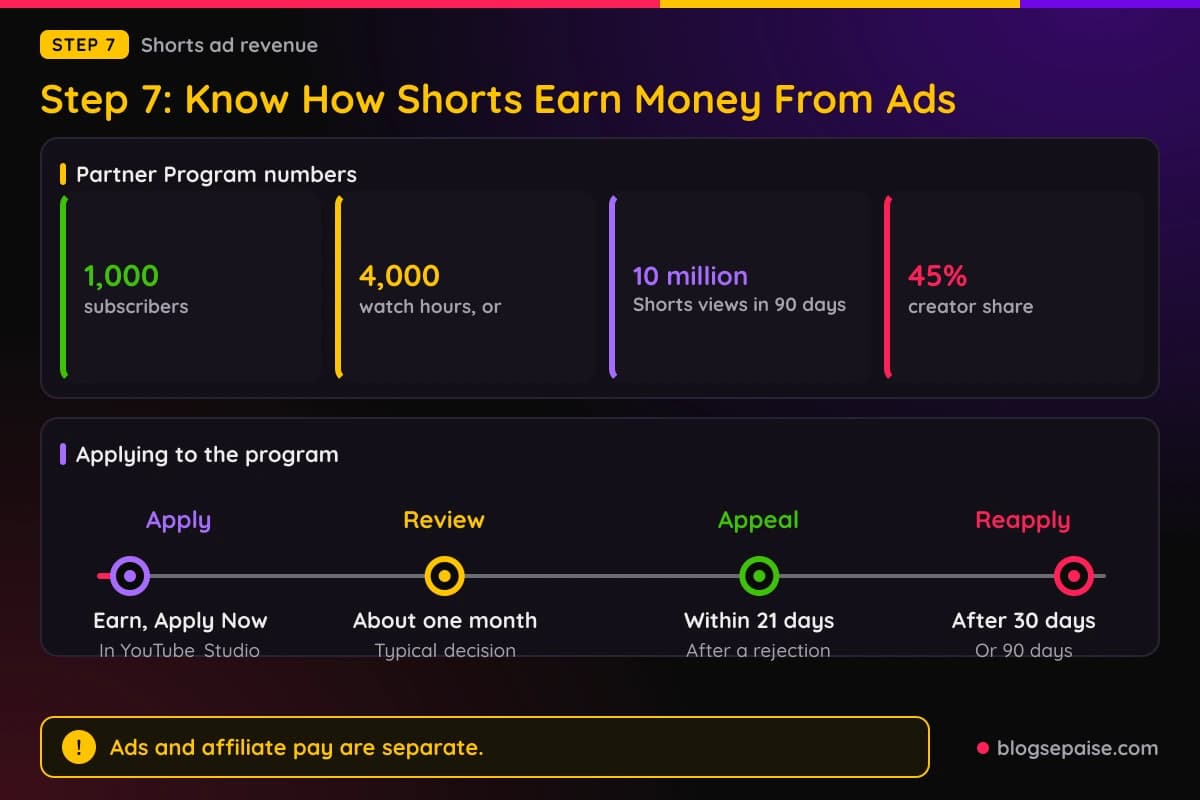
The YouTube Partner Program, or YPP, is the gateway. YouTube lists two paths for ad revenue sharing, and both need 1,000 subscribers.
The first path adds 4,000 qualified watch hours in the last 12 months. The second adds 10 million qualified Shorts views in the last 90 days, and watch hours from the Shorts feed do not count toward the 4,000 hours.
Qualified Shorts views count only public Shorts that appear in the Shorts feed. Private, unlisted, and deleted Shorts, ad campaigns, and Image Posts do not count.
YouTube lists other requirements to join.
You must follow the channel monetization policies, live in a supported country or region, have no active Community Guidelines strikes, turn on 2-Step Verification, and have access to advanced features.
You also need one active AdSense for YouTube account linked to your channel. To apply, open Earn in YouTube Studio, select Apply Now, accept the Base terms, and set up or link AdSense.
Meeting the numbers does not guarantee approval. YouTube says channels go through a review by automated systems and human reviewers, and decisions typically take about one month.
If you are rejected, you can appeal within 21 days. You can reapply after a 30 day period, and YouTube says a repeat rejection means waiting 90 days.
Joining YPP is separate from earning Shorts revenue. YouTube says only partners who accepted the Shorts Monetization Module can earn Shorts ad and YouTube Premium revenue, and views before you accept it are not eligible.
Only ads shown between videos in the Shorts feed generate revenue for sharing. YouTube says the revenue goes into a monthly pool, and creators keep 45 percent of their allocated revenue.
YouTube gives a hypothetical example of the math. A creator with 1 million of 100 million engaged views gets 1 percent of a $90,000 Creator Pool, which is $900, and after the 45 percent share the creator earns $405.
Some views never count.
YouTube lists non-original Shorts, such as unedited clips from others' movies or TV shows, reuploads, and compilations with no original content, plus artificial views and views of content that conflicts with the advertiser-friendly guidelines.
YouTube also says Shorts longer than one minute that contain claimed content cannot be monetized. Monetized content must follow the advertiser-friendly content guidelines.
Changes start on February 1, 2027. YouTube says creators must review and accept the updated terms in YouTube Studio by January 31, 2027, or lose access to the affected features on that date.
Under the update, earning from the monthly Shorts Creator Pool takes 10 million qualified Shorts views over the last 90 days.
YouTube says missing that mark does not remove you from YPP or affect other earnings, including long-form.
New creators face different entry thresholds from that date. They need 1,000 subscribers plus either 8,000 qualified watch hours in the last 365 days or 20 million qualified Shorts views in the last 90 days.
YouTube says a lower tier stays in place for fan funding, YouTube Creator Partnerships, and YouTube Shopping.
It requires 500 subscribers plus either 3,000 qualified watch hours in the last year or 3 million qualified Shorts views in the last 90 days.
Existing members are not affected by the entry change.
YouTube says a channel stays active if it meets any of these: 1,000 qualified watch hours in 365 days, 1 million qualified Shorts views in 90 days, or 2 long-form videos or 5 Shorts uploaded every 90 days.
YouTube may also turn off monetization for channels with no uploaded video or Posts tab post for 6 months or more. Keep your channel active.
Step 8: Track Results And Keep Your Tags Clean
Tracking tells you which Shorts pull their weight. YouTube gives you Shopping analytics in YouTube Analytics for tagged products, and Amazon gives aggregate numbers for its tagged products.
For Amazon tags, YouTube says Analytics shows metrics such as clicks and estimated revenue. You can see aggregate daily revenue, clicks, and sales, but not which videos or products drove purchases.
For affiliate campaigns, YouTube shows progress on a Campaign Detail Page. The statuses are In progress, Missing steps, and Completed.
After a video stays Completed for 30 consecutive days, YouTube starts the bonus payment. It is added to your next standard monthly AdSense payout, and Analytics shows Estimated Revenue, Bonus, and Earned Revenue.
Payments take time. YouTube pays Shopping affiliate commissions 60 to 120 days after the purchase, and a return reverses the commission.

Amazon tags follow a monthly cycle. YouTube gives this example: earnings locked in January are paid during the March AdSense payment cycle.
Returns deduct the commission from your current balance, which can temporarily show negative values. YouTube says a negative balance at month end rolls over, and payments resume once earnings are positive.
Amazon sets its own windows. Its policies say a qualifying order must ship and be paid for within 180 days of the purchase, sessions end after 24 hours, and cart orders must be completed within 89 days of the initial click.
Amazon also lists purchases that do not count. Purchases referred by search engine links or redirecting links are disqualified, and you may not buy through your own Special Links.
Keep an eye on tag health too. In YouTube Studio, use the Products filter and the Tagging violation option on the Content page to find any tag YouTube removed.
YouTube's Shopping affiliate tips page includes one performance figure.
It says YouTube internal data from 2024 showed videos with product tags and description links got 23 percent more product clicks than videos with description links alone.
That figure comes from YouTube's page for regular videos, not Shorts. Use it as a reason to tag products, not as a promise for your channel.
A weekly routine keeps the work small. Check which Shorts got clicks, confirm that every tag still follows the guidelines, and make sure each video still carries its disclosure.
Then compare your numbers against the money each program reports. Rules and menus change, so confirm details in YouTube Help and your program's terms before you act.
Final Thoughts
Affiliate marketing on YouTube Shorts starts with one fact. URLs in Shorts descriptions and comments are not clickable, and YouTube says the reason is to reduce spam and scams.
That leaves a few legitimate routes.
A related video can lead viewers to a long-form video, profile links can sit on your channel, brand deal links can work for sponsors, and YouTube Shopping tags can carry the links for eligible creators.
Check your program first, since Amazon's rules on links and disclosure still apply. Then build Shorts that are original and varied, tag only products that fit the guidelines, and disclose in the video itself.
Finally, track your numbers and keep your channel clean of spam signals. Check YouTube Help before you act, because the program lists, thresholds, and dates change.
Frequently Asked Questions
1. Can you put affiliate links in YouTube Shorts?
YouTube says URLs placed in Shorts comments and Shorts descriptions are non-clickable. Eligible creators can tag products with YouTube Shopping, and other routes include a related video and channel profile links.
2. Does a pinned comment make a link clickable in a Short?
YouTube's sharing page lists URLs in Shorts comments as non-clickable. Its external links policy also covers pinned comments, so the same link rules apply there.
3. Can I use Amazon affiliate links on YouTube Shorts?
Amazon lists YouTube as an accepted social network, with a public page and in most cases at least 500 organic followers. In YouTube Shopping, Amazon tagging is open to creators in the Partner Program who are enrolled in the Shopping affiliate program in the countries YouTube lists.
4. Do I need to be in the YouTube Partner Program to earn affiliate commissions?
For the YouTube Shopping affiliate program, YouTube says the channel must be in the Partner Program and meet its subscriber threshold. Other programs, such as Amazon Associates, have their own requirements.
5. How do I disclose affiliate links in a Short?
Check the paid promotion box in YouTube Studio, and also disclose in the video itself. The FTC says to use both audio and visual, since some viewers watch muted.
6. How many products can I tag in one Short?
YouTube says you can tag up to 60 products per video or Short. The Shopping sticker shows the first product in your list.
7. How long do YouTube Shopping commissions take to pay?
YouTube says commissions are paid through AdSense for YouTube 60 to 120 days after purchase. A returned purchase reverses the commission.
8. How many views do I need to earn from Shorts ads?
YouTube says Shorts ad revenue sharing requires 10 million qualified Shorts views in the last 90 days, and the partner must accept the Shorts Monetization Module. Creators keep 45 percent of their allocated revenue.