Blogsepaise Vs Lasso: Which Affiliate Link Checker Wins?
Lasso and Blogsepaise both help affiliate sites stop losing money to bad links. They come at the job from very different sides, though.
Lasso is a WordPress plugin with a hosted account. It manages your affiliate links, builds product boxes and comparison tables, and sends alerts when a link breaks.
Blogsepaise is a web app with two tools in one account. The Affiliate Program Database helps you find programs to join, and the Link Health Monitor scans your pages for broken, hijacked and undisclosed affiliate links.
Both start at $19 a month for the first paid plan. Both have a free plan that needs no card.
The real question is which problems you need solved. A site that wants pretty product displays inside WordPress has different needs from a site that wants to audit every link and find better programs.
We built Blogsepaise, so keep that in mind as you read. Where Lasso does more, we say so plainly.
Disclosure: Some of the links I share might be affiliate links. If you click on one and make a purchase, I may earn a small commission as a thank you. But don’t worry, it won’t cost you anything extra. I only recommend stuff I genuinely believe in. Your support helps me keep creating awesome content. You can read my full affiliate disclosure in my disclaimer page.
Search 1,500+ affiliate programs in the Blogsepaise Program Database and filter them by category, network and commission type, compare them side by side and track the ones you join. The Link Health Monitor then checks your posts for broken, hijacked and undisclosed affiliate links, and paid plans run those checks for you every week or month.
See every feature or pick a plan, from a free account to Pro →
What Each Tool Does
Lasso is a suite of affiliate marketing tools for WordPress sites. The paid plans run the full Lasso plugin, and the free plan runs a lighter version called Lasso Lite.
Inside WordPress, Lasso keeps all your affiliate links in one dashboard. It turns them into product displays, comparison tables and grids, and it pulls Amazon images and prices for you.
Lasso also covers YouTube. Every plan builds a product page for each video, imports links from video descriptions, and lets you update links in older videos in bulk.
Lasso has more than 40,000 users. It is built mainly for creators and publishers who run a WordPress site or a YouTube channel.
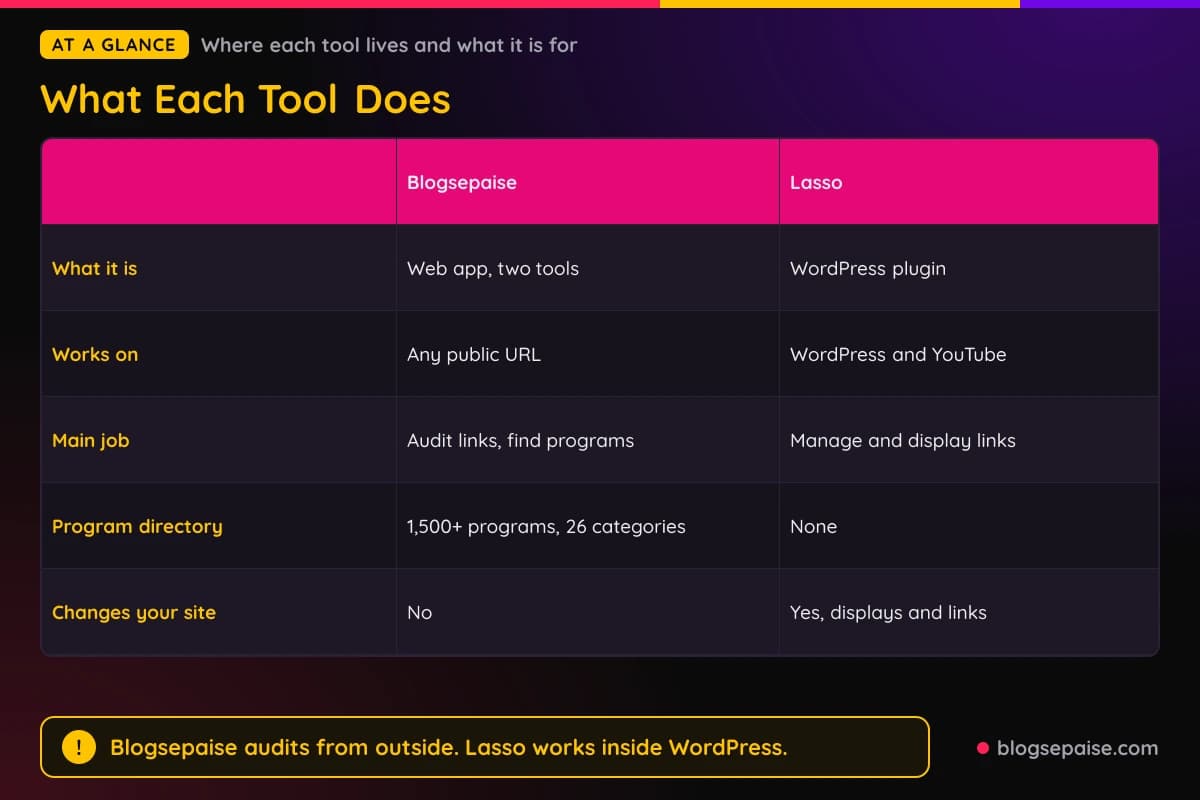
Blogsepaise runs in the browser, so it works with any site. You paste a page URL or a sitemap URL, and the Link Health Monitor finds every affiliate link on those pages.
It follows each link hop by hop, up to eight redirects, and records where it lands. Then it tells you which links are broken, which need a look, and which could not be checked.
The second tool is the Affiliate Program Database. It lists more than 1,500 affiliate programs across 26 categories, each with a link to the program's own signup page.
So Lasso lives inside your site and changes how links look and behave. Blogsepaise sits outside your site, audits what is already there, and helps you pick programs before you add links.
Checking Affiliate Links
Broken link checks are where the two tools overlap the most. Both want to catch a dead link before it costs you a sale.
Lasso monitors your site around the clock for broken links and out-of-stock Amazon products. The checks run on Lasso's own servers, so they do not slow your site down.
When Lasso finds a problem, it shows an alert so you can fix the link or swap the product. Lasso also refreshes Amazon product data every 24 hours.
On Lasso, broken link alerts and out-of-stock alerts are not part of the free plan. They start on Creator at $19 a month.
On Blogsepaise, link checks are on every plan, the free one included. A free account scans single pages, up to 25 affiliate links a scan and five scans a day.
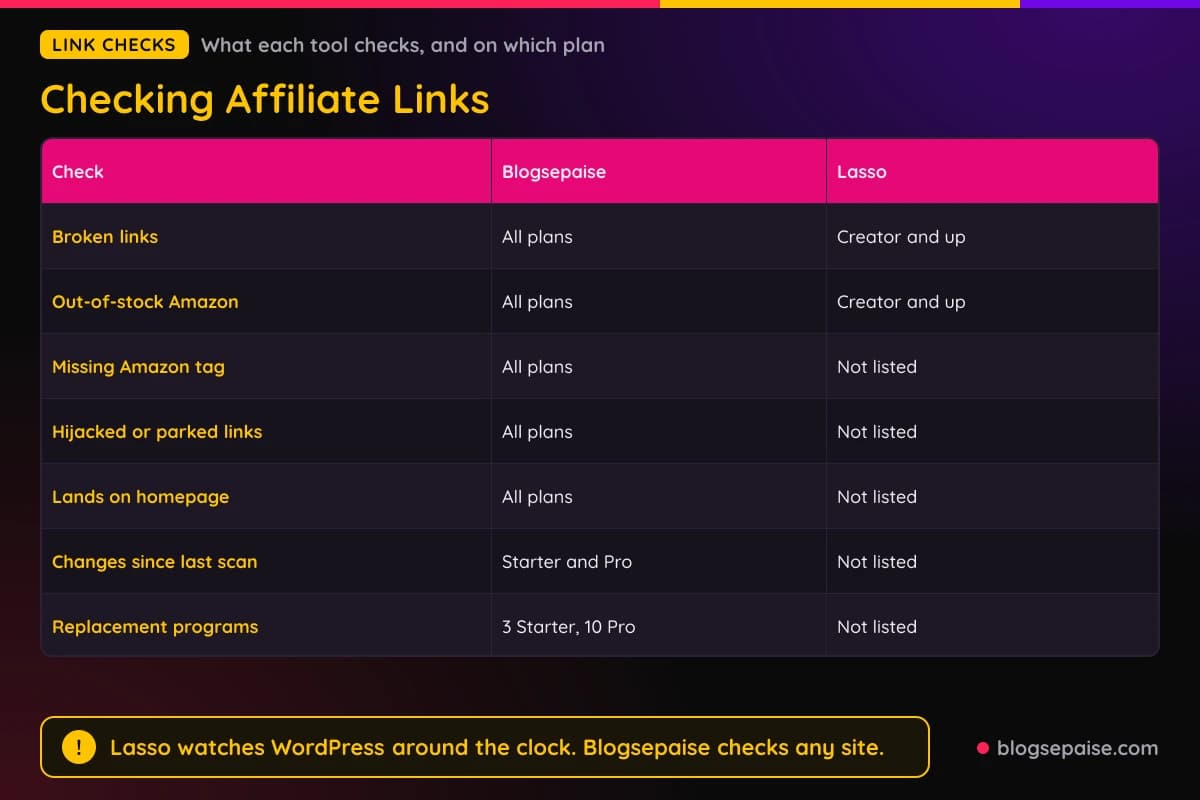
Each Blogsepaise scan flags pages that return not found or server errors. It also flags too many redirects, links that now land on a homepage, and links that use http instead of https.
The Link Health Monitor goes a step further with hijacked links. It warns you when a link bounces through unrelated sites or ends on a parked or for-sale domain.
Amazon gets its own checks too. A scan spots out-of-stock products, product pages that are gone, and Amazon links that lost their tracking tag.
Paid plans add sitemap scans, so you can check a whole site in one go. Starter scans up to 75 pages and 500 links, and Pro scans up to 500 pages and 3,000 links.
Starter and Pro also compare each scan with your last scan of the same URL. You see new problems, fixed links, and links that now go somewhere else.
When a link is dead, Blogsepaise suggests live programs in the same category from its database. Starter shows three suggestions per link, and Pro shows ten.
So for link checks alone, Blogsepaise gives more on the free plan. Lasso wins on convenience, since it watches your WordPress site without you starting a scan.
How A Blogsepaise Scan Works
A scan starts with one URL. If it is a sitemap, Blogsepaise reads the page list from it, and if it is a page, it reads that page alone.
It then pulls every link from the pages and keeps the ones that look like affiliate links. Network domains, tracking parameters and paths such as /go/ or /recommends/ all count.
Each affiliate link is opened from Blogsepaise's servers and followed one hop at a time. The scan records every site in the redirect chain, so a link that wanders off course is easy to spot.
A link that takes longer than ten seconds to answer counts as a failed connection. A site that blocks the check gets marked as could not check, with a note to open it by hand.
The report groups links as broken, needs a look, could not check and healthy. Every row shows the issue in plain words and the pages where the link appears.
Starter and Pro can download any scan as a CSV file. Reports stay in your history for 90 days on Starter and 12 months on Pro.
Lasso works the other way around. Because it lives inside WordPress, it already knows your links and watches them without a scan button.
Disclosure And Compliance Checks
Affiliate links carry rules. Google asks for rel="sponsored" on paid links, and the FTC asks for a clear disclosure near them.
Blogsepaise checks both on every scan. It lists affiliate links with no rel="sponsored" or rel="nofollow", and links marked nofollow but not sponsored.
It also reads each page for disclosure wording, such as "affiliate link", "we may earn a commission" or "As an Amazon Associate". Pages with affiliate links and none of that wording get flagged.
Free accounts see how many pages and links have these problems. Starter and Pro see exactly which pages and links to fix.
Lasso does not list a disclosure check or a rel attribute check on any plan. Its link alerts focus on broken links and out-of-stock products.
If you work in a niche where compliance matters, such as finance or health, the disclosure check is worth a close look. It catches the pages a busy writer forgets.
Finding Affiliate Programs
Lasso does not have a directory of affiliate programs. It has a Marketplace, which it calls Affiliate Plus, with exclusive high-commission products and AI product matching.
The Marketplace lets you earn without an Amazon Associates account or separate brand applications. More than 2,000,000 eligible Amazon products pay higher commissions through Lasso.
Lasso also has an Opportunities view. It shows unmonetized links and keywords on your own site, so you can turn them into affiliate links.
Blogsepaise takes a different route. The Program Database lets you search 1,500+ programs by name, niche, network and commission type.
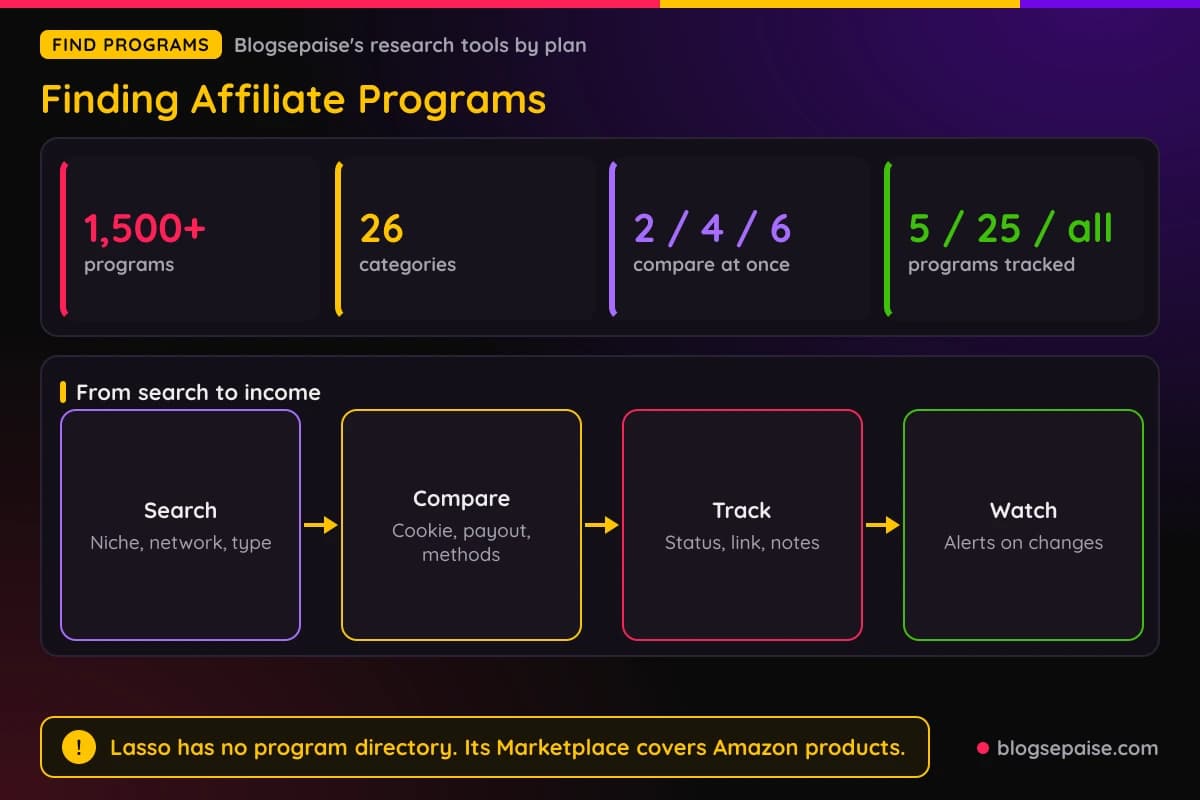
Program cards show the commission, and many show the cookie length, minimum payout, payment methods and approval type. Those details come from each program's own affiliate page.
You can tick Compare on any card and see programs side by side. Free compares two at once, Starter four, and Pro six.
A My Programs tracker keeps the programs you apply to, with a status, your own affiliate link and notes. Free tracks five programs, Starter 25, and Pro has no limit.
On paid plans you can watch a program. If its commission, cookie or signup page changes, or it leaves the database, you get an alert.
Saved searches work the same way. Save a niche search once, and new programs that match it show up in your alerts.
Blogsepaise Pro also has a missed-money finder. It spots plain links on your pages to brands that run an affiliate program, so you can join and start earning from links you already have.
So Lasso helps you earn more from products through its own marketplace. Blogsepaise helps you find and track the programs themselves.
Product Displays And Link Management
Here Lasso is clearly ahead, because Blogsepaise does not do it at all. Blogsepaise never changes your site or your links.
Every Lasso plan includes unlimited affiliate links, one dashboard for all of them, and single product displays. Paid plans add comparison tables and grids.
Paid Lasso plans also pull Amazon images and prices with no API key. Creator and up can open links in the Amazon app.
Pro and Studio send shoppers to their local Amazon store. Studio adds team access and the Lasso API.
Lasso offers commission upgrades on eligible Amazon products on every plan. You can also connect Lasso to ChatGPT or Claude on every plan.
If you want your WordPress posts to look like a polished review site, Lasso does that job. Blogsepaise only reports on the links you already have.
Amazon Features Compared
Amazon links break in their own ways. Products sell out, listings disappear, and copied links lose the tracking tag.
Lasso is built around Amazon. Paid plans pull Amazon images and prices without an API key, refresh product data every 24 hours, and change the price and image when Amazon does.
Lasso alerts you when an Amazon product goes out of stock or no longer exists. Pro and Studio also send each shopper to their own country's Amazon store.
Blogsepaise checks Amazon links during each scan. It flags out-of-stock products, product pages that no longer exist, and Amazon links without a tag parameter.
The missing tag check matters more than it looks. A link with no tag still opens the product, so nothing seems broken, yet the sale pays you nothing.
Free accounts see how many Amazon links have each problem. Starter and Pro see the exact links.
Blogsepaise does not show Amazon prices or images, and it does not route shoppers by country. For those jobs, Lasso is the stronger pick.
Alerts, Reports And Automation
Lasso's alerts come from its round-the-clock monitoring. Its alerts cover broken links and out-of-stock products, with buttons to fix a link or swap a product.
Blogsepaise saves your site and scans it on a schedule. Starter scans one saved site every month, up to 75 pages, and Pro scans five sites every week, up to 500 pages.
Scheduled scans do not use your monthly scan quota. Their results, watchlist changes and new saved-search matches arrive in one email a week.
Every alert also stays on your dashboard. You can turn the weekly email off at any time.
For agencies, Blogsepaise Pro builds a branded client report. It shows your brand name, the summary, the disclosure checks and every link to fix.
You can print that report, save it as a PDF, or send a read-only link that works for 30 days. Your client does not need an account to open it.
Lasso adds click tracking on every plan and clicks by link and page on Pro and Studio. Blogsepaise does not track clicks.
Pricing Compared
Lasso has four plans. Free costs $0, Creator costs $19 a month or $190 a year, Pro costs $29 a month or $289 a year, and Studio costs $59 a month or $549 a year.
Lasso also runs a promotion of 75% off the first year on annual plans. A full year starts at $48 with that discount.
Free Lasso covers one site with Lasso Lite. Creator covers one site, Pro up to three, and Studio up to five.
Blogsepaise has three plans. Free costs $0, Starter costs $19 a month or $180 a year, and Pro costs $49 a month or $468 a year.
Blogsepaise plans are not limited by site. Starter gives 50 scans a month and Pro gives 300, and a scan can be any page or sitemap.
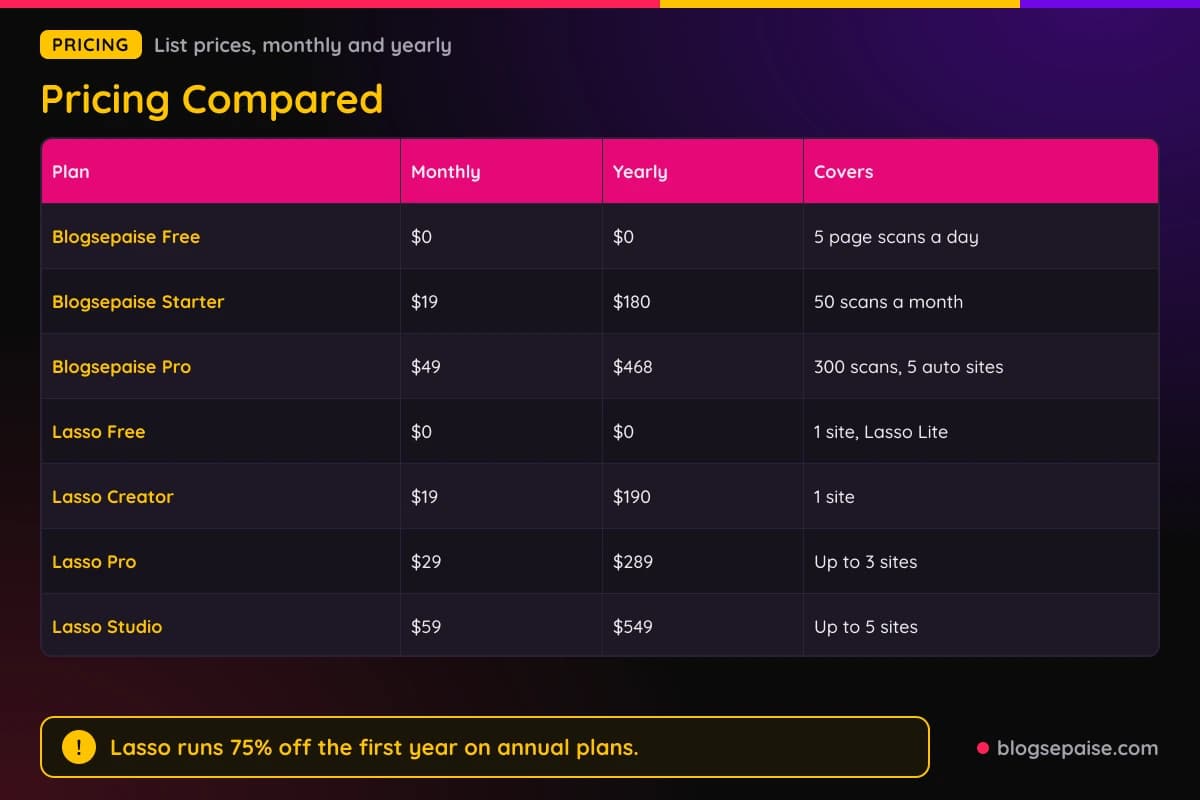
At the entry level the two match at $19 a month. On a yearly plan, Blogsepaise Starter is $180 against $190 for Lasso Creator at list price.
At the top, Lasso Studio costs $59 a month and Blogsepaise Pro costs $49. Lasso Pro at $29 sits between them, with three sites and email support.
Both let you cancel at any time. Blogsepaise plans stay active until the end of the period you paid for.
Lasso links and displays keep working on WordPress after you cancel, as long as the plugin stays active. Editing them through Lasso ends with the subscription.
Free Plans Compared
Both free plans are free forever and need no card. They are built for very different jobs, though.
Lasso Free gives you link management, single product displays, basic click tracking and YouTube tools for one site. Broken link and out-of-stock alerts are locked.
Blogsepaise Free gives you the Program Database, with the first 48 results of every search and the category filter. It also gives you five single-page scans a day with up to 25 links each.
Free Blogsepaise scans include the broken link, redirect, hijack and Amazon checks. You also get counts for missing disclosures and missing rel attributes.
On top of that, a free account tracks five programs and compares two side by side. It keeps your last five scans.
If you mainly want to check links for free, Blogsepaise gives you more. If you want free product boxes in WordPress, Lasso Free is the better fit.
Which One Wins
For checking and protecting affiliate links, Blogsepaise wins. It checks links on the free plan, catches hijacked and parked links, checks disclosures and rel attributes, and suggests replacements for dead links.
It also works on any site, scans whole sitemaps, and runs scheduled scans with a weekly email. Lasso keeps link alerts for paid plans and does not list disclosure checks.
For finding affiliate programs, Blogsepaise wins too. Lasso has no program directory, while Blogsepaise lists 1,500+ programs with compare, tracking, watchlist and saved search tools.
For displaying products inside WordPress, Lasso wins easily. Product boxes, comparison tables, Amazon images and prices, and local Amazon routing are Lasso's home turf.
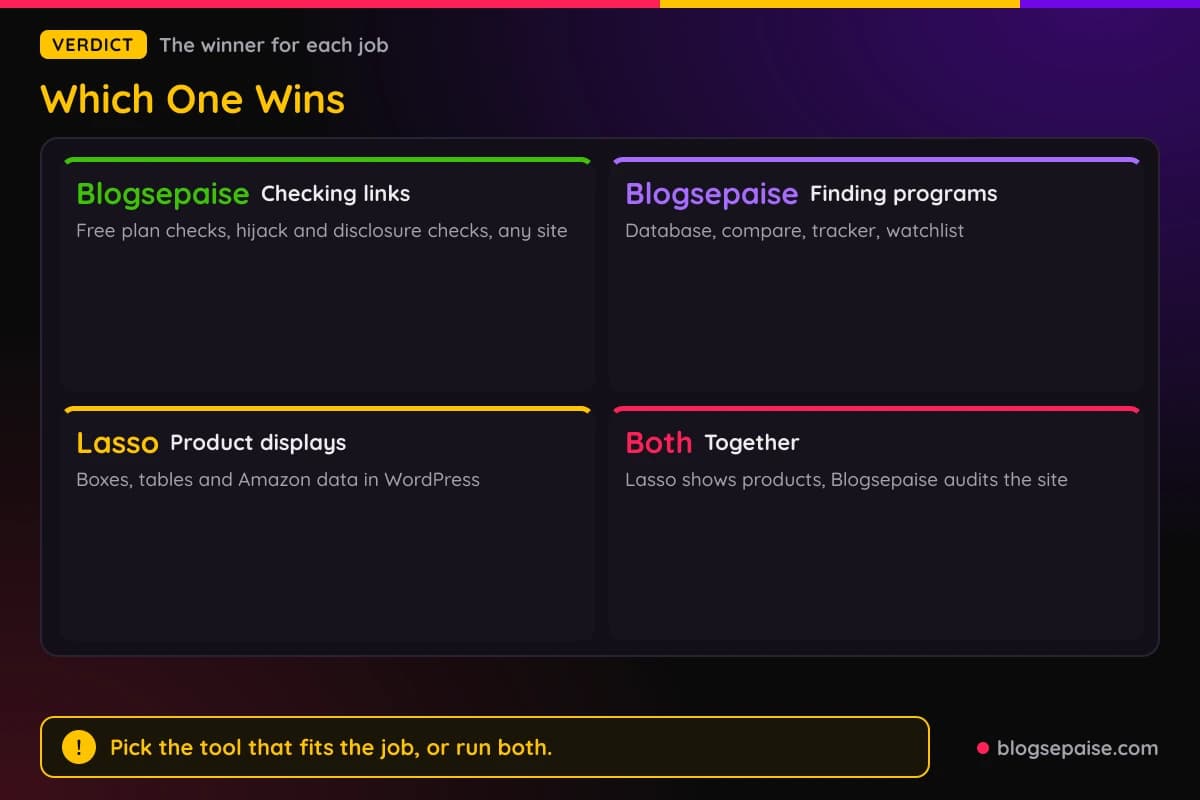
Many sites can use both. Lasso can run the displays inside WordPress, while Blogsepaise audits the whole site and finds new programs to add.
Who Should Pick Which
Pick Lasso if you run a WordPress site or a YouTube channel built on product reviews. Its displays, tables and Amazon data save hours of manual work.
Lasso also suits creators who want higher Amazon commissions through its Marketplace. Teams that need shared access and an API can look at Studio.
Pick Blogsepaise if you want to check every affiliate link without paying first. The free plan scans real pages and shows real problems.
Blogsepaise also suits sites that are not on WordPress. Since it scans any URL, it works for Webflow, Ghost, Shopify blogs and static sites alike.
Pick Blogsepaise if you are still choosing which programs to join. The database, compare view and tracker keep that research in one place.
Agencies that look after several client sites will like Blogsepaise Pro. Weekly scans of five sites and branded client reports cost $49 a month.
Final Thoughts On Blogsepaise Vs Lasso
Lasso is a strong WordPress plugin for showing products and managing links. Its broken link and out-of-stock alerts start on the $19 Creator plan.
Blogsepaise is a link auditor and a program finder in one account. Its link checks start on the free plan and grow into scheduled scans, change tracking and client reports.
If your money depends on links that work, and on programs that still pay, start with a free Blogsepaise account. Scan your top page and see what it finds.
If you later want polished product boxes too, Lasso can sit alongside it. The two tools solve different halves of the same problem.