ManyChat Review (2026): How Much Is It And What Do You Get?
ManyChat is a chat marketing and DM automation tool at manychat.com. It automates replies to comments and messages on Instagram, WhatsApp, Messenger, and TikTok, and it also lists Telegram, SMS, and email as channels.
ManyChat calls itself the #1 Instagram automation platform and an official Meta-approved partner. It also says it works as a partner with TikTok.
The company says it helps creators and social-first businesses handle engagement at scale. Its stated uses include replying to DMs and comments, capturing leads, driving clicks and sales from messages, and gathering audience and conversation insights.
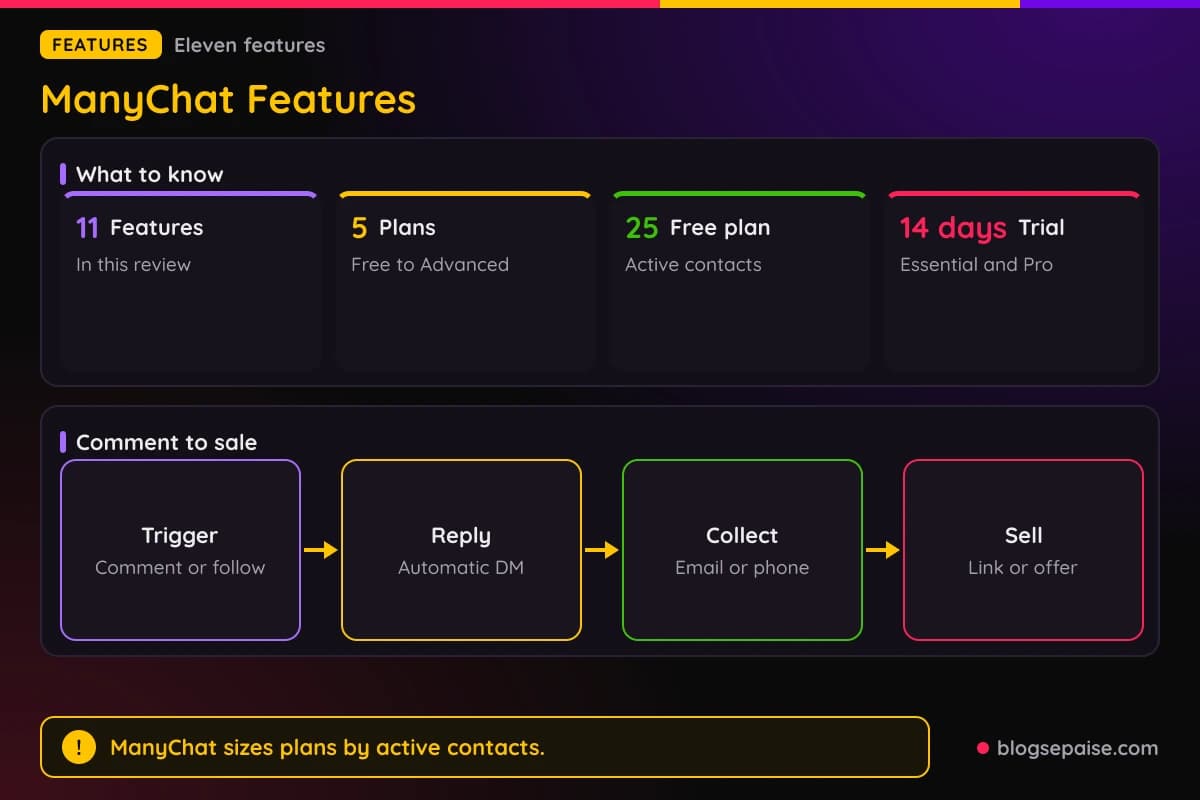
ManyChat has five plans: Free, Essential, Pro, Business, and Advanced. Free costs $0 with 25 active contacts, and the paid plans run from $17 to $199 a month.
Both Essential and Pro come with a 14-day free trial. Free needs no credit card, and paid plans need one.
ManyChat counts a person as an active contact when messages go to or from that person through automations, AI, broadcasts, or the inbox. Each plan includes a set number of active contacts a month, and extra contacts cost a small fee.
ManyChat offers AI tools for replies, comments, flow building, and text editing. WhatsApp runs on top of the Pro plan, and ManyChat charges for WhatsApp conversations separately.
Disclosure: Some of the links I share might be affiliate links. If you click on one and make a purchase, I may earn a small commission as a thank you. But don’t worry, it won’t cost you anything extra. I only recommend stuff I genuinely believe in. Your support helps me keep creating awesome content. You can read my full affiliate disclosure in my disclaimer page.
Search 1,500+ affiliate programs in the Blogsepaise Program Database and filter them by category, network and commission type, then go straight to each program's signup page. The Link Health Monitor then checks your posts for broken, redirected and untagged affiliate links.
ManyChat Features
ManyChat's product menu lists Instagram, WhatsApp, Messenger, TikTok, and ManyChat AI. Its use case pages add comment to DM, request to follow, follow to DM, and email collection.
ManyChat says it is built so that most people are up and running in minutes. It also says no coding is needed to set up automations.
ManyChat lists a Free plan with 25 active contacts and paid plans from $17 a month. It sizes every plan by active contacts.
The creators page says ManyChat is loved by 1M+ creators, while the brands page says 2M+. ManyChat's pages give both numbers.
1. Instagram Automation
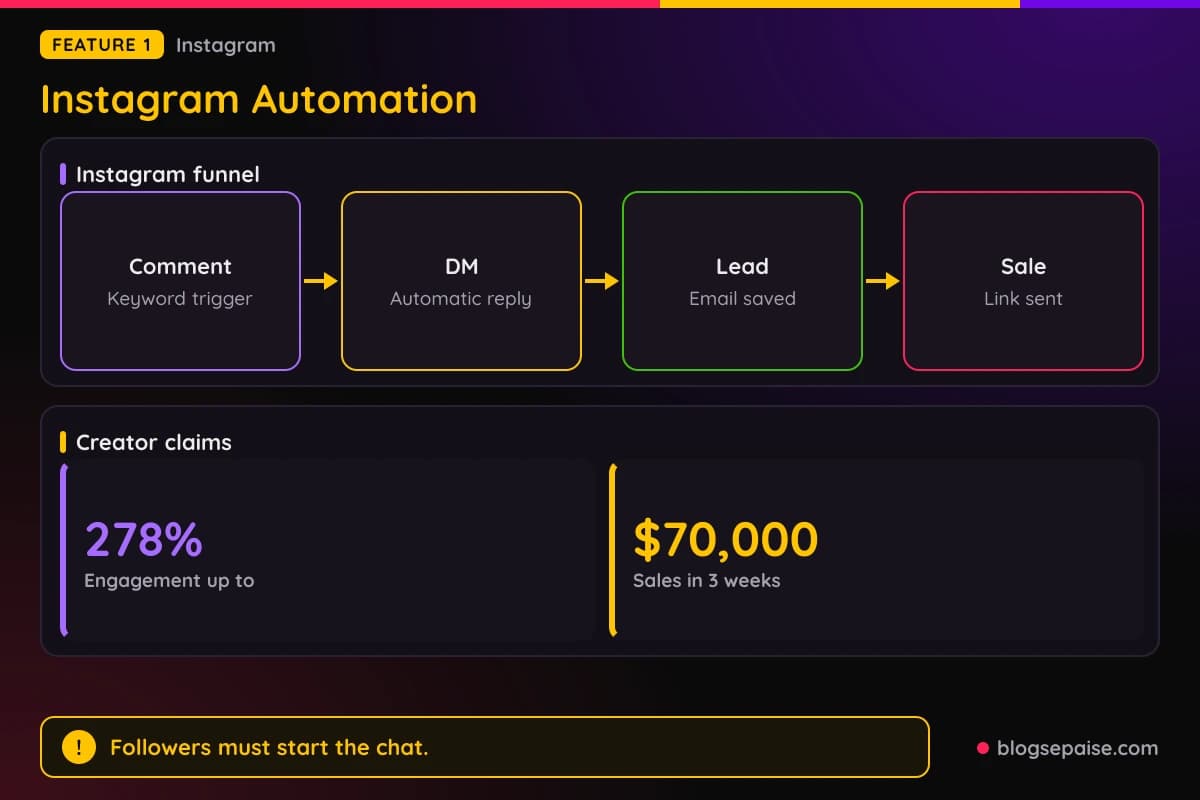
ManyChat's Instagram page promises that you can send links, answer questions, collect leads, and close sales automatically. It lists four automatic jobs: send links, reply to comments, reply to DMs, and get new followers.
ManyChat says Instagram DM marketing helps you grow followers, boost engagement, attract leads, drive sales, and answer customers around the clock. It describes this as automating your whole Instagram funnel while it answers FAQs and converts followers.
The page gives four benefits. They are turning comments into conversations that sell, catching every lead by grabbing emails and numbers from DMs, boosting engagement and reach, and saving time.
ManyChat lists five starter flows for Instagram. They are saying hi to new followers, running giveaways, delivering lead magnets, kicking off sales conversations, and booking appointments or calls directly.
The creators page lists ready-to-go templates. Those include saying hi to new followers, auto-DMing links from comments, generating leads with Stories, answering FAQs from Story replies, and getting followers from comments.
Meta does not allow a private message to a new follower who has not started a chat. ManyChat says the follower must start the conversation, and it offers a feature called Follower Check that checks if the person follows your account.
ManyChat also lists Instagram DM Lists, which were in open beta on the creators page. Followers who opt in can get a DM on a regular basis, similar to an email blast, for special offers, digital newsletters, or challenges.
ManyChat says it is an official Meta Business Partner and that Instagram DM marketing is fully approved for use by Instagram. It adds that it holds weekly meetings with Meta's product team and supports only uses that follow Meta's guidelines.
The company says a creator reported up to 278% more Instagram engagement and that one creator drove over $70,000 in sales in 3 weeks with one keyword. Both claims come from ManyChat's own creators page.
The creators page also names brands and creators that use Instagram DM marketing. They are Nike, Mindvalley, Jenna Kutcher, Amy Porterfield, Kate Northrup, Foundr, and Johnny Abraham.
2. Comment To DM Automation
Comment to DM is the second feature, and ManyChat's use case page says it will instantly DM everyone who comments. The page shows a creator asking people to comment the word PRICE to get a link in their DMs.
The follower comments, the creator replies in public to check their DMs, and the DM asks if they are ready for the link. The follower taps a button and the link arrives.
ManyChat lists three setup steps. You choose which comments or keywords trigger the DM, customize the response with personalized messages, links, or offers, and let the automation handle the rest.
The page lists benefits in two groups. For money, it names converting more of your audience into customers, sharing links when people want them, and starting sales conversations while interest is high.
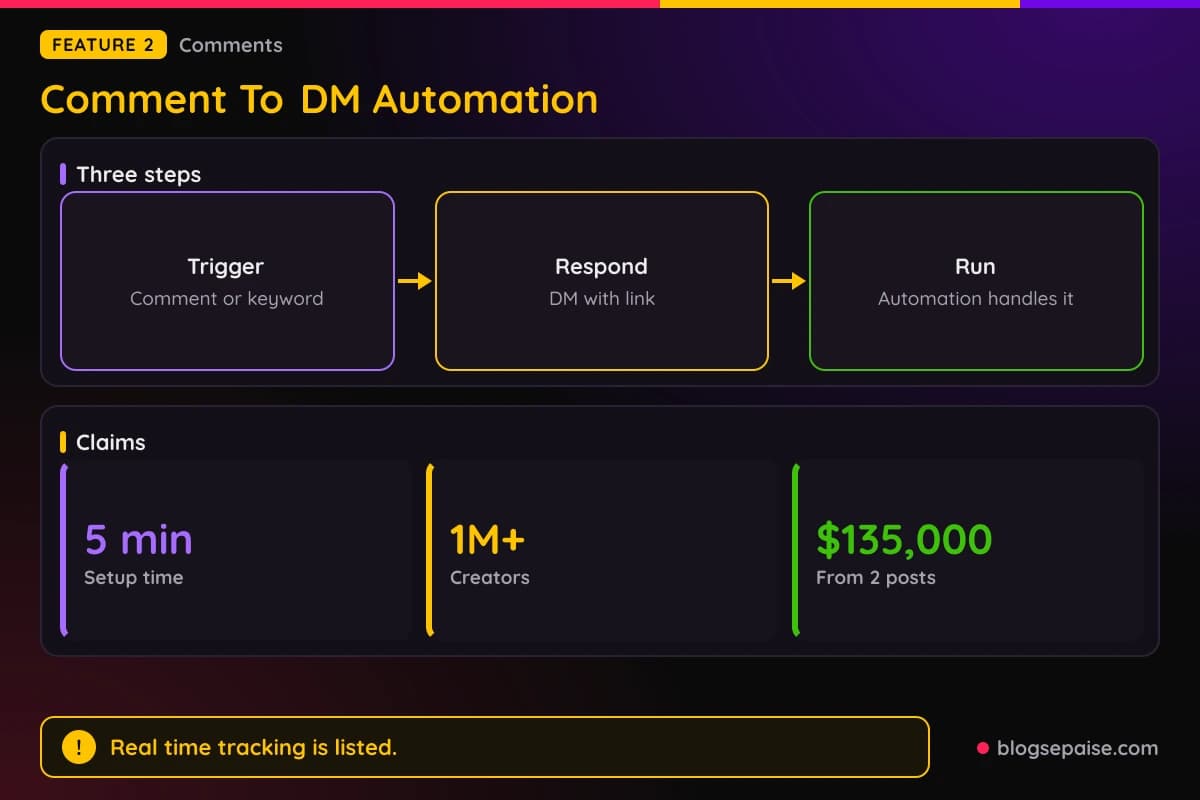
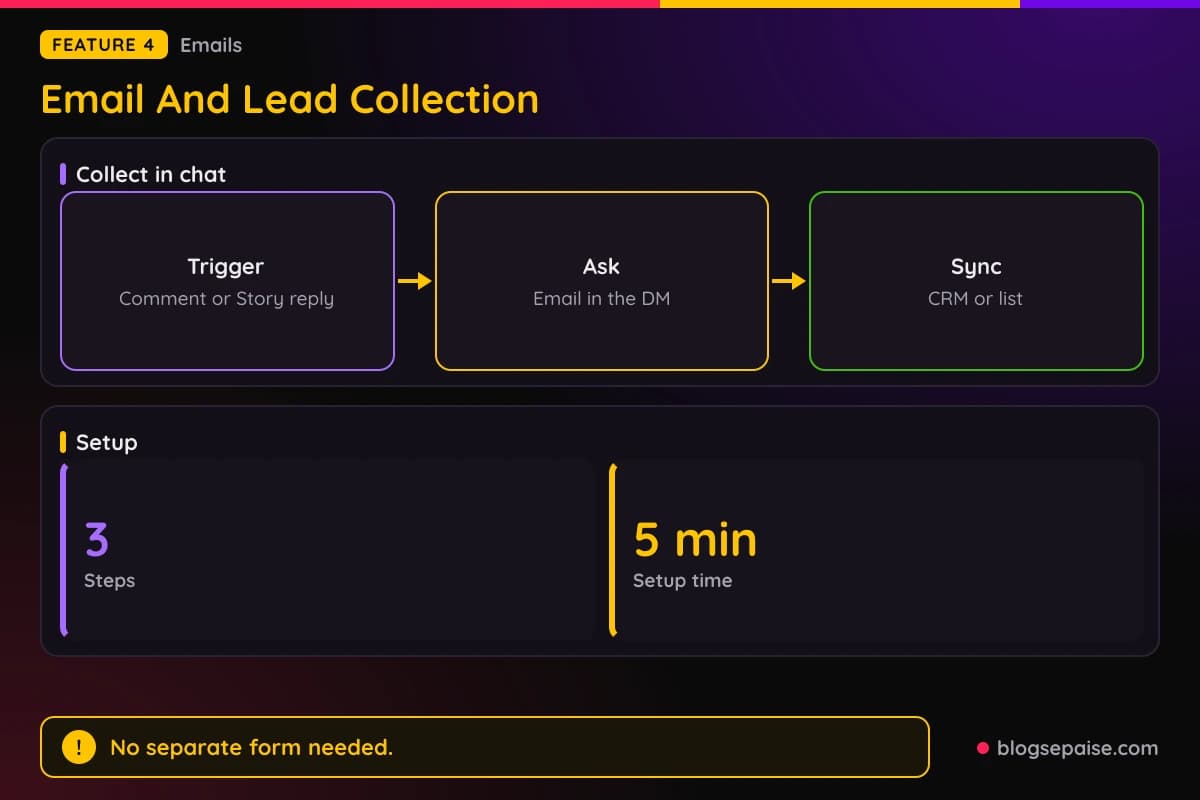
For growth, the page names more one-on-one connections, an audience that keeps coming back, and a lift in content visibility from asking for more engagement. It says setup takes about 5 minutes.
ManyChat says comment to DM converts better than a link in bio. It also says you can track results in real time.
The same page lists 24/7 support and no credit card needed to start. It says over 1M creators use ManyChat to get more engagement, build connections, and monetize their Instagram following.
The Messenger page describes a similar idea for Facebook, where a comment gets an instant reply with a coupon or promo. The ecommerce page says a product question in a comment moves to messages, where ManyChat guides the person toward purchase.
ManyChat's Instagram page shows a creator named Marketing Harry saying he generated $135,000 from 2 posts with ManyChat. That figure is the creator's own statement on ManyChat's page.
3. Request To Follow And Follow To DM
Request to Follow is the third feature, and ManyChat's use case page says it checks who is following before sharing your offers. Followers get your content after they follow, so you build a real audience.
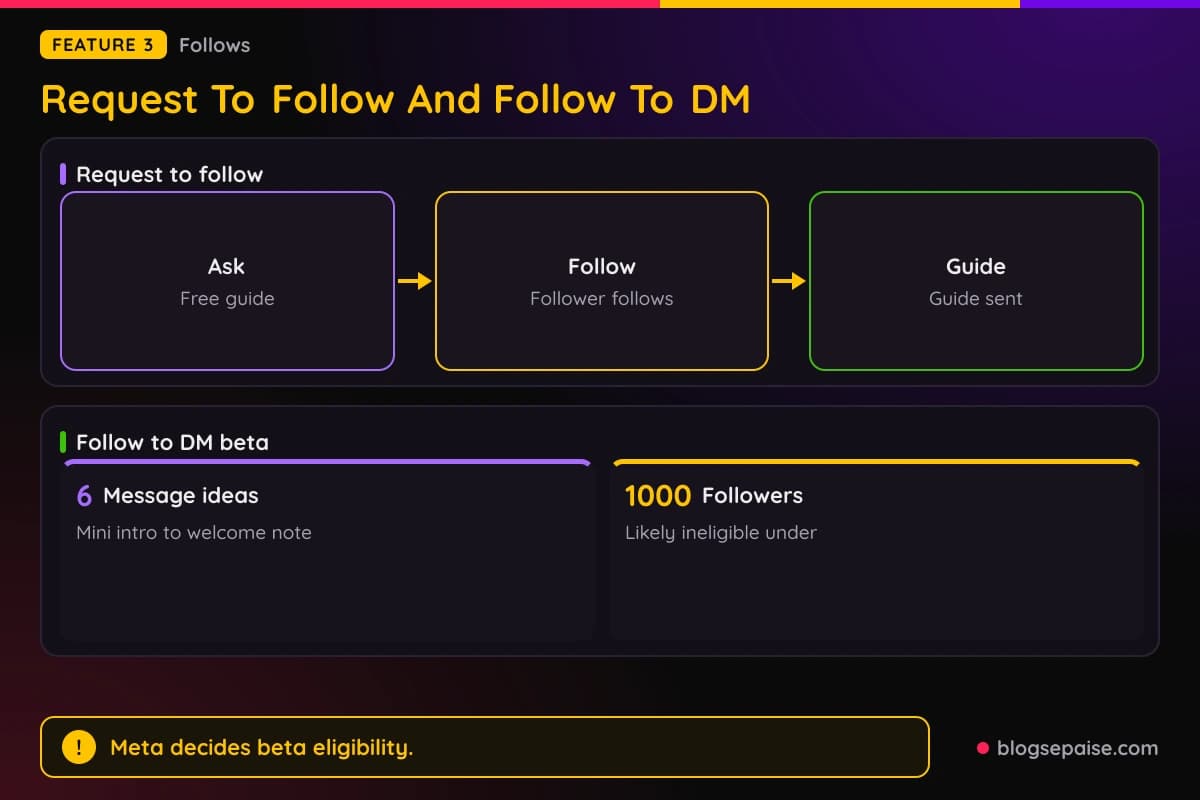
The example on the page has a follower asking for a free guide. The creator replies that the guide is for followers only, the follower follows, and the guide arrives.
ManyChat lists three steps: choose a trigger, customize the response, and watch it work. The benefits it names are sharing exclusives safely, verifying followers instantly, and rewarding genuine fans.
Follow to DM is a separate beta feature. ManyChat says it sends a message the moment someone hits Follow, so you can start the conversation while the person still remembers why they followed.
ManyChat says Follow to DM sends the welcome after a short delay so it feels authentic. You choose when new followers get the hello and write one short message.
ManyChat lists six message ideas for it: Mini intro, Ask + Engage, Freebie drop, Community invite, Content teaser, and Welcome note. It says you can connect flows, add buttons, or follow up later.
Follow to DM is open to eligible Instagram creators who meet Meta's messaging requirements. ManyChat says accounts with fewer than 1000 followers and no significant engagement are likely ineligible.
ManyChat says general availability is not guaranteed and that Meta decides eligibility. It also says the feature works on Instagram only for now.
The page lists coaches, entrepreneurs, lifestyle creators, ecommerce brands, and social media managers as a fit. It says the feature is meant for people who want to meet new followers while they are still warm.
4. Email And Lead Collection
Email and lead collection is the fourth feature. ManyChat's use case page says you can grow your email list straight from Instagram by asking fans for their contact info before sending them something.
In the example, a creator offers a free guide and the follower taps YES. The creator then asks for an email, the follower types it in, and the guide goes out.
ManyChat lists three steps. Start the conversation with automated DMs from comments, keywords, Story replies, or links, collect the email in chat without sending people to a separate form, and sync the emails to your CRM, email platform, or contact list.
The page names the benefits as building an audience you own, reaching followers without fighting the feed, and offering true fans something extra. It also lists real-time conversion tracking.
The Instagram page says leads are saved, tagged, and tracked. The creators page says you can collect emails and phone numbers to own conversations across platforms.
The WhatsApp page says you can collect emails and phone numbers there to re-engage people through ManyChat's email or SMS channels later. The TikTok page promises that you can build your email and SMS lists while you sleep.
The social media marketers page says you can collect contact info to build loyalty through newsletters and exclusive offers. The agencies page lists collecting emails and segmenting your audience as a flow.
The same agencies page lists direct integrations with Google Sheets, Hotmart, Klaviyo, ActiveCampaign, MailChimp, HubSpot, and ConvertKit. That list is the main route for moving collected emails into other tools.
5. WhatsApp Automation
WhatsApp is the fifth feature, and ManyChat's WhatsApp page promises to turn constant messages into qualified leads and closed sales. The page lists three automatic jobs: answer FAQs, generate and qualify leads, and reply outside business hours.
ManyChat describes a 24/7 customer engagement team. It names personal conversations that find high-intent leads and close sales, re-engagement that brings prospects back for promotions, and support such as order updates and follow-ups.
The page lists five WhatsApp flows. They are broadcasting a message, setting up a welcome message, automating FAQs, setting a follow-up message, and sending a response outside business hours.
ManyChat says WhatsApp is only available for Pro accounts. It is an extra charge on top of Pro and billed per new conversation in a 24-hour window.
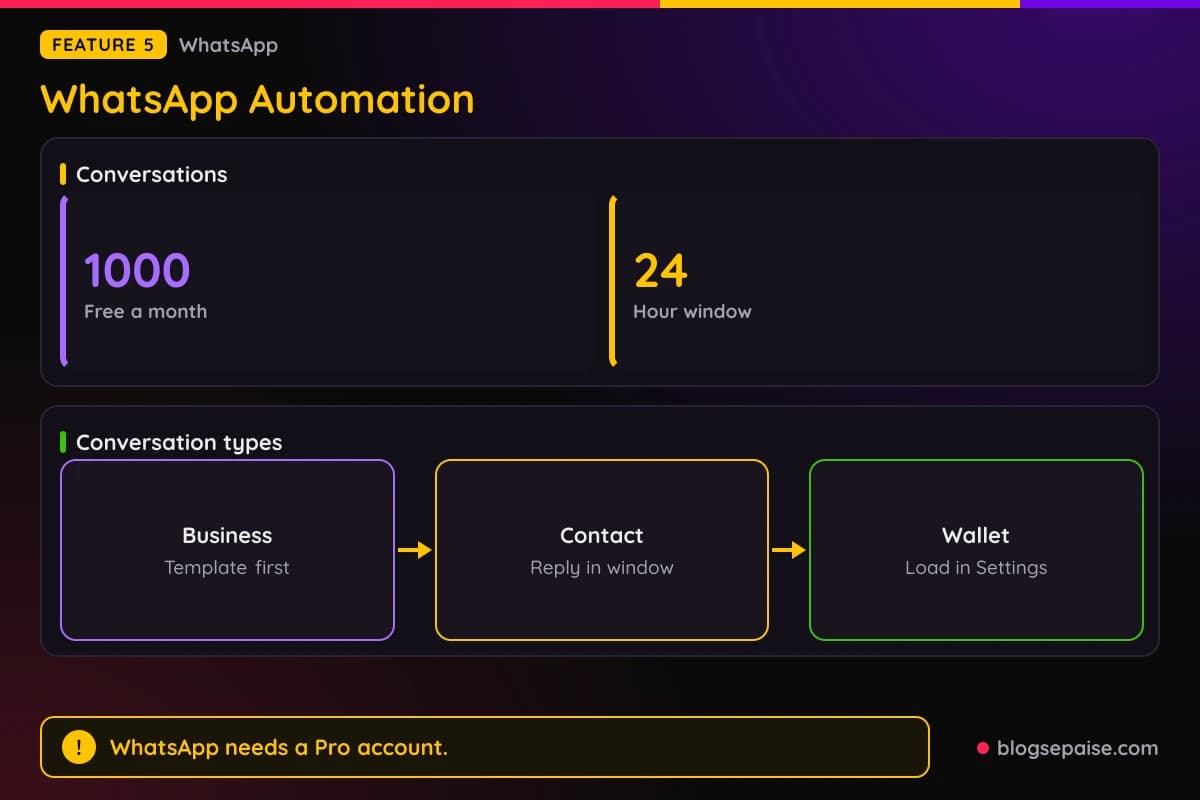
Conversations fall into two types. A business-initiated conversation starts when a business messages a contact for the first time or 24 hours after the contact's last message, and it must use a message template.
A contact-initiated conversation starts when the business replies to a contact's message. ManyChat says a business can send an unlimited number of messages of any type inside that 24-hour window.
ManyChat says your first 1000 conversations a month are free. Pricing varies by country, and you load a ManyChat Wallet under Settings to use WhatsApp automation.
You need a unique phone number. ManyChat strongly recommends a new number that is not in use with other WhatsApp apps, and it says it can provide a number if WhatsApp is added as an extra channel on an existing account.
Conversations are not viewable and answerable in the mobile WhatsApp Business app after you connect. They show up in the ManyChat Live Chat interface instead.
Business Verification is not required for customer-initiated conversations. For business-initiated outbound messages, businesses go through the Facebook Business Manager verification process, and ManyChat says it walks you through approval.
ManyChat says you can switch from another Business Solution Provider and keep your old number by contacting support. It also says you can connect a WhatsApp number to an existing ManyChat account.
WhatsApp messages cannot connect directly to other channels at the flow level for now. ManyChat says you can collect emails and phone numbers to re-engage people through ManyChat email or SMS later.
6. Messenger Marketing
Messenger is the sixth feature. ManyChat's Messenger page says you can grab every lead, answer every FAQ instantly, and never leave loyal fans or customers waiting.
The page lists four automatic jobs: automate comment replies, respond to FAQs, turn chats into sales, and collect leads. It says the platform is loved by 1M+ users.
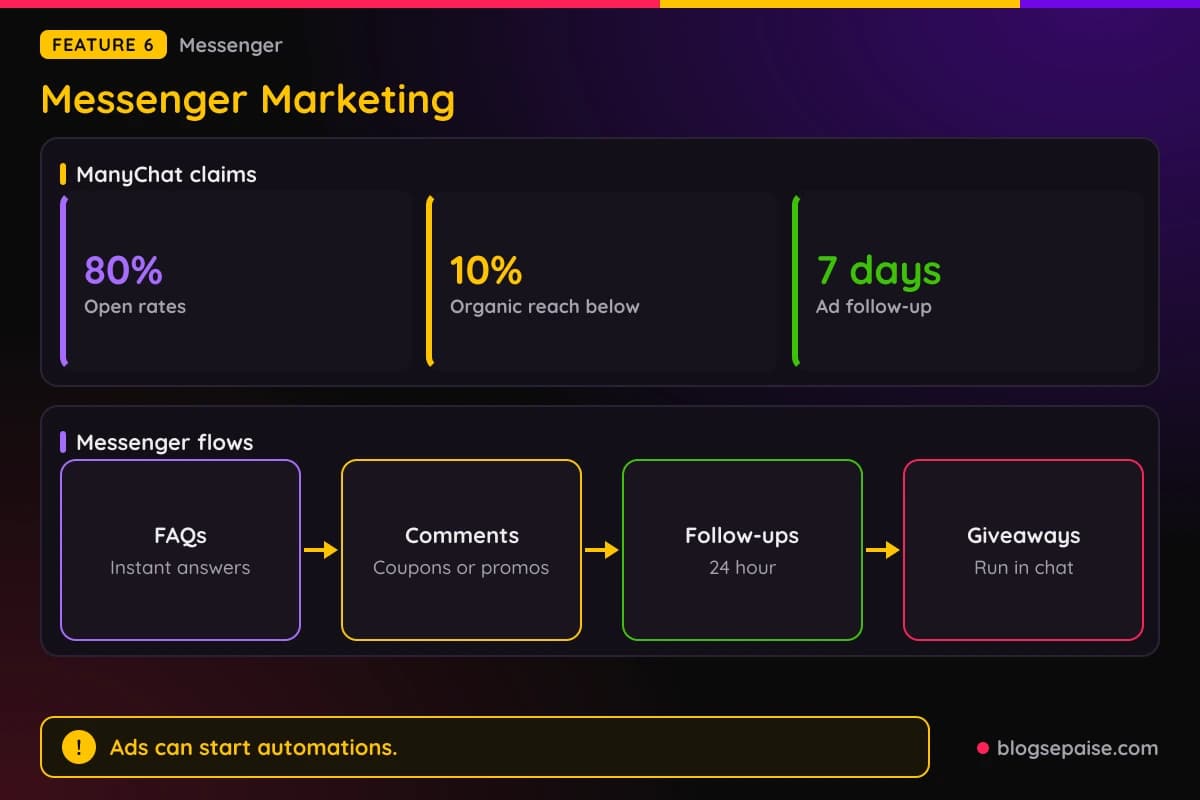
For comments, ManyChat says that when someone comments on your post you can reply instantly with coupons or promos. For engagement, it lists default replies and 24-hour follow-ups.
ManyChat lists four favorite Messenger flows: automate FAQ responses, automate comment replies, deploy follow-up messages, and run giveaways.
The Messenger FAQ says you can offer live chat support by automating common questions and handing off to live agents when needed. It says ManyChat delivers product links, recovers abandoned carts, sends discount codes, and collects contact info.
ManyChat says Facebook ads work with its automations. You can start automations from ads to engage prospects, qualify leads in conversation, and follow up through live chat within 7 days.
The ecommerce page makes a case for Messenger bots. It says organic reach is often below 10% of your audience and that Messenger has 80% open rates.
The ecommerce page says ManyChat bots let you build conversations through Messenger and SMS. The stated goals are reaching more customers, recovering lost sales, automating support, getting feedback, and generating reviews.
ManyChat says it is an Official Meta Business Partner, so using the platform does not get your social account locked. Its Messenger FAQ states this directly.
7. TikTok Automation
TikTok is the seventh feature, and ManyChat's TikTok page promises to answer messages, lock down leads, and grow your email list around the clock. It lists four automatic jobs: respond to FAQs, collect leads, turn chats into sales, and reply to comments.
ManyChat says it automates TikTok engagement so you can reclaim time and grow smarter. It lists three themes: stop drowning in busywork, sell without being pushy, and grow across platforms with email and SMS lists.
The page lists four flows. They are responding instantly to land more sales, building a contact list while you sleep, driving traffic to your sales channel of choice, and qualifying leads and routing them.
ManyChat says TikTok automations are for TikTok Business Accounts only. A creator account can switch to a business account to get started.
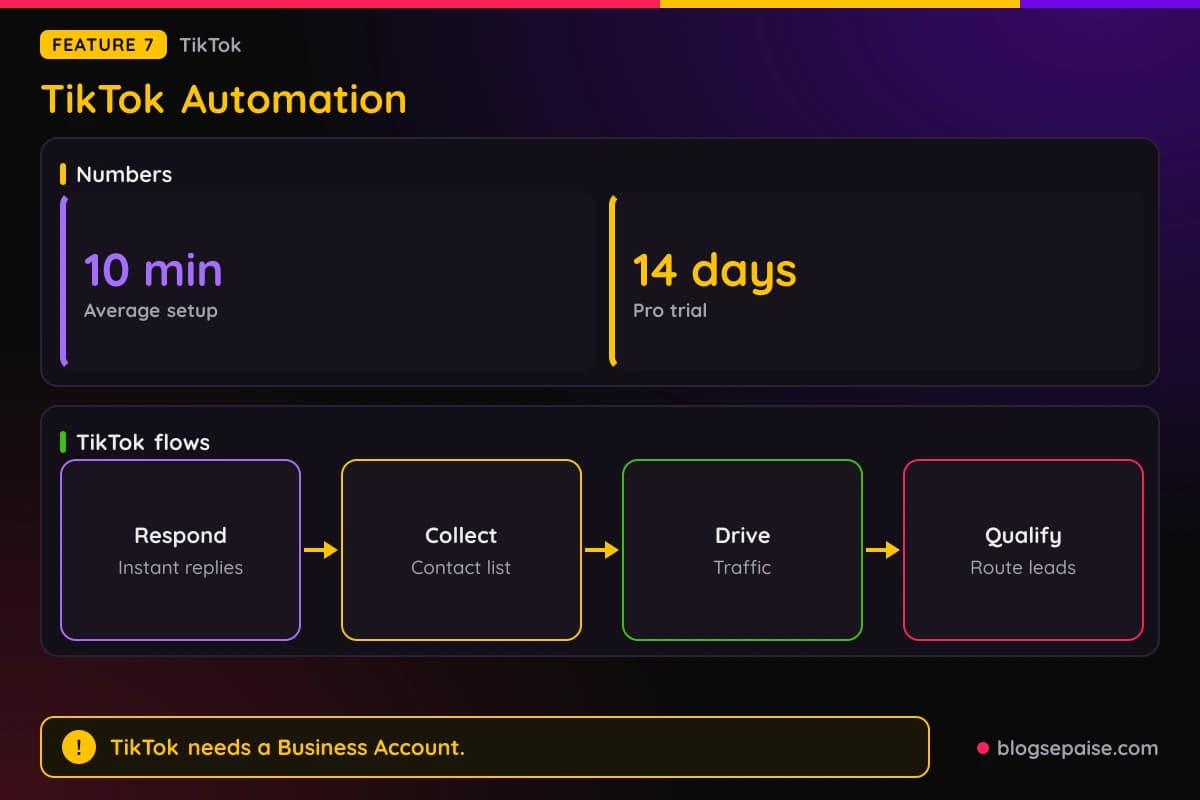
ManyChat says the average time to set up an automation is about 10 minutes. It also says you control the tone and content, so followers will not know the replies are automated unless you want them to.
The TikTok page says the tool is open to everyone except the UK and the European Union. ManyChat's creators page says it is available everywhere except the US, UK, and EU.
ManyChat says it is a TikTok partner and adds that TikTok approached it. The page also describes tracking conversions in real time.
On cost, the TikTok page says you can start free and get a 14-day Pro trial. It then says Pro starts at just $15 a month, while ManyChat's pricing page lists Pro at $39 a month monthly or $29 a month billed annually.
The creators page says TikTok automations currently have a focused set of features with more coming soon. Availability depends on country, so confirm TikTok access for your region before planning around it.
8. ManyChat AI
ManyChat AI is the eighth feature, and its page promises to help you make more connections without losing your voice. ManyChat describes it as an always-on social media assistant.
AI Replies uses your context to answer questions on Instagram, TikTok, WhatsApp, and Messenger. ManyChat says you can add up to 250k characters of context so the AI sounds like you.
AI Comments catches compliments before Meta's 24-hour window closes. ManyChat says it uses your past Instagram replies to match your style, and you approve every reply.
AI Goals links AI automations to your goals so browsers can become buyers. For AI Replies, you preview the AI's recommended responses and it fine-tunes replies based on what people say.
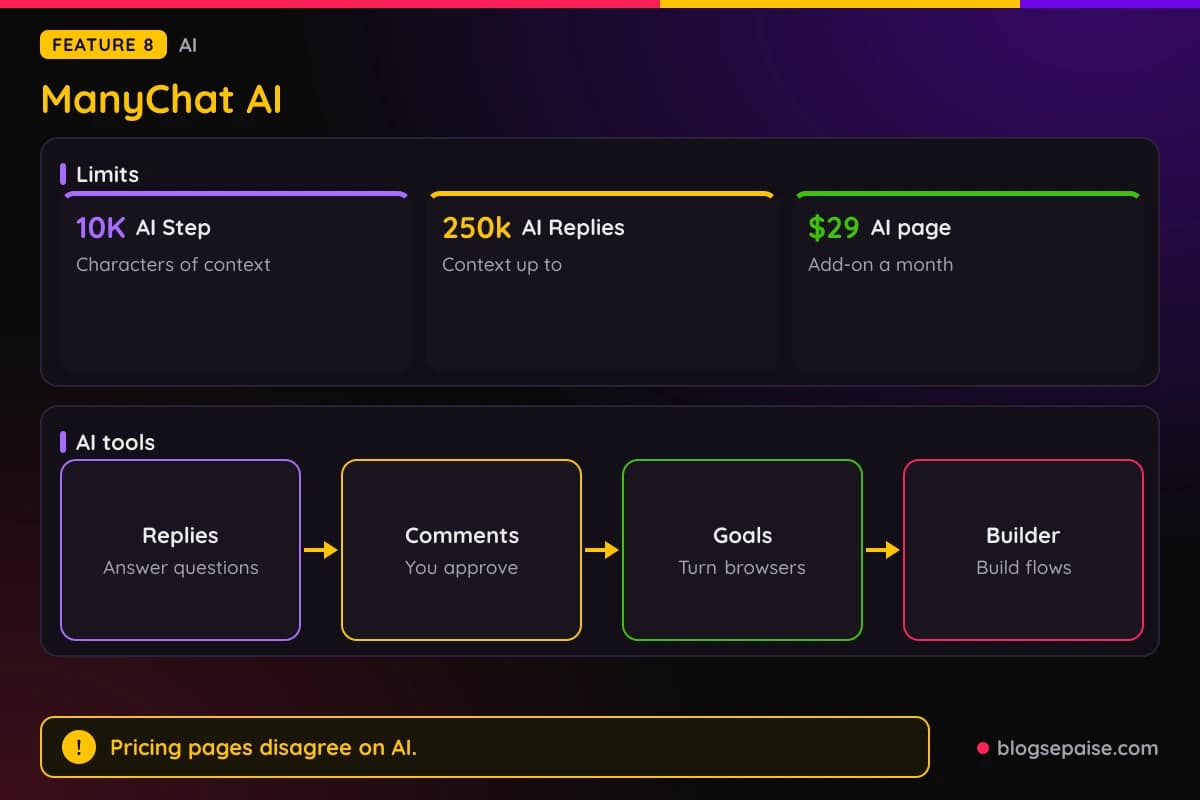
The Flow Builder Assistant builds a flow from a goal you type. ManyChat shows a prompt about collecting emails and selling skincare, and the assistant builds a flow where viewers comment GLOW and get a discount code by DM.
You can also ask the assistant for advice on improving existing flows. ManyChat says you can edit any draft with drag-and-drop options.
Text Improver rewrites your message copy. ManyChat lists options such as style it for marketing, make it friendlier, simplify language, make it sound exclusive, and a custom task.
The AI Step lets you tell the AI what to achieve, and it adapts to what followers say. You get 10K characters to tell the AI what it needs to know.
Intention Recognition delivers answers based on intent rather than keywords. ManyChat says it understands questions in all major languages and handles typos.
On cost, the AI page says ManyChat AI is an add-on to Pro that costs $29 a month. ManyChat's pricing page lists Manychat AI inside the Pro, Business, and Advanced plans.
The AI page also notes that AI is only available as an add-on to ManyChat Pro. The Free and Essential plans on the pricing page do not list it.
9. Flow Builder, Inbox, And Analytics
The builder, inbox, and analytics tools are the ninth feature. ManyChat says its Automation Builder has options for every skill level, from Quick Automations that guide you step by step to a customizable Flow Builder.
ManyChat's pricing page lists an automation builder and templates on the Free plan, with up to 4 live triggers. Essential adds custom and unlimited automations, and Pro adds advanced automations and broadcasting.
The inbox grows by plan. Free has a basic inbox, Essential adds an inbox organizer and scheduled messages, Pro adds Inbox AI, and Business and Advanced add a multi-user inbox.
Business and Advanced also list advanced automation insights and recommendations. The agencies page says you can manage every message in one place, reply faster, and hand off smoother.
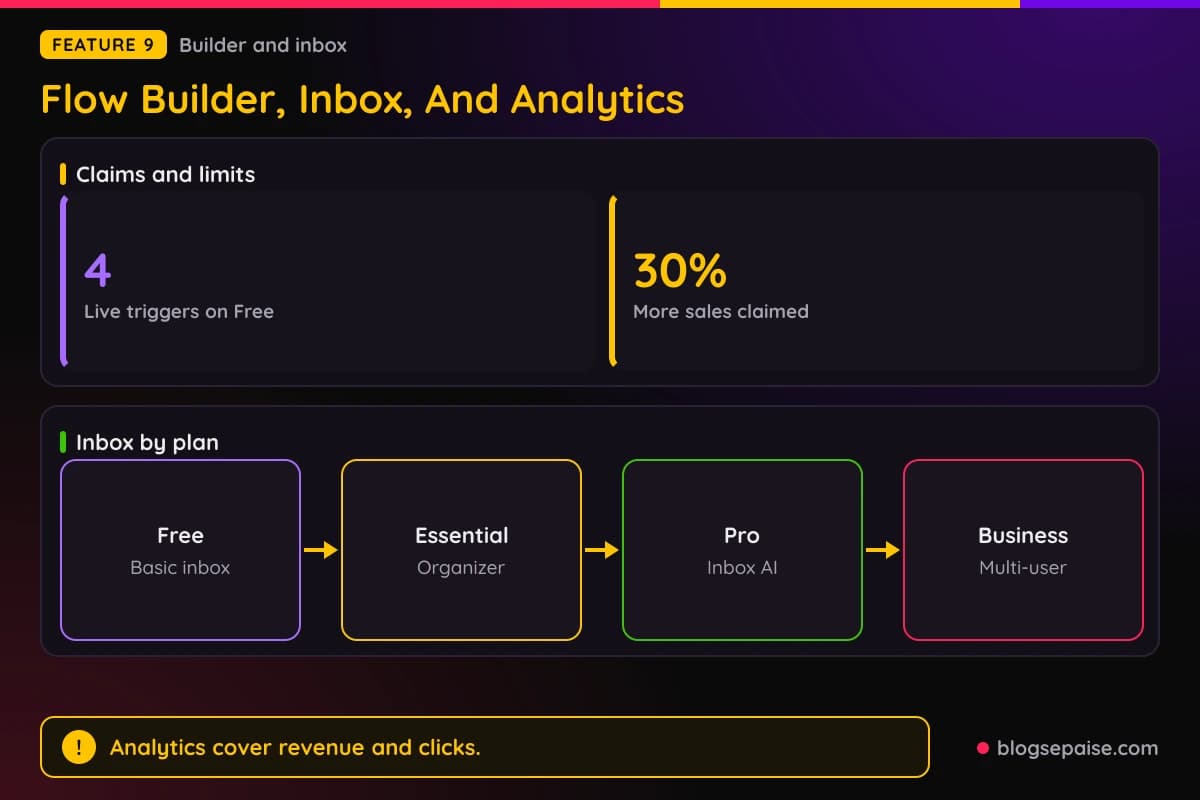
The ecommerce page describes ManyChat Analytics as showing revenue generated, contact data collected, and overall interaction rates. It says several conversion types are supported, and ManyChat has its own pixel to connect conversations to conversions on your website.
The social media marketers page says you can see click-through rates and conversation completions. It calls this a way to track real ROI.
The agencies page lists lead volume, conversion rates, and campaign performance. It says you can share results with clients.
ManyChat says brands using its tools see 30% more sales from social conversations they would otherwise miss. The claim is on the ecommerce page.
The Messenger page lists a handoff from automation to live agents. The agencies page says you can copy and reuse existing flows for new clients.
10. Channels And Integrations
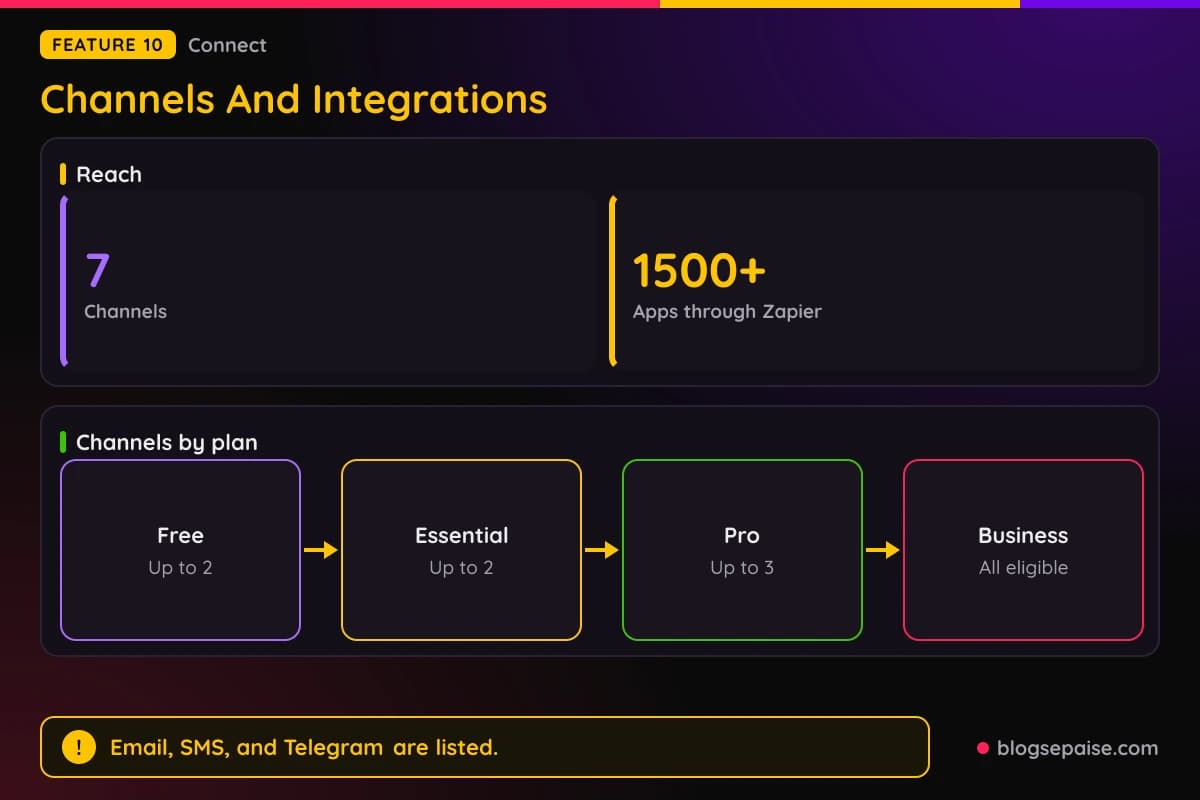
Channels and integrations are the tenth feature. ManyChat's pricing page lists Instagram, Facebook Messenger, TikTok, Telegram, WhatsApp, SMS, and email as channels.
Free and Essential connect up to 2 eligible channels, Pro connects up to 3, and Business and Advanced connect all eligible channels.
The social media marketers page says ManyChat integrates directly with Google Sheets, ChatGPT, Klaviyo, and HubSpot. The agencies page adds Hotmart, Claude, DeepSeek, ActiveCampaign, MailChimp, and ConvertKit.
ManyChat says it has over 1500 app integrations through Zapier and Make. The ecommerce page names Zapier and Integromat for the same count.
The Facebook ads flow lets you start a conversation from an ad. The agencies page lists starting conversations from Meta ads as a flow that qualifies leads and drives conversions.
The WhatsApp page says WhatsApp can connect to an existing ManyChat account, but flow-level connections to other channels are not available for now. Emails and phone numbers collected there can feed ManyChat email and SMS.
The pricing page lists email sending limits by plan in its comparison table. Pro lists 10k emails, Business lists 30k, and Advanced lists 100k.
11. Agency And Brand Tools
Agency and brand tools are the eleventh feature. ManyChat's agencies page promises to automate lead capture, appointment booking, and sales conversations.
ManyChat says agencies can build automations that book appointments, qualify leads, and close sales 24/7. It also says agencies can track every interaction across every channel.
For multiple clients, ManyChat says agencies get separate workspaces per client that are accessible through the main account. It also offers user roles so you can collaborate with your team and clients.
The agencies page lists flows such as starting conversations from Meta ads, collecting emails and segmenting your audience, sharing links and sending follow-ups, and answering FAQs.
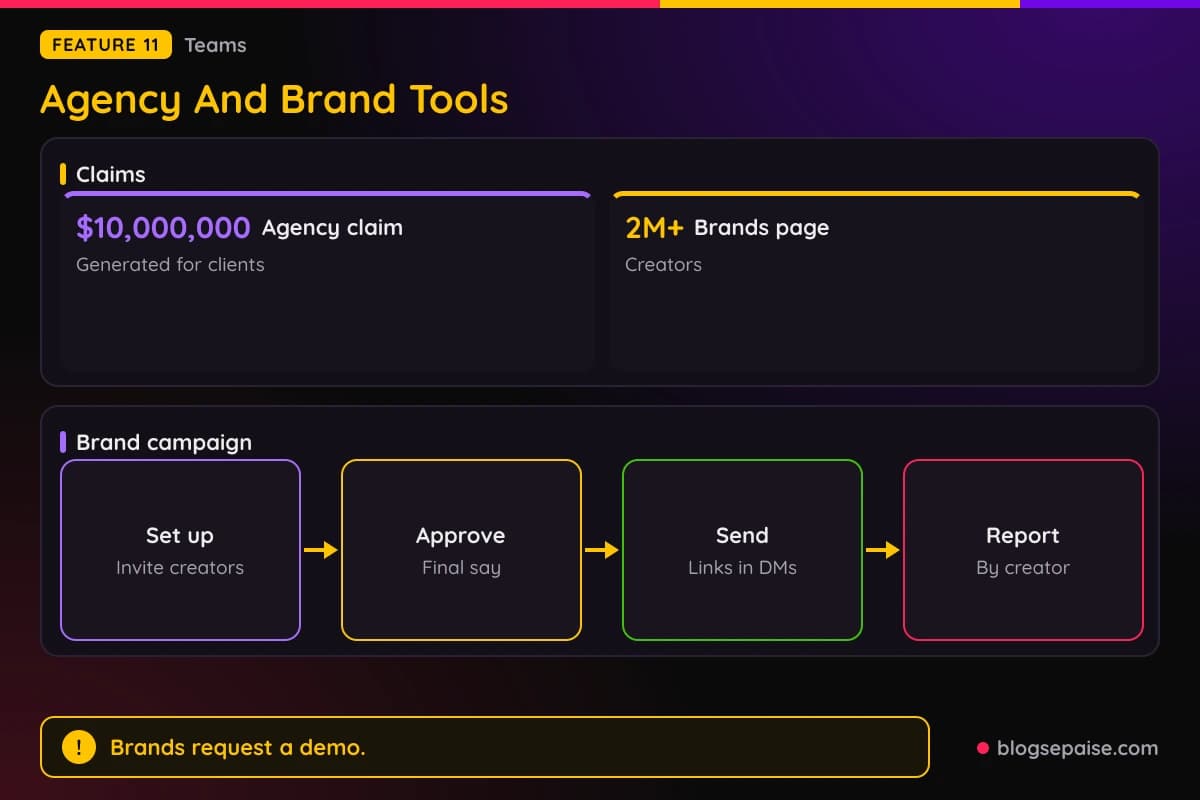
Manychat for Brands is a separate page aimed at influencer marketing. It says you can run DM automation across all your creators and see the impact of the program.
ManyChat says you set up a campaign and invite creators to collaborate. You build automations for them or let them build their own, and nothing goes live without final approval.
When someone comments on a creator's post or replies to a story to get your link, the link is sent to their DMs. ManyChat says you can track performance by campaign, creator, and post.
ManyChat says brands can compare creators to see who drives the most interest and clicks. It lists a L'Oréal Paris success story about turning comments into purchase intent.
Brands and agencies request a demo from that page instead of signing up from the pricing page. ManyChat says it is loved by 2M+ creators on that page.
The agencies page quotes Wally Nguyen of I Need This Marketing! saying the agency has generated over $10,000,000 for clients with ManyChat. That figure is his statement on ManyChat's page.
ManyChat Pricing Plans
ManyChat has five plans and prices them by active contacts. The pricing page has a monthly and annual toggle and says you can save up to 30% on a yearly subscription.
Free costs $0 with 25 active contacts, 2 channels, and 1 user. It includes the automation builder and templates with up to 4 live triggers, a basic inbox, Help Center and AI chat support, and ManyChat branding.
Essential costs $17 a month, or $14 a month billed annually for $168 a year, which is 18% off. It includes 250 active contacts, 2 channels, custom and unlimited automations, 2 users, an inbox organizer, scheduled messages, and email support, with no ManyChat branding.
Pro costs $39 a month, or $29 a month billed annually for $348 a year, which is 25% off. It includes 2500 active contacts, 3 channels, advanced automations, broadcasting, AI-powered conversations, 3 users, Inbox AI, and ManyChat AI.
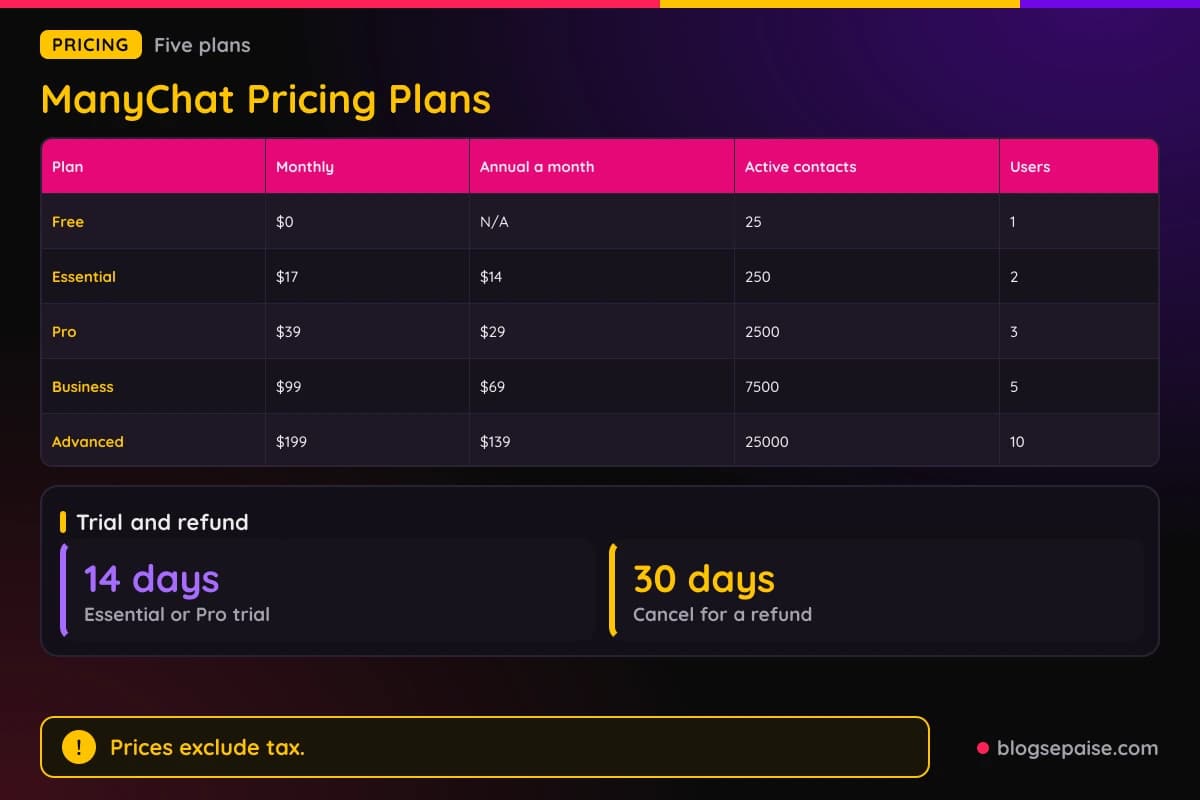
Business costs $99 a month, or $69 a month billed annually for $828 a year, which is 30% off. It includes 7500 active contacts, unlimited channels, automation insights and recommendations, 5 users, a multi-user inbox, ManyChat AI, and priority support.
Advanced costs $199 a month, or $139 a month billed annually for $1668 a year, which is 30% off. It includes 25000 active contacts, unlimited channels, 10 users, a multi-user inbox, ManyChat AI, and priority support.
If you go over your active contact limit, automations do not shut off. ManyChat charges a small fee per extra contact: $0.10 on Essential, $0.05 on Pro, $0.025 on Business, and $0.004 on Advanced when billed monthly.
On annual billing those overage fees are $0.082 on Essential, $0.038 on Pro, $0.018 on Business, and $0.0028 on Advanced. Active contacts are still counted monthly, and overages are billed monthly.
ManyChat says it emails you and warns you in the platform as you near the limit. If you upgrade in the same billing cycle, overage fees so far are forgiven and the extra contacts count toward the new plan, and you can set an overage threshold.
A contact becomes active when messages are sent or received through ManyChat via automations, AI, broadcasts, or the inbox. One person counts as one active contact for the month.
ManyChat says Essential and Pro come with a 14-day free trial. The Free plan needs no credit card, and paid plans take Visa, Mastercard, American Express, or Discover.
You can upgrade at any time, and the new billing period starts at once with the unused portion prorated and credited. A monthly downgrade takes effect at the next billing period, while an annual plan cannot be downgraded until the term ends.
Monthly plans can move to annual at any time with a credit. Annual plans cannot move to monthly until the term ends.
ManyChat says you can cancel any time. If you cancel within 30 days of purchase, you get a refund.
Prices do not include tax, and the price depends on your billing country. The final price shows on the purchase page before you pay.
WhatsApp costs extra. ManyChat charges per new conversation, with your first 1000 conversations a month free, and the rate varies by country.
The AI page says ManyChat AI is a $29 a month add-on to Pro. The pricing page lists ManyChat AI inside Pro, Business, and Advanced, so ManyChat's own pages give two different answers.
The TikTok page says Pro starts at $15 a month, while the pricing page shows $39 a month monthly. Use the pricing page figures when you compare plans.
Who Is ManyChat Best Suited For
ManyChat lists five groups on its solutions menu: creators, ecommerce, social media marketers, agencies, and brands. Each group has its own page.
For creators, ManyChat promises to turn views into followers and followers into dollars. The page lists capturing every signal a follow sends, sparking conversations at scale, collecting emails and phone numbers, and answering repetitive comments and DMs.
For ecommerce, ManyChat promises to handle customer questions so you can focus on growing your online store. It says brands see 30% more sales from social conversations, and it lists flows such as comments to customers, customer help that drives sales, and turning followers into buyers.
For social media marketers, ManyChat promises to track ROI and build engagement automatically. The page lists comment automation, DM automation, and lead generation, plus tracking and protecting freebies from non-followers.
For agencies, ManyChat promises to automate lead capture, appointment booking, and sales conversations. The page lists separate workspaces per client, user roles, reusable flows, and results reporting.
For brands, Manychat for Brands lets influencer marketing teams run DM automation across creators and measure the results. It is a separate product with a demo request form.
Follow to DM lists coaches, entrepreneurs, lifestyle creators, ecommerce brands, and social media managers as a fit. The WhatsApp page speaks to businesses that want to answer FAQs, qualify leads, and reply outside business hours.
One creator on ManyChat's creators page says creators above 10K followers should treat ManyChat as a must. That is a creator's own quote on ManyChat's page.
Who ManyChat Is Not For
The Free plan has 25 active contacts, 2 channels, 1 user, and ManyChat branding. Anyone who needs more contacts, no branding, or more users needs a paid plan.
WhatsApp is only available for Pro accounts and costs extra per conversation. You also need a unique phone number, and your conversations do not show in the mobile WhatsApp Business app.
TikTok automations are for TikTok Business Accounts only. ManyChat says they are not open in the UK and the European Union, and the creators page also names the US.
Follow to DM is a beta for eligible Instagram creators that meet Meta's messaging requirements. ManyChat says accounts under 1000 followers with little engagement are likely ineligible.
Instagram does not allow a private message to a new follower unless the follower starts the chat. ManyChat's Follower Check only checks if the person follows you.
ManyChat prices by active contacts, so a large audience that you message often raises the bill. Overage fees range from $0.10 a contact on Essential to $0.004 on Advanced when billed monthly.
Annual plans cannot be downgraded or switched to monthly until the term ends. Prices also exclude tax and depend on your billing country.
Business and Advanced show Get started buttons instead of free trial buttons on the pricing page. ManyChat's trial covers Essential and Pro only.
Brands that want the influencer program use a demo request form. ManyChat lists no self-serve price for Manychat for Brands.
ManyChat Alternatives
The table below compares ManyChat with Chatfuel, Tidio, and respond.io using each company's own pricing page. The plans differ in what they count, so the entry prices measure different things.
Chatfuel lists WhatsApp, Instagram and Facebook, TikTok, and website channels, and says every channel is included in every plan. Its Business S plan costs $18 a month billed yearly, and the page shows a free trial but no free plan.
Chatfuel meters usage with AI credits instead of contacts. Business S includes $20 in AI credits a month, and the plan page lists AI chatbots, a shared team inbox, CRM, and official WhatsApp API access.
Chatfuel's Agency S plan costs $90 a month billed yearly and covers up to 3 companies. The page lists a 10% discount for yearly billing.
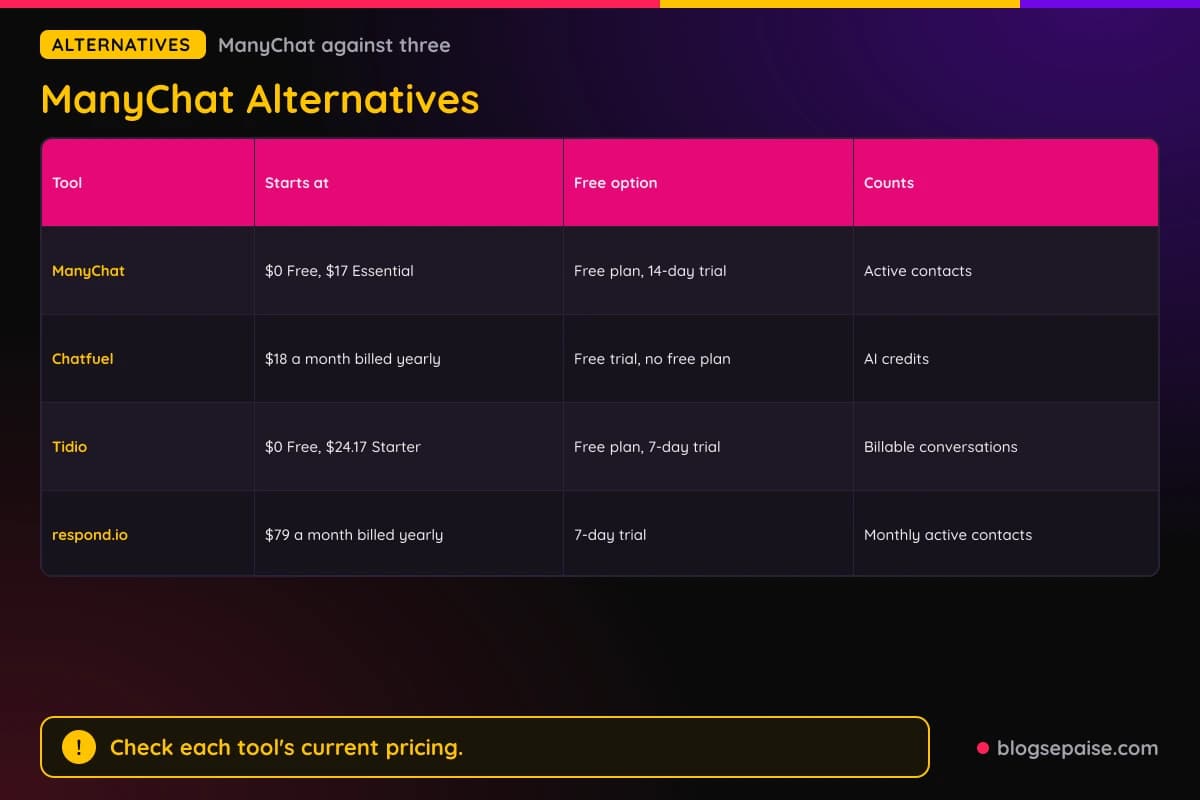
Tidio has a Free plan at $0 with 50 billable conversations and 10 seats. Its Starter plan costs $24.17 a month for 100 billable conversations, and Growth starts at $49.17 a month.
Tidio's comparison table marks Messenger, Instagram, WhatsApp, and email as included on all five plans. It lists a 7-day free trial for Starter and Growth with no credit card required.
Respond.io lists Starter at $99 a month, or $79 a month billed yearly for $948 a year. Growth costs $199 a month, or $159 billed yearly, and Advanced costs $349 a month, or $279 billed yearly.
Respond.io includes 5 users and 5,000 AI credits on Starter. It offers a 7-day free trial with Growth features for 5 users and 1,000 monthly active contacts, and it describes support for WhatsApp, TikTok, Instagram, and Facebook.
ManyChat has a $0 Free plan and a $17 Essential plan, and Tidio also has a $0 plan. Chatfuel and respond.io list free trials instead of free plans.
ManyChat prices by active contacts, Chatfuel by AI credits, Tidio by billable conversations, and respond.io by monthly active contacts. Match the counting method to how your audience behaves before you compare totals.
For more tools in this space, browse our software reviews hub. If you want to schedule the posts that feed your DM funnel, read our Vista Social review.
You can also try Vista Social for social scheduling or MailerLite for the email list you build with ManyChat. Our MailerLite review covers its plans.
ManyChat Use Cases
ManyChat publishes use case pages for collecting emails, requesting a follow, responding to comments, and following up with new followers. The sections below cover each one and the flows on its product pages.
Collect emails turns a comment, keyword, Story reply, or link into a DM that asks for an email. The email syncs to your CRM, email platform, or contact list.
Request to follow checks who follows you before sending a free guide or offer. Followers get the content after they follow.
Respond to comments sends a DM to everyone who comments a keyword. The example on ManyChat's page uses the word PRICE to deliver a link.
Follow to DM sends a welcome message after someone follows. ManyChat lists a mini intro, a freebie drop, a community invite, a content teaser, and a welcome note.
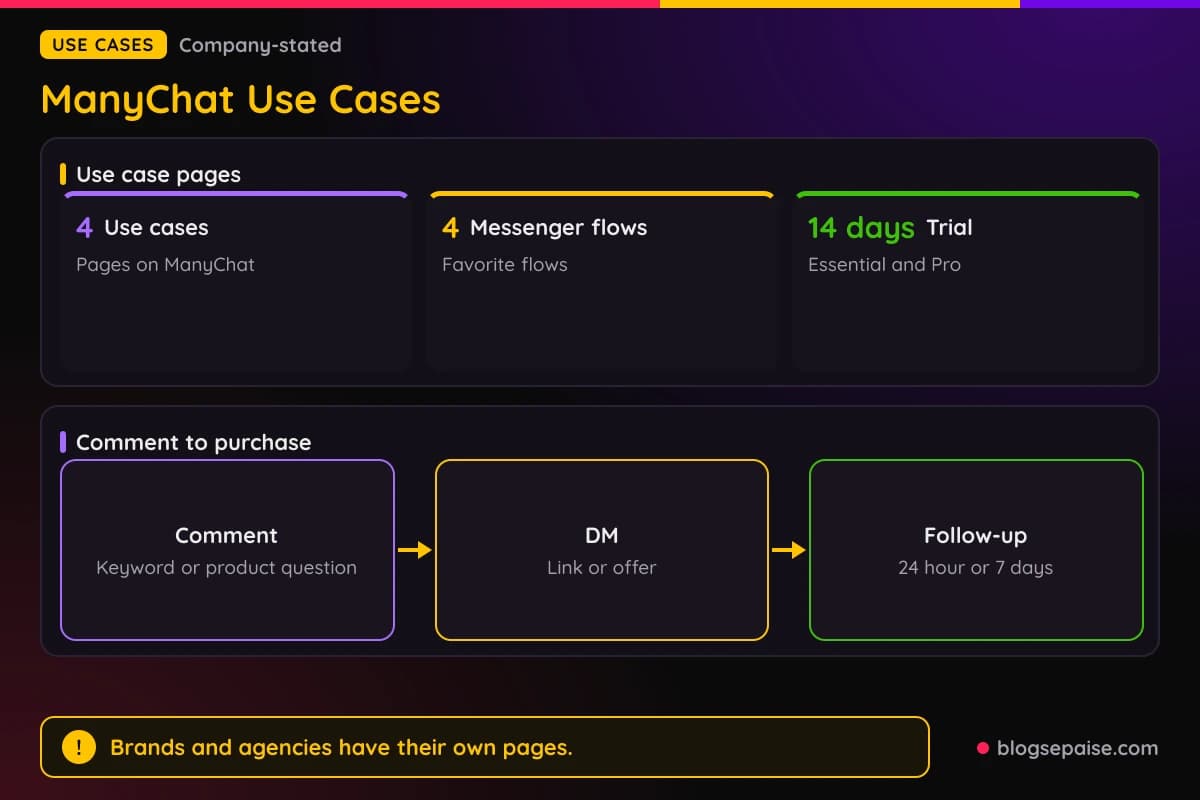
ManyChat lists giveaways, lead magnets, sales conversations, and booking appointments or calls on Instagram. It lists answering FAQs, qualifying leads, and replying outside business hours on WhatsApp.
On Messenger it lists comment replies, FAQs, follow-ups, giveaways, abandoned cart recovery, and discount codes. On TikTok it lists instant replies, building a contact list, driving traffic to your sales channel, and qualifying leads.
Agencies use ManyChat to start conversations from Meta ads, collect emails and segment audiences, share links, and answer FAQs. Brands use Manychat for Brands to run DM automation across creators and see which creators drive clicks.
ManyChat's brands page links a L'Oréal Paris success story about turning comments into purchase intent. The page also says you can send a link automatically when someone comments on a creator's post or replies to a story.
The social media marketers page lists tracking click-through rates and conversation completions. It also lists sending special offers and discounts to turn casual visitors into repeat customers.
Final Thoughts On ManyChat
ManyChat is a DM automation tool with a free plan, a 14-day trial of Essential and Pro, and paid plans from $17 to $199 a month. It covers Instagram, WhatsApp, Messenger, TikTok, Telegram, SMS, and email.
The product pages are clear about what each channel automates. Instagram gets comment to DM, request to follow, follow to DM, and email collection, while WhatsApp and TikTok have their own rules.
The catch is the limits. Free has 25 active contacts, WhatsApp needs Pro plus per-conversation fees, TikTok needs a business account and is not open in every region, and overages bill monthly.
ManyChat's own pages disagree on a few numbers. The AI page says ManyChat AI costs $29 a month on top of Pro, and the TikTok page says Pro starts at $15, while the pricing page lists AI inside Pro at $39.
Start with the Free plan or the 14-day trial and count how many people interact with your automations in a month. That number tells you which plan size fits.
You can browse more write-ups on our software reviews hub if you want to compare tools side by side.
ManyChat FAQ
1. What Is ManyChat?
ManyChat is a chat marketing and DM automation tool. It automates replies on Instagram, WhatsApp, Messenger, TikTok, Telegram, SMS, and email.
2. How Much Does ManyChat Cost?
Free costs $0, Essential costs $17 a month, Pro costs $39, Business costs $99, and Advanced costs $199. Annual billing brings them to $14, $29, $69, and $139 a month.
3. Does ManyChat Have A Free Plan?
Yes. The Free plan costs $0 and includes 25 active contacts, 2 channels, 1 user, and up to 4 live triggers.
4. Does ManyChat Have A Free Trial?
ManyChat offers a 14-day free trial of Essential or Pro. The Free plan needs no credit card, while paid plans do.
5. What Is An Active Contact On ManyChat?
An active contact is a real person you interact with in a monthly billing period through messages or automations. One person counts as one active contact for the month.
6. What Happens If You Go Over Your ManyChat Contact Limit?
Automations do not shut off. ManyChat charges a small overage fee per extra active contact, from $0.10 on Essential to $0.004 on Advanced when billed monthly.
7. Is ManyChat Safe For Instagram?
ManyChat says it is an official Meta Business Partner and that Instagram DM marketing is fully approved for use by Instagram. It says it supports only uses that follow Meta's guidelines.
8. Does ManyChat Work With WhatsApp?
Yes, on Pro accounts. WhatsApp costs extra, billed per new conversation, with the first 1000 conversations a month free.
9. Can ManyChat Message New Instagram Followers?
Not on its own. Meta does not allow private messages to new followers who have not started a chat, though the Follow to DM beta sends a welcome to eligible creators.
10. Does ManyChat Work On TikTok?
Yes, for TikTok Business Accounts. ManyChat says it is not open in the UK and the European Union, and its creators page also names the US.
11. Does ManyChat Include AI?
ManyChat AI includes AI Replies, AI Comments, AI Goals, a Flow Builder Assistant, Text Improver, AI Step, and Intention Recognition. The pricing page lists it in Pro, Business, and Advanced, while the AI page calls it a $29 a month add-on to Pro.
12. Do You Need To Code To Use ManyChat?
No. ManyChat says its Automation Builder has Quick Automations and a Flow Builder, and its AI can build flows for you.
13. Can Agencies Manage Multiple Clients In ManyChat?
Yes. ManyChat says agencies get separate workspaces per client accessible through the main account, plus user roles.
14. Does ManyChat Offer Refunds?
ManyChat says you can cancel any time. If you cancel within 30 days of purchase, you get a refund.
15. Which Payment Cards Does ManyChat Accept?
Paid plans take Visa, Mastercard, American Express, and Discover. The Free plan needs no card.
16. Which Tools Does ManyChat Integrate With?
ManyChat lists Google Sheets, Hotmart, ChatGPT, Claude, DeepSeek, Klaviyo, ActiveCampaign, MailChimp, HubSpot, and ConvertKit. It also lists over 1500 app integrations through Zapier and Make.