AdSense Low Value Content: 7 Fixes Before You Reapply
A rejection that says low value content tells you very little. The notice names no page, no paragraph, and no fix, so most people start guessing.
Seven steps follow. You check the exact status in your account, audit every page, remove thin pages, rewrite the best ones, deal with copied and AI text, add trust pages, and then request a review.
If affiliate links are part of your plan, read our guide on affiliate links before AdSense approval too. For a plan that starts from zero, see affiliate marketing first 30 days.
Disclosure: Some of the links I share might be affiliate links. If you click on one and make a purchase, I may earn a small commission as a thank you. But don’t worry, it won’t cost you anything extra. I only recommend stuff I genuinely believe in. Your support helps me keep creating awesome content. You can read my full affiliate disclosure in my disclaimer page.
Search 1,500+ affiliate programs in the Blogsepaise Program Database and filter them by category, network and commission type, then go straight to each program's signup page. The Link Health Monitor then checks your posts for broken, redirected and untagged affiliate links.
How AdSense Describes Low Value Content
Google's publisher policies carry a line on this. Under inventory value, they say Google-served ads are not allowed on screens without publisher content or with low-value content.
The same line bars ads on screens that are under construction. It also bars ads on screens used for alerts, navigation, or other behavioral purposes.
Two nearby rules matter just as much. Ads may not appear on screens with embedded or copied content from others without added commentary, and they may not appear on screens that carry more ads or paid promotional material than publisher content.
The policy line itself gives no word count and no definition. Google states that failing to comply may result in Google blocking ads from appearing against your content, and it may lead to account suspension or termination.
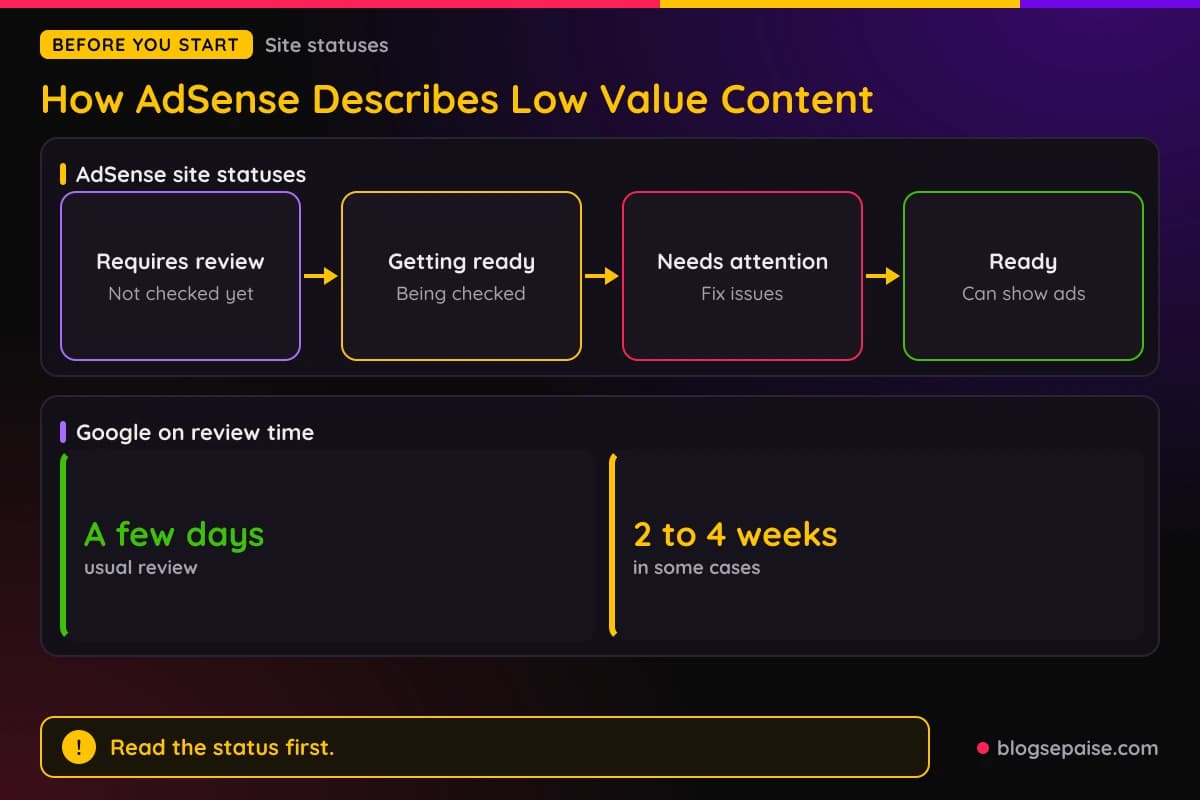
On the Sites page, a new site that fails the check shows the status Needs attention. Google's status page says that status means you must fix some issues before the site can show ads.
The other statuses are Requires review, Getting ready, and Ready. Google says a review in the Getting ready stage usually takes a few days but can take 2 to 4 weeks, and that you should not remove the site and resubmit it, because that can delay the process.
People who received the notice describe it the same way. AdSense Audit, a vendor of audit tools, says the email reads Low value content and says the site does not comply with Google Publisher Policies or Restrictions, and it calls the wording deliberately vague.
The author of Toolpod, a site of developer utilities, wrote on December 30, 2025 that the rejection email cited the reason and pointed to the program policies with no specifics. The email offered a checkbox to confirm the fixes were made and a button to request another review.
Third-party writers treat the phrase as a verdict on the whole site. AdSense Audit says the core question is if the site genuinely helps users, and that word count alone rarely decides the outcome.
Its two examples make the point. A 250-word article from an expert can pass, while a 2,000-word generic article may be flagged.
Why Sites Get Flagged For Low Value Content
Google's content and user experience page for AdSense starts with unique content. Pages need enough of it for Google to determine what the site is about, and the content should give users a reason to visit and return.
The page asks you to check if your content adds substantial value and originality compared with similar sites. It also asks you to update the site regularly with new, unique content.
Copying is the next problem. Google says ads may not be placed on sites with scraped or copyrighted content, and it lists three examples of scraping sites.
The first example is a site that republishes content from other sites without adding original value. The second is a site that copies content and lightly modifies it, such as by swapping synonyms, and the third is a site that embeds video, images, or other media from other sites without substantial added value.
Google also points publishers to its spam policies for web search. It names cloaking, doorway pages, pages with little or no content, and pages optimized for specific keywords as things to avoid.
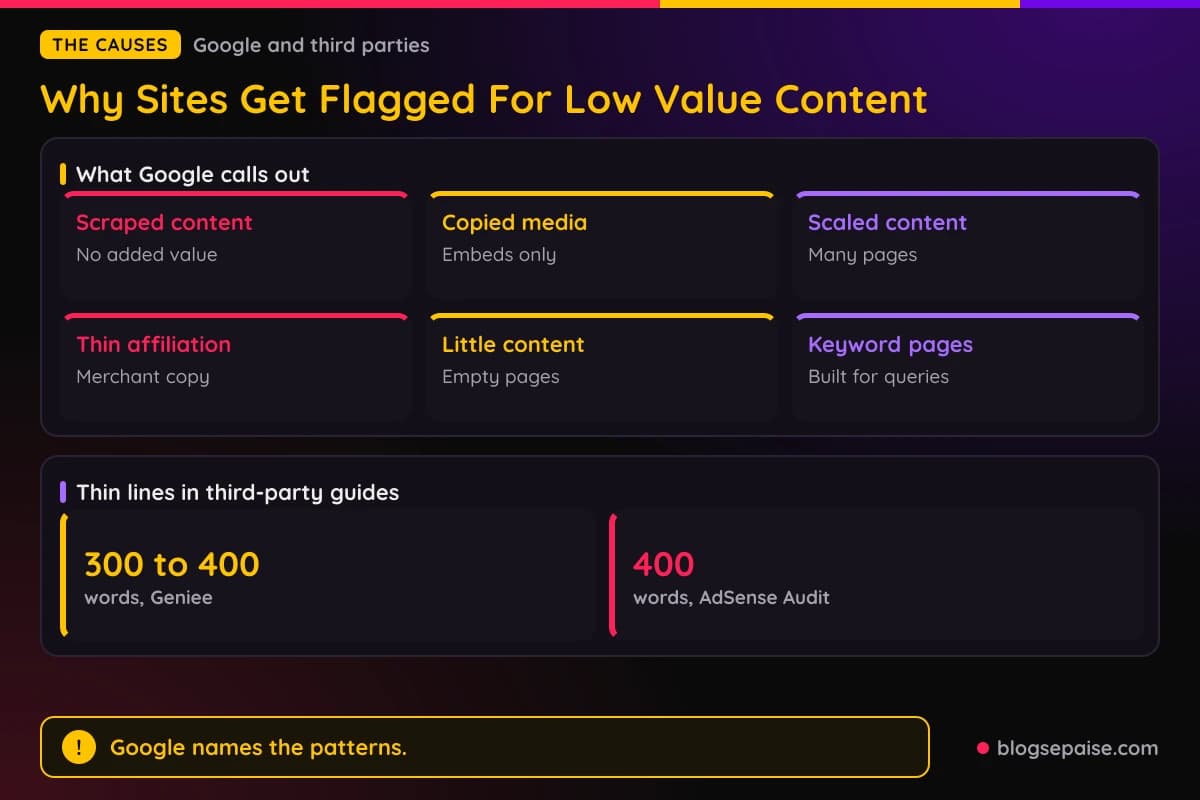
Google Search Central adds scaled content abuse. It describes many pages created mainly to manipulate rankings, usually with large amounts of unoriginal content that has little value, no matter how it is created.
Its examples include generating many pages with generative AI tools without adding value for users, and scraping feeds or search results to generate many pages. Another example is stitching together content from different web pages without adding value.
Thin affiliation gets its own entry. Google describes it as publishing product affiliate links with descriptions and reviews taken from the merchant without any original content or added value.
Google also names template-style sites that repeat similar content across pages, domains, or languages. Good affiliate pages, in Google's words, add things such as original product reviews and rigorous testing and ratings.
Third-party writers add lists of their own. AdSense Audit names five causes: thin content, duplicate or recycled content, auto-generated or generic AI text, pages created purely for SEO, and poor trust signals such as missing About, Contact, or Privacy Policy pages.
TechMessy, in an article dated July 18, 2026, lists four modern triggers. They are AI paraphrasing, niche clones on generic topics, empty categories and placeholder pages, and tool or directory sites with a few generic posts added.
Geniee, in a post by Anh Bui dated October 23, 2025, lists eight traits. They are thin content of roughly 300 to 400 words or fewer, copied content, auto-generated text, repetitive or poorly formatted posts, clickbait titles, keyword stuffing, off-niche posts, and excessive ads.
AdSense Audit gives four examples of rejected sites. They are a mortgage calculator page with one paragraph and a widget, and a blog of 100 AI-written articles of about 800 words each.
The other two are copied product descriptions with no analysis, and near-identical landing pages for keyword variations such as Best laptops 2024 cheap and Cheap laptops best 2024.
Step 1: Check The Exact Status In Your AdSense Account
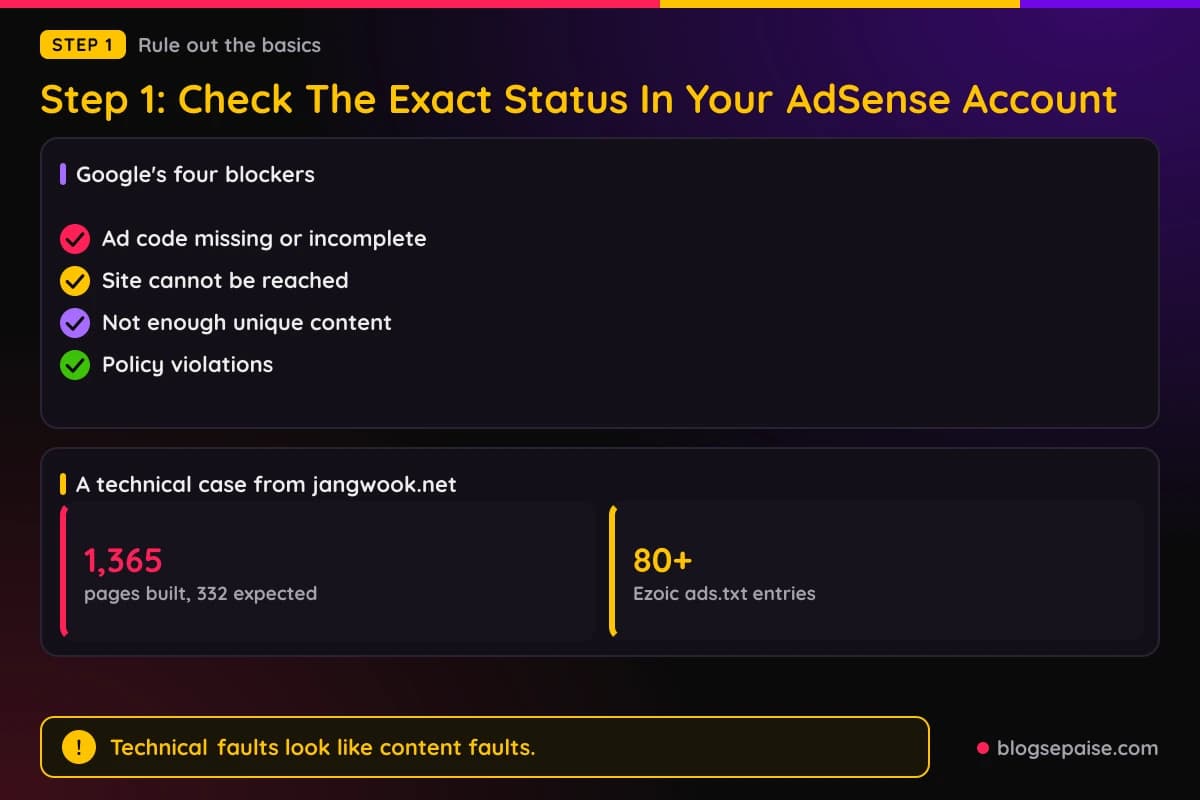
Start with the Sites page, not the content. Google's page called What to do when your site isn't ready to show ads names four blockers: missing or incomplete ad code, a site that cannot be reached, not enough unique content or a poor user experience, and policy violations.
The first two are technical and quick to rule out. Google says the ad code must sit in your site's HTML between the <head> and </head> tags, and it must be pasted into the same site you used to sign up for AdSense.
Google offers an alternative to pasting code. You can verify site ownership in Search Console instead of adding the code in the head or creating an ads.txt file, and AdSense will then keep checking if your site is ready.
Reachability has its own checklist. Google says to confirm you entered the correct URL, and if not, to remove the site from your list and add it again with the right one.
The site must be published and live. AdSense must also be able to reach it without a password, so a login-protected site needs the login removed temporarily, and your robots.txt file must not block the AdSense crawler.
If you use HTTPS, Google says you need a valid SSL certificate from a recognized certification authority, not a self-signed one. HTTP should redirect to HTTPS.
Sites that already show ads get notices in the Policy center. Google's help page says it lists sites with issues that affect ad serving, along with issue descriptions and screenshots when available, and that you are notified there and by email.
Google sorts the issues into three types. Policy issues must be fixed, while regulatory issues and advertiser preferences are optional but can reduce ads.
Click Fix in the Action column to open the Issue details page. Google says the page describes the issue, and the View issue column has an icon that opens screenshots of examples.
Technical faults can look like content faults. The author of jangwook.net, in a post dated February 7, 2026, blamed repeated Low Value Content rejections on technical defects and reported three of them.
The live ads.txt held more than 80 Ezoic entries and lacked the AdSense publisher ID, because a build step downloaded Ezoic's file and overwrote the local one. The build also produced 1,365 pages when about 332 were expected, and every sitemap URL returned a 404.
The post does not report a later approval. Its own takeaways are to check the live ads.txt, watch build page counts for surprises, visit sitemap URLs directly, and review the site the way a crawler sees it.
Step 2: Audit Every Page On Your Site
Third-party writers read the rejection as a pattern across the site. AdSense Audit starts its fix with an export of every URL from Search Console or your sitemap, then flags pages under 400 words, pages with duplicate titles or descriptions, and pages that do not answer a specific question.
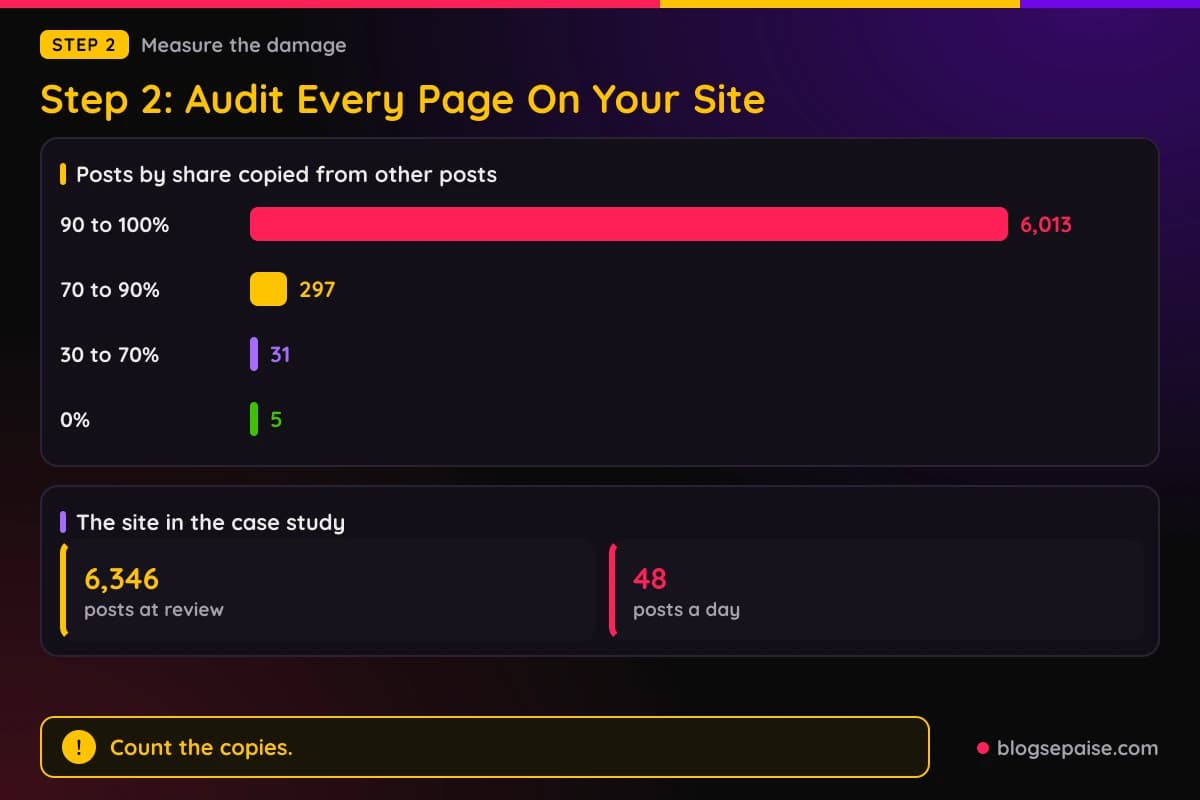
One case study shows how a pattern looks in numbers. A writer who published on October 10, 2026 said an automated publisher had run every 30 minutes and posted 48 template-built posts a day.
The site held 6,346 posts when AdSense rejected it with the message We found some policy violations. Low value content.
The author measured the damage with a short Python script. It split each post into paragraphs of at least 80 characters and counted how often each paragraph appeared across posts.
The results were stark. By share of text copied from other posts, 6,013 posts sat at 90 to 100 percent, 297 at 70 to 90 percent, 31 at 30 to 70 percent, and 5 hand-written posts at 0 percent.
Three boilerplate paragraphs each appeared in 6,341 posts. A duplicate check like this turns a vague rejection into a list of pages to fix.
Google gives you a ready-made audit form. Its Search Central page on helpful content lists questions about content and quality, and the first asks if the content offers original information, reporting, research, or analysis.
Another asks if the page draws on other sources and adds substantial value and originality rather than copying or rewriting them. Others ask if you would bookmark, share, or recommend the page, and if it offers substantial value compared with other pages in search results.
Google also asks if the content was mass-produced, outsourced to many creators, or spread across a large network of sites so individual pages get little care. It asks about spelling and style errors and if the page looks sloppy or rushed.
The people-first questions look at the site as a whole. They ask if the site has a clear primary purpose, and if a reader will feel they learned enough to reach their goal.
AdSense Audit adds a checklist for each major page. The page should answer a real user question in depth, carry a named author with demonstrated expertise, include original research, examples, or firsthand experience, and cover the topic more thoroughly than the top three Google results.
TechMessy offers an audit table with five rows. It contrasts AI text or paraphrased summaries with unique angles, dozens of posts under 600 words with 15 to 25 deeply researched guides over 1,200 words, and empty archives and default templates with working navigation and text on every active landing page.
The last two rows cover trust and indexing. TechMessy contrasts missing or generic legal pages with custom About, Contact, and privacy pages, and posts stuck unindexed in Search Console with core content that is crawled, indexed, and visible in site search.
Step 3: Remove, Merge, Or Noindex Thin Pages
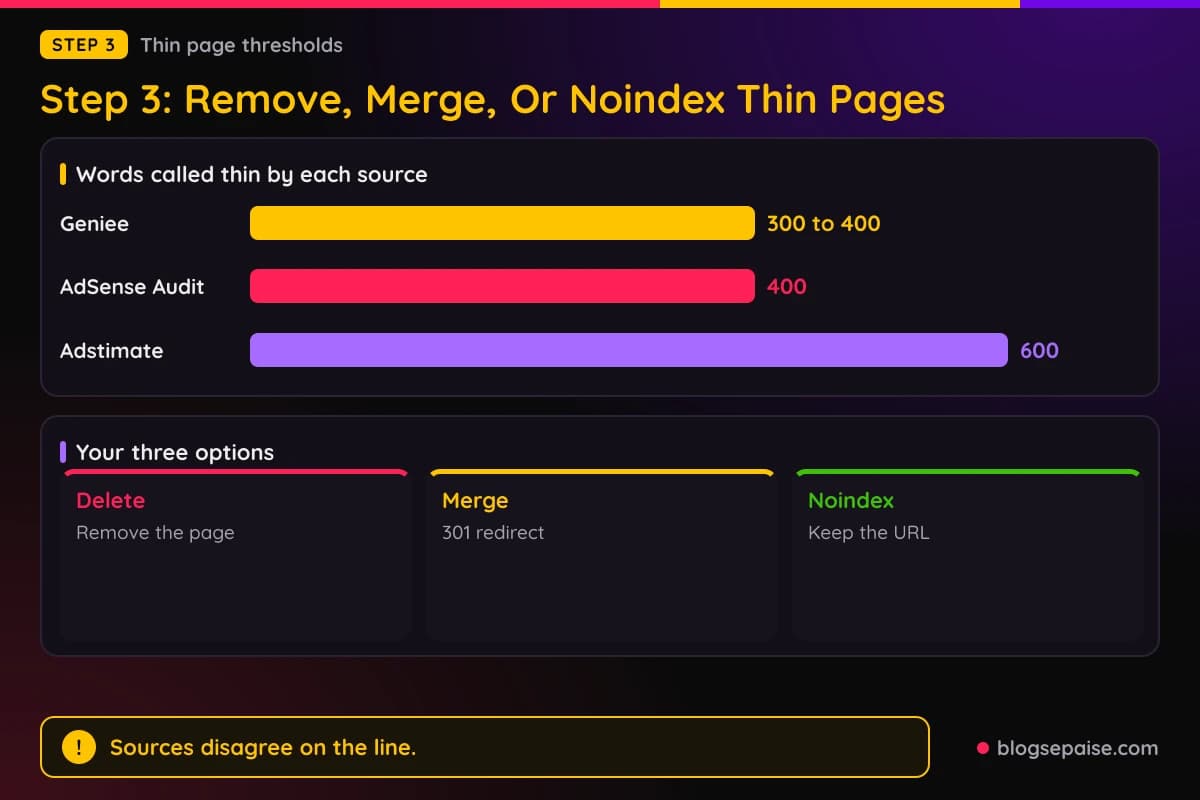
AdSense Audit says every indexable page affects overall site quality. Its three options for a thin page are to delete it, merge it into a longer article, or add a noindex tag.
Sources disagree on what counts as thin. AdSense Audit says there is no official minimum but calls pages under 400 words frequently flagged, and Geniee puts thin content at roughly 300 to 400 words or fewer.
Adstimate, in an article updated in September 2026, advises deleting or setting to draft any post under 600 words or with no unique value. TechMessy lists dozens of posts under 600 words as a rejection trap.
Adstimate also says word count matters less than semantic uniqueness, with a 700-word post holding three original insights beating a 3,000-word rewrite. These thresholds are the writers' own.
Noindex is the reversible option. Google's documentation gives the syntax as a meta tag, <meta name="robots" content="noindex">, or an X-Robots-Tag: noindex HTTP header for files that are not HTML.
Googlebot has to crawl the page to read the rule. If robots.txt blocks the page, the crawler never sees the noindex rule, and the page can still appear in results when other pages link to it.
Google says removal happens only after a recrawl, which can take months for less important pages. You can use the URL Inspection tool to request a recrawl, and the Page indexing report in Search Console shows pages where Googlebot found a noindex rule.
Merging works when several short pages cover one topic. TechMessy's example is 50 articles of around 400 words each, with three or four related short articles combined into one guide of about 2,000 words.
The old URLs should then be deleted or redirected with 301 redirects. Google's redirect documentation says to use a permanent redirect when you merge pages or remove a page, with HTTP 301 or 308 preferred, while temporary 302, 303, or 307 redirects keep the original URL in search results.
Adstimate calls the clean-out Slash and Burn. It claims Google scores a site's average quality, so weak pages drag the whole site down, and says some sites were approved after deleting 40 percent of their pages.
The writer behind the 6,346-post site took the noindex route. The publisher was paused, and template posts stayed at their URLs but were served with noindex and follow, carried no ads, and linked to curated posts.
Category pages now needed at least three listed posts, and hundreds that listed template posts returned 404. The sitemap dropped from 6,924 URLs to 25, and the author submitted 6,899 changed URLs through IndexNow so Bing would recrawl them.
No successful re-review is reported, because the author had not requested one. Google still indexed about 5,200 template pages, which were expected to take weeks to drop out, and the author judged five original articles too few to show substantial unique value.
Empty pages count too. TechMessy gives the example of a Fitness menu link that opens one post or an empty page, and it advises removing empty tags and category pages and clearing default theme placeholder text.
Step 4: Rewrite Your Best Pages With Original Value
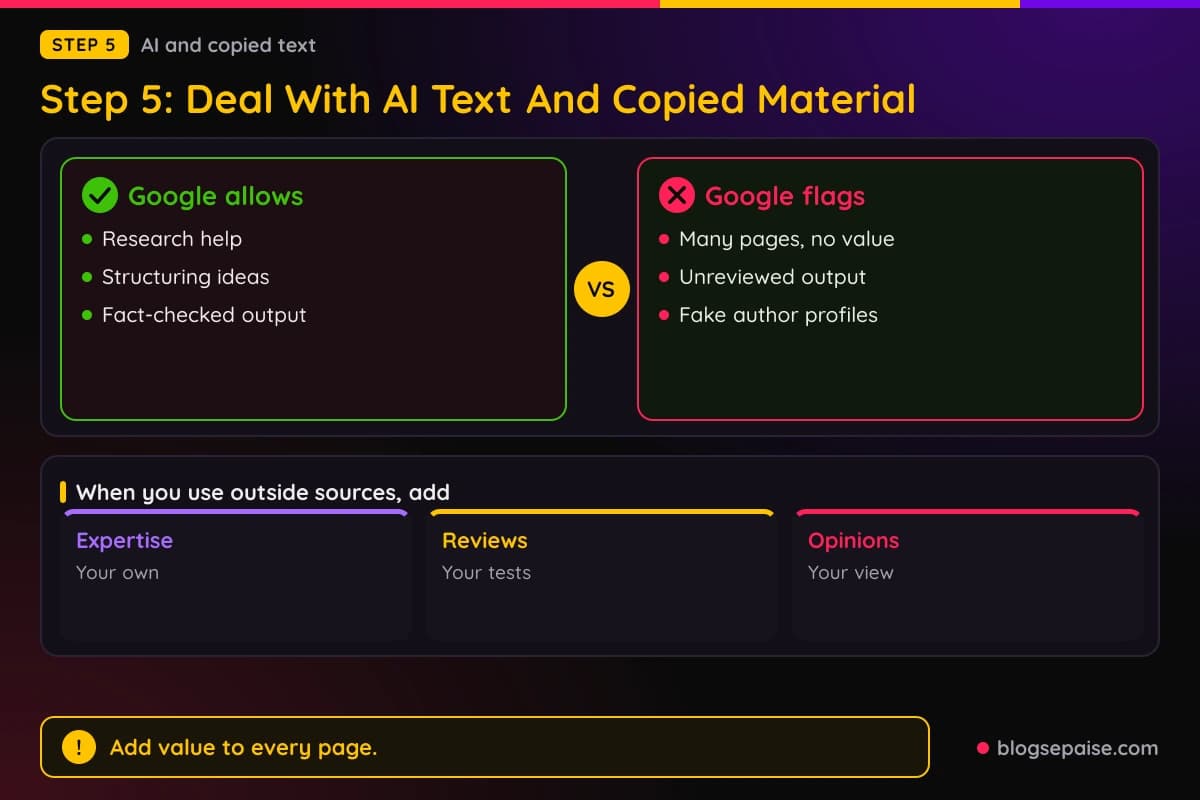
Google's AdSense page says to contribute your own original content. When you use external resources, it asks you to add your own expertise, ideas for improvement, reviews, or opinions.
The same page says not to repeat the same content across pages. It suggests consolidating or expanding similar pages and keeping repeated text brief, such as a short footer summary that links to a fuller page.
Search Central's helpful content guidance asks for first-hand expertise, such as from using a product or visiting a place. It also asks if the content goes beyond obvious points with insightful analysis or interesting information.
Titles matter too. Google asks if the main heading and page title summarize the content and avoid exaggeration or shock value.
Google lists trust as the most important part of E-E-A-T, which stands for Experience, Expertise, Authoritativeness, and Trustworthiness. It adds that E-E-A-T is not a specific ranking factor by itself.
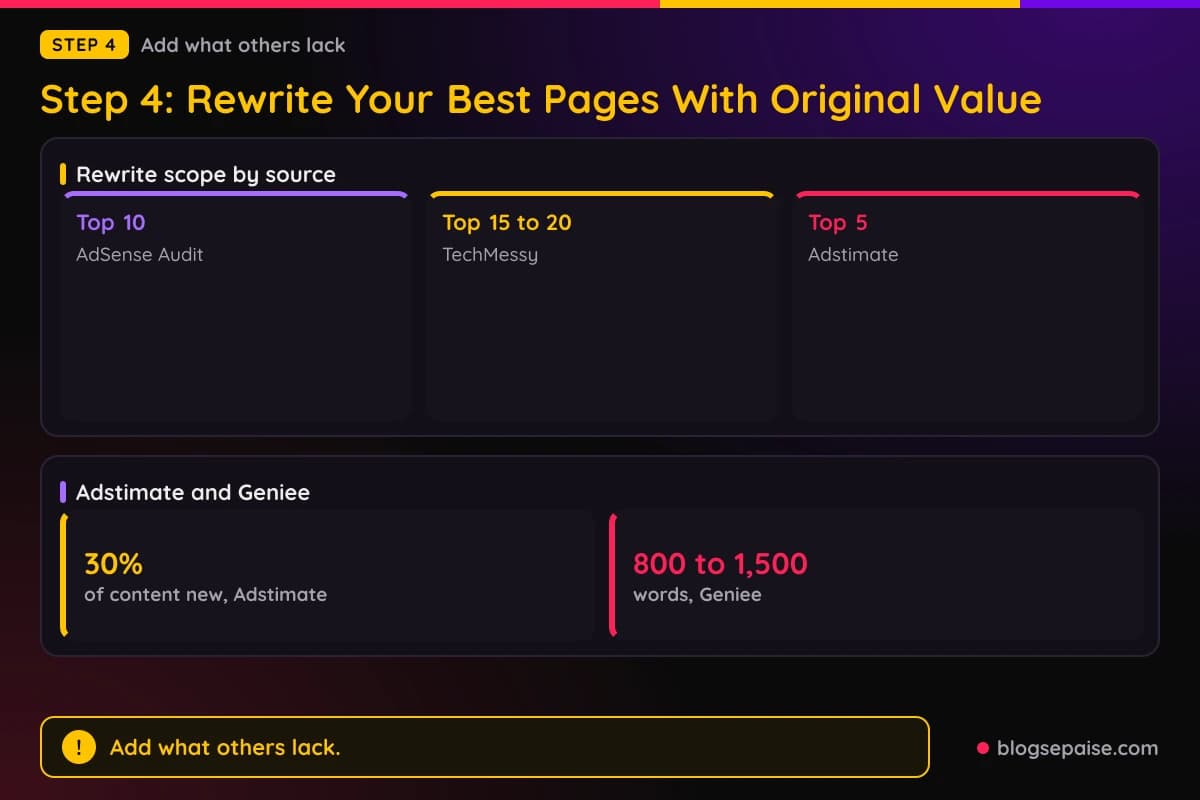
AdSense Audit tells you to rewrite your top 10 articles with E-E-A-T in mind. Its list is bylines with real credentials, firsthand examples or data, authoritative citations, and answers to follow-up questions.
TechMessy sets a wider scope of your top 15 to 20 posts. Its examples are first-person phrasing such as In my testing, your own screenshots, annotated images, or simple charts in place of stock photos, and real metrics, case studies, or a mistake you made and how you fixed it.
Adstimate proposes a 30 percent rule. At least 30 percent of the content should hold information not found elsewhere online, such as original dashboard screenshots, email-list survey results, a breakdown of actual monthly expenses, interview quotes from people in the niche, or first-hand test results.
Adstimate adds that the answer should appear in the first 300 words of a page. It also advises adding original quotes, charts, or anecdotes to your top 5 posts.
TechMessy describes the test as incremental value. If a page matches the top five search results in information, structure, and phrasing, the author says it has zero incremental value.
Its examples of redundant topics are How to screenshot on Windows 11, How to clear cache in Chrome, and What is a stock. The author says such posts need a new angle, a case study, or proprietary data.
Geniee says articles of 800 to 1,500 words that fully answer the user's question tend to perform better. It also recommends citing reputable sources, using original images, infographics, or screenshots, and building topic clusters, with Moodle, Canvas, and Blackboard under Learning Platforms as its example.
Sources disagree on how many posts a site needs. TechMessy says fewer than 15 to 20 thorough posts will almost always trigger a flag, AdSense Audit says ten well-researched articles can outperform 200 thin posts, and its separate guide on rejections says many approved sites have 15 to 30 quality pages.
Affiliate pages face a second bar. Google says good affiliate sites add pricing context, original reviews, hands-on testing and ratings, product category navigation, and comparisons.
For the affiliate side of approval, read our guide on affiliate links before AdSense approval. To see why new sites stall, read why most new affiliate sites fail.
Step 5: Deal With AI Text And Copied Material
Google's guidance on generative AI says the tools can help with researching a topic and structuring original content.
The warning follows right after. Using AI tools to generate many pages without adding value for users may violate Google's spam policy on scaled content abuse.
Google tells publishers to fact-check. It explains that generative models predict a likely sequence of words rather than retrieving facts, so outputs may contain inaccuracies that are called hallucinations.
The same review applies to title elements, meta descriptions, structured data, and image alt text. Google says these can appear in search results too.
Search Central's helpful content page says large amounts of generative AI text published without manual oversight or curation reflect little to no effort. It also calls fabricated creator profiles, such as AI-generated headshots, invented names, or false credentials, deceptive and a sign of low quality.
Google suggests telling readers how content was made. Where automation was used and readers would reasonably wonder, it says to explain how it was used and why it was considered useful.
Third-party writers agree on the direction. AdSense Audit says AI content is not automatically rejected, but unedited generic AI text is frequently flagged.
TechMessy says AI-written text can pass an AI detector and still be flagged, when it reads like a polished summary of the top three pages on a topic. It allows AI as an assistant if you add personal experience, rephrase text naturally, fact-check everything, and add original visuals.
Copied text has a direct fix in Google's help page. Remove scraped or copyrighted material and replace it with original content.
Google's policy also bars ads on screens with embedded or copied content from others without added commentary. It says publishers must follow the intellectual property abuse policy as well.
Images and embeds count. Google lists embedding video, images, or other media from other sites without substantial added value as a scraping example, and Adstimate suggests your own photos, even grainy phone shots, in place of stock images.
Comments are content too. Google's publisher policies apply to anything on your page, including user comments, and its AdSense help page says to moderate comments so they comply with the AdSense Program policies.
Geniee adds a plain warning against reproducing or lightly paraphrasing official sources or competitors. Its fix is to add personal experience, case studies, real examples, and a unique perspective.
Step 6: Add Trust Pages And Fix Navigation
Google's content and user experience page gives a four-point navigation check. It covers alignment on all devices, readable text, working drop-downs and clickable elements, and links that lead to the right content.
It also asks you to organize content by topic or category and to make sure the site displays correctly in different browsers. Links that lead to false download or streaming claims, missing pages, or irrelevant and misleading pages are named as problems.
Search Central ties trust to visible information. It asks if the content makes it easy to trust through clear sourcing, evidence of expertise, and information about the author or site, such as an author page or About page.
AdSense Audit lists poor trust signals as a cause, naming missing About, Contact, or Privacy Policy pages and anonymous sites. Its fix is an About page, a contact page, and author bios.
Its separate guide on rejections lists missing required pages as a reason and adds Terms of Service to the set. It says the pages should be linked in the footer and that missing trust pages can be fixed in 1 to 2 weeks, an estimate that is the guide's own.
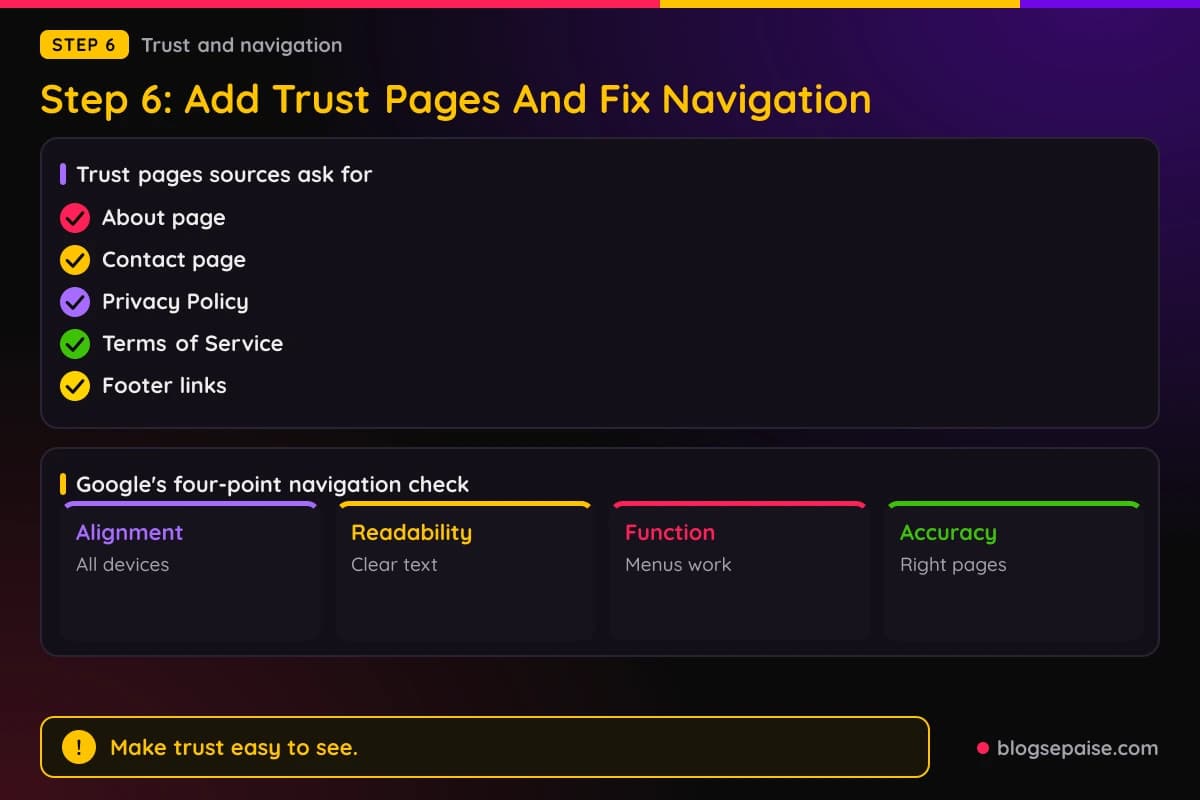
TechMessy asks for a detailed About page covering who you are, your background, and your qualifications. It also asks for Privacy Policy, Terms of Service, and Contact pages linked in the footer, and for broken links to be fixed.
Adstimate adds two small checks. The Contact page should have a real email address, and the About page should have a real photo of you or your team.
It also says to keep one author name everywhere, so John Smith and J. Smith do not split credibility. The claim is the author's own.
Google's cookie page spells out what a publisher's privacy policy needs. It says to disclose that third-party vendors, including Google, use cookies to serve ads based on a user's prior visits.
The policy should also tell users they can opt out of personalized advertising through Google's Ads Settings or aboutads.info. If third-party ad networks serve ads on your site, you notify visitors of those vendors, link to their sites, and explain how to opt out.
Our privacy policy generator gives you a starting draft, and the legal disclosures guide covers the affiliate disclosure side.
Crawlers must be able to read these pages. On the jangwook.net site, the contact page was only a Google Form inside an iframe, which crawlers cannot read, so the fix added crawlable text with a name, email, social links, and a blog description.
Ad layout is part of navigation. Google's AdSense Program policies bar ads on pages built mainly to show ads, and require sites to be easy to navigate, with no unexpected redirects, unwanted downloads, or interfering pop-ups.
Geniee advises limiting the number of ads per page and avoiding layouts that disrupt reading or slow loading. It also says to drop aggressive calls to action that force users to subscribe, comment, or share before reading.
Step 7: Request A Review And Wait For The Result
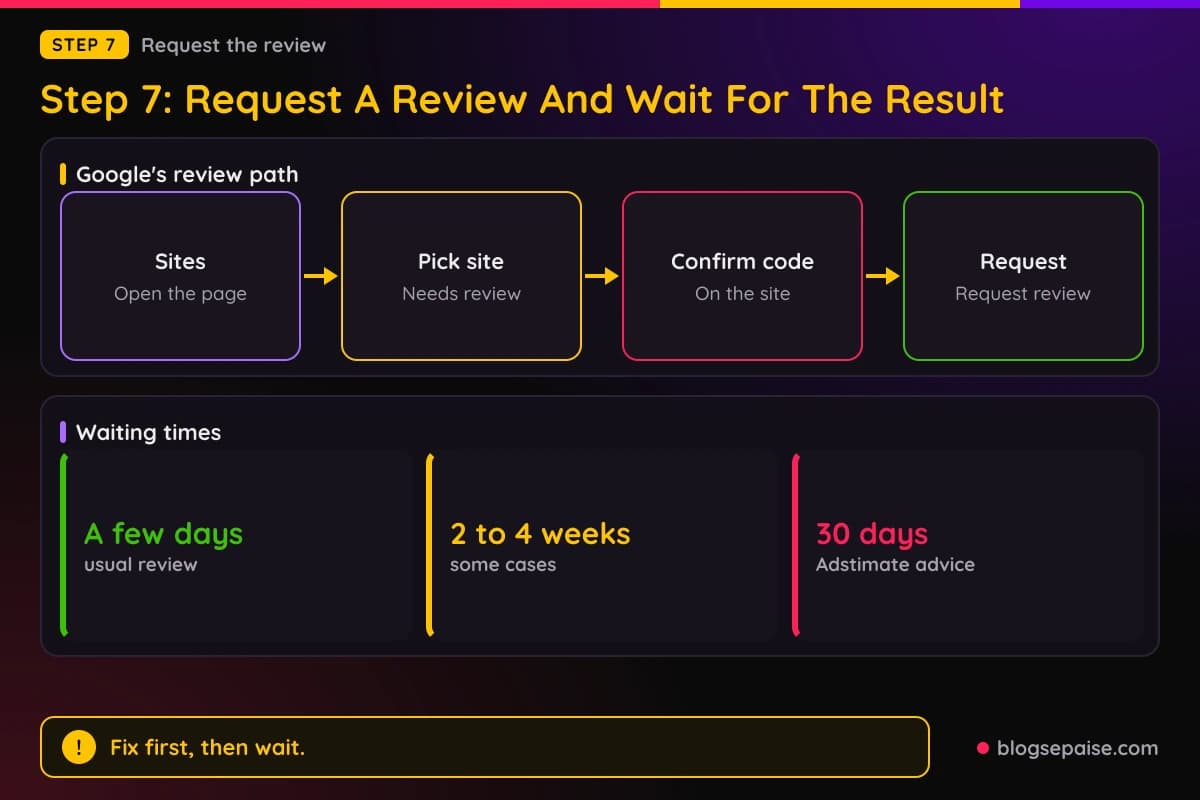
Google gives six clicks for a site that is not ready. Sign in to AdSense, click Sites, click the site that needs review, confirm you placed the AdSense code, click Next, and click Request review.
Google says the review usually takes a few days but can take 2 to 4 weeks in some cases. AdSense notifies you when the checks are complete and the site is ready to show ads.
Finish your setup tasks first. Google warns that a review requested before the required tasks are done will not happen, and the site stays in Getting ready.
Sites with enforcement in the Policy center use a different path. Click Fix next to the site, then Start review process under Issues found.
Google says the button is inactive if the site was rejected several times recently, and the page shows the date when you can try again. You then choose a reason from a drop-down: you removed the ad code, you fixed the violations, or you believe the violations are not on the page.
Check the readiness box and click Request review. Google says you must request a review for each site with enforcement for ad serving to continue.
While you wait, the status reads Under review, which means no decision yet. A rejection brings an email and details under Issues found, and Google says to re-check the policies, make further changes, and then request another review.
A successful review removes the enforcement from the Policy center and sends an email. Page-level reviews are capped at a limited number in a 30-day period, and the limit refreshes daily, though Google does not state the exact number.
Third-party writers add their own waiting times. AdSense Audit says to wait 2 to 4 weeks before reapplying, while TechMessy says to wait two to three weeks and confirm the updates are indexed in Search Console first.
TechMessy warns that reapplying early may evaluate a cached version of your site. Adstimate says to give Google 30 days to recrawl and calls reapplying after 48 hours premature.
AdSense Audit's guide on rejections gives a longer estimate of 4 to 6 weeks to fix a low value content rejection. It also says there is no official limit on reapplying, but repeated applications without fixes will likely fail again.
Toolpod's author says many people were approved on a second or third attempt with no changes, sometimes due to a different reviewer or site aging. The author also wrote that reapplying immediately often fails.
Why Some Sites Are Rejected Again
Content is not the only theory. The Toolpod author had 65 or more developer utilities, 15 blog posts, an about page, and a privacy policy when the rejection came.
Each tool page there carried a description of what the tool does and why to use it, step-by-step instructions, common use cases, FAQs, and related tools. The author concluded the rejection was a catch-all for new sites that often has little to do with content quality.
The author named three factors. Google may want a track record, which the author puts at 3 to 6 months of consistent activity, Google prefers sites that already have visitors, and Google's systems are skeptical of utility sites that are thin pages with one input field and one button.
TechMessy makes a related point about traffic. It says to build organic traffic before reapplying, submit a clean sitemap, confirm pages are indexed, and wait for regular organic search or referral traffic, and it notes there is no official minimum traffic number.
AdSense Audit's guide on rejections lists other reasons that look like content problems. They include a domain under 6 months old in some regions, a site behind a login, a domain previously banned under another account, and artificial or invalid traffic.
Its table also gives a time estimate for each reason, such as 1 to 2 weeks for missing trust pages and 2 to 3 weeks for navigation problems. The guide says these timelines are its own estimates, not official Google requirements.
The Toolpod author also looked at other options while waiting, naming Ezoic and Carbon Ads, and says chasing AdSense approval is probably the wrong priority for a brand-new site. That view is the author's own.
Keep building in the meantime. Our guide on getting traffic to a brand new affiliate site covers early traffic, and how to get approved for affiliate programs covers the program side.
Common Mistakes With Low Value Content Fixes
The first mistake is requesting a review before the fixes are indexed. TechMessy warns that reapplying early may evaluate a cached version of your site, and Adstimate calls 48 hours premature.
The second is blocking a noindexed page in robots.txt. Google says the crawler then never sees the noindex rule, so the page can stay in results.
The third is using a temporary redirect when merging pages. Google says 302, 303, and 307 redirects keep the original URL in search results, while 301 and 308 make the target the canonical page.
The fourth is removing the site from AdSense and submitting it again. Google says doing so can delay the review process.
The fifth is publishing more of the same. In the 6,346-post case, 6,013 posts were 90 to 100 percent copied from other posts, and the author judged five original articles too few to show substantial unique value.
The sixth is treating one number as a rule. Sources give 300, 400, and 600 words as thin lines, and AdSense Audit says a 250-word expert article can pass while a 2,000-word generic one can fail.
Final Thoughts
Google's policy line on low value content is short. It bars ads on screens with low-value content, the Sites page shows Needs attention, and the help page names unique content, user experience, and policy violations as blockers.
The detailed fixes come from Google's quality guidance and from site owners who went through the rejection. Audit every page, remove or merge the thin ones, add first-hand material to the best ones, check AI and copied text, add trust pages, and request a review once the changes are indexed.
Google says reviews usually take a few days and sometimes 2 to 4 weeks. Third-party guides suggest waiting 2 to 4 weeks, or 30 days, before you reapply.
Frequently Asked Questions
1. What does low value content mean in AdSense?
Google's publisher policies bar ads on screens without publisher content or with low-value content. Third-party writers describe the rejection as a judgment that the site lacks enough original, useful material.
2. How long does an AdSense review take after I fix my site?
Google says a review usually takes a few days but can take 2 to 4 weeks in some cases. AdSense notifies you when the checks are complete.
3. How many words must a page have to pass?
Sources do not agree on a number. AdSense Audit says no official minimum exists, and it, Geniee, and Adstimate give thin lines of 400, 300 to 400, and 600 words.
4. Is AI-written content allowed on an AdSense site?
Google's guidance says AI can help with research and structure. Generating many pages with no added value may violate its scaled content abuse policy, and Google asks you to fact-check the output.
5. Do I need About, Contact, and Privacy pages?
Google's Search Central page asks for clear information about the author or site, such as an author page or About page. AdSense Audit and TechMessy both list missing About, Contact, and privacy pages as a cause of rejection.
6. Can I use affiliate links on a site I plan to monetize with AdSense?
Google flags thin affiliate pages that copy merchant descriptions, and says good affiliate pages add original reviews and testing. Read our guide on affiliate links before AdSense approval for the details.
7. Should I delete thin pages or add noindex?
AdSense Audit offers delete, merge, or noindex. Google says noindex works only after a recrawl and only if robots.txt does not block the page.
8. How long should I wait before I reapply?
Third-party guides say 2 to 4 weeks, two to three weeks, or 30 days. Google's review request button goes inactive after several recent rejections and shows the date you can try again.
9. Does AdSense look at pages that carry no ads?
The writer of the 6,346-post case says AdSense reviews the whole site, including pages without ads. Google's help page says it needs enough unique content to determine what the site is about.