Can You Use Affiliate Links Before AdSense Approval? What To Know First
You just started a blog, and you want two things at once. You want affiliate income from the first week, and you want Google AdSense to say yes.
Then the worry hits. Will one affiliate link on a brand new site get your AdSense application rejected?
Here is the short answer. Affiliate links alone do not block an application, but a thin site stuffed with them can.
Google judges your site as a whole, and it wants original content that helps real readers. The steps below show how to keep both goals alive.
Seven steps cover what AdSense checks, where affiliate links fit, how to build value, and how to use the waiting time. A worked example, common mistakes, and a short FAQ follow.
Disclosure: Some of the links I share might be affiliate links. If you click on one and make a purchase, I may earn a small commission as a thank you. But don’t worry, it won’t cost you anything extra. I only recommend stuff I genuinely believe in. Your support helps me keep creating awesome content. You can read my full affiliate disclosure in my disclaimer page.
If you want to save a lot of hours searching for high-paying affiliate programs, check out our exclusive list of 2500+ affiliate programs. You’ll find all the information about the programs inside the list. This list is perfect for affiliate bloggers and influencers.
Why New Bloggers Worry About This
Most new bloggers hear mixed advice. One forum says affiliate links ruin an application, and another says everyone uses them.
Both sides skip the detail that matters. AdSense does not count your links, it judges your pages.
A new site has little history, so every choice feels risky. One wrong move seems like it could cost you months.
The fear is fair, because a rejection means waiting and fixing before you can try again. Still, the fear is often aimed at the wrong target.
Google's AdSense help asks for content that is high-quality, original, and able to attract an audience. Its eligibility rules name no restriction on affiliate links.
Notice what else is missing. The eligibility rules give no minimum word count and no minimum page count.
That leaves you room to decide. The safest path is to give Google a site that looks like a real publication first and a storefront second.
Affiliate links also affect reader trust. A visitor who lands on a page packed with buy buttons may leave before reading a word.
A page that feels like an ad is hard to defend as helpful content. That is the real risk, and it has little to do with the links themselves.
Our guide on affiliate marketing in your first 30 days shows a calm posting rhythm for a new site. The article you are reading focuses on the AdSense side.
Nobody outside Google can promise an outcome. Anyone who says affiliate links are always safe or always fatal is guessing.
The good news is simple. The habits that protect your AdSense application also make your affiliate pages better.
Original posts, clear writing, and honest links help both goals. Nothing in the plan works against your income.
Think of your first month as a trial run. You are learning what readers like, and you are showing Google a site worth reviewing.
Patience pays here. A calm start beats a rushed one, because rushed sites tend to collect thin pages and messy links.
Money matters, and wanting it early is normal. The plan below lets you chase affiliate income without risking the bigger prize.
Start with how the review works, because the rest of the plan depends on it.
Step 1: Learn What AdSense Actually Checks
AdSense checks a few basics before it looks at your writing. You must be at least 18, though a parent or guardian can sign up with their own Google Account for a younger person.
You also need access to the HTML source code of the site you submit. That rules out pages where you cannot touch the code.
Next comes content. Google asks for high-quality, original content that attracts an audience.
Policies come after that. Your site must follow the AdSense Program policies, and Google may change them, so keeping up to date is your job.
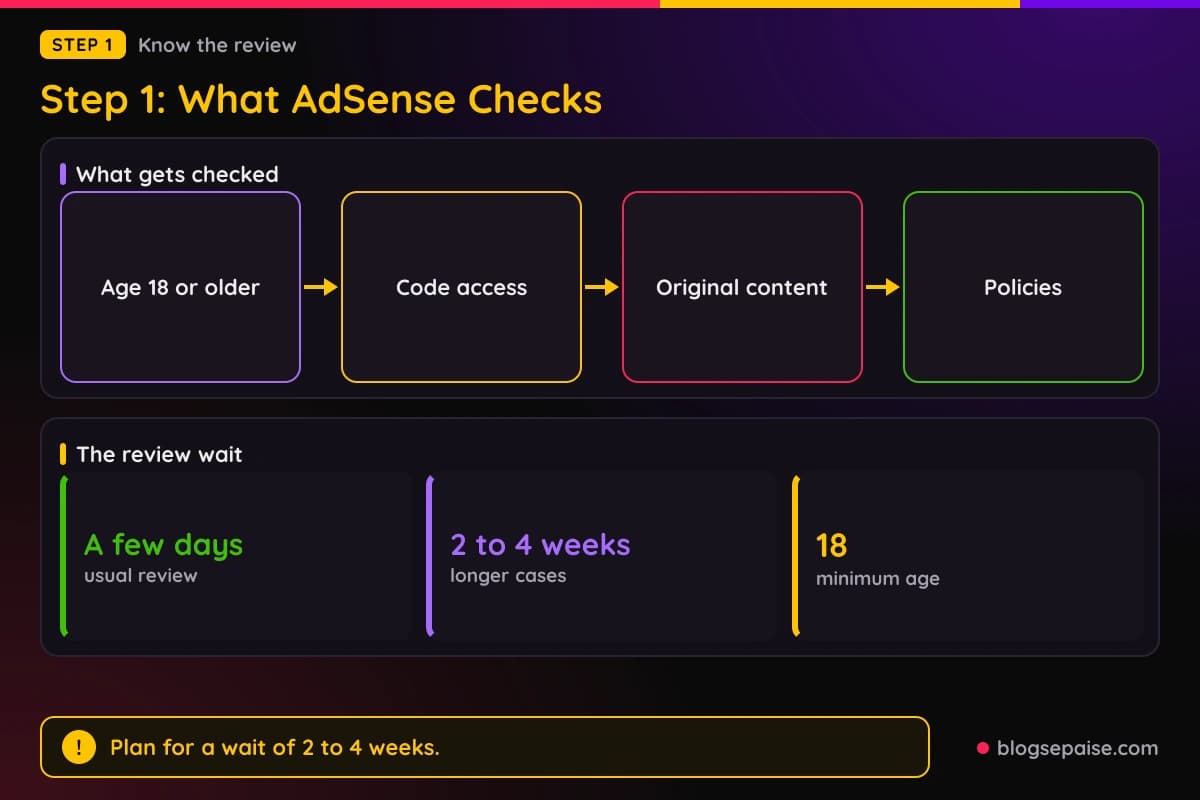
After you apply, Google reviews your whole site. Its help text says the review usually takes a few days, but in some cases it can take 2 to 4 weeks.
You can follow progress on the Sites card on your AdSense homepage. Check it instead of sending the same application twice.
A wait of 2 to 4 weeks is normal enough that you should plan for it. Do not rebuild the site on day three because you feel nervous.
Google looks at pages, not at your plans. If a page is thin today, a promise to improve it later does not help.
Hosted platforms such as Blogger and YouTube have their own rules and sign-up paths. A site on one of them follows that path instead of the standard one.
For most new bloggers, the standard path means a site on your own domain. A host such as Hostinger and a domain from Namecheap give you full access to the code.
Free subdomain sites make this harder. If you run one, read our guide on affiliate links on free blogs before you plan around AdSense.
Do not treat the review like a checklist you can pass by counting words. Google gives no word count, so each post should be as long as it needs to be to help.
Write every post to answer one question well. A reader should finish it and feel they learned something specific.
Keep notes on what you change and when. If a rejection comes, you can compare your notes with the reason Google gives.
Settle the age and ownership basics before you worry about content. They are easy to fix, and they cause avoidable delays.
Think about your reader as well as the reviewer. If a post helps a real person, it usually helps your application too.
Finally, give yourself a deadline for each fix. A site with a simple weekly plan improves faster than one that waits for a perfect moment.
With the rules clear, the next question is where affiliate links fit.
Step 2: Check If Affiliate Links Break A Rule
Begin with the plain fact. Google's eligibility rules for AdSense do not ban affiliate links.
Silence is not a promise, though. The answer sits in the policies about content value.
The Inventory value policy bars Google-served ads on screens with low-value content. It also bars screens with copied content from others where nobody adds commentary, curation, or other value.
A third line matters most to affiliates. Ads are not allowed on screens with more ads or other paid promotional material than publisher content.
Paid promotional material is a broad phrase. Read plainly, a page of buy buttons and banners with a few lines of text fits it uncomfortably well.
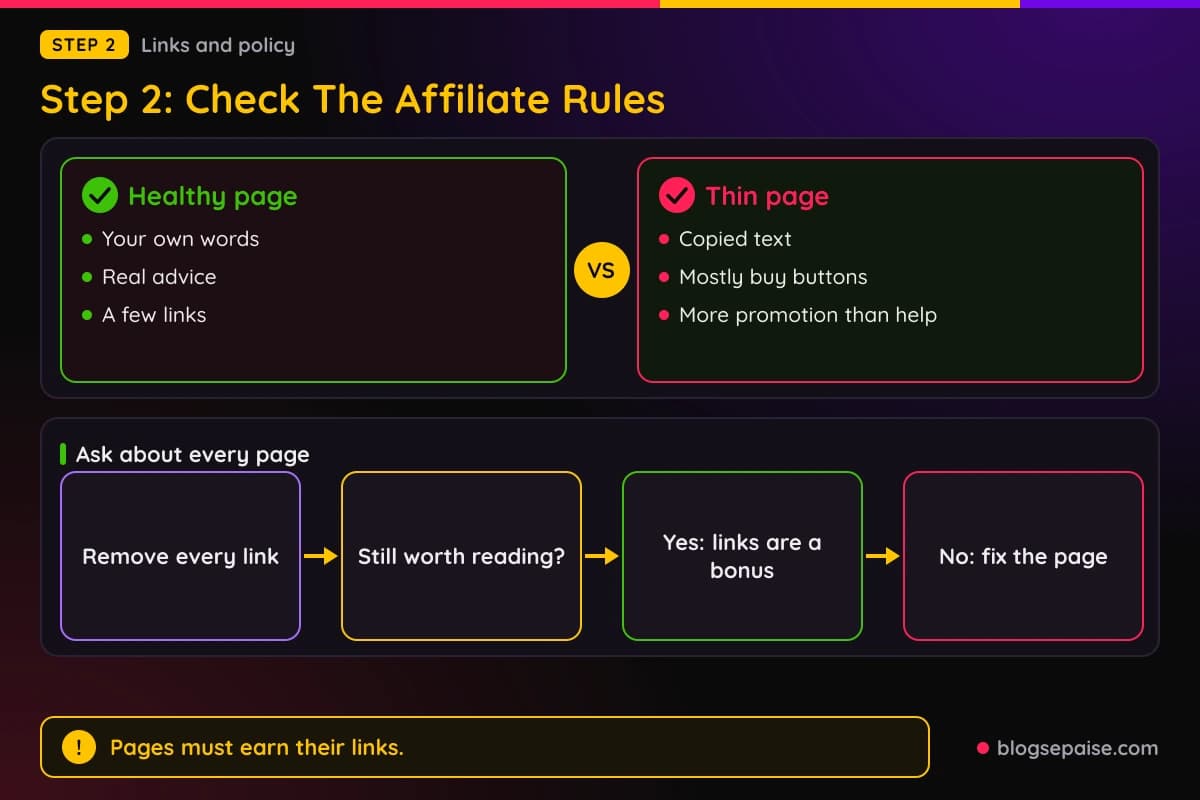
Google's search side has a matching idea. Its spam policies call out thin affiliation, which means affiliate pages with descriptions copied from the merchant and no original content or added value.
Its examples of good affiliate pages include original reviews, hands-on testing, ratings, and product comparisons. Extra price information and useful category navigation count too.
Those are search rules, not AdSense rules. Still, the thinking is the same, since Google wants to see what you added.
So affiliate links can sit on a site you submit. The risk lives in pages that exist only to hold links.
Ask a blunt question about each page. If you removed every link, would the page still be worth reading?
If the answer is yes, the links are a bonus. If the answer is no, the page is a thin affiliate page, and it needs work.
Balance matters across the whole site too. A site with many links and a few short posts looks like a store, while a site with many posts and a few links looks like a blog.
Affiliate networks have their own rules about where links may appear. Our article on how to avoid getting banned from affiliate programs covers that side.
Read the AdSense policies yourself, since Google may change them. Policy pages are the only place to confirm current wording.
Where a rule is unclear, pick the safer choice.
Write down your own rule for link density. For example, one link for each full section of advice keeps promotion from piling up.
Revisit that rule after a month. If readers click your links and still read the post, the balance probably works.
Remember that the reviewer sees a page the way a visitor does. Whatever feels pushy to you will feel pushy to them.
A page with fewer links never causes a policy problem.
Step 3: Build Real Value On Every Page
Original content is the part you control. Start here, and the rest gets easier.
Original means you wrote it from your own thinking. Copying a merchant description changes nothing about the product and adds nothing for the reader.
Added value comes in plain forms. Your own test, a comparison, a price you checked, a mistake you made, or a step by step method all count.
Use your own words and examples. A reader should learn something they could not get from the product page.
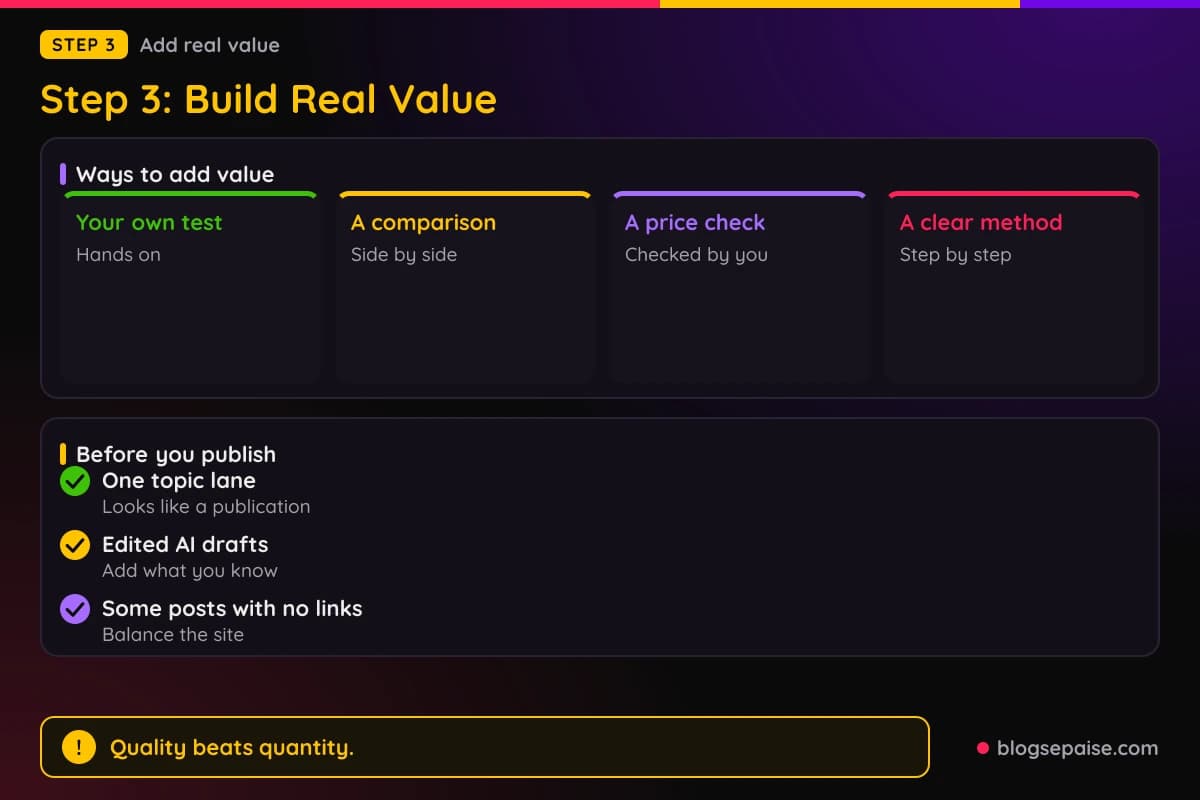
Pick one topic lane. A blog about one subject looks like a publication, while a blog about everything looks like a pile.
Write posts that answer real questions. Search your topic, see what people ask, and answer it fully.
Take your time with length. Each post should be as long as the question needs, with no filler added to hit a count.
Publish a few posts with no affiliate link at all. They show you can help readers without selling, and they balance the site.
Read each post out loud once. Awkward sentences and repeated points show up fast.
Be careful with AI drafts. Google's spam policies name AI-made pages that add nothing for users, so edit hard and add what you know.
Never scrape or stitch together text from other sites. The same policies list scraping, synonymizing, and stitching content without adding value as examples of abuse.
Images help when they are yours. A screenshot of a tool you used shows work that a copied photo cannot.
Give each post a clear title, a short intro, and headings that make it easy to scan. Clean structure helps reviewers and readers alike.
Rewrite or remove old posts that you made in a rush. One weak page can drag down the feel of the whole site.
Quality beats quantity at this stage.
Show your experience when you have it. A short story about a mistake you made teaches more than a polished paragraph that anyone could write.
Update your best posts as you learn more. Fresh details and fixed errors tell readers that someone cares for the site.
Ask a friend to read one post and tell you what they remember. If they remember nothing, the post needs a clearer point.
A smaller site of useful posts is easier to defend than a large site of filler.
Step 4: Set Up The Trust Pages
Trust pages tell visitors who runs the site. They are small, and they remove doubt.
Google's eligibility text does not name these pages. Still, a site with no author and no contact details looks unfinished.
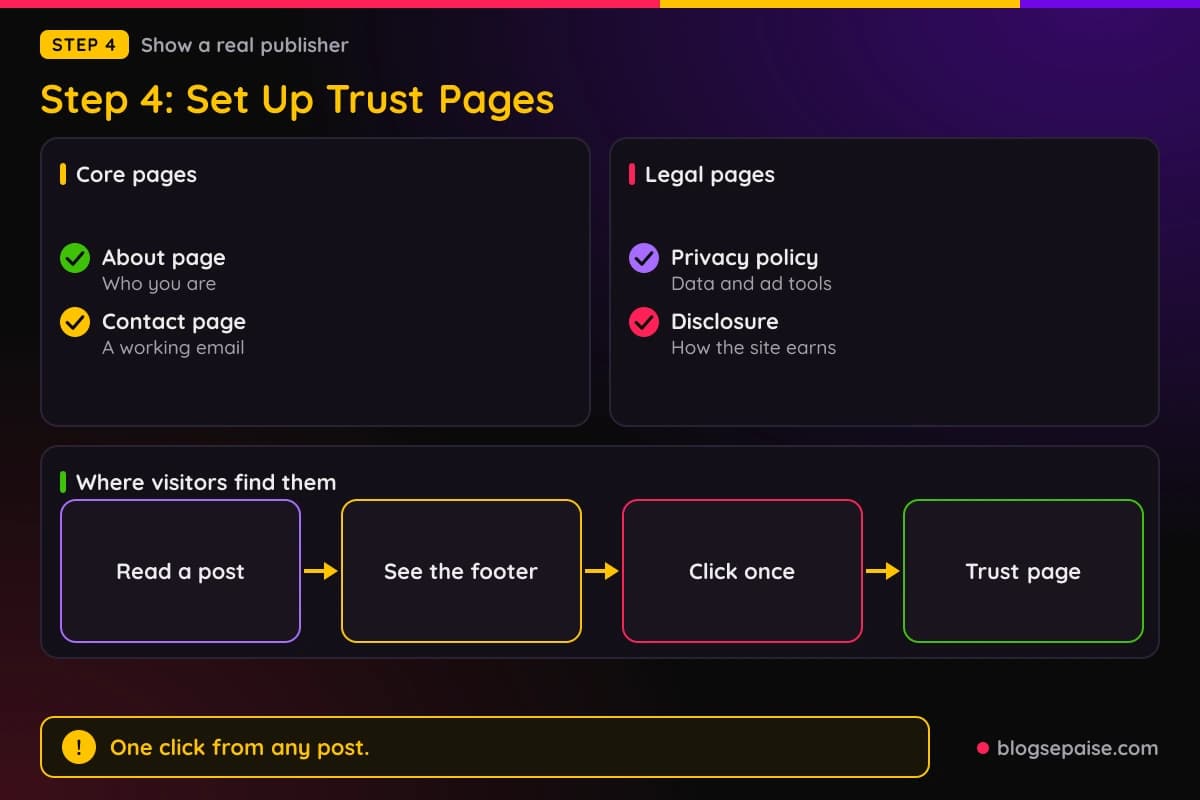
Start with an About page. Say who you are, what the blog covers, and why you write it.
Add a Contact page next. A working email address or a simple form is enough.
Then add a privacy policy. Our privacy policy generator gives you a draft to adapt.
A privacy policy matters because sites collect data through analytics and ad tools. Privacy laws differ by place, so check the rules that apply to you.
Add a disclosure statement as well. Our affiliate disclosure generator helps you write one, and the legal disclosures guide adds context.
Link these pages in the footer. Visitors and reviewers should reach them in one click from any post.
Keep navigation simple. A menu with your main topics, your About page, and your Contact page is plenty.
Make sure every link works. Broken menus and empty pages make a site look abandoned.
Do not leave placeholder text on any page. A page that still says Lorem ipsum tells everyone that nobody finished the job.
Show a real name or a steady pen name. Readers trust a person more than an anonymous box.
Use the same name across your trust pages and your posts. Consistency helps people believe one real person runs the site.
Check the site on a phone. Many visitors read on small screens, and a menu that fails there frustrates them.
Keep the wording friendly and short. Nobody enjoys a wall of legal text, and a clear page is more likely to be read.
Check the footer on every kind of page, including posts, categories, and the home page. A footer that appears everywhere builds quiet trust.
Treat these pages as part of the site, not as a chore. They are a small effort that makes the whole blog feel finished.
Update these pages when things change. A new tool, a new ad service, or a new email address should show up in your policy.
Step 5: Place Affiliate Links The Safe Way
Now you can decide where links belong. A few well placed links are safer than many scattered ones.
Put a link only where it helps the reader take the next step. A tool you describe inside a how-to is a natural fit.
Skip links in thin pages, such as short posts with a few lines of text. Those pages are the most likely to read as ads.
Keep the link count low next to the amount of text. A few paragraphs of useful writing around each link keep the balance sensible.
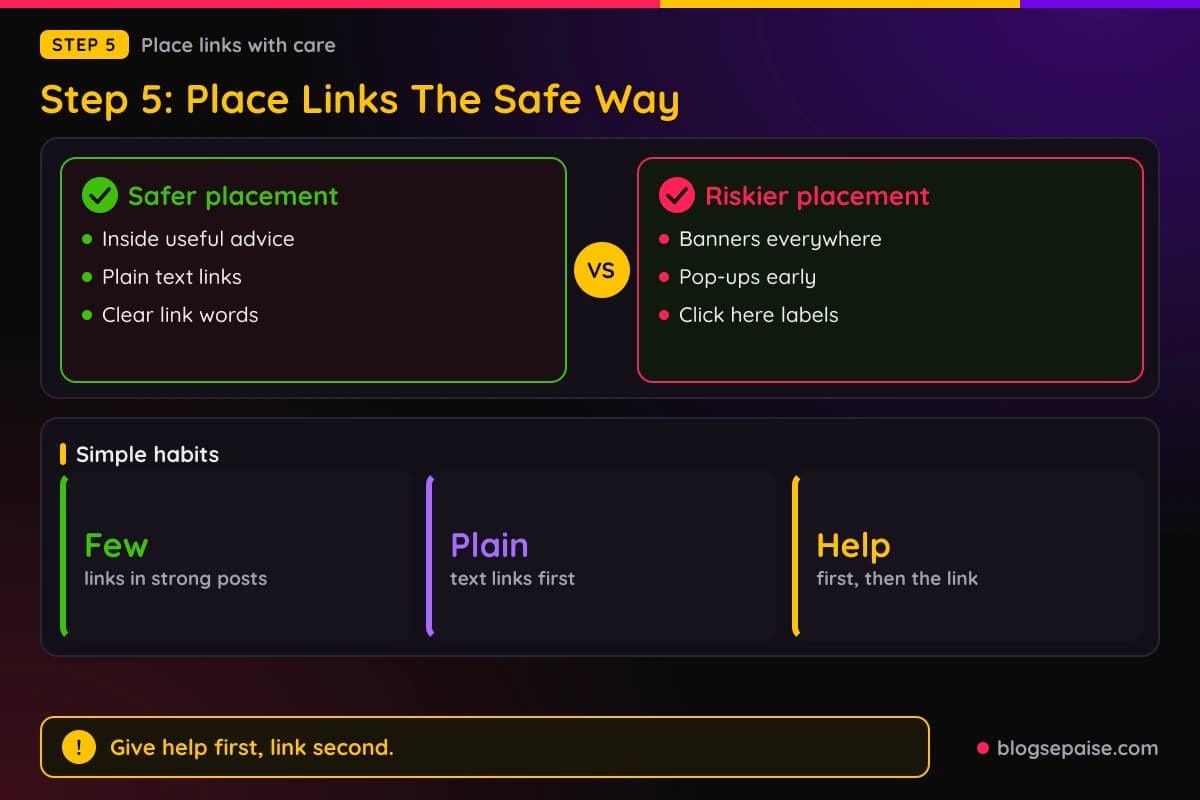
Avoid banners and pop-ups at this stage. Plain text links are easier to keep in balance with your writing.
Use link words that tell the reader where the link leads. A link labeled with the tool name is honest, while a link labeled click here is vague.
Link tools can tidy long web addresses. Keep the destination obvious to readers either way.
Google recommends the sponsored value in the rel attribute for paid placements. Many site owners use it on affiliate links too.
Check that every affiliate link opens the right page. A broken link looks careless and earns nothing.
Start with only a few links in your strongest posts. You can add more later, once you see how readers respond.
Give the help first and the link second. A reader who got value from a paragraph is more ready to click.
Plan for ads that may come later. Once AdSense runs, ads and affiliate links share the page, so leave room.
That is the same balance point from Step 2. A calm page works for both.
Read each program's terms before you place its link. Our guide on how to read affiliate program terms shows which clauses to check.
Match the link to the search intent of the post. A reader who wants a how-to guide expects tools, not a sales pitch.
Do not force a link into a post that does not need one. Some of your best pages may carry no link at all, and that is fine.
Keep a simple list of every link and the post it sits in. When a program changes its terms, you can fix everything in one afternoon.
Look at your top posts every month. Remove any link that no longer fits or points to a product you would not recommend.
Step 6: Disclose Every Link Clearly
A disclosure tells readers you may earn money when they click. The FTC says to disclose any financial relationship with a brand, and that covers more than cash.
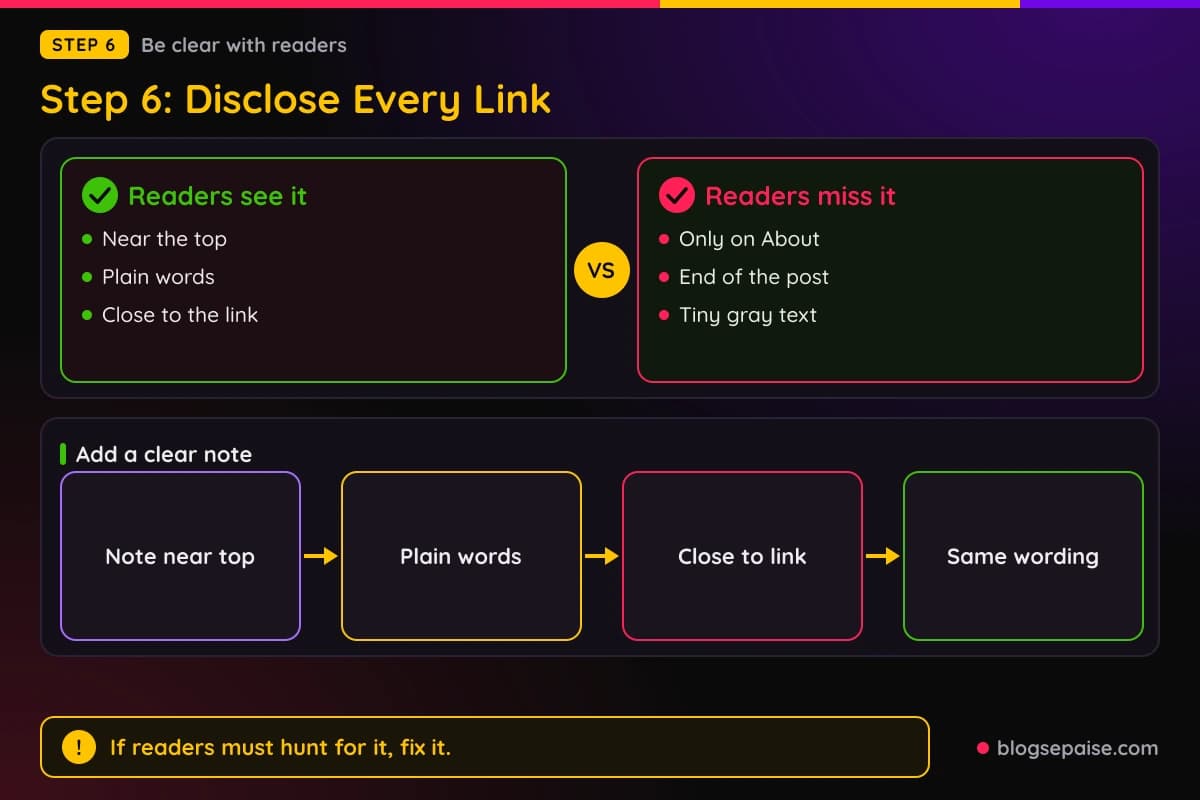
Put the note where readers cannot miss it. The FTC warns that a disclosure only on a profile or About page, at the end of a post, or behind a more link is likely to be missed.
So place a short note near the top of every post that has links. Add another near the link when the post is long.
Use plain words. The FTC suggests simple language such as ad, advertisement, sponsored, or a clear statement of the connection.
A sentence like I may earn a commission if you buy through this link works well. It is short, and anyone can read it.
Avoid vague tags. The FTC warns against labels such as sp, spon, or collab.
Do not bury the note in a block of links or hashtags. It should stand on its own.
Disclosure is separate from AdSense. Still, an honest site is easier to defend and easier to trust.
Your site-wide disclosure page remains useful. It tells the full story, while the in-post note does the quick job.
Use the same wording across your posts. Consistency avoids mistakes and saves time.
Videos and social posts need their own notes. Put the disclosure in the video itself, rather than just in the description.
The FTC is a US agency, so check local rules if you live elsewhere. The habit of plain, visible notes travels well anywhere.
Many programs also set their own disclosure rules. Read their terms so your notes match.
Go back through old posts and add notes where they are missing. A quick audit takes less time than you expect.
Place the note above the first link, not below it. A reader should meet the words before they meet the link.
Read the note as a stranger would. If it sounds like legal jargon, rewrite it in everyday words.
Honest notes often build trust rather than reduce it. Readers respect a blogger who says plainly how the site earns money.
Never shrink the note into tiny gray text. If a reader has to hunt for it, the note is not doing its job.
Step 7: Apply And Use The Waiting Time
When the site feels ready, apply through the AdSense sign-up. Use your own domain, the Google Account you plan to keep, and accurate details.
Double-check the age and code access basics from Step 1. Small gaps there can slow things down.
After you submit, Google reviews the whole site. Its help text says this usually takes a few days, and in some cases 2 to 4 weeks.
Check the Sites card on your AdSense homepage for progress. Do not send duplicate applications.
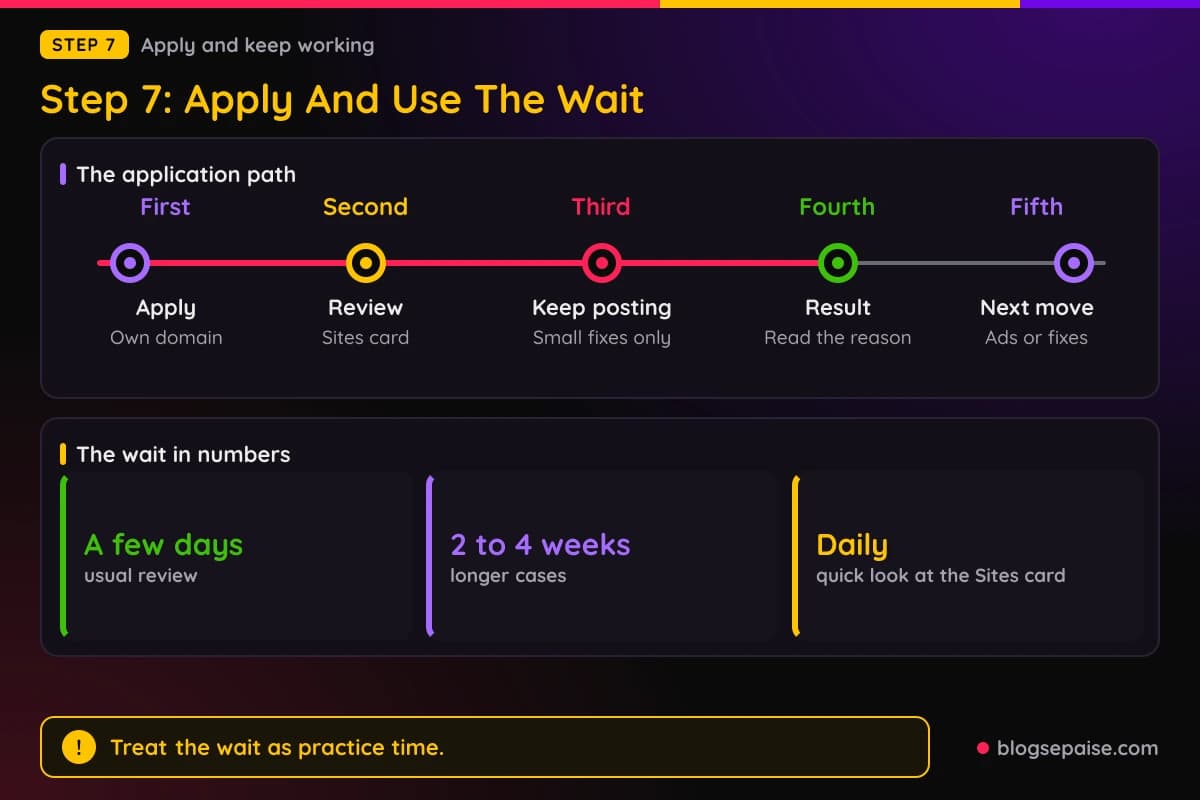
Make only small fixes while you wait. A big redesign makes the site hard to judge.
Keep publishing helpful posts. Steady new content shows that the site is alive.
Keep your affiliate work going at the same calm pace. Links already placed in useful posts can keep earning during the wait.
Test one or two programs that accept people quickly. Our guide to instant approval affiliate programs covers the options and the catch.
Track clicks and sales in a notebook or spreadsheet. Numbers show you which posts work.
Work on traffic too. Our guide on getting traffic to a brand new affiliate site gives you ideas that cost little.
If the answer is yes, follow Google's setup steps and add ads in moderation. A balanced page serves readers, ads, and affiliate links together.
If the answer is no, read the reason before you act. Fix the problem Google names, then apply again.
A rejection is feedback, not a final verdict. Many sites improve and succeed on a later try.
Do not pay anyone who promises guaranteed approval. Nobody outside Google controls the decision.
Set a weekly rhythm for the wait. One new post, one old post improved, and one hour of link checks is a good plan.
Avoid refreshing the Sites card all day. A quick look once a day is plenty.
Keep your email inbox in view too. Google may write to you if it needs anything, so check the folder for messages.
Treat the wait as free practice time. Every post you write now helps both your ads and your affiliate income later.
A Worked Example: Meera Waits For Her Review
Meera runs a blog about budget meal planning for students. She has 14 posts and 38 affiliate links spread across them.
Most of her posts are short, and several are little more than a product name with a link. She plans to apply to AdSense next week.
She reads the policies and asks the blunt question about each post. If the links vanished, would the post still help anyone?
For 9 of the 14 posts, the honest answer is no. Those posts copy the store description and add a link.
She does not delete the site. She makes a plan for the next two weeks.
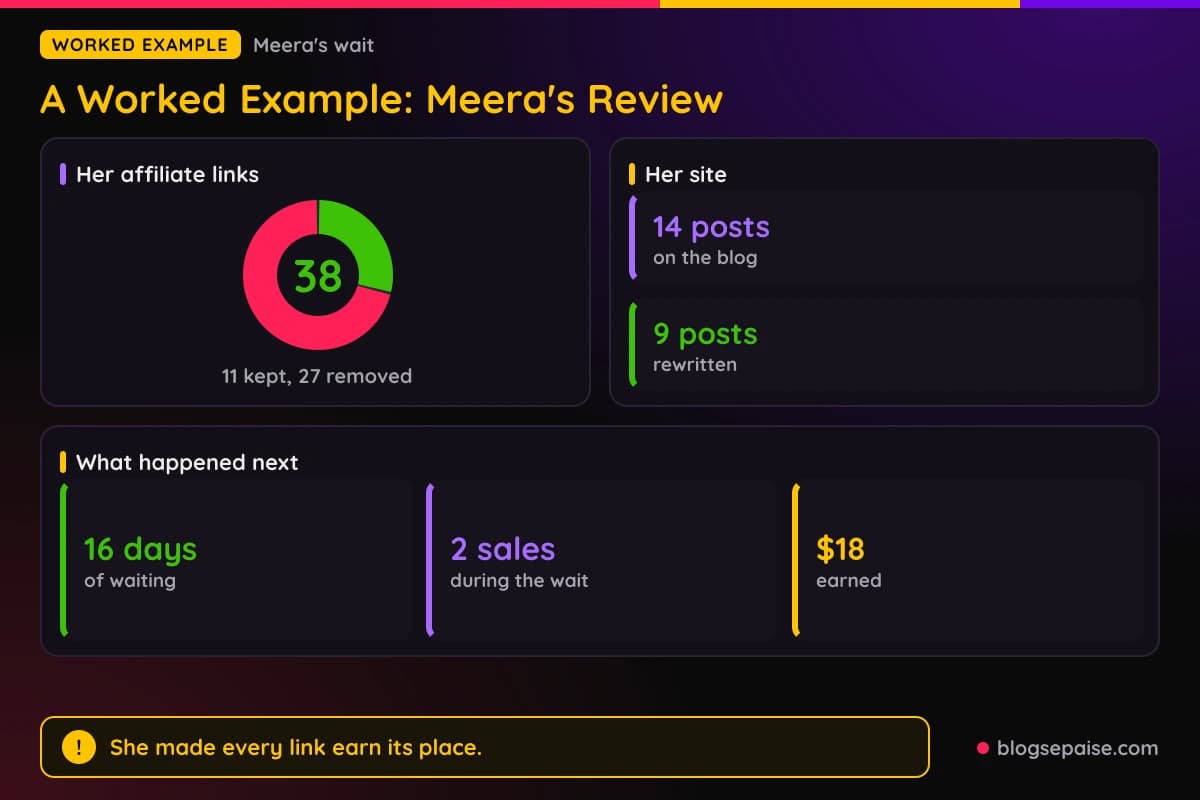
First, she rewrites the 9 weak posts with her own recipes, costs, and photos. Each one now explains how she shops and cooks.
Then she cuts her links from 38 to 11. The 27 she removed sat in posts where they added nothing.
She adds an About page, a Contact page, and a privacy policy. She links all three in the footer.
She writes a one line disclosure near the top of every post that still has links. It says she may earn a commission if readers buy through them.
After that, she submits her AdSense application. The Sites card shows her site as under review.
During the wait, she keeps working. She publishes 2 new posts that have no affiliate link at all.
She also tests one link in her best budget grocery post. She places it after a full section of tips.
Over the 16 days of waiting, 2 readers buy through that link. She earns $18.
On day 16, the result arrives, and it is a yes. Had it been a no, her plan would have stayed the same: read the reason, fix it, and apply again.
Look at what changed. Her link count fell, but the value of every page went up.
Meera did not hide her links, and she did not drop affiliate income. She made each link earn its place.
Her income stayed small, and that is normal. The $18 proved that a link in a helpful post can earn without hurting the site.
If she had added more links just to chase more money, she would have risked the pages that carried her application.
Her order of work is the lesson. Content first, trust pages second, links third, disclosure everywhere, and then the application.
Common Mistakes With Affiliate Links Before AdSense
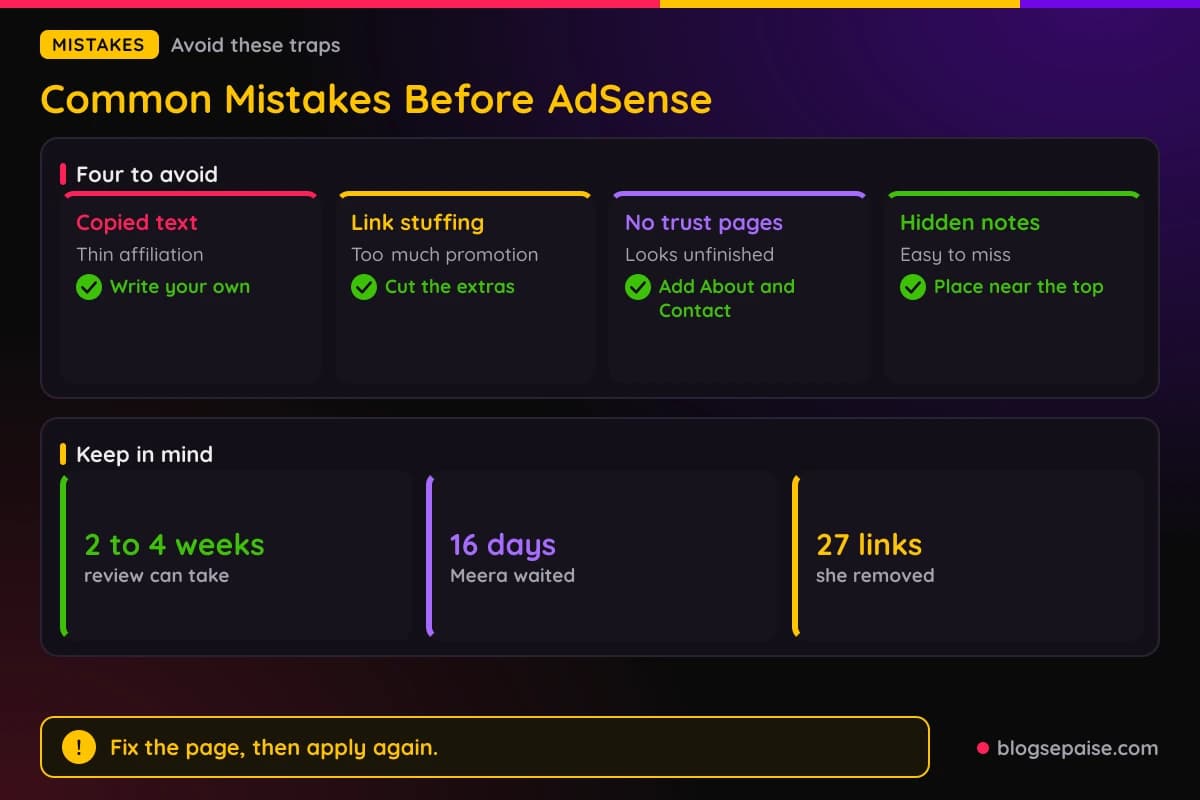
The first mistake is copying merchant descriptions. Google's spam policies call that thin affiliation, and readers can find the same words on the store page.
The second is packing every post with links. A post with more promotion than help reads like an ad.
The third is skipping the trust pages. A site with no About, Contact, or privacy policy looks unfinished.
The fourth is hiding the disclosure. A note at the bottom or on a distant page is easy to miss.
The fifth is applying with a tiny site. A handful of short posts gives a reviewer little to judge.
The sixth is reapplying the same day after a no. Without fixes, you get the same answer.
The seventh is a panic redesign during the review. Large changes make the site hard to judge and waste your time.
The eighth is buying an approval service. Nobody outside Google decides the result.
The ninth is stacking banners and pop-ups early. They add clutter before you have earned any trust.
The tenth is ignoring program terms. A rule break can cost you an affiliate account even if AdSense says yes.
The eleventh is bulk AI pages with no edits. Google names pages made at scale that add nothing for users as abuse.
The twelfth is using images you do not have the right to use. Make your own, or use ones you may use.
The thirteenth is giving up after one no. Most sites that succeed fix a few things and try again.
The last mistake is chasing both goals with equal force on day one. Build the readers first, and the money follows.
Final Thoughts
Affiliate links before AdSense approval are not forbidden, but they are not free of risk. The risk comes from thin pages and promotion that outweighs help.
Build a site you would trust as a reader. Original posts, simple trust pages, a few honest links, and clear notes give you the best shot.
Then apply, wait, and keep working. The weeks in between are a gift, because every good post you write helps your ads and your affiliate income.
Start with one page today. Ask if it would still help a reader with every link removed, and fix it if the answer is no.
Frequently Asked Questions
1. Can I use affiliate links before AdSense approval?
Yes, nothing in Google's eligibility rules bans them. Keep them few, well placed, and surrounded by original content.
2. Will affiliate links get my AdSense application rejected?
Links alone do not decide it. Thin pages, copied content, and pages with more promotion than useful text are the real risks.
3. How long does AdSense take to review a new site?
Google says the review usually takes a few days, but in some cases it can take 2 to 4 weeks. Track it on the Sites card.
4. How many posts do I need before I apply?
Google gives no set number. Aim for enough useful posts that a stranger can tell what the site is about.
5. Do I need a privacy policy and an About page?
Google's eligibility text does not name them. They still make a site look real, and a privacy policy helps with data rules.
6. Should I remove all affiliate links while I wait?
Not always. Remove links from thin pages, and keep the ones inside useful posts.
7. Can I apply with a free blog?
Some hosted platforms have their own paths. Many bloggers choose their own domain because full access to the site code is required.
8. Is an affiliate disclosure required?
The FTC says to disclose financial relationships clearly and near the link. Check local rules if you live outside the US.
9. Do I need to use rel sponsored on affiliate links?
Google recommends the sponsored value for paid placements. Many site owners add it to affiliate links as a safe habit.
10. Can I use AI to write posts for the site?
You can use it as a helper, but edit hard and add your own knowledge. Pages that add nothing for users can hurt you.
11. What if my application is rejected?
Read the reason, fix the named problem, and wait before you try again. A rejection is feedback you can act on.
12. Can I earn from affiliate programs while AdSense is pending?
Yes. Programs approve you on their own rules, and some accept new sites quickly.
13. How many affiliate links are too many?
Google gives no number. If a page has more promotion than useful text, you have too many.
14. Should I wait to add affiliate links until after approval?
You can, and it is a safe choice for a very thin site. A site with strong posts can keep a few well placed links.
15. Will AdSense and affiliate links work together later?
Many bloggers run both. Keep each page balanced so ads, links, and useful text share the space fairly.