Do 404 Errors Hurt SEO? What To Fix, Redirect, And Ignore
A 404 error does not hurt your rankings on its own. Google treats a missing page as a normal part of the web and does not count it against the rest of your site.
That answer calms most bloggers down, and then the next question shows up. If 404s are harmless, why does Search Console keep listing them, and which ones deserve your time?
Some 404s do cost you. A deleted post that still earns visitors, a page with strong backlinks, or an internal link that points nowhere can all leak traffic and trust.
Other 404s are junk. They come from mistyped URLs, old campaigns, and pages that never existed on your site, and you can leave them alone.
The skill is telling the two groups apart quickly. Affiliate blogs make this extra important, because a deleted review or a dead landing page can take commission with it.
Nine steps follow. You learn what a 404 is, what Google does with it, how to find your errors, and how to sort them into fix, redirect, or ignore.
Soft 404s get their own step, since they are the version that causes real trouble. You also get a plan for a helpful custom 404 page and a WordPress setup for redirects.
If you are still working through the basics of getting pages into Google, read our guide on why new blog posts are not indexed by Google first. It covers the indexing side that this guide builds on.
Broken outbound affiliate links are a different problem from 404s on your own site. We cover that near the end and point you to the right tools.
Disclosure: Some of the links I share might be affiliate links. If you click on one and make a purchase, I may earn a small commission as a thank you. But don’t worry, it won’t cost you anything extra. I only recommend stuff I genuinely believe in. Your support helps me keep creating awesome content. You can read my full affiliate disclosure in my disclaimer page.
Search 1,500+ affiliate programs in the Blogsepaise Program Database and filter them by category, network and commission type, then go straight to each program's signup page. The Link Health Monitor then checks your posts for broken, redirected and untagged affiliate links.
What A 404 Error Actually Is
Every time a browser or a crawler asks your server for a page, the server answers with a status code. A 404 means the server could not find that URL.
The code is not a bug in your site. It is the correct answer when a page does not exist, and Google documents it as a 4xx client error code.
A 410 is the close cousin. It means the content is gone for good, and Google treats a 410 the same way it treats a 404.
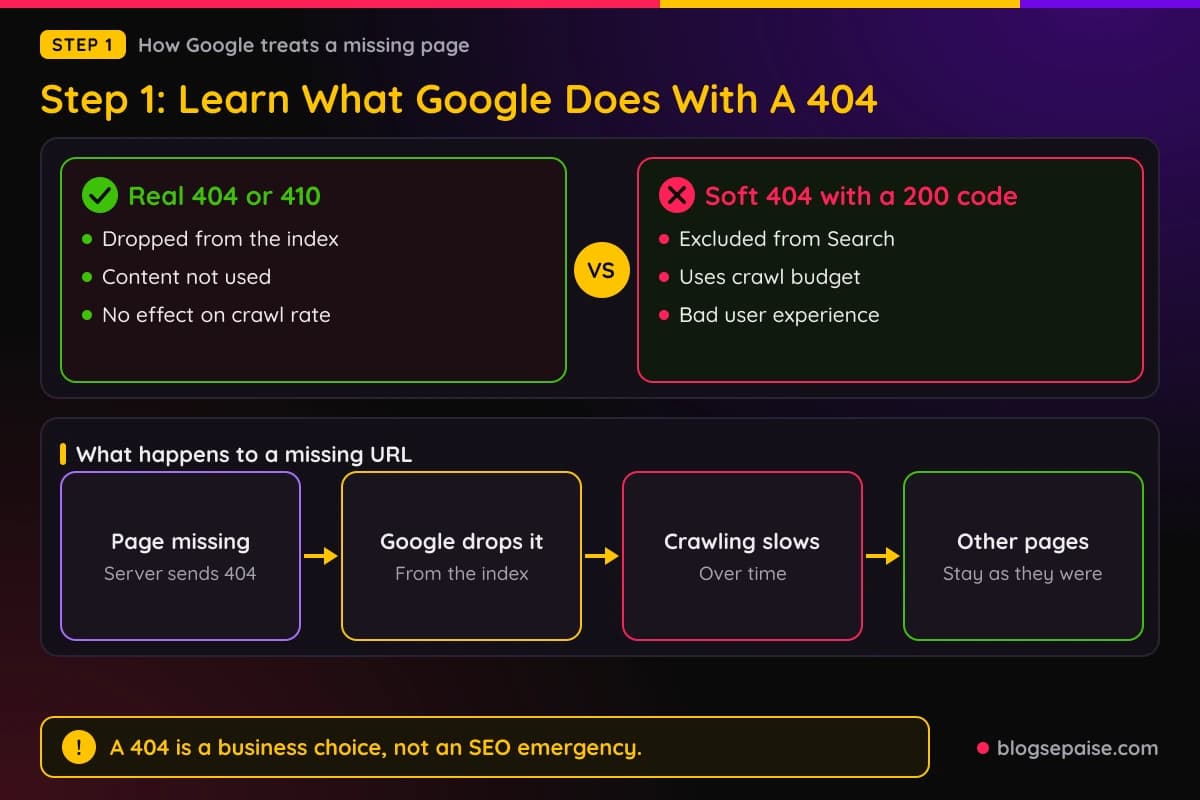
Google handles all 4xx errors except 429 in one way. Its crawlers tell the next processing system that the content does not exist.
Google does not use content from a URL that returns a 4xx code. If the URL was already indexed, the indexing pipeline removes it.
A URL that Google meets for the first time and finds missing is not processed at all. Crawling of such URLs also gradually decreases over time.
Notice that nothing in that process punishes your site. The missing URL drops out, and the rest of your pages stay where they were.
A 429 is the exception on the list. Google treats it as a sign the server is overloaded, so it behaves like a server error and not like a missing page.
Bloggers often mix up a 404 with other problems. A blank page, a server crash, and a redirect loop are different issues with different codes.
A 404 also differs from a page that exists but is not indexed. Search Console reports both in the same area, which causes a lot of the confusion we sort out below.
A soft 404 is the sneaky cousin. The page tells visitors it is missing but the server still answers with a success code.
We will return to soft 404s in Step 6. For now, hold on to one idea: a real 404 is honest, and honest is good.
Step 1: Learn What Google Does With A 404
Google published a clear answer to the ranking question back in 2011. It called 404 errors a perfectly normal part of the web.
The same post explains that URLs which no longer exist do not affect how Google crawls and ranks your other URLs. If some URLs on your site return a 404, that fact alone does not hurt you or count against you in the results.
Google even prefers a clean 404 or 410 when you remove a page. A proper status code tells the search engine the truth, and the truth lets it move on.
Search Console help repeats the point. A 404 is not necessarily a problem if the page was removed without any replacement.
Google also does not expect every page on your site to be indexed. Non-indexed URLs can be fine, and the pages that matter are your key pages.
In October 2026, Gary Illyes of Google said a 404 carries no penalty, and described it as a normal sign that a page is missing. He added that a 404 does not drain your crawl capacity.
Illyes also called fixing a 404 entirely optional, though it can be a smart business move depending on your site. That one line is the whole framework for this guide.
A 404 is a business choice, not an SEO emergency. You fix the ones that cost you money or trust, and you skip the rest.
Search Console's Crawl Stats report says the same thing in its own way. It lists Not found (404) under possibly good response codes.
That report adds that 404s may come from broken links inside your site or outside it. It also says that fixing every 404 is neither practical nor always desirable.
Google adds that 4xx codes other than 429 have no effect on crawl rate. A pile of 404s does not slow Googlebot down.
Soft 404s are different. Gary Illyes said in 2025 that soft 404 pages use crawl budget without giving anything back.
That is why this guide treats real 404s and soft 404s as two separate jobs. One is mostly noise, and the other deserves attention.
Step 2: Know When A 404 Does Not Hurt Your Rankings
Most 404s fall into this group, and you can stop worrying about them. John Mueller of Google said in 2018 that a 404 is fine when the URL has no traffic and no relevant links.
In 2026 he repeated the idea on Reddit, noting that 404s and 410s are not a negative quality signal. He added that seeing 404s in Search Console is normal and that every site has them.
A URL that never existed on your site is the clearest case. You can safely ignore 404 errors reported for URLs that do not exist on your site.
Someone mistyping your address creates one of these.
Pages you deleted on purpose also belong here when nothing replaces them. Returning a 404 is the right thing to do for a deleted page with no replacement.
Search Console help gives a simple rule for the report. Fix only the 404 errors you link to yourself or list in a sitemap.
Read that rule twice. A 404 from your own link or your own sitemap is something you control, and the rest of the list is not your job.
The same help page says a submitted URL that returns a 404 is worth fixing. That means any URL in your sitemap should work, since a sitemap is a list of pages you want found.
Do not waste a weekend chasing every row in the report. Time spent on junk 404s is time you could spend writing the next review or improving a page that already earns.
Mueller also said that when Search Console lists a huge number of errors, it sorts them by priority. If the top ones look irrelevant, nothing more important is likely sitting below them.
That tip saves time on a large site. Scan the top of the list, and when it is all junk, close the tab.
Step 3: Find Your 404 Errors In Search Console
Search Console is the first place to look, and it costs nothing. Open the Page indexing report and look for the reason called Not found (404).
The description reads simply: the page returned a 404 error when requested. You can click that reason to see the affected URLs.
The report has a related reason named Page with redirect. It lists non-canonical URLs that redirect to another page, so those URLs will not be indexed.
You will also see Soft 404 in the same report. Google describes it as a page request that returns what it believes is a soft 404 response.
Write down the URLs that matter. Keep a short list of every 404 that still gets visits, still has backlinks, or still sits in a sitemap.
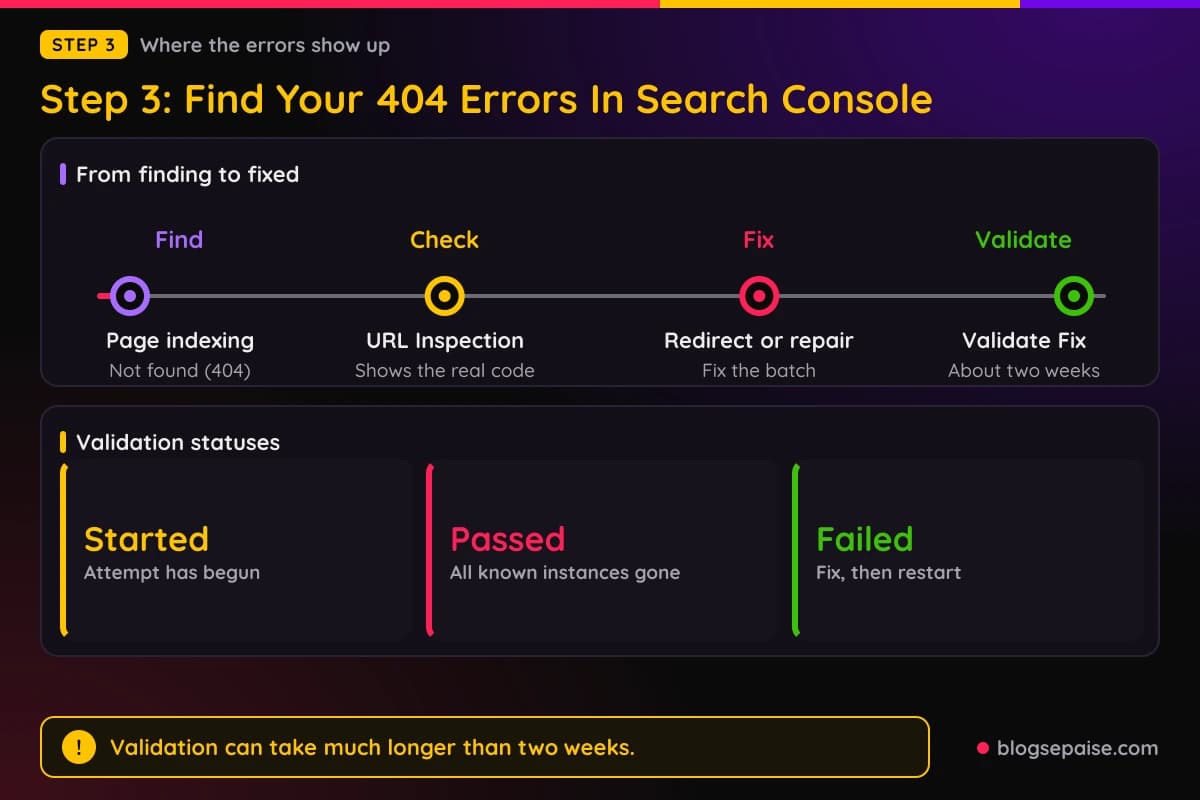
Search Console also has a URL Inspection tool. It shows the HTTP code your page actually returns, so you can confirm that a missing page answers with a real 404.
Use it again after a fix. Google recommends the tool to verify that a moved URL returns the correct code, such as a 301.
When you fix a batch of pages, you can click Validate Fix in the report. Search Console then checks a few pages right away and rechecks the URLs known to have the issue.
Validation typically takes up to about two weeks, though it can take much longer. You get a notification when validation succeeds or fails.
The statuses are Started, Passed, and Failed. Passed means all known instances of the issue are gone, or the affected URL is no longer available.
Failed means a certain threshold of pages still has the issue. Fix the problem and restart validation.
Step 4: Sort Every 404 Into Fix Or Ignore
Now you have a list. The sorting job is where you save the most time, because each 404 gets one of three outcomes: fix, redirect, or ignore.
Start with the URLs that earn visits. If a deleted page still gets traffic, the page mattered to somebody, and you are losing those visitors every day.
Then check backlinks. A link from another site that points at a 404 does not pass its value to you.
John Mueller said in 2018 that if a 404 URL has traffic or links, you should point those links at new URLs or restore a redirect. That advice is the heart of this step.
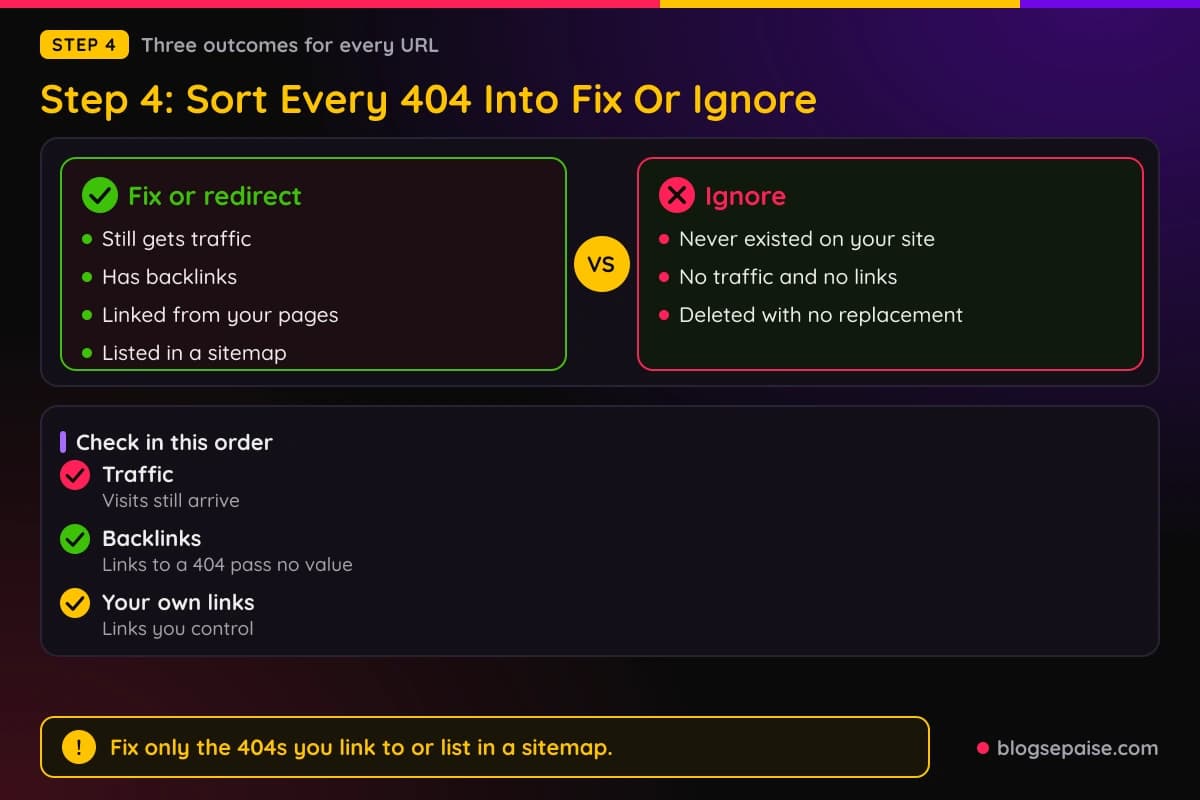
Next, check the pages you link to yourself. An internal link to a missing page is your own mistake, and you can fix it in minutes.
Fix the link so it points to a live page. If no live page fits, remove the link.
Sitemap URLs come next. A sitemap should list pages that work, so any 404 inside it needs either a fix or a removal from the file.
Money pages need extra attention on an affiliate blog. If you deleted a review or a comparison post and it was bringing readers to your affiliate links, a 404 ends that path completely.
Decide if each page should come back. Restoring a useful page is often better than redirecting away from it.
Mueller said in 2022 that adding a redirect for links to old 404s can still help for a while. He doubted it makes a big difference after two years unless the links are really strong.
So older breakage matters less than fresh breakage. A 404 you created last week deserves more urgency than one from years ago.
When a 404 has no traffic, no links, no internal links, and no sitemap entry, ignore it. Illyes said Google does not care when a URL returns a 404.
A simple habit helps here. Keep a running note of the URLs you decided to ignore, so you do not review the same rows next month.
Step 5: Redirect The Right Way With A 301
A redirect tells visitors and Google that a page has a new location. Google lists removing a page and sending users to a new page as a standard use.
Use a permanent redirect when the move is permanent. A 301 or 308 status code means the page moved to a new place for good.
Permanent redirects show the new target in search results. Temporary redirects show the source page, so they are the wrong tool for a page that is gone.
A server-side redirect is the best way to send Google and people to the correct page. Google recommends a permanent server-side redirect whenever possible.
Google keeps track of both the old URL and the new URL. The old one becomes an alternate name for the new one, and the alternate names fade away without you doing anything.
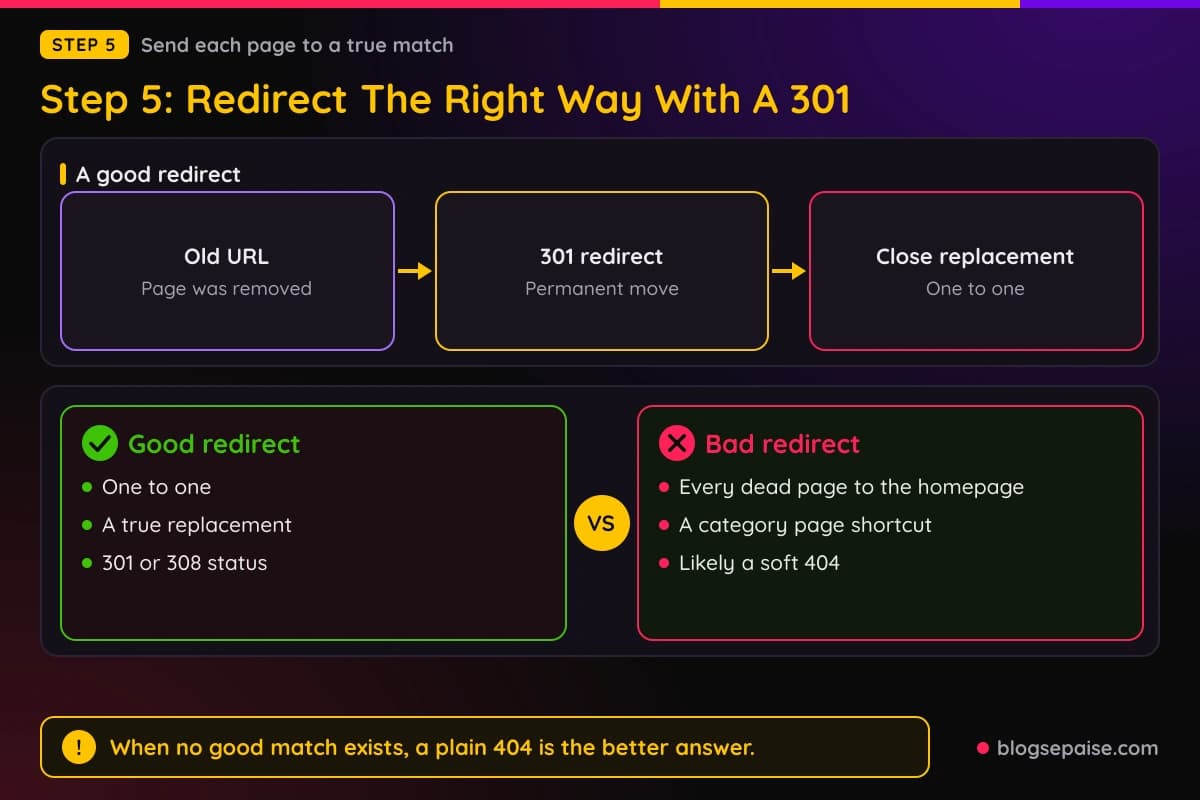
The target matters more than the code. Redirect each old page to a close replacement, meaning a page a reader would actually want next.
Do not send everything to your homepage. John Mueller said in 2016 that redirecting all pages to the home page is something Google sees as soft 404s.
Gary Illyes said in 2026 that dead pages sent to the homepage confuse humans and make your data confusing. His colleague Cherry Prommawin warned against taking the lazy shortcut of redirecting all your dead pages home.
The rule from Google is one to one. A redirect makes sense only when a true replacement exists.
In 2024, Mueller put it this way: do not blindly redirect to a similar page, a category page, or your homepage. If you are unsure, do not redirect.
That last line is worth printing and taping to your monitor. When no good match exists, a plain 404 is the better answer.
Mueller said in January 2026 that a redirect to a category page can help in the short term but can confuse users. Over time it may become a soft 404.
He described a homepage redirect as not great and not terrible, and it also keeps the old URL out of the index. In short, a bad redirect gains you very little.
Redirects also fix misspellings. Google suggests mapping common misspellings or alternate spellings to the same page on your site using redirects.
After you add a redirect, test it. Use the URL Inspection tool and check that the old URL returns a 301 and lands where you intended.
Step 6: Catch Soft 404s And Return The Right Code
A soft 404 happens when a URL shows a page that tells the visitor the content does not exist, but the server still sends a 200 success code. Google considers it a bad user experience.
Google excludes such pages from search. Search Console lists them in the Page indexing report under Soft 404.
A common cause is a custom error page that looks friendly but forgets to send the 404 code with it.
Mueller said in 2026 that a 200 status with 404 style content is definitely a soft 404. The server and the page must agree.
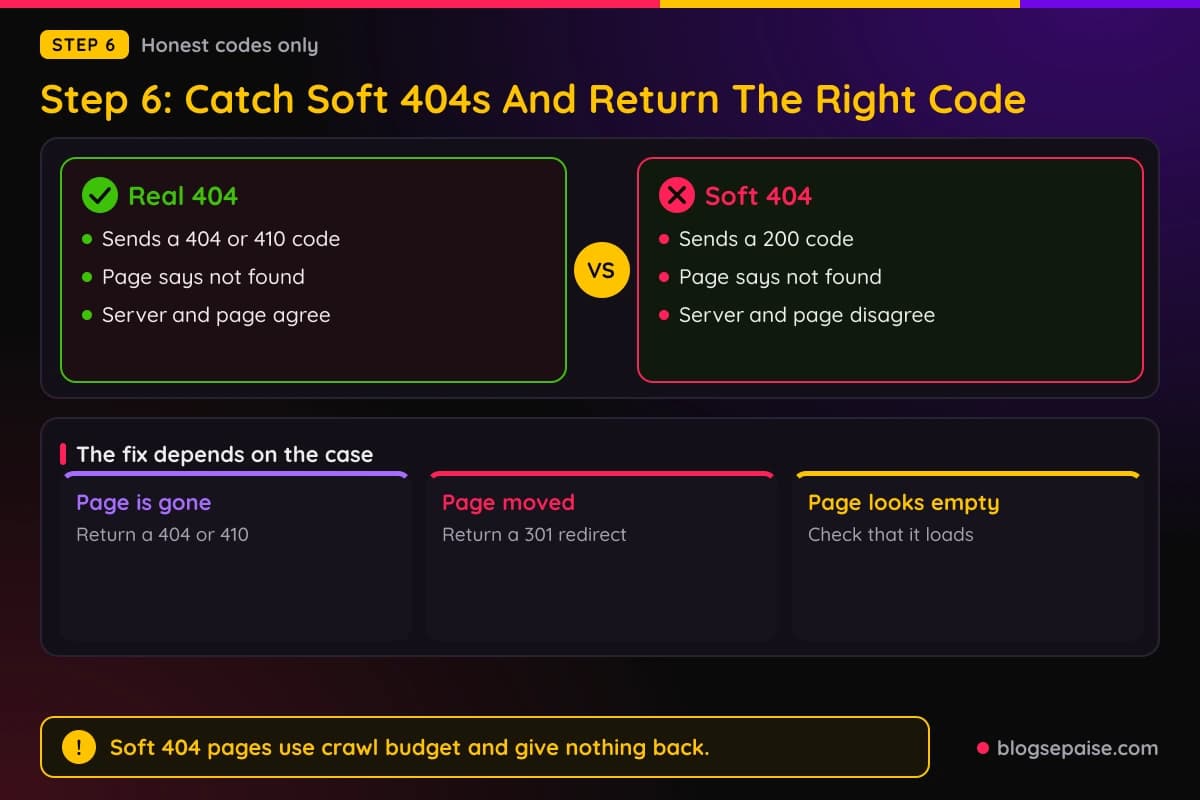
The fix depends on the case. If the page and its content are gone, return a 404 or 410 status code.
If the page moved, return a 301 redirect to the new location. If a good replacement does not exist, a real 404 is the clean answer.
Sometimes a soft 404 flag lands on a page that is fine. A page that exists but looks empty or shows an error may have loading problems.
The page may have failed to load for Googlebot or missed critical resources. Common causes include blocked resources, too many resources, server errors, and slow or very large resources.
Search Console help tells you to add more information to a page that is wrongly flagged. Content that shows the page is valid helps Google see that it is not a soft 404.
The URL Inspection tool shows both the rendered content and the returned HTTP code. If the rendered page looks blank or shows an error message, resources are probably failing to load.
Redirects can also create soft 404s, as covered in Step 5. A redirect that dumps visitors on an unrelated page sends the wrong signal.
Remember that a soft 404 matters because it wastes crawling. Illyes said soft 404 pages consume crawl budget without offering any value in return.
The 404 versus 410 choice is simple. Google treats both codes the same, so use whichever your system supports and move on.
Step 7: Find The 404s Search Console Misses
Search Console reports what Google tried to crawl.
A crawling tool fills the gap by walking your site the way a bot does. Screaming Frog is a common choice, and its Response Codes tab has a Client Error (4xx) filter that lists every URL that returned a 404 or a similar code.
Select a broken URL and open the Inlinks tab in the lower pane. You then see which of your pages link to it.
Screaming Frog also offers a bulk export for this. Go to Bulk Export, then Response Codes, then Client Error (4xx) Inlinks, and you get one file with every broken URL and the page that links to it.
The Inlinks view shows the last page that linked to the 404. If a redirect chain sits in the middle, check its All Redirects report to find the original source.
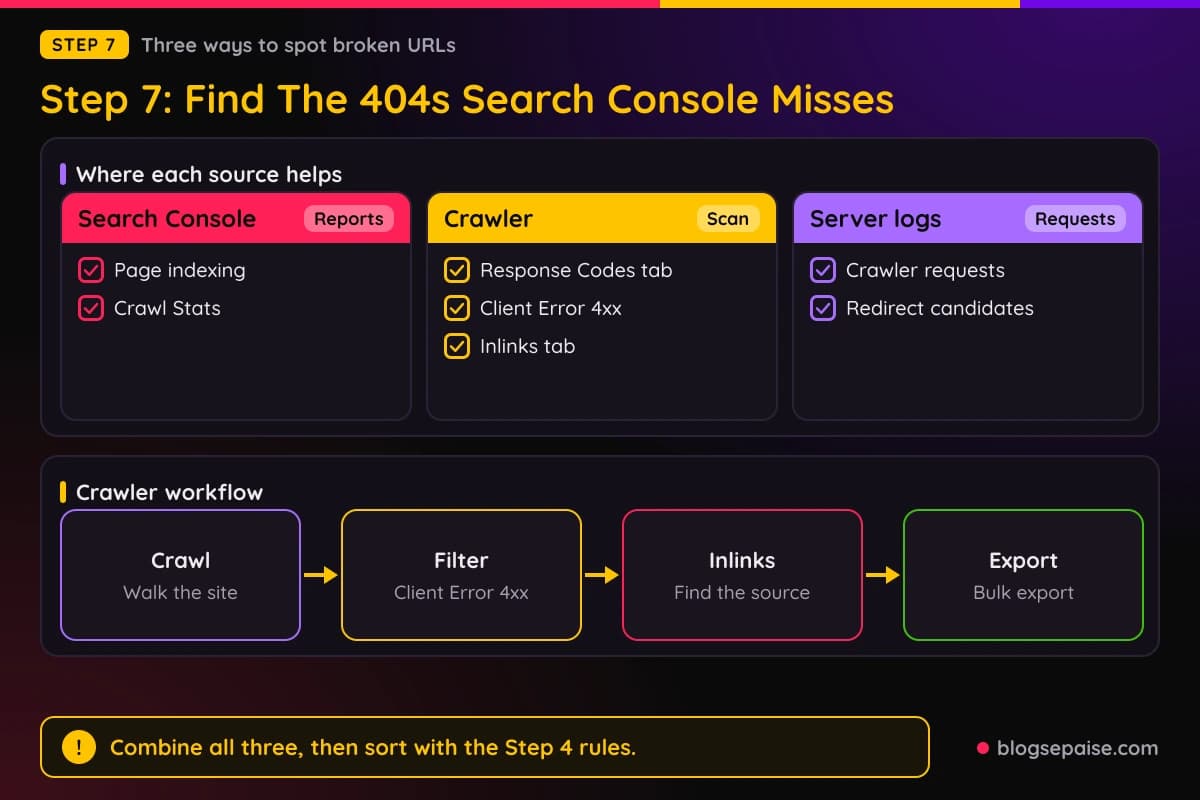
Server logs are another source. They show which missing URLs crawlers actually request.
Glenn Gabe suggested checking server logs for search engine crawlers hitting specific 404s to find redirect candidates. That idea is useful when you want to know which broken URLs matter to bots.
The Crawl Stats report in Search Console summarizes crawl responses. You find it by opening settings and choosing Crawl stats, and it works for root level properties.
Google aims that report at advanced users. Sites with fewer than a thousand pages generally do not need it.
Use these sources to build your own short list. Combine Search Console, a crawler, and your logs, then apply the sorting rules from Step 4.
Look for patterns. When many broken links share the same cause, such as a renamed category, a single fix repairs them all.
Keep your own internal links clean. A crawler can show every page that links to a missing URL, and those links are the easiest 404s to remove.
Step 8: Build A Helpful Custom 404 Page
A custom 404 page helps the real person who landed there. Google calls for a page that tells visitors clearly that the page they want cannot be found.
Make the page look and feel like the rest of your site, including the navigation.
Add links to your most popular articles or posts, plus a link to your home page. Those links keep a reader on your site instead of sending them back to search results.
Consider giving users a way to report a broken link. Readers who report a broken link point you straight to a fix.
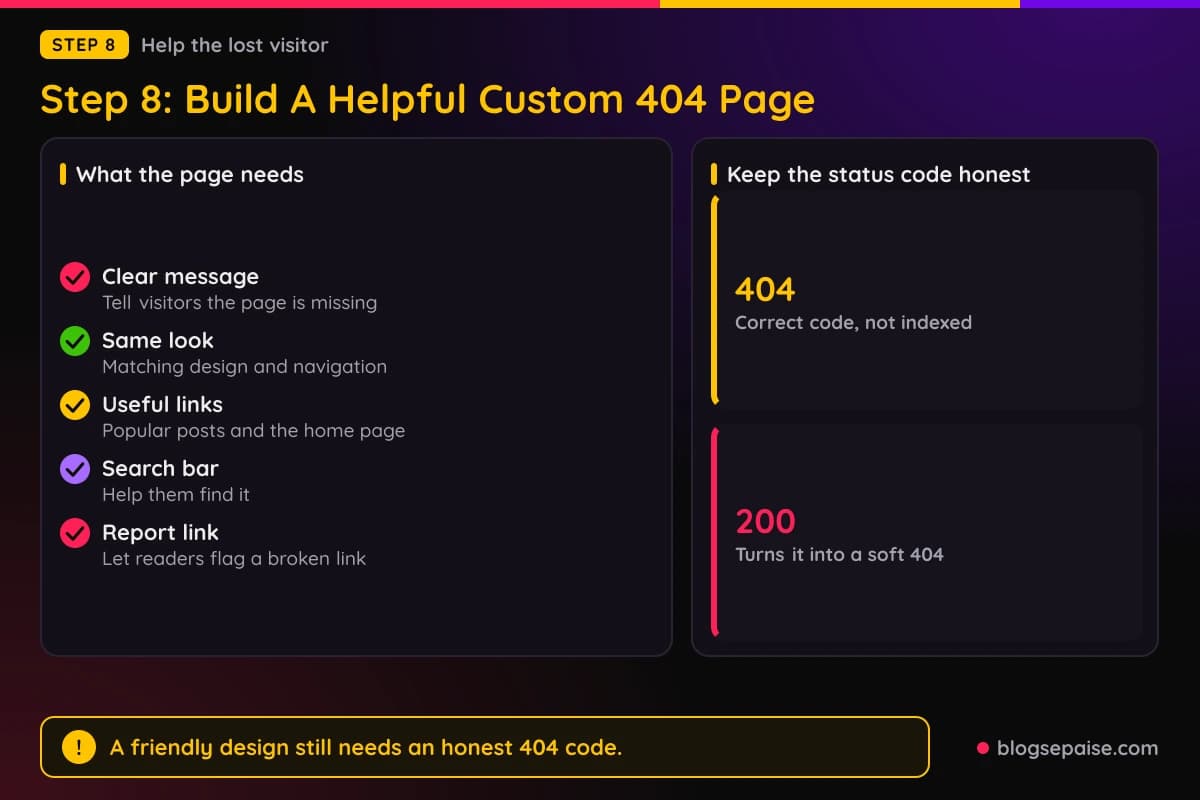
Google's Cherry Prommawin suggested a friendly message, a search bar, and links to top categories or your latest content. She said to make the 404 page as helpful as possible and to embrace the error instead of hiding it.
The page must still send a 404 status code. Google tells site owners to make sure the server returns a 404 so the pages are not indexed.
If the page returns a 200 code, it turns into a soft 404. The design can be friendly, but the code must stay honest.
Check the code with the URL Inspection tool. You can also test any made up address on your site and look at the status your server returns.
For an affiliate blog, the 404 page is a chance to keep a reader. Link to your best guides and reviews, since a visitor who hit a dead end may still want what you cover.
Keep the page simple. A clear message, a search box, and a handful of useful links give a lost visitor a path forward.
Step 9: Handle 404s And Redirects In WordPress
Many affiliate blogs run on WordPress, and a plugin can handle the redirect work. Rank Math includes a 404 Monitor and a Redirections module.
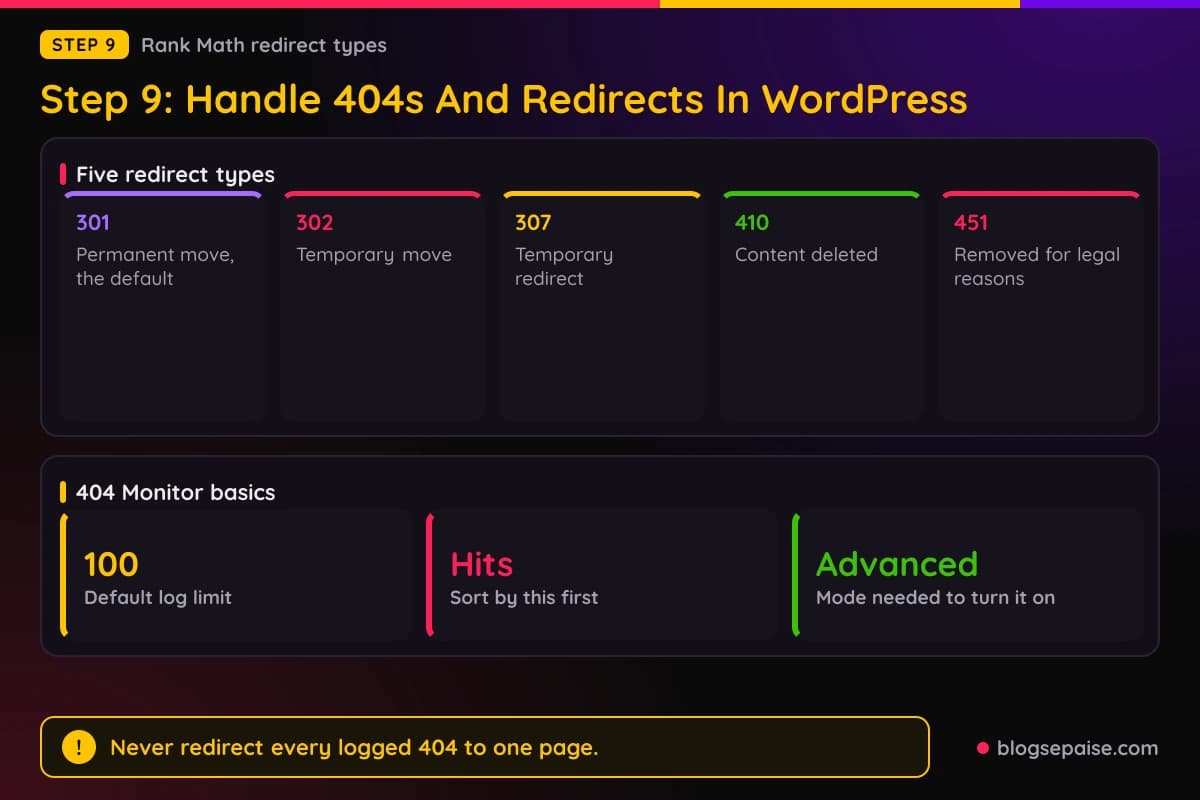
Turn on the 404 Monitor from the Rank Math dashboard. It needs Advanced Mode, and you find the log under Rank Math SEO and then 404 Monitor.
Each entry shows the URI, the number of hits, and the access time. Advanced mode adds the referrer and user agent, which helps you find where a broken link came from.
Sort the log by hits. The URLs with the most requests are the ones worth your attention first.
The log has a default limit of 100 entries. When the limit is exceeded, the monitor clears itself and starts counting again, so review it before it fills.
Rank Math notes that its 404 Monitor stores no personal data such as IP addresses. You can also exclude paths from the log if some URLs keep adding noise.
The Redirections module offers five types: 301, 302, 307, 410, and 451. A 301 is the permanent move, and it is the default for manual redirects.
A 410 marks content as deleted with no replacement. When you create a 410, you skip the destination field.
For a 301, enter the full URL where visitors should land. Rank Math also offers Auto Post Redirect, and the redirects it creates are always 301.
If you rename a post URL, the old address should point to the new one.
Do not turn the plugin into a magic broom. Redirecting every 404 in the log to one page recreates the mistake from Step 5.
Our guide to the best SEO plugins compares Rank Math with other options if you are still choosing.
Broken Affiliate Links Are A Different Problem
Everything above is about URLs on your own site. A dead affiliate link on one of your pages is the opposite direction, because a visitor clicks your link and lands on a broken page elsewhere.
Google does not count that as a 404 on your site, so Search Console will not show it. Your reader sees the failure, and you lose the commission.
Checking these links takes a separate routine. Our guide on affiliate link monitoring walks through the status codes, crawls, stock checks, and schedules.
The Link Health Monitor tool helps with the same job. Our Affiliate Link Health Monitor scans a page or sitemap and flags broken affiliate links, links that land on a homepage, and Amazon links with missing tags or out-of-stock products.
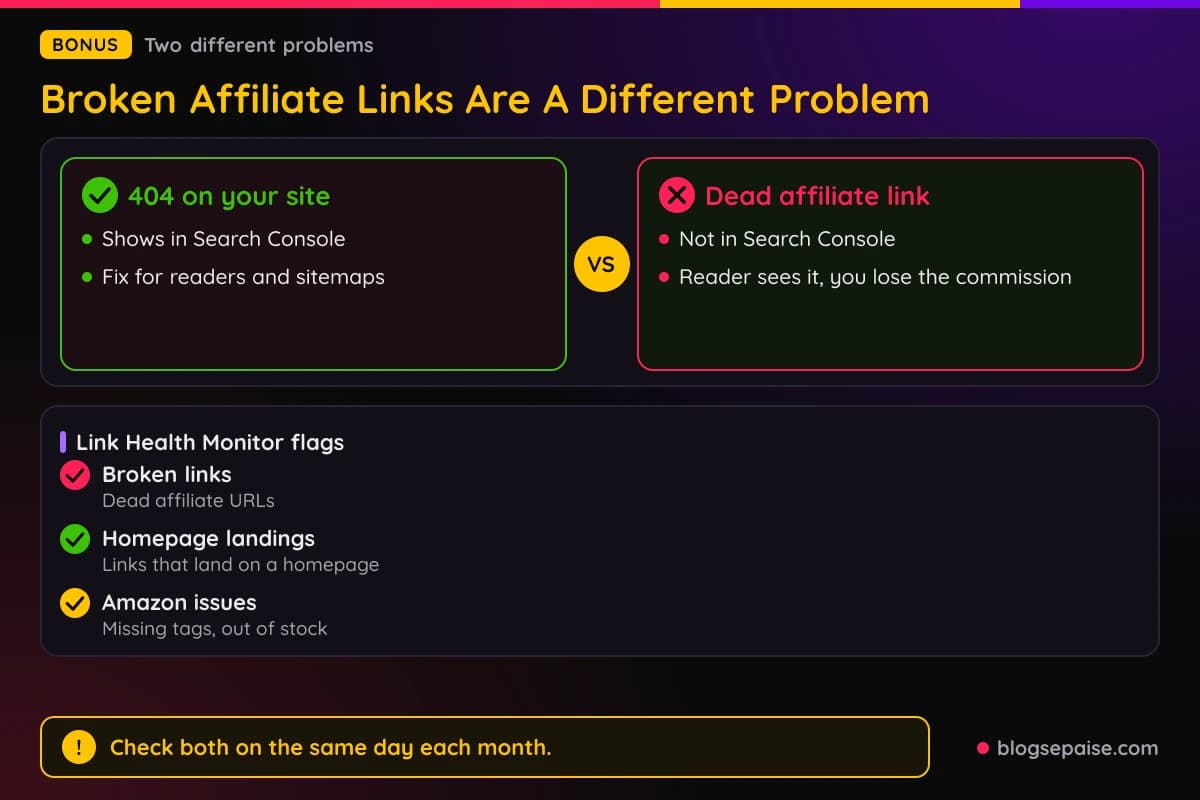
It also checks for links missing rel sponsored. That is a separate rule from 404s, yet it fits the same cleanup session.
Treat the two jobs as a pair. Fix 404s on your own site for readers and sitemaps, then check outbound links so clicks reach a working offer.
An old affiliate program that closed can break many links at once. When a network or merchant changes URLs, every post that links to it needs a new target.
If your site has a lot of pages, schedule the checks. Do the 404 review in Search Console monthly, and run the link scan on the same day so the habit sticks.
Our guide on how to avoid getting penalized covers the broader quality rules that keep a site safe. Broken links are a small part of that bigger picture.
Common 404 Mistakes On Affiliate Blogs
The first mistake is panic. Seeing a long list of 404s feels like a crisis, yet most of them are harmless.
The second mistake is redirecting everything to the homepage. Google treats that as a likely soft 404, and visitors land on a page they did not ask for.
A third mistake is deleting a post that still earns, with no replacement plan. Check traffic and backlinks before you delete anything.
Some bloggers forget the sitemap. A sitemap full of dead URLs tells Google you want pages found that do not exist.
Another mistake is a custom 404 page that returns a 200 code. It looks fine to a human and still counts as a soft 404.
Leaving internal links to deleted pages is another common slip. Those links are the one kind of 404 you fully control.
Using a temporary redirect for a permanent move is a quieter error. A temporary redirect keeps showing the source page in search results, which is not what you want for a page that is gone.
Skipping the test is the last one. After any fix, check the real status code with the URL Inspection tool.
Final Thoughts
A 404 error does not hurt your SEO by itself. Google treats it as a normal answer for a missing page and drops the URL from its index without punishing the rest of your site.
The cost comes from losing a page that mattered. A deleted post with traffic, a page with strong backlinks, a broken internal link, or a dead sitemap entry deserves a fix.
Soft 404s deserve a fix too. Return a real 404 or 410 when the page is gone, and a 301 to a true replacement when it moved.
Do not redirect to the homepage to make the number go down. Leave the 404 alone when no close page exists.
Build a custom 404 page that helps a lost visitor, and keep the status code honest. Then handle your outbound affiliate links as their own job.
Start with the Page indexing report this week. Sort the list into fix, redirect, and ignore, and spend your time on the short list that matters.
Frequently Asked Questions
1. Do 404 errors hurt SEO?
A 404 alone does not hurt your site's rankings. A missing URL does not count against your other pages.
The harm comes from losing a page that had traffic or backlinks, or from internal links that point to nowhere. Fix those and ignore the rest.
2. Should I fix every 404 error in Search Console?
No. Fix only the 404 errors you link to yourself or list in a sitemap.
Errors for URLs that never existed on your site can be ignored. Pages deleted on purpose with no replacement should stay a 404.
3. Should I redirect 404 pages?
Redirect a 404 when a close replacement exists and the old page had traffic or links. Use a 301 to the closest matching page.
Skip the redirect when no true replacement exists. John Mueller advises that if you are unsure, you should not redirect.
4. How does a soft 404 differ from a 404?
A real 404 returns a 404 status code for a missing page. A soft 404 shows a not found message while the server returns a 200 success code.
Google excludes soft 404 pages from search. Fix them by returning a 404 or 410, or by redirecting to a replacement if the page moved.
5. Is a 410 better than a 404?
A 410 gets the same treatment as a 404. Use the one your server or plugin supports.
6. Should I redirect deleted pages to my homepage?
No. Google treats redirects of many dead pages to the home page as soft 404s, and visitors land somewhere they did not ask to go.
Gary Illyes of Google said it confuses humans and makes your data confusing. Redirect only to a true replacement.
7. How long does Search Console take to clear 404 errors after I fix them?
Validation typically takes up to about two weeks, though it can take much longer. You get a notification when validation passes or fails.
8. Do broken affiliate links count as 404 errors on my site?
No. A broken outbound link is a 404 on someone else's site, so Search Console will not report it. Use a link checker, such as our Link Health Monitor, to find those.