Traffic Dropped Overnight? A Diagnosis Checklist For Affiliate Sites After A Google Update
You open Search Console and the line that always climbs has fallen off a cliff. Clicks that held steady for months are suddenly cut nearly in half.
Your first thought is that Google updated something and hit you. That may be true, but it is also the easiest explanation to grab.
Plenty of affiliate bloggers reported sudden drops around late October 2026. A drop like that can come from an update, a broken setting, a seasonal dip, or a tracking glitch.
Each cause needs a different response. If you guess wrong, you can spend weeks rewriting posts that were fine while the real problem sits untouched.
The seven steps below take you from confirming the drop to watching the fix work. A worked example, common mistakes, and a short FAQ follow.
Disclosure: Some of the links I share might be affiliate links. If you click on one and make a purchase, I may earn a small commission as a thank you. But don’t worry, it won’t cost you anything extra. I only recommend stuff I genuinely believe in. Your support helps me keep creating awesome content. You can read my full affiliate disclosure in my disclaimer page.
If you want to save a lot of hours searching for high-paying affiliate programs, check out our exclusive list of 2500+ affiliate programs. You’ll find all the information about the programs inside the list. This list is perfect for affiliate bloggers and influencers.
Why A Sudden Drop Feels Like A Penalty
A steep fall in clicks feels personal. You wrote the posts, you built the links, and now the numbers say someone decided you do not matter.
Most of the time nobody decided anything about you. Google runs ranking systems that shift constantly, and your site sits inside those shifts along with millions of others.
Google's own guide on debugging traffic drops lists several common causes. They include algorithmic updates, technical issues, security issues, spam issues, seasonality, changing interests, and site moves.
That list matters because only some of those causes involve Google judging your content. The rest are problems you can check and often fix in an afternoon.
Affiliate sites have an extra reason to panic. A drop in clicks flows straight into fewer outbound clicks, fewer sales, and a smaller payout at the end of the month.
Panic leads to bad moves, such as deleting posts, rewriting titles on pages that still rank, or switching themes in the middle of a slump. Those moves can turn a small dip into a long one.
A calm checklist beats a fast reaction here. You gather facts first, then you decide what, if anything, deserves a change.
If you have worried about penalties before, our page on building 10,000 pages without getting penalized covers the habits that keep a site out of trouble. The article you are reading starts after the drop has already happened.
Work through the steps in order. Each one rules something out, so by the end you will know much more than you do right now.
Keep one more idea in mind as you read. A drop in traffic is a symptom, and a symptom can have many causes, so your job is to find the real one.
Doctors do not prescribe medicine before they run tests, and you should not rewrite a site before you run yours.
Step 1: Confirm The Drop Is Real
Before you investigate, make sure the drop exists. Numbers can look bad because of how they are measured, not because visitors left.
Open the Performance report in Search Console and look at the main chart for clicks and impressions. Then check the Data Anomalies page, because a drop can come from a change in data processing or a logging error.
If Google lists an anomaly that covers your dates, the fall may be a reporting issue. In that case you wait for the data to settle and do nothing else.
Next, compare Search Console with your analytics tool. If Search Console shows a steep fall but your analytics shows steady organic visits, the problem is probably a tracking tag or a filter, not your rankings.
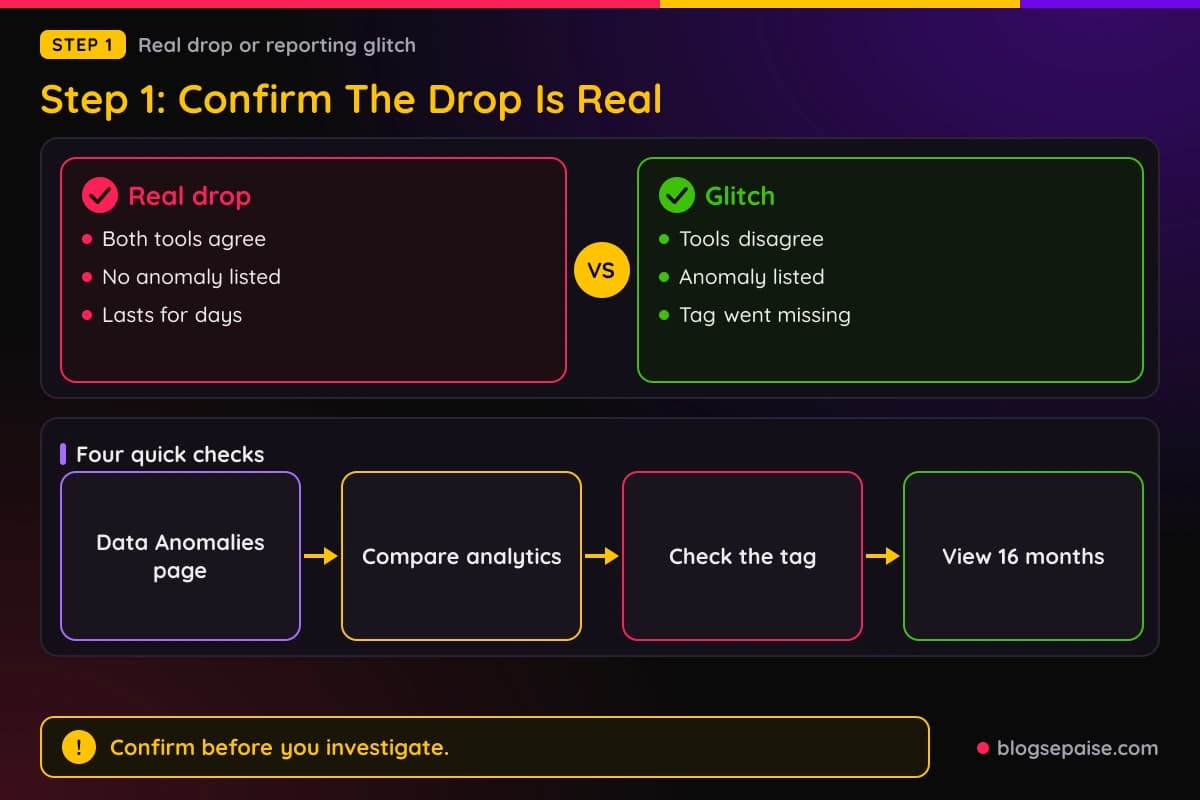
The reverse also happens. If analytics falls to zero on one day while Search Console stays flat, a tag was likely removed during a theme or plugin change.
Check that your analytics code still loads on a few different pages, including a post, a category page, and the home page. A single missing snippet in a theme file can hide a whole section of the site.
Then widen the view. Set the date filter to the last 16 months, which is the longest range Search Console keeps.
A long view shows if the same dip happened last year at the same time. Holiday weeks, school breaks, and shopping seasons often move affiliate traffic in a repeating pattern.
Pay attention to which metric moved. Google says that when impressions and clicks both fall, the cause is likely one of its common factors, while steady impressions with falling clicks point at titles and snippets.
Write down what you see in plain words, such as clicks fell from this number to that number over these dates. That note becomes your baseline for every later step.
If the drop is real after these checks, move on. If it turns out to be a tag problem or a data anomaly, you just saved yourself a lot of stress.
Our guide to setting up Google Analytics helps if your tracking was never solid to begin with.
Take a screenshot of the chart before you change anything. Screenshots protect you from memory, because stress makes drops look worse or better than they were.
Share the screenshot with a friend who runs a similar blog if you can. A second pair of eyes often spots a seasonal pattern that you missed.
Also check the dates on both tools for time zone differences. A report that cuts days at a different hour can shift a drop by a full day.
Step 2: Find The Exact Date Of The Drop
A good diagnosis starts with a date. If you cannot say which day your traffic changed, you cannot match it to anything else.
Use the Compare tab in the date filter. Pick the last three months compared with the previous period, then look closely at the daily line.
Zoom in on the days around the fall. The goal is to name one day, or at most a short window of two or three days, where the line clearly bends.
Pay attention to the shape. A large and sudden drop can point to an algorithmic update or a site-wide security or spam issue, while a sharp technical break across the whole site looks different from a slow slide.
A misplaced noindex tag, for example, usually causes a slower decline, because Google only reacts as it recrawls your pages. A real cliff overnight is more likely to be an update or a site-wide problem.
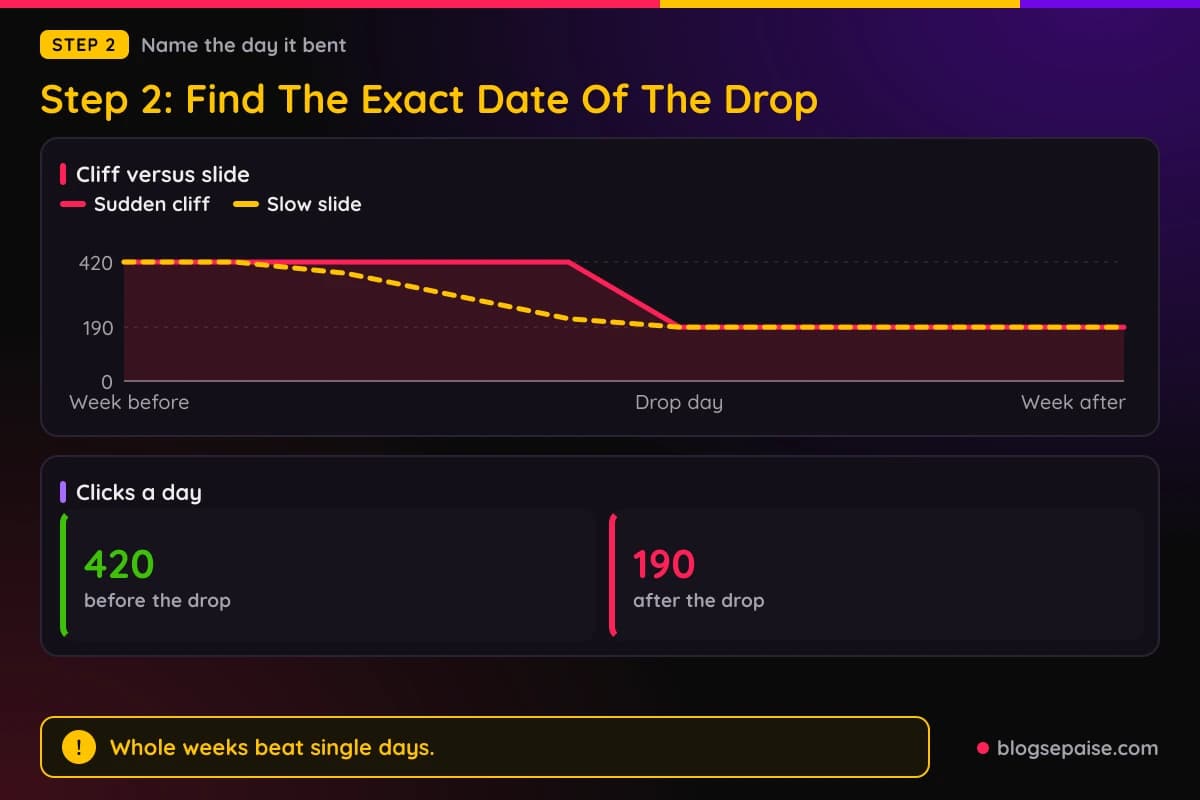
A gradual decline across many months is a third pattern. Google notes that changing interests can cause that kind of slow loss, and it has nothing to do with a single update.
Check for patterns that repeat. Some blogs dip every weekend, so a Saturday low is normal and should not be compared with a Wednesday high.
To avoid weekend noise, compare whole weeks. Take the seven days after the drop and set them against the seven days before it.
Also look at your own calendar around that date. Did you update a plugin, change your theme, edit your robots file, move a page, or switch hosts?
Those changes are easy to forget, and they are the most common reason a drop lands on a specific day. Write every change you made in the two weeks before the drop on the same note as your baseline.
Keep the date handy. In step five you will set it next to the update dates Google publishes.
If the date still looks fuzzy, note the first day that fell below your normal range. Pick a clear rule, such as the first day below the lowest day of the last month.
A clear rule keeps you honest. It stops you from picking the date that fits your favorite theory.
Step 3: Split The Loss By Page, Query, Country, And Device
A drop across the whole site and a drop on five pages tell very different stories. Splitting the loss shows you which one you have.
Start with pages. In the Performance report, turn on the comparison, open the Pages table, and sort by the clicks difference column to see which URLs lost the most.
If a handful of pages account for most of the loss, you have a page problem. If every page dropped by a similar share, you probably have a site-wide cause.
For a site-wide loss, check the Page indexing report. For a group of pages or one important page, run the URL Inspection tool on a sample.
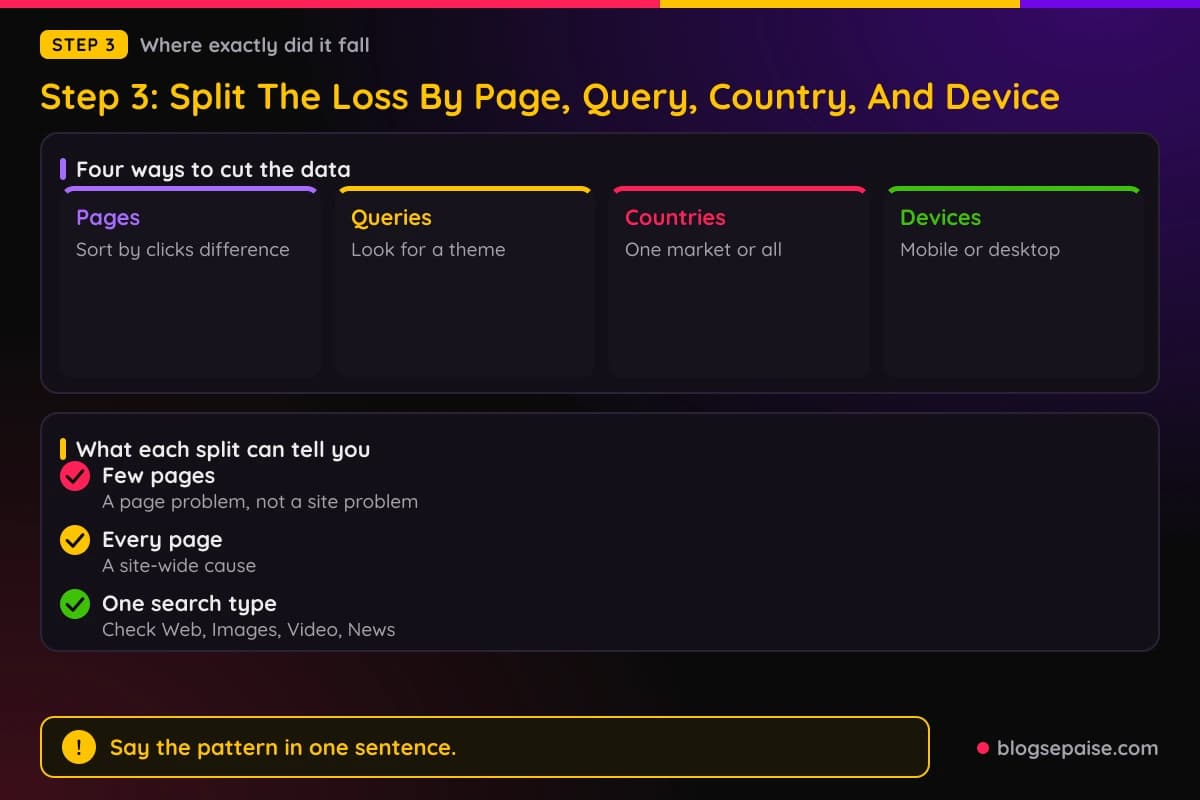
Next, open the Queries tab. Look for the search terms that lost the most clicks and ask if they share a theme, such as best-of lists, product reviews, or how-to questions.
Affiliate sites often lose first on commercial terms like best, review, and versus. Those searches attract the most competition and the most ranking changes.
Then check countries. A loss that sits in one country can point to a hosting issue, a change in local demand, or a different set of competitors in that market.
Check devices as well. If mobile fell and desktop held, look at how your pages behave on phones, including slow loading, pop-ups, or a layout that broke.
Google also suggests filtering by search type. Look at Web, Images, Video, and News separately, because a drop in one of them can hide behind a steady total.
Do not forget search appearance. A loss of rich results or other features can lower clicks even when your rankings look the same.
Open a spreadsheet and note the top ten losing pages and top ten losing queries. You will use that list in later steps to decide where to look first.
The aim is a sentence you can say out loud, such as most of the loss sits on my review pages in the United States on mobile. A sentence like that is far more useful than a feeling.
Look for a shared trait among the losing pages. They might all use the same template, the same plugin, the same affiliate program, or the same author.
A shared trait narrows the search quickly. A drop on every page that uses one table plugin, for example, points at the plugin and not at Google.
Step 4: Rule Out Technical, Security, And Manual Causes
Many drops that look like algorithm hits are really problems on the site. Rule those out before you blame any update.
Begin with the Manual Actions report. If Google applied a manual action for spam, the report says so, and the fix involves cleaning up the issue and asking for a review.
If the report shows no manual action, you can cross that cause off. Google says spam issues can also lead to lower rankings or removal through automated systems, so read its spam policies once to be sure you are clear of them.
Next, open the Security Issues report. Malware or phishing on a site can trigger browser warnings or interstitial pages that scare visitors away.
Hacked sites often show odd pages you never wrote, such as pills or casino posts. Search for your own domain plus a few of those words to see if anything strange is indexed.
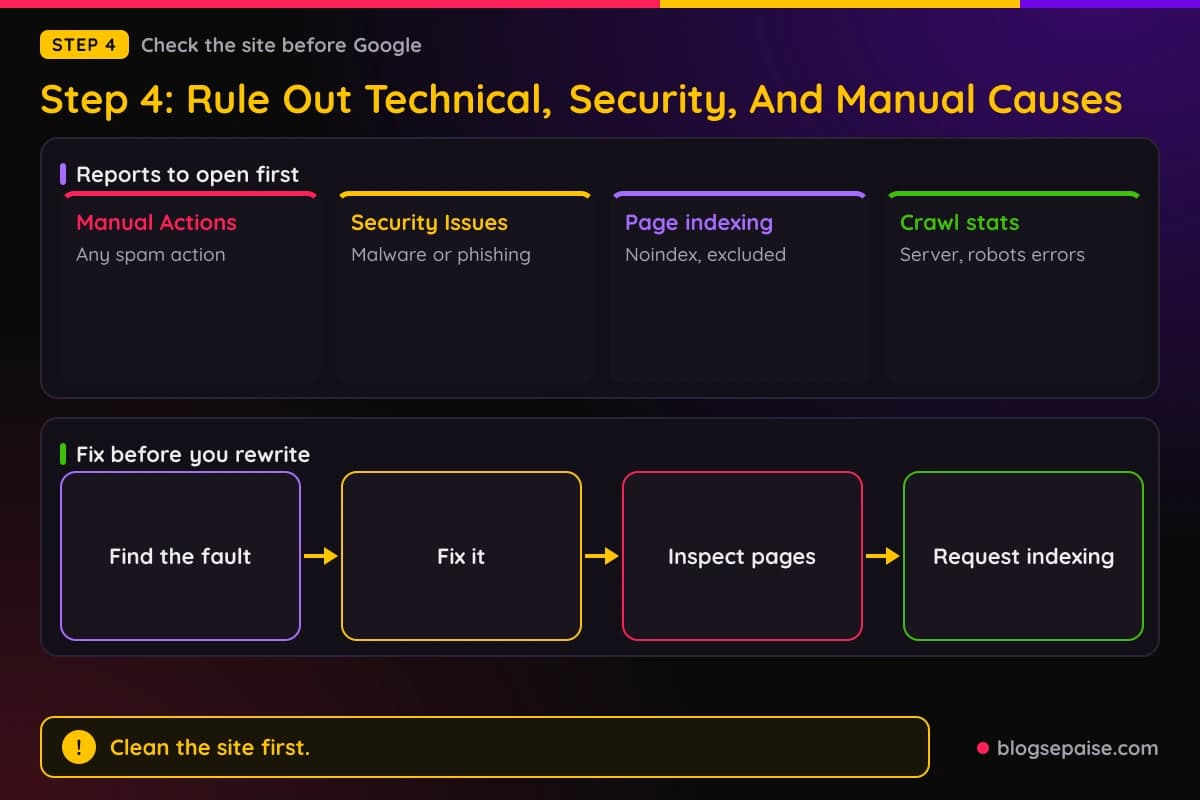
Then look at indexing. The Page indexing report shows which pages Google keeps, and a sudden jump in excluded pages is a loud warning sign.
Look closely for the noindex tag, since a single plugin setting can add it to every post. Run URL Inspection on a few losing pages and confirm that Google can index each one.
Open the Crawl stats report in the settings area as well. Server availability problems, robots.txt fetch failures, and spikes in not found errors can all stop Google from crawling and serving your pages.
Check your robots file by hand too. A single stray line that blocks a folder can hide dozens of posts.
Think about site moves. If you changed URLs, switched domains, or fixed your permalinks, expect temporary swings while Google recrawls everything.
Google says medium-sized sites may need a few weeks to settle after a move, and larger sites may need longer. If you did not move anything, cross it off the list.
Fix any real technical problem first, then request a recrawl of the key pages. Do not touch your content until this step is clean, because you will not be able to tell what helped.
Ask your host if they saw outages or changed server settings around your drop date. Hosts keep logs, and a short reply from support can save you a day of guessing.
Open your site in a private browser window and click through a few posts as a visitor would. Broken pages, redirect loops, and slow loading are easy to spot with your own eyes.
Step 5: Compare The Drop Against Update Dates
Now you can check if an update lines up with your date. Use the Google Search Status Dashboard, which lists ranking updates with their start dates and how long each one ran.
As of November 2, 2026, the dashboard lists a December 2025 core update that started on December 11 and ran about 18 days. It lists a March 2026 core update that started on March 27 and ran about 12 days.
It also lists a May 2026 core update that started on May 21 and ran about 12 days. The three spam updates it lists for 2026 are the June update on June 24, the August update on August 18, and the September update on September 24.
The September spam update ran the longest of the three, at about 13 days and 16 hours. The June and August spam updates each finished in under three days.
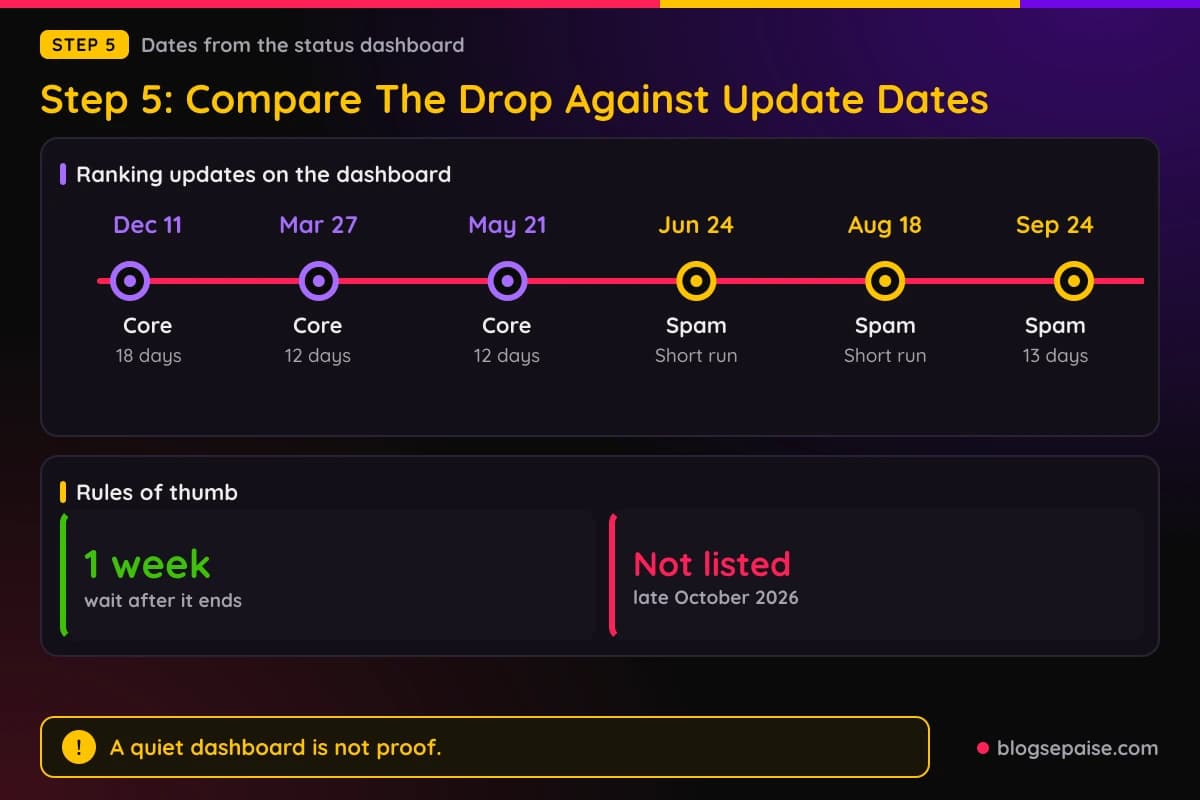
For late October 2026, the dashboard lists no ranking update that started in that window. That tells you something, but it does not close the case.
Google says smaller core updates happen between the major ones and are not announced. So a quiet dashboard does not prove that nothing changed in Google's systems.
Treat the dashboard as evidence, not as a verdict. If your drop began right after a listed start date, an update becomes a strong suspect, and if nothing is listed, a site cause moves higher on the list.
Mind the rollout window too. Google says to confirm that an update has finished rolling out before you judge a drop.
Once the update finishes, wait at least a full week before analyzing Search Console data. Then compare that week with the week before the update started.
Also remember that an update can end days before your clicks settle. A drop in the middle of a rollout may still move again before the end.
Google makes core updates several times a year, and most sites do not need to act on them. A listed update that overlaps your drop is a clue, not a sentence.
Add the matching update, or the lack of one, to your note. Your note should now hold a baseline, a date, a split, a technical result, and an update check.
Look at the update type as well. A core update changes how Google ranks pages in general, while a spam update targets spam and tends to hit sites that break the spam policies.
Affiliate sites with thin or copied content should read the spam policies carefully. Sites with real experience in their posts usually have less to fear.
Do not try to match your drop to a rumor from a forum. Stick to dates on the dashboard or in Google's own announcements, because rumors change from day to day.
Step 6: Decide What To Change And What To Leave Alone
Now comes the hard part, which is deciding what to do. The best answer is often less than you expect.
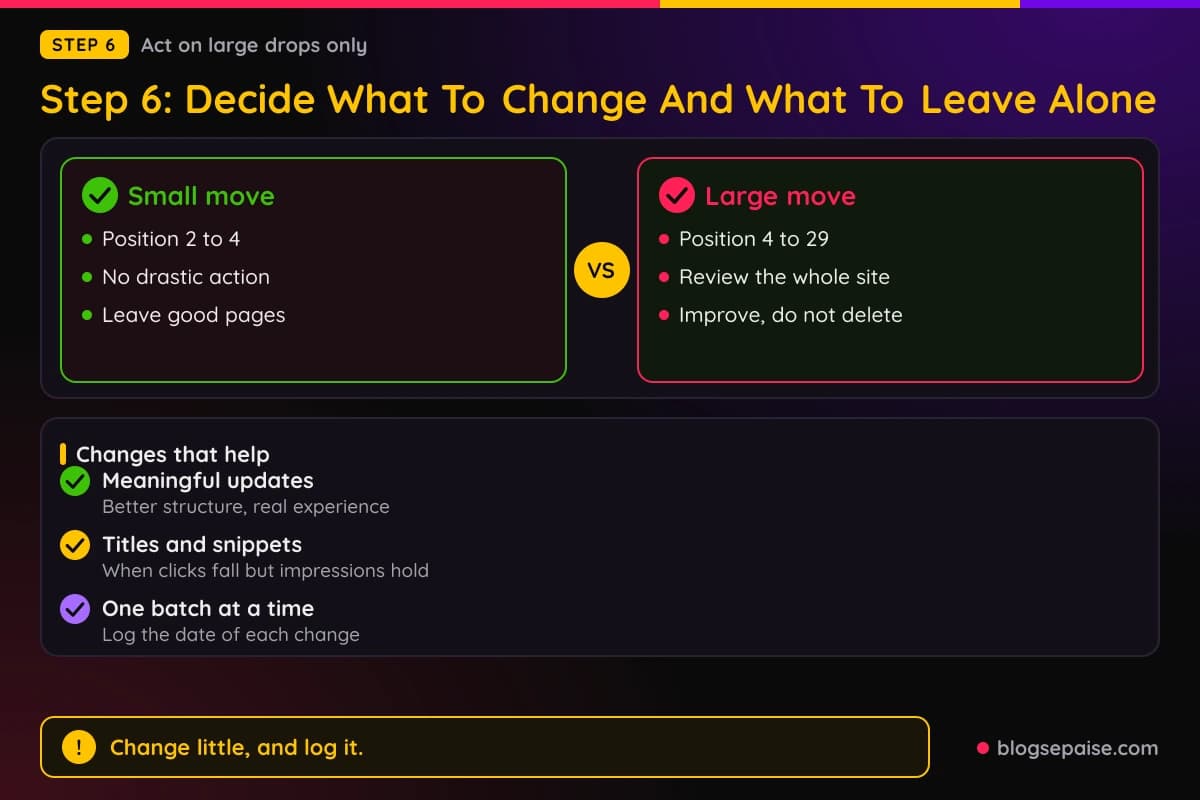
Start with how far your rankings moved. Google gives two examples: a page that slips from position 2 to position 4 is a small change, and a page that falls from position 4 to position 29 is a large one.
For a small drop, Google says no drastic action is needed and that you should avoid changing content that already performs well. Small ranking swings are normal and can reverse on their own.
For a large and lasting drop, Google suggests a deeper review of the whole site, using its helpful content questions. It also says to focus on changes that serve readers over the long term, not quick fixes.
Improve content in meaningful ways, such as restructuring a post so it is easier to read. Google says to delete content only as a last resort, when it cannot be salvaged.
For an affiliate site, a useful review asks plain questions. Do your posts show real experience, do they give a reason to pick one product over another, and are they more than a list of links?
Look hard at thin pages. A review that repeats the vendor's feature list adds little for a reader, so add what you saw, what you tested, and who the product suits.
Our guide on an AI content refresh workflow shows a careful way to update older posts without wiping out what already works. The AI content audit page helps you sort which posts deserve the effort.
Leave alone any page that held its position. Changing a healthy page because its neighbors dropped is a common way to hurt yourself.
If the drop is in clicks only, with impressions steady, work on titles and snippets. Make each title match the search better and say what the reader gets.
Make one group of changes at a time and write down the date. If you change fifty things at once, you will never know which one helped.
Expect no instant reward. Some changes can show effects within days, but Google says confirmation can take several months.
Write a short plan with three to five changes, each tied to a page you found in step three. A small plan you finish beats a big one you abandon.
Think about your readers while you edit. A post that answers the question fast, shows real photos, and gives a clear pick tends to serve people better than a longer post stuffed with links.
Step 7: Monitor For Weeks Before You Judge
After you act, the work turns into patience. Checking Search Console every hour will not speed anything up.
Pick a schedule and stick to it. A weekly check on a set day gives you enough data to see a trend without turning the dip into a daily worry.
In week one, confirm that every technical fix is in place and that Google can crawl the fixed pages. Use URL Inspection to request indexing for the most important ones.
In weeks two to four, compare clicks against the week before the problem started. Google also suggests waiting a few weeks before analyzing again after changes.
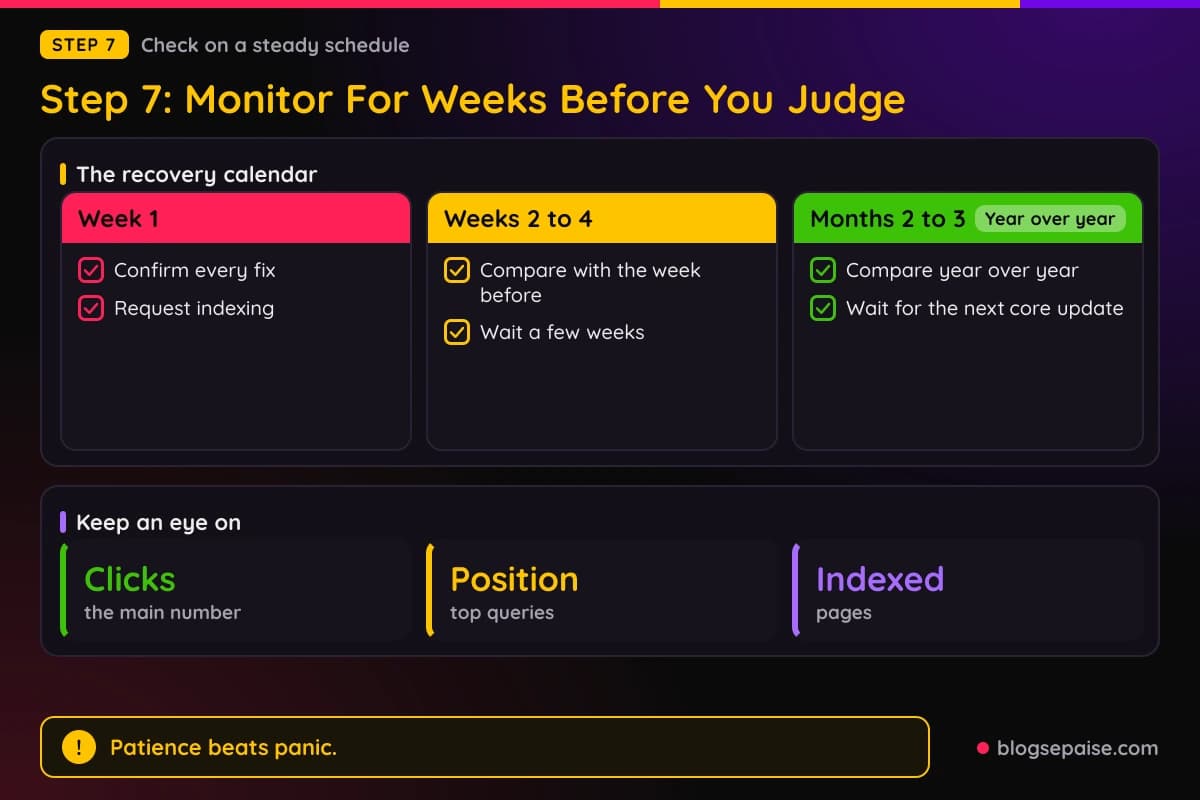
In months two to three, compare year over year if you have the data. That removes seasonal swings and shows if you are truly back.
Watch a short list of numbers: clicks, impressions, average position for your top queries, and indexed pages. Skip the rest while you recover.
Check Google Trends for your main queries too. Google recommends it to see if a decline is specific to your site or part of a market-wide change.
If no change shows up after a few months of honest improvement, Google says to wait for the next core update. That can feel slow, but forcing changes in between usually backfires.
There is no guarantee of a full recovery. Rankings also move for reasons outside your control, and a site can settle at a new, lower level.
Meanwhile, protect your income. Add an email list, work on other traffic sources, and keep publishing, because a site that depends on one search engine will always feel fragile.
Our page on affiliate blog traffic covers ways to bring in visitors that do not rely on a single ranking.
Keep your note updated each week. By the time you finish, it becomes a record you can reuse the next time your traffic wobbles.
Resist the urge to compare today with your best day ever. Compare with the same weeks in a normal month, so the bar stays fair.
A Worked Example: Marcus Checks A Drop On His Coffee Gear Blog
Marcus runs a small blog about coffee gear, with espresso machine reviews and grinder comparisons. One morning he sees that his clicks over the last seven days fell to 1,330 from 2,940 the week before.
That is a fall of about 55 percent, and his stomach drops with it. His first instinct is to rewrite every review.
Instead he follows the steps. He opens the Data Anomalies page and finds nothing, and his analytics tool shows the same fall, so the drop is real.
The daily chart shows his clicks sliding from about 420 a day to about 190 a day over roughly four days. A slide that long does not look like a sharp cliff.
He splits the loss by page. Thirty-four posts lost almost all of their clicks, while the rest of the site fell only a little.
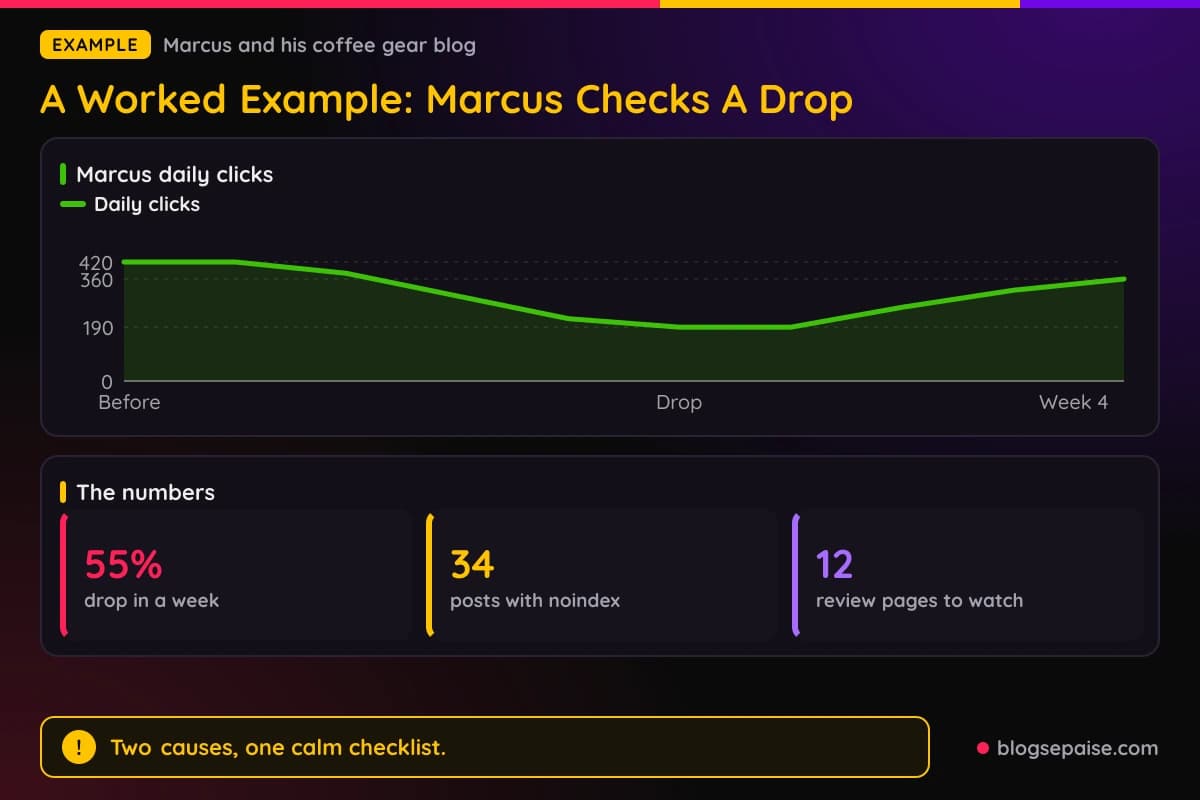
In the Page indexing report he finds those 34 posts listed as excluded by a noindex tag. A setting in his SEO plugin had added it after an update, and nobody noticed.
He checks Manual Actions and Security Issues, and both are clear. The dashboard lists no ranking update that matches the dates of his slide.
He turns the setting off, inspects a few of the posts, and requests indexing for the most important ones. He changes nothing else on those pages.
The noindex posts account for about 1,030 of the 1,610 clicks he lost, or roughly 64 percent. The remaining 580 clicks came from 12 review pages that slipped from around position 5 to position 7.
Marcus decides that a move from position 5 to 7 is small, so he leaves those pages alone. He adds a note to review them again in a month.
Four weeks later, his clicks are back near 360 a day. They have not reached 420, but they climbed without a single rewrite.
If he had rewritten every review on day one, he would have changed healthy pages and still left 34 posts invisible to Google. The checklist saved him weeks of wasted work.
The lesson is that two causes can hide inside one drop. One was a site problem that Marcus fixed, and the other was a small ranking shift that he chose to watch.
Common Mistakes When Traffic Drops After A Google Update
The first mistake is blaming Google before checking your own site. A broken tag, a noindex setting, or a server problem can look just like an update.
The second mistake is judging a drop in the middle of a rollout. Google tells site owners to wait until the update finishes and then give it a full week.
The third mistake is reading only the total. A site-wide number hides the page, query, country, and device where the real loss sits.
Another mistake is rewriting everything at once. When you change fifty pages together, you cannot learn which change helped, and you risk harming pages that were fine.
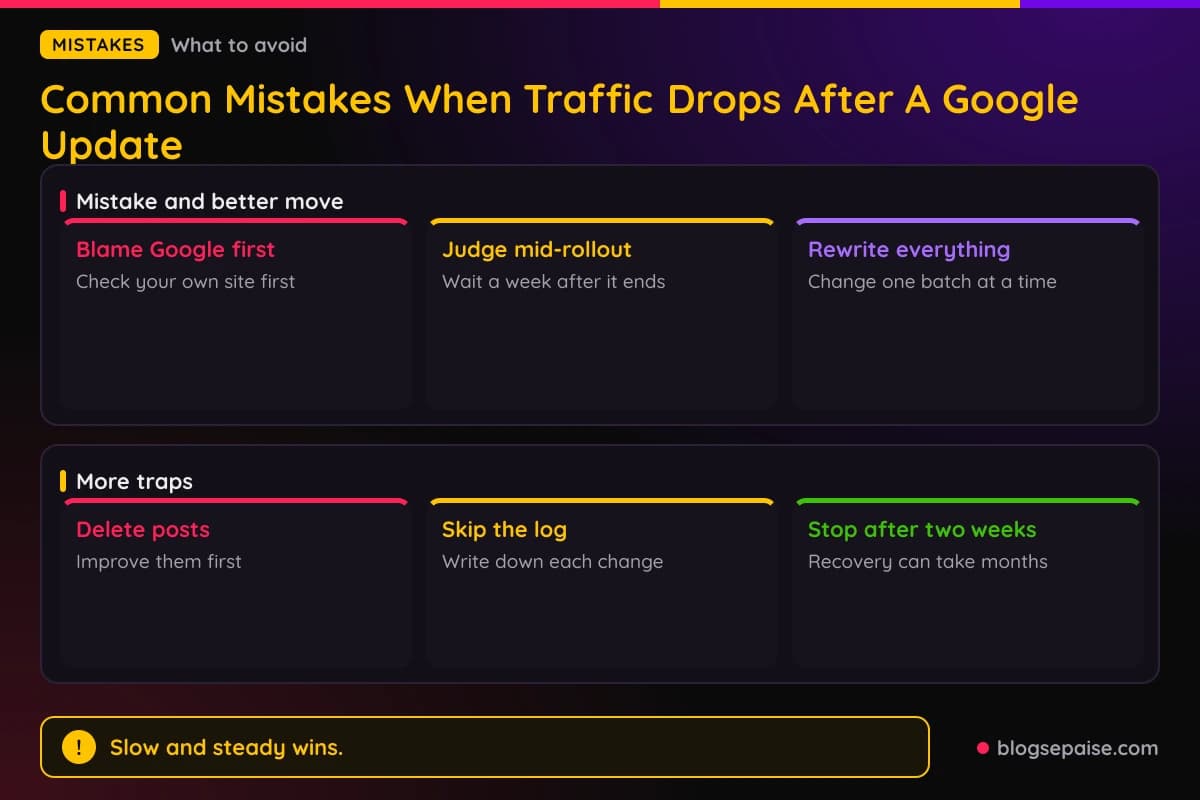
Many bloggers also delete posts in a panic. Google says to delete content only as a last resort, so try improving it first.
Ignoring seasonality is a quiet mistake. A dip that shows up every year in the same weeks needs patience and not a rebuild.
Some people chase quick fixes from forums or social posts. Google advises long-term changes that serve users, and a trick that worked for someone else may not apply to your site.
Comparing a weekend with a weekday is another trap. Whole weeks give a fair comparison, while single days mislead.
Forgetting to note your own changes causes trouble too. The plugin update you made last Tuesday is often the real cause, and you cannot find it without a log.
Finally, many bloggers stop checking after two weeks. Recovery can take months, so a steady weekly habit beats a burst of panic.
Last, many people never write down what they did. A simple dated log turns a stressful month into a lesson you can use again.
Another trap is treating one bad week as a trend. Rankings fluctuate regardless of what you do, so give a dip time to prove itself before you act.
Final Thoughts
A sudden drop in clicks is scary, but it is rarely a mystery you cannot solve. Most of the answer sits in Search Console if you read it in the right order.
Confirm the drop, find the date, split the loss, and rule out technical, security, and manual causes. Then compare your date with the dashboard before you decide to change anything.
Remember that a quiet dashboard does not prove nothing changed, and a listed update does not prove it hit you. Evidence from your own data matters most.
Change only what the data points to, leave healthy pages alone, and give the changes weeks to work. Then keep building traffic from places other than search.
Start this week. Open Search Console, write down your baseline and your drop date, and run through steps one to four. For more on keeping your income steady, read our page on how to avoid getting banned from affiliate programs.
Frequently Asked Questions
1. Why did my traffic drop after a Google update?
A core or spam update can move rankings, which changes how many people see and click your pages. Still, confirm that your dates match a listed update and rule out site problems first.
2. How do I know if a Google update caused my drop?
Find the exact day the drop began, then compare it with the start and end dates on the Google Search Status Dashboard. If the drop lines up and your site checks are clean, an update is a strong suspect.
3. How long does a core update take to roll out?
The dashboard lists each update's duration. The core updates it shows for December 2025, March 2026, and May 2026 ran about 18 days, 12 days, and 12 days.
4. How long should I wait before analyzing the drop?
Google says to wait at least a full week after an update finishes rolling out. Then compare that week with the week before the update started.
5. Can I recover after a core update?
Sometimes, but there is no guarantee. Google says some changes can show effects within days, while confirmation can take several months.
6. Should I delete the pages that lost traffic?
Usually not. Google says to delete content only as a last resort, so improve thin pages first and keep the ones that still work.
7. What if impressions stayed the same but clicks fell?
Then your pages still show up, but fewer people choose them. Google points to less compelling titles and snippets, or competitors with more eye-catching results, as possible causes.
8. Where do I check for a manual action?
Open the Manual Actions report in Search Console. If it shows no action, Google has not applied a manual penalty to your site.
9. Could my analytics tag be the problem?
Yes. If analytics fell but Search Console did not, a removed tag or a filter is the likely cause, so check that the code loads on your pages.
10. Can seasonality explain a sudden drop?
Sometimes. View the last 16 months and check Google Trends for your main queries to see if the same dip happened in earlier years.
11. Should I change my content right away?
No. Rule out technical, security, and manual causes first, then change only the pages the data points to and wait weeks to judge the result.