How To Get Approved For Amazon Affiliate Program In 7 Steps
Getting into the Amazon Associates program works in a different order from most affiliate programs.
You sign up first, and Amazon reviews your application only after you have driven qualified sales.
Amazon's Application Review Process page asks for at least three of them within the first 180 days.
Seven steps follow. Facts come from Amazon's help pages, its Operating Agreement, its Program Policies, and guidance from the Federal Trade Commission.
Advice that fits every network lives in our guide on how to get approved for affiliate programs. If a program already turned you down, read why affiliate programs reject you automatically.
Walmart and Target run their own programs with their own rules. See our guides to the Walmart affiliate program and the Target affiliate program.
Amazon updates its pages over time, so check the linked help page if a detail looks different.
Disclosure: Some of the links I share might be affiliate links. If you click on one and make a purchase, I may earn a small commission as a thank you. But don’t worry, it won’t cost you anything extra. I only recommend stuff I genuinely believe in. Your support helps me keep creating awesome content. You can read my full affiliate disclosure in my disclaimer page.
If you want to save a lot of hours searching for high-paying affiliate programs, check out our exclusive list of 2500+ affiliate programs. You’ll find all the information about the programs inside the list. This list is perfect for affiliate bloggers and influencers.
How Amazon Approval Works
Amazon splits approval into two parts. First you sign up, then the Associates team reviews your application once your links have produced sales.
Amazon's Application Review Process page states the rule directly. The team checks your application after you have driven qualified sales, and it requires at least three within the first 180 days.
Orders you place yourself do not count toward those three. Amazon says so on the same page.
Amazon's Account Dormancy page adds the details. You have 180 days after applying to refer a sale through an Associates link, and Amazon evaluates the application after three qualifying sales.
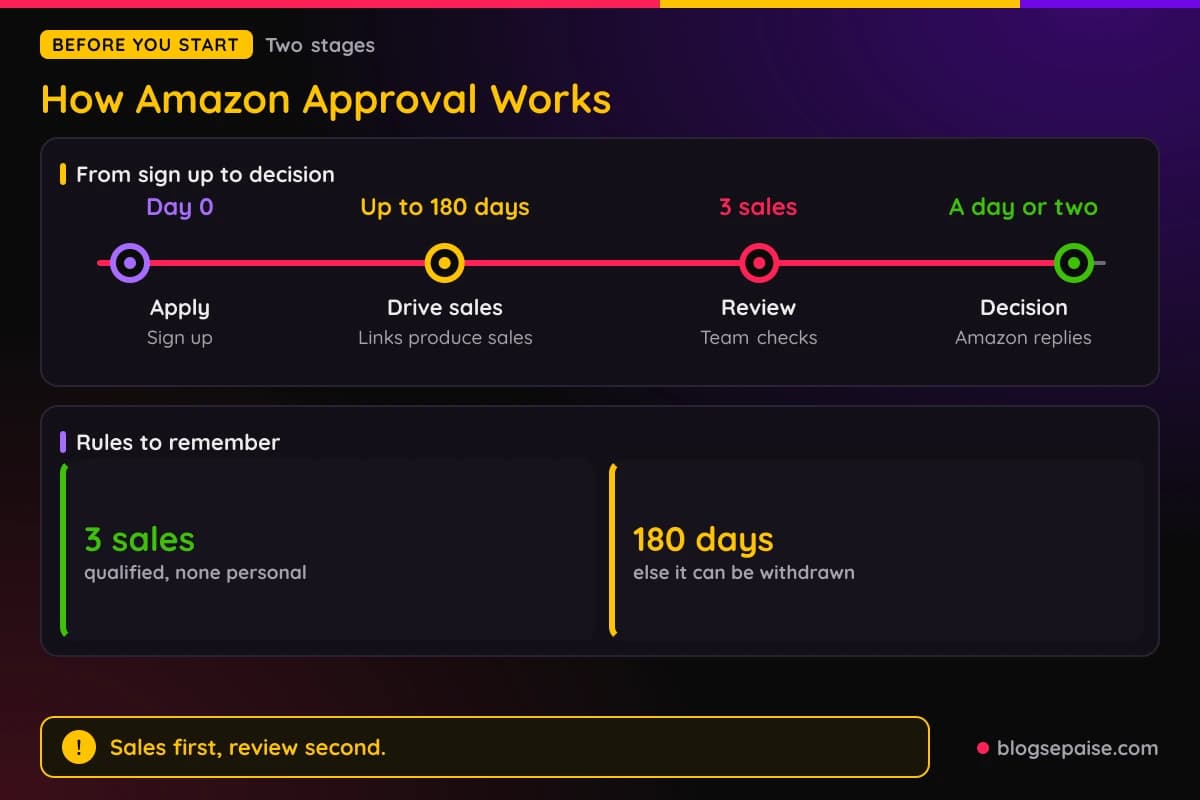
Amazon says it usually replies with a decision within a day or two of that point. If there are not enough qualifying sales within 180 days of submission, the application can be withdrawn.
The Program Policies say Amazon decides acceptance and suitability at its sole discretion. They also say your Site needs original content and must be publicly available at the address you provide.
Section 4 of the Operating Agreement says Amazon makes no guarantee about traffic or commission income. Signing up gets you an account, but nothing in the agreement promises earnings.
The program itself is free. Amazon's Program Policies say it has never authorized paid setup or consulting services.
Two separate 180 day clocks exist, and mixing them up causes confusion. One is the application window for your first three qualified sales.
The other is a commission rule in the Program Policies. A product must be shipped or delivered, and paid for, within 180 days of purchase.
Our guide on Amazon affiliate sales that dropped covers how Amazon counts a sale after approval.
The same policy page sets a 24-hour customer session after a click and 89 days to finish a cart purchase. Those figures govern which purchases earn commission.
Step 1: Check Who Can Join And Which Country To Use
Start with the legal basics. Section 4 of the Operating Agreement requires that you are lawfully able to enter into contracts.
Section 1 describes the program as a way to monetize a website, social media user-generated content, an online software application, or an Alexa skill.
Information you give Amazon must be accurate and complete at all times. The Operating Agreement says you can update it under Account Settings.
Participants outside the United States face one more rule. The Program Policies say they must perform services outside the U.S. unless their tax information says otherwise.
Next, pick the country program that matches your readers. Amazon's Creators API onboarding page lists a separate sign-up address for each locale.
Examples are affiliate-program.amazon.com for the United States and affiliate-program.amazon.co.uk for the United Kingdom. An Associate tag works only in the locale where you registered.
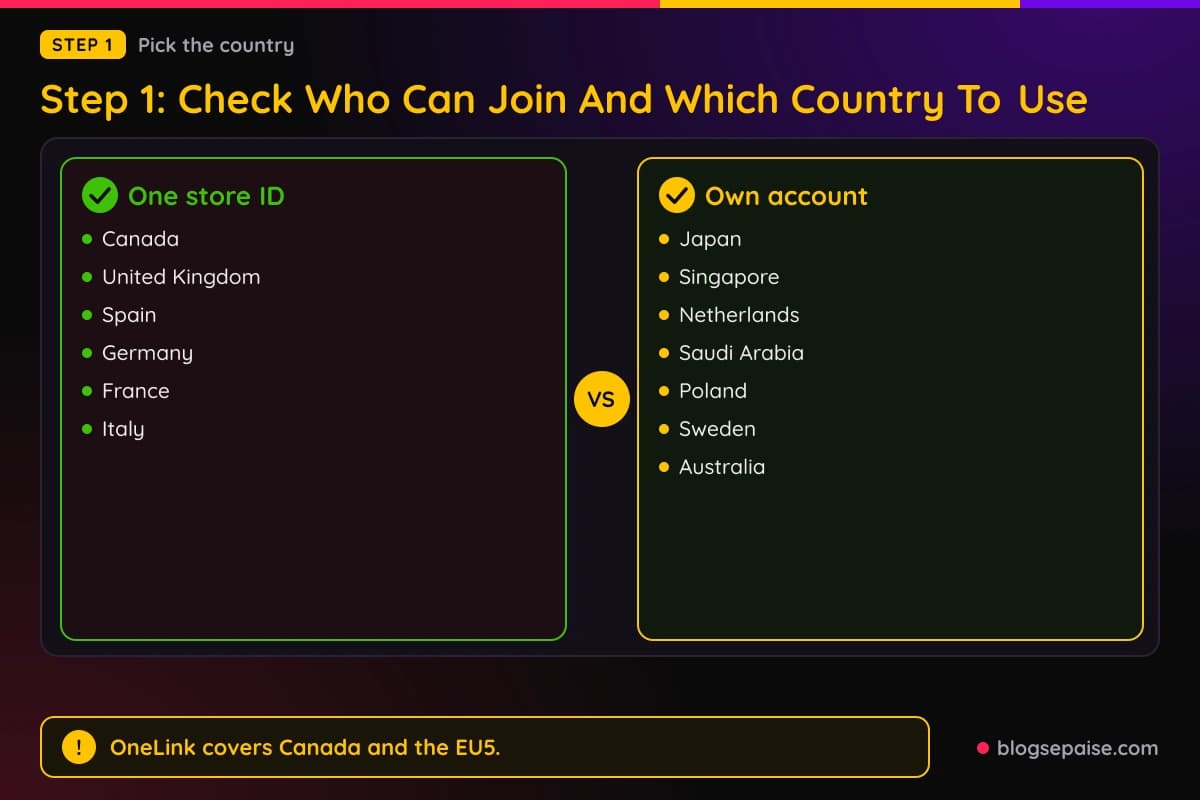
Amazon's OneLink help page offers a shortcut for part of the world. Canada and the EU5 countries (the United Kingdom, Spain, Germany, France, and Italy) can run through one store ID after a one-time setup.
Seven other marketplaces need their own accounts. They are Japan, Singapore, the Netherlands, Saudi Arabia, Poland, Sweden, and Australia.
Payment and tax details follow the same split. For Canada and the EU5, you set the payment method once in the U.S. Associates portal.
For the other seven, you set it up in each country. Each local account must reach that country's minimum earnings threshold before payout.
Amazon warns that missing or incorrect payment and tax details delay or block payments. Check each country's portal for notifications.
OneLink gives three redirect options: Exact match, Close match (the default), and Do not redirect. Settings apply per tracking ID, so configure each one.
Visitors from neighboring countries go to the nearest supported store. Irish visitors, for example, go to Amazon.co.uk.
Only Amazon full links and Amazon short links redirect. Third-party shortened links are not redirected.
Canada and EU5 earnings appear in the consolidated earnings summary. The other seven markets report under Geo-redirected Traffic in each country's portal.
Redirected earnings use the commission table of the program where the purchase occurs.
Closing a store is permanent under OneLink. Amazon says a closed store cannot be reopened for OneLink and its historical reports become inaccessible, so download any reports first.
Step 2: Pick The Sites And Pages You Will List
Amazon asks you to list every place you plan to put links. Its Application Review Process page names four kinds: websites, mobile apps, social network pages, and Alexa skills.
Reviewers check each one against Amazon's customer experience standard. Sites that fail it cannot participate under any circumstances.
For a website, Amazon says you must own it. Content should generally be from the last 60 days.
The site also needs substantial original content, even with ads removed. As a rule of thumb, Amazon says that means at least 10 posts.
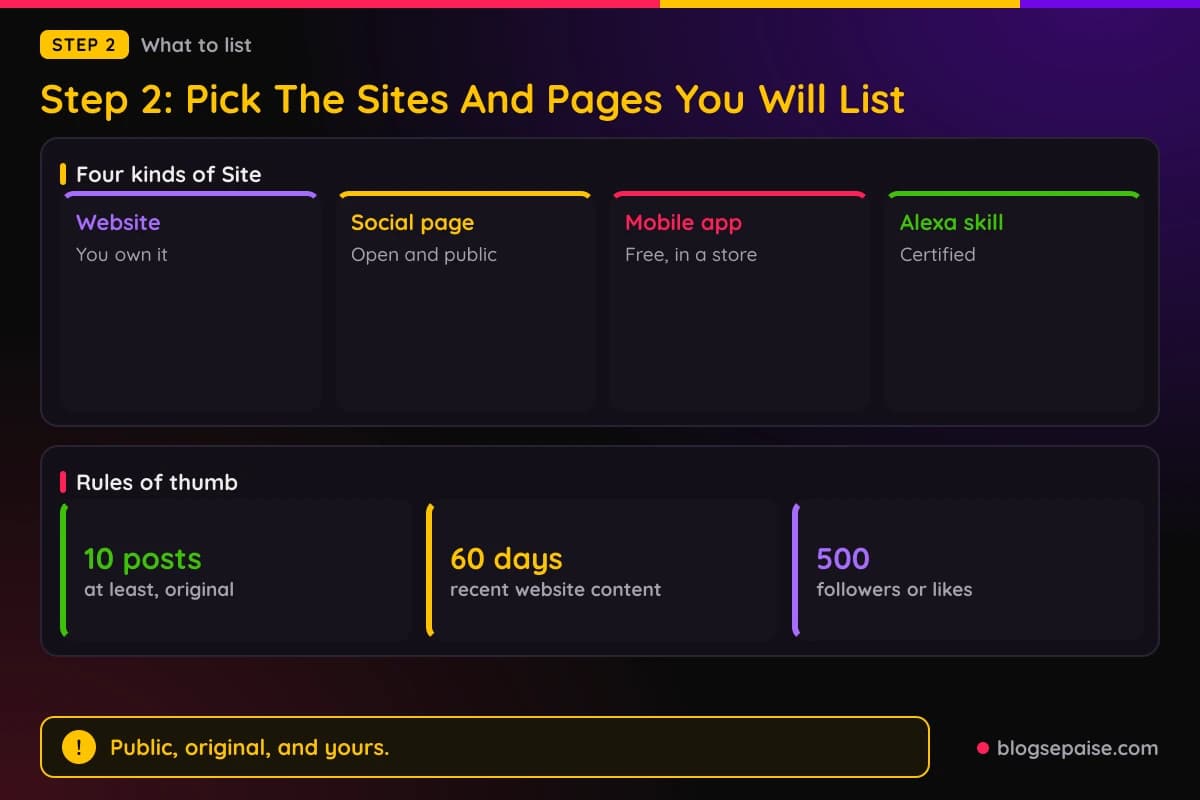
It must be publicly available too. Closed groups and paywalled content do not qualify.
Social pages follow a tighter list. Amazon accepts Facebook, Instagram, Twitter, YouTube, TikTok, and Twitch.tv.
On Facebook, only open groups and fan pages count, not personal pages. You must list the exact page URL and not just the network's domain.
A social page should generally have at least 500 organic followers or likes. It must be publicly visible and must not hide posts or follower counts from non-followers.
Mobile apps need to follow the Mobile Application Policy. The Program Policies add that the app must be available in the Google Play, Apple, or Amazon app store.
The app must be free, and all Amazon links must work without payment. It must have original content, must not emulate Amazon's shopping app, and must not host or render Amazon web pages in WebViews.
Mobile use of Product Advertising Content requires approval, except for Approved Mobile Applications.
Alexa skills must meet the Alexa Skill Certification requirements. Keep your list current so Amazon reviews the right traffic sources.
Material from other sources needs care. The Program Policies say third-party content must include significant commentary, analysis, or transformation.
Our guide on affiliate links before AdSense approval covers affiliate links on a site that is still waiting for AdSense approval.
Step 3: Meet Amazon's Content And Suitability Standards
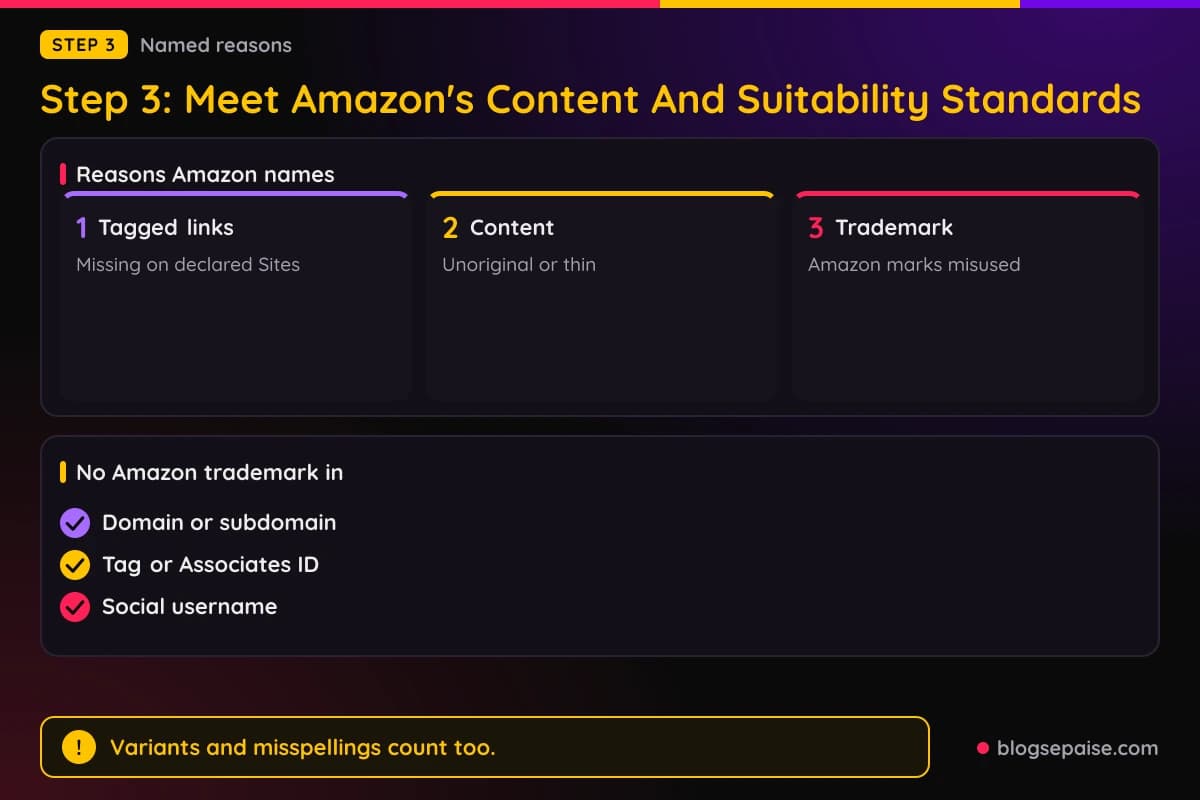
Amazon names three reasons for rejection on its Application Review Process page. They are missing tagged links, unoriginal or insufficient content, and trademark violation.
Amazon states it will reject applications that do not meet its standards. It also says it cannot reassess an application once it has been rejected.
Content comes first. Amazon says sites should offer visitors insight they cannot easily find elsewhere, and that well-written, consistent content helps build an audience that returns.
Trademarks come next. Amazon tells applicants to remove unapproved use of its trademarks, including words, images, and customer reviews, and to follow its Trademark Guidelines before reapplying.
The Program Policies add specifics. Amazon trademarks, or variants and misspellings of them, cannot appear in a domain, subdomain, tag or Associates ID, or social media username.
Use Amazon Marks only to advertise product availability on an Amazon Site, with a Special Link to that Site. Use only the images Amazon supplies, and do not change their proportions, colors, fonts, or elements.
Marks cannot appear offline, in print, mail, or SMS. Do not register or use confusingly similar trademarks, domains, subdomains, usernames, or app names.
Unsuitable content has its own list. Amazon bars sites that promote or contain sexually explicit or obscene material, or violence.
False, deceptive, libelous, or defamatory material is barred. So is hateful, harassing, invasive, abusive, or discriminatory material.
Sites that promote illegal activities or violate intellectual property rights are unsuitable as well.
Sites directed toward children are unsuitable. So are sites that knowingly collect personal information from children under 13, or another applicable age threshold, or that violate laws such as COPPA.
Claims about products need care. The Program Policies bar inaccurate, overbroad, or misleading claims about Products, Amazon Sites, or policies.
Product lists, such as search results, events, or department pages, need additional relevant original content. Remove any reference to a promotion as soon as it ends.
Step 4: Sign Up And Declare Your Sites
Signing up takes four moves, based on Amazon's onboarding and help pages. Pick your locale's Associates address, create the account, give your site URL, and finish the declaration.
Amazon's Creators API onboarding page says you must provide your site's URL when you create the account.
Register as an Associate before you sign up as a Creators API developer. The API returns an error if you are not a registered, valid Associate.
After sign up, Amazon emails your Associate tag. The Associates home page shows your email address and tag once you sign in.
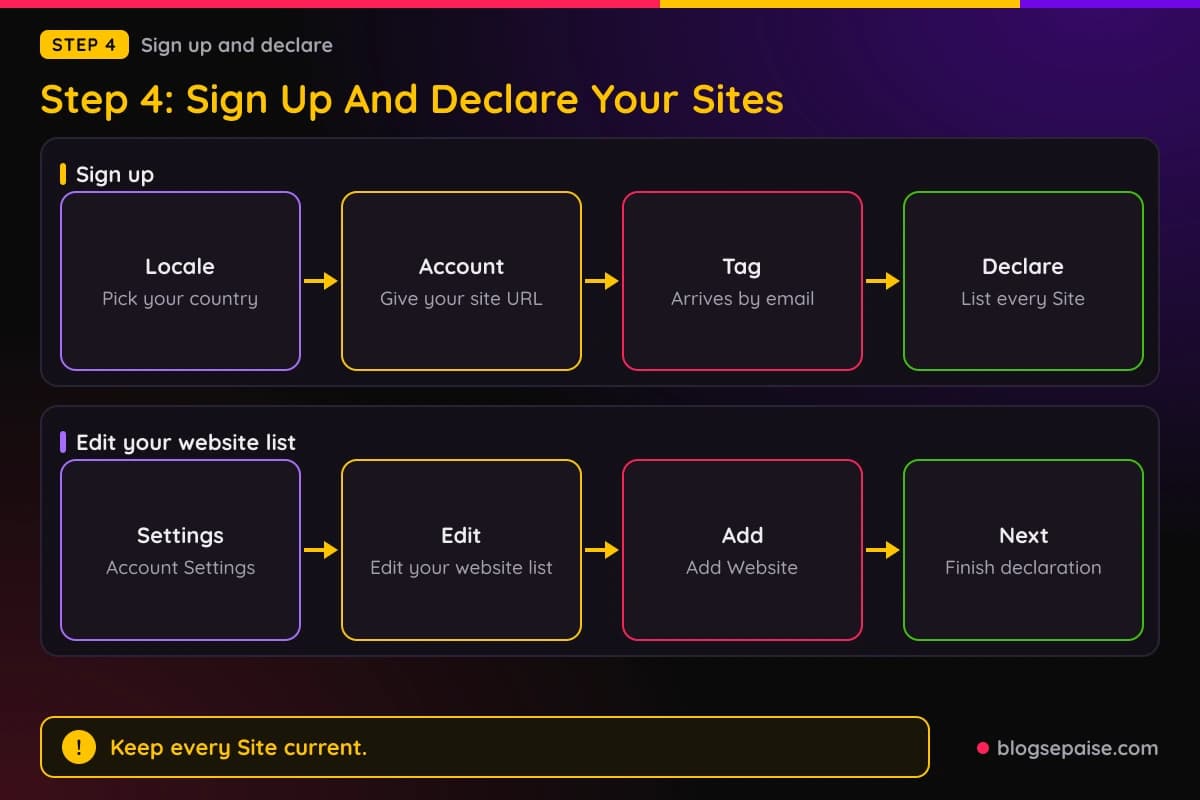
The Program Policies say to identify all of your Sites in the application. The Operating Agreement says the agreement starts upon your registration for or use of the Associates Site.
To add or change sites later, sign in to Associates Central and hover over your email address. Open Account Settings and select Edit your website list.
Enter the URL under Enter Your Website(s) and click add. To add several, enter the URLs and click the Add Website button, then click Next to complete the declaration process.
Amazon's help page says to keep your sites up to date as the Operating Agreement requires. Social pages need the full page URL and not just the network's domain.
Notices go to your account email. The Program Policies say you are deemed to have received them, so keep your email, contact details, and Site information current.
Tax information matters from the start. Schedule 3 of the Operating Agreement says Amazon may withhold commissions if it requests tax information and you do not provide it.
Step 5: Tag Your Links And Add The Disclosure
Missing tagged links is a rejection reason Amazon names. Embed your Associates tagged links in Amazon product links on the Sites you declared.
Alexa developers should update their skill connection payload with the new tags. After a reapplication, update your product links with tags from the new application.
The Program Policies say Special Links must use your Associates ID. Include your tag as a URL parameter, and access links directly from your Site.
Do not encourage visitors to bookmark Special Links. Do not cloak or obscure Special Link URLs, or use link shorteners that make the Amazon destination unclear.
Do not offer incentives for using Special Links, and do not post them on Amazon in reviews or forums. Sub-tags need Amazon's approval, and you must never assign sub-tags to individual users.
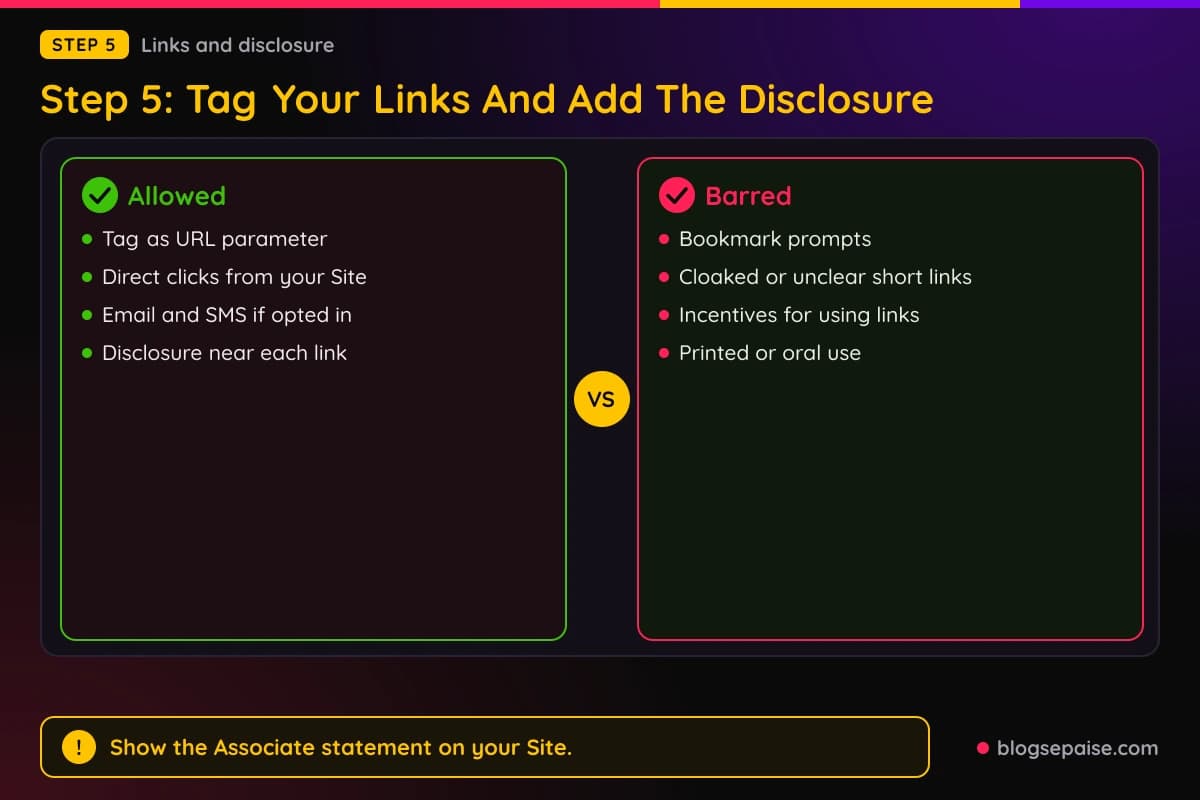
Email and messages have their own condition. Special Links may appear in emails, SMS, and direct messages from social media only if recipients opted in.
Special Links may not appear in printed materials, ebooks, mailings, or oral solicitations. Comply with marketing laws such as CAN-SPAM and the TCPA.
Disclosure comes next. Section 5 of the Operating Agreement requires you to clearly and prominently state, "As an Amazon Associate I earn from qualifying purchases."
Amazon treats Section 5 violations as material breaches. Apart from that disclosure, the agreement bars public statements about it or your participation without Amazon's advance written permission.
Amazon's disclosure help page also asks for a disclosure near each affiliate link or product review. It gives (paid link), #ad, and #CommissionsEarned as short examples.
On social media, the Associate statement must be associated with your account. Amazon names Facebook's Branded Content tool as an example of a platform feature to check.
The Program Policies make you responsible for legal disclosures on your Site. They cite the FTC Endorsement Guides and GDPR as examples.
Privacy disclosures must cover cookies, pixels, and other tracking technologies. Where the law requires it, explain visitor opt-out choices.
The FTC adds detail in its Endorsement Guides Q and A. Affiliates should clearly and conspicuously disclose their relationship with the retailer, and a disclosure closer to your recommendation is better.
The FTC says the label affiliate link alone may not tell readers you are paid. A buy now button is not adequate, and neither is commissionable link.
Paid link placed right next to an affiliate link should be adequate, according to the FTC. Its sample wording is a sentence saying you get commissions for purchases made through links in the post.
For video, the FTC says to disclose in the video and in the description near the links.
The FTC influencer guide adds that disclosures are likely to be missed on a profile page, behind a MORE link, or mixed into a group of hashtags.
That guide says to disclose any financial, employment, personal, or family relationship with a brand. Financial relationships include free or discounted products and other perks.
Disclose even if nobody asked you to mention that product, and even if you think your opinion is unbiased. Likes, tags, and pins can count as endorsements.
U.S. law applies to posts made from abroad when the post will reasonably foreseeably affect U.S. consumers. For images such as Stories, superimpose the disclosure and leave enough time to read it.
For live streams, repeat the disclosure periodically. Use simple, clear language in the same language as the endorsement.
Do not rely on a platform's disclosure tool alone, though you can use it in addition to your own wording. The FTC also says not to talk about a product you have not tried.
If you were paid and thought a product was terrible, the FTC says you cannot call it terrific. Links provided only as a convenience, with no payment involved, need no disclosure.
The FTC Guides do not have the force of law. Practices that conflict with them may lead to Section 5 enforcement actions, which can require defendants to pay money back to harmed consumers and follow future requirements.
Amazon's Operating Agreement also points to its Community Guidelines for content you post on Amazon.com. Those guidelines prohibit customer reviews that are created, edited, or removed in exchange for compensation.
Vague labels such as sp, spon, or collab are on the FTC's avoid list. Our guide on legal disclosures covers the wording in more depth.
Step 6: Drive Three Qualified Sales Inside 180 Days
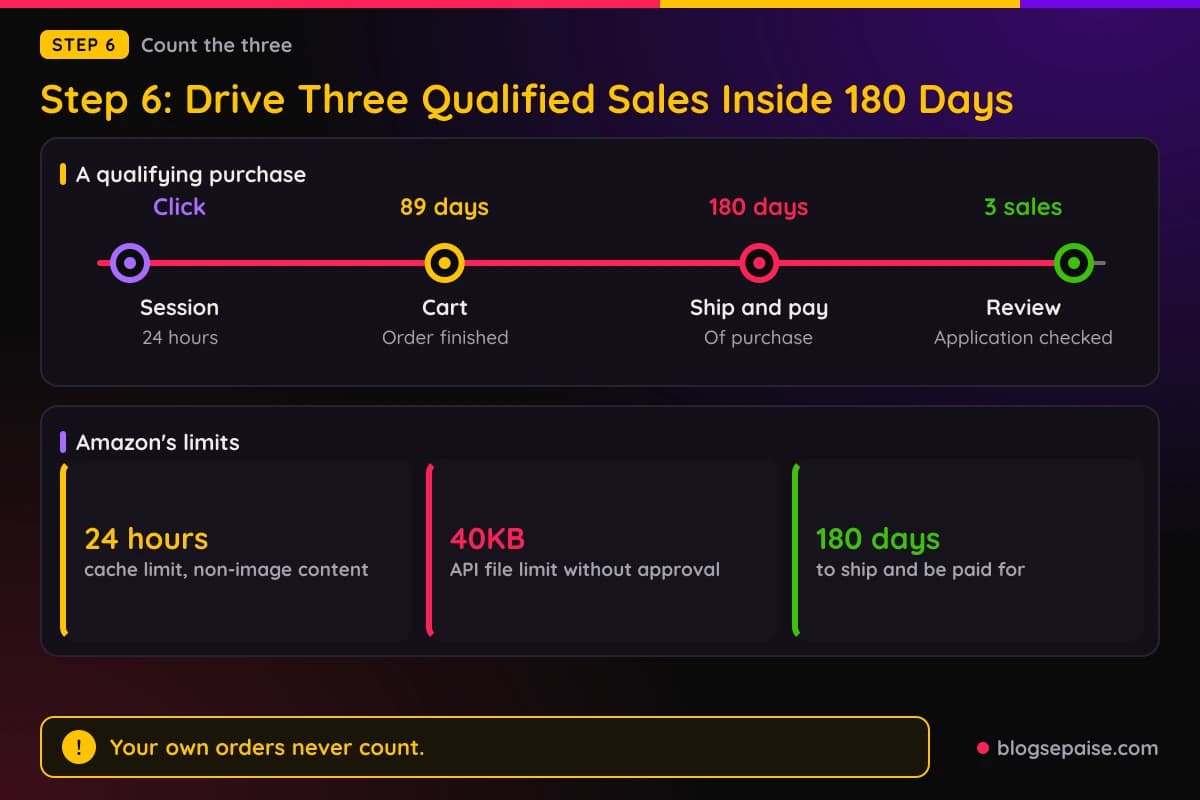
Amazon's review waits on sales, so this step decides the outcome. The count starts when you apply, and the window is 180 days.
Only qualifying purchases count. The Program Policies set a 24-hour customer session from the click, with cart purchases finished within 89 days of the first click.
Orders you place yourself do not count. Amazon states this directly on its application review page.
Paid search needs care. The Program Policies bar bidding on Amazon trademarks in paid search, and paid search placements that use those terms are disqualified.
Keep your pages compliant while you wait. The Program Policies say to show prices or availability only if Amazon serves the link or you pull the data through the Creators API or PA API.
In comparison displays, show the lowest new price and, if provided, the lowest used price on Amazon. Add a date and time stamp next to pricing or availability if you use Data Feeds or refresh less than hourly.
Amazon supplies required disclaimer text saying prices and availability are accurate as of the date and time indicated and are subject to change. Place it next to the price or link to it.
Do not store or cache images, though you may store links to images for up to 24 hours. Other non-image content can be cached for up to 24 hours, and ASINs may be stored indefinitely.
Do not exceed API rate limits, or send files over 40KB to the Creators API or PA API without approval.
Content from Amazon has limits too. Program Content may be displayed on your Site only, and you may not sublicense, sell, or redistribute it.
Do not use Program Content to train machine learning models, and do not scrape or use robots to gather data. Autonomous agents must identify themselves in the user agent string as Agent followed by the agent name.
Do not frame Amazon pages or layer ads promoting Amazon. Pop-ups are barred except those closely tied to your Site's products.
Excluded Products include alcoholic beverages for U.S. licensed businesses, and prescription drugs or Amazon Pharmacy items.
Remove Program Content when Amazon says it is no longer available. Price tracking or price alert functions are prohibited unless Amazon agrees otherwise.
Step 7: Handle The Decision, A Rejection, Or A Closure
Amazon usually replies within a day or two after the third qualifying sale, according to its Account Dormancy page. If you do not reach three in 180 days, the application can be withdrawn.
A rejection is final in one sense. Amazon's application review page says it cannot reassess an application once it has been rejected.
Amazon's pages differ on what happens next. The Account Dormancy page says Amazon cannot reinstate a rejected account or Associates ID, and that you may reapply once your site is established.
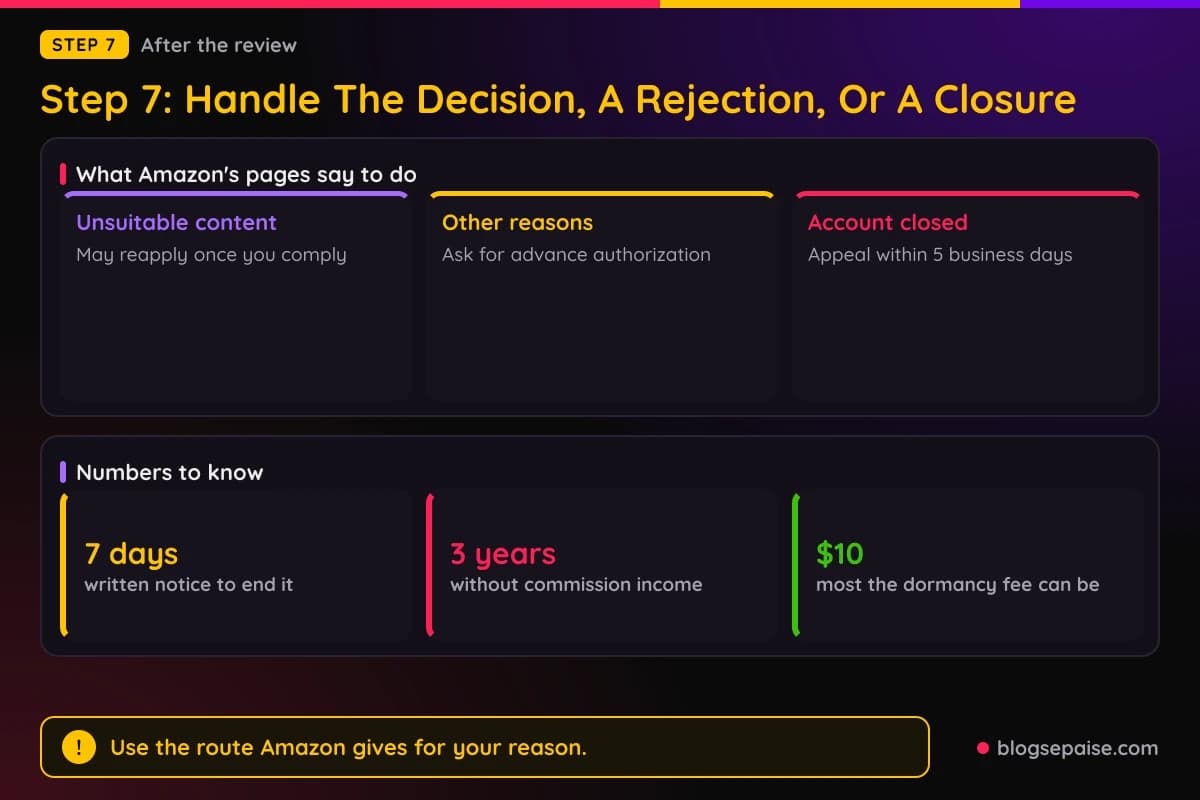
The Program Policies split it by reason. If you were rejected for unsuitable content, you may reapply once you comply with the suitability requirements.
If you were rejected for any other reason, or terminated for violation or abuse, you cannot rejoin without advance authorization. Request it through the Contact Associates Customer Service form.
The application review page covers trademark rejections. A rejected site can be reconsidered after the trademark issue is corrected, and links need tags from the new application.
After approval, the rules keep running. Either party may end the agreement at any time, with or without cause, on 7 calendar days' written notice.
Amazon may terminate or suspend immediately for listed reasons, including material breach. It may also act if you fail to cure other breaches within 7 days of notice.
Violations of the Participation Requirements are deemed material breaches. Amazon can also change the agreement, and continued participation counts as acceptance.
Changes generally take effect no sooner than two business days after notice. Section 13 of the Operating Agreement covers this.
Disputes go to binding arbitration under Washington law, with exceptions for small claims court. Schedule 2 of the Operating Agreement sets that out.
Failure to give a requested compliance certification is also a material breach. Amazon may suspend or terminate, and may withhold commissions if it detects claims on other programs using the same traffic.
If Amazon closes your account, act fast. Its help page says to contact Amazon within 5 business days of the closure, using the Contact Us form and the subject Closed Account Appeal.
The appeal route depends on the violation. For one that is not a customer trust risk, such as not responding to a request for information, you can correct it and appeal.
For a customer trust risk, such as redirecting traffic from an Amazon site, Amazon reviews only appeals with detailed evidence that its facts were wrong.
A reply to a compliance warning should list the changes you made to your Sites. It should also confirm that your Site information is complete, accurate, and current, including social pages.
It should confirm that your Sites identify you as an Amazon Associate, as the Operating Agreement requires.
It should also confirm you reviewed the Operating Agreement and Program Policies and are no longer in violation.
Dormancy is the quiet risk. If an account has no commission income in the 3 years before a calendar month, Amazon may charge a fee on the first day of that month.
The fee is the lesser of $10 or your unpaid accrued commission income, and the account is closed for dormancy. Unpaid accrued commission may be subject to escheatment under state law.
The Program Policies add a related rule. Accounts with no substantial activity for 3 years may have accrued commissions withheld after 7 days' written notice.
To close an account yourself, sign in to the Associates Site and choose the close account option in Account Settings.
Common Mistakes When Applying To The Amazon Associates Program
Using your own orders to reach three sales is the first mistake. Amazon says personal orders do not count.
Listing a personal Facebook page is another. Only open groups and fan pages qualify.
Entering only a network's domain instead of the exact page URL is a third. Amazon asks for the full page address.
Putting an Amazon trademark in a domain, tag, or username is a fourth. The Program Policies bar it, including variants and misspellings.
Leaving the tag off links on declared sites is next. Missing tagged links is a named rejection reason.
Hiding a link behind a shortener is another. The Program Policies bar link shorteners that make the Amazon destination unclear.
Skipping the disclosure is a costly one. Violations of Section 5 are deemed material breaches.
Paying someone to get you in is the last. Amazon says it has never authorized paid setup or consulting services.
Final Thoughts
Amazon treats approval as a test of real sales. You sign up, list real sites, and Amazon decides after your links produce three qualified sales.
Work through the steps in order. Check who can join, list sites that meet the standards, keep Amazon trademarks out of your names, and sign up for the right country.
Then tag your links, show the disclosure, and keep your pages inside the policy rules while the 180 days run.
If a rejection or closure comes, read the exact reason Amazon gives and use the route its pages describe for that reason.
Frequently Asked Questions
1. How long does it take to get approved for the Amazon affiliate program?
Amazon ties the review to your sales. It evaluates the application after three qualifying sales, usually replying within a day or two, according to its Account Dormancy page.
2. Do I need a website to join Amazon Associates?
No. Amazon lists websites, mobile apps, social network pages, and Alexa skills. Social pages must be on Facebook (open groups and fan pages), Instagram, Twitter, YouTube, TikTok, or Twitch.tv.
3. How many followers do I need for Amazon Associates?
Amazon says a social page should generally have at least 500 organic followers or likes. The page must be publicly visible and cannot hide posts or follower counts from non-followers.
4. How many posts does a website need?
Amazon says a site needs substantial original content even with ads removed, and gives at least 10 posts as a rule of thumb. Website content should generally be from the last 60 days.
5. What happens if I do not make 3 sales in 180 days?
Amazon says the application can be withdrawn if there are not enough qualifying sales within 180 days of submission.
6. Can I reapply after Amazon rejects my application?
Amazon's pages differ. The Program Policies allow reapplying after a rejection for unsuitable content once you comply, and require advance authorization for other reasons. Its application review page says it cannot reassess a rejected application.
7. Is the Amazon Associates program free?
Yes. Amazon's Program Policies say the program is free and that Amazon has never authorized paid setup or consulting services.
8. Do my own purchases count toward the three sales?
No. Amazon's application review page says personal orders do not count.
9. What disclosure does Amazon require?
Section 5 of the Operating Agreement requires a clear and prominent statement: "As an Amazon Associate I earn from qualifying purchases." Amazon also asks for a disclosure near each affiliate link.
10. Do I need a separate account for each country?
Canada and the EU5 countries (the United Kingdom, Spain, Germany, France, and Italy) can run through one store ID with OneLink. Japan, Singapore, the Netherlands, Saudi Arabia, Poland, Sweden, and Australia need their own accounts.