How To Get Approved For The Walmart Affiliate Program
Walmart sells almost everything, so it feels like an easy fit for a blog about home, family, fitness, or gadgets. You want a link that earns when your readers shop, and you want to know how to get a yes.
The program has its own rules, and a few of them catch people by surprise. Sites with the wrong audience, an unfinished layout, or links added too early can get turned away.
The seven steps below cover eligibility, site prep, signing up through the network, the application, the usual rejection causes, getting links, and keeping the account safe. A worked example, a mistakes section, and a short FAQ follow.
Rates and terms change, so treat every number here as a starting point. Check the current terms on Walmart's affiliate site and inside your network account before you apply.
Disclosure: Some of the links I share might be affiliate links. If you click on one and make a purchase, I may earn a small commission as a thank you. But don’t worry, it won’t cost you anything extra. I only recommend stuff I genuinely believe in. Your support helps me keep creating awesome content. You can read my full affiliate disclosure in my disclaimer page.
If you want to save a lot of hours searching for high-paying affiliate programs, check out our exclusive list of 2500+ affiliate programs. You’ll find all the information about the programs inside the list. This list is perfect for affiliate bloggers and influencers.
Why Bloggers Want Into The Walmart Affiliate Program
Walmart is a name that almost every reader in the United States already knows. A reader who trusts the store does not need much convincing to click.
The catalog is huge, which means you can link to a blender, a backpack, or a kids' desk from the same site. That range helps a general blog as much as a narrow one.
Walmart runs its affiliate program through a network called Impact. You sign up there, apply to the Walmart program, and wait for a decision.
Walmart's own affiliate page promises a fast approval process and says you can get started within a day. Treat that as the best case, not a guarantee, since Walmart decides each application on its own.
Members also get a weekly newsletter with banners and product information, plus a member center with link tools and data feeds. Those tools help once you are in, but they do not help you get in.
The catch is that Walmart pays low commissions compared with many software programs. Published guides from early 2024 put the range at 1% to 4%, and the cookie window at 3 days.
Those numbers may have changed, so confirm them inside the network before you plan around them. The rate for a product depends on its category.
Low rates do not make the program a bad idea. Walmart works best as a way to earn from shopping content you already write, with volume making up for the small percentage.
Our guide on how to get approved for affiliate programs covers the general rules that apply to every application. The article you are reading focuses on Walmart's own rules and quirks.
A close cousin is the retail program from Home Depot. If you plan to apply to both, read our page on how to get approved for the Home Depot affiliate program too.
Walmart also runs a separate program called Walmart Creator, which is built for social creators and lets them share shoppable posts, including on Pinterest.
It is not the same thing as the affiliate program covered here, so check which one fits where you post.
Keep one goal in mind as you read. You want a clean site, an honest application, and a plan for what you will do the day you get approved.
Think about the kinds of posts that fit. Gift guides, back-to-school lists, home organization ideas, and budget gadget roundups all send readers straight to a product page.
Seasonal traffic helps as well. A site that publishes holiday gift lists in the fall can see clicks jump when shoppers start searching for ideas.
Step 1: Check Eligibility And Read The Terms
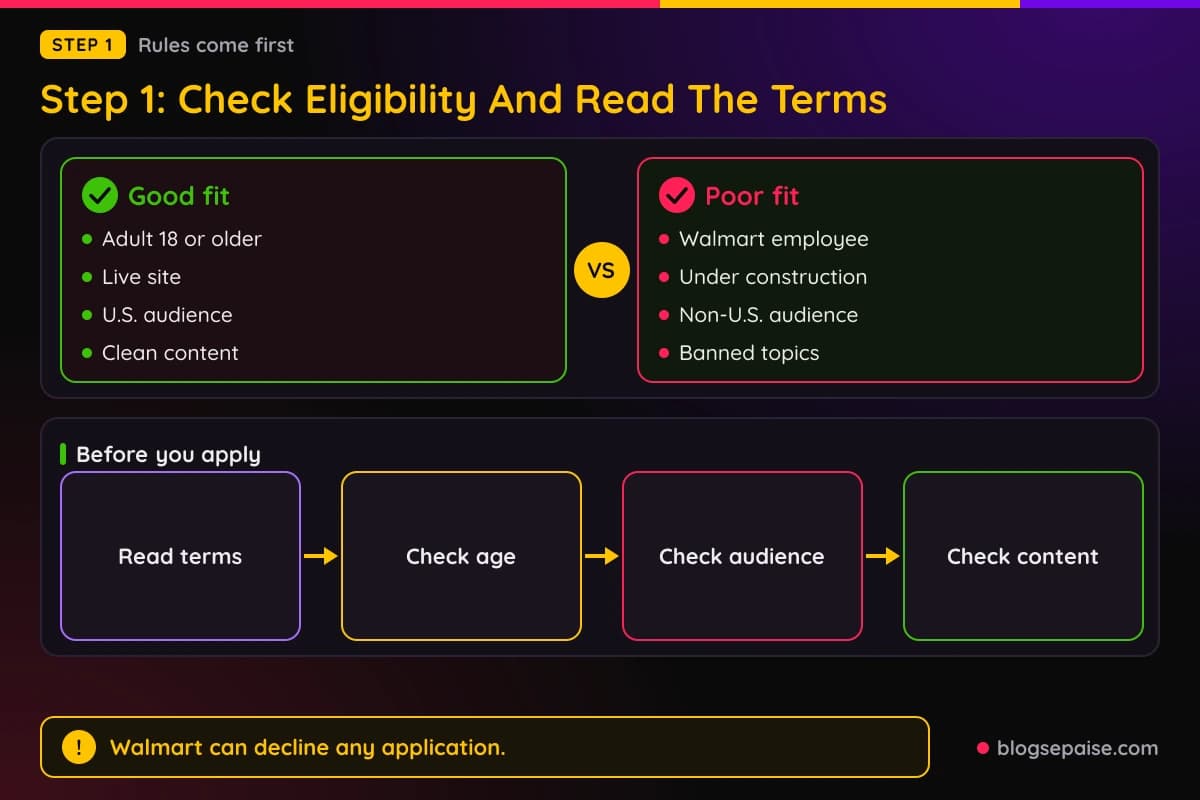
Start with the rules, because they decide if an application is worth sending. Walmart publishes an operating agreement for its affiliate network, and it answers most of the questions beginners ask.
First, you must be an adult. The agreement says applicants need to be of legal age where they live, which is at least 18 in most states.
Walmart employees cannot join. If you work at a Walmart store or office, the program is closed to you.
Second, the audience matters. The agreement bars sites aimed at people outside the United States, so a blog written for readers in another country is a poor fit.
That does not mean a visitor from abroad will ruin your application. It means Walmart wants a site that mainly serves shoppers in the U.S.
Third, your site has to be live. Walmart's agreement bars sites that are under construction, so an empty theme with a coming soon banner will not pass.
Fourth, the content has to be clean. The terms bar sexually explicit material, hate and violence, illegal activity, alcohol, tobacco, gambling, and crypto trading sites.
Published guides describe the target as wholesome, family friendly content. If your blog sits close to a banned topic, expect a rejection.
The agreement also says Walmart may accept or reject any application in its sole discretion. That sentence is why even a good site can get a no, and why you should not take one personally.
You are also told not to link to Walmart before you are approved. Keep that in mind if you have drafts with unofficial links in them.
The agreement does not set a minimum traffic number. That is good news for small sites, though a site with no content at all still looks unfinished.
Read the whole agreement once, slowly, and keep a copy of the date you read it. Our guide on how to read affiliate program terms shows which clauses matter most.
Terms change over time, so a quick reread before each major update to your site is a smart habit.
Write down the rules that apply to you in a short note. A one page summary is easier to check against your site than a long legal document.
If a clause confuses you, look for help inside the network or ask support a simple question. A clear answer before you apply beats a guess that costs you the account.
Check your tax situation too. The network asks for tax details, and the rules differ by country and by how you earn, so ask a tax professional when you are unsure.
Step 2: Prepare Your Site Before You Apply
Next, get your site ready for a stranger to review. A reviewer will click your link, look around for a minute, and decide.
Pick one clear topic. A blog about home organization, back-to-school shopping, or budget gadgets tells a reviewer what your readers want.
Publish real posts first. Fifteen to twenty useful articles look better than three thin ones, though Walmart does not set a number.
Add the trust pages. An about page, a contact page, and a privacy policy tell a reviewer that a real person runs the site.
Your privacy policy has special work to do here. Walmart's terms ask you to disclose cookie use in your policy, because the program relies on cookies to track sales.
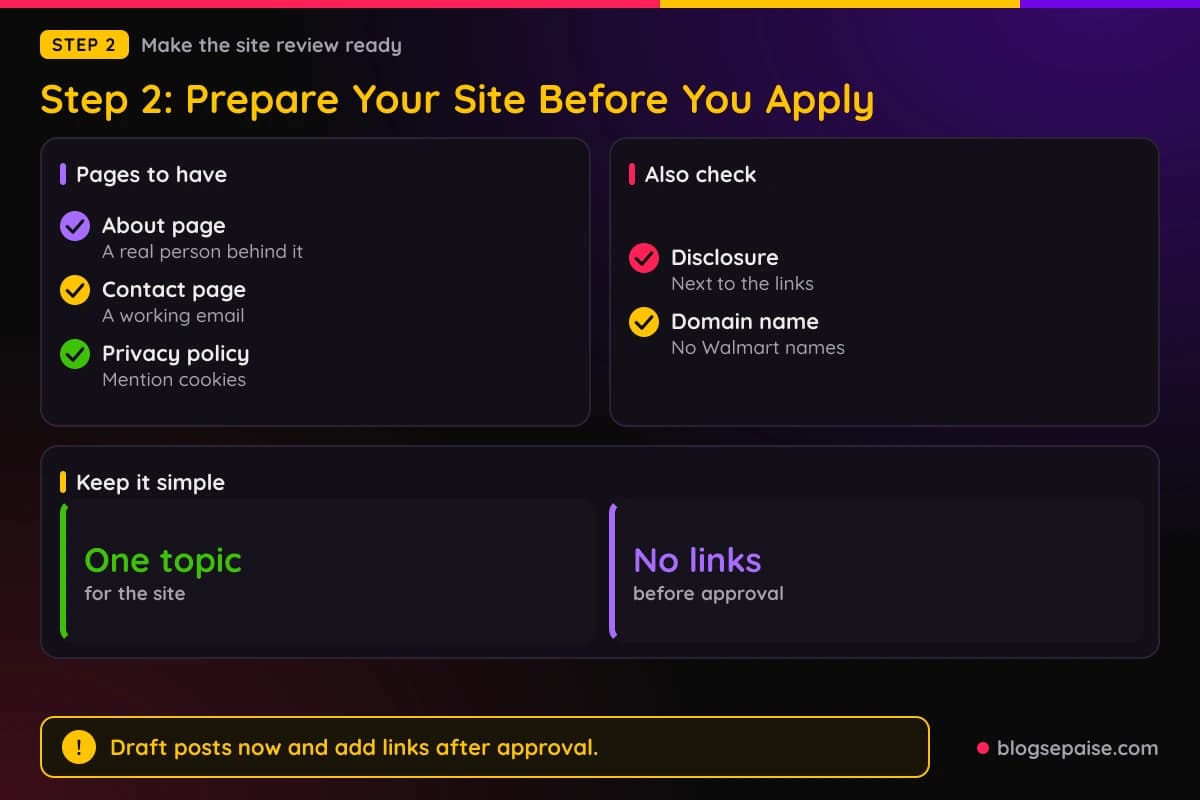
Add a disclosure that readers can actually see. Walmart wants a clear note placed next to the links, not hidden at the bottom of the page.
Our page on legal disclosures explains how to word that note. Keep it plain, such as a line saying you may earn a commission when readers buy.
Check your domain name. Walmart's agreement bars using its names inside your domain, subdomain, or email addresses, so a site called walmartdealsdaily would be a problem.
Take a hard look at your layout too. A site cluttered with pop-ups, huge ads, or auto-playing video can feel spammy to a reviewer.
If you plan to write shopping content, draft a few posts where a Walmart product fits naturally. A buying guide or a gift list gives a reviewer proof that you know how to recommend things.
Do not add Walmart links yet. Draft the posts and wait until the approval email arrives.
Finally, test your site on a phone. Many readers shop from their phones, and a broken mobile layout hurts both your application and your future sales.
Look at your menu with fresh eyes. A reviewer should be able to reach your best posts, your about page, and your contact page in a couple of clicks.
Proofread your top posts for typos and broken images. Small errors add up and make a site feel careless.
Keep your content original. Walmart product descriptions copied from the store add nothing for a reader, so write your own notes from real use or real research.
Step 3: Sign Up Through Impact
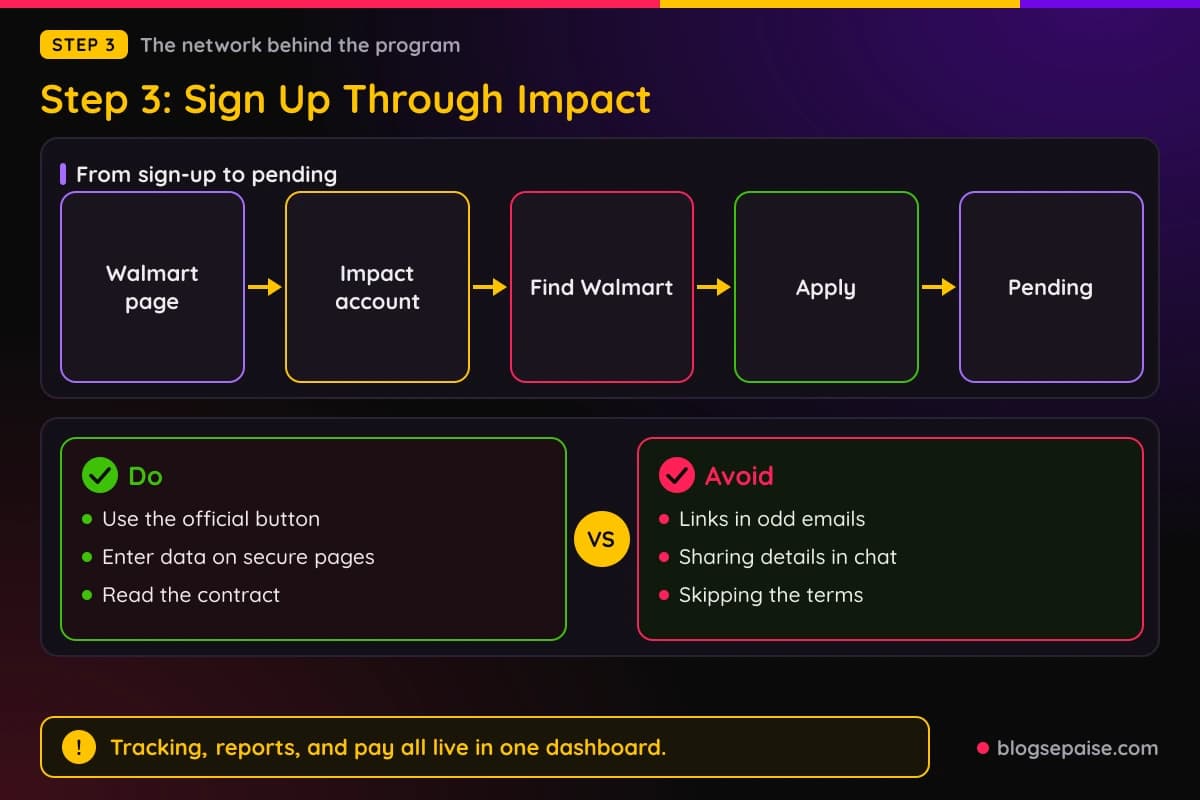
Now create your account on the network. Walmart's affiliate page has a sign-up button that sends you to the login and account screen.
Impact is the network behind the program, and Walmart's agreement says payments are processed through the Impact platform. That means your tracking, reports, and money all live in one dashboard.
If you already have an Impact account from another brand, you can usually apply to Walmart from the same login. If you do not, you will build a new account first.
Use your real name and a business style email address when you can. A domain email looks more serious than a throwaway address.
Choose the correct account type for how you earn. A blogger usually picks the type that fits a content site, and the choice affects the questions you see later.
Add your site details carefully. The address you enter should load a live site, with no errors and no redirect loop.
Impact will also ask for tax and payment details at some point, because that is how the network sends money. Enter those on the network's own secure pages only, and never in an email or chat message.
Be wary of fake sign-up pages. Type the address yourself or use the button on Walmart's own affiliate page, and avoid links in unexpected emails.
Once your account exists, look for the Walmart program in the network's directory. Open its page and read the contract terms listed there.
The contract on that page is the legal text you agree to when you apply. If something in it seems wrong for your site, stop before you click apply.
After you apply, the network shows your status as pending. Keep your inbox open, since decisions and follow-up questions come by email.
Take a screenshot of each screen as you go. If something breaks, you can show support exactly what you saw.
Do not rush through the terms screens. The checkboxes you tick are agreements, and you are bound by them once you apply.
Set up two step login on your network account if the option is offered. Your account holds payment and tax details, so protect it the way you protect your email.
Step 4: Fill Out The Application Carefully
The application itself is where many people rush. A published guide from 2024 called it quite lengthy, with questions about how you promote, where you promote, and who you are.
Expect to describe your main promotion method and any secondary methods. For a blogger, the main method is usually content on a website, such as reviews and buying guides.
You will also name the countries where you promote. Choose the United States, since Walmart's terms favor sites aimed at U.S. shoppers.
Company and personal details come next. Use your real legal name, and match it to the name on your payment and tax forms.
A mismatch between names can slow down a payment later. Fixing it before you apply is far easier than fixing it afterward.
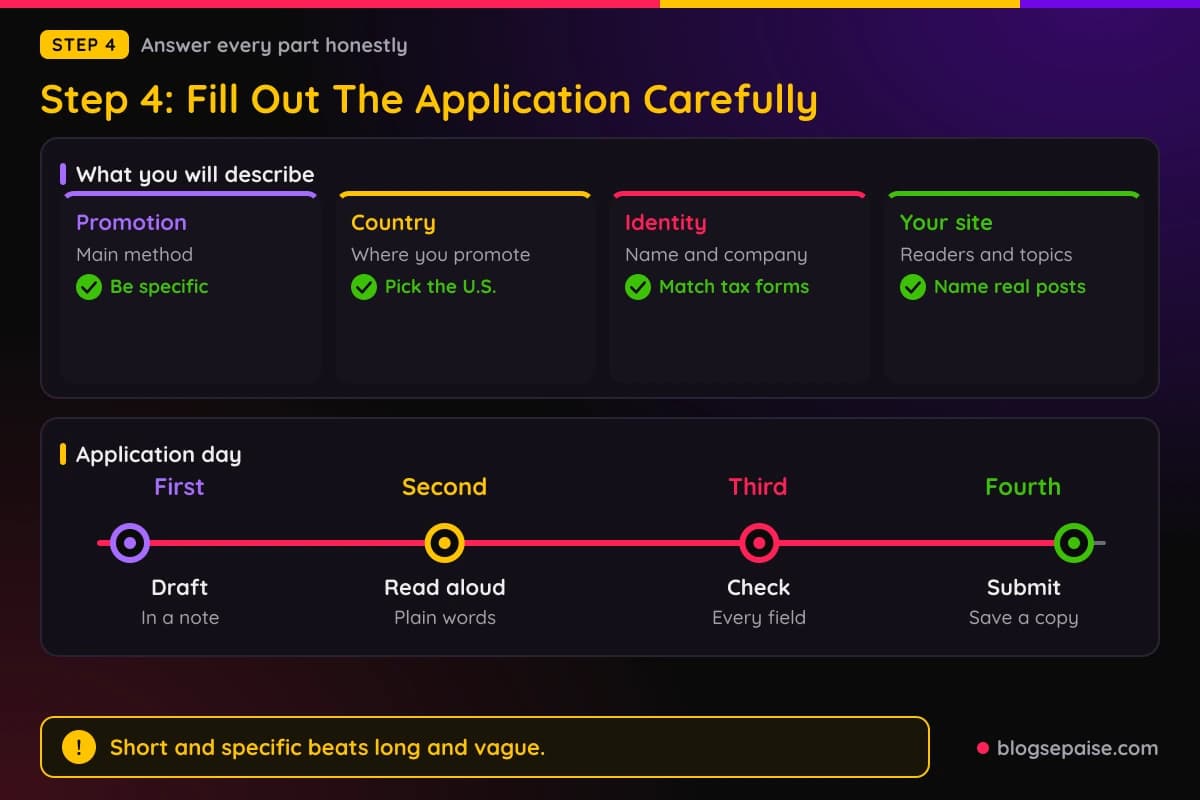
Write a clear description of your site. Say who your readers are, what topics you cover, and how Walmart products fit into your posts.
Short and specific beats long and vague. A line like I write home organization guides for renters and plan to link storage products reads well.
Name real example pages. If you already have a post where Walmart products would fit, point to it so the reviewer can see your plan.
Be honest about your traffic. Walmart sets no traffic minimum in its agreement, so there is no reason to stretch the truth.
Do not claim promotion methods you do not use. If you say you run an email list, a reviewer may ask to see it.
Double check every field before you submit. A typo in your site address can send the reviewer to a dead page.
Save a copy of your answers in a note on your computer. If you have to reapply, you will have a head start.
Read your site description out loud before you send it. If it sounds like an ad, rewrite it in plain words, the way you would explain your blog to a friend.
Do not copy answers from a forum post or a template. Reviewers read many applications, and canned text stands out for the wrong reasons.
Give a working contact email and check it daily. A follow-up question can land in a spam folder, and a missed reply can sink a good application.
Step 5: Avoid The Common Rejection Causes
Walmart does not publish a list of rejection reasons. Its agreement says unsuitable websites are rejected, and the program can decline an application in its sole discretion.
Even so, the terms point to the likely causes. Fixing each one before you apply improves your odds.
The first cause is a site that is not live or not finished. An under-construction page is named in the terms as a problem.
The second cause is the wrong audience. Walmart's terms bar sites that mainly serve people outside the United States.
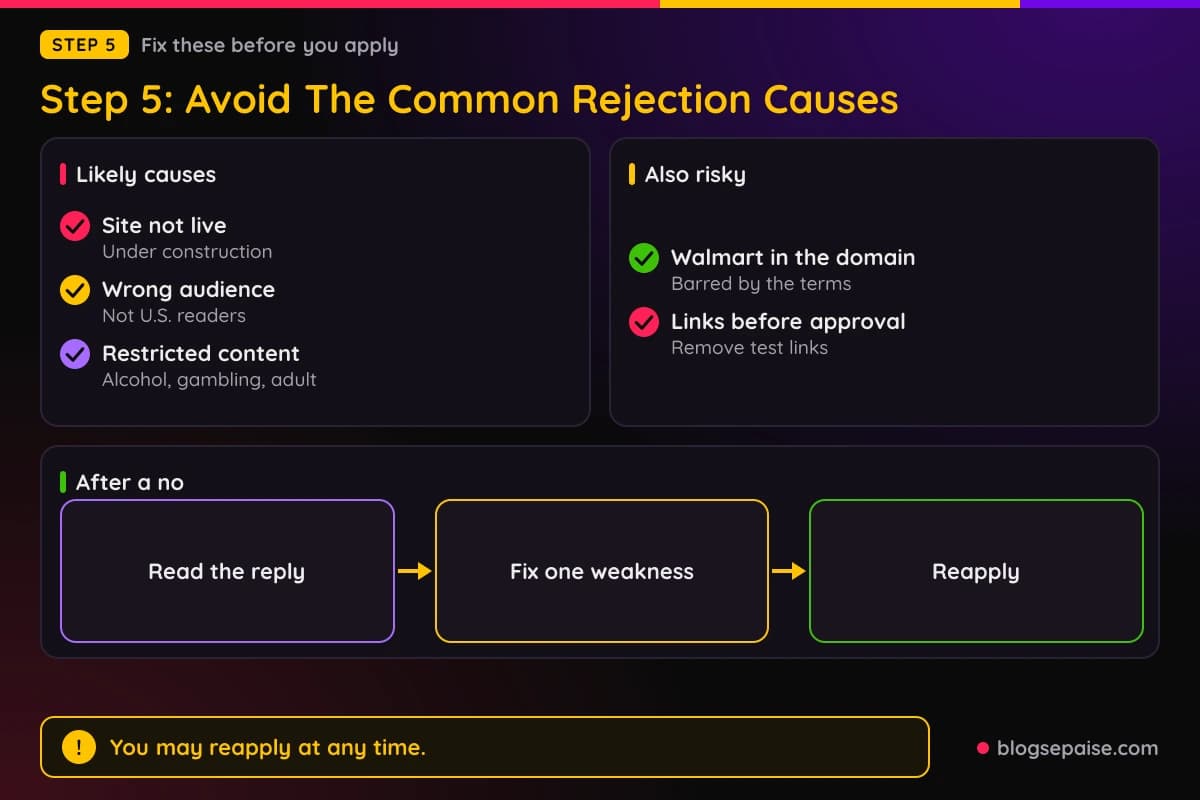
The third cause is restricted content. Alcohol, tobacco, gambling, adult material, hate, and crypto trading all fall under the prohibited list.
The fourth cause is a name problem. Using Walmart's names in your domain or email address is barred, so rename the project before you apply.
The fifth cause is early linking. The agreement tells you not to link to Walmart before approval, so remove any test links from drafts.
The sixth cause is a promotion plan that breaks the rules. Paid search ads on Walmart's name, spam email, and reward schemes for clicking your links are all barred.
The seventh cause is a coupon style site that mixes Walmart's name with words like sale or coupons. Exhibit A of the agreement bars using trademarks beside percent off, sale, or coupon terms.
Cashback and loyalty sites get extra scrutiny. The terms let Walmart decline them or add conditions when a site gives members points or cash back.
Thin or copied content can hurt too, even though the terms do not name it. Reviewers see a lot of sites, and a page stuffed with product grids tells them little.
If you get a no, you can try again. The agreement says you may reapply at any time, so use the wait to fix what looks weak.
Read any reply from the network for clues. Our guide on how to avoid getting banned from affiliate programs shows how to stay on the right side of program rules after you are in.
When you reapply, change something real. Add posts, clean up the layout, and fix any issue that you can name before you send a second application.
Run a final check the night before you apply. Open your site on a phone, click every menu item, and read your disclosure once more.
Ask a friend to look at the site for two minutes and tell you what it is about. If they cannot say, a reviewer probably cannot either.
Keep a short log of each application date and result. Over time the log shows you what changed between a no and a yes.
Step 6: Get Your Links And Start Promoting
The approval email is the starting gun. Log in to the network and open the Walmart program page, where link tools are waiting.
Walmart's own site says members get access to banners, link generation, and data feeds through the member center. Use the link generator for simple text links first.
Link only to products that fit your content. Walmart's terms say to link to qualifying products that are clearly featured on the page.
Link directly to Walmart. The terms bar shortening or obscuring links and redirecting them somewhere else, so skip any trick that hides the real address.
Use the official links only. The agreement tells affiliates to use qualifying links from Walmart or the network, not links you build by hand.
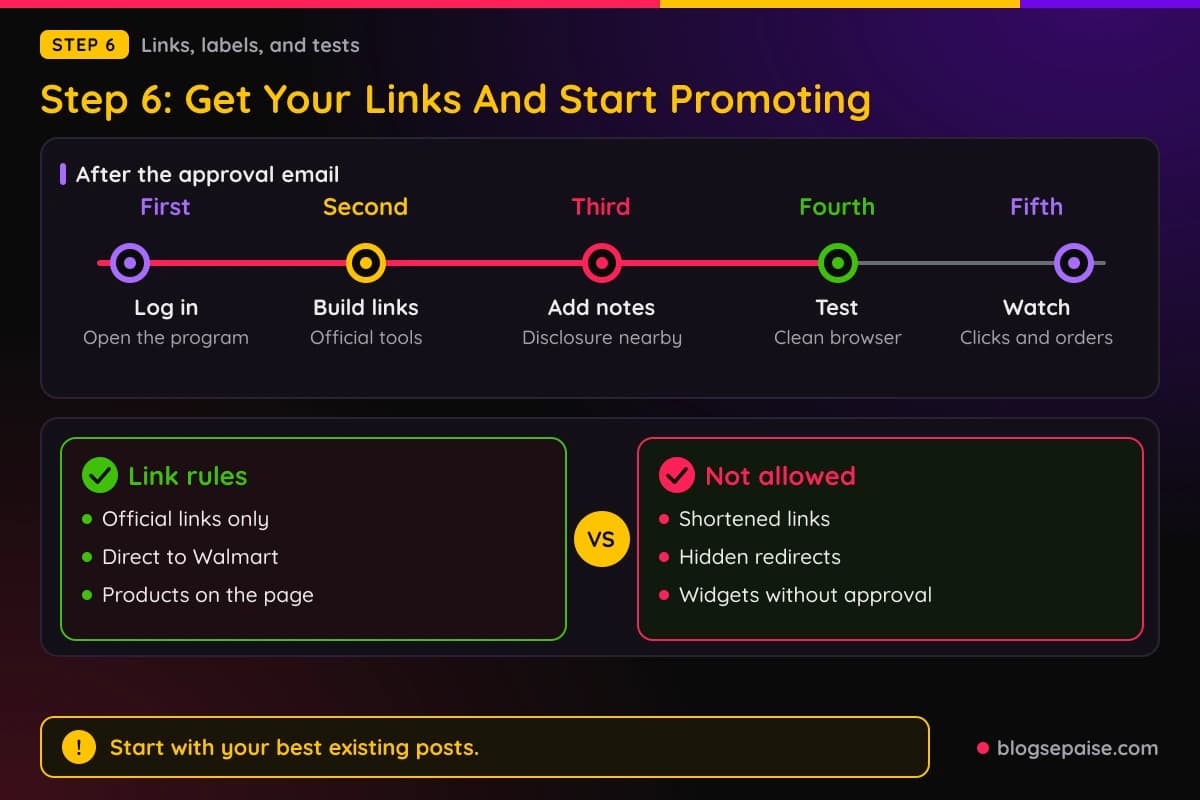
Place the disclosure next to every group of links. A short line above a list of products works better than a note at the bottom of the page.
Walmart's terms also ask for a label on endorsements, such as the hashtag WalmartPartner or the words paid link. That matters most on social posts, where space is tight.
Your reviews have to be honest. The terms say an endorsement should reflect your real opinion based on recent use.
Start with your best existing posts. A link inside a post that already gets visitors teaches you more than a link in a brand new post.
Our guide on how to find affiliate links walks through the steps for pulling links from a network dashboard. The steps look similar across many programs.
If your site is also waiting on an ad network, read how to use affiliate links before AdSense approval for ideas on making use of links in the meantime.
Test every link in a clean browser window. Confirm that it lands on the right Walmart page and that your network dashboard records the click.
Do not use the widgets without permission. Walmart's agreement says widgets need pre-approval.
Remember that the buyer must have cookies enabled for a sale to count. You cannot control that, so do not be surprised when a few clicks never show up as sales.
Plan your first month before you place a single link. Pick five posts, pick two or three products for each, and decide where the disclosure will go.
Write about products you would actually recommend. Readers can tell when a link was added only for a commission, and trust is worth more than one sale.
Update old posts with fresh links too. Many of your best opportunities sit in older articles that already rank and bring steady visitors.
Step 7: Track Results And Keep Your Account Safe
Approval is the start of a long relationship. Now you need to watch your numbers and follow the rules every day.
Open your network reports each week. Look at clicks, orders, and commissions, and compare them with the posts that sent the traffic.
Commissions are paid on eligible sales after a customer follows your link, and the buyer must accept delivery and pay in full. A cancelled order does not pay.
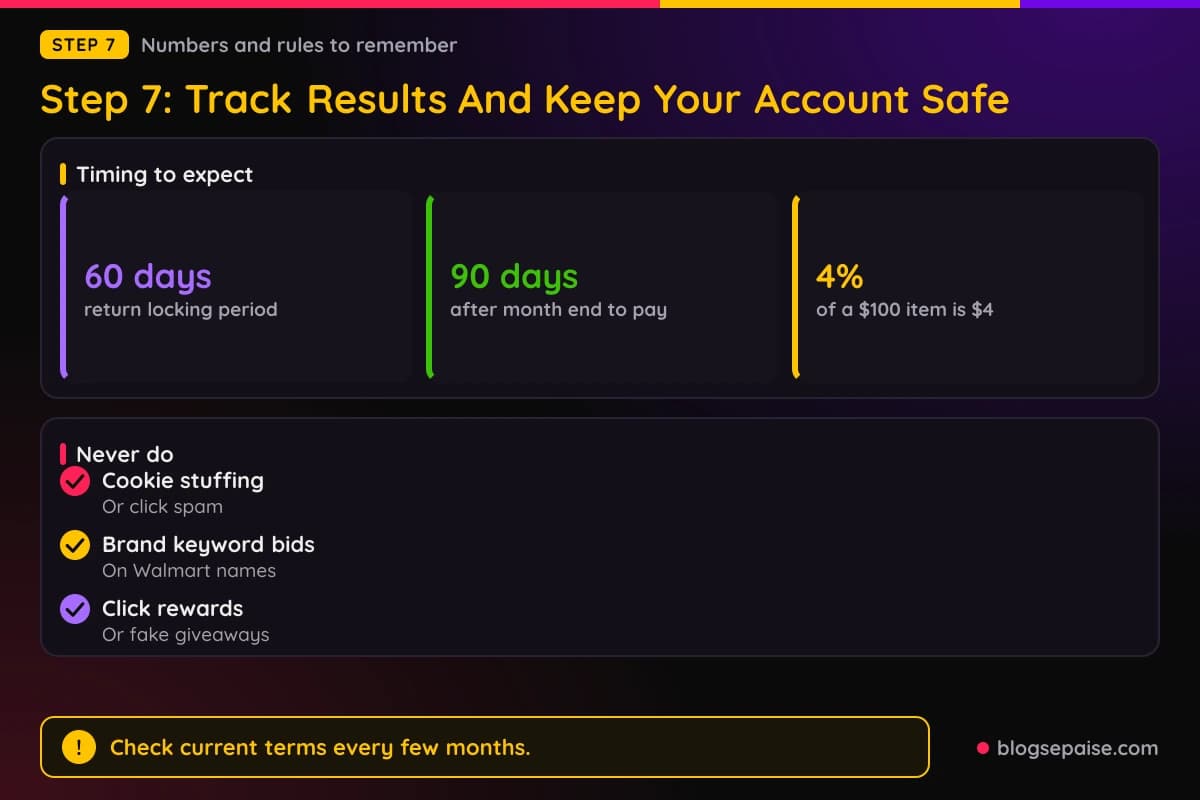
Commission is based on the sale price, not on shipping, taxes, or similar charges. A $100 item at a 4% rate earns $4, no matter what the shipping cost is.
Some purchases never count. Walmart's agreement names Sam's Club, pharmacy, travel, financial services, tires, and gift cards as excluded.
Returns reduce your pay. If a customer returns an item before the 60 day locking period ends, the commission comes out of your next monthly payment.
Payments arrive slowly. The terms say Walmart pays about 90 days after the end of each month, and the agreement does not state a minimum payout amount.
Check the payout settings in your network account for the current threshold. A guide that names a figure may be out of date.
Pay attention to the rules on promotion. Walmart bars cookie stuffing, spyware, bots, click spam, and paid ad networks, with a narrow exception for its Business program.
Keyword bidding on Walmart's trademarks is barred as well. Skip paid search on the brand name entirely.
Never offer rewards for clicking or buying through your links. Giveaways that depend on using your affiliate link break the terms.
If you use AI to help write posts, check every fact. The terms say AI content has to be accurate and reviewed before you post it.
Either side can end the relationship at any time. Violations can lead to immediate removal, withheld commissions, or worse, so keep your habits clean.
Taxes are your job. The agreement says you are responsible for your own taxes, so keep records of what the network pays you.
Give each test about four weeks before you judge it. A slow week on a small site proves nothing.
Move your effort toward the posts that earn. If a buying guide brings orders and a news post brings none, write more guides.
Review the terms again every few months. Rules, rates, and excluded items can shift, and a quick check keeps you from breaking a rule you never saw change.
A Worked Example: Tessa Applies With A Home Blog
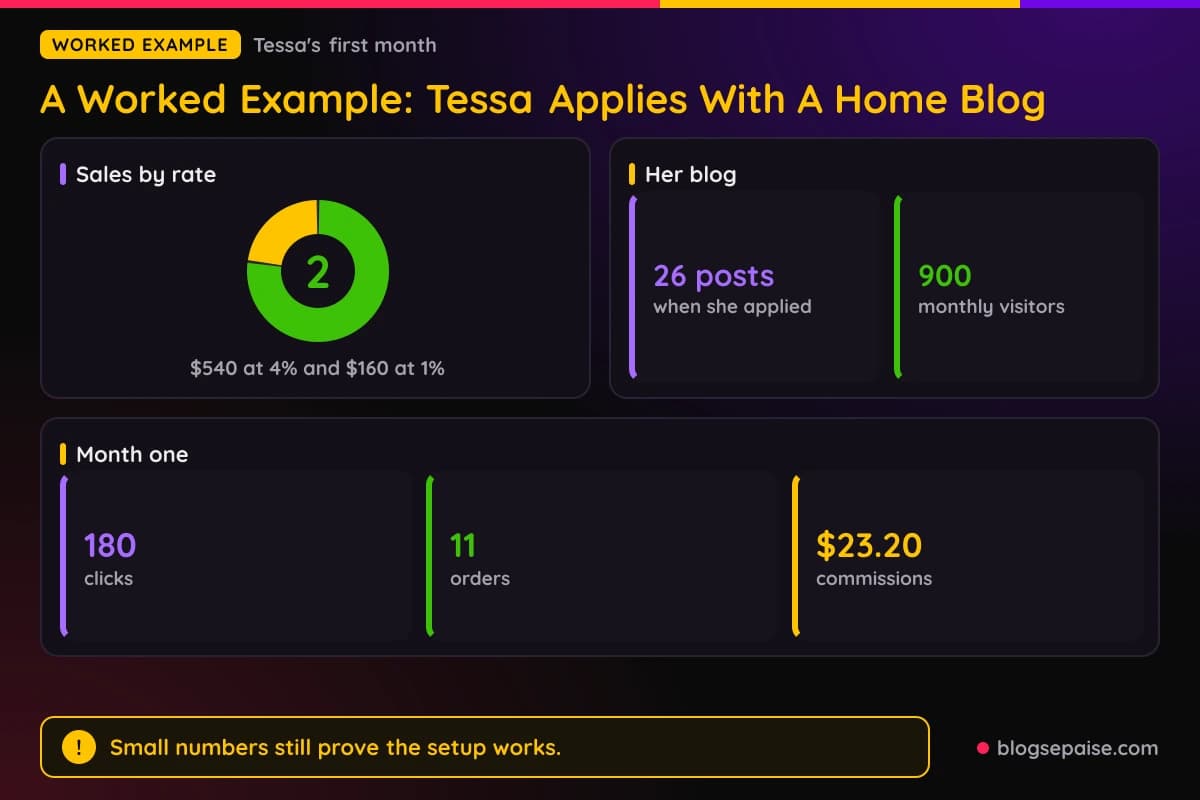
Tessa runs a blog about home organization for renters. She has 26 posts, an about page, a contact page, and a privacy policy that mentions cookies.
All the numbers in this example are made up so you can follow the method. They are not a promise of what your site will earn.
In week one, Tessa reads the Walmart agreement start to finish. She notes that her site is aimed at U.S. readers and that she is over 18.
She also renames her draft social handle, which had Walmart in it. She fixes it before she applies.
Tessa removes two test links she had placed in a draft. She remembers that the terms bar linking before approval.
In week two she creates her Impact account and fills out the Walmart application. She describes her blog, names two posts where storage products fit, and chooses the United States as her country.
The network shows her status as pending. Three days later an approval email arrives.
On day four she opens the member center and builds links for ten storage items. She adds a plain note above each product list that says she may earn a commission.
She places the links in her five best posts, which together bring about 900 visitors a month. She tests each link in a clean browser.
By the end of month one she has 180 clicks and 11 orders. Her qualifying sales come to $540 in home products at a 4% rate and $160 in electronics at a 1% rate.
That works out to $21.60 plus $1.60, or $23.20 in commissions. The amount is small, but the dashboard proves her tracking works.
Because Walmart pays about 90 days after the end of the month, Tessa does not see the money for a while. She treats the first quarter as a test and keeps writing.
One order is returned during the 60 day locking period. Its commission comes out of her next payment, which she expected after reading the terms.
In month two she moves her links higher in the posts and adds a buying guide for dorm room storage. Clicks climb as the posts get more traffic.
Her lesson is not the $23.20. She followed the rules, kept her disclosures clear, and used real numbers to decide where to add links next.
Notice what she did not do. She did not buy through her own links, she did not run paid ads on the brand, and she did not promise readers anything the products could not deliver.
Her made-up numbers also show a common shape. Clicks come first, orders come next, and the money shows up much later.
If Tessa had been rejected, her plan would have been simple. She would have read the reply, fixed the weakest part of her site, and reapplied.
Common Mistakes With The Walmart Affiliate Program
Most mistakes come from rushing or from skipping the terms. Each one below can cost you an approval or an account.
The first mistake is linking before approval. Walmart's agreement says not to link to its site until you are accepted.
The second mistake is putting Walmart in your domain or email address. The terms bar it, and a rename after launch costs far more than a rename before.
The third mistake is skipping the disclosure. Walmart wants a clear note next to your links, and readers deserve to know that you may earn a commission.
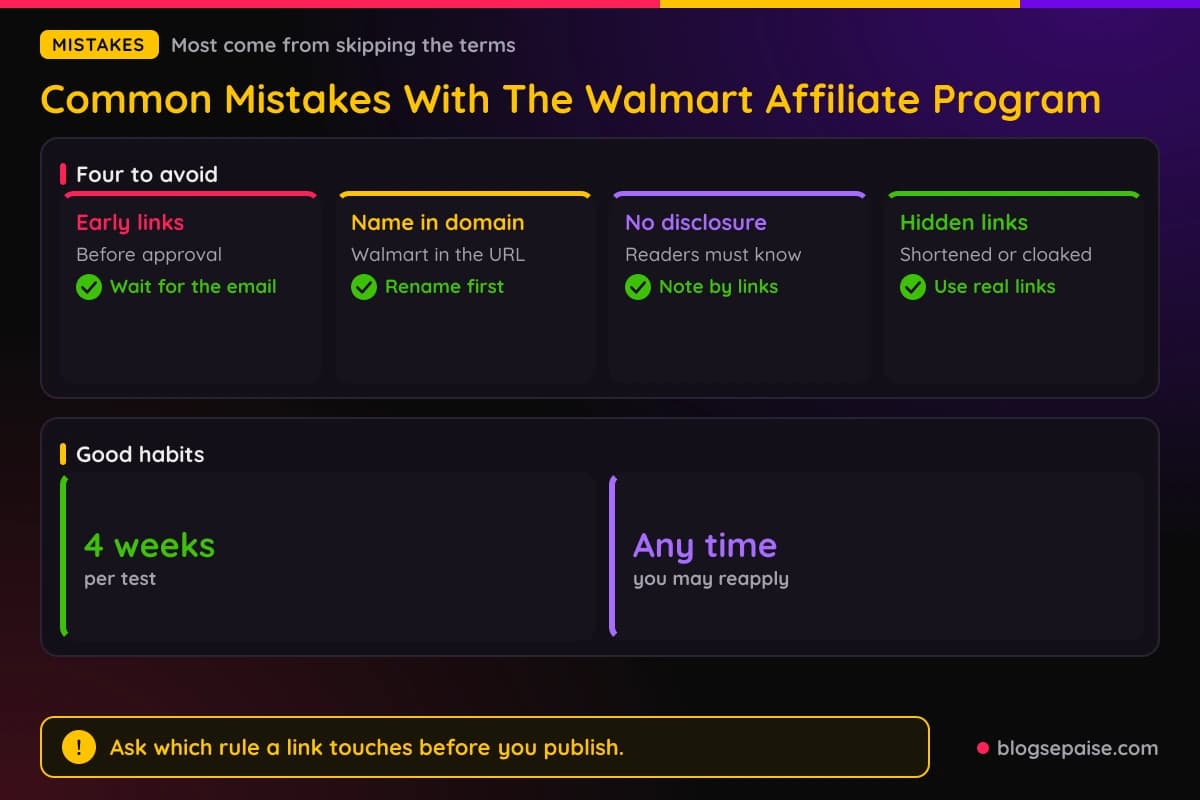
The fourth mistake is hiding the link. Cloaked or shortened links that obscure the destination break the link rules.
The fifth mistake is bidding on Walmart's name in paid search. The terms bar keyword bidding on its trademarks, and the penalty can be removal.
The sixth mistake is using coupon words next to the brand. Terms bar pairing Walmart's marks with percent off, sale, or coupon language.
The seventh mistake is aiming at the wrong audience. A site written mainly for readers outside the United States does not fit the program.
The eighth mistake is trusting an old guide. Rates, cookie windows, and payout rules change, and a post from last year may be wrong today.
The ninth mistake is treating the program as a quick payday. Low rates and slow payments mean you need steady traffic and patience.
The tenth mistake is giving up after one rejection. The agreement says you can reapply at any time, so fix the weak spots and try again.
The last mistake is ignoring your reports. A link that gets clicks and no sales tells you something, and you only learn it if you look.
A good habit fixes most of these. Before you click apply or publish a link, ask yourself which rule it touches and where you can read it.
If you cannot find the answer in a couple of minutes, ask support. Network teams would rather answer a question than clean up a mistake.
Final Thoughts
Getting into the Walmart affiliate program is mostly about preparation. A live site, a U.S. audience, clean content, a clear disclosure, and an honest application cover most of what a reviewer wants.
Remember the quirks. Apply through Impact, do not link before you are approved, keep Walmart's names out of your domain, and expect slow payments.
Rates, cookie windows, and payout rules can change. Check the current terms on Walmart's affiliate site and in your network account before you plan your income around them.
If you get a no, treat it as a to-do list. Fix what looks weak and reapply, since the terms allow it.
Start with step one today and read the agreement. When you are ready to keep your account safe long term, read our page on how to avoid getting banned from affiliate programs.
Frequently Asked Questions
1. How do I get approved for the Walmart affiliate program?
Sign up through the Impact network, apply to the Walmart program, and describe your live site honestly. Walmart reviews each application on its own and may accept or reject it.
2. Which network does the Walmart affiliate program use?
It runs on Impact, and Walmart's agreement says payments go through the Impact platform. Start from the sign-up button on Walmart's affiliate page.
3. How long does approval take?
Walmart's affiliate page promises a fast process and says you can get started within a day. Real timing varies, so wait for the decision email before you add links.
4. Do I need a website to join?
Walmart's terms are written around websites, and they bar sites that are not live. A finished site with real posts gives you the best chance.
5. Is there a minimum traffic requirement?
The agreement sets no traffic minimum. A site still needs real content to look credible.
6. Can I join from outside the United States?
The terms bar sites that mainly serve a non-U.S. audience. A site aimed at U.S. shoppers fits best.
7. How old do I have to be?
You must be of legal age where you live, which is at least 18 in most states. Walmart employees cannot join.
8. How much does the Walmart affiliate program pay?
Published guides from early 2024 reported rates of 1% to 4%, depending on the category. Check your network account for the current rates.
9. How long is the cookie window?
Those same guides reported a 3 day window. Confirm the current number in the program details before you plan around it.
10. When does Walmart pay affiliates?
The agreement says payments arrive about 90 days after the end of each month. Returns during the 60 day locking period reduce your payment.
11. Why was my application rejected?
Walmart does not publish reasons, and it decides in its sole discretion. Common causes include an unfinished site, the wrong audience, restricted content, and linking before approval.
12. Can I reapply after a rejection?
Yes. The agreement says you may reapply at any time, so fix the weak spots first.
13. Do I need a disclosure?
Yes. Walmart wants a clear note next to your links, and the law expects honest disclosure too.
14. Can I run paid ads on Walmart's name?
No. The terms bar keyword bidding on Walmart trademarks and most ad network promotion.
15. Is Walmart Creator the same program?
No. Walmart Creator is a separate program for social creators, so read its own rules if you plan to join it.
16. Can I put Walmart in my domain name?
No. The agreement bars using Walmart's names in a domain, subdomain, or email address.