Answer Page Affiliate Marketing: 8 Steps To Rank For Questions
Open a Google results page and look past the blue links. Questions show up in boxes, in related searches, and in forum threads.
Each question is a small reader problem with a real person behind it. An answer page solves one of those problems and then points the reader to the next step.
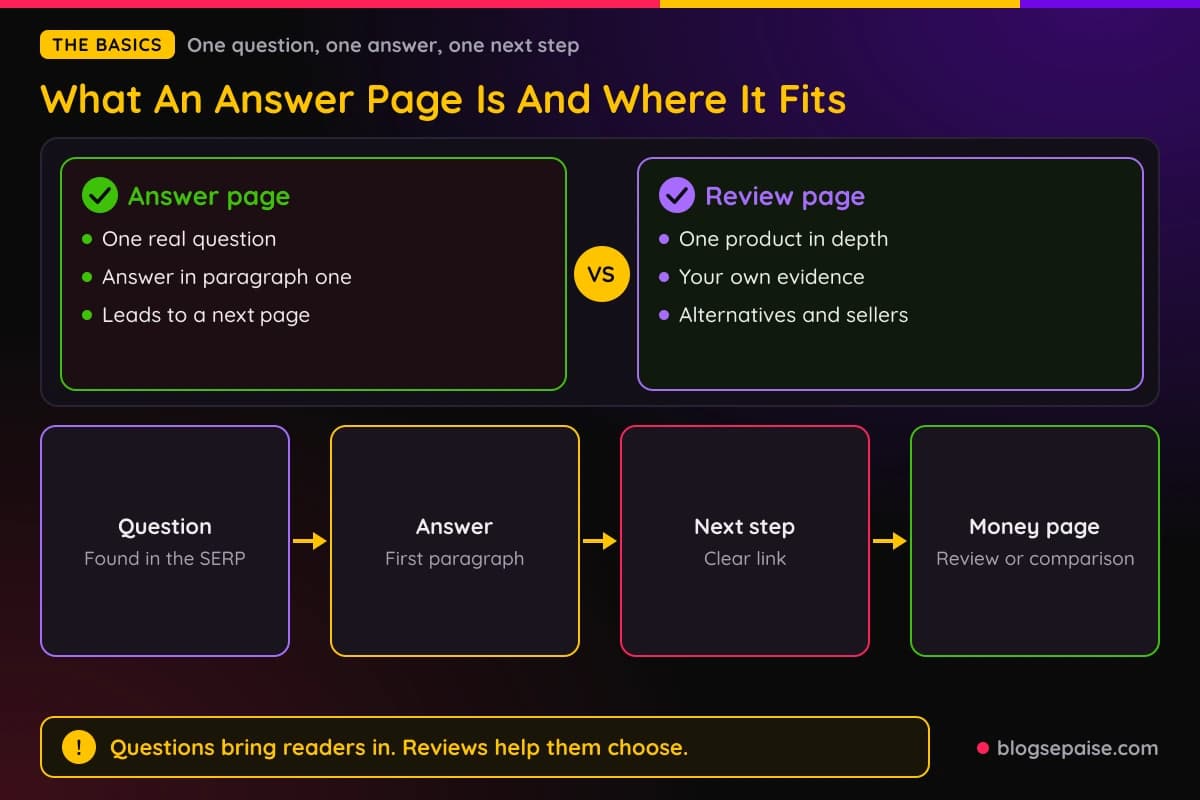
For an affiliate, that next step is usually a review, a comparison, or a buying guide. The answer page earns trust first and sends the click second.
Answer page affiliate marketing is the habit of writing those pages on purpose. You find a question in the results, answer it fast, and link to the page that helps the reader choose.
The pages work best when they stay small and honest. Thin affiliate pages, scaled content, and doorway pages all count as spam, so every answer page has to earn its place.
Below are eight steps that take you from reading a results page to updating a live answer page. Along the way you will see where Search Console, autocomplete, and People Also Ask fit.
If you still need the basics of finding keywords, start with our guide to keyword research for affiliate blog posts. Then come back and use the questions in the results as your next layer.
Our search intent classifier helps with step three. Our guide to writing vs comparison pages covers the money page your answer page sends readers to.
Disclosure: Some of the links I share might be affiliate links. If you click on one and make a purchase, I may earn a small commission as a thank you. But don’t worry, it won’t cost you anything extra. I only recommend stuff I genuinely believe in. Your support helps me keep creating awesome content. You can read my full affiliate disclosure in my disclaimer page.
Search 1,500+ affiliate programs in the Blogsepaise Program Database and filter them by category, network and commission type, then go straight to each program's signup page. The Link Health Monitor then checks your posts for broken, redirected and untagged affiliate links.
What An Answer Page Is And Where It Fits
An answer page is a focused page that answers one real search question. The title, the first paragraph, and the headings all stay on that question.
A review covers one product in depth. An answer page covers one question, and it may mention several products along the way.
A long blog post covers a broad topic from many angles. An answer page picks one angle and finishes it.
Search results already show you where questions live. People Also Ask is a group of related questions, and clicking one reveals a short answer taken from a specific web page.
Each click loads more questions below it, so the list keeps growing as you explore. The answers appear as a paragraph, a list, a table, an image, or a video.
Featured snippets can also show up inside that related questions group. A featured snippet reverses the format of a normal result, so the descriptive text comes first and the source link follows.
You cannot mark a page as a featured snippet. Google's systems decide if a page makes a good one, and no special markup is needed.
People Also Ask is common. Semrush Sensor data from August 2024 shows the box in 51.85% of all searches, and Ahrefs found a box on 43% of the queries in its own Keywords Explorer data.
Clicks are a different story. A Backlinko study cited by Ahrefs found an average interaction rate of about 3%, and up to 13.6% on some queries.
Interactions are not clicks to your site, so treat the box as a clue about what readers ask. The box is a map of questions, and the page you write is what earns the visit.
Chasing the box makes the most sense on high traffic or high value pages. A site with little organic traffic usually has bigger jobs to do first.
Answer pages fit affiliate sites because question searchers are often early in a decision. They want one clear answer, and then many of them want help choosing.
Helpful content lets readers reach their goal and feel satisfied. Pages that force readers to search again for better information are a warning sign.
An answer page that resolves the question and then offers a relevant next page passes that test. A page that only exists to push a link does not.
The FAQ rich result no longer appears in Google Search as of May 2026. Skip any plan to build pages for that markup and focus on pages that answer the question in plain text.
AI features in Search need no extra markup either. A page only has to be indexed and eligible to show a snippet, and traffic from those features is counted under the Web search type in Search Console.
Step 1: Read The SERP For Question Signals
Start with the results page for your main keyword. Search the way a reader would, and slow down to read every block instead of scrolling to the first link.
Look for the People Also Ask group first. Click a few questions and watch new ones load, since the chain often wanders from your keyword into nearby topics.
Next, scroll to the related searches at the bottom of the page. A second block called People also search for appears when you click a result and come back to the page.
Search each related term and note the new suggestions that appear. Repeating the loop gives you a quick list of ready made topics without any paid tool.
Check for a featured snippet at the top. Its format tells you what Google picked for this query, such as a short paragraph, a list, or a table.
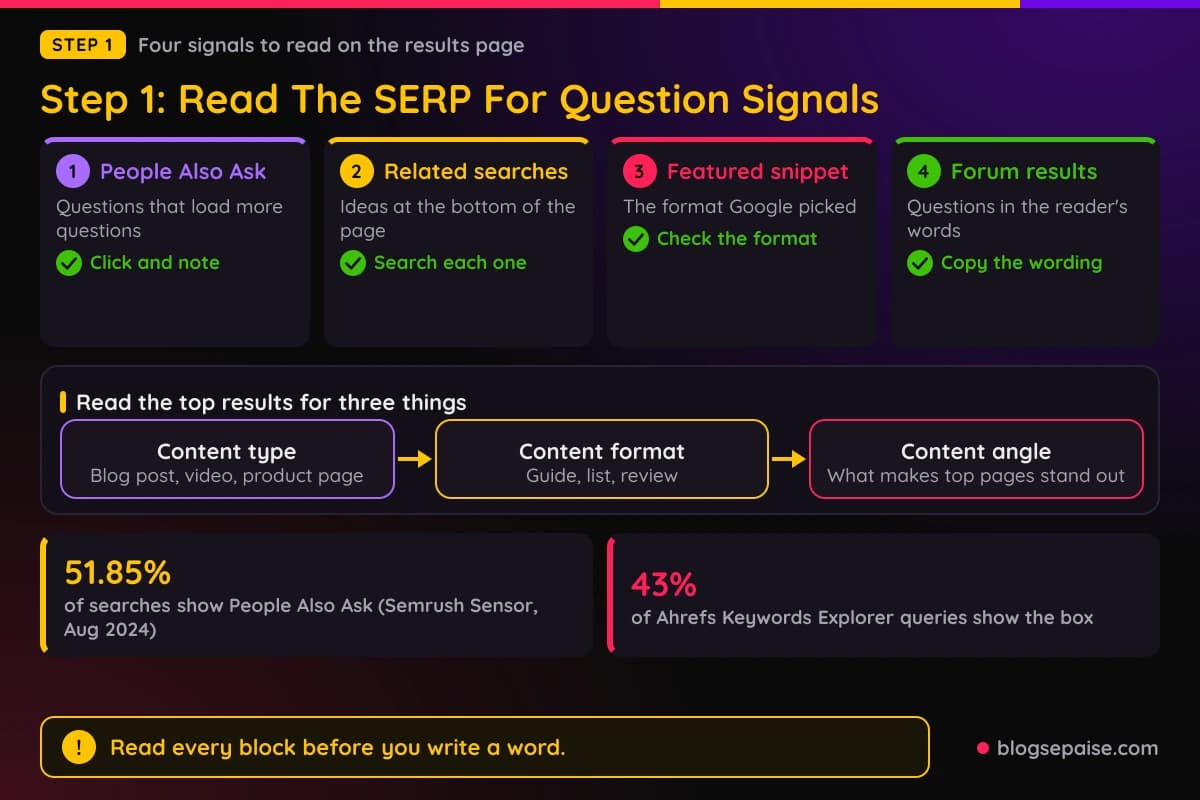
Notice forum and discussion results too. A thread in the results tells you real people ask the question in their own words, and those words often make better headings than any keyword tool suggests.
Then read the content type, format, and angle of the top results. These three Cs of search intent show what kind of page the reader expects.
Content type is the kind of page that dominates, such as a blog post, a video, a product page, or a landing page. Content format is the structure, such as a how to guide, a list, a review, or a comparison.
Content angle is the selling point that makes the top pages stand out. If every result carries the same year or the same promise, readers want that angle.
Titles are the fastest scan. Read the top ten titles in a row, and you will usually see the dominant type and format within a minute.
Watch how much the top positions shift over time. Stable results point to a clear intent, and frequent shuffling points to an intent that changes.
Results vary with location, language, and device. Google's own example is a repair shop query that returns different shops in different cities, so search with your target reader's setting in mind.
The query itself also changes which search features appear. A local service query can bring up local results, and a product style query can bring up images.
A tool can speed the reading. Thruuu analyzes up to 100 search results and reports heading structures, topic coverage, and content depth across the ranking pages.
Whatever you use, write down what you see. Note the dominant format, the questions in the box, and any gap, such as a missing step or an outdated answer.
Google does not publish how it picks the questions in the group, so treat them as a snapshot and not a promise. They change as readers ask and as the results change.
Step 2: Collect Questions From Search Console, Autocomplete, And People Also Ask
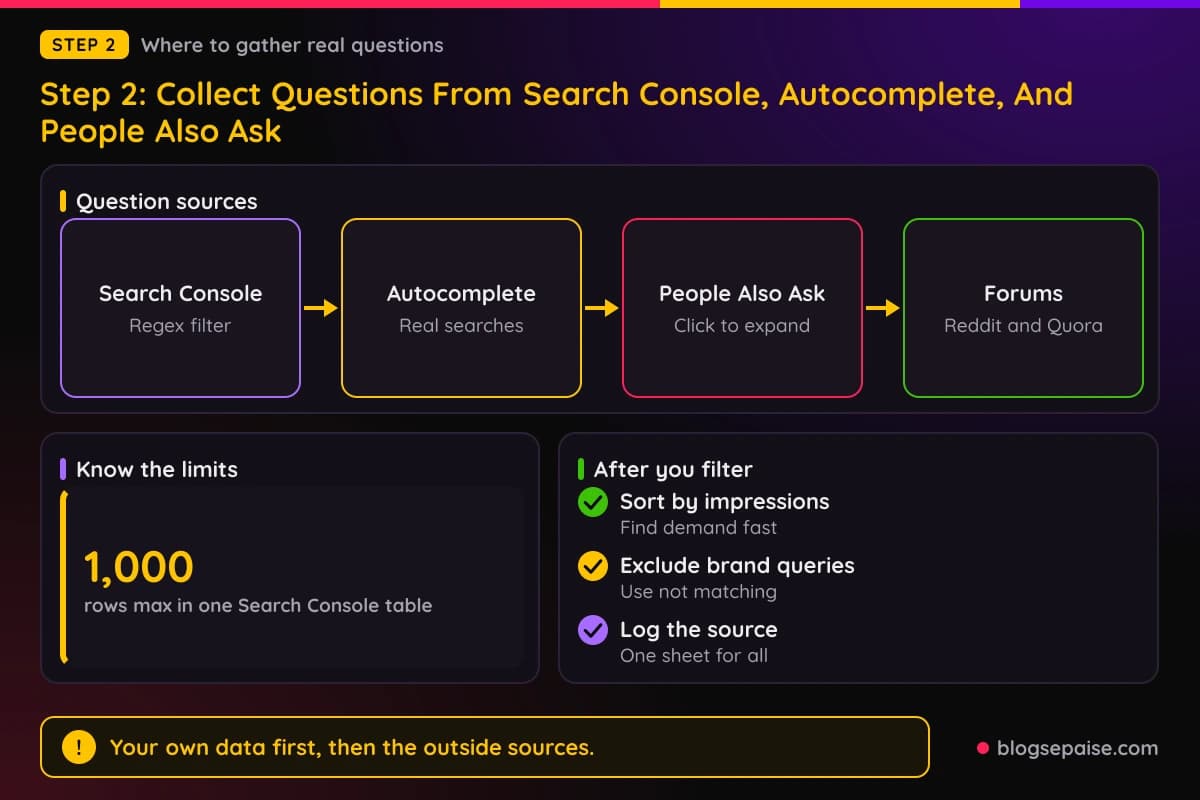
Your own data is the best place to start. Search Console already shows the real queries that brought readers to your site.
Open the Performance report for Search results and stay on the Queries tab. The tab groups rows by the words people typed, and the metrics are clicks, impressions, click through rate, and average position.
Add a Query filter and choose Custom (regex). The pattern what|how|when|why finds queries that your content could answer, maybe through an FAQ.
You can widen that pattern with other question words. The Semrush question filter counts who, what, where, when, why, how, is, and can.
A caret in front of the group, like ^(who|what|where|when|why|how|is|can), keeps only queries that start with a question word.
Search Console uses RE2 syntax, so check Google's RE2 reference before you try anything fancy.
A second dropdown lets you pick matching or not matching. Use the not matching option to clear out noise, such as your brand name, once the first list is on screen.
Sort the filtered list by impressions. A question with many impressions and a low position is a page waiting to be written, or a page you already have that does not answer clearly enough.
Know the limits of the report. Tables show a maximum of 1,000 rows, and some rare or sensitive queries are hidden for privacy.
The Search Console API offers a larger selection of rows, so a big site can export more than the table shows. A small site rarely hits the cap.
Your report also shows only what you already earn impressions for. A question you have never ranked for will not appear, so you need outside sources too.
Autocomplete is the next stop. Predictions reflect real searches, and they change with language, location, trending topics, and a signed in reader's history.
Autocomplete does not simply list the most common queries on a topic. Treat it as a clue about wording, never as a ranked list of volume.
Type your keyword followed by a question word and read what comes up. Note the phrases that sound like a real reader.
People Also Ask is your third source. Expand the questions on the results page, and copy the ones that match your topic and your next step.
Tools can map this for you. AlsoAsked turns a topic into a visual map of related questions, and Semrush Keyword Magic Tool has a Questions filter that keeps queries with question words.
Compare the questions by search volume and keyword difficulty, and favor higher volume with lower difficulty.
The Keyword Magic Tool can also filter by SERP features so you see only terms that trigger People Also Ask.
Mangools KWFinder pairs related keyword ideas with local search results, which helps when you want to check the real SERP behind a question.
Communities are the fourth source. Reddit and Quora hold questions that readers ask when search results fail them, and many subreddits keep a list of common questions in the sidebar.
Your own readers count too. Comments, emails, and replies from your list are questions you can answer with proof that you were listening.
Put every question in one sheet with the source, the date, and the page that could answer it. The sheet turns a messy pile of ideas into a queue you can sort in step three.
Step 3: Judge The Intent Behind Each Question
Not every question deserves an answer page. The intent behind the words decides if a page will help the reader and if it can lead to a sale.
Searches fall into four intent types. Informational searchers want an answer, commercial searchers compare options, transactional searchers are ready to act, and navigational searchers want a specific site.
Answer pages live in the informational group. Many of them end by leading a reader toward commercial content, which is why the next step matters.
Our guide on the difference between informational and commercial content shows how those two types work together on an affiliate site.
A question with a comparison inside it is different. When the words say best, versus, or which one, the reader is already weighing options and a comparison page fits better than an answer page.
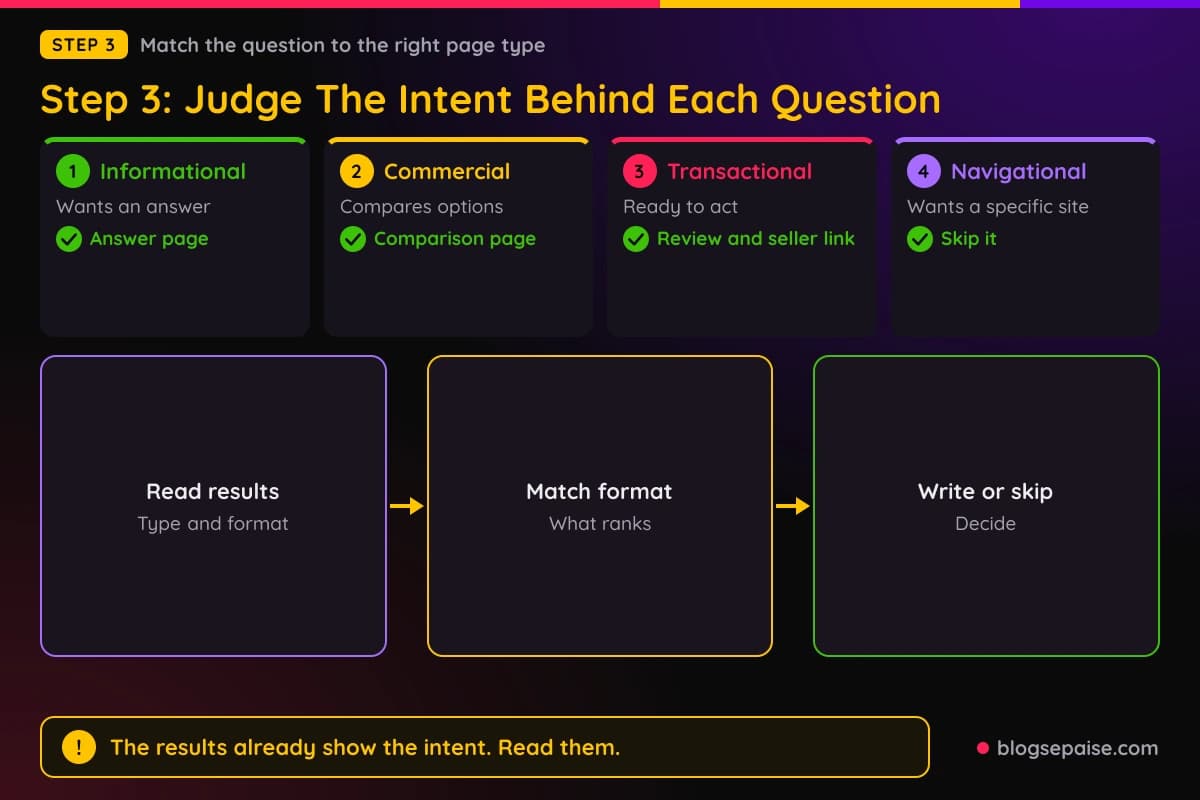
Use the results to settle close calls. If the top pages are how to guides and explainers, the reader wants an answer, and an answer page matches.
If the top pages are product pages, reviews, or list posts, the reader wants to choose, and a plain answer page will struggle. Pick the format the results already prove.
If the results mix formats, the intent may shift between readers. Frequent movement in the rankings is a sign of that, so you may need a page that answers fast and then helps readers choose.
Our search intent classifier can label a keyword for you in seconds. Use it as a first pass, then confirm with the real results.
Check the question against your site too. Topics chosen for trends instead of audience interest are a warning sign, so pick questions that tie back to what your site covers.
Skip questions where you have nothing to add. Original information, real testing, or a clearer explanation gives the page a reason to exist.
Skip questions that promise an answer nobody has. A page that claims answers that do not exist, such as an unconfirmed release date, is a warning sign.
Score each question on three points. Does it match your audience, does it have a clear intent, and can you point the reader to a useful next page.
A question that fails the third point may still be worth a section in a bigger guide. A question that fails the first two is better left alone.
Step 4: Decide If A Question Gets Its Own Page Or A Section
Many questions share one answer. Writing a page for each wording of the same question is a fast way to build pages that compete with each other.
Run three checks before you split. Look at how broad the original topic is, ask if a reader would want both questions answered in the same place, and ask if the questions serve the same goal.
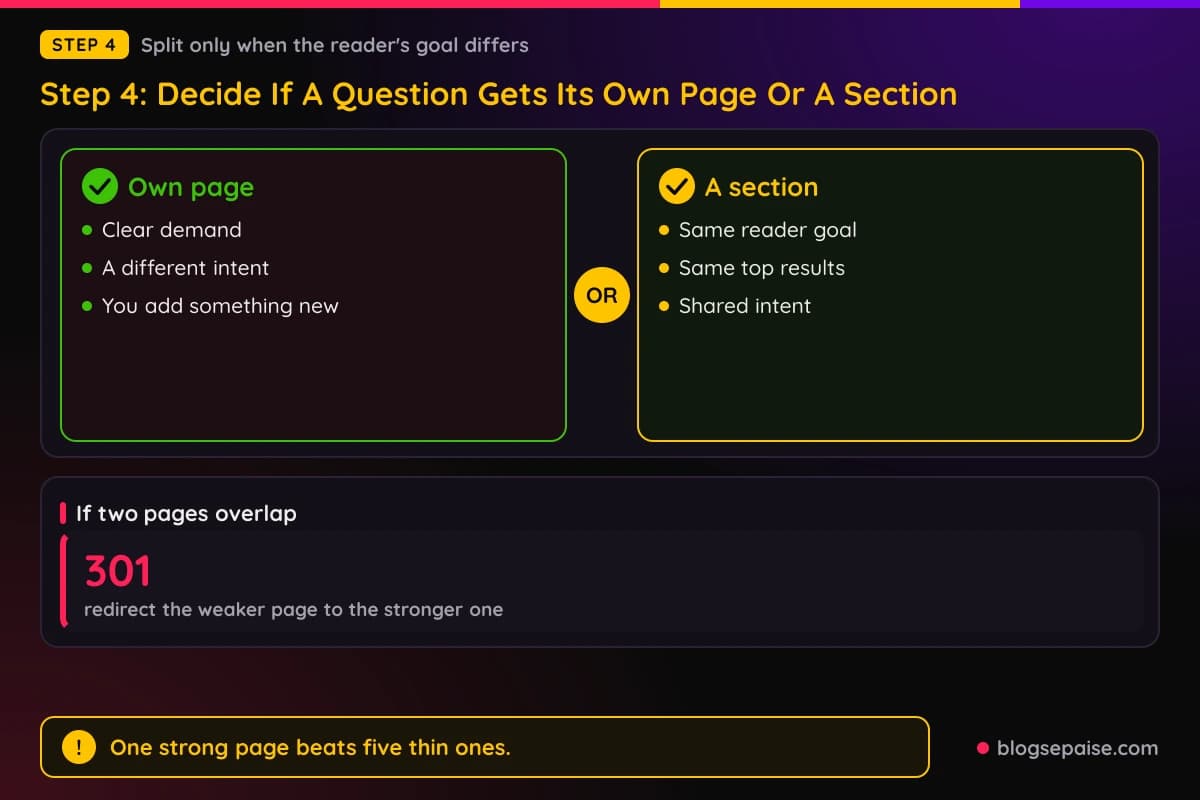
If the same reader wants both answers together, put them on one page. If the goals differ, the questions earn separate pages.
Use the results as a second opinion. When two questions bring up the same top pages, they likely share an intent, and when they bring up different formats, they likely do not.
Questions that share a page can become headings. Use the question as the heading, answer it directly, and match the format of the current answers.
The answer wording can differ from the question. The reader should still find a clear reply under each heading without hunting for it.
Give a question its own page when it passes a few tests. It has real impressions or clear demand, it has a different intent from your other pages, and you can answer it better than the pages in the results.
Be careful with volume. Scaled content abuse means generating many pages mainly to manipulate rankings, however the pages are made.
Doorway abuse is the related risk. Multiple pages that aim at the same query with small changes, or near duplicate pages that sit closer to search results than a clear site structure, are on the list.
Duplicate pages cause quieter trouble. When several URLs hold the same or very similar content, Google picks one version to show and signals get split.
Overlap becomes a real problem when pages target the same keyword and also meet the same intent. Pages with different intents that share a keyword are usually fine.
If you find two pages that overlap, merge them. Combine the content on one URL, redirect the old one, and update the internal links that pointed to it.
A permanent 301 redirect is the strongest signal for retiring a duplicate. A rel canonical link and a sitemap entry are weaker signals.
Do not link internally to the duplicate URL once you pick the preferred one.
Canonical tags are not a fix for cannibalization. They fit true duplicates and near duplicates.
Before you publish a new page, search your own site for the question. A page that already answers it needs an update, not a twin.
Step 5: Write The Answer First
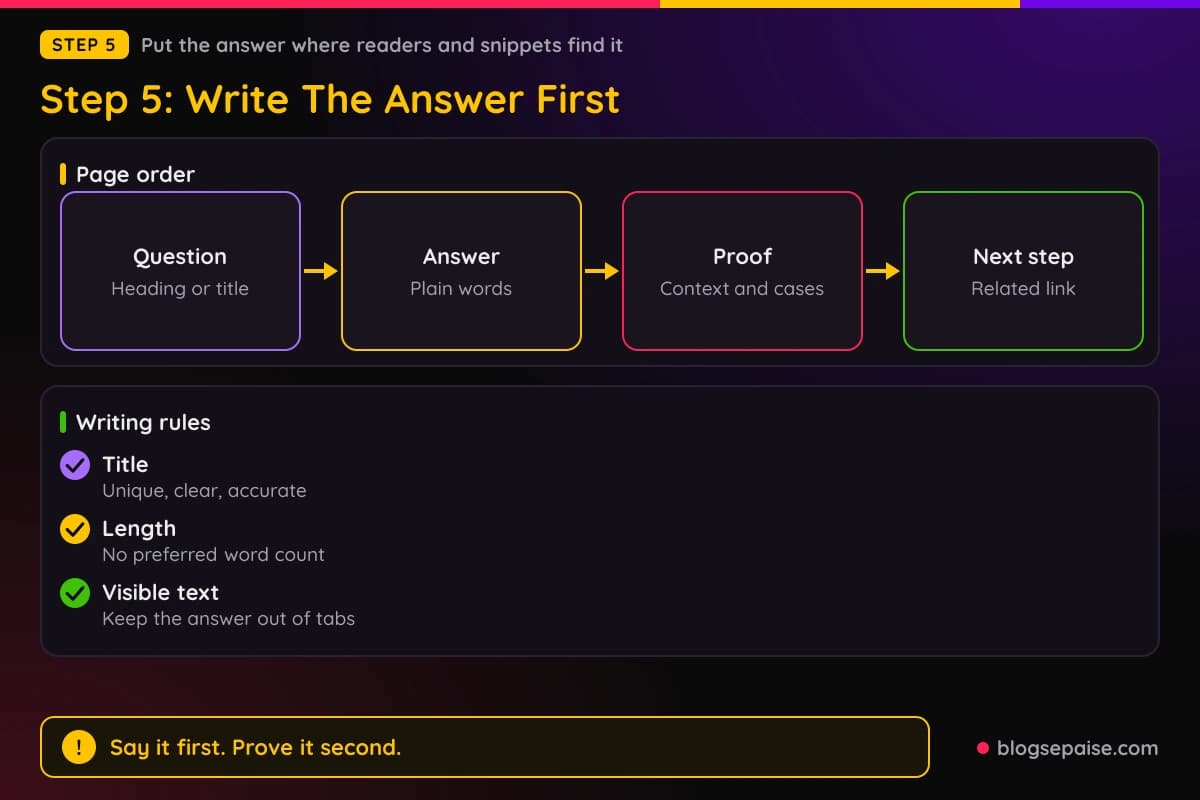
Put the answer where the reader and the search system can find it fast. The first paragraph under the title should answer the question in plain words.
Then add the context. Explain the exceptions, the proof, and the cases where the answer changes, so a reader who needs more has a reason to stay.
Google builds snippets mostly from text on the page, and it picks the part that best matches the query.
The same page can show different snippets for different searches. Clear paragraphs under clear headings give the system more to pick from.
Snippets come from visible content. Information hidden in collapsed or tabbed sections is less likely to be used for a Read more link, so keep the answer in plain view.
When a featured snippet is clicked, the reader goes straight to the section of the page shown in the snippet. The scroll needs no markup.
If Google cannot find the section with confidence, the click lands at the top of the page.
Match the format the results prove. If the box shows a numbered list, a list will do.
If it shows a short paragraph, give a short paragraph first.
Write a title that is unique to the page, clear, and accurate. Title links come from the title element and from headings, so avoid exaggeration and avoid promising more than the page gives.
Write a meta description for the page too. Google uses it only when it summarizes the page better than the text on the page, so keep it short, relevant, and different on every page.
Headings help readers move around. Google does not require a set order and there is no ideal number, but too many headings is a sign to cut back.
Keep paragraphs short and break long content into sections. Useful content is easy to read, well organized, unique, and kept up to date.
Do not write to hit a number of words. Google has no preferred word count, and writing to a target length is a warning sign.
An answer page can be short when the answer is short. It should grow only when the reader needs more proof, more steps, or more cases.
Show that you know the topic. First hand experience, such as having used a product, clear sourcing, and an author readers can check all build trust.
Explain how you produced the page when readers would wonder. For product reviews, disclose the number of products tested and the methods, with evidence such as photos.
Do not copy the answer from the page that already ranks. Republishing other sites' content, or lightly changing it with synonyms, counts as scraping, even when you cite the source.
Check the facts before you publish. Google's helpful content questions ask if the page is free of easily verified factual errors.
Step 6: Add A Clear Next Step To A Review Or Comparison
An answer page that ends with the answer wastes the visit. A reader who asked a question usually has a follow up one, and the next step is where your affiliate work begins.
Pick the next page by looking at what the reader needs after the answer. If the question was about choosing, send them to a comparison.
If it was about a single tool, send them to its review.
Good affiliate pages add value through original reviews, testing and ratings, price information, product comparisons, or useful navigation. That list is your guide to the page you link to.
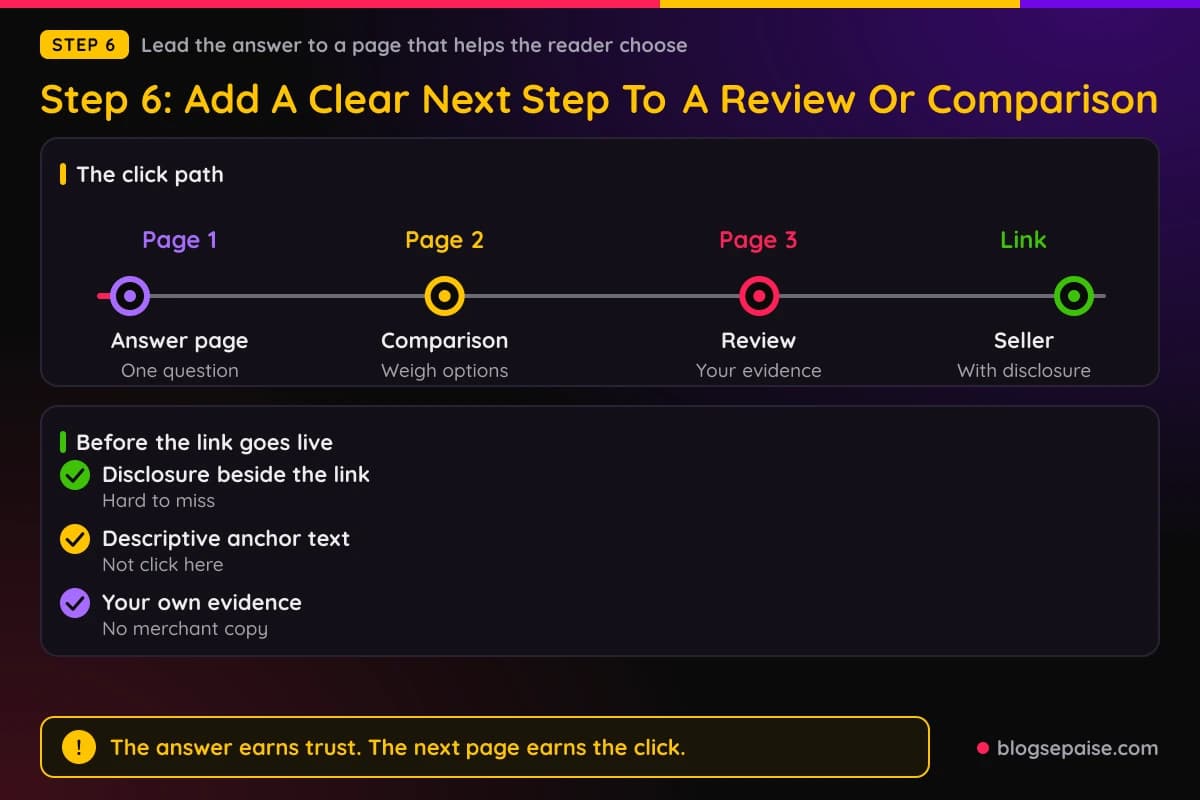
Google's guide to high quality reviews adds more. Explain what sets a product apart, compare alternatives, say which one suits which use, and base pros and cons on your own testing or research.
The same guide asks you to link to several sellers so readers can buy from the one they prefer. It also says to justify top picks with first hand evidence.
Write the bridge in plain words. One or two sentences that say what the reader will find next work better than a loud button.
Use descriptive anchor text. Anchor text tells users and search systems what the target page is about, and generic phrases like click here are weak.
Test the anchor by reading it alone. If the words do not make sense out of context, make them more specific.
Our guide to writing vs comparison pages that rank shows how to build the page at the end of this path. It covers verdicts, criteria, and where affiliate links belong.
Disclose your affiliate relationship where the reader meets the link. The FTC says a disclosure must be hard to miss, and it belongs with the endorsement, not behind a MORE link or at the end of a post.
The FTC also asks for simple, clear wording such as ad, advertisement, or sponsored. Our affiliate disclosure generator gives you wording to start from.
Our guide on legal disclosures and FTC guidelines explains the rules in more detail.
Advertisements and paid placements get the sponsored value in the rel attribute. Many affiliate sites add it to their affiliate links.
Keep the answer page useful when the links are removed. If the page only works as a doorway to a seller, it matches Google's description of a thin affiliate page.
Thin affiliate pages copy descriptions and reviews from the merchant and add nothing. The fix is your own evidence, your own comparison, and a clear reason the reader should click.
Step 7: Link Answer Pages And Money Pages Together
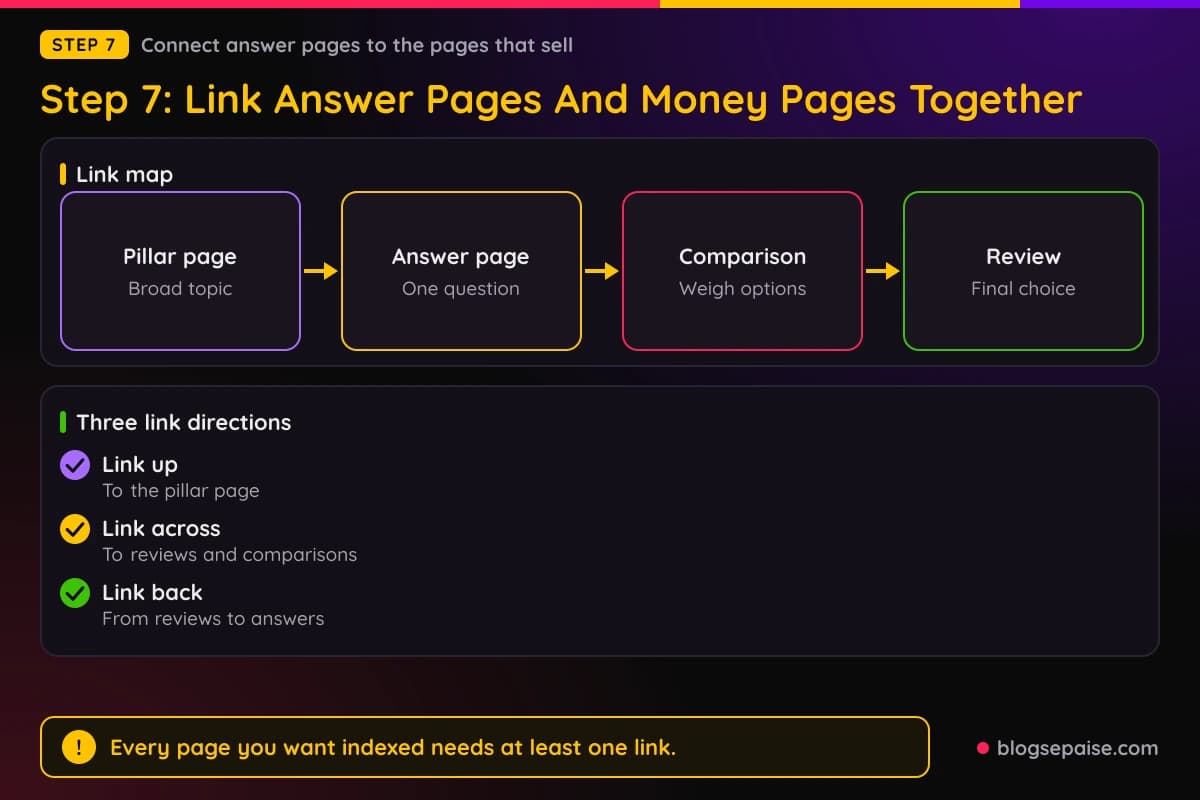
Links give answer pages their place on your site. Most new pages Google finds are discovered through links, and every page you want indexed should receive at least one link from another page on your site.
Link from the answer page to the money page, and link back from the money page to the answer page. The reader of a review often has the same question your answer page solves.
Place links in context, inside the paragraph where the reader needs them. Related pages linked in context with descriptive anchor text help readers and search systems alike.
There is no ideal number of links per page. An excessive number can hurt usability, so link where it helps a reader and stop there.
Use crawlable links. Google generally follows only anchor elements that have an href attribute, and links built on a click handler alone may not be found.
For image links, the alt text works as the anchor text. Write it to describe the page the image links to.
Do not stuff keywords into anchors, and do not place several links side by side. The words around a link give it context.
Keep one clear parent for each question. Link the answer page up to the pillar page that covers the broader topic, such as our affiliate tips hub.
Our blog topic cluster mapper turns a keyword list into clusters, so you can see which questions belong around which money page. Our guide to building topical authority explains why a tight cluster helps.
Different pages can link to the same target with different anchors, as long as each anchor describes the target. Avoid pointing two similar anchors at two different pages, since that blurs which page answers what.
Link to the canonical URL every time. Linking internally to duplicate URLs instead of the preferred one sends mixed signals.
Add each new page to your sitemap with its canonical URL. If a new page does not show up in Search, our guide on new blog posts not indexed by Google walks through the checks.
Two helper tools speed up the linking. The internal link opportunity finder suggests places to add links, and our article on AI internal linking explains where automation helps and where it does not.
Step 8: Measure And Update Your Answer Pages
Once a page is live, Search Console tells you how it performs. Filter the Performance report by that page, then read the queries tab to see which questions bring readers.
Watch clicks, impressions, click through rate, and average position. Average position in the table covers the specific row you are looking at, so read it per page and per query.
Do not judge a page in a week. Changes can take hours to months to appear in Search, so wait a few weeks before you judge the impact.
Compare the queries a page earns with the question you wrote it for. If new question queries appear, add a clear answer for them or plan a new page, using the rules from step four.
Update with substance. Changing dates without real changes is a warning sign, and adding or removing large amounts of content only to seem fresh does not help rankings.
A real update fixes an outdated fact, adds a missing step, replaces a product that changed, or improves the next step link. Our AI content refresh workflow covers how to schedule updates across a site.
Check your links on a schedule. A review that moves, a broken seller link, or a program that closes turns a good answer page into a dead end, and our guide on affiliate link monitoring shows how to catch it.
After a meaningful update, use the URL Inspection tool to request a recrawl. Crawling can take anywhere from a few days to a few weeks, and sending the same URL again does not speed it up.
For many pages at once, submit a sitemap. A recrawl request does not guarantee that a page will appear in results quickly, or at all.
Retire pages that no longer help. Review old content, update it, or remove it when it is no longer relevant.
When you retire a page, redirect it to the closest useful one with a 301. That keeps the reader from landing on a dead end and keeps your internal links clean.
Review the results page again every so often. The questions in the box, the formats at the top, and the angle that wins can all shift, so your answer should shift with them.
AI features in Search lean on longer, more specific queries and follow up questions. Content that answers deeper questions on the topic does well there, and a cluster of answer pages does exactly that.
Common Mistakes With Answer Pages
The first mistake is writing a page for every wording of a question. Near duplicate pages sit under Google's doorway and scaled content rules, and they compete with each other.
The second mistake is turning an answer page into a link holder. When the page only copies merchant text and pushes a link, it fits the definition of a thin affiliate page.
The third mistake is padding to reach a word count. Google has no preferred length, so cut the filler and keep the answer.
The fourth mistake is hiding the answer. Placing it under tabs, in collapsed sections, or beneath a long preamble makes it harder for readers and snippets to find.
The fifth mistake is picking topics for the trend instead of the reader. That habit is a warning sign for search systems.
The sixth mistake is ignoring intent. A question that wants a comparison will not be satisfied by a short explainer, however well it is written.
The seventh mistake is skipping the disclosure or tucking it away. The FTC wants it hard to miss and placed with the endorsement.
The eighth mistake is relying on markup instead of content. The FAQ rich result no longer shows in Search, and structured data must match the text a reader can see.
The ninth mistake is copying the page that already holds the box. Rewording another site's answer adds no value, and Google treats light rewrites of copied content as scraping.
The tenth mistake is never coming back. A page that goes stale or links to a broken offer loses the trust it earned.
Final Thoughts
An answer page is a small, honest promise. It tells the reader that one question gets one clear answer, and that a good next step is a click away.
Start with the results page, collect questions from your own data, judge the intent, and write only the pages that earn their place. Then link them to your reviews and comparisons, and keep them current.
You do not need hundreds of pages to make this work. A handful of strong answer pages around a good review can do more than a long list of thin ones.
Frequently Asked Questions
1. What is an answer page in affiliate marketing?
An answer page answers one real search question and then leads the reader to a useful next step, such as a review or comparison. The title, the first paragraph, and the headings stay on that single question.
2. How do I find questions to write answer pages for?
Use a regex filter for question words in the Search Console Performance report. Then add autocomplete, People Also Ask, related searches, forums, and reader emails, and collect them in one sheet.
3. How long should an answer page be?
Google has no preferred word count, and writing to a target length is on its list of warning signs. Make the page as long as the reader needs to get the answer, the proof, and the next step.
4. Should I use FAQ schema on an answer page?
The FAQ rich result no longer appears in Google Search as of May 2026, so the markup will not earn that result. Structured data must also match the text a reader can see, so write the answer in plain text first.
5. Can one page answer several questions?
Yes, when the same reader wants the answers together and the questions serve one goal. Use each question as a heading and answer it directly, and split into separate pages only when the intent differs.
6. Do answer pages need affiliate links?
Not always, since the page has to help the reader first. When a link serves the next step, place a clear disclosure beside it.