Pinterest Impressions Dropped Overnight: Causes And A Recovery Plan For Bloggers
You open Pinterest analytics, and the line that used to climb now looks like a ski slope. Impressions that sat near the same level for months have fallen off a ledge, and your outbound clicks are following.
You are not alone. Since late September 2026, bloggers on Reddit have posted about 80% drops, AI labels on pins, and domains flagged as spam.
Those are reports from creators, and Pinterest has not confirmed them.
A drop can come from five places: reporting, the season, a flag, tired pins, or a broken link on your own site. The 7 steps below check each one in order, so you fix the real problem.
A worked example, a list of common mistakes, and a short FAQ follow the steps. You do not need a paid tool to follow along, though a scheduler can save you time.
Disclosure: Some of the links I share might be affiliate links. If you click on one and make a purchase, I may earn a small commission as a thank you. But don’t worry, it won’t cost you anything extra. I only recommend stuff I genuinely believe in. Your support helps me keep creating awesome content. You can read my full affiliate disclosure in my disclaimer page.
If you want to save a lot of hours searching for high-paying affiliate programs, check out our exclusive list of 2500+ affiliate programs. You’ll find all the information about the programs inside the list. This list is perfect for affiliate bloggers and influencers.
Why Pinterest Impressions Can Drop Overnight
Pinterest is a search and discovery site, not a feed of your friends. Pins reach people through searches, related ideas, and home feed picks that Pinterest chooses on its own.
Because Pinterest chooses, your reach can shift without a warning email. A small change in how the system ranks pins can move your numbers in a single day.
Pinterest defines impressions as the number of times your pins or ads were on screen. An impression is not a visit, and it is not a click.
Outbound clicks are the number of times people take an action that leads to a place off Pinterest, such as your blog. For a blogger or an affiliate marketer, that is the number that turns into traffic.
Impressions usually fall first, and clicks follow a little later, since fewer eyes on your pins means fewer people to click. A drop in clicks with steady impressions points to a different problem, like a weak pin or a broken link.
Creators have posted about sudden drops in the Pinterest Business community all summer. One creator who checked 88 pins reported that pins older than a week lost most of their impressions in a few days, while newer pins barely changed.
In a July 2026 reply, a Pinterest community representative wrote that staff cannot manually review accounts. The reply pointed to ebbs and flows, seasonality, changing interests, format, engagement, and system updates.
That list is useful, because it gives you things to check yourself. Pinterest also says in its community guidelines that it may remove, limit, or block the distribution of harmful content and accounts.
The same guidelines ban spam, including repetitive or deceptive content made to earn money. So a drop might be a normal swing, a reporting quirk, a rule problem, or a quality problem.
You cannot tell which one it is until you check, and guessing leads to the wrong fix.
If you share affiliate links on Pinterest, read our guide to affiliate links on Pinterest too. Link rules are an early thing to check when reach falls.
Step 1: Confirm The Drop In Pinterest Analytics
Start by proving the drop is real. Open your Pinterest analytics and look at the overview before you change anything.
Pinterest lets you view custom date ranges for the past year and a half, plus real-time estimates from the last 48 hours. Use the long range to see the shape of the line, and use the short one only for a quick look.
Pinterest warns that real-time numbers are estimates and can change. A bad day inside the last 48 hours might look better once the final numbers arrive.
Set the range to the last 90 days and write down the date when the line turned down. A date gives you something to match against changes on your side.
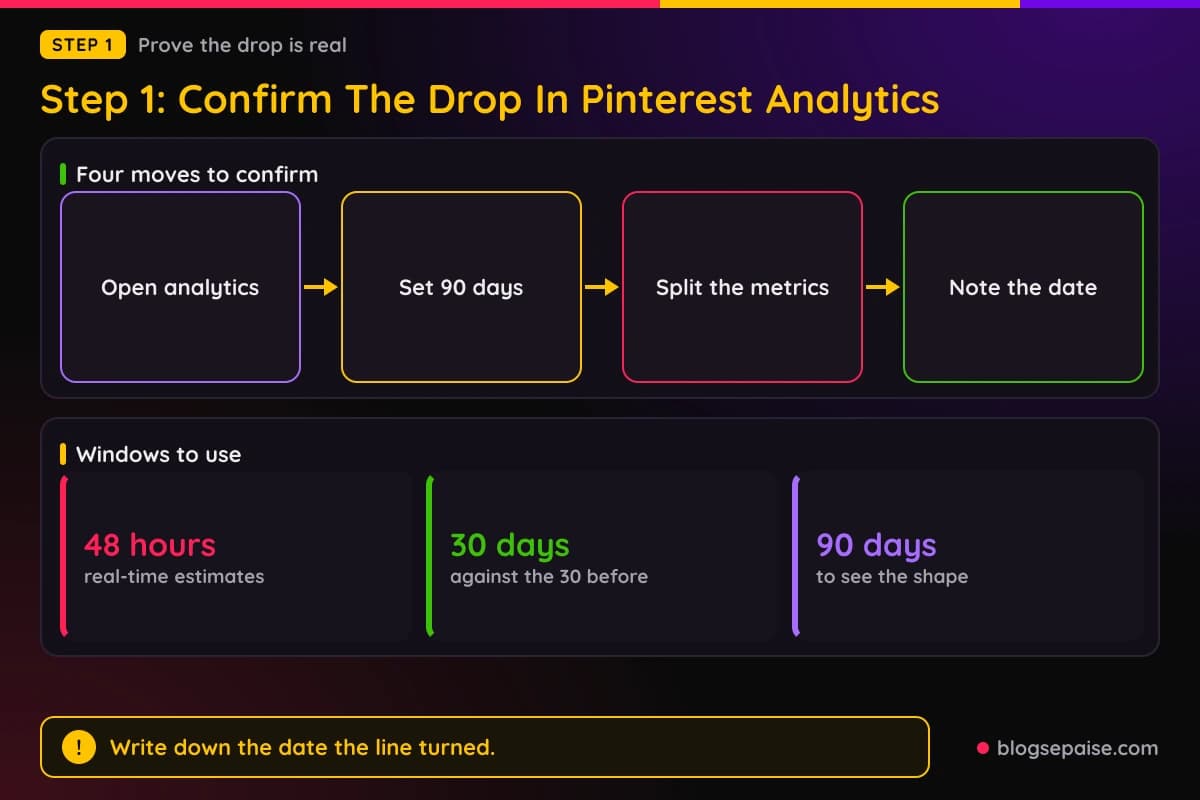
Next, look at impressions and outbound clicks one at a time. Their definitions are different, so they can move in different directions.
Then compare two equal stretches, such as the last 30 days against the 30 days before. A clean comparison beats a feeling about a bad week.
Check engagements as well. Pinterest counts saves, pin clicks, outbound clicks, and carousel swipes as engagements, so a drop there tells you people interact less on top of seeing less.
If you use the content type filter, remember that Pinterest says real-time analytics are not available with it. Use a normal date range when you filter.
Open the top pins list for your range and sort it by impressions. If your best pins fell but your new ones did not, or the other way around, that pattern is a clue for the later steps.
Take a screenshot of the graph and copy your numbers into a simple sheet. Pinterest keeps the data for a year and a half, yet your own notes make it easy to compare after each fix.
Record outbound clicks with care. Pinterest measures them from the date a link is added, so a pin whose link you edited recently may start counting again from that edit.
Cross-check with your own site. Our guide to setting up Google Analytics shows how to see Pinterest as a referral source for the same dates.
If your site shows fewer visits from Pinterest too, the drop is real and it costs you traffic. If your site numbers are steady, the problem may sit in how Pinterest counts, which step 2 covers.
Write one sentence that sums it up, such as impressions fell by about 80% on a certain date and clicks fell with them. That sentence keeps you calm as you work through the list.
Step 2: Rule Out Reporting Changes And Seasonality
Many drops turn out to be normal. Pinterest content moves with the calendar, and the numbers are estimates until they settle.
Look back at the same weeks last year if your account is old enough. Pinterest keeps a year and a half of data, so you can compare this autumn with the last one.
Seasonal topics rise and fall on a schedule. Garden posts fade in autumn, and holiday posts climb before the holiday, so a drop on a seasonal topic may just be the calendar at work.
A travel creator in the Pinterest community noted that traffic rose in June and dropped in mid-July, even though summer is their high season. Seasons do not always behave, so compare with your own history.
Break your impressions down by topic, using your boards or your top pins list. If only one topic fell while the others held, season or interest is a likelier cause than a penalty.
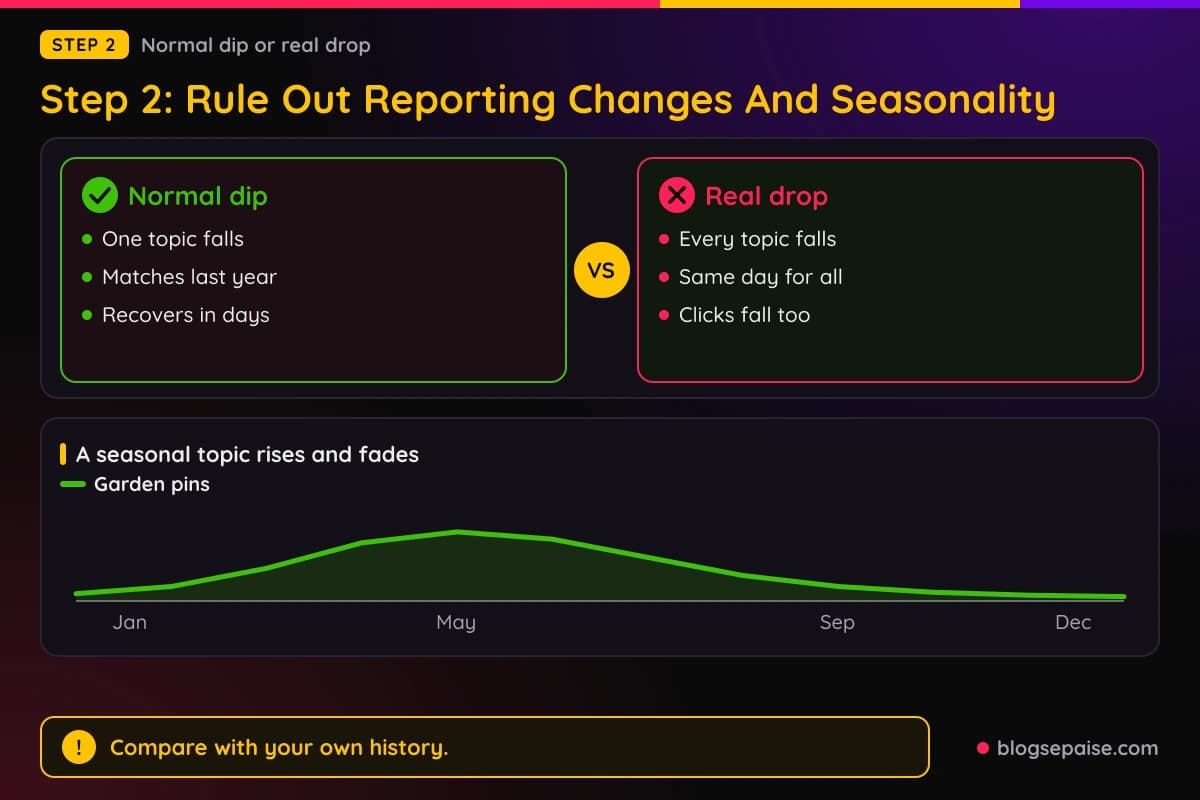
If everything fell on the same day, the cause probably hit the whole account or the whole domain. Step 3 deals with that case.
Check for reporting delays next. Pinterest says real-time metrics can change, so wait a few days before you treat a one day dip as a trend.
Be careful with the crowd. A thread where many creators say the same thing feels like proof, but it only shows that some creators saw a drop, not why.
Ask other creators in your niche if they saw the same date. If several did, a platform change is more likely, and your best move is patience plus steady posting.
A Pinterest representative named system updates as one source of swings. Pinterest has not confirmed a named change for late September 2026, so treat any such claim as unconfirmed.
Do not judge a new pin by its first days. Tailwind studied more than 1 million pins and found that new pins mostly get zero impressions in their first couple of days, with about 20% still showing none after a week.
The same study says distribution grows over the first 90 days and tracks closely with saves and outbound clicks. A new pin can look dead while Pinterest is still testing it.
Wait at least 2 to 3 weeks after any change before you judge it. Tailwind advises measuring over 2 to 3 weeks, and its study suggests looking for steady week over week gains across a few months.
If the dip is small, seasonal, or short, keep posting and move on. If it is large, sudden, and spread across all topics, continue to step 3.
Step 3: Check Your Account And Domain For Flags
A flag is the scariest cause, so check it with calm steps. Most of these checks take only minutes.
Start with your account status. Open your settings and your account messages, and look for any notice about violations, limits, or removed pins.
Pinterest says it may remove, limit, or block the distribution of content and accounts that break its rules. If you see no notice, that does not prove nothing is wrong, but it is a good sign.
Next, test your links. Click a few of your pins while logged in, then try again in a private browser window, and look for a warning screen before your page loads.
Creators in the Pinterest Business community have posted about a message that reads, "We blocked this link because it may redirect to spam."
Several said their impressions fell sharply after a link or domain was blocked, with drops of 80% to 95% mentioned.
Those are reports from creators, and Pinterest has not published a reason for each case. Some said their appeals were turned down with no clear reason, while others said support told them their account was not flagged.
The community guidelines give clues about what trips the system. They bar links to unsafe, deceptive, or unoriginal websites, and they say excessive or deceptive redirects and abused link shorteners may be blocked.
So look at how your links reach your page. If a pin goes through a shortener, a tracking redirect, or a chain of hops, replace it with the plain address of your post.
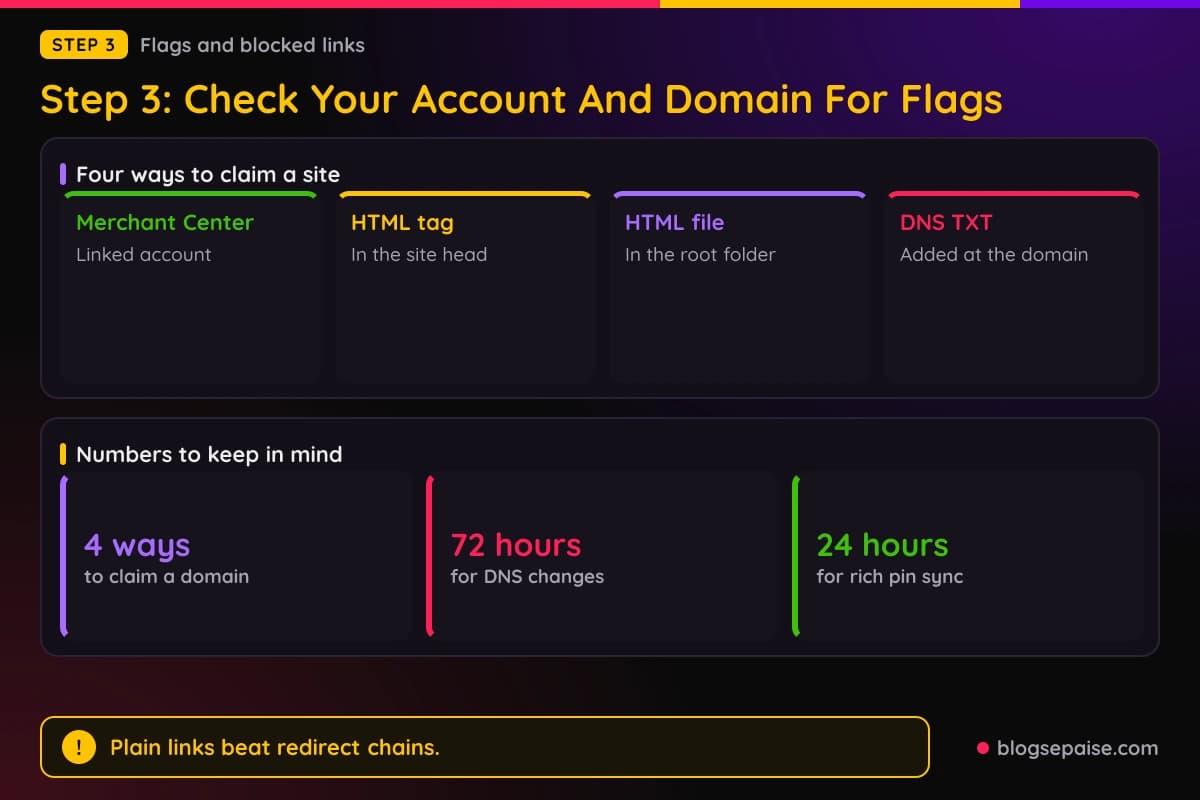
Claim your website if you have not done so. Claiming shows how often your content is shared on Pinterest and connects saved pins to your profile.
Pinterest offers 4 ways to claim a site: Google Merchant Center, an HTML tag, an HTML file, or a DNS TXT record. DNS changes can take up to 72 hours.
Check that your claim still works after any site move or theme change. A new theme can drop the HTML tag from your site header, and then the claim breaks without any warning.
Rich pins are worth a look too. They pull details from your site, such as the headline, description, and author for articles, and they refresh when the page changes.
Rich pin changes can take up to 24 hours to sync. Pinterest also notes that listicles and image-heavy pages do not count as articles for rich pins.
If you find a block, appeal it through Pinterest's help channels and keep the message short and factual. Name the domain, the date you noticed, and what you changed, such as removing a redirect.
If you find nothing, do not keep chasing a flag. Many creators with no flag still saw drops, so move on to pin quality in step 4.
Step 4: Check Pin Quality And Fresh Content
If no flag exists, the next suspect is the pins themselves. Pinterest says it wants inspiration that is high-quality and useful.
Look at your last ten pins the way a stranger would. Ask if the image is sharp, if the text is easy to read on a phone, and if the pin promises something the page delivers.
Check for duplicates. Posting the same image again and again looks like the repetitive content that the community guidelines warn about.
Check for pins that mislead. A pin that promises a free printable and sends people to a long sales page earns no saves and some complaints.
Now look at freshness. Your account stays strong when you keep adding new images instead of repeating old ones.
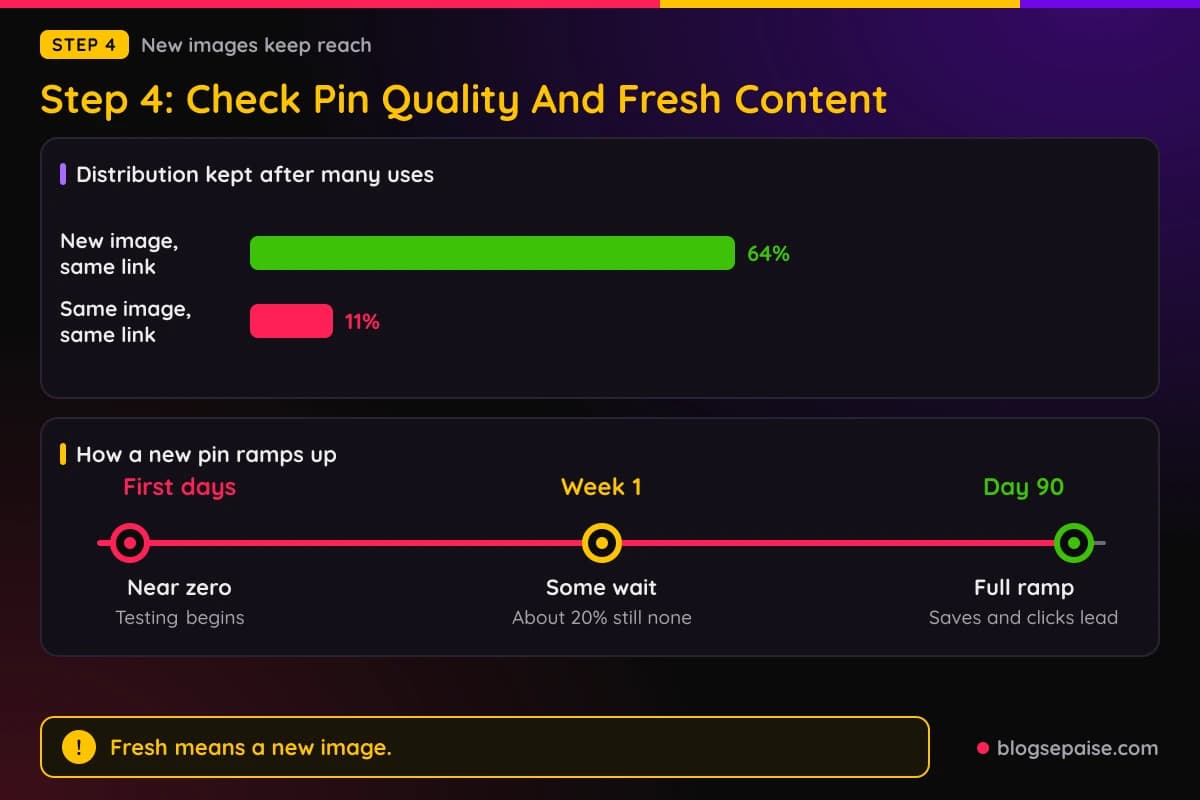
Tailwind's research treats freshness as a spectrum. In its study of more than 1 million pins, a pin with a new image on a used link kept 64% of its distribution even at the 11th to 25th use.
The same study found that pins reusing the same link and the same image kept only 11%. Reposting an old image is a weak move, while a new image for the same post is a strong one.
Tool makers and creators define a fresh pin in slightly different ways. Treat the exact rule as a guide and not a law, and lean toward new images.
Count how many new pins you published in the 60 days before the drop. If the answer is close to zero, your account may be leaning on old pins to do all the work.
Remember the timing. New pins mostly sit near zero for a couple of days and build over 90 days, so a pin from last week cannot rescue a drop yet.
Check the text on each pin, including the title, the description, and the words on the image. Our Pinterest pin title generator helps you write clear titles with the keyword up front.
Check how people react. Few saves and few clicks on your newer pins suggest a weak idea, while many impressions with no clicks suggest a weak promise in the image or title.
Look at any AI made images next. Press coverage says Pinterest announced AI modified labels in April 2025 for image pins that its systems detect as generative AI.
The same coverage says detection uses metadata and classifiers, and that it may not always be right.
Creators have reported that labeled pins get fewer outbound clicks. Treat that as a report, and test it with your own numbers by comparing labeled and unlabeled pins.
The same coverage describes an appeal option for labels that you believe are wrong and a control that lets people ask to see less AI content. Check the current steps in Pinterest's help center before you rely on either one.
Step 5: Check Your Site And Link Health
Pinterest can only send people to a page that works. A slow or broken page hurts clicks even when impressions are fine.
Open ten of your top pin links on your phone using mobile data. Note anything that loads slowly, shows an error, or asks people to accept a pop-up before they see content.
Look for redirect chains. Each hop from a short link to a tracking link to your page adds delay, and the community guidelines say excessive redirects may be blocked.
Check that your pages use https and load without security warnings. A browser warning scares visitors away before they read a word.
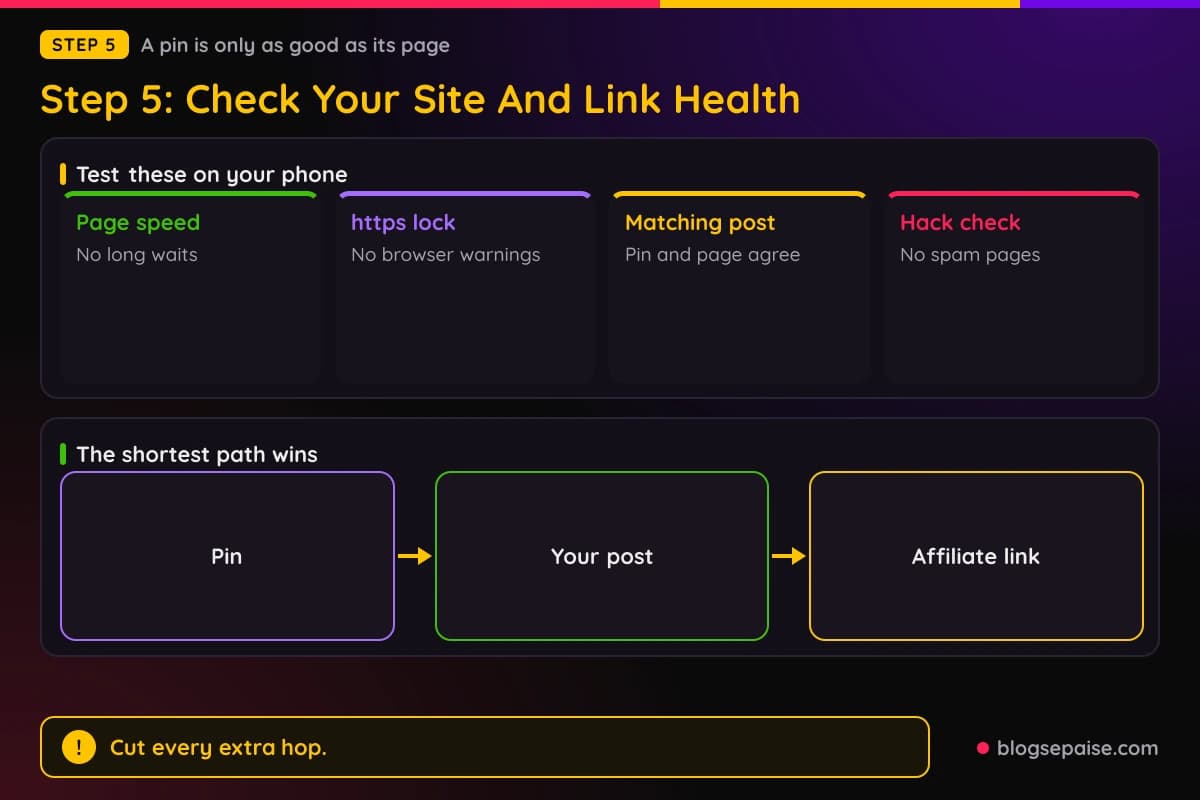
Make sure each pin links to the post that matches it. A pin about a slow cooker recipe that opens your home page frustrates people.
Test any link cloaker or tracker you use. Our guide to growing affiliate blog traffic covers traffic sources beyond Pinterest, and it is a good read while you fix this one.
Pinterest's guidelines name unsafe, deceptive, or unoriginal websites as a problem. Scan your own site for thin copied pages, odd links you did not add, and pop-ups that cover the page.
Run a malware and hacked content check. A hacked site can fill with spam pages without you noticing, and security systems may then mark your domain.
Check your claimed domain tag again, and check your rich pin data. When people save an image from your claimed site, Pinterest links the pin to your profile, so a broken claim costs you credit.
Make sure each post has a tall image with clear text on it. That image is what people save, so it works as your pin even when you did not make a new one.
Compare Pinterest traffic with your other sources for the same dates. If search traffic fell too, your site may have an issue beyond Pinterest.
Fix the small things first. Replace the redirect, speed up the heavy page, repair the broken link, and write down the date of each fix.
Do not change many things at once. If you change links, titles, and images in one afternoon, you cannot tell which fix helped.
Give each fix a couple of weeks before you judge it. Pinterest tests pins slowly, so quick answers are rare.
Step 6: Adjust Your Pin Mix And Keywords
Once the basics are clean, change what you publish. A steady mix beats a big burst.
Try a simple weekly mix of 5 pins: 2 new ideas, 2 fresh pins for older posts, and 1 test pin for a new keyword. Small numbers you can keep up beat large numbers you drop after a week.
A new idea has a new image, new text, and a new page. A fresh pin uses an older post but gets a new image, new keywords, and new text, which fits Tailwind's definition of fresh.
Tailwind ranks pins from New Ideas at the top, then Fresh, Fresh Take, and Pretty Fresh, down to Not Fresh. Its data says Fresh pins get roughly 64% to 77% of the distribution of New Ideas when the link stays the same.
Pick your priority posts first. These are the posts that earn clicks or affiliate sales, so they deserve new pin designs before anything else.
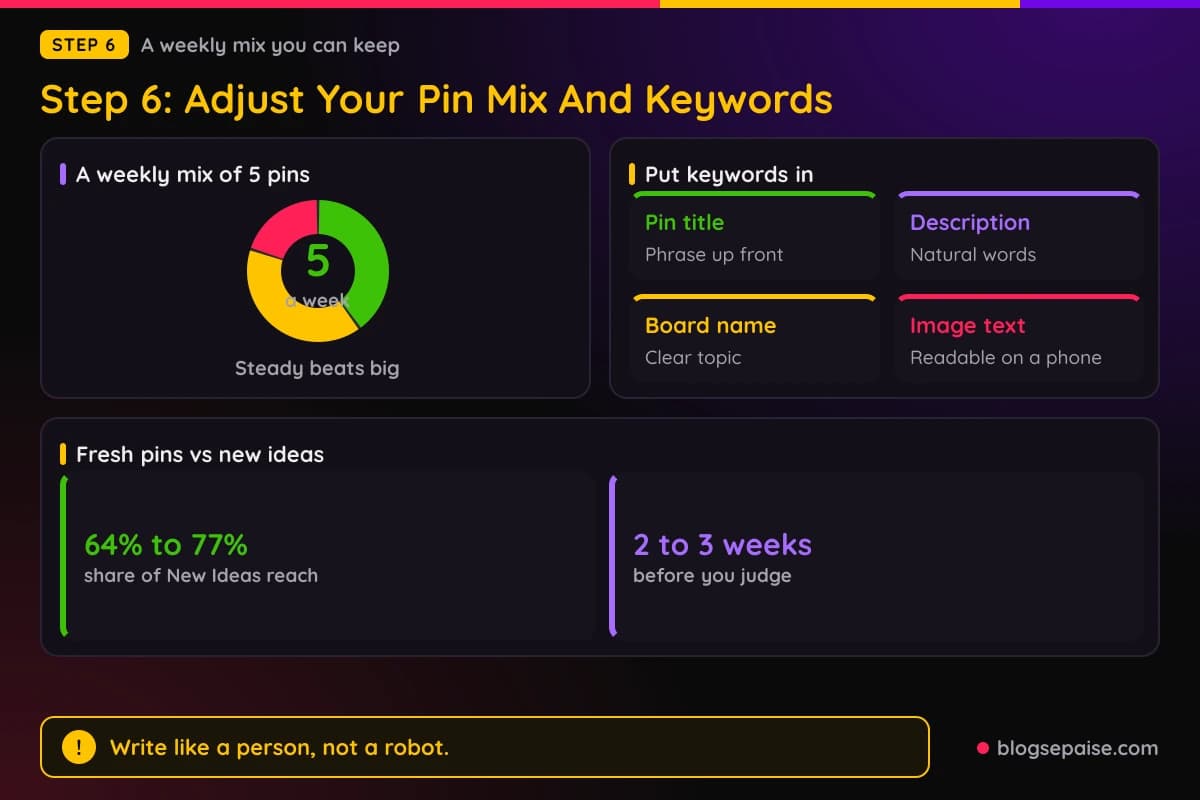
Create two or three new designs for each priority post, not ten. Then watch which one gains traction over 2 to 3 weeks.
Rewrite titles and descriptions around words that people search for. Pinterest works like a search engine, so a clear phrase such as small kitchen storage ideas beats a clever line.
Use keywords in four places: the pin title, the description, the board name, and the text on the image. Match the pin to the page so the promise holds.
Use the Pinterest search bar to find words. Type a topic, note the phrases it offers, and use them in a natural way.
Do not stuff keywords. The guidelines list keyword stuffing as a way of manipulating distribution, so write like a person.
A scheduler can help you keep the weekly rhythm. Tailwind offers Pinterest scheduling, and our list of the best social media schedulers compares other tools.
Be careful with automation. Pinterest's guidelines say automation it has not explicitly approved is not allowed, so use tools that connect the approved way and keep a human pace.
Spread your pins across boards in a sensible way. Save each pin first to the one board that fits it best, and skip blasting the same pin into twenty boards at once.
Send pins to your own post and add affiliate links there when you can. That keeps the redirect count low and lets you update a link in one place.
Step 7: Rebuild Steadily And Track Results
Recovery, if it comes, is usually slow. Plan for weeks, not days.
Set a weekly check on the same day. Look at impressions, outbound clicks, and Pinterest visits in your site analytics.
Use your own numbers as the baseline. Tailwind's authors advise comparing against your own past performance, and that advice fits a recovery well.
Keep a change log with dates. Write down each fix, such as removed a redirect, posted new pins, or changed titles, so you can match later gains to a cause.
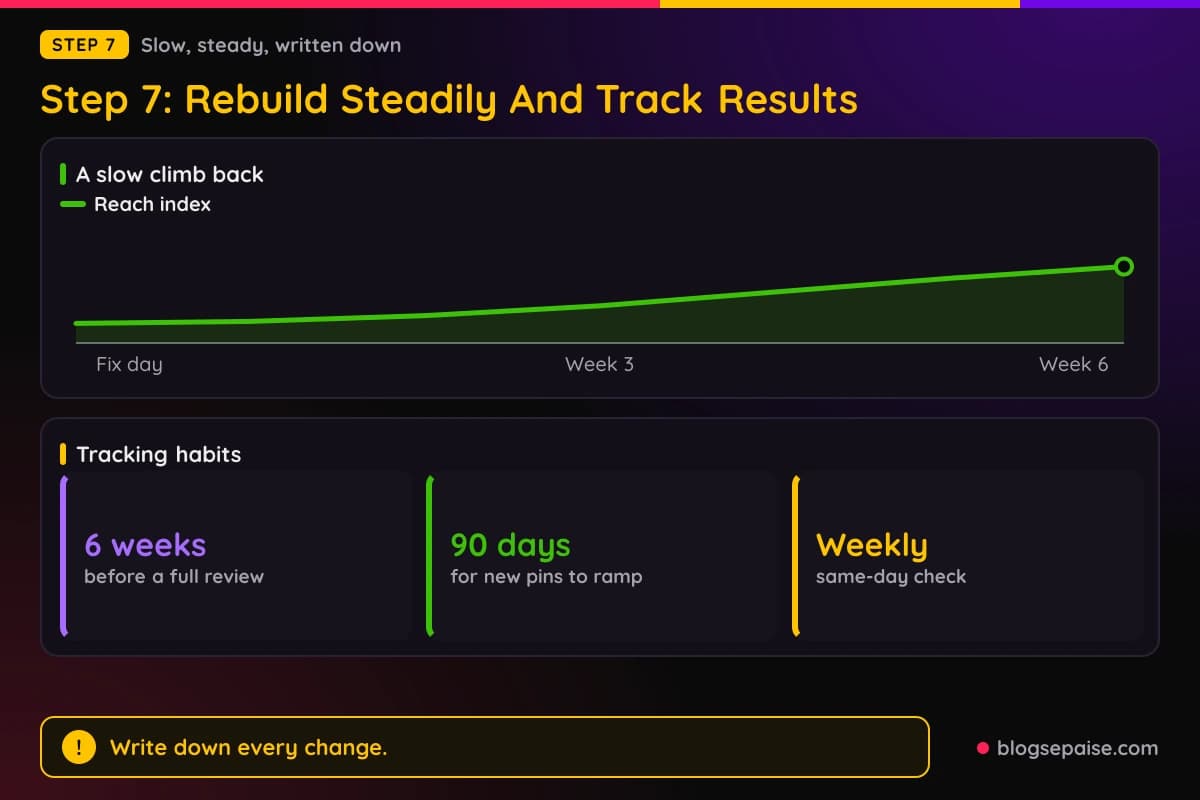
Expect a ramp. Distribution on new pins builds over 90 days, so the first sign of recovery often looks like a small lift on your newest pins.
In the Pinterest community, one creator said a similar drop recovered gradually over a few weeks without big changes. Another reported daily impressions falling from over 35,000 to over 5,000 with no recovery after two weeks.
Set honest expectations. Some accounts bounce back and some stay lower, and nobody outside Pinterest can promise which one yours will be.
Do not rely on Pinterest alone. Put an email signup on your best pages, so readers who find you there can stay with you if reach shifts.
Build other traffic, too. Our guide on how to get traffic to a brand new affiliate site lists sources that do not depend on one platform.
After 6 weeks, review your log. Keep what worked, drop what did not, and put your time into the pins and posts that earn clicks.
If clicks recover slower than impressions, work on the promise in your titles and images. If impressions stay low but the few people who see your pins click often, make more pins like those.
If nothing moves after 6 weeks and you found no problems, contact Pinterest support with your dates and your checks. Staff said in the community that they cannot review accounts manually, so expect a general answer.
Write down your rules for the future: check analytics weekly, keep a change log, publish new pins every week, and test your links every month.
Treat the drop as a reason to make your Pinterest work less fragile, not as a verdict on your blog.
A Worked Example: Dana Rebuilds After An 80% Drop
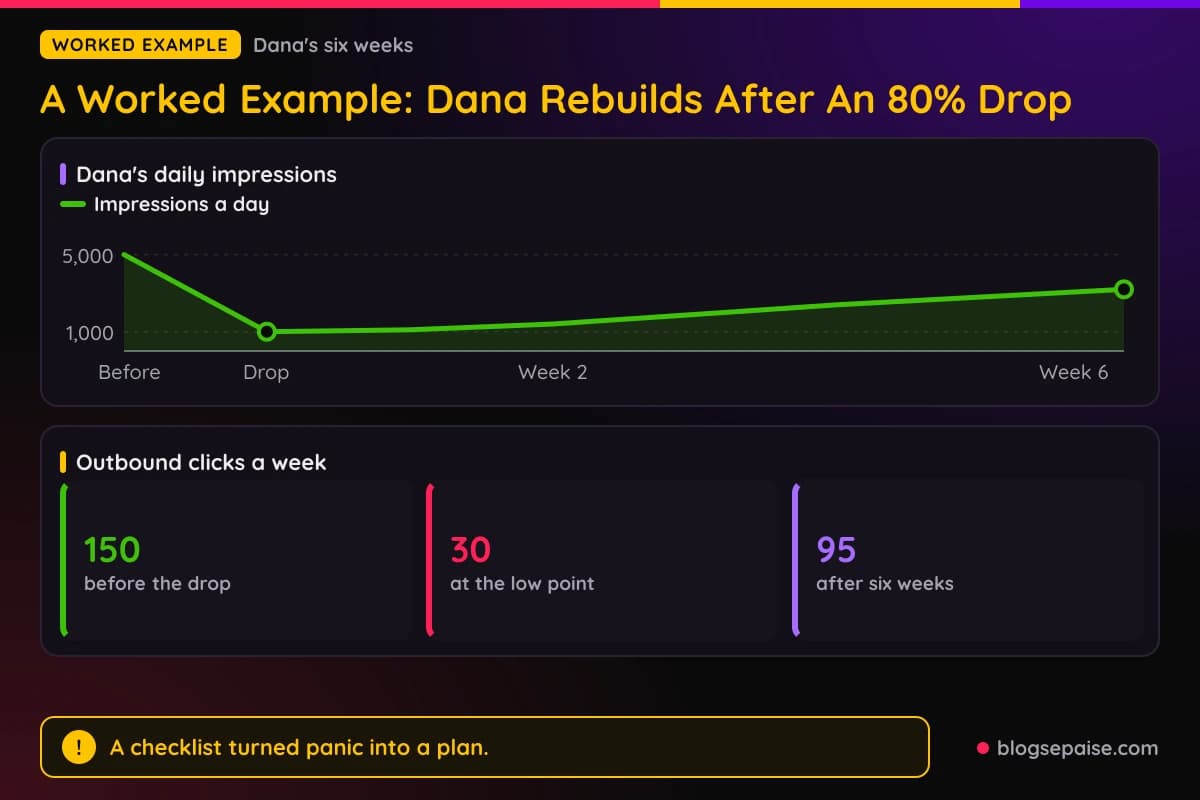
Dana runs a home organization blog and shares affiliate links for storage products. Her Pinterest account averaged 5,000 impressions a day for months, with about 150 outbound clicks a week.
One Tuesday, her daily impressions fell to 1,000, a drop of 80%. Weekly outbound clicks sank to 30 within ten days.
She started with step 1. A 90 day view showed the date of the fall, and her site analytics showed fewer Pinterest visits on the same days.
In step 2, she compared last autumn and found a flat line, so the season did not explain it. Every board fell on the same day, which pointed to the whole account or domain.
In step 3, she found no account message and no block warning. Her domain claim still worked, but 12 of her pins used a short link that redirected twice.
She replaced those links with the plain address of each post. She also skipped the temptation to delete old pins.
In step 4, she saw that she had posted no new images in 60 days. Her best pin had been saved to the same three boards over and over with one image.
In step 5, she tested ten top links on her phone and fixed one slow page. In step 6, she switched to 5 pins a week, with 2 new ideas, 2 fresh pins, and 1 test pin.
In step 7, she kept a log and checked every Friday. After 2 weeks her daily impressions reached 1,400, which was small but real.
After 6 weeks her daily impressions reached 3,200 and her weekly outbound clicks reached 95. She did not get back to 5,000.
Dana cannot say which fix mattered most, because she changed links and posting at the same time. She says that the log still helped her keep calm and stick with the plan.
Her takeaway is simple. A drop felt like a disaster for days, yet a list of checks turned panic into a to-do list.
Common Mistakes When Pinterest Impressions Drop
The first mistake is deleting old pins in a panic. Deleted pins cannot help you, and a drop is not proof that old pins are the problem.
The second mistake is reposting the same image to many boards. Pinterest warns about repetitive content, and Tailwind's study found that a reused link and image kept only 11% of its distribution.
The third mistake is buying followers or engagement. The community guidelines list buying engagement as manipulation of distribution.
The fourth mistake is changing everything at once. When links, titles, and images all change on the same day, you learn nothing from the result.
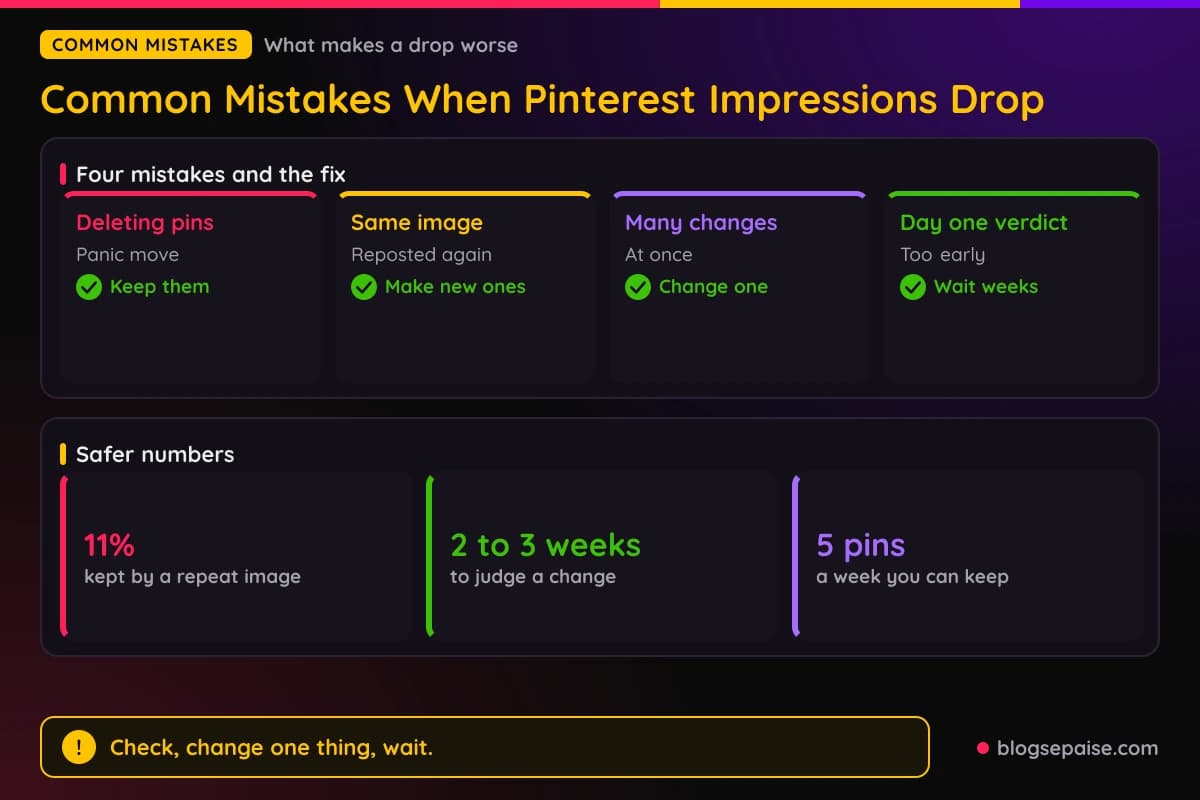
The fifth mistake is judging a change after one day. Real-time numbers are estimates, and new pins often get nothing for a couple of days.
The sixth mistake is leaving redirect chains in place. Short links and tracking hops add delay, and the guidelines say excessive redirects may be blocked.
The seventh mistake is ignoring your own site. A slow page, a broken claim, or a hacked page can hurt you while you stare at pin designs.
The eighth mistake is treating forum claims as facts. A post that says a named update caused the drop may be right, but until Pinterest says so, it is a guess.
The ninth mistake is using automation that Pinterest has not approved. The guidelines say such automation is not allowed, and a burst of robotic pins can look like spam.
The tenth mistake is posting less because you feel discouraged. A quiet account gives Pinterest nothing new to test.
The eleventh mistake is relying on Pinterest as your only traffic source. One platform can change its mind, and your email list and search traffic do not.
The twelfth mistake is making misleading pins to win clicks. A pin that promises more than the page gives earns bad signals and hurts trust with readers.
A good habit prevents most of these. Check, change one thing, wait, and write it down.
Final Thoughts
A sudden fall in Pinterest numbers feels personal, yet it often has a plain cause you can find. Reporting changes, season, a blocked link, stale pins, and a weak page can all look the same on a graph.
Work through the steps in order. Confirm the drop, rule out the calendar, check for flags, refresh your pins, test your links, adjust your mix, and track the results for weeks.
Reports from creators about an 80% collapse, AI labels, and spam flags are worth watching, but Pinterest has not confirmed them. Base your fixes on your own data and on the community guidelines.
Keep your expectations steady. Some accounts recover, some settle lower, and the safest plan is a steady stream of new pins plus other ways for readers to find you.
Start today by writing down the date your line turned down, then work through step 2. For more on pinning with links, read our guide to affiliate links on Pinterest.
Frequently Asked Questions
1. Why did my Pinterest impressions drop suddenly?
Common causes include a normal swing in distribution, seasonality, a blocked link, stale pins, or a site problem. Pinterest staff have named ebbs and flows, season, format, engagement, and system updates.
2. Is a Pinterest impressions drop an algorithm change?
It can be, but Pinterest has not confirmed a named change for late September 2026. Treat those claims as reports from creators until Pinterest says otherwise.
3. How do I check if my domain was flagged as spam?
Click your pins in a private browser window and look for a block warning. Also check your account messages and your claimed domain status.
4. What does the message about a blocked link mean?
Creators report a notice that a link may redirect to spam. Pinterest has not explained each case, so remove extra redirects and appeal with the facts.
5. Do AI labels reduce outbound clicks?
Creators have reported that, but no confirmed data backs it. Compare labeled and unlabeled pins in your own analytics to see for yourself.
6. How can I appeal an AI label I think is wrong?
Press coverage describes an appeal option in the help center. Check the current steps there, since the process may change.
7. What counts as a fresh pin?
Tool makers such as Tailwind say a fresh pin has a new image, and new text and keywords help. A new image on an old link kept 64% of distribution in their study.
8. How many new pins should I post each week?
Pick a number you can keep, such as 5 a week. Steady beats big, and Pinterest does not publish a magic number.
9. How long do new pins take to get impressions?
Tailwind found they mostly get none in the first couple of days, and about 20% still had none after a week. Distribution builds over 90 days.
10. Should I delete old pins?
No. Deleting them removes any reach they still have, and a drop does not prove old pins are the cause.
11. Does claiming my website help?
It shows how often your content is shared and links saved pins to your profile. It does not guarantee reach, but a broken claim is worth fixing.
12. Will my impressions come back?
Some creators report recovery over a few weeks, and others report none after two weeks. Nobody outside Pinterest can promise how yours will behave.
13. Can I contact Pinterest about the drop?
Yes, but a staff member wrote that they cannot manually review accounts. Send dates and your checks, and expect a general reply.
14. Is it safe to use a scheduler?
Use tools that connect the approved way, because Pinterest does not allow automation it has not approved. Keep a human pace and vary your pins.
15. Should I still post affiliate links on Pinterest?
Many bloggers do, and linking to your own post keeps redirects low. Read the guidelines and our affiliate links guide first.
16. What else can bring traffic while Pinterest is down?
Search traffic, an email list, and other social sites help. Spread your effort so one platform cannot cut your whole audience.